
PARTY Boom 80W - Loudspeaker Niceboy - Free user manual and instructions
Find the device manual for free PARTY Boom 80W Niceboy in PDF.


| Product Type | Portable Bluetooth Party Speaker |
| Model | PARTY Boom 80W |
| Brand | Niceboy |
| Output Power | 80W RMS |
| Bluetooth Version | Bluetooth 5.0 |
| Wireless Range | Up to 10 meters |
| Battery Type | Rechargeable Li-ion |
| Battery Capacity | 3600 mAh |
| Playback Time | Up to 8 hours (at 50% volume) |
| Charging Time | Approx. 3 hours |
| Charging Port | USB-C |
| Dimensions (W x H x D) | 300 x 250 x 230 mm |
| Weight | 2.5 kg |
| Speaker Configuration | 2 x 10W tweeters + 1 x 60W subwoofer |
| Frequency Response | 40 Hz - 20 kHz |
| Water Resistance | IPX4 (splash-proof) |
| LED Lighting | Multi-color party lights with multiple modes |
| Microphone Input | 1 x 6.35 mm (1/4") for karaoke |
| USB Port | USB-A for charging external devices |
| Audio Inputs | 3.5 mm AUX, USB, microSD card slot |
| Controls | Buttons for power, volume, play/pause, lighting, EQ, and TWS pairing |
| Included Accessories | Power adapter, 3.5mm audio cable, user manual |
| Color Options | Black |
Frequently Asked Questions - PARTY Boom 80W Niceboy
User questions about PARTY Boom 80W Niceboy
0 question about this device. Answer the ones you know or ask your own.
Ask a new question about this device
Download the instructions for your Loudspeaker in PDF format for free! Find your manual PARTY Boom 80W - Niceboy and take your electronic device back in hand. On this page are published all the documents necessary for the use of your device. PARTY Boom 80W by Niceboy.
USER MANUAL PARTY Boom 80W Niceboy
User Manual / Party Speaker

CZ
OBSAH BALENÍ
Reproduktor
Návod k použití
Bezdrátový mikrofon
Napájecí adaptér
Dálkové ovládání
POPIS ZADNÍHO PANELU
- Microphone priority: When playing music, the microphone is audible in all modes.
- Pause / Play: in USB / microSD / BT / TWS mode
- Previous track: Short press to go to previous track, long press to rewind.
- Next track: Short press to go to next track, long press to fast forward.
- Mode selection: Short press to select Bluetooth / FM / LINE IN / USB / microSD mode. Long press the button to turn off/on the acoustic prompt. („E-OF“: acoustic prompt off; „E-ON“: acoustic prompt on)
-
Automatic equalizer: EQ00; EQ01; EQ02; EQ03; EQ04; EQ05 (Flat-Classic-Pop-Rock-Jazz-Country)
-
Changing the LED lighting mode and on / off:
Short press to change the lighting mode (1 - 7). Long press the button to turn off the light.
-
Volume up
-
Volume down
-
MENU (microphone volume / echo / bass / treble control):
When a wireless microphone is turned on or a wired microphone is plugged in, press the "MENU" button on the LED display to switch between "N / E // B / T / V":
"N" microphone volume (0 to 16) / "E" microphone echo effect (0 to 12) / "B" bass setting (-6 to +6) / "T" treble setting (-6 to +6) / "V" volume control (0 to 32)
Each of the parameters can be regulated using the buttons Volume + (8) / - (9)
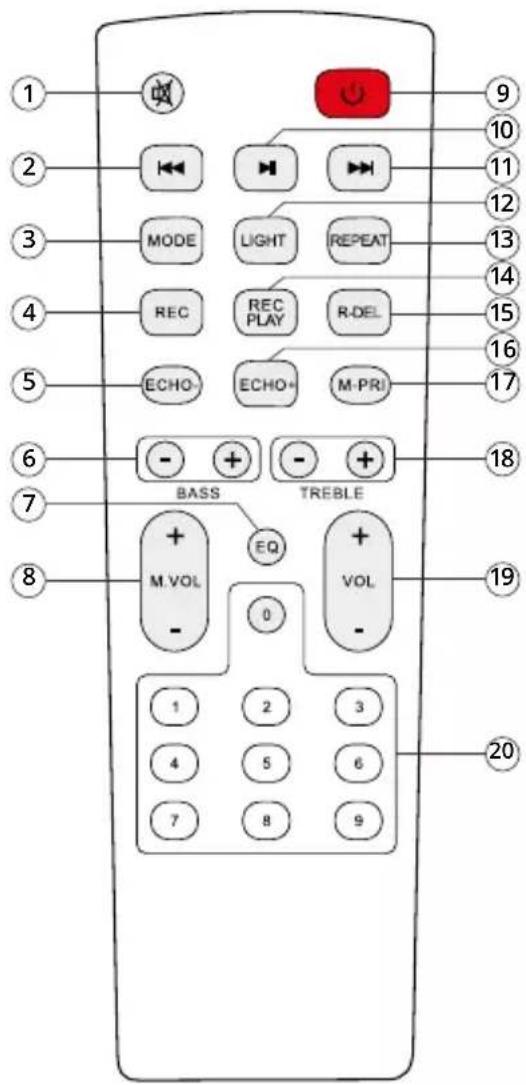
REMOTE CONTROL
- Mute: Can be muted in any mode
- Previous song
In Bluetooth / USB / microSD mode - previous track In FM mode - previous station
- Mode: Short press to enter the mode
Bluetooth / FM / LINE IN / USB / microSD
Long press to turn off the voice prompt
- Recording function: In USB / microSD mode, press "REC" button to record songs to USB / Micro SD card
- Weakening the Echo effect
- BASS + / - adjustment
- EQ function (EQ00; EQ01; EQ02; EQ03; EQ04; EQ05)
- Microphone volume + / -
- Switching on / off
- Pause / Play
- Next song: In Bluetooth / USB / micro SD card mode - next track In FM mode - next station
- Light mode switch: Short press to change the light mode (LED 1 to LED 7). Long press the button to turn off the light
- Repeat function / folder change
Repeat one song or loop a song from USB / micro SD storage)
Long press to change folder
- Play record
- Delete Record
- Amplify the Echo effect
- Microphone priority: When playing music, the microphone is audible in all modes
- TREBLE + / - adjustment
- Volume control
- Number buttons: In USB / micro SD card mode to select songs In FM mode to select automatically stored stations
BATTERIES AND CHARGING
To charge the speaker battery, plug the supplied power cable into the input (6).
- It takes about 8 hours to fully charge. Charging is indicated by a red LED (5); The LED will turn green when the battery is fully charged.
- Low battery level may cause distorted sound, monitor battery level for best acoustic performance.
- To maximize battery life, charge immediately. If the device is not used for a long time, the battery gradually loses its energy. We recommend fully charging the battery at least every 30 days.
- Turn off the speaker when not in use to save battery.
BLUETOOTH MODE:
- Turn on the speaker with the power switch (4). The speaker is now in pairing mode for wireless connection. If not, press the MODE button (5) on the top panel or on the remote control (3). The pairing mode is indicated by the flashing BLUE on the display.
- Activate Bluetooth on your device. Select „Niceboy PARTY Boom 80W“ from the list of available devices.
- The device connects to the speaker. Successful pairing will be announced by an acoustic prompt and the display will light up BLUE.
When you turn it on again, the speaker will automatically connect to the last paired device.
AUX MODE
Insert the AUX cable into the input (3). Press the MODE button (5) on the unit or on the remote control (3) until LINE IN appears on the display. Play music from a connected device.
MICRO SD CARD AND USB MODE
Insert the data carrier into the appropriate slot (7) (8). The speaker will automatically switch to the appropriate mode. If the carrier is already inserted and you want to activate it again, press the MODE button (5) to find the appropriate mode on the display. The unit automatically loads and plays the music on the data carrier. Play music as described on the top panel or remote control.
RECORD FUNCTION
Record your sound through the microphone to a USB flash / micro SD card. Press the REC button (4) on the remote control to start recording. Press button (14) to stop recording and play. You can delete the track by pressing the button (15).
FM MODE:
Turn on the power and press the MODE button repeatedly to select the FM function (the frequency will appear on the display).
- Long press the playback button (2) to activate automatic storage (the tuner searches for available stations and stores them automatically). The number of stations stored in the memory depends on the reception in your area.
- You can end the automatic search by briefly pressing the button (2), another short pressing of the button (2) will start the playback.
- Use the next (4) / previous (3) buttons to listen to the stations stored in the memory.
- To select a stored station directly, press the corresponding button on the remote control (20).
TWS MODE:
Using True Wireless (TWS) technology, you can connect two Niceboy PARTY Boom 80W speakers and play music at the same time.
- Turn on both speakers and make sure they are not connected to any Bluetooth device (mobile phone, laptop, etc.).
- Press and hold the TWS button (2) for 3 seconds on the control panel of one of the speakers to pair with the other speaker. „T-ON“ will appear on the display. A tone will be heard from the main speaker and the second speaker after successful pairing.
- Open Bluetooth settings on your device. Then select „Niceboy PARTY Boom 80W“ from the list of available devices. A successful pairing will be announced by an acoustic prompt. When you turn off or change the playback mode, the speakers will automatically disconnect from each other.
SPECIFICATIONS
BT version: 5.3
Frequency band: 2.4 GHz
Radiofrequency power: ≤ 2.5 mW
Drivers: 6.5" woofer, 1.5" tweeter
Impedance: 4 Ω
Sensitivity: 85 dB ±3 dB
Frequency range: 80 Hz - 20 kHz
Battery: 7.4V / 3600mAh lithium battery
Power: 80 W
Inputs: 3.5 mm Aux-in / USB / micro SD / Microphone input x 2
Supported audio formats: mp3, WAV, WMA, FLAC
Functions: FM radio, Bluetooth connection / Bass / Treble /
Microphone volume / Echo control
Product size: 23.5x23.5x31.0cm
Product weight: 2.90 kg
Play time: 10 hours at 50% volume
Charging time: 6\~7 hours
SAFETY INFORMATION
Listening to music at very high volume can damage your hearing. Do not expose the device to fluids or humidity. Do not expose the device to extreme temperatures or try to disassemble it. Protect the device from sharp objects and falls from height. Batteries – improper handling (prolonged charging, short circuit, breakage by other objects, etc.) may result in fire, overheating or battery leakage.
The battery or accumulator that may be included with the product has a service life of six months, as it is a consumable. The manual is available for download in electronic form at www.niceboy.eu in the support section. NICEBOY s.r.o. hereby declares that radio device type Niceboy PARTY Boom 80W complies with Directives 2014/53/EU, 2014/30/EU, 2014/35/EU, and 2011/65/EU. The full EU Declaration of Conformity is available at the following website: https://niceboy.eu/en/party-boom-80w
INFORMATION FOR USERS ON DISPOSAL OF ELECTRICAL AND ELECTRONIC EQUIPMENT (HOUSEHOLDS)
The above symbol on the product or accompanying documentation means that used up electrical or electronic products must not be disposed of as communal waste. To dispose of the product correctly, bring it to designated waste collection points, where it will be disposed of free of charge. Proper disposal of the product helps preserve valuable natural resources and prevent potential negative impact on the
environment and human health caused by improper waste disposal. For more information, contact local authorities or the nearest waste collection point. Improper disposal of this type of waste may result in a fine pursuant to national legislation.
Information for Users on Disposal of Electrical and Electronic Equipment (Corporate Use) To properly dispose of electrical and electronic equipment for corporate use, contact the manufacturer or importer of the product. They will provide you information on disposal methods for the product and will inform you on who is obligated to fund the disposal of the electrical device based on the date the product was put on the market. Information on Disposal in Countries outside the European Union. The above symbol only applies in EU countries. To properly dispose of electrical and electronic equipment, request more information from your local authority or the seller of the product.
DE
LIEFERUMFANG
Lautsprecher
Bedienungsanleitung
Drahtloses Mikrofon
Ladeadapter
Fernbedienung
https://niceboy.eu/hr/party-boom-80w
INFORMACIJE ZA KORISNIKE O ODLAGANJU ELEKTRIČNE I ELEKTRONIČKE OPREME (KUĆNA UPOTREBA)
Nusle, 140 00, Czech Republic, ID: 294 16 876,
Made in China.
RoHS


- User Manual / Party Speaker
- CZ
- OBSAH BALENÍ
- POPIS ZADNÍHO PANELU
- REMOTE CONTROL
- BATTERIES AND CHARGING
- BLUETOOTH MODE:
- AUX MODE
- MICRO SD CARD AND USB MODE
- RECORD FUNCTION
- FM MODE:
- TWS MODE:
- SPECIFICATIONS
- SAFETY INFORMATION
- INFORMATION FOR USERS ON DISPOSAL OF ELECTRICAL AND ELECTRONIC EQUIPMENT (HOUSEHOLDS)
- DE
- LIEFERUMFANG
- INFORMACIJE ZA KORISNIKE O ODLAGANJU ELEKTRIČNE I ELEKTRONIČKE OPREME (KUĆNA UPOTREBA)
Brand : Niceboy
Model : PARTY Boom 80W
Category : Loudspeaker