
RAZE mini - Loudspeaker Niceboy - Free user manual and instructions
Find the device manual for free RAZE mini Niceboy in PDF.


| Product Type | Portable Bluetooth Speaker |
| Brand | Niceboy |
| Model | RAZE mini |
| Dimensions | 92 x 92 x 46 mm |
| Weight | 190 g |
| Bluetooth Version | 4.2 |
| Transmission Distance | Up to 10 m |
| Power Rating | 5 W |
| Sensitivity | ≥ 95 dB |
| Frequency Range | 280 Hz - 16 kHz |
| Charging Time | 2-3 hours |
| Power Input | 5V via Micro USB |
| Playback Modes | Bluetooth, FM Radio, USB, MicroSD, Telephone Calls |
| Controls | Mode, Volume +/-, Play/Pause/Answer, On/Off |
| Microphone | Built-in for hands-free calls |
| FM Radio Antenna | USB cable acts as antenna |
| Included Accessories | Micro USB charging cable |
| Compliance | EU Directives 2014/53/EU, 2014/30/EU, 2014/35/EU, 2011/65/EU |
| Disposal | WEEE Directive - do not dispose with household waste |
Frequently Asked Questions - RAZE mini Niceboy
User questions about RAZE mini Niceboy
0 question about this device. Answer the ones you know or ask your own.
Ask a new question about this device
Download the instructions for your Loudspeaker in PDF format for free! Find your manual RAZE mini - Niceboy and take your electronic device back in hand. On this page are published all the documents necessary for the use of your device. RAZE mini by Niceboy.
USER MANUAL RAZE mini Niceboy
natural_image
Symbol of a trash bin with crossed lines and a solid black rectangle below (no text or labels)natural_image
Symbol of a trash bin with no text or labels, including a crossed-out box and a solid black rectangle below (no readable text or symbols)Operating Instructions
MicroUSB cable
PRODUCT DESCRIPTION
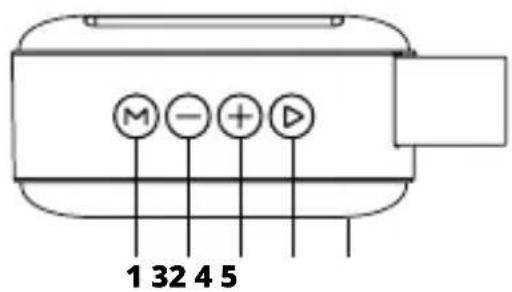
- Selection of modes
- Previous track/volume down
- Next track/volume up
- Playback/pause/tuning/answering & termination of a call
- LED/microphone
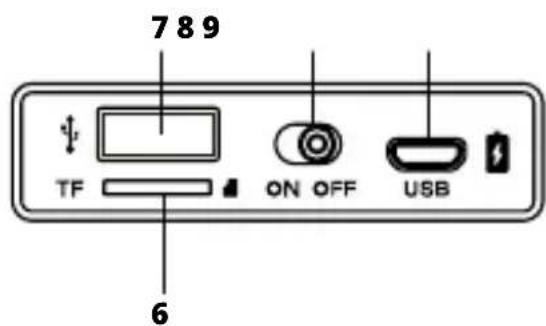
- MicroSD card slot
- USB port
- On/Off button
- Charging microUSB port

BASIC OPERATION
You will turn on/off the speaker with the button 8. Use the button 1 to change over between individual modes (indication by beeping). Long press the buttons 2 and 3 to adjust volume (in all modes); by pressing them shortly you will scroll through the individual tracks (in Bluetooth, USB and MicroSD modes) or broadcasting stations (in FM radio mode). By shortly pressing the button 4 you will pause or resume playback (in Bluetooth, USB and MicroSD modes).
BLUETOOTH CONNECTION MODE
- Blued LED (5) flashes and the speaker indicates pairing by beeping in the pairing mode.
- Activate Bluetooth on your device and select "RAZE mini" from the list of available devices.
- A beep is heard and the LED lights blue after successful pairing.
- You can also control volume and change over the tracks from your mobile phone of with buttons on the speaker.
FM RADIO MODE
- Insert the supplied USB cable into the charging USB port (9) (the cable acts as antenna) and change over to the FM Radio mode.
- Press the tune button (4) to start automatic searching for broadcasting stations (blue LED is flashing quickly).
- Once the stations are tuned up (blue LED flashing slowly) you can change over between them (pressing shortly buttons 2 and 3).
PLAYBACK MODE VIA USB AND MICROSD CARD

Insertion of the memory card (6) or of USB flash disk (7) will result in automatic activation of the respective mode on the speaker, which will start playing music. You may also activate the desirable mode with the mode selection button (1).
TELEPHONE CALLS
Answer an incoming call with the button 4 and terminate it with the same button. Double press quickly the button 4 to dial the last called number.
CHARGING
The speaker will remind you of low state of its battery by beeping. To charge the speaker battery, connect the supplied USB cable to the charging port (9) on one end and to any charging adapter (5V) or to USB on your PC on the other. Charging in progress is indicated by the red LED, which turns off after the battery is fully charged (2-3 hours).
Our recommendation is to fully charge the speaker before you use it for the first time. This will maximize the battery life.
PARAMETERS
Bluetooth: 4.2
Transmission distance: up to 10 m
Power rating: 5W
Sensitivity: ≥ 95 dB
Frequency: 280 Hz - 16 kHz
Dimensions and weight: 92 x 92 x 46 mm, 190 g
RTB Media s.r.o. hereby declares that the type of radio equipment RAZE MINI complies with Directives 2014/53 / EU, 2014/30 / EU, 2014/35 / EU, and 2011/65 / EU. The full content of EU Declaration of Conformity is available on the following websites: https://niceboy.eu/cs/podpora/prohlaseni-o-shode-mM38CtmYvX693IHwvu4CWpk3vjGrvnC
USER INFORMATION FOR DISPOSING ELECTRICAL AND ELECTRONIC DEVICES (HOME USE)
natural_image
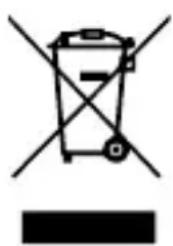
Simple line drawing of a trash bin with crossed lines indicating no waste or discharge (no text or symbols)This symbol located on a product or in the product's original documentation means that the used electrical or electronic products may not be disposed together with the communal waste. In order to dispose of these products correctly, take them to a designated collection site, where they will be accepted for free. By disposing of a product in this way, you are helping to protect precious natural resources and helping to prevent any potential negative impacts on the environment and human health, which could be the result of incorrect waste disposal. You may receive more detailed information from your local authority or nearest collection site. According to national regulations, fines may also be given out to anyone who disposes of this type of waste incorrectly. User information for disposing electrical and electronic devices.
(Business and corporate use)
In order to correctly dispose of electrical and electronic devices for business and corporate use, refer to the product's manufacturer or importer. They will provide you with information regarding all disposal methods and, according to the date stated on the electrical or electronic device on the market, they will tell you who is responsible for financing the disposal of this electrical or electronic device. Information regarding disposal processes in other countries outside the EU. The symbol displayed above is only valid for countries within the European Union. For the correct disposal of electrical and electronic devices, request the relevant information from your local authorities or the device seller.
DE
INHALT DER PACKUNG
natural_image
Symbol of a trash bin with crossed lines indicating no waste, and a solid black rectangle below (no text or labels)natural_image
Symbol of a trash bin with crossed lines indicating no waste, and a solid black rectangle below (no text or labels)natural_image
Simple line drawing of a trash bin with crossed lines indicating no waste or discharge (no text or symbols)Simbol naveden na proizvodu ili u popratnoj dokumentaciji znači da je zabranjeno odlagati električne ili elektroničke proizvode zajedno s komunalnim otpadom. Pobrinite se za pravilnu likvidaciju otpada: dotrajali proizvod predajte besplatno u ovlašteni centar za skupljanje otpada. Propisnom likvidacijom dotrajalog proizvoda ćete doprinijeti očuvanju skupocjenih prirodnih izvora te prevenciji negativnih utjecaja na okoliš i ljudsko zdravlje zbog nepravilne likvidacije otpada. Za više informacija obratite se nadležnom lokalnom uredu ili mjestu zbrinjavanja.
Nepravilno zbrinjavanje ove vrste otpada kažnjava se sukladno nacionalnim propisima.
Informacije za korisnika o načinu zbrinjavanja električnih i elektronskih uređaja
(Poslovna uporaba)
Vezano za pravilno zbrinjavanje dotrajale električne/elektronske opreme za poslovnu upotrebu i upotrebu u tvorničkim pogonima obratite se proizvođaču ili uvozniku ovog proizvoda.
Proizvođač će Vam pružiti informacije o načinu zbrinjavanja proizvoda i obavijestit će vas o tome tko je dužan osigurati zbrinjavanje ovog električnog uređaja ovisno o datumu uvođenja proizvoda na tržište. Informacije o zbrinjavanju dotrajalog proizvoda u ostalim zemljama (izvan EU). Gore navedeni simbol važi samo u Europskoj uniji. Za više informacija o pravilnom zbrinjavanju električnih i elektronskih uređaja se obratite prodavatelju ili dobavljaču.
PL
ZAWARTOŚĆ OPAKOWANIA
natural_image
Simple line drawing of a trash bin with no text or symbolsnatural_image
Simple line drawing of a trash bin with crossed lines indicating no waste or discharge (no text or symbols)natural_image
Simple line drawing of a trash bin with crossed lines indicating no waste or plastic (no text or symbols)


- BASIC OPERATION
- BLUETOOTH CONNECTION MODE
- FM RADIO MODE
- PLAYBACK MODE VIA USB AND MICROSD CARD
- TELEPHONE CALLS
- CHARGING
- PARAMETERS
- USER INFORMATION FOR DISPOSING ELECTRICAL AND ELECTRONIC DEVICES (HOME USE)
- (Business and corporate use)
- DE
- INHALT DER PACKUNG
- (Poslovna uporaba)
- PL
- ZAWARTOŚĆ OPAKOWANIA
Brand : Niceboy
Model : RAZE mini
Category : Loudspeaker