
DEH-6300SD - Car stereo PIONEER - Free user manual and instructions
Find the device manual for free DEH-6300SD PIONEER in PDF.


| Product type | Car stereo with CD player, FM/MW/LW tuner, USB port, SD slot, iPod compatibility |
| Dimensions (DIN) | Chassis: 178 mm × 50 mm × 165 mm; Front panel: 188 mm × 58 mm × 18 mm |
| Dimensions (D) | Chassis: 178 mm × 50 mm × 165 mm; Front panel: 170 mm × 46 mm × 18 mm |
| Weight | 1.16 kg |
| Power supply voltage | 14.4 V DC (10.8 V to 15.1 V acceptable) |
| Maximum current consumption | 10.0 A |
| Maximum power output | 50 W × 4 (speakers) + 70 W × 1 / 2 (subwoofer) |
| Compatible audio formats (CD/USB/SD) | MP3, WMA, WAV, AAC (iTunes only) |
| FM frequency range | 87.5 MHz to 108.0 MHz |
| MW frequency range | 531 kHz to 1602 kHz (9 kHz steps) |
| LW frequency range | 153 kHz to 281 kHz |
| Display | Information section, level indicator, main display (frequency or time) |
| Equalizer | 5-band graphic (100 Hz, 315 Hz, 1.25 kHz, 3.15 kHz, 8 kHz); presets (POWERFUL, NATURAL, VOCAL, CUSTOM1/2, FLAT, SUPER BASS) |
| High-pass filter (HPF) | Cutoff frequency: 50/63/80/100/125 Hz, slope -12 dB/octave |
| Subwoofer output | Mono, cutoff frequency: 50/63/80/100/125 Hz, slope -18 dB/octave, gain +6 dB to -24 dB |
| Loudness compensation | Levels: OFF, LOW, MID, HIGH |
| Sound Retriever | Compressed audio enhancement: OFF, 1 (low compression), 2 (high compression) |
| Auxiliary input (AUX) | 3.5 mm stereo mini-jack |
| USB port | USB 2.0 full speed, max power 500 mA, iPod compatible (via cable) |
| SD card slot | SD, miniSD, microSD, SDHC up to 32 GB |
| iPod/iPhone compatibility | iPod nano (1st to 5th gen.), iPod classic, iPod touch (1st to 3rd gen.), iPhone 3G/3GS/4, etc. |
| RDS functions | AF, TA, NEWS, PTY, REGIONAL, PI automatic search |
| Station memory | 6 stations per band (FM1, FM2, FM3, MW/LW); BSM (automatic memory) |
| Optional remote control | CD-R320 (sold separately) |
| Fuse | 10 A |
Frequently Asked Questions - DEH-6300SD PIONEER
User questions about DEH-6300SD PIONEER
0 question about this device. Answer the ones you know or ask your own.
Ask a new question about this device
Download the instructions for your Car stereo in PDF format for free! Find your manual DEH-6300SD - PIONEER and take your electronic device back in hand. On this page are published all the documents necessary for the use of your device. DEH-6300SD by PIONEER.
USER MANUAL DEH-6300SD PIONEER
REPRODUCTOR DE CD CON RECEPTOR RDS
CD RDS-EMPFÄNGER
CD RDS-ONTVANGER
CD RDS ПРИЕМнИK
DEH-6300SD
Owner's Manual
Mode d'emploi
PykoBoIDCTBO NOJb3OBaTeJIa
Made for

iPod

iPhone

Plays
Windows
MediaTM
Contents
01
Before You Start
About this unit 2
Demo mode 3
In case of trouble 3
Sound muting 3
About this manual 3
02
Operating this unit
Head unit 3
Optional remote control 3
Display indication 4
Basic Operations 4
Menu operations identical for function settings/audio adjustments/initial settings/lists 5
Tuner 5
CD/CD-R/CD-RW and external storage devices (USB, SD) 6
iPod 7
Audio Adjustments 9
Initial Settings 9
Other Functions 10
03
Installation
Connections 11
Installation 12
#
Additional Information
Troubleshooting 13
Error messages 13
Handling guidelines 14
Compressed audio compatibility (disc, USB, SD) 15
iPod compatibility 16
Sequence of audio files 16
Copyright and trademark
Specifications 17
Before You Start
Thank you for purchasing this PIONEER product.
To ensure proper use, please read through this manual before using this product. It is especially important that you read and observeWARN
INGs and CAUTIONs in this manual. Please keep the manual in a safe and accessible place for future reference.

If you want to dispose this product, do not mix it with general household waste. There is a separate collection system for used electronic products in accordance with legislation that requires proper treatment, recovery and recycling.
Private households in the member states of the EU, in Switzerland and Norway may return their used electronic products free of charge to designated collection facilities or to a retailer (if you purchase a similar new one).
For countries not mentioned above, please contact your local authorities for the correct method of disposal.
By doing so you will ensure that your disposed product undergoes the necessary treatment, recovery and recycling and thus prevent potential negative effects on the environment and human health.
About this unit
The tune frequencies on this unit are allocated for use in Western Europe, Asia, the Middle East, Africa and Oceania. Use in other areas may result in poor reception. The RDS (radio data system) function only operates in areas with broadcasting RDS signals for FM stations.
CAUTION
This product is a class 1 laser product classified under the Safety of laser products, IEC 60825-1:2007, and contains a class 1M laser module. To ensure continued safety, do not remove any covers or attempt to gain access to the inside of the product. Refer all servicing to qualified personnel.
CLASS 1 LASER PRODUCT
CAUTIONCLASS 1M INVISIBLE LASER RADIATION WHEN OPEN,DO NOT VIEW DIRECTLY WITH OPTICAL INSTRUMENTS
#
CAUTION
- Do not allow this unit to come into contact with liquids. Electrical shock could result. Also, damage to this unit, smoke, and overheating could result from contact with liquids.
The Pioneer CarStereo-Pass is for use only in Germany.
Always keep the volume low enough to hear outside sounds. - Avoid exposure to moisture.
- If the battery is disconnected or discharged, any preset memory will be erased.
Before You Start
Note
Function setting operations are completed even if the menu is cancelled before the operations are confirmed.
Demo mode

Important
Failure to connect the red lead (ACC) of this unit to a terminal coupled with ignition switch on/off operations may lead to battery drain.
Demo mode
The demo automatically starts when the ignition switch is set to ACC or ON while the unit is turned off. Turning off the unit does not cancel demo mode. To cancel the demo mode, press
/ DISP / SCR Press / DISP / SCR again to start. Operating the demo while the ignition switch is set to ACC may drain battery power.
In case of trouble
Should this unit fail to operate properly, please contact your dealer or nearest authorized PIONEER Service Station.
Sound muting
Sound is muted automatically when:
- A call is made or received using a cell phone connected to this unit.
Voice guidance is output from a connected Pioneer navigation unit.
The sound is turned off, MUTE is displayed and no audio adjustments are possible. Operation returns to normal when the phone connection or the voice guidance is ended.
About this manual
- In the following instructions, USB memories, USB portable audio players, and SD memory cards are collectively referred to as "external storage devices (USB, SD)." If only USB memories and USB portable audio players are indicated, they are collectively referred to as "USB storage devices."
- In this manual, iPod and iPhone will be referred to as "iPod".
Operating this unit
Head unit
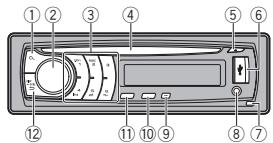
Optional remote control
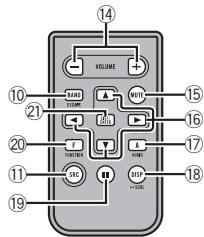
The remote control CD-R320 is sold separately.
| Part | Part | |||
| ① | (list) | ⑧ | AUX input jack (3.5 mm stereo jack) | |
| ② | MULTI-CONTROL (M.C.) | ⑨ | TA/NEWS | |
| ③ | 1 to 6 | ⑩ | BAND/ESC | |
| ④ | Disc loading slot | ⑪ | SRC/OFF | |
| ⑤ | ▲ (eject) | ⑫ | →/DISP/SCRL | |
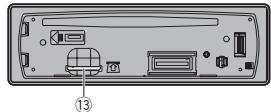
| ⑥ | USB port | ⑬ | Removing the front panel, you can see the SD memory card slot. | |
| ⑦ | Detach button | |||

CAUTION
Use an optional Pioneer USB cable (CD-U50E) to connect the USB audio player/USB memory as any device connected directly to the unit will protrude out from the unit and may be dangerous.
Do not use unauthorized products.
| Part | Operation | |
| 14 | VOLUME | Press to increase or decrease volume. |
| 15 | MUTE | Press to mute. Press again to unmute. |
| 16 | ▲/▼/▲ | Press to perform manual seek tuning, fast forward, reverse and track search controls. Also used for controlling functions. |
| 17 | AUDIO | Press to select an audio function. |
| 18 | DISP/SCRL | Press to select different displays. Press and hold to scroll through the text information. |
| 19 | II | Press to pause or resume play-back. |
Operating this unit
| Part | Operation | |
| 20 | FUNC-TION | Press to select functions. Press and hold to recall the ini-tial setting menu when the sources are off. |
| 21 | LIST/ENTER | Press to display the list de-pending on the source. While in the operating menu, press to control functions. |
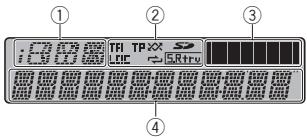
Display indication
| Indicator | State | |
| ① | Information display section | Source, band, and menu operation guides are displayed. |
| TA | TA (traffic announcement standby) function is on. | |
| LOC | Local seek tuning is on. | |
| TP | A TP station is tuned in. | |
| XX (random) | The random function is on. The iPod source is selected and the shuffle or shuffle all function is on. | |
| ② | ( shake) | The repeat function is on. |
| (repeat) | SD/SDHC memory card is inserted. | |
| (SD memory card) | The sound retriever function is on. | |
| ③ | Level meter display section | The levels of the audio outputs are displayed. |
| ④ | Main display section | Tuner: frequency Built-in CD, external storage device (USB, SD) and iPod: elapsed playback time and text information |
Basic Operations
Important
- Handle gently when removing or attaching the front panel.
Operating this unit
- Avoid subjecting the front panel to excessive shock.
- Keep the front panel out of direct sunlight and high temperatures.
- To avoid damaging the device or vehicle interior, remove any cables and devices attached to the front panel before detaching it.
Removing the front panel to protect your unit from theft
1 Press the detach button to release the front panel.
Push the front panel upward and pull it toward you.
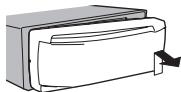
3 Always keep the detached front panel in a protection device such as a protection case.
Re-attaching the front panel
1 Slide the front panel to the left. Make sure to insert the tabs on the left side of the head unit into the slots on the front panel.
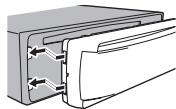
Press the right side of the front panel until it is firmly seated.
If you cannot attach the front panel to the head unit successfully, make sure that you are placing the front panel onto the head unit correctly. Forcing the front panel into place may result in damage to the front panel or head unit.
Turning the unit on
1 Press SRC/OFF to turn the unit on.
Turning the unit off
1 Press and hold SRC/OFF until the unit turns off.
Selecting a source
1 Press SRC/OFF to cycle between: TUNER (tuner)CD (built-in CD player)-USB (USB)/USB-iPod (iPod)-SD (SD memory card)-AUX (AUX)
Adjusting the volume
1 Turn M.C. to adjust the volume.
CAUTION
For safety reasons, park your vehicle when removing the front panel.
Note
When this unit's blue/white lead is connected to the vehicle's auto-antenna relay control terminal, the vehicle's antenna extends when this unit's source is turned on. To retract the antenna, turn the source off.
Operating this unit
Menu operations identical for function settings/audio adjustments/initial settings/ lists
Returning to the previous display
Returning to the previous list/category (the folder/ category one level higher)
Press /DISP/SCRL.
Returning to the main menu
Returning to the top tier of the list/category.
Press and hold /DISP/SCRL.
Returning to the ordinary display
Canceling the initial setting menu
Returning to the ordinary display from the list/category
1 Press BAND/ESC.
Tuner
Basic Operations
Selecting a band
Press BAND/ESC until the desired band (FM1, FM2. FM3 for FM or MW/LW is displayed.
Manual tuning (step by step)
Push M.C. left or right.
Seeking
1 Push and hold M.C. left or right, and then release.
You can cancel seek tuning by pushing M.C. left or right.
While pushing and holding M.C. left or right, you can skip stations. Seek tuning starts as soon as you release M.C.
Note
This unit's AF (alternative frequencies search) function can be turned on and off. AF should be off for normal tuning operation (refer to the next page).
Using PI Seek
If the tuner cannot find a suitable station, or the reception status deteriorates, the unit automatically searches for a different station with the same programming. During the search, PI seek is displayed and the sound is muted.
Using Auto PI Seek for preset stations
When preset stations cannot be recalled, the unit can be set to perform PI Seek during preset recall.
- The default setting for Auto PI Seek is off. Refer to AUTO PI (auto PI seek) on page 10.
Storing and recalling stations for each band
Using preset tuning buttons
1 When you find a station that you want to store in memory, press one of the preset tuning buttons (1 to 6) and hold until the preset number stops flashing.
2 Press one of the preset tuning buttons (1 to 6) to select the desired station.
- You can also recall stored radio stations by pushing M.C. up or down during the frequency display.
Using the preset screen
1 Press to switch to the preset screen.
Operating this unit
2 Use M.C. to store the selected frequency in the memory.
Turn to change the preset number. Press and hold to store.
3 Use M.C. to select the desired station.
Turn to change the station. Press to select.
Switching the RDS display
RDS (radio data system) contains digital information that helps search for the radio stations.
Press /DISP/SCRL.
Program service name—PTY information—Frequency
- PTY information and the frequency appear on the display for eight seconds.
PTY list
NEWS/INFO
NEWS (News), AFFAIRS (Current affairs), INFO (Information), SPORT (Sports), WEATHER (Weather), FINANCE (Finance)
POPULAR
POP MUS (Popular music), ROCK MUS (Rock music), EASY MUS (Easy listening), OTH MUS (Other music), JAZZ (Jazz), COUNTRY (Country music), NAT MUS (National music), OLDIES (Oldies music), FOLK MUS (Folk music)
CLASSICS
L. CLASS (Light classical), CLASSIC (Classical)
OTHERS
EDUCATE (Education), DRAMA (Drama), CULTURE (Culture), SCIENCE (Science), VARIORED (Varied), CHILDREN (Children's), SOCIAL (Social affairs), RELIGION (Religion), PHONE IN (Phone in), TOURING (Travel), LEISURE (Leisure), DOCUMENT (Documentaries)
Advanced operations using special buttons
Receiving traffic announcements
Regardless of the source you are listening to, you can receive traffic announcements automatically with TA (traffic announcement standby).
1 Tune in to a TP or enhanced other network's TP station.
2 Press TA/NEWS to turn traffic announcement standby on or off.
3 Use M.C. to adjust the TA volume when a traffic announcement begins.
The newly set volume is stored in the memory and will be recalled for subsequent traffic announcements.
4 Press TA/NEWS while a traffic announcement is being received to cancel the announcement.
The tuner returns to the original source but remains in the standby mode until TA/NEWS is pressed again.
Using news program interruption
When a news program is broadcast from a PTY code news station, the unit automatically switches to the news broadcast station. When the news program ends, reception of the previous program resumes.
Press and hold TA/NEWS to turn news program interruption on or off. A news program can be canceled by pressing TA/NEWS.
Function settings
1 Press M.C. to display the main menu.
2 Turn M.C. to change the menu option and press to select FUNCTION.
Operating this unit
3 Turn M.C. to select the function.
After selecting, perform the following procedures to set the function.
- If MW/LW band is selected, only BSM or LOCAL is available.
BSM (best stations memory)
BSM (best stations memory) automatically stores the six strongest stations in the order of their signal strength.
1 Press M.C. to turn BSM on. To cancel, press M.C. again
REGIONAL (regional)
When AF is used, the regional function limits the selection of stations to those broadcasting regional programs.
Press M.C. to turn the regional function on or off.
LOCAL (local seek tuning)
Local seek tuning lets you tune in to only those radio stations with sufficiently strong signals for good reception.
Press M.C. to display the setting mode.
2 Turn M.C. to select the desired setting. FM: OFF—LEVEL1—LEVEL2—LEVEL3—LEVEL4
MW/LW: OFF—LEVEL1—LEVEL2
The highest level setting allows reception of only the strongest stations, while lower levels allow the reception of weaker stations.
3 Press M.C. to confirm the selection.
PTY SEARCH (program type selection)
You can tune in to a station using PTY (program type) information.
Press M.C. to display the setting mode.
2 Turn M.C. to select the desired setting. NEWS/INFO—POPULAR—CLASSICS—OTHERS
3 Press M.C. to begin the search. The unit searches for a station broadcasting that type of program. When a station is found, its program service name is displayed. PTY (program type ID code) information is listed in the following section. Refer to the previous page.
The program of some stations may differ from that indicated by the transmitted PTY. If no station is broadcasting the type of program you searched for, NOT FOUND is displayed for about two seconds and then the tuner returns to the original station.
TRAFFIC (traffic announcement standby)
Press M.C. to turn traffic announcement standby on or off.
AF (alternative frequencies search)
Press M.C. to turn AF on or off.
NEWS (news program interruption)
1 Press M.C. to turn the NEWS function on or off.
Operating this unit
CD/CD-R/CD-RW and external storage devices (USB, SD)
Basic Operations
Playing a CD/CD-R/CD-RW
Insert the disc into the disc loading slot with the label side up.
Ejecting a CD/CD-R/CD-RW
1 Press▲(eject).
Playing songs on a USB storage device
1 Open the USB connector cover and plug in the USB storage device using a USB cable.
Stopping playback of files on a USB storage device
You may disconnect the USB storage device at any time.
Playing songs on an SD memory card
1 Remove the front panel.
Insert an SD memory card into the SD card slot.
Insert it with the contact surface facing down, and press on the card until it clicks and completely locks into place.
3 Re-attach the front panel.
4 Press SRC/OFF to select $D as the source. Playback will start.
Stopping playback of files on an SD memory card
1 Remove the front panel.
2 Press on the SD memory card until it clicks. The SD memory card is ejected.
3 Pull out the SD memory card.
4 Re-attach the front panel.
Selecting a folder
Push M.C.up or down.
Selecting a track
Push M.C. left or right.
Fast forwarding or reversing
Push and hold M.C. left or right.
Returning to root folder
Press and hold BAND/ESC.
Switching between compressed audio and CD-DA
1 Press BAND/ESC.
Notes
- When playing compressed audio, there is no sound during fast forward or reverse.
- Disconnect USB storage devices from the unit when not in use.
Displaying text information
Selecting the desired text information
Press DISP/SCRL.
Scrolling the text information to the left
Press and hold /DISP/SCRL.
Notes
Depending on the version of iTunes used to write MP3 files to a disc or media file types, incompatible text stored within an audio file may be displayed incorrectly.
Text information items that can be changed depend on the media.
Selecting and playing files/ tracks from the name list
1 Press to switch to the file/track name list mode.
2 Use M.C. to select the desired file name (or folder name).
Changing the file or folder name
1 Turn M.C.
Playing
1 When a file or track is selected, press M.C.
Operating this unit
| Viewing a list of the files (or folders) in the sele- lected folder 1 When a folder is selected, press M.C. |
| Playing a song in the selected folder 1 When a folder is selected, press and hold M.C. |
Advanced operations using special buttons
| Selecting a repeat play range 1 Press 6← to cycle between the following: CD/CD-R/CD-RW · DISC – Repeat all tracks · TRACK – Repeat the current track · FOLDER – Repeat the current folder External storage device (USB, SD) · ALL – Repeat all files · TRACK – Repeat the current file · FOLDER – Repeat the current folder |
| Playing tracks in random order 1 Press 5/2× to turn random play on or off. Tracks in a selected repeat range are played in random order. |
| Pausing playback 1 Press 2/PAUSE to pause or resume. |
| Enhancing compressed audio and restoring rich sound (sound retriever) 1 Press 1/S.Rtrv to cycle between: OFF (off)—1—2 1 is effective for low compression rates, and 2 is effective for high compression rates. |
Function settings
1 Press M.C. to display the main menu.
2 Turn M.C. to change the menu option and press to select FUNCTION.
3 Turn M.C. to select the function.
After selecting, perform the following procedures to set the function.
REPEAT (repeat play)
Press M.C. to display the setting mode.
2 Turn M.C. to select a repeat play range. For details, refer to Selecting a repeat play range on this page.
3 Press M.C. to confirm the selection.
RANDOM (random play)
Press M.C. to turn random play on or off.
PAUSE (pause)
1 Press M.C. to pause or resume.
S.RTRV (sound retriever)
Automatically enhances compressed audio and restores rich sound.
Press M.C. to display the setting mode.
2 Turn M.C. to select the desired setting. For details, refer to Enhancing compressed audio and restoring rich sound (sound retriever) on this page.
3 Press M.C. to confirm the selection.
iPod
Basic Operations
Playing songs on an iPod
1 Open the USB connector cover.
2 Connect an iPod to the USB cable using an iPod Dock Connector.
Selecting a track (chapter)
Push M.C. left or right.
Fast forwarding or reversing
Push and hold M.C. left or right.
Operating this unit
Notes
- The iPod cannot be turned on or off when the control mode is set to AUDIO.
- Disconnect headphones from the iPod before connecting it to this unit.
- The iPod will turn off about two minutes after the ignition switch is set to OFF.
Displaying text information
Selecting the desired text information
Press DISP/SCRL.
Scrolling the text information to the left
Press and hold DISP/SCRL.
Browsing for a song
1 Press to switch to the top menu of list search.
2 Use M.C. to select a category/song.
Changing the name of the song or category
Turn M.C.
Playlists—artists—albums—songs—podcasts—genres—composers—audiobooks
Playing
1 When a song is selected, press M.C.
Viewing a list of songs in the selected category
1 When a category is selected, press M.C.
Playing a song in the selected category
When a category is selected, press and hold M.C.
Searching the list by alphabet
When a list for the selected category is displayed, press to switch to alphabet search mode.
2 Turn M.C. to select a letter.
3 Press M.C. to display the alphabetical list.
Notes
- You can play playlists created with the PC application (MusicSphere). The application will be available on our website.
- Playlists that you created with the PC application (MusicSphere) are displayed in abbreviated form.
Advanced operations using special buttons
Selecting a repeat play range
Press 6 / 1 to cycle between the following:
ONE-Repeat the current song
ALL-Repeat all songs in the selected list
Playing all songs in random order (shuffle all)
Press 5/ to turn shuffle all on.
- When the control mode is set to iPod/APP shuffle play is on.
Pausing playback
Press 2/PAUSE to pause or resume.
Operating this unit
Playing songs related to the currently playing song
You can play songs from the following lists.
- Album list of the currently playing artist
Song list of the currently playing album - Album list of the currently playing genre
Press and hold M.C. to switch to link play mode.
2 Turn M.C. to change the mode; press to select.
- ARTIST - Plays an album of the artist currently being played.
- ALBUM - Plays a song from the album currently being played.
GENRE - Plays an album from the genre currently being played.
The selected song/album will be played after the currently playing song.
The selected song/album may be canceled if you operate functions other than link play (e.g., fast forward and reverse).
Depending on the song selected to play, the end of the currently playing song and the beginning of the selected song/album may be cut off.
Operating this unit's iPod function from your iPod You can listen to the sound from your iPod applications using your car's speakers, when APP is se-. lected.
This function is not compatible with the following iPod models.
- iPod nano 1st generation
- iPod 5th generation
APP mode is compatible with the following iPod models.
- iPod touch 3rd generation (software version 3.0 or later)
- iPod touch 2nd generation (software version 3.0 or later)
- iPod touch 1st generation (software version 3.0 or later)
iPhone 4 (software version 4.0 or later)
iPhone 3GS (software version 3.0 or later)
iPhone 3G (software version 3.0 or later)
iPhone (software version 3.0 or later)
1 Press 4/iPod to switch the control mode.
- iPod - This unit's iPod function can be operated from the connected iPod.
- APP - Play back the sound from your iPod applications.
- AUDIO - This unit's iPod function can be operated from this unit.
Enhancing compressed audio and restoring rich sound (sound retriever)
1 Press 1/S.Rtrv to cycle between: OFF (off)—1—2
1 is effective for low compression rates, and 2 is effective for high compression rates.
Function settings
1 Press M.C. to display the main menu.
2 Turn M.C. to change the menu option and press to select FUNCTION.
Operating this unit
3 Turn M.C. to select the function.
After selecting, perform the following procedures to set the function.
REPEAT (repeat play)
1 Press M.C. to display the setting mode.
2 Turn M.C. to select a repeat play range. For details about the settings, refer to Selecting a repeat play range on the previous page.
3 Press M.C. to confirm the selection.
SHUFFLE (shuffle)
1 Press M.C. to display the setting mode.
2 Turn M.C. to select your favorite setting.
- SONGS - Play back songs in the selected list in random order.
- ALBUMS - Play back songs from a randomly selected album in order.
OFF-Cancel random play.
3 Press M.C. to confirm the selection.
SHUFFLE ALL (shuffle all)
- Press M.C. to turn shuffle all on.
To turn off, set SHUFFLE in the FUNCTION menu to off.
LINK PLAY (link play)
1 Press M.C. to display the setting mode.
Turn M.C. to change the mode; press to select. For details about the settings, refer to Playing songs related to the currently playing song on this page.
PAUSE (pause)
Press M.C. to pause or resume.
AUDIO BOOKS (audiobook speed)
1 Press M.C. to display the setting mode.
2 Turn M.C. to select your favorite setting
- FASTER - Playback at a speed faster than normal
NORMAL-Playback at normal speed - SLOWER-Playback at a speed slower than normal
3 Press M.C. to confirm the selection.
S.RTRV (sound retriever)
1 Press M.C. to display the setting mode.
2 Turn M.C. to select the desired setting. For details, refer to Enhancing compressed audio and restoring rich sound (sound retriever) on this page.
3 Press M.C. to confirm the selection.
Notes
- Switching the control mode to iPod pauses song playback. Operate the iPod to resume playback.
- The following functions are still accessible from the unit even if the control mode is set to iPod/APP.
Switching the text information (iPod)
— Pausing
Fast forward/reverse
Track up/down
Repeat play (ONE/ALL/OFF)
Random play shuffle)
- (list) to use iPod menu
Press M.C. to press the iPod click wheel
- Push M.C. up to turn the iPod click wheel to the left
Push M.C. down to turn the iPod click wheel to the right
- When the control mode is set to iPod/APP, operations are limited as follows:
The function settings are not available.
The browse function cannot be operated from this unit.
Operating this unit
Audio Adjustments
1 Press M.C. to display the main menu.
2 Turn M.C. to change the menu option and press to select AUDIO.
3 Turn M.C. to select the audio function. After selecting, perform the following procedures to set the audio function.
FAD/BAL (fader/balance adjustment)
Press M.C. to display the setting mode.
Press M.C. to cycle between fader (front/rear) and balance (left/right).
3 Turn M.C. to adjust the speaker balance. When the rear output setting is SW, you cannot adjust front/rear speaker balance. Refer to SW CONTROL (rear output and subwoofer setting) on the next page.
PRESET EQ (equalizer recall)
1 Press M.C. to display the setting mode.
2 Turn M.C. to select an equalizer curve. POWERFUL-NATURAL-VOCAL-CUSTOM1-CUSTOM2-FLAT-SUPER BASS
3 Press M.C. to confirm the selection.
GRAPHIC EQ (equalizer adjustment)
You can adjust the currently selected equalizer curve setting as desired. Adjusted equalizer curve settings are stored in CUSTOM1 or CUSTOM2.
- A separate CUSTOM1 curve can be created for each source. If you make adjustments when a curve other than CUSTOM2 is selected, the equalizer curve settings will be stored in CUSTOM1.
- A CUSTOM2 curve that is common for all sources can be created. If you make adjustments when the CUSTOM2 curve is selected, the CUSTOM2 curve will be updated.
Press M.C. to display the setting mode.
Press M.C. to cycle between equalizer band and level.
3 Press M.C. to switch to equalizer band and then turn M.C. to select. 100HZ-315HZ-1.25KHZ-3.15KHZ-8KHZ
4 Press M.C. to switch to level and then turn M. C. to adjust. Adjustment range: +6 to -6
LEVEL METER (level meter display setting)
1 Press M.C. to display the setting mode.
2 Turn M.C. to select the desired setting. OFF (off)-MODE1-MODE2-MODE3- MODE4
3 Press M.C. to confirm the selection.
LOUDNESS (loudness)
Loudness compensates for deficiencies in the low- and high-frequency ranges at low volume.
1 Press M.C. to display the setting mode.
Turn M.C. to select the desired setting. OFF (off)LOW (low)-MID (mid)-HIGH (high)
3 Press M.C. to confirm the selection.
SW SETTING 1 (subwoofer on/off setting)
Operating this unit
This unit is equipped with a subwoofer output which can be turned on or off.
Press M.C. to display the setting mode.
2 Turn M.C. to select the desired setting. NORMAL (normal phase)—REVERSE (reverse phase)—OFF (subwoofer off)
3 Press M.C. to confirm the selection.
SW SETTING 2 (subwoofer adjustment)
The cut-off frequency and output level can be adjusted when the subwoofer output is on. Only frequencies lower than those in the selected range are outputted from the subwoofer.
Press M.C. to display the setting mode.
Press M.C. to cycle between the cut-off frequency and output level of the subwoofer.
3 Press M.C. to switch to cut-off frequency and then turn M.C. to select the cut-off frequency. 50HZ—63HZ—80HZ—100HZ—125HZ
4 Press M.C. to switch to output level and then turn M.C. to adjust the output level. Adjustment range: +6 to -24
HPF SETTING (high pass filter adjustment)
When you do not want low sounds from the subwoofer output frequency range to play from the front or rear speakers, turn on the HPF (high pass filter). Only frequencies higher than those in the selected range are output from the front or rear speakers.
1 Press M.C. to display the setting mode.
Turn M.C. to select the cut-off frequency. OFF (off) 50HZ-63HZ-80HZ-100HZ 125HZ
3 Press M.C. to confirm the selection.
BASS BOOSTER (bass boost)
Press M.C. to display the setting mode.
TurnM.C.to adjust the level. Adjustment range:0to +6
3 Press M.C. to confirm the selection.
SLA (source level adjustment)
SLA (Source Level Adjustment) lets you adjust the volume level of each source to prevent radical changes in volume when switching between sources.
- When selecting FM as the source, you cannot switch to SLA.
- Settings are based on the FM volume level, which remains unchanged.
- The MW/LW volume level can also be adjusted with this function.
Press M.C. to display the setting mode.
Turn M.C. to adjust the source volume. Adjustment range: +4 to -4
3 Press M.C. to confirm the selection.
Initial Settings
1 Press and hold SRC/OFF until the unit turns off.
2 Press M.C. and hold until the initial setting menu appears in the display.
3 Turn M.C. to select the initial setting. After selecting, perform the following procedures to set the initial setting.
CLOCK SET (setting the clock)
1 Press M.C. to display the setting mode.
2 Press M.C. to select the segment of the clock display you wish to set. Hour—Minute
3 Turn M.C. to adjust the clock.
CLOCK (clock on/off setting)
1 Press M.C. to turn the clock display on or off.
FM STEP (FM tuning step)
Operating this unit
Normally, the FM tuning step employed by seek tuning is 50kHz . When AF or TA is on, the tuning step automatically changes to 100kHz . It may be preferable to set the tuning step to 50kHz when AF is on.
1 Press M.C. to display the setting mode.
Turn M.C. to select the FM tuning step. 100KHz (100 kHz)—50KHz (50 kHz)
3 Press M.C. to confirm the selection.
AUTO PI (auto PI seek)
The unit can automatically search for a different station with the same programming, even during preset recall.
Press M.C. to turn Auto PI seek on or off.
AUX (auxiliary input)
Activate this setting when using an auxiliary device connected to this unit.
1 Press M.C. to turn AUX on or off.
USB PNP (plug and play)
This setting allows you to switch your source to USB/USB-iPod automatically.
Press M.C. to turn the plug and play function on or off.
ON- When a USB storage device/iPod is connected, depending on the type of device, the source is automatically switched to USB/USB-iPod when you turn on the engine. If you disconnect your USB storage device/iPod, this unit's source is turned off.
OFF- When a USB storage device/iPod is connected, the source is not switched to USB/USB-iPod automatically. Please change the source to USB/USB-iPod manually.
SW CONTROL (rear output and subwoofer setting)
This unit's rear output (rear speaker leads output) can be used for full-range speaker (FUL) or subwoofer (SW) connection. If you switch the rear output setting to SW, you can connect a rear speaker lead directly to a subwoofer without using an auxiliary amp.
Initially, REAR SP is set for rear full-range speaker connection (FUL).
Press M.C. to display the setting mode.
2 Turn M.C. to change the output and press to select.
REAR SP:FUL-SW
3 Press M.C. to confirm the selection.
DEMO (demo display setting)
Press M.C. to turn the demo display on or off.
EVER SCRL (scroll mode setting)
When ever scroll is set to ON, recorded text information scrolls continuously in the display. Set to OFF if you prefer the information to scroll just once.
1 Press M.C. to turn the ever scroll on or off.
TITLE (multi-language)
This unit can display titles even if they are embedded in a European language or in Russian. Text information such as title name, artist name or comment can be recorded on a compressed audi disc.
- If the embedded language and the selected language setting are not the same, text information may not display properly.
- Some characters may not be displayed properly.
Press M.C. to display the setting mode.
Turn M.C. to select the desired setting.
EURO (European)RUSSIA (Russian)
3 Press M.C. to confirm the selection.
Operating this unit
Other Functions
Using an AUX source
1 Insert the stereo mini plug into the AUX input jack.
2 Press SRC/OFF to select AUX as the source.
Note
AUX cannot be selected unless the auxiliary setting is turned on. For more details, refer to AUX (auxiliary input) on this page.
Installation
Connections

Important
- When installing this unit in a vehicle without an ACC (accessory) position on the ignition switch, failure to connect the red cable to the terminal that detects operation of the ignition key may result in battery drain.

ACC position

No ACC position
- Use of this unit in conditions other than the following could result in fire or malfunction.
Vehicles with a 12-volt battery and negative grounding.
— Speakers with 50 W (output value) and 4 ohm to 8 ohm (impedance value). - To prevent a short-circuit, overheating or malfunction, be sure to follow the directions below.
- Disconnect the negative terminal of the battery before installation.
- Secure the wiring with cable clamps or adhesive tape. Wrap adhesive tape around wiring that comes into contact with metal parts to protect the wiring.
- Place all cables away from moving parts, such as the gear shift and seat rails.
- Place all cables away from hot places, such as near the heater outlet.
Do not connect the yellow cable to the battery by passing it through the hole to the engine compartment.
Cover any disconnected cable connectors with insulating tape. - Do not shorten any cables.
-
Never cut the insulation of the power cable of this unit in order to share the power with other devices. The current capacity of the cable is limited.
Use a fuse of the rating prescribed. -
Never wire the negative speaker cable directly to ground.
— Never band together negative cables of multiple speakers. -
When this unit is on, control signals are sent through the blue/white cable. Connect this cable to the system remote control of an external power amp or the vehicle's auto-antenna relay control terminal (max. 300 mA 12 V DC). If the vehicle is equipped with a glass antenna, connect it to the antenna booster power supply terminal.
- Never connect the blue/white cable to the power terminal of an external power amp. Also, never connect it to the power terminal of the auto antenna. Doing so may result in battery drain or a malfunction.
- The black cable is ground. Ground cables for this unit and other equipment (especially, high-current products such as power amps) must be wired separately. If they are not, an accidental detachment may result in a fire or malfunction.
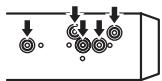
This unit
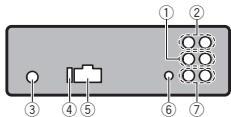
① Front output
② Rear output
③ Antenna input
④ Fuse(10A)
⑤ Power cord input
⑥ Wired remote input Hard-wired remote control adaptor can be connected (sold separately).
⑦ Subwoofer output
Installation
Power cord
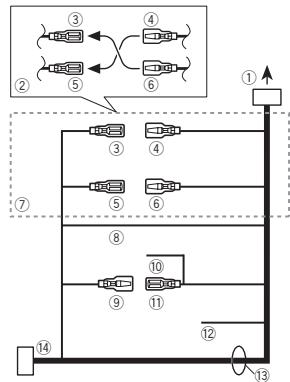
① To power cord input
② Depending on the kind of vehicle, the function of ③ and ⑤ may be different. In this case, be sure to connect ④ to ⑤ and ⑥ to 3
③ Yellow Back-up (or accessory)
④ Yellow Connect to the constant 12 V supply terminaI.
⑤ Red Accessory (or back-up)
⑥ Red Connect to terminal controlled by ignition switch (12 V DC).
⑦ Connect leads of the same color to each other.
⑧ Black (chassis ground)
Installation
Power amp (sold separately)
Perform these connections when using the optional amplifier.
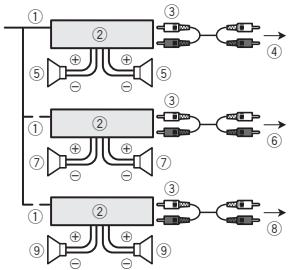
① System remote control Connect to Blue/white cable.
② Power amp (sold separately)
③ Connect with RCA cables (sold separately)
④ To Rear output
⑤ Rear speaker
⑥ To Front output
⑦ Front speaker
⑧ To subwoofer output
⑨ Subwoofer
Installation

Important
- Check all connections and systems before final installation.
- Do not use unauthorized parts as this may cause malfunctions.
- Consult your dealer if installation requires drilling of holes or other modifications to the vehicle.
- Do not install this unit where:
- it may interfere with operation of the vehicle.
-
it may cause injury to a passenger as a result of a sudden stop.
-
The semiconductor laser will be damaged if it overheats. Install this unit away from hot places such as near the heater outlet.
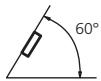
Optimum performance is obtained when the unit is installed at an angle of less than 60^ .
DIN front/rear mount
This unit can be properly installed using either front-mount or rear-mount installation.
Use commercially available parts when installing.
DIN Front-mount
1 Insert the mounting sleeve into the dashboard.
For installation in shallow spaces, use the supplied mounting sleeve. If there is enough space, use the mounting sleeve that came with the vehicle.
2 Secure the mounting sleeve by using a screwdriver to bend the metal tabs (90^) into place.
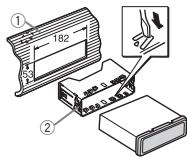
① Dashboard
② Mounting sleeve
Installation
3 Install the unit as illustrated.
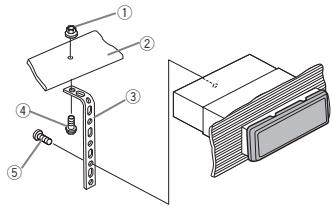
① Nut
② Firewall or metal support
③ Metal strap
④ Screw
⑤ Screw (M4 × 8)
Make sure that the unit is installed securely in place. An unstable installation may cause skipping or other malfunctions.
DIN Rear-mount
1 Determine the appropriate position where the holes on the bracket and the side of the unit match.
2 Tighten two screws on each side.
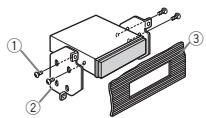
① Tapping screw (5mm× 8mm)
② Mounting bracket
③ Dashboard or console
Removing the unit
1 Remove the trim ring.
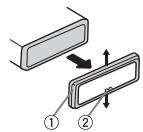
① Trim ring
② Notched tab
- Releasing the front panel allows easier access to the trim ring.
- When reattaching the trim ring, point the side with the notched tab down.
2 Insert the supplied extraction keys into both sides of the unit until they click into place.
3 Pull the unit out of the dashboard.
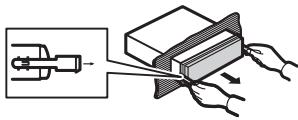
Removing and re-attaching the front panel
You can remove the front panel to protect your unit from theft.
Press the detach button and push the front panel upward and pull it toward you.
For details, refer to Removing the front panel to protect your unit from theft and Re-attaching the front panel on page 4.
Additional Information
Troubleshooting
Symptom
Cause
Action
The display automatically returns to the ordinary display.
You did not perform any operation within about 30 seconds.
Perform operation again.
The repeat play range changes unexpectably.
Depending on the repeat play range, the selected range may change when another folder or track is being selected or during fast forwarding/reversing.
Select the repeat play range again.
A subfolder is not played back.
Sub folders cannot be played when FOLDER (folder repeat) is selected.
Select another repeat play range.
There is no embedded text information.
m = 311
NO XXXX appears when a display is changed (NO
There is no embedded text information.
Switch the display or play another track/file.
TITLE, for example).
The display is illuminated when the unit is turned off.
Demo mode is on.
-
Press DISI
SCRL to cancel demo mode. -
Turn off the demo display setting.
Symptom
Cause
Action
The unit is malfunctioning. There is interference.
You are using a device, such as a cellular phone, that transmits electric waves near the unit.
Move electrical devices that may be causing the interference away from the unit.
Error messages
When you contact your dealer or your nearest Pioneer Service Center, be sure to note the error message.
Built-in CD Player
| Message | Cause | Action |
| ERROR-07, 11, 12, 17, 30 | The disc is dirty. | Clean the disc. |
| The disc is scratched. | Replace the disc. | |
| ERROR-10, 11, 12, 15, 17, 30, A0 | There is an elec-trical or me-chanical error. | Turn the ignition switch OFF and back ON, or switch to a differ-ent source, then back to the CD player. |
| ERROR-15 | The inserted disc is blank | Replace the disc. |
| ERROR-23 | Unsupported CD format | Replace the disc. |
| FORMAT READ | Sometimes there is a delay between the start of playback and when you start to hear any sound. | Wait until the message disap-pears and you hear sound. |
Additional Information
| Message | Cause | Action |
| NO AUDIO | The inserted disc does not contain any playable files. | Replace the disc. |
| SKIPPED | The inserted disc contains DRM protected files. | Replace the disc. |
| PROTECT | All the files on the inserted disc are em-bedded with DRM. | Replace the disc. |
External storage device (USB, SD)/iPod
| Message | Cause | Action |
| NO DEVICE | When plug and play is off, no USB storage device or iPod is connected. | • Turn the plug and play on. • Connect a compatible USB storage device/iPod. |
| FORMAT READ | Sometimes there is a delay between the start of playback and when you start to hear any sound. | Wait until the message disappears and you hear sound. |
| NO AUDIO | There are no songs. | Transfer the audio files to the USB storage device and connect. |
| The connected USB storage device has security enabled | Follow the USB storage device in-structions to disable the security. |
Message
Cause
Action
SKIPPED
The connected USB storage device contains files embedded with Windows Media™ DRM 9/10
Play an audio file not embedded with Windows Media DRM 9/10.
PROTECT
All the files in the USB storage device are embedded with Windows Media DRM 9/10
Transfer audio files not embedded with Windows Media DRM 9/10 to the USB storage device and connect.
N/A USB
The connected USB storage device is not supported by this unit.
-
Connect a USB Mass Storage Class compliant device.
-
Disconnect your device and replace it with a compatible USB storage device.
Non-compatible iPod
Disconnect your device and replace it with a compatible iPod.
N/A SD
Non-compatible SD storage device
Remove your device and replace it with a compatible SD storage device.
CHECK USB
The USB connector or USB cable has short-circuited.
Check that the USB connector or USB cable is not caught in something or damaged.
Additional Information
| Message | Cause | Action |
| CHECK USB | The connected USB storage device consumes more than 500 mA (maximum allowable current). | Disconnect the USB storage device and do not use it. Turn the ignition switch to OFF, then to ACC or ON and then connect only compliant USB storage devices. |
| CHECK USB | The iPod operates correctly but does not charge | Make sure the connection cable for the iPod has not shorted out (e.g., not caught in metal objects). After checking, turn the ignition switch OFF and back ON, or disconnect the iPod and reconnect. |
| Message | Cause | Action |
| ERROR-19 | Communication failed. | Perform one of the following operations. -Turn the ignition switch OFF and back ON. -Disconnect or eject the external storage device. -Change to a different source. Then, return to the USB or SD source. -Disconnect the cable from the iPod. Once the iPod's main menu is displayed, re-connect the iPod and reset it. |
| ERROR-19 | iPod failure | Disconnect the cable from the iPod. Once the iPod's main menu is displayed, re-connect the iPod and reset it. |
| ERROR-23 | USB storage device was not for-matted with FAT12, FAT16 or FAT32 | USB storage device should be for-matted with FAT12, FAT16 or FAT32. |
Additional Information
| Message | Cause | Action |
| ERROR-16 | The iPod firm-ware version is old | Update the iPod version. |
| iPod failure | Disconnect the cable from the iPod. Once the iPod's main menu is displayed, re-connect the iPod and reset it. | |
| STOP | There are no songs in the current list. | Select a list that contains songs. |
| NOT FOUND | No related songs | Transfer songs to the iPod. |
Handling guidelines
Discs and player
Use only discs that feature either of the following two logos.

DIGITAL AUDIO

DIGITAL AUDIO
TEXT
Use 12-cm discs. Do not use 8-cm discs or an adapter for 8-cm discs.
Use only conventional, fully circular discs. Do not use shaped discs.


Do not insert anything other than a CD into the CD loading slot.
Do not use cracked, chipped, warped, or otherwise damaged discs as they may damage the player.
Unfinalized CD-R/CD-RW discs cannot be played back.
Do not touch the recorded surface of the discs.
Store discs in their cases when not in use.
Do not attach labels, write on or apply chemicals to the surface of the discs.
To clean a CD, wipe the disc with a soft cloth outward from the center.
Condensation may temporarily impair the player's performance. Let it rest for about one hour to adjust to a warmer temperature. Also, wipe any damp discs off with a soft cloth.
Playback of discs may not be possible because of disc characteristics, disc format, recorded application, playback environment, storage conditions, and so on.
Road shocks may interrupt disc playback.
External storage device (USB, SD)
Address any questions you have about your external storage device (USB, SD) to the manufacturer of the device.
Do not leave the external storage device (USB, SD) in places with high temperatures.
Depending on the external storage device (USB, SD), the following problems may occur.
Operations may vary.
- The storage device may not be recognized.
- Files may not be played back properly.
Additional Information
USB storage device
Connections via USB hub are not supported.
Do not connect anything other than a USB storage device.
Firmly secure the USB storage device when driving. Do not let the USB storage device fall onto the floor, where it may become jammed under the brake or accelerator pedal.
Depending on the USB storage device, the following problems may occur.
The device may generate noise in the radio.
SD memory card
This unit supports only the following types of SD memory cards.
SD
miniSD
- microSD
- SDHC
Keep the SD memory card out of the reach of children. Should the SD memory card be swallowed, consult a doctor immediately.
Do not touch the connectors of the SD memory card directly with your fingers or with any metal device.
Do not insert anything other than an SD memory card into the SD card slot. If a metal object (such as a coin) is inserted into the slot, the internal circuits may break and cause malfunctions.
When inserting a miniSD or microSD, use an adapter. Do not use an adapter which has metal parts other than the connectors exposed.
Do not insert a damaged SD memory card (e.g. warped, label peeled off) as it may not be ejected from the slot.
Do not try to force an SD memory card into the SD card slot as the card or this unit may be damaged.
When ejecting an SD memory card, press it and hold it until it clicks. It is dangerous for you to release your finger immediately after you press on the card as the card may shoot out of the slot and hit you in the face, etc. If the card shoots out of the slot, it may become lost.
iPod
To ensure proper operation, connect the dock connector cable from the iPod directly to this unit.
Firmly secure the iPod when driving. Do not let the iPod fall onto the floor, where it may become jammed under the brake or accelerator pedal.
About iPod settings
- When an iPod is connected, this unit changes the EQ (equalizer) setting of the iPod to off in order to optimize the acoustics. When you disconnect the iPod, the EQ returns to the original setting.
- You cannot set Repeat to off on the iPod when using this unit. Repeat is automatically changed to All when the iPod is connected to this unit.
Incompatible text saved on the iPod will not be displayed by the unit.
DualDiscs
DualDisks are two-sided discs that have a recordable CD for audio on one side and a recordable DVD for video on the other.
Since the CD side of DualDiscs is not physically compatible with the general CD standard, it may not be possible to play the CD side with this unit.
Additional Information
Frequent loading and ejecting of a DualDisc may result in scratches on the disc. Serious scratches can lead to playback problems on this unit. In some cases, a DualDisc may become stuck in the disc loading slot and will not eject. To prevent this, we recommend you refrain from using DualDisc with this unit.
Please refer to the information from the disc manufacturer for more detailed information about DualDiscs.

CAUTION
Do not leave the discs/external storage device (USB, SD) or iPod in places with high temperatures.
Compressed audio compatibility (disc, USB, SD)
WMA
File extension: .wma
Bit rate: 48 kbps to 320 kbps (CBR), 48 kbps to 384 kbps (VBR)
Sampling frequency: 32kHz 44.1 kHz,48 kHz
Windows Media Audio Professional, Lossless, Voice/DRM Stream/Stream with video: Not compatible
MP3
File extension:.mp3
Bit rate: 8 kbps to 320 kbps (CBR), VBR
Sampling frequency: 8kHz to 48kHz (32 kHz, 44.1 kHz, 48 kHz for emphasis)
Compatible ID3 tag version: 1.0, 1.1, 2.2, 2.3, 2.4 (ID3 tag Version 2.x is given priority over Version 1. x.)
M3u playlist: Not compatible
MP3i (MP3 interactive), mp3 PRO: Not compatible
WAV
File extension: .wav
Quantization bits: 8 and 16 (LPCM), 4 (MS ADPCM)
Sampling frequency: 16kHz to 48kHz (LPCM), 22.05 kHz and 44.1kHz (MS ADPCM)
AAC
Compatible format: AAC encoded by iTunes
File extension:m4a
Sampling frequency: 11.025 kHz to 48 kHz
Transmission rate: 16 kbps to 320 kbps, VBR
Apple Lossless: Not compatible
AAC file bought from the iTunes Store (.m4p file extension): Not compatible
Supplemental information
Only the first 32 characters can be displayed as a file name (including the file extension) or a folder name.
This unit may not operate correctly depending on the application used to encode WMA files.
Additional Information
There may be a slight delay when starting playback of audio files embedded with image data.
Russian text to be displayed on this unit should be encoded in one of the following character sets:
Unicode (UTF-8, UTF-16)
- A character set other than Unicode that is used in a Windows environment and is set to Russian in the multi-language setting
Disc
Playable folder hierarchy: up to eight tiers (A practical hierarchy is less than two tiers.)
Playable folders: up to 99
Playable files: up to 999
File system: ISO 9660 Level 1 and 2, Romeo, Joliet
Multi-session playback: Compatible
Packet write data transfer: Not compatible
Regardless of the length of blank sections between the songs from the original recording, compressed audio discs play with a short pause between songs.
External storage device (USB, SD)
Playable folder hierarchy: up to eight tiers (A practical hierarchy is less than two tiers.)
Playable folders: up to 1500
Playable files: up to 15000
Playback of copyright-protected files: Not compatible
Partitioned external storage device (USB, SD): Only the first playable partition can be played.
There may be a slight delay when starting playback of audio files on a USB storage device with numerous folder hierarchies.
SD memory card
There is no compatibility for Multi Media Cards (MMC).
Compatibility with all SD memory cards is not guaranteed.
This unit is not compatible with SD-Audio.
CAUTION
Pioneer accepts no responsibility for data lost on USB memory/USB portable audio players/SD memory cards/SDHC memory cards, even if that data is lost while this unit is used.
Additional Information
iPod compatibility
This unit supports only the following iPod models. Supported iPod software versions are shown below. Older versions may not be supported.
iPhone 4 (software version 4.0)
iPhone 3GS (software version 4.0)
iPhone 3G (software version 4.0)
iPhone (software version 3.1.3)
- iPod nano 5th generation (software version 1.0.2)
- iPod nano 4th generation (software version 1.0.4)
- iPod nano 3rd generation (software version 1.1.3)
- iPod nano 2nd generation (software version 1.1.3)
- iPod nano 1st generation (software version 1.3.1)
- iPod touch 3rd generation (software version 4.0)
- iPod touch 2nd generation (software version 4.0)
- iPod touch 1st generation (software version 3.1.3)
- iPod classic 160GB (software version 2.0.4)
- iPod classic 120GB (software version 2.0.1)
- iPod classic (software version 1.1.2)
- iPod 5th generation (software version 1.3)
Depending on the generation or version of the iPod, some functions may not be available.
Operations may vary depending on the software version of iPod.
When using an iPod, an iPod Dock Connector to USB Cable is required.
A Pioneer CD-IU50 interface cable is also available. For details, consult your dealer.
About the file/format compatibility, refer to the iPod manuals.
Audio Book, Podcast: Compatible

CAUTION
Pioneer accepts no responsibility for data lost on the iPod, even if that data is lost while this unit is used.
Sequence of audio files
The user cannot assign folder numbers and specify playback sequences with this unit.
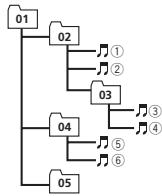
Example of a hierarchy
Level 1 Level 2 Level 3 Level 4
Folder
Compressed
audio file
01 to 05: Folder
number
① to ⑥: Playback
sequence
Disc
Folder selection sequence or other operation may differ depending on the encoding or writing software.
External storage device (USB, SD)
The playback sequence is the same as the recorded sequence in the external storage device (USB, SD).
To specify the playback sequence, the following method is recommended.
1 Create a file name that includes numbers that specify the playback sequence (e.g., 001xxx.mp3 and 099yyy.mp3).
Put those files into a folder.
3 Save the folder that contains the files to the external storage device (USB, SD).
However, depending on the system environment, you may not be able to specify the playback sequence.
Additional Information
For USB portable audio players, the sequence is different and depends on the player.
Copyright and trademark
iTunes
Apple and iTunes are trademarks of Apple Inc., registered in the U.S. and other countries.
MP3
Supply of this product only conveys a license for private, non-commercial use and does not convey a license nor imply any right to use this product in any commercial (i.e. revenue-generating) real time broadcasting (terrestrial, satellite, cable and/or any other media), broadcasting/ streaming via internet, intranets and/or other networks or in other electronic content distribution systems, such as pay-audio or audio-on-demand applications. An independent license for such use is required. For details, please visit http://www.mp3licensing.com.
WMA
Windows Media and the Windows logo are trademarks or registered trademarks of Microsoft Corporation in the United States and/or other countries.
This product includes technology owned by Microsoft Corporation and cannot be used or distributed without a license from Microsoft Licensing, Inc.
SD memory card
SD Logo is a trademark of SD-3C, LLC.
miniSD Logo is a trademark of SD-3C, LLC.
microSD Logo is a trademark of SD-3C, LLC.
SDHC Logo is a trademark of SD-3C, LLC.
iPod & iPhone
iPhone, iPod, iPod classic, iPod nano, and iPod touch are trademarks of Apple Inc., registered in the U.S. and other countries.
"Made for iPod" and "Made for iPhone" mean that an electronic accessory has been designed to connect specifically to iPod or iPhone, respectively, and has been certified by the developer to meet Apple performance standards.
Apple is not responsible for the operation of this device or its compliance with safety and regulatory standards.
Specifications
General
Power source 14.4 V DC (10.8 V to 15.1 V Allowable)
Grounding system Negative type
Maximum current consumption 10.0A
Dimensions (W× H× D) DIN
$$ \begin{array}{c} \text {C h a s s i s . . . . . . . . . . . . . . . . . . . . . . . . . . . . . . . . . . . . . . . . . . . . . . . . . . . . . . . . . . . . . . . . . . . . . . . . . . . . . . . . . . . . . 1 7 8 m m \times 5 0 m m \times 1 6 5 m m} \ \hline \end{array} $$
$$ \text {N o s e} \quad 1 8 8 \mathrm {m m} \times 5 8 \mathrm {m m} \times 1 8 $$
D
$$ \begin{array}{c} \text {C h a s s i s . . . . . . . . . . . . . . . . . . . . . . . . . . . . . . . . . . . . . . . . . . . . . . . . . . . . . . . . . . . . . . . . . . . . . . . . . . . . . . . . . . . 1 7 8 m m \times 5 0 m m \times 1 6 5} \ \text {m m} \end{array} $$
$$ \text {N o s e} \quad 1 7 0 \mathrm {m m} \times 4 6 \mathrm {m m} \times 1 8 $$
Weight 1.16 kg
Audio
Maximum power output ... 50W× 4 70W× 1 / 2 (for subwoofer)
Continuous power output 22 W x 4 (50 Hz to 15,000 Hz, 5% THD, 4 Ω load, both channels driven)
Load impedance 4Ω (4Ω to 8Ω allowable)
Preout maximum output level 4.0 V
Equalizer (5-Band Graphic Equalizer):
Frequency 100/315/1.25k/3.15k/8k Hz
Gain 12 dB
HPF:
Frequency 50/63/80/100/125 Hz
Slope -12 dB/oct
Additional Information
Subwoofer (mono):
Frequency 50/63/80/100/125 Hz
Slope -18 dB/oct
Gain +6 dB to -24 dB
Phase Normal/Reverse
Bass boost:
Gain +12 dB to 0 dB
WMA decoding format .... Ver. 7, 7.1, 8, 9, 10, 11, 12 (2ch audio)
(Windows Media Player)
AAC decoding format ......... MPEG-4 AAC (iTunes encoded only) (m4a)
(Ver. 9.2 and earlier)
WAV signal format ......... Linear PCM & MS ADPCM (Non-compressed)
CD player
System Compact disc audio system
Usable discs Compact disc
Signal-to-noise ratio 94 dB (1 kHz) (IEC-A network)
Number of channels 2 (stereo)
MP3 decoding format ...... MPEG-1 & 2 Audio Layer 3
WMA decoding format .... Ver. 7, 7.1, 8, 9, 10, 11, 12 (2ch audio)
(Windows Media Player)
AAC decoding format ......... MPEG-4 AAC (iTunes encoded only) (m4a)
(Ver. 9.2 and earlier)
WAV signal format ......... Linear PCM & MS ADPCM
(Non-compressed)
USB
USB standard specification
USB 2.0 full speed
Maximum current supply
500mA
USB Class .MSC (Mass Storage Class)
File system FAT12,FAT16,FAT32
MP3 decoding format ...... MPEG-1 & 2 Audio Layer 3
WMA decoding format .... Ver. 7, 7.1, 8, 9, 10, 11, 12 (2ch audio)
(Windows Media Player)
AAC decoding format ...... MPEG-4 AAC (iTunes encoded
only).m4a)
(Ver. 9.2 and earlier)
WAV signal format ......... Linear PCM & MS ADPCM
(Non-compressed)
SD
Compatible physical format
Version 2.00
Maximum memory capacity
32 GB (for SD and SDHC)
File system FAT12,FAT16,FAT32
MP3 decoding format ...... MPEG-1 & 2 Audio Layer 3
FM tuner
Frequency range 87.5 MHz to 108.0 MHz
Usable sensitivity 9 dBF (0.8 μV/75 Ω mono, S/N: 30 dB)
Signal-to-noise ratio 72 dB (IEC-A network)
MWtuner
Frequency range 531 kHz to 1602 kHz (9 kHz)
Usable sensitivity 25 V (S/N: 20 dB)
Signal-to-noise ratio 62 dB (IEC-A network)
LWTuner
Frequency range 153 kHz to 281 kHz
Usable sensitivity 28 V S/N:20 dB
Signal-to-noise ratio 62 dB (IEC-A network)
Note
Specifications and the design are subject to modifications without notice.
Table des matieres
EDUCATE (Éducation), DRAMA (Drame),
CULTURE (Culture), SCIENCE (Science), VARIED
S.RTRV (sound retriever)
S.RTRV (sound retriever)
BASS BOOSTER (accentuation des graves)
USB PNP (Plug-and-Play)
Apple Lossless: incompatible
Livre audio, Podcast: compatible
PRECAUTION
Phase Normale/Inverse
(Windows Media Player)
Format de decodage AAC
Specification standard USB
(Windows Media Player)
Format de decodage AAC
(Windows Media Player)
Format de decodage AAC
MW/LW:OFF-LEVEL1-LEVEL2
USB PNP (plug and play)
Estensione file: .wma
Velocity in bit: da 48 kbps a 320 kbps (CBR), da 48 kbps a 384 kbps (VBR)
Estensione file:.mp3
Apple Lossless: Non compatible
Consumo massimo 10,0 A
Dimensio (L × A × P) DIN
Telaio 178 mm × 50 mm × 165 mm
Pannello anteriore
188mm×58mm×18 mm
94 dB (a 1 kHz) (rete IEC-A)
Ver. 7, 7.1, 8, 9, 10, 11, 12 (2 canali audio)
(Windows Media Player)
(Windows Media Player)
Ver. 7, 7.1, 8, 9, 10, 11, 12 (2 ca
nali audio)
(Windows Media Player)
MW/LW: OFF—LEVEL1—LEVEL2
USB PNP (plug and play)
EsteajustepermitechangiamarfuenteaUSB/USB- ipodautomatically.
1 Pulse M.C, para activar o desactivar Plug and Play.
94 dB (1 kHz) (red IEC-A)
Ver. 7, 7.1, 8, 9, 10, 11, 12
.audio 2 canales)
(Windows Media Player)
USB
Especification de la norma USB
Ver. 7, 7.1, 8, 9, 10, 11, 12
.audio 2 canales)
(Windows Media Player)
Ver. 7, 7.1, 8, 9, 10, 11, 12
.audio 2 canales)
(Windows Media Player)
USB PNP (Plug and play)
Equalizer (5-Band Graphic Equalizer):
Frequenz 100/315/1250/3150/8000 Hz
Verständung ±12dB
HPF:
Frequenz 50/63/80/100/125 Hz
(Windows Media Player)
(Windows Media Player)
(Windows Media Player)
KLASSE 1 LASERPRODUCT
VOORZICHTGONZICHTBARE LASERSTRALING KLASSE 1M. INDEN OPEN NIET RECHSTRECKS BEKIJKEN MET OPTISCHE INSTRUMENTEN.
A LET OP
USB (USB)/USB-iPod (iPod)—SD (SD-geuengkaart)—AUX (AUX)
FM: OFF—LEVEL1—LEVEL2—LEVEL3—LEVEL4
MW/LW: OFF—LEVEL1—LEVEL2
S.RTRV (sound retriever)
SHUFFLE ALL (shuffle all)
S.RTRV (sound retriever)
HPF SETTING (high pass filter aanpassen)
BASS BOOSTER (bass boost)
(Windows Media Player)
OCHOBHOE yCTPOIcTBO 115
JI3A3EPHbI IPOJyKT KJIACC 1
BHMANAME-HEBIMIDMOIAEJPHEOEKTHYNHEME KOTAAC 1M, PNPOTKHPYKBIKUKE3ATPIUEIAAETCA CMOTPETS B JAPL398PHIOYNIPOEKPE3OTNNHMEKTPN60PLD.
Ipeed Naalom 3KcnnyaTaun
UnpaBHeHne daHHbIM yCTpoiCTBOM

BHIMAHNE
He donyckaTne nopaDnHa JxKoCTn Ha daHNoe yctpoNbTO.3To MoKet NOBNeB npaKaHeNe 3NeKTPmckTOM KOpme TOrO, noPaDaNe HJXKOCTN B yctpoNTBO MoKet CTaB pInuHNO erO BbXQda n3 cTPO, nepePBeA nOBRNEHn DbMa.
- PioneerCarStereo-Pass pnpdna3haennIe Icnpb0b8aHnIy ToTbKO Befemnau
Bcerda coxpaarneIypoBeHbPOMKoCTN DOCTaTOHNO HN3KM, YTOb6bln CbIbHbBykM3BHe.
He donnyckaTe BO3dEJIcTBn BIAJXOCTHa m3dENIE.
PnOtKIOHEnHmIpa3peAakymyTTOHNObATEnpaTeNpMaTb npEeBaPHTbHbIXNaCTpoek 6yETcStpe.
PpmeaHne
BbIOnnHHeBtHaTpoKIN BCTynAOT B CIny, daKe ecIn BbITN n3 MeHIO Be3 PoNTBepJdeHHa HtAcPOIKn.
DEmOHCTpaUHOHHbpeXHM

BaxHo
Ecni kpaChbI npBoD (ACC) 3To0r yctPoHCTBa HE noLcoeHMeN K KOHTaTY, o6eCneHUBaOcEy My BKIIIOueHHe/BblKIOUeHHe 3aXmHaHnA, AKKyMynITOPHg Batape ABTOMOBnMAoKet pa3pndtbc.
Haxmijne, YOsbIy BemyuBnITN yumEbnUbYr pROMKOTy.
15
MUTE
Hakmite, Yt6bI nprrnyuHtB 3Byk. Yt6bI OTMEnHtB pinnyU- uHe 3Byka, Hakmite e else pa3.
YnpabLeHne daHbIM yCTpoiCTBOM
BkIIOUeHHe yCTpoIcTBA
1 HAKMITE KHONKY SRC/OFT, YTO6bI BKIOHHTB yCTPOHCTBO.
BbIKIOHHe yCTPOIcTBA
1 HAKMTEH uYeRKHBAETe KHONY SRC/OFF, NOKA yCTOPCTEBO HE bIKHOYNCHTC.
Bb6op nctouHnKa cHnHa
1 Hachimamate KHONKY SRC/OFДЯ ВьборинЗсгдуюшхФунким.
TUNER (TINHEP) CD (BCTPOEHNBI INPOINPBbI BATENB KOMPAKT-DIKCKOB) -USB (USB)/USB-iPod (iPod)-SD (KAPTA naAMTNSD)-AUX (BCONMOIRTHIOOE UCTPOCTBO (AUX))
Perynnpovka rpoMkoCTn
10PoborabaiBme M.C.,TTOb6IOTpyrNIOBpOBtB rPOMKoCTb.

BHIMMAHNE
B L cienx 6eonocchct onctobohno ATOMOnbl, npexde cmCHTb nepehdno naneh
PpmeaHne
Koanda ronyb6/6bnipnoobd 3oro yctpoi
CTBA NOkIIOUeH K pene naHENY npabEnHnA
ABOTMOBINBHO AHTENHO, AHTENHA Na ABTO
MOBIIe BbIDBRAeTcPn BKNIOUYEHN ICTOHNKa CnHnA lTOrO YctPOIcTBa. YtObbl TBAHYb
AHTENHY, BbIKNOUHTe ICTOHNK CnHnA.
3IeMeHTbI MeHIO, 06uNe dJa NaCTpoKn FyHKcN/ ayDnONapaMetPOB/ NaHaJIbHbIX HaCTpoEK/CnNCKOB
Bo3bpaueHne K npdebldyuemy Dnncnneio
B03par K npdeu dyumemy Cnnyck/ kateroprn (K panke/kateroprn Ha ondn yupoben Bhwe)
1 HaxmTe KhoNky /DISP/SCRL.
Bo3BpaT B rIaBHOe MeHIO
Bo3BpT B BepxHn ypoBeH cncKa/kaTeOpM
1 HaxmTe uyepeKnBaaiTe /DISP/SCRL.
Bo3BpaT B INCXOAnHbI peKIM
OTMeHa BbIOda MeHIO HaayabHbIX HAcTpoEK
Bovat B inxodnhpekmn H3 cnckca/kateropm
1 HaxmTe KhoNky BAND/ESC.
Tiohep
Ochobhble onepaunn
Bb6op dnaana30Ha
1 Haximaima越KhoNKy BAND/ESC, noKa hJaCnIe He OTo6pa3ntcR yHKnBly dHaIa3oH (FM1, FM2, FM3 dNar FM iNn MW/LW).
Pунаянachtpoika (nowarobay)
1 HaxmTe M.C. BneBo nInn BnpaBO.
Nonck
1 HaKMTE M.C.B.NBEO IYIN BPNAO IYeepKbIaIe, a 3ATEM OTNCTyTMe.
Bb Mokeite OTMeHHITb HACTPOIKy C noNCKOM, HAKAB M.C. BNPABIO IN NBEBO
KaHaJIbI MoXHO npOnyckatb, HaxMmAB BnPa-BO IIN BNeO bYpeKxMBAa M.C. HAcTpoIka C NOcKOM HaHETcR, KaK ToNko Bb OTNyCTHe M.C.
PpmeaHne
MOxHO BkIIOHHTb ININ BbKIOHHTb FyHKUHO AF (NOMCKA bTepHATBbHX cAtractOT) DAHHOR YoCtpoiCTBa.ДЯ ObIcHoi NaCTpoiKnФyHKUHA FdOJIIXa 6bITb BbIKIOHeA (CMOTPnTe B Ctp. 119).
NcnoB3OBAHneФyHKnI TOnck PI (no ndeHTnKkAToPy npOrpaMbl)
Ecnno ndoxouu cyanu nohnye ydaetcnn kanectbo npemha yyduaetcny, yctpoiCTBO AOBATMnueckn BblOpHNT NOCK dpyrOtn CTAnu co CxDnOH nporpammO.Bo bPema nonca oTo6paKaetcPI seek u npnrnyaaetc38yK.
NcnoIb3ObaHne aBtOMaTHueckoro noncka PI (no ndeHTnΦnKaTopy nporpaMMbl) Iy npeBapNTelbHO hAcTpoEHhbIX CTaHcN
Ecni He ydaTcBb3bIaTb npEBaPntbHo HacTpoehHbe CTahuHn, yctPoIcTBo MOxHO HaCTpOThBa HbINOpHeHne NOnsCa PI (no IeHTNfKAtOpTy npOrpAmMb) BOpeM Bb3Oba npEBaPntbHbO nHaCtpoKn.
- No ymouhanmo fkyhkiyab ATOMATNUeCKO NOBCKA PI (no iDeHTNfMkATOpY npOrpAMMb) BbIKIOUeHa.Cm. pasdE AUTO PI (aTOMATNUeCKM NOCK NO iDeHTNfMkATOpY npOrpAMMb)Ha cTp. 124.
YnpabLeHne daHbIM yCTpoiCTBOM
CoxpaHene N BbI3OB IV3 NaMaTn padnoctaunn dnn KaKdoRo dnana30Ha
IcnoIb3OBAHne KHOIOK npedBapnteHbHnHaCTpoIKn
1 Ttob6bI coxpaHnTB b namrN HUkHyo pa- daNOCTaHnO, hAKMTE Ody N3 KHONOK npedBaPHTbHOH NaCtpoKn (c 1 no 6) uYepKNaBteEe, noka HOMe npedBaPHTbHOH NaCTPOKn He npekpATNT MiraTb.
2ДЯьБИбopaНУХКоHр радиocTeанMuнHAKMITE OHyD m3 KONOpIпeДВaBpHTeNbHOr NaHCTOKN (OT 1do6).
CoxpaheHHyIO qaTOTy MOxHO TAOKE Bb3BabhaxatmE M.C.BBEXN HBN3 B pexme DcIINPEAqTOBy.
IcnoIb3OBAHne 3KpaHa npedBapnteJbHOH NaCTpoIKN
1 HaxMMTE KhoNky Q, YTO6bblB3BaTb 3KpAn PpeDbapnteHbHOHaCTpoKn.
2 C homoubo M.C. coxapanite Bbipahnyo cactoy T B amayr T ycpoTcbA.
LobovapbaaIe nIy bIb6pa dpyrTOro Homepa npedBapnIeBHOH aTcpoKu. YTo6bl coxpaHntb, HakMnTe u ydepKBaITae.
3 C nOmoBIO M.C. BbIeBPeHTe HxHxHyo pa-dnOCTaHNo.
NEWS (HOBOCT), AFFAIRS (TEKUYAAN INHOPMAZA), INFO (INHOPMAZIA), SPORT (cnpot), WEATHER (noTORA), FINANCE (FHANHCB)
POPULAR
POP MUS (NON-My3bka),ROCK MUS (POK-My3bka), EASY MUS (IeRkA My3bka),OTH MUS (PPOuchy My3bkanlNsHe XaHbI),JAZX (Dka3), COUNTRY (KaHTpr),NAT MUS (NaIOHOAbnHaMy3bka), OLDIES (OoONaT a KOnJIeku4), FOLK MUS (HapOJaMy3bka)
CLASSICS
L. CLASS (NerKRAJI KIAOCHNECKA MY3bIKA),CLASS (KNIACNCHEKA MY3bIKA)
OTHERS
EDUCATE (obpa3oBateBbIe nporpAMMbI), DRAMA (noCTaHOBK),CULTURE (kyIbTyPA), SCIENCE (Hayka), VARIOV (pa3HoE), CHILDREN (deTcKne nporpAMMbI),SOCIAL (coUaPbHBHe BO- npocb),RELIGION (peINrHIO3bIe nporpAMMbI), PHONE IN (TOk-Woy), TOURING (nyTeueCTBIA), LEISURE (OTbIx), DOCUMENT (doKymentaIbNb Hbe nporpAMMbI)
YnpabLeHne daHbIM ycTpoCTBOM
PacunpeHbIe yHKnC n HcNoJIb3OBAHNEM CneuaJIbHbIX KHOJOK
PnneM DopoxhNbIX CBOOK
HeaBicnMoO TBy6paHnHO NCTOnHnKa CnHana DOPOxHHe BcDnK MoNHO NIOyuATb ATOBmATnuecknC nOMoBzO fynkunT A (OxMnAne doPOxh HbX CBODOK).
1 HacrpoTe ToHep Ha TP-ctaHnIO IINI CTaHnIO paacsipeHHo CTeI BeuaHnE, nepeAdoIyO npodoxbHe bCdoKnTP.
2 Haxkmtte TA/NEWS, YTObIb BKNIOHITb INBbIKIOHITb PEXMIM OKINDAHIN DOPOKHbIX CBODOK.
3 B hauane npnemA doPoxKHO cBDOxN OtperyLmpyIte rpmKOCTb TA (doPoxHbIX cBDOkO) c nomoubIO peryTJrTOPA M.C. HOBAT ycaHOBIIeHHAR pOMKoTb COXpAHETcB NAMRTN I bEyTe Bb3bBAITcB dIra NoCneDyIOUIMs DOPOXHbIX CBODOK.
4ДЯгOTМЕнь ПОСNYПИБАНОСВОДКИ NAKMЛTe KONКУ TA/NEWS BO ВРЕМ РИЕМА CBOДКI. TJOHEP BPERTCA K INCXOДHOMY MCTOCHNHY KINHA, HO OCTAHETCB POKIME OXJDAHNY DO NOBTOPOHRO HANOKATRA KONKHI NA/NEWS.
FM: OFF—LEVEL1—LEVEL2—LEVEL3—LEVEL4
MW/LW: OFF—LEVEL1—LEVEL2
Hactpoika camoro BbICOKO ypOBHnIOBNOBHT OcUyECTBNTB rPNEM TOJIbKO CTaHNCIM Ccamblm CINbHM CINTHANALOM, aMeHbIeHNHE ypOBHn HACTPOKNI PO3BOPTN pRINHMATb CTaHCIMC600ee cna6bIM CINTHANOL.
3 HaxMnTe M.C., TTo6bl NoTBePdntb Bb6Op.
PTY SEARCH (Bb6op Tnna nporpaMMbl)
MoHxo HACTOPbTaBa HA nApOthacTnBcHIO cNo MoTuO hNtOopMaTHy PTY (TuHa npOrpAmmb).
3 HaxmTe M.C., yTo6bI HaaTaB NcK.
UyctoIeTbO NaHmHaTe NOnck pAdmoCTaHnM, nepeDaIOuXh DanHHN TnP nPorpAMM. PnI o6- hApuyKeHNn pAdmoCTaHnM Ha DcNpEe bEydet nok3aHaNo H3BaHne DAnHO NporpAMMbI.
INHOPMAIpy PTY(1DcHTNpKHaUNOHbI KOJ Tmna nporpAmMbI) npBvBeNa B cJeDuYo-um p43eNe. C.M. ctr. 118.
IrporpamMbI HeKOTOpbIX paIIOCTaHmI MOYr OTNIuHTbCt O nprrpamM, yka3aHbIX b nepeDaabaEMOM kode PTY.
EcnHn Onda n3 staHnn He nepeadaert nporpammbly HxhOno Tnna, To na HcNtIee B Teuehe NPiMePHO DByx CekyHd Bydet Nkao3AH
[1] HANKMTE M.C., TOTb6I BKNIOHHT bN IIN BKNIOHHT bNYKHIIOU HOBOCTNI.
CD/CD-R/CD-RW u BheuHne 3aOpMHaUoHe yCTpoiCTBa (USB, SD)
OCHOBhIe Onpaun
Bocnpon3BeDeHne CD/CD-R/CD-RW
1 CstabeTBe DNCK B UeNJIb 4aRpy3Ku DNCKA MAPKIOBAPNOBCTOPOHONB BVPX.
I3BneueHne Dncka CD/CD-R/RD-RW
1 HaxmteA(n3BneueHne).
Bocnns3BvDHeHcKOMN3uIHa 3aONMHaOio- 1eum TcrpoiTe USB
1 Otkpoite KpbIshky pazb6Ma USB n odknIOuHte 3anOMHaJooee yctpoCTBO USB c noMooubO USB-Ka6BnE.
OctaHOBKa BCNOpRzBdEneMaФaIIOB ha3ANO mHaONUeM yCToPcIbTe USB
3JAMOHNIAHIOYECTPOICTBOUSBMOKHOOTCOEDHNHTBILIO60MOMET.
Bocnpon3BeDHeN KOMnOzHmC kapTbI namrTn SD
1 CHIMITE nepeDnIO nHaHeB.
BCTABTe kApTu nAMrT S D B CNOTIa KApTbI nAMrTSD.
BctaBnTne Kapry KOHTAkhTOH NOBepxHOCTbO BHN3, 3aTeM HAKMNTE Do UeTHKa nΦHcAoun b CNOTe.
3 YctaHOBInTe nepeNDIOI naHb Ha MeCTO.
4]HaxMMTE KONKY SRC/OFF, YTO6bl BbVbPabT 5D KB ACHCTBE ICTOHNHKI CIRHANA.
HaHHeTcBocPon3BeDeneHne.
Octahobka Bocnpno3BedeNna faHOB na Kapte narnyTD
1 CHIMNTe nepeDnIO nHaHeNb.
[2] HauKMHTe Na Kapty NamyTn SD du cIeNtKa. Kapty NamyTn SD bduTe n3CnToA.
3 N3BNeKIne KaPTy namrtn SD.
4 YctaHOBInTe nepeNDIO naneIb Ha MeCTO.
Bb6op napiK
1 HaKmTe M.C. BBepx NIN Bn3.
Bb6opdoopokn
1 HaXMMTe M.C. BnEBo nIN BnpaBO.
Yckopenhna nepemOTka BpeepiHa3a
1 HauKMITE M.C.BNEO HNIN BNPABO uJdepKBNAE.
Bo3BpaT K KopHeBoi nanke
1 HaxmTe uydepKuBaTKeHONky BAND/ESC.
PereKhoNHeMe MEkdy CKatbIMy ayDIOHaJIaIaMn mNDCKOM CD-DA
1 HaxmTe KhoNky BAND/ESC.
PpmeaHn
- PnB OBCPON3BVeDhen CxAbyx ayDIOcFaiJIOB 3ByK HE BOCPON3BODITC8, ECNI BKIOHeHa yCKOpEHNa IpePEoMTKa BpePeIe NIIH H3aI.
EcnlaanomnHauoee ytroepIOBTO USBE nCnObn3yETc,OTcOeINHITRe.
OTo6paXeHne TeKCTOBoHnHΦopMaun
Bb6Op TeKCTOBHnHOpMaun
1 HaKmTe KHOIky DISP/SCRL.
PpOKpyKa TEKCTOBH INHOPMaUN BHeBO
1 HaxmTe n ydepkmbaTe /DISP/SCRL
PpmeaHn
B 3aBnICMOCTN OBerpcin iTunes, nCIOIb- 3OBOHNOI DAN 3aNCS IaIIIOB MP3 Ha DINCK,IINOT TmNA MednaIaIaJIaTEKTOBAI INHOPMAIINHEOBMECTIMOROΦOPMATA, 3aNcIaHHaB B aayIOaIae, MoKET OTo6paXkTbCS HKeOPKeTHO.
Bo3MOxHOCtB BHeCENH I3MHeHn B TEKCTBOYI INΦOpMaio H2ABCNT OT TnHa HOCTeJIa.
UnpaBHeHne daHbIM yCTpoiCTBOM
Bb6op H Bocpn3BepeHne faoJb/DopoxkeN3 cnHcKa
1 Haxmte KhoIky Q, TTo6bl OTo6pa3ntb cnCOK Ha3BaHnФaJIOB/DopOKeK.
2 C nomoubo M.C. BuiBepTe HyXhOe NmJ faJIaN (nINn nAnK).
Bb6op h3BaHnIa qaiIa nIin panKIn
1 NOBOPaHbAaTe M.C.
Bocnpn3BeDHeHne
BüBePente faJIH INI DOpOKKy HnAaKMITE M. C.
PnOcMOTr CNiCKA Na3BaBaanФaIIOB (panIOB) B BbIpaBNHnPaJIe
1 Bb6epnte npky n HaxMMte M.C.
Bocnpo3B6eDnHe KMOOn3uIcN I3 Bb5bpaHNoi napK
1 BbEpBeHne nanky, zatEm HaxKMITE u YdepKHNBAITE M.C.
PacunpeHHbIe yHKcHn C nIOJIb3OBAHNEM CneuaJIbHbIX KHOJOK
Bb6p dianaa3no nobtroporho Bocnpn3eBHeNII
HakimaiyeKhoNky6/→nPaBbIbOpaI3 cneDyuOuIXsФyHKU:CD/CD-R/CD-RW
DISC-IOBTOPHOE BCNOPOIN3BEDENHE BCEX DOPOKEXE
- TRACK - ПовторTekушей дорожки
FOLDER-ПовторTekушпапки
BHeuHHee 3aOpMNHaIOoee yctpOietBO (USB, SD)
ALL-IOBTOPCbexpaaiIOB
- TRACK - ПовторTekуцero Фальna
FOLDER-ПовторTekушпапки
Bocponn3BdEneHIOPOKbE B npO3BOrbHNo nOcneDobateNbHOCT
1 HAKMITE KHONKY 5/2X, TTO6b BYKNOHTB IIN BYKIOHITb FYHKNUO BOCNPOHM3BEDEHNBAIPOIM3BOHNI NOCNEBOBATHEHOCT.
DAnHARy FuNkUa N03BONET BOCPON3BODINb DOpOKK8 B PNO3BOHNo NocNoDBATenBHO CTn BnpEeXa Bb6pAnHO Dmana3OHa NOBTOPHORO BOCPN0BdEHNH.
PpnoocTahOBka BOCpON3BeDHeHn
1 HaxMITE KHONY 2/PAUSE, Tc0b6 BKIOHNTB naay Iiny BO30BHOTB BCPOPN3BEDEHIE.
Unyuene HauceCTBa 38yka cKaTbX ayDINOpaJIOB N BOCCTaHOBEne NOHOTbY 38yAHHNIA (TexHONrIne pNeo6ba3OBAHHN 38yKa)
1 HaxkImaTe KhONky 1/S.Rtrv nIy bIb6pa h3 cIeIyOu7yФkhNyr
OFF(BbIKI)-1-2
HactnoiKa 1 3ΦeKTVBHa dianpaioB c H3KnO CTENbE bCKaTHa, a HactnoiKa 2 - dian paioB c BcKoB CTENbE bCKaTHa.
YnpabLeHne daHbIM ycTpoiCTBOM
HactpoikaФункин
1 HaKMMTE M.C., YTO6bI OTKpbITr rnaBHOE MEHO.
2 IIObopaunBaIte M.C.ДЯnpokpyTkn nyHKTOB MeHIO; HAKMNTE FUNCTION, YTO6bl BbIOpBt.
3ДЯь bIbOpaФyHKmnoNobOpaHBaIte M.C.
3aTeM BbIOpHNTe CnEduOuIe DeIeTBnA, YTObI NOITBepDHTb HAcTPOKy.
REPEAT (noBTOHoe BOCPOn3BeDHe)
Bb6op dianana0ha noBtropHoro 8ocpnOn3BeHnIa
Hakimaiye KhoNky 6/1,Дяп Вьбори ИЗ cIeIyduOxHФуКн'd.
- ONE - NOBTOPEKUeien KOMN03n
ALL-TOBTOP BCEX KOMN03UIN B BV-6panHOnCnIcK
Bocnpo3BedeHne Bcex kOMno3nuiB npo03-BOIbHOI NOcpeNoDBaTeBbHOCTn (nepeMeaTb BCE)
1 HAKMMITE 5/2X, YTO6bI BKIOHHTb FyHNKIOB BOCPON3BEdENHBAPOIN3BOHNOH NOCNEBOBATENBOCTN.
- Ecnm Bb6bnpexMn ynpabEnHn iPod/APP, BKNUQaETcpeXMn BocnpOn3BedeHn B npOn3BONHION0CNEI0D8ATENHOCTH.
Пистанова BOCNPOI3BEdENHIA HaxmITE KHOJNY 2/PAUSE,TObIb BKNIOHTb pany3u INBO36OBHTBnBocPON3BEdENHe.
Bocpn03BeDeHne KOMn03nMn B xHaPe BOCpnp03BODmO B dAnHHb MOMENT KCMn03nMn MoKHO Bocpn03BDoNTb KOMn03nMn Nc cIeDyIOxuX CNICOB.
CnCKoB AILMOB APTRCTA, KOMO3N3U4 KOTOPOR BOCPON3BODINTC B DAHHI MOHMENT
CINCKOMKOMNIZHNI,OTOHCAUHXXKBCOPON3-BODMOHBMADHHI BMOHMT ABN5BOY
CnIOK OAIb6MOB,OTOHcIuXcK BCOINPO3- BODIMOM BYaHHbI MOMEHT My3bIKaJIbHOMy XaHpy
1 HauKMITE u YdEKPbBAIe TcHONKy M.C.ДЯpeKlIOUeHnB I pKeIM B cOpN03BeDENHnO KATEROPIN.
REPEAT (noBtophoe Bocnpoun3BeJeHne)
IДУЮТБОРБЕЦИЙ YUCTAHOBOVORO MEHNO HA- KHMATE M.C.
2ПовораньaiteM.C.,HTO6bIb6paTbДиANA-30NOBTOHOROBOCIPONBDEHIN.
ПОвдБИУнФОРМАЦИОНСТROHOKA CM.
ВраздениБыбOPДИANAZAOHONOBTOHROBOCSPONBDEHINHAcTp.121.
3 HaxmTe M.C.,yTo6bI noTbePdntB bIbOp.
SHUFFLE (nepemeeaTb)
3 HaxmTe M.C., YTo6bI NOITBepNTb BbIbOp.
UnpabLeHne daHHbIM yCTpoIcTBOM
S.RTRV (sound retriever, texhoolnna npeo6pa3-OBAHNA 3Byka)
CLOCK SET (ycTaHOBKa yacOB)
JIMI OTOOBAPKENHUYCTAHBOVCHORO MEHO HA
2 HaximmaTe M.C., YTOb6y BbIb6paTb CeMENT dCINnne JAcob, KOTOpBb IBy XOTIne yCTaHOBtB. TaCb--MmHyTb
3ПовачinasеМ.C.,чтбы оретулковая bvema.
CLOCK (BKNIOUHeHne/BbIKIOUHeHne YacOB)
1 HAKMITE M.C.,TO6bI BYKIOCHIT INH BYKIOCHIT DNICNPEI YACOB.
FM STEP (waar hactpoynB FM-dunaana30ne)
Obchyu wag hactpoiku B FM-Diannao3oHe, nCnoIbIyEmBnHn pI aNtPcKe C noNcKOM, coCTaBnEeR 50 kTg. Pnpr BkUPOChENy fHykUz AF nnTA WJ aag hactpoiku ABtoMTaMueckn MeHReTaCnHa 100 kTg. Pnpr BkUPOChENhOy fHykUz AF npdeNoHTyTeBHO yctaHOBbIt wag hactpoiku 50 kTg.
JIMI OTOOBAPKENH YACTAHOBOCHORO MEHO HA
2Поверн'tеМ.C.,чобьblбьрabtшларсториВ FM-dиалэоhe.100KHz(100kU)-50KHz(50kTg)
3 HaxmTe M.C., YTo6bI NoTBePdntBb6Op.
AUTO PI (aBtOMaTInueckn PONCK PNO NDeHTINpK Katopy npOrpaMMbl)
UCTPOBTO MOKET ABOTMATNUHECKNI KCAITbI DUYI TO CTAHNIO C TAKOI KE IPOGRAMMOI DAJE BO BVPMA B3OBA PINEBADPTBHOH HACTPOINJ.
1 HAKMITE M.C., YTO6bI BKIOHHTB JINI BYIKHOITb ABOTMATHECKN NOCK N DEENTHFKaTOpY InpORpAMMbI.
AUX (BCNOMORAteNbHbBxOd)
AKTINBUPyIe 3Tu HAcTPOkU pNIOJKNIOUeHNNK DAHNOMOY UcTPOiCTBy BCNOMOrATEJIbHO TcPOrCTBA.
HAKMITE M.C., TNObSI BKNIOHTB INN BIKHOIOTB BYHKLIIOAUX.
USB PNP (plug and play)
37a hactoPoiKa No3B0IaTe ABOTAMUHeCKNe nepeKIIIOHbTbIbpaHHb NcTOHnK CINHa Na USB/USB-iPod.
Hakmite M.C.M.,tOb6bl BIKIOHTB HIN BYIKIOHTBpyHKMIIO plug and PI
ON-ECNn NOKINKOHOENZAMONHAIOIOOEy cTPOIcTBU/ISPo,TOBaB3AUNCIMOCNTO TmTHaYcTPOICTBA,INTOCHYNCKINTHAIA BAOTMueckNIpeKIOHAcTeCAHBSAUBPb/ISPpoIpyzACKeDBVIRATEJI.PrnpOTCOeDNHINH yctPOIcTBU/ISPocTOHNKcIHNABa bIKNOAETCA.
OFF-EcnnIOcknIOHeO3aONMnaHOoeeyycTPOBTO USB/iPod,IcTOCHNIK CmHnA He nepeKIOuaeTcHa USB/USB-iPodabTOMATNUHEKn. Heo6xMDmO BpyHyNo Bb6pTa USB/USB-iPod
SW CONTROL (HactpoKa BbIXoJa 3aDHeRo KaHa- nI caBbypepa)
UnpabLeHne daHHbIM yCTpoIcTBOM
BbIXoD 3aJHero KAHANA 3Toro yCtpoiCTBa (BbIXoD naPBOOda 3aJHero rPOMKOFOBOPITEN) MOXHO hONLOB30AB Ta nOPOKIIQEHNHA WIPOKONIOcHOro rPOMKOFBOPITEN (FUL) nIN cAbSyphi (SW). PnB bIbOpe dJa NactpOnk BbIXoDA 3aJHero KAHANA 3aJHeHNs SW,MOxHO nOPOKIIQHHTb PBOODA 3aJHero rPOMKOFOBOPITEN HEnOpCEdCTBeHHo K CaSBCype6 Be3 NcPNOB3OBAHNs BCNOmoratEblHO YcNlTIPTen.
Пу мolyманно REAR SP Nahtropoeh NaqdknoHeHne 3aHero shpokonolochoro rpoMKorobopitnel (FUL).
JITAOIOB6PbAKENHUYCTAHOBOCHORMOHEHO HAKMATEM.C.
2ДЯИЗМЕнEHЯpeKIMBAbXOdaNoBOpaHnBaTteM.C.,ДЯВыБОра-нakmITE. REAR SP:FUL-SW
3 HaxmTe M.C., YTo6bI noTBePmTb Bb6Op.
DEMO (HACTPOKIA DEMOHCTPAUHOHORO pekma)
1 HaxKMITE M.C., 1NTb6bl KINIOHHTB INH BIKHOI-4HTB DEMOHTBAPCHOHNBEK PHEKM.
EVER SCRL (Hactpoikapekma npokpyTK)
Ecni BkHIOHTb FyHKMIIO NOCTORHHNO pOKpyT KTO TKeCTOBAR INHOFPMAUZ 6JET NOCSTHO NpOKpyNHBaTcBa HAcINCnEE.OTKIIHOHTe3OT pEXMIM DAREIINHOBPEMEHNO NPOKpyTK 3ToI INHOFPMAUZ
1 HAKIMATME M.C., YTOGBI BKIOKHTI INI BIL KIOHKTI BYFHKUINO NOCTHOHHN NPOPKRTNY.
TITLE (BbI6Op Ra3bika)
3T0 yctpoTbMO MOKET OTO6pKaBt 3aQIOBKN, co3dAHHbHe Na OHOM I EBPONeCKnX INI H apyCCKM 3aBlke.
HaNDCK,coepkaaun cXbtaBte ayduofoaaibl, MoKET sbItaIanCahA TEKCTOBAA HINOPOMAua, HApIMMeP,Ha3BaHIne KOMPOUNU,MMNcNOJHITTEy INI TEKCTOBB KOMMEHTAPR.
- Pnri HECOEMCTMCHOTH ACTPQEOB BCTPOEHNO I BVb6pAHHOI R3aIKBa BO3MOKNHb NCKAKeHN4 npri BbBODE TEKCTOBX BCOOSEHIN.
- Hekontopbte CIMBOBly MORYT OTObpaKaTaBcHnepaBnIbNo.
1Дагу OTбразкении уетаановоно мени нажmates M.C.
2 プоворашилье M.C. Дял bьбора настюк. EURO (Еронецкий)—RUSSIA (pyсckn)
3 HaxmTe M.C.,yTo6bI noTBePnTb Bb6Op.
DpyrneФyHKuH
NcnoIb3OBAHne dOnoJIHnTeIbHOrO nCTOuHnka CnHana (AUX)
1 Bctabte MHHWtEkep Ctepeoka6JIa B rH3doAUX.
2 Hakmite KhoNY SRC/Off,HTo6bIb6bPa8AUXBAKCTEeTocHnHaCmRHnA.
PpmeaHne
Hebo3MoXHO Bb6paTb AUX,ecnHne BkJUHye HbCNOMoratoBnBaHacToPka. IopdoBoHyo HnΦopMaunO cm.BaIadepne AUX (BCNOMoratoTeBbHbBxQd)Ha ctp.124.
YctaHOBka
CoeinnHeHn

BaxHo
- Pnju yctahOBke daHHoro yctpOiCTBa B ABOtOMoBHe, B K TOPOKOM OTCYCTBYET nOIOXeHMe KNoHua 3azKmraHNA ACC,KpaCbH kAbSeB NdoKHe 6bItb PoKnIOHKe H KJIeMKe, KToPoaop AnpeDJIeRat PaOohee nOIOXeHne KNOHa 3AzKmraHNa; B nPoTINBOM cJyuae MoKTe BO3HNkHyb YteKA TOKA aKKyMylrTopHOI bATapeN.

PonokxeHne ACC

Положенews ACCOTCYTBETY
3KcNpyataaHnDaHHoro yctpoCTBaBy CyCNOBAX,OTNIuHbIX OT ONICAHhIX HnHex,MOXET npINBEcTn KNojKApHy NnIe c6oIO B paOte yc TPOJcTBa.
TAPHONCTBHe CpeCTBa C 12-BOJIbTOBbIM AKKUMyJITOPOM Ia3eMJIeHNEM OTPIaTeIbHO NOIIOCA.
ΓροΜΟκόβροπει Μην 50 (Bbθαύναι Mòu- hónt) ) n ο ὄ 4 Φ 8 Ωm (Cɒŋpθνβεnhēne).
Bo n36ZeJAHne KOPOTKORO 3aMbKHAnH, nepeRbeA Hn HeNCnPABHOCTe O6aTaeBtHoCobNIOJADTE cNeYIOUcE YK3AaHN.
- Pénéz yctaHOBK OTOECDINHITE OTRIATAE HUYO KNEEMMY AKGYMNTRTORA.
3aKpEnIte npoOda npn NOMOUI 3axIMOB ININIOBNIUMHOINNEHb.IJNA3aUHTb npOoDkN 3aIN3OINpyTe npODA B MeCTAX INCOPRINKOCBOHEMNC METAIINECKMN DE-TALMM.
—Pa3MeCTIe BCE Ka6eINu B ydaENHHOT NOBWKbIX DetaneH, TAKHX KAK pHaar nepeKJIIOUeHnpepeaHn HappaBIAIOUne CNDHn.
—Pazmechtte BCE ka6eBn BYdaneHNOT HApBaHOuIXxCdTeaNei, TaKxN KAK peWetKa oObrpeBentn.
-
3anpeaetca nokknoayt bxeitb npobod mocnner k akyymyarotpoh 6atapee aTOmBnIy Uepe3 cbepeHoe OBePcTne BOTce Ke Dbrateta.
HIOINIPYTE KOHNBLC XE He NOIcOeIDENHEH HXKABEIEHOIJIIOIIOIOHNOHNIHTO.
He ykopauHbaIe Ka6eni.
Hnkorga He cpeaaeIe 3oiau co shypara nHTAHNA daHHORO yCTPOIcTBa C cIeBIO noDAH NITAHNA H aDpyOe yCTPOIcTBo. DOnyctmAR Hapy3ka Ka6bI NO TKO ORAPHueHa.
Icnobnjyte npredoxparrntb c yka3aHbIMn napametprAm.
3- 2aPaeuaeeacn Taepmaoy 3a3eammtbT optnaIeBnH bIyBQd prrKMOROBOPTRn.
3aepaaetc C8BbBtB MBeMeTe OTPaTeNbIe KaEBn HeckOJIbKx rPmKOrOBOpuTene. -
PnB KlnIOeHmN pNTAHIN yCtPOCTBA uynpaBLOIaO CINHAN NOAETCA Tpe3 CHe6BeIb nPoBD, PNOKNIOTHE 3OT nPoBDOK KJLEMME NytbTa YnpabLNHm BHeUHrero yCInTEnMa MOUHOCTN IIN KJLEMME pene yPnABLeHNa aHTENHb C 3NeKTPoPNBOMD (MaKc. 300 MA 12 B NoCTOHHORTO Ka). EcnI ABTOMOBIL ObOpoyBOAH BCTPOEHHO B OKOHHO CTKEIIO AHENTHO, NOcDOHNITE npOBOD K JLEMME NITAHIN yCInTEnTe aHTENHb.
3a9peuaetcnaoocdinaHb cnHe-6bIb kabelb KKneMME nTaanHBAWEHrero ycnntenMaOuHcNt. TaekaeTcnaoocdeHb daHbI npBOD K KneMMe NITAHNA aHTeHNbI c 3JeKToPnpBODom.B npOTNBOM CNyUae MoKET Bo3NHkyTb YteKa TOKA aKKymJIoTOpHo bTaapeINnHa HNeCnpBaHOCTb.
YctaHOBka
- CephnykabelbraIETc3a3emnlozIM. 3a3emnlozIe KabeIN daHoroVcTpoCTBaN i dpynnx yctpoBCTOB (oc6oBeHHO cYptoCTB, npdeHaahueHHbX IJNAKcPnuTatauN pni 60bluxn ToKAX, TaNX kAK YcunHteB MOUHOCHT) DOJKNbI MOHTIPOBATcO TdEJIbHO. B nptnbHOM cnyae IN CNyauHoe OTcoeHNHeHne MoKet npInBeCt N Knoxapy IN IN HeNCnPABHOCTN.
DaHHoe yCTpOcTBO
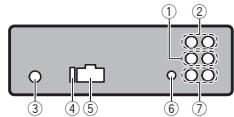
① IpepeHnBbIXoD
② BbIXoJ 3aHrero KaHaHa
③ THe3do aHTeHHbl
④ Плавский п体现在хрантел (10 A)
⑤ Φe3do shypa nHTaHn
6Bxod npOBoHDoro npyIbTa nCTaHnUHOHOrO nypaBEnHnCyuxNIT dnoPQKnIOeHnnpOBoHDoro aadantepa npyIbTa nCTaHnUHOHOrO ynpaBEnHn (npMo6pTaetcOndEhHo).
⑦ Bbixoanca6Byepa
Unyp nntanna
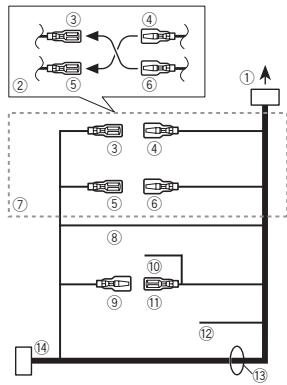
① Krhe3dy shhypa nTaHn
② B3ABNCMOCNTOTTINATABOAMOIBIANyHKUNI ③ N ⑤ MOYrTOTNHAAcBcR.B ① OTCMcUYae CNEUYETNOKNCHUHTB ④ K ⑤ N ⑥ K ③
③ KentbI
P3eBpHbN pa3Bem (mIIN pa3bE mD oOIOHnTehBOHO 06oDyOBaHn)
④ KeIbI
YCHINTEJBMOUHOCTN (PnHO6peTaETcOtJeBHO)
UcnoNsb3yIteDaHHy CXeMy NpOCoEINHnHn npN CNOJb3OBAHHN DOnJIHInTeBHorO yCUNITERMA MOHOCN.
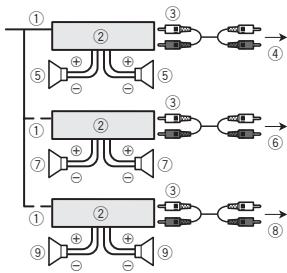
① PnybT DnCTAHUHOHORO UynpABNEHNA CNTeMoI PndcoedHHTe CnHN/6enbl Ka6enbl.
2UcnHITbMoUHOCTn(PINO6pTaETcTcOT- DnelHo)
(Ⅲ) Φιηκουνιτες Κόμοικυ καδεῦην RCA (προύβεραστοιθέ οὐθέλην)
④ KbIxOdy3aHHeroKaHaHa
⑤ 3aDnH rPOMKOrOBOpuTEnb
YctaHOBka
⑥ K napeHnemy BbIXOyD
⑦Передниурмогорпель
⑧ K BbIXOу KaHana ca6Bypepa
Ca6Bypep
YCTaHOBKa

BaxHo
- Ptejek OOKAHATIELNBY yCTABOKOBI npoBepBe TBE COEQDHNEHNA I CTMEB.
He mnoIb3yIte Detamn He paapeeHnhIbe pOIM3BODITENEM K IcNOIb3OBAHNIO, POCKOLbky 3TO MOKET CTaTb PnUHHOH HcNpABHOCTei. - YTOCHNTE y dIJIePA KOMNaHIN, Tpe6yET IIN CTAHOBKA CBEPENH NOr TBEPCTNI INN BHECEHNA INbIX IN3MeHENB KOHCTPyKlIO ABTOMOHIN.
He yctahabnbaite daaHoe ycIpoCTBO MeCTax, rde OHO MOxET: nomeuatb ynpaBneHIO abTOMoBNeM. TpaBmPoBaTb naaccAmpa npri BHe3AnHOJ octAHOBKe ABTOMOBnIA.
Ipeperpeb noynpobodnikofo naepe npinbeet K ergo blyxoody m3 ctpo. Pa3meTte BCE ka6ebm B ydaeneHm ot harpebaioxmcjdeTanei, taknx Ka kpeuTeKa oborpbebentae.
OTIMMANBHLNBEYRCCTA YCTAHOBKA yCTPOICTBAIOYTNOMMeEH60°

Передим/Задим Крелене CTандгет DIN
Длдангоги Изdeniya рпсусмтөнв 603-MOKHOCTb yctaHOBc n ComOшью NepeДэгero UNIДЗАгОН KRPENJIБЕ.
PnIyCTAHOBKe IcNpOJIb3yIeTeTALNI,IMEO-UINEEeB BnpOJaXe.
IpeepHee KpEnIeHne cTaHapTa DIN
1 BCTABTE MOHTAXHYO 6OeMyB nepeDHHIO NAnHb.
PnY cTahOBKe B HeDcTOAToHIO Tpy6KOM
RHe3e NcNpIb3yIte MoTAKHyIO bOmyI, BXO
dA yBOM K BOMNKT NoCTABKU yCTPOJCTBa. Pn
HaNCHN DoCTAHO RnoCPTaHCTBa 3a YC
TPOJCTBOM pIMMeHReTc MOHTaxHna O6OIma,
NoCTABNEMAR BMECT C ABTOMoBNIEM.
2 3akpenitte 6ooyu, nooorhyb c no-moibbo OTBepTKMetaJIHueckne Ra3bIKN (90°).
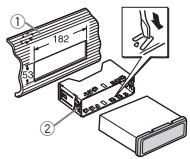
2 3aTnHIne no DaBb BuHTa c KaKdoi CtoPoHbI.
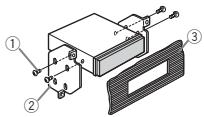
① Camohape3aoun BnHT (5MM×8MM)
② MoHTaXHa paMaKa
③ Pπb6opnnaHηνηκοHcŋb
Демонох усточь
1 CHHMMTe paMKy.
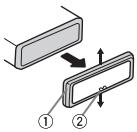
①ДeКОРаТИВHAЯ рамka
② 3blyOK
CHETNE pepehdN aHenei oBneYaet DoCTyN k DEKOPARTHOB PAMek.
- PnI yctahOBKe DEKOPATMBH OpAMK STOPOA pAMKc C3bYHKOM DJIJKHA 6bTb HaprabHeBA BHN3.
2 BctabIe pnnarmaebie kctpaktobc I obexn CTOPON yuctoJCTBA do uenka.
3 BtIyTHaNte yCTpoINCTBO M3 pH6OpHNOI naEHNI ABTOMObINIA.
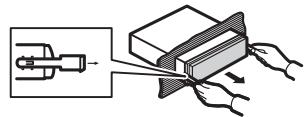
ChyTne u yctaHOBka nepednei naHeJI
B centa zaaattby ot kpaenepednoo naehnbo MOKHO CHrTb.
HaxMMTE H KONKY CHRTNY PAHENI IN NOTAHITE PAHENI BEBPX AND HE6B.
Tcbobl nonyuHTb dononHnTeBHyu nHΦopMa- uio, cm. ChTne nepedH neHEn BJeHx 3a- uHTb OT KpaXn YCTahOBKa nepedH naHen Na ctp.117.
DOnonHnTeIbHa nHΦopMaun
YctpaHHeHne HEnCnpaBHOCTe
Прнзнak
PpUHa
ДeястVEN
Ducnnne aB-
B TeueHne 30
TOMATNueCKIN
CEkyHNe
BO3Bpauaet
6bINO BInOnHe
CBAHCXO-
HO HNKAKMX
HbI pEXM.
onepaui.
BbInOnHnTe one-
paunio c nayana.
Dnana3OH no
B 3aBcHMOCTN
BTOPHORO
OTBbIbpaHHoro
BOCnpon3BE-
Dnana30Ha BOC
Дени симо-
PpOn3BedeHnA,
PON3BOJbHO
BbIpaHHbI
N3MEHReTcR.
Dnana3OH
MOKET N3ME
HATbCnPn Bbl
6ope dpyro
PANKINIINIO
pOKn, a TaKKe
PnepemOTke
BnpeH/Ha3aI.
Bloxehna
BnOKeHHbIe
Nanka He BOC
PANKHHEBOC
PON3BODNT-
PON3BODTCTCA,
CRA.
ecnBb6paH
ДиANA3OH FOL-
DER (noBTOp
HOE BOCNPON3-
BedeHne
nanKn).
Pn n3MeHe
TeKCTOBaH
HIN DUCNNEA
Φopmaunr O-T
0to6paxkaet
CYTCTBYET.
NOXXXX
PpOIN3BeDHeHnE
(hanpimep,
dpyroDopoxkN/
NO TITLE).
Фаиna.
Признak
PnUHa
Демства.
Icnnei noB- BknueH de
CBeHBAeTc, MOHCTpaUHOH
XOTy yCTpoH HbI peKIM.
CTBO BbIKIIO
UeHO.
- HaxmTe
/DISP/SCRL,
YTO6bBbIKIO
YHTb DEMOHCTpa
LIOHbIpeKIM.
BbiknHouHTe
MOHCTpaLNOH
HbI pEKM.
UcTpoIcTB0
ΦyHKUHOH
pyet coun6
KAMN.
VMeHOTcNo
MEXN.
Praom cyc
TPOINCTBOMNC
nonb3yETc
np60p, nep
DAIOUH 3NEK
MEXN.
TpOMaHHTHbIe
BOJIHbI, HApnI
Mep, COTOBbl
TenefoH.
Y6epuTe np6op,
BbI3bBAIOUH NIO
MEXN,OT 3TOFO
yctpoicTba.
Coo6eHn8 o6 oun6kax
Ppexdeem6bpatntbceKtoprobomyped- cstBtIeHIOIN B6IuXaIuNc seBPCnChbI ceHTP Pioneer,6o3aTeIbNo 3aOpMNHe cooo- sune He o6 ouin6ke.
BcTpoehbI npOnrpBbATEbKOMnakT-DnCKOB
| СообSEнe | Причина | ДeйстВи |
| ERROR-07, 11, 12, 17, 30 | ДиSC 3агряЗ-н. ДиSC поца- пан. | ОчистITE дИСК. |
| ЗаменITE дИСК. |
DOnoJIHnteIbHaNΦOpMaun
He npinkacaiTaebc K 3aHncaHHN OOBEPXHOCTNIKOB.
Korda nckn he nonbtyotc, xpahtne ix B cytnpax.
He NpKINKIIeBAIte 3TNIKETOK, He NIIHUNITE H E HAHOCHITE XIMMIECKNX BEECTB HA NOBEPXHOCTB. DMCIOB.
TOKHNI OT HEPBOHOCTE OPOPOM MGY TbB38tBa npbHuBHeBnO BOCPNO3BEDEHINDA KCA.
BheuHee 3anOMnHaOooee yctpoCTBO (USB, SD)
C Bonpocami o paobote BheuHireo 3aONMHaio- yeuroyctroIy (USB, SD) o6paauTebc K npnoBvodntenoy uctpoTc8a.
He octabnIte BheUHHe 3aONMHaIOUe ee yc- tpoCTBO (USB, SD) B MecTax, ITe OHO MOKeT 6bTb NpDeBpHrTO Bo3JeCTBIO BbICOKIX TeMIIpeTyp.
B 3abciNMOCTN OT TINIA BHEJHrero 3aONMHaIOIe OyctpoiCTBa (USB, SD) MOrT Bo3HNKHyTB cnDyUOINoPi6nBmbl.
- UnpabIeHne FyHKUaMn MOXeT OTJNuTaBcR.
3aONMOHAnKoUe 8yCTPOIcTBO MOKET He pa-nOHOHABATCb.
Фанын НБОМохно ВОСпОПЗВЕСТКОРБКТ- HO.
DOnoJIHnTeJIbHa NΦOpMaun
3anomnhaouoeyyctpoictbo USB
Windows Media Audio Professional, Lossless, Voice/DRM Stream/Stream c nopejkk Bideo: He nopepkjnaeTc
MP3
PacuipneH: .mp3
CkOpctbNepeHdAaHdbXb:OT8Kbnt/cdo320 Kbnt/C (nOtoTHHa),nepeMeHHa
Yachotra Nckpehr3aun: O8 4Kf DO 48 Kf (32 Kf, 44.1 Kf, 48 Kf NKOBAR)
COBEmTImaB BepCnTeB ID3:1.0,1.1,2.2, 2.3,2.4(TerlID3BepCN2.xHMeIOT npHOpNtEr nepEd BepCnE1.x.)
Спник BocnpnoBédénia M3u: He noДeprkniBAOCTO
MP3i (HITePAKTHINbHb MP3), mp3 PRO: He noD-derPekBaAOTc
DOnonHnTeIbHa HOpMaun
WAV
PacunepHe: .wav
PaaRrHIOCTb KBAHTOBANH: 8n16 (LPCM),4 (MS ADPCM)
Cachota Dicsekpetnaazim: ot 16 kTu do 48 kTu (LPCM), 20,05 kTu h 44,1 kTu (MS ADPCM)
AAC
CObMeTbHmI pOoMrt: paJIbI AAC, npeo6pa3-OBaHbNcPri nPi NOMouI iTunes
Pacunepne:m4a
Uactota dNckpeTn3aun: ot 11,025 kTDo 48 kT
Kocspotb nepedana dahnbIX:OT 16 KNT/c do 320 KNT/c, nepemehna
Apple Lossless: He noДерхиВаетс
Фальы Формata AAC, риборетень в санлд-mагаизи iTunes Store (pacшениm.m4p):he noДджрхвадотс
DOnonHnTeIbHaN HOpMaun
B Kauchefte nablahna ipaai ni nnapki moryt oto6pakaTc tonbko nepbte 32 cmmboa (BKNUOY paacuPneHie)
3To yctpoBCTBO MOKET HeBEPHO BOCPON3BO- DnB HeKOTOpBE daHbI foPMAr WMA B 3aBIMCMOCTOn OT pniIOXeHN, INCpNb3OBaHbHbIX dJIN X3AINIC.
Bheeshee 3aONMnHaOoee yctpoCTBO (USB, SD)
DonyctimmaIeiparXnI nanok:do BCsMnIypoBHe (peaIbnnaIeiparXnI nanok COCTABnIeT MeHee DByx yPoBHe)
KojunieCTBO BOCPON3BODIMbIX nanoK:he 600ee1500
KoluncheTbO BocnpOnBzOBIMbXФaIIOB:He 60bnE 15000
Bocnpo3mBdEneHzeauiuHbIyOxONkpOBaHnAiaJohne:He noJeDpKeBaWETAc
BHeuHae 3anOMnHaOooee yctpoTcBO (USB, SD), codepkaooee paadienb: Bocnpo3Boditcr TtoIbKO npBbPpaeden, codepkaaDIOCTyHbIe IaON BOCNP03BEdENH aaiJIb.
PnH hauane Bocpnon3BedeHna aydinodaiNo ha 3aONHnAIOeum yucpoCTBE USB, cOepeJXaUeM pa3BeTbENHbIe HepaxmNanok, MOKET BOHNKATb He6oJIuaa 3aDePkxa.
KapTa namrTn SD
MynbTImeDJIHbIe KapTb(MMC) He noDDepKHHBAOTc.
Пдэдэрха С breastнл ST He rapaHTypeTc.
BheuHee 3aONMnHaOooee yCTpoCtBO (USB,SD)
Фаны ВсорноютгСВТTOПОСLEДОВАТБНЮCTИ,ВКOTOPО ИОН ЗАПСАНОВHA ВЧЕЦHЯЗПМАСНМАЮСЕМУТСРОТСТЕ (USB,SD).
Ддьыбора aniroptma Bocnpo3BedenHЯ peKOMeHdyeTcBbIOnHnTb CneDyOuSne DeiCTBn.
1 PnncBoTe pAaIam ImHea CzIcPpAmn, onpeIeIaIOUcIMN nOcNEIbOBeAtelbHocTb Bocnpo3BEdENHa (HapnMpEep, 001xxx.mp3 u099yy. mP3).
2 Tomecntte 3Tn faaBnB nanky.
3 Coxpahnte panky, B kotopor codepkatac faaibl,Ha BHeuHem 3anOMMHauioem yctpoictbe (USB, SD).
YUHTbBaiTe, YTO B NEKOTOpBX CNTeMHbIX CpeAaHEb03MOKHO YCTAHOBITb NOPADOK BOCPONBDEHnA.
NocloBeBatebHbOCTbCboPOn3eDeneHiaIaIIOB ha nopTaTHBnOM USB aydmonHepe Moket HmEHTBcya 3AEBiCNTOT TnHa nIeepa.
AbTopckoe npabo ToBapHbIe 3HaKIn
iTunes
Apple i iTunes raIIOTc TOpROBbIMN 3HAKAMM KOMPAMn Apple Inc., 3aperyntcnpoBaHbIMN B CUSA n dpyrnx ctpaAn.
DOnoJIHnTeJIbHa INΦOpMaun
MP3
Ioctabka 3toro I3dennia daet npab0 Tonko Ha
ero cachthoe N heKoMMepeckoe IcNb03oBA
Hne H nepeOCTabnIe NTiuehEni Hne Npda3
ZyMeBaet npab0 IcNOnb3oBAHna 3toro
I3dennia B IIObIx KOMMepuecknx (t.e. npHoc
zcuixnp6bIb) npBMyx TpAChTl4nx (TeNEB
BIOHOHbIX, CNYTHNKOBX, KaBeNbHbx W/nni
IIObIb xdpYrHex, BeuAnHHoNTOKOBn nepEaeJa
yepez INTEpHET, NOKaNbHbx CTeAx w/nni Dpyr
C9x EINB BDPyrX 3eKTKPOHNbIX CnTeMeax
pacnpoctpaHENH, TAKs KAc CnCTembl PnATHo
Oauynio u auyno no 3anpcOy.ДяТakoro IIOb3oBAHna HeobXoDima cneUaJIbNa
IIneH3n.ДЯ nONyuEHHaDonOpNHteBhoi
INΦopMaunn NocTeTite
http://www.mp3licensing.com.
WMA
Windows Media n norotnn Windows abnbotc TOpRObMbIM kapkam mHn 3apeNCTpnpoBAHbI Mm TOpRObMbIM kapkam Kopnpaum Microsoft B CUSA n/nu npdynx cTpaeh.
B daHOM m3dennm nCnObn3yOTc TExHoNOrnn, npHaDnEkaaIe KOpnpaunu Microsoft, kotoPbIe He p3apeaetcN cNoIb3oBaT bIi pacnpoctpaHrTa 63 nIueH3n ot Microsoft Licensing, Inc.
Kapta namrtn SD
Jorotin SD ABNRAETC TOBAPBIM 3HAKOM SD-3C, LLC.
"Made for iPod" and "Made for iPhone" 03nauaet, QTO 3eKToPOnHbN npIb6pBbI pa3pa6oTah c CteBbIO pOKnIOUChEN OponEeHNHO K iPod IIN iPOO CoOTBeCTBHeNO, IMeETc cePTNIuKaia Pa3pa6OHTu Ka O COOTBeCTBNi C TeHNueckmm XapakTePcnCTkAmm Apple.
Apple He Hecet OTBETCTBEHHOCTM 3a pa60ty daHnHOrO yCTPOCTBA IIN erO COOTBETCTBNE co cTaHdaptAMN IO TEXNHKE 6eONACHOCTM INI pERyTNIHBIMI HOPMAMI.
TexHnueckne xapaKTepeNCTNKn
067ne
ICTOHNIK NITAHIN 14,8 B NOCTOHNHO TOKA (DO) nycTnMb dIaIa3oH OT 10,8 B Do 15,1B)
Bercnn 7, 7.1, 8, 9, 10, 11, 12
(ДБУХКАньНь 3ВYК)
(Windows Media Player)
ΦopMaT DeKoOpOBaHmI φaInOB AAC
MPEG-4 AAC (ToIbKO KoIu
POBaHHbIX C NIOMOUbIO
(Windows Media Player)
ΦopMaT DeKoDnPoBaHna PaJIOB AAC
MPEG-4 AAC (ToIbKO KoAn
POBaHHbIX C NIOMOUbHO
iTunes) (.m4a)
(Bercn 9,2 n60nee paHnx)
ΦopMaT cnHana WAV ....... Linear PCM u MS ADPCM
(6e3KoMnpceccn)
SD
Iopdepknaebmyn3nueckmfoPMaT
Bercna 2.00
MaKcMaIbHaE MKOCTb nAMrTn
32Γ6(dπaSDuSDHC)
Bercnn 7, 7.1, 8, 9, 10, 11, 12
(ДБУХКАньНьз 3ВYК)
(Windows Media Player)
ΦopMaT DeKoDnPoBaHna PaIIOB AAC
MPEG-4 AAC (ToIbko KoDn
POBaHHbIX C IOMOuIbIO
iTunes (.m4a)
(Bepcn 9,2 n6oJee paHHx)
ΦopMaT CnHaJa WAV ....... Linear PCM u MS ADPCM
(6e3 komnpeccu)
FM-TIOHEP
Tone3HaayBCTbntbHoct b
9 DΦ (0,8 MKB/75 Ω, MOHO
OTHOWeHne CnHnA/Hym:30
A6)
OTHOWEHNE CnHnAN/WM
72d5 (cetb IEC-A)
DOnonHHTeIbHa HOpMaun
MW-TioHep
Dnana3OH yactot 531 Kfdo 1602Kf (9
KrU)
Pone3na yBCTbNTeHbHOCTb
25MKB (OTHOWEHNE CnHaJI/
ym:20B)
OTHOWEHNE CNTHAN/WHM
62dB(ceTBIEC-A)
LW-TIOHEP
Duaa3OH qactot .153Ku do 281 KU
Pone3na yBCTbTeJIbHOCTb
28 MKB (OTHOSEHNE CnHaJI/
ym:20B)
OTHOWEHNE CNTHAN/WHM
62dBceTBIEC-A)
PpmeaHne:
B COOTBETCTBNN CO CTaTbeN 53aKoHa Poc-
cnckoΦeepaunn“O3aunTe npab no-
Tpe6nte"N NOCTAHOBHeHnEM
npaBnteIbCTBa Pocsnicko Fedepaun No
720 ot 16.06.97 kompanha Pioneer Europe
NV orobapnBaet cJeDyUoUs Cpok cnjx6bl
n3deH, OoHuaJIbHO NOCTaBIAeMbIX Ha
POCCNCKNUDbIHOK.
ABTOMO6nJIbHaJ 3JIeKToPHnKa:6IeT
Dpyrne n3dJIyra (HayuHnKm, Mnkpofohbl
t.n.):5 net
PpmeaHn
Xapakteprnctnkiu Koohtpykua Moryt 6bTb N3MeHeBb 6e3 pdeBapntelbHoro yBeDoMJIeHn.
-ДанhoeуctpoIbTOBPOIOn3BEdeHOВTaNHNe.


http://www.pioneer.eu
Visit www.pioneer.co.uk (or www.pioneer.eu) to register your product.
Pioneer CarStereo-Pass
Please fill out immediately after purchase.
Published by Pioneer Corporation. Copyright © 2010 by Pioneer Corporation. All rights reserved.
PIONEER ELECTRONICS (USA) INC.
P.O. Box 1540, Long Beach, California 90801-1540, U.S.A.
TEL: (800) 421-1404
PIONEER EUROPE NV
Haven 1087, Keetberglaan 1, B-9120 Melsele, Belgium/Belgique
TEL: (0) 3/570.05.11
PIONEER ELECTRONICS ASIACENTRE PTE. LTD.
253 Alexandra Road, #04-01, Singapore 159936
TEL: 65-6472-7555
PIONEER ELECTRONICS AUSTRALIA PTY. LTD.
178-184 Boundary Road, Braeside, Victoria 3195, Australia
TEL: (03) 9586-6300
PIONEER ELECTRONICS OF CANADA, INC.
300 Allstate Parkway, Markham, Ontario L3R 0P2, Canada
TEL: 1-877-283-5901
TEL: 905-479-4411
PIONEER ELECTRONICS DE MEXICO, S.A. de C.V.
Blvd. Manuel Avila Camacho 138 10 piso
Col.Lomas de Chapultepec, Mexico, D.F. 11000
TEL: 55-9178-4270
先鋒股份有限公司
台北市內湖區瑞光路407號8樓
電話:(02)2657-3588
先鋒電子(香港)有限公司
香港九龍尖沙咀海港城世界商業中心
9樓901-6室
電話:(0852) 2848-6488
Printed in Thailand