
DVR-2810 - DVD Burner PIONEER - Free user manual and instructions
Find the device manual for free DVR-2810 PIONEER in PDF.


| Product Type | Internal DVD Writer |
| Brand | PIONEER |
| Model | DVR-2810 |
| Interface | SATA (Serial ATA) |
| Buffer Size | 2 MB |
| Maximum Read Speed (DVD-ROM) | 16X |
| Maximum Read Speed (CD-ROM) | 40X |
| Maximum Write Speed (DVD-R) | 18X |
| Maximum Write Speed (CD-R) | 40X |
| Supported Disc Formats (Read/Write) | DVD±R/RW, DVD-RAM, DVD±R DL, CD-R/RW, CD-DA, Video CD, etc. |
| Power Supply | Via SATA connector (5V, 12V) |
| Operating Temperature | +5°C to +45°C |
| Operating Humidity | 5% to 85% (non-condensing) |
| Audio Output | Stereo, 0.70 V (load 10 kΩ) |
| Included Accessories | Mounting screws (x4), user manual (PDF on CD) |
| Cleaning | Damp cloth only, no solvents |
| Safety | Class 1 Laser Product, avoid water exposure |
| Maintenance | Refer all servicing to qualified personnel |
Frequently Asked Questions - DVR-2810 PIONEER
User questions about DVR-2810 PIONEER
0 question about this device. Answer the ones you know or ask your own.
Ask a new question about this device
Download the instructions for your DVD Burner in PDF format for free! Find your manual DVR-2810 - PIONEER and take your electronic device back in hand. On this page are published all the documents necessary for the use of your device. DVR-2810 by PIONEER.
USER MANUAL DVR-2810 PIONEER
- Pioneer DVR-212DBK (black) DVD/CD Writer or Pioneer DVR-212DSV (silver) DVD/CD Writer or Pioneer DVR-212D (beige) DVD/CD Writer
- Software from Nero® Inc.
Operating Instructions
Mode d'emploi
INJURY,DO NOT REMOVE COVER (FRONT OR BACK)
NO USER-SERVICABLE PARTS ARE INSIDE. REFER
SERVICING TO QUALIFIED SERVICE PERSONNEL
R/RW

DVD+ReWritable


PLAYER

ReWritable 与
(this page intentionally left blank)
IMPORTANT

The lightening flash with arrowhead symbol within an equilateral triangle is intended to alert the user to the presence of un-insulated "dangerous voltage" with the product's enclosure that may be of sufficient magnitude to constitute a risk of electrical shock to individuals.
CAUTION
RISK OF ELECTRICAL SHOCK DO NOT OPEN
CAUTION:
TO PREVENT THE POSSIBLE RISK OF ELECTRICAL SHOCK OR INJURY,DO NOT REMOVE THE COVER (FRONT,BACK,OR TOP). NO USER-SERVICABLE PARTS ARE INSIDE. REFER SERVICING TO QUALIFIED SERVICE PERSONNEL.

The exclamation mark within an equilateral triangle is intended to alert the user to the presence of important operating and maintenance (servicing) instructions in the literature accompanying the product.
Note: This equipment has been tested and found to comply with the limits for a Class B digital device, pursuant to Part 15 of the FCC Rules. These limits are designed to provide reasonable protection against harmful interference in a residential installation. This equipment generates, uses, and can radiate radio frequency energy and, if not installed and used in accordance with instructions, may cause harmful interference to radio communications. However, there is no guarantee that interference will not occur in a particular installation. If this equipment does cause harmful interference to radio or television reception, which can be determined by turning the equipment OFF and ON, the user is encouraged to try to correct the interference by one or more of the following measures:
- Reorient or relocate the receiver or receiving antenna.
- Increase the separation between the equipment and the receiver.
- Plug the equipment into an outlet on a circuit different from the receiver.
- Consult the dealer or an experienced radio/TV technician for assistance.
Information to User:
Alteration or modifications carried out without appropriate authorization may invalidate the user's right to warranty service or other assistance.
[For Canadian Model]
This Class B apparatus complies with Canadian ICES-003.
CAUTION: Use of controls or adjustments or performance of procedures other than those specified herein may result in hazardous radiation exposure.
CAUTION: The use of optical instruments with this product will increase eye hazard.
This product complies with the EMC Directives (89/336/EEC, amended by 92/31/EEC and 93/68/ECC).
Federal Communications Commission Declaration or Conformity
This device complies with part 15 of the FCC Rules. Operation is subject to the following two (2) conditions:
(1) This device may not cause harmful interference
(2) This device must accept any interference received, including interference that may cause undesired operation.
Product Name: DVD / CD Writer
Model Numbers: DVR-2810
Responsible Party Name: PIONEER ELECTRONICS SERVICE INC.
Address: 1925 E. Dominguez Street, Long Beach, CA 90810 U.S.A.
Thank you for buying this Pioneer product.
Please read through these operating instructions so you will know how to operate your model properly. After you have finished reading the instructions, put them away in a safe place for future reference.
WARNING:
This product is not waterproof. To prevent a fire or shock hazard, do not place a container filled with liquid near this unit or expose it to other sources of moisture.
WARNING: Handling the product's cord or cords associated with accessories sold with the unit will expose you to lead, a chemical known by California and other governmental entities to cause cancer and birth defects or other reproductive harm. Wash Hands After Handling.
The generation of acoustical noise is less than 70dB (ISO7779/DIN45635)
CAUTION
This product is a Class 1 laser product but this product contains a laser diode higher than Class 1. To ensure continued safety, do not remove any covers or attempt to gain access to the inside of this product. Refer all servicing to qualified personnel. The caution label shown to the right appears on your unit (top of cover).
CLASS 1 LASER PRODUCT
IMPORTANT NOTICE - RECORD THE MODEL NUMBER AND SERIAL NUMBER OF THIS UNIT BELOW. THE NUMBERS ARE ON THE REAR PANEL.
MODEL #: DVR-2810
SERIAL #:
KEEP THESE NUMBERS FOR FUTURE REFERENCE.
To ensure your personal safety and to maximize the full operating potential of your unit, read and follow these safety instructions.
Environment - Avoid installing this drive in a location with exposure to large quantities of dust, high temperatures, high humidity, or subject to excessive vibrations or shocks.
Power - Turn OFF the system before installing this or any other hardware device.
Read & Retain Instructions - Read all operating and user information provided with this drive.
Cleaning - Use a damp cloth to clean the exterior housing. Avoid using any fluids including liquid, aerosol or alcohol-based cleaning products.
Water or Moisture - Avoid operating or locating this drive near water or other sources of fluid.
Power Sources - Operate this drive only from the recommended power sources. If you are unsure of the power source, consult an authorized Pioneer representative.
Overloading - Avoid connecting too many devices to a single wall socket or power source as this can cause fires or short circuits.
Object & Liquid Entry - Never push inappropriate objects in to the device. Avoid spilling any liquids in to or on the outside of the drive.
Condensation - Moisture can form in the operating section of the product if the drive is taken from cool surroundings to a room with a warmer temperature. Let the drive stand for one to two hours in the new location before turning it ON.
Servicing - Opening or removing the cover exposes you to possible electrical shock or other danger. Contact a Pioneer authorized service representative for repairing this drive (refer to the enclosed Service & Support Card).
About DualDisc Playback - DualDisc is a new two-sided disc with one side containing DVD video / audio / etc. content and the opposite side containing non-DVD content such as digital audio material. The non-DVD audio side is not compliant with the CD Audio Specification; therefore, may not play. The DVD side of DualDisc media plays in this unit. For more details about the DualDisc specification, please refer to the disc manufacturer or your retailer.
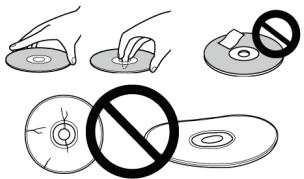
- Avoid touching or scratching the signal surface (shiny side) of the disc.
- Hold the disc by the edges or by the center hold and one edge.
- Do not affix paper or labels to the disc.
- Discard warped or cracked discs as they may cause damage to the drive.
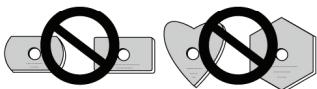
- Avoid specially shaped discs such as hearts or polygons.
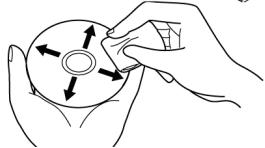
- Remove dust or lint from the disc with a soft cloth by wiping from the inside to the outside edge rather than in a circular motion.
- Do not use record-cleaning or anti-static agents as the solutions may cause damage to a disc.
Always be sure to store your discs in proper DVD-R storage cases when not in use, and always be sure to check for dirt or dust on discs (especially on the recording side) before use.
Note: Some discs may not be playable due to different recording formats or the physical condition of the disc at the time of recording or playback.
Write Speed (CAV, *ZCLV)
DVD-R 1X,2X,4X,6X,8X**,12X**,16X*,18X*
DVD-R (DL) 2X, 4X, 6X, 8X^ , 10X^
DVD-RW 1X,2X,4X,6X
DVD+R 2.4X, 4X, 6X, 8X, 12X, 16X, 18X
DVD+R (DL) 2.4X, 4X, 6X, 8X, 10X
DVD+RW 2.4X,3.3X,4X,6X,8X**
CD-R 4X,10X,16X,24X**,32X**,40X*
CD-RW 4X,10X,16X,20X**,24X**,32X**
Maximum Read Speed
DVD-ROM (single) 16X DVD-ROM (DL) 12X
DVD-R, DVD+R 12X DVD-R (DL) 8X
DVD-RW, DVD+RW 8X DVD+R (DL) 8X
CD-ROM, CD-R 40X CD-RW 32X
DVD-RAM 5X
DualDisc (please refer to the previous page in this document)
- ATA Interface Serial ATA Revision 2.5; Data Transfer Mode Genli 1.5Gbits/sec
- Buffer Size 2 MBytes (Read/Write)
- 5.25" Half-Height built-in type
- Stereo Audio Output
LCD Tilt-Servo Mechanism
Horizontal / Vertical orientation - Low vibration mechanism by DRA System
Supports "Buffer Under Run" protection (CD/DVD) - This product will obtain certification under the "Microsoft® Windows® Logo Program" (WHQL)
- This product complies to RoHS Directive and WEEE Directive
- Disc Format (Read/Write)
DVD single layer/dual layer / 120mm / 80mm disc (horizontal position only)
DVD-R (when writing, use only 650nm – for General use – media)
DVD-R
Dual Layer DVD-R and Double Layer DVD+R
DVD-RW
DVD+R
DVD+RW
DVD-RAM (non-cartridge, Version 2.0, Version 2.1)
CD-ROM Mode 1
CD-RXA Mode 2 (form 1, form 2)
Photo CD (single and multiple sessions)
CD-DA
CD-Extra (CD PLUS)
Video-CD
CD Text
CD-R
CD-RW / High Speed CD-RW / Ultra Speed CD-RW
Note:
- A specific application program is necessary to write the formats listed above.
- Supported media required for specific DVD and CD writing speeds.
- When writing to DVD at 12X, 16X, and 18x use Pioneer-tested media. For media brand information, refer to the Pioneer website: www.pioneerelectronics.com
Interface
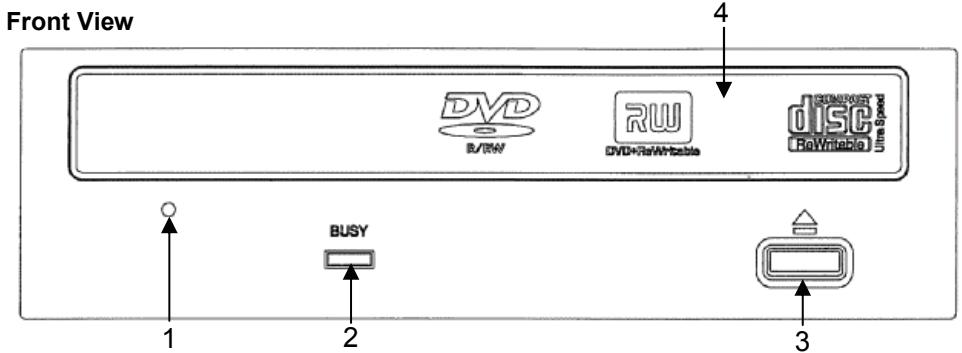
1) Forced Ejection Hole
If the tray fails to eject when the Eject button is pressed, insert a stiff rod into the hole and push to eject the tray.
During normal operation, the eject button should be used to unload the tray. Turn the power to the drive OFF then wait approximately one minute until the disc stops spinning before trying to eject the tray using the Forced Ejection Hole.
2) BUSY Indicator
Operation status is indicated as follows:
During reading: Lights
During writing: Lights
3) Eject Button
Press the button to unload / load the disc.
4) Disc Tray
Press the Eject button to open the loading tray then place a CD or DVD disc onto the tray with the label facing up. Press the Eject button again or gently push the tray to close and load.
Do not attempt to pull out the disc tray forcibly – use the Forced Ejection Hole (1).
Precautions When Playing 8cm (3.15") Discs
An 8cm (3.15") disc cannot be played when the drive is mounted vertically even with an adapter.
ABOUT REGION CODES
The region code can only be changed five (5) times, including the initial setting. Please be aware that the fifth change becomes PERMANENT. Therefore, avoid changing the region code unless absolutely necessary.
- Region codes are part of the DVD Standard. However, region codes on DVD discs are optional. DVD discs with no specified region code can be played on all compliant players.
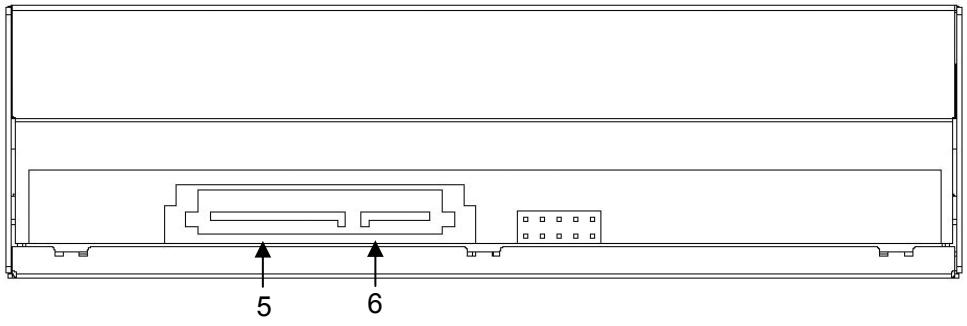
Rear View
5) DC Input
| Pin | Name | Function |
| 1 | V3.3 | 3.3 V Power (not used) |
| 2 | V3.3 | 3.3 V Power (not used) |
| 3 | V3.3 | 3.3 V Power (not used) |
| 4 | GND | |
| 5 | GND | |
| 6 | GND | |
| 7 | V5 | 5 V Power |
| 8 | V5 | 5 V Power |
| 9 | V5 | 5 V Power |
| 10 | GND | |
| 11 | DAS/DSS | Device Activity Signal / Disabled Staggered Spin-up (not used) |
| 12 | GND | |
| 13 | V12 | 12 V Power |
| 14 | V12 | 12 V Power |
| 15 | V12 | 12 V Power |
6) Serial ATA (SATA) Interface
To connect the drive through a PC's SATA port, use a 7-pin cable. Total length of the cable must be less than 1 meter (1m) according to SATA specifications.
| Pin | Name | Function |
| 1 | GND | |
| 2 | A+ | Differential Signal Pair A |
| 3 | A- | |
| 4 | GND | |
| 5 | B- | Differential Signal Pair B |
| 6 | B+ | |
| 7 | GND |
1) Turn OFF the computer's power and remove the power cord from the wall outlet before removing the front cover.
2) Remove the blank panel from the front of the empty 5.25" bay slot.
3) Install the slide rails on the drive if necessary. (Please contact the store where the drive was purchase to obtain slide rails.)
4) Insert the drive into the slot.
5) When anchoring is required, refer to the computer's instruction manual.
- Please use screws measuring 5mm (3/16") or less for mounting. Using longer screws may damage the drive.
- When the mounting screws are loose, the vibrations from a spinning disc may generate a ripping noise. To prevent this noise, tighten the screws.
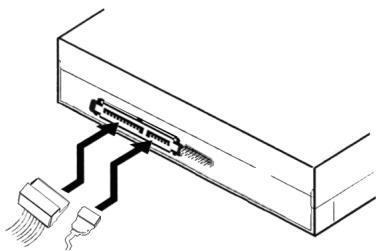
1) Turn OFF the power to the computer.
2) Connect the computer's power cable to the drive, checking the polarity of the cable.
3) Connect the computer's SATA interface cable to the drive.
The computer powers this product. Do NOT use a power supply other than the internal source provided by the PC.
[Position]
This unit may be installed vertically as well as horizontally.
[Disc Size]
12 cm / 8 cm (Drive does not support non-standard shapes such as business cards, diamond, etc.) * 8cm disc cannot be used vertically – adapters do not effect this limitation
[Disc Transfer Rate]
Data Read (sustained)
DVD Max. 21.6 MBytes/sec. (6.6X - 16X CAV Mode over 16 block transfer)
CD Max. 6.00 MBytes/sec. (17.2X - 40X CAV Mode over 16 block transfer)
Data Write (sustained)
DVD Max. 24.3 MBytes/sec. (Max 18X DVD-R)
CD Max. 6.00 MBytes/sec. (Max. 40X CD-R)
ATA Interface
Serial ATA Revision 2.5
- Media that is dirty, damaged, unbalanced, warped, or scratched can affect the transfer rate.
[Access Time / Seek Time] (Random Averages)
Access Time DVD-ROM 130 ms CD-ROM 120 ms
Seek Time DVD-ROM 120 ms CD-ROM 110 ms
[Audio Characteristics]
Line out 0.70 ± 0.15 Vms (at 10 load)
[Physical Information]
Dimensions 5.8" W x 1.7" H x 7.1" D 148 (W) x 42.3 (H) x 180 (D) mm (including front panel)
Power DC +12 V, 1.75 A DC +5 V, 1.6 A
Weight 2.0 pounds 0.9Kg
Operating Temperature +5^ + 45^
Operating Humidity 5% at 85% (no condensation)
Storage Temperature - 40^ a + 60^
Storage Humidity 5% al 90% (no condensation)
[Accessories]
- Mounting Screws (x 4)
- Operating Instructions (x 1 - included as a PDF document on the software installation disc)
Note: Specifications and designs are subject to possible modifications without notice, due to improvements.
(this page intentionally left blank)
Dimensions externes 5.8'' W x 1.7" D x 7.1" L 148 (L) x 42.3 (H) x 180 (P) mm
(façade comprise)
Alimentation +12 V CC, 1.75 A +5 V CC, 1.6 A
Poids 0.9 Kg
AFTER SALES SERVICE FOR PIONEER PRODUCTS
Please contact the dealer or distributor where you purchased this product for its after-sale service (including warranty conditions) or any other information. In case the necessary information is not available, please contact the Pioneer's subsidiaries (regional service headquarters) listed below.
PLEASE DO NOT SHIP YOUR PRODUCT TO THE COMPANIES
at the addresses listed below for repair without advance contact as these locations are not repair facilities.
United States
UNITED STATES
PIONEER ELECTRONICS SERVICE INC.
P.O.Box 1760
Long Beach, CA 90801-1760
United States of America
CANADA
PIONEER ELECTRONICS OF CANADA, INC.
Customer Support
300 Allstate Parkway
Markham, Ontario
L3R-0P2 Canada
PIONEER CORPORATION
Published by Pioneer Corporation
All Rights Reserved
Copyright © 2007 Pioneer Corporation
PIONEER CORPORATION 4-1, Meguro, 1-Chrome, Meguro-ku, Tokyo 153-8654, Japan
Pioneer Electronics (USA) Inc.
Industrial Solutions Business Division
2265 E. 220th Street, Long Beach, CA 90810 USA
PIONEER ELECTRONICS SERVICE INC.
1925 East Dominguez Street, Long Beach, CA 90810 USA
www.pioneerelectronics.com/DVR2810support/
Pioneer Electronics of Canada, Inc.
Industrial Products Division
300 Allstate Parkway, Markham, Ontario, L3R-0P2 Canada
www.pioneerelectronics.com/DVR2810support/
For software related issues, please contact:
NERO
www.nero.com
email support: techsupport@nero.com
Tel: 888/309-4212 (toll call)
FAQs: http://www.nero.com/enu/Support.html


- IMPORTANT
- CAUTION
- RISK OF ELECTRICAL SHOCK DO NOT OPEN
- CAUTION:
- Information to User:
- [For Canadian Model]
- Federal Communications Commission Declaration or Conformity
- WARNING:
- Note:
- Interface
- 1) Forced Ejection Hole
- 2) BUSY Indicator
- 3) Eject Button
- 4) Disc Tray
- Precautions When Playing 8cm (3.15") Discs
- ABOUT REGION CODES
- 6) Serial ATA (SATA) Interface
- [Position]
- [Disc Size]
- [Disc Transfer Rate]
- [Audio Characteristics]
- [Physical Information]
- [Accessories]
- AFTER SALES SERVICE FOR PIONEER PRODUCTS
- PLEASE DO NOT SHIP YOUR PRODUCT TO THE COMPANIES
- UNITED STATES
- CANADA
- NERO
Brand : PIONEER
Model : DVR-2810
Category : DVD Burner