EB-U2500 - Power bank SAMSUNG - Free user manual and instructions
Find the device manual for free EB-U2500 SAMSUNG in PDF.

 FR
FR
 BG
BG
 CS
CS
 DA
DA
 DE
DE
 EL
EL
 EN
EN
 ES
ES
 ET
ET
 FI
FI
 HU
HU
 ID
ID
 IT
IT
 KK
KK
 KO
KO
 LT
LT
 LV
LV
 NL
NL
 NO
NO
 PL
PL
 PT
PT
 RO
RO
 RU
RU
 SK
SK
 SL
SL
 SV
SV
 TR
TR
 UK
UK
 ZH
ZH
User questions about EB-U2500 SAMSUNG
0 question about this device. Answer the ones you know or ask your own.
Ask a new question about this device
Download the instructions for your Power bank in PDF format for free! Find your manual EB-U2500 - SAMSUNG and take your electronic device back in hand. On this page are published all the documents necessary for the use of your device. EB-U2500 by SAMSUNG.
USER MANUAL EB-U2500 SAMSUNG
Magnet Wireless Battery Pack
USER GUIDE
EB-U2500
02/2026 Rev.1.2
Table of Contents
| English | Ελληνικά |
| Français | Slovenščina |
| Deutsch | Slovenčina |
| Italiano | Čeština |
| Español | Українська |
| Magyar | Türkçe |
| Polski | ไทย |
| Română | Bahasa Indonesia |
| Български | العربية |
| Hrvatski | Русский |
| Srpski | Қазақ тілі |
| Português | 繁體中文 (台灣) |
| Latviešu | Français (Canada) |
| Lietuvių kalba | Português (Brasil) |
| Eesti | 한국어 |
| Nederlands | |
| Svenska | |
| Norsk | |
| Suomi | |
| Dansk |
Getting started
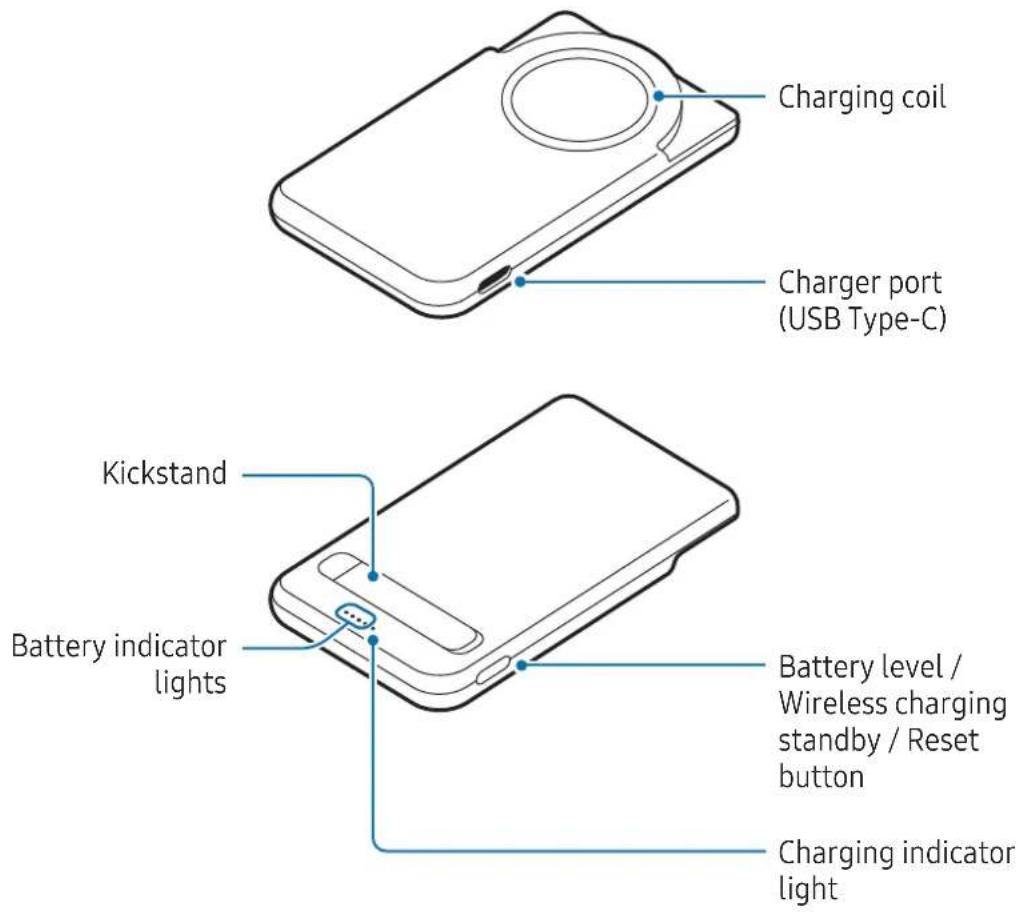
Device layout
Charging the battery
Charge the battery before using the product for the first time or when the product has been unused for extended periods.
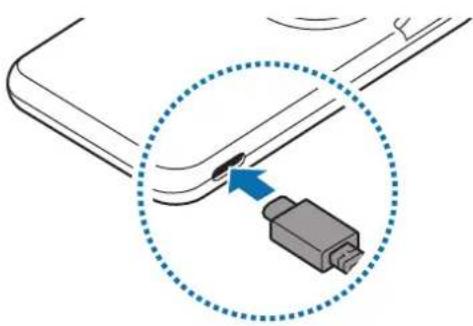
1 Connect the product to a charger.
When the charger is correctly connected to the product, the battery indicator lights will turn on and blink.
natural_image
Diagram showing a connector inserted into a cable, with a blue arrow indicating the insertion point (no text or symbols present)2 When the product is fully charged, disconnect the product from the charger.
Battery charging tips and precautions

Use only Samsung-approved charger and cable specifically designed for your product. Incompatible charger and cable can cause serious injuries or damage to your product.

- Connecting the charger improperly may cause serious damage to the product. Any damage caused by misuse is not covered by the warranty.
- Use only USB Type-C cable supplied with the product. The product may be damaged if you use Micro USB cable.
- If you charge the product while the charger port is wet, the product may be damaged. Thoroughly dry the charger port before charging the product.

- You can charge the product using the charger (sold separately).
- To save energy, unplug the charger when not in use. The charger does not have a power switch, so you must unplug the charger from the electric socket when not in use to avoid wasting power. The charger should remain close to the electric socket and easily accessible while charging.
- When using a charger, it is recommended to use an approved charger that guarantees the charging performance.
- Using a power source other than the charger, such as a computer, may result in a slower charging speed because of a lower electric current.
- The product can be used while it is charging, but it may take longer to fully charge the battery.
- While charging, the product may heat up. This is normal and should not affect the product's lifespan or performance. If the product gets hotter than usual, the charger may stop charging.
- The actual capacity (Wh) is measured based on the battery's output current and voltage. It may differ from the capacity (Wh) indicated on the product, depending on the output power condition, the connected device's circuit configuration, and the operation environment.
- If the product is not charging properly, take the product and the charger to a Samsung Service Centre or an authorised service centre.
Checking the remaining battery power
The battery indicator lights inform you of the remaining battery power.
Check the remaining battery power by pressing the Battery level / Wireless charging standby / Reset button. Depending on the remaining battery power, the battery indicator lights will turn on and then turn off.
| Remaining battery power Battery indicator light | |
| 70-100% | Four battery indicator lights on |
| 40-70% | Three battery indicator lights on |
| 20-40% | Two battery indicator lights on |
| 5-20% | One battery indicator light on |
| 0-5% | One battery indicator light blinking |

- If the battery indicator lights do not operate properly or are recognised incorrectly, disconnect the charger and connect it again.
- The battery indicator lights may work differently depending on the device connected to the product.
Using the product
Charging devices
Wired charging
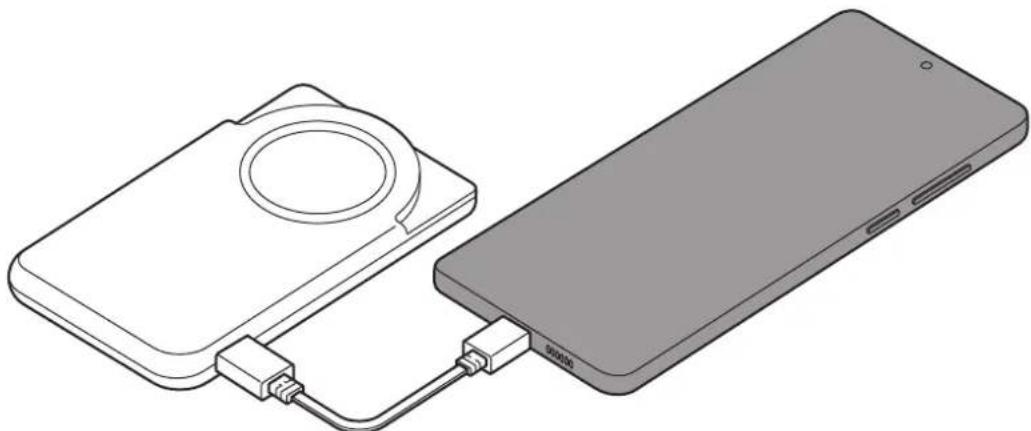
1 Connect one end of the USB cable to the product's charger port. Then, plug the other end of the USB cable into the mobile device's multipurpose jack.
natural_image
Line drawing of a smartphone connected to a compact device (no text or symbols present)2 When the mobile device is fully charged, disconnect the USB cable from the product and the mobile device.

- If the multipurpose jack of the charger and the device you want to charge is the micro USB type, use a USB connector that is sold separately.
- Charging time may vary depending on the charging conditions.
- To begin fast charging, connect a device that supports fast charging to the product.
- If the device connected to the product is not charging, disconnect the USB cable from the product and reconnect it. Or, press and hold the Battery level / Wireless charging standby / Reset button for more than 7 seconds.
- The product is an auxiliary external battery. It may not fully charge some devices.
- If the product is exposed to extremely hot or cold temperatures or a problem occurs, the battery indicator lights will blink. Disconnect the device from the product and reconnect it.
Wireless charging
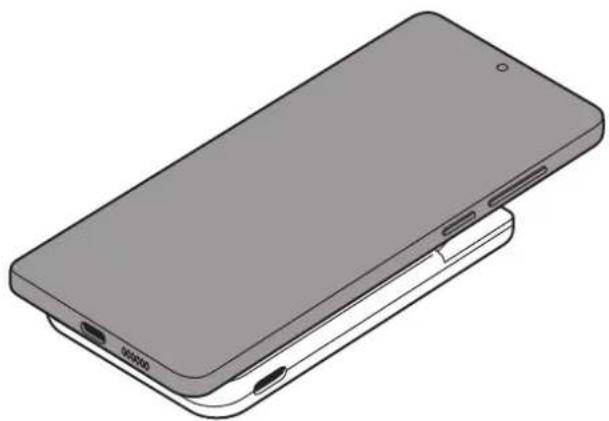
The product has a built-in wireless charging coil. You can charge devices that support wireless charging.
If the device you're trying to charge has a screen, the estimated charging time will appear on the device's screen. The estimated remaining charging time may differ from the actual time depending on the charging environment.
1 Place the device you want to charge on the product, aligning the wireless charging coil of the device with the centre of the product's charging coil. Wireless charging may not work smoothly with certain device accessories or covers. For stable wireless charging, it is recommended to use a Qi2 Ready-certified wireless charging cover (sold separately). Alternatively, separate the cover or accessory from the device you want to charge.
natural_image
Isometric line drawing of a smartphone showing front and side views (no text or symbols)2 After fully charging, separate the device from the product.

Precautions for wireless charging
If you do not follow the precautions, the device may not charge properly or may overheat, or the phone and any cards may be damaged.
- Do not place the phone on the product with a credit card or radio-frequency identification (RFID) card (such as a transportation card or a key card) placed between the back of the phone and the phone cover.
- Do not place the phone on the product when conductive materials, such as metal objects and magnets, are placed between the phone and the product.

- If you use the product in areas with weak network signals, you may lose network reception.
- If the device is not charging, press and hold the Battery level / Wireless charging standby / Reset button for more than 7 seconds.
- Because of the design of the device's rear camera, the camera lens may be partly covered when using the product. To use the camera app, position the device at a slight angle so the camera lens is not covered or separate it from the product.
Checking the wireless charging status
Check the wireless charging status of the product by looking at the indicator light's colour.
| Colour Status | |
| Continuously red | • Wireless charging |
| Continuously green | • Wireless charging complete |
| Blinking red → green → yellow (Once) | • Wireless charging standby mode |

- In wireless charging standby mode, the device you want to charge will be recognised more quickly. To enter wireless charging standby mode, press the Battery level / Wireless charging standby / Reset button before wireless charging.
- If the charging indicator light does not operate properly or is recognised incorrectly, disconnect the device you want to charge from the product and put it on the product again.
- The charging indicator light may work differently depending on the device you want to charge.
Using the kickstand
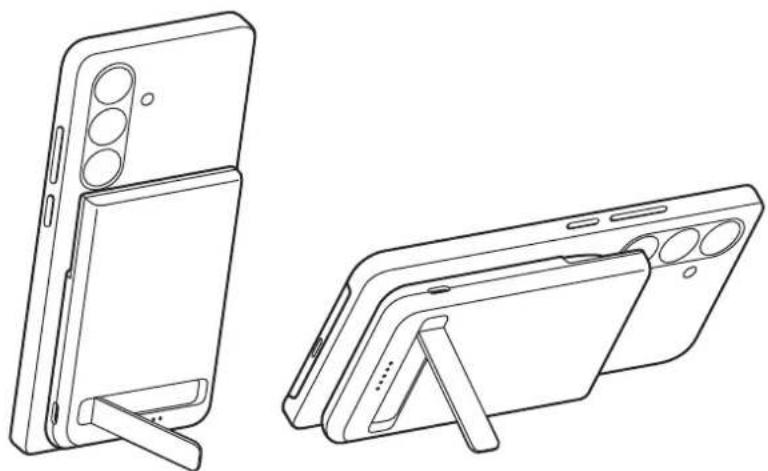
You can open the stand and place the product on a flat surface to enjoy videos or play games while charging the phone.
Place the phone on the product correctly, and stand it up as shown in the image so it does not shake or fall.

If the phone has insufficient magnetic force, it may not remain properly attached to the product. To use the stand while charging the phone, you must attach a Qi2 Ready-certified wireless charging cover (sold separately) to the phone.

The product includes magnets. The location of the wireless charging coil may differ depending on the phone. Adjust the position of the phone to ensure that they are properly connected. Otherwise, the phone may slide because of the slope or the magnetic force.
natural_image
Line drawing of a smartphone rear panel and its side view, showing front and back views (no text or symbols)Usage notices
Precautions for using the product
Please read this guide when using the product to ensure safe and proper use.
- Images may differ in appearance from the actual product. Content is subject to change without prior notice.
- Because of the nature of its material, the product may rub off or change colour from processes such as friction with strong-colour objects in its usage environment.
- Your product contains magnets. Keep it away from credit cards, implanted medical devices, and other devices that may be affected by magnets. In the case of medical devices, keep your product more than 15 cm apart. Stop using your product if you suspect any interference with your medical device and consult your physician or your medical device manufacturer.
Instructional icons

Warning: situations that could cause injury to yourself or others

Caution: situations that could cause damage to your product or other equipment

Notice: notes, usage tips, or additional information
Notes on package contents and accessories
Check the product box for the following items:
- Product
- USB cable
- Quick start guide

- The items supplied with the product and any available accessories may vary depending on the region or carrier.
- The supplied items are designed only for this product and may not be compatible with other devices.
- Appearances and specifications are subject to change without prior notice.
- You can purchase additional accessories from Samsung website. Make sure they are compatible with the product before purchase.
- Use Samsung-approved accessories. Using unapproved accessories may cause the performance problems and malfunctions that are not covered by the warranty.
- Availability of all accessories is subject to change depending entirely on manufacturing companies. For more information about available accessories, refer to the Samsung website.
Appendix
Removing the battery
- To remove the battery, contact an authorised service centre. To obtain battery removal instructions, please visit www.samsung.com/global/ecodesign_energy.
- For your safety, you must not attempt to remove the battery. If the battery is not properly removed, it may lead to damage to the battery and device, cause personal injury, and result in the device being unsafe.
- Samsung does not accept liability for any damage or loss (whether in contract or tort, including negligence) which may arise from failure to precisely follow these warnings and instructions, other than death or personal injury caused by Samsung's negligence.
FCC Part 15.19 (Only some regions/countries)
This device complies with part 15 of the FCC Rules. Operation is subject to the following two conditions: (1) This device may not cause harmful interference, and (2) this device must accept any interference received, including interference that may cause undesired operation.
FCC Part 15.21 (Only some regions/countries)
Any changes or modifications (including the antennas) to this device that are not expressly approved by the manufacturer may void the user's authority to operate the equipment.
FCC Part 2.1093 RF Radiation Exposure Statement (Only some regions/countries)
This equipment complies with FCC RF Radiation exposure limits set forth for an uncontrolled environment. This device and its antenna must not be co-located or operating in conjunction with any other antenna or transmitter.
This equipment should be installed and operated with a minimum distance of 20 cm between the radiator and your body.
FCC Part 15.105 (Only some regions/countries)
Note: This equipment has been tested and found to comply with the limits for a Class B digital device, pursuant to part 15 of the FCC Rules. These limits are designed to provide reasonable protection against harmful interference in a residential installation. This equipment generates, uses and can radiate radio frequency energy and, if not installed and used in accordance with the instructions, may cause harmful interference to radio communications. However, there is no guarantee that interference will not occur in a particular installation. If this equipment does cause harmful interference to radio or television reception, which can be determined by turning the equipment off and on, the user is encouraged to try to correct the interference by one or more of the following measures:
- Reorient or relocate the receiving antenna.
- Increase the separation between the equipment and receiver.
- Connect the equipment into an outlet on a circuit different from that to which the receiver is connected.
- Consult the dealer or an experienced radio/TV technician for help.
ISED Notice (Only some regions/countries)
This device contains licence-exempt transmitter(s)/receiver(s) that comply with Innovation, Science and Economic Development Canada's licence-exempt RSS(s). Operation is subject to the following two conditions:
- This device may not cause interference.
- This device must accept any interference, including interference that may cause undesired operation of the device.
ISED RF Radiation Exposure Statement (Only some regions/countries)
This equipment complies with Innovation, Science and Economic Development Canada RF Radiation exposure limits set forth for an uncontrolled environment. This device and its antenna must not be co-located or operating in conjunction with any other antenna or transmitter.
Model number: EB-U2500
FCC ID: ZCAEBU2500
Safe Handling & Recycling of Batteries and Electronics (USA Only)
WARNING! Never dispose of batteries in a fire because they may explode. Do not disassemble, crush, puncture, heat, burn or reuse batteries. For more information, visit call2recycle.org or call 1-800-822-8837.
Dispose of unwanted electronics through an approved recycler: To find the nearest recycling location, go to our website www.samsung.com/recycling or call 1-800-SAMSUNG (726-7864).
Copyright
Copyright © 2026 Samsung Electronics Co., Ltd.
Copyright © 2026 Samsung Electronics America, Inc. (USA Only)
This guide is protected under international copyright laws.
No part of this guide may be reproduced, distributed, translated, or transmitted in any form or by any means, electronic or mechanical, including photocopying, recording, or storing in any information storage and retrieval system.
Trademarks
- Samsung and the Samsung logo are registered trademarks of Samsung Electronics Co., Ltd.
- All other trademarks and copyrights are the property of their respective owners.
Démarrage
natural_image
Diagram showing a connector with a blue arrow pointing to a gray USB socket (no text or symbols present)natural_image
Line drawing of a smartphone connected to a compact device (no text or symbols present)natural_image
Isometric line drawing of a smartphone showing front and side panels (no text or symbols)natural_image
Line drawing of a smartphone rear panel and its side view, showing front and back views (no text or symbols)Copyright © 2026 Samsung Electronics Co., Ltd.
natural_image
Diagram showing a connector with a blue arrow pointing to a gray USB device (no text or symbols present)natural_image
Illustration of a smartphone connected to a device via cable (no text or symbols)natural_image
Isometric line drawing of a smartphone showing front and side views (no text or symbols)natural_image
Line drawing of a smartphone rear panel and its side view, showing front and back views (no text or symbols)Nutzungshinweise
Copyright © 2026 Samsung Electronics Co., Ltd.
natural_image
Diagram showing a USB connector inserted into a cable, with a blue arrow indicating the insertion point (no text or symbols present)natural_image
Line drawing of a smartphone connected to a compact device (no text or symbols present)natural_image
Isometric line drawing of a smartphone showing front and side panels (no text or symbols)natural_image
Line drawing of a smartphone rear panel and its side view, showing front and back views (no text or symbols)Copyright © 2026 Samsung Electronics Co., Ltd.
natural_image
Diagram showing a USB connector inserted into a cable, with a blue arrow indicating the insertion point (no text or symbols present)natural_image
Illustration of a smartphone connected to a compact device via cable (no text or symbols)natural_image
Isometric line drawing of a smartphone showing front and side views (no text or symbols)natural_image
Line drawing of a smartphone rear panel and its side view, showing front and back views (no text or symbols)Avisos de uso
natural_image
Symbol of a trash bin with crossed lines indicating no waste or restriction, and a solid rectangle below (no text or labels)Copyright © 2026 Samsung Electronics Co., Ltd.
Copyright © 2026 Samsung Electronics America, Inc.
natural_image
Diagram showing a connector with a blue arrow pointing to a gray USB device (no text or symbols present)natural_image
Illustration of a smartphone connected to a device via cable (no text or symbols)natural_image
Isometric line drawing of a smartphone showing front and side views (no text or symbols)natural_image
Line drawing of a smartphone rear panel and its side view, showing front and back views (no text or symbols)Copyright © 2026 Samsung Electronics Co., Ltd.
natural_image
Diagram showing a connector with a blue arrow pointing to a gray USB device (no text or symbols present)natural_image
Illustration of a smartphone connected to a device via cable (no text or symbols)natural_image
Isometric line drawing of a smartphone showing front and side views (no text or symbols)natural_image
Line drawing of a smartphone rear panel and its side view, showing front and back views (no text or symbols)Copyright © 2026 Samsung Electronics Co., Ltd.
natural_image
Diagram showing a connector inserted into a cable, with a blue arrow indicating direction (no text or symbols present)natural_image
Line drawing of a smartphone connected to a compact device (no text or symbols present)natural_image
Isometric line drawing of a smartphone showing front and side views (no text or symbols)natural_image
Line drawing of a smartphone rear panel and its side view, showing front and back views (no text or symbols)natural_image
Diagram showing a connector inserted into a cable, with a blue arrow indicating the insertion point (no text or symbols present)natural_image
Illustration of a smartphone connected to a device via cable (no text or symbols)natural_image
Isometric line drawing of a smartphone showing front and side views (no text or symbols)natural_image
Line drawing of a smartphone rear panel and its side view, showing front and back views (no text or symbols)Copyright © 2026 Samsung Electronics Co., Ltd.
natural_image
Diagram showing a connector with a blue arrow pointing to a gray USB socket (no text or symbols present)natural_image
Illustration of a smartphone connected to a device via cable (no text or symbols)natural_image
Illustration of a smartphone showing front and side views (no text or symbols)2 Nakon što se baterija u potpunosti napunila, odvojite uređaj od proizvoda.

natural_image
Line drawing of a smartphone rear panel with extended screen and stand (no text or symbols)Copyright © 2026 Samsung Electronics Co., Ltd.
natural_image
Diagram showing a connector with a blue arrow pointing to a gray USB socket (no text or symbols present)natural_image
Illustration of a smartphone connected to a device via cable (no text or symbols)2 Kada se mobilni uređaj napuni do kraja, odvojite USB kabl od proizvoda i mobilnog uređaja.

- Ako je višenamenski konektor punjača i uređaj koji želite da punite mikro USB tip, koristite USB konektor koji se prodaje zasebno.
natural_image
Illustration of a smartphone showing front and side views (no text or symbols)natural_image
Line drawings of a smartphone showing front and side views (no text or symbols)Napomene o upotrebi
Mere predostrožnosti za upotrebu proizvoda
Copyright © 2026 Samsung Electronics Co., Ltd.
Ovaj priručnik je zaštićen međunarodnim zakonima o autorskim pravima.
Nijedan deo ovog priručnika se ne sme reprodukovati, distribuirati, prevoditi niti prenositi ni u jednom obliku niti bilo kojim putem, elektronskim niti mehaničkim, što podrazumeva fotokopiranje, snimanje i skladištenje u okviru bilo kog skladišta informacija i sistema za preuzimanje.
Trgovačke marke
- Samsung i Samsung logotip predstavljaju registrovane žigove kompanije Samsung Electronics Co., Ltd.
- Sve ostale trgovačke marke i autorska prava su vlasništvo njihovih vlasnika.
Começar
natural_image
Diagram showing a USB connector inserted into a cable, with a blue arrow indicating the insertion point (no text or symbols present)natural_image
Line drawing of a smartphone connected to a compact device (no text or symbols present)natural_image
Isometric line drawing of a smartphone showing front and side views (no text or symbols)natural_image
Line drawing of a smartphone rear panel and its side view, showing front and back views (no text or symbols)Copyright © 2026 Samsung Electronics Co., Ltd.
Este manual está protegido pelas leis internacionais de copyright.
natural_image
Diagram showing a connector with a blue arrow pointing to it, enclosed in a dotted circle (no text or symbols present)natural_image
Illustration of a smartphone connected to a device via cable (no text or symbols)natural_image
Illustration of a smartphone showing front and side views (no text or symbols)natural_image
Line drawing of a smartphone rear panel with extended screen and stand (no text or symbols)natural_image
Diagram showing a connector inserted into a cable, with a blue arrow indicating the insertion point (no text or symbols present)natural_image
Illustration of a smartphone connected to a device via cable (no text or symbols)natural_image
Isometric line drawing of a smartphone showing front and side panels (no text or symbols)natural_image
Line drawing of a smartphone rear panel with extended screen and stand (no text or symbols)Naudojimo pastabos
natural_image
Diagram showing a connector with a blue arrow pointing to a gray USB socket (no text or symbols present)natural_image
Illustration of a smartphone connected to a device via cable (no text or symbols)natural_image
Illustration of a smartphone showing front and side views (no text or symbols)natural_image
Line drawing of a foldable smartphone showing front and side views (no text or symbols)Kasutamise märkused
Copyright © 2026 Samsung Electronics Co., Ltd.
natural_image
Diagram showing a USB connector inserted into a cable, with a blue arrow indicating the insertion point (no text or symbols present)natural_image
Line drawing of a smartphone connected to a compact device (no text or symbols present)natural_image
Isometric line drawing of a smartphone showing front, side, and rear panels with ports (no text or symbols)natural_image
Line drawing of a smartphone rear panel and its side view, showing front and back views (no text or symbols)Copyright © 2026 Samsung Electronics Co., Ltd.
natural_image
Diagram showing a connector inserted into a cable, with a blue arrow indicating the insertion point (no text or symbols present)natural_image
Illustration of a smartphone connected to a device via cable (no text or symbols)natural_image
Illustration of a smartphone showing front and side views (no text or symbols)natural_image
Line drawings of a smartphone showing front and side views (no text or symbols)Copyright © 2026 Samsung Electronics Co., Ltd.
natural_image
Diagram showing a connector inserted into a cable, with a blue arrow indicating the insertion point (no text or symbols present)natural_image
Illustration of a smartphone connected to a device via cable (no text or symbols)2 Når mobilenheten erfulladet, koble USB-kabelen fra produktet og mobilenheten.

- Hvis flerfunksjonskontakten på laderen og enheten du vil lade, er av type mikro-USB, må du bruke en USB-kontakt som selges separat.
natural_image
Isometric line drawing of a smartphone showing front and side views (no text or symbols)natural_image
Line drawing of a foldable smartphone with front and side views (no text or symbols)Bruksmerknader
Forholdsregler ved bruk av produktet
natural_image
Diagram showing a connector with a blue arrow pointing to a gray USB socket (no text or symbols present)natural_image
Illustration of a smartphone connected to a device via cable (no text or symbols)natural_image
Isometric line drawing of a smartphone showing front and side views (no text or symbols)natural_image
Line drawing of a smartphone showing front and side views (no text or symbols)Copyright © 2026 Samsung Electronics Co., Ltd.
natural_image
Diagram showing a connector with a blue arrow pointing to a gray USB socket (no text or symbols present)natural_image
Illustration of a smartphone connected to a device via cable (no text or symbols)natural_image
Illustration of a smartphone showing front and side views (no text or symbols)natural_image
Line drawing of a foldable smartphone with front and side views (no text or symbols)natural_image
Diagram showing a connector inserted into a cable, with a blue arrow indicating the insertion point (no text or symbols present)2 'Otav to proióv fortiosteí plýrws, aposuvdésste to proióv apó tov fortiosth.
natural_image
Illustration of a smartphone connected to a device via cable (no text or symbols)natural_image
Isometric line drawing of a smartphone showing front and side views (no text or symbols)natural_image
Line drawing of a smartphone rear panel with its side view showing front and back views (no text or symbols)natural_image
Diagram showing a connector with a blue arrow pointing to a gray USB socket (no text or symbols present)natural_image
Illustration of a smartphone connected to a device via cable (no text or symbols)2 Ko je mobilna naprava v celoti napolnjena, odklopite kabel USB z izdelka in mobilne naprave.

natural_image
Illustration of a smartphone showing front and side views (no text or symbols)natural_image
Line drawing of a smartphone rear panel with extended screen and stand (no text or symbols)Obvestila o uporabi
natural_image
Diagram showing a USB cable connector inserted into a port, with a blue arrow indicating the cable's direction (no text or symbols present)natural_image
Illustration of a smartphone connected to a device via cable (no text or symbols)natural_image
Illustration of a smartphone showing front and side views (no text or symbols)natural_image
Line drawing of a smartphone rear panel with its side view showing front and back views (no text or symbols)Copyright © 2026 Samsung Electronics Co., Ltd.
natural_image
Diagram showing a connector with a blue arrow pointing to a gray USB device (no text or symbols present)natural_image
Line drawing of a smartphone connected to a compact device (no text or symbols present)natural_image
Isometric line drawing of a smartphone showing front and side views (no text or symbols)natural_image
Line drawing of a smartphone rear panel and its side view, showing front and back views (no text or symbols)Copyright © 2026 Samsung Electronics Co., Ltd.
natural_image
Diagram showing a cable connector inserted into a USB socket, with a blue arrow indicating the insertion point (no text or symbols present)natural_image
Illustration of a smartphone connected to a device via cable (no text or symbols)natural_image
Isometric line drawing of a smartphone showing front and side views (no text or symbols)natural_image
Line drawing of a smartphone rear panel and its side view, showing front and back views (no text or symbols)natural_image
Diagram showing a connector with a blue arrow pointing to a gray USB device (no text or symbols present)natural_image
Line drawing of a smartphone connected to a compact device (no text or symbols present)natural_image
Isometric line drawing of a smartphone showing front and side views (no text or symbols)natural_image
Line drawing of a smartphone rear panel and its side view, showing front and back views (no text or symbols)Telif hakkı © 2026 Samsung Electronics Co., Ltd.
natural_image
Diagram showing a connector with a blue arrow pointing to a gray USB device (no text or symbols present)natural_image
Illustration of a smartphone connected to a battery pack, showing the device's cable and connection (no text or symbols present)natural_image
Isometric line drawing of a smartphone showing front and side views (no text or symbols)natural_image
Line drawing of a smartphone rear panel and its side view, showing front, top, and side views (no text or symbols)ประกาศการใช้งาน
Copyright © 2026 Samsung Electronics Co., Ltd.
natural_image
Diagram showing a USB connector inserted into a cable, with a blue arrow indicating the insertion point (no text or symbols present)natural_image
Line drawing of a smartphone connected to a compact device (no text or symbols present)natural_image
Isometric line drawing of a smartphone showing front and side views (no text or symbols)natural_image
Line drawing of a smartphone rear panel and its side view, showing front and back views (no text or symbols)natural_image
Diagram showing a USB connector inserted into a cable, with a blue arrow indicating the insertion point (no text or symbols present)الشاحن.
natural_image
Illustration of a smartphone connected to a battery pack, showing the battery and its internal connection (no text or symbols present)natural_image
Isometric line drawing of a smartphone showing front and side views (no text or symbols)natural_image
Line drawing of a smartphone rear panel with front and side views (no text or symbols)إشعارات الاستخدام
natural_image
Diagram showing a connector inserted into a cable, with a blue arrow indicating the insertion point (no text or symbols present)natural_image
Illustration of a smartphone connected to a compact device (no text or symbols visible)natural_image
Isometric line drawing of a smartphone showing front and side views (no text or symbols)natural_image
Line drawing of a smartphone showing front and side views (no text or symbols)natural_image
Diagram showing a connector with a blue arrow pointing to a gray USB device (no text or symbols present)natural_image
Illustration of a smartphone connected to a battery pack, showing the battery and its internal connection (no text or symbols present)natural_image
Isometric line drawing of a smartphone showing front and side views (no text or symbols)natural_image
Line drawing of a smartphone rear panel with its side view showing front, top, and side views (no text or symbols)Copyright © 2026 Samsung Electronics Co., Ltd.
natural_image
Diagram showing a connector with a blue arrow pointing to a gray USB device (no text or symbols present)natural_image
Illustration of a smartphone connected to a battery pack, showing the battery and its internal cable (no text or symbols present)natural_image
Isometric line drawing of a smartphone showing front and side views (no text or symbols)natural_image
Line drawing of a smartphone showing front and side views (no text or symbols)使用注意事項
產品使用注意事項
Copyright © 2026 Samsung Electronics Co., Ltd.
本指南受國際版權法保護。
natural_image
Diagram showing a USB connector inserted into a cable, with a blue arrow indicating the insertion point (no text or symbols present)natural_image
Line drawing of a smartphone connected to a compact device (no text or symbols present)natural_image
Isometric line drawing of a smartphone showing front and side panels (no text or symbols)natural_image
Line drawing of a smartphone rear panel and its side view, showing front and back views (no text or symbols)Copyright © 2026 Samsung Electronics Co., Ltd.
