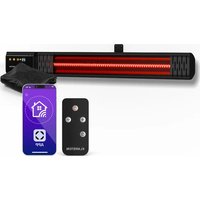
Phantom Smart - Heating Klarstein - Free user manual and instructions
Find the device manual for free Phantom Smart Klarstein in PDF.


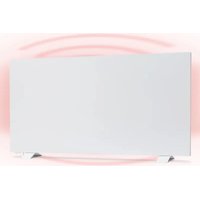
| Product type | Wall-mounted infrared heater |
| Brand | Klarstein |
| Model | Phantom Smart |
| Category | Heating |
| Heating technology | Infrared |
| Power supply | 220-240 V ~ / 50 Hz |
| Power | 2000 W |
| Power levels | 9 (P0 to P9) |
| Timer | 0 to 24 hours |
| Standby delay | 3 seconds |
| WiFi connectivity | Yes (2.4 GHz band) |
| WiFi frequency / Max power | 2.4 GHz / < 20 dBm |
| Remote control | Remote control and smartphone app (Klarstein) |
| Mobile app | Klarstein (iOS and Android) |
| Mounting type | Wall-mounted |
| Recommended use | Outdoor (patio, terrace) |
| Article number | 10047606 |
| Maintenance | Clean reflector and filament monthly; replace reflector every 2 years |
| Safety | Overheat protection, automatic shut-off, cover prohibited |
| Certification | CE, compliant with directive 2014/53/EU |
Frequently Asked Questions - Phantom Smart Klarstein
User questions about Phantom Smart Klarstein
0 question about this device. Answer the ones you know or ask your own.
Ask a new question about this device
Download the instructions for your Heating in PDF format for free! Find your manual Phantom Smart - Klarstein and take your electronic device back in hand. On this page are published all the documents necessary for the use of your device. Phantom Smart by Klarstein.
USER MANUAL Phantom Smart Klarstein
INHALT
Technische Daten 3
Sicherheitshinweise
Installation
Bedienung 7
natural_image
Technical line drawing of a rectangular device with six labeled icons (no text or symbols)natural_image
Pure electrical control panel diagram without any text, numbers, or symbolsnatural_image
Symbol of a trash bin with crossed lines indicating no waste or discharge, and a solid black rectangle below (no text or labels)Congratulations on purchasing this equipment. Please read this manual carefully and take care of the following hints to avoid damages. Any failure caused by ignoring the items and cautions mentioned in the instruction manual are not covered by our warranty and any liability. Scan the QR code to get access to the latest user manual and other information about the product.
CONTENTS
Technical Specifications 15
Safety Instructions 16
Installation
18
Operation 19
Device Control by Smartphone 21
Maintenance and Cleaning 23
Disposal Considerations 24
Declaration of Conformity 24
TECHNICAL SPECIFICATIONS
| Article number 10047606 | |
| Power supply 220-240 V~ / | 50 Hz |
| Power 2000 W | |
| Power levels 9 | |
| Switch-to-standby time 3 seconds | |
| Timer 24 hours | |
| Mounting wall-mounted | |
| WLAN frequencyRadio-frequency power | 2.4 GHz<20 dBm |
SAFETY INSTRUCTIONS
Please read all instructions before trying to operate this device. Keep the assembly instructions for future reference. Keep the assembly instructions for future reference. When storing the heater during a long period of non-use, please keep the original packaging for use.
- Do not leave this device unattended when using it.
- This heater will get hot when in use. Do not touch hot surfaces.
- Do not move the device when using it. Before moving, please wait for the heater to cool completely, and check whether the heater has been unplugged from the power supply.
- Place the device at least 1m away from highly flammable materials such as furniture, trees, leaves, hay and bushes.
- The heater must be at least 1.8m (6ft) above the ground and at least 0.7m (2.5ft) above the building ceiling or hanging objects.
- The heater must not face up, towards the ceiling. The heater element must face the area to be heated.
- Keep children and pets at a safe distance away from equipment.
- Children aged 8 and above, as well as people with reduced physical, sensory or mental abilities or lack of experience and knowledge, can use this equipment, provided that they have received supervision or guidance on safe use of this equipment and know the dangers involved.
• Children are not allowed to play with the equipment. Without supervision, children are not allowed to carry out cleaning and user maintenance. - If there are any signs of damage or malfunction, do not operate the heater.
- Do not try to repair or adjust any electrical or mechanical functions on this device. The device does not contain any user-serviceable parts. Only qualified electricians can carry out maintenance or repair. Trying to repair the equipment yourself will void your warranty.
- If the power cable is damaged, it must be replaced by the manufacturer, its service agent or similar qualified personnel to avoid danger.
- Do not operate components with bare hands. If accidentally touched, use a soft cloth and methylated alcohol or alcohol to remove finger marks, otherwise these marks will burn into the components, resulting in premature failure of the heater.
- Do not replace or attempt to replace the components in this product.
- This product is suitable for outdoor use only. Do not use this heater near the bathroom, shower or swimming pool.
- Do not touch the plug with wet hands or wet hands.
- Do not run the power cord under the carpet. Do not cover the power cord with carpet, slide or similar covering. Place the power cord away from pedestrians and where you won't trip.
- Do not wrap the power cord around the equipment.
-
Do not insert or allow foreign objects into any ventilation or opening of the heater, as this may cause electric shock, fire or damage to the heater.
• To prevent possible fire, do not block the vent. -
There are heating and arc or spark parts inside the heater. Do not use it in areas where gasoline, paint, explosives and/or flammable liquids are used or stored. Keep the equipment away from heated surfaces and open flames.
- Avoid using extension cords as much as possible, as this may overheat and cause a fire. However, if you have to use the extension cable, please make sure that it is suitable for the purpose, has been tested for outdoor use, and it is best to have RCD equipment installed or connected.
- Always make sure that the heater is plugged into a suitable socket, which has been tested for outdoor use.
- To disconnect the heater, turn off the controller and unplug it from the socket. Do not unplug the plug by pulling the power cord.
- Before moving, cleaning or storing, always unplug the equipment to ensure that it is completely cooled.
- This heater is for domestic use only and should not be used for commercial contract purposes. Any alternative use not recommended by the manufacturer may cause fire, electric shock or personal injury.
- It is not recommended to use accessories on the heater.
- Before installing the heater, check the outer wall for damaged areas.
• Always use on dry, properly firm, stable, flat and horizontal surfaces. - Check the communication, cable and pipeline of the external wall. If there are any service lines nearby, please don't install the heater and find another place to install this product.
- Do not put it directly above or below the power outlet.
- Do not remove any warning labels or signs from the product.
CAUTION
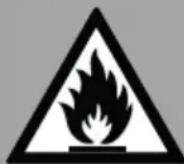
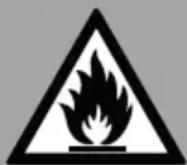
Fire hazard
Never cover the heater. If you cover the device, there is a risk of overheating and fire. The heater must not be placed directly under a power socket.
CAUTION
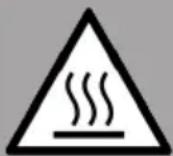
Risk of burns
Some parts of this appliance can become very hot and cause burns. Special care should be taken when children and infirm persons are present.
CAUTION
Risk of personal injury
This heater is not equipped with a device to control the room temperature. Unless there is continuous supervision, don't use this heater in a small room occupied by people who can't leave the room by themselves..
INSTALLATION
Before the installation, these matters need to attention
- Products should be put down gently
- Acid and alkali environment installation is not recommended.
- The product must be grounding
- The products are required to check the product brand mark on the voltage and the local voltage whether conform.
- Ensure the power rating should have sufficient current carrying capacity.
Installation steps of the wall-mounted heater
These precautions need to be taken before installation
• The product should be put down gently;
- Do not install in acid and alkali environment;
• The product must be grounded.
- Check whether the nameplate mark on the product voltage conforms to the local voltage.
- Ensure that the cable socket has sufficient current carrying capacity.
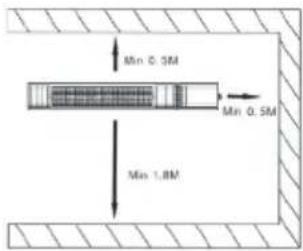
The installation position of the product should be placed 1.8 m from the ground, with a minimum distance of 0.5 m from the bottom of the ceiling, roof or other covering and a minimum distance of 0.5 m from the walls on both sides For the wall-mounted infrared heater installation step.
| 1. Installation location, use percussion drilling to make three diameter 8 mm round holes. | 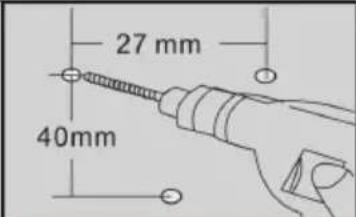 |
| 2. Insert the three plastic wall anchors to the three holes. | 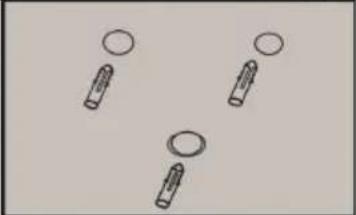 |
| 3. Fixed the bracket by three ST4*35 screws and make sure the installation points fixed securely. | 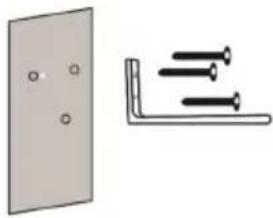 |
| 4. Before fixed the heater,make sure the rocker power switch on the right side and then fixed the bracket and heater by two M6*14 screws and butterfly nuts. | 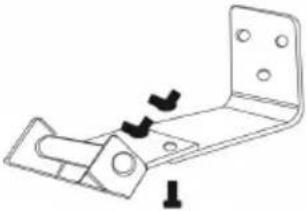 |
| The inner agon nut on the holder can be used to adjust the angle of the product. | 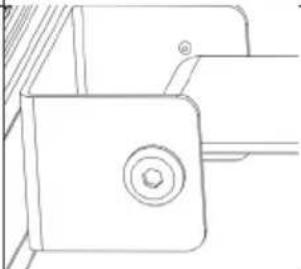 |
OPERATION
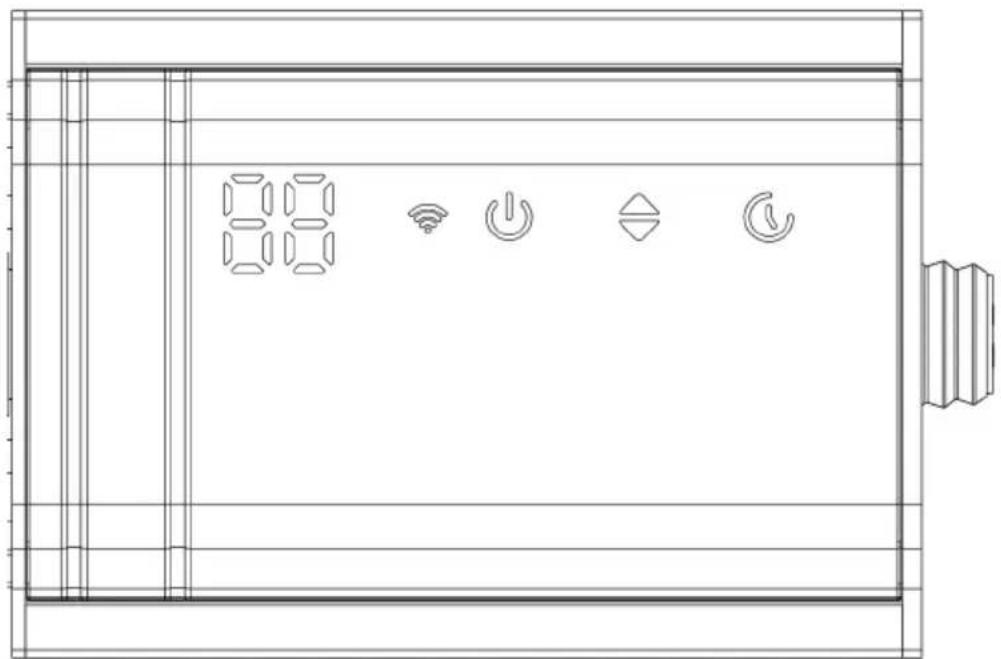
Plug in the power supply and turn on the side main switch.
natural_image
Technical line drawing of a device panel with six function icons (no text or labels)Control panel operation
- Turn the unit on: Touch the On/Off button ⏻ to turn on the heater. The display shows P0.
- Adjust the heat level: Touch the button to adjust the heat level between P0 and P9. The operation lamp lights up and heater starts to operate.
- Setting the timer: The operation light will illuminate. Touch the control panel when the display is flashing '00'. When you touch the button now you can set the timer for 0 to 24 hours. After the timer is set, flashes. If you touch the button during operation, the heater will go into standby.
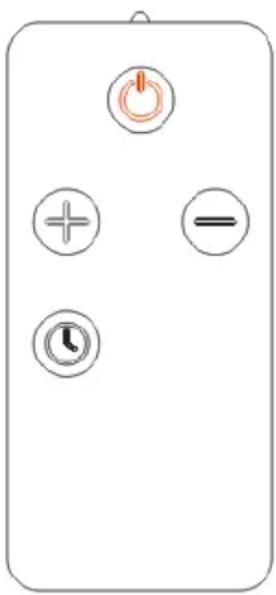
Remote control operation
natural_image
Pure electrical control panel diagram without any text, numbers, or symbolsThe remote control has a similar operation as the control panel on the unit. For changing the heating level, you use the buttons + and - .
WiFi operation: The WiFi light will flash, indicating that the WiFi is not connected. to be connected. To connect start the Klarstein App, enter the local WiFi account password, and search to add device. After being connected, the WiFi lamp lights constantly.
DEVICE CONTROL BY SMARTPHONE
If you integrate the device into your home WiFi, you can conveniently operate it via the associated Klarstein app. The app not only allows you to remotely control the device via your smartphone, but also gives you access to recipes and additional information.
Follow these steps to connect your smartphone to your Klarstein device:
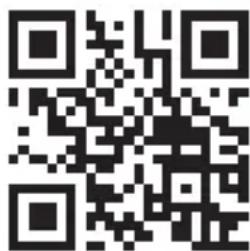
- Download the Klarstein app first by scanning the QR code with your smartphone (see below), or download it directly from App Store or Google Play.
- Make sure your smartphone is connected to the same WiFi network that your Klarstein device is to be connected to.
- Open the Klarstein app.
- Sign in to your account. If you do not have an account, sign up in the Klarstein app.
- Follow the instructions from the app.
App Download
Use the scan function of your smartphone to scan the QR code and save the app on your smartphone.
Note: The app provides further information on how to use the app and help on how to connect to your device as soon as you open it for the first time.
| iOS Android | |
 |  |
Troubleshooting connection problems
If your Klarstein device cannot be found in the WiFi, check the following:
1 The device is not plugged in. Make sure that your device is plugged into an electric socket.
2 The device is not in pairing mode. Make sure that the WiFi indicator (LED) on the smart device control panel is blinking as described in the 'Reset WiFi settings' instruction of your smart device (instructions are usually available on device connection process).
3 The WiFi access point does not operate on 5 GHz. Make sure that your access point operates on 2.4 GHz band and you have a separate SSID on 2.4 GHz band. If you are not sure about the operating band of your access point, please contact your internet provider company.
Important: please note that if your WiFi router is dual band - operating on both 2.4 GHz and 5 GHz band - you need to separate the SSIDs for each band and use the 2.4 GHz SSID for connection.
4 Firewall settings of your WiFi network; the firewall setting of your WiFi network may not allow the Klarstein app to configure the WiFi settings on your smart device. Please make sure that you are not using a public WiFi network, e.g. airports, dormitories, companies, etc.
5 Different credentials used in smartphone and the app. Make sure that the WiFi credentials entered in the Klarstein app are the same as the ones that your smartphone is connected to.
Following the above mentioned points, if your smart device still fails to connect to the app, please contact us via email for support: appsupport@klarstein.com
MAINTENANCE AND CLEANING
Maintenance
Attention! Careful and regular maintenance of the infrared heater is necessary to obtain a long and efficient operation of your appliance.
- Check the cleanliness of the reflector and IR filament at least once a month. If necessary, follow the cleaning and maintenance instructions.
- The number of checks may be increased depending on the amount of dust in the environment.
- During cleaning, visually inspect the reflector, wire and frame for deformation. In case of deformation, consult a qualified technician.
- Visually inspect the power cord and plug while cleaning the fixture. If there is any deformation, consult a qualified technician.
- It is recommended that the reflector be replaced every 2 years for more efficient operation.
Cleaning
WARNING: Risk of electric shock
Remove the power cord from the wall outlet before cleaning. After cooling products. Don't immerse the appliance in water or other fluids when cleaning.
Attention! Regular and careful cleaning will help your heater to work efficiently for many years.
- For your safety, unplug the power cord before cleaning the appliance.
- Using a slotted screwdriver, remove the front grid wire through the inlets on the frame.
- The reflector and filament should be cleaned with a soft cloth, soft brush or cool or dry air. The cloth may be damp, but never too wet, and the cleaning agent must not contain any chemicals.
- Do not use cleaning products that could damage the reflector (detergents, etc.).
- Replace the grille using a flat screwdriver.
DISPOSAL CONSIDERATIONS
natural_image
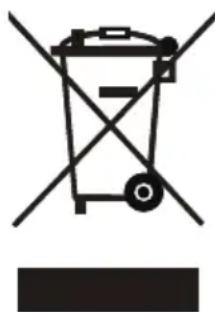
Symbol of a trash bin with crossed lines indicating no waste or discharge, and a solid black rectangle below (no text or labels)If there is a legal regulation for the disposal of electrical and electronic devices in your country, this symbol on the product or on the packaging indicates that this product must not be disposed of with household waste. Instead, it must be taken to a collection point for the recycling of electrical and electronic equipment. By disposing of it in accordance with the rules, you are protecting the environment and the health of your fellow human beings from negative consequences. For information about the recycling and disposal of this product, please contact your local authority or your household waste disposal service.
This product contains batteries. If there is a legal regulation for the disposal of batteries in your country, the batteries must not be disposed of with household waste. Find out about local regulations for disposing of batteries. By disposing of them in accordance with the rules, you are protecting the environment and the health of your fellow human beings from negative consequences.
DECLARATION OF CONFORMITY

Manufacturer & Importer for Great Britain:
Chal-Tec GmbH, Mühlenstraße 25, 10243 Berlin, Germany.
Contact: info@electronic-star.de
Hereby, Chal-Tec GmbH declares that the radio equipment type Phantom Smart is in compliance with Directive 2014/53/EU. The full text of the EU declaration of conformity is available at the following internet address: use.berlin/10047606
For Great Britain: Hereby, Chal-Tec GmbH declares that the radio equipment type Ruby Bar is in compliance with the relevant statutory requirements. The full text of the declaration of conformity is available at the following internet address: use.berlin/10047606
Estimado cliente:
ÍNDICE
Datos técnicos 25
natural_image
Technical line drawing of a device panel with six labeled icons (no text or symbols)natural_image
Pure electrical control panel diagram without any text, numbers, or symbolsnatural_image
Symbol of a trash bin with crossed lines indicating no waste or discharge, and a solid black rectangle below (no text or labels)SOMMAIRE
Fiche technique 35
natural_image
Technical line drawing of a rectangular device with six labeled icons (no text or symbols)natural_image
Pure electrical control panel diagram without any text, numbers, or symbolsnatural_image
Symbol of a trash bin with crossed lines indicating no waste or discharge, and a solid black rectangle below (no text or labels)DÉCLARATION DE CONFORMITÉ

Fabricant :
INDICE
natural_image
Technical line drawing of a device panel with six function icons (no text or labels)natural_image
Simple diagram of a remote control panel with power, plus, minus, and clock icons (no text or labels)natural_image
Symbol of a trash bin with crossed lines indicating no waste or discharge, and a solid black rectangle below (no text or labels)bar
| Category | Value | |---|---| | Category 1 | 100 | | Category 2 | 100 | | Category 3 | 100 | | Category 4 | 100 | | Category 5 | 100 | | Category 6 | 100 | | Category 7 | 100 | | Category 8 | 100 | | Category 9 | 100 | | Category 10 | 100 | | Category 11 | 100 | | Category 12 | 100 | | Category 13 | 100 | | Category 14 | 100 | | Category 15 | 100 | | Category 16 | 100 | | Category 17 | 100 | | Category 18 | 100 | | Category 19 | 100 | | Category 20 | 100 | | Category 21 | 100 | | Category 22 | 100 | | Category 23 | 100 | | Category 24 | 100 | | Category 25 | 100 | | Category 26 | 100 | | Category 27 | 100 | | Category 28 | 100 | | Category 29 | 100 | | Category 30 | 100 | | Category 31 | 100 | | Category 32 | 100 | | Category 33 | 100 | | Category 34 | 100 | | Category 35 | 100 | | Category 36 | 100 | | Category 37 | 100 | | Category 38 | 100 | | Category 39 | 100 | | Category 40 | 100 | | Category 41 | 100 | | Category 42 | 100 | | Category 43 | 100 | | Category 44 | 100 | | Category 45 | 100 | | Category 46 | 100 | | Category 47 | 100 | | Category 48 | 100 | | Category 49 | 100 | | Category 50 | 100 | | Category 51 | 100 | | Category 52 | 100 | | Category 53 | 100 | | Category 54 | 100 | | Category 55 | 100 | | Category 56 | 100 | | Category 57 | 100 | | Category 58 | 100 | | Category 59 | 100 | | Category 60 | 100 | | Category 61 | 100 | | Category 62 | 100 | | Category 63 | 100 | | Category 64 | 100 | | Category 65 | 100 | | Category 66 | 100 | | Category 67 | 100 | | Category 68 | 100 | | Category 69 | 100 | | Category 70 | 100 | | Category 71 | 100 | | Category 72 | 100 | | Category 73 | 100 | | Category 74 | 100 | | Category 75 | 100 | | Category 76 | 100 | | Category 77 | 100 | | Category 78 | 100 | | Category 79 | 100 | | Category 80 | 100 | | Category 81 | 100 | | Category 82 | 100 | | Category 83 | 100 | | Category 84 | 100 | | Category 85 | 100 | | Category 86 | 100 | | Category 87 | 100 | | Category 88 | 100 | | Category 89 | 100 | | Category 90 | 100 | | Category 91 | 100 | | Category 92 | 100 | | Category 93 | 100 | | Category 94 | 100 | | Category 95 | 100 | | Category 96 | 100 | | Category 97 | 100 | | Category 98 | 100 | | Category 99 | 100 | | Total (Total) = [sum of bars] / [values] * (sum of bars + bars) * (sum of bars + bars) * (sum of bars + bars) * (sum of bars + bars) * (sum of bars + bars) * (sum of bars + bars) * (sum of bars + bars) * (sum of bars + bars) * (sum of bars + bars) * (sum of bars + bars) * (sum of bars + bars) * (sum of bars + bars) * (sum of bars + bars) * (sum in brackets) * (sum in brackets) * (sum in brackets) * (sum in brackets) * (sum in brackets) * (sum in brackets) * (sum in brackets) * (sum in brackets) * (sum in brackets) * (sum in brackets) * (sum in brackets) * (sum in brackets) * (sum in brackets) * (sum in brackets) * (sum in brackets) * (sum in brackets) * (sum in brackets) * (total).* (sum in brackets) * (sum in brackets) * (sum in brackets) * (sum in brackets) * (sum in brackets) * (sum in brackets) * (sum in brackets) * (sum in brackets) * (sum in brackets) * (sum in brackets) * (sum in brackets) * (sum in brackets) * (total).* (sum in brackets) * (sum in brackets) * (sum in brackets) * (sum in brackets)
KLARSTEIN
- INHALT
- CONTENTS
- SAFETY INSTRUCTIONS
- CAUTION
- Fire hazard
- Risk of burns
- Risk of personal injury
- INSTALLATION
- Before the installation, these matters need to attention
- Installation steps of the wall-mounted heater
- OPERATION
- Control panel operation
- Remote control operation
- DEVICE CONTROL BY SMARTPHONE
- Follow these steps to connect your smartphone to your Klarstein device:
- App Download
- Troubleshooting connection problems
- MAINTENANCE AND CLEANING
- Maintenance
- Cleaning
- WARNING: Risk of electric shock
- DISPOSAL CONSIDERATIONS
- DECLARATION OF CONFORMITY
- Estimado cliente:
- ÍNDICE
- SOMMAIRE
- DÉCLARATION DE CONFORMITÉ
- Fabricant :
- INDICE
- KLARSTEIN
Brand : Klarstein
Model : Phantom Smart
Category : Heating