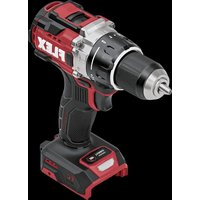
DD 2G 18-EC HD2 - Drill Flex - Free user manual and instructions
Find the device manual for free DD 2G 18-EC HD2 Flex in PDF.


| Brand | Flex |
| Model | DD 2G 18-EC HD2 |
| Product type | Cordless drill/driver |
| Nominal voltage | 18 Vdc |
| No-load speed (drill) | 0-550 / 0-2400 rpm |
| Turbo speed without load | 0-700 / 0-3000 rpm |
| Chuck capacity | 13 mm |
| Max. drilling diameter (wood) | 160 mm |
| Max. drilling diameter (metal) | 13 mm |
| Max. torque (soft/hard screwdriving) | 75 / 170 Nm |
| Number of clutch positions | 22+ |
| Weight (without battery) | 1.6 kg |
| Compatible battery type | AP 18.0/2.5; AP 18.0/5.0; AP 18.0/8.0 |
| Operating temperature | -10 to 40 °C |
| Charging temperature | 0 to 40 °C |
| Storage temperature | -20 to 50 °C |
| Main features | Keyless chuck, two speeds, 22-position torque setting, turbo mode, LED light, auxiliary handle, belt clip |
| Safety | Central rotation direction lock, anti-restart protection, motor brake |
| Maintenance and cleaning | Regular cleaning of ventilation slots with dry compressed air; repairs by an authorized service center |
| Spare parts and repairability | Spare parts list at www.flex-tools.com |
| General information | Compliant with CE and UKCA standards; lithium-ion battery subject to dangerous goods transport regulations |
Frequently Asked Questions - DD 2G 18-EC HD2 Flex
User questions about DD 2G 18-EC HD2 Flex
0 question about this device. Answer the ones you know or ask your own.
Ask a new question about this device
Download the instructions for your Drill in PDF format for free! Find your manual DD 2G 18-EC HD2 - Flex and take your electronic device back in hand. On this page are published all the documents necessary for the use of your device. DD 2G 18-EC HD2 by Flex.
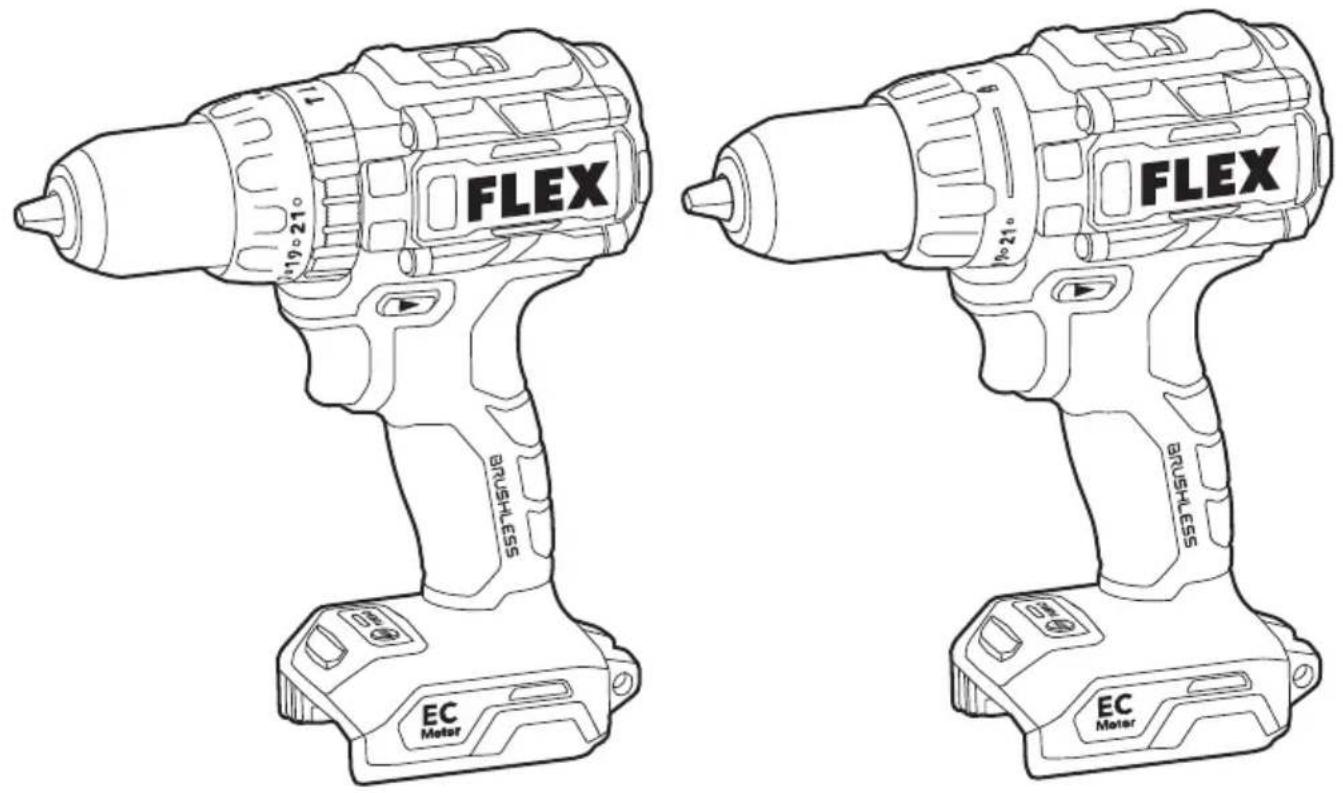
USER MANUAL DD 2G 18-EC HD2 Flex
DD 2G 18-EC HD2DD 2G 18-EC
PD 2G 18-EC HD2PD 2G 18-EC
natural_image
Technical line drawing of a mechanical component with intersecting lines (no text or symbols)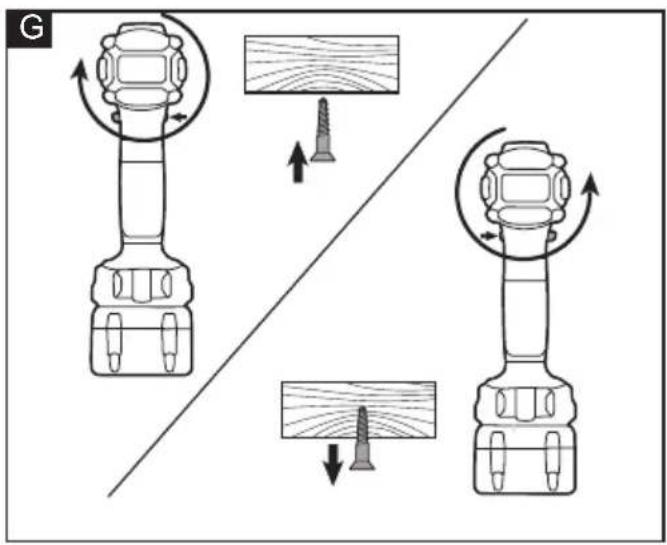
natural_image
Technical line drawing of two mechanical components with labeled parts (1 and 2), no readable text or symbols present.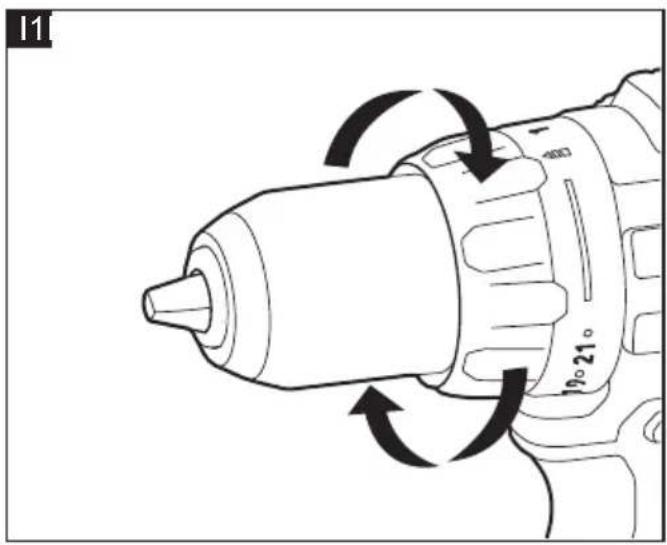
natural_image
Diagram of a drill bit with directional arrows indicating motion (no text or symbols)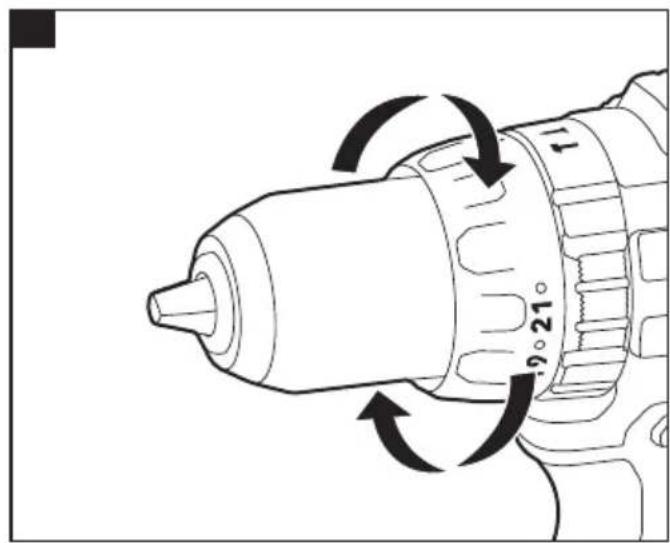
natural_image
Technical line drawing of a drill bit with directional arrows indicating rotation (no text or symbols)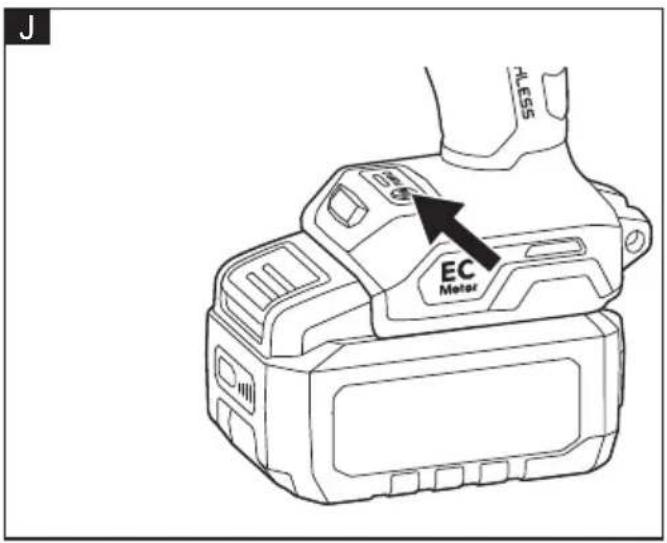
natural_image
Technical line drawing of a drill bit machining a workpiece (no text or symbols)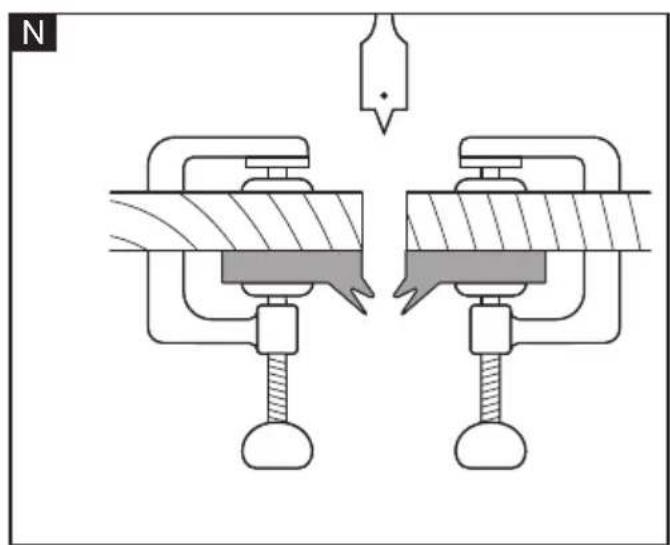
natural_image
Diagram of two mechanical clamps with a spring, showing internal components and a pointer (no text or labels)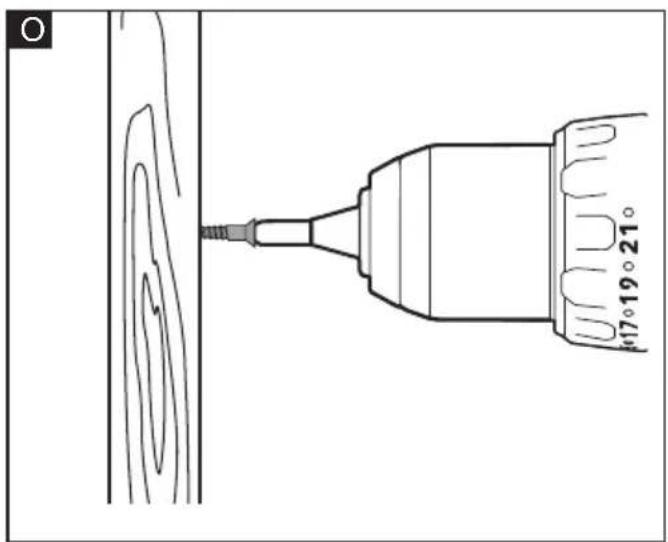
natural_image
Technical line drawing of a drill bit with a screw, showing no text or symbols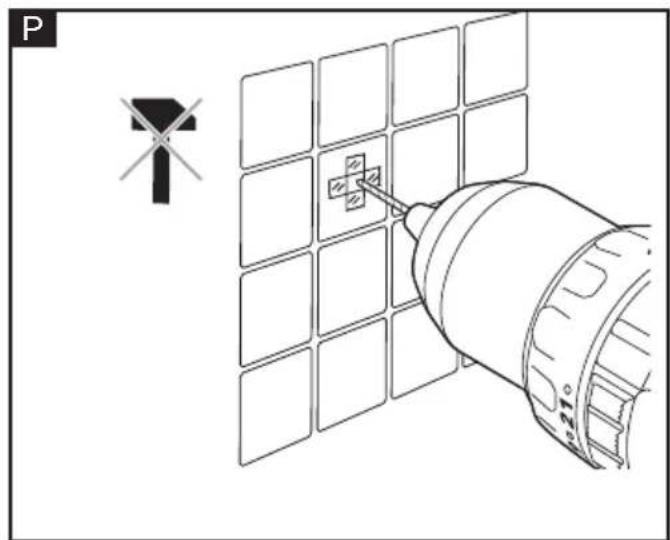
natural_image
Diagram showing a satellite with solar panels and a wind turbine symbol, no text or labels present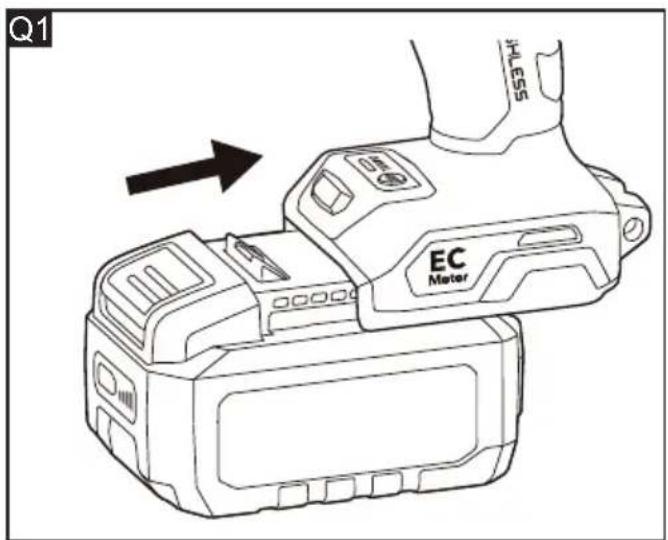
natural_image
Diagram of a flashlight with rotating arrow indicating clockwise motion (no text or symbols)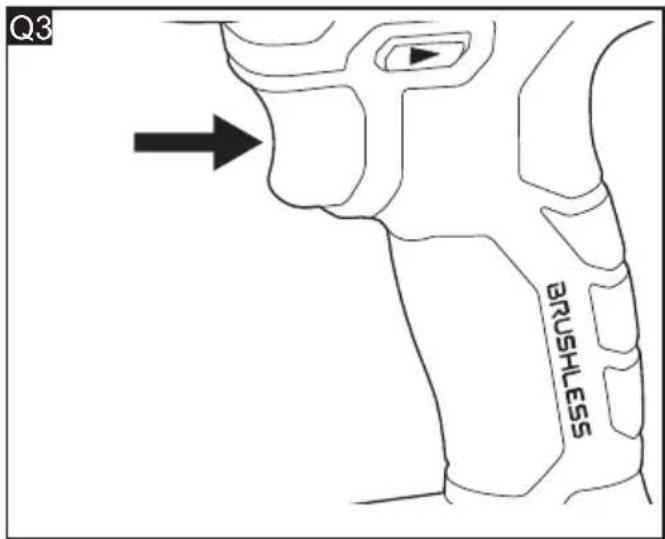
natural_image
Diagram of a handheld device with rotating arrow indicating rotation (no text or symbols)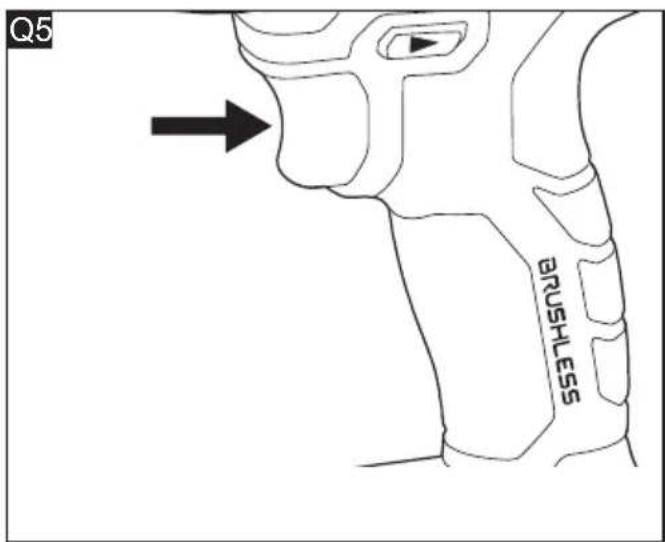
natural_image
Line drawing of a DSLR camera with visible buttons and front panel (no text or symbols)Inhalt
(For PD 2G 18-EC HD2)
Symbols used in this manual....18
Symbols on the product....18
Important safety information....18
Noise and vibration....19
Technical data....20
Overview....20
Operating instructions 20
Transport 25
Maintenance and care....25
Disposal information....25
CE Declaration of conformity....26
UK CA Declaration of conformity ..... 26
Exemption from liability 26
Symbols used in this manual

WARNING!
Denotes impending danger. Non-observance of this warning may result in death or extremely severe injuries.

CAUTION!
Denotes a possibly dangerous situation. Non-observance of this warning may result in slight injury or damage to property.

NOTE
Denotes application tips and important information.
Symbols on the product

Before switching on the power tool, read the operating manual.

Disposal information for the old tool (see page 25)

CE marking

UKCA marking
Important safety information

WARNING!
Before using the power tool, please read the following and act accordingly:
– these operating instructions,
- the "General safety instructions" on the handling of power tools in the enclosed booklet (leaflet-no.: 315915),
– the currently valid site rules and the regulations for the prevention of accidents.
This power tool is state of the art and has been constructed in accordance with the acknowledged safety regulations.
Nevertheless, when in use, the power tool may pose a danger to life and limb of the user or a third party, or the power tool or other property may be damaged.
The power tool may be operated only
- for its intended use
– in perfect working order.
Faults which impair safety must be repaired immediately.
Intended use
The cordless drill driver / percussion drill driver is intended
– for commercial use in industry and trade,
- for drilling holes, drilling wood, drilling metal, driving screws and drilling masonry (this only for percussion drill driver).
Safety instructions for drill driver / percussion drill driver

WARNING!
Read all safety warnings, instructions, illustrations and specifications provided with this power tool. Failure to follow all instructions listed below may result in electric shock, fire and/or serious injury.
Save all warnings and instructions for future reference.
Safety instructions for all operations
■ Hold the power tool by insulated gripping surfaces, when performing an operation where the cutting accessory or fastener may contact hidden wiring. The cutting
accessory or fastener contacting a "live" wire may make exposed metal parts of the power tool "live" and could give the operator an electric shock.
- Secure the work piece. Clamping devices or a vise will hold the work piece in place better and more safely than holding it by hand.
■ Use auxiliary handle(s). Loss of control can cause personal injury.
■ Wear ear protectors when impact drilling. Exposure to noise can cause hearing loss.
■ Do not drill, fasten or break into existing walls or other blind areas where electrical wiring may exist. If this situation is unavoidable, disconnect all fuses or circuit breakers feeding this worksite.
■ Position yourself to avoid being caught between the tool or walls or posts. Should the bit become bound or jammed in the work, the reaction torque of the tool could crush your hand or leg.
■ Always wait until the machine has come to a complete stop before placing it down. The tool insert can jam and lead to loss of control over the power tool.
■ When working with the power tool, always hold it firmly with both hands and assume a secure stance. The power tool is guided more securely with both hands.
Safety instructions when using long drill bits:
■ Never operate at higher speed than the maximum speed rating of the drill bit. At higher speeds, the bit is likely to bend if allowed to rotate freely without contacting the workpiece, resulting in personal injury.
■ Always start drilling at low speed and with the bit tip in contact with the workpiece. At higher speeds, the bit is likely to bend if allowed to rotate freely without contacting the workpiece, resulting in personal injury.
■ Apply pressure only in direct line with the bit and do not apply excessive pressure. Bits can bend causing breakage or loss of control, resulting in personal injury.
■ Do not drill, fasten or break into existing walls or other blind areas where electrical wiring may exist. If this situation is unavoidable, disconnect all fuses or circuit breakers feeding this worksite.
■ Position yourself to avoid being caught
between the tool or side handle and walls or posts. Should the bit become bound or jammed in the work, the reaction torque of the tool could crush your hand or leg.
Noise and vibration
The noise and vibration values have been determined in accordance with EN 62841. The A-weighted noise level of the power tool is typically:
- Sound pressure level L_pA :
DD 2G 18-EC HD2: 77 dB(A)
PD 2G 18-EC HD2: 77 dB(A) - Sound power level L_WA :
DD 2G 18-EC HD2: 85 dB(A)
PD 2G 18-EC HD2: 85 dB(A) - Uncertainty: K = 5 dB
Total vibration value: - Emission value a_h,D :
DD 2G 18-EC HD2: <2.5m/s ^2
PD 2G 18-EC HD2: <2.5 m/s - Emission value a_h,ID :
PD 2G 18-EC HD2: <2.5 m/s - Uncertainty: K = 1.5 m/s

CAUTION!
The specified measured values apply to new power tools. Daily use causes the noise and vibration values to change.

NOTE
The vibration emission level stated in these instructions has been measured in accordance with a standardised test given in EN 62841 and may be used to compare one tool with another. It can also be used for a preliminary assessment of exposure.
The declared vibration emission level represents the main applications of the tool.
However, if the tool is used for different applications, with different accessories or poor maintenance, the vibration emission level may differ. This may significantly increase the exposure level over the total working period.
To make an accurate estimation of the vibration exposure level, it is also necessary to take into account the times when the tool is switched off or running but not actually in use. This may significantly decrease the exposure level over the total working period.
Identify additional safety measures to protect the operator from the effects of vibration such as:
Maintaining the tool and the accessories, keeping the hands warm, organisation of work patterns.

CAUTION!
Wear ear defenders at a sound pressure over 85 dB(A).
Technical data
| Product type | DD 2G 18-EC HD2 | PD 2G 18-EC HD2 | |
| Product Drill Driver | Percussion Drill Driver | ||
| Rated voltage Vdc 18 | |||
| No-load Speed_drill mode | rpm | 0-550/0-2400 | |
| No-load Speed_hammer mode/Screw mode | rpm | 0-550/0-2400 | |
| No-load TUR-BO Speed_drill mode | rpm | 0-700/0-3000 | |
| No-load TUR-BO Speed_hammer mode/Screw mode | rpm | 0-600/0-2550 | |
| Impact rate ipm N/A | 0-88000-38400 | ||
| Turbo impact ipm / | 0-96000-40800 | ||
| Chuck capacity mm 13 | |||
| Max. drill diameter for metal | mm | 13 13 | |
| Max. drill diameter for wood | mm | 160 160 | |
| Max. drill diameter for masonry | mm | N/A 16 | |
| Torque, max.- Soft screw-driving case - Hard screw-driving case | Nm | 75/170 75/1 | 70 |
| Clutch settings | 22+ | 22+ | |
| Weight according to FLEX Procedure 01 | kg | 1.6 | |
| Battery | 18V | AP 18.0/2.5AP 18.0/5.0AP 18.0/8.0 | |
| Weight of battery | kg | AP 18.0/2.5AP 18.0/5.0AP 18.0/8.0 | 0.40.71.1 |
| Charger range | CA 12/18CA 18.0-LDCA 10.8/18.0CA SP 2x 12/18 | ||
| Charging temperature | 0~40°C | ||
| Working temperature | -10~40°C | ||
| Storage temperature | -20~50°C | ||
Overview (see figure A)
The numbering of the product features refers to the illustration of the machine on the graphics page.
1 Chuck jaws
2 Chuck
3 Torque-adjustment ring
4 Function-selection ring
(For PD 2G 18-EC HD2)
5 Two-speed gear shifter
6 Direction preselector switch (forward/ center-lock/reverse)
7 Variable-speed trigger switch
8 Soft grip
9 Strap fixing
For attaching a wrist strap (not included) in order to reduce the chances of dropping your tool.
10 Turbo function indicator
11 Turbo function button
12 LED light
13 Removable belt clip
14 Fastening screw
15 Removable bit bracket
16 Auxiliary handle
Operating instructions

WARNING!
Remove the battery before carrying out any work on the power tool.
Before switching on the power tool
Unpack the power tool and accessories and check that no parts are missing or damaged.

NOTE
The batteries are not fully charged on delivery. Prior to initial operation, charge the batteries fully. Refer to the charger operating manual.
Tips for a long battery service life CAUTION!
- Never charge batteries at temperatures below 0 °C or above 40 °C.
- Do not charge batteries in environments with high air humidity or ambient temperature.
- Do not cover batteries and the charger during the charging process.
- Pull out the charger mains plug at the end of the charging process.
Battery and charger heat up during the charging process. This is perfectly normal!

NOTE
Follow the instructions for correct battery charging in the operating instructions for the battery.
If batteries are not used for an extended period of time, store them partially charged in a cool place.
Inserting/replacing the battery (see figure B1-B2)
■ Press the charged battery into the power tool until it clicks into place (see figure B1).
■ To remove, press the release button (1.) and pull out the battery (2.) (see figure B2).

CAUTION!
When the device is not in use, protect the battery contacts. Loose metal parts may short circuit the contacts; explosion and fire hazard!
Removable belt clip and bit bracket (see figure C)
■ Remove the battery pack from the tool.
■ Align the hole of the belt clip 13 and bit
bracket 15 with the threaded hole on the base of the tool.
■ Insert the fastening screw 14 and securely tighten the screw with a screwdriver (not included).
Strap fixing (see figure D)
Strap fixing 9 is provided to attach a wrist strap (not included) in order to reduce the chances of dropping your tool. Wrap the strip around your hand when carrying the tool.
Auxiliary handle (see figure E)

WARNING!
For safety and ease of operation, securely tighten the auxiliary handle before every use. Loss of control can cause personal injury.
■ Remove the battery from the tool.
■ Loosen the auxiliary handle 16 by turning the handle counterclockwise.
■ Align the raised portion on the auxiliary handle 16 with the grooves on gearbox of the tool, and then put the auxiliary handle onto the tool.
■ Hand-tighten the handle by turning the handle clockwise.
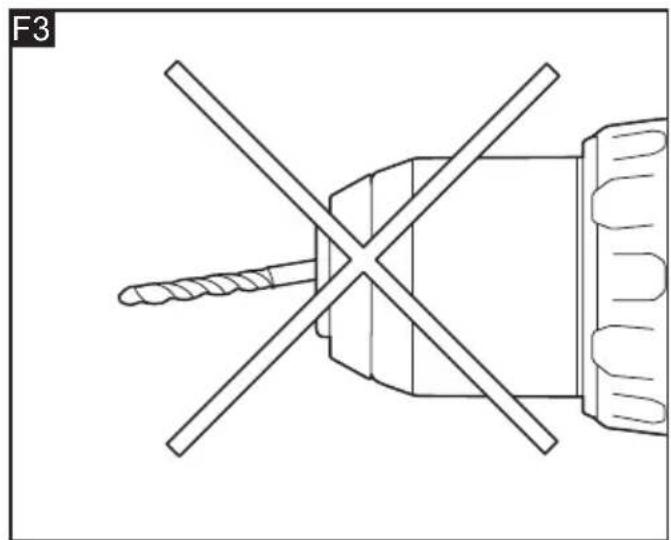
Install and remove bits (see figure F1-F3)

CAUTION!
Before carrying out any work on the power tool, move the direction preselector switch 6 to the middle position.
■ Place the direction selector switch 6 in the center position to lock the trigger switch 7.
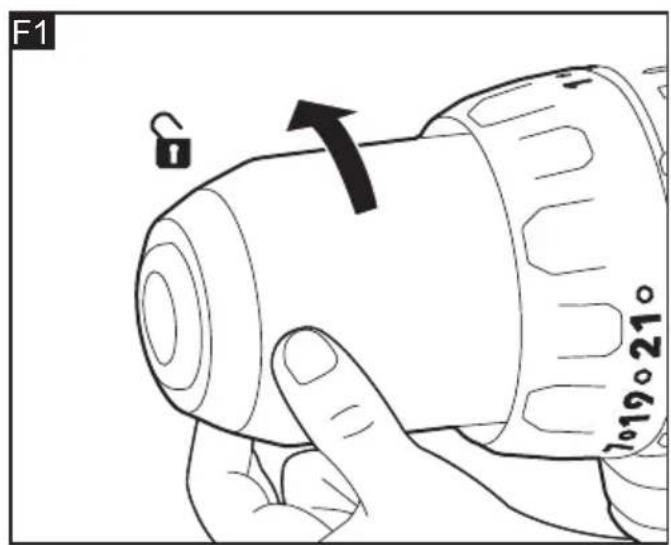
■ Remove the battery pack. Rotate the chuck 2 counterclockwise to open the chuck jaws 1.
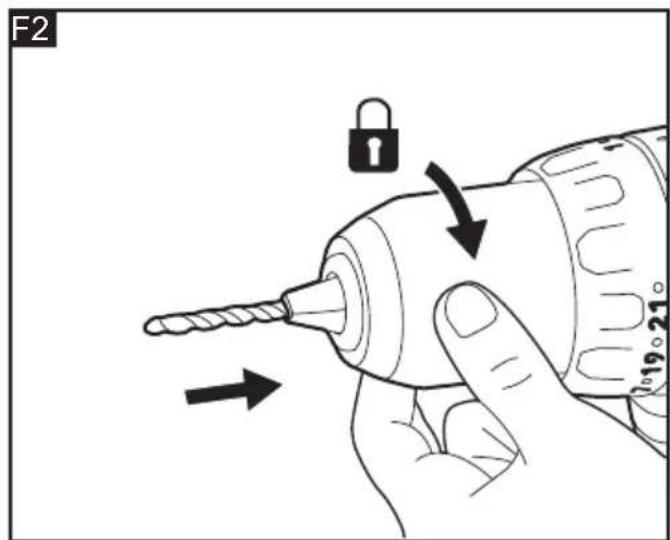
■ Insert a bit as far as it will go and rotate the chuck 2 clockwise and securely tighten by hand.
■ To remove the bit, rotate the chuck 2 counterclockwise to open the chuck jaws and remove the bit.

WARNING!
Make sure to insert the drill bit straight into the chuck jaws. Do not insert the drill bit into the chuck jaws at an angle and then tighten the chuck as shown in Figure F3
This could cause the drill bit to be thrown from the tool, resulting in possibly serious personal injury or damage to the chuck.

WARNING!
The bit may be hot after prolonged use. Use protective gloves when removing the bit from the tool, or first allow the bit to cool down.
Direction preselection (see figure G)

CAUTION!
Change the direction of rotation only when the power tool is stopped.
Move the direction preselector switch 6 to the required position:
■ Position the direction preselector switch 6 to the far left of the tool to drive screws in or tighten screws.
■ Position the direction preselector switch to the far right of the tool to remove screws or loosen screws.
■ Position the direction preselector switch in the "OFF" (center-lock) position to help reduce the possibility of accidental starting when not in use.

NOTE
The tool will not run unless the direction preselector switch is engaged fully to the left or to the right.

WARNING!
Battery tools are always in operating condition. Therefore, the direction preselector switch should always be locked in the center position when the tool is not in use or when carrying it at your side.
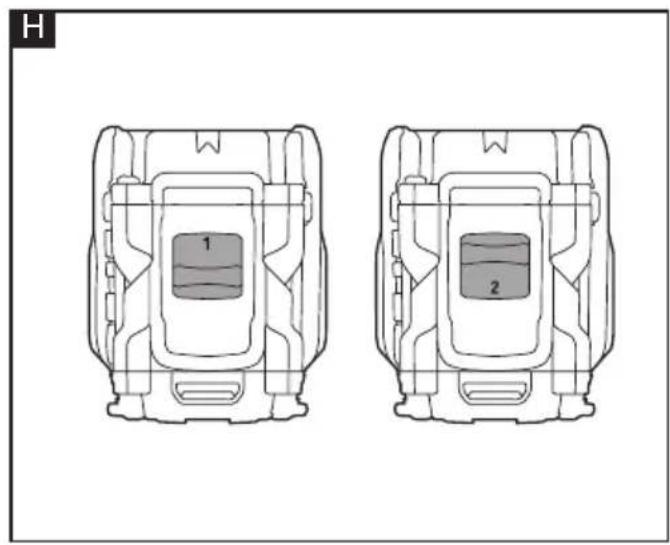
Two-speed gear shifter (see figure H)
The shifter 5 is located on the top of the tool and allows to switch between gears "1" and "2".
- Gear "1" provides higher torque and slower speeds for heavy-duty work or for driving screws, drilling large diameter holes, or tapping threads. Use the mode "1" for starting holes without a center punch, drilling metals or plastic, drilling ceramics, or in applications requiring a higher torque.
- Gear "2" provides lower torque and faster speeds for hammer drilling (PD 2G 18-EC HD2 only) or lighter drilling work. The gear "2" speed is more suitable for drilling wood and wood composites and for using abrasive and polishing accessories.
Function-selection ring (PD 2G 18-EC HD2 only) and torque-adjustment ring

WARNING!
Do not adjust the torque or function-selection ring when the tool is running.
Your tool is equipped with a function-selection ring 4 (PD 2G 18-EC HD2 only) and torque-adjustment ring 3 for various applications. Move the ring depending on the requirements of your task.
The proper setting depends on the job and the type of bit, fastener, and the material you will be working on. In general, use greater torque for larger screws. If the torque is too high, the screws may be damaged or broken.
DD 2G 18-EC HD2 (see figure I1)
Your drill features 22 torque settings for driving and 1 drilling setting. Output torque will increase as the ring is rotated from 1 to 22.
Adjust the torque by rotating the torque-adjustment ring 2. The higher the torque setting, the more force the tool produces to turn an object.
The drilling setting will lock the clutch to permit drilling and other heavy-duty applications.
PD 2G 18-EC HD2 (see figure I2)
Your hammer drill features 22 torque settings, 1 drilling setting, and 1 hammer drilling setting. Output torque will increase as the ring is rotated from 1 to 22.
The Drill setting will lock the clutch to permit (non-hammer) drilling and other heavy-duty applications.
The Hammer Drilling setting will lock the clutch to permit hammer drilling only.
NOTICE: Do not use the hammer drilling setting for drilling in wood, metal, ceramic, and plastic to prevent the drill/screw bit from being damaged.
Turbo mode (see figure J)
In turbo mode the tool delivers higher rotation speed and higher RPM. The torque remains the same.

NOTE
When operating in turbo mode, the tool depletes the battery pack faster.

NOTE
The turbo mode cannot be activated or deactivated while the tool is in operation.
Press the turbo function button 11 to activate the turbo mode of the tool. The turbo function indicator 10 will light up at the same time.
When you press the trigger switch 7 the tool will operate in turbo mode.
To turn off the turbo function mode, release the trigger switch 7, and then press the turbo function button 11. The indicator will turn off and the tool will return to its "normal" mode.
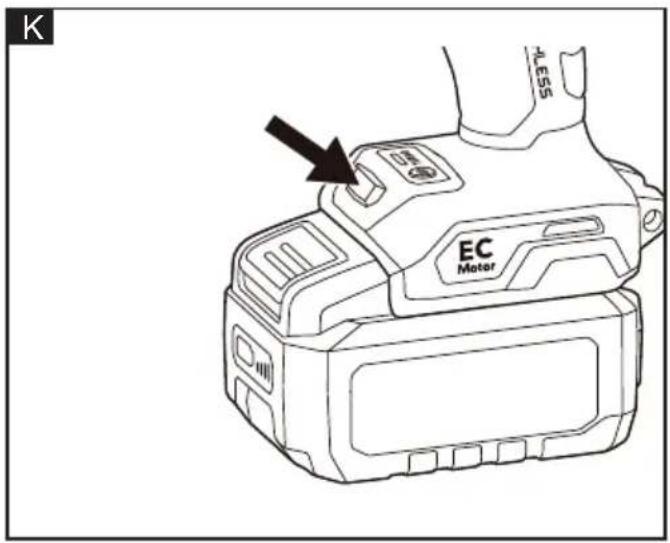
LED light (see figure K)
Your tool is equipped with an LED light 12, located on the base of the tool. This provides additional light on the surface of the workpiece for operation in lower-light areas. The LED light 12 will automatically turn on with a slight squeeze on the variable-speed trigger switch 7 before the tool starts running, and will turn off approximately 10 seconds after the variable-speed trigger switch 7 is released.
The LED light will rapidly flash when the tool and/or battery pack becomes overloaded or too hot, and the internal sensors will turn the tool off. Rest the tool for a while or place the tool and battery pack separately under air flow to cool them.
The LED light will flash more slowly to indicate that the battery is at low-battery capacity. Recharge the battery pack.
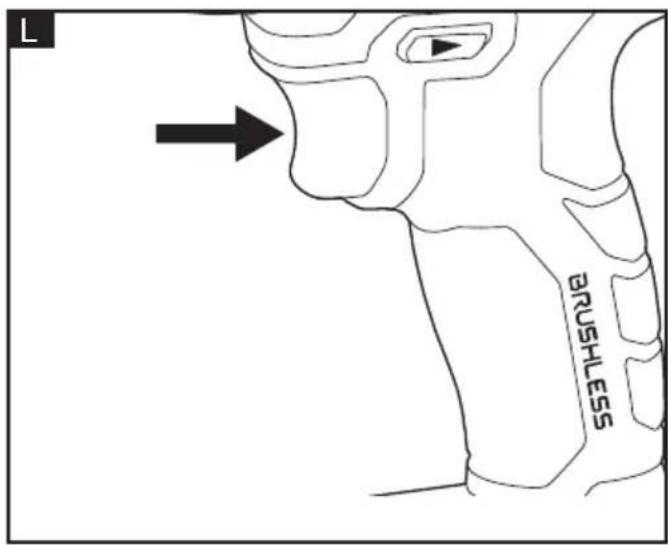
Switching on the power tool (see figure L)
■ To switch the power tool on: Press the trigger switch 7. The variable-speed trigger switch delivers higher speed with increased trigger pressure and lower speed with decreased trigger pressure.
■ To switch the power tool off: Release the trigger switch 7.

WARNING!
To prevent accidental starting that could cause serious personal injury, always remove the battery pack from the tool when assembling parts.

WARNING!
If any parts are damaged or missing, do not operate this product until the parts are replaced. Use of this product with damaged or missing parts could result in serious personal injury.
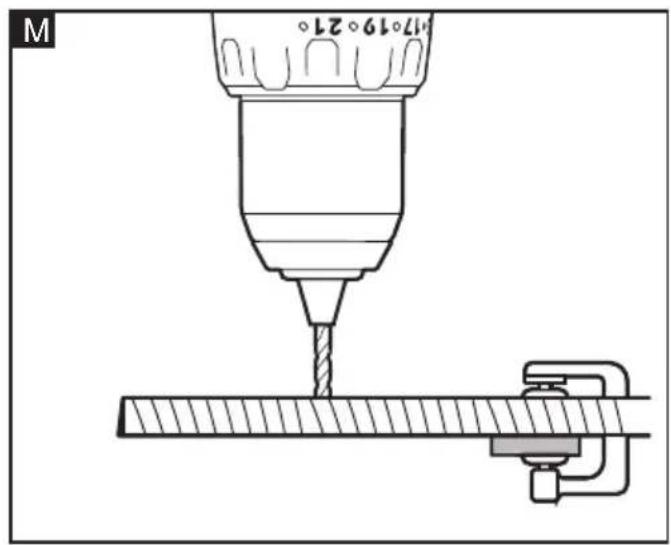
Drilling (see figure M)

WARNING!
Always wear safety goggles or safety glasses with side shields during power tool operation or when blowing dust. If operation is dusty, also wear a dust mask.
■ Check that the direction preselector switch 6 is at the correct setting (forward or reverse).
■ Secure the material to be drilled in a vise or with clamps to keep it from turning as the drill bit rotates.
■ Hold the drill firmly and place the bit at the point to be drilled.
■ Depress the variable-speed trigger switch 7 to start the drill.
■ Move the drill bit into the workpiece, applying only enough pressure to keep the bit "biting". Do not force the drill or apply side pressure to elongate a hole. Let the tool do the work.
■ When drilling hard, smooth surfaces, use a center punch to mark the desired location of the hole. This will prevent the drill bit from slipping off-center as the hole is started.
■ When drilling metals, use light oil on the drill bit to keep it from overheating. The oil will prolong the life of the bit and increase the drilling efficiency.
■ If the bit jams in the workpiece or if the drill stalls, stop the tool immediately. Remove the bit from the workpiece and determine the reason for jamming.
There are two rules for drilling hard materials. First, the harder the material, the greater the pressure you need to apply to the tool. Second, the harder the material, the slower the speed should be. If the hole to be drilled is large, drill a smaller hole first, and then enlarge to the required size with a larger bit; it's often faster in the long run.
Drilling wood (see figure N)
For maximum performance, use high-speed
steel or brad-point bits for wood drilling.
■ Begin drilling at a very low speed to prevent the bit from slipping off the starting point.
■ Increase speed as the drill bit bites into the material.
- When drilling "through" holes, secure a block of wood behind the workpiece to prevent ragged or splintered edges on the back side of the workpiece
NOTICE: Bits may overheat unless reversed and pulled out frequently to clear chips from flutes.
Drilling metal
For maximum performance, use high-speed steel bits for metal or steel drilling.
■ When drilling metals, use light oil on the drill bit to keep it from overheating. The oil will prolong the life of the bit and increase the drilling efficiency.
■ Begin drilling at a very low speed to prevent the bit from slipping off the starting point.
■ Maintain a speed and a pressure that allow cutting without overheating the bit.
Applying too much pressure will:
- Overheat the Drill.
- Wear the bearings.
- Bend or burn bits.
- Produce off-center or irregularly shaped holes.
Driving screws (see figure O)
Try to use standard-type screws for easy driving and improved grip.
■ Install the correct driver bit.
■ Ensure that the torque-adjustment ring is set to the most suitable setting. If in doubt, start with a low setting and gradually increase the setting as necessary. Do not change the torque setting when the tool is running.
■ Use the correct gear ("1" or "2") for the job and initially apply minimal pressure to the variable speed trigger switch. Increase the speed only when full control can be maintained.
■ It is advisable to drill a pilot hole first. This hole should be slightly longer than the screw to be driven and just smaller than the shank diameter of the screw. The pilot hole will act as a guide for the screw and will also make tightening the screw less difficult. When screws are positioned close to an edge of the material, a pilot hole will
also help to prevent splitting of the wood.
■ Use a countersinking bit (sold separately) to accommodate the screw head so that it does not protrude from the surface.
- Keep sufficient pressure on the drill to prevent the bit turning out of the screw head. The screw head can easily become damaged, making it difficult to drive home or remove.
■ To stop the drill/driver, release the trigger switch and allow the tool to come to a complete stop.
Drilling masonry (PD 2G 18-EC HD2 only) (see figure P)
For maximum performance, use carbide-tipped masonry bits when drilling holes in brick, tile, concrete, etc.
■ Maintain a speed and a pressure that allow cutting without overheating the bit or drill. Applying too much pressure will:
- Overheat the drill.
- Wear the bearings.
- Bend or burn bits.
– Produce off-center or irregular-shaped holes.
■ Apply light pressure and medium speed for best results in brick.
■ Apply additional pressure for hard materials such as concrete.
- When drilling holes in tile, practice on a scrap piece to determine the best speed and pressure. To prevent the drill bit from skidding/ sliding, first apply two pieces of masking tape to create an "X" shape over the intended drilling spot.
■ Begin drilling at a very low speed to prevent the bit from slipping off the starting point.
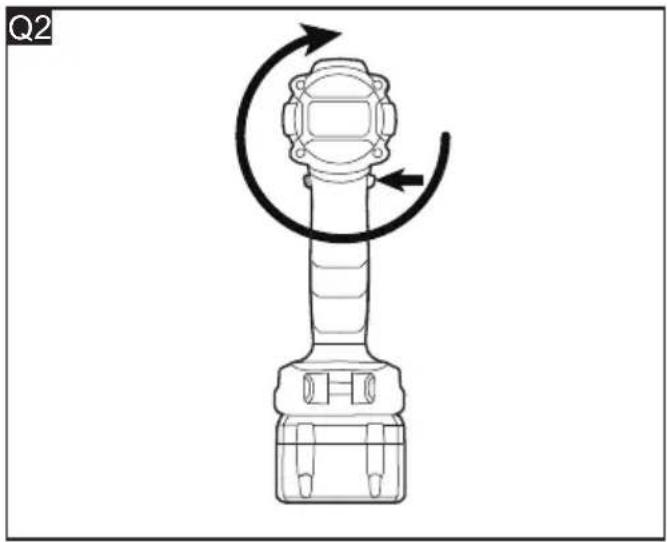
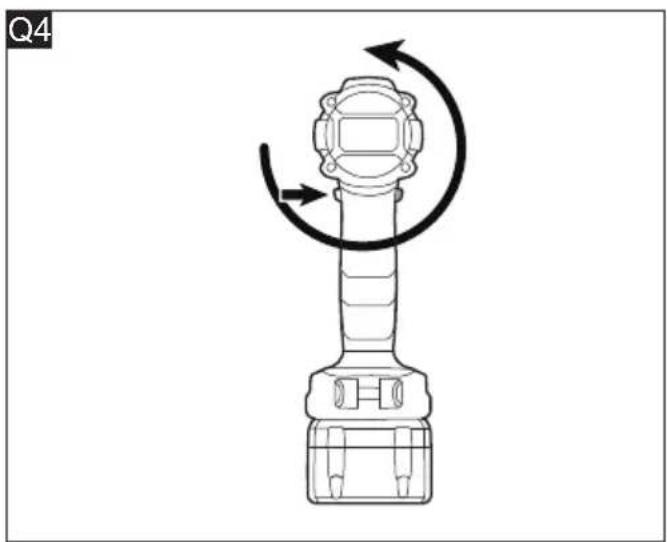
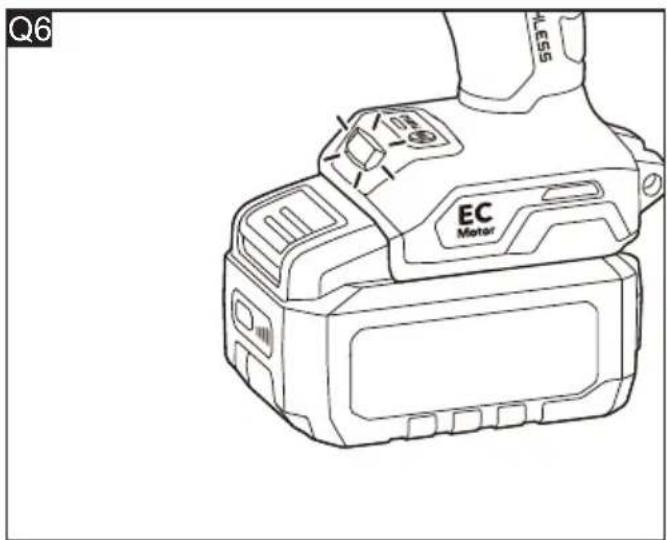
To deactivate the anti-kickback function (see figure Q1-Q6)
■ Insert the battery.
■ Push the direction preselector switch to the forward rotation mode.
■ Push the trigger switch for 5 times continuously and each push no more than 5 seconds.
■ Push the direction preselector switch to the reverse rotation mode.
■ Push the trigger switch for 5 times continuously and each push no more than 5 seconds.
■ LED light will start blinking to indicate that
the anti-kickback function is turned off.

NOTE
The anti-kickback feature will turn on automatically after 30 minutes of no use or after removing battery.
Transport
Lithium-Ion batteries are subject to the Dangerous Goods Legislation requirements.
Transportation of those batteries has to be done in accordance with local, national and international provisions and regulations.
Users may transport these batteries by road without further requirements.
The commercial transportation of lithium-ion batteries by shipping companies is subject to the regulations for the transportation of dangerous goods. Shipping preparations and transportation may only be carried out by appropriately trained persons. The entire process must be professionally supervised.
The following points must be observed when transporting rechargeable batteries:
Ensure that the battery contact terminals are protected and insulated to prevent short circuits.
Ensure that the battery pack is secured against movements inside the packaging.
Damaged or leaking batteries must not be transported.
Contact your shipping company for further information.

CAUTION!
Do not post batteries which have a damaged housing.
Maintenance and care

WARNING!
Before performing any work on the power tool, remove the battery pack from the tool.
Cleaning

CAUTION!
When cleaning with dry compress air, always wear goggles.
Regularly clean the power tool and ventilation slots. Frequency of cleaning is dependent on the material and duration of use. Regularly
blow out the housing interior and motor with dry compressed air.
Repairs
Repairs may be carried out by an authorized customer service centre only.

NOTE
During the warranty period, do not loosen the screws on the housing. Failure to comply with this requirement will invalidate any claims under the manufacturer's warranty.
Spare parts and accessories
Other accessories, in particular tools and accessories, can be found in the manufacturer's catalogues. Exploded drawings and spare-part lists can be found on our homepage: www.flex-tools.com.
Disposal information

WARNING!
Render redundant power tools unusable:
- battery operated power tool by removing the battery.

EU countries only
Do not throw electric power tools into the household waste!
In accordance with the European Directive 2012/19/EU on Waste Electrical and Electronic Equipment and transposition into national law used electric power tools must be collected separately and recycled in an environmentally friendly manner.

Raw material recovery instead of waste disposal.
Device, accessories and packaging should be recycled in an environmentally friendly manner. Plastic parts are identified for recycling according to material type.

WARNING!
Do not throw batteries into the household waste, fire or water. Do not open used batteries.
EU countries only:
In accordance with Directive 2006/66/EC defective or used batteries must be recycled.

NOTE
Please ask your dealer about disposal
options!
CE -Declaration of Conformity
The Declarations of conformity are included in Annex 1 to this instruction manual.

Declaration of Conformity
The Declarations of conformity are included in Annex 1 to this instruction manual.
Exemption from liability
The manufacturer and his representative are not liable for any damage and lost profit due to interruption in business caused by the product or by an unusable product.
The manufacturer and his representative are not liable for any damage which was caused by improper use of the product or by use of the product with products from other manufacturers.
Table des matières
DD 2G 18-EC HD2 (voir figure I1)
PD 2G 18-EC HD2 (voir figure I2)
(Solo PD 2G 18-EC HD2)
DD 2G 18-EC HD2 (figura I1)
DD 2G 18-EC HD2 (se figur I1)
(For PD 2G 18-EC HD2)
DD 2G 18-EC HD2 (se figur I1)
(Pre PD 2G 18-EC HD2)
- Razina zvučnog tlaka L _pA : DD 2G 18-EC HD2: 77 dB (A) PD 2G 18-EC HD2: 77 dB (A)
- Razina zvučne snage L_WA : DD 2G 18-EC HD2: 85 dB (A) PD 2G 18-EC HD2: 85 dB (A)
- Nesigurnost: K = 5 dB
(Za PD 2G 18-EC HD2)
Hrup in tresljaji 175
- Negotovost: K = 5 dB
(Za PD 2G 18-EC HD2)
Unit 8 Anglo Office Park
Lincoln Road
HP12 3RH, High Wycombe, Buckinghamshire
United Kingdom
Phone: +44 (0)1325 741 793
E-Mail: uk.sales@flex-tools.com



- DD 2G 18-EC HD2DD 2G 18-EC
- PD 2G 18-EC HD2PD 2G 18-EC
- Inhalt
- Symbols used in this manual
- WARNING!
- CAUTION!
- NOTE
- Symbols on the product
- Important safety information
- Intended use
- Safety instructions for drill driver / percussion drill driver
- Safety instructions for all operations
- Safety instructions when using long drill bits:
- Noise and vibration
- Overview (see figure A)
- Operating instructions
- Before switching on the power tool
- Tips for a long battery service life CAUTION!
- Inserting/replacing the battery (see figure B1-B2)
- Removable belt clip and bit bracket (see figure C)
- Strap fixing (see figure D)
- Auxiliary handle (see figure E)
- Install and remove bits (see figure F1-F3)
- Direction preselection (see figure G)
- Two-speed gear shifter (see figure H)
- Function-selection ring (PD 2G 18-EC HD2 only) and torque-adjustment ring
- DD 2G 18-EC HD2 (see figure I1)
- PD 2G 18-EC HD2 (see figure I2)
- Turbo mode (see figure J)
- LED light (see figure K)
- Switching on the power tool (see figure L)
- Drilling (see figure M)
- Drilling wood (see figure N)
- Drilling metal
- Driving screws (see figure O)
- Drilling masonry (PD 2G 18-EC HD2 only) (see figure P)
- To deactivate the anti-kickback function (see figure Q1-Q6)
- Transport
- Maintenance and care
- Cleaning
- Repairs
- Spare parts and accessories
- Disposal information
- Raw material recovery instead of waste disposal.
- CE -Declaration of Conformity
- Declaration of Conformity
- Exemption from liability
- Table des matières
- DD 2G 18-EC HD2 (voir figure I1)
- PD 2G 18-EC HD2 (voir figure I2)
- DD 2G 18-EC HD2 (figura I1)
- DD 2G 18-EC HD2 (se figur I1)
Brand : Flex
Model : DD 2G 18-EC HD2
Category : Drill