
LH50 - Engraving tool Vevor - Free user manual and instructions
Find the device manual for free LH50 Vevor in PDF.
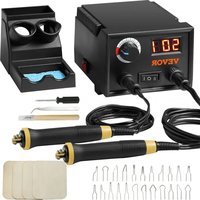


| Product Type | Pyrography Machine |
| Model | LH50 |
| Brand | Vevor |
| Power Supply | 120 V ~ 60 Hz (US) / 220-240 V ~ 50 Hz (EU/AU) |
| Power | 20 W |
| Temperature Range | 300 to 700 °C |
| Number of Pen Ports | 2 (dual port with switching) |
| Temperature Control | Progressive adjustment knob |
| Display | Digital (built-in thermometer) |
| Compatible Tip Types | Curved wire, pointed wire, flat wire (for line, shading, detail) |
| Protection Class | Class II (double insulation) |
| Standards | CE, FCC Part 15 (Class B) |
| Recommended Use | Pyrography on wood, gourds, leather, etc. |
| Safety | Auto shut-off, detailed safety instructions |
| Maintenance | Clean after use, store in a dry fireproof place |
| Included Accessories | Multiple pen tips, tweezers, pen holder |
| Repairability | Spare parts available via Vevor after-sales service; professional replacement recommended for cord |
| Warranty | Electronic warranty certificate at www.vevor.com/support |
Frequently Asked Questions - LH50 Vevor
User questions about LH50 Vevor
0 question about this device. Answer the ones you know or ask your own.
Ask a new question about this device
Download the instructions for your Engraving tool in PDF format for free! Find your manual LH50 - Vevor and take your electronic device back in hand. On this page are published all the documents necessary for the use of your device. LH50 by Vevor.
USER MANUAL LH50 Vevor
Technical Support and E-Warranty Certificate www.vevor.com/support
PYROGRAPHY MACHINE
We continue to be committed to providing you with tools at competitive prices.
"Save Half", "Half Price", or any other similar expressions used by us only represent an estimate of savings you might benefit from buying certain tools with us compared to the major top brands, and do not necessarily mean to cover all categories of tools offered by us. You are kindly reminded to carefully consider whether you are actually saving half when placing an order with us compared to major brands.
VEVOR®
TOUGH TOOLS, HALF PRICE
PYROGRAPHY MACHINE
MODEL: LH50
NEED HELP? CONTACT US!
Have product questions? Need technical support? Please feel free to contact us:
Technical Support and E-Warranty Certificate www.vevor.com/support
This is the original instruction. Please read all manual instructions carefully before operating. VEVOR reserves the right to interpret the user manual. The appearance of the product shall be subject to the product you received. Please forgive us that we won't inform you of any technology or software updates on our product.
 | Warning-To reduce the risk of injury, user must read instructions manual carefully. |
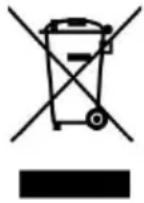 | CORRECT DISPOSALThis product is subject to the provision of European Directive 2012/19/EC. The symbol showing a wheelie bin crossed through indicates that the product requires separate refuse collection in European Union. This applies to the product and all accessor marked with this symbol. Products marked as such may not discarded with normal domestic waste, but must be taken to collection point for recycling electrical and electronic devices |
 | This symbol, placed before a safety comment, indicates a kind precaution, warning, or danger. Ignoring this warning may lead accident. Please always follow the recommendation below to the risk of injury, fire, or electrocution. |
 | This product is of protection class II. That means it is equip enhanced or double insulation. |
FCC INFORMATION
CAUTION: Changes or modifications not expressly approved by the party responsible for compliance could void the user's authority to operate the equipment!
This device complies with Part 15 of the FCC Rules. Operation is subject to the following two conditions:
1) This product may cause harmful interference.
2) This product must accept any interference received, including interference that may cause undesired operation.
WARNING: Changes or modifications to this product not expressly approved by the party responsible for compliance could void the user's authority to operate the product.
Note: This product has been tested and found to comply with the limits for a Class B digital device, pursuant to Part 15 of the FCC Rules. These limits are designed to provide reasonable protection against harmful interference in a residential installation.
This product generates, uses, and can radiate radio frequency energy, and if not installed and used in accordance with the instructions, may cause harmful interference to radio communications. However, there is no guarantee that interference will not occur in a particular installation. If this product does cause harmful interference to radio or television reception, which can be determined by turning the product off and on, the user is encouraged to try to correct the interference by one or more of the following measures.
- Reorient or relocate the receiving antenna.
- Increase the distance between the product and the receiver.
- Connect the product to an outlet on a circuit different from that to which the receiver is connected.
- Consult the dealer or an experienced radio/TV technician for assistance.
IMPORTANT SAFEGUARDS
WARNING:
- Warnings must be followed carefully to avoid bodily injury. Improper use may result in electric shock, fire, personal injury, and other damage:
1) Keep unplugged when moving the machine. 2) Keep unplugged when installing accessories. 3) Place on a flat and stable platform and operate under ventilated conditions. 4) Wear special protective equipment when operating the machine. 5) Do not use this machine in a hazardous location. 6) Only use it when the machine is working correctly.
7) Do not disassemble or repair this machine. 8) Do not use an unsuitable AC outlet. 9) Do not touch the heating plate when the machine is heating. 10) Do not use in humid environments or in contact with water. Also, do not allow liquid to infiltrate the machine to prevent fire or electric shock caused by a short circuit. 11) Do not use a power supply that does not meet the rated voltage. A power supply that does not meet the specified voltage may cause fire or electric shock. 12) Ensure that the machine is grounded to avoid harm to the body. 13) Do not touch the rotating rod or bearing parts with your fingers during use to prevent injuries. 14) If the machine is not in use for a long time, unplug the power cord from the socket. 15) Do not use the machine during thunderstorms or lightning to avoid damage to the machine. 16) Place the machine smoothly on a flame-retardant table and keep it away from flammable and explosive items. 17) Stop using the machine if it smokes, emits a peculiar smell, becomes noisy, or shows other abnormal conditions. 18) This appliance can be used by children aged 8 years and above and persons with reduced physical, sensory, or mental capabilities or lack of experience and knowledge if they have been given supervision or instruction concerning use of the appliance in a safe way and understand the hazards involved. Children shall not play with the appliance. Cleaning and user maintenance shall not be made by children without supervision. 2. Type Y attachment: if the supply cord is damaged, it must be replaced by the manufacturer, its service agent, or similarly qualified persons in order to avoid a hazard. 3. In order to avoid a hazard due to inadvertent resetting of the thermal cutout, this appliance must not be supplied through an external switching device, such as a timer connected to a circuit that is regularly switched on and off by the utility. 4. In the process of temperature adjustment, there will be a slight delay in the digital temperature display, which is a normal phenomenon. Please wait a moment.
SAVE THESE INSTRUCTIONS
Instruction Manual of Pyrography Machine
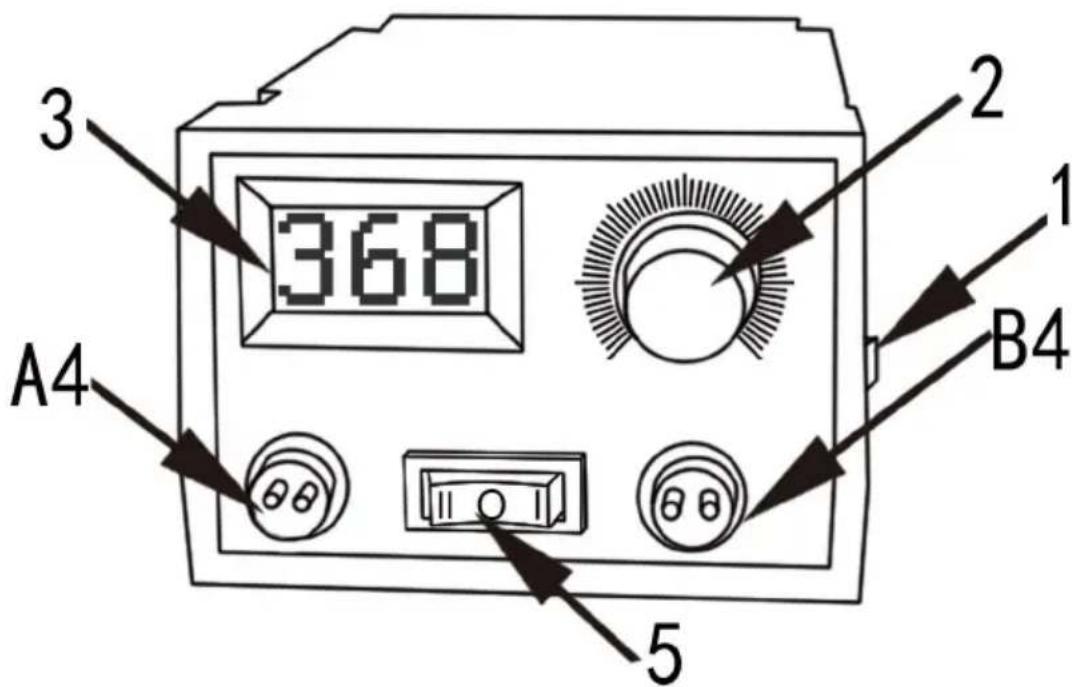
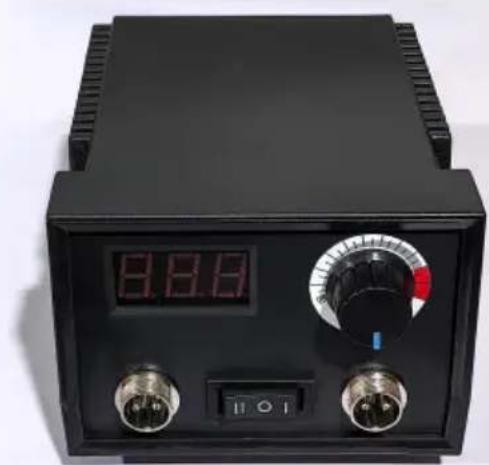
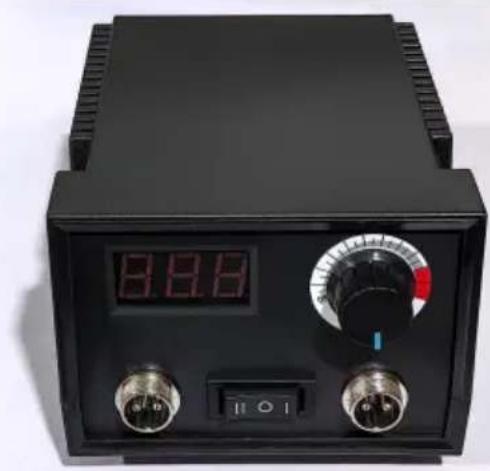
1) Pyrography machine switch: Turn on the switch when using it, and turn it off when not in use to avoid danger. 2) Temperature regulator: adjusts the temperature of the wood burning pen. Low temperature rendering adjusts the temperature in the light gray area; the high temperature area is mainly for line effects.
The temperature of the wood burning pen is adjusted slowly using the thermostat. First, set the temperature to about 600 degrees, then slowly lower it. The best temperature is about 300-500 degrees. Low temperature rendering is best used in the range of 250-400 degrees. When adjusting the rendering temperature, watch the wood burning pen to see if it can burn light colors on the material; the temperature at that time is the best for rendering (different material densities and humidity levels require different optimal temperatures, so please be patient in debugging). You can draw the color painting with different layers over and over again. If the temperature is too high, it is difficult to achieve delicate picture effects. When tracing lines, the temperature can be
appropriately increased, and smooth lines can be drawn according to your own situation. If you want to bake the line well, you should learn to slow down at low temperature. The lower the temperature of the burning wood used, the slower the writing pen, the better the painting effect.
3) Thermometer: The temperature of the pyrography machine is adjusted by adjusting the Temperature value, and the temperature adjustment display range is 300-700 degrees. 4) Pyrography pen socket: Two with dual port configuration, press the button to quickly change pens. The pyrography pen plug should be closely matched with the socket; the plug should be inserted into the bottom of the socket, which should closely match to avoid overheating and burning accessories. 5) Conversion switch: When using the A-point wood burning pen, press I, and the A-point wood burning pen will be powered on and immediately generate heat. When using the B-point wood burning pen, press II, and the B-point wood burning pen will be powered on and immediately generate heat.
Note for pyrography machine:
1) Tighten the screw of the pen tip when applying the pen tip, avoid poor contact between the pen tip and the terminal so that the pen tip is not hot. The overheating of the terminal will burn out the accessories. If the terminal is too hot, that means the pen tip is not tightly fastened, and it should be fastened with a screwdriver. 2) Select a heating wire under 1 mm as the pen tip. Do not choose other non-heating wire materials such as iron wire as the pen tip, which is very dangerous and easy to burn out all the accessories in the movement, and it can cause electric shock and fire.
Instructions for using the wood burning wire tip
1) The function of the bent shape wire pen tip is to introduce
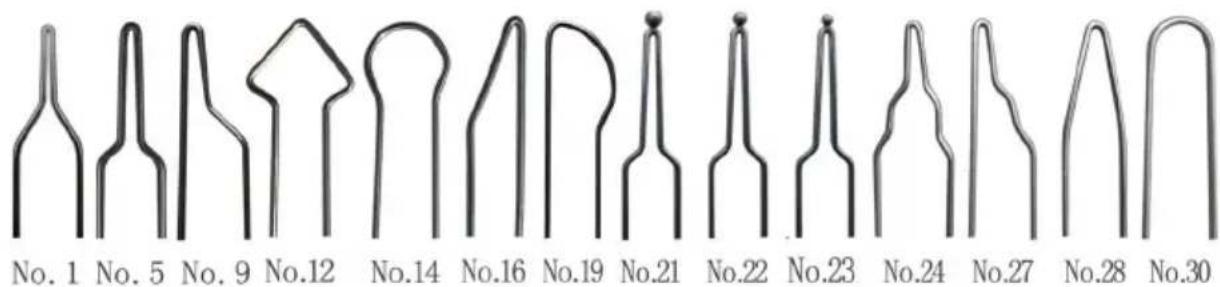
Tips for using a bent metal wire pen tip. The main function of a bent pen tip is to trace lines and render small areas of silk hair. When tracing lines, the blue indicator on the temperature control knob should point towards around 250°C - 350°C. Slowly move the pen and do not move too fast. Look at the smooth edges of the line color, and the entire line color should be even and just right. When rendering, adjust the temperature to around 220°C - 300°C, and draw hair fine lines at a temperature of around 250°C - 350°C.
2) Pointed flat shape of metal wire pen head function introduction
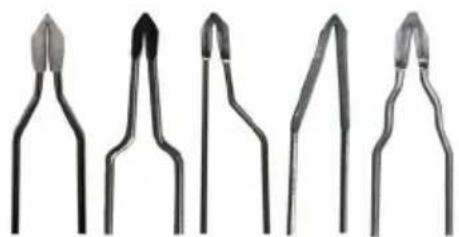
No. 2 No. 7 No. 11 No. 18 No. 26
Tips for using pointed metal wire pen tips: Pointed pen tips are mainly for drawing fine lines and rendering fine parts. The temperature for drawing fine lines is 220 - 250°C, and the temperature for rendering fine parts is 220 - 230°C. When rendering, it is best to watch the color change slightly on the gourd and wooden board, and gradually deepen the color so that the color is delicate and rich. Dark color rendering is best at around 30°C.
3) Flat shape wire pen tip function introduction
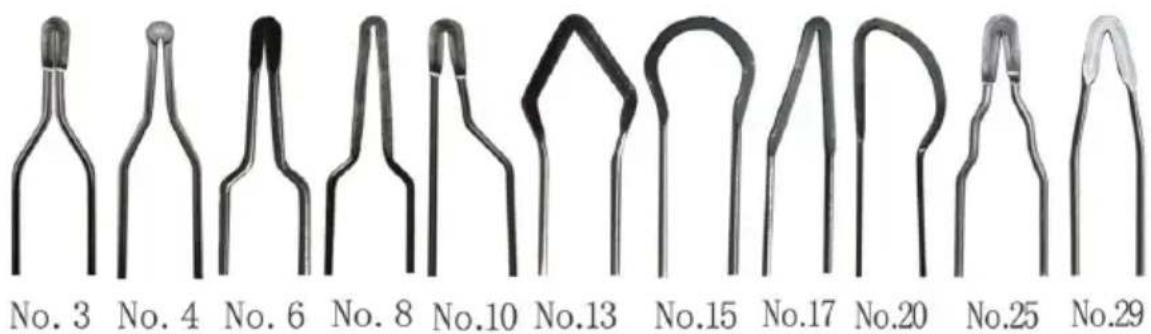
The flat metal wire pen head is mainly used for flat rendering and line drawing. The temperature for flat rendering is around 220°C - 290°C for light colors, and 300°C - 400°C for dark colors.
light colors, and 300°C - 400°C for dark colors.
Summary: The temperature of the pen head introduced earlier should not be too dogmatic and rigid. Depending on the density, humidity, and hardness of the material used for soldering, the temperature required for soldering may vary. You can learn from and adjust the experiment file to find the most suitable temperature for yourself. Whether it's writing, tracing, or rendering, if you want good results, you would rather use the pen slowly at low temperatures to deepen layer by layer, never use it quickly at high temperatures. It is difficult to see works with uneven lines, uneven rendering colors, uneven depth, rough and delicate images.
Correct installation of pen point of pyrography
The pen point of pyrography is not hot, and the temperature is suddenly high and suddenly low. There are sparks coming from the pen point and the pen holder is hot to grasp. What are the reasons? It's because of the incorrect installation of the pen point.
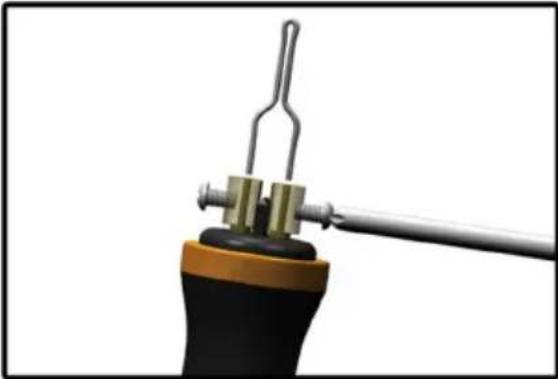 | Unscrew both screws on the pen detach them from the hole where pen head is installed, making it ea for the pen head to be inserted smoothly to the bottom. The effect shown in the above picture. |
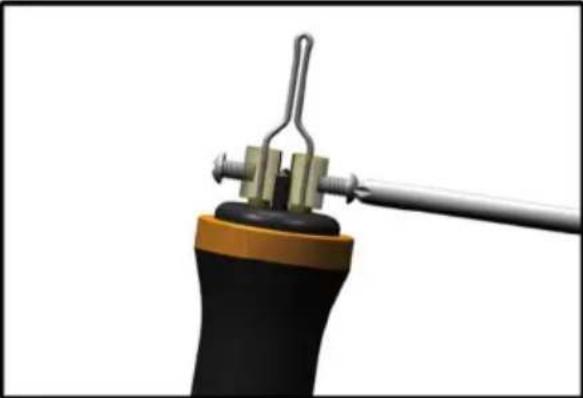 | The picture above correctly shows effect by inserting the two pins of pen tip into the bottom of the hole inside |
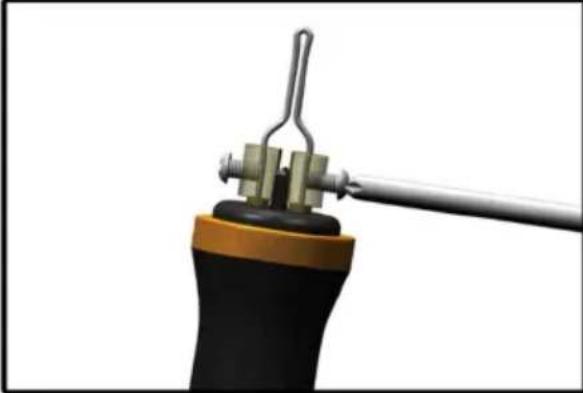 | Finally, tighten the two screws with appropriate torque, be sure to tight |
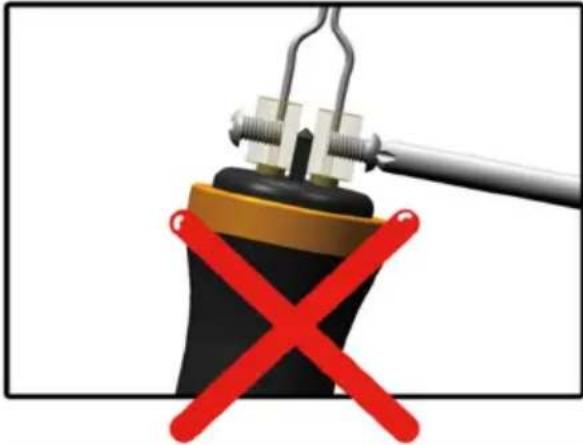 | Screw does not hold pen tip two pins,error! The pen tip does not help properly. |
There are some symptoms of the incorrect installation of pen point: the abnormal heat of pen point, unstable temperature of pen point, sparks generating from the pen point, the heating of copper column and the burning hot of pen holder.
Tips for using wood burning pen tips
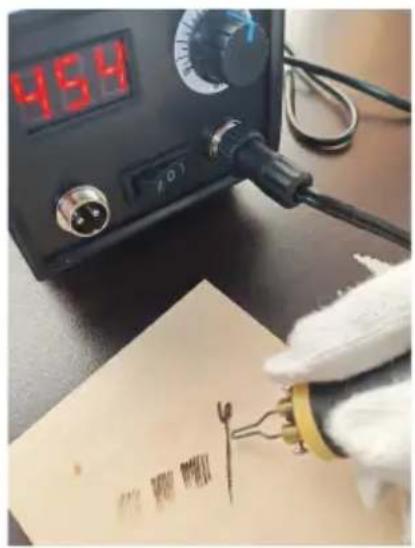
Adjust the temperature to the temperature range shown in the diagram, try lifting the pen and applying gentle pressure. Move the pen faster, and it will burn out light color lines. Slow down the speed of the pen, and a great downward pressure will burn out wide and dark lines. Use this method to try different techniques and effects.
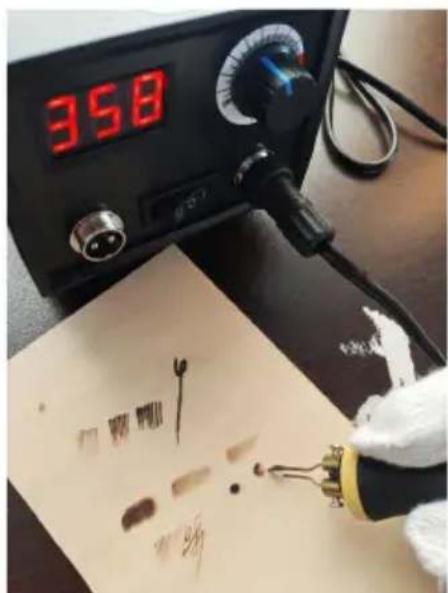
Adjust the temperature to different temperature ranges between 350 and 550°C. Using the pen tip shown in the picture, try to lift the pen gently and apply pressure to move faster. Draw an elliptical path back and forth on the left and right of the pen path, which will create a uniform light gray effect. Similarly, if the pen moves slowly, a greater downward pressure will create a darker effect. Use this method to try different techniques and effects by varying the speed, direction, and pressure of writing.
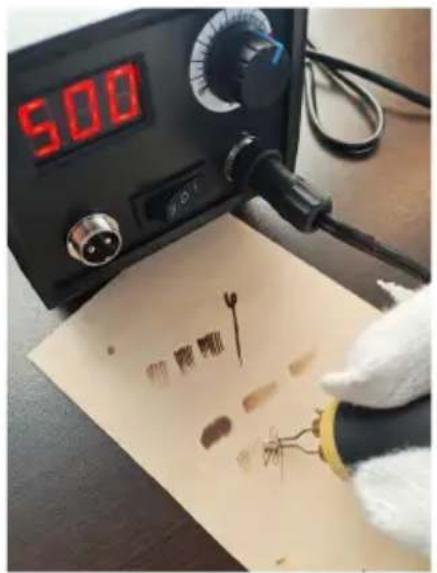
Adjust the temperature to the temperature range on the graph using this type of pen tip. Try lifting the pen with gentle pressure and moving it faster, which will burn fine and light colored lines. Slow down the speed of the pen, and a greater downward pressure will burn out wide and dark lines. Use this method to try different techniques and effects by varying the speed, direction, and pressure of writing.
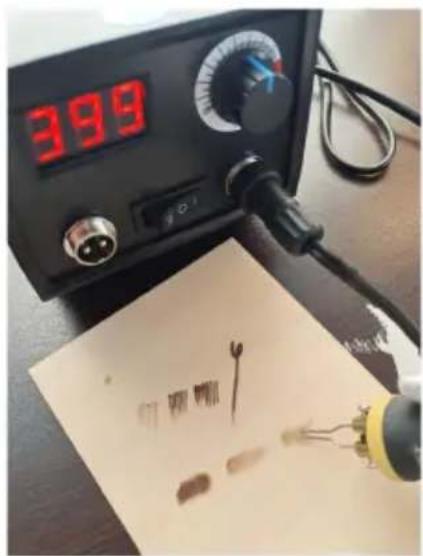
Adjust the temperature to different temperature ranges between 400 and 600°C. Using the pen tip shown in the picture, try to lift the pen gently and apply pressure to move faster. Draw an elliptical path back and forth on the left and right of the pen path, which will create a uniform light gray effect. Similarly, if the pen moves slowly, a greater downward pressure will create a darker effect. Use this method to try different techniques and effects by varying the speed, direction, and pressure of writing.
Tips for using wood burning tools and knives
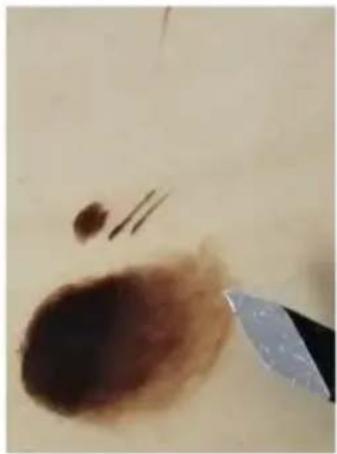
This is a rendering of the wood burning just now. Later, we will demonstrate the usage techniques with a carving knife.
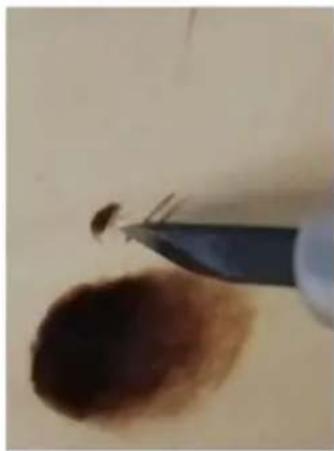
Use a carving knife to scrape off unwanted images or defects. When scraping, gently scrape and try to scrape as flat and smooth as possible.
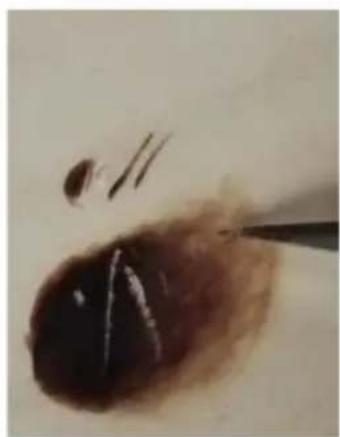
Techniques such as using a carving knife to scrape out highlights, fine lines, and increase the brightness of local color tones in the image
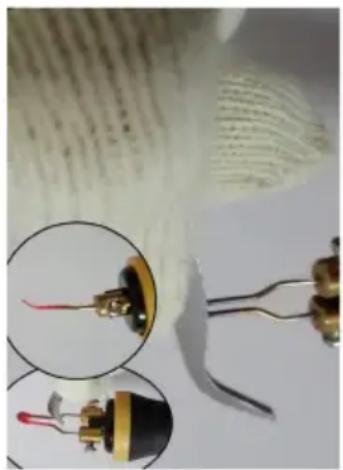
1) Use tweezers to clamp and adjust the angle of the pen head. The default angle of the factory-made pen head is relatively small. When increasing the angle of the pen head, first set the temperature to the highest. When the pen turns red and has good plasticity, use tweezers to clamp and bend the angle of the pen head.
2) When replacing the pen tip, it is very hot and can easily burn the skin. It is safer to replace it with tweezers.
Precautions for using a pyrography pen holder
When using a pyrography pen, the temperature of the pen tip is very high. When placing the pen in the holder, it is important to avoid the high-temperature pen tip coming into contact with the holder to avoid burning it out. When placing the pen on the holder, use the pen holder to contact and fix the pyrography brush. It is forbidden for the high-temperature pen tip to come into contact with any part of the holder.
Technical data
| Model | LH50 | |
| Rated voltage | 120V~ 60Hz For US | 220-240V~ 50Hz For EU or A |
| Power | 20W | |
Manufacturer: Shanghai Muxin Muye Youxiangongsi
Address: Shuangchenglu 803nong11hao1602A-1609shi, Baoshan District, Shanghai 200000, CN.
Imported to AUS: SIHAO PTY LTD. 1 ROKEVA STREET, EASTWOOD NSW 2122, Australia.
Imported to USA: Sanven Technology Ltd. Suite 250, 9166 Anaheim Place, Rancho Cucamonga, CA 91730.
| UK | REP |
YH CONSULTING LIMITED. C/O YH Consulting
Limited Office 147, Centurion House, London
Road, Staines-upon-Thames, Surrey, TW18 4AX.
| EC | REP |
E-CrossStu GmbH
Mainzer Landstr. 69,
60329 Frankfurt am Main.
VEVOR®
TOUGH TOOLS, HALF PRICE
Technical Support and E-Warranty Certificate www.vevor.com/support
VEVOR®
TOUGH TOOLS, HALF PRICE
NEED HELP? CONTACT US!
No. 2 No. 7 No. 11 No. 18 No. 26
Imported into AUS: SIHAO PTY LTD. 1 ROKEVA STREET EASTWOOD NSW 2122 Australia
Imported into the USA: Sanven Technology Ltd. Suite 250, 9166 Anaheim Place, Rancho Cucamonga, CA 91730
YH CONSULTING LIMITED. C/O YH Consulting
Limited Office 147, Centurion House, London
Road, Staines-upon-Thames, Surrey, TW18 4AX
NEED HELP? CONTACT US!
No. 2 No. 7 No. 11 No. 18 No. 26
YH CONSULTING LIMITED. C/O YH Consulting Limited Office 147, Centurion House, London Road, Staines- upon-Thames, Surrey, TW18 4AX
| Przedstawiciel WE |
E-CrossStu GmbH Mainzer Landstr.69, 60329 Frankfurt am Main.
VEVOR®
TOUGH TOOLS, HALF PRICE
No. 2 No. 7 No. 11 No. 18 No. 26
Road, Staines-upon-Thames, Surrey, TW18 4AX
| EG-Vertreter |
E-CrossStu GmbH
Mainzer Landstr.69,
60329 Frankfurt am Main.
VEVOR®
TOUGH TOOLS, HALF PRICE
MACHINE DEPYROGRAPHIE
MODÈLE : LH50
BESOIN D'AIDE ? CONTACTEZ-NOUS !
No. 2 No. 7 No. 11 No. 18 No. 26
YH CONSULTING LIMITED. A/S YH Consulting
Limited, bureau 147, Centurion House, London
Road, Staines-upon-Thames, Surrey, TW18 4AX
| REPRÉSENTANT DE LA CE |
E-CrossStu GmbH
Mainzer Landstr.69,
HULP NODIG? NEEM CONTACT MET ONS OP!
No. 2 No. 7 No. 11 No. 18 No. 26
Limited Kantoor 147, Centurion House, London
Road, Staines-upon-Thames, Surrey, TW18 4AX
| EC | REP |
E-CrossStu GmbH
Mainzer Landstr.69,
60329 Frankfurt am Main.
VEVOR®
TOUGH TOOLS, HALF PRICE
Technical support and e-warranty certificate www.vevor.com/support
VEVOR®
TOUGH TOOLS, HALF PRICE
NEED HELP? CONTACT US!
No. 2 No. 7 No. 11 No. 18 No. 26
YH CONSULTING LIMITED. C/O YH Consulting
Limited Office 147, Centurion House, London
Road, Staines-upon-Thames, Surrey, TW18 4AX
| EG-representant |
E-CrossStu GmbH
Mainzer Landstr. 69,
60329 Frankfurt am Main.
VEVOR®
TOUGH TOOLS, HALF PRICE
www.vevor.com/support
VEVOR®
TOUGH TOOLS, HALF PRICE
No. 2 No. 7 No. 11 No. 18 No. 26
YH CONSULTING LIMITADA. A/C YH Consulting
Limited Oficina 147, Centurion House, London
Road, Staines-upon-Thames, Surrey, TW18 4AX
- PYROGRAPHY MACHINE
- VEVOR®
- NEED HELP? CONTACT US
- FCC INFORMATION
- IMPORTANT SAFEGUARDS
- WARNING
- SAVE THESE INSTRUCTIONS
- INSTRUCTION MANUAL OF PYROGRAPHY MACHINE
- INSTRUCTIONS FOR USING THE WOOD BURNING WIRE TIP
- CORRECT INSTALLATION OF PEN POINT OF PYROGRAPHY
- TIPS FOR USING WOOD BURNING PEN TIPS
- TIPS FOR USING WOOD BURNING TOOLS AND KNIVES
- PRECAUTIONS FOR USING A PYROGRAPHY PEN HOLDER
- TOUGH TOOLS, HALF PRICE
- BESOIN D'AIDE ? CONTACTEZ-NOUS
- HULP NODIG? NEEM CONTACT MET ONS OP
Brand : Vevor
Model : LH50
Category : Engraving tool