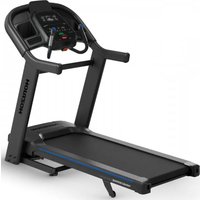
HF-7.4AT - Treadmills Horizon - Free user manual and instructions
Find the device manual for free HF-7.4AT Horizon in PDF.


User questions about HF-7.4AT Horizon
0 question about this device. Answer the ones you know or ask your own.
Ask a new question about this device
Download the instructions for your Treadmills in PDF format for free! Find your manual HF-7.4AT - Horizon and take your electronic device back in hand. On this page are published all the documents necessary for the use of your device. HF-7.4AT by Horizon.
USER MANUAL HF-7.4AT Horizon
Read the TREADMILL GUIDE before using this OWNER'S MANUAL.
There are several areas during the assembly process that special attention must be paid. It is very important to follow the assembly instructions correctly and to make sure all parts are firmly tightened. If the assembly instructions are not followed correctly, the treadmill could have parts that are not tightened and will seem loose and may cause irritating noises. To prevent damage to the treadmill, the assembly instructions must be reviewed and corrective actions should be taken.
Before proceeding, find your treadmill's serial number located on a white barcode sticker near the on/off power switch and power cord and enter it in the space provided below.
ENTER YOUR SERIAL NUMBER AND MODEL NAME IN THE BOXES BELOW:
» Refer to the SERIAL NUMBER and MODEL NAME when calling for service.
SERIAL NUMBER:
TM
MODEL NAME: HORIZON 7.4AT TREADMILL

SERIAL NUMBER LOCATION

TOOLS INCLUDED:
8 mm T-Wrench
6mmL-Wrench
5 mm L-Wrench
PARTS INCLUDED:
1 Main Frame
□ 1 Console Assembly
□2 ConsoleMasts
1 Cross Support Bar
□1 Hardware Kit
1 Safety Key
1 Audio Adapter Cable
1 Bottle of Silicone Lubricant
(for 2 applications)
1 Power Cord
2 Pulse Rate Grips

NEED HELP?
If you have questions or if there are any missing parts, contact Customer Tech Support.
PRE ASSEMBLY
UNPACKING
Place the treadmill carton on a level flat surface. It is recommended that you place a protective covering on your floor. Take CAUTION when handling and transporting this unit. Never open box when it is on its side. Once the banding straps have been removed, do not lift or transport this unit unless it is fully assembled and in the upright folded position, with the lock latch secure. Unpack and assemble the unit where it will be used. The enclosed treadmill is equipped with high-pressure shocks and may spring open if mishandled. Never grab hold of any portion of the incline frame and attempt to lift or move the treadmill.
WARNING
DO NOT ATTEMPT TO LIFT THE TREADMILL! Do not move or lift treadmill from packaging until specified to do so in the assembly instructions. You may remove the plastic wrap from console masts.
WARNING
FAILURE TO FOLLOW THESE INSTRUCTIONS COULD RESULT IN INJURY!
NOTE: During each assembly step, ensure that ALL nuts and bolts are in place and partially threaded in before completely tightening any ONE bolt.
NOTE: A light application of grease may aid in the installation of hardware. Any grease, such as lithium bike grease is recommended.


ASSEMBLY STEP 1
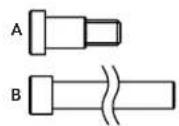
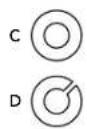
| HARDWARE FOR STEP 1 | |||
| PART TYPE DESCRIPTION QTY | |||
| M8X1.25PX11L 2 A UPRIGHT | GUIDE BOLT | ||
| B | MAST BOLT | M8X1.25PX80L | 8 |
| C | FLAT WASHER | 8.4X15.5X1.6T | 8 |
| D | SPRING WASHER | 8.2X15.4X2.0T | 8 |
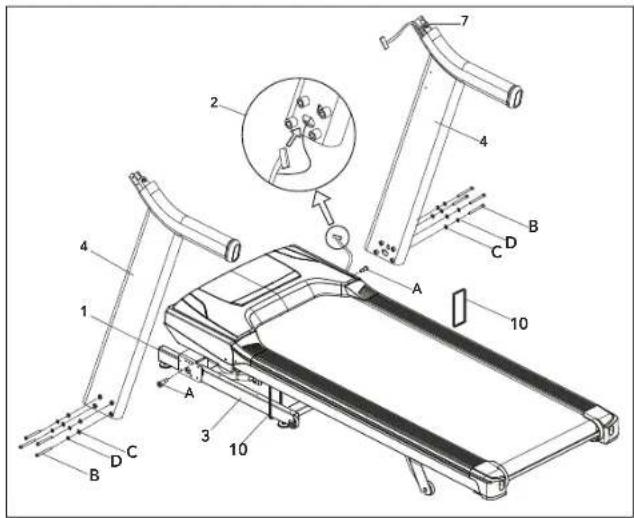
A Cut the BANDING STRAPS (10) and lift the running deck upward from the rear to remove all contents from underneath the running deck.
B Open HARDWARE FOR STEP 1.
C Insert UPRIGHT GUIDE BOLT (A) into MAIN FRAME BRACKET (1) and fully tighten.
NOTE: Do not fully tighten the following bolts until the end of STEP 4.
D Attach LEAD WIRE to bottom end of CONSOLE CABLE (2). Pull LEAD WIRE through RIGHT CONSOLE MAST (4). After pulling the wire through the mast, the top of the CONSOLE CABLE (2) should be located at the ATTACHMENT BRACKET (7).
E Attach RIGHT CONSOLE MAST (4) to MAIN FRAME (3) using 4 BOLTS (B), 4 FLAT WASHERS (C) AND 4 SPRING WASHERS (D). Feed the extra console cable back into the upright mast.
NOTE: Be careful not to pinch the console cable while attaching the right console mast.
F Repeat STEP E on the LEFT SIDE.
ASSEMBLY STEP 2
| HARDWARE FOR STEP 2 | |||
| PART TYPE DESCRIPTION QTY | |||
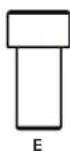
| M6X1.0PX15L 4 E BOLT | |||
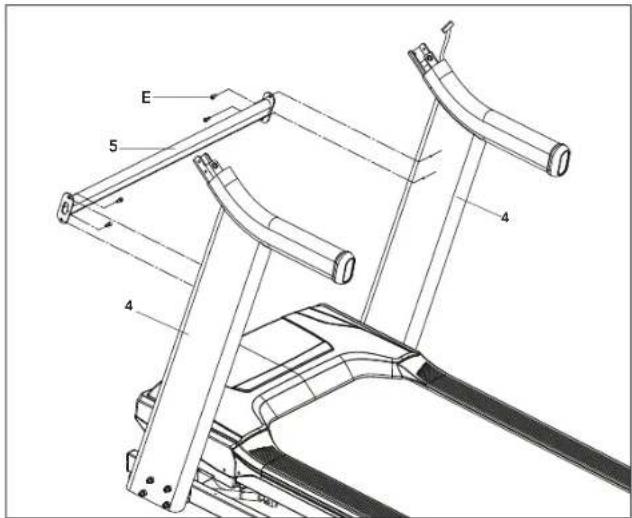
NOTE: Do not fully tighten bolts until STEP 3.
A Open HARDWARE FOR STEP 2.
B Attach CROSS SUPPORT BAR (5) using holes on UPRIGHT MASTS (4) with 4 BOLTS (E).


ASSEMBLY STEP 3
| HARDWARE FOR STEP 3 | |||
| PART TYPE DESCRIPTION QTY | |||
| F | ARC WASHER | 8.4X15.5X1.6T | 4 |
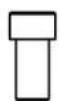
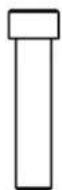
| G | SHORT BOLT | M8x1.25Px15L | 2 |
| H | LONG BOLT | M8x1.25Px70L | 2 |
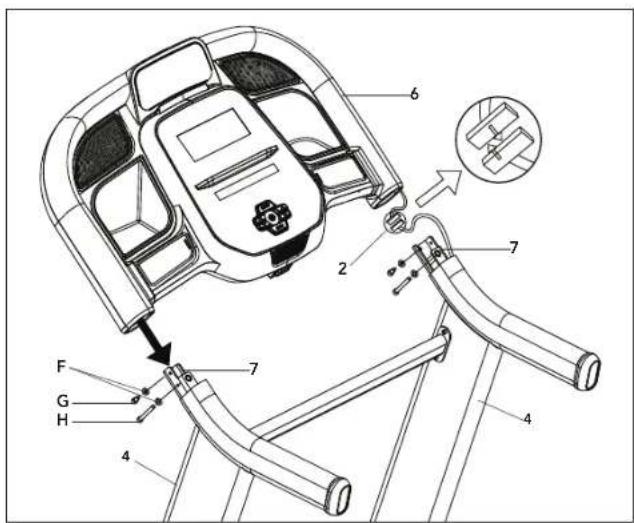
A Open HARDWARE FOR STEP 3.
B Have someone help hold the console while attaching the CONSOLE CABLE (2). Use the lead wire to carefully pull the CONSOLE CABLE (2) out of the RIGHT CONSOLE MAST (4). Attach the CONSOLE CABLE (2) from the CONSOLE (6) to the CONSOLE CABLE (2) from the top of the RIGHT UPRIGHT MAST (4). Detach and discard the lead wire.
C Carefully slide the CONSOLE (6) onto the ATTACHMENT BRACKETS (7) being careful not to pinch the CONSOLE CABLE (2). Align the holes on the bottom side of the CONSOLE (6) with the holes on the ATTACHMENT BRACKETS (7).
D Attach the CONSOLE (6) to the ATTACHMENT BRACKETS (7) by first placing ARC WASHERS (F) onto BOLTS (G) AND (H) as illustrated. Insert SHORT BOLTS (G) into the top hole of the ATTACHMENT BRACKET (7) and LONG BOLTS (H) into the bottom hole.
E Repeat STEP D for the opposite side.

FGH
ASSEMBLY STEP 4
| HARDWARE FOR STEP 4 | |||
| PART TYPE DESCRIPTION QTY | |||
| M8×15L 8I BOLT | |||
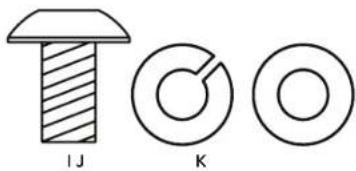
| J | SPRING WASHER | 8.2×15.4×2.0T | 8 |
| K | FLAT WASHER | 8.4×15.5×1.6T | 8 |
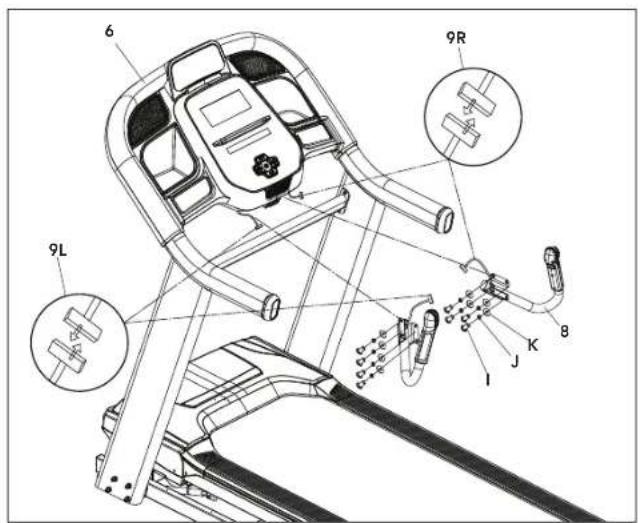
A Open HARDWARE FOR STEP 4.
B Attach RIGHT SIDE PULSE RATE GRIP (8) to the underside of the CONSOLE (6) using 4 BOLTS (I), 4 SPRING WASHERS (J) and 4 FLAT WASHERS (K).
C Connect the RIGHT CONSOLE CABLES (9R) and carefully tuck in wires to avoid damage.
D Repeat STEP B on the LEFT SIDE.
E Connect the LEFT CONSOLE CABLES (9L) and carefully tuck wires to avoid damage.
NOTE: Fully tighten all bolts from PREVIOUS STEPS

ASSEMBLY STEP 5
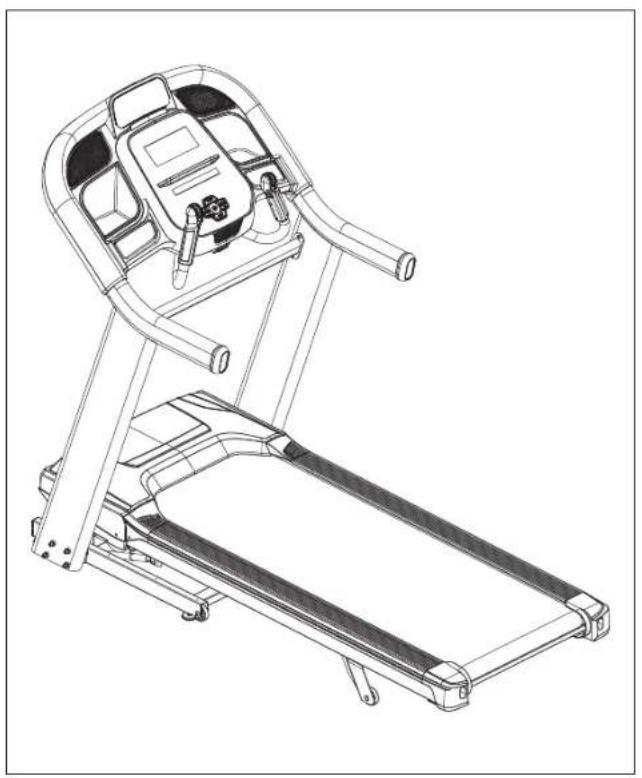
ASSEMBLY COMPLETE!
Before the first use, lubricate the treadmill deck by following the instructions in the MAINTENANCE section in the TREADMILL GUIDE.
TECH SPECS
Assembled Dimensions 193 x 93 x 161 cm / (L x W x H) 76" x 37" x 63"
Product Weight 146 kg / 321 lbs.
Max User Weight 159 kg / 350 lbs.
TREADMILL OPERATION
This section explains how to use your treadmill's console and programming.
The BASIC OPERATION section in the TREADMILL GUIDE has instructions for the following:
- LOCATION OF THE TREADMILL
USING THE SAFETY KEY
FOLDING THE TREADMILL - MOVING THE TREADMILL
LEVELING THE TREADMILL
TENSIONING THE RUNNING BELT - CENTERING THE RUNNING BELT
- USING THE HEART RATE FUNCTION


ENNS
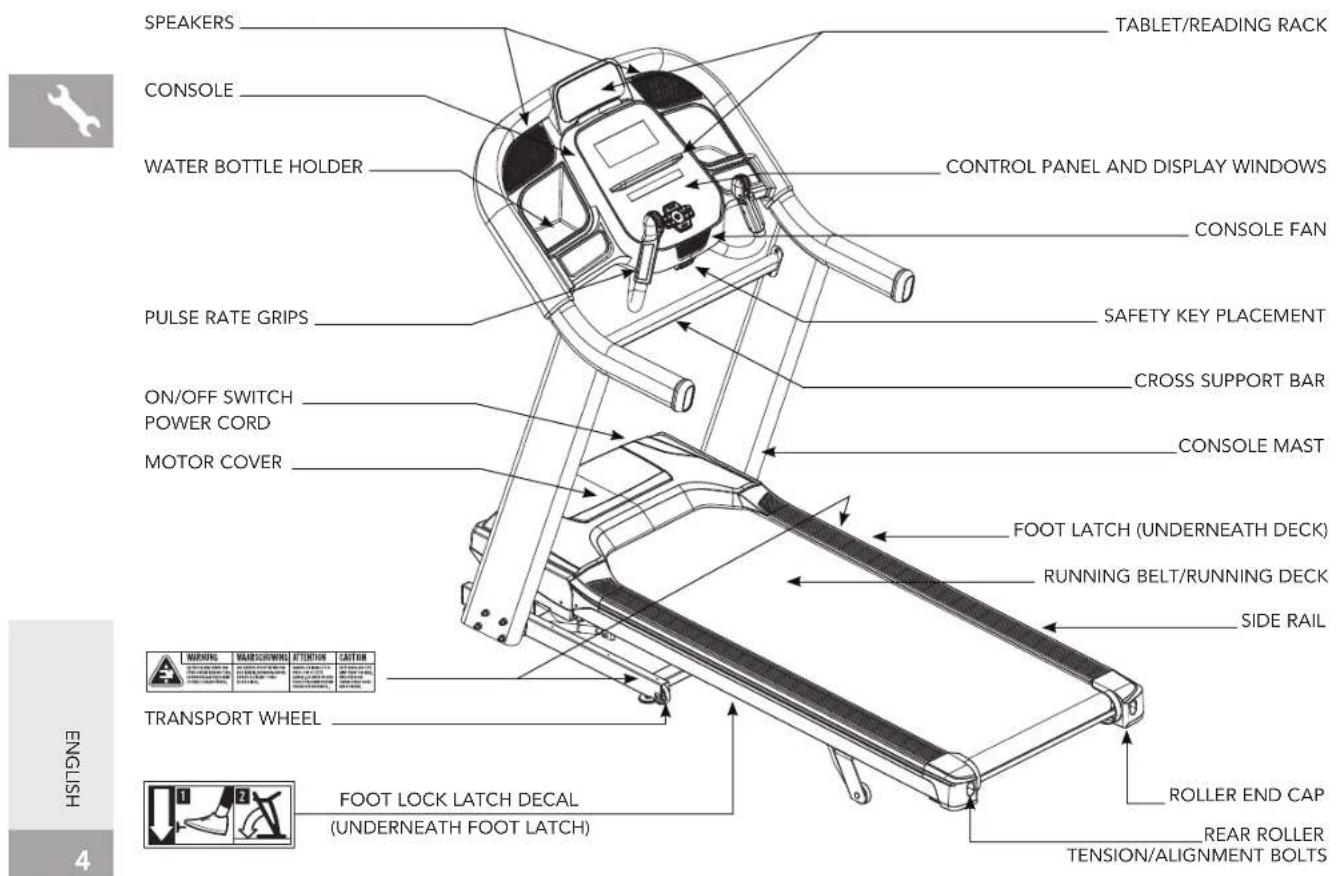
CONSOLE OPERATION
Note: There is a thin protective sheet of clear plastic on the overlay of the console that should be removed before use.
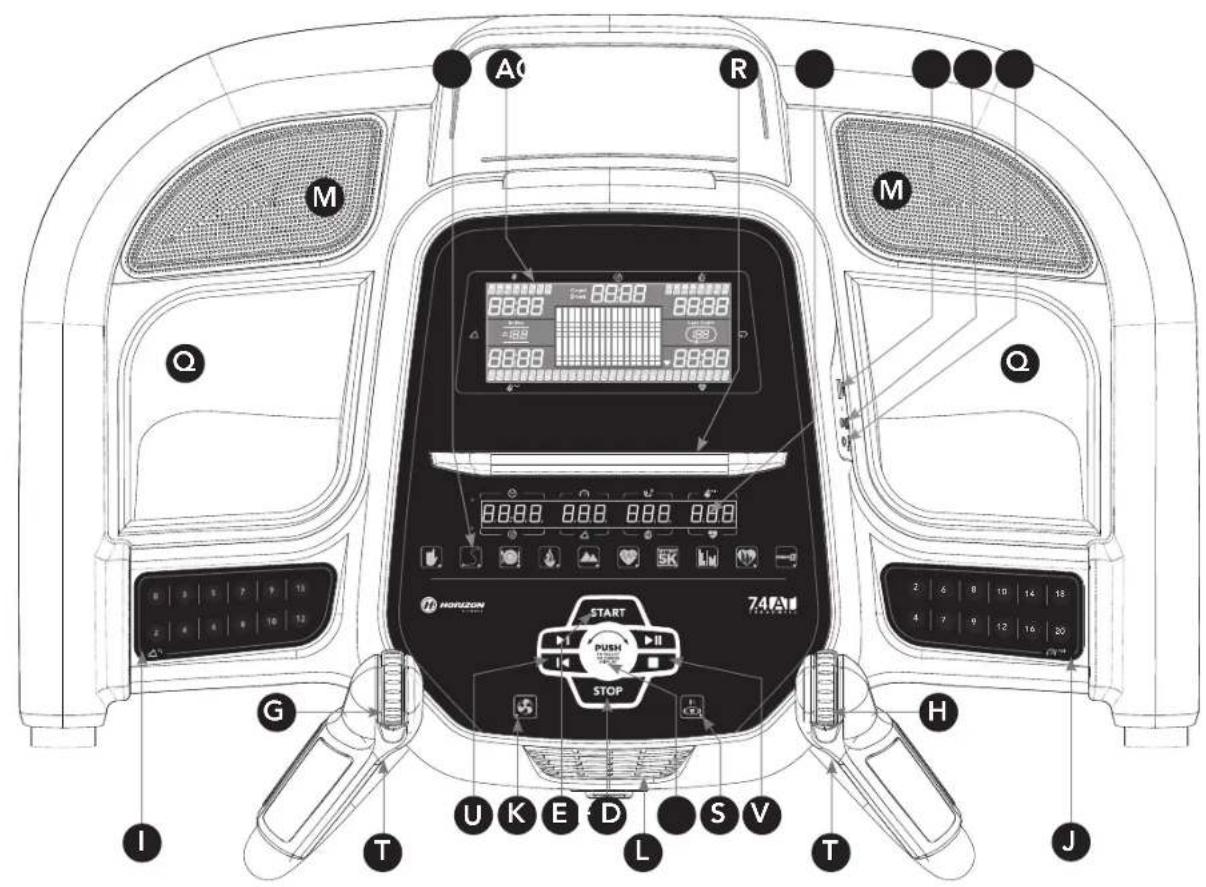
A) LCD DISPLAY WINDOWS: Watts, Pace, Calories/Hour, Heart Rate, Laps.
B) LED DISPLAY: Time, Speed, Distance, Incline, Pace, Heart Rate, and Calories.
C) WORKOUT LED INDICATORS: indicates what workout is set for the current program.
D) SELECT TARGET/WORKOUT KNOB: rotate/press to select your desired workout/target
E) START: press to begin exercising, start your workout, or resume exercising after pause.
F) STOP: press to pause/end your workout. Hold for 3 seconds to reset the console.
G) INCLINE SCROLL WHEEL: used to adjust incline in small increments (0.5%).
H) SPEED SCROLL WHEEL: used to adjust speed in small increments (0.1 km/h).
1) INCLINE QUICK KEYS: used to reach desired incline more quickly.
J) SPEED QUICK KEYS: used to reach desired speed more quickly.
K) FAN KEY: press to turn fan on and off.
L) FAN: personal workout fan.
M) SPEAKERS: music plays through speakers when your CD / MP3 player is connected to the console.
N) AUDIO IN JACK: plug your CD / MP3 player into the console using the included audio adaptor cable.
O) AUDIO OUT / HEADPHONE JACK: plug your headphones into this jack to listen to your music through the headphones. Note: when headphones are plugged into the headphone jack the sound will no longer come out through the speakers.
P) USB INPUT: 1A/5V USB output power.
Q) WATER BOTTLE POCKETS: holds personal workout equipment.
R) TABLET/READING RACK: holds tablet or reading material.
S) BLUETOOTH INDICATOR LIGHT: displays when machine is paired with a Bluetooth compatible device.
T) INTERVAL KEYS: these are programmable keys. When an user is selected, they can be programmed to a desired speed and incline setting.
U) MEDIA SKIP KEYS: used to skip to previous or next audio track.
V) MEDIA RUN/PAUSE/STOP KEYS: top button used to pause/play media, bottom button stops media.


DISPLAYWINDOWS
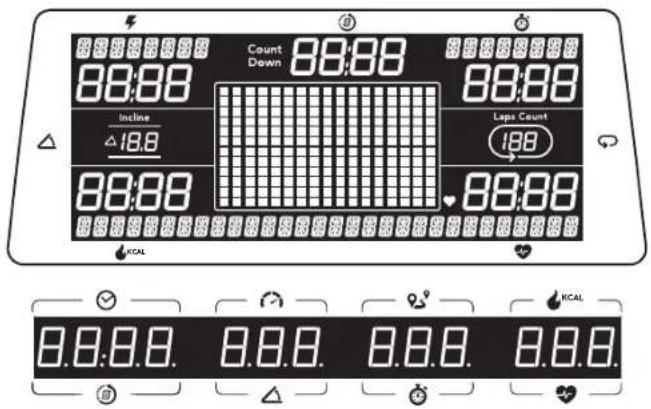
TIME: Shown as minutes : seconds. View the time remaining or the time elapsed in your workout.
- DISTANCE: Shown as kilometers. Indicates distance traveled during your workout.
SPEED: Shown as km/h. Indicates how fast your walking or running surface is moving.
- INCLINE: Shown as percent. Indicates the incline of your walking or running surface.
- CAERIES: Total calories burned during your workout.
HEART RATE: Shown as BPM (beats per minute). Used to monitor your heart rate. (displayed when contact is made with both pulse grips).
PACE: Indicates how many minutes it takes to complete a kilometer while running or walking at your current speed.
WATTS: Indicates the power output at your current speed and incline.
CALORIES/ HOUR: Indicates the number of calories you will burn in an hour at your current speed and incline
- BRICKYARD: Each vertical segment represents a speed or incline unit, each horizontal segment represents time.
LAPS: Shows how many 400 meter (1/4 mile) laps have been completed.
COUNT (SPRINT 8): Shows how many Sprint 8 program sprints you have completed
GETTING STARTED
1) Check to make sure no objects are placed on the belt that will hinder the movement of the treadmill.
2) Plug in the power cord and turn the treadmill ON. (The ON/OFF switch is next to the power cord.)
3) Stand on the side rails of the treadmill.
4) Attach the safety key clip to part of your clothing making sure that it is secure and will not become detached during operation.
5) Insert the safety key into the safety keyhole in the console.
6) You have two options to start your workout:
A) QUICK START UP
Simply press the START key to begin working out.
Time, distance, and calories will all count up from zero. OR...
B) SELECT A WORKOUT OR TARGET
1) Select your USER by turning the workout knob and then pressing when your desired USER is displayed.
2) Select your WEIGHT by turning the workout knob and then pressing when your desired WEIGHT is displayed.
3) Select your PROGRAM by turning the workout knob and then pressing when your desired PROGRAM is displayed.
4) Adjust the SETTING by turning the workout knob and then pressing when your desired SETTING is displayed.
5) Press START to begin.


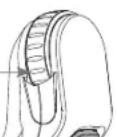
Roll forward/backward to increase/decrease incline.
INTERVAL BUTTON 1-INTERVAL BUTTON 2
SPEED SCROLL WHEEL
Roll forward/backward to increase/decrease speed
HOW TO PROGRAM AND USE CUSTOM INTERVAL BUTTONS
The programmable interval buttons located on the pulse rate grips are designed to help you customize this machine to match whatever workout you like to do the most.
The LEFT and RIGHT INTERVAL BUTTONS are programmable for speed and incline.
To program the INTERVAL button, you must select a user, start the machine, set the desired speed and incline, press and hold the desired INTERVAL button for three seconds until the treadmill beeps. Now the INTERVAL button is programmed to your settings. After programming the INTERVAL button, it will remember the setting for that user until reprogrammed.
Now when the INTERVAL button is pressed, the treadmill speed and incline will change to the settings you programmed for that button.
The most common type of workout these keys will help with is interval training. We suggest programming one of the INTERVAL buttons to your high intensity segments and the other to your recovery segments.
Another common use is to set one INTERVAL button to your warm up and cool down settings and the other to your desired workout settings.
These buttons should allow you to customize the settings of your treadmill to quickly fit the type of workout you enjoy most.
WORKOUT PROFILES

MANUAL: Control everything about your workout - from start to finish. This program is a basic workout with no pre-defined settings, allowing you to manually adjust the machine at any time. It begins with an incline at 0 and speed at 0.8km/h .

HILL CLIMB: Simulates a hill ascent and descent. This program helps tone muscle and improve cardiovascular ability. Incline changes and segments repeat every 30 seconds.
Incline changes and segments repeat every 30 seconds.
| Segment Wa | m Up 1 2 3 4 5 6 7 8 9 10 | |||||||||
| Time 4:00 Mins | 30 sec 30 sec 30 sec 30 sec 30 sec 30 sec 30 sec 30 sec 30 sec 30 sec 30 sec 30 sec 30 sec 30 sec 30 sec 30 sec 30 sec 30 sec 30 sec 30 sec 30 sec 30 sec 30 sec 30 sec 30 sec 30 sec | sec 30 sec | 30 sec 30 sec 30 sec 30 sec 30 sec 30 sec 30 sec 30 sec 30 sec 30 sec 30 sec 30 sec 30 sec 30 sec 30 sec 30 sec 30 sec 30 sec 30 sec 30 sec 30 sec 30 sec 30 sec 30 sec 30sec 30 sec 30 sec 30 sec 30 sec 30 sec 30 sec 30 sec 30 sec 30 sec 30 sec 30 sec 30 sec 30 sec 30 sec 30 sec 30 sec 30 sec 30 sec 30 sec 30 sec 30 sec 30 sec 30 sec 30 sec 30sec | 3.5 3.5 3.5 3.5 3.5 3.5 3.5 3.5 3.5 3.5 3.5 3.5 3.5 3.5 3.5 3.5 3.5 3.5 3.5 3.5 3.5 3.5 3.5 3.5 3.5 3.5 | 3.5 3.5 3.5 3.5 3.5 3.5 3.5 3.5 3.5 3.5 3.5 3.5 3.5 3.5 3.5 3.5 3.5 3.5 3.5 3.5 3.5 3.5 3.5 3.5 3. | 3.5 3.5 3.5 3.5 3.5 3.5 3.5 3.5 3.5 3.5 3.5 3.5 3.5 3.5 3.5 3.5 3.5 3.5 3.5 3.5 3.5 3.5 3.5 3.5 3. | ||||
| Level 1 0 0 1 | 1.5 2 2.5 3 3.2 5 2 1.5 1 | |||||||||
| Level 2 0 0 1 | 5 2 2.5 3 3.5 3.5 3.5 2.5 2 1.5 | |||||||||
| Level 3 0 1 2 | 2.5 3 3.5 4 4 3.5 3 2.5 2 | |||||||||
| Level 4 0 1.5 | 2.5 3 3.5 4 4.5 4.5 4.5 4.5 3.5 3 2.5 | |||||||||
| Level 5 0 1.5 | 8 3.5 4 4.5 5 5 5 4.5 4 3.5 3 | |||||||||
| Level 6 0 1.5 | 3.5 4 4.5 5 5.5 5.5 5.4 5 4.5 3.5 | |||||||||
| Level 7 0 1.5 | 4 4.5 5.5 5 6 6 5.5 5 4.5 4 | |||||||||
| Level 8 0 2.5 | 5 5 5.5 6 6.5 6.5 6.5 6.5 5.5 4.5 | |||||||||
| Level 9 0 2.5 | 5.5 6 6.5 7 7.5 6.5 6.5 5.5 | |||||||||
| Level 10 0 2 | 5.5 6 6.5 7 7.5 7.5 7 6.5 6.5 5.5 |



MY FIRST 5K: This 9-week program is intended for inexperienced runners looking to run their first 5k or simply begin an exercise routine. It is designed specifically to keep you motivated and engaged, gradually building your strength, increasing your stamina and giving you the confidence it takes to complete your first 5k.
Week Workout#1 Workout #2 Workout #3
1 5 minute warmup 5 minute warmup 5 minute warmup
2 minute walk, 2 minute walk, 2 minute walk
1.5 minute log, 1.5 minute ins, 1.5 minute log
2 minute walk, 2 minute walk, 2 minute walk
1.5 minute log-1.5 minute log-1.5 minute log
3rnnn 3nannn 3nannn
1.5 minute jog, 1.5 minute run, 1.5 minute jog
1.5 minute walk, 2-minute walk, 3-minute walk
15in 15in 15in
3 minute log, 3 minute log, 3 minute log
Warmup and cooldown speeds 1.0 mph or 75% of walk speed, whichever is greater
Week Workout #1 Workout #2 Workout #3
4 5 minute warmup 5 minute warmup 5 minute warmup
3 minute log 3 minute log 3 minute log
1.5 minute walk, 1.5 minute walk, 1.5 minute walk
2.5 minute walk 2.5 minute walk 2.5 minute walk
3 minute log 3 minute log 3 minute log
1.5 minute walk 1.5 minute walk 1.5 minute walk
5 minute log, 5 minute log, 5 minute log
5 minute cooldown 5 minute cooldown 5 minute cooldown
5 5 minute warmup 5 minute warmup 5 minute warmup
5 minute log 5 minute log 5 minute log
3 minute walk 3 minute walk 3 minute walk
5 minute log 5 minute log 5 minute log
3 minute walk 3 minute walk 3 minute walk
3 minute walk, 3 minute walk, 5 minute cooldown
8 minute log, 10 minute log
3 minute walk, 5 minute run/down
5 minute log
5 minute cool down
7 5 minute warmup 5 minute warmup 5 minute warmup
25 minute jog 25 minute jog 25 minute jog
5 minute cooldown 5 minute cooldown 5 minute cooldown
8 5 minute warmup 5 minute warmup 5 minute warmup
Warmup and cooldown speeds 1.0 mph or 75% of walk speed, whichever is greater

FAT BURN: Relatively slow and steady is the name of the game to maximize your weight-loss goals. Promotes weight loss by increasing and decreasing the speed and incline, while keeping you in your fat burning zone.
Speed and Incline changes, segments repeat every 30 seconds.
| Segment Warm Up 1 2 3 4 5 6 7 8 | |||||||||||
| Time 4:00 Mins 30 Sec 30 Sec 30 Sec 30 Sec 30 Sec 30 Sec 30 Sec 30 Sec 30 Sec 30 Sec 30 Sec 30 Sec 30 Sec 30 Sec 30 Sec 30 Sec 30 Sec 30 Sec 30 Sec 30 Sec 30 Sec 30 Sec 30 Sec 30 Sec 30 Sec 30Sec 30 Sec 30 Sec 30 Sec 30 Sec 30 Sec 30 Sec 30 Sec 30 Sec 30 Sec 30 Sec 30 Sec 30 Sec 30 Sec 30 Sec 30 Sec 30 Sec 30 Sec 30 Sec 30 Sec 30 Sec 30 Sec 30 Sec 30 Sec 30 Sec 30 S | |||||||||||
| Level 1 | Incline 0 0.5 1.5 1.5 1.5 1.5 1.5 1.5 1.5 1.5 1.5 1.5 1.5 1.5 1.5 1.5 1.5 1.5 1.5 1.5 1.5 1.5 1.5 1.5 1.5 1.5 1.5 2.5 | ||||||||||
| Speed (mph) 0.5 1.5 2 2.5 3.5 4 3.5 3 2.5 | |||||||||||
| Speed (km/h) 0.8 2.4 3.2 4.0 4.8 5.6 6.4 5.6 4.8 4.0 | |||||||||||
| Level 2 | Incline 0 0.5 1.5 1.5 1.5 1.5 1.5 1.5 1.5 1.5 1.5 1.5 1.5 1.5 1.5 1.5 1.5 1.5 1.5 1.5 1.5 1.5 1.5 1.5 15.2 | ||||||||||
| Speed (mph) 0.5 1.9 2.5 3.5 4 4.5 4 3.5 3 | |||||||||||
| Speed (km/h) 0.8 3.0 4.0 4.8 5.6 6.4 7.2 6.4 4.5 5.6 4.8 | |||||||||||
| Level 3 | Incline 0.5 1.5 1.5 1.5 1.5 1.5 1.5 1.5 1.5 1.5 1.5 1.5 1.5 1.5 1.5 1.5 1.5 1.5 1.5 1.5 1.5 1.5 1.5 1.5 1.2 | ||||||||||
| Speed (mph) 0.5 2.3 3.5 4 4.5 4.5 4 3.5 | |||||||||||
| Speed (km/h) 0.8 3.7 4.8 5.6 6.4 7.2 8.0 8.8 7.2 6.4 | |||||||||||
| Level 4 | Incline 0.5 1.5 1.5 1.5 1.5 1.5 1.5 1.5 1.5 1.5 1.5 1.5 1.5 1.5 1.5 1.5 1.5 1.5 1.5 1.5 1.5 1.5 1.5 1.5 | ||||||||||
| Speed (mph) 1.5 2.6 3.5 4.4 5.5 5 5 5 4.5 4 | |||||||||||
| Speed (km/h) 1.6 4.2 5.6 6.4 7.2 8.0 8.8 8.0 7.2 6.4 | |||||||||||
| Level 5 | Incline 1 1.5 2.5 2.5 2.5 2.5 2.5 2.5 2.5 2.5 2.5 2.5 2.5 2.5 2.5 2.5 2.5 2.5 2.5 2.5 2.5 2.5 2.5 2.5 2.5 2.5 2.5 1.5 2.5 2.5 2.5 2.5 2.5 2.5 2.5 2.5 2.5 2.5 2.5 2.5 2.5 2.5 2.5 2.5 2.5 2.5 2.5 2.5 2.5 2.5 2.5 2.2 | ||||||||||
| Speed (mph) 1.5 3.3 4.5 5.5 5.6 6.5 6.5 6.5 5.5 5.6 5.5 5.5 5.5 5.5 5.5 5.5 5.5 5.5 5.5 5.5 5.5 5.5 5.5 5.5 5.5 5.5 5.5 5.5 5.5 5.5 5.5 5.5 5.5 5.5 5.5 5.6 | |||||||||||
| Speed (km/h) 1.6 1.5 2.5 3.3 2.5 2.2 2.2 2.2 2.2 2.2 2.2 2.2 2.2 2.2 2.2 2.2 2.2 2.2 2.2 2.2 2.2 2.2 2.2 2.2 2.2 2.2 2.2 2.2 2.2 2.2 2.5 | |||||||||||
| Level 6 | Incline 1 1.5 2.5 2.5 2.5 2.5 2.5 2.5 2.5 2.5 2.5 2.5 2.5 2.5 2.5 2.5 2.5 2.5 2.5 2.5 2.5 2.5 2.5 2.5 2 .5 2 .5 2 .5 2 .5 2 .5 2 .5 2 .5 2 .5 2 .5 2 .5 2 .5 2 .5 2 .5 2 .5 2 .5 2 .5 2 .5 2 .5 2 .5 2 .5 2 .5 2 .5 2 .5 2 .5 2 .5 2.5 2 .5 2 .5 2 .5 2 .5 2 .5 2 .5 2 .5 2 .5 2 .5 2 .5 2 .5 2 .5 2 .5 2 .5 2 .5 2 .5 2 .5 2 .5 2 .5 2 .5 2 .5 2 .5 2 .5 2.5 2.5 2 .5 2 .5 2 .5 2 .5 2 .5 2 .5 2 .5 2 .5 2 .5 2 .5 2 .5 2 .5 2 .5 2 .5 2 .5 2 .5 2 .5 2 .5 2 .5 2 .5 2 .5 2 .5 2.5 2 .5 2.5 2 .5 2 .5 2 .5 2 .5 2 .5 2 .5 2 .5 2 .5 2 .5 2 .5 2 .5 2 .5 2 .5 2 .5 2 .5 2 .5 2 .5 2 .5 2 .5 2 .5 2 .5 2 .5 2.5 2.5 2.5 2 .5 2 .5 2 .5 2 .5 2 .5 2 .5 2 .5 2 .5 2 .5 2 .5 2 .5 2 .5 2 .5 2 .5 2 .5 2 .5 2 .5 2 .5 2 .5 2 .5 2 .5 2.5 2 .5 2 .5 2.5 2 .5 2 .5 2 .5 2 .5 2 .5 2 .5 2 .5 2 .5 2 .5 2 .5 2 .5 2 .5 2 .5 2 .5 2 .5 2 .5 2 .5 2 .5 2 .5 2 .5 2 .5 2.5 2 .5 2.5 2.5 2 .5 2 .5 2 .5 2 .5 2 .5 2 .5 2 .5 2 .5 2 .5 2 .5 2 .5 2 .5 2 .5 2 .5 2 .5 2 .5 2 .5 2 .5 2 .5 2 .5 2 .5 2.5 2.5 2 .5 2.5 2 .5 2 .5 2 .5 2 .5 2 .5 2 .5 2 .5 2 .5 2 .5 2 .5 2 .5 2 .5 2 .5 2 .5 2 .5 2 .5 2 .5 2 .5 2 .5 2 .5 2 .5 2.5 2.5 2.5 2.5 2 .5 2 .5 2 .5 2 .5 2 .5 2 .5 2 .5 2 .5 2 .5 2 .5 2 .5 2 .5 2 .5 2 .5 2 .5 2 .5 2 .5 2 .5 2 .5 2 .5 2.5 2 .5 2 .5 2 .5 2.5 2 .5 2 .5 2 .5 2 .5 2 .5 2 .5 2 .5 2 .5 2 .5 2 .5 2 .5 2 .5 2 .5 2 .5 2 .5 2 .5 2 .5 2 .5 2 .5 2 .5 2.5 2 .5 2 .5 2.5 2.5 2 .5 2 .5 2 .5 2 .5 2 .5 2 .5 2 .5 2 .5 2 .5 2 .5 2 .5 2 .5 2 .5 2 .5 2 .5 2 .5 2 .5 2 .5 2 .5 2 .5 2.5 2 .5 2.5 2 .5 2.5 2 .5 2 .5 2 .5 2 .5 2 .5 2 .5 2 .5 2 .5 2 .5 2 .5 2 .5 2 .5 2 .5 2 .5 2 .5 2 .5 2 .5 2 .5 2 .5 2 .5 2.5 2 .5 2.5 2.5 2.5 2 .5 2 .5 2 .5 2 .5 2 .5 2 .5 2 .5 2 .5 2 .5 2 .5 2 .5 2 .5 2 .5 2 .5 2 .5 2 .5 2 .5 2 .5 2 .5 2 .5 2.5 2.5 2 .5 2 .5 2.5 2 .5 2 .5 2 .5 2 .5 2 .5 2 .5 2 .5 2 .5 2 .5 2 .5 2 .5 2 .5 2 .5 2 .5 2 .5 2 .5 2 .5 2 .5 2 .5 2 .5 2.5 2.5 2 .5 2.5 2.5 2 .5 2 .5 2 .5 2 .5 2 .5 2 .5 2 .5 2 .5 2 .5 2 .5 2 .5 2 .5 2 .5 2 .5 2 .5 2 .5 2 .5 2 .5 2 .5 2 .5 2.5 2.5 2.5 2 .5 2.5 2 .5 2 .5 2 .5 2 .5 2 .5 2 .5 2 .5 2 .5 2 .5 2 .5 2 .5 2 .5 2 .5 2 .5 2 .5 2 .5 2 .5 2 .5 2 .5 2 .5 2.5 2.5 2.5 2.5 2.5 2 .5 2 .5 2 .5 2 .5 2 .5 2 .5 2 .5 2 .5 2 .5 2 .5 2 .5 2 .5 2 .5 2 .5 2 .5 2 .5 2 .5 2 .5 2 .5 2.5 2 .5 2 .5 2 .5 2 .5 2.5 2 .5 2 .5 2 .5 2 .5 2 .5 2 .5 2 .5 2 .5 2 .5 2 .5 2 .5 2 .5 2 .5 2 .5 2 .5 2 .5 2 .5 2 .5 2 .5 2.5 2 .5 2 .5 2 .5 2.5 2.5 2 .5 2 .5 2 .5 2 .5 2 .5 2 .5 2 .5 2 .5 2 .5 2 .5 2 .5 2 .5 2 .5 2 .5 2 .5 2 .5 2 .5 2 .5 2 .5 2.5 2 .5 2 .5 2.5 2 .5 2.5 2 .5 2 .5 2 .5 2 .5 2 .5 2 .5 2 .5 2 .5 2 .5 2 .5 2 .5 2 .5 2 .5 2 .5 2 .5 2 .5 2 .5 2 .5 2 .5 2.5 2 .5 2 .5 2.5 2.5 2.5 2 .5 2 .5 2 .5 2 .5 2 .5 2 .5 2 .5 2 .5 2 .5 2 .5 2 .5 2 .5 2 .5 2 .5 2 .5 2 .5 2 .5 2 .5 2 .5 2.5 2 .5 2.5 2 .5 2 .5 2.5 2 .5 2 .5 2 .5 2 .5 2 .5 2 .5 2 .5 2 .5 2 .5 2 .5 2 .5 2 .5 2 .5 2 .5 2 .5 2 .5 2 .5 2 .5 2 .5 2.5 2 .5 2.5 2 .5 2.5 2.5 2 .5 2 .5 2 .5 2 .5 2 .5 2 .5 2 .5 2 .5 2 .5 2 .5 2 .5 2 .5 2 .5 2 .5 2 .5 2 .5 2 .5 2 .5 2 .5 2.5 2 .5 2.5 2.5 2 .5 2.5 2 .5 2 .5 2 .5 2 .5 2 .5 2 .5 2 .5 2 .5 2 .5 2 .5 2 .5 2 .5 2 .5 2 .5 2 .5 2 .5 2 .5 2 .5 2 .5 2.5 2 .5 2.5 2.5 2.5 2.5 2 .5 2 .5 2 .5 2 .5 2 .5 2 .5 2 .5 2 .5 2 .5 2 .5 2 .5 2 .5 2 .5 2 .5 2 .5 2 .5 2 .5 2 .5 2 .5 2.5 2.5 2 .5 2 .5 2 .5 2.5 2 .5 2 .5 2 .5 2 .5 2 .5 2 .5 2 .5 2 .5 2 .5 2 .5 2 .5 2 .5 2 .5 2 .5 2 .5 2 .5 2 .5 2 .5 2 .5 2.5 2.5 2 .5 2 .5 2.5 2.5 2 .5 2 .5 2 .5 2 .5 2 .5 2 .5 2 .5 2 .5 2 .5 2 .5 2 .5 2 .5 2 .5 2 .5 2 .5 2 .5 2 .5 2 .5 2 .5 2.5 2.5 2 .5 2.5 2 .5 2.5 2 .5 2 .5 2 .5 2 .5 2 .5 2 .5 2 .5 2 .5 2 .5 2 .5 2 .5 2 .5 2 .5 2 .5 2 .5 2 .5 2 .5 2 .5 2 .5 2.5 2.5 2 .5 2.5 2.5 2.5 2 .5 2 .5 2 .5 2 .5 2 .5 2 .5 2 .5 2 .5 2 .5 2 .5 2 .5 2 .5 2 .5 2 .5 2 .5 2 .5 2 .5 2 .5 2 .5 2.5 2.5 2.5 2 .5 2 .5 2.5 2 .5 2 .5 2 .5 2 .5 2 .5 2 .5 2 .5 2 .5 2 .5 2 .5 2 .5 2 .5 2 .5 2 .5 2 .5 2 .5 2 .5 2 .5 2 .5 2.5 2.5 2.5 2 .5 2.5 2.5 2 .5 2 .5 2 .5 2 .5 2 .5 2 .5 2 .5 2 .5 2 .5 2 .5 2 .5 2 .5 2 .5 2 .5 2 .5 2 .5 2 .5 2 .5 2 .5 2.5 2.5 2.5 2.5 2 .5 2.5 2 .5 2 .5 2 .5 2 .5 2 .5 2 .5 2 .5 2 .5 2 .5 2 .5 2 .5 2 .5 2 .5 2 .5 2 .5 2 .5 2 .5 2 .5 2 .5 2.5 2.5 2.5 2.5 2.5 2.5 2.5 2.5 2.5 2.5 2.5 2.5 2.5 2.5 2.5 2.5 2.5 2.5 2.5 2.5 2.5 2.5 2.5 2.5 2 .5 2 .5 8.8 | Incline | Incline | Incline | Incline | Incline | Incline | Incline | Incline | Incline | Incline |
| Speed (mph) | Speed (km/h) | Speed (km/h) | Speed (km/h) | Speed (km/h) | Speed (km/h) | Speed (km/h) | Speed (km/h) | Speed (km/h) | Speed (km/h) | Speed (km/h) | |
| Level 1 | Incline | Incline | Incline | Incline | Incline | Incline | Incline | Incline | Incline | Incline | Incline |
| Speed (mph) | Speed (km/h) | Speed (km/h) | Speed (km/h) | Speed (km/h) | Speed (km/h) | Speed (km/h) | Speed (km/h) | Speed (km/h) | Speed (km/h) | Speed (km/h) | |

CUSTOM: Allows you to create and reuse your perfect workout with a combination of a specific speed, incline and time or distance. The ultimate in personal programming. This is a time or distance based goal program.

TARGET PROFILES

DISTANCE: Push yourself and go further during your workout with 13 distance workouts. Choose from 1 mile, 2 miles, 5k, 5 miles, 10k, 8 miles, 15k, 10 miles, 20k, half marathon, 15 miles, 20 miles, and marathon goals. You set your level.
Incline changes and all segments are 0.16km
| Segment Wa | m Up 1 km | 2 3 4 5 6 km | 7 8 9 10 km | 11 12 13 km | 14 15 km | |||||||||||||
| Distance 0.16 | 0.16 | 0.16 | 0.16 | 0.16 | 0.16 | 0.16 | 0.16 | 0.16 | 0.16 | 0.16 | 0.16 | 0.16 | 0.16 | 0.16 | 0.16 | 0.16 | 0.16 | 0.16 |
| km | km | km | km | km | km | km | km | km | km | km | km | km | km | km | km | km | km | |
| Level 1 0 0 0 | 0 0 0 0 | 0 0 0 0 | 0 0 0 0 | 0 0 0 0 | ||||||||||||||
| Level 2 0 0 5 | 1 3 2 3 2 | 3 2 5 3 5 | 2 5 3 2 | 3 2 3 1 | ||||||||||||||
| Level 3 0 5 1 | 1.5 3 5 1 | 5 3 5 2 5 | 3 5 2 5 | 4 2 5 3.5 | 2.5 3.5 | 1.5 3.5 | 1.5 | |||||||||||
| Level 4 0 5 1 | 1.5 3 5 2 | 5 3 5 2 5 | 3 5 3 4 | 3 5 2 5 | 3.5 2.5 | 3.5 | 1.5 | |||||||||||
| Level 5 1 1.5 | 2 4 2 4 3 | 4 3 4 5 | 3 4 3 4 2 | 4 2 | ||||||||||||||
| Level 6 1 1.5 | 2 4 3 4 3 | 4 3 5 4 5 | 3.5 4 3 | 4 3 4 2 | ||||||||||||||
| Level 7 1.5 2 | 2.5 4 5 2 | 5 4 5 3.5 | 4.5 3.5 | 5 3.5 4.5 | 3.5 4.5 | 2.5 4.5 | 2.5 | |||||||||||
| Level 8 1.5 2 | 2.5 4 5 3 | 5 4 5 3.5 | 4.5 4 5 | 4 4.5 3.5 | 4.5 3.5 | 4.5 | 2.5 | |||||||||||
| Level 9 2 2.5 | 3.5 3 5 4 | 5 4 5 5.5 | 4 5 4 5 3 | 5 3 | ||||||||||||||
| Level 10 2 2.5 | 3 5 4 5 | 4 5 4 5.5 | 4.5 4 5 4 | 4 5 4 5 3 |

CALORIES: Set goals for burning calories from 20 to 980 calories in 20 calorie increments. You set your level to keep you in your fat burning zone.
Incline changes and all segments are 20 calories.
| Segment Warm Up 1 2 3 4 5 6 7 8 9 10 11 12 13 14 15 | ||||||||||||||||||||
| Calories | 20 cal | 20 cal | 20 cal | 20 cal | 20 cal | 20 cal | 20 cal | 20 cal | 20 cal | 20 cal | 20 cal | 20 cal | 20 cal | 20 cal | 20 cal | 20 cal | 20 cal | 20 cal | 20 cal | 20 cal |
| Level 1 0 0 0 | 0 0 0 0 | 0 0 0 0 | 0 0 0 0 | 0 0 0 0 | ||||||||||||||||
| Level 2 0 0.5 | 1 3 2 3 2 | 3 2 5 3 5 | 2 5 3 2 | 3 2 3 1 | ||||||||||||||||
| Level 3 0.5 1 | 1.5 3.5 1 | 1.5 3.5 2.5 | 3.5 2.5 | 4 2.5 3.5 | 2.5 3.5 | 1.5 3.5 1.5 | ||||||||||||||
| Level 4 0.5 1 | 1.5 3.5 2 | 2.5 3.5 2.5 | 3.5 3.5 4 | 3 3.5 2.5 | 3.5 2.5 | 3.5 1.5 | ||||||||||||||
| Level 5 1 1.5 | 2 4 2 4 3 | 4 3 4.5 | 4 3 4.2 | 4 2 | ||||||||||||||||
| Level 6 1 1.5 | 2 4 3 4 3 | 4 3 5 4.5 | 3.5 4.5 | 4 3 4.2 | ||||||||||||||||
| Level 7 1.5 2 | 2.5 4.5 2 | 2 5 4.5 3.5 | 4.5 4.5 | 3.5 4.5 | 3.5 4.5 | 2.5 4.5 2.5 | ||||||||||||||
| Level 8 1.5 2 | 2.5 4.5 3 | 5 4.5 3.5 | 4.5 4.5 | 4.5 4.5 | 4.5 3.5 | 4.5 2.5 | ||||||||||||||
| Level 9 2 2.5 | 3 5 3 5 4 | 5 4 5.5 | 4 5 4.5 3 | 5 3 | ||||||||||||||||
| Level 10 2 2.5 | 3 5 4 5 | 4 5 4.5 | 5 4.5 4.5 | 4 5 4.5 3 | ||||||||||||||||

TARGET HEART RATE: This program is designed for you to improve your overall cardiovascular fitness levels. You simply set your target heart rate. The program will then monitor and adjust the intensity level to maintain your heart rate within your targeted range while you exercise - a proven method to maximize your weight loss and fitness goals. A chest strap is required and must be worn during the duration of this program. See below for calculating your target heart rate.

Calculating Your Target Heart Rate
The first step in knowing the right intensity for your training is to find out your maximum heart rate (max HR = 220 - your age). The age-based method provides an average statistical prediction of your max HR and is a good method for the majority of people, especially those new to heart rate training.
The most precise and accurate way of determining your individual max HR is to have it clinically tested by a cardiologist or exercise physiologist through the use of a maximal stress test. If you are over the age of 40, overweight, have been sedentary for several years, or have a history of heart disease in your family, clinical testing is recommended.
This chart gives examples of the heart rate range for a 30 year old exercising at 5 different heart rate zones. For example, a 30-year-old's max HR is 220 - 30 = 190 bpm and 90% max HR is 190 × 0.9 = 171 bpm.
Additional target heart rate notes:
The treadmill incline will automatically adjust to bring you near your specified heart rate. If there is no heart rate detected, the unit will not change the incline. If your heart rate is 25 beats over your target zone the program will shut down.
| Target Heart Rate Zone | Workout Duration | Example THR (age 30) | Your THR Recommend For | |
| VERY HARD 90 - 100% | < 5 min | 171-190 BPM | Fit persons for athletic training | |
| HARD 80 - 90% | 2-10 min 1 | 52-171 BPM Shorter Workouts | ||
| MODERATE 70 - 80% | 10-40 min | 133-152 BPM | Moderately long Workouts | |
| LIGHT 60 - 70% | 40-80 min | 114-133 BPM | Longer and frequently repeated shorter exercises | |
| VERY LIGHT 50 - 60% | 20-40 min | 104-114BPM | Weight management and active recovery | |


CUSTOM HEART RATE: This program allows you to set your Heart Rate for a specified time. The program will adjust incline to keep your Heart Rate in your target zone. Build multiple Heart Rate targets into a full program to help you reach your cardiovascular goals. The program total time includes a 4 minute warm up and 4 minute cool down time. Your selected custom heart rates will repeat after the warm up until 4 minutes before the total time expires.

SPRINT 8: A time based program that allows you to select a level. After warm up, the program will give you 30 seconds at a high speed and intensity, alternating with 90 seconds at a lower recovery speed. Increasing levels will allow you to keep your calorie burn high and increase your overall running speed.
TREADMILL SPRINT 8 CHART
Speed changes and segments repeat 90 and 30 seconds.
| Segment Warm Up 1 2 3 4 5 6/8 9 10 11 12 13 14 15 Cpol Down | |||||||||||||||||||
| Time (Sec) | 3:00 Mins | 90 | 30 | 90 | 30 | 90 | 30 | 90 | 30 | 90 | 30 | 90 | 30 | 90 | 30 | 90 | 30 | 90 | 30 |
| Level 1 | Incline | 0 3 0 3 0 3 | 0 3 0 3 0 3 | 0 3 0 3 | 0 3 0 3 | 0 3 0 3 | 0 3 0 | 0 3 0 | 0 3 0 | 0 3 0 | 0 3 0 | 0 3 0 | 0 3 0 | 0 3 0 | 0 3 0 | 0 3 0 | 0 3 0 | 0 3 0 | 0 3 0 |
| Speed (mph) | 1.5 | 2 1.5 | 3.2 | 1.5 | 3.2 | 1.5 | 3.2 | 1.5 | 3.2 | 1.5 | 3.2 | 1.5 | 3.2 | 1.5 | 3.2 | 1.5 | 3.2 | 1.5 | |
| Speed (km/h) | 2.4 | 5.1 | 2.4 | 5.1 | 2.4 | 5.1 | 2.4 | 5.1 | 2.4 | 5.1 | 2.4 | 5.1 | 2.4 | 5.1 | 2.4 | 5.1 | 2.4 | 5.1 | |
| Level 2 | Incline | 0 3 0 3 0 3 | 0 3 0 3 0 3 | 0 3 0 3 | 0 3 0 3 | 0 3 0 | 0 3 0 | 0 3 0 | 0 3 0 | 0 3 0 | 0 3 0 | 0 3 0 | 0 3 0 | 0 3 0 | 0 3 0 | 0 3 0 | 0 3 0 | 0 3 | 1.5 |
| Speed (mph) | 1.5 | 3.7 | 1.5 | 3.7 | 1.5 | 4 | 1.5 | 4 | 1.5 | 4 | 1.5 | 4.2 | 1.5 | 4.2 | 1.5 | 4.2 | 1.5 | ||
| Speed (km/h) | 2.4 | 5.9 | 2.4 | 5.9 | 2.4 | 6.7 | 2.4 | 6.7 | 2.4 | 6.7 | 2.4 | 6.7 | 2.4 | 6.7 | 2.4 | 6.7 | 2.4 | 6.7 | |
| Level 3 | Incline | 0 3 0 3 0 3 | 0 3 0 3 0 3 | 0 3 0 3 | 0 3 0 3 | 0 3 0 | 0 3 0 | 0 3 0 | 0 3 0 | 0 3 0 | 0 3 0 | 0 3 0 | 0 3 0 | 0 3 0 | 0.3 0 | 0.3 0 | 0.3 0 | 0.3 | 1.5 |
| Speed (mph) | 1.5 | 4.2 | 1.5 | 4.2 | 1.5 | 4.4 | 1.5 | 4.6 | 1.5 | 4.6 | 1.5 | 4.6 | 1.5 | 4.6 | 1.5 | 4.6 | 1.5 | 1.5 | |
| Speed (km/h) | 2.4 | 6.7 | 2.4 | 6.7 | 2.4 | 7.4 | 2.4 | 7.4 | 2.4 | 7.4 | 2.4 | 7.4 | 2.4 | 7.4 | 2.4 | 7.4 | 2.4 | 7.4 | |
| Level 4 | Incline | 0 3 0 3 0 3 | 0 3 0 3 0 3 | 0 3 0 | 0 3 0 | 0 3 0 | 0 3 0 | 0 3 0 | 0 3 0 | 0 3 0 | 0 3 0 | 0 3 0 | 0 3 0 | 0.3 0 | 0.3 0 | 0.3 0 | 0.3 0 | 0.3 | 1.5 |
| Speed (mph) | 1.5 | 4.6 | 1.5 | 4.6 | 1.5 | 4.8 | 1.5 | 4.8 | 1.5 | 4.8 | 1.5 | 5 | 1.5 | 5 | 1.5 | 5 | 1.5 | ||
| Speed (km/h) | 2.4 | 7.4 | 2.4 | 7.4 | 2.4 | 7.7 | 2.4 | 8.0 | 2.4 | 8.0 | 2.4 | 8.0 | 2.4 | 8.0 | 2.4 | 8.0 | 2.4 | 8.0 | |
| Level 5 | Incline | 0 3 0 3 0 3 | 0 3 0 3 0 3 | 0 3 0 | 0 3 0 | 0 3 0 | 0 3 0 | 0 3 0 | 0 3 0 | 0 3 0 | 0 3 0 | 0 3 0 | 0 3 0 | 0.3 0 | 0.3 0 | ||||
| Speed (mph) | 1.5 | 4.9 | 1.5 | 4.9 | 1.5 | 5.1 | 1.5 | 5.3 | 1.5 | 5.3 | 1.5 | 5.3 | 1.5 | 5.3 | 1.5 | 5.3 | 1.5 | 5.3 | |
| Speed (km/h) | 2.4 | 7.8 | 2.4 | 7.8 | 2.4 | 8.2 | 2.4 | 8.5 | 2.4 | 8.5 | 2.4 | 8.5 | 2.4 | 8.5 | 2.4 | 8.5 | 2.4 | 8.5 | |
| Level 6 | Incline | 0 4 0 4 0 4 | 0 4 0 4 0 4 | 0 4 0 | 0 4 0 | 0 4 0 | 0 4 0 | 0 4 0 | 0 4 0 | 0 4 0 | 0 4 0 | 0 4 0 | 0 4 0 | 0.3 0 | 0.3 0 | ||||
| Speed (mph) | 2 | 5 | 2 | 5 | 2 | 5.2 | 2 | 5.2 | 2 | 5.5 | 2 | 5.5 | 2 | 5.5 | 2 | 5.5 | 2 | ||
| Speed (km/h) | 3.2 | 8 | 3.2 | 8 | 3.2 | 8.3 | 3.2 | 8.3 | 3.2 | 8.3 | 3.2 | 8.8 | 3.2 | 8.8 | 3.2 | 8.8 | 3.2 | ||
| Level 7 | Incline | 0 4 0 4 0 4 | 0 4 0 4 0 4 | 0 4 0 | 0 4 0 | 0 4 0 | 0 4 0 | 0 4 0 | 0 4 0 | 0 4 0 | 0 4 0 | 0 4 0 | 0 4 0 | 0.3 0 | 0.3 0 | 0.3 0 | |||
| Speed (mph) | 2 | 5.3 | 2 | 5.3 | 2 | 5.5 | 2 | 5.5 | 2 | 5.8 | 2 | 5.8 | 2 | 5.8 | 2 | 5.8 | 2 | ||
| Speed (km/h) | 3.2 | 8.5 | 3.2 | 8.5 | 3.2 | 9.3 | 3.2 | 9.3 | 3.2 | 9.3 | 3.2 | 9.3 | 3.2 | 9.3 | 3.2 | 9.3 | 3.2 | 9.3 | |
| Level 8 | Incline | 0 4 0 4 0 4 | 0 4 0 4 0 4 | 0 4 0 | 0 4 0 | 0 4 0 | 0 4 0 | 0 4 0 | 0 4 0 | 0 4 0 | 0 4 0 | 0 4 0 | 0 4 0 | 0.3 0 | 0.3 0 0.3 0 | ||||
| Speed (mph) | 2 | 5.8 | 2 | 5.8 | 2 | 6 | 2 | 6 | 2 | 6.3 | 2 | 6.3 | 2 | 6.3 | 2 | 6.3 | 2 | ||
| Speed (km/h) | 3.2 | 9.3 | 3.2 | 9.3 | 3.2 | 9.6 | 3.2 | 9.6 | 3.2 | 10.1 | 3.2 | 10.1 | 3.2 | 10.1 | 3.2 | 10.1 | 3.2 | ||
TREADMILL SPRINT 8 CHART
Speed changes and segments repeat 90 and 30 seconds.
| Segment Warm Up 1 2 3 4 5 6 7 8 9 10 11 12 13 14 15 Cpm Down | ||||||||||||||||||||
| Time (Sec) | 3:00 Mins | 30 90 | 30 90 | 30 90 | 30 90 | 30 150 | ||||||||||||||
| Level 9 | Incline 0 4 0 4 0 4 0 4 0 4 0 4 0 4 0 4 0 4 0 4 0 4 0 4 0 4 0 4 0 4 0 4 0 4 0 4 0 4 0 4 0 4 0 4 0 4 0 4 0 4 0 0 | 0 | 0 | 0 | 0 | 0 | ||||||||||||||
| Speed (mph) | 2 6 2 | 6 2 6 3 | 2 6 3 2 | 6 6 2 | 6 5 2 | |||||||||||||||
| Speed (km/h) | 3.2 | 9.6 | 3.2 | 9.6 | 3.2 | 10.1 | 3.2 | 10.1 | 3.2 | 10.4 | 3.2 | 10.4 | 3.2 | 10.4 | 3.2 | 10.4 | 3.2 | 10.4 | 3.2 | |
| Level 10 | Incline 0 4 0 4 0 4 0 4 0 4 0 4 0 4 0 4 0 4 0 4 0 4 0 4 0 4 0 4 0 4 0 4 0 4 0 4 0 4 0 4 0 4 0 4 0 4 0 4 | 0 | 0 | 0 | 0 | 0 | ||||||||||||||
| Speed (mph) | 2 6.5 | 2 6.5 | 2 6.7 | 2 7 2 | 2 | |||||||||||||||
| Speed (km/h) | 3.2 | 10.4 | 3.2 | 10.4 | 3.2 | 10.7 | 3.2 | 10.7 | 3.2 | 11.2 | 3.2 | 11.2 | 3.2 | 11.2 | 3.2 | 11.2 | 3.2 | 11.2 | 3.2 | |
| Level 11 | Incline 0 5 0 5 0 5 0 5 0 5 0 5 0 5 0 5 0 5 0 5 0 5 0 5 0 5 0 5 0 5 0 5 0 5 0 5 0 5 0 5 0 5 0 5 0 5 0 5 0 5 0 0 | 0 | 0 | 0 | 0 | 0 | ||||||||||||||
| Speed (mph) | 2.5 | 7 | 2.5 | 7 | 2.5 | 7.2 | 2.5 | 7.2 | 2.5 | 7.5 | 2.5 | 7.5 | 2.5 | 7.5 | 2.5 | 7.5 | 2.5 | 7.5 | 2.5 | |
| Speed (km/h) | 4 | 11.2 | 4.0 | 11.2 | 4.0 | 11.5 | 4.0 | 11.5 | 4.0 | 12.0 | 4.0 | 12.0 | 4.0 | 12.0 | 4.0 | 12.0 | 4.0 | 12.0 | 4.0 | |
| Level 12 | Incline 0 5 0 5 0 5 0 5 0 5 0 5 0 5 0 5 0 5 0 5 0 5 0 5 0 5 0 5 0 5 0 5 0 5 0 5 0 5 0 5 0 5 0 5 0 5 0 5 | 0 | 0 | 0 | 0 | 0 | ||||||||||||||
| Speed (mph) | 2.5 | 7.5 | 2.5 | 7.5 | 2.5 | 7.7 | 2.5 | 7.7 | 2.5 | 8 | 2.5 | 8 | 2.5 | 8 | 2.5 | 8 | 2.5 | 8 | 2.5 | |
| Speed (km/h) | 4 | 12.0 | 4.0 | 12.0 | 4.0 | 12.3 | 4.0 | 12.3 | 4.0 | 12.8 | 4.0 | 12.8 | 4.0 | 12.8 | 4.0 | 12.8 | 4.0 | 12.8 | 4.0 | |
| Level 13 | Incline 0 5 0 5 0 5 0 5 0 5 0 5 0 5 0 5 0 5 0 5 0 5 0 5 0 5 0 5 0 5 0 5 0 5 0 5 0 5 0 5 0 5 0 5 0 5 0 50 | 0 | 0 | 0 | 0 | 0 | ||||||||||||||
| Speed (mph) | 2.5 | 8 | 2.5 | 8 | 2.5 | 8.2 | 2.5 | 8.2 | 2.5 | 8.5 | 2.5 | 8.5 | 2.5 | 8.5 | 2.5 | 8.5 | 2.5 | 8.5 | 2.5 | |
| Speed (km/h) | 4 | 12.8 | 4.0 | 12.8 | 4.0 | 13.1 | 4.0 | 13.1 | 4.0 | 13.6 | 4.0 | 13.6 | 4.0 | 13.6 | 4.0 | 13.6 | 4.0 | 13.6 | 4.0 | |
| Level 14 | Incline 0 5 0 5 0 5 0 5 0 5 0 5 0 5 0 5 0 5 0 5 0 5 0 5 0 5 0 5 0 5 0 5 0 5 0 5 0 5 0 5 0 5 0 5 0 5 0 5 | |||||||||||||||||||
| Speed (mph) | 2.5 | 8.5 | 2.5 | 8.5 | 2.5 | 8.7 | 2.5 | 8.7 | 2.5 | 9 | 2.5 | 9 | 2.5 | 9 | 2.5 | 9 | 2.5 | 9 | 2.5 | |
| Speed (km/h) | 4 | 13.6 | 4 | 13.6 | 4 | 14.0 | 4 | 14.0 | 4 | 14.4 | 4 | 14.4 | 4 | 14.4 | 4 | 14.4 | 4 | 14.4 | 4 | |
| Level 15 | Incline 0 5 0 5 0 5 0 5 0 5 0 5 0 5 0 5 0 5 0 5 0 5 0 5 0 5 0 5 0 5 0 5 0 5 0 5 0 5 0 5 0 5 0 5 0 5 0 5/ | |||||||||||||||||||
| Speed (mph) | 2.5 | 9 | 2.5 | 9 | 2.5 | 9.2 | 2.5 | 9.2 | 2.5 | 9.5 | 2.5 | 9.5 | 2.5 | 9.5 | 2.5 | 9.5 | 2.5 | 9.5 | 2.5 | |
| Speed (km/h) | 4 | 14.4 | 4.0 | 14.4 | 4.0 | 14.8 | 4.0 | 14.8 | 4.0 | 15.2 | 4.0 | 15.2 | 4.0 | 15.2 | 4.0 | 15.2 | 4.0 | 15.2 | 4.0 | |
| Level 16 | Incline 1 6 1 6 1 6 1 6 1 6 1 6 1 6 1 6 1 6 1 6 1 6 1 6 1 6 1 6 1 6 1 6 1 6 1 6 1 6 1 6 1 6 1 6 1 6 1 6 1 6 1 1 | 1 | 0 | 0 | 0 | 0 | ||||||||||||||
| Speed (mph) | 3 9.5 | 3 9.5 | 3 9.7 | 3 9.7 | 3 10 | 3 | 3 | 3 | 3 | 3 | 3 | 3 | 3 | 3 | 3 | 3 | 3 | 3 | 3 | |
| Speed (km/h) | 4.8 | 15.2 | 4.8 | 15.2 | 4.8 | 15.6 | 4.8 | 15.6 | 4.8 | 16.0 | 4.8 | 16.0 | 4.8 | 16.0 | 4.8 | 16.0 | 4.8 | 16.0 | 4.8 | |
| Level 17 | Incline 1 6 1 6 1 6 1 6 1 6 1 6 1 6 1 6 1 6 1 6 1 6 1 6 1 6 1 6 1 6 1 6 1 6 1 6 1 6 1 6 1 6 1 6 1 6 1 61 | 1 | 0 | 0 | 0 | 0 | ||||||||||||||
| Speed (mph) | 3 | 10 | 3 | 10 | 3 | 10.2 | 3 | 10.2 | 3 | 10.5 | 3 | 10.5 | 3 | 10.5 | 3 | 10.5 | 3 | 10.5 | 3 | |
| Speed (km/h) | 4.8 | 16.0 | 4.8 | 16.0 | 4.8 | 16.4 | 4.8 | 16.4 | 4.8 | 16.9 | 4.8 | 16.9 | 4.8 | 16.9 | 4.8 | 16.9 | 4.8 | 16.9 | 4.8 | |
| Level 18 | Incline 1 6 1 6 1 6 1 6 1 6 1 6 1 6 1 6 1 6 1 6 1 6 1 6 1 6 1 6 1 6 1 6 1 6 1 6 1 6 1 6 1 6 1 6 1 6 1 6 | |||||||||||||||||||
| Speed (mph) | 3 | 10.5 | 3 | 10.5 | 3 | 10.7 | 3 | 10.7 | 3 | 11 | 3 | 11 | 3 | 11 | 3 | 11 | 3 | 11 | 3 | |
| Speed (km/h) | 4.8 | 16.9 | 4.8 | 16.9 | 4.8 | 17.2 | 4.8 | 17.2 | 4.8 | 17.7 | 4.8 | 17.7 | 4.8 | 17.7 | 4.8 | 17.7 | 4.8 | 17.7 | 4.8 | |
| Level 19 | Incline 2 6 2 6 2 6 2 6 2 6 2 6 2 6 2 6 2 6 2 6 2 6 2 6 2 6 2 6 2 6 2 6 2 6 2 6 2 6 2 6 2 6 2 6 2 6 2 6 2 6 2 26 | 2 | 0 | 0 | 0 | 0 | ||||||||||||||
| Speed (mph) | 3 | 11 | 3 | 11 | 3 | 11.2 | 3 | 11.2 | 3 | 11.5 | 3 | 11.5 | 3 | 11.5 | 3 | 11.5 | 3 | 11.5 | 3 | |
| Speed (km/h) | 4.8 | 17.7 | 4.8 | 17.7 | 4.8 | 18.0 | 4.8 | 18.0 | 4.8 | 18.5 | 4.8 | 18.5 | 4.8 | 18.5 | 4.8 | 18.5 | 4.8 | 18.5 | 4.8 | |
| Level 20 | Incline 2 6 2 6 2 6 2 6 2 6 2 6 2 6 2 6 2 6 2 6 2 6 2 6 2 6 2 6 2 6 2 6 2 6 2 6 2 6 2 6 2 6 2 6 2 6 2 6 | |||||||||||||||||||
| Speed (mph) | 6 | 11.5 | 6 | 11.5 | 6 | 11.7 | 6 | 11.7 | 6 | 12 | 6 | 12 | 6 | 12 | 6 | 12 | 6 | 12 | 6 | |
| Speed (km/h) | 9.6 | 18.5 | 9.6 | 18.5 | 9.6 | 18.8 | 9.6 | 18.8 | 9.6 | 19.3 | 9.6 | 19.3 | 9.6 | 19.3 | 9.6 | 19.3 | 9.6 | 19.3 | 9.6 | |


TO RESET THE CONSOLE
Hold STOP key for 3 seconds.
When your workout is complete, the unit will beep. Your workout information will stay displayed on the console for 60 seconds and then reset.
TO RESET THE LUBE BELT WARNING
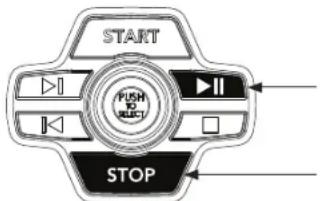
The treadmill will flash "LUBE BELT" reminder every 300 mi. After lubricating belt, reset warning by holding down STOP and PLAY/PAUSE buttons for 5 seconds.
The 7.4AT Treadmill will connect and stream music form your compatible music device. This includes many smart phones and traditional mp3 players such as the iPod®.
Your 7.4AT Treadmill comes equipped with Bluetooth speakers. Bluetooth compatible devices (running Bluetooth 4.0) can stream music wirelessly from your device to the speakers. You can also connect your music device via an audio cable and still stream music through the speakers. Instructions for both types of audio connection are detailed below.
CONNECTING VIA BLUETOOTH 4.0
1) Check to ensure that your music device is Bluetooth 4.0 compatible
2) Go into your device's Bluetooth settings and scan for devices.
3) On your music device, locate the Bluetooth device list. Select your unit that appears on this list.
Wait for your music device to finish pairing with the unit.
4) You will know when pairing is successful when your music device shows the unit as now being a paired device.
WHEN UNIT IS POWERED OFF THEN BACK ON
If you turn your unit off, or if it goes into sleep mode, the next time it is powered on the unit will look to pair with the last music device with which it was paired. It will automatically pair at this time.
RE-PAIRING MUSIC DEVICES
In the event that the unit cannot find the last paired music device (for example, the music device is off or not being used) then the unit will stop looking to pair with the music device. If this happens, and if you wish to use your music device again, then you will need to go through the pairing process listed above and re-pair through your music device's settings.
USING MULTIPLE MUSIC DEVICES
If multiple devices are being paired with the unit (i.e.: multiple users are using the unit and pairing their music devices with it) then the unit will look to pair with the last device used and "forget" other devices. If you wish to re-pair a "forgotten" music device, then you will need to un-pair the current paired device and then re-pair your device through the pairing procedure noted above.
CONNECTING VIA AN AUDIO CABLE
1) Connect the included AUDIO ADAPTOR CABLE to the AUDIO IN JACK on the top right of the console and the headphone jack on your music device.
2) Use your CD / MP3 player buttons to adjust song settings.
3) Remove the AUDIO ADAPTOR CABLE when not in use.
4) If you don't want to use the SPEAKERS, you can plug your headphones into the AUDIO OUT JACK at the bottom of the console. This ensures that if you accidentally catch the headphone line while running, you won't drop your device to the ground.
BLUETOOTH HEART RATE MONITORING
The 7.4AT Treadmill is equipped with multi-channel Bluetooth which enables you to wirelessly connect compatible Bluetooth heart rate monitoring devices to this unit. You will need to ensure that your wireless heart rate monitoring device is Bluetooth 4.0 compatible and is also "open" to sharing data. Non-"open" or "closed" devices typically only share data with their proprietary apps. The 7.4AT Treadmill needs an "open" device to receive data from the device. You may need to consult with your device's owner's manual or the manufacturer to confirm if it is an open device.

AUFBAU
WARNING
8 mm T-Schraubenschlüssel
6 mm L-Schraubenschlüssel
5 mm L-Schraubenschlüssel
IM LIEFERUMFANG ENTHALTENE TEILE:
Woche Training #1 Training #2 Training #3
Week Training #1 Training #2 Training #3
| Segment Warning-up 1 2 3 4 5 6 7 8 9 10 | ||||||||||
| Tjd:4:00 minutes 30 sec 30 sec 30 sec 30 sec 30 sec 30 sec 30 sec 30 sec 30 sec 30 sec 30 sec 30 sec 30 sec 30 sec 30 sec 30 sec 30 sec 30 sec 30 sec 30 sec 30 sec 30 sec 30 sec 30 sec 30 sec 30sec 30 sec 30 sec 30 sec 30 sec 30 sec 30 sec 30 sec 30 sec 30 sec 30 sec 30 sec 30 sec 30 sec 30 sec 30 sec 30 sec 30 sec 30 sec 30 sec 30 sec 30 sec 30 sec 30 sec 30 sec 30 Sec 30 sec 30 sec 30 sec 30 sec 30 sec 30 sec 30 sec 30 sec 30 sec 30 sec 30 sec 30 sec 30 sec 30 sec 30 sec 30 sec 30 sec 30 sec 30 sec 30 sec 30 sec 30 sec 30 sec 30 sec 30Sec 30 sec 30 sec 30 sec 30 sec 30 sec 30 sec 30 sec 30 sec 30 sec 30 sec 30 sec 30 sec 30 sec 30 sec 30 sec 30 sec 30 sec 30 sec 30 sec 30 sec 30 sec 30 sec 30 sec 30 sec 30 SEC 30 sec 30 sec 30 sec 30 sec 30 sec 30 sec 30 sec 30 sec 30 sec 30 sec 30 sec 30 sec 30 sec 30 sec 30 sec 30 sec 30 sec 30 sec 30 sec 30 sec 30 sec 30 sec 30 sec 30 sec 30/sec 30 sec 30 sec 30 sec 30 sec 30 sec 30 sec 30 sec 30 sec 30 sec 30 sec 30 sec 30 sec 30 sec 30 sec 30 sec 30 sec 30 sec 30 sec 30 sec 30 sec 30 sec 30 sec 30 sec 30 sec 30 seca 30 sec 30 sec 30 sec 30 sec 30 sec 30 sec 30 sec 30 sec 30 sec 30 sec 30 sec 30 sec 30 sec 30 sec 30 sec 30 sec 30 sec 30 sec 30 sec 30 sec 30 sec 30 sec 30 sec 30 sec 30 soc 30 sec 30 sec 30 sec 30 sec 30 sec 30 sec 30 sec 30 sec 30 sec 30 sec 30 sec 30 sec 30 sec 30 sec 30 sec 30 sec 30 sec 30 sec 30 sec 30 sec 30 sec 30 sec 30 sec 30 sec 30 sen 30 sec 30 sec 30 sec 30 sec 30 sec 30 sec 30 sec 30 sec 30 sec 30 sec 30 sec 30 sec 30 sec 30 sec 30 sec 30 sec 30 sec 30 sec 30 sec 30 sec 30 sec 30 sec 30 sec 30 sec 30SEC 30 sec 30 sec 30 sec 30 sec 30 sec 30 sec 30 sec 30 sec 30 sec 30 sec 30 sec 30 sec 30 sec 30 sec 30 sec 30 sec 30 sec 30 sec 30 sec 30 sec 30 sec 30 sec 30 sec 30 sec 30seg 30 sec 30 sec 30 sec 30 sec 30 sec 30 sec 30 sec 30 sec 30 sec 30 sec 30 sec 30 sec 30 sec 30 sec 30 sec 30 sec 30 sec 30 sec 30 sec 30 sec 30 sec 30 sec 30 sec 30 sec 30 seg 30 sec 30 sec 30 sec 30 sec 30 sec 30 sec 30 sec 30 sec 30 sec 30 sec 30 sec 30 sec 30 sec 30 sec 30 sec 30 sec 30 sec 30 sec 30 sec 30 sec 30 sec 30 sec 30 sec 30 sec 30seca 30 sec 30 sec 30 sec 30 sec 30 sec 30 sec 30 sec 30 sec 30 sec 30 sec 30 sec 30 sec 30 sec 30 sec 30 sec 30 sec 30 sec 30 sec 30 sec 30 sec 30 sec 30 sec 30 sec 30 sec 31 sec 31 sec 31 sec 31 sec 31 sec 31 sec 31 sec 31 sec 31 sec 31 sec 31 sec 31 sec 31 sec 31 sec 31 sec 31 sec 31 sec 31 sec 31 sec 31 sec 31 sec 31 sec 31 sec 31 sec 31 sec 30sec 30sec 30sec 30sec 30sec 30sec 30sec 30sec 30sec 30sec 30sec 30sec 30sec 30sec 30sec 30sec 30sec 30sec 30sec 30sec 30sec 30sec 30sec 30sec 30sec 30seg 30sec 30sec 30sec 30sec 30sec 30sec 30sec 30sec 30sec 30sec 30sec 30sec 30sec 30sec 30sec 30sec 30sec 30sec 30sec 30sec 30sec 30sec 30sec 30sec 30 sec 31sec 31sec 31sec 31sec 31sec 31sec 31sec 31sec 31sec 31sec 31sec 31sec 31sec 31sec 31sec 31sec 31sec 31sec 31sec 31sec 31sec 31sec 31sec 31sec 31sec 31seg 31sec 31sec 31sec 31sec 31sec 31sec 31sec 31sec 31sec 31sec 31sec 31sec 31sec 31sec 31sec 31sec 31sec 31sec 31sec 31sec 31sec 31sec 31sec 31sec 31seca 31sec 31sec 31sec 31sec 31sec 31sec 31sec 31sec 31sec 31sec 31sec 31sec 31sec 31sec 31sec 31sec 31sec 31sec 31sec 31sec 31sec 31sec 31sec 31sec 31sem 31sec 31sec 31sec 31sec 31sec 31sec 31sec 31sec 31sec 31sec 31sec 31sec 31sec 31sec 31sec 31sec 31sec 31sec 31sec 31sec 31sec 31sec 31sec 31sec 31sek 31sec 31sec 31sec 31sec 31sec 31sec 31sec 31sec 31sec 31sec 31sec 31sec 31sec 31sec 31sec 31sec 31sec 31sec 31sec 31sec 31sec 31sec 31sec 31sec 31Sec 31sec 31sec 31sec 31sec 31sec 31sec 31sec 31sec 31sec 31sec 31sec 31sec 31sec 31sec 31sec 31sec 31sec 31sec 31sec 31sec 31sec 31sec 31sec 31sec 31SEC 31sec 31sec 31sec 31sec 31sec 31sec 31sec 31sec 31sec 31sec 31sec 31sec 31sec 31sec 31sec 31sec 31sec 31sec 31sec 31sec 31sec 31sec 31sec 31sec 31SEGMENT Warring-up 12345678910 Tjtd:4:00 minutes 30 sec 30 sec 30 sec 30 sec 30 sec 30 sec 30 sec 30 sec 30 sec 30 sec 30 sec 30 sec 30 sec 30 sec 30 sec 30 sec 30 sec 30 sec 30 sec 30 sec 30 sec 30 sec 30 sec 25252525252525252525252525252525252525252525252525252525252525252525252525252525252525252525252525252SECA:4:00 minutes 52252525252525252525252525252525252525252525252525252525252525252525252525252525252525252525252525252SAS:4:00 minutes 7225252525252525252525252525252525252525252525252525252525252525252525252525252525252525252525252525 | ||||||||||



Week Training #1 Training #2 Training #3
1 5 minutes warming-up 5 minutes warming-up 5 minutes warming-up
1 minut joggen 1 minut jeggen 1 minut jeggen
1,5 minuut wandelen 1,5 minuut wandelen 1,5 minuut wandelen
1 minut joggen 1 minut joggen 1 minut joggen
1,5 minut wandelen 1,5 minut wandelen 1,5 minut wandelen
1 minut jougen 1 minut jougen 1 minut jougen
1.5 minuut wandelen 1,5 minuut wandelen 1,5 minuut wandelen
3 5 minutes warming-up 5 minutes warming-up 5 minutes warming-up
1.5 minutjoggen 1,5 minuut joggen 1,5 minuut joggen
1,5 minuut wandelen 1,5 minuut wandelen 1,5 minuut wandelen
3 minuten joggen 3 minuten joggen 3 minuten joggen
3 minuten wandelen 3 minuten wandelen 3 minuten wandelen
Week Training #1 Training #2 Training #3
4 5 minuIen warming-up 5 minuIen warrning-up 5 minuIen warring-up
3 minutes joggen 3 minutes joggen 3 minutes joggen
1,5 minuut wandelen 1,5 minuut wandelen 1,5 minuut wandelen
5 minuten jeggen 5 minuten jeggen 5 minuten jeggen
2,5 minuut wandelen 2,5 minuut wandelen 2,5 minuut wandelen
- minutes 1000 3. minutes 1000
1,5 minuut wandelen 1,5 minuut wandelen 1,5 minuut wandelen
5 minutee jogeenn 5 minuteen jogeenn 5 minuteen jogeenn
5 minuten cooling-down 5 minuten cooling-down 5 minuten cooling-down
5 5 minutes warming-up 5 minutes warming-up 5 minutes warming-up
5 minute cooling-down
7 5 minuten warming up 5 minuten warming up 5 minuten warming up
25 minuten jeggen 25 minuten jeggen 25 minuten jeggen
5 minuten cooling-down 5 minuten cooling-down 5 minuten cooling-down
8 5 minuTn warrinng-up 5 minuTn warring-up 5 minuTn warring-up
28 minutes joggen 28 minutes joggen 28 minutes joggen
5 minuten cooling-down 5 minuten cooling-down 5 minuten cooling-down
9 5 minu t on w a r m i n g - u p 5 minu t on w a r m i n g - u p
30 minutes joggen 30 minutes joggen 30 minutes joggen
5 minute cooling-down 5 minute cooling-down 5 minute cooling-down
| Segment Warming-up 1 2 3 4 5 6 7 8 | |||||||||||||||||||||||||
| Tijd 4:00 minutes 30 sec 30 sec 30 sec 30 sec 30 sec 30 sec 30 sec 30 sec 30 sec 30 sec 30 sec 30 sec 30 sec 30 sec 30 sec 30 sec 30 sec 30 sec 30 sec 30 sec 30 sec 30 sec 30 sec 30 sec 30 sec 30sec 30sec 30sec 30sec 30sec 30sec 30sec 30sec 30sec 30sec 30sec 30sec 30sec 30sec 30sec 30sec 30sec 30sec 30sec 30sec 30sec 30sec 30sec 30sec 30sec 30 sec 30sec 30sec 30sec 30sec 30sec 30sec 30sec 30sec 30sec 30sec 30sec 30sec 30sec 30sec 30sec 30sec 30sec 30sec 30sec 30sec 30sec 30sec 30sec 30 sec 30 sec 30 sec 30 sec 30 sec 30 sec 30 sec 30 sec 30 sec 30 sec 30 sec 30 sec 30 sec 30 sec 30 sec 30 sec 30 sec 30 sec 30 sec 30 sec 30 sec 30 sec 30 sec 30 sec 30 Sec 30 sec 30 sec 30 sec 30 sec 30 sec 30 sec 30 sec 30 sec 30 sec 30 sec 30 sec 30 sec 30 sec 30 sec 30 sec 30 sec 30 sec 30 sec 30 sec 30 sec 30 sec 30 sec 30 sec 30 sec 30Sec 30 sec 30 sec 30 sec 30 sec 30 sec 30 sec 30 sec 30 sec 30 sec 30 sec 30 sec 30 sec 30 sec 30 sec 30 sec 30 sec 30 sec 30 sec 30 sec 30 sec 30 sec 30 sec 30 sec 30 sec 30 SEC 30 sec 30 sec 30 sec 30 sec 30 sec 30 sec 30 sec 30 sec 30 sec 30 sec 30 sec 30 sec 30 sec 30 sec 30 sec 30 sec 30 sec 30 sec 30 sec 30 sec 30 sec 30 sec 30 sec 30 sec 30seg 30 sec 30 sec 30 sec 30 sec 30 sec 30 sec 30 sec 30 sec 30 sec 30 sec 30 sec 30 sec 30 sec 30 sec 30 sec 30 sec 30 sec 30 sec 30 sec 30 sec 30 sec 30 sec 30 sec 30 sec 30 sec 30 sec 30 sec 30 sec 30 sec 30 sec 30 sec 30 sec 30 sec 30 sec 30 sec 30 sec 30 sec 30 sec 30 sec 30 sec 30 sec 30 sec 30 sec 30 sec 30 sec 30 sec 30 sec 30 sec 30 sec 30 soc 30 soc 30 soc 30 soc 30 soc 30 soc 30 soc 30 soc 30 soc 30 soc 30 soc 30 soc 30 soc 30 soc 30 soc 30 soc 30 soc 30 soc 30 soc 30 soc 30 soc 30 soc 30 soc 30 soc 30 soc 30 SOC 30 SOC 30 SOC 30 SOC 30 SOC 30 SOC 30 SOC 30 SOC 30 SOC 30 SOC 30 SOC 30 SOC 30 SOC 30 SOC 30 SOC 30 SOC 30 SOC 30 SOC 30 SOC 30 SOC 30 SOC 30 SOC 30 SOC 30 SOC 30 SOC 30SOC 30 SOC 30 SOC 30 SOC 30 SOC 30 SOC 30 SOC 30 SOC 30 SOC 30 SOC 30 SOC 30 SOC 30 SOC 30 SOC 30 SOC 30 SOC 30 SOC 30 SOC 30 SOC 30 SOC 30 SOC 30 SOC 30 SOC 30 SOC 30 SOC 30 soc 30 soc 30 soc 30 soc 30 soc 30 soc 30 soc 30 soc 30 soc 30 soc 30 soc 30 soc 30 soc 30 soc 30 soc 30 soc 30 soc 30 soc 30 soc 30 soc 30 soc 30 soc 30 soc 30 soc 30SOC 30 SOC 30 SOC 30 SOC 30 SOC 30 SOC 30 SOC 30 SOC 30 SOC 30 SOC 30 SOC 30 SOC 30 SOC 30 SOC 30 SOC 30 SOC 30 SOC 30 SOC 30 SOC 30 SOC 30 SOC 30 SOC 30 SOC 30 SOC 30SOC 30SOC 30 SOC 30 SOC 30 SOC 30 SOC 30 SOC 30 SOC 30 SOC 30 SOC 30 SOC 30 SOC 30 SOC 30 SOC 30 SOC 30 SOC 30 SOC 30 SOC 30 SOC 30 SOC 30 SOC 30 SOC 30 SOC 30 SOC 30 SOC 30 soc 30 SOC 30 SOC 30 SOC 30 SOC 30 SOC 30 SOC 30 SOC 30 SOC 30 SOC 30 SOC 30 SOC 30 SOC 30 SOC 30 SOC 30 SOC 30 SOC 30 SOC 30 SOC 30 SOC 30 SOC 30 SOC 30 SOC 30 SOC 30SOC 30SOL 30SOL 30SOL 30SOL 30SOL 30SOL 30SOL 30SOL 30SOL 30SOL 30SOL 30SOL 30SOL 30SOL 30SOL 30SOL 30SOL 30SOL 30SOL 30SOL 30S OL 1111111111111111111111111111111111111111111111111111111111111111111111111111111111111111111111111111 | |||||||||||||||||||||||||
| Niveau 1 | Helling 0,5,1,5,1,5 | 1,0,5,0,5,0,5 | 1,1,5 | ||||||||||||||||||||||
| Snelheid (mph) 0,5,1,52,2,5,3,5 | 1,52,2,5,3,5 | 1,54,5,4,5,4,5 | 1,54,5,4,5,4,5 | 1,54,5,4,5,4,5 | 1,54,5,4,5,4,5 | 1,54,5,4,5,4,5 | 1,54,5,4,5,4,5 | 1,54,5,4,5,4,5 | 1,54,54,54,54,54,54,54,54,54,54,54,54,54,54,54,54,54,54,54,54,54,54,54,54,54,54,54,54,54,54,54,54,54,54.54,54,54,54,54,54,54,54,54,54,54,54,54,54,54,54,54,54,54,54,54,54,54,54,54,54,54,54,54,54,54,54,54, | 1,52,2,5,3,5,4,5,5,6,7,8,9,6,8,8,8,8,8,8,8,8,8,8,8,8,8,8,8,8,8,8,8,8,8,8,8,8,8,8,8,8,8,8,8,8,8,8,8,8,8,8,8,8,8,8,8,8,8,8,8,8,8,8, | 1,52,2,5,3,5,4,5,5,6,7,8,9,6,8,8,8,8,8,8,8,8,8,8,8,8,8,8,8,8,8,8,8,8,8,8,8,8,8,8,8,8,8,8,8,8,8,8, | 1,52,2,5,3,5,4,5,5,6,7,8,9,6,9,6,8,8,8,8,8,8,8,8,8,8,8,8,8,8,8,8,8,8,8,8,8,8,8,8,8,8,8,8,8,8,8,8,8,8,8,8,8,8,8,8,8,8,8,8,8,8,8, | 1,51,2,5,3,5,4,5,5,6,7,8,9,6,9,6,8,8,8,8,8,8,8,8,8,8,8,8,8,8,8,8,8,8,8,8,8,8,8,8,8,8,8,8,8,8,8,8,8,8,8, | 1,51,2,5,3,5,4,5,5,6,7,8,9, | 1,51,2,5,3,5,4,5,5,6,7,8,9,6,9,6,8,8,8,8,8,8,8,8,8,8,8,8,8,8,8,8,8,8,8,8,8,8,8,8,8,8,8,8,8,8,8,8, | 1,51,2,5,3,5,4,5,5,6,7,8,9,6,9,6,9,6,8,8,8,8,8,8,8,8,8,8,8,8,8,8,8,8,8,8,8,8,8,8,8,8,8,8,8,8,8,8,8,8,8,8,8,8,8,8,8,8,8,8,8,8,8, | 1,51,2,4,5,5,6,7,8,9,6,9,6,8,8,8,8,8,8,8,8,8,8,8,8,8,8,8,8,8,8,8,8,8,8,8,8,8,8,8,8,8,8,8,8,8,8,8,8,8,8,8, | 1,51,2,4,5,5,6,7,8, | 1,51,2,4,5,5,6,7,8,9,6,9,6,8,8,8,8,8,8,8,8,8,8,8,8,8,8,8,8,8,8,8,8,8,8,8,8,8,8,8,8,8,8,8,8,8,8, | 1,51,2,4,5,5,6,7,8,9,6,9,6,8,7,8,9,6,9,6,8,8,8,8,8,8,8,8,8,8,8,8,8,8,8,8,8,8,8,8,8,8,8,8,8,8,8,8,8,8,8,8,8,8,8,8,8,8,8,8,8,8,8, | 1,51,2,4,5,4,5,5,6,7,8,9,6,9,6,8,7,8,9,6,9,6,8,7,8,9,6,9,6,8,7,8,9,6,9,6,8,7,8,9,6,9,6,8,7,8,9,6,9,6,8,7,8,9,6,9,6,8,7,8,9,6,9,6,8, | 1,51,2,4,5,5,6,7,8,9,6,9,6,8,7,8,9,6,9,6,8,7,8,9,6,9,6,8,7,8,9,6,9,6,8,7,8,9,6,9,6,8,7,8,9,6,9,6,8,7,8,9, | 1,51,2,4,5,5,6,7,8,9,6,9,6,8,7,8,9,6,9,6,8,7,8,9,6,9,6,8,7,8,9,6,9,6,8,7,8,9,6,9,6,8,7,8,9,6,9,6, | 1,51,2,4,5,5,6,7,8,9,6,9,6,8,7,8,9,6,9,6,8,7,8,9,6,9,6,8,7,8,9,6,9,6,8,7,8,9,6,9,6,8,7,8,9,6,9,6, | |

1 minute of icoining, 1 minute of icoining, 1 minute of icoining
15 minutes of jogging 15 minutes of jogging 15 minutes of jogging
1 minu de jocin 1 minut de jocin 1 minut de jocin
1.5 minute de jogging 1.5 minute de jogging 1.5 minute de jogging
1 minute in arriving 1 minute in arriving 1 minute in arriving
1 minute de jogging 1 minute de jogging 1 minute de jogging 1.5 minutes de marche 1.5 minutes de marche 1.5 minutes de ma
1 minute de jocin, 1 minute de jocin, 1 minute de jocin
15 minu#n 15 minu#n 15 minu#n
5 minutes de repos 5 minutes de repos 5 minutes de repos
2 5 minutes d'echauffement 5 minutes d'echauffement 5 minutes d'chauffement
5 minutes dc jogging
5 minutes de repos
7
| Segment Echauffement 1 2 3 4 5 6 7 8 | ||||||||||
| Temps 4:00 min 30 sec 30 sec 30 sec 30 sec 30 sec 30 sec 30 sec 30 sec 30 sec 30 sec 30 sec 30 sec 30 sec 30 sec 30 sec 30 sec 30 sec 30 sec 30 sec 30 sec 30 sec 30 sec 30 sec 30 sec 30 sec 30sec 30 sec 30 sec 30 sec 30 sec 30 sec 30 sec 30 sec 30 sec 30 sec 30 sec 30 sec 30 sec 30 sec 30 sec 30 sec 30 sec 30 sec 30 sec 30 sec 30 sec 30 sec 30 sec 30 sec 30 sec 30 Sec 30 sec 30 sec 30 sec 30 sec 30 sec 30 sec 30 sec 30 sec 30 sec 30 sec 30 sec 30 sec 30 sec 30 sec 30 sec 30 sec 30 sec 30 sec 30 sec 30 sec 30 sec 30 sec 30 sec 30 sec 30Sec 30 sec 30 sec 30 sec 30 sec 30 sec 30 sec 30 sec 30 sec 30 sec 30 sec 30 sec 30 sec 30 sec 30 sec 30 sec 30 sec 30 sec 30 sec 30 sec 30 sec 30 sec 30 sec 30 sec 30 sec 30 SEC 30 sec 30 sec 30 sec 30 sec 30 sec 30 sec 30 sec 30 sec 30 sec 30 sec 30 sec 30 sec 30 sec 30 sec 30 sec 30 sec 30 sec 30 sec 30 sec 30 sec 30 sec 30 sec 30 sec 30 sec 30/sec 30 sec 30 sec 30 sec 30 sec 30 sec 30 sec 30 sec 30 sec 30 sec 30 sec 30 sec 30 sec 30 sec 30 sec 30 sec 30 sec 30 sec 30 sec 30 sec 30 sec 30 sec 30 sec 30 sec 30 sec 30 seca 30 sec 30 sec 30 sec 30 sec 30 sec 30 sec 30 sec 30 sec 30 sec 30 sec 30 sec 30 sec 30 sec 30 sec 30 sec 30 sec 30 sec 30 sec 30 sec 30 sec 30 sec 30 sec 30 sec 30 sec 30 soc 30 sec 30 sec 30 sec 30 sec 30 sec 30 sec 30 sec 30 sec 30 sec 30 sec 30 sec 30 sec 30 sec 30 sec 30 sec 30 sec 30 sec 30 sec 30 sec 30 sec 30 sec 30 sec 30 sec 30 sec 30 sen 30 sec 30 sec 30 sec 30 sec 30 sec 30 sec 30 sec 30 sec 30 sec 30 sec 30 sec 30 sec 30 sec 30 sec 30 sec 30 sec 30 sec 30 sec 30 sec 30 sec 30 sec 30 sec 30 sec 30 sec 30SEC 30 sec 30 sec 30 sec 30 sec 30 sec 30 sec 30 sec 30 sec 30 sec 30 sec 30 sec 30 sec 30 sec 30 sec 30 sec 30 sec 30 sec 30 sec 30 sec 30 sec 30 sec 30 sec 30 sec 30 sec 30 SECS 30 sec 30 sec 30 sec 30 sec 30 sec 30 sec 30 sec 30 sec 30 sec 30 sec 30 sec 30 sec 30 sec 30 sec 30 sec 30 sec 30 sec 30 sec 30 sec 30 sec 30 sec 30 sec 30 sec 30 sec 30 SSC 30 sec 30 sec 30 sec 30 sec 30 sec 30 sec 30 sec 30 sec 30 sec 30 sec 30 sec 30 sec 30 sec 30 sec 30 sec 30 sec 30 sec 30 sec 30 sec 30 sec 30 sec 30 sec 30 sec 30 sec 30 scc 30 sec 30 sec 30 sec 30 sec 30 sec 30 sec 30 sec 30 sec 30 sec 30 sec 30 sec 30 sec 30 sec 30 sec 30 sec 30 sec 30 sec 30 sec 30 sec 30 sec 30 sec 30 sec 30 sec 30 sec 30秒 30 sec 30 sec 30 sec 30 sec 30 sec 30 sec 30 sec 30 sec 30 sec 30 sec 30 sec 30 sec 30 sec 30 sec 30 sec 30 sec 30 sec 30 sec 30 sec 30 sec 30 sec 30 sec 30 sec 30 sec 30 msec 30 sec 30 sec 30 sec 30 sec 30 sec 30 sec 30 sec 30 sec 30 sec 30 sec 30 sec 30 sec 30 sec 30 sec 30 sec 30 sec 30 sec 30 sec 30 sec 30 sec 30 sec 30 sec 30 sec 30 sec 30seg C 30 sec 30 sec 30 sec 30 sec 30 sec 30 sec 30 sec 30 sec 30 sec 30 sec 30 sec 30 sec 30 sec 30 sec 30 sec 30 sec 30 sec 30 sec 30 sec 30 sec 30 sec 30 sec 30 sec 30 sec 30 seg C 30 sec 30 sec 30 sec 30 sec 30 sec 30 sec 30 sec 30 sec 30 sec 30 sec 30 sec 30 sec 30 sec 30 sec 30 sec 30 sec 30 sec 30 sec 30 sec 30 sec 30 sec 30 sec 30 sec 30 sec 31sec 31sec 31sec 31sec 31sec 31sec 31sec 31sec 31sec 31sec 31sec 31sec 31sec 31sec 31sec 31sec 31sec 31sec 31sec 31sec 31sec 31sec 31sec 31sec 31sec 31seg C 31sec 31sec 31sec 31sec 31sec 31sec 31sec 31sec 31sec 31sec 31sec 31sec 31sec 31sec 31sec 31sec 31sec 31sec 31sec 31sec 31sec 31sec 31sec 31sec 31seca 31sec 31sec 31sec 31sec 31sec 31sec 31sec 31sec 31sec 31sec 31sec 31sec 31sec 31sec 31sec 31sec 31sec 31sec 31sec 31sec 31sec 31sec 31sec 31sec 31scc C 31sec 31sec 31sec 31sec 31sec 31sec 31sec 31sec 31sec 31sec 31sec 31sec 31sec 31sec 31sec 31sec 31sec 31sec 31sec 31sec 31sec 31sec 31sec 31sec 32sec C 31sec 31sec 31sec 31sec 31sec 31sec 31sec 31sec 31sec 31sec 31sec 31sec 31sec 31sec 31sec 31sec 31sec 31sec 31sec 31sec 31sec 31sec 31sec 31sec 30sec C 31sec 31sec 31sec 31sec 31sec 31sec 31sec 31sec 31sec 31sec 31sec 31sec 31sec 31sec 31sec 31sec 31sec 31sec 31sec 31sec 31sec 31sec 31sec 31sec 29sec C 31sec 31sec 31sec 31sec 31sec 31sec 31sec 31sec 31sec 31sec 31sec 31sec 31sec 31sec 31sec 31sec 31sec 31sec 31sec 31sec 31sec 31sec 31sec 31sec 42sec C 31sec 31sec 31sec 31sec 31sec 31sec 31sec 31sec 31sec 31sec 31sec 31sec 31sec 31sec 31sec 31sec 31sec 31sec 31sec 31sec 31sec 31sec 31sec 31sec C 31sec 31sec 31sec 31sec 31sec 31sec 31sec 31sec 31sec 31sec 31sec 31sec 31sec 31sec 31sec 31sec 31sec 31sec 31sec 31sec 31sec 31sec 31sec 31sec 52sec C 31sec 31sec 31sec 31sec 31sec 31sec 31sec 31sec 31sec 31sec 31sec 31sec 31sec 31sec 31sec 31sec 31sec 31sec 31sec 31sec 31sec 31sec 31sec 31sec csc C 31sec 31sec 31sec 31sec 31sec 31sec 31sec 31sec 31sec 31sec 31sec 31sec 31sec 31sec 31sec 31sec 31sec 31sec 31sec 31sec 31sec 31sec 31sec 31sec 3 | ||||||||||

Horizon 7.4AT | 7.4AT-24 Rev. 1.0 | 1000519295
©2024 Horizon Fitness