
HUM-CM50B-GB - Air Humidifier HOMEDICS - Free user manual and instructions
Find the device manual for free HUM-CM50B-GB HOMEDICS in PDF.


User questions about HUM-CM50B-GB HOMEDICS
0 question about this device. Answer the ones you know or ask your own.
Ask a new question about this device
Download the instructions for your Air Humidifier in PDF format for free! Find your manual HUM-CM50B-GB - HOMEDICS and take your electronic device back in hand. On this page are published all the documents necessary for the use of your device. HUM-CM50B-GB by HOMEDICS.
USER MANUAL HUM-CM50B-GB HOMEDICS
natural_image
Exterior view of a modern, conical air purifier device (no visible text or symbols)Instruction Manual
HUM-CM50B-EU
HUM-CM50B-GB
2year guarantee
READ ALL INSTRUCTIONS BEFORE USE.
SAVE THESE INSTRUCTIONS FOR FUTURE REFERENCE.
IMPORTANT SAFEGUARDS:
WHEN USING ELECTRICAL PRODUCTS, ESPECIALLY WHEN CHILDREN ARE PRESENT, BASIC SAFETY PRECAUTIONS SHOULD ALWAYS BE FOLLOWED, INCLUDING THE FOLLOWING:
- ALWAYS unplug the appliance from the electrical outlet immediately after using and before cleaning. To disconnect, turn all controls to the 'OFF' position, then remove plug from outlet.
- NEVER leave an appliance unattended when plugged in. Unplug from the mains outlet when not in use and before putting on or taking off parts or attachments.
- This appliance is not intended for use by persons (including children) with reduced physical, sensory or mental capabilities, or lack of experience and knowledge, unless they have been given supervision or instruction concerning use of the appliance by a person responsible for their safety. Children should be supervised to ensure that they do not play with the appliance.
- DO NOT reach for an appliance that has fallen in water or other liquids. Switch off at the mains and unplug it immediately. Keep dry – DO NOT operate in wet or moist conditions.
- NEVER insert pins or other metallic fasteners into the appliance.
- Use this appliance for the intended use as described in this booklet. DO NOT use attachments not recommended by HoMedics.
- NEVER operate the appliance if it has a damaged cord or plug, if it is not working properly, if it has been dropped or damaged, or dropped into water. Return it to the HoMedics Service Centre for examination and repair.
- Keep cord away from heated surfaces.
- Excessive use could lead to the product's excessive heating and shorter life. Should this occur, discontinue use and allow the unit to cool before operating.
- NEVER drop or insert any object into any opening.
- DO NOT operate where aerosol (spray) products are being used or where oxygen is being administered.
- DO NOT operate under a blanket or pillow. Excessive heating can occur and cause fire, electrocution or injury to persons.
- DO NOT carry this appliance by the cord or use cord as a handle.
• DO NOT use outdoors. - DO NOT crush. Avoid sharp folds.
• This product requires a 220-240 V AC power. - DO NOT attempt to repair the appliance. There are no user serviceable parts. For service, send to a HoMedics Service Centre. All servicing of this appliance must be performed by authorised HoMedics service personnel only.
- Never block the air openings of the appliance or place it on a soft surface, such as a bed or couch. Keep air openings free of lint, hair etc.
- Do not place or store appliance where it can fall or be pulled into a bath or sink. Do not place in or drop into water or other liquid.
- Failure to follow the above may result in the risk of fire or injury.
- Burns can result from improper use.
SAFETY CAUTIONS :
PLEASE READ THIS SECTION CAREFULLY BEFORE USING THE APPLIANCE.
- DO NOT use while bathing or in shower.
- Keep dry – DO NOT operate in a wet or moist condition.
• DO NOT use water above 30^ C. - Use this appliance only for its intended use as described in this manual.
• Always place the humidifier on a firm, flat, level surface. - Please hold the water tank firmly with both hands when carrying a full tank of water.
- NEVER use humidifier in an environment where explosive gases are present.
- DO NOT place the humidifier near heat sources, such as a stove and do not expose the humidifier to direct sunlight.
- To disconnect, turn all controls to the "OFF" position, then remove plug from outlet.
- This appliance is designed for personal, non-professional use only.
• DO NOT overfill with water. - Never cover the appliance when it is in operation.
• Always keep the cord away from high temperature and fire. - Perform regular maintenance of the Ultrasonic Nebulizer.
- Avoid contact with detergent to your mouth and eyes. If contact occurs, use clean water to wash immediately. If necessary, seek medical treatment.
- Never use detergent to clean the Ultrasonic Nebulizer that is not recommended by the manufacturer.
- Never scrape the Ultrasonic Nebulizer with a hard object to clean.
- If the supply cord is damaged, it must be replaced by the manufacturer, its service agent or similarly qualified persons in order to avoid a hazard.
- Unplug the appliance during filling and cleaning.
MAINTENANCE:
- Do not repair or adjust the unit. Servicing must be performed by professional or qualified personnel.
- Do not operate any appliance with an aging, knotted or damaged cord or plug, the replacement must be performed by the manufacturer, service center or qualified professional personnel.
- Stop use if there is an unusual noise or smell. Servicing should be performed by qualified personnel only.
- Humidifier should be unplugged when not in use for a long period of time.
- Do not touch the water in the main unit or the parts in the water when the unit is on.
- Never operate unit without water in the tank. Only use water in the tanks.
- Never add any additive to the water that is not produced or under the supervision of the manufacturer.
- Do not wash, adjust or move the humidifier without first unplugging the unit from its electrical outlet.
- Adding oils can reduce the life expectancy of the product.
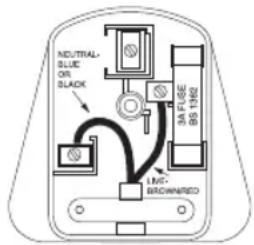
Plug (MODEL HUM-CM50-GB ONLY)
If the plug on this appliance is damaged, it can be replaced with a BS 1363 plug, fitted with a 3A BS 1362 fuse. Only use a 3 amp fuse with this appliance. Care must be taken when changing the plug.
If in doubt, contact a qualified electrician.
WEEE explanation
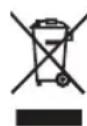
This marking indicates that this product should not be disposed with other household wastes throughout the EU. To prevent possible harm to the environment or human health from uncontrolled waste disposal, recycle it responsibly to promote the sustainable reuse of material resources. To return your used device, please use the return and collection systems or contact the retailer where the product was purchased. They can take this product for environmental safe recycling.
PRODUCT FEATURES:
Ultrasonic Technology
This humidifier uses ultrasonic high frequency technology to convert the water into particles that are dispersed into the air evenly. These particles then combine with the ions generated by the humidifier to moisten the air.
Oscillating Head
The humidifier features a motorized nozzle that oscillates 120^ . The oscillating head can also be stopped at any point in the oscillation cycle to target the mist in a specific direction.
Night Light
A useful night light feature is included for your convenience.
Auto Shut Off Protection
When the tank is empty the unit will shut off automatically.
Advanced Multi-Protection
The humidifier shuts off automatically if the water tank is removed OR unit is overloaded.
Ultrasonic Nebulizer
The humidifier utilizes special spray techniques and the ultrasonic nebulizer is easy to clean for lifetime use.
Voltage
220-240V/50Hz
Tank Capacity
3.78 litres
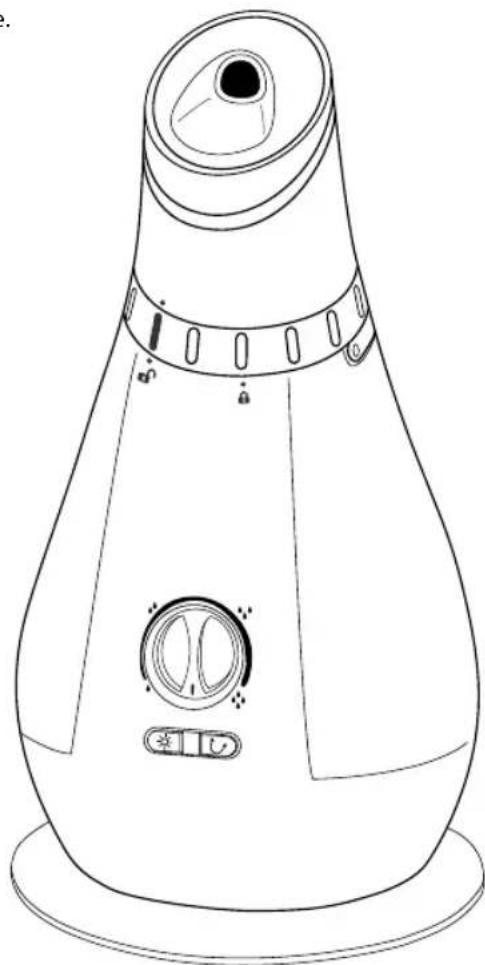
natural_image
Line drawing of a conical shower device with control buttons and a dial (no text or symbols)Fig.1
INSTRUCTIONS FOR USE:
Mist Control
Plug unit in to a 220-240 AC electrical outlet. Turn the mist control clockwise to turn unit on.
ATTENTION: When the water in the tank is almost empty the red indicator light in the tank will turn on and the power will shut off to indicate to the user to refill water.
Mist Adjustment Setting
Mist adjusts from Lowest output ( to Highest output ( ) To increase the mist output, turn the MIST control clockwise. To decrease mist output, turn the MIST control counter-clockwise (Fig.2).
Night Light
Press the NIGHT LIGHT (×) button to turn on the night light. The light at the bottom of the water tank will turn on, illuminating the tank (Fig.2).
Oscillation
When the humidifier is producing mist, press the OSCILLATION ON/OFF (☐) button to turn on the motorized oscillation feature. The nozzle at the top of the unit will oscillate in a 120° range from side to side. To target the nozzle and mist in a fixed direction, press the OSCILLATION ON/OFF (☐) button when the nozzle is at the desired position and the nozzle will stop and direct mist to the desired area only (Fig.2).
NOTE: The oscillation feature will not operate if the humidifying function is not operating. Oscillation feature will only work when mist is being produced.
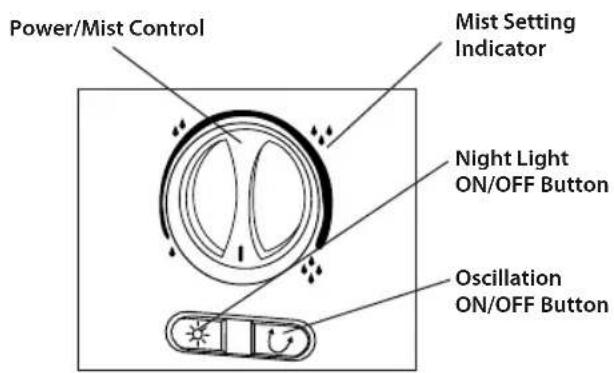
Fig.2 Fig.3
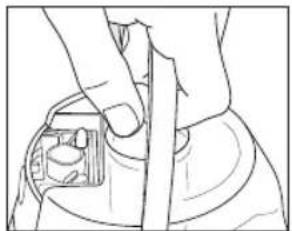
HOW TO FILL
CAUTION: Before filling unit with water, turn power off and unplug unit from outlet.
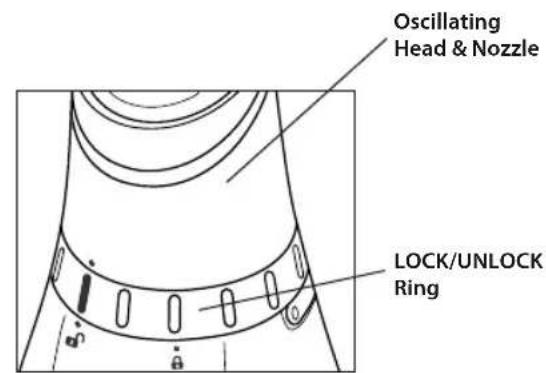
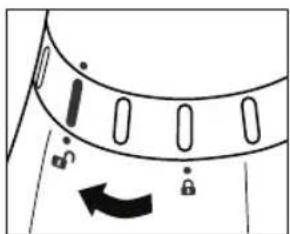
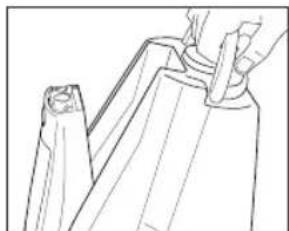
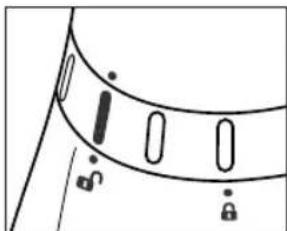
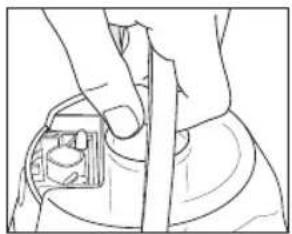
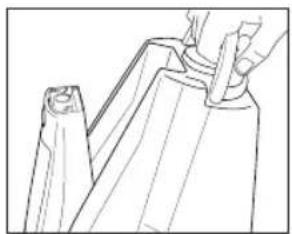
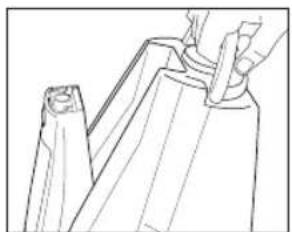
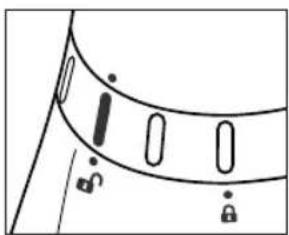
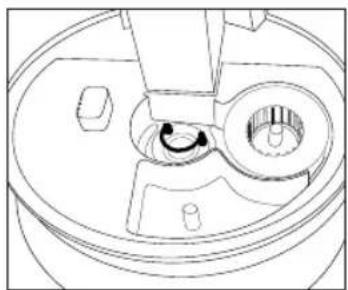
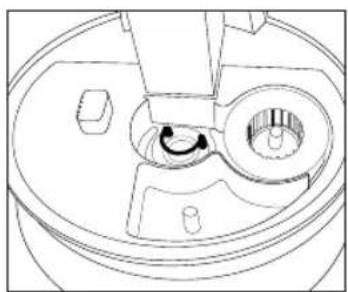
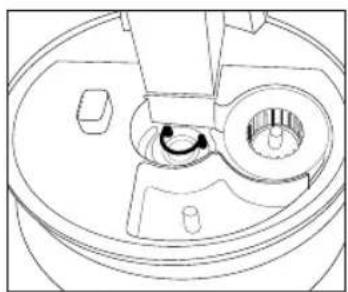
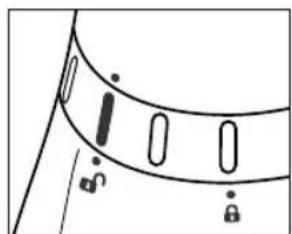
- Remove the oscillation nozzle. To remove the nozzle, turn the ring on the bottom of the nozzle to the left until the Locator icons on the head, ring and base all line up and are aligned with the UNLOCK (position. Lift up to remove the nozzle and set aside (Fig.4).
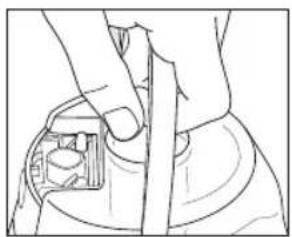
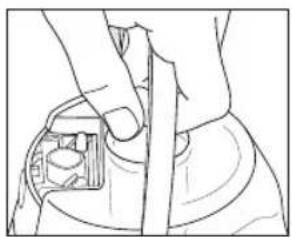
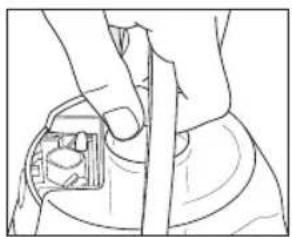
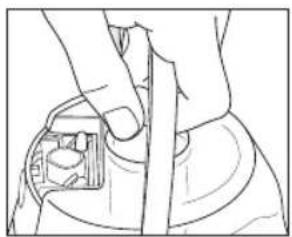
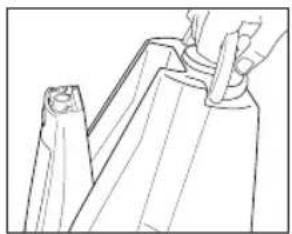
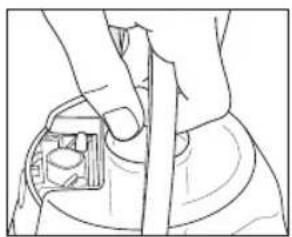
- Raise the flip-up handle on the water tank and remove the tank from the humidifi er base by lifting it up and away (Fig.5).
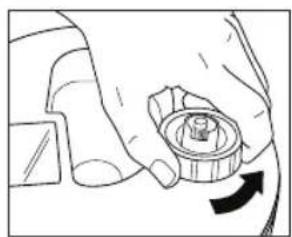
- Turn the tank upside down – remove the tank cap by turning it counter-clockwise (Fig.6).
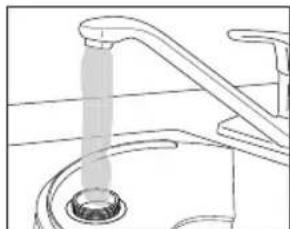
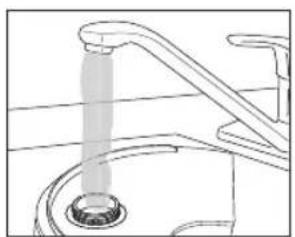
- Fill the water tank with clean, cool (not cold) tap water. We recommend using distilled water if you live in a hard water area (Fig.7).
-
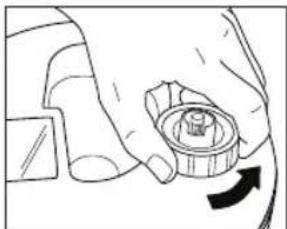
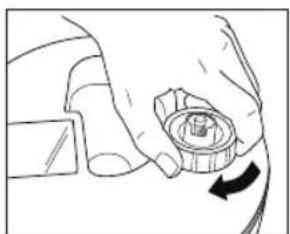
Replace the tank cap by turning clockwise until tight (Fig.8).
-
Install the tank back on the base of the unit. Make sure the tank is firmly seated (Fig.9).
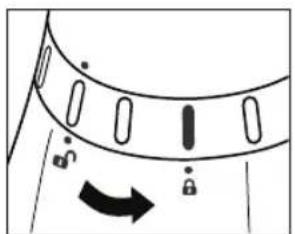
- Place the oscillating nozzle back on the unit making sure that the locator icons on the head and ring are aligned with the locator icon (●) on the base above the UNLOCK (○)con (Fig.10a).
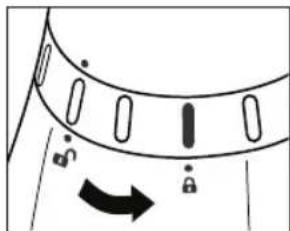
- Lock into place by turning the ring to the right until the Locator icon (♦ is aligned with the LOCK () position (Fig.10b).
natural_image
Diagram of a mechanical component with arrows indicating motion or rotation (no text or symbols)Fig.4 Fig.5 Fig.6 Fig.7
natural_image
Line drawing of hands holding a small object, no text or symbols present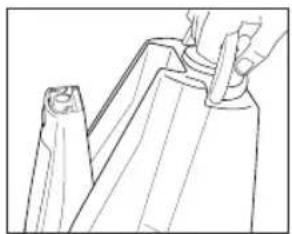
natural_image
Line drawing of a hand holding a tool interacting with a mechanical component (no text or symbols)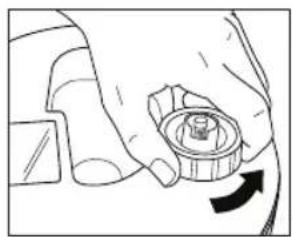
natural_image
Hand holding a mechanical component with a circular arrow indicating rotation (no text or symbols)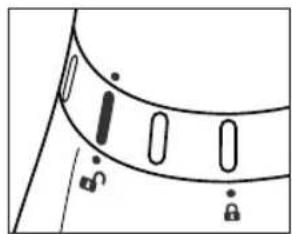
natural_image
Simple line drawing of a curved object with vertical slots and a diagonal line, no text or symbols present.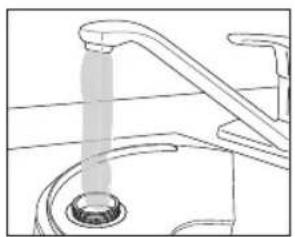
natural_image
Line drawing of a faucet with a drain and pipe (no text or symbols)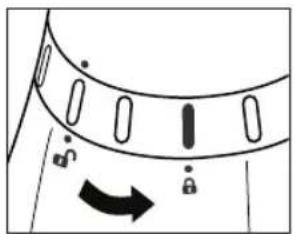
natural_image
Diagram of a curved mechanical component with directional arrows and lock symbols (no text or labels)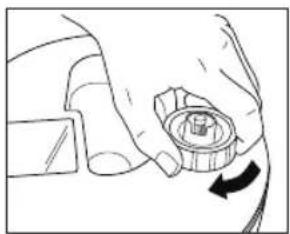
natural_image
Line drawing of a hand holding a mechanical component with an arrow indicating rotation (no text or symbols)Fig.8 Fig.9 Fig.10a Fig.10b
ABOUT WHITE DUST
Use of high-mineral content hard water will cause a white mineral residue to accumulate on room surfaces near the humidifier. The mineral residue is commonly called "white dust". The higher the mineral content (the harder your water is), the greater the potential for white dust. The white dust is not caused by a defect in the humidifier, but is due only to minerals suspended in the water.
Demineralization Cartridge
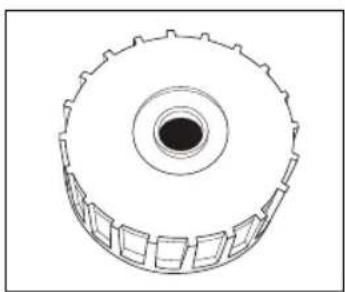
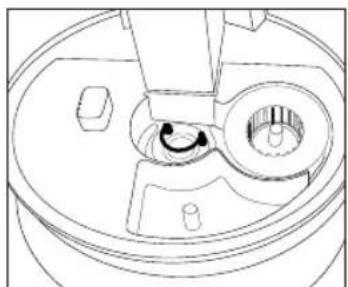
The HoMedics demineralization cartridge (Fig.11) will help reduce the potential for white dust, a deposit of minerals left behind from using hard water in your humidifier. The cartridge should be replaced every 30-40 fillings. The cartridge may need to be replaced more often when very hard water is used. When the cartridge needs to be changed, white dust will form around the humidifier. If white residue still forms around the humidifier after a new cartridge has been inserted, please make sure that the water you are using is untreated. If you live in a hard water area, we recommend the use of distilled water for better results from the humidifier. Do not use with water softeners.
natural_image
Technical line drawing of a mechanical gear or wheel component (no text or symbols)Fig.11
natural_image
Technical line drawing of a mechanical component with no visible text or symbolsFig.12
Installing Instructions
- Remove demineralization cartridge from packaging and let it soak in water for 10 minutes.
- Remove the oscillation nozzle. To remove the nozzle, turn the ring on the bottom of the nozzle to the left until the locator icons on the head, ring and base all line up and are aligned with the UNLOCK position. Lift up to remove the nozzle and set aside (Fig.4).
- Raise the flip-up handle on the water tank and remove the tank from the humidifier base by lifting it up and away (Fig.5).
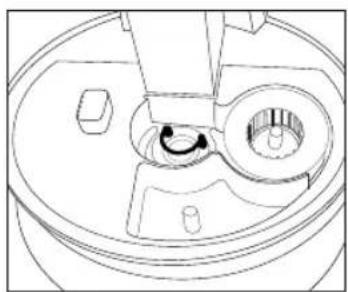
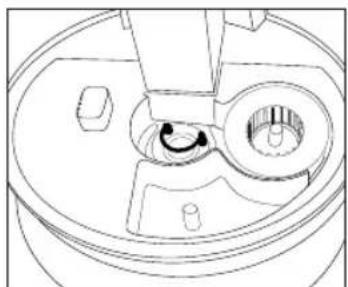
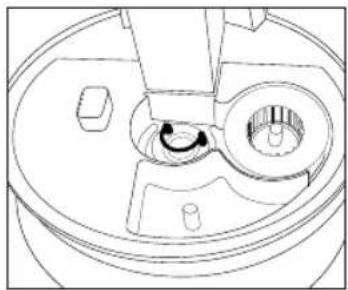
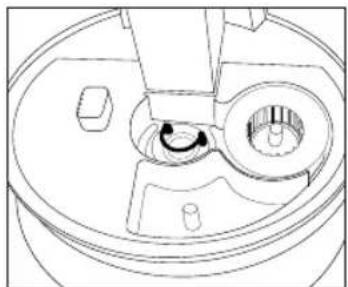
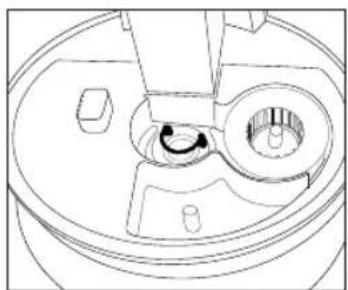
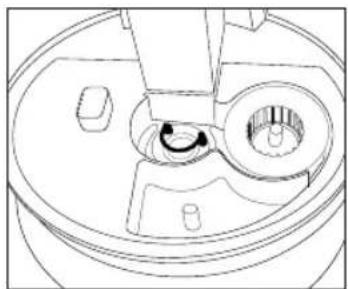
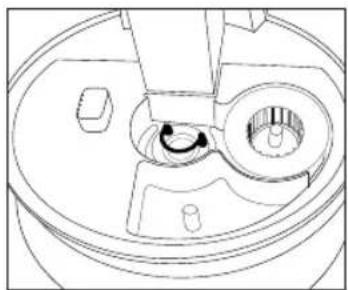
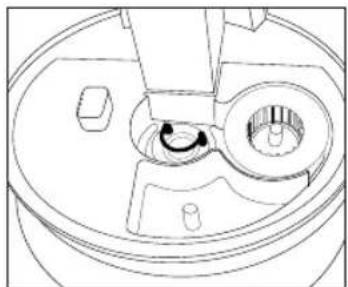
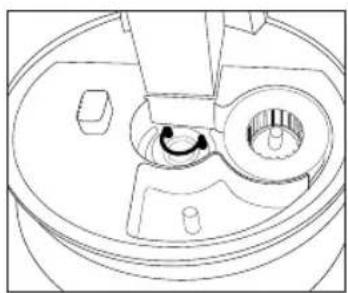
- Place 1 demineralization cartridge down onto post and into the matching slot in the humidifier base (Fig.12).
- Place the tank back on the base.
- Place the oscillating nozzle back on to the unit and lock into place by turning the ring to the right until the locator icon is aligned with the LOCK position (Fig.10).
CLEANING AND CARE
CAUTION: Before cleaning the unit, turn power off and unplug unit from the outlet.
natural_image
Simple line drawing of a mechanical component with no text or symbolsFig.13
Tank Cleaning
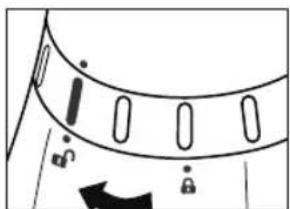
Remove the oscillation nozzle. To remove the nozzle, turn the ring on the bottom of the nozzle to the left until the locator icons on the head, ring and base all line up and are aligned with the UNLOCK position. Lift up to remove the nozzle and set aside.
natural_image
Line drawing of a hand using a tool to press a circular component on a surface (no text or symbols)Fig.14
Remove the water tank from the humidifier base by lifting it by the flip-up handle. Unscrew the tank cap; wipe the tank with a soft cloth then wash it with clean water.
Suggestion: Clean the water tank once every two to three weeks, depending on your water conditions.
natural_image
Line drawing of a hand using a tool to clean or wash a container (no text or symbols)Fig.15
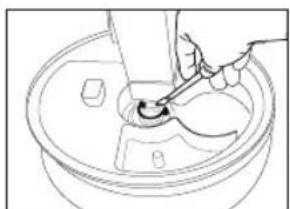
Ultrasonic Nebulizer Cleaning
Put small amount of mild dish soap on the surface of the ultrasonic nebulizer, then pour in some water and soak for 5 minutes. Brush clean with soft bristle brush (not included) and rinse.
natural_image
Line drawing of a hand using a tool to press or adjust a mechanical component (no text or symbols visible)Fig.16
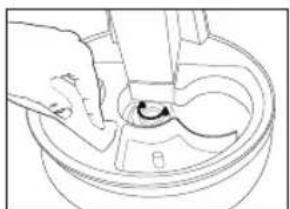
Surface Cleaning
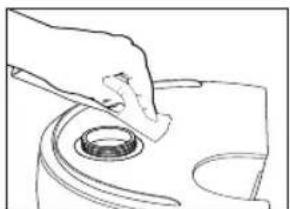
Clean the surface of the unit with a clean damp soft cloth.
natural_image
Diagram of a mechanical component with gears and a handle, no text or symbols presentFig.17
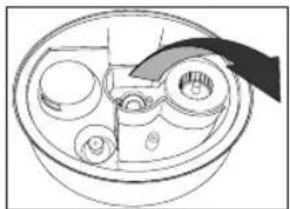
Emptying humidifier base
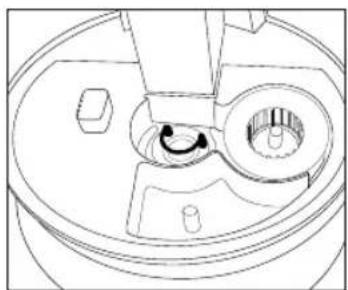
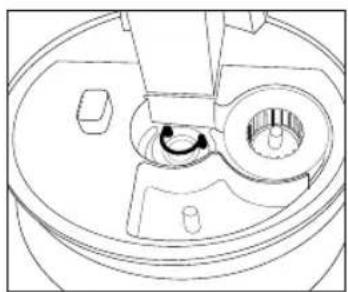
To empty water from humidifier base, tip unit in the direction of the arrow on the inside of the unit.
TROUBLESHOOTING
| PROBLEM POSSIBLE CAUSE SOLUTION | ||
| Power Light is off • Unit is not plugged in• No power at unit | • Plug unit in• Press the POWER button to turn the power on• Check circuits, fuses, try a different outlet | |
| Peculiar Odor • If new unit | • If unit is in use, the odor may be a dirty tank or old tank water | • Open the water tank cap and keep it in a shady and cool place for 12 hours• Empty the old water, clean the tank and fill with clean water |
| Excessive Noise • Unit is not level | • Low water level | • Place unit on a flat, even surface• Check the water level. Refill the tank if the water is low |
| White Dust Accumulation • Hard water used• Demineralization Cartridge needs replacement | • Use distilled water and a Demineralization Cartridge• Replace Demineralization Cartridge | |
| White Dust is forming on nearby furniture | • Hard water will deposit a certain amount of dust. Dust in the air settles because of the added humidity in the room | • Use distilled water and a Demineralization Cartridge• Replace Demineralization Cartridge |
LIRE TOUTES LES INSTRUCTIONS AVANT UTILISATION. LES CONSERVER POUR POUVOIR LES CONSULTER ULTÉRIEUREMENT.
natural_image
Line drawing of a conical shower device with control panel and buttons (no text or symbols)Fig.1
MODE D'EMPLOI :
natural_image
Diagram of a mechanical component with a curved arrow indicating rotation (no text or symbols)Fig.4 Fig.5 Fig.6 Fig.7
natural_image
Line drawing of hands holding a small object, no text or symbols present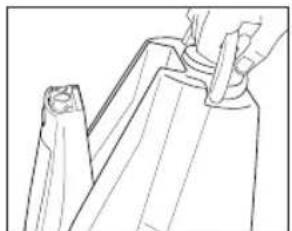
natural_image
Line drawing of a hand holding a folded garment or bag, no text or symbols present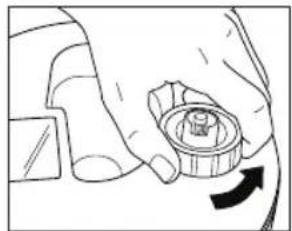
natural_image
Hand holding a mechanical component with a circular button and an arrow indicating rotation (no text or symbols)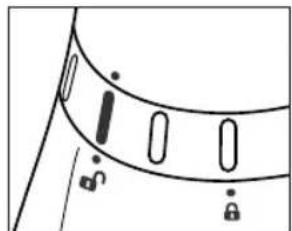
natural_image
Simple line drawing of a curved object with vertical slots and a lock, no text or symbols present
natural_image
Line drawing of a faucet with a drain and handle (no text or symbols)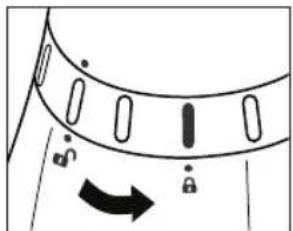
natural_image
Diagram of a mechanical component with directional arrows and lock symbols (no text or labels)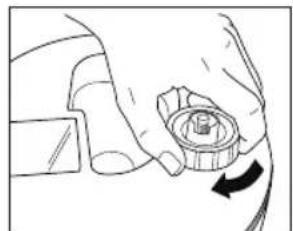
natural_image
Hand holding a mechanical component with a circular arrow indicating rotation (no text or symbols)Fig.8 Fig.9 Fig.10a Fig.10b
À PROPOS DE LA POUSSIÈRE BLANCHE
natural_image
Technical line drawing of a mechanical gear or cam component with no visible text or symbolsFig.11
natural_image
Technical line drawing of a mechanical component with no visible text or symbolsFig.12
natural_image
Diagram of a mechanical component with circular features and directional arrows (no text or symbols)Fig.13
natural_image
Line drawing of a hand pressing down on a mechanical component with a circular knob (no text or symbols)Fig.14
natural_image
Line drawing of a hand pouring liquid into a container with a spoon (no text or symbols)Fig.15
natural_image
Line drawing of a hand using a tool to clean or inspect a circular object inside a container (no text or symbols)Fig.16
natural_image
Line drawing of a bowl containing several circular objects, with a knife inserted (no text or symbols)Fig.17
natural_image
Line drawing of a conical shower device with control buttons and a dial (no text or symbols)GEBRAUCHSANLEITUNG:
Nebelregler
natural_image
Diagram of a mechanical component with a curved arrow indicating rotation (no text or symbols)natural_image
Line drawing of a hand holding a small object, possibly a device or tool, with no visible text or symbols.(四) 本说明仅供参考。
natural_image
Hand holding a mechanical component with an arrow indicating rotation (no text or symbols)(五) 2017年1月1日
natural_image
Line drawing of a faucet with a drain and a pipe inserted (no text or symbols)natural_image
Illustration of a hand holding a mechanical component with an arrow indicating rotation (no text or symbols present)Abb. 8 Abb. 9 Abb. 10a Abb. 10b
natural_image
Line drawing of a hand holding a plastic bag, no text or symbols present10b
natural_image
Simple line drawing of a curved object with vertical slots and a diagonal line, no text or symbols present.广力云智慧零售收银系统
natural_image
Diagram of a mechanical component with directional arrows and lock symbols (no text or labels)(1) AD = BD = 1
WEISSER STAUB
natural_image
Technical line drawing of a mechanical gear or cam component with no visible text or symbolsAbb. 11
natural_image
Technical line drawing of a mechanical component with no visible text or symbolsAbb. 12
natural_image
Simple line drawing of a circular object with internal oval shapes and a curved arrow, no text or symbols present.Abb.13
Tankreinigung
natural_image
Line drawing of a hand pressing down on a circular object (no text or symbols)Abb.14
natural_image
Line drawing of a hand using a tool to clean or wash a small object inside a bowl (no text or symbols)Abb.15
natural_image
Line drawing of a hand using a tool to press or install a mechanical component (no text or symbols)Abb.16
natural_image
Diagram of a mechanical component with gears and a handle, no text or symbols presentAbb.17
natural_image
Line drawing of a conical shower device with control buttons and a dial (no text or symbols)Fig.1
INSTRUCCIONES DE USO:
natural_image
Diagram of a mechanical component with arrows indicating motion or rotation (no text or symbols)Fig.4 Fig.5 Fig.6 Fig.7
natural_image
Line drawing of hands holding a small object with a grid-like structure (no text or symbols)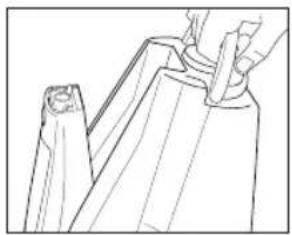
natural_image
Line drawing of a hand holding a tool, partially overlapping a piece of paper or plastic (no text or symbols)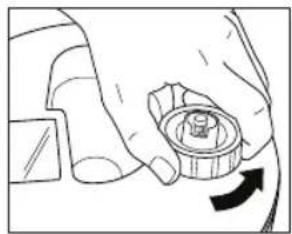
natural_image
Hand holding a mechanical component with an arrow indicating rotation (no text or symbols)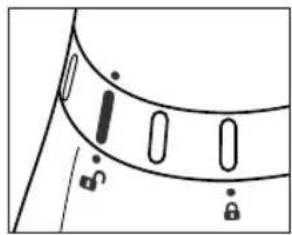
natural_image
Simple line drawing of a curved object with vertical bars and lock symbols, no text or labels present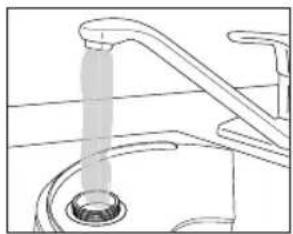
natural_image
Line drawing of a faucet with a drain and handle (no text or symbols)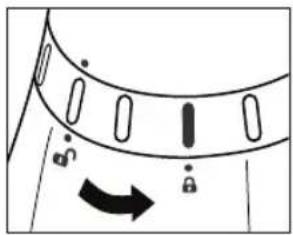
natural_image
Diagram of a garment collar with a directional arrow indicating movement (no text or symbols)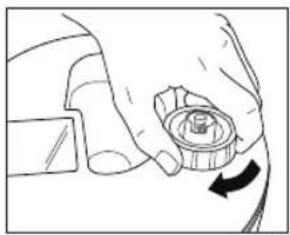
natural_image
Hand holding a mechanical component with a circular arrow indicating rotation (no text or symbols)Fig.8 Fig.9 Fig.10a Fig.10b
ACERCA DEL POLVO BLANCO
natural_image
Technical line drawing of a mechanical gear or wheel component (no text or symbols)Fig.11
natural_image
Technical line drawing of a mechanical component with no visible text or symbolsFig.12
natural_image
Pure diagram of a mechanical component with no text, numbers, or symbolsFig.13
natural_image
Line drawing of a hand pressing down on a circular object (no text or symbols)Fig.14
natural_image
Line drawing of a hand using a spoon to clean or wash a bowl (no text or symbols)Fig.15
natural_image
Line drawing of a hand using a tool to press or adjust a mechanical component (no text or symbols)Fig.16
natural_image
Simple line drawing of a bowl with multiple circular objects and a handle, no text or symbols present.Fig.17
natural_image
Line drawing of a conical shower device with control panel and buttons (no text or symbols)Fig.1
ISTRUZIONI D'USO:
natural_image
Diagram of a mechanical component with arrows indicating motion or rotation (no text or symbols)Fig.4 Fig.5 Fig.6 Fig.7
natural_image
Line drawing of hands holding a small object, no text or symbols present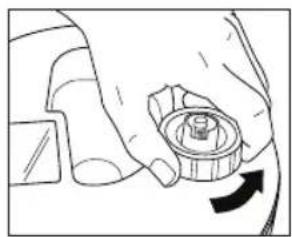
natural_image
Hand holding a mechanical component with a circular arrow indicating rotation (no text or symbols)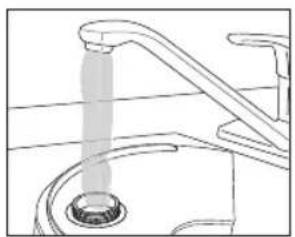
natural_image
Line drawing of a faucet with a drain and pipe pouring liquid (no text or symbols)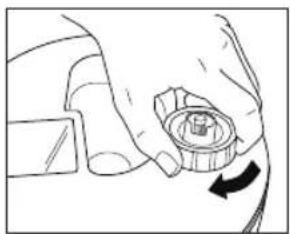
natural_image
Line drawing of a hand holding a mechanical component with an arrow indicating rotation (no text or symbols)Fig.8 Fig.9 Fig.10a Fig.10b
natural_image
Line drawing of a hand holding a tool interacting with a mechanical component (no text or symbols)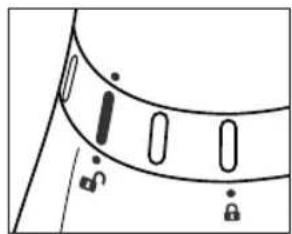
natural_image
Simple line drawing of a curved object with vertical slots and a diagonal line, no text or symbols present.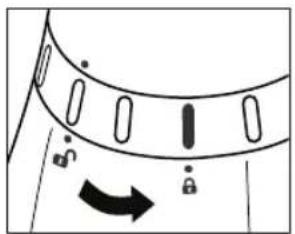
natural_image
Diagram of a curved mechanical component with directional arrows and lock symbols (no text or labels)INFORMAZIONI SULLA POLVERE BIANCA
natural_image
Technical line drawing of a mechanical gear or wheel component (no text or symbols)Fig.11
natural_image
Technical line drawing of a mechanical component with no visible text or symbolsFig.12
natural_image
Diagram of a mechanical component with circular features and a curved arrow indicating direction (no text or symbols)Fig.13
Pulizia serbatoio
natural_image
Line drawing of a hand pressing down on a circular component (no text or symbols)Fig.14
natural_image
Line drawing of a hand using a tool to clean or wash a bowl (no text or symbols)Fig.15
natural_image
Line drawing of a hand using a tool to cut a circular component into a bowl (no text or symbols)Fig.16
Pulizia superficie
natural_image
Diagram of a bowl containing several small circular objects, with a tool partially visible inside (no text or symbols)Fig.17
natural_image
Line drawing of a conical shower device with control buttons and a dial (no text or symbols)Fig.1
natural_image
Diagram of a door handle with lock and arrow indicators (no text or symbols)Fig.4 Fig.5 Fig.6 Fig.7
natural_image
Line drawing of hands holding a small object, no text or symbols present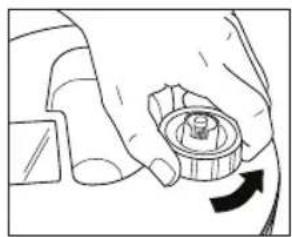
natural_image
Hand holding a mechanical component with a circular arrow indicating rotation (no text or symbols)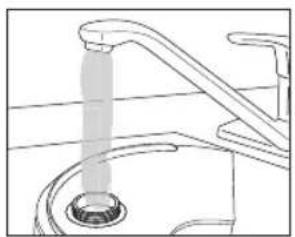
natural_image
Line drawing of a faucet with a drain and handle (no text or symbols)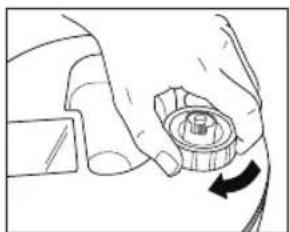
natural_image
Hand holding a mechanical component with a circular arrow indicating rotation (no text or symbols)Fig.8 Fig.9 Fig.10a Fig.10b
natural_image
Line drawing of a hand holding a tool, partially overlapping a piece of paper or metal (no text or symbols)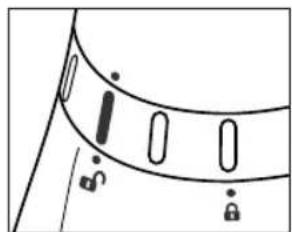
natural_image
Simple line drawing of a curved object with vertical slots and a diagonal line, no text or symbols present.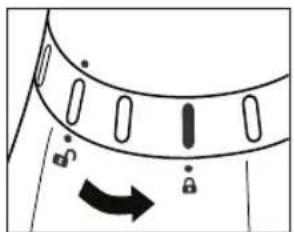
natural_image
Diagram of a curved mechanical component with directional arrows and lock symbols (no text or labels)PÓ BRANCO
natural_image
Technical line drawing of a mechanical gear or cam component with no visible text or symbolsFig.11
natural_image
Technical line drawing of a mechanical component with no visible text or symbolsFig.12
natural_image
Diagram of a mechanical component with no visible text or symbolsFig.13
natural_image
Line drawing of a hand pressing down on a circular object (no text or symbols)Fig.14
natural_image
Line drawing of a hand using a tool to clean or wash a small container (no text or symbols)Fig.15
natural_image
Line drawing of a hand using a tool to adjust or install a mechanical component (no text or symbols present)Fig.16
natural_image
Line drawing of a bowl containing various circular objects, with a hand holding a tray (no text or symbols)Fig.17
Esvaziar a base do humidificador
natural_image
Line drawing of a conical shower device with control buttons and a dial (no text or symbols)GEBRUIKSINSTRUCTIES:
Nevelbedieningsknop
natural_image
Diagram of a mechanical component with arrows indicating motion (no text or symbols)natural_image
Line drawing of hands holding a small object, no text or symbols present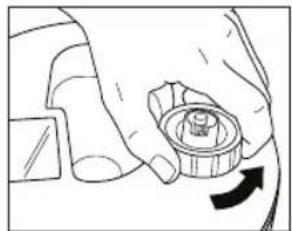
natural_image
Hand holding a mechanical component with an arrow indicating rotation (no text or symbols)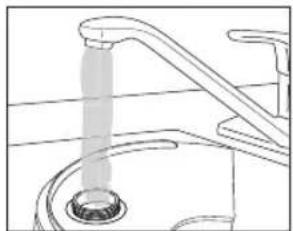
natural_image
Line drawing of a faucet with a drain and pipe (no text or symbols)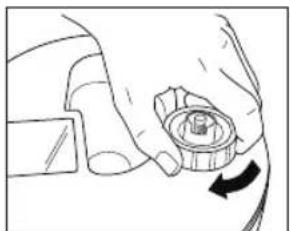
natural_image
Diagram of a hand holding a mechanical component with a circular arrow indicating rotation (no text or symbols present)natural_image
Line drawing of a hand holding a tool interacting with a mechanical component (no text or symbols)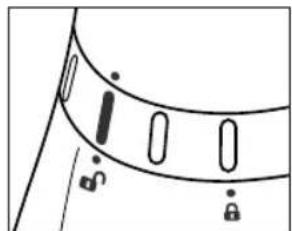
natural_image
Simple line drawing of a garment collar with selection handles and a diagonal seam (no text or symbols)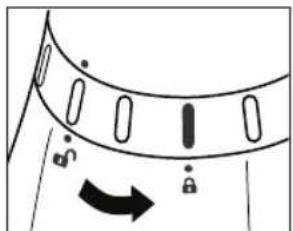
natural_image
Diagram of a garment collar with an arrow indicating direction (no text or symbols)OVER WITTE STOF
natural_image
Technical line drawing of a mechanical gear or wheel component (no text or symbols)Afb. 11
natural_image
Technical line drawing of a mechanical component with no visible text or symbolsAfb. 12
natural_image
Simple line drawing of a mechanical component with no text or symbolsAfb.13
Reiniging reservoir
natural_image
Line drawing of a hand using a tool to press a circular object on a mechanical component (no text or symbols)Afb.14
natural_image
Line drawing of a hand using a tool to clean or wash a small object inside a bowl (no text or symbols)Afb.15
natural_image
Line drawing of a hand operating a mechanical component with a curved arrow indicating rotation (no text or symbols)Afb.16
Reiniging Oppervlak
natural_image
Line drawing of a bowl containing multiple circular objects, with a hand holding a tool (no text or symbols)Afb.17
natural_image
Line drawing of a conical shower device with control buttons and a dial (no text or symbols)Şekil 1
KULLANIM TALİMATLARI:
Nem Kontrolü
natural_image
Diagram of a mechanical component with arrows indicating motion or rotation (no text or symbols)natural_image
Line drawing of hands holding a component with a circular inset (no text or symbols)(No text)

natural_image
Hand holding a mechanical component with an arrow indicating rotation (no text or symbols)natural_image
Line drawing of a faucet with a drain drain (no text or symbols)natural_image
Line drawing of a hand holding a mechanical component with an arrow indicating rotation (no text or symbols)natural_image
Line drawing of a mechanical component or assembly (no text or symbols)10b
natural_image
Simple line drawing of a curved object with vertical slots and a diagonal line, no text or symbols present.natural_image
Diagram of a curved mechanical component with directional arrows and lock symbols (no text or labels)natural_image
Technical line drawing of a mechanical gear or wheel component (no text or symbols)Şekil 11
natural_image
Technical line drawing of a mechanical component with no visible text or symbolsŞekil 12
Takma Talimatları
natural_image
Pure diagram of a mechanical component with no text, numbers, or symbolsŞekil 13
Depoyu Temizleme
natural_image
Line drawing of a hand pressing down on a circular object (no text or symbols)Şekil 14
natural_image
Line drawing of a hand using a spoon to clean or wash a bowl (no text or symbols)Şekil 15
natural_image
Line drawing of a hand using a tool to press or adjust a mechanical component (no text or symbols visible)Şekil 16
natural_image
Diagram of a mechanical component with gears and a handle, no text or symbols presentŞekil 17
natural_image
Line drawing of a conical shower device with control buttons and a dial (no text or symbols)Σχ. 1
ΟΔΗΓΙΕΣ ΧΡΗΣΗΣ:
natural_image
Diagram of a mechanical component with arrows indicating motion or rotation (no text or symbols)natural_image
Line drawing of hands holding a small object, no text or symbols present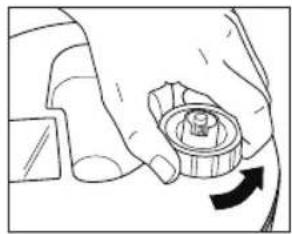
natural_image
Hand holding a mechanical component with a circular dial and arrow indicating rotation (no text or symbols)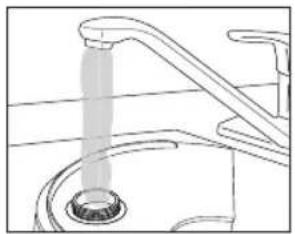
natural_image
Line drawing of a kitchen sink with a faucet and drain, showing water release from a pipe (no text or symbols)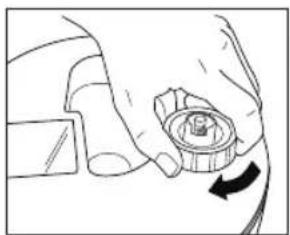
natural_image
Hand holding a mechanical component with a circular arrow indicating rotation (no text or symbols)natural_image
Line drawing of a mechanical component or tool interacting with a piece of material (no text or symbols visible)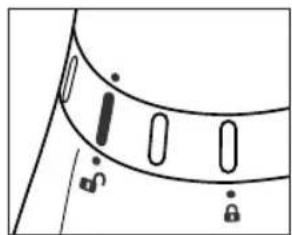
natural_image
Simple line drawing of a curved object with vertical slots and a diagonal line, no text or symbols present.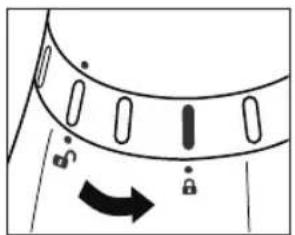
natural_image
Diagram of a curved mechanical component with directional arrows and lock symbols (no text or labels)natural_image
Technical line drawing of a mechanical gear or cam component (no text or symbols)Σχ. 11
natural_image
Technical line drawing of a mechanical component with no visible text or symbolsΣχ. 12
natural_image
Simple line drawing of a mechanical component with no text or symbolsΣχ. 13
natural_image
Line drawing of a hand pressing down on a circular object (no text or symbols)Σχ. 14
natural_image
Line drawing of a hand using a tool to clean or store contents in a bowl (no text or symbols)Σχ. 15
natural_image
Line drawing of a hand using a tool to cut or mark a mechanical component (no text or symbols)Σχ. 16
natural_image
Diagram of a mechanical component with gears and a handle, no text or symbols presentΣχ. 17
natural_image
Line drawing of a conical shower device with a circular vent and buttons (no text or symbols)Рис. 1
natural_image
Diagram of a mechanical component with arrows indicating motion or rotation (no text or symbols)natural_image
Line drawing of hands holding a small object, no text or symbols present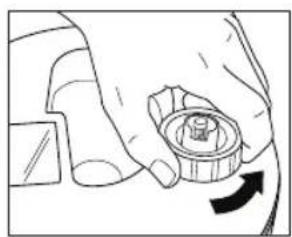
natural_image
Hand holding a mechanical component with an arrow indicating rotation (no text or symbols)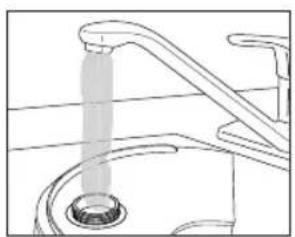
natural_image
Line drawing of a faucet with a drain drain, showing water flow direction (no text or symbols)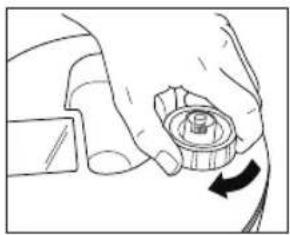
natural_image
Hand holding a mechanical component with a circular arrow indicating rotation (no text or symbols)natural_image
Line drawing of a hand holding a tool near a folded garment (no text or symbols)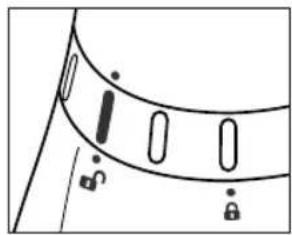
natural_image
Simple line drawing of a curved object with vertical slots and lock symbols, no text or labels present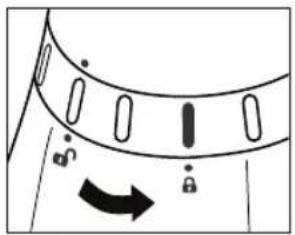
natural_image
Diagram of a curved mechanical component with directional arrows indicating motion (no text or symbols)НАКИПЬ
natural_image
Technical line drawing of a mechanical gear or wheel component (no text or symbols)Рис. 11
natural_image
Technical line drawing of a mechanical component with no visible text or symbolsРис. 12
natural_image
Simple line drawing of a curved mechanical component with no text or symbolsРис. 13
Очистка резервуара
natural_image
Line drawing of a hand using a tool to press a circular component on a surface (no text or symbols)Рис. 14
natural_image
Line drawing of a hand using a spoon to clean or wash a bowl (no text or symbols)Рис. 15
natural_image
Line drawing of a hand pressing down on a mechanical component (no text or symbols)Рис. 16
natural_image
Diagram of a mechanical component with gears and a handle, no text or symbols presentРис. 17
natural_image
Line drawing of a conical washing machine with buttons and gauges (no text or symbols)Rys. 1
INSTRUKCJA OBSŁUGI:
Kontrola mgły
natural_image
Diagram of a mechanical component with directional arrows and lock symbols (no text or labels)natural_image
Line drawing of hands holding a small object, no text or symbols present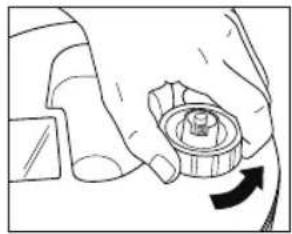
natural_image
Hand holding a mechanical component with a circular button and directional arrow (no text or symbols)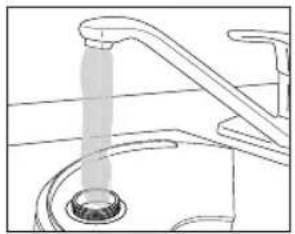
natural_image
Line drawing of a faucet with a drain drain, showing water flow direction (no text or symbols)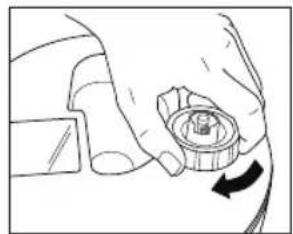
natural_image
Diagram of a hand holding a mechanical component with an arrow indicating rotation (no text or symbols present)natural_image
Line drawing of a garment being adjusted with a zipper (no text or symbols)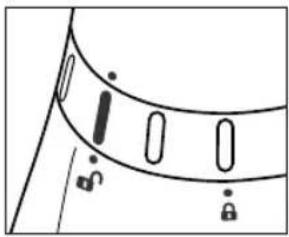
natural_image
Simple line drawing of a curved object with internal oval shapes and mounting points (no text or symbols)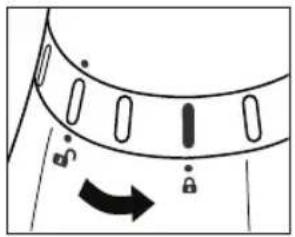
natural_image
Diagram of a curved mechanical component with directional arrows and lock symbols (no text or labels)O BIAŁYM PYLE
natural_image
Technical line drawing of a mechanical gear or wheel component (no text or symbols)Rys. 11
natural_image
Technical line drawing of a mechanical component with no visible text or symbolsRys. 12
natural_image
Pure diagram of a mechanical component with no text, numbers, or symbolsRys.13
natural_image
Line drawing of a hand pressing down on a circular component (no text or symbols)Rys.14
natural_image
Line drawing of a hand pouring liquid into a bowl (no text or symbols)Rys.15
natural_image
Line drawing of a hand using a tool to press or adjust a mechanical component (no text or symbols visible)Rys.16
natural_image
Line drawing of a mechanical component with gears and a handle (no text or symbols)Rys.17
natural_image
Line drawing of a conical shower device with control buttons and a dial (no text or symbols)Fig.1
BRUKSANVISNING:
Mistkontroll
natural_image
Diagram of a mechanical component with arrows indicating motion or rotation (no text or symbols)Fig.4 Fig.5 Fig.6 Fig.7
natural_image
Line drawing of hands holding a small object, no text or symbols present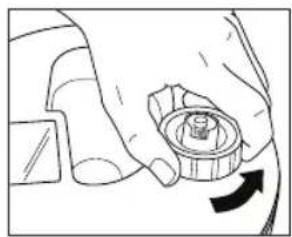
natural_image
Hand holding a mechanical component with an arrow indicating rotation (no text or symbols)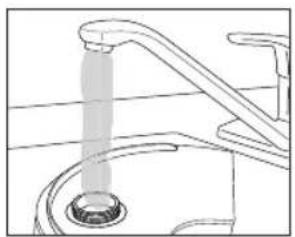
natural_image
Line drawing of a faucet with a drain and handle (no text or symbols)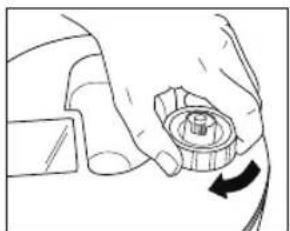
natural_image
Hand holding a mechanical component with a circular arrow indicating rotation (no text or symbols)Fig.8 Fig.9 Fig.10a Fig.10b
natural_image
Line drawing of a mechanical component or tool interacting with a surface (no text or symbols)
natural_image
Simple line drawing of a garment collar with selection handles and a diagonal seam (no text or symbols)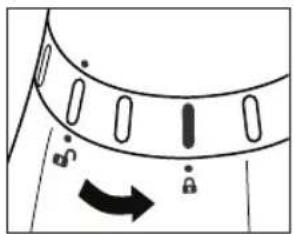
natural_image
Diagram of a curved mechanical component with directional arrows and lock symbols (no text or labels)OM VITT DAMM
natural_image
Technical line drawing of a mechanical gear or wheel component (no text or symbols)Fig.11
natural_image
Technical line drawing of a mechanical component with no visible text or symbolsFig.12
Installationsinstruktioner
natural_image
Diagram of a mechanical component with no visible text or symbolsFig.13
natural_image
Line drawing of a hand pressing down on a circular component (no text or symbols)Fig.14
natural_image
Line drawing of a hand using a tool to clean or wash a bowl (no text or symbols)Fig.15
Rengöring av ultraljudsnebulisator
natural_image
Line drawing of a hand using a tool to press or adjust a mechanical component (no text or symbols visible)Fig.16
Ytrengöring
natural_image
Line drawing of a bowl containing various circular objects, with a hand holding a tray (no text or symbols)Fig.17
Tömning av luftfuktarens bas
natural_image
Line drawing of a conical shower device with control buttons and a dial (no text or symbols)Fig.1
BRUGSVEJLEDNING:
Diskontrol
natural_image
Diagram of a mechanical component with arrows indicating motion or rotation (no text or symbols)Fig.4 Fig.5 Fig.6 Fig.7

natural_image
Line drawing of hands holding a small object, no text or symbols present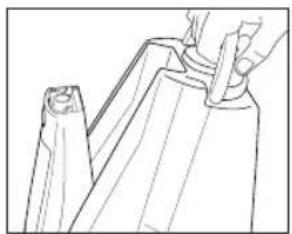
natural_image
Line drawing of a hand holding a tool interacting with a mechanical component (no text or symbols)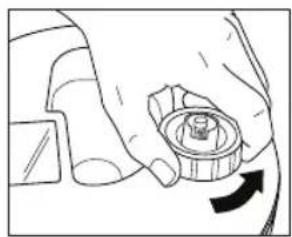
natural_image
Hand holding a mechanical component with a circular arrow indicating rotation (no text or symbols)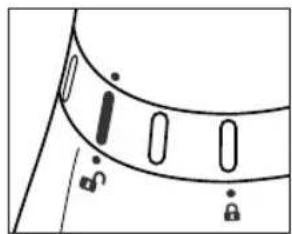
natural_image
Simple line drawing of a curved object with vertical slots and a diagonal line, no text or symbols present.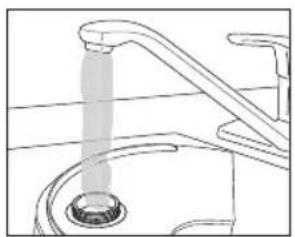
natural_image
Line drawing of a faucet with a drain and pipe pouring liquid (no text or symbols)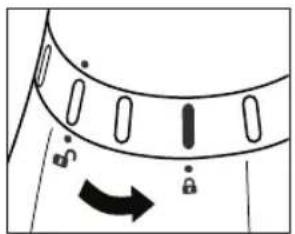
natural_image
Diagram of a curved mechanical component with directional arrows and lock symbols (no text or labels)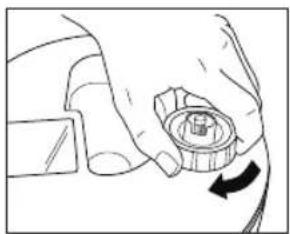
natural_image
Line drawing of a hand holding a mechanical component with an arrow indicating rotation (no text or symbols)Fig.8 Fig.9 Fig.10a Fig.10b
OM HVIDT ST∅V
natural_image
Technical line drawing of a mechanical gear or wheel component (no text or symbols)Fig.11
natural_image
Technical line drawing of a mechanical component with no visible text or symbolsFig.12
Installationsinstruktioner
natural_image
Diagram of a mechanical component with arrows indicating motion or force (no text or symbols)Fig.13
Tankrengøring
natural_image
Line drawing of a hand pressing down on a circular component (no text or symbols)Fig.14
natural_image
Line drawing of a hand using a tool to clean or store items in a bowl (no text or symbols)Fig.15
natural_image
Line drawing of a hand using a tool to lift a curved object into a bowl (no text or symbols)Fig.16
Overfladerengøring
natural_image
Line drawing of a bowl containing various small objects, with a black tool partially visible (no text or symbols)Fig.17
natural_image
Line drawing of a conical shower device with control buttons and a dial (no text or symbols)Fig.1
BRUKERVEILEDNING:
Tåkekontroll
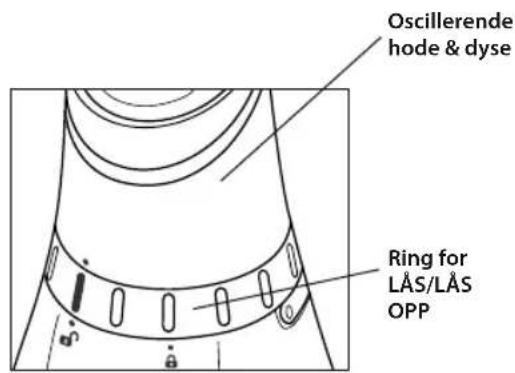
Fig.2 Fig.3
SLIK FYLLER DU VANN
natural_image
Diagram of a mechanical component with arrows indicating motion or rotation (no text or symbols)Fig.4 Fig.5 Fig.6 Fig.7
natural_image
Line drawing of hands holding a small object, no text or symbols present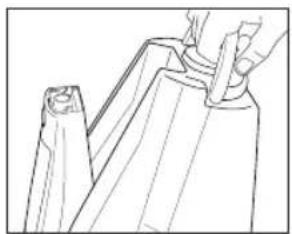
natural_image
Line drawing of a hand holding a tool interacting with a mechanical component (no text or symbols)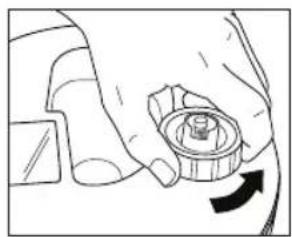
natural_image
Hand holding a mechanical component with a circular arrow indicating rotation (no text or symbols)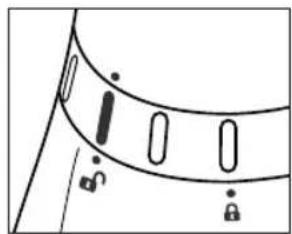
natural_image
Simple line drawing of a curved object with vertical slots and a diagonal line, no text or symbols present.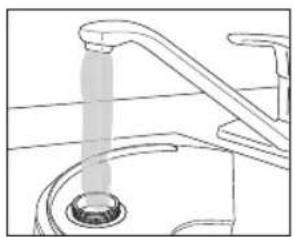
natural_image
Line drawing of a faucet with a drain and pipe pouring liquid (no text or symbols)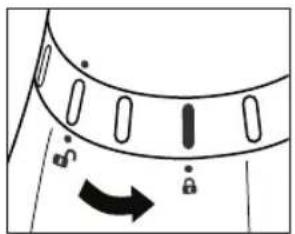
natural_image
Diagram of a curved mechanical component with directional arrows and lock symbols (no text or labels)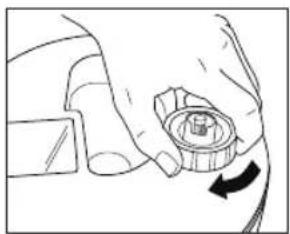
natural_image
Hand holding a mechanical component with a circular arrow indicating rotation (no text or symbols)Fig.8 Fig.9 Fig.10a Fig.10b
ANGÅENDE HVITT ST∅V
natural_image
Technical line drawing of a mechanical gear or wheel component (no text or symbols)Fig.11
natural_image
Technical line drawing of a mechanical component with no visible text or symbolsFig.12
natural_image
Diagram of a mechanical component with no visible text or symbolsFig.13
Rengjøre tanken
natural_image
Line drawing of a hand pressing down on a mechanical component with a circular base (no text or symbols)Fig.14
natural_image
Line drawing of a hand pouring liquid into a bowl (no text or symbols)Fig.15
Rengjøre ultralydnebulisator
natural_image
Line drawing of a hand pressing down on a mechanical component (no text or symbols)Fig.16
Overflaterengjøring
natural_image
Technical line drawing of a mechanical component with no visible text or symbolsFig.17
natural_image
Line drawing of a conical shower device with control panel and buttons (no text or symbols)KÄYTTÖOHJEET
Höyrynsäädin
natural_image
Diagram of a mechanical component with arrows indicating motion or rotation (no text or symbols)natural_image
Line drawing of hands holding a small object with a grid-like structure inside (no text or symbols)7
natural_image
Diagram of a hand holding a mechanical component with an arrow indicating rotation (no text or symbols present)[Non-Text]
natural_image
Line drawing of a faucet with a drain drain, showing water release from a sink (no text or symbols)[Non-Text]
natural_image
Line drawing of a hand holding a mechanical component with an arrow indicating rotation (no text or symbols)natural_image
Line drawing of a hand holding a tool, partially overlapping a piece of paper or plastic (no text or symbols)a 10b
natural_image
Simple line drawing of a curved object with vertical slots and a diagonal line, no text or symbols present.(1)
natural_image
Diagram of a curved mechanical component with directional arrows and lock symbols (no text or labels)natural_image
Technical line drawing of a mechanical gear or wheel component (no text or symbols)Kuva 11
natural_image
Technical line drawing of a mechanical component with no visible text or symbolsKuva 12
Asennusohjeet
natural_image
Diagram of a mechanical component with no visible text or symbolsKuva 13
Säilion puhdistus
natural_image
Line drawing of a hand using a tool to press a circular component on a mechanical part (no text or symbols)Kuva 14
natural_image
Line drawing of a hand using a spoon to clean or wash a bowl (no text or symbols)Kuva 15
natural_image
Line drawing of a hand operating a mechanical component with a curved handle and circular base (no text or symbols)Kuva 16
Pintapuhdistus
natural_image
Diagram of a mechanical component with gears and a handle, no text or symbols presentKuva 17