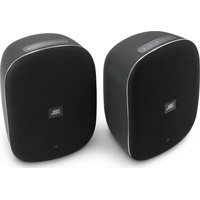
Control XStream - Speaker JBL - Free user manual and instructions
Find the device manual for free Control XStream JBL in PDF.


| Product type | Speaker |
| Brand | JBL |
| Model | Control XStream |
| Category | Speaker |
| Low-frequency transducer | 133mm (5.25") Woofer |
| High-frequency transducer | 25mm (1") Tweeter |
| Rated power | 30 W RMS per channel |
| Frequency response | 70 Hz - 20 kHz |
| Signal-to-noise ratio | 80 dBA |
| Input connections | Wi-Fi, Bluetooth, Aux-in |
| Bluetooth version | 4.2 |
| Wi-Fi network compatibility | IEEE 802.11 b/g/n (2.4 GHz) and 802.11 n/ac (5 GHz) |
| Power supply | 100-240 V AC, 50/60 Hz, 60 W |
| Standby power consumption | <2.0 W (main speaker), <0.5 W (secondary speaker) |
| Dimensions (W x D x H) per speaker | 253.5 x 178 x 145.5 mm |
| Main speaker weight | 2.65 kg |
| Secondary speaker weight | 2.63 kg |
| Gross weight (packaging) | 6.7 kg |
| Packaging dimensions (W x D x H) | 430 x 230 x 300 mm |
| Features | Built-in Chromecast, Spotify Connect, Bluetooth, Wi-Fi, multi-room connection |
| Automatic speaker pairing | Yes |
| Wall mount support | 3/8"-16 threaded insert (bracket not included) |
| Reset | Reset button (press and hold 5 seconds) |
| Box contents | 2 speakers, 2 power cables, quick start guide |
| Care and cleaning | Clean with a soft, dry cloth. Do not use chemical products. Avoid moisture. |
| Safety | Do not open the device. Risk of electric shock. Use only the supplied adapter. |
| Spare parts and repairability | Repair by a certified professional. No user-serviceable parts. |
Frequently Asked Questions - Control XStream JBL
User questions about Control XStream JBL
0 question about this device. Answer the ones you know or ask your own.
Ask a new question about this device
Download the instructions for your Speaker in PDF format for free! Find your manual Control XStream - JBL and take your electronic device back in hand. On this page are published all the documents necessary for the use of your device. Control XStream by JBL.
USER MANUAL Control XStream JBL
natural_image
Two black USB flash drives shown in side profile, no text or symbols visibleJBL®CONTROL XSTREAM
Quick Start Guide
Primary speaker x 1 Secondary speaker x 1

natural_image
Simple line drawing of a tool or probe with two pins and a handle (no text or symbols)Power cable (1.5m) × 2
2
Top panel - Primary speaker
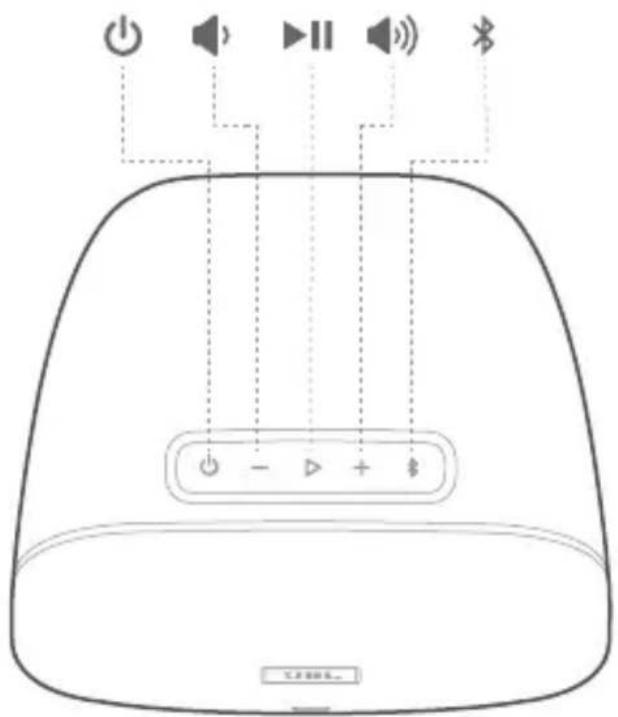
JBL®CONTROL XSTREAM
Quick Start Guide
- Wi-Fi status
- Reset
- AUX-in
- Power input AC
- Left / Right switch
- Wall/Other equalization (based on your installation)
- Pairing
- Threaded insert*
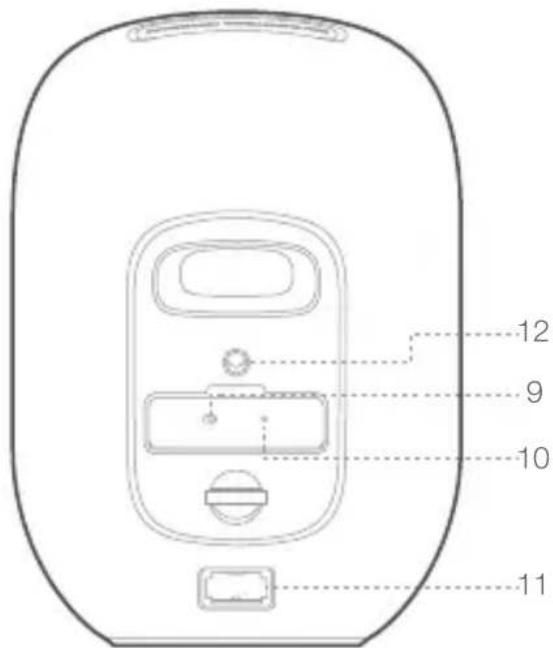
Secondary speaker
-
Wall/Other equalization (based on your installation)
-
Pairing
- Power input AC
- Threaded insert*
JBL®CONTROL XSTREAM
Quick Start Guide
natural_image
Line drawing of two identical electronic device back panels with control buttons and indicator lights, connected by a dotted line (no text or symbols)Primary speaker Secondary speaker
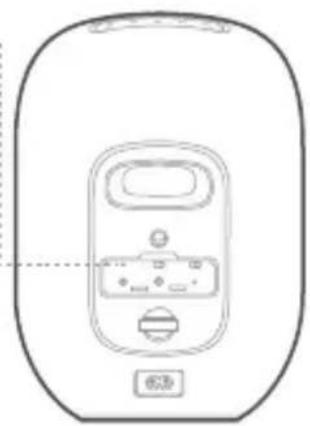
JBL Control Xstream speakers are automatically "paired" with each other.
If the system does not connect right away, use a paper clip or similar object to press the pairing button on both units within 3 minutes of each other.
The units will communicate with each other.
The Front LED will stop blinking and remain a solid white color when paired
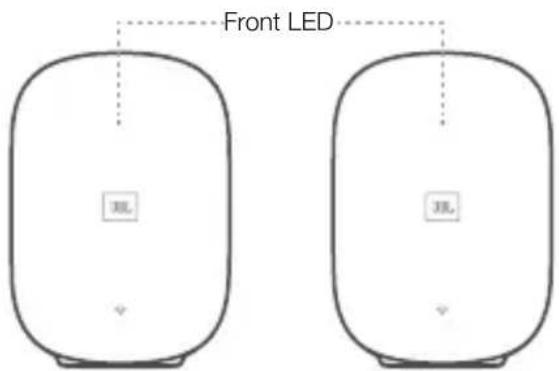
| Front LED status (for speaker pairing) | Primary speaker | Secondary speaker |
| Speaker connected (Power On) | White, Constant | White, Constant |
| Speaker disconnected | White, Constant | White, Slow |
| Pairing mode | Quick flashing if press the pair button | Quick flashing if press the pair button |
| Standby | AmberAmber |
JBL®CONTROL XSTREAM
Quick Start Guide
Step 1: Download the Google Home app.


Google Home
Step 2: Power on the speaker.
If the speaker is disconnected from Wi-Fi, it will enter Wi-Fi setup mode automatically.
Step 3: Find JBL Control Xstream in the app, and follow the setup guide.
| LED behavior | |
| No Wi-Fi connection | Off |
| Ready to set-up | White, Slow flash |
| Wi-Fi connecting | White, Fast flash |
| Wi-Fi connected (Recommended signal) | White, Constant |
| Wi-Fi connected (Weak signal) | Amber |
natural_image
Line drawing of a device control panel with buttons and display (no text or symbols)JBL®CONTROL XSTREAM
Quick Start Guide
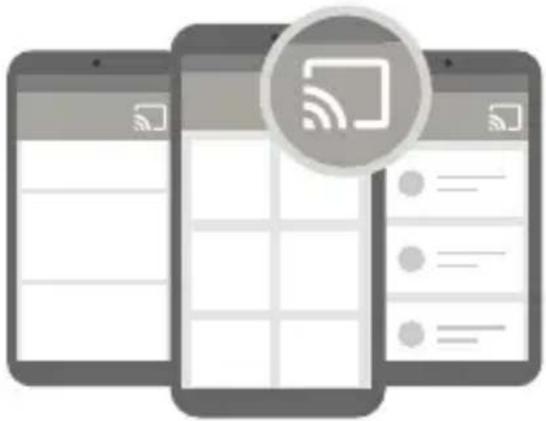
Chromecast play music procedure
Step 1: Open Chromecast supported app
Step 2: Play Music
Step 3: Tap the cast icon and select "JBL Control Xstream"
natural_image
Three smartphones displaying mobile app interfaces with a circular icon showing wireless signal (no text or symbols)* you can switch to Chromecast source by above procedure from Bluetooth or Aux-in source
** JBL Control Xstream can support multi-room control provided by Chromecast built-in, more details you can refer to Google Home app

Spotify play music procedure

Spotify®
Say hello to Spotify Premium
Spotify Premium lets you listen to millions of songs ad-free – the artists you love, the latest hits and discoveries just for you. Simply hit play to hear any song you like, at the highest sound quality.
Try Premium free for 30 days at spotify.com/freetrial
Your new device has Spotify Connect built in.
Spotify Connect lets you control the music playing on your device, using the Spotify app on your mobile, tablet or PC.
Listening is seamless. You can take calls, play games, even switch your phone off – all without interrupting the music.
Learn more at spotify.com/connect
JBL®CONTROL XSTREAM
Quick Start Guide
You'll need Spotify Premium to use Connect, see details overleaf.
Step 1 Add your speakers to your wifi network (see product user instructions for details).
Step 2 Fire up the Spotify app on your phone, tablet or PC using the same wifi network as above.
Step 3 Play a song on Spotify and hit 'DEVICES AVAILABLE'.
Step 4 Choose your speakers and your music will start playing out loud.
Happy listening.
One-Touch Play feature – continue listening to Spotify music on the JBL Control Xstream speaker without logging into Spotify App
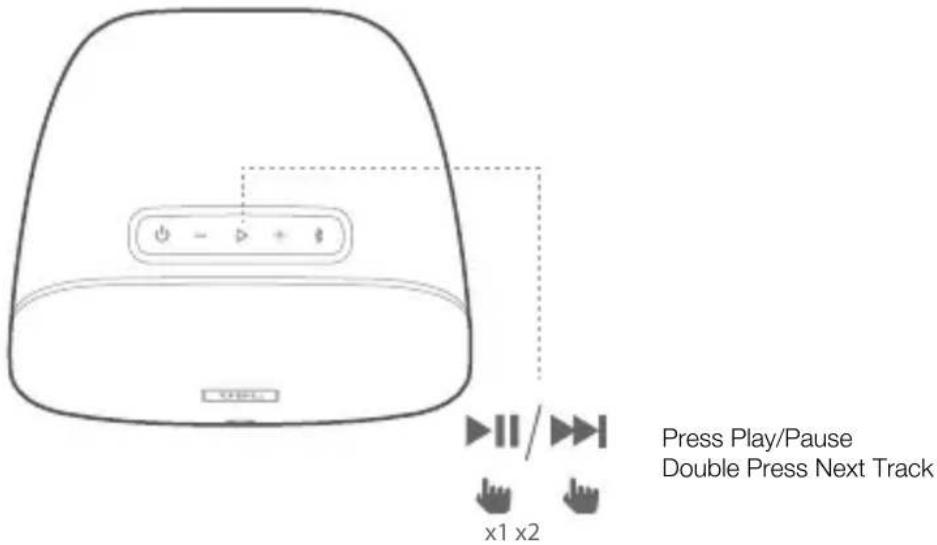
The One-Touch Play feature allows you to continue listening to whatever you played on your Spotify Premium account on another device, now on the JBL Control Xstream speaker, by simply pressing the ▶II button.
Step 1 You must use your new JBL Control Xstream speaker once with your Spotify Connect account to teach it the path.
Step 2 Later, after using Spotify on your phone or computer, and stopping play, you can continue your album, playlist or artist on the JBL Control Xstream speaker, just by pressing the ▶■ button. No need to log on to Spotify App again.
Step 3 If you want to change your selection of artist, album, playlist etc., you must again log on to Spotify App on your normal device.
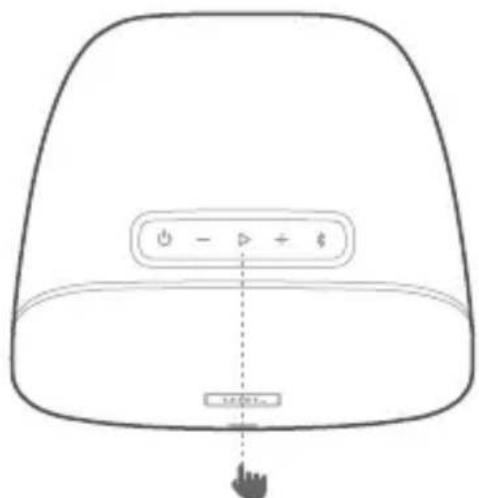
One Touch Play feature
JBL®CONTROL XSTREAM
Quick Start Guide
Switch to Bluetooth Source
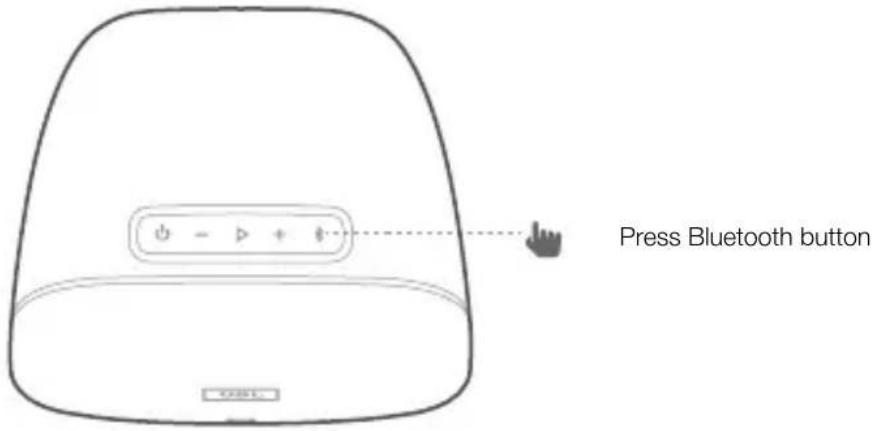
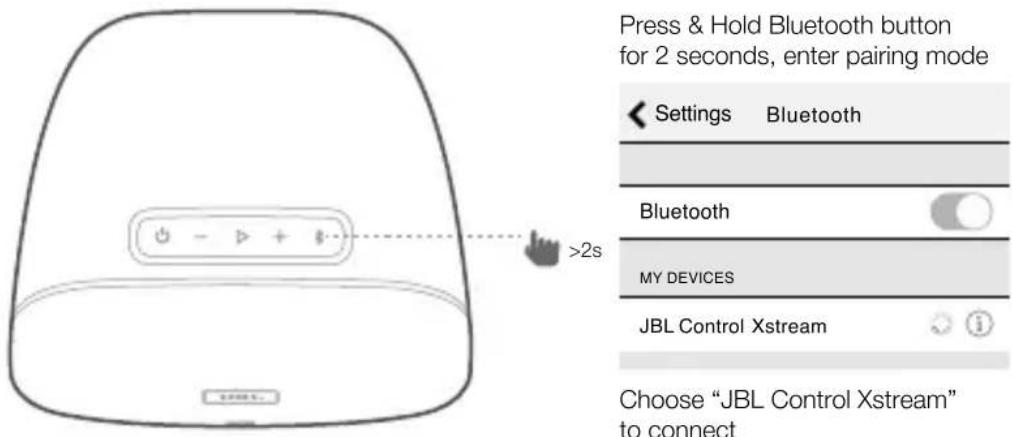
Enter Bluetooth pairing mode
Control playback
JBL®CONTROL XSTREAM
Quick Start Guide
Technical specification
EN
• Model Name: JBL Control Xstream
- Low-Frequency Transducer: 5.25" (133mm) woofer
• High-Frequency Transducer: 1" (25mm) tweeter
- Rated power: 30W per channel RMS
• Frequency response: 70Hz-20kHz
• Signal-to-noise ratio: 80dBA
- Input connections: Wi-Fi, Bluetooth, Aux-in
- Product Dimensions (W x D x H): 253.5 x 178 x 145.5 mm per speaker
• Weight: 2.65 kg (Primary speaker) ; 2.63 kg (Secondary speaker)
- Packaging Dimensions (W x D x H) : 430 x 230 x 300 mm
• Gross Weight: 6.7 kg
• Power supply: 100-240VAC, 50/60Hz, 60 Watts
- Power consumption in sleep mode: <2.0W (for primary speaker), <0.5W (for secondary speaker)
- Bluetooth 4.2 version
- Bluetooth transmitter frequency range: 2402 – 2480MHz
- Bluetooth transmitter power: <9dBm
- Bluetooth transmitter modulation: GFSK, /4 DQPSK, 8DPSK
- 5G Wi-Fi transmitter frequency range: 5.150\~5.350GHz, 5.470\~5.725GHz, 5.725\~5.825GHz
• 5G Wi-Fi transmitter power: <20dBm (EIRP)
• 5G Wi-Fi modulation: OFDM, BPSK, QPSK, 16QAM, 64QAM, 256QAM
• 5G Wi-Fi network compatibility: IEEE 802.11 n/ac
- 5G Wireless frequency range:5.150\~5.250 GHz, 5.725\~5.875GHz
• 5G Wireless transmitter power: <20dBm(EIRP)
• 5G Wireless modulation: QPSK
- 2.4G Wi-Fi transmitter frequency range: 2412 – 2472MHz (2.4GHz ISM Band, USA 11 Channels, Europe and others 13 Channels)
• 2.4G Wi-Fi transmitter power: <20dBm (EIRP)
• 2.4G Wi-Fi modulation: OFDM, DSSS, DBPSK, DQPSK, CCK, 16QAM, 64QAM
• 2.4G Wi-Fi network compatibility: IEEE 802.11b/g/n
ENERGY SPECIFICATION:
Power consumption in sleep mode: 2.0 Watts/Hour
Note:
Resetting Control Xstream
Control Xstream can be reset to its default factory settings and erasing all programming.
To reset, press and hold RESET button for 5s.
The functions of Wireless Access Systems including Radio Local Area Networks
(WAS/RLANs) within the band 5150-5350 MHz for this device are restricted to indoor use only within all European Union countries
(BE/BG/CZ/DK/DE/EE/IE/EL/ES/FR/HR/IT/CY/LV/LT/LU/HU/MT/NL/AT/PL/PT/RO/SI/SK/FI/SE/UK/TR/NO/CH/IS/LI).
JBL®CONTROL XSTREAM
Quick Start Guide
The Bluetooth® word mark and logos are registered trademarks owned by Bluetooth SIG, Inc. and any use of such marks by HARMAN International Industries, Incorporated is under license. Other trademarks and trade names are those of their respective owners.
This product may be operated in whole Europe territory.

Chromecast built-in

Spotify


CERTIFIED
Chromecast built-in is a trademark of Google Inc.
The Wi-Fi CERTIFIED ^™ Logo is a certification mark of the Wi-Fi Alliance ^® .
Spotify Connect feature requires Spotify Premium subscriptions. Spotify Connect feature may not be used in countries where Spotify service is not available.
This product contains open source software, some of which is licensed under the GPL. For a list of open source software used in the product, please download the Google Home app available on the App Store or Google Play. For your convenience, the source code and relevant build instruction for software licensed under the GPL is available at http://www.jbl.com/opensource.html. You may also obtain this information by contacting us at:
Appuiez - Lecture/Pause
Altavoz principal x 1
Altavoz secundario x 1
Panel superior - Altavoz principal

Panel posterior
Altavoz principal
Para saber mais, acesse spotify.com/connect
Modo de usar o Connect
Premere - Play/Pause
Kolla in Spotify Premium
Et tryk - Play/Pause
"הכלהה" "הכלהה" "הכלהה" "הכלהה" "הכלהה" "הכchia" "JBL Control Xstream" "JBL Control Xstream" "Spotify Premium"

- JBL®CONTROL XSTREAM
- Secondary speaker
- Chromecast play music procedure
- Spotify play music procedure
- Spotify®
- Say hello to Spotify Premium
- Your new device has Spotify Connect built in.
- Technical specification
- EN
- ENERGY SPECIFICATION:
- Note:
- Panel superior - Altavoz principal
- Panel posterior
- Modo de usar o Connect
- Kolla in Spotify Premium
Brand : JBL
Model : Control XStream
Category : Speaker