7161 - Motion detector Heath Zenith - Free user manual and instructions
Find the device manual for free 7161 Heath Zenith in PDF.


User questions about 7161 Heath Zenith
0 question about this device. Answer the ones you know or ask your own.
Ask a new question about this device
Download the instructions for your Motion detector in PDF format for free! Find your manual 7161 - Heath Zenith and take your electronic device back in hand. On this page are published all the documents necessary for the use of your device. 7161 by Heath Zenith.
USER MANUAL 7161 Heath Zenith
Be sure to remove all contents from packaging and verify all items are present before assembling this light fixture.
This package includes the following items:
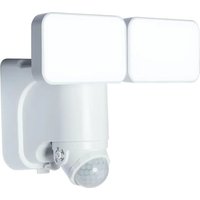
LED Battery-Powered Motion Sensor Light
Model 7161
FEATURES
- 180^ motion sensor
• 400 lumen LED output - 5000K color temperature
- No wiring required
- Wall mount only
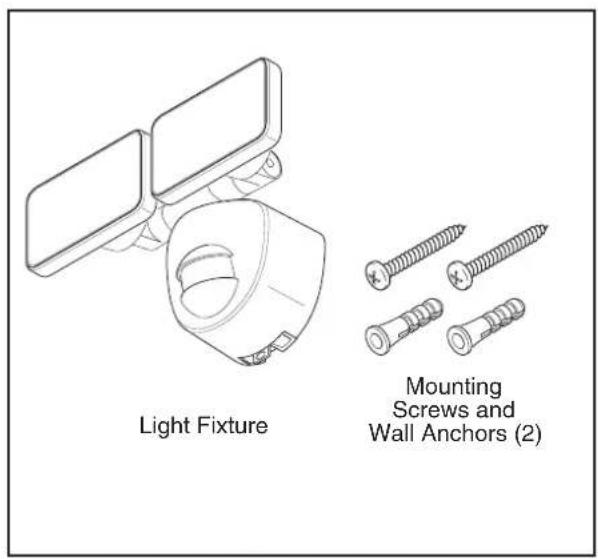
text_image
Light Fixture Mounting Screws and Wall Anchors (2)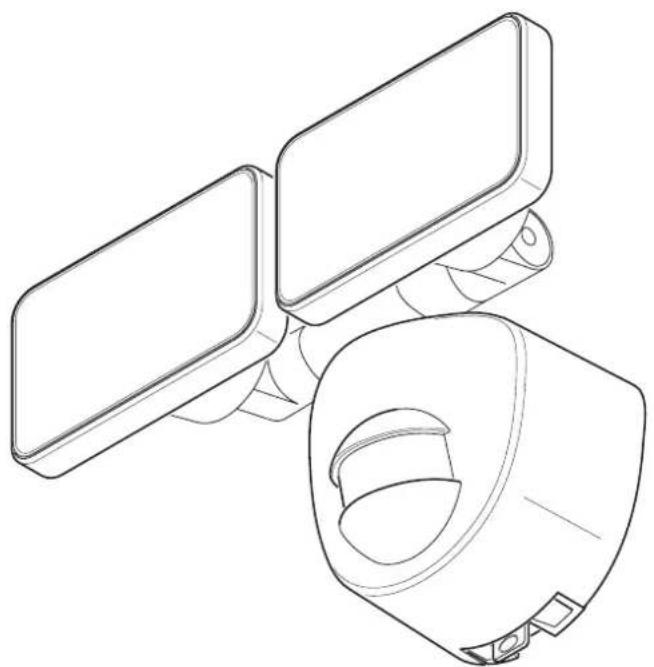
natural_image
Line drawing of a medical device with two rectangular components and a circular opening (no text or symbols)INSTALLATION
Mounting the Light Fixture:
For best performance, mount the light fixture about 8 feet (2.4 m) above the ground.
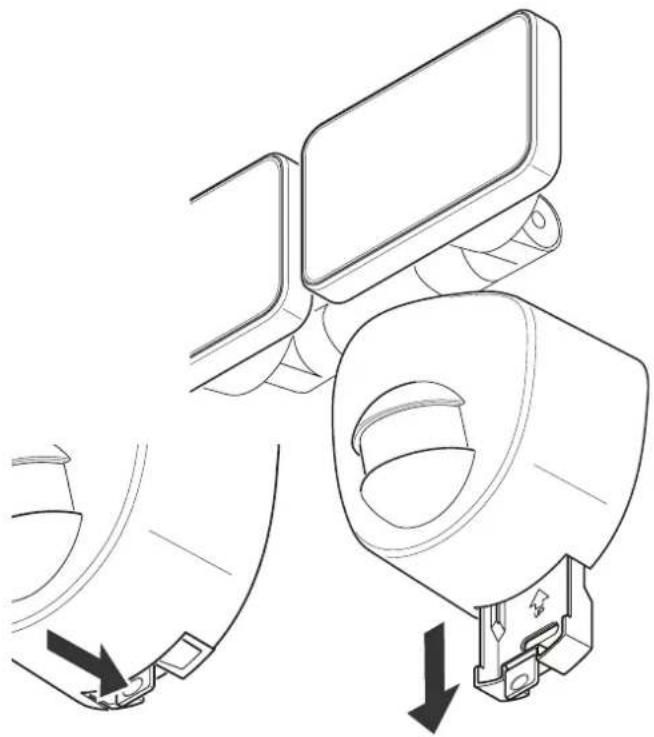
- Press the bottom tab of the wall mounting plate and slide the mounting plate from the light body.
natural_image
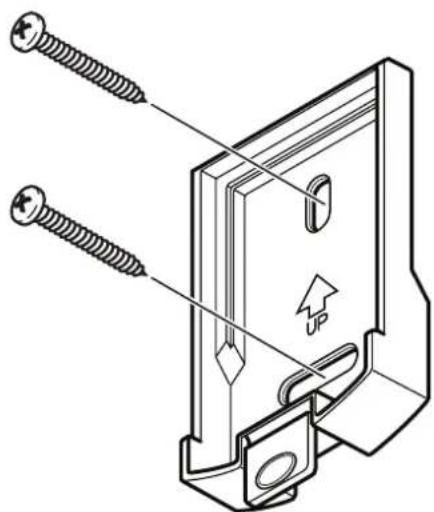
Technical line drawing of a mechanical assembly with two parts, one showing a bracket and the other a handle (no text or symbols present)- NOTE: If needed, drill the necessary holes in the indented areas on the wall mounting plate for the mounting screws.
Using the wall mounting plate as a template, mark the position of the mounting holes. Use the two screws and wall anchors (provided) to mount the wall plate to a solid surface. Make sure there is enough vertical space above the mounting plate to allow the light fixture to be slid down onto the mounting plate.
natural_image
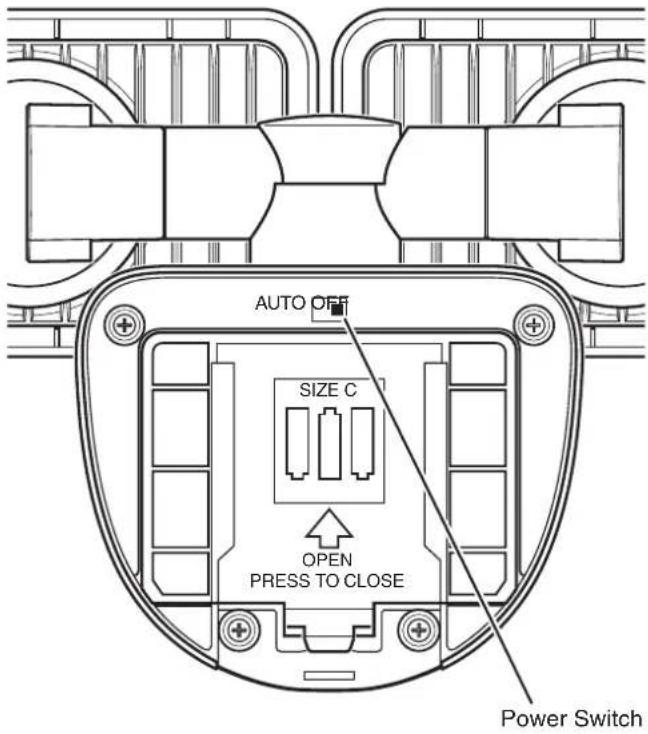
Technical line drawing of a mechanical clamp or bracket with screws and an upward arrow indicator (no text or symbols present)- Slide the power switch located on the rear of the light to the OFF position. Press up on the battery compartment cover locking tab and swing the cover out and down to remove.
text_image
AUTO OFF SIZE C OPEN PRESS TO CLOSE Power Switch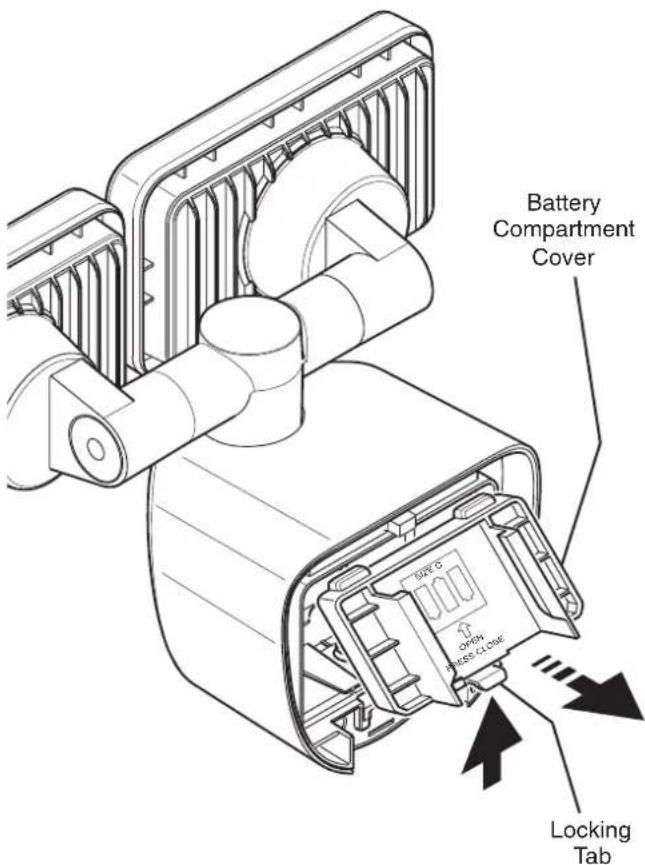
text_image
Battery Compartment Cover Type 6 Open Press Close Locking Tab- Install three, 1.5V "C" batteries (not included) into the battery compartment. Make sure the polarity of the batteries is correct. Replace the battery compartment cover.
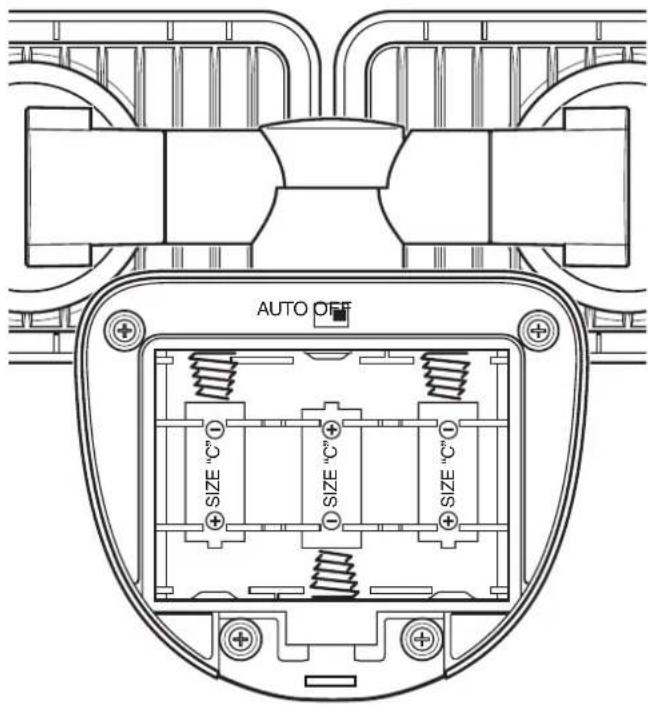
text_image
AUTO OFF SIZE "C" SIZE "C" SIZE "C"- Slide the power switch to the AUTO position to activate the motion sensor. When motion is detected, the light will turn on. The light will stay on for a period of ten seconds after all motion has stopped to prolong battery life.
NOTE: To extend the life of the batteries, this light only works in the dark (nighttime).
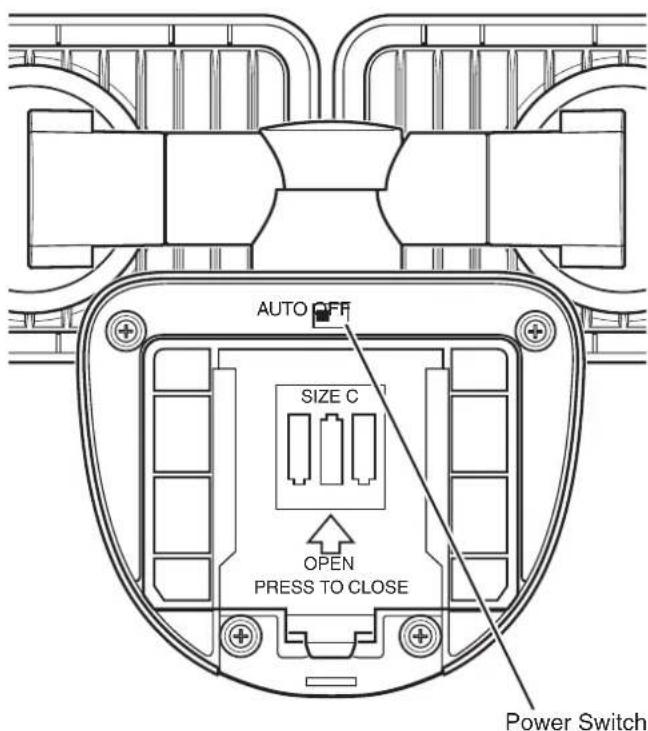
text_image
AUTO OFF SIZE C OPEN PRESS TO CLOSE Power Switch- Place the top rear of the light fixture over the wall mounting plate and slide the fixture down onto the wall mounting plate. Slide the light fixture down until the bottom tab clicks and locks the light fixture into place.

natural_image
Technical line drawing showing a mechanical assembly with a component being inserted into a housing (no text or symbols present)FINAL ADJUSTMENT
Adjusting the Lamp Heads:
If needed, gently grasp the lamp heads and move them from side to side or up and down to adjust the light coverage area.
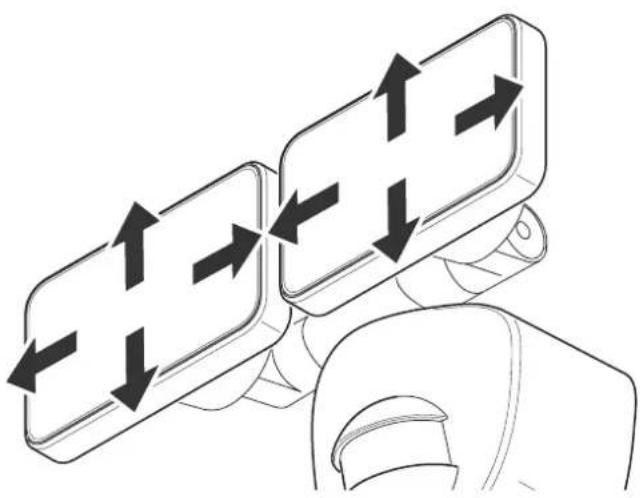
natural_image
Illustration of a hand holding two 3D directional arrows (no text or symbols)Motion Sensor:
The motion sensor is fixed with a 180^ detection range.
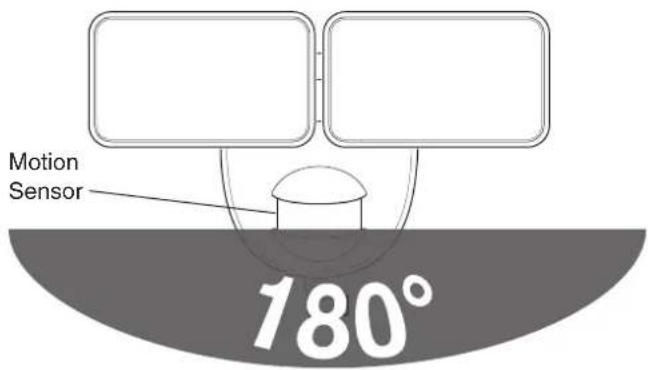
text_image
Motion Sensor 180°How The Motion Sensor Works:
The sensor detects "motion" by the movement of heat (body heat) across the coverage area. However, following are examples of objects that also produce heat and can cause the sensor to false trigger:
- Pools of Water • Air Conditioners
- Dryer Vents
- Fenced-In Animals
• Heating Vents • Automobile Traffic
If you suspect that a heat source of this type is falsely triggering the sensor, move the light fixture away from the heat source in question.
NOTE: The detector is less sensitive to motion directly towards it and more sensitive to across motion.
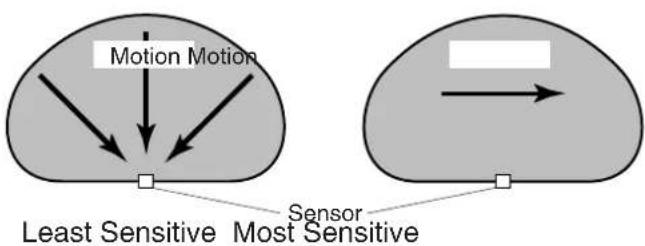
flowchart
graph TD
    A["Motion Motion"] --> B["Central Sensor"]
    C["Sensor"] --> D["Central Sensor"]
    style A fill:#f9f,stroke:#333
    style C fill:#bbf,stroke:#333
    style B fill:#dfd,stroke:#333
    style D fill:#dfd,stroke:#333
CARE AND CLEANING
• To prolong the original appearance, clean the light fixture with clear water and a soft, damp cloth only.
- Do not use paints, solvents, or other chemicals on this light fixture. They could cause a premature deterioration of the finish. This is not a defect in the finish and will not be covered by the warranty.
- Do not spray the light fixture with a hose or power washer.
- To clean the camera lens, use a dry, microfiber cloth only.
GENERAL ELECTRICAL AND SAFETY WARNINGS
- Do not immerse components in liquid.
BATTERY REPLACEMENT
IMPORTANT: Properly dispose of drained batteries.
- Press the bottom tab of the wall mounting plate and slide the light fixture up and off of the mounting plate.
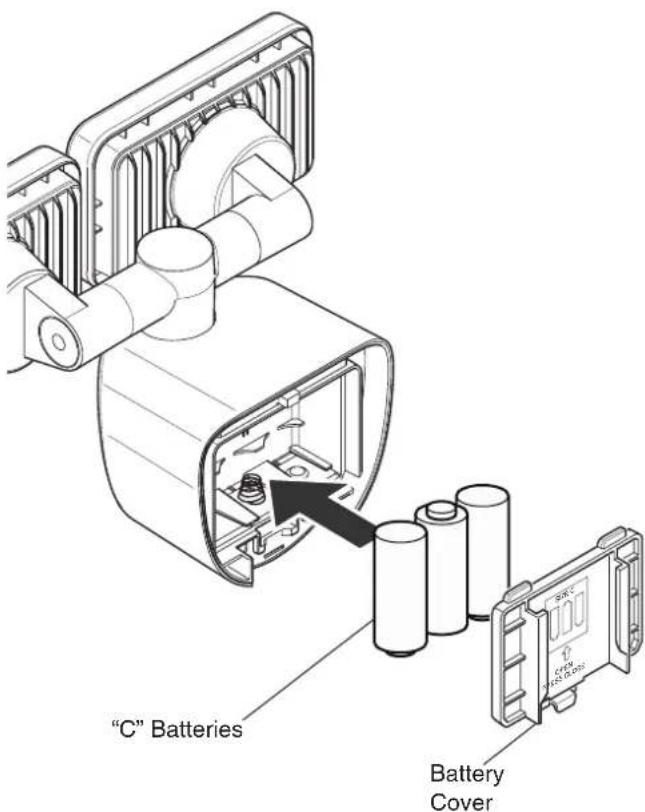
- Remove the battery cover on the back of the light fixture and remove the old batteries.
- Install three new 1.5V "C" batteries into the battery compartment. Make sure the polarity of the batteries is correct.
- Replace the battery cover.
- Place the top rear of the light fixture over the wall mounting plate and slide the fixture down onto the wall mounting plate. Slide the light fixture down until the bottom tab clicks and locks the light fixture into place.
text_image
"C" Batteries Battery CoverTROUBLESHOOTING GUIDE
| SYMPTOM POSSIBLE C | AUSE SOLUTION | |
| Light does not activate in normal operation. | 1. Power switch is in OFF position.2. Weak battery.3. Daylight turn-off (photocell) is in effect. | 1. Turn power switch to the ON position.2. Check battery charge and replace if necessary.3. Recheck after dark. |
| Lights come on for no apparent reason. | Light control may be sensing small animals or automobile traffic. | Reposition light away from the area of movement. |
| Light is not as bright as normal. | Weak battery. Check battery charge and replace if necessary. | |
TECHNICAL SERVICE
Please call 1-800-858-8501 for assistance before returning product to store.
If you experience a problem, follow this guide. You may also want to visit our Web site at: www.hzsupport.com. If the problem persists, call* for assistance at 1-800-858-8501, 8:00 AM to 5:00 PM CST (M-F). You may also write* to:
HeathCo LLC
P.O. Box 90045
Bowling Green, KY 42102-9045
ATTN: Technical Service Specialty Products
* If contacting Technical Service, please have the following information available: Model Number, Date of Purchase, and Place of Purchase.
No Service Parts Available for this Product
Please keep your dated sales receipt, it is required for all warranty requests.
This device complies with Part 15 of the FCC Rules. Operation is subject to the following two conditions: (1) this device may not cause harmful interference, and (2) this device must accept any interference received, including interference that may cause undesired operation.
CAN ICES-005 (B) / NMB-005 (B)
THREE YEAR LIMITED WARRANTY
This is a “Limited Warranty” which gives you specific legal rights. You may also have other rights which vary from state to state or province to province.
For a period of three years from the date of purchase, any malfunction caused by factory defective parts or workmanship will be corrected at no charge to you.
Not Covered - Repair service, adjustment and calibration due to misuse, abuse or negligence, light bulbs, batteries, and other expendable items are not covered by this warranty. Unauthorized service or modification of the product or of any furnished component will void this warranty in its entirety. This warranty does not include reimbursement for inconvenience, installation, setup time, loss of use, unauthorized service, or return shipping charges.
This warranty covers only HeathCo LLC assembled products and is not extended to other equipment and components that a customer uses in conjunction with our products.
THIS WARRANTY IS EXPRESSLY IN LIEU OF ALL OTHER WARRANTIES, EXPRESS OR IMPLIED, INCLUDING ANY WARRANTY, REPRESENTATION OR CONDITION OF MERCHANTABILITY OR THAT THE PRODUCTS ARE FIT FOR ANY PARTICULAR PURPOSE OR USE, AND SPECIFICALLY IN LIEU OF ALL SPECIAL, INDIRECT, INCIDENTAL, OR CONSEQUENTIAL DAMAGES.
REPAIR OR REPLACEMENT SHALL BE THE SOLE REMEDY OF THE CUSTOMER AND THERE SHALL BE NO LIABILITY ON THE PART OF HEATHCO LLC FOR ANY SPECIAL, INDIRECT, INCIDENTAL, OR CONSEQUENTIAL DAMAGES, INCLUDING BUT NOT LIMITED TO ANY LOSS OF BUSINESS OR PROFITS, WHETHER OR NOT FORESEEABLE. Some states or provinces do not allow the exclusion or limitation of incidental or consequential damages, so the above limitation or exclusion may not apply to you. Please keep your dated sales receipt, it is required for all warranty requests.
HeathCo LLC reserves the right to discontinue products and to change specifications at any time without incurring any obligation to incorporate new features in products previously sold.
Heath Zenith
DESEMPAQUE
natural_image
Line drawing of a medical device with two rectangular components and a circular opening (no text or symbols)INSTALACIÓN
natural_image
Technical line drawing of a mechanical assembly with two arrows indicating fastening or disassembly steps (no text or symbols present)natural_image
Technical line drawing of a mechanical bracket with screws and a fastener, no text or symbols presenttext_image
AUTO OFF SIZE "C" SIZE "C" SIZE "C"natural_image
Technical line drawing showing a mechanical assembly with a component inserted into a housing (no text or symbols present)natural_image
Illustration of a hand holding two 3D directional arrows (up and down) on a smartphone screen, no text or symbols present.Bowling Green, KY 42102-9045
natural_image
Line drawing of a medical device with two rectangular components and a circular opening (no text or symbols)INSTALLATION
natural_image
Technical line drawing showing mechanical assembly with arrows indicating connection points (no text or symbols)natural_image
Technical line drawing of a mechanical bracket with screws and a fastener, no text or symbols presenttext_image
AUTO OFF SIZE "C" SIZE "C" SIZE "C"natural_image
Technical line drawing showing a mechanical assembly with a component being inserted into a device (no text or symbols present)DERNIERS AJUSTEMENTS
natural_image
Illustration of two smartphone screens with directional arrows indicating movement, held by a finger (no text or symbols)Bowling Green, KY 42102-9045
Date of Purchase: ____
Fecha de compra / Date d'achat
Staple Purchase Receipt Here