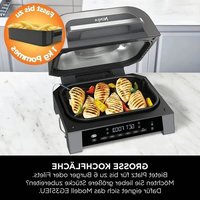
EG351EU - Deep fryer NINJA - Free user manual and instructions
Find the device manual for free EG351EU NINJA in PDF.


| Brand | Ninja |
| Model | EG351EU |
| Product Type | Oil-free fryer and electric grill |
| Power supply | 220-240 V ~ 50-60 Hz |
| Power | 1760 W |
| Cooking modes | Grill, Air Fry, Bake, Roast, Dehydrate |
| Maximum temperature (Grill) | 265 °C (MAX) |
| Maximum temperature (Air Fry) | 200 °C |
| Timer | Up to 30 min (Grill), 1 h (Air Fry, Bake), 4 h (Roast), 12 h (Dehydrate) |
| Capacity of the pan | Not specified, suitable for 2 to 4 portions |
| Included accessories | Grill plate, cooking tray, cooking pan, lid, splash guard, cleaning brush, Foodi Smart thermometer probe |
| Coating | Non-stick ceramic |
| Maintenance and cleaning | Pan, trays, guard and brush are dishwasher safe; thermometer probe hand wash only |
| Safety | Automatic shut-off, preheating, overheat protection, hot surfaces indicated, splash guard |
| Smart thermometer probe | Foodi Smart with PRESET and MANUAL modes, automated core cooking |
| Control panel | Digital with display, mode selection buttons, temperature and time settings, Start/Stop button |
| Commercial warranty | 2 years (registration required within 28 days) |
| Country of manufacture | Not specified (Ninja is a global brand) |
| Dimensions (approx.) | Approximately 35 x 30 x 25 cm (estimate based on similar models) |
| Weight (approx.) | Approximately 6 kg (estimate) |
Frequently Asked Questions - EG351EU NINJA
User questions about EG351EU NINJA
0 question about this device. Answer the ones you know or ask your own.
Ask a new question about this device
Download the instructions for your Deep fryer in PDF format for free! Find your manual EG351EU - NINJA and take your electronic device back in hand. On this page are published all the documents necessary for the use of your device. EG351EU by NINJA.
USER MANUAL EG351EU NINJA
ninjakitchen.eu/register-guarantee

natural_image
Technical line drawing of a mechanical component with an inset showing internal layered structure (no text or symbols)GRILL CONTROL-TEKNOLOGI
natural_image
Line drawing of a rice cooker with lid and side ports (no text or symbols)RARE-MED RARE-MED MED WELL WELL
natural_image
Line drawing of a food preparation step showing a tray with food being placed into a container (no text or symbols)2 Tryk på knappen DEHYDRATE (Dehydrer). Standard temperaturen visos. Brug p lono til venstre for displayet til at justere temperaturen op til 90°C.
3 Brug pilene til nojre for displayel til at justere dehydöreringstiden med 15-minusters-interval or op til 12 timer.
4 Tryk på START/STOP for at sætte den i gang. (Apparatel forvarmer ikke i dehydreringstilstand.)
5 Når dehyöreringstiden er gået, bipper apparatet, og displayet viser "END" (færdig).
RENG∅RING AF DIN NINJA FOODI
natural_image
Technical line drawing of a mechanical component with an inset showing internal features (no text or symbols)GRILL CONTROL-TECHNOLOGIE
natural_image
Line drawing of a rice cooker with handle and side panel (no text or symbols)RARE-MED RARE-MED MED WELL WELL
natural_image
Line drawing of a hand placing food into a closed storage box with arrows indicating steps (no text or symbols)for purchasing the Ninja Air Grill & Air Fryer

REGISTER YOUR PURCHASE

ninjakitchen.eu/register-guarantee

Scan QR code using mobile device
RECORD THIS INFORMATION
Model Number
Serial Number
Date of Purchase:
(Keep receipt)
Store of Purchase:
TECHNICAL SPECIFICATIONS
Vollage: 220-240V-50-60Hz
Watts: 1760W


TIP: You can find the model and serial numbers on the QR code label on the back of the unit by the power cord.

This marking indicates this product should not be disposed of with other household waste. To prevent possible harm to the
environment or human health from uncontrolled waste disposal, recycle it responsibly to promote the sustainable reuse of material sources. To return your used device, please use the return and collection systems or contact the retailer where this product was purchased. They can take this product for environmentally safe recycling.
IMPORTANT SAFETY INSTRUCTIONS
INDOOR HOUSEHOLD USE ONLY • READ ALL INSTRUCTIONS BEFORE USE
To reduce the risk of injury, fire, electrical shock or property damage, basic safety precautions must always be followed, including the following numbered warnings and subsequent instructions. Do not use appliance for other than intended use
⚠ WARNING
1 To eliminate a choking hazard for young children, discard all packaging materials immediately upon unpacking.
2 This appliance can be used by persons with reduced physical, sensory or mental capabilities or lack of experience and knowledge if they have been given supervision or instruction concerning use of the appliance in a safe way and understand the hazards involved.
3 Keep the appliance and its cord out of reach of children. DO NOT allow the appliance to be used by children. Close supervision is necessary when used near children.
4 To reduce the risk of fire, DO NOT place appliance on hob or on hot surfaces.
5 DO NOT place in heated oven
6 This appliance is for household use only. DO NOT use this appliance for anything other than its intended use. DO NOT use in moving vehicles or boats. DO NOT use outdoors. Misuse may cause injury.
7 Ensure the surface is level, clean and dry. DO NOT place the appliance near the edge of a countertop during operation.
8ALWAYS ensure the appliance is properly assembled before use.
9 When using this appliance, provide at least 6 inches (15.25 cm) of space above and on all sides for air circulation.
10 DO NOT use an extension cord. A short power-supply cord is used to reduce the risk of children grabbing the cord or becoming entangled and to reduce the risk of people tripping over a longer cord.
11 To protect against electrical shock DO NOT mmerse cord, plugs, or main unit housing in water or other liquid.
12 DO NOT use the appliance if there is damage to the power cord or plug. Regularly inspect the appliance and power cord. If the appliance malfunctions or has been damaged in any way, immediately stop use and call Customer Service
13 NEVER use socket below counterlop surface.
14 DO NOT place appliance and let cord hang over edges of tables, counters or touch not surfaces.
15 Only use recommended accessories included with this appliance or authorized by SharkNinja. The use of accessories or attachments not recommended by SharkNinja may cause a risk of fire or injury.
16 Before placing any accessory into the cooker, ensure they are clean and dry.
17 DO NOT use the appliance without the removable cocking pot and splatter guard installed.
18 ALWAYS ensure id is fully closed before operating.
19 DO NOT move the appliance when in use.
20 DO NOT cover the air intake vent or air outlet vent while unit is operating. Doing so will prevent even cooking and may damage the unit or cause it to overheat.
21 DO NOT touch hot surfaces. Appliance surfaces are not during and after operation. To prevent burns or personal injury, ALWAYS use protective hot pads or insulated oven mitts and use available handles and knobs.
22DO NOT touch accessories during or immediately after cooking. The grill plate and criseer plate becomes extremely hot during the cooking process. Avoid physical contact while removing the accessory from the appliance. To prevent burns or personal injury ALWAYS use care when interfacing with product. Recommend use of long handed utensil and protect vs hot pads or insulated oven mills.
23DO NOT use this appliance for deep-frying
24 The Foodi Smart Thermometer does NOT replace an external food thermometer
25 To prevent possible illness. ALWAYS use an external food thermometer to check that your food is cooked to the recommended temperatures
26 Should a grease fire occur or the unit emits black smoke, unplug immediately. Wait for smoking to stop before removing any cooking accessories.
IMPORTANT SAFETY INSTRUCTIONS
INDOOR HOUSEHOLD USE ONLY • READ ALL INSTRUCTIONS BEFORE USE
27 Please refer to the Cleaning & Maintenance section for regular maintenance of the appliance.
28 To disconnect, turn unit to "off", then unplug from socket when not in use and before cleaning.
29 Allow to cool before cleaning, dissassembly, putting in or taking off parts and storage
30 DO NOT clean with metal scouring pads. Pieces can break off the pad and touch electrical parts, creating a risk of electric shock
31 Cleaning and user maintenance shall not be made by children.
32 Extreme caution must be used when moving an appliance containing hot oil or other hot liquids.
33 DO NOT place appliance on hot surfaces, near hot gas or electric burner, in a heated oven, or on a stovetop.
34 Appliances are not intended to be operated by means of an external timer or separate remote control system.
SAVE THESE INSTRUCTIONS
| Indicates to read and review instructions to understand operation and use of product. | |
| Indicates the presence of a hazard that can cause personal injury, death or substantial property damage if the warning included with this symbol is ignored. | |
| Take care to avoid contact with hot surface. Always use hand protection to avoid burns. | |
| For indoor and household use only. | |
| Do not immerse in water. |
PARTS
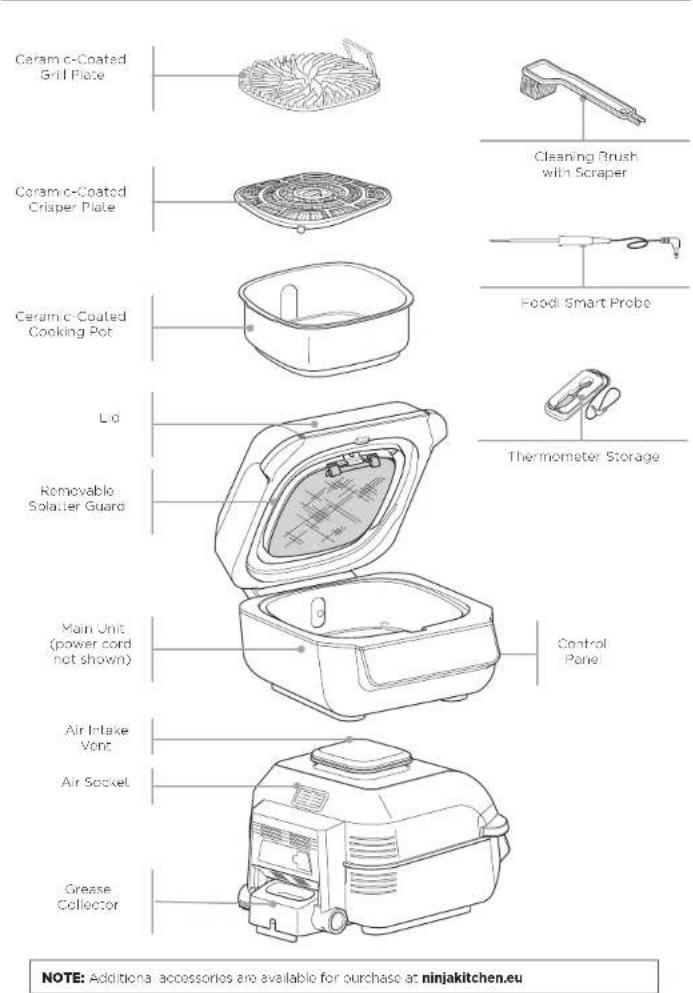
GETTING TO KNOW THE NINJA FOODI USING THE NINJA FOODI
FUNCTIONS
GRILL: Grill indoors while creating even char, grill marks and grilled flavor.
AIR Fry: For crispiness and crunch with little to no oil.
BAKE: Bake cakes, treats, desserts, and more.
ROAST Tender-se meats, roast vegetables, and more.
DEHYDRATE: Dehydrate meats, fruits, and vegetables for healthy snacks.
OPERATING BUTTONS
POWER button: Once the unit is plugged in, press the power button to turn on the unit. Pressing it during cooking stops the current cooking function and turns off the unit
FUNCTION:
Press to scroll through and select functions.
NOTE: To adjust the temperature or time during cooking, press the up and down arrows. The unit will then resume at those settings.
Left arrows: Use the up ⚙ and down ⚙ arrows to the left of the display to adjust the cooking temperature for any function or, with some models, to set the internal doneness after using PRESET or MANUAL button.
Right arrows: Use the up ⬆ and down ⬆ arrows to the right of the display to adjust the cook time or with some models, to set the food type when using PRESET.
MANUAL setting: Pressing the thermometer button ☑ twice switches the display screen so you can manually set the thermometer internal doneness.
PRESET setting: Switches the display screen so you can set the thermometer, food type, and internal doneness.
START/STOP button: After selecting temperature and time, press the START/STOP button to begin cooking
Standby Mode: If there has been no interaction with the control panel for 10 minutes and the unit is not cooking, the unit will go into Standby Mode and the control panel will dim.
PREHEAT setting: If the unit is preheating, it will be indicated by a progress bar on the display screen. To skip preheat (not recommended), press the button while the grill is in preheat state. ADD FOOD will display.
BEFORE FIRST USE
1 Remove all packaging material, promotional labels and tape from the unit.
2 Remove all accessories from the package and read this instruction booklet carefully. Please pay particular attention to operational instructions, warnings, and important safety instructions to avoid any injury or property damage.
3 Wash the grill plate, splatter guard, crisper plate, thermometer, cleaning brush and cooking pot in warm, soapy water, then rinse and dry thoroughly.
4 When using this apolience, provide at least 15cm of space on all sides for adequate air circulation.
SPLATTER GUARD
Located on the underside of the lid, the splatter guard helps keep the heating element clean. ALWAYS ensure the splatter guard is installed when cooking. Failure to use the splatter guard will result in oil buildup on the hoating element, which can cause smoking.
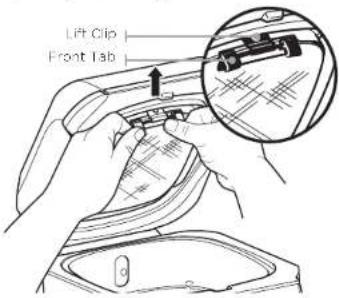
Removing the splatter guard
Remove the splatter guard for cleaning after ovory use. Once the splatter guard has cooled completely, remove it by pushing the upper left tao toward the pack of the tie. This will release the splatter guard, allowing you to remove it.
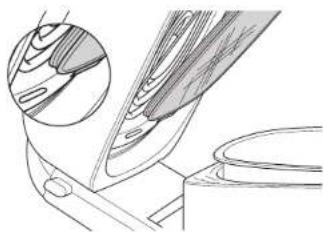
Installing the splatter guard
To install, insert the splatter guard so the grooves on the splatter guard ring match those of the fixed heat guard ring notch on the right. Then gently push the splatter guard upward until it clicks into the tab on the left side.
natural_image
Technical line drawing of a mechanical component with an inset showing internal layered structure (no text or symbols)GRILL CONTROL TECHNOLOGY
When using the Grill function, you will need to select the grill plate temperature setting. Below are recommended temperature levels for common ingredients.
| LO(200°C) | MED(240°C) | HI(260°C) | MAX(Up to 265°C) |
| • Bacon• Sausages• When using thick BBQ sauce | • Frozen meats• Marinates/seafood meats | • Steaks• Chicken• Burgers• Meat kbabs | • Veggies• Fruit• Pizzas• Fresh/frozen seafood• Veggie kbabs |
NOTE: For less smoke, we recommend using Canola, Rofinod Coconut, Avocado, Vegetable or Rapeseed oil instead of olive oil. Healing oil past its smoke point can impart food with a burnt acric flavor.
NOTE: The unit may produce smoke when cooking ingredients on a hotter setting than what is recommended. For more cooking charts, refer to your inspiration on Guide or visit ninjakitchen.eu
Switching to Grill after using another function
If the unit is a ready warm from using a different function, "ADD FOOD" may appear on the screen immediately. We recommend allowing the grill plate to heat up for at least 6 minutes before placing ingredients on it.
Batch grilling
When grilling more than two consecutive batches of food, it is recommended that you empty the fat/oil from the removable cooking pot. It is also HIGHLY recommended to clean the spiatter guard in between uses. This will help prevent grease from burning and causing smoke.
If you would like to skip the Preheat process, press the PREHEAT button.
USING THE NINJA FOODI - CONT.
USING THE FOODI SMART THERMOMETER
IMPORTANT: DO NOT place hands near Food Smart Thermometer cord when in use to prevent burning or scalding
Before First Use
Make sure the thermometer jack is free of any residue and the cord is free of knots before plugging it into the jack.
1 Unwind the cord from the magnetic storage compartment to remove the thermometer.
2 Plug the thermometer into the jack of the right side of the control panel. Push firmly on the plug until it cannot go into the jack any further. Place the storage compartment back onto the side of the unit.
3 Once the thermometer is plugged into the jack, it will enable and illuminate PRESET and MANUAL. Select the desired cook function by pressing FUNCTION and cook temperature.
natural_image
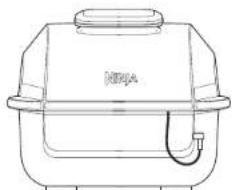
Line drawing of a rice cooker with handle and side legs (no text or symbols)4 Press the thermometer button to fully illuminate PRESET and use the arrows to the right of the display to select your desired food type and the arrows to the loft of the display to set the internal doneness of your food (Rare through Wall).
NOTE: There is no need to set a cook time, as the unit will automatically turn off the heating element and alert you when your food has finished cooking.
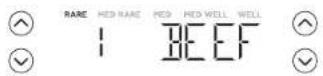
To use the MANUAL function instead of PRESET, press the thermometer button again to switch to MANUAL. Use the recommended internal cook temperatures below:
FOOD TYPE: SET DONENESS TO:
| Flsh Medium (55°C) | |
| Medium Well (60°C) | |
| Well Done (65°C) | |
| Chicken/Turkey Well Done (75°C) | |
| Pork Medium (55°C) | |
| Medium Well (65°C) | |
| Well Done (70°C) | |
| Beef/Lamb Rare (50°C) | |
| Medium Rare (55°C) | |
| Medium (60°C) | |
| Medium Well (65°C) | |
| Well Done (70°C) | |
NOTE: Refer to the local food standards authority for recommended food sale temperatures.
NOTE: Set outputs for BEEF/LAMB are lower than normal recommendations as unit will carry-over cook 5-10°C.
5 Place the accessory required (excluding the thermometer) for your selected cook function in the unit and close the lid. Press START/STOP to begin preheating.
6 While the unit is preheating, insert the thermometer horizontally into the centre of the thickest part of the piece of protein. Refer to the chart on the adjacent page on further thermometer placement instructions.
7 When the unit has proheated and "ADD FOOD" appears on the screen, open the lid, place food with inserted thermometer in the unit, and close the lid over the thermometer cord.
8 The progress bar at the top of the display will crack doneness. It will start flashing at the lowest doneness and progress to the set doneness.
RARE-MED RARE-MED MED WELL WELL
NOTE: When using Roast and Gri L, the unit will beep and display FLIP. Flipping is optional, but recommended.
9 The unit will automatically stop when desired doneness is almost reached, as it accounts for carry-over cooking, and "GET FOOD" will display on the screen.
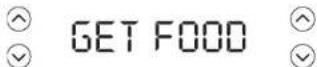
10 Transfer the protein to a plate while "REST" displays on the screen. Thermometer does not need to still be inserted. The protein will continue to carry-over cook to your set doneness, which will take about 3-5 minutes. This is an important step, as not resting could lead to results looking less cooked. Carry-over cook times can vary based on type, cut and size of protein.
NOTE: To check the internal temperature of other pieces of protein, press and hold the thermometer button and insert the thermometer into each piece of meat.
NOTE: The thermometer will be HOT. Use either oven mths or tongs to take the thermometer out of the protein.
USING THE NINJA FOODI - CONT.
HOW TO CORRECTLY INSERT THE THERMOMETER
| FOOD TYPE: | PLACEMENT | CORRECT | INCORRECT |
| SteaksPork chopsLamb chopsChicken breastsBurgersTenderloinsFish fillets | • Insert thermometer horizontally into the center of the thickest part of the meat.• Make sure the thermometer is close to (but not touching) the bone and away from any fat or gristle.• Make sure the tip of the thermometer is inserted straight into the center of the meat, not angled toward the bottom or top of it.NOTE: The thickest part of the fillet may not be the center. It is important that the end of the thermometer hits this area so that desired results are achieved. | 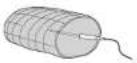 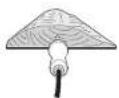 |  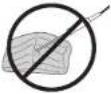 |
| Whole chicken • Inser: Thermometer horizontally into the thickest part of the breast, parallel to, but not touching, the bone• Make sure the tip reaches the center of the thickest part of the breast and doesn't go all the way through the breast into the cavity. | 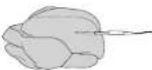 |  |
COOKING FUNCTIONS
Plug in the unit and press the power @utton to turn it on.
Grill
1 Place the cooking pot in the unit with the indent on the pot aligned with the bump on the main unit. Then place the grill plate grate to plate in the pot with the handles facing up. Ensure the splatter guard is in place, then close the lid.
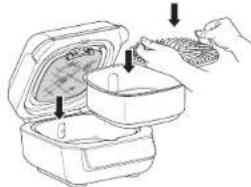

GET FOOD

2 Press the GRILL button. The default: temperature setting will display. Use the set of arrows to the left of the display to adjust the temperature up to MAX.
3 If using the Foodi® Smart Thermometer, refer to the Using the Foodi Smart Thermometer section. If not using the thermometer, use the set of arrows to the right of the display to adjust the cook time, in 1-minute increments, up to 30 minutes.
4 Press START/STOP to begin preheating. The progress bar will begin illuminating. It will take approximately 10 minutes for the unit to preheat.
5 When preheating is complete, the unit will beep and "ADD FOOD" will appear on the display.
NOTE: If your model has a cooking thermometer and you would like to use it to check your food's internal doneness, press the thermometer button ⊖ for 2 seconds and the food's internal temperature will appear on the screen. Press and hold button again to exit mode.
6 Open the Id and place ingredients on the grill plate. Once the hood is closed, cooking will begin and the timer will start counting down
7 When cook time is complete, the unit will beep and END will appear on the display
NOTE: If batch cooking, refer to page 8 for instructions.
Air Fry
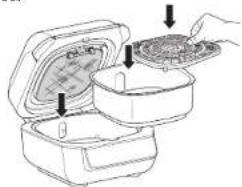
1 Place cooking pot in the unit with the indent on the pot aligned with the bump on the main unit. Place the crisper plate in the pot. Ensure the splatter guard is in place, then close the hood.
natural_image
Illustration of a food delivery box with lid removed, showing open lid and tray (no text or symbols)2 Press the AIR FRY button. The default temperature setting will display. Use the set of arrows to the left of the display to adjust the temperature up to 200°C.
3 If using the Foodi Smart Thermometer, refer to the Using the Foodi Smart Thermometer section. If not using the thermometer, use the set of arrows to the right of the display to adjust the cook time, in 1-minute increments, up to 1 hour.
4 Press START/STOP to begin preheating. The progress bar will begin illuminating. It will take approximately 3 minutes for the unit to preheat.
5 When preheating is complete, the unit will beep and "ADD FOOD" will appear on the display.
NOTE: While preheating is strongly recommended for best results, you can skip it by pressing the SKIP PREHEAT button. "ADD FOOD" will appear on the display. Open the hood and place ingredients in the crisper plate. Once the hood is closed, cooking will begin and the timer will start counting down.
USING THE NINJA FOODI - CONT.
6 Open the hood and place ingredients in the crisper plate. Once the hood is closed, cooking will begin and the timer will start counting down.
7 When you open the hood, the unit will pause. Use silicon-tipped tongs to mix the food on the crisper plate. When done, close the hood and cooking will automatically resumo:
8 When cook time is complete, the unit will beep and END will appear on the display.
Roast
1 Place cocking pot in the unit with the indent on the pot aligned with the bump on the main unit. Ensure the splatter guard is in place, then close the hood.
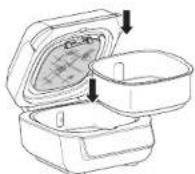
2 Press the ROAST button. The default temperature setting will display. Use the set of arrows to the loft of the display to adjust the temperature up to 220°C.
NOTE: Convert traditional oven recipes by reducing the temperature by 20°C Check food frequently to avoid overcooking.
3 If using the Foodi Smart Thermometer, refer to the Using the Foodi Smart Thermometer section. If not using the thermometer, use the set of arrows to the right of the display to adjust the cook 1 me, in 1-minute increments up to 1 hour and 5-minute increments from 1 to 4 hours.
4 Press START/STOP to begin proheating. The progress bar will begin illuminating. It will take approximately 3 minutes for the unit to preheat.
NOTE: While reheating is strongly recommended for best results, you can skip it by pressing the SKIP FREHEAT button. "ADD FOOD" will appear on the display. Open the hood and place ingredients in the cooking pot. Once the hood is closed, cooking will begin and the timer will start, counting down.
5 When preheating is complete, the unit will beep and "ADD FOOD" will appear on the display.
6 Open the lid and place ingredients in the pot. Once the lid is closed, cooking will begin and the timer will start counting down.
NOTE: If you want to check the doneness of your food, press the thermometer button ☑ for 2 seconds and the load's internal temperature will appear on the screen. Press and hole button again to exit mode.
7 When cook time is complete, the unit will beep and END will appear on the display.
Bake
1 Place cooking pot in the unit with the indent on the pot aligned with the bump on the main unit. Ensure the splatter guard is in place, then close the hood.
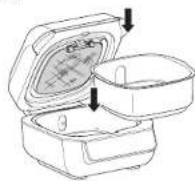
2 Press the BAKE button. The default temperature setting will display. Use the set of arrows to the left of the display to adjust the temperature up to 200°C.
NOTE: Convert traditional oven recipes by reducing the temperature by 20°C. Check food frequently to avoid overcooking.
3 If using the Food® Smart Thermometer refer to the Using the Food® Smart Thermometer section, if not using the thermometer, use the set of arrows to the right of the display to adjust the cook time. In 1-minute increments, up to 1 hour and in 5-minutes increments from 1 to 2 hours.
4 Press START/SOP to begin preheating. The progress bar will begin illuminating. It will take approximately 3 minutes for the unit to preheat.
NOTE: While preheating is strongly recommended for best results, you can skip it by pressing the SKIP PREFERAT button. "ADD FOOD" will appear on the display. Open the hood and pace ingredients in the crisper plate. Once the hood is closed, cooking will begin and the timer will start counting down.
5 When preneating is complete, the unit will beep and "ADD FOOD" will appear on the display.
6 Open the lid and add ingredients to the pot or set the bake pan directly in the pot, and close the lid to start cooking. Once the hood is closed, cooking will begin and the timer will start counting down.
NOTE: If you would like to use the thermometer to check your food's internal openness, press the thermometer button for 2 seconds and the food's internal temperature will appear on the screen. Press and hold button again to exit mode.
7 When cook time is complete, the unit will be open and END will appear on the display.
Dehydrate
1 Place cooking pot in the unit with the indent on the pot aligned with the bump on the main unit. Place a single layer of ingredients in the pot. Then place the crisper plate in the pot on top of the ingredients and add another layer of ingredients to the plate. Ensure the splatter guard is in place, then close the hood.
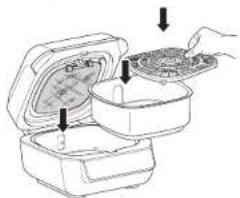
2Press the DEHYDRATE button. The default temperature setting will display. Use the set of arrows to the left of the display to adjust the temperature up to 90°C.
3 Use the set of arrows to the right of the display to adjust the dehydration time, in 15-minute increments, up to 12 hours.
4 Press START/STOP to begin. (The unit does not preheat in Dehydrate mode.)
5 When dehydration time is complete, the unit will beep and END will appear on the display
CLEANING YOUR NINJA FOODI
The unit should be cleaned thoroughly after every use. Always let the appliance cool before cleaning.
- Unplug the unit from the plug socket before cleaning. Keep the hood open after removing your food to allow the unit to cool quicker.
• The cooking pot, grill grate, crisper plate, splatter guard, cleaning brush, and any other included accessories are dishwasher safe, except the thermometer. DO NOT place the thermometer in the dishwasher. - If hand-washing, we recommend using the included cleaning brush to help wash the parts. Use the opposite end of the cleaning brush as a scraper to assist with releasing baked-on sauces or cheese. Air-dry or towel-cry all parts after hand-washing.
NOTE: DO NOT use washing up liquid on or near the thermometer jack. We recommend using compressed air or a cotton swab to avoid damaging the jack.
- If food residue or grease are stuck on the grill grate, splatter guard, or any other removable part, soak in warm soapy water before cleaning.
- Clean the splatter guard after every use. Soaking the solatter guard overnight will help soften the baked-on grease. After soaking, use the cleaning brush to remove the grease from the stainless steel frame and front tabs.
- Deep clean the splatter guard by putting it in a pot of water and boiling it for 10 minutes. Then, rinse with room temperature water and allow to dry completely.
- The Food: Smart Thermometer and holder are handwash with a damp cloth only. Never place unit or thermometer in dishwasher or submerse in liquid of any kind.
NOTE: NEVER use abrasive tools or cleaners. NEVER immerse the main unit in water or any other liquid.
STORAGE TIP: When stacking the coated accessories to store place a cloth or paper towel between each piece to protect the coated surfaces.
REPLACEMENT PARTS
To order additional parts and accessories, visit ninjakitchen.eu
TROUBLESHOOTING
- "Add Food" appears on the control panel display.
The unit has completed preheating and it is now time to add your ingredients. - "Shut Lid" appears on the control panel display.
The lid is open and needs to be closed for the selected function to start. -
"Plug In" appears on the control panel display.
-
"PRBE ERR" appears on the control panel display.
This means the unit timed out before food reached the set internal temperature. As a protection for the unit, it can run for only certain lengths of time at specific temperatures. - "E" appears on the control panel display.
The thermometer is not plugged into the jack on the right side of the control panel. Plug the thermometer in before proceeding. Press the thermometer in until you hear a click.
The unit is not functioning properly. Contact Customer Service at 0800 862 0453. So we may better assist you, please register your product online at ninjakitchen.eu/registerguarantee and have the product on hand when you call.
• Why is my food overcooked or undercooked even though I used the thermometer?
It is important to insert the thermometer lengthwise into the thickest part of the ingredient to get the most accurate reading. Make sure to allow food to rest for 3-5 minutes to complete cooking. For more information, refer to the Using the Food® Smart Thermometer section.
• Why does the preheat progress bar not start from the beginning?
When the unit is warm from previously being used, it will not require the full preheating time.
• Can I cancel or override preheating?
Preheating is highly recommended for best results, but you can skip it by selecting the PREHEAT button after you press the START/STOP button.
- Should I add my ingredients before or after preheating?
For best results, let the unit preheat before adding ingredients.
• Why is my unit emitting smoke?
When using the Grill function, always select the recommended temperature setting. Recommended settings can be found in the Inspiration Guide. Make sure the splatter guard is installed.
• How do I pause the unit so I can check my food?
When the hood is opened during a cooking function, the unit will automatically pause.
- Will the thermometer grip melt if it touches the hot grill grate?
No, the grip is made of a high-temperature silicone that can handle the Ninja® Food® Grill's high temperatures.
• My food is burned.
Do not add food until recommended preheat time is complete. For best results, check progress throughout cooking, and remove food when desired level of brownness has been achieved. Remove food immediately after the cook time is complete to avoid overcooking.
• Why does the unit have a 1-9 scale for the Beef Preset?
Perception of what a specific internal outcome looks like differs from person to person, even restaurant to restaurant. The 1-9 scale provides a wide range of options for each doneness level so you can customize doneness to your liking.
PRODUCT REGISTRATION
TWO (2) YEAR LIMITED GUARANTEE
When you buy a product in Europe as a consumer, you get the benefit of legal rights relating to the quality of the product (your "statutory rights"). You can enforce these statutory rights against your retailer. However, at Ninja we are so confident about the quality of our products (the "Products") that we give you a manufacturer's guarantee of two years. This guarantee only applies to the Product if it is bought in new and unused condition. These terms and conditions relate to our guarantees only - your statutory rights as a buyer are unaffected.
The conditions below describe the prerequisites and scope of our guarantees which are issued by SharkNinja Germany GmbH, Rotfeder-Ring 9, 60327 Frankfurt am Main, Germany ("us", "our" or "we"). They do not affect your statutory rights or the obligations of your retailer and your contract with them. The same applies if you have purchased the product directly from Ninja.
Ninja® Guarantees
A household kitchen appliance constitutes a sizeable investment. Your new machine needs to work properly for as long as possible. The guarantee it comes with is an important consideration - and reflects how much confidence the manufacturer has in its product and manufacturing quality.
You'll find online support at www.ninjakitchen.eu.
How do I register my guarantee?
You can register your guarantee online within 28 days of purchase. To save time, you'll need the following information about your machine:
- Model no.
- Serial Number (only if available)
• Date of purchase of the Product (receipt or delivery note)
To register online, please visit www.ninjakitchen.eu
IMPORTANT
• The guarantee covers your Product for 2 years starting on the date of purchase.
- Please keep the receipt at all times. Should you need to use your guarantee we will need the receipt to verify the information supplied to us is correct. The inability to produce a valid receipt will invalidate your guarantee.
What are the benefits of registering my guarantee?
When you register your guarantee, you can choose to receive our newsletter containing tips, advice and competitions. Hear the latest news about new Ninja technology and launches. If you register your guarantee online, you'll get instant confirmation that we've received your details.
For details of our privacy policy please visit www.ninjakitchen.eu
How long are our Products guaranteed for?
Our confidence in our design and quality control means that your Product is guaranteed for two years.
What is covered by the guarantee?
Repair or replacement (at Ninja's discretion) of your Product, including all parts and labour in case of any defect in design, materials and workmanship (including transport and shipping costs). Our guarantee is in addition to your legal rights as a consumer.
What is not covered by the guarantee?
• Normal wear and tear.
- Accidental damage, faults caused by negligent use or care, misuse, neglect, careless operation or handling of the kitchen appliance which is not in accordance with the Ninja® Instruction Manual supplied with your machine.
• Use of the kitchen appliance for anything other than normal domestic household purposes.
- Use of parts not assembled or installed in accordance with the operating instructions.
- Use of parts and accessories which are not Ninja® Genuine Components.
• Faulty installation (except where installed by Ninja®).
- Repairs or alterations carried out by parties other than Ninja or its agents, unless you can show that the repairs or alterations carried out by others are not related to the defect for which you exercise the guarantee.
Where can I buy genuine Ninja spares and accessories?
Ninja spares and accessories are developed by the same engineers who developed your Ninja kitchen appliance. You'll find a full range of Ninja spares, replacement parts and accessories for all Ninja machines at www.ninjakitchen.eu
Please remember that using non-Ninja spares may invalidate your manufacturer's guarantee. However, your statutory rights are unaffected.
GRACIAS
ninj@kitchen.eu/register-guarantee
natural_image
Technical line drawing of a mechanical component with an inset showing internal detail (no text or symbols)TECNOLOGÍA GRILLCONTROL
natural_image
Line drawing of a KINJA rice cooker with handle and side legs (no text or symbols)| RARE | HED RARE | HED | HED WELL | WELL |
| 1 | BEEF | |||
RARE-MED RARE-MED MED WELL WELL
natural_image
Line drawing of a hand placing food into a container with arrows indicating steps (no text or symbols)natural_image
Illustration of a hand placing a food item into two open containers (no text or symbols visible)natural_image
Technical line drawing of a mechanical component with a magnified inset showing internal features (no text or symbols)TECHNOLOGIE DE CONTRÔLE DU GRIL
natural_image
Line drawing of a rice cooker with a handle and side legs (no text or symbols)RARE-MED RARE-MED MED WELL WELL
INSÉRER CORRECTEMENT LA THERMOSONDE
natural_image
Line drawing of a hand placing food into a container with a tray (no text or symbols)natural_image
Line drawing of a food delivery box with lid and tray, showing hand placement (no text or symbols)natural_image
Technical line drawing of a mechanical component with an inset showing internal features (no text or symbols)TECNOLOGIA GRILL CONTROL
Grigliate consecutive
natural_image
Line drawing of a rice cooker with handle and side legs (no text or symbols)RARE-MED RARE-MED MED WELL WELL
natural_image
Line drawing of a hand placing food into a container with arrows indicating steps (no text or symbols)natural_image
Line drawing of a hand placing a tray into a container with a lid open (no text or symbols)nin, & kitchen.eu/register guarantee
Scan de QR-code mes men re child aparaal
SCHRIJF DEZE INFORMATIE OP
Modelnummer:
Serienummer
Datum van aankoop:
(Cewoor be kassabon)
natural_image
Technical line drawing of a mechanical component with an inset showing internal layered structure (no text or symbols)GRILL CONTROL TECHNOLOGY
natural_image
Line drawing of a rice cooker with handle and side arm (no text or symbols)| RARE | HED RARE | HED | HED WELL | WELL |
| 1 | BEEF | |||
RARE-MED RARE-MED MED WELL WELL
natural_image
Line drawing of a hand placing food into a container with a tray (no text or symbols)natural_image
Line drawing of a food storage machine with open lid and side bowl, showing internal components (no text or symbols)ninjakitchen.eu/register-guarantee

natural_image
Technical line drawing of a mechanical component with an inset showing internal layered structure (no text or symbols)GRILL CONTROL-TEKNOLOGI
Når du bruker Grill-funksionen, må du velge temperaturinnstillingen for grillplaten. Nadenfor ser du anbefalte temperatumivåer for vanlige ingredienser.
| LO (lav) (200°C) | MED (medium) (210°C) | HI (hey) (260°C) | MAX (maks.) (topol 265°C) |
| • Bacon • Polser • Når du brücker lykk BuJQ-saus | • Frosset kjett • Marincel kjøtt | • Biff/stek • Kylling • Hunger • Kraabljølt | • Grannsaker • Lrukt • Pizza • Funk/froccum sjørnøt • Vågolansk lekbara |
MERK: For mindre røyk anbefaler vi å bruke rapso je, raffinert kokosolje, avokadoolje eller vegetabisk olje i stedet for olivenolje. Hvis olen varmes opp over røykounktot, kan maten få en brent og skarp smak.
natural_image
Line drawing of a Jinja rice cooker with handle and side legs (no text or symbols)RARE-MED RARE-MED MED WELL WELL
natural_image
Illustration of a hand placing food into a container with arrows indicating steps (no text or symbols)natural_image
Line drawing of a food preparation step showing open containers and a bowl with a lid (no text or symbols)Dehydrate (dehydrere)
nin&kitchen.eu/register-guarantee
natural_image
Technical line drawing of a mechanical component with an inset showing internal layered structure (no text or symbols)TECNOLOGIA GRILL CONTROL
natural_image
Line drawing of a rice cooker with handle and side panel (no text or symbols)RARE-MED RARE-MED MED WELL WELL
natural_image
Line drawing of a food delivery box with lid removed, showing internal compartments and arrows indicating steps (no text or symbols)ninjakitchen.eu/register-guarantee

natural_image
Technical line drawing of a mechanical component with an inset showing internal layered structure (no text or symbols)GRILL CONTROL -TEKNOLOGIA
natural_image
Line drawing of a NIKA rice cooker with handle and side panel (no text or symbols)| RARE | HED RARE | HED | HED WELL | WELL |
| 1 | BEEF | |||
RARE-MED RARE-MED MED WELL WELL
natural_image
Line drawing of a hand placing food into two containers with arrows indicating steps (no text or symbols)natural_image
Line drawing of a food preparation step showing a tray with lid and two containers with handles (no text or symbols)ninjakitchen.eu/register-guarantee

Skanna QR-kod med mobilenhel
NOTERA DENNA INFORMATION
Modellnummer:
Ser enummer
Inkópsdatum:
(Spara kv ttot)
Inkópsstá le.
TEKNISKA DATA
Spänning 220-240 V-50-60 H/
Effekt. 1760 W


natural_image
Technical line drawing of a mechanical component with an inset showing internal layered structure (no text or symbols)GRILLENS REGLERINGSFUNKTIONER
natural_image
Line drawing of a NIKA rice cooker with handle and side arm (no text or symbols)RARE-MED RARE-MED MED WELL WELL
natural_image
Line drawing of a hand placing food into a container with a tray (no text or symbols)natural_image
Line drawing of a food preparation setup with open and closed containers, no text or symbols present© 2024 SharkNinja Operating LLC. TRYKT | KINA
DEUTSCH
© 2024 SharkNinja Operating LLC. GEDRUCKT IN CHINA
ENGLISH
Illustrations may differ from actual product. We are constantly striving to improve our products, therefore the specifications contained herein are subject to change without notice.
FOODI and NINJA are registered trademarks of SharkNinja Operating LLC.
© 2024 SharkNinja Operating LLC. PRINTED IN CHINA
ESPAÑOL
© 2024 SharkNinja Operating LLC. IMPRESO EN CHINA
FRANÇAIS
© 2024 SharkNinja Operating LLC. IMPRIMÉ EN CHINE
ITALIANO
© 2024 SharkNinja Operating LLC. STAMPATO IN CINA
SharkNinja Europe Ltd, 1st/2nd Floor Building 3150, Thorpe Park, Century Way, Leeds, England,
LS15 8ZB
ninjakitchen.eu
EG351EU_IB_MP_240712_MV1
NEDERLANDS
© 2024 SharkNinja Operating LLC.
GEDRUKT IN CHINA
NORSK
© 2024 SharkNinja Operating LLC. TRYKKET I KINA
PORTUGUÊS
© 2024 SharkNinja Operating LLC. IMPRESSO NA CHINA
SUOMI
© 2024 SharkNinja Operating LLC. PAINETTU KIINASSA
SVENSKA
© 2024 SharkNinja Operating LLC. TRYCKT I KINA
SharkNinja Germany GmbH, Rotfeder-Ring 9, 60327 Frankfurt am Main, Germany
ninjakitchen.eu