USER MANUAL TS181A Vevor
Technical Support and E-Warranty Certificate www.vevor.com/support
MODEL:TS181A
We continue to be committed to provide you tools with competitive price. "Save Half", "Half Price" or any other similar expressions used by us only represent estimate of savings you might benefit from buying certain tools with us compared to top brands and does not necessarily mean to cover all categories of tools offered. We kindly remind you to verify carefully when you are placing an order with us to see if you are actually saving half in comparison with the top major brands.
MODEL:TS181A
Have product questions? Need technical support? Please feel free to contact us:
Technical Support and E-Warranty Certificate
www.vevor.com/support
This is the original instruction. Please read all manual instructions carefully before operating. VEVOR reserves a clear interpretation of our user manual. The appearance of the product shall be subject to the product you received. Please forgive us that we won't inform you again if there are any technology or software updates on our product.
| FC | This device complies with Part 15 of the FCC Rules. Operat subject to the following two conditions:(1)This device may not harmful interference, and (2)this device must accept any inter received, including interference that may cause undesired oper |
 | This product is subject to the provision of European Directive 2012/19/EC. The symbol showing a wheelie bin crossed through indicates that the product requires separate refuse collection in European Union. This applies to the product and all accesso marked with this symbol. Products marked as such may not discarded with normal domestic waste, but must be taken to collection point for recycling electrical and electronic devices |
INTRODUCTION
This instrument is a multifunctional, high-sensitivity metal detector designed to detect various kinds of underground metal objects.
Main Features:
• Control panel with easy-to-press buttons - Two kinds of selectable detection modes: All Metals Mode and Discrimination Mode • Digital target ID and target ID cursor help operator determine the probable metal type of the target - Ground balance adjustment with the ground balance setting (-99 ~ displayed) - Adjustable sensitivity with a bar-graph display • Target depth indication • Audio alarm. There are 6 kinds of alarm tones in Discrimination Mode • 4 preset Discrimination Modes and 1 custom Discrimination Mode • Target pinpointing - Battery level indication
• Waterproof search coil - 3.5mm earphone jack
TECHNICAL SPECIFICATION
Maximum Detection Distance: About 10 inches for a US 25-cent coin
Operating Environment: Temperature: 0°C to 50°C
Relative Humidity: 85%
Storage Environment: Temperature: -20°C to 50°C
Relative Humidity: 85%
Battery: 1.5V alkaline battery, AA or equivalent, 6 pieces
Weight: About 1.4kg (including battery)
FRONT PANEL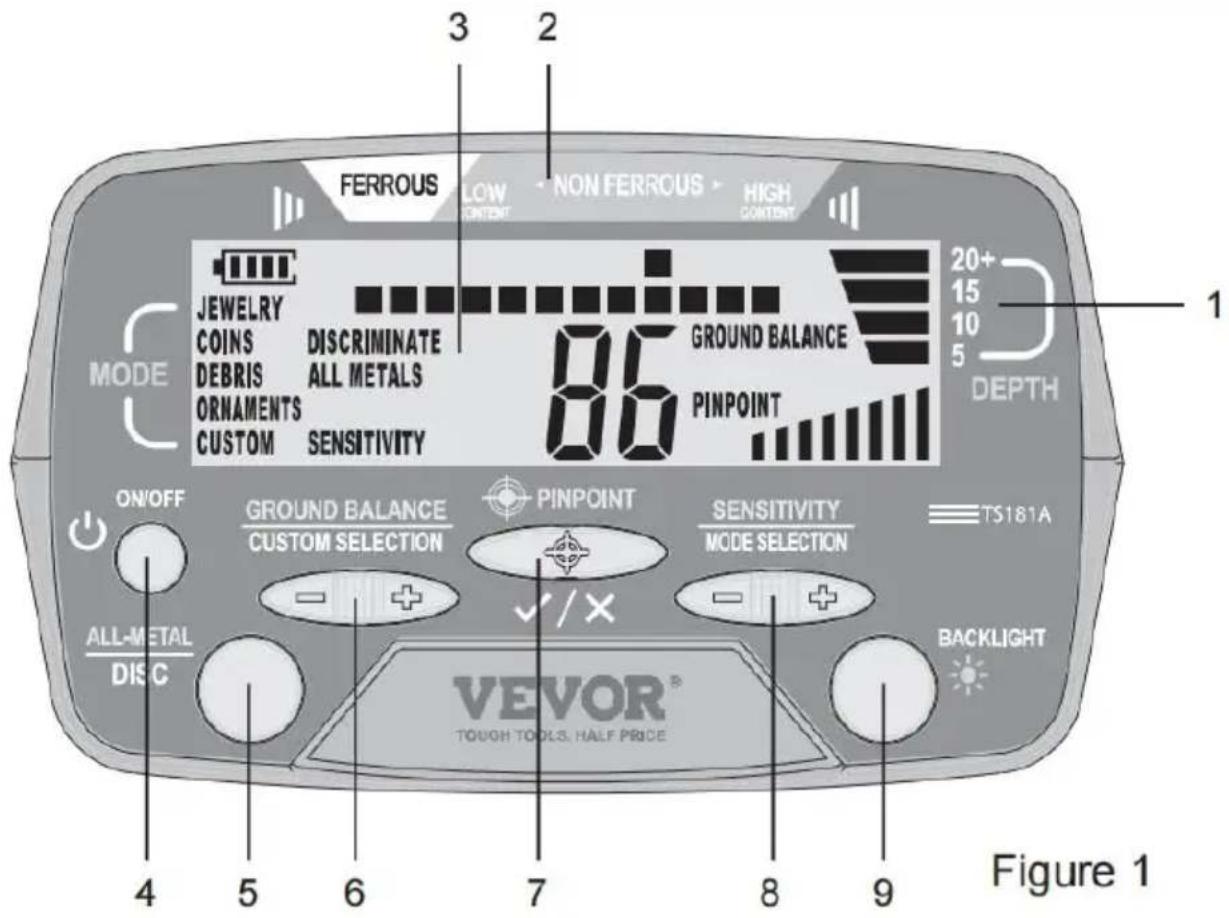
1. Depth Scale
This depth scale is to be used in conjunction with the displayed target depth indicator bar for target depth prediction.
2. Target ID Legend
Works with the Target ID Cursor to indicate the probable metal type of a detected metallic object.
3. Display
Press this "ON/OFF" button to turn on or off the metal detector.
Press this "ALL-METAL/DISC" button to switch between the All Metal Mode and a Discrimination Mode.
In All Metals Mode, this "GROUND BALANCE/CUSTOM SELECTION" button is used in ground balance adjustment.
In CUSTOM mode, which is one of the five Discrimination Modes (JEWELRY mode, COINS mode, DEBRIS mode, ORNAMENTS mode, CUSTOM mode), this button is used to move the target ID cursor to the desired position in order to create a desired discrimination pattern.
In CUSTOM mode, you can press the " + " side of this button to move the target ID cursor rightwards, or press the " - " side of this button to move the target ID cursor leftwards.
In All Metals Mode, this "PINPOINT" button is used to pinpoint a metallic object.
In CUSTOM mode, this button is used to eliminate or activate the pi located on the horizontal scale, directly below the Target ID Cursor.
In All Metals Mode, this "SENSITIVITY/MODE SELECTION" button is to adjust the detector's sensitivity.
In any Discrimination Mode, you can press the " + " side or " - " button to switch among the five Discrimination Modes.
Briefly press this " BACKLIGHT " button to turn on or off the backlight. Press and hold down this button for about 2 secs to switch the data between channel 0 and channel 1.
UNDERSTANDING THE DISPLAY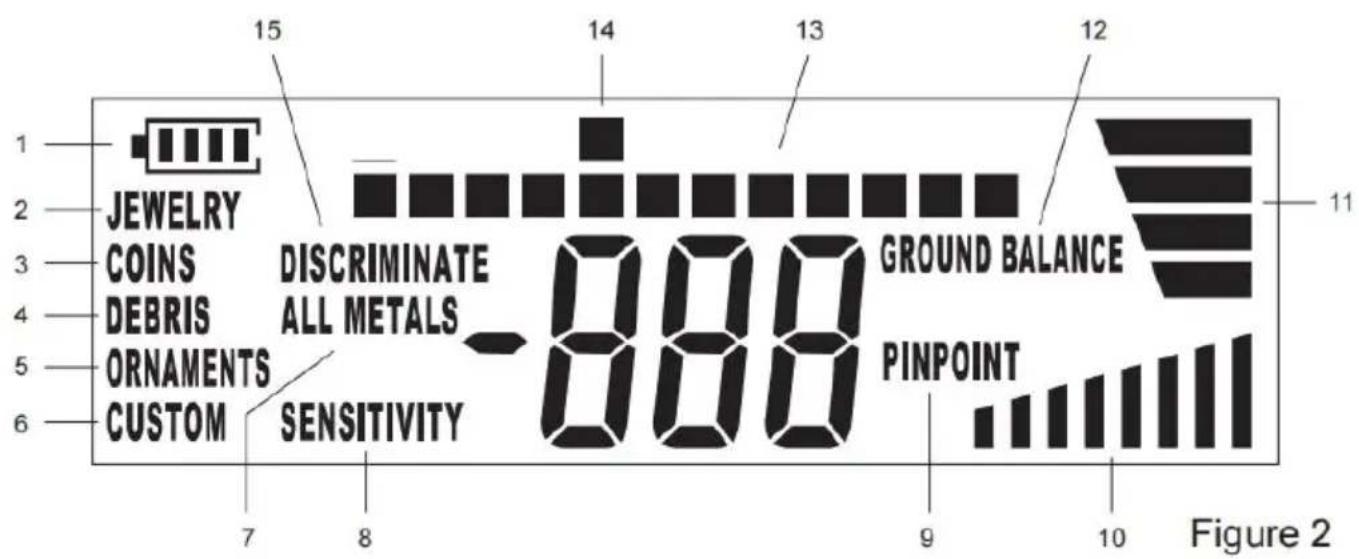
Explanations:
- Battery level indicator.
- JEWELRY The metal detector is in JEWELRY mode.
- COINS The metal detector is in COINS mode.
- DEBRIS The metal detector is in DEBRIS mode.
- ORNAMENTS The metal detector is in ORNAMENTS mode.
- CUSTOM The metal detector is in CUSTOM mode.
- ALL METALS The metal detector is in All Metals Mode.
- SENSITIVITY The metal detector is in sensitivity adjustment mode.
- PINPOINT The metal detector is in PINPOINT mode.
- Sensitivity indicator bars.

- Target depth indicator bars
- GROUND BALANCE .....The metal detector is in ground balance adjustment mode.
- Horizontal scale that shows the current discrimination pattern, with lighted pixels indicating accepted targets and blank pixels indicating rejected targets.
- .....Target ID cursor.
- DISCRIMINATE .....The metal detector is in a Discrimination Mode.
Overall Structure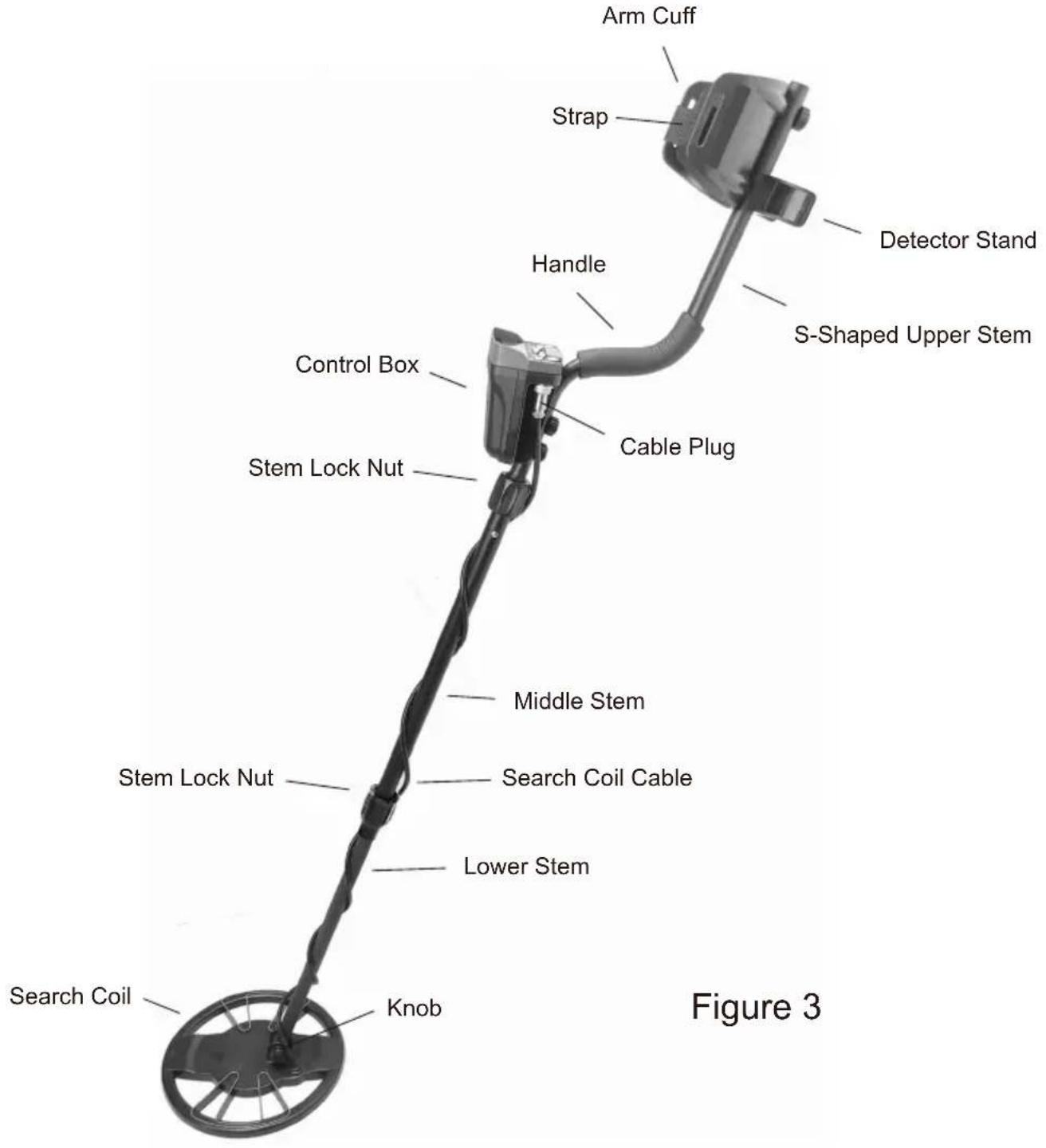
Upper Part Structure
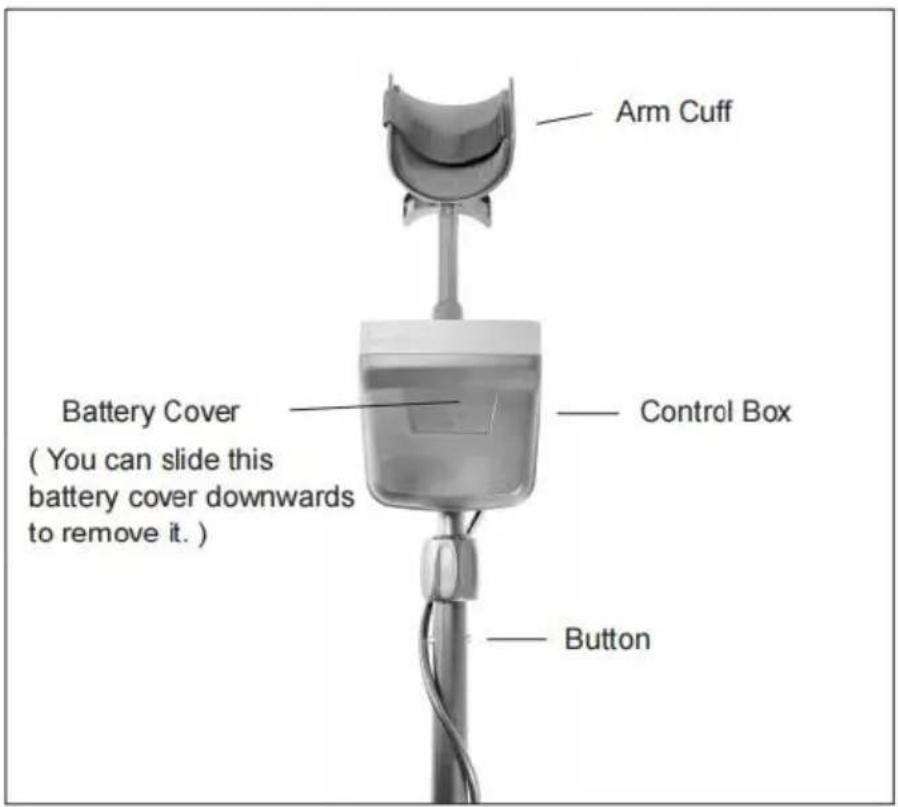
Figure 4. Front View of the Upper Part of the Detector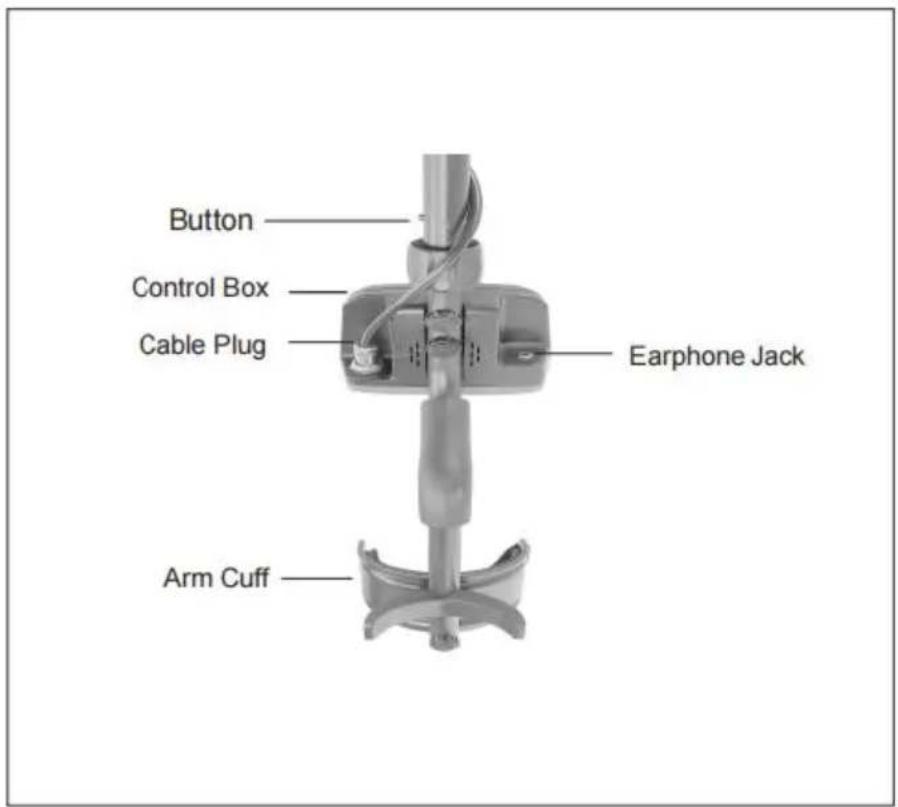
Figure 5. Back View of the Upper Part of the Detector
Assembly Drawing
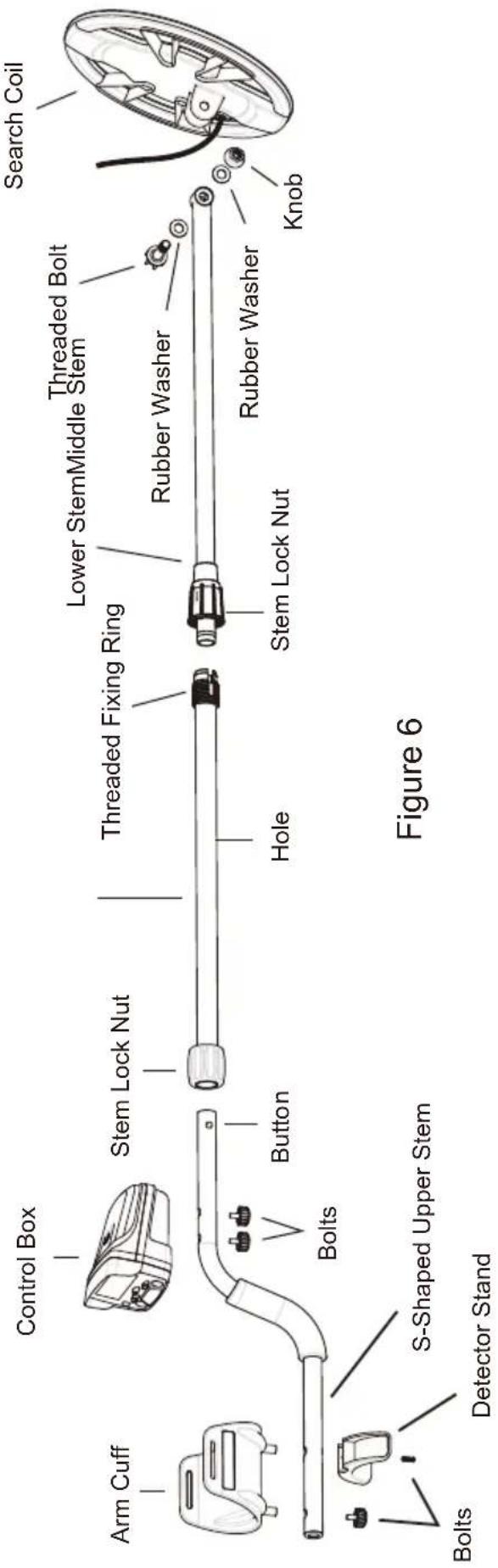
Note:
- The two rubber washers are to be placed in the two circular slots, on two sides of the end of the lower stem, before slipping the search coil over the end of the lower stem.
- Gently turn the relevant stem lock nut on the middle stem in the proper direction to fasten the lower stem only after the lower stem is inserted into the middle stem and the two buttons on the lower stem pop into the holes on the middle stem. Similarly, gently turn the relevant stem lock on the middle stem in the proper direction to fasten the S-shaped upper stem only after the upper stem is inserted into the middle stem and the two buttons on the upper stem pop into the desired holes on the middle stem.
- To avoid damage, do not pull the cable with force.
How to adjust the length of the detector:
- Gently and counterclockwise turn the lower stem lock nut until it is
- Depress the two lower buttons on the middle stem, and adjust the stem's position until the two buttons pop into the desired holes on the middle stem. (Tip: To be able to adjust the lower stem's position, it is necessary to further insert the lower stem into the middle stem a little, then turn the lower stem a little while depressing the two buttons.)
- Turn the stem lock nut clockwise until the lower stem is secured.
Target ID Legend
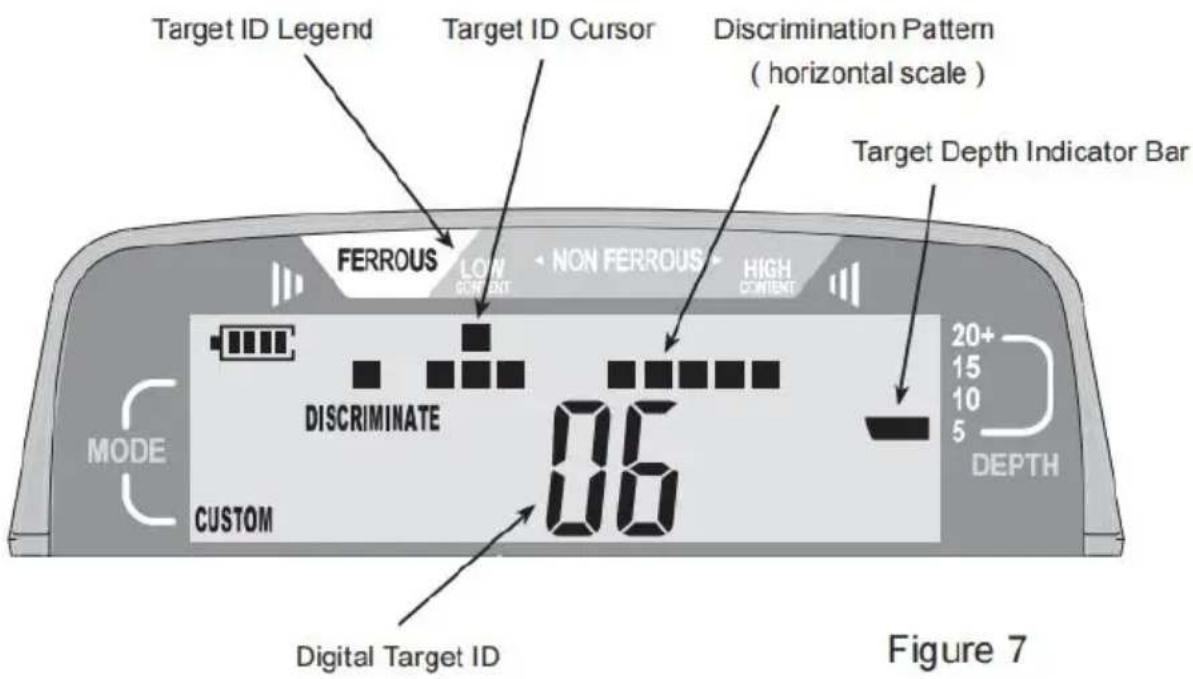
The Target ID Legend functions with the Target ID Cursor to indicate the probable metal type of the target, with ferrous (iron) targets at the left, non-ferrous targets which are thin or have low conductivity in the middle, and thick or high conductivity targets at the right.
Horizontal Scale
The horizontal scale shows the present discrimination pattern, with light pixels indicating accepted targets and blank pixels indicating rejected targets.
Target ID Cursor
When the detector detects a target, a Target ID Cursor will display the target if the metal signal is strong enough; but the detector will produce an audible signal only for targets accepted on the horizontal scale and will probably not produce an audible signal for objects rejected on the horizontal scale.
Digital Target ID
Provides a two-digit number to identify the target more precisely than the Target ID Cursor. Target ID can vary widely based on the target's size and thickness because small, thin pieces of metal cannot conduct electric current as well as thicker pieces of metal. Moreover, mineralized soils cause Target ID errors, especially for small targets.
Note:
Soil mineralization reaction can be eliminated most efficiently when the target is centered under the search coil and the search coil is swept at a constant height above the ground. After the detector detects a target, you can perform detection on this target several times and discard wrong Target ID readings obtained and take only correct Target ID readings. The smaller the indicated depth of burial, the stronger the detected metal signal, and the more reliable the Target ID reading.
Category Value
| Iron Ferrous metal- nails, bolts, stainless steel, cast iron | Foil Aluminum, tin foil | Nickel US 5¢ coin, newer pull tabs | Pull Tab Older pull tabs | Small Cap Bottle screw cap | Zinc US pennies, Canadian 1 &2 | Dime US 10¢ coin, older copper pennies | Quarter US 25¢ coin, US silver dollar, US half-dollar |
Note: Silver and Gold can be in multiple spectrums.
Figure 8
When the detected metal signal is strong enough, a target ID cursor appears in a certain position to indicate the probable metal type (or category) of the detected metallic object. According to the position of the target ID cursor, you can predict the probable metal type (or categorize the detected object) by referring to Figure 8 and the Target ID Legend (Figure 7) above the target ID cursor. Figure 8 is essentially similar to the Target ID Legend, but the information contained in Figure 8
is expressed using words and is far more detailed than the information contained on the Target ID Legend. You can use Figure 8 in conjunction with the target ID cursor like you use the Target ID Legend.
Coins will most likely have a similar value with each pass with the coil due to their round shape. Gold and silver can actually be detected at various category values due to their metallic qualities. Smaller gold or silver objects will have a value different from that of a larger gold object. Trash objects can give off a different value each time the search coil passes over it. The angle of the detector can also affect the identification of an object. If you decide to test the detector by passing a coin across the search coil, pass it with its flat side parallel to the search coil; this is how you will find most buried coins.
Figure 9 shows an example display shown when the metal detector detects a US 25-cent coin buried about 15 cm below the ground surface.
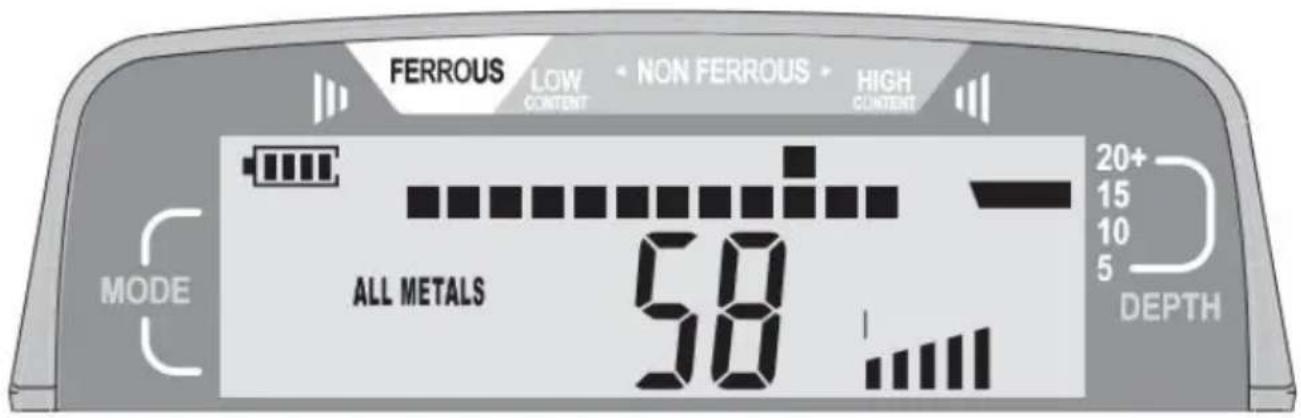
Figure 9
The All Metals Mode allows the detector to achieve the maximum depth possible.
Press the ON/OFF button to turn on the metal detector. To select the All Metals Mode, press the "ALL-METAL/DISC" button until the symbol "ALL METALS" appears on the display.
1. Adjust the Sensitivity
Hold the detector by its handle. Lift and adjust the search coil so the search coil is about 50 cm above and parallel to the ground. The detector sensitivity is adjusted via the "SENSITIVITY/MODE SELECTION" button, and the number of the displayed sensitivity indicator bars graphically indicates the present sensitivity. Press the "+" or "-" side of the "SENSITIVITY/MODE SELECTION" button until a faint sound from the detector is heard.
To cancel out the minerals in the soil, you must perform ground balance adjustment before you start scanning in the All Metals Mode in a site.
- Hold the detector and move it to a place where there is no metal object in the ground under the search coil.
- Lift and adjust the search coil so that it is about 5 cm above and parallel to the ground.
- Press the "+" or "-" side of the "GROUND BALANCE/CUSTOM SELECTION" button once. The symbol "GROUND BALANCE" appears on the display, and the ground balance setting (which is in the range of +99) is shown on the display.
- Lower the search coil to approximately 5cm to 8cm above the ground. If the sound from the detector increases when the search coil is lowered to the ground, raise the search coil to about 50cm above the ground, and then press the "-" side of the "GROUND BALANCE/CUSTOM SELECTION" button to decrease the ground balance setting. If the sound from the detector decreases when the search coil is lowered to the ground, raise the search coil to about 50cm above the ground, and then press the "+" side of the "GROUND BALANCE/CUSTOM SELECTION" button to increase the ground balance setting.
Tip: Pressing and holding down the "+" or "-" side of the "GROUND BALANCE/CUSTOM SELECTION" button will increase or decrease the ground balance setting quickly.
- Repeat step 4 until the sound from the detector remains approximately unchanged when you lower and lift the search coil. Now the ground balance adjustment is completed.
- Begin Scanning
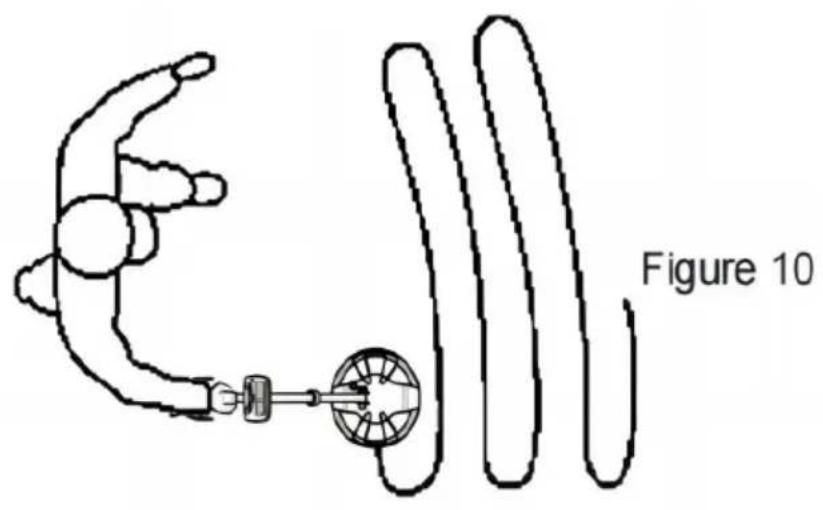
After you have completed the sensitivity adjustment and then the ground balance adjustment, you can start to scan for metallic objects or targets. During scanning, keep the search coil height approximately 5cm to 10cm above and parallel to the ground at all times for best detection results. Slowly scan the search coil in a straight line from side to side over the ground.
When the detector detects a metallic object, a target ID cursor will appear in a
certain position to indicate the probable metal type of the object being detected, and a digital target ID, which is a two-digit number, will be on the display if the strength of the detected metal signal exceeds the detector's identification threshold. At the same time, if the target is accepted by a lighted pixel on the horizontal scale, the sound from the detector will increase.
Because many factors (degree of oxidation of metallic object, metal impurities in soil, soil moisture content, size and metal content of the depth, etc.) can affect the target ID cursor indication and digital target ID, they are not accurate and are only for non-critical reference. The target ID cursor indication and digital target ID are not guaranteed to be correct.
When the detected metal signal is strong enough, the display will show a target depth indicator bar, which is to be used in conjunction with the scale for you to predict the distance between the detected object and the search coil. Because many factors can affect the indication of the target indicator bar, the indication of the target depth indicator bar is not accurate and is not guaranteed to be correct. It is only for non-critical reference.
During scanning, the search coil must be in motion. If the search coil is stationary, the detector cannot detect metal normally.
After you detect a metallic object, you can use the Pinpoint function to pinpoint this object. Precisely pinpointing an object allows you to quickly recover the ground because of the smallest digging hole possible.
Use the following procedure to pinpoint a target:
- Move the search coil around the detected metallic object to determine the
approximate location of this object. Then move the search coil to this location, and then hold the search coil in this location and above the detected object.
- Press and hold down the PINPOINT button. The display shows the symbol "PINPOINT" and all the 8 sensitivity indicator bars.
- Release the PINPOINT button and then immediately (within 1 second of releasing the button) press and hold the button again. The number of displayed sensitivity indicator bars decreases by 1, and the sound volume of the detector decreases accordingly.
- Move the search coil a short distance toward the metal signal source (the detected object) according to the volume of the sound. The sound volume of the detector increases as the search coil approaches the signal source (the detected object).
- Repeat steps 3 and 4 to approach the target progressively. In the end, the target can be pinpointed.
Note:
The detector exits the PINPOINT mode automatically about 3 seconds after you release the PINPOINT button.
If you want to detect a specific type (or kind) of metallic objects while largely ignoring other types of metallic objects during scanning, you should select a suitable Discrimination Mode. There are 5 Discrimination Modes in total: JEWELRY mode, COINS mode, DEBRIS mode,
ORNAMENTS mode, and CUSTOM mode. You can select any of these modes to meet your need.
The detector has 12 pixels or "notches" of discrimination, shown on the horizontal scale (see Figures 2 and 7). In any Discrimination Mode, a detected target that is accepted by a lighted pixel on the horizontal scale will cause an increase in sound, and targets that are rejected by a blank pixel on the horizontal
scale will probably not cause an increase in sound.
Among these modes, the JEWELRY mode, COINS mode, DEBRIS mode, and ORNAMENTS mode are preset and cannot be modified, but in CUSTOM mode, you can modify the present discrimination pattern freely to create a desired discrimination pattern to better meet your need.
To select a desired Discrimination Mode, first make sure that the detector is in a Discrimination Mode. If the detector is in the All Metals Mode ("METALS" is displayed), press the "ALL-METAL/DISC" button until the symbol "DISCRIMINATE" appears on the display. Then press the "+" side of the "SENSITIVITY/MODE SELECTION" to select among the Discrimination Modes.
Whenever a mode is selected, the display will show the corresponding mode indicator (see Figure 2) to indicate the presently selected mode.
The five Discrimination Modes are explained as follows:
• JEWELRY Mode
Designed to find jewelry such as rings, watches, bracelets, and necklaces while ignoring most iron trash.
• COINS Mode
The COINS mode is designed to find US coins and similar coins and eliminate common trash items such as iron and foil. Be aware that medium-sized jewelry may be missed with this discrimination pattern and that some junk targets (such as aluminum cans) may be detected, causing an increase in sound.
- DEBRIS Mode
The DEBRIS mode is designed to detect debris while eliminating (ignoring) small iron pieces.
• ORNAMENTS Mode
The ORNAMENTS mode is designed to detect most kinds of metallic ornaments.
- CUSTOM Mode
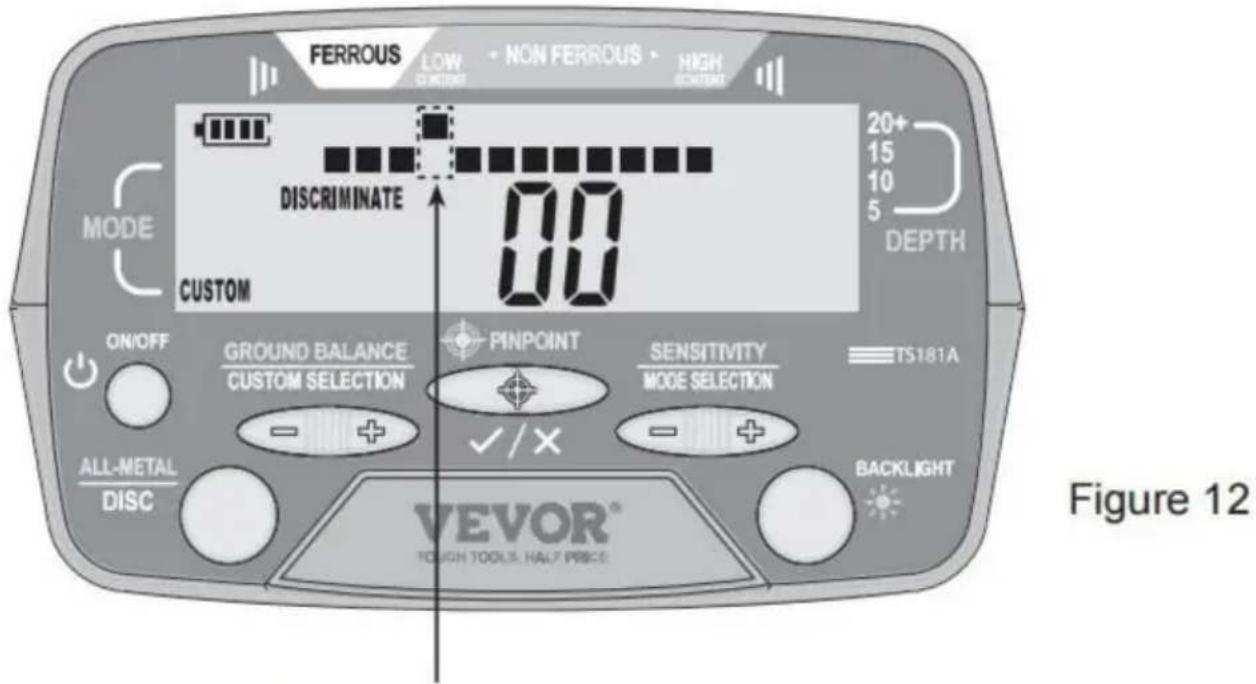
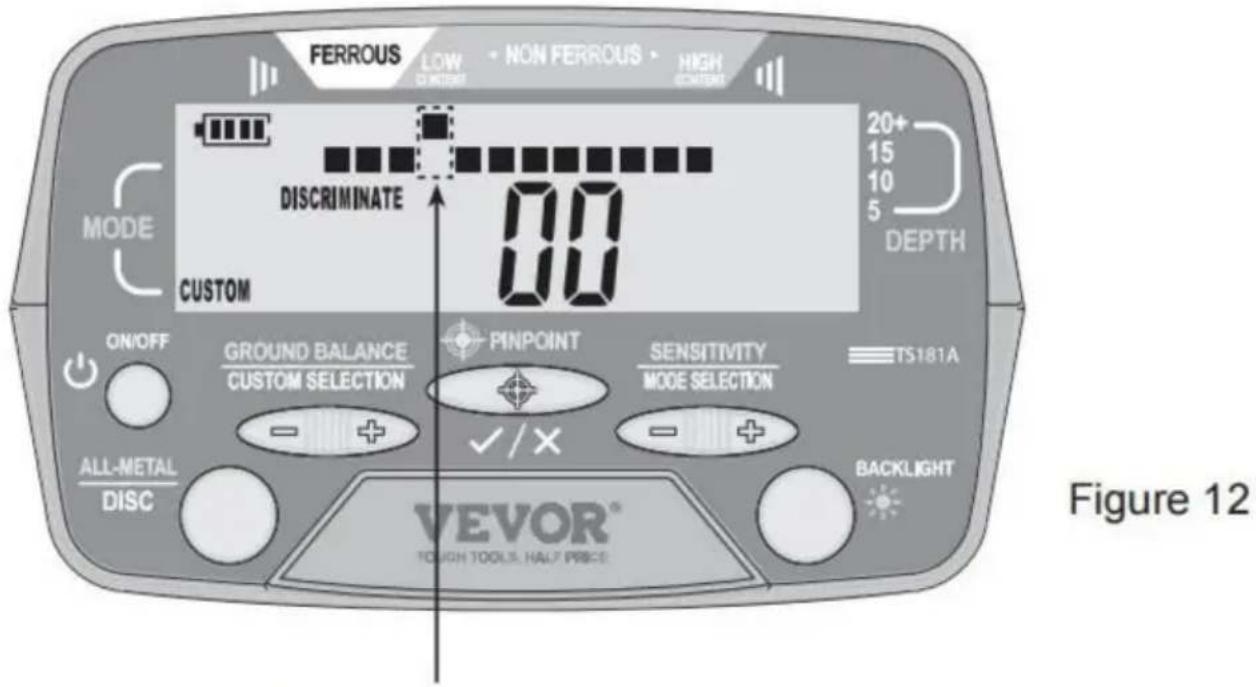
The detector has 12 pixels or "notches" of discrimination, shown on a horizontal scale. The CUSTOM mode allows you to modify the preset discrimination pattern freely and create a desired discrimination pattern. To do it, first make sure that the detector is in the CUSTOM mode and the search coil is far away from any metallic object and interference source. Press the "+" or "-" side of the "GROUND BALANCE/CUSTOM SELECTION" button to move the Target ID Cursor to the right or left until it is in the desired position. Then press the "PINPOINT" button to eliminate or activate the pixel located on the horizontal scale, directly below the Target ID Cursor. (See Figures 11 and 12.)
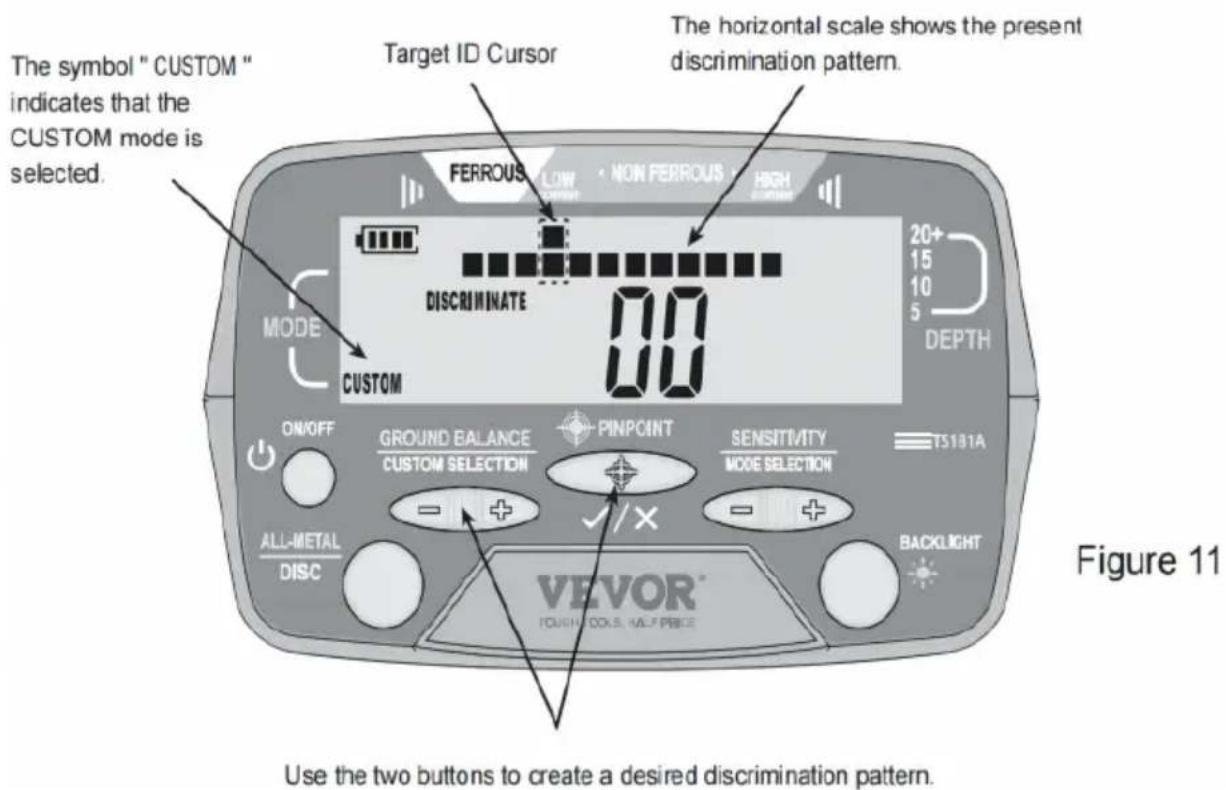
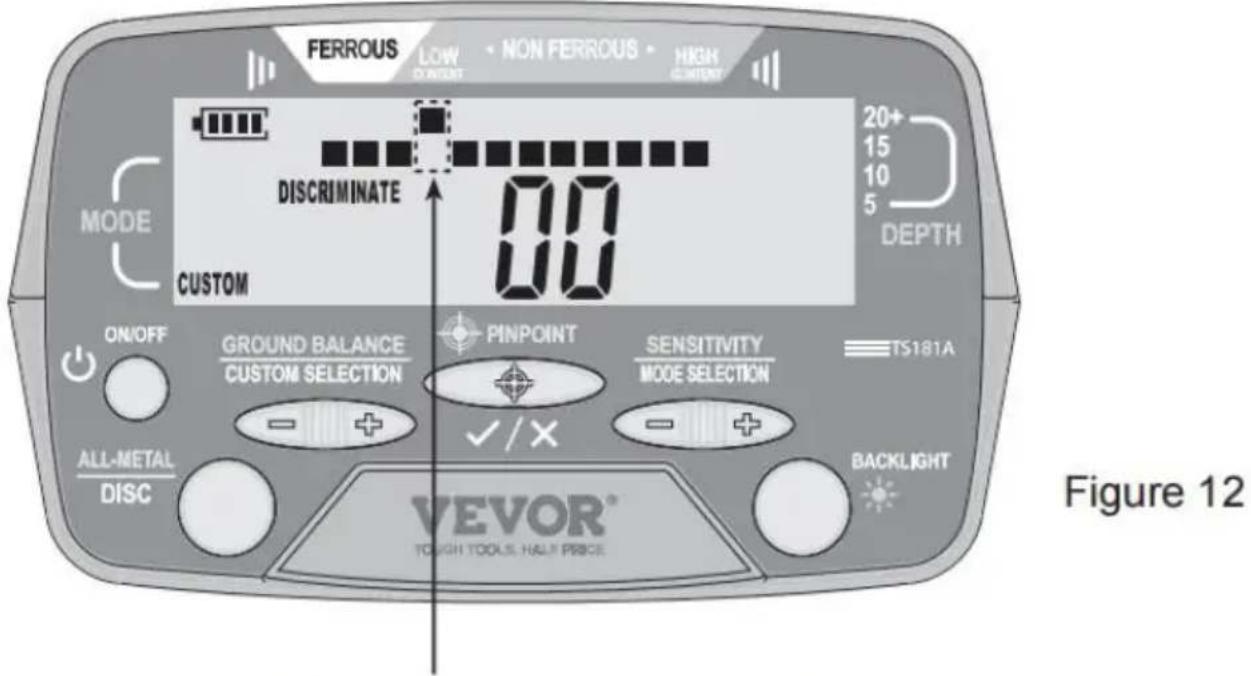
The pixel which is on the horizontal scale and directly below the Target ID Cursor has been eliminated.
After you have selected a desired Discrimination Mode or created a desired discrimination pattern in the CUSTOM mode, you can start to search for metallic objects or targets. The scanning method is the same as the All Metals
Mode.
When the detector detects a metallic object, a target ID cursor will be in a certain position to indicate the probable metal type of the object detected, and a digital target ID, which is a two-digit number, will be on the display if the strength of the detected metal signal exceeds the detector's identification threshold. At the same time, if the target is accepted by a lighted pixel on the horizontal scale, the detector will beep(s).
Because many factors (degree of oxidation of metallic object, metal impurities in soil, soil moisture content, size and metal content of the depth, etc.) can affect the target ID cursor indication and digital target ID, the target ID cursor indication and digital target ID are not accurate
only for non-critical reference. The target ID cursor indication and digital target ID are not guaranteed
to be correct.
When the detected metal signal is strong enough, the display will show a target depth indicator bar, which is to be used in conjunction with the scale for you to predict the distance between the detected object and search coil. The indication of the target depth indicator bar is not acceptable and is not guaranteed to be correct. It is only for non-critical reference.
During scanning, the search coil must be in motion. If the search coil is stationary, the detector cannot detect metal normally.
6-FREQUENCY AUDIO ALARM FUNCTION
In any Discrimination Mode, the detector can produce 6 kinds of alarm tones for different types of metal objects, which is intended to help identify the probable metal type of the detected object. For a specific detected object which is accepted by a lighted pixel on the horizontal scale, the detector will produce a specific tone.
USING THE BACKLIGHT
When using the detector in a dim environment, you can turn on the backlight for easy operation. To turn on or off the backlight, briefly press the "BACKLIGHT" button when the detector is on.
CHANGING THE OPERATING CHANNEL OF THE DETECTOR
When there are two same metal detectors operating in the same site, you can set them to two different operating channels to avoid crosstalk (interference) between them.
When the detector is turned on, it defaults to channel 0. You can hold down the "BACKLIGHT" button for about 2 seconds to switch the detector between channel 0 and channel 1; the display will briefly indicate the presently selected channel.
USING THE EARPHONE
The detector can work with the earphone (optional). To use the earphone, just insert the plug of the earphone into the earphone jack on the control box; the loudspeaker in the control box will be disabled automatically.
Note:
For safety, do not use earphone (or headphone) near traffic.
To avoid hearing loss, do not use earphone (or headphone) if using makes you feel uncomfortable.
TROUBLESHOOTING
| SYMPTOM | SOLUTION |
| The detector can not be turned on. | 1. Make sure that the batteries are installed in correct orientation.2. Replace the old batteries with new ones of the sa |
| Erratic sounds or target ID cursor movement | 1. Ensure that the search coil is securely connected at the search coil cable is snugly wound around the ste2. When using the detector indoors, be aware that ex electrical interference is present and that floors and w may contain reinforcing steel rods or other metallic ob3. Make certain whether the search coil is near other detector or other metallic object ( such as electrical p line, wire fence, etc ).4. Reduce the detector sensitivity when in the All Me Mode. |
| Intermittent Signals | Intermittent signals typically mean that the detector have detected a deeply buried metal object or one that is positioned at an angle difficult for the detector to read Scan from different directions to help define the signal case of multiple targets, switch to the All Metals Mod use the pinpointing function of the detector to precisely locate all targets.NOTE:Iron objects may cause intermittent signals. You can ir iron objects in the All Metals Mode. |
| The detector is incapable of finding specific targets | Ensure that you are using a suitable detection mode. want to detect coins, the COINS mode is probably the choice to eliminate other unwanted metal objects.You can also use the All Metals Mode, which detects metal targets to ensure that desired targets can be d |
| Target ID Cursor bounces | If Target ID Cursor bounces erratically, the detector m have detected a junk object or the metal signal is to However, Target ID Cursor may bounce if a good tan ( such as a coin ) is not parallel to the search coil target is below the edge of the search coil. Target ID may also bounce if there is one or several junk obje existing beside the good target. Move the search coil different directions until Target ID Cursor becomes mor stable.Note:Large iron plates, depending on their orientation in the can read as a good target or cause Target ID Curso erratically. |
BATTERY REPLACEMENT
The battery level indicator on the display shows the current battery level. Four bars ( ) indicate that the batteries are fully charged. To avoid performance degradation or abnormal operation, replace the batteries immediately when the battery level indicator shows " " (there is one bar on the indicator).
To replace the batteries, first turn off the detector. Then slide down the battery cover, which is located on the front of the control box (refer to Fig. remove the battery cover). Replace the old batteries with new ones of the same type, making
sure that the polarity connections are correct (see the polarity indicator at the bottom of the battery compartment). Reinstall the battery cover.
NOTE
- Turn off the detector when not in use.
- If the detector operates abnormally, a possible cause is that the batteries are exhausted. Replace the batteries if necessary.
- Protect the plug of the search coil cable from damp; otherwise the detector may lose its detecting ability. Dry the plug as needed.
- The control box is not waterproof. Protect the control box from water; do not use the detector in rain.
- Do not place the detector in any high temperature environment.
- Handle the detector carefully. Do not bump, drop, or abuse the detector.
- Do not tamper with the circuit of the detector.
WARNING
Any metal detector may discover underground power lines, explosives, or other items which, when struck, could cause personal injury. When searching for metal objects, adhere to the following guidelines:
- Do not search in an area where you believe there may be buried underground electric lines or pipes.
- Do not strike any line known to be or suspected to be carrying electric power.
- Do not disturb any pipeline, particularly if it could be carrying flammable gas or liquid.
- Use reasonable caution when digging toward any object, particularly in areas where you are uncertain of underground conditions.
- For safety, do not go to minefields or military zones.
- Observe all national, state, and local laws while detecting.
ACCESSORIES
Manual: 1 piece
Earphone: 1 piece
Handbag: 1 piece
Digging shovel: 1 piece
Earphone plug: 1 piece
Battery: 6 pieces
Coil protection cover: 1 piece
DECLARATION
- This manual is subject to change without notice.
- Our company will not take any other responsibilities for any loss.
- The contents of this manual cannot be used as a reason to use the detector for any special application.
Address: Shuangchenglu 803nong11hao1602A-1609shi, Baoshanqu, Shanghai 200000 CN.
Imported to AUS: SIHAO PTY LTD, 1 ROKEVA STREETEASTWOOD NSW 2122 Australia
Imported to USA: Sanven Technology Ltd, Suite 250, 9166 Anaheim Place, Rancho Cucamonga, CA 91730
E-CrossStu GmbH.
Mainzer Landstr.69, 60329 Frankfurt am Main.
YH CONSULTING LIMITED.
K/O YH Consulting Limited Office 147, Centurion House, London Road, Staines-upon-Thames, Surrey, TW18 4AX
VEVOR®
TOUGH TOOLS, HALF PRICE
Technical Support and E-Warranty Certificate
www.vevor.com/support
VEVOR®
Figure 4. Front View of the Upper Part of the Detector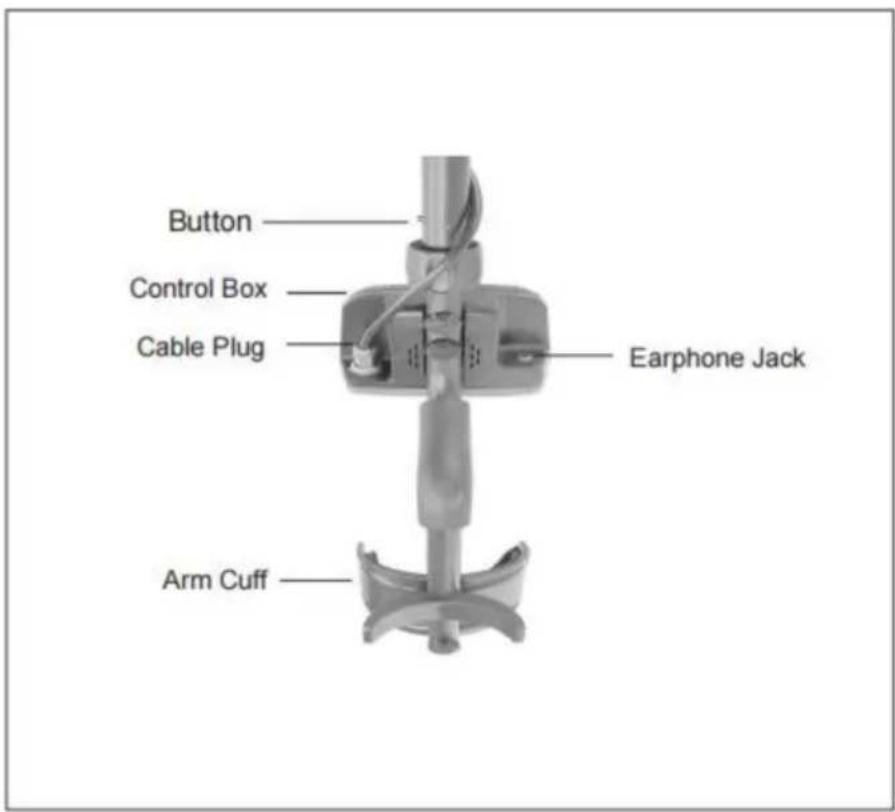
Figure 5. Back View of the Upper Part of the Detector
Assembly drawing
Figure 6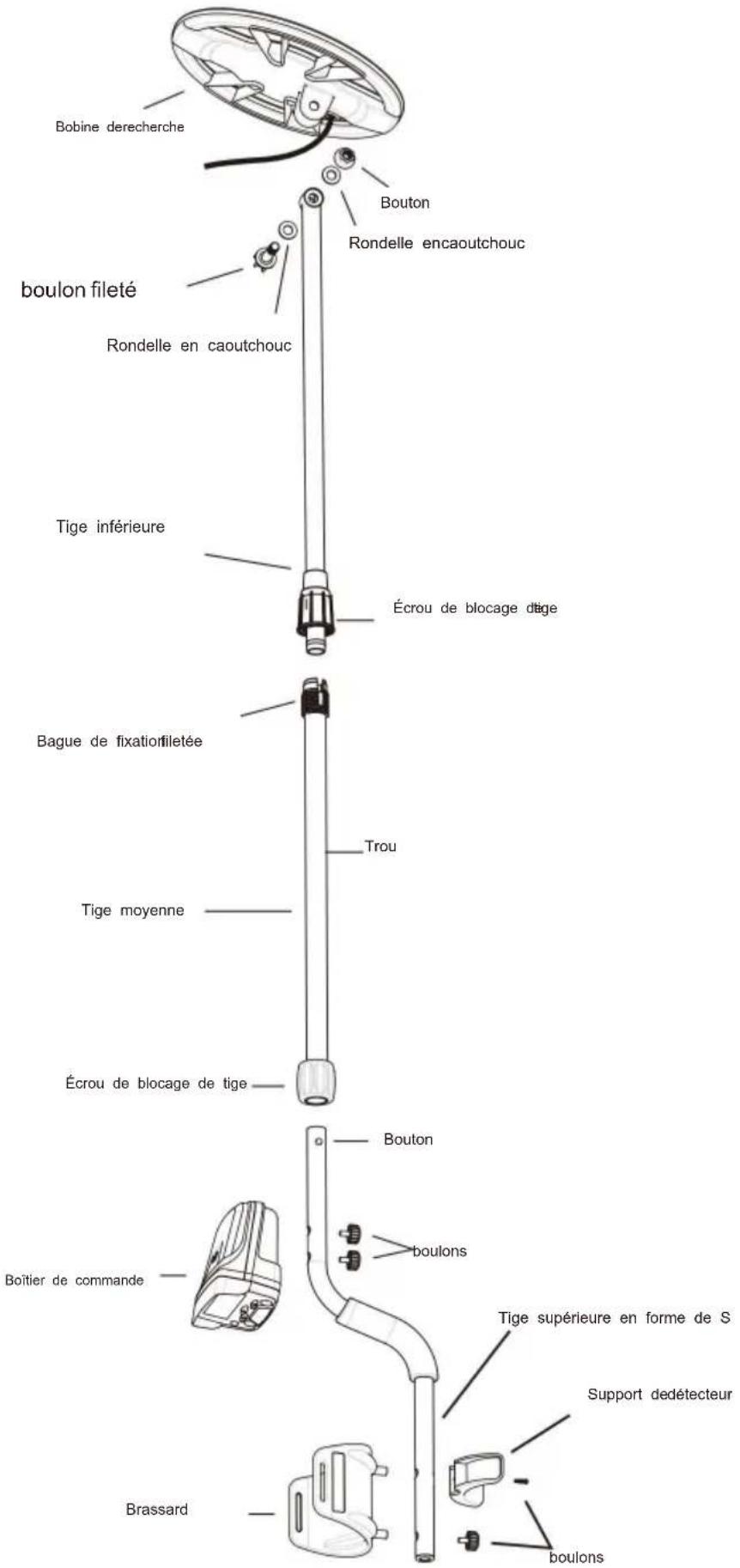
| Iron Ferrous metal- nails, bolts, stainless steel, cast iron | Foil Aluminum, tin foil | Nickel US 5¢ coin, newer pull tabs | Pull Tab Older pull tabs | Small Cap Bottle screw cap | Zinc US pennies, Canadian 1 &2 | Dime US 10¢ coin, older copper pennies | Quarter US 25¢ coin, US silver dollar, US half-dollar |
Note: Silver and Gold can be in multiple spectrums.
Figure 8
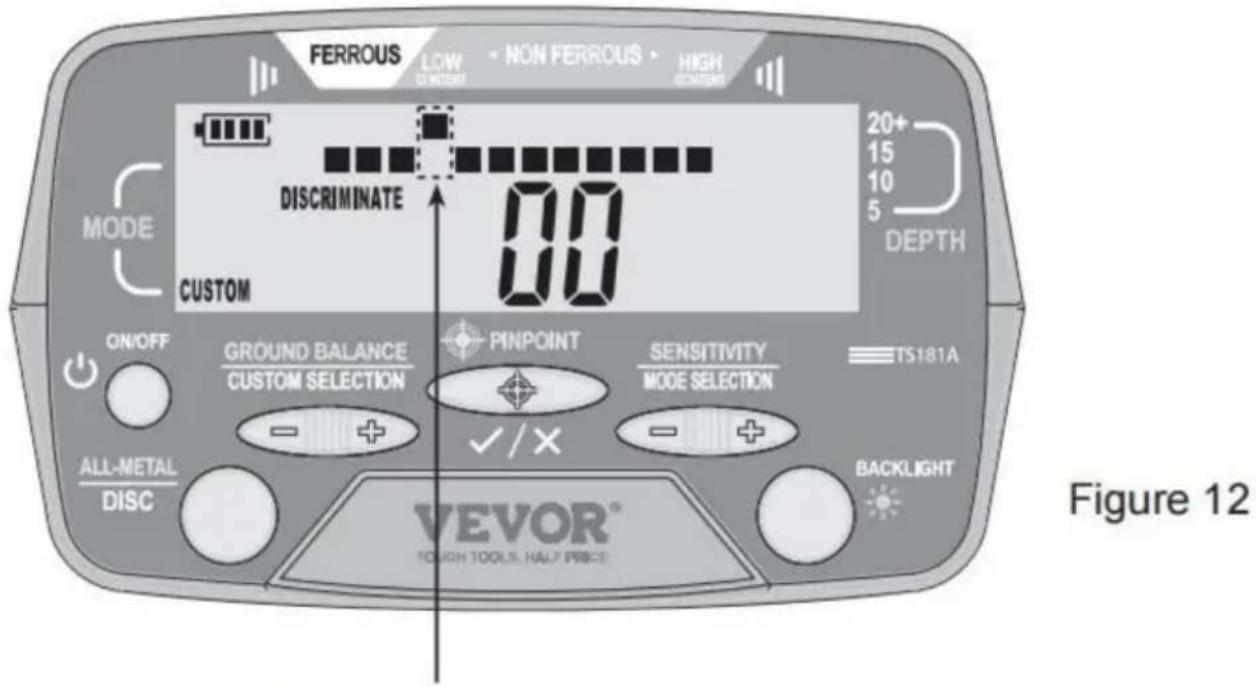
The pixel which is on the horizontal scale and directly below the Target ID Cursor has been eliminated.
A/S YH Consulting Limited Bureau 147, Centurion House, London Road, Staines-upon-Thames, Surrey, TW18 4AX
VEVOR®
TOUGH TOOLS, HALF PRICE
Figure 4. Front View of the Upper Part of the Detector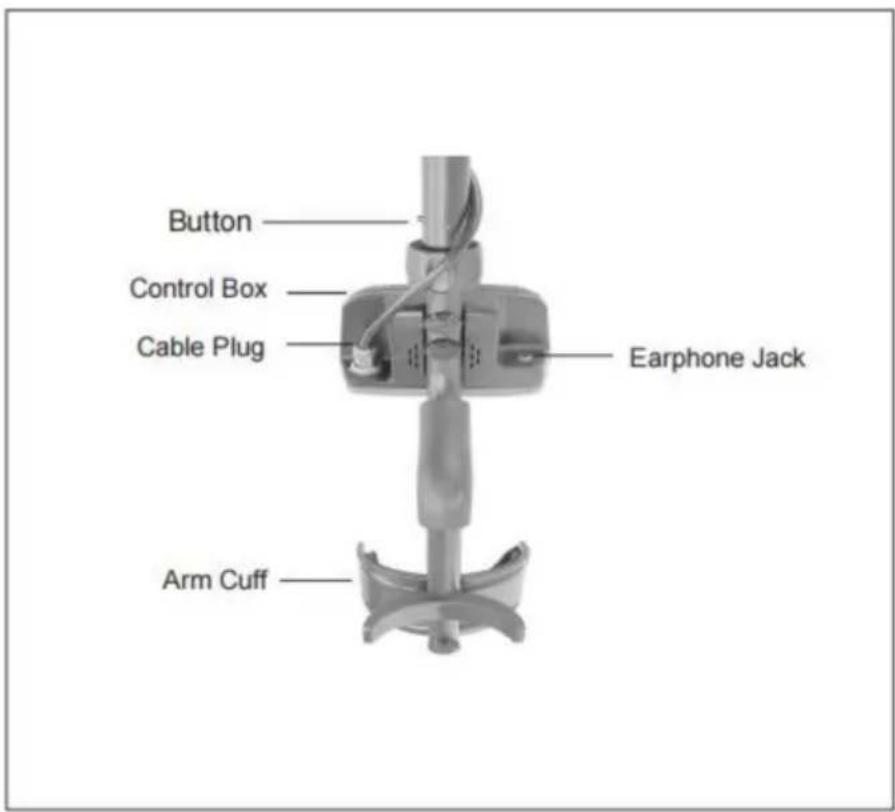
Figure 5. Back View of the Upper Part of the Detector
| Iron Ferrous metal- nails, bolts, stainless steel, cast iron | Foil Aluminum, tin foil | Nickel US 5¢ coin, newer pull tabs | Pull Tab Older pull tabs | Small Cap Bottle screw cap | Zinc US pennies, Canadian 1 &2 | Dime US 10¢ coin, older copper pennies | Quarter US 25¢ coin, US silver dollar, US half-dollar |
Note: Silver and Gold can be in multiple spectrums.
Figure 8
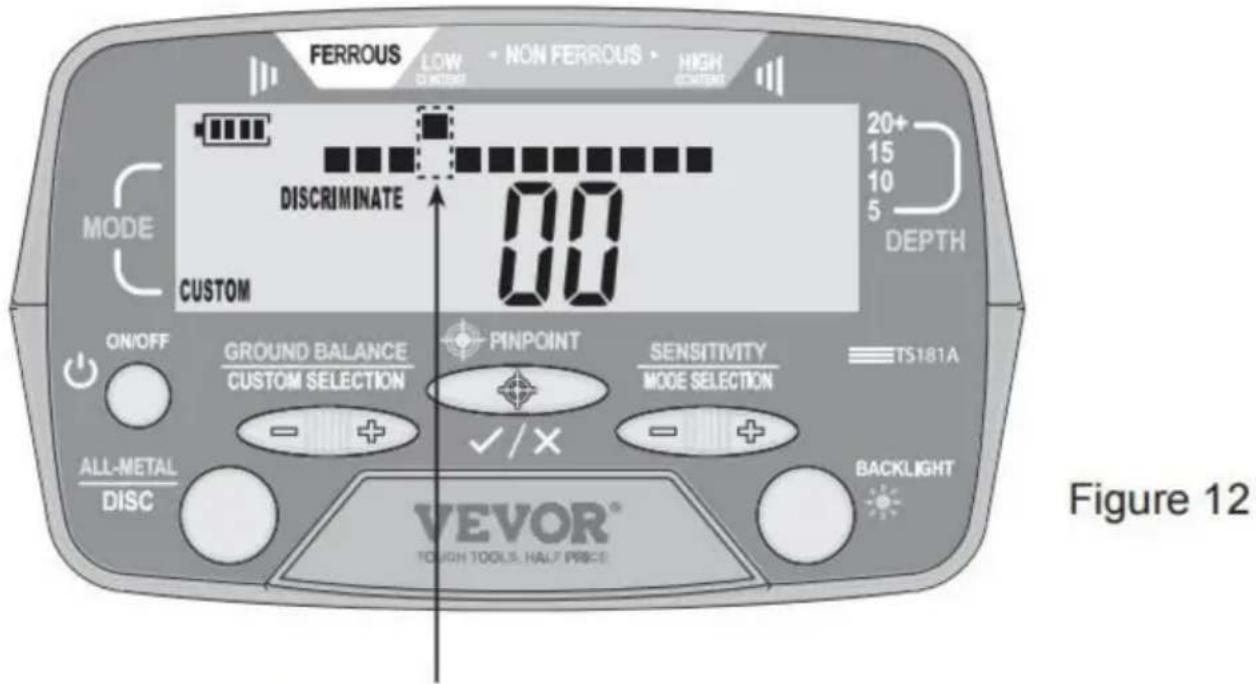
The pixel which is on the horizontal scale and directly below the Target ID Cursor has been eliminated.
C/O YH Consulting Limited Office 147, Centurion House, London Road, Staines-upon-Thames, Surrey, TW18 4AX
VEVOR®
TOUGH TOOLS, HALF PRICE
www.vevor.com/support
Explanations:
Figure 4. Front View of the Upper Part of the Detector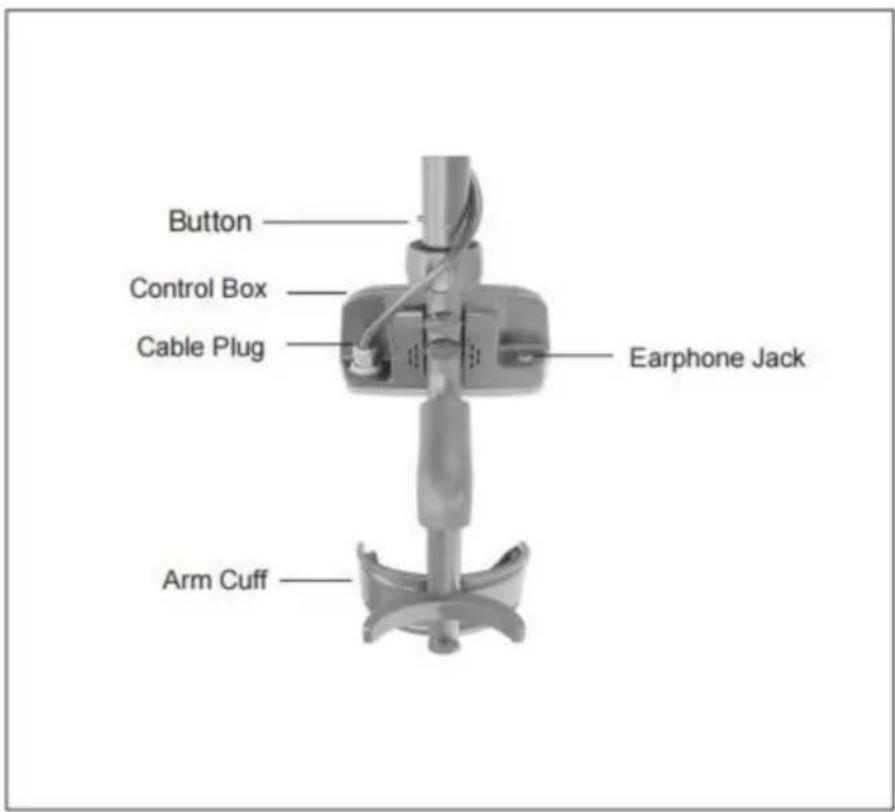
Figure 5. Back View of the Upper Part of the Detector
Assembly drawing
Figure 6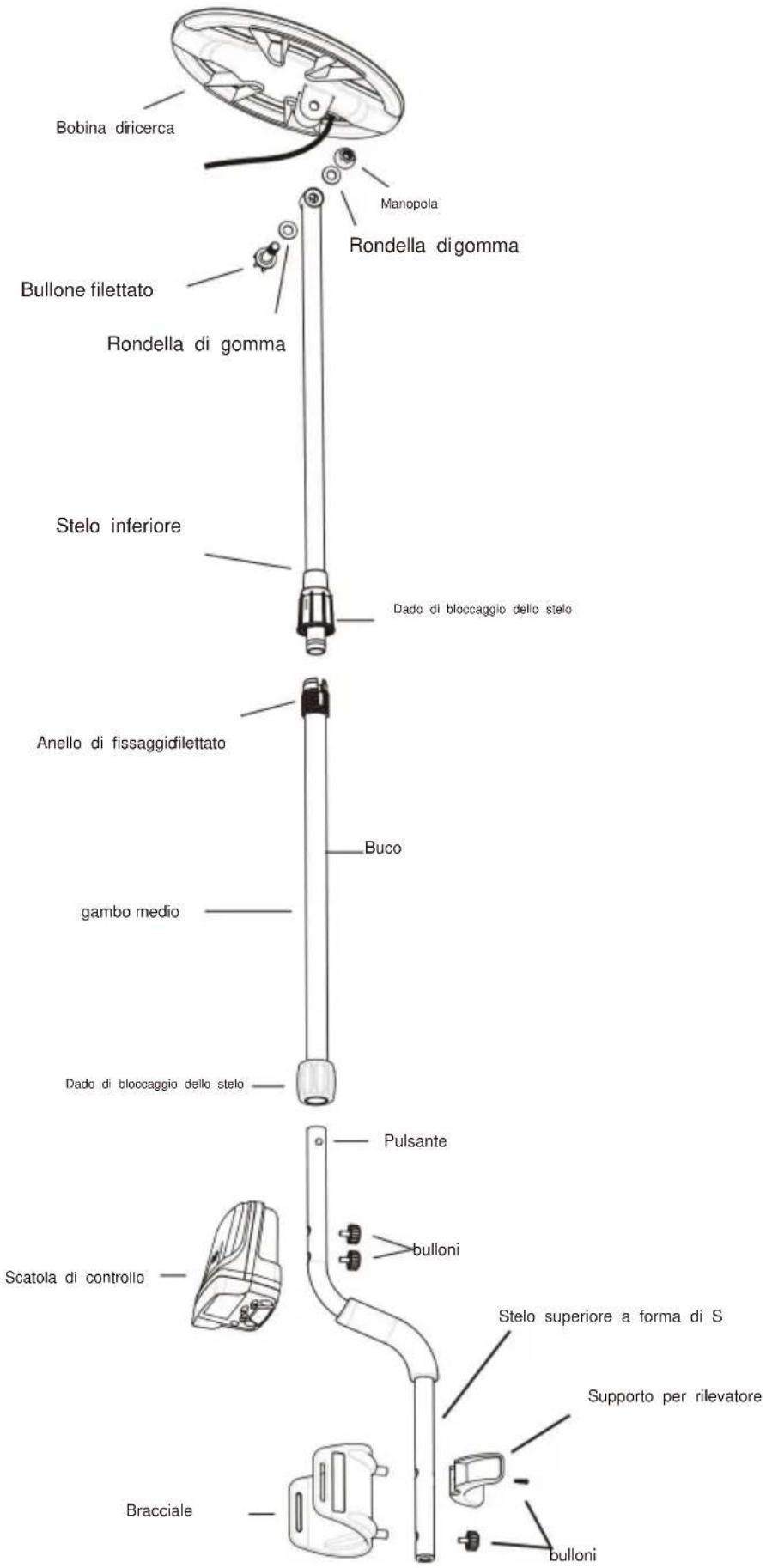
| Iron Ferrous metal- nails, bolts, stainless steel, cast iron | Foil Aluminum, tin foil | Nickel US 5¢ coin, newer pull tabs | Pull Tab Older pull tabs | Small Cap Bottle screw cap | Zinc US pennies, Canadian 1 &2 | Dime US 10¢ coin, older copper pennies | Quarter US 25¢ coin, US silver dollar, US half-dollar |
Note: Silver and Gold can be in multiple spectrums.
Figure 8
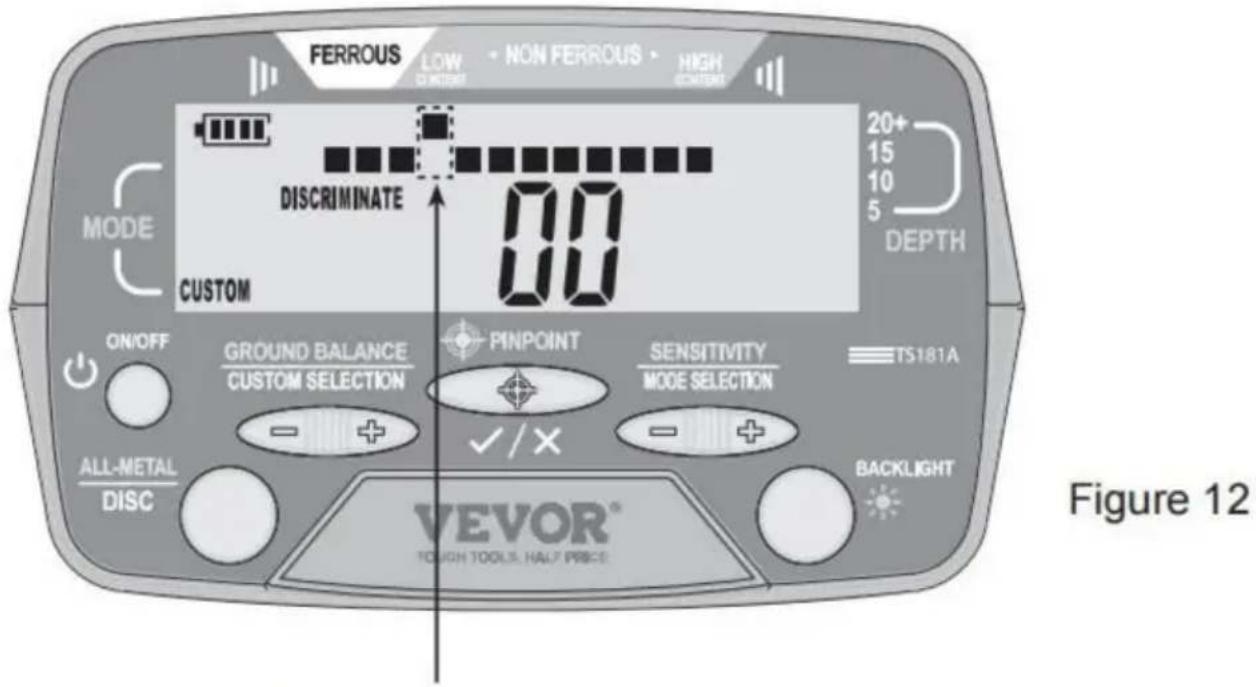
The pixel which is on the horizontal scale and directly below the Target ID Cursor has been eliminated.
Imported into AUS: SIHAO PTY LTD, 1 ROKEVA STREETEASTWOOD
C/O YH Consulting Limited Office 147, Centurion House, London Road, Staines-upon-Thames, Surrey, TW18 4AX
VEVOR®
TOUGH TOOLS, HALF PRICE
Figure 4. Front View of the Upper Part of the Detector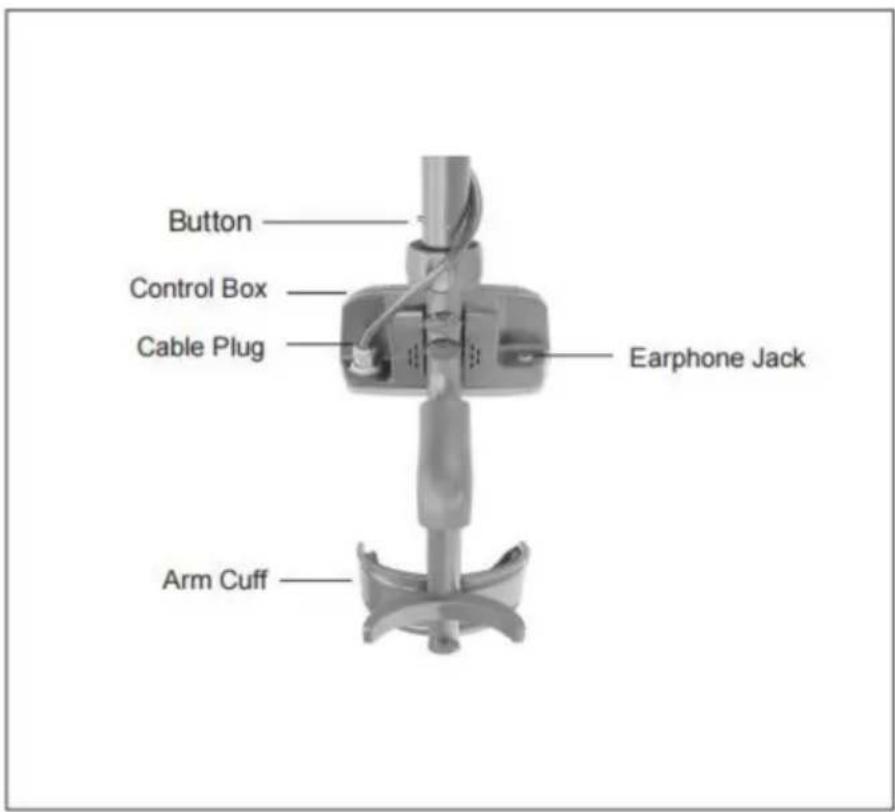
Figure 5. Back View of the Upper Part of the Detector
Assembly drawing
Figure 6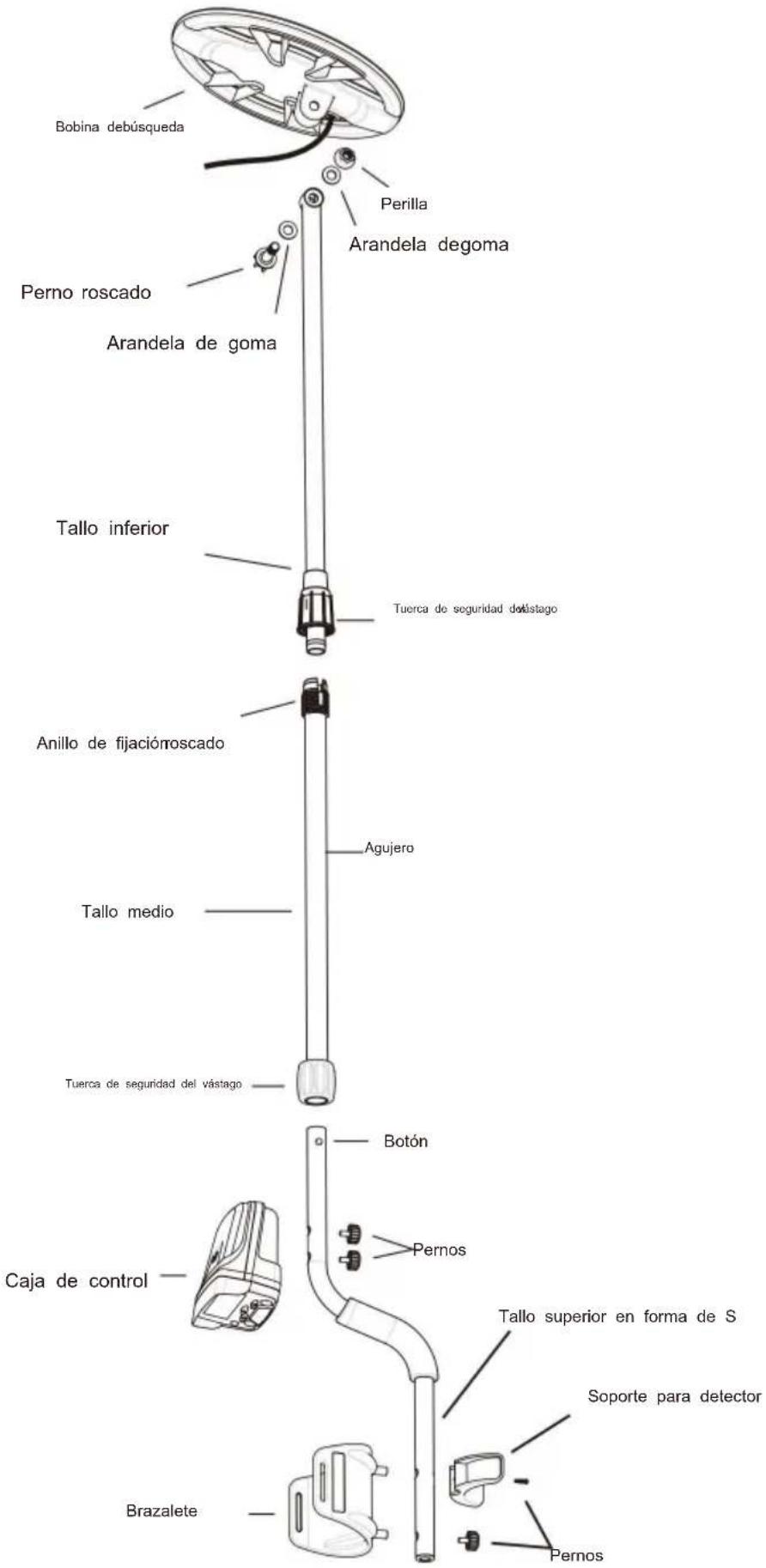
| Iron Ferrous metal- nails, bolts, stainless steel, cast iron | Foil Aluminum, tin foil | Nickel US 5¢ coin, newer pull tabs | Pull Tab Older pull tabs | Small Cap Bottle screw cap | Zinc US pennies, Canadian 1 &2 | Dime US 10¢ coin, older copper pennies | Quarter US 25¢ coin, US silver dollar, US half-dollar |
Note: Silver and Gold can be in multiple spectrums.
Figure 8
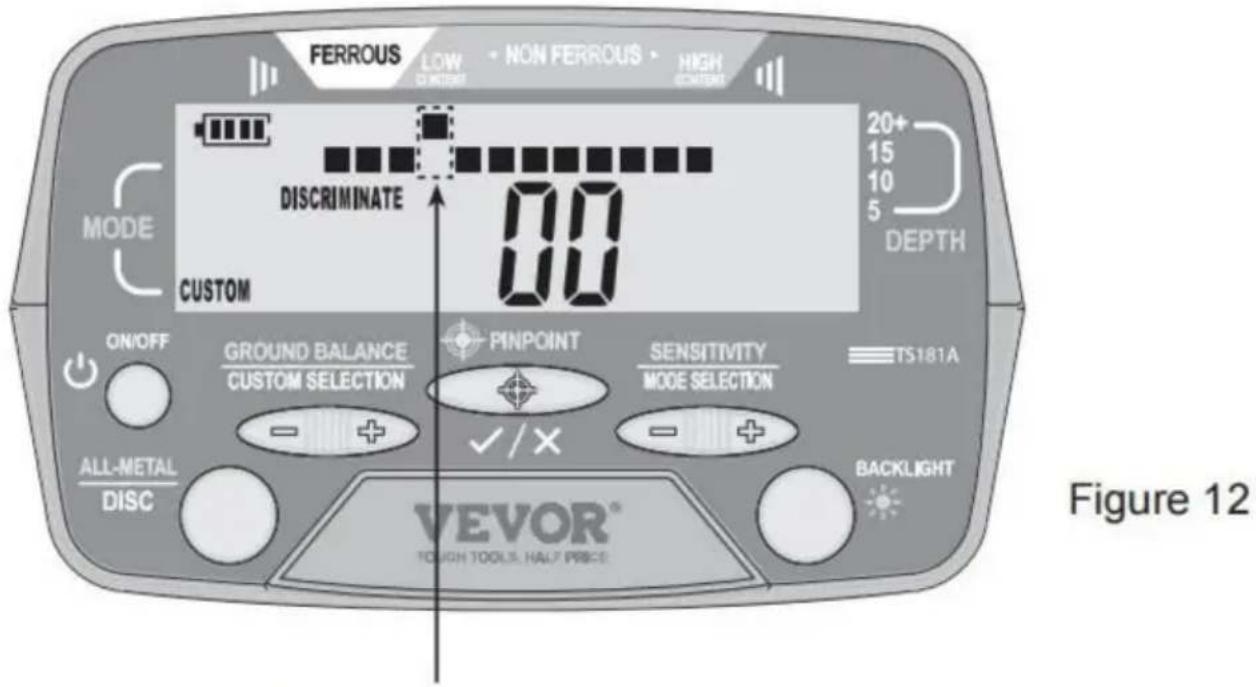
The pixel which is on the horizontal scale and directly below the Target ID Cursor has been eliminated.
Imported to AUS: SIHAO PTY LTD, 1 ROKEVA STREET, EASTWOOD NSW 2122 Australia
Imported to USA: Sanven Technology Ltd, Suite 250, 9166 Anaheim Place, Rancho Cucamonga, CA 91730
C/O YH Consulting Limited Office 147, Centurion House, London Road, Staines-upon-Thames, Surrey, TW18 4AX
VEVOR®
TOUGH TOOLS, HALF PRICE
NEED HELP? CONTACT US!
Figure 4. Front View of the Upper Part of the Detector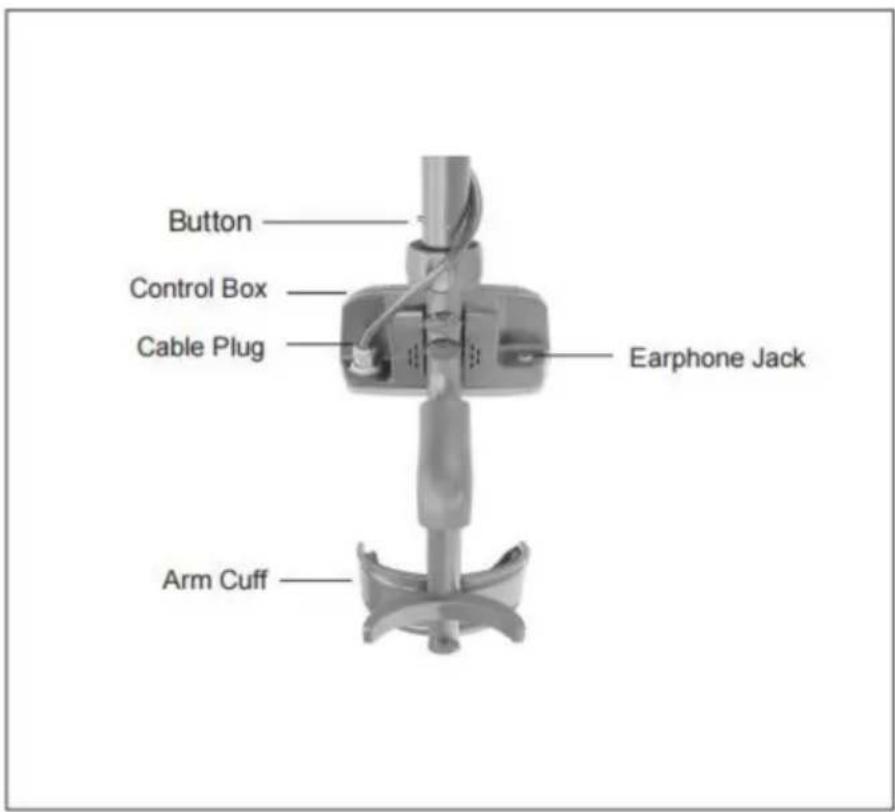
Figure 5. Back View of the Upper Part of the Detector
Assembly drawing
Figure 6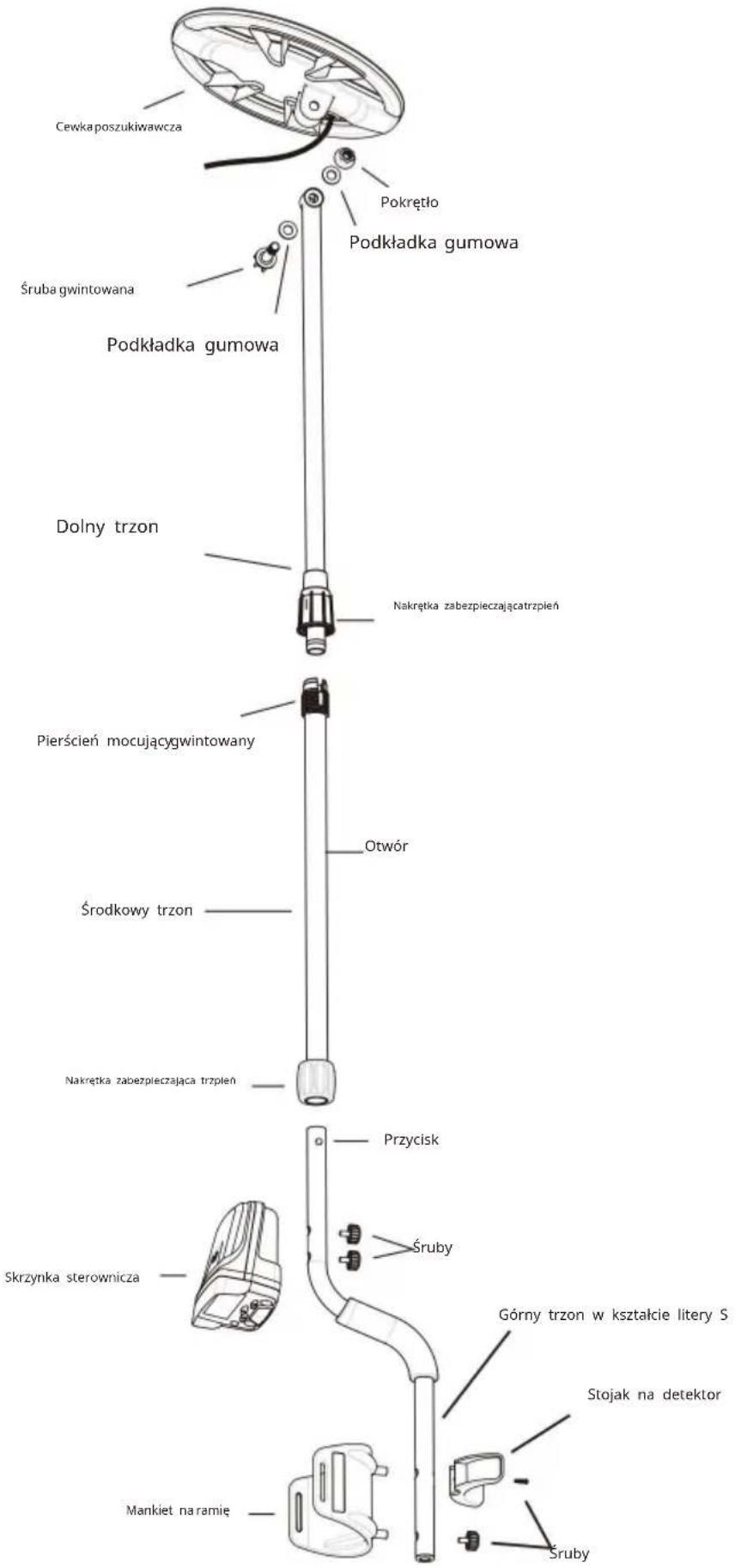
| IronFerrous metal-nails, bolts,stainless steel,cast iron | FoilAluminum,tin foil | NickelUS 5¢ coin,newer pull tabs | Pull TabOlder pull tabs | Small CapBottle screw cap | ZincUS pennies,Canadian1 &2 | DimeUS 10¢ coin,older copperpennies | QuarterUS 25¢ coin,US silver dollar,US half-dollar |
Note: Silver and Gold can be in multiple spectrums.
Figure 8
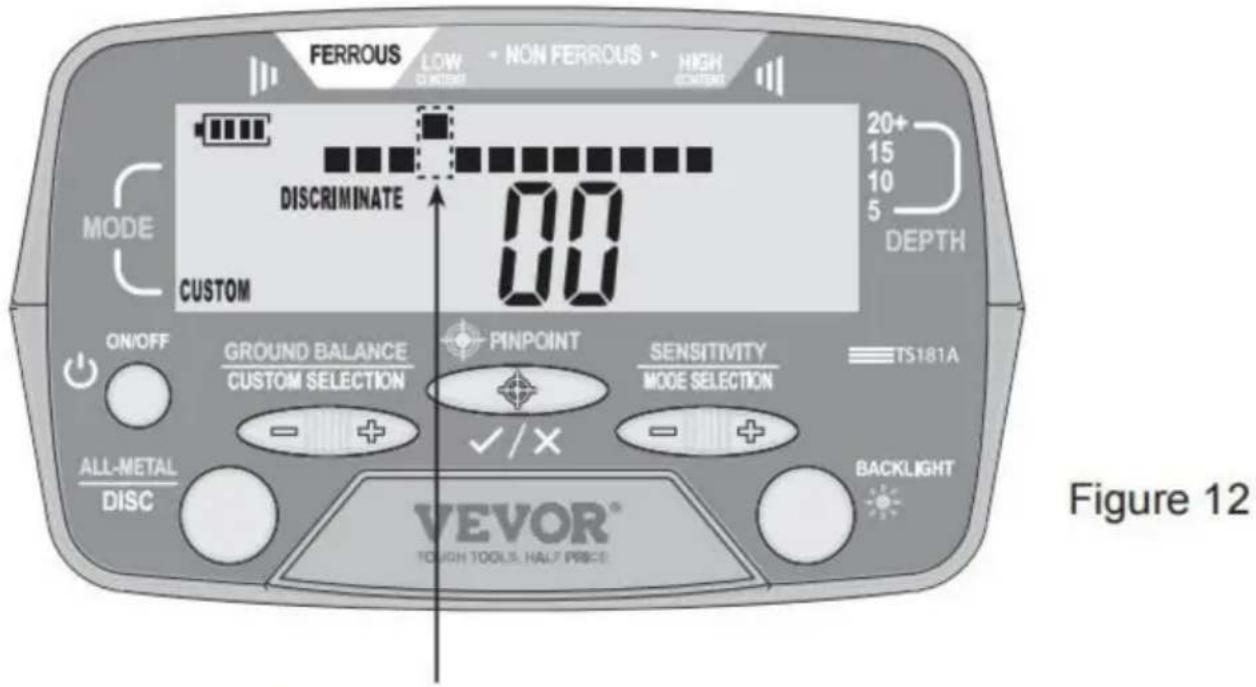
The pixel which is on the horizontal scale and directly below the Target ID Cursor has been eliminated.
Imported into AUS: SIHAO PTY LTD, 1 ROKEVA STREETEASTWOOD NSW 2122 Australia
C/O YH Consulting Limited Office 147, Centurion House, London Road, Staines-upon-Thames, Surrey, TW18 4AX
VEVOR®
TOUGH TOOLS, HALF PRICE
www.vevor.com/support
Figure 4. Front View of the Upper Part of the Detector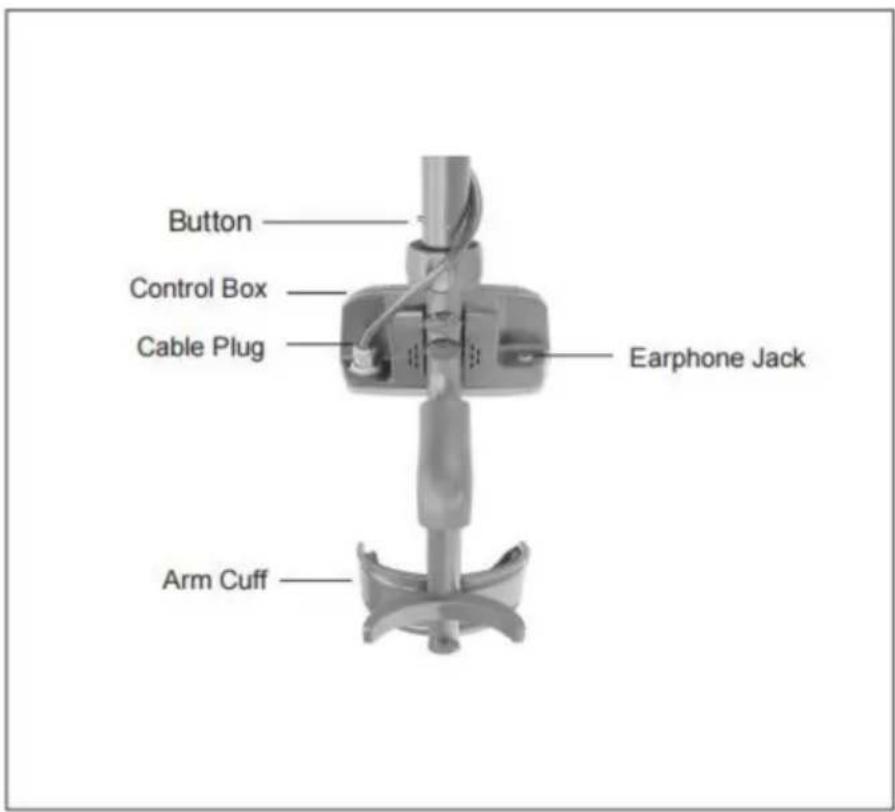
Figure 5. Back View of the Upper Part of the Detector
Assembly drawing
Figure 6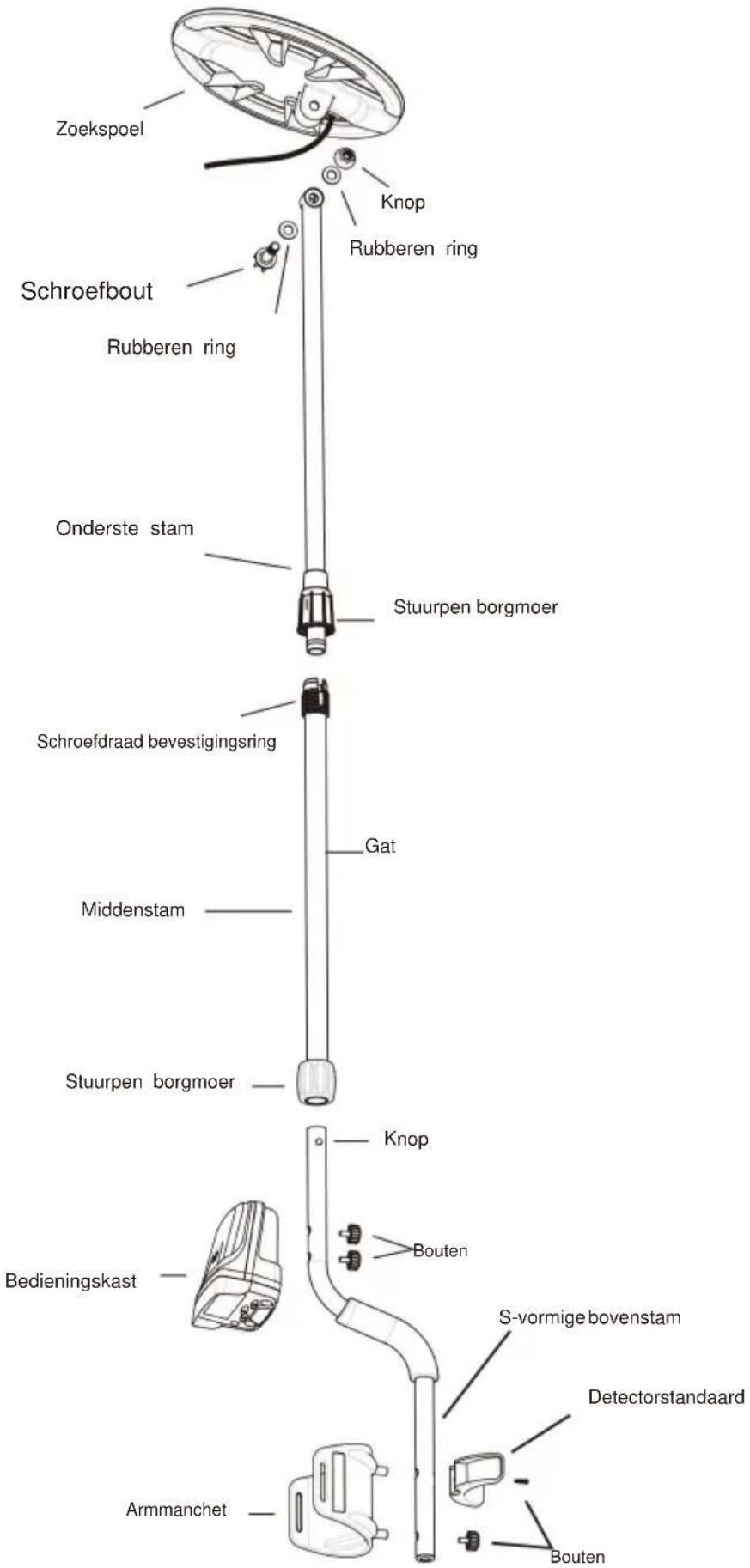
| Ferrous | Non-Ferrous |
| | | | | | Gold | Silver |
| LOW CONTENT | HIGH CONTENT |
| Iron
Ferrous metal-
nails, bolts,
stainless steel,
cast iron | Foil
Aluminum,
tin foil | Nickel
US 5¢ coin,
newer pull tabs | Pull Tab
Older pull tabs | Small Cap
Bottle screw
cap | Zinc
US pennies,
Canadian
1 &2 | Dime
US 10¢ coin,
older copper
pennies | Quarter
US 25¢ coin,
US silver dollar,
US half-dollar |
Note: Silver and Gold can be in multiple spectrums.
Figure 8
The pixel which is on the horizontal scale and directly below the Target ID Cursor has been eliminated.
VEVOR®
TOUGH TOOLS, HALF PRICE
Technical support and e-warranty certificate www.vevor.com/support
VEVOR®
NEED HELP? CONTACT US!
www.vevor.com/support
Explanations:
Figure 4. Front View of the Upper Part of the Detector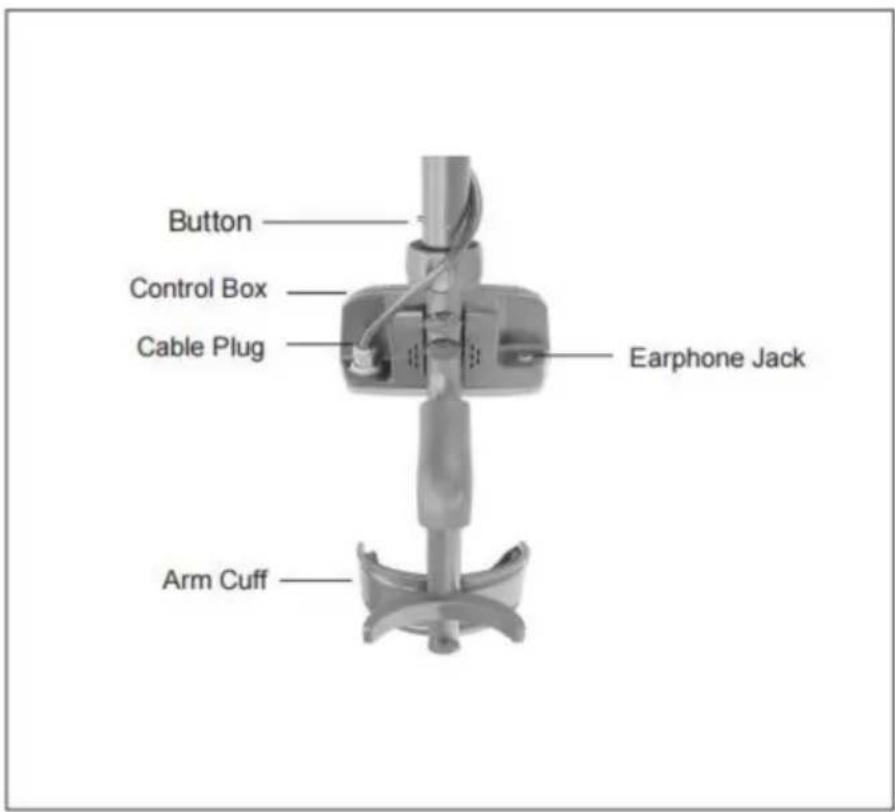
Figure 5. Back View of the Upper Part of the Detector
Mounting drawing
Figure 6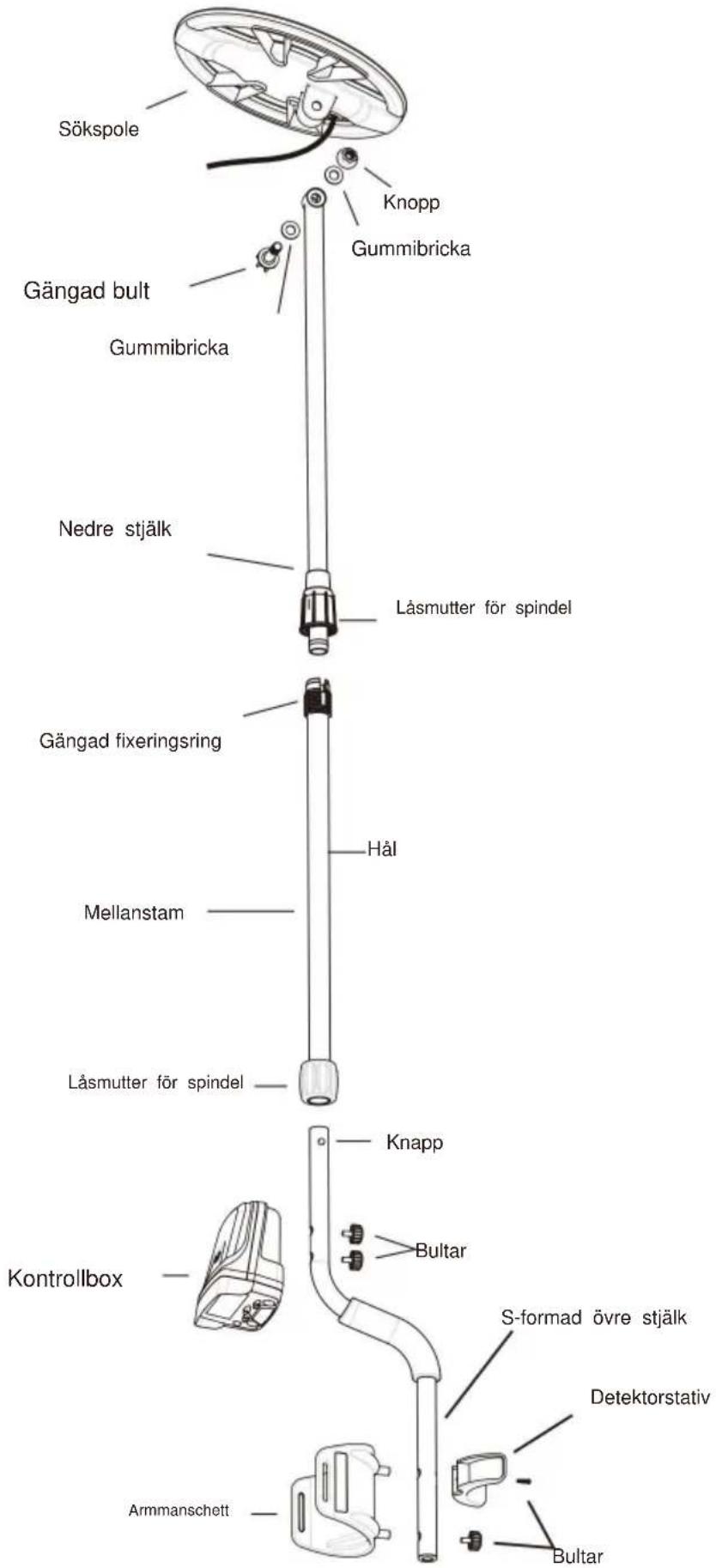
Note:
| Ferrous | Non-Ferrous |
| | | | | | Gold | Silver |
| LOW CONTENT | HIGH CONTENT |
| Iron
Ferrous metal-
nails, bolts,
stainless steel,
cast iron | Foil
Aluminum,
tin foil | Nickel
US 5¢ coin,
newer pull tabs | Pull Tab
Older pull tabs | Small Cap
Bottle screw
cap | Zinc
US pennies,
Canadian
1 &2 | Dime
US 10¢ coin,
older copper
pennies | Quarter
US 25¢ coin,
US silver dollar,
US half-dollar |
Note: Silver and Gold can be in multiple spectrums.
Figure 8
The pixel which is on the horizontal scale and directly below the Target ID Cursor has been eliminated.
C/O YH Consulting Limited Kontor 147, Centurion House, London Road, Staines-upon-Thames, Surrey, TW18 4AX
VEVOR®
TOUGH TOOLS, HALF PRICE
www.vevor.com/support