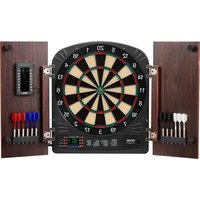
9176WD - Toys Vevor - Free user manual and instructions
Find the device manual for free 9176WD Vevor in PDF.


| Product type | Electronic dartboard with 40 built-in games and more than 590 variants |
| Brand | Vevor |
| Model | 9176WD |
| Material | Plastic with electronic segments |
| Dimensions | Approximately 45 cm diameter (standard board) |
| Weight | Approximately 2.3 kg |
| Power supply | 3 AA 1.5V batteries (LR6) or 5V DC, 1A power adapter (not included) |
| Number of players | 1 to 8 players |
| Main functions | 40 games, 590+ options, electronic scoring, automatic calculation, handicap modes, cricket, league, etc. |
| Dart type | Soft tip darts (max weight 12 g, max length 2.5 cm) |
| Wall mounting | Bullseye height 172.72 cm from floor, throwing distance 244 cm |
| Care and cleaning | Clean with a soft dry cloth. Avoid liquids. Check batteries regularly. |
| Safety | Contains small parts (choking hazard). Adult supervision required. Do not use steel tip darts. |
| Spare parts and repairability | Replacement darts available. In case of malfunction, contact Vevor support. |
| General information | Auto-off after 30 min. CE and FCC compliant. Protection class III. |
Frequently Asked Questions - 9176WD Vevor
User questions about 9176WD Vevor
0 question about this device. Answer the ones you know or ask your own.
Ask a new question about this device
Download the instructions for your Toys in PDF format for free! Find your manual 9176WD - Vevor and take your electronic device back in hand. On this page are published all the documents necessary for the use of your device. 9176WD by Vevor.
USER MANUAL 9176WD Vevor
Technical Support and E-Warranty Certificate
www.vevor.com/support
DARTBOARD AND CABINET SET
Model:9176WD
We continue to be committed to provide you tools with competitive price. "Save Half", "Half Price" or any other similar expressions used by us only represents an estimate of savings you might benefit from buying certain tools with us compared to the major top brands and does not necessarily mean to co\ all categories of tools offered by us. You are kindly reminded to verify carefully when you are placing an order with us if you are actually Saving Half in comparison with the top major brands.
Model:9176WD
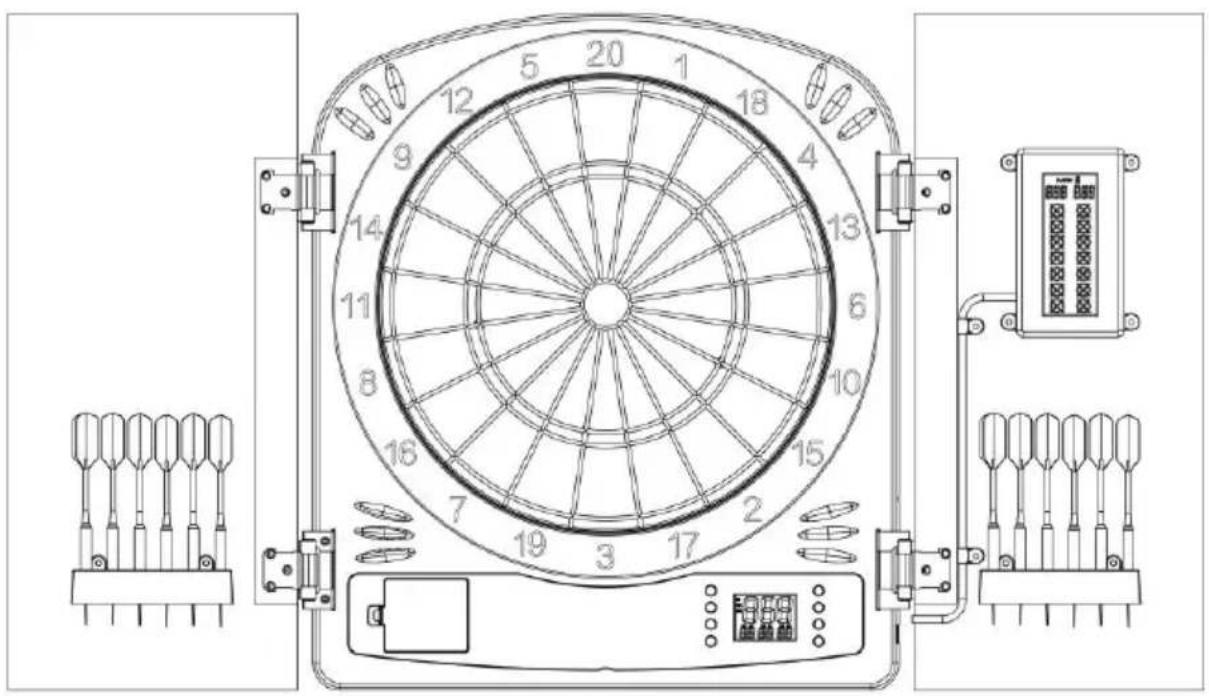
NEED HELP? CONTACT US!
Have product questions? Need technical support? Please feel free to contact us:
Technical Support and E-Warranty Certificate
www.vevor.com/support
This is the original instruction, please read all manual instructions carefully before operating. VEVOR reserves a clear interpretation of o user manual. The appearance of the product shall be subject to the product you received. Please forgive us that we won't inform you ag there are any technology or software updates on our product.
SAFETY WARNINGS AND PRECAUTIONS
 | Warning-To reduce the risk of injury, user must read instruction manual carefully. |
 | CORRECT DISPOSAL for DisplayThis product is subject to the provision of european Directive 2012/19/EU. The symbol showing a wheelie bin crossed through indicates that the product requires separate refuse collection in European Union. This applies to the product and all accessories marked with this symbol. Products marked as such may not be discarded with normal domestic waste, but must be taken to acollection point for recycling electrical and electronic devices. |
 | This product is of protection class III. |
 | Compliance is a EC security certification. |
 | FCC Information for DisplayCAUTION: Changes or modifications not expressly approved by party responsible for compliance could void the user's authority operate the equipment!This device complies with Part 15 of the FCC Rules. Operation subject to the following two conditions:1) This product may cause harmful interference.2) This product must accept any interference received, including interference that may cause undesired operation.WARNING: Changes or modifications to this product not express approved by the party.responsible for compliance could void the authority to operate the product.Note: This product has been tested and found to comply with for a Class B digital device pursuant to Part 15 of the FCC These limits are designed to provide reasonable protection again harmful interference in a residential installation.This product generates, uses and can radiate radio frequency and if not installed and used in accordance with the instruction cause harmful interference to radio communications. However, the no guarantee that interference will not occur in a particular ins If this product does cause harmful interference to radio or telereception,which can be determined by turning the product off a the user is encouraged to try to correct the interference by or more of the following measures.Reorient or relocate the receiving antenna.Increase the distance between the product and receiver.Connect the product to an outlet on a circuit different from which the receiver is connected.Consult the dealer or an experienced radio/TV technician for assistance. |
WARNING:
Please read this manual carefully before using the product. Failure to do so result in serious injury.
ELECTRIC SAFETY!
- Before using, check that the voltage power corresponds to the one shown the appliance nameplate. Ensure that the voltage set on the machine corresponds to the electricity supply in your country.
- Do not operate any appliance with a damaged cord or plug or after it malfunctions or has been damaged in any manner. Return the appliance to the nearest authorized service facility for examination, repair, or adjustment.
- If the supply cord is damaged, it must be replaced by a special cord or assembly available from the manufacturer or its service agent.
- Do not let the cord hang over the edge of a table or counter or touch surface.
- Do not use appliances for other than intended use.
- To protect against fire, electric shock, or personal injury, do not immerse electric plugs, or appliances in water or other liquids.
- The use of accessories, which the appliance manufacturer does not recommend, may result in fire, electric shock, or personal injury.
- Do not use an extension cord with this product.
- The power cord should lie flat on a table or counter surface and may not over the edge. Please keep it away from hot surfaces and water.
- WARNING: This product contains small parts. If swallowed, it will pose a
choking hazard. Keep these small parts away from children when assembling!
ATTENTION!

WARNING! Remove all packaging materials and keep them for future use. Packaging materials are not a toy.
WARNING! Don't let children play with the packaging
materials. If they swallow the packaging materials, they will suffocate!
SAVE THESE INSTRUCTIONS
Thank you for purchasing this electronic dart game. Its computerized scoring system makes game playing easy and enjoyable. With 40 built-in games and over 590 options/variations to choose from, both beginners and more advanced players will find games to suit them. Up to 8 players can play at one time. Please read the instructions before playing and be sure to save them for future reference.
MOUNTING (PHYSICAL INSTALLATION)
The dartboard should be hung on a wall hook, with the bull's eye 172.72cm (6 above the floor. Darts are supposed to be thrown from a distance of about 244cm (96"), so be sure there is about 3m (10') of open floor space in front c the board.
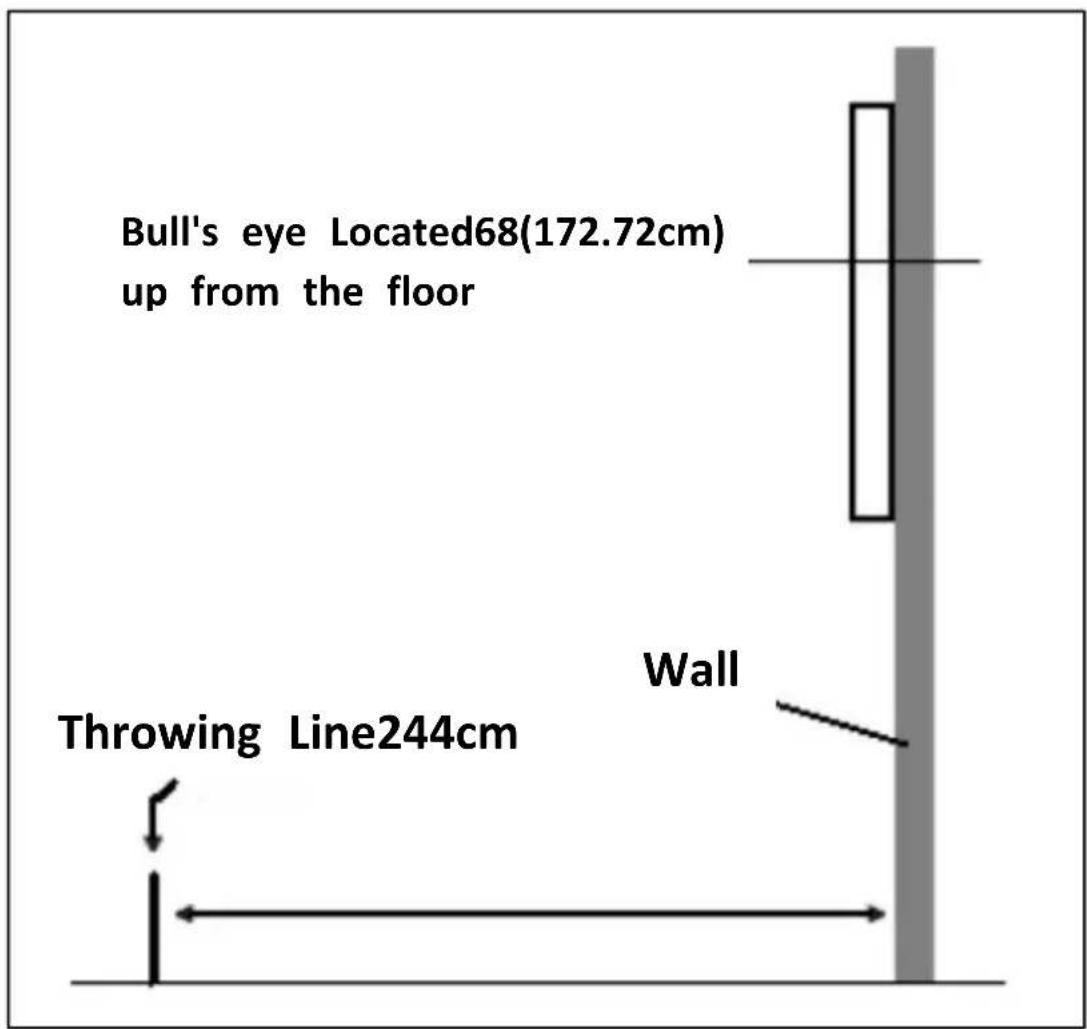
Place two marks on the selected wall studs 192.3 cm (75.71") above the floor, another at 153.2 cm (60.32"). Screw two screws into the reference marks until the screw heads are protruding about 1/2" from the wall.
Line up the mounting holes on the back of the game with the screw heads, th mount the game. It may be necessary to adjust the screws until the board fits snugly against the wall.
After the board is mounted, the bull's eye should be 172.72cm (68") above the floor.
There are two mounting methods to mount this dartboard to the wall. Either drill two (2) hanging holes or four (4) through holes to mount the dartboard.
Methods One
STEP1: Take the center of the paper 172.72cm from the ground (68") as the reference sticker
STEP2: Holholes and install screws
STEP3: Hang up the dart target
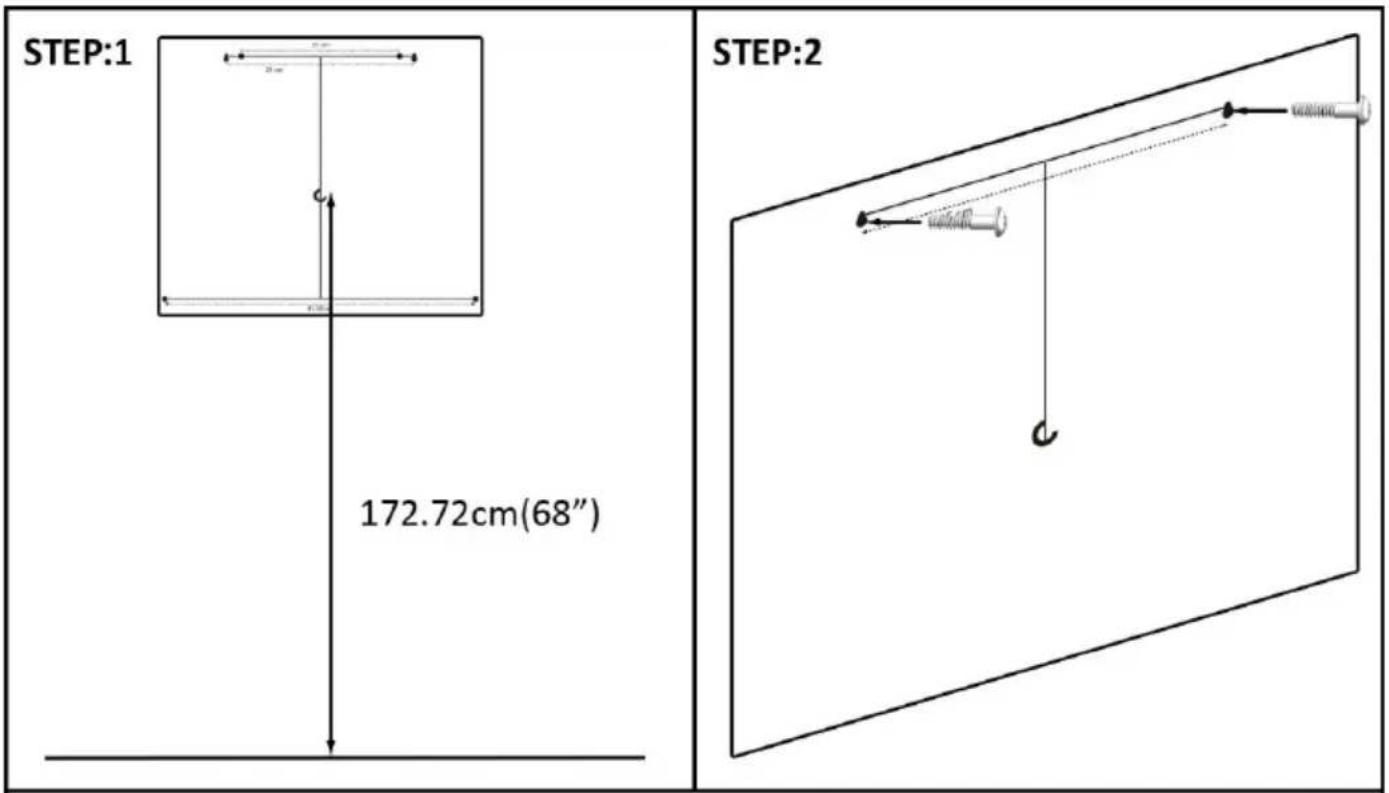
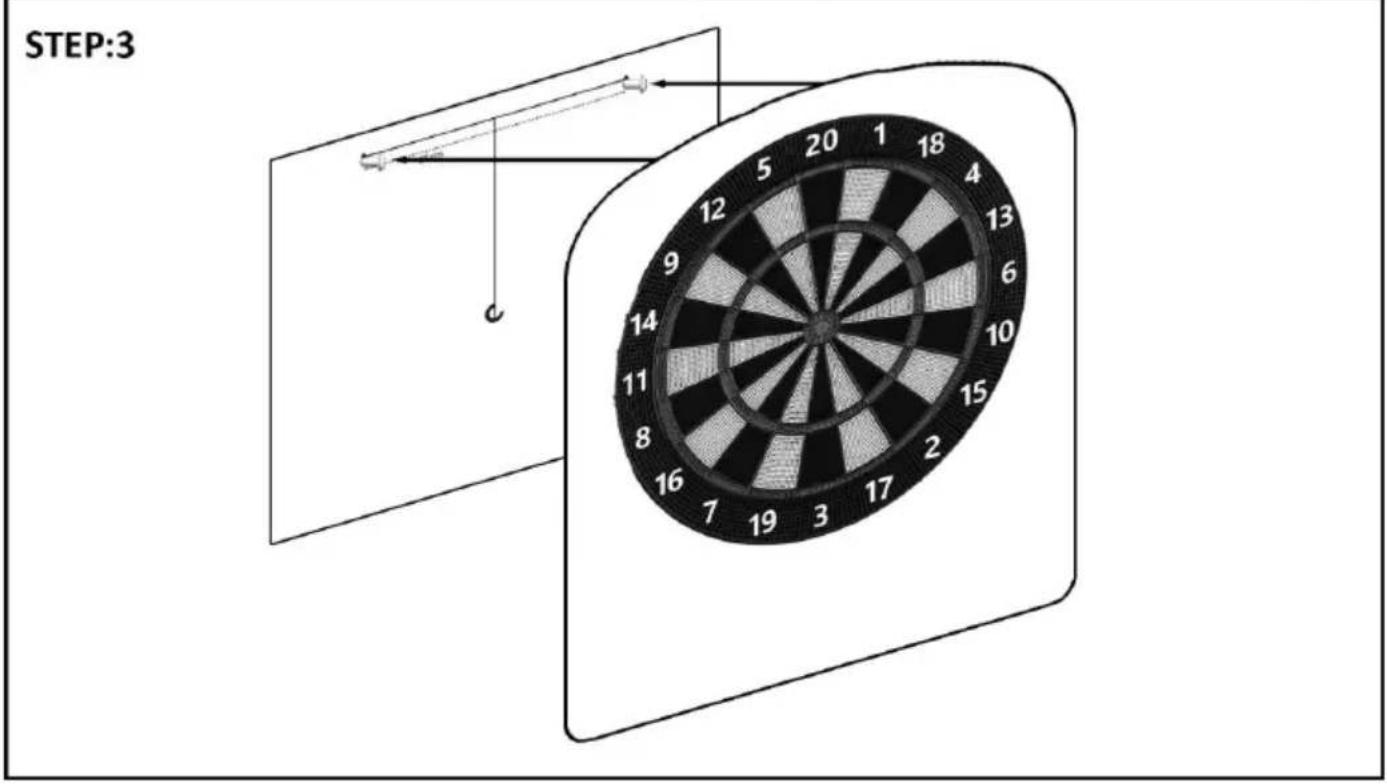
Methods Two
STEP1: Take the center of the paper 172.72cm from the ground (68") as the reference sticker
STEP2: Align the four screw holes of the dart target to the positioning paper
STEP3: Holholes and install screws
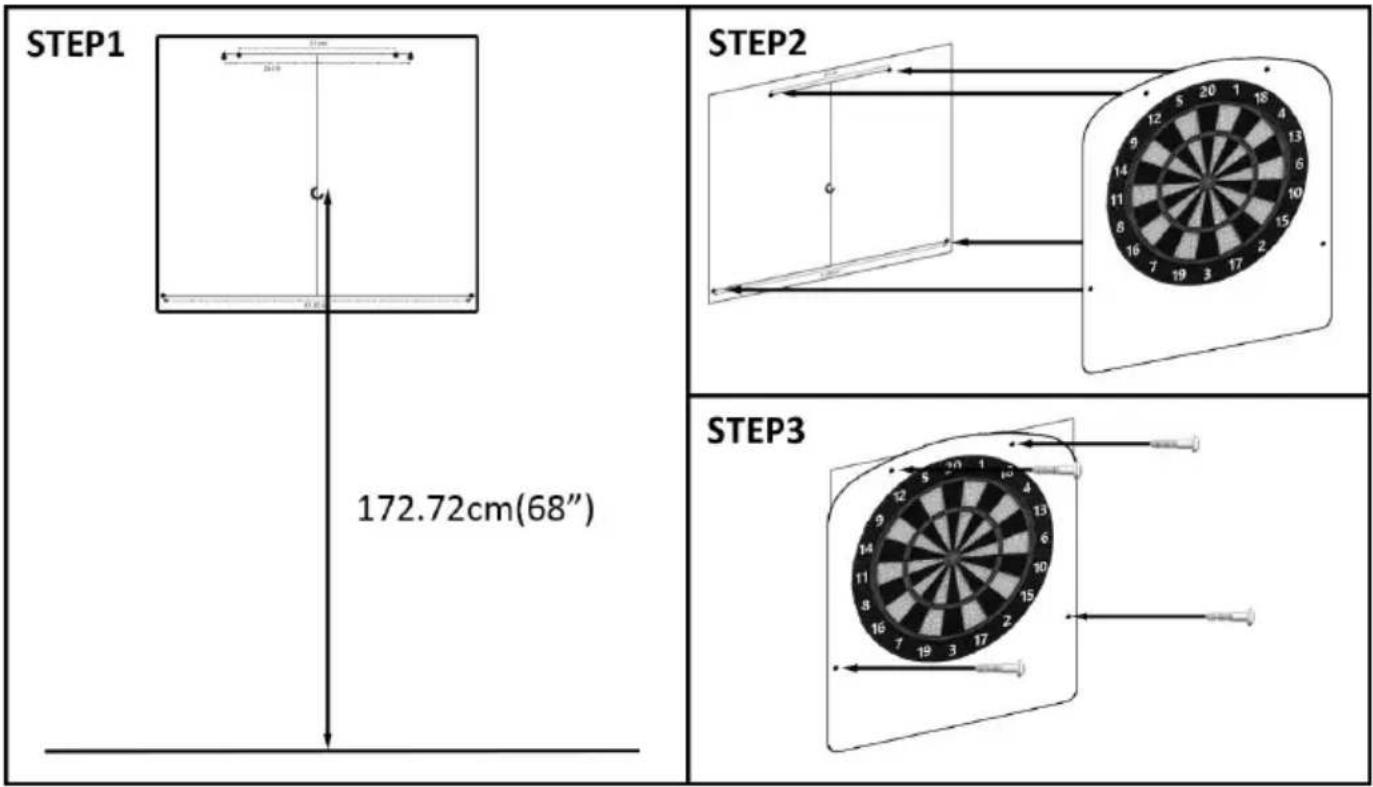
POWER INSTALLATION
The dartboard is designed to be powered by 3 x 1.5v AA (LR6) batteries. The battery compartment can be opened from the back to install the batteries. To conserve batteries, this dartboard is equipped with an auto power-off mode. If the dartboard is not being used, it will automatically turn off after 30 minutes.
WARNING!
- Batteries should be replaced by an adult.
• Non-rechargeable batteries are not to be recharged. - Rechargeable batteries are to be removed from the toy before being charged.
- Rechargeable batteries are only to be charged under adult supervision.
-
Different types of batteries or new and used batteries are not to be mixed.
-
Only batteries of the same or equivalent types as recommended are to be used.
- Batteries are to be inserted with the correct polarity.
- Exhausted batteries are to be removed from the toy.
- The supply terminals are not to be short-circuited.
- Do not dispose of in fire, in water or the general rubbish.
It can be also powered by an AC to 5V DC, 1,000 milliamp (minimum) adapter, with the DC plug polarity configured as positive (+) outside, and negative (-) center. To connect by adapter, plug the DC plug insert into the DC power jack and the AC plug into an electrical outlet.
WARNING!
- During use: ensure the connecting cable does not present a tripping or other hazard.
- After using the dartboard: switch off the power at the mains and unplug the adapter from the mains and dartboard.
- Never leave the adapter connected to the dartboard when not in use.
- Stow the adapter safely when not in use.
IMPORTANT NOTE
-
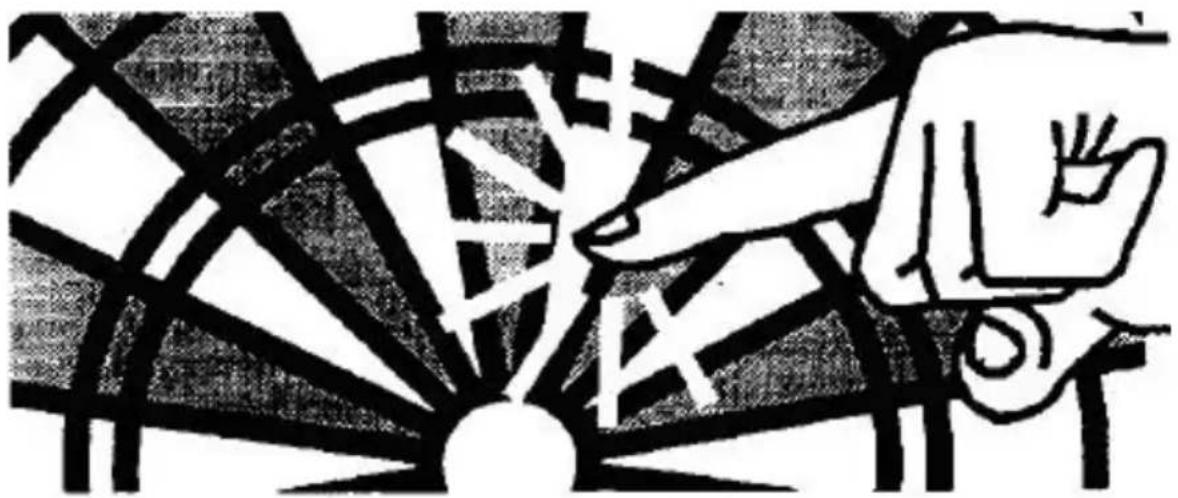
During shipping or in the course of normal play it is possible for scoring segments of this board to become temporarily jammed, resulting in a frozen segment. If this occurs, the score of stuck segment will be counted and displayed when player change. Take the following steps when this error appears:
-
Find the stuck segment.
- Press firmly down on the stuck segment until it breaks free and loose. Once stuck segments are loosened, the error should be gone and the board should continue to operate normally.
natural_image
Abstract black-and-white line drawing of a hand interacting with a geometric structure (no text or symbols)- This game is designed only for use of lighter soft tip darts and highly recommended to use with darts as provided in the package. Do not attempt to use steel tip darts, or longer soft tip darts (maximum length 2.5cm), or heavier darts (maximum weight of dart is 12g) at any time as these will cause damage to the board.
- Electronic and mechanical reaction time is required between shots. If two shots occur too close together, pull out second dart and re-throw to properly record your score.
- Under the environment with electrical fast transient the dart game may malfunction and require use to reset the dart game.
- This is an adult game which includes functional sharp point. Children should only play under adult supervision.
- Please peel off the protective film (if any) at the display area before use.
CALCULATING POINTS
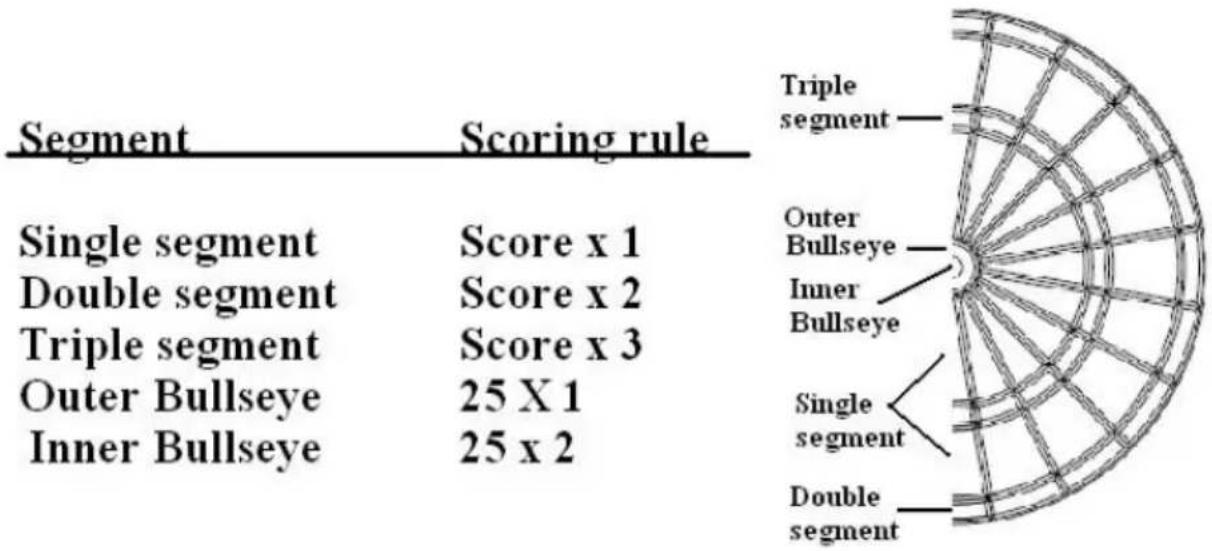
radar
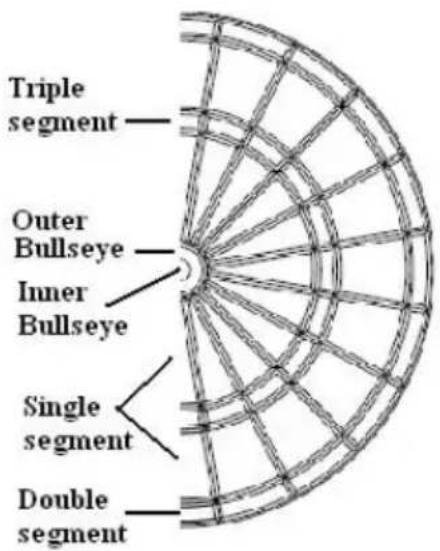
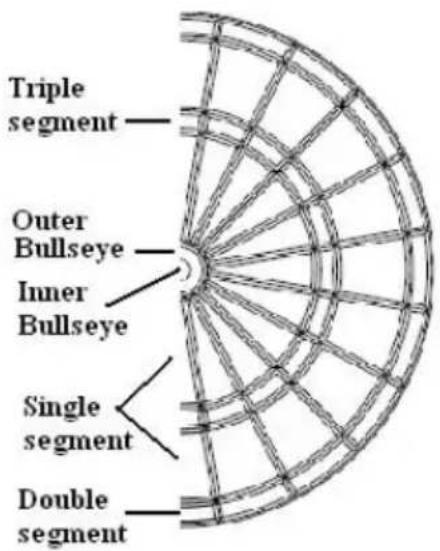
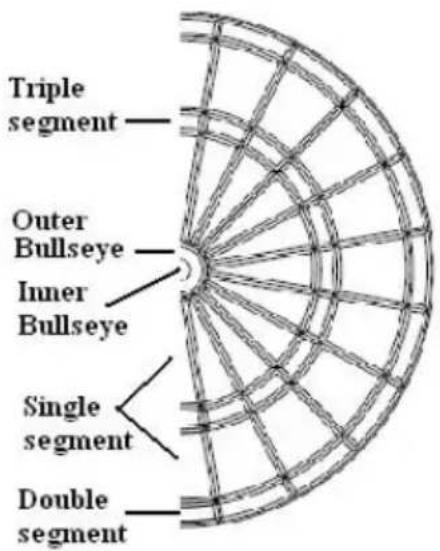
| Segment | Score | | ------------------- | --------- | | Single segment | x1 | | Double segment | x2 | | Triple segment | x3 | | Outer Bullseye | 25 X 1 | | Inner Bullseye | 25 x 2 |Function Keys
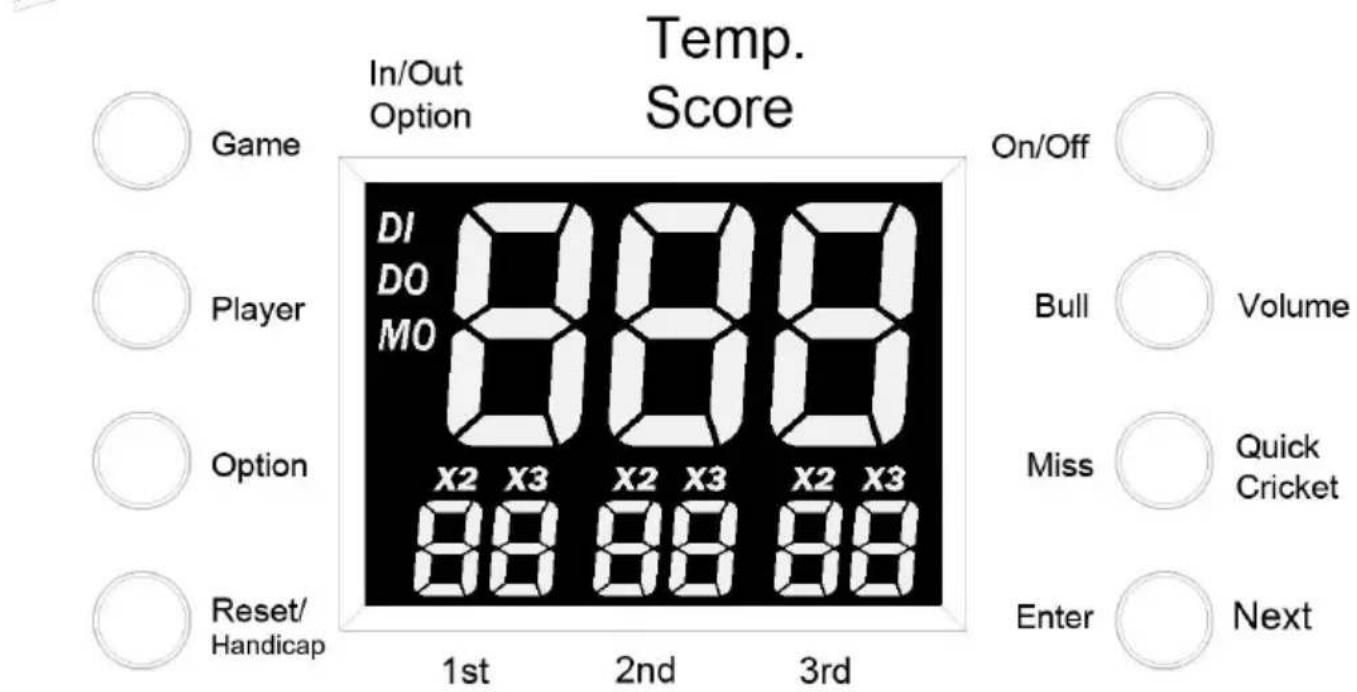
9) GAME Button – During the selection of games, press the Game I to scroll through the selections. During the game play or after the game is over, press and hold the Game button 2 seconds to retu the beginning of that game.
10) ON/OFF Button - Press ON/OFF to turn on the board. Press an ON/OFF to turn the board off.
11) PLAYER Button - Press repeatedly to scroll through 1 player to
players, then scroll through the 5 levels of the computer player: Beginner, Intermate, Advanced, Expert, Professional, and then scroll back to 1 player.
12) BULL OPTION Button – During the selection page, press BULL OPTION to select the 25 or 50 at the bull.
13) VOLUME Button - During the selection page, press this button w activate the BULL OPTION only. During the game play, press repeatedly to scroll through 4 positions: Mute, low volume, middle volume, high volume. Default at middle volume when the power of dartboard is turned on.
14) OPTION Button - Press repeatedly to scroll through options (if available) of the selected game.
15) MISS Button - Press MISS during the game to register missed
16) QUICK CRICKET Button – Press QUICK CRICKET to access Ga 13 Standard Cricket, 2 players and Option single in/double out.
17) RESET Button – During the game play, press RESET and hold seconds to return to the game selection page “GAME 01”. After the game is over, press and hold the RESET buttons 2 seconds to r to the game selection page “GAME 01”.
18) HANDICAP Button – To activate handicap feature, press Handicap button after selected game, player and option. At the handicap page press player button to scroll from selected player number. For example 4 players selected to play, you may scroll through P1, P2, P3 & handicap page. Press the segment for the handicap score. For example, at P4 press triple 20 segment, P4 will start with 241 pc 301 game.
Suitable for new HANDICAP games :
| Game | Name | Options | Players | |
| 1 | 301 | 6/12 | 1-8 | Handicap |
| 2 | 501 | 6/12 | 1-8 | Handicap |
| 3 | 601 | 6/12 | 1-8 | Handicap |
| 4 | 701 | 6/12 | 1-8 | Handicap |
| 5 | 801 | 6/12 | 1-8 | Handicap |
| 6 | 901 | 6/12 | 1-8 | Handicap |
| 7 | 301 League | 6/12 | 4-8 | Handicap |
| 8 | 501 League | 6/12 | 4-8 | Handicap |
| 9 | 601 League | 6/12 | 4-8 | Handicap |
| 10 | 701 League | 6/12 | 4-8 | Handicap |
| 11 | 801 League | 6/12 | 4-8 | Handicap |
| 12 | 901 League | 6/12 | 4-8 | Handicap |
| 13 | Cricket | 3/6 | 1-8 | Handicap |
| 21 | Count Up | 9/18 | 1-8 | Handicap |
| 24 | High Score | 12/24 | 1-8 | Handicap |
19) ENTER Button - Press ENTER to confirm the selection and start
20) NEXT PLAYER Button - Press NEXT PLAYER to switch to next player after a turn is finished.
21) The Dartboard will be automatically power OFF if no button is activated for 30 minutes.
1) VJ76 - 40 Games
| Game | Name | Options | Players |
| 1 | 301 | 6/12 | 1/8 |
| 2 | 501 | 6/12 | 1/8 |
| 3 | 601 | 6/12 | 1/8 |
| 4 | 701 | 6/12 | 1/8 |
| 5 | 801 | 6/12 | 1/8 |
| 6 | 901 | 6/12 | 1/8 |
| 7 | 301 League | 6/12 | 4/8 |
| 8 | 501 League | 6/12 | 4/8 |
| 9 | 601 League | 6/12 | 4/8 |
| 10 | 701 League | 6/12 | 4/8 |
| 11 | 801 League | 6/12 | 4/8 |
| 12 | 901 League | 6/12 | 4/8 |
| 13 | Cricket | 3/6 | 1/8 |
| 14 | No Score Cricket | 3/6 | 1/8 |
| 15 | Cut Throat Cricket | 3/6 | 1/8 |
| 16 | Killer Cricket | 3/6 | 2/8 |
| 17 | Scram Cricket | 1/2 | 2 |
| 18 | Low Pitch Cricket | 3/6 | 1/8 |
| 19 | English Cricket | 1/2 | 2 |
| 20 | Single Only Cricket | 3 | 1/8 |
| 21 | Count Up | 9/18 | 1/8 |
| 22 | Round the Clock | 12 | 1/8 |
| 23 | Shanghai | 4 | 1/8 |
| 24 | High Score | 12/24 | 1/8 |
| 25 | Overs | 19/38 | 2/8 |
| 26 | Unders | 19/38 | 2/8 |
| 27 | Halve-It | 1/2 | 1/8 |
| 28 | Big-6 | 19 | 2/8 |
| 29 | Double Down | 1/2 | 1/8 |
| 30 | 21 Points | 7 | 1/8 |
| 31 | Nine Dart Century | 3/6 | 1/8 |
| 32 | Best of Nine | 5 | 1/8 |
| 33 | 3 Point Contest | 2 | 1/8 |
| 34 | 9 Lives | 7 | 2/8 |
| 35 | Forty-One | 1/2 | 1/8 |
| 36 | Shoot-Out | 19 | 1/8 |
| 37 | Bingo | 4 | 1/8 |
| 38 | Killer | 30 | 2/8 |
| 39 | Shooting | 1/2 | 1/8 |
| 40 | All Fives | 5/10 | 1/8 |
2) LCD Display layout for reference.
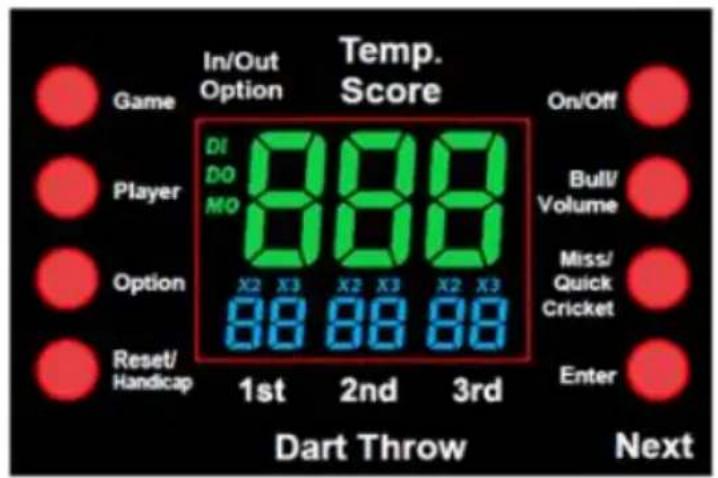
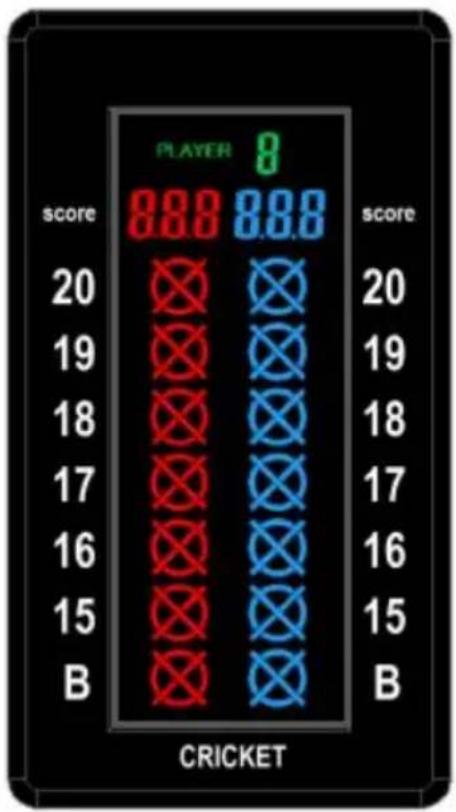
bar
| score | score | |---|---| | 20 | 20 | | 19 | 19 | | 18 | 18 | | 17 | 17 | | 16 | 16 | | 15 | 15 | | B | B | CRICKETGame Descriptions & Rules
G01 (With 6 options of Single In/Out, Double In/Out and Master C 25/50 Bull and 50/50 Bull)
The score will be deducted for each dart from 301 points; the first p who reaches exactly 0 will be the winner. Please refer to clause (5) operation for the selection of various single in/out, double in/out and master out options.
For single in or single out options, the game can be started or ended throwing at any segments, regardless if single, double or triple. For double in / double out options, the beginning / ending throw will only accepted respectively by hitting the double zone or double the bull's. For master out, you have to hit either double or triple zone to end games. You cannot start or end the game by hitting the wrong score segments.
This game also equips with an option of selecting 50/50 bull (both ir and outer bull is 50) or 25/50 bull (inner bull is 50 and outer bull i making the variations to a total of 72.
For more fun, the board will display the closest segment to be hit in to end the game in the fastest manner if a player's score is lower for Double Out or 180 for Master Out options.
To make games more enjoyable, the game can also display the dart averaging for each player to check the skill level after finishing the g
G02 501
All games and features same as the G01 301 rules except the game from 501.
G03 601
All games and features same as the G01 301 rules except that the starts from 601.
G04 701
All games and features same as the G01 301 rules except the game from 701.
G05 801
All games and features same as the G01 301 rules except the game from 801.
G06 901
All games and features same as the G01 301 rules except the game from 901.
G07 301 LEAGUE (With options of Single In/Out, Double In/Out and Master Out, team selection, Bull and 50/50 Bull)
Similar to 301 Count-down but here the teams play against each other member of the team reaches 0 exactly, his/her team has won. However there is one condition. The total score of his/her team must not be that the opposing team's total score. If it is greater, the team has no and it resumes its previous position. Apart from the 301 standard variations, this game also allows selection of the different team combinations to play with.
G08 501 League
All games and feature same as the G07 301 League rules except the game starts from 501.
G09 601 League
All games and feature same as the G07 301 League rules except the game starts from 601.
G10 701 League
All games and feature same as the G07 301 League rules except the game starts from 701.
G11 801 League
All games and feature same as the G07 301 League rules except the game starts from 801.
G12 901 League
All games and feature same as the G07 301 League rules except the game starts from 901.
G13 CRICKET (With option C00, C20, C25, 25/50 Bull and 50/50 E
Following the standard rules, in Simple Cricket only the number 15-20 bull's eye are used. All valid hits will be confirmed & displayed by the Cricket Display.
- When a number has been hit 3 times by a player, it is then 'op that player and any further hits will score points as thrown.
- Once a number has been hit 3 times by all players, that number then ‘closed’ and can no longer be scored upon by any player. time, the cricket score of that number will display as O.
- A player who has ‘opened’ a number can continue to score on the number until it becomes ‘closed’.
- A player wins the game when he first ‘closes’ all the numbers are equal or greater scores than the other players. However, if player tied on points, or have no points, the first player to ‘close’ all n wins.
- And if a player has ‘closed’ all numbers first, but is behind on scoring continues on ‘open’ numbers. If that player has not accumulated the highest point total by the time another player ‘clo the player with the most points will be the winner.
● C00 hit & “open” the numbers 15-20 and bull’s eye at any orde - C20 hit & “open” the number 20 first, then in order “open” numl 18, 17, 16, 15 & bull’s eye
- C25 hit & “open” bull’s eye first, then in order “open” numbers 15 17, 18, 19 & 20.
Note:
(1) Single segment - count one time
Double segment - count two times
Triple segment - count three times
(2) The segment will be opened if already hit more than three times. will then be closed if all players open the same segment.
| Cricket Status | One Time | Two Times | Open | Close |
| Sign |  |  |  |  |
G14 NO SCORE CRICKET (with options of 000, 020, 025, 25/50 B and 50/50 Bull)
The game is played the same as Cricket EXCEPT no score is made winner is the player who first closed all the points.
G15 CUT THROAT CRICKET (with options of 00C, 20C, 25C, 25/5( Bull and 50/50 Bull)
Same basic rules as the standard cricket EXCEPT points are added your opponents' total once scoring begins. The player who first closes segments with the fewest scores wins. This variation enables players rack up scores for his opponents, digging them into a deeper hole.
G16 KILLER CRIKCET (with options of H00, H20, H25, 25/50 Bull 50/50 Bull)
The game is played the same as No Score Cricket. Except when you closed a point, and your opponents do not, you can eliminate opponents marking by hitting the same number again. The winner is the player closed all the points.
G17 SCRAM CRICKET (with options of 25/50 Bull and 50/50 Bull)
This game is a variation of Cricket. The game consists of 2 rounds.
first round, player 1 must close 15 through 20 and bull's eye while attempts to get as high a score as he can by scoring the open nur. Round 1 will be finished when all numbers have been closed. For ro the reverse is done. The player with the highest score after both rou the winner.
G18 LOW PITCH CRICKET (with options of E00, E20, E25, 25/50 and 50/50 Bull)
The game is played the same as Cricket. Except the points to be s changed from 15 to 20 and Bull to 1 to 6 and Bull.
● E00: Open numbers 1 to 6 and bulls eye in any order
● E20: Open numbers 6 to 1 and bulls eye in order
● E25: Open numbers bulls eye and 1 to 6 in order
G19 ENGLISH CRICKET (with options of 25/50 Bull and 50/50 Bul
This game is for 2 players only. The game consists of two rounds. round one, the target of player one is the bulls' eye, each hit of the bull counts as one-mark, inner bull counts as two marks, and the other numbers are count as 0 mark. The object of Player 2 is to get the possible score before Player 1 accumulates 9 marks. Player 2 can then any number. However, if player 2 scores 42 points, it counts as 2 points, player 2 scores 59 points, it counts as 19 points. Therefore, score is counted only when the total score of three darts is over 40 otherwise, counts as 0 points. The first round is finished when Player 1 accumulates 9 marks. In round two, the players change their roles. Player 2 hits bulls' eye and Player 1 goes for points. The game is over when Player 1 accumulates 9 marks. The player with the most pints is the winner.
G20 SINGLE ONLY CRICKET (with options of S00, S20, S25)
Played like traditional cricket except the double and triple only score time of score. Example if player A hits a triple 20, only one 20 is player A hits a double 20, only one 20 is scored.
If player A hits three 20s either by single, double or triple the numb closed if player B does not hit three 20s and leaves the 20 open. I has a chance to score. Player A can score points in the following n Single 20 scores 20 points, Double 20 scores 20 points, Triple 20 scc 20 points.
Bull eyes function in the same manner, if a double bull is hit it could single bull.
The game is finished when a player has closed all of his numbers a bulls eyes and is ahead in points
G21 Count Up (with options of 100, 200, 300, ..... 900, 25/50 Bu 50/50 Bull )
The score will be accumulated for each dart, the first player who rea or goes over the set points will be the winner. The set point options 100, 200, 300, ..... 900.
G22 ROUND THE CLOCK (with options of 105, 110, 115, 120, 205, 215, 220, 305, 310, 315, 320)
Hit in strict order of 1, 2, 3,.....until 5, 10, 15 or 20s are reached straight, double or triple shots depending on the difficulty level. The fi player to reach the final score is the winner. Players start their next with the next correct number in the sequence. The computer will disp the number that the player has to hit.
105,110,115,120: The last number is 5,10,15,20 respectively regardless single, double or triple.
205,210,215,220: The last number is 5,10,15,20 respectively and only double is valid.
305,310,315,320: The last number is 5,10,15,20 respectively and only triple is valid.
G23 SHANGHAI (with options of L05, L07, L09, L11)
Each player has to proceed around the board to score from 1 through target number as the selected level. The dartboard will display the ta number to hit. Throw 3 darts for each target number. No matter the darts hit or miss the target number, the player will need to hit next number in next play of 3 darts. Each player can score on any corre segments (single X 1, Double X 2, Triple X 3) and selections are va the following:
● L05 the game starts from segment 1 to 5
● L07 the game starts from segment 1 to 7
● L09 the game starts from segment 1 to 9
● L11 the game starts from segment 1 to 11
The opening segment will automatically appear on the display.
There are two ways to win: either have the highest score at the end game or score a Shanghai and win automatically. A shanghai is hitting the single, double and triple of the number in play.
G24 HIGH SCORE (with options of H03, H04, H05, H06, H07, H08, H10, H11, H12, H13, H14, 25/50 Bull and 50/50 Bull)
The rules are simple. Each player has to rack up the most points in 5, .....or 14 rounds (each round 3 darts) to win. Doubles and triples as X2 and X3 that segment's score respectively.
G25 OVERS (with options of O03, O04, O05, .... O21, 25/50 Bull 50/50 Bull)
The players have to take turns to throw 3 darts. If a player's score than the previous player's score, one cricket light will turn off which he loses one life. Before each player shoots in each round, the text displays the record score.
A player will be out of the game when all his lives are gone. The surviving player is the winner. O03 –O21 represents 3 lives to 21 liv
G26 UNDERS (with options of U03, U04, U05, .... U19, U20, U21, Bull and 50/50 Bull)
Rules follow exactly as above except
- The leader's score is the lowest score for each turn.
- A missed dart should be counted as 60 by pressing the MISS but U03-U21 represents 3 lives to 21 lives.
G27 HALVE-IT (with options of 25/50 Bull and 50/50 Bull)
There are 12 rounds of three darts each in this game. The objective score as many points of the designated numbers as possible. The designated numbers for each round are:
| 1^st round | 12 |
| 2^nd round | 13 |
| 3^rd round | 14 |
| 4^th round | Any doubles |
| 5^th round | 15 |
| 6^th round | 16 |
| 7^th round | 17 |
| 8^th round | Any triples |
| 9^th round | 18 |
| 10^th round | 19 |
| 11^th round | 20 |
| 12^th round | Bull’s Eye |
Scoring occurs when the dart hits the designated area only. All hits scored at face value. Should all three of a player's darts miss the designated target area, his total score to those points is cut in half. highest score at the end is the winner.
G28 BIG-6 (with options of b03, b04, b05, ..... b19, b20, b21) This game allows players to challenge their opponents to hit the target for their choice. However, players must earn the chance of picking the target for their opponent by making a hit on the current target first. Object of the game is to force your opponent into losing lives by self-tough targets for your opponent to hit such as “Double Bull’s eye” or 20”.
Single 6 is the first target to hit when the game begins. Before the starts, players must agree on how many lives will be used by pressi OPTION button (e.g., B3 represents 3 lives, and etc.). Within the two throws, player 1 must hit a 6 to “save” his/her life. If player 1 hits target within two throws, the next dart thrown will determine the opponent’s target. If player 1 fails to hit the current target within 2 c he/she will lose the chance to determine the next target for player 2 player misses all three throws, he will lose a life and the next player get to try a random target. If player 1 hits the target at the third th target for the next player will also be randomly generated.
Singles, doubles and triples are all separate targets for this game.
The last player with a life left is the winner.
The no. of lives left is displayed by the cricket display.
G29 DOUBLE DOWN (with options of 25/50 Bull and 50/50 Bull)
The game starts with a base score of 60 for each player. The player to score by hitting the active segments of the current round. For inst the 1^st round, the player must throw to hit segment 15. If no 15's is player's score will be cut by half. The next round is 16 and so on. and T, the player has to hit any double or triple and the same rule applied. The player who gets the highest score is the winner.
| 15 | 16 | D | 17 | 18 | T | 19 | 20 | B | TOTAL | |
| PLAYER 1 | ||||||||||
| PLAYER 2 |
D: Double T: Triple B: Bull's eye
G30 21 POINTS (with options of 005, 006, 007, 008, 009, 010, 01 The object of this game is to get the most marks. A player can get mark in two ways:
- Gets 21 points exactly with 1, 2 or 3 darts
- Gets the highest points up to 21 points (if no one gets 21 points round)
The player will ‘bust’ when a score is over 21 points and the player get a mark. After the game is over, the player with the highest mark the game.
005, 006, 007..... 011 represent 5 rounds, 6 rounds, 7 rounds..... 11 rounds respectively.
G31 NINE DART CENTURY (with options of 100, 150, 200, 25/50 and 50/50 Bull)
The options are the target score, see the chart below.
| Option | 100 | 150 | 200 |
| Target Score | 100 Points | 150 Points | 200 Points |
In this game each player has 9 darts (three turns) to score 100 (or 200) points without going over, or get as close to 100 as possible. go over you are out of the game. The dart board will announce “Bu Darts that land outside the scoring area will reset your score back due to zero. Darts that bounce out are not penalized and do not count f points. The number on the dartboard that you hit will be your score. double segment is worth double points and a triple is worth triple. The player that gets closest to the Target Score without going over is the winner.
G32 BEST OF NINE (with options of 009, 012, 015, 018, 021)
The computer will display a random number for the player to hit in each round. A player receives 1 score when hitting the number, 2 scores when hitting a double and 3 scores for hitting a triple.
| Option | 009 | 012 | 015 | 018 | 021 |
| No. of da | 9 | 12 | 15 | 18 | 21 |
The player with the highest score at the end of the game wins.
G33 3 Point Contest
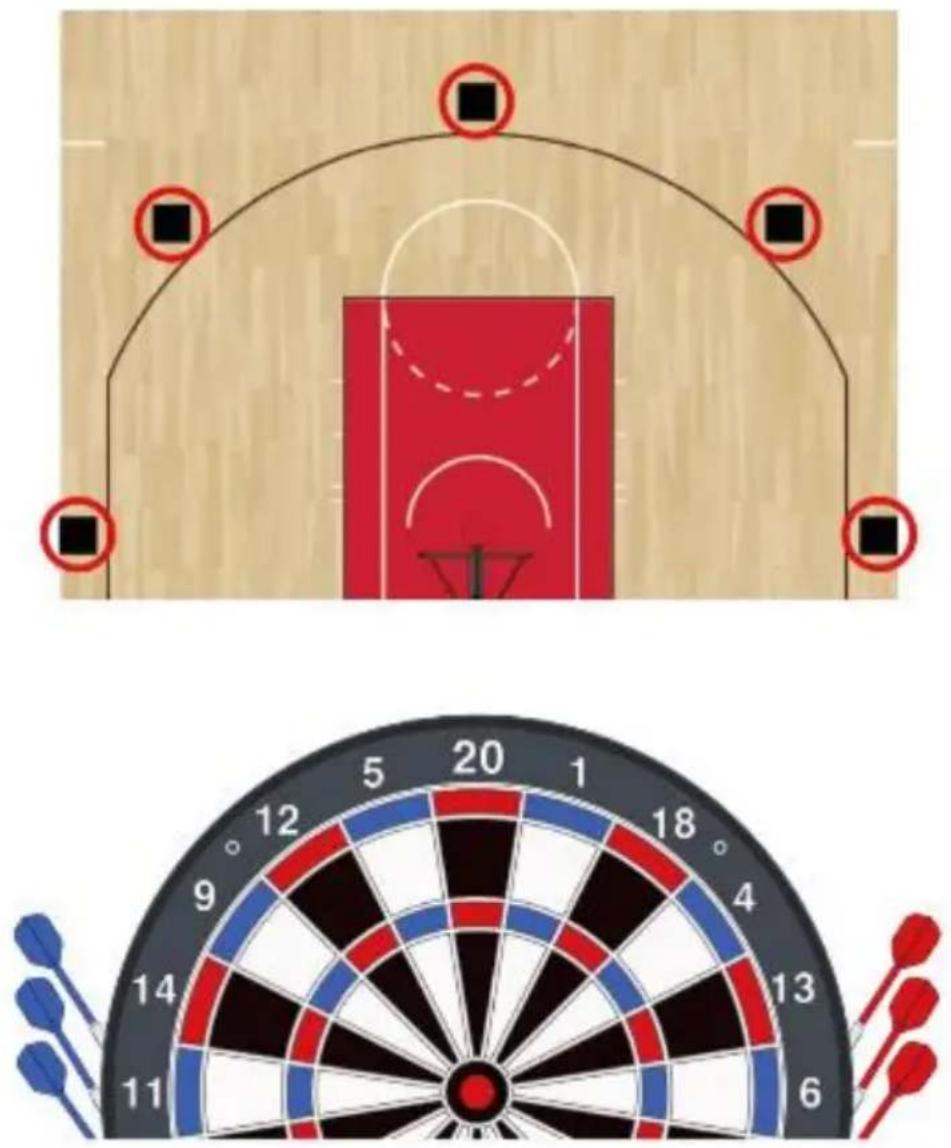
In a basketball game, the three-pointer contest consists of 5 positions 45, 90, 135, 180 degrees) and each shoot 3 goals (darts).
We use the upper half of the dartboard to simulate the basketball has 11 points, 9 points, 20 points, 4 points, and 6 points into 5 positions. The first 2 balls (darts) are normal balls, and one point is counted. third ball is Money ball, and two points are counted. The dartboard will provide the hint of the target to hit.
During the game, the player's first 2 darts (balls) need to hit the tar zone, and the SCORE display will show the hit points, and the CRIC display will light up accordingly.
The 3rd dart (Money ball) needs to hit the bull's eye area (25/50), a CRICKET display will light up two strokes accordingly
The player who lights up the most strokes of CRICKET after the gar over wins
The game can choose the difficulty (OPTION)
Easy: The first 2 darts only need to hit the target zone at any posi example, if you are hitting 11 points zones, both odd, double and tri are considered hit.
Difficulty: As mentioned above, the first 2 darts need to hit the triple to be considered hit.
For these two difficulties, the Money ball needs to hit the bull's eye (25/50)
There is no set number of rounds, and the game ends in one round
G34 9 LIVES (with options of 003, 004, 005, 006, 007, 008, 009) This game plays numbers 1 through 20 and bull's eye in a sequence. Players take turns throwing in 1 in the first round, 2 in the second and so on, until "25" in thousand, 1 in the ^nd round and so on. Each player must hit the target number with one dart in each round. The will lose a life if all 3 darts miss. The last player remaining alive is winner.
003, 004, 005 ..... 009 represent 3, 4, 5..... 9 lives respectively.
G35 FORTY-ONE (with options of 25/50 and 50/50 Bull) The game starts with a base score of 40 for each player. Then eve
starts the game by shooting for the number 20, and then 19, D, 18, 16, 15, Bull's Eye and then total 41 points. Each player throws three at the same number, and then progresses to the next number in the round. All scores will be accumulated, Double counts as 2x and Triple 3x the points. An additional round or 41 points is included after bull's and a player has to get through this challenge before ending the game the end of the game, the player with the most points is the winner.
| 20 | 19 | D | 18 | 17 | T | 16 | 15 | B | ‘41’ | TOTAL | |
| PLAYER 1 | |||||||||||
| PLAYER 2 |
B: Bull's eye
G36 SHOOT-OUT (with options of -03, -04, -05, ....- -19, -20, -21
The first player who hits the number of correct targets,
depending on the option selected, is the winner. The computer will randomly select a number (target) for the player to hit. One correct hit on a segment of the displayed number subtracts one from the score. Single, double and triple segments all count as one hit. If a player does not hit the selected number within 10 seconds, the dart is regarded as a miss and the computer will automatically select another random number for the player to hit for the next dart.
| Scoring Option | -3 | -4 | -5 | -6 | -7 | -8 | -9 | -10 | -11 | -12 |
| No. of Targets and Start Score | 3 | 4 | 5 | 6 | 7 | 8 | 9 | 10 | 11 | 12 |
| Scoring Option | -13 | -14 | -15 | -16 | -17 | -18 | -19 | -20 | -21 | |
| No. of Targets and Start Score | 13 | 14 | 15 | 16 | 17 | 18 | 19 | 20 | 21 |
G37 BINGO
OPTION: 132, 141, 168, 189
The board will display the target segment automatically. The player will first finishes hitting all specified target segments for three times wins game.
132- Hit the segment with the sequence of 15, 4, 8, 14, 3.
141- Hit the segment with the sequence of 17, 13, 9, 7, 1.
168- Hit the segment with the sequence of 20, 16, 12, 6, 2.
189- Hit the segment with the sequence of 19, 10, 18, 5, 11.
The player should hit a number segment three times to enter into the number segment. Hitting the single segment counts as one time; the double segment counts as two times; the triple segment counts as th times.
G38 KILLER (with options, please refer to below option list)
To start, each player must select his number by throwing a dart at target area. The display will indicate “SEL” at this point. The number of player gets is his assigned number throughout the game. No two players can have the same number. Once each player has a number, the action starts. Each player tries to hit the corresponding Shoot area (killer) in option table of his/her own number to attain the qualification for a “kill”. When becoming a killer, the objective of the player is to “kill” his /her opponents by hitting their segment number until all their “lives” are lost a killer hits his/her own segment number, the killer will lose the qualification for “killer” and also lose one “life”. He/She should hit his/ her own segment number again for “killer” qualification. The last player to remain alive is declared the winner. For more difficult play, hit the close (or triple) for his /her own scoring number to attain the qualification for “killer”.
| Option | Lives | Shoot area (killer) |
| 003 | 3 | Single, double, triple |
| 005 | 5 | Single, double, triple |
| ...... | ... | Single, double, triple |
| 021 | 21 | Single, double, triple |
| 203 | 3 | Double |
| 205 | 5 | Double |
| ... | ...... | Double |
| 221 | 21 | Double |
| 303 | 3 | Triple |
| 305 | 5 | Triple |
| .... | .... | Triple |
| 321 | 21 | Triple |
G39 SHOOTING (with options of 25/50 Bull and 50/50 Bull)
In this game, each player throws three darts. The player with the high dart total wins that round. Winner is the first one to win 7 rounds.
G40 All Fives (Games options of 51, 61, 71, 81, 91, 25/50 & 50/
Before starting the game you must select the number of players and desired option.
The options are the total points you need to win, see the chart belc
| Option | 51 | 61 | 71 | 81 | 91 |
| Total Points | 51 | 61 | 71 | 81 | 91 |
During each round the player's total scores must be divisible by 5. E divisible 5 counts as one point. For instance, 2, 8, 5 and the total player will get 3 points as 15 divided by 5 is 3. There will be no the total scores of 3 darts are not divisible by 5 or if any darts might though the sum of the other darts scores are divisible by 5. The disk will show the best segment to hit and score points. The first player scores or gets over 51, 61, 71, 81, or 91 will be the winner.
VEVOR®
TOUGH TOOLS, HALF PRICE
Technical Support and E-Warranty Certificate
www.vevor.com/support
VEVOR®
TOUGH TOOLS, HALF PRICE
www.vevor.com/support
ENSEMBLE JEU DE FLÉCHETTES ET ARMOIRE
MODÈLE : 9176WD
BESOIN D'AIDE ? CONTACTEZ-NOUS!
www.vevor.com/support
SAFETY WARNINGS AND PRECAUTIONS
INSTALLATION ÉLECTRIQUE
natural_image
Abstract black-and-white line drawing of a hand holding a small object, surrounded by intersecting lines and geometric shapes (no text or symbols)Segment Scoring rule
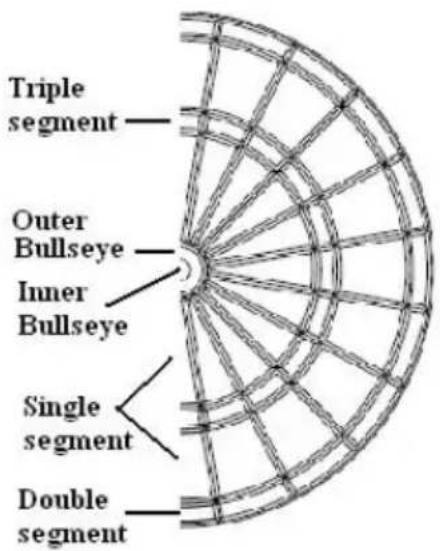
| Single segment | Score x 1 |
| Double segment | Score x 2 |
| Triple segment | Score x 3 |
| Outer Bullseye | 25 X 1 |
| Inner Bullseye | 25 x 2 |
Touches de fonction
22) MARCHE/ARRÊT
23) Jeu
24) Joueur
25) Taureau/ V olume
26) Option
27) Miss/Cricket rapide
28) Réinitialisation/Handicap
29) Entrée/Suivant
www.vevor.com/support
www.vevor.com/support
SAFETY WARNINGS AND PRECAUTIONS
KRAFTINSTALLATION
natural_image
Abstract black-and-white line drawing of a hand reaching toward a circular object, no text or symbols present| Segment | Scoring rule |
| Single segment | Score x 1 |
| Double segment | Score x 2 |
| Triple segment | Score x 3 |
| Outer Bullseye | 25 X 1 |
| Inner Bullseye | 25 x 2 |
Funktionstasten
natural_image
Diagram of a basketball court with red arch and black square markers (no text or symbols)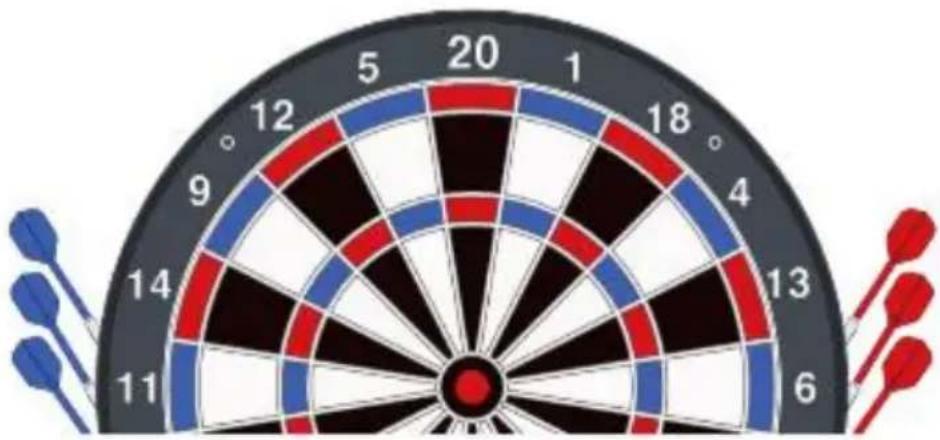
natural_image
Dartboard with number 20 and red/blue painted aiming, no text or symbols on the face or backgroundwww.vevor.com/support
VEVOR®
TOUGH TOOLS, HALF PRICE
www.vevor.com/support
SET BERSAGLIO E ARMADIETTO
MODELLO : 9176WD
www.vevor.com/support
SAFETY WARNINGS AND PRECAUTIONS
natural_image
Abstract black-and-white line drawing of a hand holding a small object, surrounded by intersecting lines and geometric shapes (no text or symbols)| Segment | Scoring rule |
| Single segment | Score x 1 |
| Double segment | Score x 2 |
| Triple segment | Score x 3 |
| Outer Bullseye | 25 X 1 |
| Inner Bullseye | 25 x 2 |
Tasti funzione
natural_image
Diagram of a basketball court with red panel and surrounding square markers (no text or symbols)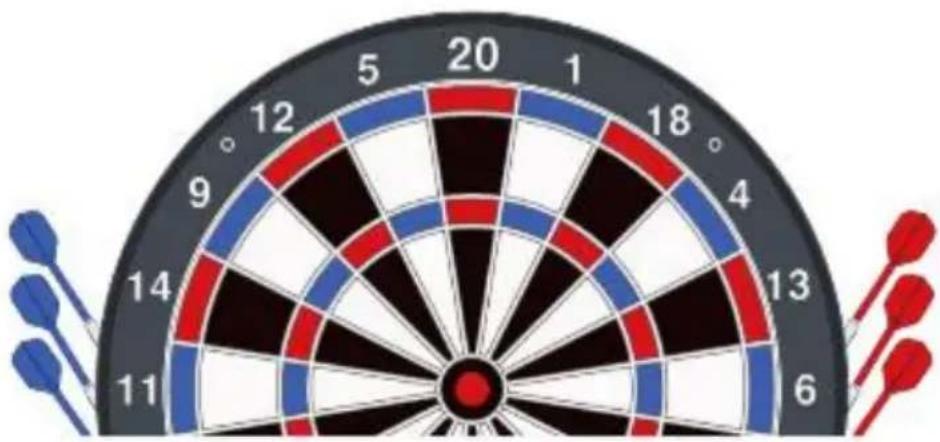
natural_image
Dartboard with number 20 and red/blue painted aiming, no text or symbols on the face or backgroundG34 9 VITE (con opzioni 003, 004, 005, 006, 007, 008, 009)
www.vevor.com/support
VEVOR®
TOUGH TOOLS, HALF PRICE
www.vevor.com/support
JUEGO DE DIANA Y GABINETE
MODELO : 9176WD
www.vevor.com/support
SAFETY WARNINGS AND PRECAUTIONS
Bull's eye Located68(172.72cm) up from the floor
Wall
Throwing Line244cm
natural_image
Abstract black-and-white line drawing of a hand holding a small object, surrounded by intersecting lines and geometric shapes (no text or symbols)| Segment | Scoring rule |
| Single segment | Score x 1 |
| Double segment | Score x 2 |
| Triple segment | Score x 3 |
| Outer Bullseye | 25 X 1 |
| Inner Bullseye | 25 x 2 |
Teclas de función
www.vevor.com/support
VEVOR®
TOUGH TOOLS, HALF PRICE
www.vevor.com/support
ZESTAW DO DARTA I SZAFKI
MODEL : 9176WD
POTRZEBUJESZ POMOCY? SKONTAKTUJ SIĘ Z NAMI!
www.vevor.com/support
SAFETY WARNINGS AND PRECAUTIONS
INSTALACJA ZASILANIA
natural_image
Abstract black-and-white line drawing of a hand holding a device, surrounded by geometric lines and shapes (no text or symbols)radar
| Segment | Score | | -------------------- | --------- | | Single segment | Score x 1 | | Double segment | Score x 2 | | Triple segment | Score x 3 | | Outer Bullseye | 25 X 1 | | Inner Bullseye | 25 x 2 |Klawisze funkcyjne
Opisy gier i zasady
www.vevor.com/support
VEVOR®
TOUGH TOOLS, HALF PRICE
www.vevor.com/support
DARTBORD- EN KASTENSET
MODEL : 9176WD
HULP NODIG? NEEM CONTACT MET ONS OP!
SAFETY WARNINGS AND PRECAUTIONS
STROOMINSTALLATIE
natural_image
Abstract black-and-white line drawing of a hand holding a small object, surrounded by intersecting lines and geometric shapes (no text or symbols)Segment Scoring rule
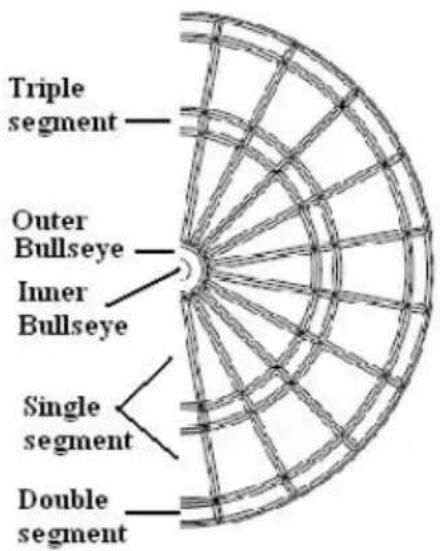
| Single segment | Score x 1 |
| Double segment | Score x 2 |
| Triple segment | Score x 3 |
| Outer Bullseye | 25 X 1 |
| Inner Bullseye | 25 x 2 |
Functietoetsen
natural_image
Diagram of a basketball court with red arch and black square markers (no text or symbols)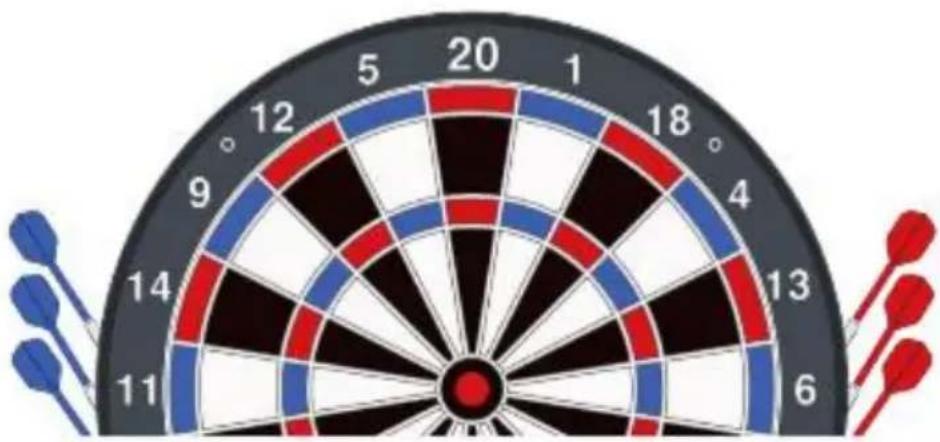
natural_image
Dartboard with number 20 and red/blue painted aiming, no text or symbols on the face or backgroundwww.vevor.com/support
VEVOR®
TOUGH TOOLS, HALF PRICE
www.vevor.com/support
SET MED DARTTAVLA OCH SKÅP
MODELL : 9176WD
BEHÖVER HJÄLP? KONTAKTA OSS!
www.vevor.com/support
SAFETY WARNINGS AND PRECAUTIONS
STRÖMININSTALLATION
natural_image
Abstract black-and-white line drawing of a hand interacting with a geometric structure (no text or symbols)radar
| Segment | Score | | ------------------- | --------- | | Single segment | x1 | | Double segment | x2 | | Triple segment | x3 | | Outer Bullseye | 25 X 1 | | Inner Bullseye | 25 x 2 |Funktionstangenter
The options are the target score, see
www.vevor.com/support
- DARTBOARD AND CABINET SET
- Model:9176WD
- NEED HELP? CONTACT US!
- SAFETY WARNINGS AND PRECAUTIONS
- WARNING:
- ELECTRIC SAFETY!
- ATTENTION!
- SAVE THESE INSTRUCTIONS
- MOUNTING (PHYSICAL INSTALLATION)
- Methods One
- Methods Two
- POWER INSTALLATION
- WARNING!
- IMPORTANT NOTE
- Function Keys
- Game Descriptions & Rules
- G01 (With 6 options of Single In/Out, Double In/Out and Master C 25/50 Bull and 50/50 Bull)
- G02 501
- G03 601
- G04 701
- G05 801
- G06 901
- G07 301 LEAGUE (With options of Single In/Out, Double In/Out and Master Out, team selection, Bull and 50/50 Bull)
- G08 501 League
- G09 601 League
- G10 701 League
- G11 801 League
- G12 901 League
- G13 CRICKET (With option C00, C20, C25, 25/50 Bull and 50/50 E
- Note:
- G14 NO SCORE CRICKET (with options of 000, 020, 025, 25/50 B and 50/50 Bull)
- G15 CUT THROAT CRICKET (with options of 00C, 20C, 25C, 25/5( Bull and 50/50 Bull)
- G16 KILLER CRIKCET (with options of H00, H20, H25, 25/50 Bull 50/50 Bull)
- G17 SCRAM CRICKET (with options of 25/50 Bull and 50/50 Bull)
- G18 LOW PITCH CRICKET (with options of E00, E20, E25, 25/50 and 50/50 Bull)
- G19 ENGLISH CRICKET (with options of 25/50 Bull and 50/50 Bul
- G20 SINGLE ONLY CRICKET (with options of S00, S20, S25)
- G21 Count Up (with options of 100, 200, 300, ..... 900, 25/50 Bu 50/50 Bull )
- G22 ROUND THE CLOCK (with options of 105, 110, 115, 120, 205, 215, 220, 305, 310, 315, 320)
- G23 SHANGHAI (with options of L05, L07, L09, L11)
- G24 HIGH SCORE (with options of H03, H04, H05, H06, H07, H08, H10, H11, H12, H13, H14, 25/50 Bull and 50/50 Bull)
- G25 OVERS (with options of O03, O04, O05, .... O21, 25/50 Bull 50/50 Bull)
- G26 UNDERS (with options of U03, U04, U05, .... U19, U20, U21, Bull and 50/50 Bull)
- G27 HALVE-IT (with options of 25/50 Bull and 50/50 Bull)
- G29 DOUBLE DOWN (with options of 25/50 Bull and 50/50 Bull)
- G32 BEST OF NINE (with options of 009, 012, 015, 018, 021)
- G33 3 Point Contest
- G36 SHOOT-OUT (with options of -03, -04, -05, ....- -19, -20, -21
- G37 BINGO
- G38 KILLER (with options, please refer to below option list)
- G39 SHOOTING (with options of 25/50 Bull and 50/50 Bull)
- G40 All Fives (Games options of 51, 61, 71, 81, 91, 25/50 & 50/
- VEVOR®
- TOUGH TOOLS, HALF PRICE
- ENSEMBLE JEU DE FLÉCHETTES ET ARMOIRE
- BESOIN D'AIDE ? CONTACTEZ-NOUS!
- INSTALLATION ÉLECTRIQUE
- Touches de fonction
- KRAFTINSTALLATION
- Funktionstasten
- SET BERSAGLIO E ARMADIETTO
- MODELLO : 9176WD
- Tasti funzione
- G34 9 VITE (con opzioni 003, 004, 005, 006, 007, 008, 009)
- JUEGO DE DIANA Y GABINETE
- MODELO : 9176WD
- Teclas de función
- ZESTAW DO DARTA I SZAFKI
- MODEL : 9176WD
- POTRZEBUJESZ POMOCY? SKONTAKTUJ SIĘ Z NAMI!
- INSTALACJA ZASILANIA
- Klawisze funkcyjne
- DARTBORD- EN KASTENSET
- HULP NODIG? NEEM CONTACT MET ONS OP!
- STROOMINSTALLATIE
- Functietoetsen
- SET MED DARTTAVLA OCH SKÅP
- MODELL : 9176WD
- BEHÖVER HJÄLP? KONTAKTA OSS!
- STRÖMININSTALLATION
- Funktionstangenter
Brand : Vevor
Model : 9176WD
Category : Toys