
ZHP2301-800 - Air purifier Vevor - Free user manual and instructions
Find the device manual for free ZHP2301-800 Vevor in PDF.
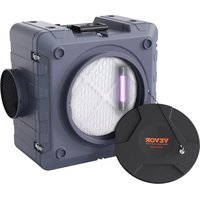


| Brand | Vevor |
| Model | ZHP2301-800 |
| Product Type | Air Purifier |
| Dimensions (L x D x H) | 616 x 406 x 598 mm |
| Weight | 16 kg |
| Power Supply | 120 V ~ 60 Hz |
| Power | 300 W |
| Maximum Airflow | 800 CFM |
| Filters | Pre-filter, HEPA filter, activated carbon filter, UV-C lamp |
| Filter Change Indicator | Indicator light and buzzer after 2000 hours |
| UV-C Function | UV-C sterilization lamp with fault detection |
| Adjustable Speed | Speed controller (min 385 CFM, max 800 CFM) |
| Usage Positions | Vertical or horizontal |
| Auxiliary Outlet | 120 V AC outlet, max 12 A (unit off) / 9 A (unit on) |
| Circuit Breaker | Overcurrent protection |
| Timer | Operating hours counter |
| Power Cord | With 3-prong plug, grounded |
| Air Inlet/Outlet | Ductable (inlet 13", outlet 8") |
| Housing Materials | Not specified in the manual (estimate: steel or sturdy plastic) |
| Noise Level | Not specified in the manual |
| Operating Temperature | Not specified in the manual |
| Certifications | GFCI recommended, complies with safety standards |
Frequently Asked Questions - ZHP2301-800 Vevor
User questions about ZHP2301-800 Vevor
0 question about this device. Answer the ones you know or ask your own.
Ask a new question about this device
Download the instructions for your Air purifier in PDF format for free! Find your manual ZHP2301-800 - Vevor and take your electronic device back in hand. On this page are published all the documents necessary for the use of your device. ZHP2301-800 by Vevor.
USER MANUAL ZHP2301-800 Vevor
Technical Support and E-Warranty Certificate www.vevor.com/support
AIR SCRUBBER
MANUAL
MODEL: ZHP2301-550/ZHP2301-550R /ZHE2401-550/ZHE2401-800
We continue to be committed to providing you tools with competitive prices. "Save Half", "Half Price" or any other similar expressions used by us only represent savings you might benefit from buying certain tools with us compared to top brands and does not necessarily mean to cover all categories of tools offered. We are kindly reminded to verify carefully when placing an order with us that you are actually saving half in comparison with the top major brands.
ZHP2301-550/ZHP2301-550R/ZHE2401-550/ZHE2401-800
NEED HELP? CONTACT US!
Have product questions? Need technical support? Please feel free to contact us:
Technical Support and E-Warranty Certificate www.vevor.com/support
This is the original instruction. Please read all manual instructions carefully before operating. VEVOR reserves a clear interpretation of the user manual. The appearance of the product shall be subject to the product you received. Please forgive us that we won't inform you of any technology or software updates on our product.
Read the instructions carefully before using the device.
Catalogue
- Technical Parameters
- Safety Precautions
- Product Structure Diagram
- Instructions for Use
- Scope of Application
- Common Fault Analysis
Technical Parameters
| Brand | vevor | |
| Model | ZHP2301-550 | ZHP2301800 |
| Voltage | 120V~ 60Hz | 120V~ 60Hz |
| power(w) | 220 | 300 |
| Air Volume(CFM) | 550 | 800 |
| product size (mm) | 616*406*598 | 616*406*598 |
| product weigh (kg) | 15.7 | 16 |
| Model | ZHE2401-550 | ZHE2401-800 |
| Voltage | 220-240V~ 50/60Hz | 220-240V~ 50/60Hz |
| power(w) | 80 | 130 |
| Air Volume(CFM) | 550 | 800 |
| Product Size (mm) | 616*406*598 | 616*406*598 |
| product weigh(kg) | 15.7 | 16 |
Safety Precautions

Safety & Warning
- Please note that the air scrubber should only be used with parts approved by the supplier. Using unauthorized parts or making alterations to the machine could void your warranty. Contact an authorized distributor for further assistance.
- If the supply cord is damaged, it must be replaced by the manufacturer, its service agent, or similarly qualified persons in order to avoid a hazard.
- This appliance is not intended for use by persons (including children) with reduced physical, sensory, or mental capabilities, or lack of experience and knowledge, unless they have been given supervision or instruction concerning use of the appliance by a person responsible for their safety.
- Children should be supervised to ensure that they do not play with the appliance.
- Please remove all filter packing bags before plugging the machine into the power supply. Otherwise, there is a risk of damage to the machine or filters, and the machine may not work properly.
- The power supply must be cut off before replacing any filters. In addition, all filters must use authorized or approved components.
Otherwise, it will affect the filter efficiency or cause damage to the machine.
- WARNING: This appliance contains a UV emitter. Do not stare at the light source.
- CAUTION: To reduce the risk of electric shock, connect only to a supply with a ground fault circuit interrupting device.
- Note: To reduce the risk of electric shock, please connect only to a socket with
the ground fault circuit breaker device.
- Ensure that the intake and outlet are free of all materials and obstructions, as any
restrictions may cause the equipment to overheat and cause impact hazards.
- Do not change or modify the machine in any way.
To avoid the risk of fire or electric shock:
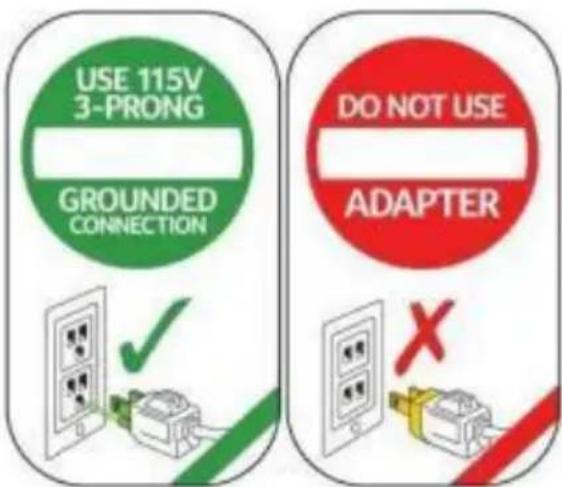
- The unit must be electrically grounded.
- Insert 3-prong plug directly into outlet with Ground Fault Circuit Interrupting device.
- Do not use an adapter with this unit.
- Do not use the unit in standing water.
- If electrical parts get wet, they must be dried before use.
Breathing Hazard
When using the air scrubber in a containment area, always turn off open combustion appliances, such as fireplaces, furnaces, water heaters, and HVAC systems, to avoid the risk of back drafting carbon monoxide fumes.
If the Filter Change Light illuminates during the remediation process, immediately change the HEPA/Activated Carbon Filter.
Tipping Hazard
- Use caution when stacking units.
- Do not stack more than 2 units on top of each other.
- Falling equipment could cause bodily harm.
WARNING: Do not expose to water or rain to reduce the risk of electric shock.
WARNING: NOT SUITABLE FOR USE WITH SOLID-STATE SPEED CONTROLS
CAUTION: To reduce the risk of electric shock, connect only to an outlet with a ground fault circuit interrupting device.
WARNING: Skin or eye damage may result from directly viewing the light produced by the lamp in this apparatus. Always disconnect power before relamping or servicing. Replace Lamp With Lamp ZW4S15W-Z135, DC20160mA 100-280nm.
SAFETY NOTES
• Always unplug the unit before performing any maintenance. - Check the power cord for damage (fraying, cuts, etc.) before use. • To avoid electric shock, never use a water hose or pressure wash to clean the electrical components. - Check the pre-filter before operating the machine to ensure it is not clogged. If there is any sign of airflow restriction, change the filter. • Make sure the unit is dry before installing clean filters.
When using the air scrubber for remediation purposes, replace both filters simultaneously and always clean the machine between jobs. This will prevent cross-contamination.
GFCI: Press the TEST button (then RESET button) every month to ensure proper operation.
SAVE THESE INSTRUCTIONS
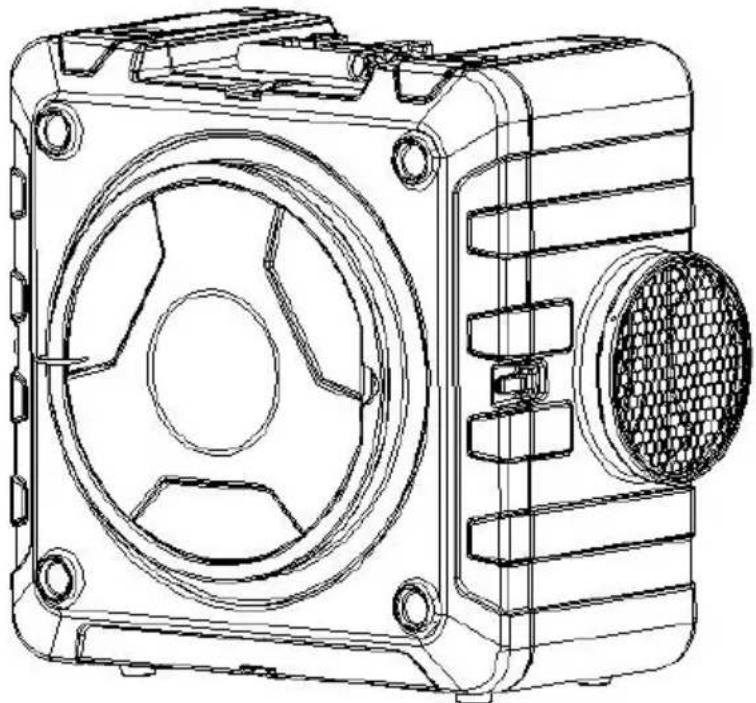
Product Structure Diagram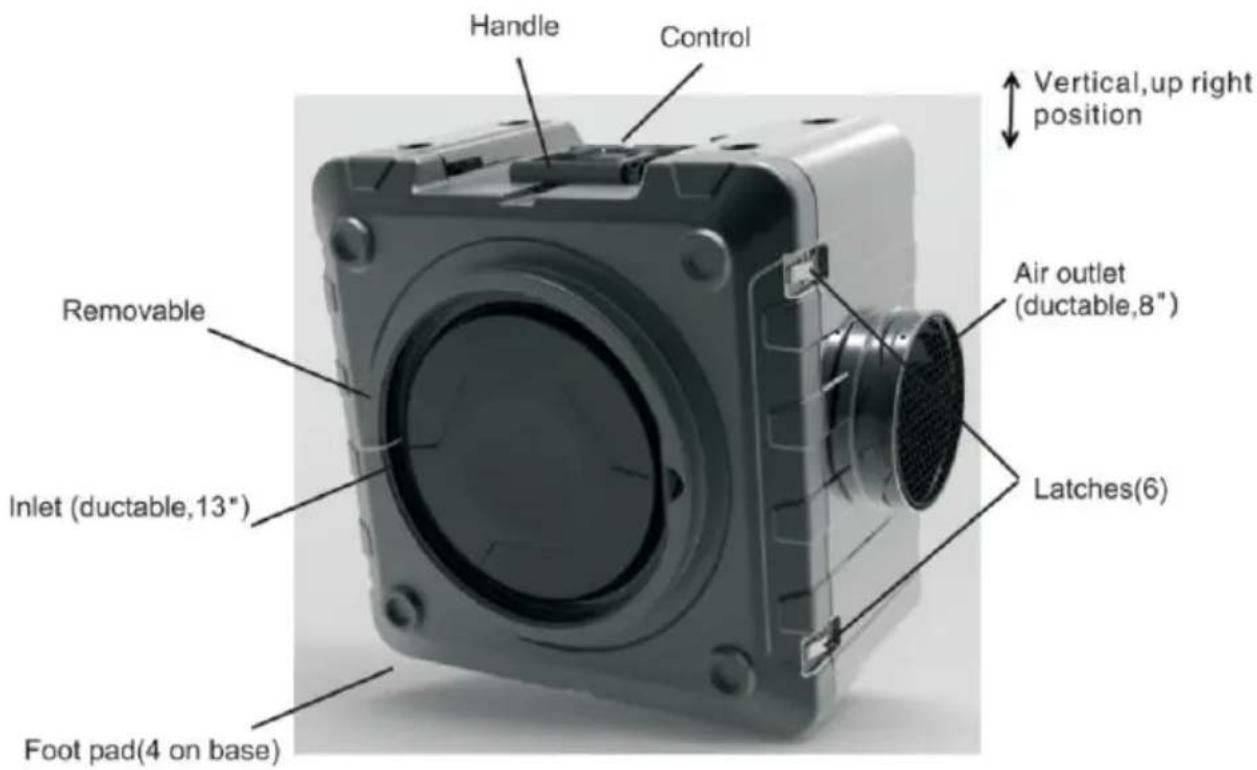
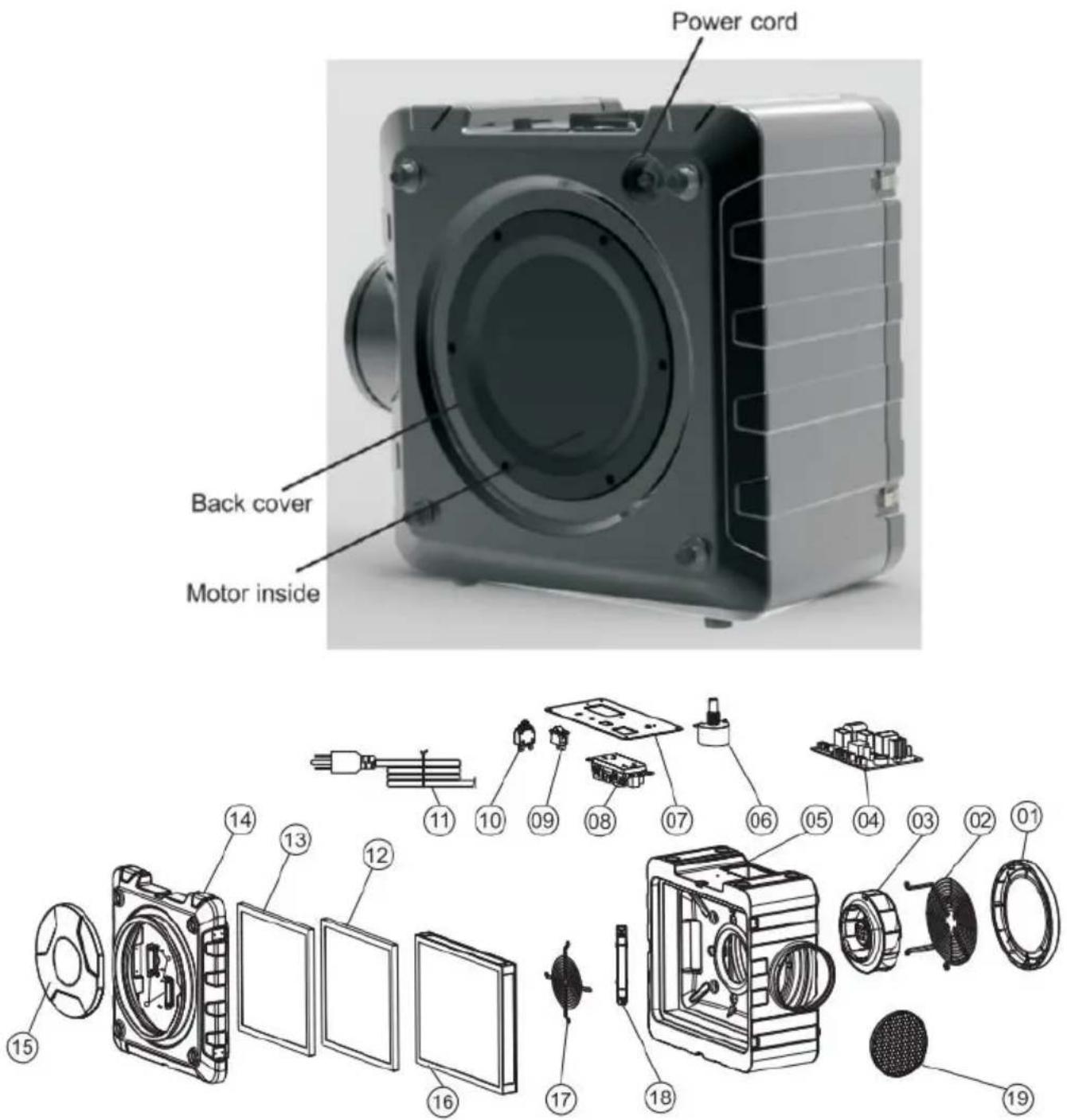
| No. | Name | Qty | No | Name | Qty | |
| 01 | The fan cover | 1 | 11 | Power line | 1 | |
| 02 | Fan holder | 1 | 12 | Carbon filter | 1 | |
| 03 | Draught fan | 1 | 13 | Air pre-cleaner | 1 | |
| 04 | Power strip | 1 | 14 | Suction canal | 1 | |
| 05 | Noumenon | 1 | 15 | Air inlet cover | 1 | |
| 06 | Potentiometer | 1 | 16 | Hepa filter | 1 | |
| 07 | Control panel assembly | 1 | 17 | Fan retainer | 1 | |
| 08 | Socket | 1 | 18 | UVC lamp | 1 | |
| 09 | Switch | 1 | 19 | The wind hood | 1 | |
| 10 | Overcurrent protector | 1 | ||||
Instructions Of Use
SETUP
- Place the air scrubber so that it is in an upright, vertical position.
- Plug the machine into a standard 120-volt outlet. Note: Each unit uses 2 amps to operate.
- Power the unit on and adjust the speed by turning the variable speed control. The maximum speed is 550 CFM, and the minimum rate is 100 CFM.
- The air scrubber can be operated vertically or horizontally, depending on the situation. At this point, adjust the machine to the optimal position.
- When the machine's total working time
adds up to 2000 hours, the filter change warning light
will blink with buzzing on the
control panel to remind changing filters. (To reset the machine, push V-C
light.Switch 3 times continuously in 5 seconds after resetting the filter service time. )
- UV-C sterilization lamp fault detection function: when the UV-C sterilization lamp does not work, the buzzer will keep ringing.
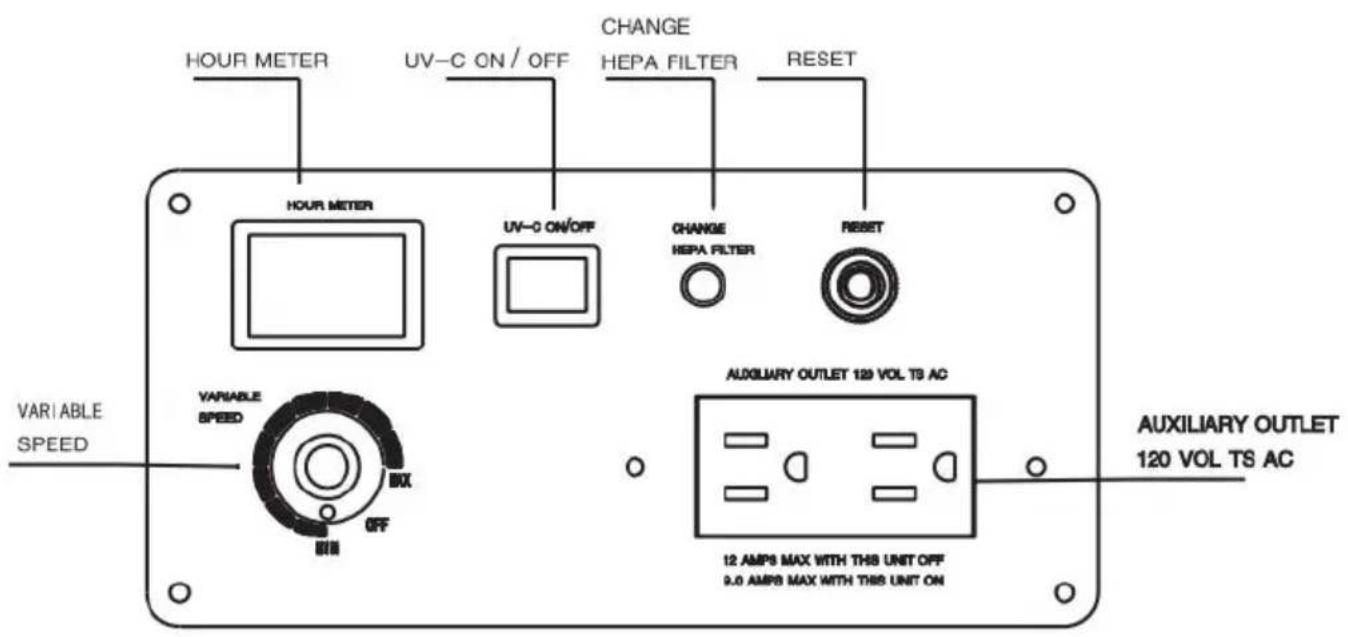
THE CONTROL PANEL
Variable Speed Control
Variable speed control is used to adjust the power of the machine. Turn the knob in a clockwise direction to increase the speed from minimum speed to maximum. The minimum speed setting is located immediately close to OFF.
Auxiliary Outlet
If more air filtration is necessary for a space, you can "daisy chain" up to 3 air scrubbers to the same outlet. There is a maximum amp of 12 when the units are turned off, and a maximum of 9 amps when they are turned on. Other equipment can be plugged into the same outlet as
the scrubber as long as it doesn't go above the max amperage.
Circuit Breaker Switch
The Circuit Breaker Switch protects the unit if more than 12 amps of electricity are passing through the circuit. If this occurs, the switch will cut off power to the unit.
Timer
Used to time the running time of the device. Start timing when running, and pause timing when the device is stopped.
CHANGING THE FILTERS
- Loosen the 2 locks that hold the filter board in place. 2. Slide out the filter panel board.
- Remove the used filters and replace them with new filters.
WARNING
• Always wear approved protective gear when changing the filters. - Filters should be changed after each remediation job. - If the indicator light is on, Buzzer rang, always change the HE
PA/Activated Carbon Filter.
- For the safe operation of this machine follow the instructions given in booklet and the training provided.
Failure to do so can result in personal injury and/or damage to machine and property!
•DO NOT OPERATE MACHINE IN AN EXPLOSIVE ENVIRONMENT!
NOTE: In Canada, the use of a temporary adapter is not permitted by the Canadian Electrical Code.
Scope Of Application
Water Damage
In this application, the air scrubber should be placed in the center of affected area. The air scrubber will draw in the air, filter it, then blow newly cleaned air. To begin the process, turn on the scrubber, and start cleaning the air. Keep in mind that if you work in a large area divided by walls, you may need several air scrubbers to clean the air effectively.
Odor Control
When used with the HEPA/Activated Carbon Filter, the air scrubber is excellent at odor control. Place the carbon filter in the pre-filter slot, will capture a wide variety of odor-causing gas molecules, such as volatile organic compounds (VOCs), smoke, soot, and paint fumes.
Other Uses
The air scrubber is also valuable for many other applications, including mold remediation, fire damage, dust control, and sewage remediation.
Common Fault Analysis
| Fault Phenomenon | Solution |
| The machine does not turn on | ·Switch not turned on-turn·Circuit breaker or GFCI has tripped-push rest button·No power to scrubber-make sure unit is plugged in;check power supply·Faulty switch-replace |
Made In China
VEVOR®
TOUGH TOOLS, HALF PRICE
Technical Support and E-Warranty Certificate
www.vevor.com/support
VEVOR®
TOUGH TOOLS, HALF PRICE
www.vevor.com/support
AIR SCRUBBER
MANUAL
MODEL: ZHP2301-550/ZHP2301-550R /ZHE2401-550/ZHE2401-800
NEED HELP? CONTACT US!
www.vevor.com/support
AIR FILTER
MANUAL
MODEL: ZHP2301-550/ZHP2301-550R /ZHE2401-550/ZHE2401-800
www.vevor.com/support
VEVOR®
TOUGH TOOLS, HALF PRICE
electronics www.vevor.com/support
VEVOR®
TOUGH TOOLS, HALF PRICE
NEED HELP? CONTACT US!
NEED HELP? CONTACT US!
warranty certificate www.vevor.com/support
VEVOR®
TOUGH TOOLS, HALF PRICE
www.vevor.com/support
AIR SCRUBBER
MANUAL
MODEL: ZHP2301-550/ZHP2301-550R /ZHE2401-550/ZHE2401-800
NEED HELP? CONTACT US!
www.vevor.com/support
- AIR SCRUBBER
- MANUAL
- NEED HELP? CONTACT US
- CATALOGUE
- SAFETY PRECAUTIONS
- SAFETY & WARNING
- TO AVOID THE RISK OF FIRE OR ELECTRIC SHOCK
- BREATHING HAZARD
- TIPPING HAZARD
- SAFETY NOTES
- SAVE THESE INSTRUCTIONS
- INSTRUCTIONS OF USE
- SETUP
- THE CONTROL PANEL
- VARIABLE SPEED CONTROL
- AUXILIARY OUTLET
- CIRCUIT BREAKER SWITCH
- TIMER
- CHANGING THE FILTERS
- WARNING
- SCOPE OF APPLICATION
- WATER DAMAGE
- ODOR CONTROL
- OTHER USES
- MADE IN CHINA
- VEVOR®
- TOUGH TOOLS, HALF PRICE
- WWW.VEVOR.COM/SUPPORT
- AIR FILTER
- MODEL: ZHP2301-550/ZHP2301-550R /ZHE2401-550/ZHE
Brand : Vevor
Model : ZHP2301-800
Category : Air purifier