
BZT-242 - Air purifier Vevor - Free user manual and instructions
Find the device manual for free BZT-242 Vevor in PDF.
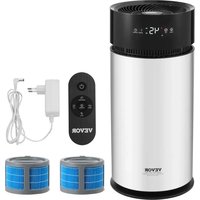


| Product type | Air Purifier / Evaporative Humidifier |
| Brand | Vevor |
| Model | BZT-242 |
| Power supply | Electric |
| Mist levels | 3 levels (1, 2, 3) |
| Timer | 1 to 14 hours |
| Humidity control | Adjustable from 30% to 90% RH |
| Drying mode | Yes (filter drying) |
| Remote control | Yes |
| Display | LED |
| Safety | Automatic shut-off when water runs out |
| Filter | Evaporative, replacement recommended every 3-4 months |
| Cleaning | Washable with water, citric acid for limescale |
| Usage | Indoor only |
| Operating temperature | 5°C to 40°C |
| Operating humidity | Less than 80% RH |
| Warranty | 1 year limited |
Frequently Asked Questions - BZT-242 Vevor
User questions about BZT-242 Vevor
0 question about this device. Answer the ones you know or ask your own.
Ask a new question about this device
Download the instructions for your Air purifier in PDF format for free! Find your manual BZT-242 - Vevor and take your electronic device back in hand. On this page are published all the documents necessary for the use of your device. BZT-242 by Vevor.
USER MANUAL BZT-242 Vevor
Technical Support and E-Warranty Certificate www.vevor.com/support
EVAPORATIVE HUMIDIFIERS
MODEL: BZT-242
We continue to be committed to providing you with tools at competitive prices. "Save Half", "Half Price", or any other similar expressions used by us only represent an estimate of savings you might benefit from buying certain tools with us compared to the major top brands and do not necessarily mean to cover all categories of tools offered by us. You are kindly reminded to verify carefully when placing an order with us if you are actually saving half in comparison with the top major brands.
MODEL: BZT-242
NEED HELP? CONTACT US!
Have product questions? Need technical support? Please feel free to contact us:
Technical Support and E-Warranty Certificate www.vevor.com/support
This is the original instruction. Please read all manual instructions carefully before operating. VEVOR reserves a clear interpretation of the user manual. The appearance of the product shall be subject to the product you received. Please forgive us that we won't inform you of any technology or software updates on our product.
CORRECT DISPOSAL

This product is subject to the provisions of European Directive
2012/19/EU. The symbol showing a wheelie bin crossed through indicates that the product requires separate refuse collection in the European Union. This applies to the product and all accessories marked with this symbol. Products marked as such may not be discarded with normal domestic waste but must be taken to a collection point for recycling electrical and electronic devices.
Safety Instructions
1. To avoid the danger of electric shock, do not pull the plug while hands are wet. 2. Do not disassemble, repair, or alter this product. Doing so will void the warranty. 3. Protect the power cord from scratches, damage, knots, or being pressed by heavy objects to avoid electric shock, short circuit, or fire. 4. In case of abnormal behavior, pull the plug immediately and contact an authorized dealer. 5. Do not separate the water tank from the base while the machine is working, and do not touch the water and parts in the base. 6. This machine is for indoor use only. 7. Do not leave the machine plugged in if it will not be in use for a period or during thunderstorm weather. 8. Do not flip the machine while it is working or while there is water in the base to avoid burning out the internal components. 9. Keep away from children. Do not allow children to operate the product. 10. Pull the power plug when filling water and cleaning.
Matters Needing Attention
(1) The power supply voltage must be consistent with the rated voltage of the product. If the supply voltage does not match, do not use the product.
2) Initial use: leave the humidifier at room temperature for 30 minutes before use. This prevents water tank damage due to sudden temperature change. 3) Only operate the machine between 5°C and 40°C. 4) Place the machine on flat surfaces. 5) Do not put the humidifier directly on wooden floors to prevent damage. 6) Place the humidifier at least 2 meters away from furniture and electrical appliances to avoid damage. 7) Keep away from heat sources and direct sunlight. 8) Never add hot water above 40°C into the water tank to avoid damaging the machine. 9) Never let water drip into the outlet. Wipe the machine and its cord to avoid damage. 10) Pour out all the water if the machine will be placed in temperatures below 0°C to avoid damage to the machine. 11) Do not put metals, chemicals, and detergents into the machine to avoid spreading fumes during misting. 12) Turn off the power supply and pull out the plug when pouring water. 13) Do not immerse the machine in water. 14) Household use only.
Cleaning and maintenance
Some areas have hard water, with high calcium and magnesium ion content, coupled with the use of bleach powder and other water purifiers in some areas, and in some places due to large air pollution, there is a large amount of dust in the air. In the use of this product for about a week, the sink and filter will produce dirt and scale. If not cleaned in time, it will affect the use effect.
When cleaning, the filter can be directly washed under the faucet, but not rubbed by hand, and cannot be brushed with a wool (steel) brush. It can be wiped with a clean cloth.
If there is stubborn scale that cannot be wiped with a cloth, you can pour acid into the sink, and then wipe off the scale with a cloth or soft brush.
Then clean with water.
The function of the filter element to filter water and absorb water will decrease with the increase of use time. The recommended use cycle is 3-4 months. Please replace it regularly.
If the product is not used for a long time, it is recommended to drain the remaining water in the tank, dry the filter element, and then put it away.
Cleaning
1. Filter cleaning steps:
a. Take out the humidifier host and filter, scrub the inside of the wall with a brush or soft cloth, and then rinse with water and wipe clean (Figure 1).
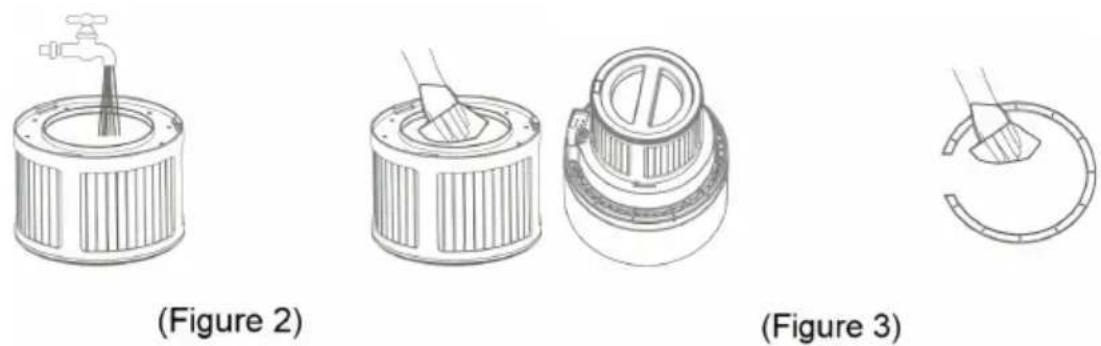
b. Clean the filter: pick up the main assembly and turn it right as indicated by the arrow to take out the filter. Rinse the filter with water. The rubber shell can be wiped with a soft cloth (the filter becomes dark due to water quality and time problems and cannot be cleaned, which does not affect use) (Figure 2).
c. To clean the primary filter, pick up the main component, take out the primary filter, and clean the dirt on the surface with a cloth or water (Figure 3).
(Figure 1)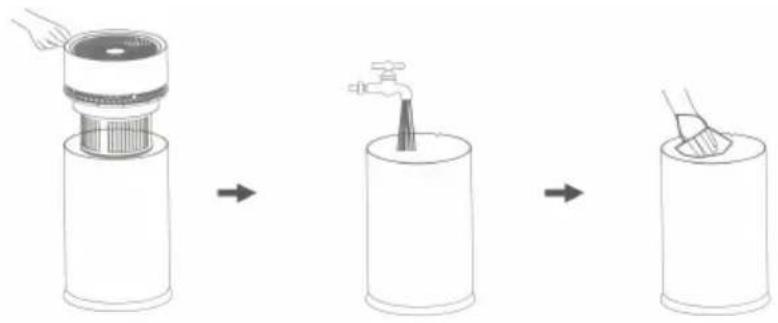
Note:
- Unplug the power before adding water or cleaning.
- Do not add essential oils, perfumes or disinfectant to the water tank to avoid corrosion and damage to the product or human body.
Warranty
- The machine in normal use has a one year limited warranty on produce due to its quality from the date of purchase with receipt.
- The following circumstances do not fall within the scope of warranty
- Failure to follow the instructions and precautions causing product failure
- Faults of products caused by unexpected disasters and other factors such as high voltage fluctuations, fire, flood, earthquake, etc.
- Outside of the warranty period.
- Customer making unauthorized repairs, changes, misuse or accidental damages.
- Using the product in an environment not suited for the product.
INTRODUCTION
Your new humidifier adds invisible moisture to your home by moving inlet air through a saturated
wick. As air moves through the wick, the water evaporates into the air, leaving behind any white dust, minerals, or dissolved and suspended solids in the wick. Because the water is evaporated, there is just clean and invisible moist air.
As the evaporation wick traps accumulated minerals from the water, its ability to absorb and evaporate water decreases. We recommend changing the wick at the beginning of every season. In hard water areas, more frequent replacement may be necessary to maintain your humidifier's efficiency.
STRUCTURE OF PRODUCT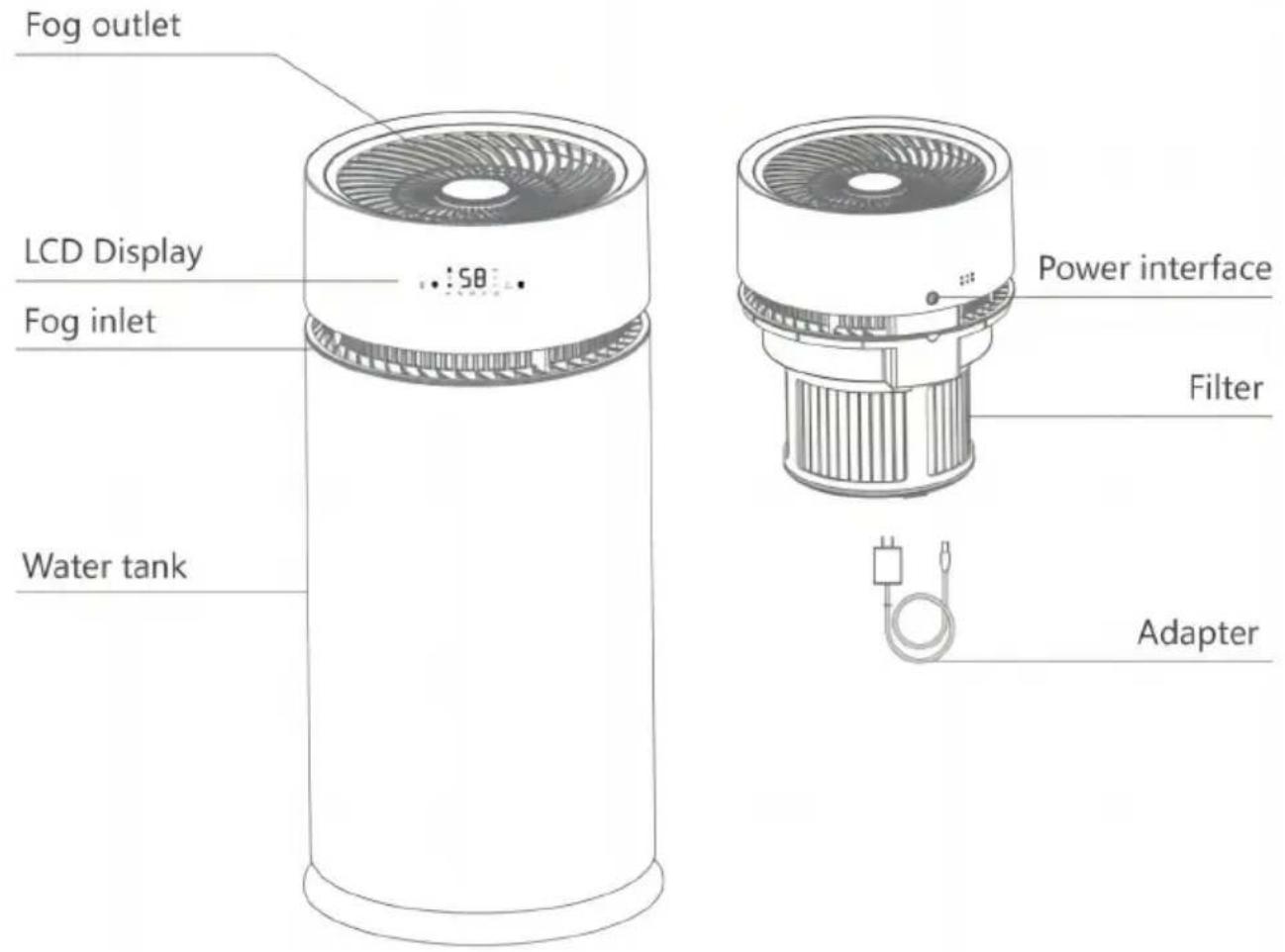
The frame diagram is for reference only, please refer to the actual product.
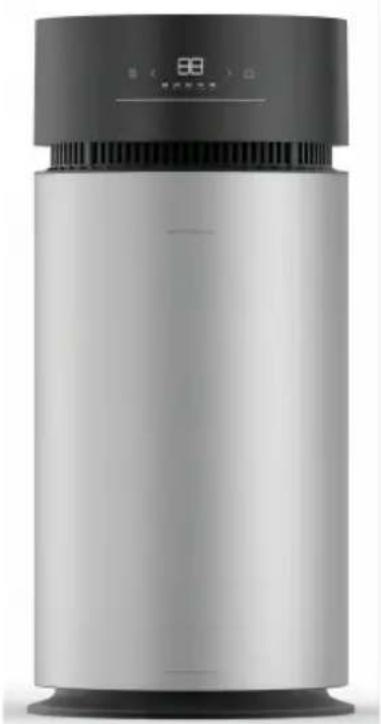
Function Control Panel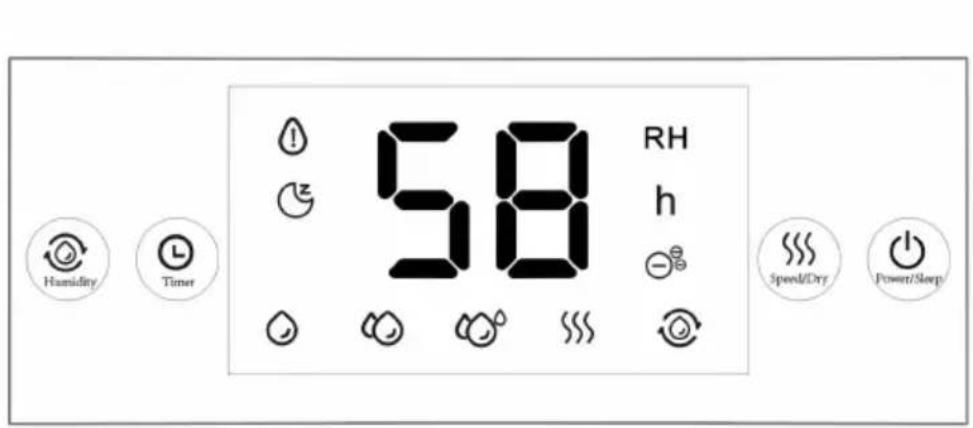
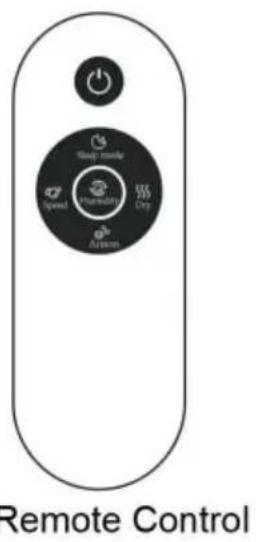
Remote Control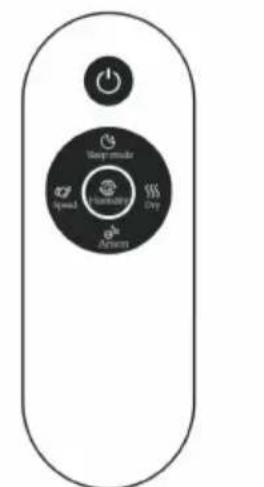
HOW TO USE
Preparation before use
Make sure to read the "Safety Precautions" before use.
- Removing all packaging
- Please set the humidifier at a stable level. The surface must be water-resistant.
- Please do not cover the air inlet and exhaust vents.
- Choose a hard, flat location for the humidifier at least 30cm away from any walls. 5. Mist should be directed away from walls, furniture, bedding, and appliances.
- Take the head off of the base and remove all tape, including any tape/poly bag on the filter.
Instructions for use
- The proper operating environment for a humidifier is as follows: The temperature is between 5°C and 40°C, and the relative humidity is less than 80% RH.
- Use clean water with a temperature lower than 40°C. Do not fill with water.
(Pure water is recommended).
- If not used for a long time, clean the water tank and sink first.
STEPS
- Take the humidifier out of the packing box, remove the plastic bag wrapped in the evaporation wick filter and the packaging material in the water tank, and place the product in a firm and stable place.
- Two ways to add water:
(1) Top filling: In the shutdown state, you can directly add water from the head of the air outlet net; (2) After removing the humidifier host, add clean water to the water tank (the highest water level is at the top edge of the water line).
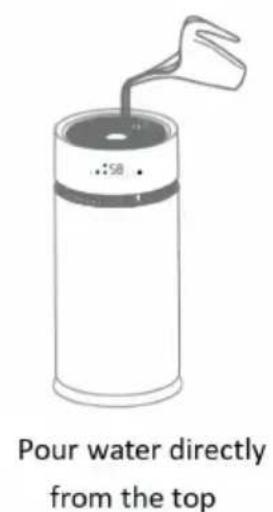
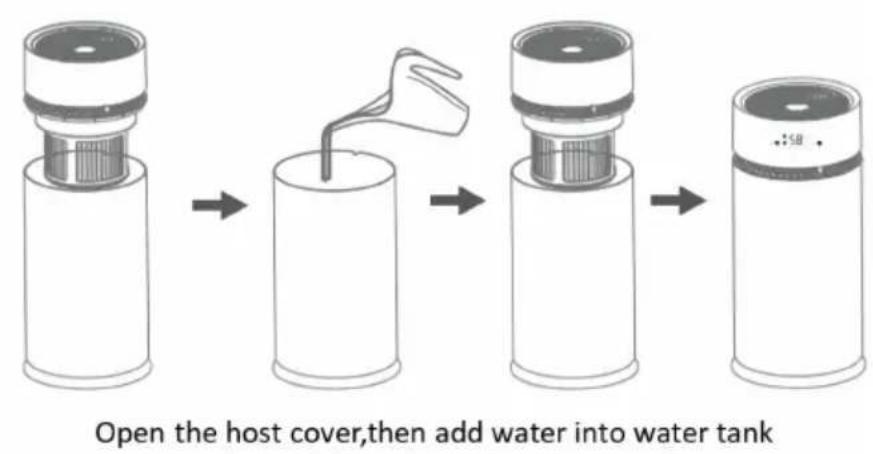
- When the humidifier is powered on, the buzzer beeps once, the screen stays on for 3 seconds and then goes off. The humidifier enters the standby state.
4. Power ON/OFF/Sleep: Press the power button, the humidifier will work normally. The default startup state: fog level 1 (screen display pattern), lights up and works; the current humidity is displayed on the screen; other functions are in standby state (related icons displayed). Long press the power button for 3s to enter the sleep mode; the icons and numbers on the screen go out, but the various programs being executed keep working normally. Then touch any key to release sleep mode.
- Speed/Dry: The default startup state: fog level 1 when the machine is turned on. Press this button in sequence to switch to Level 2 and so on. Long press the button for 3s to enter the dry mode. After entering the mode, the icon on the screen lights up.
6. Dry function: the air drying filter function, long press the Speed/dry button for 3s to enter the dry mode. The icon flashes for 3s and then stays on, and the dry mode is activated. The fog level 3 works. The screen displays the
humidity, and other ongoing tasks are auto-shut down. (In this function, the pump does not work, no water shortage sensor and power out detection.) After 30 minutes of working, the machine auto-shuts down, stops working, and enters standby mode.
7. Timer function: Press the timer button, the timer icon on the screen
and the timer prompt, and the humidity number will turn into a timer and light up. The time number will be adjusted from 1 hour. Press the value is adjusted by one hour, it can be cycled to 14 hours. After setting, it will flash for 3 seconds to enter the timer working state; press again to exit the timer, the humidifier will automatically power off and stop working.
(Note: Timing, the timer value is displayed as countdown, and humidity switching display every 5 seconds).
8. Humidity function: press the humidity button, the humidity function starts, (the icon on the LED screen lights up), the initial default humid 30% RH (press in sequence to 35% , 40% , 45% , 50% , 55% , 60% , 65% , 75% , 80% , 85% , 90% , "--"; "--" flashes for 3 seconds, it means exiting humidity mode), when the humidity value you want is set, after the v flashes for 3 seconds, it enters the set humidity value to work, and the humidity is displayed as the current ambient humidity. When the humidity reaches the set value, the humidifier stops working. When the humidity lower than the set humidity value by 5% RH, the humidifier works again, press button once to turn off humidity function after entering the set work (the humidity icon goes out.)
9. Lack of water status: when the sensed tank is lack of water, the water shortage light on the screen flashes (long flash), all other displays on screen go out when lack of water status; add water again and press can be working.
- Memory function: Except for the constant humidity function, other have no memory function.
NOTE:
- Press the button with a beeping sound;
- The functions of the buttons on the remote control are the same on the humidifier.
Manufacturer: Shanghaiuxinmuyeyouxianggsi
Address: Shuangchenglu 803nong11hao1602A-1609shi, baoshanqu,
shanghai 200000 CN.
Imported to AUS: SIHAO PTY LTD. 1 ROKEVA STREETEASTWOOD
NSW 2122 Australia
Imported to USA: Sanven Technology Ltd. Suite 250, 9166 Anaheim
Place, Rancho Cucamonga, CA 91730
| UK | REP |
YH CONSULTING LIMITED. C/O YH Consultin
Limited Office 147, Centurion House, London
Road, Staines-upon-Thames, Surrey, TW18 4A
| EC | REP |
E-CrossStu GmbH
Mainzer Landstr.69,
60329 Frankfurt am Main.
VEVOR
TOUGH TOOLS, HALF PRICE
Technical Support and E-Warranty Certificate
www.vevor.com/support
VEVOR®
TOUGH TOOLS, HALF PRICE
Technical Support and E-Warranty Certificate www.vevor.com/support
EVAPORATIVE HUMIDIFIERS
MODEL: BZT-242
(Figure 3) (Figure 1)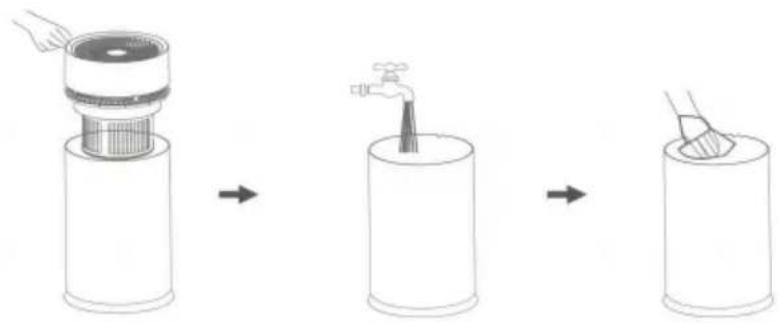
(Figure 2) (Figure 3)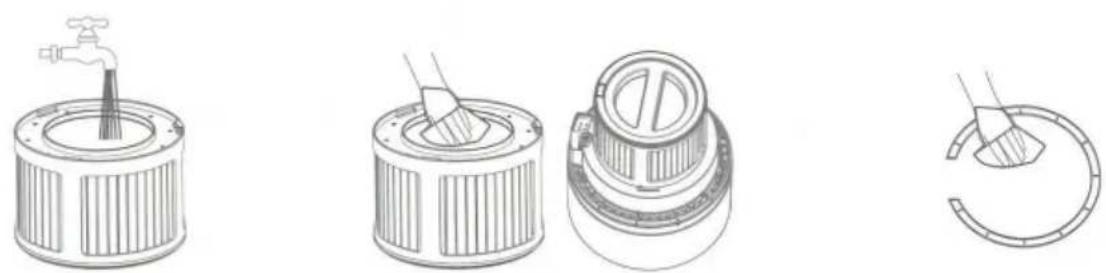
Note:
PRODUCT STRUCTURE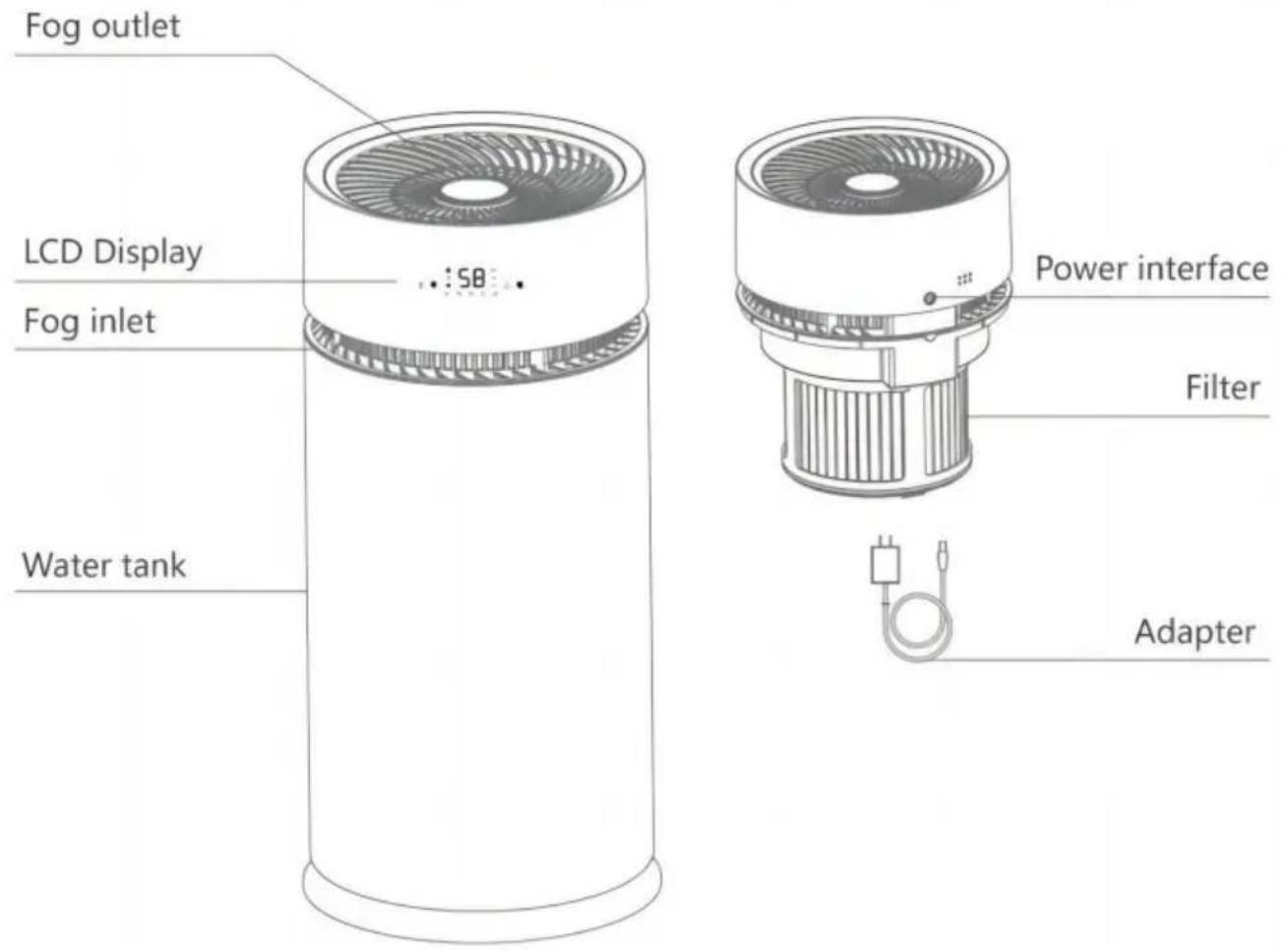
YH CONSULTING LIMITED. C/O YH Consulting Limited Office 147, Centurion House, London Road, Staines-upon-Thames, Surrey, TW18 4AX
E-CrossStu GmbH Mainzer Landstr.69, 60329 Frankfurt am Main.
VEVOR
TOUGH TOOLS, HALF PRICE
Technical support and warranty certificate
(Figure 3) (Figure 1)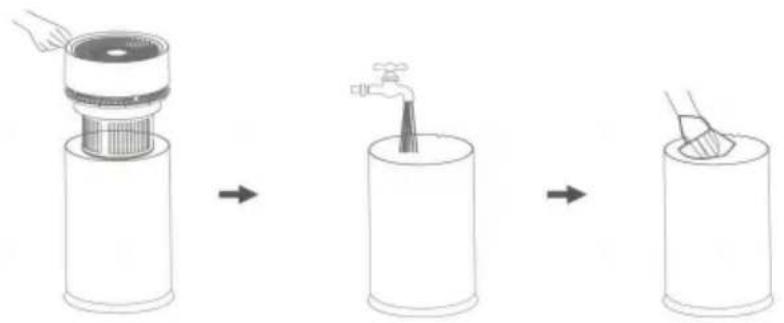
(Figure 2) (Figure 3)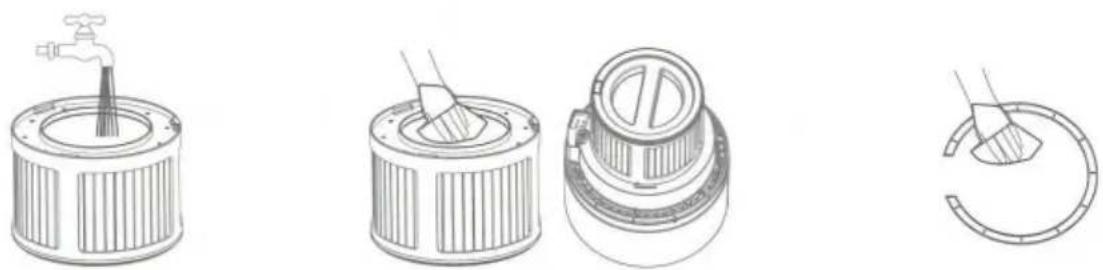
Note:
Function Control Panel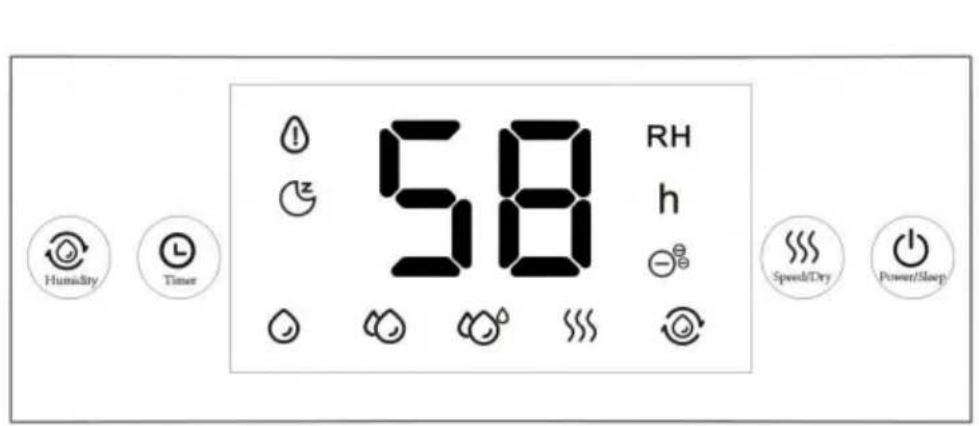
HOW TO USE
YH CONSULTING LIMITED. C/O YH Consulting Limited Office 147, Centurion House, London Road, Staines-upon-Thames, Surrey, TW18 4AX
www.vevor.com/support
VEVOR
TOUGH TOOLS, HALF PRICE
(Figure 2) (Figure 3)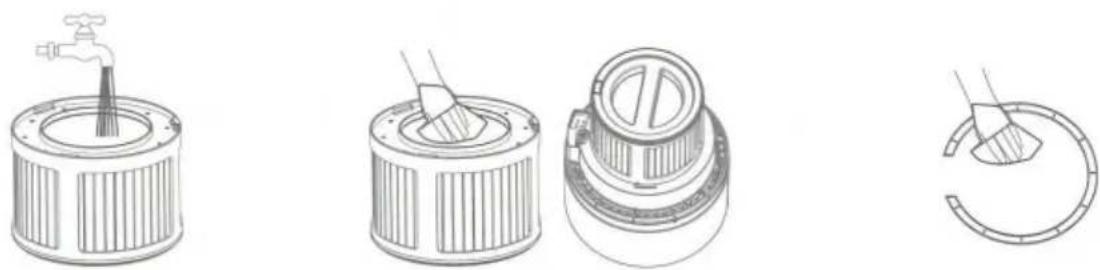
Note:
Imported into AUS: SIHAO PTY LTD. 1 ROKEVA STREETEASTWOOD NSW 2122
Australia
Rancho Cucamonga, CA 91730
| REP. DEL | REGNO UNITO |
YH CONSULTING LIMITED. C/O YH Consulting Limited
Office 147, Centurion House, London Road, Staines-
upon-Thames, Surrey, TW18 4AX
| REP.CE |
E-CrossStu GmbH
Mainzer Landstr.69,
60329 Frankfurt am Main.
VEVOR
TOUGH TOOLS, HALF PRICE
electronics www.vevor.com/support
VEVOR®
TOUGH TOOLS, HALF PRICE
Technical support and warranty certificate electronics www.vevor.com/support
(Figure 2) (Figure 3)
Note:
YH CONSULTING LIMITED. C/O YH Consulting Limited Office 147, Centurion House, London Road, Staines-upon-Thames, Surrey, TW18 4AX
E-CrossStu GmbH Mainzer Landstr.69, 60329 Frankfurt am Main.
VEVOR
TOUGH TOOLS, HALF PRICE
(Figure 2) (Figure 3)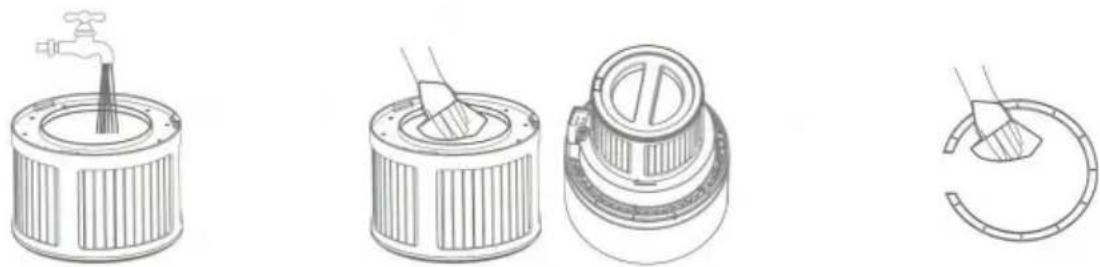
Note:
LIABILITY. C/O YH Consulting Limited
Office 147, Centurion House, London Road, Staines-upon-Thames, Surrey, TW1
E-CrossStu GmbH
Mainzer Landstr.69,
60329 Frankfurt am Main.
VEVOR
TOUGH TOOLS, HALF PRICE
www.vevor.com/support
VEVOR®
TOUGH TOOLS, HALF PRICE
Technical support and e-warranty certificate www.vevor.com/support
EVAPORATIVE HUMIDIFIERS
MODEL: BZT-242
NEED HELP? CONTACT US!
(Figure 2) (Figure 3)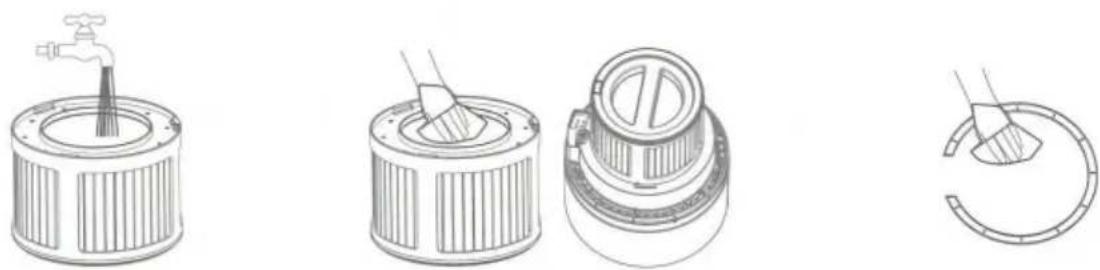
Note:
YH CONSULTING LIMITED. C/O YH Consulting Limited Office 147, Centurion House, London Road, Staines-upon-Thames, Surrey, TW18 4AX
warranty certificate www.vevor.com/support
VEVOR®
TOUGH TOOLS, HALF PRICE
(Figure 3) (Figure 1)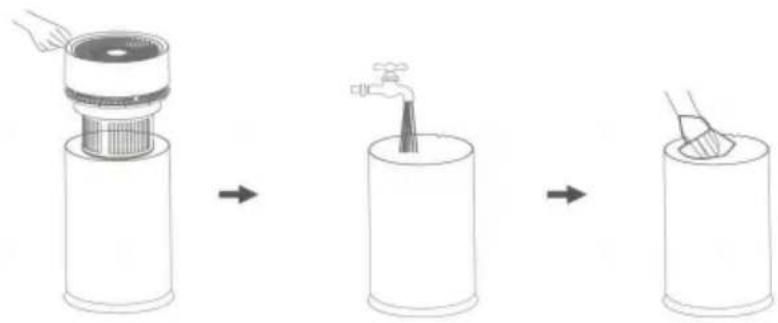
(Figure 2) (Figure 3)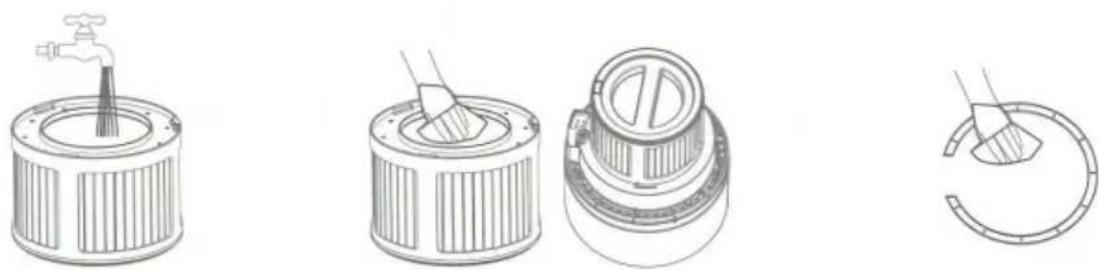
Note:
YH CONSULTING LIMITED. C/O YH Consulting Limited Office 147, Centurion House, London Road, Staines-upon-Thames, Surrey, TW18 4AX

E-CrossStu GmbH
Mainzer Landstr.69,
60329 Frankfurt am Main.
VEVOR
TOUGH TOOLS, HALF PRICE
www.vevor.com/support
- EVAPORATIVE HUMIDIFIERS
- MODEL: BZT
- NEED HELP? CONTACT US
- TECHNICAL SUPPORT AND E-WARRANTY CERTIFICATE WWW.VEVOR.COM/SUPPORT
- CORRECT DISPOSAL
- SAFETY INSTRUCTIONS
- MATTERS NEEDING ATTENTION
- CLEANING AND MAINTENANCE
- CLEANING
- FILTER CLEANING STEPS
- NOTE
- WARRANTY
- INTRODUCTION
- HOW TO USE
- PREPARATION BEFORE USE
- MAKE SURE TO READ THE "SAFETY PRECAUTIONS" BEFORE USE
- INSTRUCTIONS FOR USE
- STEPS
- TIMER FUNCTION: PRESS THE TIMER BUTTON, THE TIMER ICON ON THE SCREEN
- VEVOR
- VEVOR®
- TOUGH TOOLS, HALF PRICE
Brand : Vevor
Model : BZT-242
Category : Air purifier