
TS552 - Measuring equipment Vevor - Free user manual and instructions
Find the device manual for free TS552 Vevor in PDF.
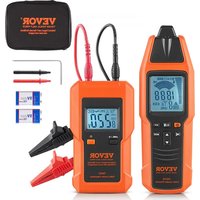


| Product Type | Cable Locator |
| Brand | Vevor |
| Model | TS552 |
| Composition | Transmitter and receiver |
| Output frequency (transmitter) | 125 kHz |
| Voltage measurement range (transmitter) | 12 V to 600 V DC/AC (50-60 Hz) |
| Tracing depth (unipolar) | Up to 2 m |
| Tracing depth (bipolar) | Up to 0.5 m (up to 2.5 m with separate return line) |
| Non-contact voltage detection | 90 V to 264 V AC, 50-60 Hz |
| Power supply | 2 x 9 V batteries (type 6F22 or equivalent) |
| Transmitter dimensions | 133 x 76 x 32 mm |
| Transmitter weight | Approx. 207 g (with battery) |
| Receiver dimensions | 186 x 60 x 35 mm |
| Receiver weight | Approx. 234 g (with battery) |
| Measurement category | CAT III 600 V |
| Protection rating | IP20 |
| Operating temperature | 0 °C to 40 °C |
| Storage temperature | -20 °C to 60 °C |
| Display | LCD with backlight |
| Included accessories | 2 test leads, 2 probes, 2 alligator clips, 1 ground stake, 1 carrying bag, 1 manual |
| Maintenance | Clean with a damp cloth; replace batteries if low battery indicator appears |
| Fuse replacement (transmitter) | 500 mA/600 V, fast-acting, 6.35 x 32 mm |
| Recommended calibration | Every year (or every 3 years for infrequent use) |
| Warranty | Technical support and electronic warranty certificate at www.vevor.com/support |
Frequently Asked Questions - TS552 Vevor
User questions about TS552 Vevor
0 question about this device. Answer the ones you know or ask your own.
Ask a new question about this device
Download the instructions for your Measuring equipment in PDF format for free! Find your manual TS552 - Vevor and take your electronic device back in hand. On this page are published all the documents necessary for the use of your device. TS552 by Vevor.
USER MANUAL TS552 Vevor
Technical Support and E-Warranty Certificate
www.vevor.com/support
CABLE LOCATOR
MODEL:TS552
We continue to be committed to provide you tools with competitive price. "Save Half", "Half Price" or any other similar expressions used by us only represent estimate of savings you might benefit from buying certain tools with us compared to top brands and does not necessarily mean to cover all categories of tools offered. We kindly remind you to verify carefully when you are placing an order with us whether you are actually saving half in comparison with the top major brands.
MODEL:TS552
NEED HELP? CONTACT US!
Have product questions? Need technical support? Please feel free to contact us:
Technical Support and E-Warranty Certificate www.vevor.com/support
This is the original instruction. Please read all manual instructions carefully before operating. VEVOR reserves a clear interpretation of the user manual. The appearance of the product shall be subject to the product you received. Please forgive us that we won't inform you if there are any technology or software updates on our product.
 | Warning-To reduce the risk of injury, user must read instructi manual carefully. |
 | This device complies with Part 15 of the FCC Rules. Operat subject to the following two conditions:(1)This device may not harmful interference, and (2)this device must accept any inter received, including interference that may cause undesired oper |
 | This product is subject to the provision of European Directive 2012/19/EC. The symbol showing a wheelie bin crossed throu indicates that the product requires separate refuse collection i European Union. This applies to the product and all accesso marked with this symbol. Products marked as such may not discarded with normal domestic waste, but must be taken to collection point for recycling electrical and electronic devices |
INTRODUCTION
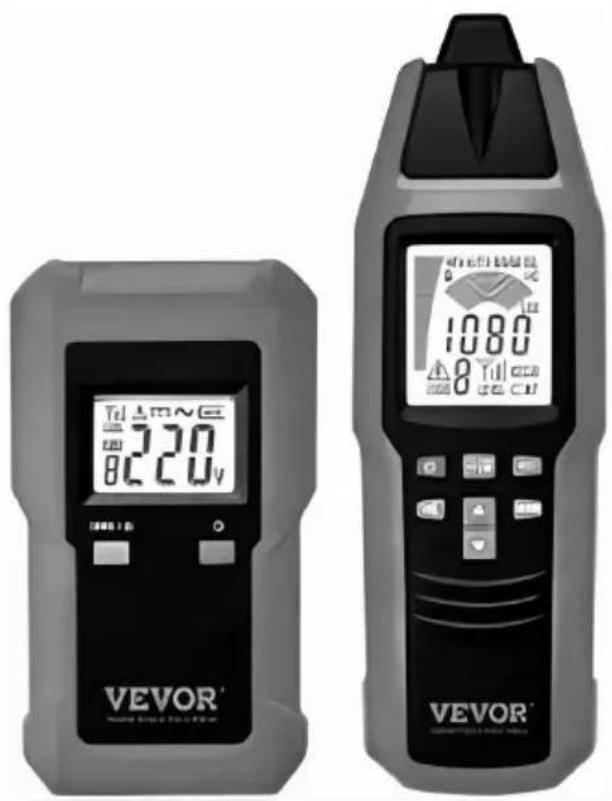
This cable locator is a portable instrument designed to detect or trace conduits. It consists of a transmitter and a receiver. The signal generated by the transmitter is a modulated current which generates an electromagnetic field around the conductor connected. This electromagnetic field induces a voltage within the receiving coil of the receiver. Then the induced voltage is amplified, decoded, converted by the receiver, and finally indicated on the receiver screen.
Features:
● Finding cable in wall, line interruption, or short-circuit in a line. ● Tracing a cable that is in soil. ● Detecting fuse or circuit breaker and assigning current circuits. ● Tracing socket or distribution socket that has accidentally been covered by plastering. ● Detecting interruption or short-circuit in floor heating. ● Tracing metallic water and heating piping. ● Various applications in both voltage-free and live systems. - The screen of the transmitter indicates the transmission level, the transmission code, and the foreign voltage.
- The screen of the receiver indicates the reception level and the transmission code. ● Mains voltage detection by using the receiver. ● Automatic and manual sensitivity adjustment of the receiver. ● Acoustic signal indication of the receiver may be turned off.
- Illumination function. ● Automatic power-off.
- Backlight.
Supply list:
- One transmitter.
- One receiver.
- Two test leads.
- Two test leads that have a probe.
- Two alligator clips.
- 1 ground stake.
- One carrying bag.
- One manual.
SAFETY INFORMATION
- Adhere to local and national safety codes. Individual protective equipment must be used to prevent shock and arc blast injury where hazardous live conductors are exposed.
- Do not operate the instrument where explosive (or combustible) gas, vapor or dust is present.
- Use caution when working with voltage above 30V ac rms, 42V peak, or dc. Such voltages pose a shock hazard.
- To avoid electric shock, do not touch any naked conductor with your hands, and do not ground yourself while using the instrument.
- Do not use the instrument if it is damaged or operates abnormally.
- Inspect the test leads for damaged insulation or exposed metal. If a test lead is damaged, replace it with a new one of the same ratings before use.
Before any operation, make sure that the connecting leads used and the electronic load are in good condition.
Measurement in dangerous proximity to electrical installations can only be made when instructed by a responsible electrical specialist. Never work alone.
Keep the instrument dry.
To avoid interference, do not use the instrument where there is an intense environmental electromagnetic field; otherwise, the detection or measurement result may be wrong.
The instrument may only be used on systems complying with the nominal voltages indicated in the technical data section of this manual.
It is recommended to exclusively connect the transmitter from the phase toward the neutral conductor. If the transmitter connection is made from the phase toward the protective conductor, the functional safety of the protective conductor must be tested first, in compliance with DIN VDE 0100. The reason is that when connecting the transmitter from phase toward ground, all parts connected to the earth may be live in the event of an error (if resistance does not comply with the prescriptions).
If the RCD trips when connecting the transmitter (with reference to the protective earth contact PE), a fault current is already active within the installation which generates the RCD tripping when cumulated to the additionally fed current.
The instrument can only be used under those conditions and for those purposes for which it was designed.
Because the instrument's voltage amplitude/value indication is affected by many factors (such as environmental electromagnetic field, the distance between the receiver and the conductor under test, the resistance of the connecting leads, the connection resistance, etc.), do not treat or regard the voltage amplitude/value indicated by the instrument as the actual voltage amplitude/value of the circuit under test.
Do not tamper with the internal circuits of the instrument.
Never short the positive and negative terminals of any battery. Do not place any battery in fire. Do not dismantle or bump any battery.
Transmitter
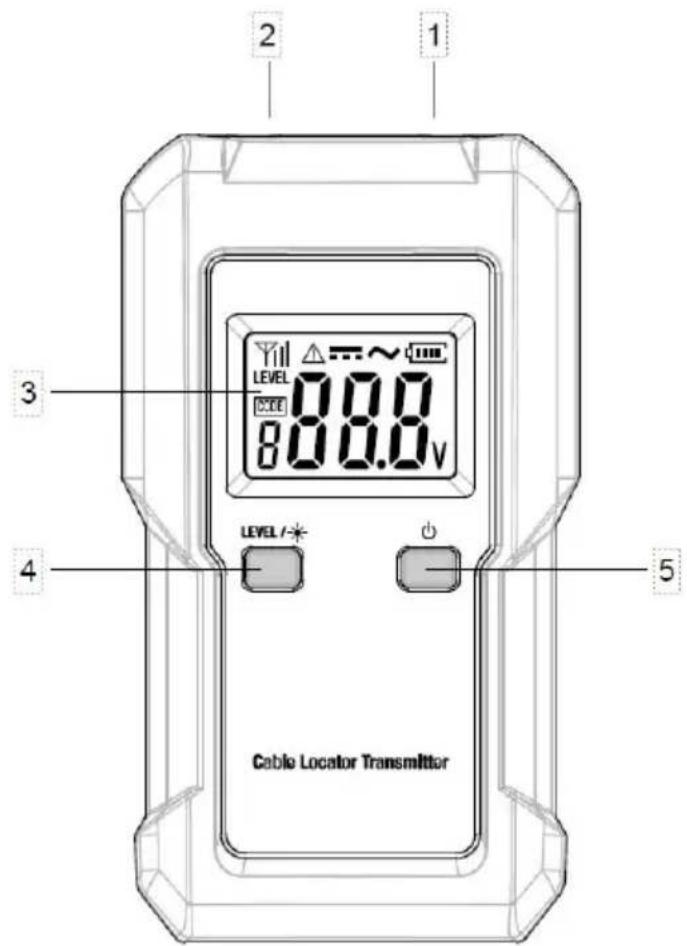
Figure 1. Transmitter
①. Black Terminal: Used to connect a black test lead. ②. Red Terminal: Used to connect a red test lead. ③. Display. ④. LEVEL 7
- Press this " " button to select a desired transmission level among the three transmission levels.
- Press and hold down this " " button for about 2 secs to turn on or off the backlight. ●This " "button is also used when you select a desired transmission code.
⑤. " Button.
- Press and hold down this " " button for about 1 sec to turn on or of transmitter. ●This " 🔊 button is used when you select a desired transmission code.
Transmitter Display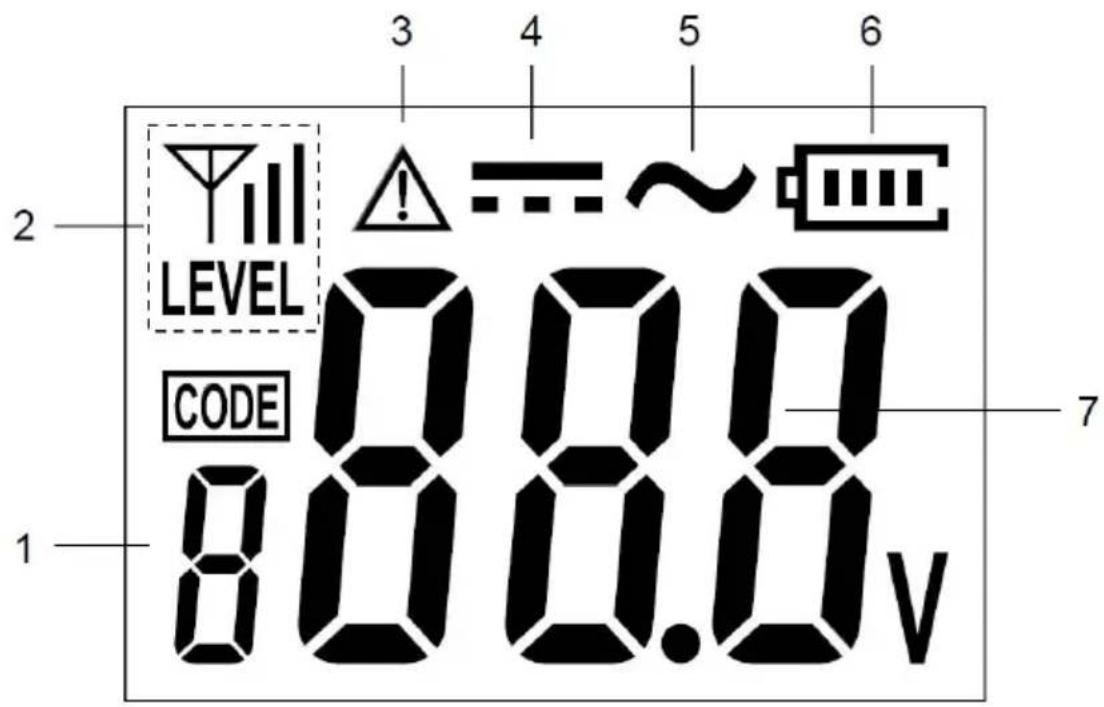
Figure 2. Transmitter Display
①. Transmission code display which shows the present transmission code of the transmitter. Transmission code is a number, such as 1, 2, 3, etc ②. Transmission level display which shows the present transmission ③. level of the transmitter. The higher the transmission level, the stronger the signal being transmitted.
LEVEL ...... denotes that the present transmission level is level 1.
LEVEL ...... denotes that the present transmission level is level 2.
LEVEL ...... denotes that the present transmission level is level 3.
④. Voltage alarm icon indicating that a voltage > 36V is being detected. ⑤. DC symbol indicating that a DC voltage is being detected. ⑥. AC symbol indicating that an AC voltage is being detected.
⑦. Battery level indicator.
When this indicator becomes " ", the battery in the transmitter is not high enough and must be replaced immediately.
⑧. Voltage value display which shows the external voltage value.
The transmitter can detect the DC or AC voltage of the circuit connected to the terminals of the transmitter. The detecting range of the transmitter is DC to 600V DC, or 12V AC to 600V AC at 50Hz-60Hz.
If the voltage being detected is < 12V, " " will be shown on this voltage value display.
Note:
If the voltage between the two lines which are connected to the terminals of the transmitter is a DC voltage, the transmitter will display the absolute value of this voltage.
Receiver
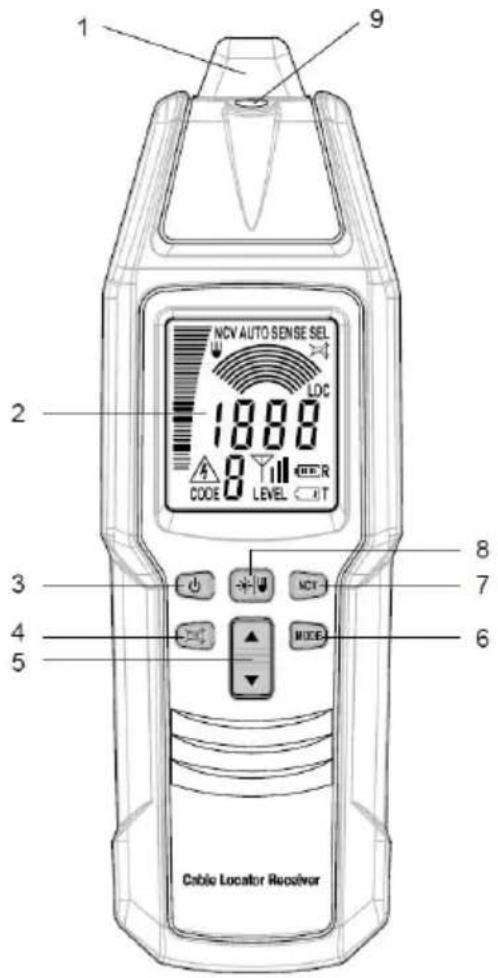
Figure 3. Receiver
①. Probe.
Signal sensing/detecting part of the receiver.
②. Display.
③. " Button.
Press and hold down this " button for about 1 sec to turn on or off the receiver.
④. "Button."
Press this 📋 button to enable or disable the built-in buzzer.
When the buzzer is disabled, the receiver is mute and does not give acoustic signal indication.
⑤. "▲"/▼ button.
Used to increase or decrease the sensitivity of the receiver when the receiver is in manual mode or selective mode.
⑥. "MODE" button.
Press this "MODE" button to switch among the automatic mode ("AUTO" appears), manual mode ("SENSE" appears), selective mode ("SEL" appears), and PINPOINT mode ("LOC" appears).
⑦. "NCV" button.
Press this "NCV" button to enter or exit the non-contact mains voltage detection mode.
⑧. "Button."
Briefly press this button to turn on or off the light. The light automatically turns off after about 60 secs.
Press and hold down this button for about 1 sec to turn on or off the backlight.
⑨. Light.
Receiver Display
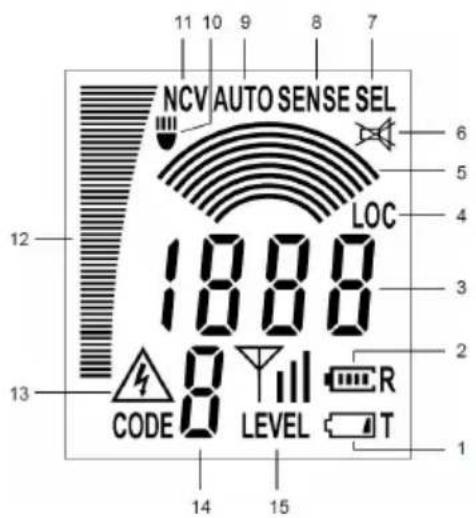
Figure 4. Receiver Display
①. Transmitter low battery indicator. When this low battery indicator ( ) appears, the battery in the transmitter is not high enough and must be replaced immediately; otherwise the transmitter will not work normally. ②. Receiver battery level indicator used to indicate the level of the battery in the receiver. When this indicator becomes "T", the battery in the receiver is not high enough and must be replaced immediately; otherwise the receiver will not work normally. ③. A display that has two kinds of uses as described below:
- In the automatic mode, PINPOINT mode, or mains voltage detection mode, this display area shows the numeric value of the intensity of the signal being detected by the receiver. The higher the intensity of the signal being detected, the higher the numeric value being displayed.
- In the manual mode or selective mode, this display area shows the preset sensitivity degree (1 - 8) of the receiver.
④. Indicates that the receiver is in the PINPOINT mode. ⑤. Arcs graph display. In the manual mode or selective mode, this display graphically shows the present sensitivity degree of the receiver. One arc on the arcs graph display represents one sensitivity degree. (For example, the graph " " stands for sensitivity degree 2, the graph " " stands for sensitivity degree 3, and so on). The more arcs present on this display, the higher the sensitivity degree the receiver is at, and the higher the sensitivity the receiver has. ⑥. Indicates that the built-in buzzer of the receiver is disabled and that the receiver is mute. ⑦. Indicates that the receiver is in the selective mode. ⑧. Indicates that the receiver is in the manual mode. ⑨. Indicates that the receiver is in the automatic mode. 10. Indicates that the light on the receiver has been turned on. 11. Indicates that the receiver is in the mains voltage detection mode. 12. Bargraph that indicates the present intensity of the signal being detected by the receiver. The higher the bargraph, the higher the present intensity of the signal being detected by the receiver. 13. An alarm icon that will appear when the receiver detects a mains voltage. 14. Transmission code display that shows the present transmission code of the
transmitter.
- Transmission level display that shows the present transmission level of the transmitter.
" " denotes that the present transmission level of the transmitter is level 1. "LEVEL" denotes that the present transmission level of the transmitter is level 2. " " denotes that the present transmission level of the transmitter is level 3.
PRODUCT INSTRUCTION
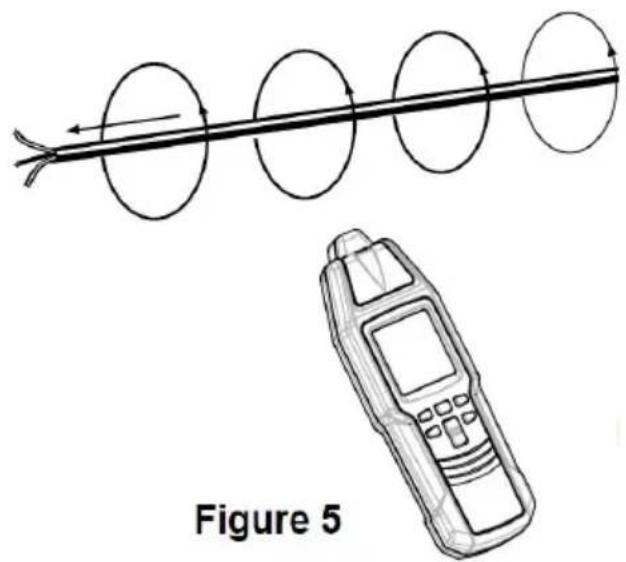
The instrument consists of a transmitter and a receiver. The transmitter generates an AC signal of a modulated current. The current of the AC signal flows through the connected conductor, generating an electromagnetic field around this conductor. This electromagnetic field induces a voltage in the receiver coils. In the automatic mode and manual mode, the receiver works with three coils and does not depend on the direction of the receiver. A selective and position-dependent search is performed in the selective mode or PINPOINT mode with only one coil. The induced voltage is amplified, decoded, and converted by the receiver and finally indicated on the receiver screen. For any application, ensure that there is a closed loop for the flowing signal in the conductor when connecting the transmitter (see Figure 5).
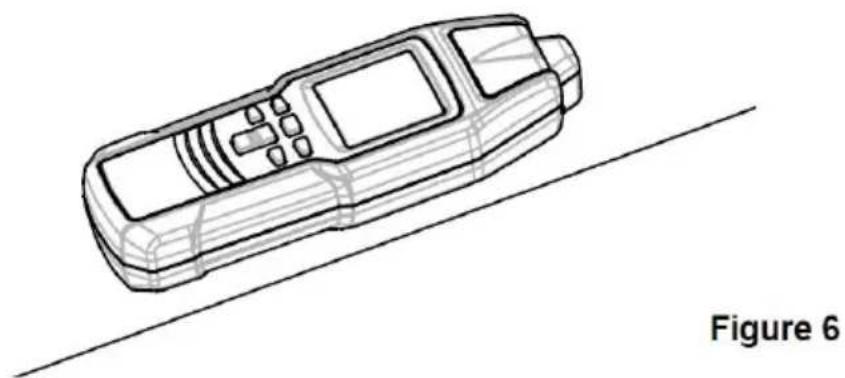
In the PINPOINT mode, when the longitudinal axis of the receiver is parallel to the line conductor which is connected to the transmitter, and the receiver is above this line conductor (see Figure 6), the signal received by the receiver is at its maximum. The PINPOINT mode is used to accurately locate a line conductor buried under a wall or earth surface.
In the mains voltage detection mode, the receiver can detect a 50Hz - 60Hz electromagnetic field in any direction.
LOCATOR IN COMPLETE CIRCUITS
●1st Possibility (one pole application)
Connect the transmitter to only one conductor. The second conductor is the ground. This arrangement causes a signal current to flow through the conductor and to be transmitted to ground, similar to a radio and receiver. Hereafter, call the above described operation one-pole application.
●2nd Possibility (double-pole application)
Connect the transmitter to the mains. In this condition, the modulated current flows through the phase and then returns to the transmitter via the neutral. There is another possibility for voltage free systems by connecting the transmitter to two line terminals while short-circuiting the other line ends. The complete circuit is created. Then, the transmitter is supplied by the built-in battery. Hereafter, we call this operation double pole application.
Note:
The instrument can only detect or locate lines which are connected correctly in accordance with the physical principle described.
In double-pole application, the PINPOINT mode of the receiver does not work. Do not use the PINPOINT mode in any double-pole application.
IMPORTANT APPLICATIONS
●In open circuits (one pole application) (see Figure 7)
Line interruptions in walls and floors. Finding and tracing of lines, sockets, junction box, switches, etc. For house installations.
The black terminal of the transmitter must be connected to a suitable earth. A typical example is a properly earthed socket. The tracing depth amounts to 2 meters.
Note: The tracing depth depends on the medium and application.
Figure 7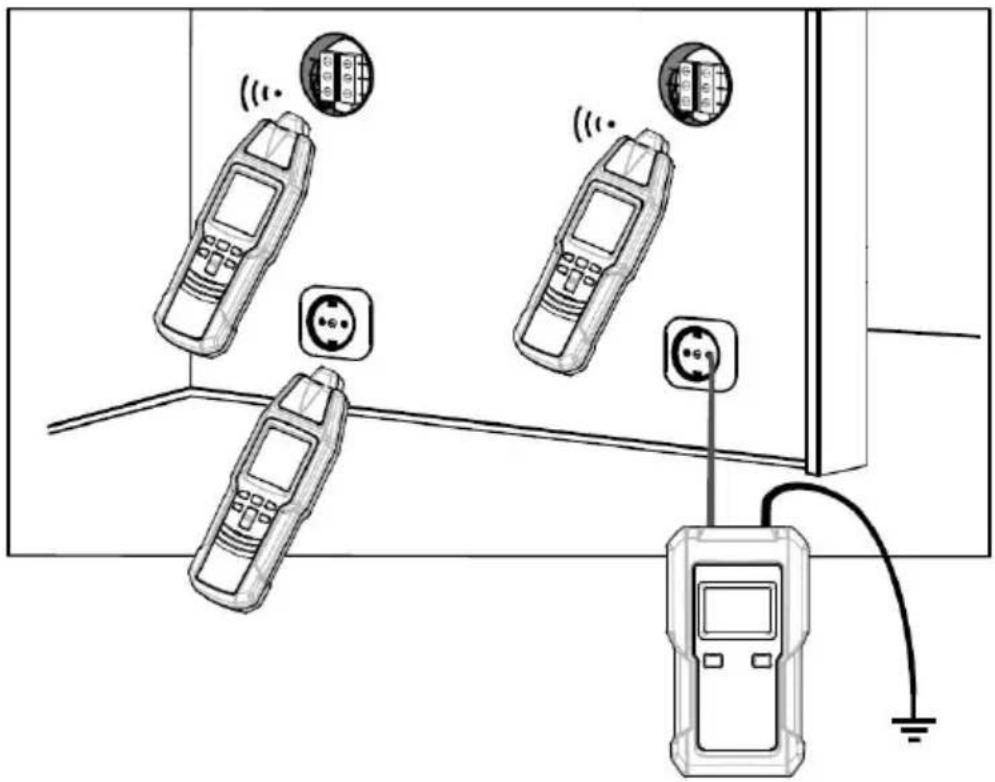
●In complete circuits (double pole application) (see Figure 8)
When detecting short-circuits or during wire sorting, i.e. circuits with or without voltage. Voltage-free circuits are directly supplied by the transmitter battery. In live circuits, the transmitter is mainly supplied by the circuit connected. The transmitter is voltage-proof up to 600V AC/DC.
Example for a complete circuit: Complete circuits are appropriate for: i.e. detecting switches, sockets, etc in live installations.
Note:
- The tracing depth amounts to 0 - 0.5 meter. The tracing depth depends on medium and application.
- Increasing the transmission level from level 1 to level 3 with the " " bit increases the detecting distance of the receiver by a factor of about 4.
- When connecting the transmitter in a live circuit, adhere to local and national safety codes. To avoid electric shock, do not touch any naked conductor with hand or skin.
Figure 8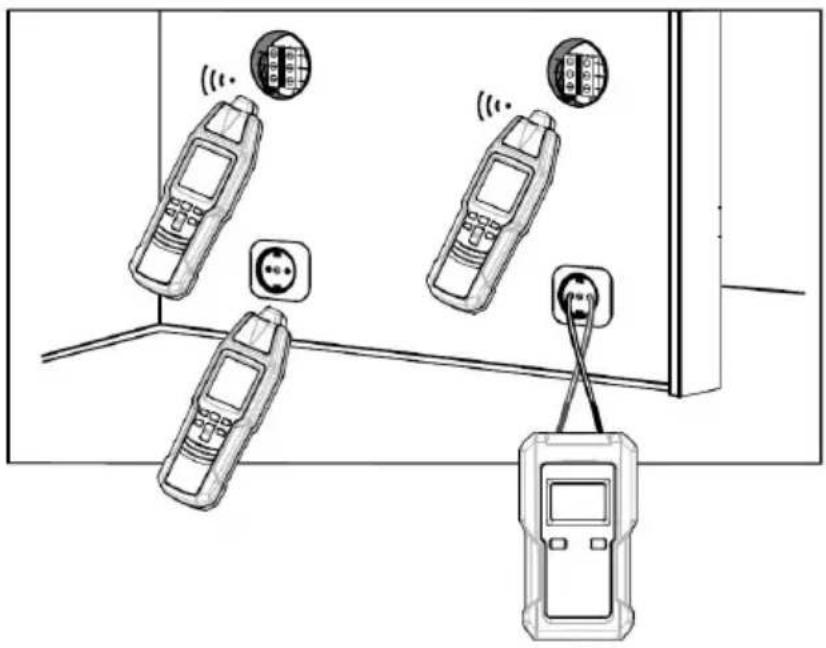
CARRYING OUT MEASUREMENT
Tracing and locating of lines, sockets, switches and junctions in house installation circuits (one-pole application)
Requirements:
●The circuit must be dead. ●Neutral line and ground must be fully operational. - Connect the transmitter to phase and ground according to Figure 9. ●Carry out this example as described in the application example.
In the one-pole application, lateral circuit branches can also be traced.
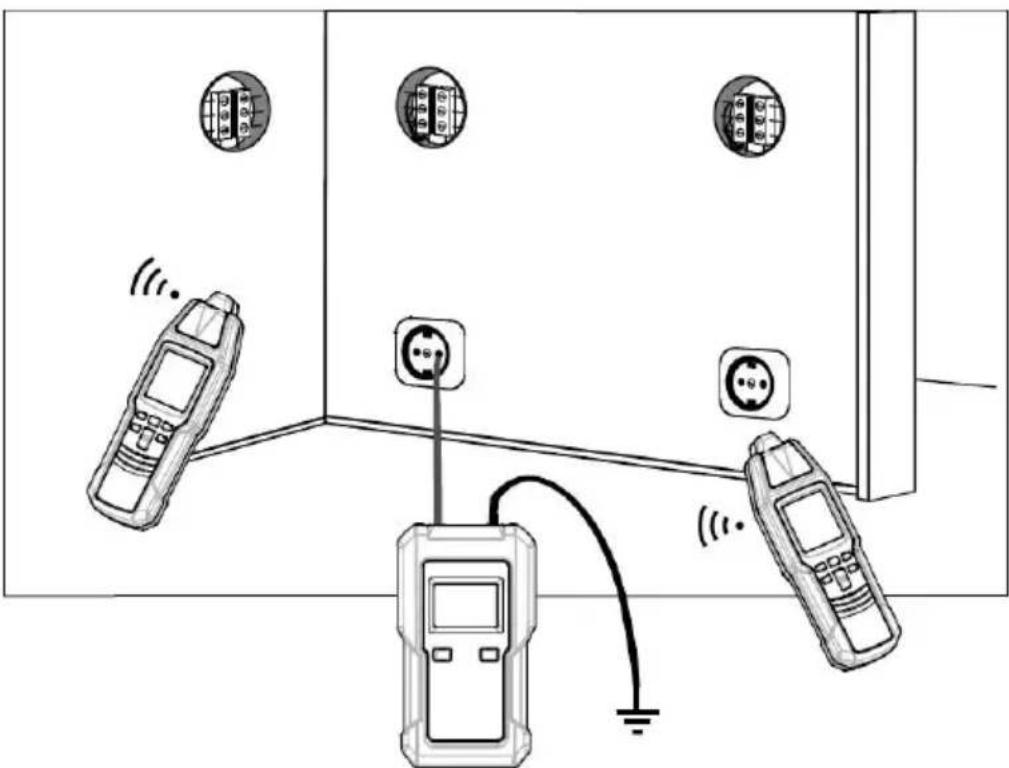
Figure 9
Note:
- If the supply cable fed with the signal via the transmitter is located direct parallel to other conductors (e.g. cable duct) or if these conductors are on the signal is also input into the other conductors.
- Increasing the transmission level from level 1 to level 3 with the " " button increases the detecting distance of the receiver by a factor of about
- Setup of the receiver: manual mode, minimal sensitivity. If necessary, adjust the sensitivity of the receiver according to the actual condition during detection. ●Max. tracing depth: about 2 meters.
Locating of line interruptions (one-pole application)
Requirements:
●The circuit must be dead. ●All lines that are not required must be connected to the auxiliary ground in accordance with Figure 10. - Connect the transmitter to one lead and to ground according to Figure 10. ●Carry out this example as described in the application example.
Line interruption in the plastic-sheathed cable.
The ground connected to the transmitter should be earth from a properly earthed socket or a water pipe that is properly earthed.
When tracing line interruption in a multicore cable, note that all remaining leads in plastic-sheathed cable must be grounded in accordance with the regulations. This is required to avoid crosscoupling of the fed signal (by a capacitive effect).
The tracing depth for sheathed cable and conductors are different, because individual leads in the sheathed cable are twisted around themselves.
The transition resistance of a line interruption must be > 100 kΩ. The verification of resistance can be done by using a multimeter.
Systematically circle around the interruption while changing the sensitivity of the receiver. By this means, the line interruption can be located in the end.
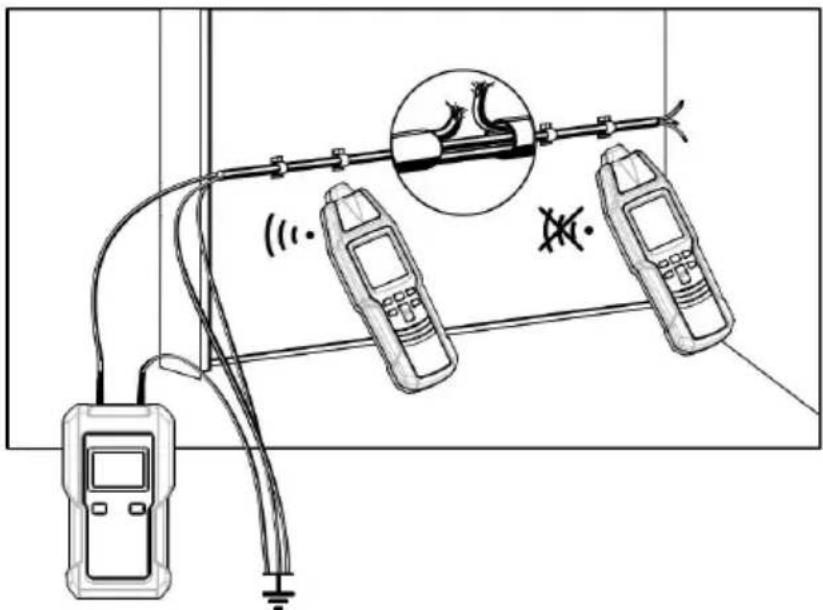
Figure 10
Note:
- Increasing the transmission level from level 1 to level 3 with the " " button increases the detecting distance of the receiver by a factor of about
- Setup of the receiver: manual mode, minimal sensitivity. If necessary, adjust the sensitivity of the receiver according to the actual condition during detection. ●Max. tracing depth: about 2 meters.
When locating a line interruption using one transmitter to feed from one conductor end, the location of the line interruption may not be precise in case of bad conditions due to field disturbance. This drawback can easily be avoided by using two transmitters (one from each end) for interruption detection. In this instance, each of the transmitters is set to a different transmission code (e.g., one transmitter is set to code "1", the other transmitter is set to code "6").
Your instrument includes only one transmitter. If you need a second transmitter, you can separately order one or more transmitters from our company.
If the transmitters are connected in accordance with Figure 11, the receiver displays the transmission code "1" at the left side of the line interruption. If you continue further than the interruption, toward the right, the receiver displays the transmission code "6". If the receiver probe is directly at the line interruption, no transmission code is displayed, due to the overlapping of both transmitter signals. The line interruption is located between the displayed codes "1" and "6".
Requirements:
● The circuit must be dead. ● All lines which will not be used must be connected to the auxiliary ground as shown in Figure 11. - Connect the two transmitters as shown in Figure 11. ● Proceed as described in the application example.
The ground connected to the transmitter and to the wires not being used can be an auxiliary ground, the ground contact of a properly earthed outlet, or a properly grounded water pipe.
When carrying out line interruption locating on a multi-wire shielded cable, make sure that all unused wires are orderly grounded. This is required to avoid inductive disturbance (by capacity coupling).
The locating depth for shielded conductors and cables varies, because individual wires within the shield are twisted.
The transition resistance of a line interruption must be > 100 kΩ. Verification of resistance can be done by using a multimeter.
Systematically circle the line interruption by changing the sensitivity of the receiver.
Note:
- Increasing the transmission level from level 1 to level 3 with the "+" button increases the detecting distance of the receiver by a factor of about 3.
- Setup of the receiver: manual mode, minimal sensitivity. If necessary, adjust the sensitivity of the receiver according to the actual condition during detection. ● Max. tracing depth: about 2 meters
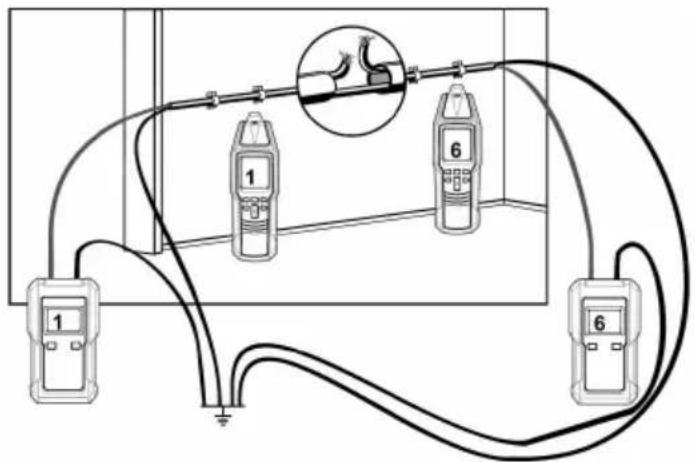
Figure 11
LOCATING CIRCUIT BREAKER OR FUSE THAT SUPPLIES AN OUTLET (DUAL-POLE APPLICATION)
Warning: Adhere to local and national safety codes. To avoid electric shock, do not touch any naked conductor with hand or skin.
Refer to Figure 12, connect the red and black terminals of the transmitter to the desired energized AC wall outlet. Make sure that the red terminal of the transmitter is connected to the Live terminal of the outlet and the black terminal of the transmitter is connected to the Neutral terminal of the outlet. The transmitter displays the value of the voltage of the outlet. Set the transmission level of the transmitter to level 1, the transmitter will dis

" as an indication.
Go to the circuit breaker panel box, place the flat top of the pin, the receiver directly onto circuit breaker or fuse (refer to Figure 1). Hold the receiver so that it is perpendicular to the breakers or fuses
as shown. Slowly move the receiver up and down over the rows of breakers or fuses. During this process, if two or more circuit breakers (or fuses) caused the receiver to give signal indication, decrease receiver's sensitivity and then scan slowly all breakers or fuses once more.
When you find the only one circuit breaker or fuse at which the receiver gives signal indication, turn off the circuit breaker (or remove the fuse). If the receiver stops giving audio and visual signal indication and the transmitter displays " instead of a voltage reading, the circuit breaker (or the fuse) is the circuit breaker (or fuse) supplying the outlet. If the transmitter still displays a voltage reading, it means the circuit breaker (or the fuse) is not the circuit breaker (or fuse) that supplies the outlet.
The detection or assignment of the circuit breaker or fuse strongly depends on the wiring realized within the distribution. To obtain a result as precise as possible, the cover should be removed and the supply line to the fuse should be traced.
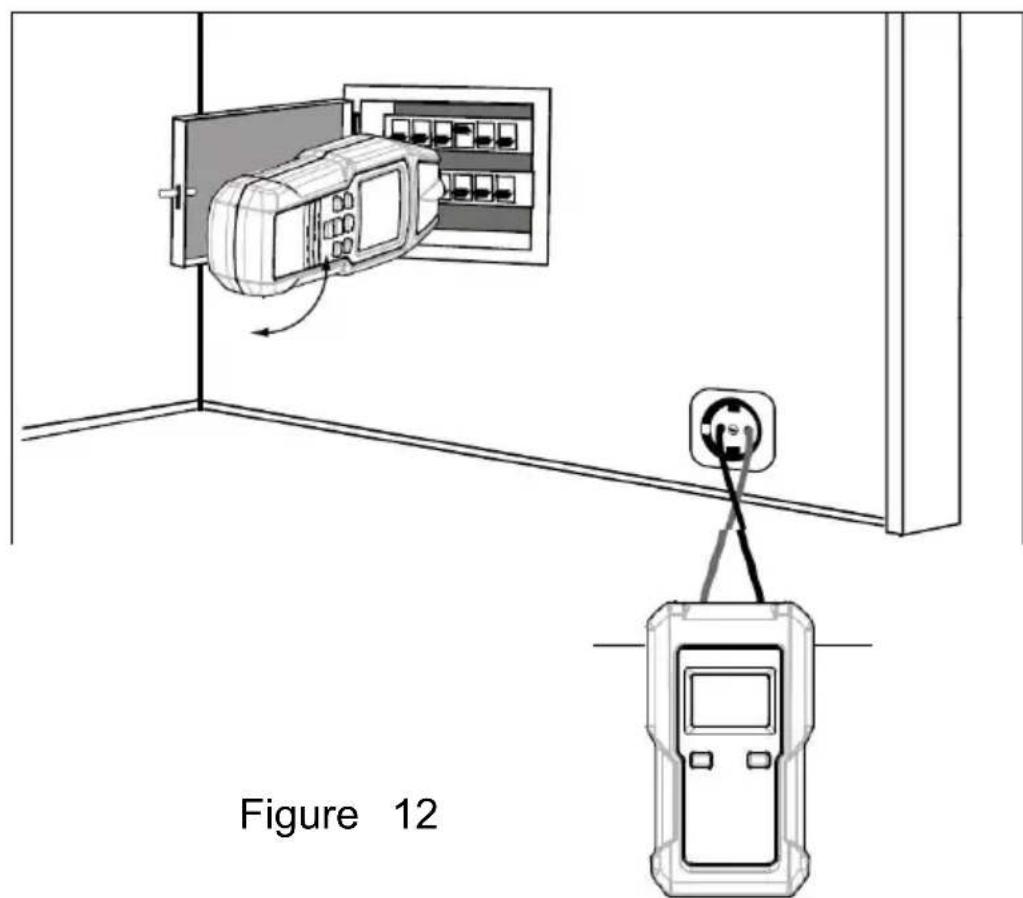
Note:
- If the circuit breaker panel box is not far from the transmitter, the transmission level of the transmitter must be set to level 1. If the circuit breaker panel box is too far from the transmitter so that it is impossible to perform detection and locating, you should appropriately increase the transmission level of the transmitter according to actual condition.
- Increasing the transmission level from level 1 to level 3 with the "LEVEL" button increases the detecting distance of the receiver by a factor of about 4.
- Setup of the receiver: selective mode, minimal sensitivity.
- Safety cutouts of different manufacturers have different installation positions for magnetic coils. If no evident signal can be detected by the receiver, it is recommended to rotate the receiver clockwise or counterclockwise by 90 degrees.
- To avoid electric shock, do not touch any naked conductor with hand or skin.
Error detection for an electrical floor heating (one-pole application)
Requirements:
The circuit must be dead. A second transmitter is required for this application. Connect the transmitters as shown in Figure 13. Carry out this example as described in the application example. If a shield mat or shield wiring is located above the heating wire, ground connection may exist. If required, separate the shield from ground connection, and remember to restore the ground connection after you finish the detection.
Note:
Increasing the transmission level from level 1 to level 3 with the "LEVEL" button increases the detecting distance of the receiver by a factor of about 4.
- Setup of the receiver: manual mode, minimal sensitivity. If necessary, adjust the sensitivity of the receiver according to the actual condition during detection. Max. tracing depth: about 2 meters.
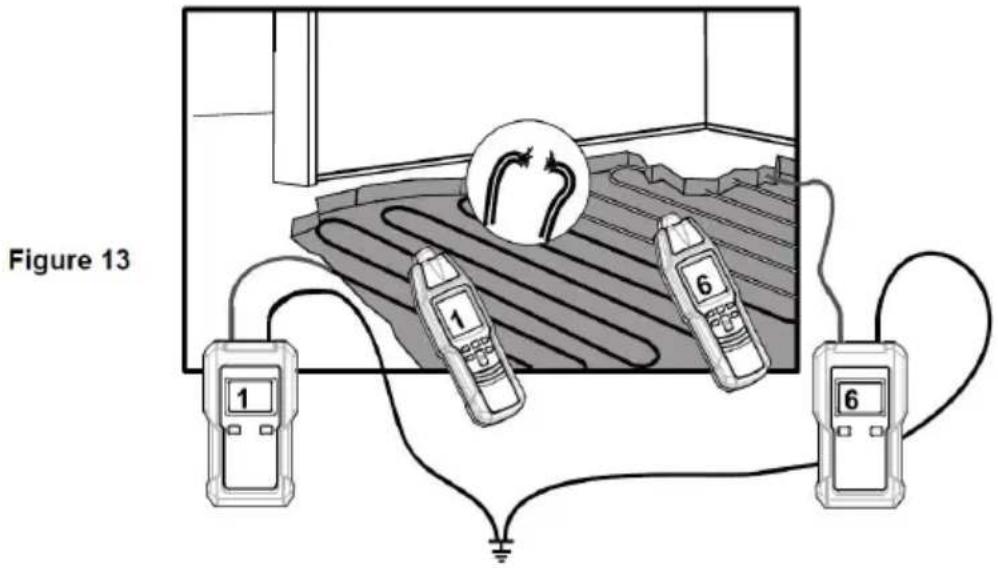
Locating of short-circuits in conductors (double-pole application)
Requirements:
All circuits within the cable must be dead. Connect the transmitter in accordance with Figure 14. Carry out this example as described in the application example.
Note that the tracing depth for sheathed cable and conductors are different because the individual leads in the sheathed cable are twisted around themselves.
Usually, short-circuit can only be correctly detected when the short-circuit resistance is lower than 20 Ohm. The verification of the short-circuit resistance can be done by using a multimeter. If the short-circuit resistance is more than 20 Ohm, you can try the experiment to detect the error location by means of the line interrupt detection method.
Systematically circle round the interruption by changing the sensitivity of the receiver.
Note:
- Increasing the transmission level from level 1 to level 3 with the "LEVEL" button increases the detecting distance of the receiver by a factor of about 4.
- Setup of the receiver: manual mode, minimal sensitivity. If necessary, adjust the sensitivity of the receiver according to the actual condition during detection. Max. tracing depth: about 0.5 meter.
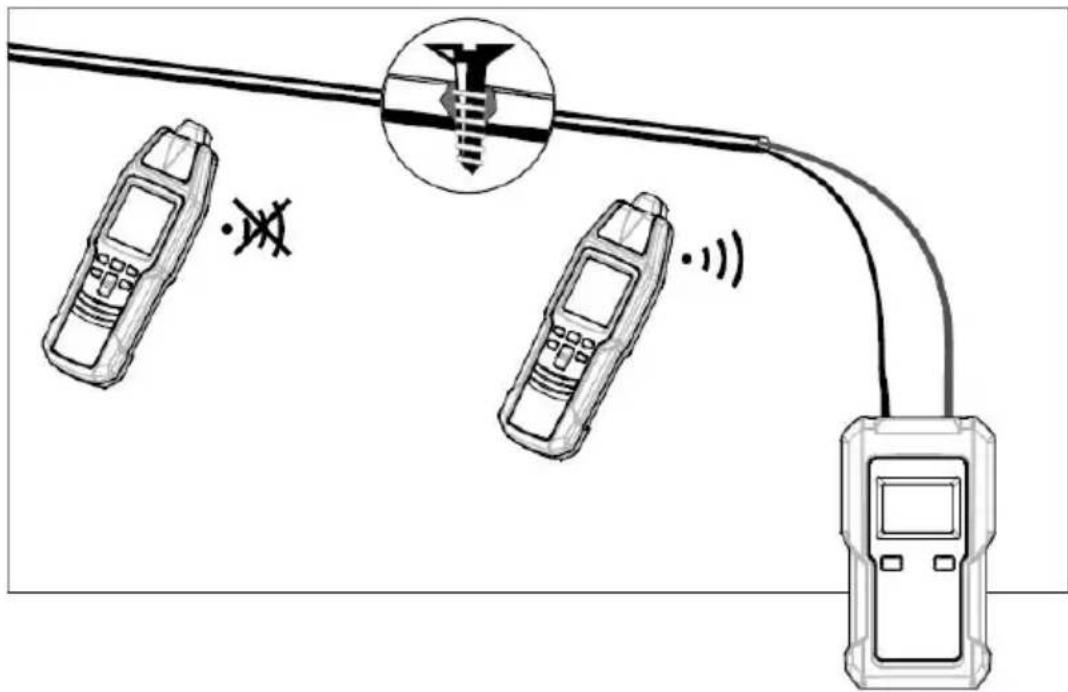
Figure 14
Tracing installed water and heating pipes (one-pole application)
Requirements:
● The line to be located must be separated from the equipotential bonding. (When you finish tracing water or heating pipes, remember to restore the line's connection which you have disconnected.) - Connect the transmitter in accordance with Figure 15. ● For safety reasons, the electrical system must not be live!
Connect the black terminal of the transmitter to the ground terminal of a properly earthed socket, and connect the red terminal of the transmitter to the conductor to be traced or located. Now the feed can be traced.
Note:
- Increasing the transmission level from level 1 to level 3 with the "LEVEL/ON" button increases the detecting distance of the receiver by a factor of about 4.
- Setup of the receiver: manual mode, minimal sensitivity. If necessary, adjust the sensitivity of the receiver according to the actual condition during detection. ● Max. tracing depth: about 2 meters.
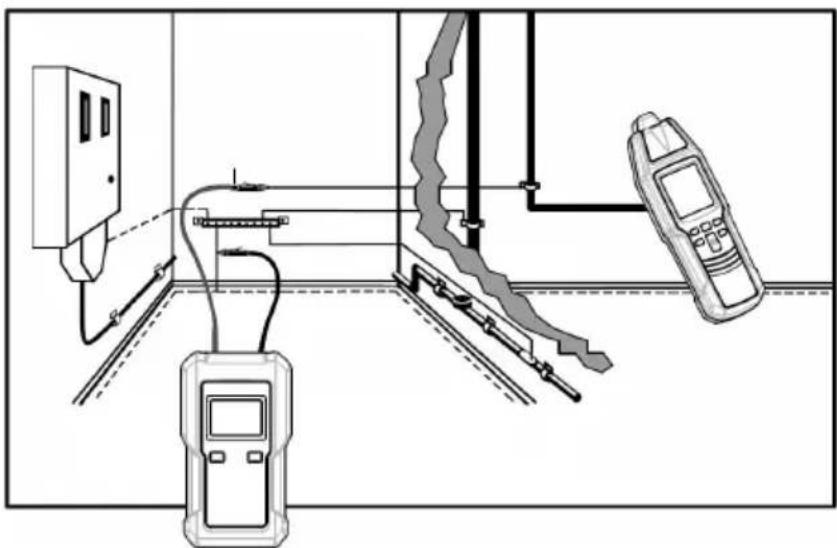
Figure 15
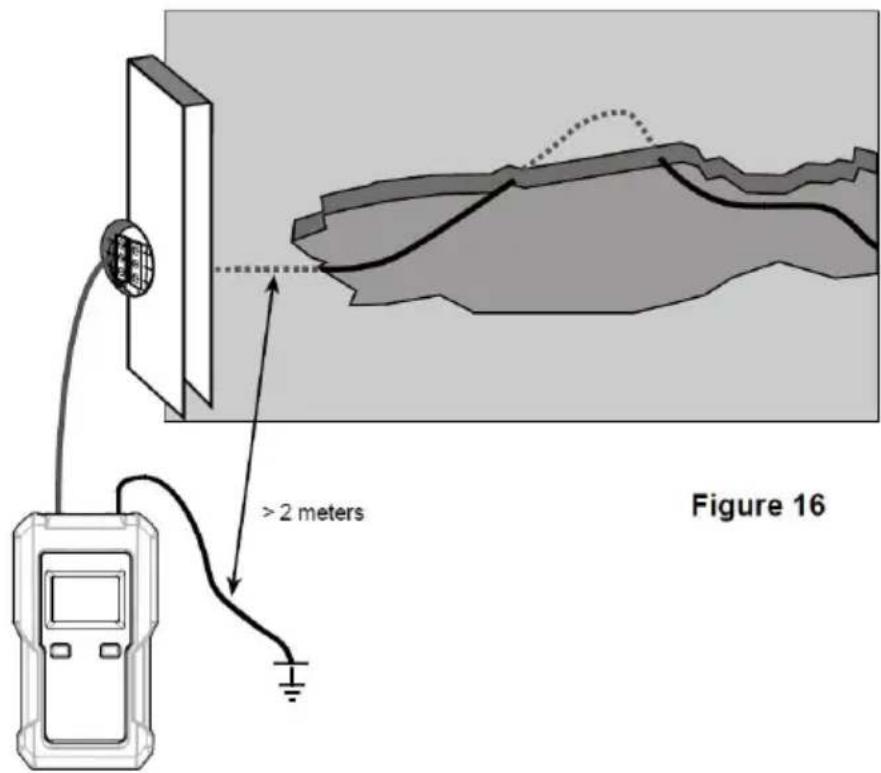
Tracing conductors buried in the soil (single-pole application)
The connection is realized in compliance with Figure 16.
Warning: Ensure that the current circuit is not live.
Note: Make sure that the distance between the connection to the ground and the conductor to be detected is high. If the distance is too short, no definite assignment of the received signal can be made to one conductor. (See Figure 16.)
The max. tracing depth is about 2 meters. The tracing depth strongly depends on the soil characteristics and the instrument's settings.
Set the receiver to automatic mode. Now, search or trace the conductor by means of the signal intensity displayed. When circling the receiver slowly across the conductor to be searched, the displayed values change considerably. The display of the maximum signal intensity is performed directly via the conductor. The signal intensity level decreases with increasing distance of the fed-in signal (transmitter).
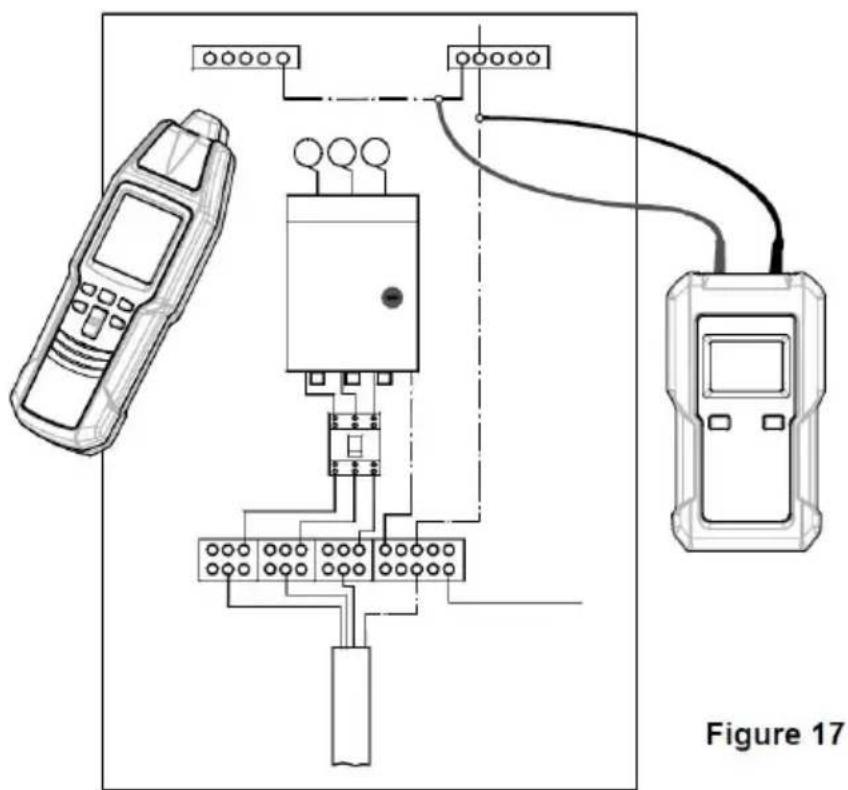
Practical application example.
In order to determine all electrical lines of a house within one work process, proceed as follows:
- Remove the bridge in the main distribution between "PE" and "N". Warning: For safety reasons, the system must not be live!
- Connect the transmitter to the system in compliance with Figure 1. Now, the neutral conductor present in the system may be followed.
Note:
- Increasing the transmission level from level 1 to level 3 with the "LEVEL" button increases the detecting distance of the receiver by a factor of about 4.
- Setup of the receiver: manual mode, minimal sensitivity. If necessary, adjust the sensitivity of the receiver according to the actual condition during detection.
●Max. tracing depth: about 2 meters
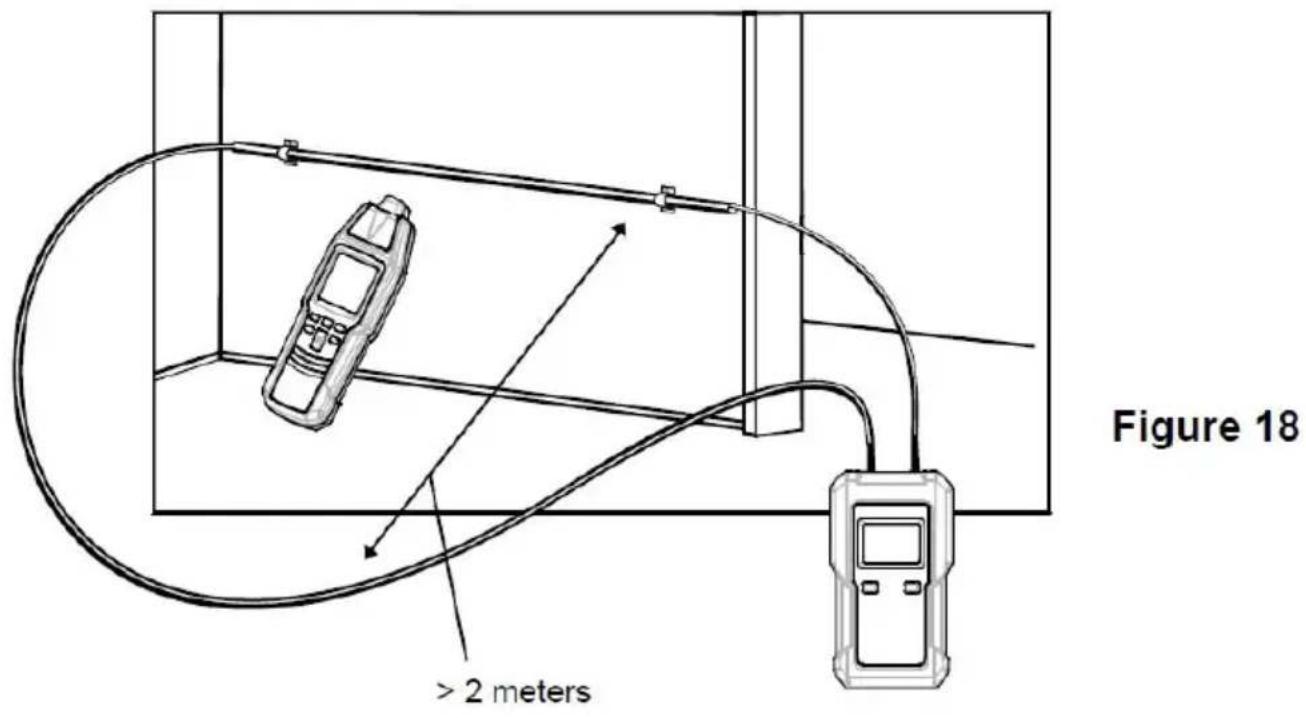
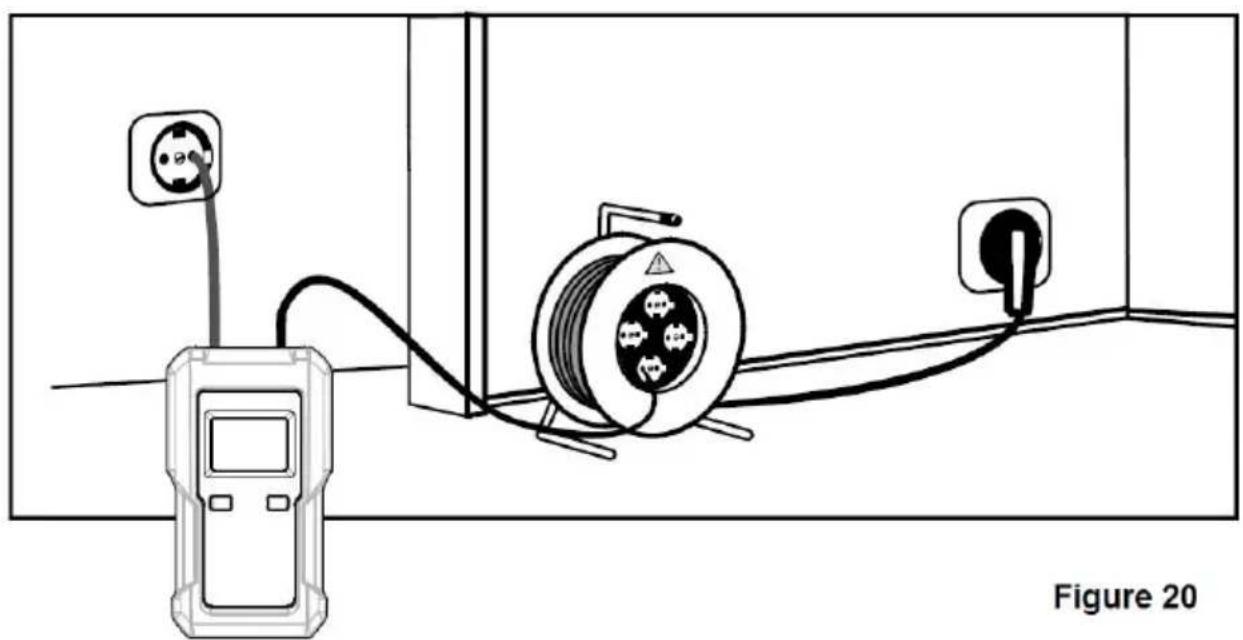
If the dual-pole application is carried out on multi-wire cables (NYM 3 x1.5mm2), the location depth is widely limited. This is best the go-and-return lines are installed very closely. And as a result, strong distortion of the magnetic field occurs. The electro-magnetic field may not develop at the bottleneck. This limitation can easily be eliminated when using a separate conductor as the return line. This separate conductor allows a larger spreading of the electro-magnetic field. Any conductor or cable reel can be used as separate return conductor.
When tracing the conductors, make sure that the distance between the feeder line and the return line is larger than the location depth. In practical applications, this amounts to approx. 2.0 meters.
For this application, humid walls, plaster, etc. have only an insignificant influence on the location depth.
Requirements:
●The current circuit must not be live. - Connect the transmitter in compliance with Figure 18. ●The distance between the feeder line and the return line must be at least 2.0 to 2.5 meters or more. ●Proceed as described in the application example.
Note:
- Increasing the transmission level from level 1 to level 3 with the "LEVEL/2" button increases the detecting distance of the receiver by a factor of about 4.
- Setup of the receiver: manual mode, minimal sensitivity. If necessary adjust the sensitivity of the receiver according to the actual condition during detection.
●Max. tracing depth: about 2 meters
The reach will be improved when seeking the tension.
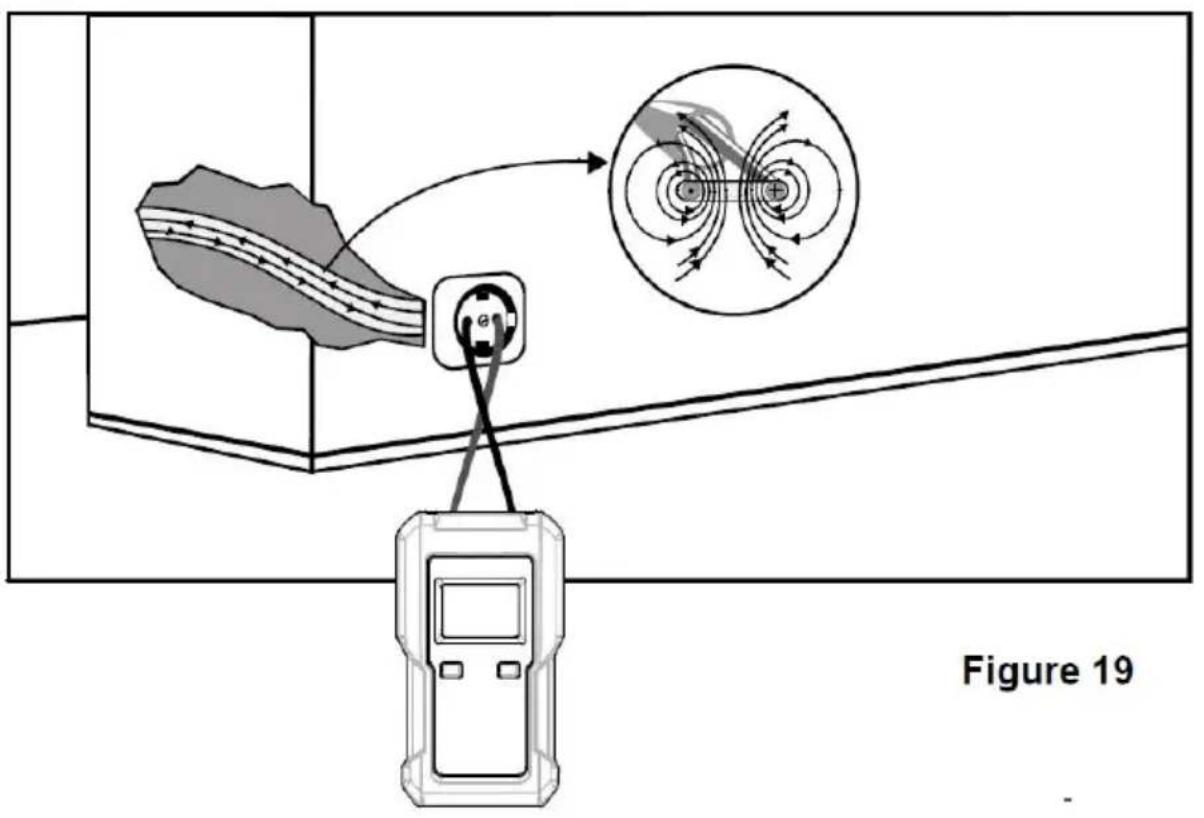
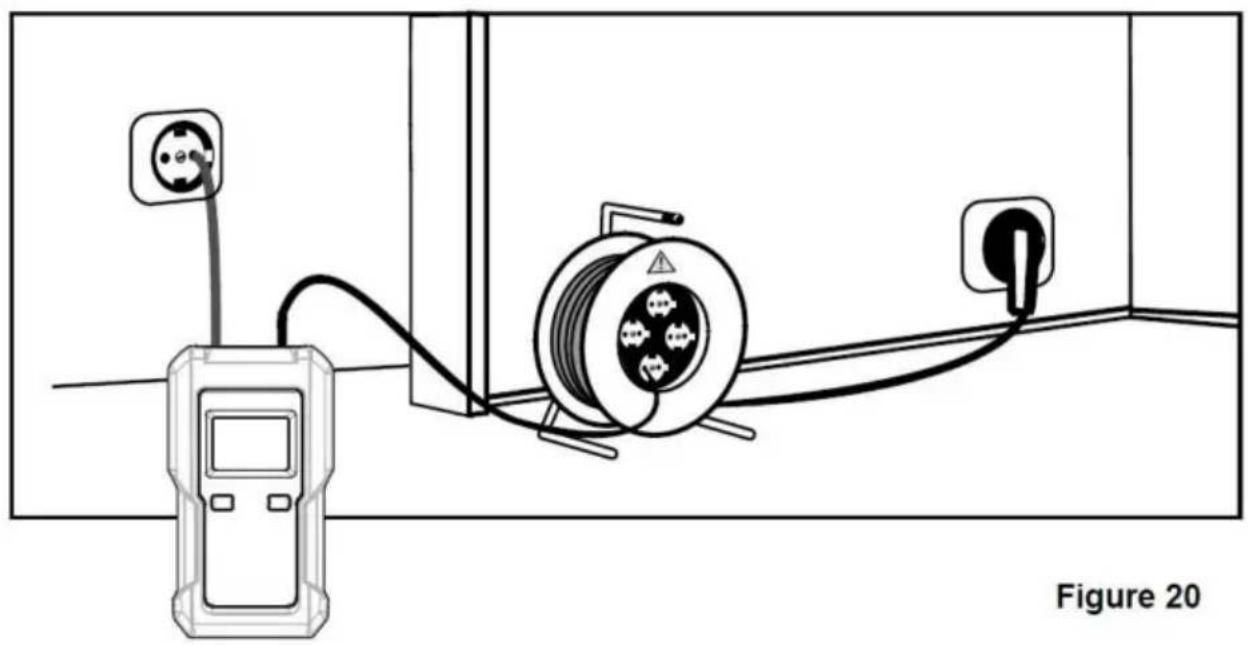
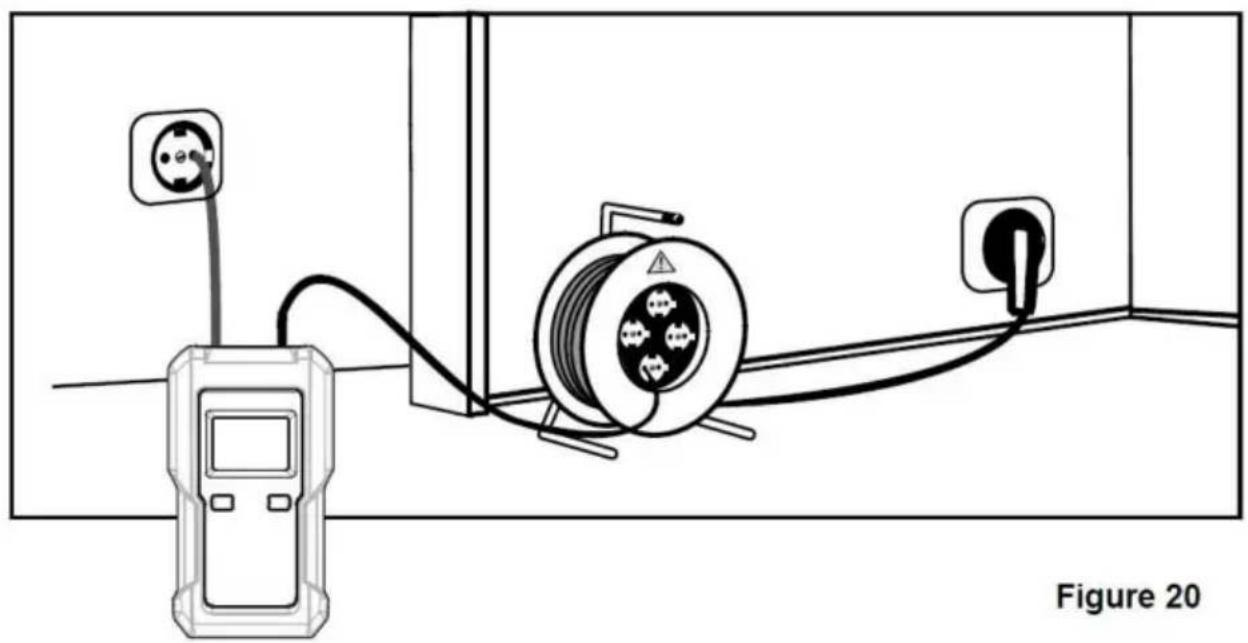
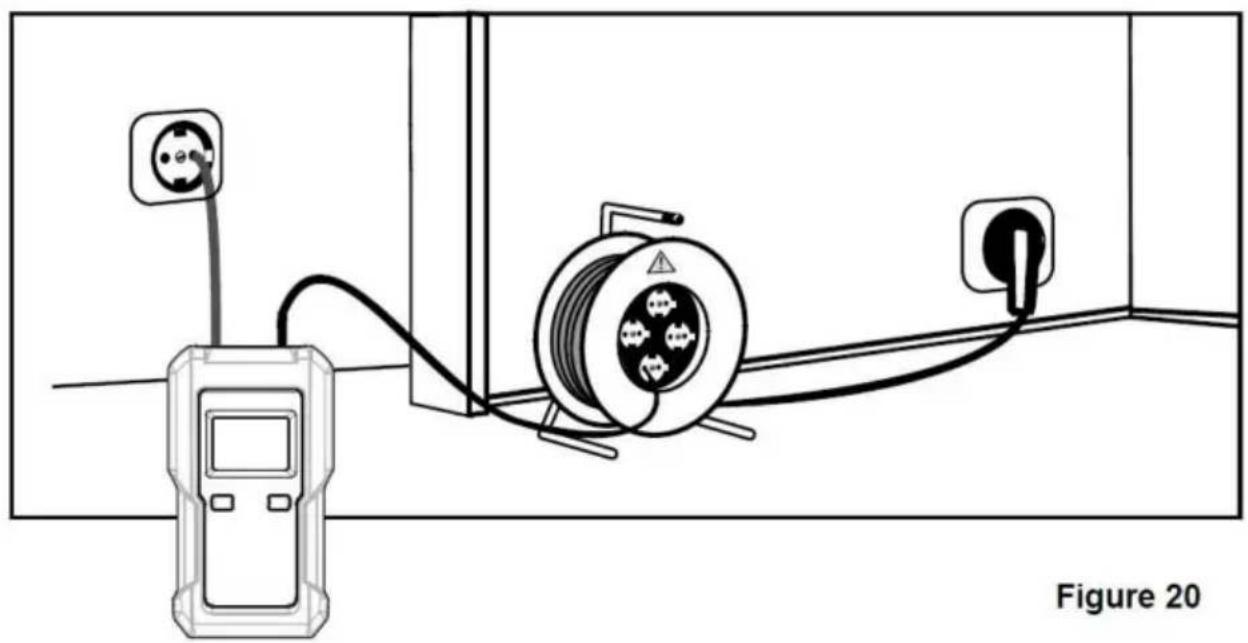
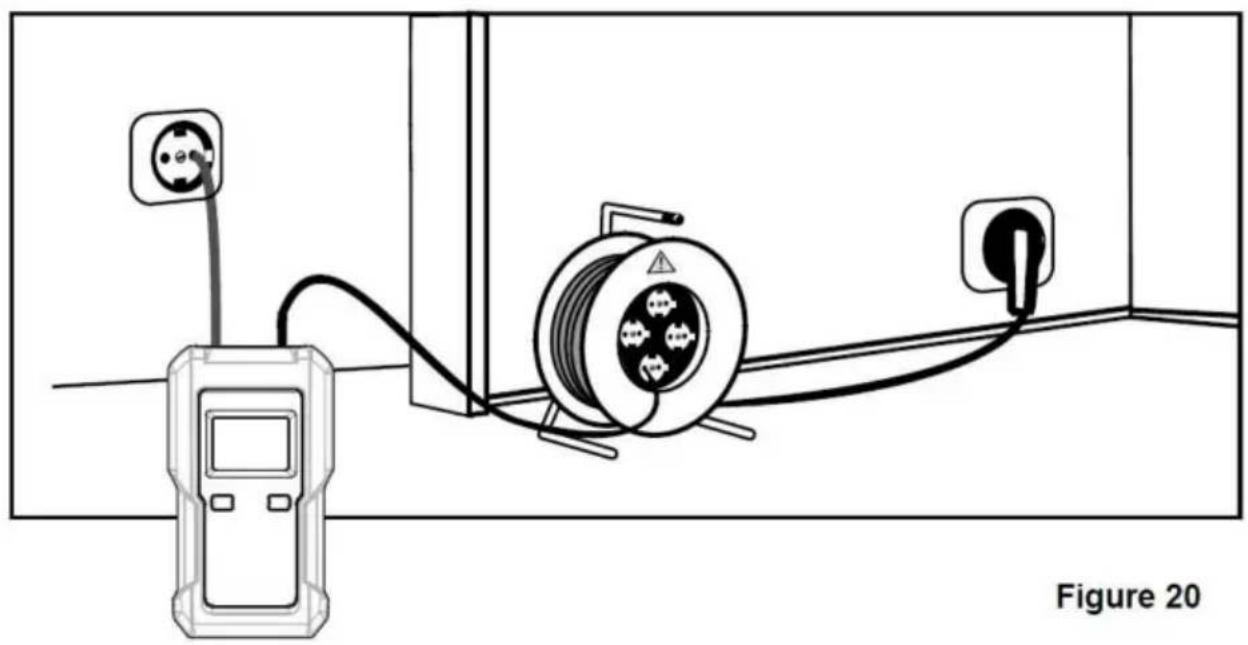
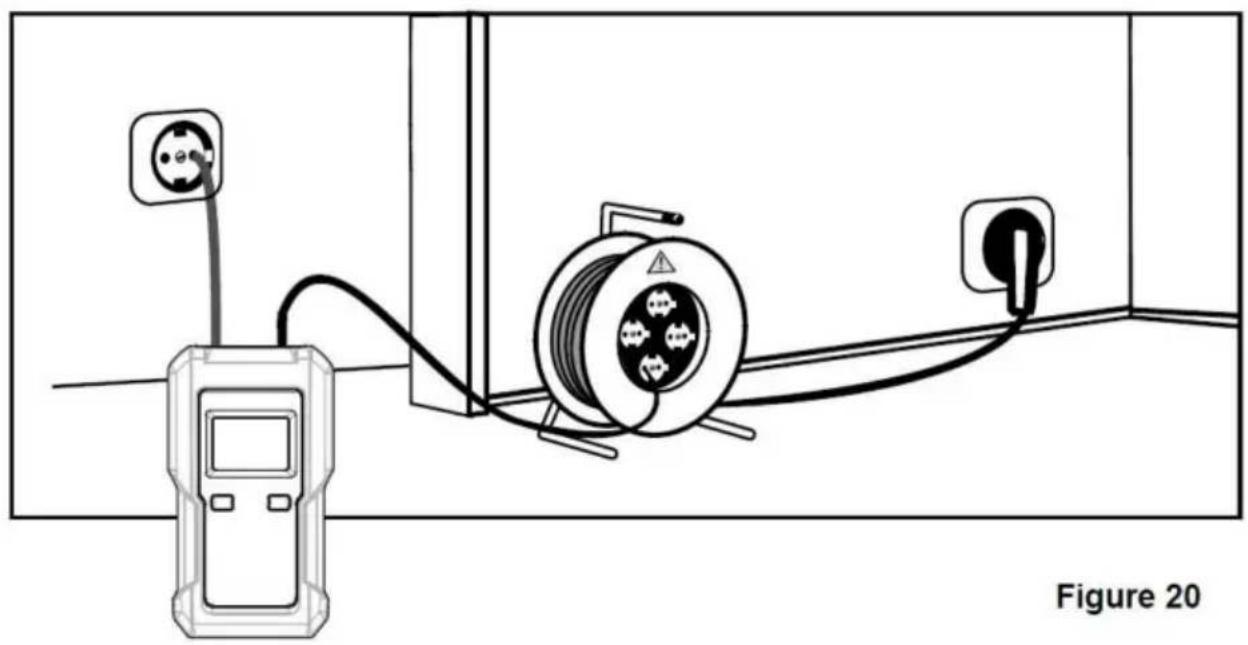
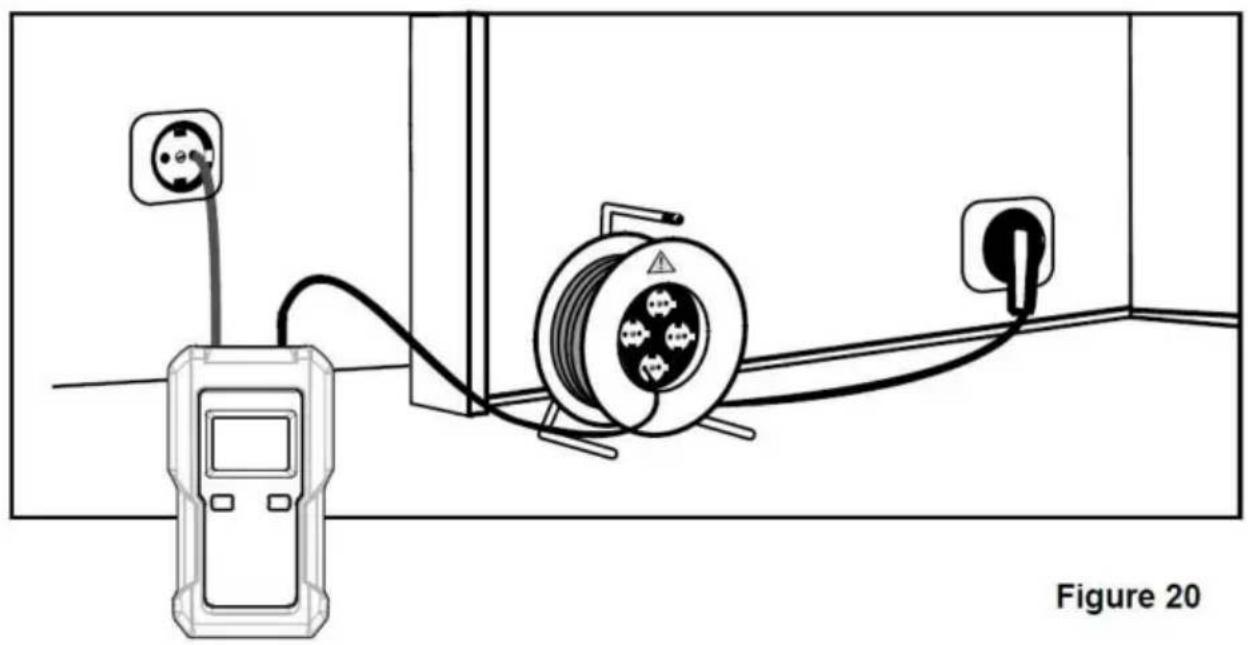
If the transmitter is connected to a live line and a neutral line, the signal is conducted on two parallel lines (see Figure 19).
The twisting of the lines can sometimes cause the signals to cancel each other. In this case, the maximum effective detecting radius of the receiver is only about 0.5 meter.
To eliminate the effect pointed out in Figure 19, the connection should be carried out as shown in Figure 20. In this figure, a separate cable is used as the return line, which can increase the effective detecting radius of the receiver to about 2.5 meters or higher. A larger distance return line can be provided through the cable reel.
Pay attention to the distance between the receiver and the line being checked, so that the line can be clearly determined according to the signal indication of the receiver.
Comply with the relevant national and local safety laws and regulations when performing connections on live circuits.
Note:
Increasing the transmission level from level 1 to level 3 with the "LEVEL" button increases the detecting distance of the receiver by a factor of about 4.
Sorting or determination of conductors already installed (double-pole application)
Requirements:
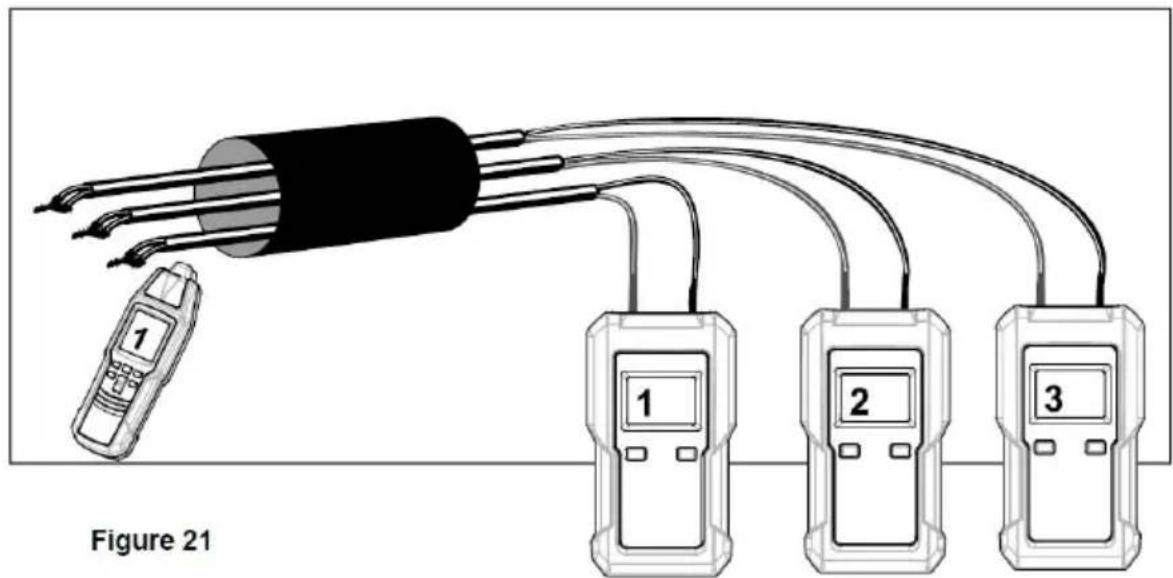
● All circuits within the cable must not be live. ● The lead terminals must be twisted and electrically connected to each other. ● You need several transmitters with different transmission codes. - Connect the transmitter according to Figure 21. ● Carry out this example as described in the application example.
For this application example, please notice that the stripped lead terminals are twisted with each other. The electrical connection between the stripped lead terminals must be good.
If you have only one transmitter, the sorting of the sheathed cable can be done by sequentially reconnecting the transmitter.
Note:
Increasing the transmission level from level 1 to level 3 with the "LEVEL/2" button increases the detecting distance of the receiver by a factor of about 4.
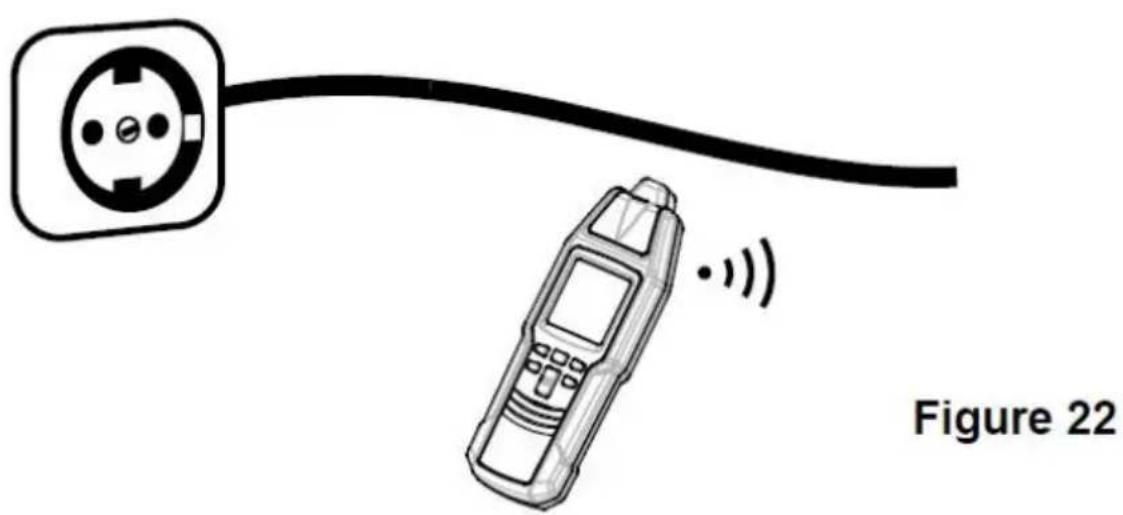
The test is performed in compliance with Figure 22. For this application, no transmitter is required.
Select the mains voltage detection mode with the "NCV" button on the receiver. (When the mains voltage detection mode is selected, the receiver displays the symbol "NCV" as an indicator.) Move the receiver probe close to the cable to be tested, and observe the right to see where it gives a signal indication.
The bargraph display indicating the signal intensity and the signal sound frequency depend on the level of the voltage of the conductor under test, the distance between the receiver and the live conductor, the insulation of the conductor, etc.
The higher the frequency of the signal sound of the receiver, the higher the voltage, or the lower the distance to the conductor.
Warning:
●The signal intensity indicated by the receiver does not necessarily indicate the level and type of the voltage of the conductor under test. The value of a voltage can only be determined by a professional measurement tool such as a multimeter. ●The signal indication of the receiver is affected by the distance between the receiver probe and the conductor under test, the voice of the conductor, the insulation of the conductor, etc. The conductor under test may be live even if the receiver does not give any indication. To avoid electric shock and personal injury, do not touch any conductor with hand or skin. - Before and after each use, verify the receiver's operation by detecting a known energized power socket. Do not use the receiver if it operates abnormally or is damaged.
To avoid interference, do not use the receiver where there is a strong environmental electromagnetic field; otherwise the test result may be wrong.
Setting the transmission code of the transmitter
☐ Make sure that the transmitter is off. On the transmitter, press and hold down the " " button while holding down the LEVEL / button. When the transmitter has turned on, release all the buttons. Briefly press the LEVEL / button until the desired transmission code appears on the transmitter display. To exit the transmission code setting mode, press and hold down "button for about 1 sec. The transmitter turns off.
Using the illumination function of the receiver
Make sure that the receiver is on, then briefly press the " " button to turn on or off the light on the receiver. The light turns off automatically after about 60 secs.
MAINTENANCE
Warning
The instrument is not waterproof. Do not let water or any liquid enter the case or terminals of the instrument.
Before cleaning the instrument, turn off the instrument and disconnect the instrument from any cable/lead.
Cleaning:
Periodically wipe the case with a damp cloth. Do not use abrasive solvents.
General Maintenance:
Except for replacing the battery and fuse, never attempt to repair or service the instrument.
Store the instrument in a dry place when not in use. Do not stand in an environment with intense electromagnetic fields.
If the instrument fails, check and replace (as needed) the battery and fuse and/or review this manual to verify proper operation.
BATTERY REPLACEMENT
Replacing the battery in the transmitter:
When the battery level indicator on the transmitter display becomes "or when the receiver display shows", the battery in the transmitter is not high enough and you must replace it immediately; otherwise the transmitter will not operate normally or the measurement/detection result may be wrong.
To replace the battery, turn off the transmitter and then disconnect the transmitter from any cable/lead and circuit. Remove the screw on the battery cover of the transmitter and then remove the battery cover. Replace the old battery with a new one of the same type, making sure that the polarity connections are correct. Reinstall the battery cover and the screw.
Warning
To avoid electric shock, turn off the transmitter and then disconnect the transmitter from any cable/lead and circuit before opening the battery cover or case of the transmitter.
Replacing the battery in the receiver:
When the low battery indicator "R" appears on the receiver display, the battery in the receiver is not high enough and you must replace it immediately; otherwise the receiver will not operate normally or the detection result may be wrong.
To replace the battery, turn off the receiver first. Remove the screw on the battery cover of the receiver and then remove the battery cover. Replace the old battery with a new one of the same type, making sure that the polarity connections are correct. Reinstall the battery cover and the screw.
REPLACING THE FUSE IN THE TRANSMITTER
The fuse in the transmitter protects the transmitter against overload or faulty manipulation.
If the output signal generated by the transmitter is weak and can be increased to a normal level, the fuse in the transmitter may be damaged.
Use the following procedure to check whether the fuse is damaged:
- Disconnect the transmitter from all cables/leads connected.
- Turn on the transmitter, then set its transmission level to level 1. "1" is shown on the transmitter display. Connect one end of a test lead to the red terminal of the transmitter.
- Turn on the receiver. The receiver defaults to the automatic mode and the symbol "AUTO" appears on the receiver display as an indicator.
- Place both the transmitter and receiver on a wooden desk (or nonmetallic desk). Move the receiver probe close to the test lead that is connected to the red terminal of the transmitter, and adjust the position of the receiver until the receiver displays a reading which approximates 700. Do not move the receiver from now on in the following procedure, and note down this reading.
- Do not move the transmitter. Connect the unused end of the test lead to the black terminal of the transmitter.
- If the fuse in the transmitter is good, the reading on the receiver display will roughly double.
If needed, use the following steps to replace the fuse:
- Turn off the transmitter. Disconnect the transmitter from any cable/lead and circuit.
- Remove the screw on the battery cover of the transmitter, then remove the battery cover, and then remove the battery.
- Remove the screws on the back cover of the transmitter, and then remove the back cover. Replace the damaged fuse with a new one of the same ratings. Reinstall the back cover and its screws. Then reinstall the battery, the battery cover, and the screw correctly.
The transmitter uses one fuse whose ratings are: 500mA/600V, F action, ∅6.35X32mm.
INSTRUMENT CALIBRATION
To ensure measurement accuracy, the instrument must be periodically calibrated by our company. The recommended calibration interval is one year.
If the instrument is used very often or if it is used under rough conditions, we recommend shorter intervals. If the instrument is used only a few times, the calibration interval can be extended to 3 years.
TRANSPORT AND STORAGE
Please keep the original packaging for later transport, e.g. for calibration. Any transport damage due to faulty packaging will be excluded from warranty claims.
In order to avoid damage caused by battery leakage, remove batteries from the instrument if you do not use the instrument for a period of time.
When the instrument is not in use, it must be stored in a dry area without intense electromagnetic fields.
TECHNICAL DATA
Transmitter:
Output Signal: 125kHz
External Voltage Measuring Range: 12V dc to 600V dc, or 12V ac to 600V ac at 50Hz/60Hz
Display: LCD
Measurement Category: CAT III 600V
Pollution Degree: 2
Battery: 9V battery, 6F22 or equivalent, 1 piece
Operating Environment: Temperature: °C to 40°C
Relative Humidity: < 75%
Storage Environment: Temperature: -20 to 60°C
Relative Humidity: < 85%
IP Degree: IP20
Operating Altitude: 0 to 2000 meters
Size: 133mm x 76mm x 32mm
Weight: About 207g (including battery)
Receiver:
Tracing Depth: The tracing depth depends on medium and application.
Cable Locator Mode: Approx. 0 to 2 meters (single-pole application)
Approx. 0 to 0.5 meter (double-pole application) or 0 to 2.5 meters (only when a separate return line is used in double-pole application)
Note: The distance between the transmitter and the receiver must be 2m. In double-pole applications, do not use the PINPOINT mode.
Non-Contact AC Voltage Detection Range: 90V ac to 264V ac, at 50/60Hz
Display: LCD
Battery: 9V battery, 6F22 or equivalent, 1 piece
Operating Environment: Temperature: 0°C to 40°C
Relative Humidity: < 75%
Storage Environment: Temperature: -20°C to 60°C
Relative Humidity: < 85%
IP Degree: IP20
Operating Altitude: 0 to 2000 meters
Size: 186mm x 60mm x 35mm
Weight: About 234g (including battery)
APPENDIX: TEST LEAD ASSEMBLY
Before you use the supplied test leads that are without a probe, you must connect them to the alligator clips as described as follows:
- Remove the two protective caps at the two ends of each test lead.
- Refer to Figure 23, insert the specified end of each test lead into the corresponding alligator clip until the end is reached.
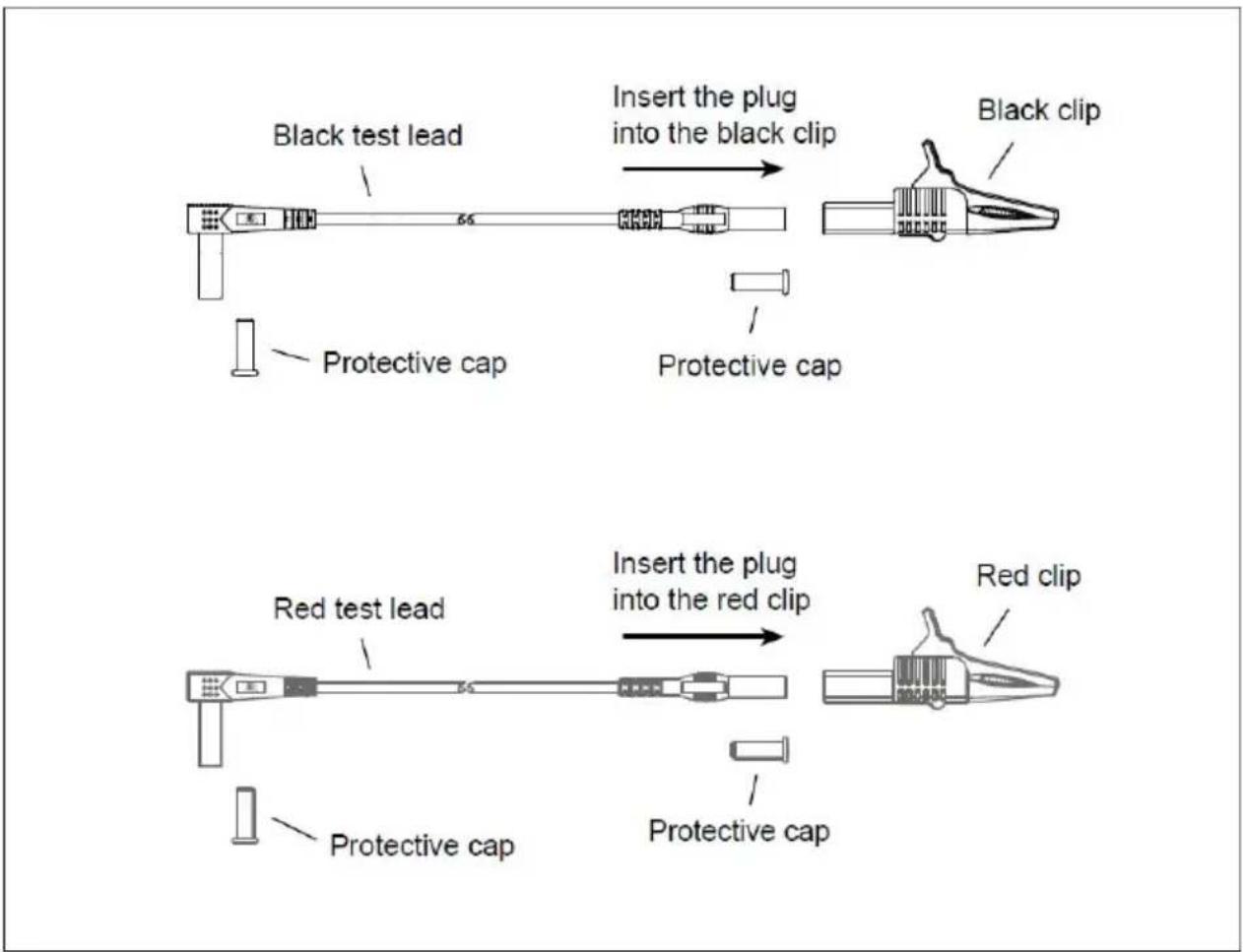
Figure 23
NOTE
This manual is subject to change without notice. Our company will not be held responsible for any loss. The contents of this manual cannot be used as a basis for any special application.
Accessories list
- Test leads *1
- Test probes *2
- Test clips *2
- L-shaped grounding rod *1
- Storage bag *1
- Instruction manual *1
- 9V lithium battery *2
- Phillips screwdriver *1
- USB charging cable *1
DISPOSAL OF THIS ARTICLE
Dear Customer,
If you at some point intend to dispose of this article, please keep in mind that many of its components consist of valuable materials, which can be recycled.
Please do not dispose of it in the garbage bin, but check with your local council for recycling facilities in your area.
Address: Baoshanqu Shuangchenglu 803long 11hao 1602A-1609shi Shanghai
Imported to AUS: SIHAO PTY LTD, 1 ROKEVA STREETEASTWOOD NSW 2122 Australia
Imported to USA: Sanven Technology Ltd, Suite 250, 9166 Anaheim Place, Rancho Cucamonga, CA 91730
| EC | REP |
SHUNSHUN GmbH
Römeräcker 9 Z2021, 76351
Unit 5 Albert Edward House, The
Pavilions Preston, United Kingdom
Made In China
VEVOR®
TOUGH TOOLS, HALF PRICE
Technical Support and E-Warranty Certificate
www.vevor.com/support
VEVOR®
TOUGH TOOLS, HALF PRICE
INSTRUCTIONS PRODUIT
Transmitter
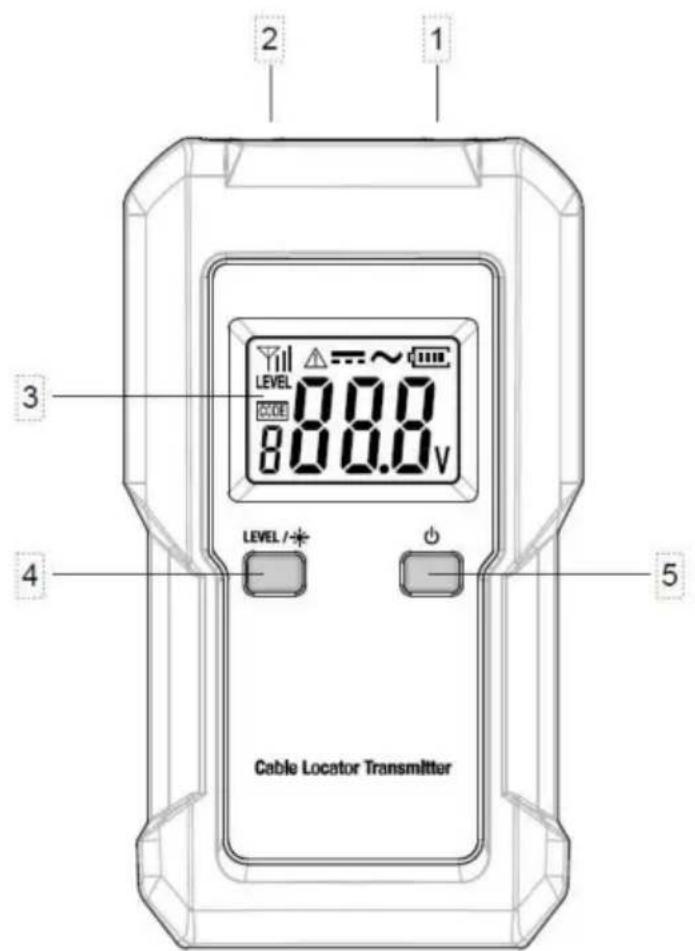
Figure 1. Transmitter
Figure 3. Receiver
①. Probe.
Figure 4. Receiver Display
PRODUCT INSTRUCTIONS
IMPORTANT APPLICATIONS
TAKING THE MEASUREMENT
Figure 9
Note:
Figure 10
Note:
Figure 11
LOCATING THE CIRCUIT BREAKER OR FUSE THAT POWERS AN OUTLET (BIPOLAR APPLICATION)
Note:
Figure 14
Figure 15

The instrument is not waterproof. Do not let water or any liquid enter the case or terminals of the instrument.
Before cleaning the instrument, turn off the instrument and disconnect the instrument from any cable/lead.
Cleaning:
Figure 23
NOTE
DISPOSAL OF THIS ARTICLE
Dear Customer,
If you at some point intend to dispose of this article, then please keep in mind that many of its components consist of valuable materials, which can be recycled.
Please do not discharge it in the garbage bin, but check with your local council for recycling facilities in your area.

Address: Baoshanqu Shuangchenglu 803long 11hao 1602A-1609shi
Shanghai
Imported in Australia: SIHAO PTY LTD, 1 ROKEVA STREETESTWOOD
NSW 2122 Australia
Location, Rancho Cucamonga, CA 91730
| REPRÉSENTANT CE |
SHUNSHUN GmbH
Römeräcker 9 Z2021, 76351
Linkenheim-Hochstetten, Germany
| REPRÉSENTANT | DU ROYAUME-UNI |
Pooledas Group Ltd
www.vevor.com/support
CABLE LOCATOR
MODEL: TS552
Figure 3. Receiver
①. Probe.
Figure 4. Receiver Display
TAKING MEASUREMENT
Figure 9
Note:
Figure 10
Note:
Figure 11
Figure 14
Figure 15
The instrument is not waterproof. Do not let water or any liquid enter the case or terminals of the instrument.
Before cleaning the instrument, turn off the instrument and disconnect the instrument from any cable/lead.
Cleaning:
Figure 23
NOTE
DISPOSAL OF THIS ARTICLE
Dear Customer,
If you at some point intend to dispose of this article, then please keep in mind that many of its components consist of valuable materials, which can be recycled.
Please do not discharge it in the garbage bin, but check with your local council for recycling facilities in your area.

Address: Baoshanqu Shuangchenglu 803long 11hao 1602A-1609shi Shanghai
www.vevor.com/support
VEVOR®
TOUGH TOOLS, HALF PRICE
electronics www.vevor.com/support
Figure 3. Receiver
①. Probe.
Figure 4. Receiver Display
Figure 9
Note:
Figure 10
Note:
Figure 11
IDENTIFYING THE SWITCH OR FUSE THAT POWERS AN OUTLET (BIPOLAR APPLICATION)
Figure 14
Figure 15
The instrument is not waterproof. Do not let water or any liquid enter the case or terminals of the instrument.
Before cleaning the instrument, turn off the instrument and disconnect it from any cable or lead.
Cleaning:
Figure 23
NOTE
DISPOSAL OF THIS ARTICLE
Dear Customer,
If you at some point intend to dispose of this article, please keep in mind that many of its components consist of valuable materials, which can be recycled.
Please do not dispose of it in the garbage bin, but check with your local council for recycling facilities in your area.

Address: Baoshanqu Shuangchenglu 803long 11hao 1602A-1609shi Shanghai
Imported into Australia: SIHAO PTY LTD, 1 ROKEVA STREET EASTWOOD NSW 2122 Australia
Figure 3. Receiver
①. Investigation.
Figure 4. Receiver Display
Figure 9
Note:
Figure 10
Note:
Figure 11
Figure 14
Figure 15
The instrument is not waterproof. Do not let water or any liquid enter the case or terminals of the instrument.
Before cleaning the instrument, turn off the instrument and disconnect the instrument from any cable/lead.
Cleaning:
Figure 23
NOTE
DISPOSAL OF THIS ARTICLE
Dear Customer,
If you at some point intend to dispose of this article, then please keep in mind that many of its components consist of valuable materials, which can be recycled.
Please do not discharge it in the garbage bin, but check with your local council for recycling facilities in your area.

Figure 3. Receiver
①. Probe.
Figure 4. Receiver Display
PERFORMING THE MEASUREMENT
Figure 9
Note:
Figure 10
Note:
Figure 11
FIND THE SWITCH OR FUSE POWERING THE OUTLET
(TWO-POLE APPLICATION)
Figure 14
Figure 15
The instrument is not waterproof. Do not let water or any liquid enter the case or terminals of the instrument.
Before cleaning the instrument, turn off the instrument and disconnect the instrument from any cable/lead.
Cleaning:
Figure 23
DISPOSAL OF THIS ARTICLE
Dear Customer,
If you at some point intend to dispose of this article, then please keep in mind that many of its components consist of valuable materials, which can be recycled.
Please do not discharge it in the garbage bin, but check with your local council for recycling facilities in your area.

Address: Baoshanqu Shuangchenglu 803long 11hao 1602A-1609shi Szanghaj
Import to AUS: SIHAO PTY LTD, 1 ROKEVA STREETEASTWOOD
www.vevor.com/support
VEVOR®
TOUGH TOOLS, HALF PRICE
www.vevor.com/support
CABLE LOCATOR
MODEL: TS552
NEED HELP? CONTACT US!
Figure 3. Receiver
①. Ask questions.
Figure 4. Receiver Display
TAKING MEASUREMENTS
Figure 9
Note:
Figure 10
Note:
Figure 11
PLACE THE CIRCUIT BREAKER OR FUSE THAT POWERS AN OUTLET (DUAL APPLICATION)
Figure 14
Figure 15
The instrument is not waterproof. Do not let water or any liquid enter the case or terminals of the instrument.
Before cleaning the instrument, turn off the instrument and disconnect the instrument from any cable/lead.
Cleaning:
Figure 23
NOTE
DISPOSAL OF THIS ARTICLE
Dear Customer,
If you at some point intend to dispose of this article, then please keep in mind that many of its components consist of valuable materials, which can be recycled.
Please do not discharge it in the garbage bin, but check with your local council for recycling facilities in your area.

Address: Baoshanqu Shuangchenglu 803long 11hao 1602A-1609shi Shanghai
www.vevor.com/support
CABLE LOCATOR
MODEL: TS552
Figure 3. Receiver
①. Probe.
Figure 4. Receiver Display
IMPORTANT APPLICATIONS
PERFORM MEASUREMENT
Figure 9
Note:
Figure 10
Note:
Figure 11
PLACEMENT OF CIRCUIT BREAKER OR FUSE SUPPLYING AN OUTLET (DUAL-POLE APPLICATION)
Figure 14
Figure 15
Locate a complete house wiring (single-pole application)
The instrument is not waterproof. Do not let water or any liquid enter the case or terminals of the instrument.
Before cleaning the instrument, turn off the instrument and disconnect the instrument from any cable/lead.
Cleaning:
TRANSPORT AND STORAGE
Figure 23
NOTE
DISPOSAL OF THIS ARTICLE
Dear Customer,
If you at some point intend to dispose of this article, then please keep in mind that many of its components consist of valuable materials, which can be recycled.
Please do not discharge it in the garbage bin, but check with your local council for recycling facilities in your area.

Address: Baoshanqu Shuangchenglu 803long 11hao 1602A-1609shi
Shanghai
Imported to AUS: SIHAO PTY LTD, 1 ROKEVA STREETEASTWOOD
NSW 2122 Australia
Imported to USA: Sanven Technology Ltd, Suite 250, 9166 Anaheim
Place, Rancho Cucamonga, CA 91730
| EC | REP |
SHUNSHUN GmbH
Römeräcker 9 Z2021, 76351
Linkenheim-Hochstetten, Germany
| UK | REP |
Pooledas Group Ltd
Unit 5 Albert Edward House, The
Pavilions Preston, United Kingdom
Made in China
VEVOR®
TOUGH TOOLS, HALF PRICE
www.vevor.com/support
- CABLE LOCATOR
- NEED HELP? CONTACT US
- INTRODUCTION
- FEATURES
- SUPPLY LIST
- SAFETY INFORMATION
- TRANSMITTER
- ⑤. " BUTTON
- NOTE
- RECEIVER
- PRODUCT INSTRUCTION
- LOCATOR IN COMPLETE CIRCUITS
- IMPORTANT APPLICATIONS
- CARRYING OUT MEASUREMENT
- REQUIREMENTS
- LOCATING CIRCUIT BREAKER OR FUSE THAT SUPPLIES AN OUTLET (DUAL-POLE APPLICATION)
- SORTING OR DETERMINATION OF CONDUCTORS ALREADY INSTALLED (DOUBLE-POLE APPLICATION)
- WARNING
- SETTING THE TRANSMISSION CODE OF THE TRANSMITTER
- USING THE ILLUMINATION FUNCTION OF THE RECEIVER
- MAINTENANCE
- CLEANING
- GENERAL MAINTENANCE
- BATTERY REPLACEMENT
- REPLACING THE BATTERY IN THE TRANSMITTER
- REPLACING THE BATTERY IN THE RECEIVER
- REPLACING THE FUSE IN THE TRANSMITTER
- INSTRUMENT CALIBRATION
- TRANSPORT AND STORAGE
- TECHNICAL DATA
- APPENDIX: TEST LEAD ASSEMBLY
- ACCESSORIES LIST
- DISPOSAL OF THIS ARTICLE
- VEVOR®
- TOUGH TOOLS, HALF PRICE
- INSTRUCTIONS PRODUIT
- PRODUCT INSTRUCTIONS
- TAKING THE MEASUREMENT
- LOCATING THE CIRCUIT BREAKER OR FUSE THAT POWERS AN OUTLET (BIPOLAR APPLICATION)
- TAKING MEASUREMENT
- IDENTIFYING THE SWITCH OR FUSE THAT POWERS AN OUTLET (BIPOLAR APPLICATION)
- PERFORMING THE MEASUREMENT
- DEAR CUSTOMER
- TAKING MEASUREMENTS
- PLACE THE CIRCUIT BREAKER OR FUSE THAT POWERS AN OUTLET (DUAL APPLICATION)
- PERFORM MEASUREMENT
- PLACEMENT OF CIRCUIT BREAKER OR FUSE SUPPLYING AN OUTLET (DUAL-POLE APPLICATION)
Brand : Vevor
Model : TS552
Category : Measuring equipment