
R7313 - Sander Vevor - Free user manual and instructions
Find the device manual for free R7313 Vevor in PDF.



| Product Type | Random Orbital Sander |
| Brand | Vevor |
| Model | R7313 |
| Power Supply Voltage | 120 V AC 60 Hz / 220-240 V AC 50 Hz |
| Power | 350 W |
| No-Load Speed | 4,000 - 10,000 rpm |
| Pad Diameter | 5 inch (127 mm) or 6 inch (150 mm) |
| Eccentric | 5 mm |
| Dust Extraction Connection | 28 mm |
| Weight | Approx. 1.5 kg |
| Protection Class | II (Double Insulation) |
| Speed Control | Electronic with wheel and +/- buttons |
| Speed Modes | Linear (progressive) and fixed (memorized) |
| Indicator Light | LED operation indicator |
| Safety Functions | Low and high voltage protection |
| Use | Dry sanding of wood, metal, plastic, stone |
| Included Accessories | Abrasive paper, sponge pad, S6 key |
| Maintenance | Clean ventilation slots with compressed air |
| Storage | Unplug, clean, dry before storing |
Frequently Asked Questions - R7313 Vevor
User questions about R7313 Vevor
0 question about this device. Answer the ones you know or ask your own.
Ask a new question about this device
Download the instructions for your Sander in PDF format for free! Find your manual R7313 - Vevor and take your electronic device back in hand. On this page are published all the documents necessary for the use of your device. R7313 by Vevor.
USER MANUAL R7313 Vevor
ORBITAL SANDER
MODEL: R7313
We continue to be committed to providing you with tools at competitive prices. "Save Half", "Half Price", or any other similar expressions used by us only represent an estimate of savings you might benefit from buying certain tools with us compared to top brands and does not necessarily mean to cover all categories of tools offered. We kindly remind you to verify carefully when placing an order with us whether you are actually saving half in comparison with the top major brands.
MODEL: R7313

NEED HELP? CONTACT US!
Have product questions? Need technical support? Please feel free to contact us:
This is the original instruction. Please read all manual instructions carefully before operating. VEVOR reserves a clear interpretation of the user manual. The appearance of the product shall be subject to the product you received. Please forgive us that we won't inform you of any technology or software updates on our product.
 | Warning-To reduce the risk of injury, user must read instructions manual carefully. |
     | Always wear ANSI approved safety goggles when work with tools and equipment.Wear eye protection.Wear ear protection.Wear protective gloves.Wear a dust mask.Wear protective, slip-resistant footwear. |
  | Compliance is a EC & UK security certification. |
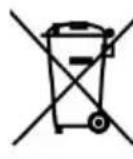 | This product is subject to the provision of European D 2012/19/EC. The symbol showing a wheelie bin crosse through indicates that the product requires separate ref collection in the European Union. This applies to the and all accessories marked with this symbol. Products marked as such may not be discarded with normal dc waste, but must be taken to a collection point for red electrical and electronic devices. |
 | Switch the product off and disconnect it from the pow before assembly, cleaning,adjustments, maintenance, stor and transportation. |
 | This product is of protection class II. That means it is with enhanced or double insulation. |
IMPORTANT SAFEGUARDS
Thank you for using this product. In order to make sure that you can operate the machine correctly, read this instruction carefully before operation and keep it properly for future reference. Please be sure to follow the precautions and safety rules on this page to ensure your safe use. This manual will outline safety warnings and precautions, operating, maintenance, and cleaning. The warnings and instructions reviewed in the manual cannot cover all possible conditions and situations that may occur. Caution and common sense are not built into this product, since we expect that the users will comply with these codes. If you have any problem, please call us. Do not try to fix the problems yourself, or it will cause injury or property damage.
Please read ALL the instructions before using your machine.
1. WORK AREA SAFETY
- Keep work area clean and well lit. Cluttered or dark areas invite accidents.
- Do not operate power tools in explosive atmospheres, such as in the presence of flammable liquids, gases, or dust. Power tools create sparks which may ignite the dust or fumes.
- Keep children and bystanders away while operating a power tool. Distractions can cause you to lose control.
2. ELECTRICAL SAFETY
- Power tool plugs must match the outlet. Never modify the plug in any way. Do not use any adapter plugs with earthed (grounded) power tools. Unmodified plugs and matching outlets will reduce risk of electric shock.
- Avoid body contact with earthed or grounded surfaces such as pipes, radiators, ranges and refrigerators. There is an increased risk of electric shock if your body is earthed or grounded.
- Do not expose power tools to rain or wet conditions. Water entering a power tool will increase the risk of electric shock.
- Do not abuse the cord. Never use the cord for carrying, pulling or unplugging the power tool. Keep cord away from heat, oil, sharp edges or moving parts. Damaged or entangled cords increase the risk of electric shock.
moving parts. Damaged or entangled cords increase the risk of electric shock.
When operating a power tool outdoors, use an extension cord suitable for outdoor use. Use of a cord suitable for outdoor use reduces the risk of electric shock.
If operating a power tool in a damp location is unavoidable, use a residual current device (RCD) protected supply. Use of an RCD reduces the risk of electric shock.
3. PERSONAL SAFETY
Stay alert, watch what you are doing and use common sense when operating a power tool. Do not use a power tool while you are tired or under the influence of drugs, alcohol or medication. A moment of inattention while operating power tools may result in serious personal injury.
Use personal protective equipment. Always wear eye protection.
Protective equipment such as dust mask, non-skid safety shoes, hard hat or hearing protection used for appropriate conditions will reduce personal injuries.
Prevent unintentional starting. Ensure the switch is in the off-position before connecting to power source and/or battery pack, picking up or carrying the tool. Carrying power tools with your finger on the switch or energising power tools that have the switch on invites accidents.
Remove any adjusting key or wrench before turning the power tool on. A wrench or a key left attached to a rotating part of the power tool may result in personal injury.
- Do not overreach. Keep proper footing and balance at all times. This enables better control of the power tool in unexpected situations.
- Dress properly. Do not wear loose clothing or jewelry. Keep your clothing and gloves away from moving parts. Loose clothes, jewelry, or hair can be caught in moving parts.
- If devices are provided for the connection of dust extraction and collection facilities, ensure these are connected and properly used. Use dust collection can reduce dust-related hazards.
4. POWER TOOL USE AND CARE
- Do not force the power tool. Use the correct power tool for your application. The correct power tool will do the job better and safer at the rate for which it was designed.
- Do not use the power tool if the switch does not turn it on and off. Any power tool that cannot be controlled with the switch is dangerous and must be repaired.
- Disconnect the plug from the power source and/or the battery pack from the power tool before making any adjustments, changing accessories, or storing power tools. Such preventive safety measures reduce the risk of starting the power tool accidentally.
- Store idle power tools out of the reach of children and do not allow persons unfamiliar with the power tool or these instructions to operate the power tool. Power tools are dangerous in the hands of untrained users. - Maintain power tools. Check for misalignment or binding of moving parts, breakage of parts, and any other condition that may affect the power tool's operation. If damaged, have the power tool repaired before use. Many accidents are caused by poorly maintained power tools.
- Keep cutting tools sharp and clean. Properly maintained cutting tools with sharp cutting edges are less likely to bind and are easier to control. - Use the power tool, accessories, and tool bits, etc., in accordance with these instructions, taking into account the working conditions and the work to be performed. Use of the power tool for operations different from those intended could result in a hazardous situation.
5. SERVICE
- Have your power tool serviced by a qualified repair person using only identical replacement parts. This will ensure that the safety of the power tool is maintained.
SAFETY INSTRUCTIONS FOR SANDER
1. SAFETY INSTRUCTIONS FOR ALL OPERATIONS
a) This power tool is intended to function as a sander. Read all safety warnings, instructions, illustrations, and specifications provided with this power tool. Failure to follow all instructions listed below may result in
electric shock, fire, and/or serious injury.
b) This power tool is not recommended for grinding, wire brushing, or off-hand operations. Operations for which the power tool was not designed can create a hazard and cause personal injury.
c) Do not allow any loose portion of the bonnet or its attachment strings to spin freely. Tuck away or trim any loose attachment strings. Loose and spinning attachment strings can entangle your fingers or snag on the workpiece.
d) Do not use accessories which are not specifically designed and recommended by the tool manufacturer. Just because the accessory can be attached to your power tool, it does not assure safe operation.
e) The rated speed of the accessory must be at least equal to the maximum speed marked on the power tool. Accessories running faster than their rated speed can fly apart.
f) The outside diameter and the thickness of your accessory must be within the capacity rating of your power tool. Incorrectly sized accessories cannot be adequately guarded or controlled.
g) The arbor size of wheels, flanges, backing pads, or any other accessory must properly fit the spindle of the power tool. Accessories with arbor holes that do not match the mounting hardware of the power tool will run out of balance, vibrate excessively, and may cause loss of control.
h) Do not use a damaged accessory. Before each use, inspect the accessory such as abrasive wheels for chips and cracks, backing pads for cracks, tears, or excess wear, and wire brushes for loose or cracked wires. If the power tool or accessory is dropped, inspect for damage or install an undamaged accessory. After inspecting and installing an accessory,
position yourself and bystanders away from the plane of the rotating accessory and run the power tool at maximum no-load speed for one minute. Damaged accessories will normally break apart during this test time.
i) Wear personal protective equipment. Depending on application, use face shield,
safety goggles or safety glasses. As appropriate, wear dust mask, hearing protectors, gloves, and shop apron capable of stopping small abrasive
workpiece fragments. The eye protection must be capable of stopping flying debris generated by various operations. The dust mask or respirator must be capable of filtrating particles generated by your operation.
Prolonged exposure to high intensity noise may cause hearing loss.
j) Keep bystanders a safe distance away from work area. Anyone entering the work area must wear personal protective equipment. Fragments of workpiece or of a broken accessory may fly away and cause injury beyond the immediate area of operation.
k) Position the cord clear of the spinning accessory. If you lose control, the cord may be cut or snagged and your hand or arm may be pulled into the spinning accessory.
l) Never lay the power tool down until the accessory has come to a complete stop. The spinning accessory may grab the surface and pull the power tool out of your control.
m) Do not run the power tool while carrying it at your side. Accidental contact with the spinning accessory could snag your clothing, pulling the accessory into your body.
n) Regularly clean the power tool's air vents. The motor's fan will drag dust inside the housing and excessive accumulation of powdered metal may cause electrical hazards.
o) Do not operate the power tool near flammable materials. Sparks can ignite these materials.
p) Do not use accessories that require liquid coolants. Using water or liquid coolants may result in electrocution or shock.
2. KICKBACK AND RELATED WARNINGS
Kickback is a sudden reaction to a pinched or snagged rotating wheel, backing pad, brush or any other accessory. Pinching or snagging causes rapid stalling of the rotating accessory which in turn causes the uncontrolled power tool to be forced in the direction opposite of the accessory's rotation at the point of the binding.
For example, if an abrasive wheel is snagged or pinched by the workpiece, the edge of the wheel that is entering into the pinch point can dig into the surface of the material causing the wheel to climb out or kick out. The wheel may either jump toward or away from the operator, depending on the
direction of the wheel's movement at the point of pinching. Abrasive wheels may also break under these conditions. Kickback is the result of power tool misuse and/or incorrect operating procedures or conditions and can be avoided by taking proper precautions as given below.
a) Maintain a firm grip on the power tool and position your body and arms to allow you to resist kickback forces. Always use auxiliary handle, if provided, for maximum control over kickback or torque reaction during start-up. The operator can control torque reactions or kickback forces, if proper precautions are taken. b) Never place your hand near the rotating accessory. The accessory may kickback over your hand. c) Do not position your body in the area where power tool will move if kickback occurs. Kickback will propel the tool in the direction opposite the wheel's movement at the point of snagging. d) Use special care when working corners, sharp edges etc. Avoid bouncing and snagging the accessory. Corners, sharp edges or bouncing have a tendency to snag the rotating accessory and cause loss of control or kickback. e) Do not attach a saw chain woodcarving blade or toothed saw blade. Such blades create frequent kickback and loss of control.
GENERAL
- Use this tool for sanding wood, paint removal, polishing.
- Use the sanding paper and sponge pad which are supplied with the tool.
- Only use this tool for dry sanding.
- This tool should not be used by people under the age of 16 years.
- Always disconnect plug from power source before making any adjustment or changing any accessory.
- Do not work materials containing asbestos (asbestos is considered carcinogenic).
ACCESSORIES
- Use only accessories with an allowable speed matching at least the highest no-load speed of the tool.
- Do not use damaged, deformed or vibrating accessories.
OUTDOOR USE
- When used outdoors, connect the tool via a fault current (FI) circuit breaker with a triggering current of 30 mA maximum, and only use an extension cord which is
intended for outdoor use and equipped with a splashproof coupling.
PRODUCT OVERVIEW
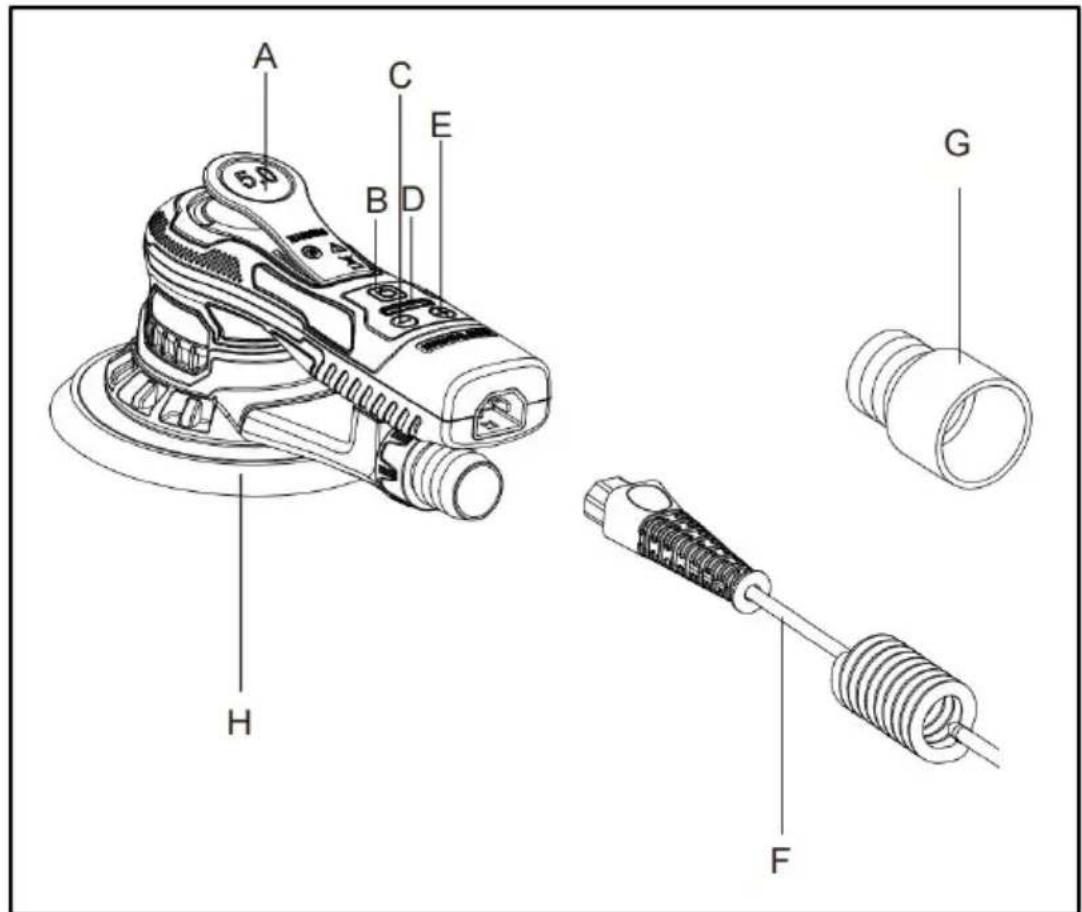
A. Lever B. On / Off Key C. RPM- D. LED E. RPM- F. Power cord G. Connect adaptor H. Backing pad
PRODUCT PARAMETERS
| MODEL | Region | Voltage | Power | Plug Type |
| R7313 | North America | AC120 V 60Hz | 350W | American PLUG |
| Europe | AC220-240V 50Hz | 350W | European PLUG | |
| Australia | AC220-240V 50Hz | 350W | Australia PLUG | |
| No-load Speed | 4000 - 10000 RPM | |||
| Dia. Φ Max | 5inch(127mm) / 6inch(150mm) | |||
| Eccentric | 5mm | |||
| Connect adaptor | Φ28mm | |||
Note: Please use the correct power source voltage.
Attention: Some models have 5-inch Hook & loop backing pads that need to be purchased separately.
BEFORE USING
Before using the appliance for the first time, peel off any promotional packaging materials and check that the product is clean and dust-free. Please dispose of all plastic bags carefully and keep them away from children and pets. Check all components provided according to the list in this manual.
- Always check that the supply voltage is the same as the voltage indicated on the nameplate of the tool (tools with a rating of 230V or 240V can also be connected to a 220V supply).
- Dust from material such as paint containing lead, some wood species, minerals and metal may be harmful (contact with or inhalation of the dust may cause allergic reactions and/or respiratory diseases to the operator or bystanders); wear a dust mask and work with a dust extraction device when connectable.
- Certain kinds of dust are classified as carcinogenic (such as oak or beech dust) especially in conjunction with additives for wood conditioning.
Wear a dust mask and work with a dust extraction device when connectable.
- Follow the dust-related national requirements for the materials you want to work with.
- Secure the work-piece (a work-piece clamped with clamping devices in a vice is held more securely than by hand).
- Do not clamp the tool in a vice.
- Use completely unrolled and safe extension cords with a capacity (Amps).
AFTER USE
- Before you put down the tool, switch off the motor and ensure that moving parts have come to a complete standstill.
- After switching off the tool, never stop the rotation of the accessory by lateral force applied against it.
Proper use of tool
This sander is designed for sanding all types of materials, i.e. metals, stone, plastics, etc. using abrasives designed for this purpose. Do not use this sander for any other purpose than that specified without consulting the manufacturer or the manufacturer's authorized supplier.
Work stations
The tool is intended to be operated as a hand-held tool. It is always recommended that the tool should be used when standing on a solid surface. It can be in any position but before any such use, the operator must be in a secure position, having a firm grip and footing and be aware that the tool can develop a torque reaction. See the section "Operating instructions".
ATTACHING AND CHANGING THE SANDING PAPER
Place the sanding paper in the center of the sanding pad and press. The holes in the sanding paper must be in alignment with the holes in the sanding pad. For round sanding pad only: conduct a test run to check that the sanding disc is clamped in the center.
REPLACING THE BACKING PAD
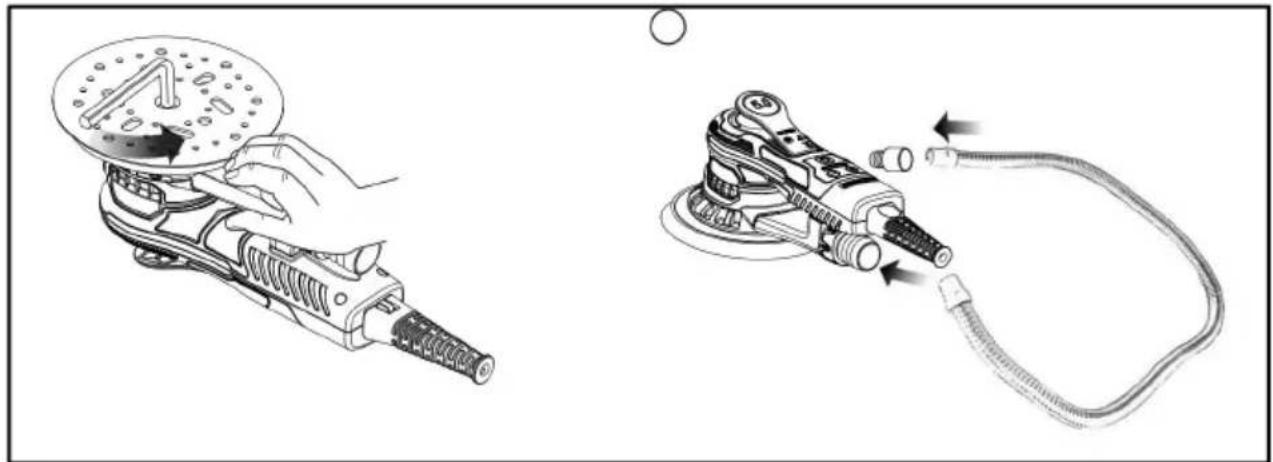
- Flip the sander over and place it on a flat, level surface.
- Use the S6 wrench to unscrew the screw in the center of the disc counterclockwise.
- Remove the old pad and change to the new one.
- Tighten the screw clockwise.
VACUUM PIPE INSTALLATION
- Choose one end of the vacuum pipe and connect it to the dust outlet on the machine.
- Choose the other end of the vacuum pipe, connect it with a 35mm adapter first, then connect it to the vacuum cleaner.
OPERATING INSTRUCTIONS
The tool is intended to be operated as a hand-held tool. The tool can be used in any position. Note! The sander can develop a torque reaction when started. Make sure the sander is switched off. Select a suitable abrasive and secure it to the backing pad. Make sure the abrasive is centered on the backing pad. Switch on the sander by pressing the On/Off key. The LED is now green.
- The sander can now be started by pressing the lever.
- The speed can be adjusted between 4,000rpm and max rpm by adjusting the position of the lever.
- The max rpm can be adjusted by pressing rpm+ or rpm-. Each press increases or reduces the speed by 1,200rpm until it reaches the limit. The rpm can be adjusted in the range of 4,000 to 10,000 rpm.
- The tool has two speed control modes. In the default mode, the speed can be adjusted linearly by changing the position of the lever. In the other mode, the speed remains fixed at the set max rpm when the tool is running. When the rpm+ and rpm- buttons are pressed simultaneously, the tool toggles between the two controlling modes.
- When sanding, always place the tool on the work surface before starting the tool. Always remove the tool from the work surface before stopping it. This will prevent gouging of the work surface due to excess speed or abrasive.
- When sanding is finished, turn off the sander by pressing the On/Off button. The sander LED is now turned off.
TROUBLESHOOTING GUIDE
| Symptom | Possible cause | Solution |
| The sander LED shows normal, rpm-and rpm+ keys are normal,but the switch does not work | Damaged Hall components. | Send machine back to after sales service, changing hall components. |
| After plugging in,no matter what button is pressed, the LED light will not light up. | Switch damaged. | Change switch components. |
| The LED light does not light u and the machine stops working. | Input voltage is lower than 170VAC ±10VAC, the machine enters low voltage protection. | Change to the right input voltage, above 180V and below 285V. |
| The LED1,LED3,LED5 light up, Other lights off. | Input voltage is higher than 275VAC±10VAC, the machine enters high voltage protection. | Change to the right input voltage, above 180V and below 285V. |
| The LED1,LED6 light up, other lights off. | The three wires of the motor are loose or broken. | Send machine back to after sales service for repair. |
CLEANING & STORAGE
- Please unplug the power cord and make sure the product is stopped before cleaning.
- Wipe with a dry towel, do not soak in liquid.
- Always keep tool and cord clean (especially ventilation slots).
- Do not attempt to clean ventilation slots by inserting pointed objects through openings.
TIPS: Compressed air can be used to clean the powder on the surface of the product.
- Always unplug the machine before storage.
- Always ensure the machine is cleaned, cooled, and dried before storing.
- Cleaning and user maintenance shall not be carried out by children without supervision.
Manufacturer: Shanghai Muxin Muye Youxiangongsi
Address: Shuangchenglu 803nong11hao1602A-1609shi, Baoshanqu, Shanghai 200000 CN.
Imported to AUS: SIHAO PTY LTD, 1 ROKEVA STREETEASTWOOD NSW 2122 Australia
Imported to USA: Sanven Technology Ltd., Suite 250, 9166 Anaheim Place, Rancho Cucamonga, CA 91730
| EC | REP |
E-CrossStu GmbH
Mainzer Landstr.69, 60329 Frankfurt am Main
| UK | REP |
YH CONSULTING LIMITED.
C/O YH Consulting Limited Office 147, Centurion House, London Road, Staines-upon-Thames, Surrey, TW18 4
VEVOR®
TOUGH TOOLS, HALF PRICE
Technical Support and E-Warranty Certificate
www.vevor.com/support
VEVOR®
TOUGH TOOLS, HALF PRICE
NEED HELP? CONTACT US!
A. Lever
PRODUCT PARAMETERS
INSTRUCTIONS FOR USE
C/O YH Consulting Limited Bureau 147, Centurion House, London Road, Staines-upon-Thames, Surrey, TW18 4AX
VEVOR®
TOUGH TOOLS, HALF PRICE
A. Lever
B. On/Off button
C. Speed control
D. LED
OPERATING INSTRUCTIONS
YH CONSULTING LIMITED. C/O YH Consulting Limited Office 147, Centurion House, London Road, Staines-upon-Thames, Surrey, TW18 4AX
VEVOR®
TOUGH TOOLS, HALF PRICE
www.vevor.com/support
VEVOR®
TOUGH TOOLS, HALF PRICE
A. Lever
B. On/Off switch C. RPM-G.
D. LED
INSTRUCTIONS FOR USE
Imported in AUS: SIHAO PTY LTD, 1 ROKEVA STREETEASTWOOD
New South Wales 2122 Australia
electronics www.vevor.com/support
VEVOR®
TOUGH TOOLS, HALF PRICE
A. Lever
INSTRUCTIONS FOR USE
NEED HELP? CONTACT US!
- WORKPLACE SAFETY
OPERATING INSTRUCTIONS
Imported into AUS: SIHAO PTY LTD, 1 ROKEVA STREET, EASTWOOD NSW 2122 Australia
C/O YH Consulting Limited Office 147, Centurion House, London Road, Staines-upon-Thames, Surrey, TW18 4AX
VEVOR®
TOUGH TOOLS, HALF PRICE
NEED HELP? CONTACT US!
A. Lever
B. On/off button C. RPM-G.
D. LED indicator
E. RPM- F. Power cord
USER MANUAL
TROUBLESHOOTING GUIDE
C/O YH Consulting Limited Office 147, Centurion House, London Road, Staines-upon-Thames, Surrey, TW18 4AX
VEVOR®
TOUGH TOOLS, HALF PRICE
Warranty certificate www.vevor.com/support
VEVOR®
TOUGH TOOLS, HALF PRICE
NEED HELP? CONTACT US!
A. Lever
B. On/off button
C. RPM - G. Connection
D. LED
E. RPM - F. Power cord
adapter H. Support plate
PRODUCT PARAMETERS
| MODELL | Område | Spänning | Typ av strömkontakt | |
| R7313 | Norr Amerika | AC120 V 60Hz 350W | amerikansk PLUGG | |
| Europa | AC220-240V 50 Hz | 350W | Europeiska PLUGG | |
| Australien | AC220-240V 50 Hz | 350W Australia PLUG | ||
| No-load hastighet | 4000 - 10000 RPM | |||
| Dia.ÿ Max | 5 tum (127 mm) / 6 tum (150 mm) | |||
| Excentrisk | 5 mm | |||
| Anslut adaptern | ÿ28 mm | |||
OPERATING INSTRUCTIONS
YH CONSULTING LIMITED. C/O YH Consulting Limited Office 147, Centurion House, London Road, Staines-upon-Thames, Surrey, TW18 4AX
VEVOR®
TOUGH TOOLS, HALF PRICE
www.vevor.com/support
- ORBITAL SANDER
- NEED HELP? CONTACT US
- IMPORTANT SAFEGUARDS
- PLEASE READ ALL THE INSTRUCTIONS BEFORE USING YOUR MACHINE
- WORK AREA SAFETY
- ELECTRICAL SAFETY
- PERSONAL SAFETY
- POWER TOOL USE AND CARE
- SERVICE
- SAFETY INSTRUCTIONS FOR SANDER
- SAFETY INSTRUCTIONS FOR ALL OPERATIONS
- KICKBACK AND RELATED WARNINGS
- GENERAL
- ACCESSORIES
- OUTDOOR USE
- PRODUCT OVERVIEW
- BEFORE USING
- AFTER USE
- PROPER USE OF TOOL
- WORK STATIONS
- ATTACHING AND CHANGING THE SANDING PAPER
- REPLACING THE BACKING PAD
- VACUUM PIPE INSTALLATION
- OPERATING INSTRUCTIONS
- CLEANING & STORAGE
- VEVOR®
- TOUGH TOOLS, HALF PRICE
- INSTRUCTIONS FOR USE
- USER MANUAL
Brand : Vevor
Model : R7313
Category : Sander