
YY-R108 - Wireless communication device Vevor - Free user manual and instructions
Find the device manual for free YY-R108 Vevor in PDF.



| Product Type | Restaurant Pager |
| Brand | Vevor |
| Model | YY-R108 |
| Operating Frequency | 433 MHz |
| Modulation | OOK |
| Power Adapter - Input | AC 100-240 V, 50/60 Hz |
| Power Adapter - Output | DC 9 V, 1 A |
| Number of Pagers Included | 20 + 1 (bonus) |
| Call Range (open area) | Approximately 500 meters |
| Interference Protection | Unique host number to avoid interference between establishments |
| Pairing Method | Configuration via keypad (host number) and registration of pagers |
| Adjustable Reminder Duration | 0 to 999 seconds (default 20 s) |
| Adjustable Beep Mode | Enabled or disabled (default enabled) |
| Adjustable Vibration Mode | Enabled or disabled (default enabled) |
| Adjustable Lighting | Enabled or disabled (default enabled) |
| Power On/Off | Keypad: plug/unplug; Pager: on charging base with power, or enter "0" and press button |
| Cleaning | Wipe with a soft dry cloth; do not use abrasive material |
| Recommended Cleaning Frequency | At least once a month |
| Safety Precautions | Do not immerse, do not disassemble, keep out of reach of children, use only the supplied adapter |
| Certifications | CE, UKCA, FCC Part 15 (Class B) |
| Disposal | Compliant with WEEE directive (2012/19/EC); do not dispose with household waste |
| Manufacturer Address (CN) | Shuangchenglu 803nong11hao1602A-1609shi, Baoshanqu, Shanghai 200000 |
| Australian Importer | SIHAO PTY LTD, 1 ROKEVA STREET, ASTV NSW 2122 |
| US Importer | Sanven Technology Ltd., Suite 250, 9166 Anaheim Place, Rancho Cucamonga, CA 91730 |
Frequently Asked Questions - YY-R108 Vevor
User questions about YY-R108 Vevor
0 question about this device. Answer the ones you know or ask your own.
Ask a new question about this device
Download the instructions for your Wireless communication device in PDF format for free! Find your manual YY-R108 - Vevor and take your electronic device back in hand. On this page are published all the documents necessary for the use of your device. YY-R108 by Vevor.
USER MANUAL YY-R108 Vevor
Technical Support and E-Warranty Certificate www.vevor.com/support
RESTAURANT PAGER
MODEL: YY-R108
We continue to be committed to provide you tools with competitive price. "Save Half", "Half Price" or any other similar expressions used by us only represent estimate of savings you might benefit from buying certain tools with us compared to top brands and does not necessarily mean to cover all categories of tools offered. You are kindly reminded to verify carefully when you are placing an order with us that you are actually saving half in comparison with the top major brands.
MODEL: YY-R108

NEED HELP? CONTACT US!
Have product questions? Need technical support? Please feel free to contact us:
Technical Support and E-Warranty Certificate www.vevor.com/support
This is the original instruction. Please read all manual instructions carefully before operating. VEVOR reserves a clear interpretation of the user manual. The appearance of the product shall be subject to the product you received. Please forgive us that we won't inform you of any technology or software updates on our product.
 | Warning-To reduce the risk of injury, user must read instructi manual carefully. |
 | CORRECT DISPOSALThis product is subject to the provision of European Directive 2012/19/EC. The symbol showing a wheelie bin crossed through indicates that the product requires separate refuse collection in European Union. This applies to the product and all accessor marked with this symbol. Products marked as such may not discarded with normal domestic waste, but must be taken to collection point for recycling electrical and electronic devices |
 | To minimize hazards to health and the environment at the er product's life , laws dealing with Waste Electrical and Electro Equipment ( WEEE ) and The Waste Battery Directive require y dispose of this product at a suitable collection facility where i sent in order to remove the batteries and for appropriate recycling.Please contact your local authorities for more details recycling and safe disposal of these in your area. |
 | Compliance is a EC & UK security certification. |
 | Move away from any potential source of ignition immed the battery leaks or emits an unusual odor. When you unusual smell, heat, discoloration, deformation, or any of unusual situations in the process of using, charging, or batteries, you should immediately remove them from the or charger and stop using them. |
IMPORTANT SAFEGUARDS
Thank you for using this product. In order to make sure that you can operate the machine correctly, read this instruction carefully before operation and keep it properly for future reference. Please be sure to follow the precautions and safety rules on this page to ensure your safe use. This manual will outline safety warnings and precautions, operating, maintenance and cleaning. The warnings and instructions reviewed in the manual cannot cover all possible conditions and situations that may occur. Caution and common sense are not built into this product, since we assume that the users will comply with these codes. If you have any problem, please call us. Do not try to fix the problems yourself, or it will cause injury or property damage.
Please read ALL the instructions before using your machine.
- If the battery is low, please charge it in time.
- Do not let children, minors, and pets get close to or touch the machine.
- Do not immerse the appliance in water or any other liquid.
- Do not disassemble the product.
- Using any accessories or attachments that are not provided or recommended by the manufacturer may cause injury.
- If the machine is not to be used for a long period of time, remove the batteries. Do not use other adapters than the included AC adapter.
- Do not leave the product hanging over the edge of a table or counter. Do not let it come into contact with any hot surfaces.
- Do not place the product on or near hot air, electric burners, or other heat sources.
- Do not apply this unit to any other purposes than the indicated use.
- KEEP IT OUT OF CHILDREN'S REACH.
- DO NOT CLEAN IT WITH ANY ABRASIVE MATERIAL.
- Please clean it regularly, at least once a month.
- This appliance is not intended for use by persons (including children) with reduced physical, sensory or mental capabilities, or lack of experience.
or knowledge, unless they have been given supervision or instruction concerning the use of the appliance by a person responsible for their safety.
FCC INFORMATION
CAUTION: Changes or modifications not expressly approved by the party responsible for compliance could void the user's authority to operate the equipment!
This device complies with Part 15 of the FCC Rules. Operation is subject to the following two conditions:
1) This product may cause harmful interference. 2) This product must accept any interference received, including interference that may cause undesired operation.
WARNING: Changes or modifications to this product not expressly approved by the party responsible for compliance could void the user's authority to operate the product.
Note: This product has been tested and found to comply with the limits for a Class B digital device, pursuant to Part 15 of the FCC Rules. These limits are designed to provide reasonable protection against harmful interference in a residential installation.
This product generates, uses and can radiate radio frequency energy, and if not installed and used in accordance with the instructions, may cause harmful interference to radio communications. However, there is no guarantee that interference will not occur in a particular installation. If this product does cause harmful interference to radio or television reception, which can be determined by turning the product off and on, the user is encouraged to try to correct the interference by one or more of the following measures:
- Reorient or relocate the receiving antenna.
- Increase the distance between the product and receiver.
- Connect the product to an outlet on a circuit different from that to which the receiver is connected.
- Consult the dealer or an experienced radio/TV technician for assistance.
PRODUCT PARAMETERS
| Model | YY-R108 |
| Working frequency | 433MHZ(ASK) |
| Modulation | OOK AM |
| Power adapter In put | AC100-240V 50/60Hz |
| Power adapter Out Pu | DC9V 1A |
| Pagers | 20PCS+1PCS (Free gift) |
BEFORE USING
- Before using the appliance for the first time, peel off any promotional packaging materials and check that the product is clean and dust-free.
- Please dispose of all plastic bags carefully and keep them away from children and pets.
- Check all components provided according to the list in this manual to make sure you have all of the parts listed.
ABOUT SIGNAL INTERFERENCE
Each transmitter is given a unique host number when produced, so even if nearby shops use the same product, it won't cause signal interference. However, if transmitters from close stores share the same host number, signal interference may occur. In this case, changing the host number of either transmitter can help, but all its receivers should be re-registered to the transmitter.
KEY DESCRIPTION
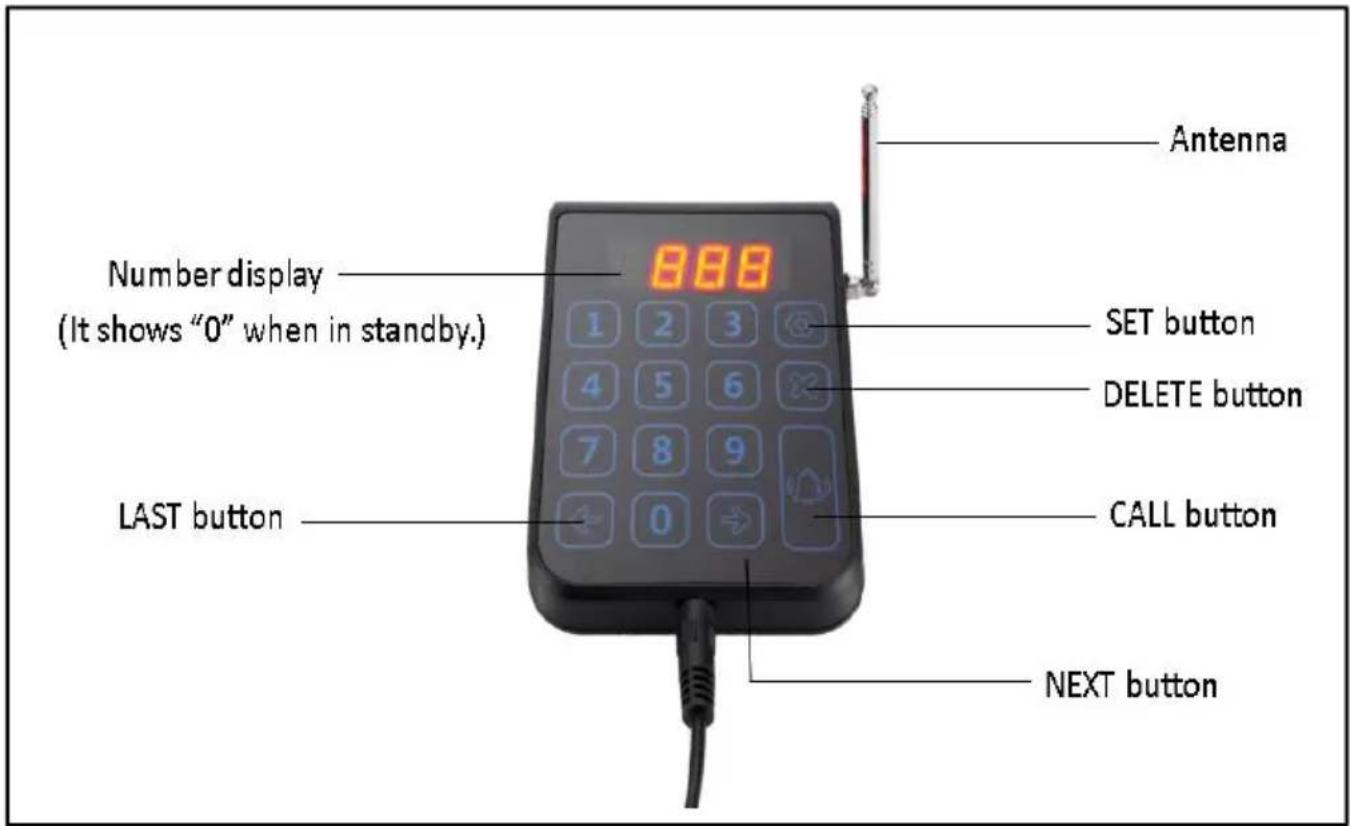
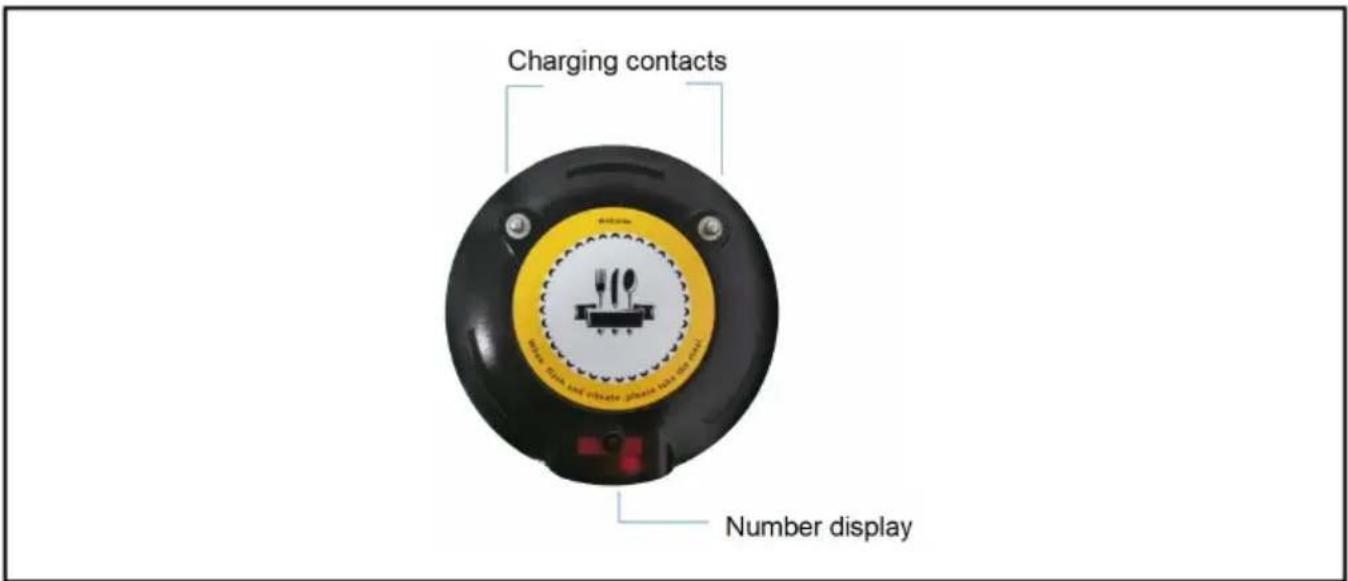
SETTING INSTRUCTIONS
1. Setting keypad ID (already set up before delivery)
- Plug in the keypad and long press the [ ] button until "F" is displayed.
- Briefly press the [ ] button, and a set of numbers (keyboard ID) will appear.
- Enter a new set of numbers (1-999) and briefly press the [ ] button to save the new ID.
- After setting, briefly press the [X] button twice to return until the screen displays "0".
Note: Power off the keypad and plug it in again to check if the keypad ID was set successfully.
2. Pairing the pager number (already set up before delivery)
Note: Before pairing, please charge the pager for more than half an hour to ensure it has enough power.
- Place all the pagers on the base and charge them.
- Long press the [ ] button until "F1" is displayed.
- Briefly press the [ →] button once until "F2" is displayed.
- Briefly press the [ ] button again to enter pairing mode.
- Enter the desired number and quickly press the [ ] button within seconds after removing the pager from the charging base. The desired number will be displayed on the pager's screen after pairing successfully.
- After setting, briefly press the [X] button twice to exit.
3. Setting the reminder duration for the pager: (The default duration is 20s.)
- Put all the pagers on the base and charge them.
- Long press the [ ] button until "F1" is displayed.
- Briefly press the [→] button twice until "F3" is displayed.
- Briefly press the [ ] button again to enter the reminder duration setting.
- Enter the required reminder duration (0-999s). Remove a disc extension and quickly press the [ ] key within 3 seconds of removing the disc extension. The disc extension will flash and emit a beep sound to indicate that the setting is complete.
- After setting, briefly press the [X] button twice to exit.
4. Setting pager beep mode: (The default is "on".)
- Put all the pagers on the base and charge them.
- Long press the [ ] button until "F1" is displayed.
- Briefly press the [→] button three times until "F4" is displayed.
- Briefly press the [ ] button again to enter the beep mode setting.
- Enter 0 or 1 (0 means turn off the beep, 1 means turn on the
Take down a disc splitter and quickly press the 【】 key within 3 seconds of taking it down. The disc splitter light flashes and emits a beeping sound to indicate that the setup is complete;
- After setting, briefly press the [X] button twice to exit.
5. Setting pager vibrate mode: (The default is "on".)
- Putting all the pagers on the base and charge them.
- Long press the [ ] button until the "F1" is displayed.
- Briefly press the [ →] button four times until the "F5" is displayed
- Briefly press the [ ] button again to enter the vibrate mode setting
- Enter 0 or 1 (0 means turn off the vibrate, 1 means turn on the
vibrate), Take down a disc splitter and quickly press the 【】 key within
3 seconds of taking it down. The disc splitter light flashes and emits beeping sound to indicate that the setup is complete;
- After setting, briefly press the [X] button twice to exit.
6. Setting pager lighting: (The default is "on".)
- Putting all the pagers on the base and charge them.
- Long press the [ ] button until the "F1" is displayed.
- Briefly press the [ →] button five times until the "F6" is displayed
- Briefly press the [ ] button again to enter the lighting setting.
- Enter 0 or 1 (0 means turn off the lighting, 1 means turn on the lighting). Take down a disc splitter and quickly press the [ ] key within 3 seconds of taking it down. The disc splitter light flashes and emits a beeping sound to indicate that the setup is complete.
- After setting, briefly press the [X] button twice to exit.
TURN ON/TURN OFF
Keypad: It will turn off after removing the power, and it will turn on after plugging in the power.
Pager:
Turn on: It will be turned on when it's on the charging base with power.
Turn off:
- Putting the pager on the charging base with power.
- Enter "0" on the keypad and briefly press the [ ] button until the display disappears.
Note: Please turn off the pager when it is not being used to avoid draining the battery's life.
CALLING METHOD
- Enter the desired calling number on the keypad.
- Briefly press the [ ] button to complete the calling.
SIMPLE TROUBLESHOOTING
*No response from the pager when the keypad is calling:
- Check if the calling number is correct.
- The keypad ID has been changed, it needs to be re-paired with the pagers.
- The reminding duration was set to "0" and it needs to be changed to 1-999s.
- The pager is too far away from the base and the signal cannot be reached.
*After keyboard call, there is no buzzing, vibration, or lighting in the extension:
At this point, you need to reset the buzzing sound, vibration, and lighting to "1" and turn them on again.
*The pager screen goes black after showing it when the keypad is c
- The battery level is too low and it needs to be charged for more than an hour.
- The battery is damaged and it needs to be replaced.
TROUBLESHOOTING
Attention: Please do not disassemble or repair the device unless you are a qualified technician.
| Scenarios | Problems | Solutions |
| Having pressed the keypad area, the transmitter has no response OR the number display shows nothing | The AC adapter is not plugged. | Please plug the AC adapter into the socket. |
| The power connector is not connected to the transmitter. | Please connect the power connector to the transmitter. | |
| The power cord of the AC adapter is broken. | Please inquire customer service staff for assistance. | |
| The keypad area stained. | Please wipe off the stain a soft dry cloth. | |
| The receiver can’t respond to the call. | The receiver has low battery level. | Please insert it into the transmitter for charging. (40 minutes of charging can enable it to be ready for |
| The receiver is out of its working distance.Walls or metal (lik cars) can block the signal sent from t transmitter to the receiver. | The receiver has a receipt range of approximately 500 meters in an open area.The thickness and material of walls may weaken the signal. Also, in an enclose spaces made of metal, the radio waves may have difficulty reaching the receiver. Both of the circumstances may impair the working distance of the receiver. Please reduce your distance from the transmitter (It may be possible to red signals by opening the car window.) | |
| The host number the transmitter is changed. | If the receivers have been paired with the transmitter, changing the host number the transmitter will disconnect them from each other. Please re-register all receivers to the transmitter, or restore the host numbe | |
| The receivers can't be charged | The charging contacts are dirty. | Please wipe off the dirt w soft dry cloth. |
| There are foreign objects in the charging slot. | Please clean out the charging slot. | |
| The receivers can vibrate and flash, b fail to beep. | The calling mode set at “No Sound Mode”. | Please alter the calling mode. |
CLEANING AND STORAGE
- If the machine is not to be used for a long period of time, clean and cover it, and store it in a dry and safe place.
- Wipe with a soft, dry cloth. Be sure to keep the product dry.
- Please put the pager and host together.
Manufacturer: Shanghaimuxinmuyeyouxiangongsi
Address: Shuangchenglu 803nong11hao1602A-1609shi, baoshanqu, shanghai 200000 CN.
Imported to AUS: SIHAO PTY LTD, 1 ROKEVA STREETEASTWOOD NSW 2122 Australia
Imported to USA: Sanven Technology Ltd., Suite 250, 9166 Anaheim Place, Rancho Cucamonga, CA 91730
| EC | REP |
E-CrossStu GmbH
Mainzer Landstr.69, 60329 Frankfurt am Main
| UK | REP |
YH CONSULTING LIMITED.
C/O YH Consulting Limited Office 147, Centurion House, London Road, Staines-upon-Thames, Surrey, TW18 4
VEVOR®
TOUGH TOOLS, HALF PRICE
Technical Support and E-Warranty Certificate
www.vevor.com/support
VEVOR®
TOUGH TOOLS, HALF PRICE
We continue to be committed to providing you with tools at competitive prices. "Save Half", "Half Price", or any other similar expressions used by us only represent an estimate of savings you might benefit from buying certain tools with us compared to top brands, and does not necessarily mean to cover all categories of tools offered. We kindly remind you to verify carefully when placing an order with us whether you are actually saving half in comparison with the top major brands.
MODEL: YY-R108

NEED HELP? CONTACT US!
Have product questions? Need technical support? Please feel free to contact us:
Technical Support and E-Warranty Certificate www.vevor.com/support
This is the original instruction. Please read all manual instructions carefully before operating. VEVOR reserves the right to interpret the user manual. The appearance of the product shall be subject to the product you received. Please forgive us that we won't inform you of any technology or software updates on our product.
SETTING INSTRUCTIONS
CLEANING AND STORAGE
C/O YH Consulting Limited Office 147, Centurion House, London Road, Staines-upon-Thames, Surrey, TW18 2
VEVOR®
TOUGH TOOLS, HALF PRICE
www.vevor.com/support
VEVOR®
TOUGH TOOLS, HALF PRICE
We continue to be committed to provide you tools with competitive price. "Save Half", "Half Price" or any other similar expressions used by us only represent estimate of savings you might benefit from buying certain tools with us compared to top brands and does not necessarily mean to cover all categories of tools offered. We kindly remind you to verify carefully when you are placing an order with us that you are actually saving half in comparison with the top major brands.
MODEL: YY-R108

NEED HELP? CONTACT US!
Have product questions? Need technical support? Please feel free to contact us:
Technical Support and E-Warranty Certificate www.vevor.com/support
This is the original instruction. Please read all manual instructions carefully before operating. VEVOR reserves a clear interpretation of the user manual. The appearance of the product shall be subject to the product you received. Please forgive us that we won't inform you if there are any technology or software updates on our product.
SETTING INSTRUCTIONS
CLEANING AND STORAGE
C/O YH Consulting Limited Office 147, Centurion H
London Road, Staines-upon-Thames, Surrey, TW18 4
VEVOR®
TOUGH TOOLS, HALF PRICE
We continue to be committed to providing you with tools at competitive prices. "Save Half", "Half Price", or any other similar expressions used by us only represent an estimate of savings you might benefit from buying certain tools with us compared to top brands and does not necessarily mean to cover all categories of tools offered. We kindly remind you to verify carefully when placing an order with us that you are actually saving half in comparison with the top major brands.
MODEL: YY-R108

NEED HELP? CONTACT US!
Have product questions? Need technical support? Please feel free to contact us:
Technical Support and E-Warranty Certificate www.vevor.com/support
This is the original instruction. Please read all manual instructions carefully before operating. VEVOR reserves a clear interpretation of the user manual. The appearance of the product shall be subject to the product you received. Please forgive us that we won't inform you if there are any technology or software updates on our product.
SETTING INSTRUCTIONS
CLEANING AND STORAGE
C/O YH Consulting Limited Office 147, Centurion H London Road, Staines-upon-Thames, Surrey, TW18 4
VEVOR®
TOUGH TOOLS, HALF PRICE
www.vevor.com/support
VEVOR®
TOUGH TOOLS, HALF PRICE
We continue to be committed to provide you tools with competitive price. "Save Half", "Half Price" or any other similar expressions used by us only represent of savings you might benefit from buying certain tools with us compared top brands and does not necessarily mean to cover all categories of tools offered are kindly reminded to verify carefully when you are placing an order with us actually saving half in comparison with the top major brands.
MODEL: YY-R108

NEED HELP? CONTACT US!
Have product questions? Need technical support? Please feel free to contact us:
Technical Support and E-Warranty Certificate www.vevor.com/support
This is the original instruction, please read all manual instruction carefully before operating. VEVOR reserves a clear interpretation user manual. The appearance of the product shall be subject to product you received. Please forgive us that we won't inform you there are any technology or software updates on our product.
SETTING INSTRUCTIONS
CLEANING AND STORAGE
STREET EASTWOOD NSW 2122 Australia
Imported to USA: Sanven Technology Ltd., Suite 250, 9166 Anaheim Place, Rancho Cucamonga, CA 91730
| EC | REP |
E-CrossStu GmbH
Mainzer Landstr.69, 60329 Frankfurt am Main
| UK | REP |
YH CONSULTING LIMITED.
C/O YH Consulting Limited Office 147, Centurion H
London Road, Staines-upon-Thames, Surrey, TW18 4
VEVOR®
TOUGH TOOLS, HALF PRICE
www.vevor.com/support
VEVOR®
TOUGH TOOLS, HALF PRICE
Technical Support and E-Warranty Certificate www.vevor.com/support
RESTAURANT PAGER
MODEL: YY-R108
We continue to be committed to provide you tools with competitive price. "Save Half", "Half Price" or any other similar expressions used by us only represent of savings you might benefit from buying certain tools with us compared top brands and does not necessarily mean to cover all categories of tools offered are kindly reminded to verify carefully when you are placing an order with us actually saving half in comparison with the top major brands.
MODEL: YY-R108

NEED HELP? CONTACT US!
Have product questions? Need technical support? Please feel free to contact us:
Technical Support and E-Warranty Certificate www.vevor.com/support
This is the original instruction, please read all manual instruction carefully before operating. VEVOR reserves a clear interpretation user manual. The appearance of the product shall be subject to product you received. Please forgive us that we won't inform you there are any technology or software updates on our product.
SETTING INSTRUCTIONS
CLEANING AND STORAGE
Anaheim Place, Rancho Cucamonga, CA 91730
| EC | REP |
E-CrossStu GmbH
Mainzer Landstr.69, 60329 Frankfurt am Main
| UK | REP |
YH CONSULTING LIMITED.
C/O YH Consulting Limited Office 147, Centurion House
London Road, Staines-upon-Thames, Surrey, TW18 4
VEVOR®
TOUGH TOOLS, HALF PRICE
www.vevor.com/support
VEVOR®
TOUGH TOOLS, HALF PRICE
We continue to be committed to provide you tools with competitive price. "Save Half", "Half Price" or any other similar expressions used by us only represent savings you might benefit from buying certain tools with us compared to top brands and does not necessarily mean to cover all categories of tools offered. We kindly remind you to verify carefully when you are placing an order with us that you are actually saving half in comparison with the top major brands.
MODEL: YY-R108

NEED HELP? CONTACT US!
Have product questions? Need technical support? Please feel free to contact us:
Technical Support and E-Warranty Certificate www.vevor.com/support
This is the original instruction. Please read all manual instructions carefully before operating. VEVOR reserves the right to interpret the user manual. The appearance of the product shall be subject to the product you received. Please forgive us that we won't inform you of any technology or software updates on our product.
SETTING INSTRUCTIONS
CLEANING AND STORAGE
Imported to AUS: SIHAO PTY LTD, 1 ROKEVA STREET, EASTWOOD NSW 2122 Australia
Imported to USA: Sanven Technology Ltd., Suite 250, 9166 Anal Place, Rancho Cucamonga, CA 91730
| EC | REP |
E-CrossStu GmbH
Mainzer Landstr.69, 60329 Frankfurt am Main
| UK | REP |
YH CONSULTING LIMITED.
C/O YH Consulting Limited Office 147, Centurion House
London Road, Staines-upon-Thames, Surrey, TW18 4
VEVOR®
TOUGH TOOLS, HALF PRICE
www.vevor.com/support
VEVOR®
TOUGH TOOLS, HALF PRICE
We continue to be committed to provide you tools with competitive price. "Save Half", "Half Price" or any other similar expressions used by us only represent estimate of savings you might benefit from buying certain tools with us compared top brands and does not necessarily mean to cover all categories of tools offered are kindly reminded to verify carefully when you are placing an order with us actually saving half in comparison with the top major brands.
MODELLO: YY-R108

NEED HELP? CONTACT US!
Have product questions? Need technical support? Please feel from contact us:
Technical Support and E-Warranty Certificate www.vevor.com/support
This is the original instruction, please read all manual instruction carefully before operating. VEVOR reserves a clear interpretation user manual. The appearance of the product shall be subject to product you received. Please forgive us that we won't inform you there are any technology or software updates on our product.
SETTING INSTRUCTIONS
CLEANING AND STORAGE
Importato in AUS: SIHAO PTY LTD, 1 ROKEVA STREETEASTWOOD NSW 2122 Australia
Importato negli USA: Sanven Technology Ltd., Suite 250, 9166 Anah Place, Rancho Cucamonga, CA 91730
| EC | REP |
E-CrossStu GmbH
Mainzer Landstr.69, 60329 Frankfurt am Ma
| UK | REP |
YH CONSULTING LIMITED.
C/O YH Consulting Limited Office 147, Centurion House
London Road, Staines-upon-Thames, Surrey, TW18 4
VEVOR®
TOUGH TOOLS, HALF PRICE
www.vevor.com/support
- RESTAURANT PAGER
- MODEL: YY-R
- NEED HELP? CONTACT US
- IMPORTANT SAFEGUARDS
- PLEASE READ ALL THE INSTRUCTIONS BEFORE USING YOUR MACHINE
- FCC INFORMATION
- BEFORE USING
- ABOUT SIGNAL INTERFERENCE
- KEY DESCRIPTION
- SETTING INSTRUCTIONS
- SETTING KEYPAD ID (ALREADY SET UP BEFORE DELIVERY)
- PAIRING THE PAGER NUMBER (ALREADY SET UP BEFORE DELIVERY)
- SETTING THE REMINDER DURATION FOR THE PAGER: (THE DEFAULT DURATION IS 20S.)
- SETTING PAGER BEEP MODE: (THE DEFAULT IS "ON".)
- SETTING PAGER VIBRATE MODE: (THE DEFAULT IS "ON".)
- SETTING PAGER LIGHTING: (THE DEFAULT IS "ON".)
- TURN ON/TURN OFF
- PAGER
- TURN OFF
- CALLING METHOD
- SIMPLE TROUBLESHOOTING
- TROUBLESHOOTING
- CLEANING AND STORAGE
- VEVOR®
- TOUGH TOOLS, HALF PRICE
- TECHNICAL SUPPORT AND E-WARRANTY CERTIFICATE WWW.VEVOR.COM/SUPPORT
- MODELLO: YY-R
Brand : Vevor
Model : YY-R108
Category : Wireless communication device