
SC-5XD - Hot dog maker Vevor - Free user manual and instructions
Find the device manual for free SC-5XD Vevor in PDF.



| Product Type | Hot Dog Machine |
| Brand | Vevor |
| Model | SC-5XD |
| Power Supply (North America) | 110 V AC, 60 Hz |
| Power Supply (Europe) | 220-240 V AC, 50 Hz |
| Power (North America) | 750 W |
| Power (Europe) | 1000 W |
| Fuse | 10 A |
| Plug Type | US Plug / EU Plug |
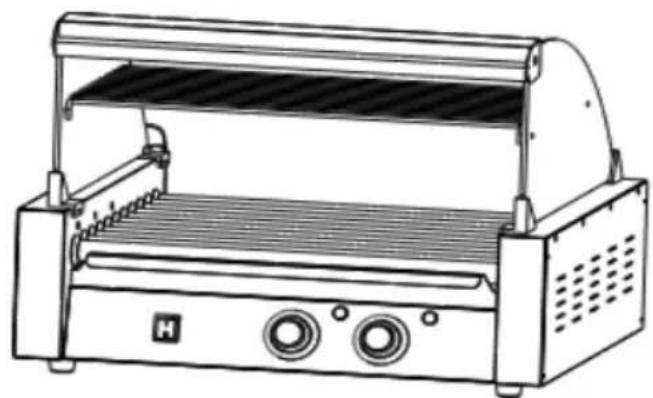
| Number of Rollers | 5 motorized heated rollers |
| Cooking Temperature | 120-160 °C (248-320 °F) |
| Main Functions | Heating and rotating rollers, oil drip tray |
| Housing Material | Stainless Steel |
| Usage | Indoor Only |
| Maintenance | Clean rollers every 4-5 hours, apply food-grade oil to rollers |
| Safety | Hot surface, do not immerse, supervision required, unplug before cleaning |
| Spare Parts | Curved glass, side glasses, brackets, shelves, screws, nuts, seals |
| Certifications | ETL (North America), CE, UKCA |
| Warranty | Electronic warranty certificate (www.vevor.com/support) |
| Manufacturer | Shanghaimuxinmuyeyouxiangongsi, Shanghai, China |
Frequently Asked Questions - SC-5XD Vevor
User questions about SC-5XD Vevor
0 question about this device. Answer the ones you know or ask your own.
Ask a new question about this device
Download the instructions for your Hot dog maker in PDF format for free! Find your manual SC-5XD - Vevor and take your electronic device back in hand. On this page are published all the documents necessary for the use of your device. SC-5XD by Vevor.
USER MANUAL SC-5XD Vevor
Technical Support and E-Warranty Certificate www.vevor.com/support
ROLLING HOT-DOG GRILL
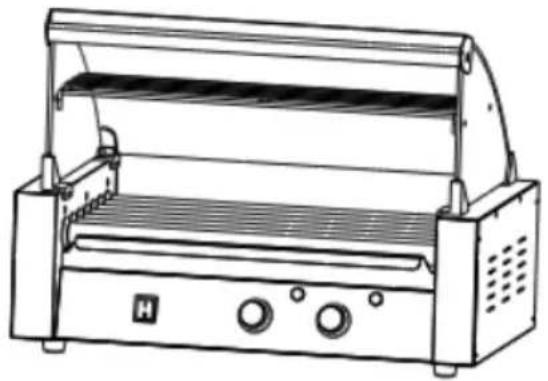
MODEL: SC-5XD / SC-7XD / SC-11XD
We continue to be committed to providing you with tools at competitive prices. "Save Half", "Half Price", or any other similar expressions used by us only represent an estimate of savings you might benefit from buying certain tools with us compared to the major top brands and does not necessarily mean to cover all categories of tools offered by us. You are kindly reminded to verify carefully when you are placing an order with us if you are actually saving half in comparison with the top major brands.
VEVOR®
TOUGH TOOLS, HALF PRICE
ROLLING HOT-DOG GRILL
MODEL: SC-5XD MODEL: SC-7XD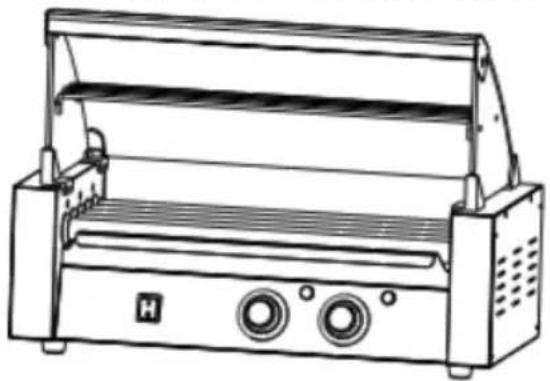
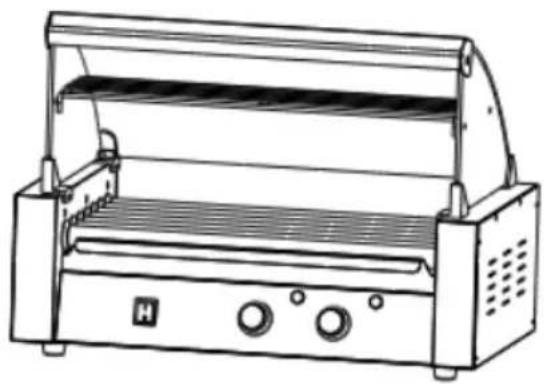
MODEL: SC-11XD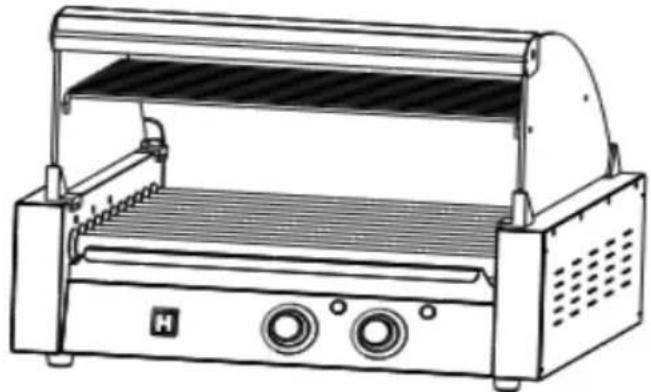
NEED HELP? CONTACT US!
Have product questions? Need technical support? Please feel free to contact us:
Technical Support and E-Warranty Certificate www.vevor.com/support
This is the original instruction. Please read all manual instructions carefully before operating. VEVOR reserves a clear interpretation of the user manual. The appearance of the product shall be subject to the
product you received. Please forgive us that we won't inform you again if there are any technology or software updates on our product.
 | Warning-To reduce the risk of injury, user must read instructi manual carefully. |
 | Indoor use only. |
 | Pay attention to high temperatures to prevent burns. |
 | CORRECT DISPOSALThis product is subject to the provision of European Directive 2012/19/EC. The symbol showing a wheelie bin crossed throu indicates that the product requires separate refuse collection i European Union. This applies to the product and all accesso marked with this symbol. Products marked as such may not discarded with normal domestic waste, but must be taken to collection point for recycling electrical and electronic devices |
 | Compliance is a North America security certification. |
 | Compliance is a EC & UK security certification. |
A white protective film is attached to the surface of the fuselage to protect the fuselage from scratches. Please tear it off before use.
SAFETY WARNINGS AND PRECAUTIONS
Thank you for using this product. To ensure that you can operate the machine correctly, read this instruction carefully before operation and keep it properly for future reference. Please read the precautions and safety rules on page to ensure your safe use. This manual will outline safety warnings and precautions, operating, maintenance and cleaning. The warnings and instructions reviewed in this manual cannot cover all possible conditions and situations that may occur. Caution and common sense are not built into this product, since we believe that the users will comply with these codes. Before starting a training program or engaging in strenuous endurance activity on the device, please consult a doctor.
Please read ALL the instructions before using your machine.
- Make sure the voltage in your outlet is the same as the voltage indicated by the appliance's rating label.
- Do not let children, minors, and pets get close to or touch the machine.
- Do not touch the hot surface directly with your hands. Always use the hat knob for operation.
- To prevent electrical shock, do not immerse the cord or plug into water or liquids.
- Do not immerse the appliance in water or any other liquid.
- Unplug the machine from the outlet when not in use and before cleaning. Unplug the appliance before installing or removing parts and before cleaning.
- Cool down the HOT parts before operation and cleaning.
- Do not operate the device with a damaged cord or plug, malfunction, or with mechanical damage. Send it to your nearest authorized service centre for examination and repair (ONLY technicians should open up the unit).
- Using any accessories or attachments that are not provided or recommended by the manufacturer may cause injury.
- If the machine is not to be used for a long period of time, unplug it, cover it, and store it in a dry and safe place.
- Do not leave the power cord hanging over the edge of a table or counter.
Do not let the power cord come into contact with any hot surfaces.
- Do not place the unit on or near hot air, electric burners, or heaters.
- Always switch off the power to the socket before plugging in or unplugging. Hold the plug instead of pulling on the cord.
- Do not use this unit for any purpose other than the indicated usage.
- KEEP IT OUT OF CHILDREN'S REACH. Never leave it unattended while in use.
- DO NOT CLEAN IT WITH ANY ABRASIVE MATERIAL.
- Always check that this machine is plugged into a grounded outlet with the appropriate electrical supply. Ensure that the wall outlet being used is properly grounded. If not, you must install a grounded outlet. Have the work performed by a certified electrician who is properly qualified to meet local safety and electrical codes.
- Ensure that the power outlet, plug, and cord being used are in good working condition. Damaged components should be repaired by a certified electrician who is qualified to meet local safety and electrical codes. Even if your power cord is functioning properly, keep it away from water and avoid letting it run over cars or heating devices.
- Avoid using it in the presence of flammable liquids, gases, dust, or other explosive situations.
- Do not move the machine before cooling and during heating.
- Do not operate the machine in an appliance garage or under a wall cabinet. Always unplug the unit from the electrical outlet when storing in an appliance garage. Otherwise, it would cause a risk of fire, especially if the machine touches the garage wall or the door touches it as it closes.
- Type Y attachment: If the supply cord is damaged, it must be replaced by the manufacturer, its service agent, or similarly qualified persons in order to avoid a hazard.
- Children shall not play with the appliance. Cleaning and user maintenance shall not be made by children without supervision.
- Inspect before every use.
- DO NOT CLEAN IT WITH ANY ABRASIVE MATERIAL.
- Never leave it unattended while in use. Never leave the child unattended.
- Pet urine and feces can damage the product, please keep away.
⚠ WARNING: This appliance is not intended for use by young or infirm persons unless supervised by a responsible person to ensure that they use the appliance safely. Young children should be supervised to ensure that they do not play with the product. Pets should stay away from the product.
PRODUCT PARAMETERS
| MODEL | Region | Voltage | Power | Plug Type | Fuse |
| SC-5XD | North America | AC110V 60Hz | 750W | American PLUC | 10A |
| Europe | AC220-240V 50Hz | 1000W | European PLUC | ||
| SC-7XD | North America | AC110V 60Hz | 1050W | American PLUC | 15A |
| Europe | AC220-240V 50Hz | 1400W | European PLUC | ||
| SC-11XD | North America | AC110V 60Hz | 1650W | American PLUC | 20A |
| Europe | AC220-240V 50Hz | 2200W | European PLUC |
Attention:
- The voltage used for this device must be the same as the power supply.
- Users need to install it near the power switch and fuse.
- If the machine is not powered, remove the plug from the electrical outlet and check whether the fuse is blown.
- It is recommended that products use separate lines and sockets to avoid breaker or time delay fuse overload.

WARM PROMPT:
A white protective film is attached to the surface of the fuselage to protect the fuselage from scratches. Please tear it off before use.
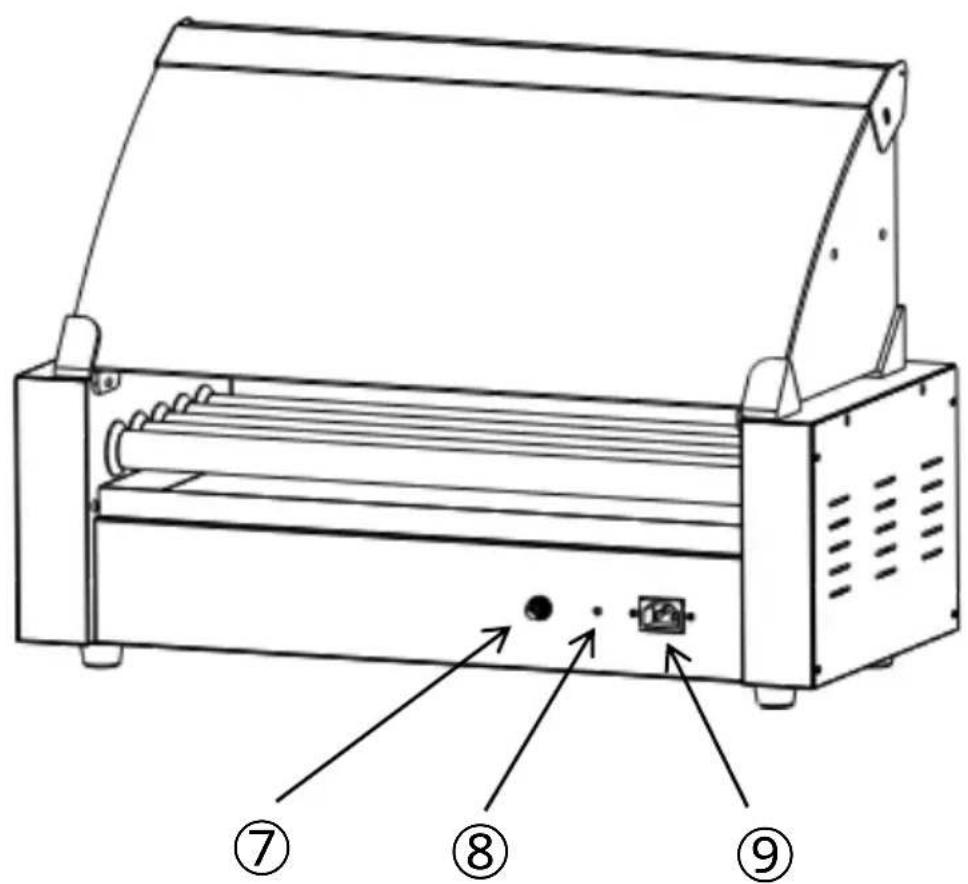
PRODUCT COMPONENTS
Note: The location of the core components of these three machines is the same!
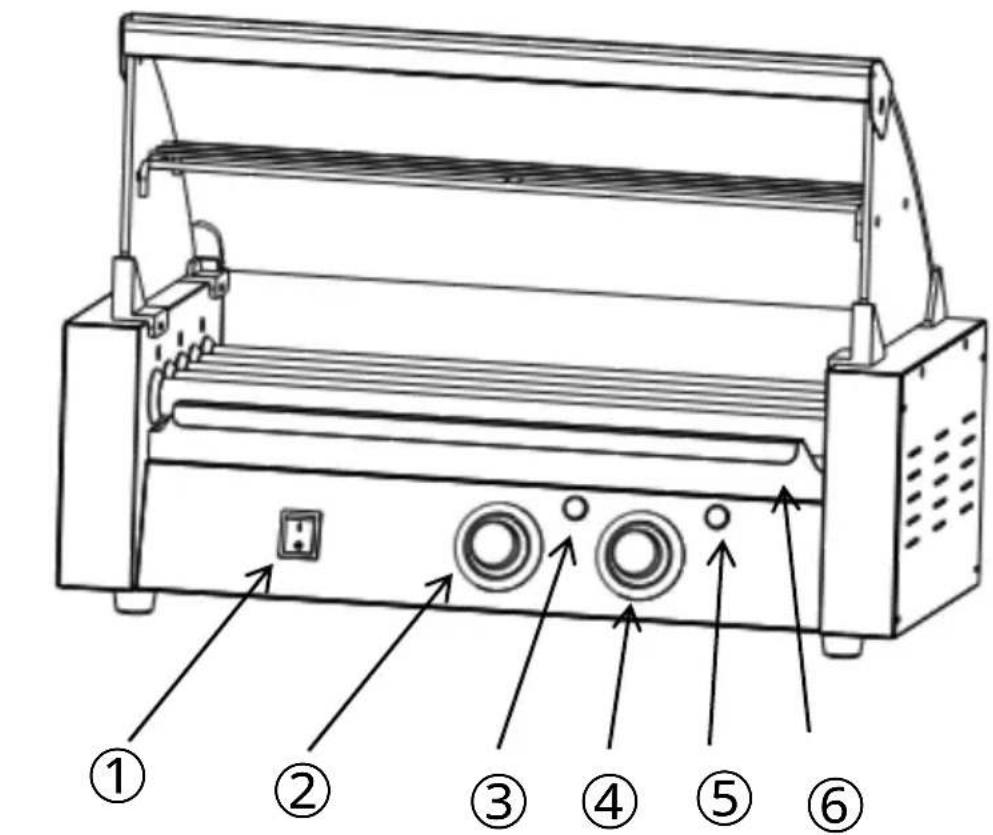
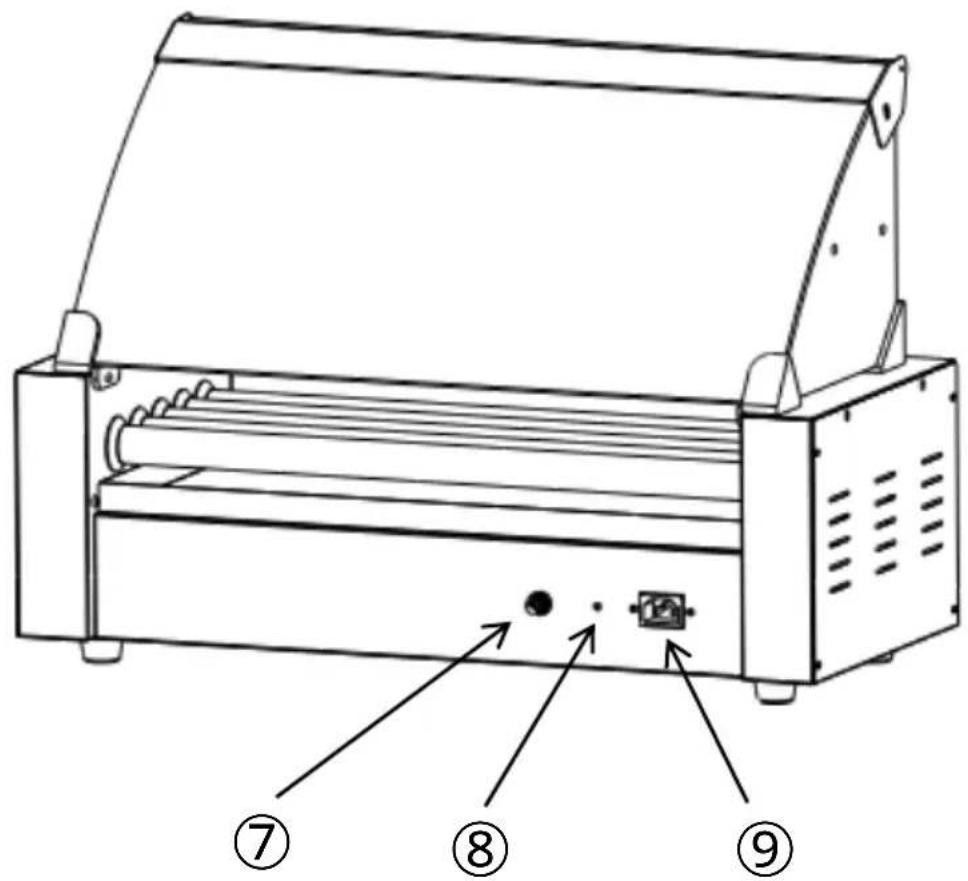
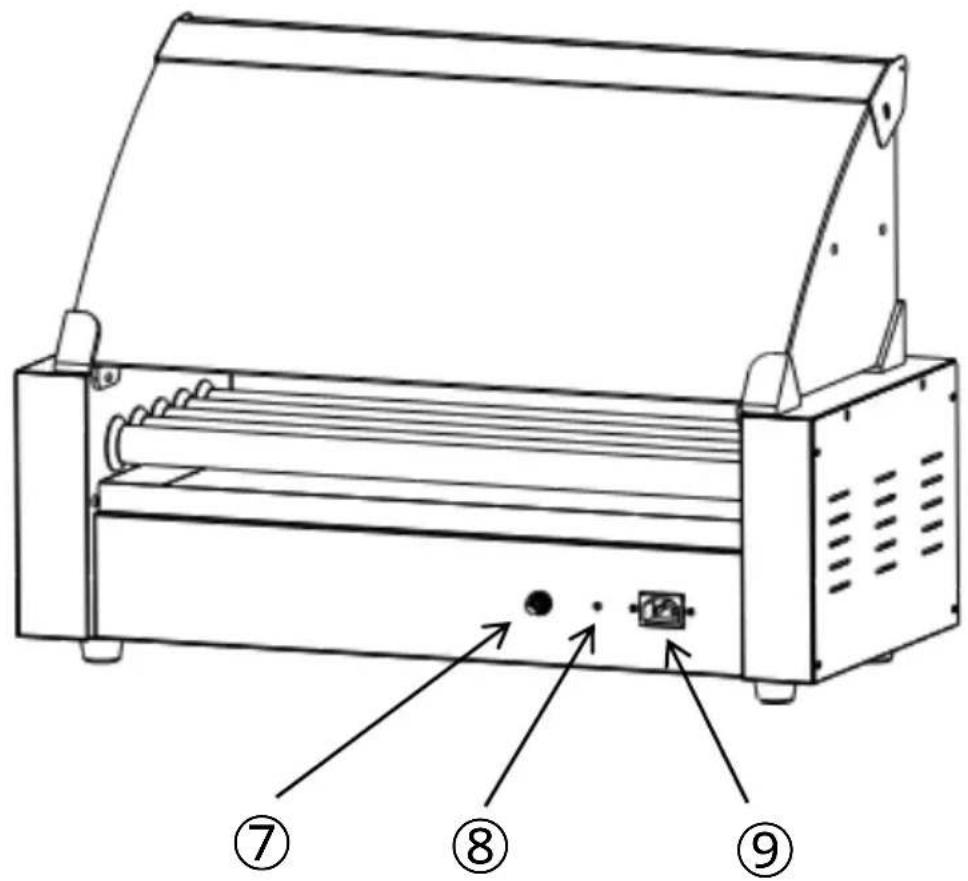
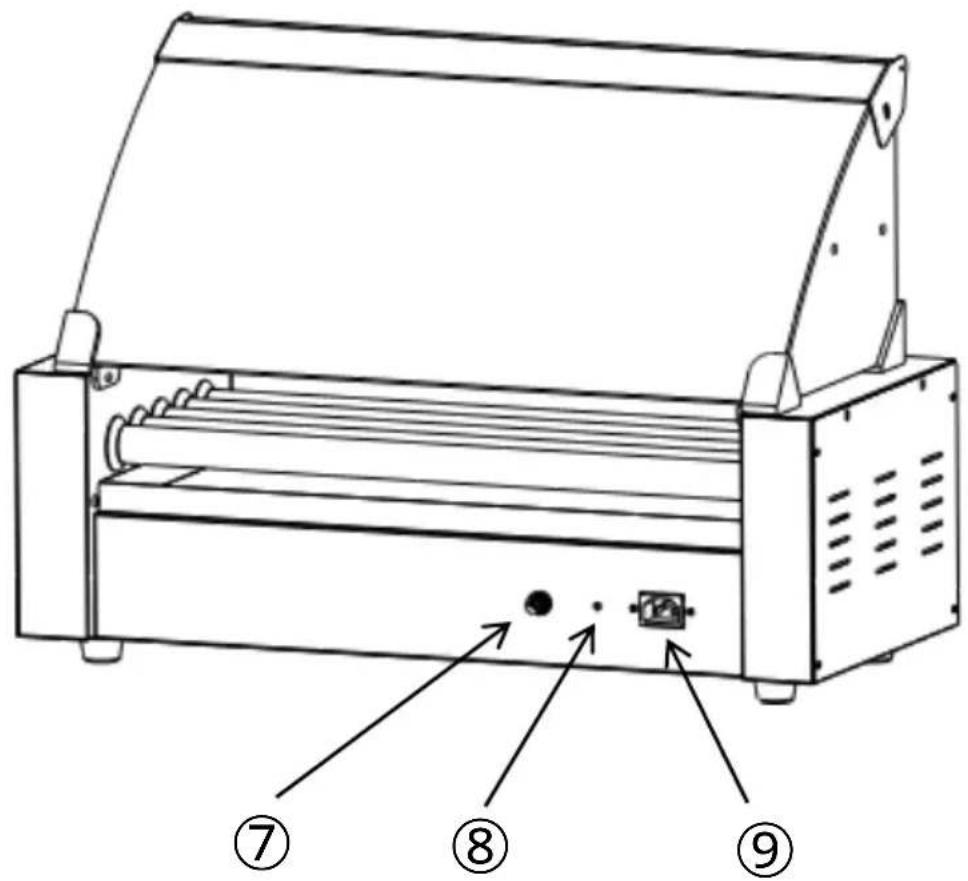
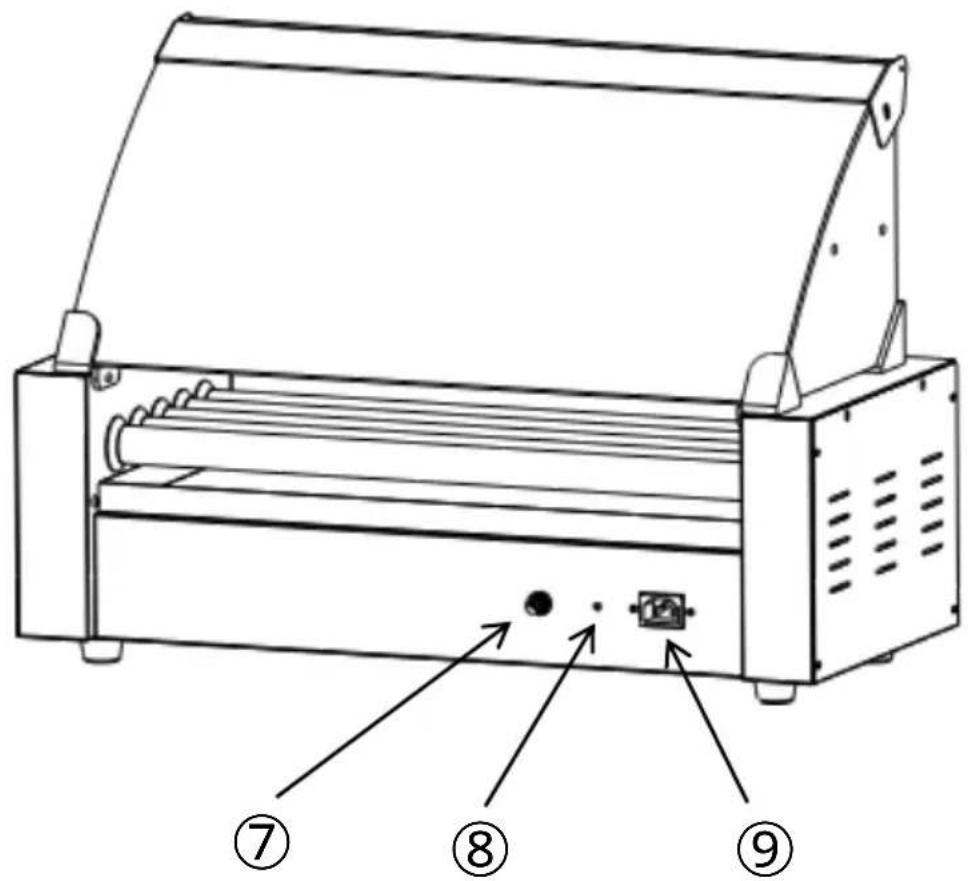
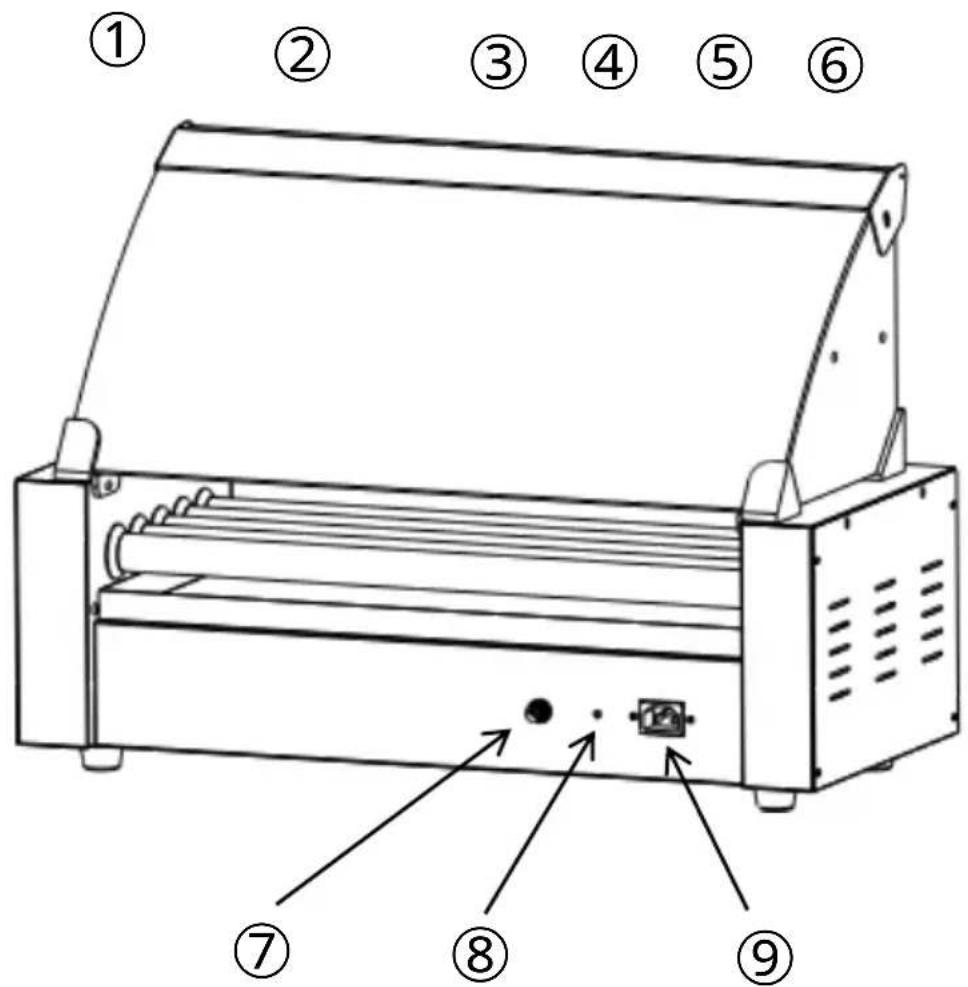
- Power Switch
- Temperature Knob (Front)
- Heat Light (Front)
- Temperature Knob (Back)
- Heat Light (Back)
- Pan
- Fuse
- Protective Earthing
- Power Socket
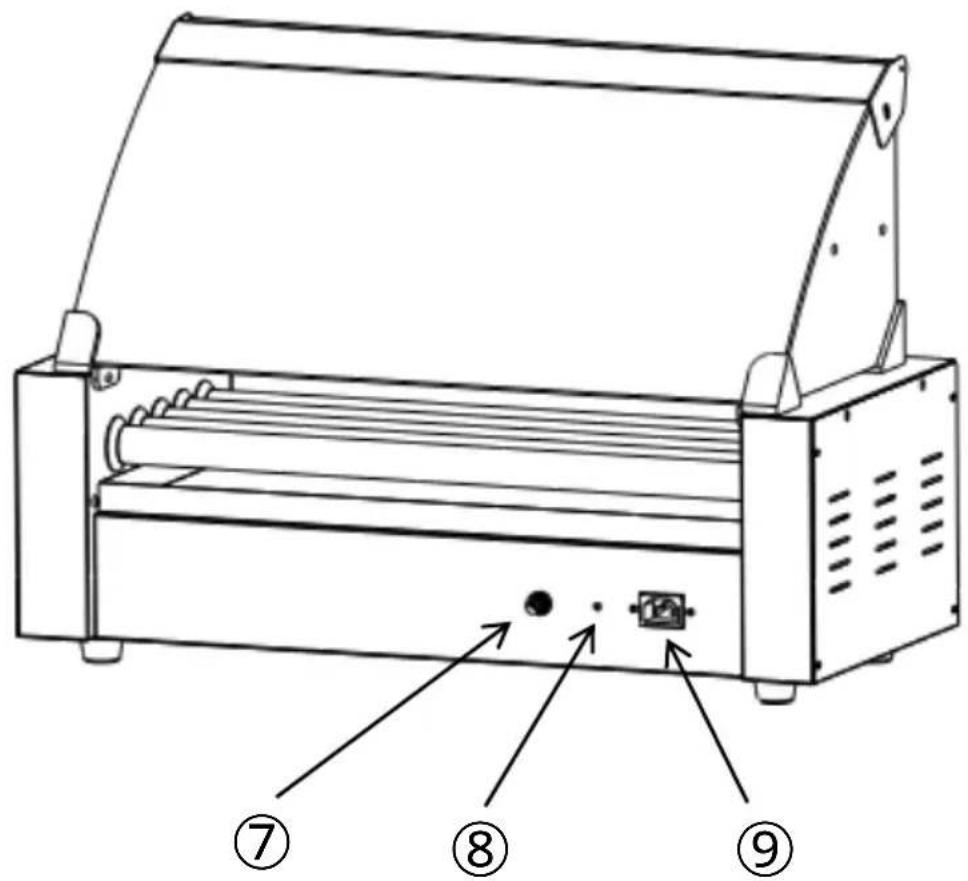
EXPLODED VIEW
Note: The location of the core components of these three machines is the same!
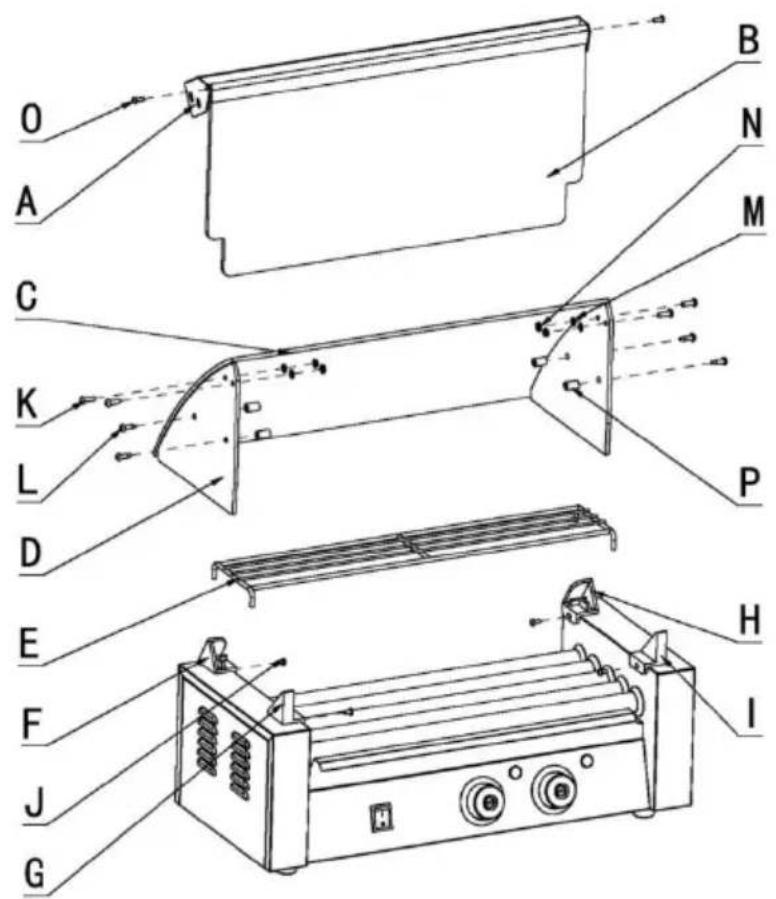
| NO. | Name | QTY | NO. | Name | QTY |
| A | Glass front fixed beam | 1 | I | Glass stand front (right) | 1 |
| B | Glass front door | 1 | J | Screws M4x8 | 4 |
| C | Curved glass | 1 | K | Screws M5x14 | 4 |
| D | Side glass | 2 | L | Screws M6x14 | 4 |
| E | Shelves | 1 | M | Nut M5 | 4 |
| F | Behind the glass stand (left) | 1 | N | Mica gasket | 4 |
| G | Glass stand front (left) | 1 | O | Screws M4x12 | 2 |
| H | Behind the glass stand (right) | 1 | P | Nylon sleeve | 4 |
Note: The quantity of parts shown in the manual is the actual usage; unused parts are spare parts.
Note: The location of the core components of these three machines is the same!
Step 1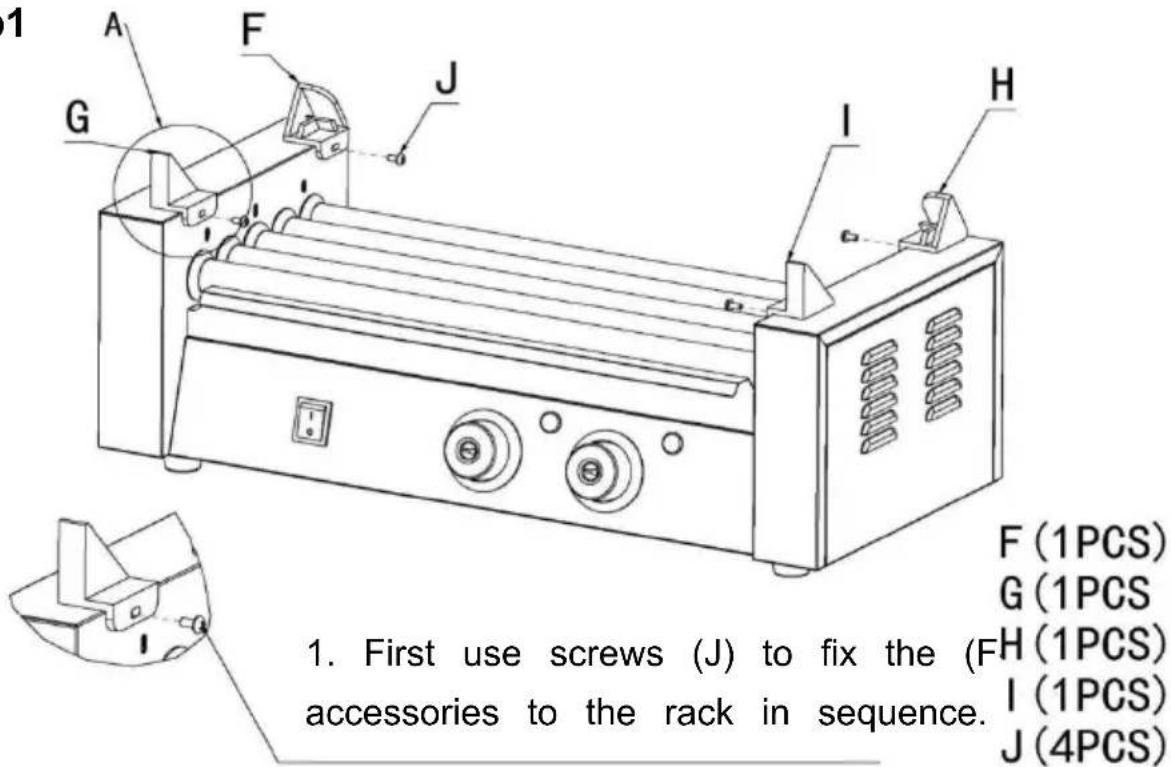
Note: Do not tighten the screws completely yet.
Step 2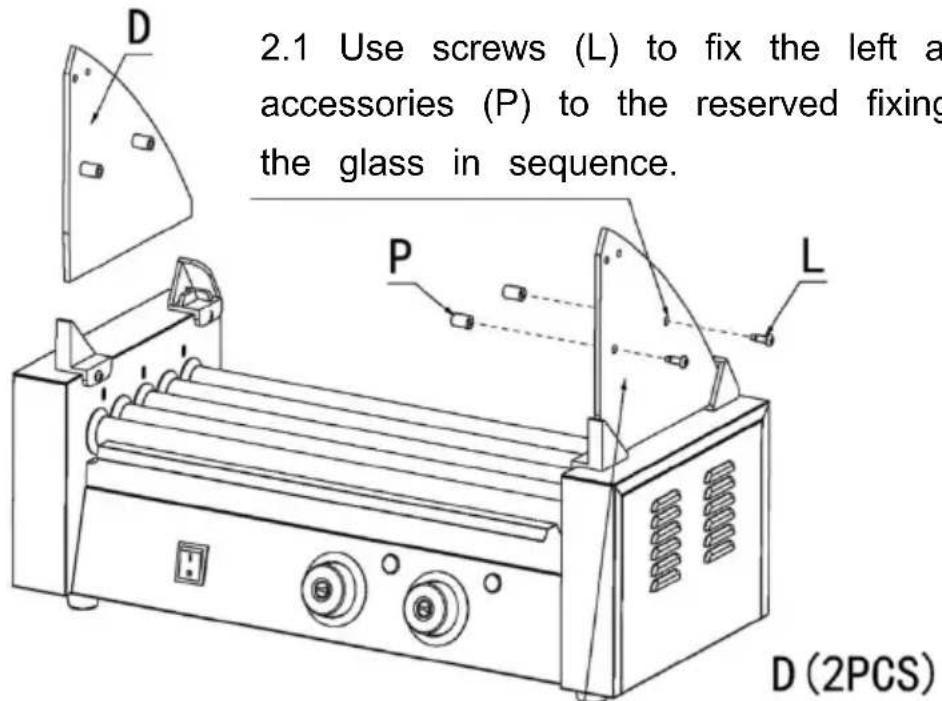
2.2 First put the left and right glass into the fasteners in sequence, and then tighten the fixing screws.
D (2 PCS)
L (4PCS)
P (4PCS)
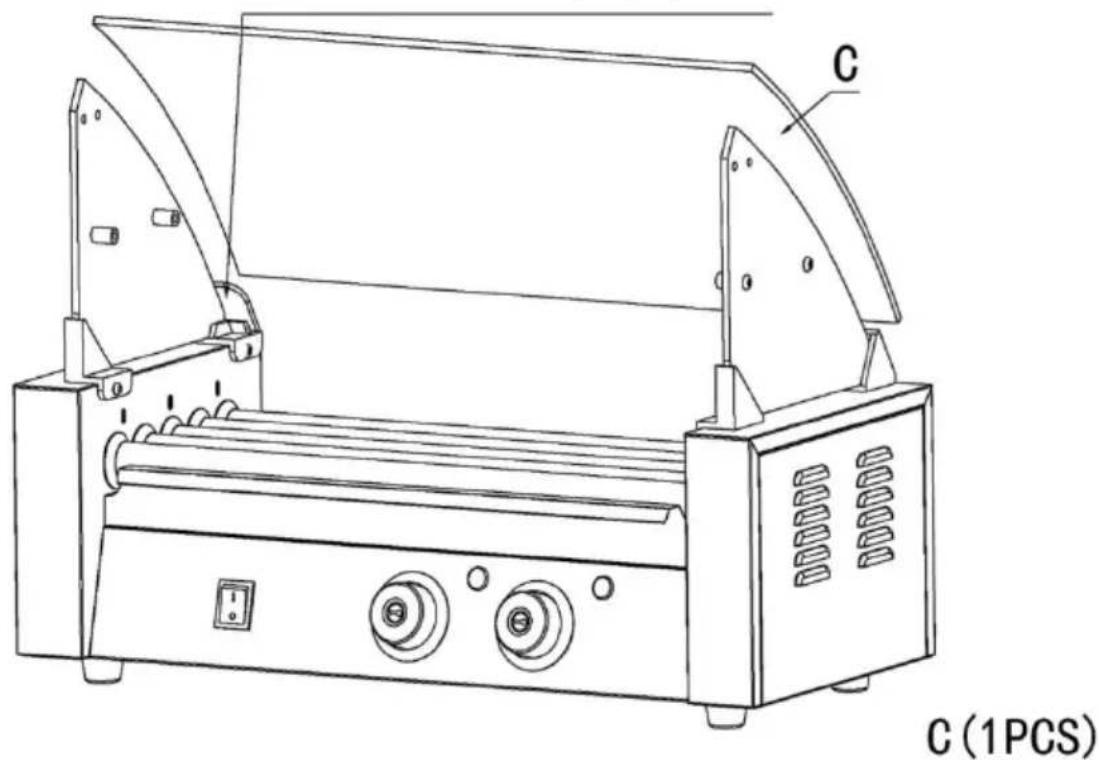
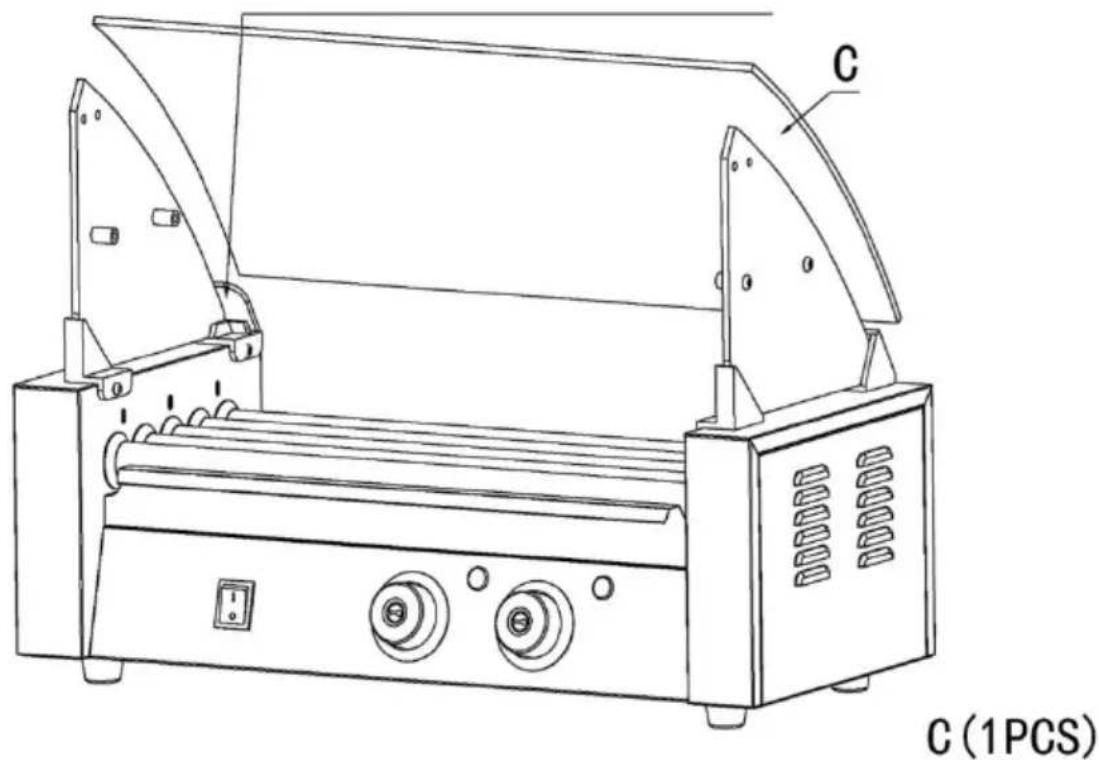
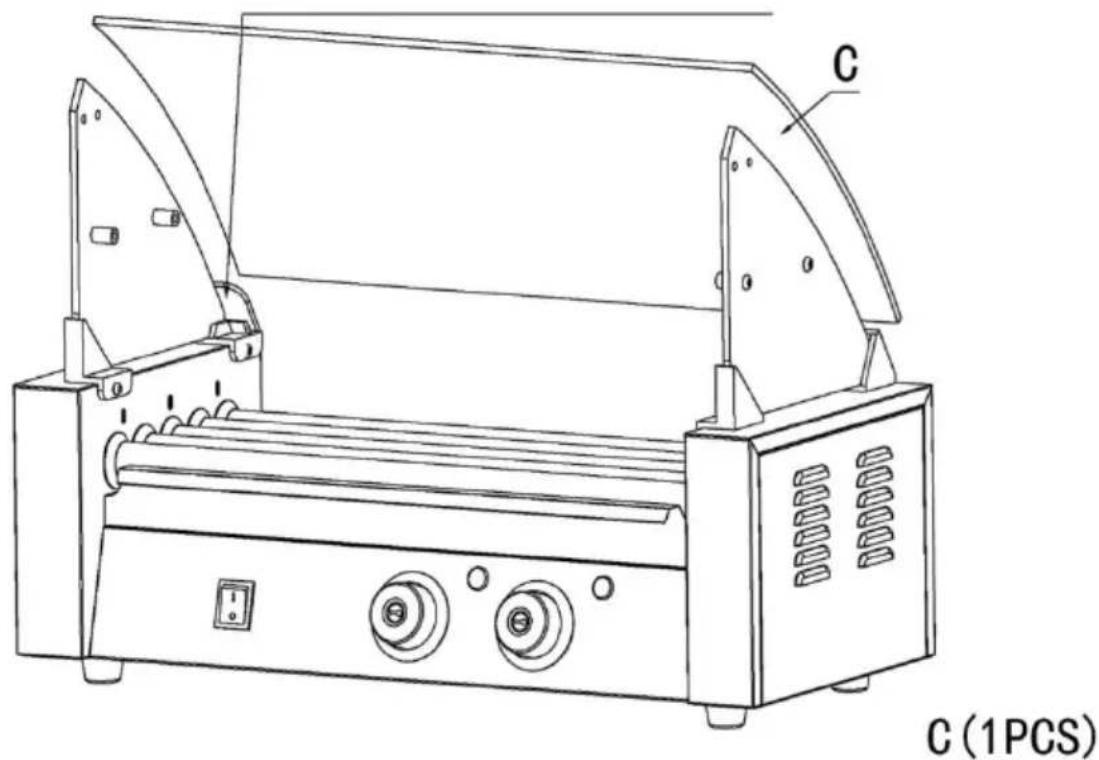
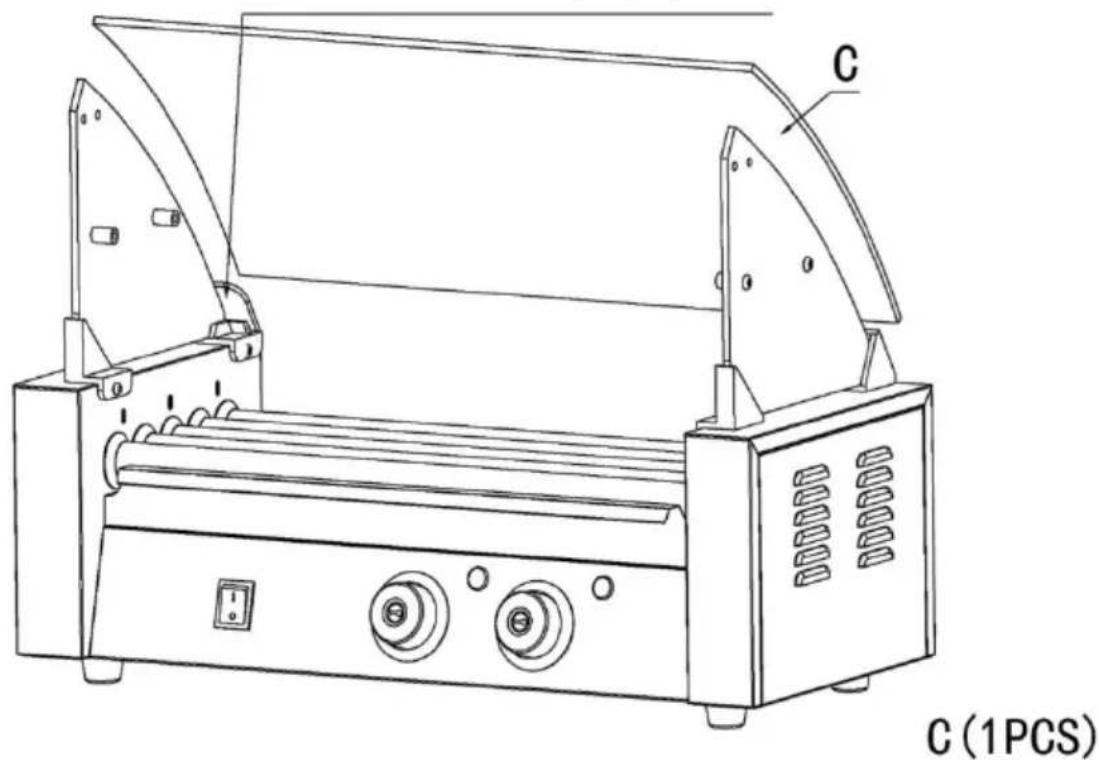
Step 3: 3.1 Place the accessory (C) into the slot of the glass.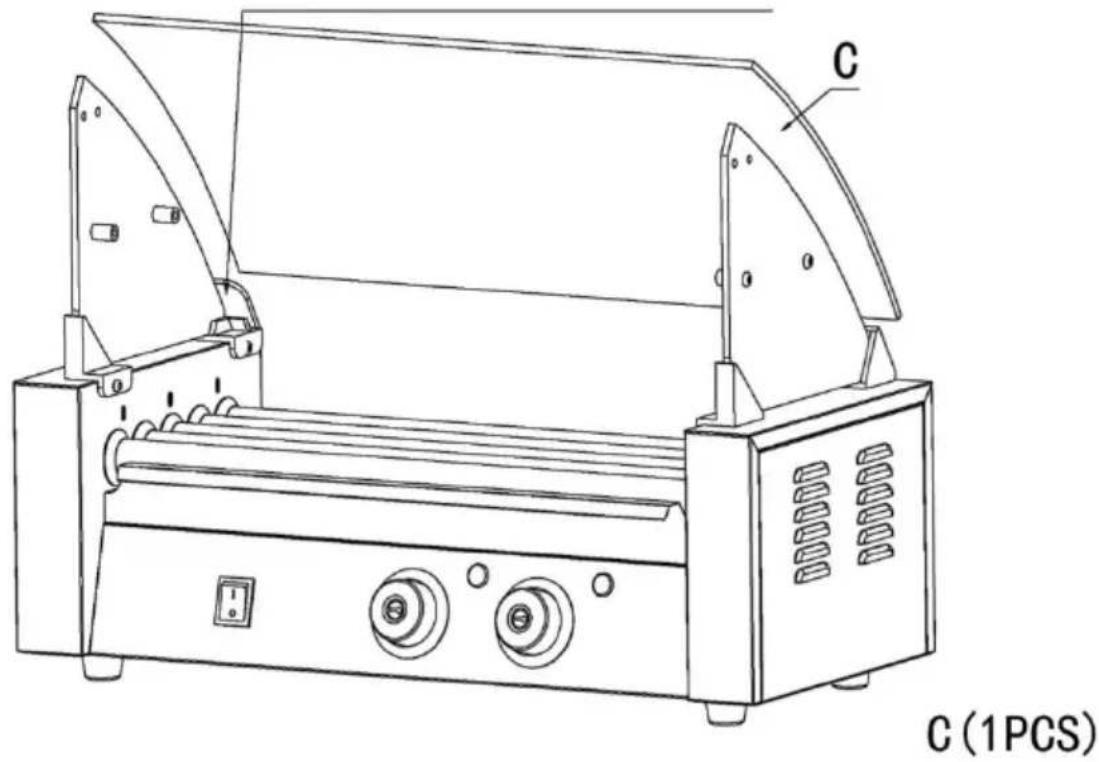
Step 4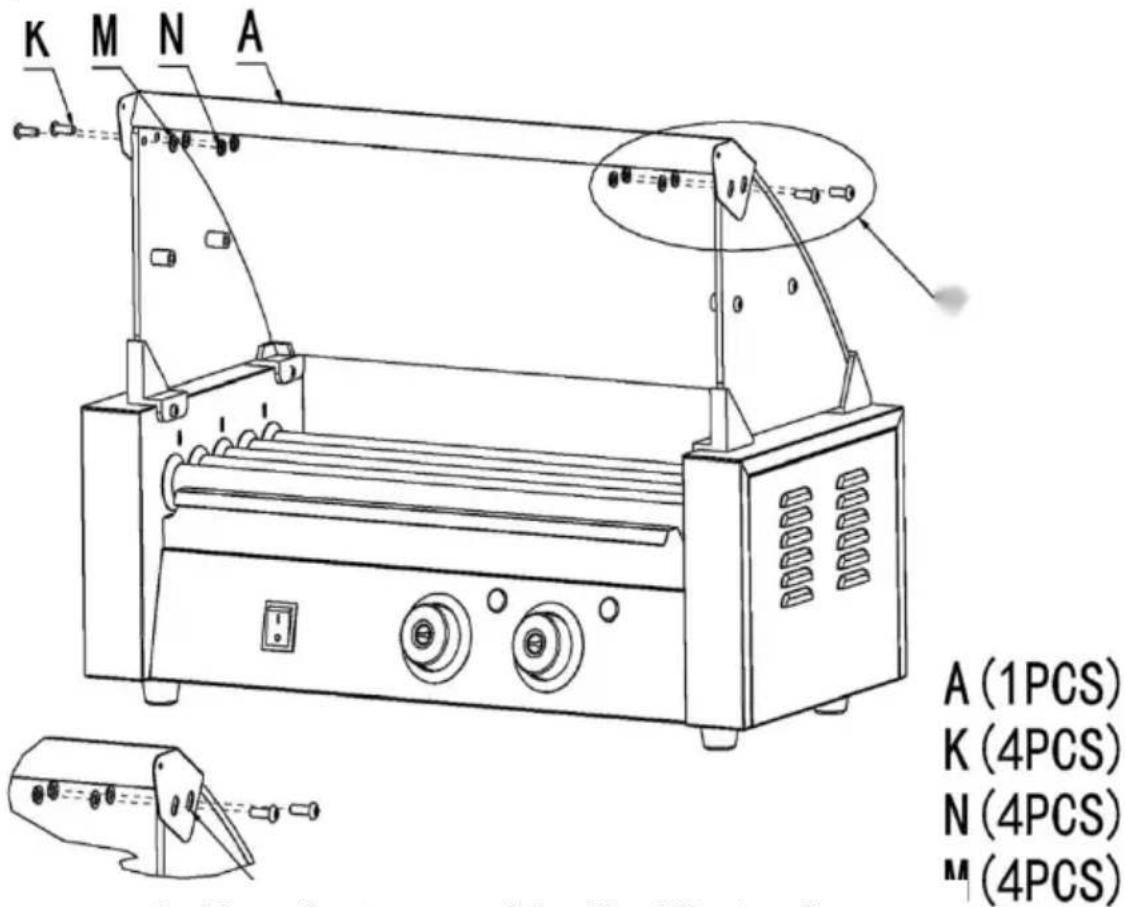
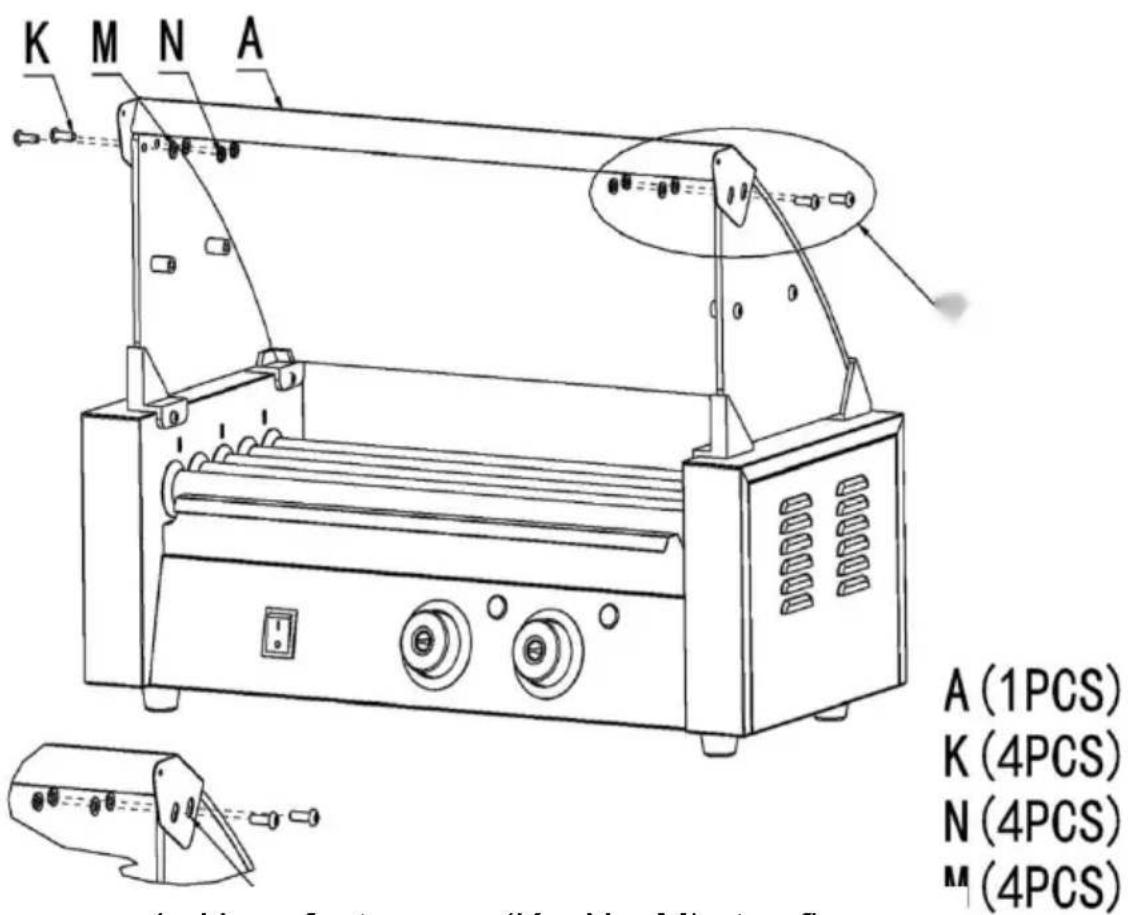
4. Use fasteners (K; N; M) to fix accessory (A) to the reserved openings in the glass order and tighten them.
Step 5
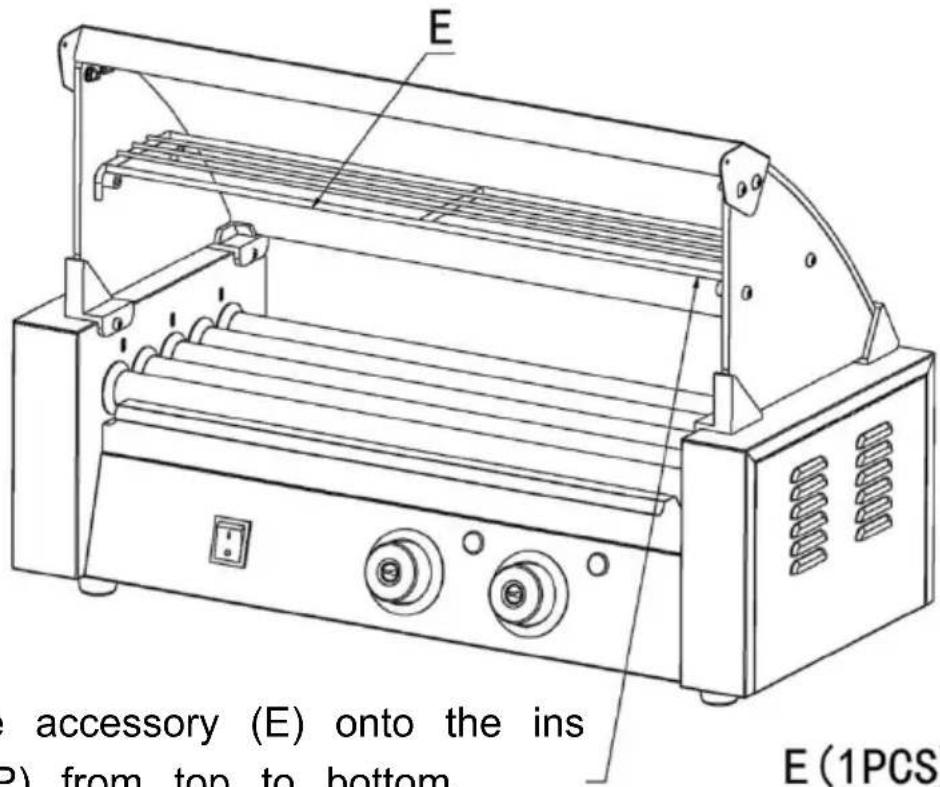
5. Place the accessory (E) onto the accessory (P) from top to bottom.
E (1PCS)
Step 6
OPERATING INSTRUCTIONS
Before using the appliance for the first time, peel off any promotional material and packaging materials, and check that the product is clean and free of dust. If necessary, wipe them over with a damp cloth. Spread over with an absorbent kitchen towel and wipe off any excess oil. When your appliance is heated for the first time, it may emit slight smoke or odor, which is normal for many appliances, and will not affect the safety of your appliance.
- Place the machine on a clean, dry, level surface near a plug base outlet.
- Plug the cord into the machine power socket.
- Plug the cord into the wall outlet.
- How to test your machine: Turn on the power switch, the indicator light is on. Turn on the motor switch, the rollers rotate. Turn the thermostat knob clockwise to align the knob on the temperature scale with the red triangle on the panel, the heating indicator light is on, and the rollers start to heat. When the temperature reaches the set value, turn the knob clockwise to about 302°F (150°C).
At this time, the heating indicator light will go off, which means it has reached the set temperature.
- Place the pre-prepared sausages parallelly in the middle of the two rollers; the sausages will rotate in
opposite directions. Please do not place the sausages too close together; leave about 0.4 inch (10 mm) at the end of each roller.
Note:
- Every time you turn on the machine for the first time, you must first turn the heating switch to preheat, and then turn on the rotary switch to prevent the oil from solidifying.
- Opening of the bottom pan or both sides is not permitted, unless you are eligible to do so. 3. Usually the baking temperature should be appropriate 24
F-320°F (120-160°C).
- When heating, your hands are not allowed to touch the steel roller to prevent scalding.
- When connecting or unplugging the plug, it should be disconnected from the total external power supply.
- Keep your hands dry when plugging the cord.
TIPS
- To save electricity and reduce the heating time, you can naturally defrost sausages or heat them by microwave oven beforehand.
- Apply food oil to the left and right sides of the roller before use to increase smooth rolling of the roller.
Note: The pan under the rollers is used to catch drops of oil. It can also preheat the sausage, but it is not appropriate to put the grilled sausages into it.
CLEANING AND MAINTENANCE
- Once you have finished baking, remove the plug from the electrical outlet. Leave the machine to cool down completely before cleaning.
- The rollers should be cleaned every 4-5 hours of grilling.
- For the exterior, wipe with a soft, dry cloth. Never use an abrasive or harsh pad. Any other servicing should be provided by an Authorized Service Representative.
Warning: Do not use liquid to rinse the product directly to avoid water damage to internal components.
STORAGE
- Always unplug the machine before storage.
- Always make sure the machine is clean, cool, and dry before storing.
- Apply vegetable oil to the surface of the product to prevent rust.
Manufacturer: Shanghai Muxin Muye Youxian Gongsi
Address: Shuangcheng Road 803, Lane 11, Room 1602A-1609, Baoshan District, Shanghai 200000 CN.
Imported to AUS: SIHAO PTY LTD. 1 ROKEVA STREET, EASTWOOD NSW 2122 Australia
Imported to USA: Sanven Technology Ltd. Suite 250, 9166 Anaheim Place, Rancho Cucamonga, CA 91730
| UK | REP |
YH CONSULTING LIMITED.
C/O YH Consulting Limited Office 147,
Centurion House, London Road,
Staines-upon-Thames, Surrey, TW18 4AX
| EC | REP |
E-CrossStu GmbH
Mainzer Landstr.69,
60329 Frankfurt am Main.
VEVOR®
TOUGH TOOLS, HALF PRICE
Technical Support and E-Warranty Certificate
www.vevor.com/support
VEVOR®
TOUGH TOOLS, HALF PRICE
MODEL: SC-5XD / SC-7XD / SC-11XD
MODEL: SC-5XD MODEL: SC-7XD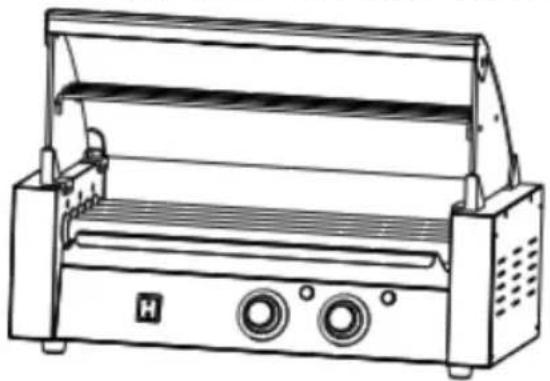
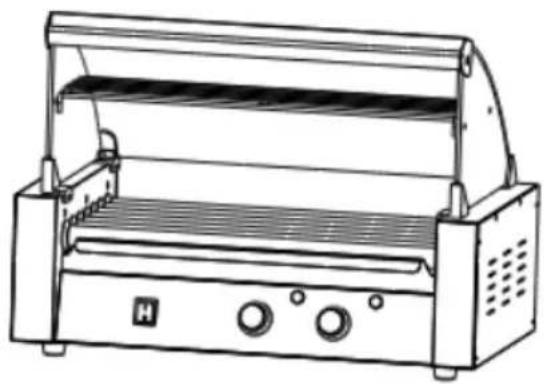
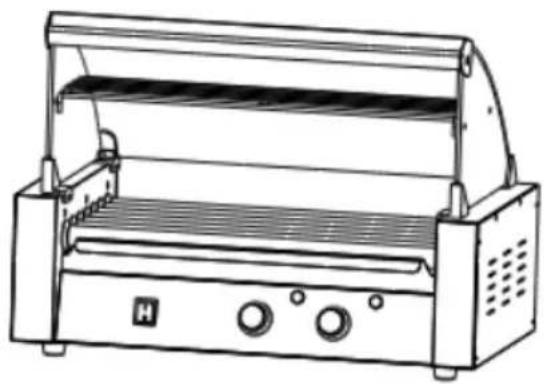
MODEL: SC-11XD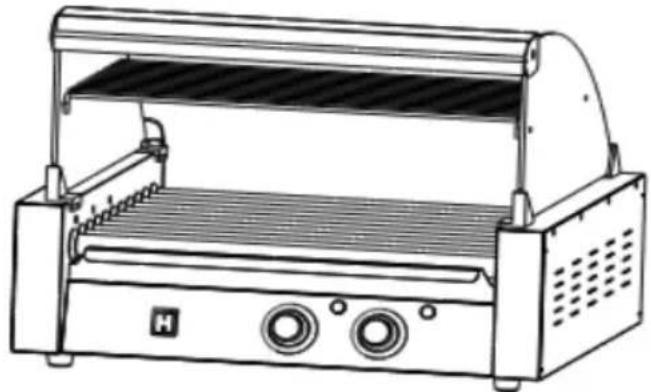
NEED HELP? CONTACT US!
SAFETY WARNINGS AND PRECAUTIONS
- Power Switch
- Temperature Knob (Front)
- Heat Light (Front)
- Temperature Knob (Back)
- Heat Light (Back)
- Pan
- Fuse
- Protective Earthing
- Power Socket
EXPLODED VIEW
2.2 First put the left and right glass into the fasteners in sequence, and then tighten the
D (2PCS)
L (4PCS)
P (4PCS)
Step 3: 3.1 Place the accessory (C) into the slot of the glass.
Step 4
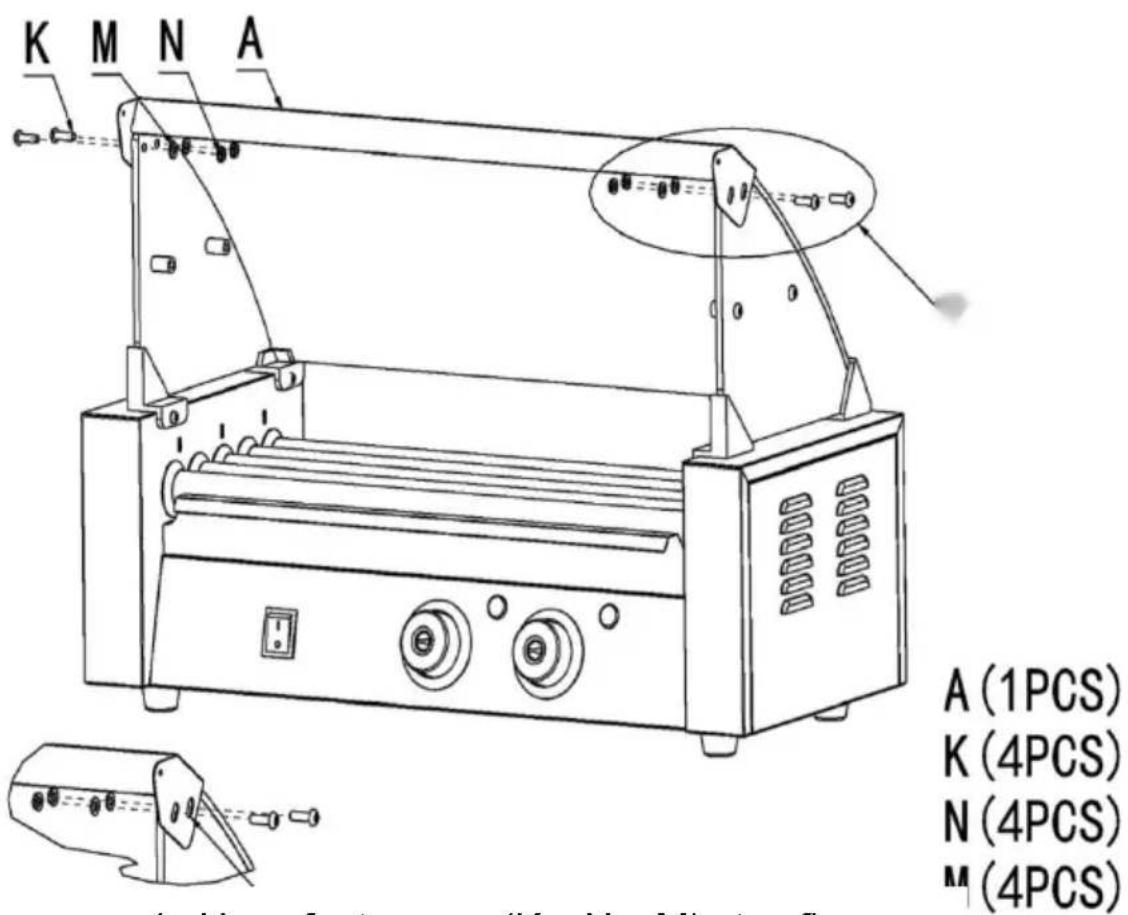
4. Use fasteners (K; N; M) to fix accessory (A) to the reserved openings in the glass order and tighten them.
Step 5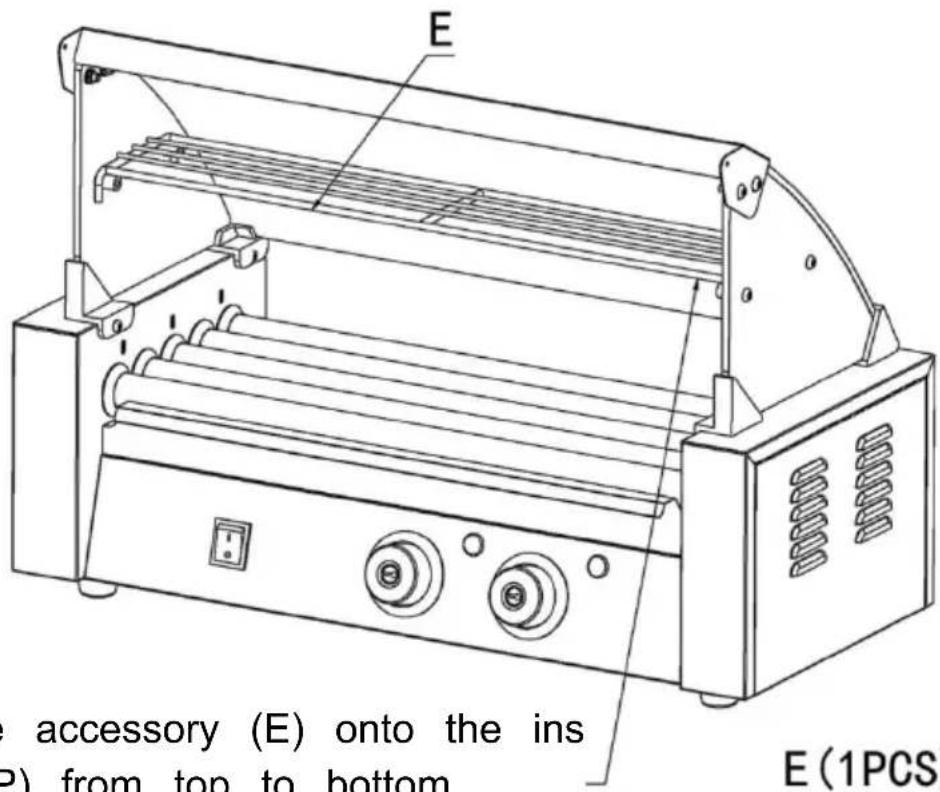
5. Place the accessory (E) onto the accessory (P) from top to bottom.
E (1PCS)
Step 6
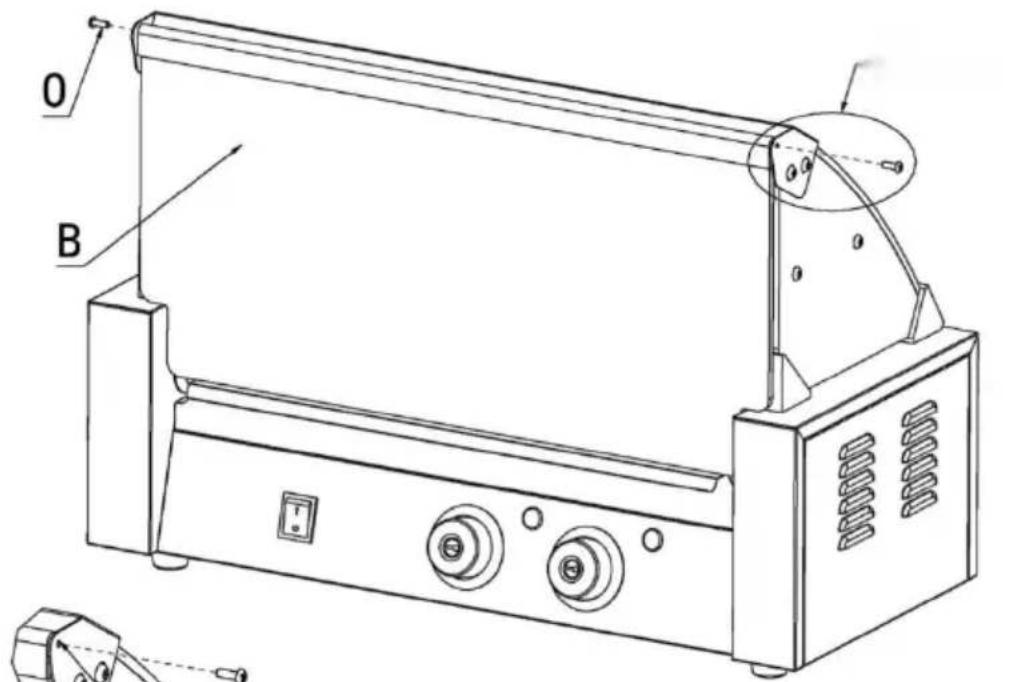
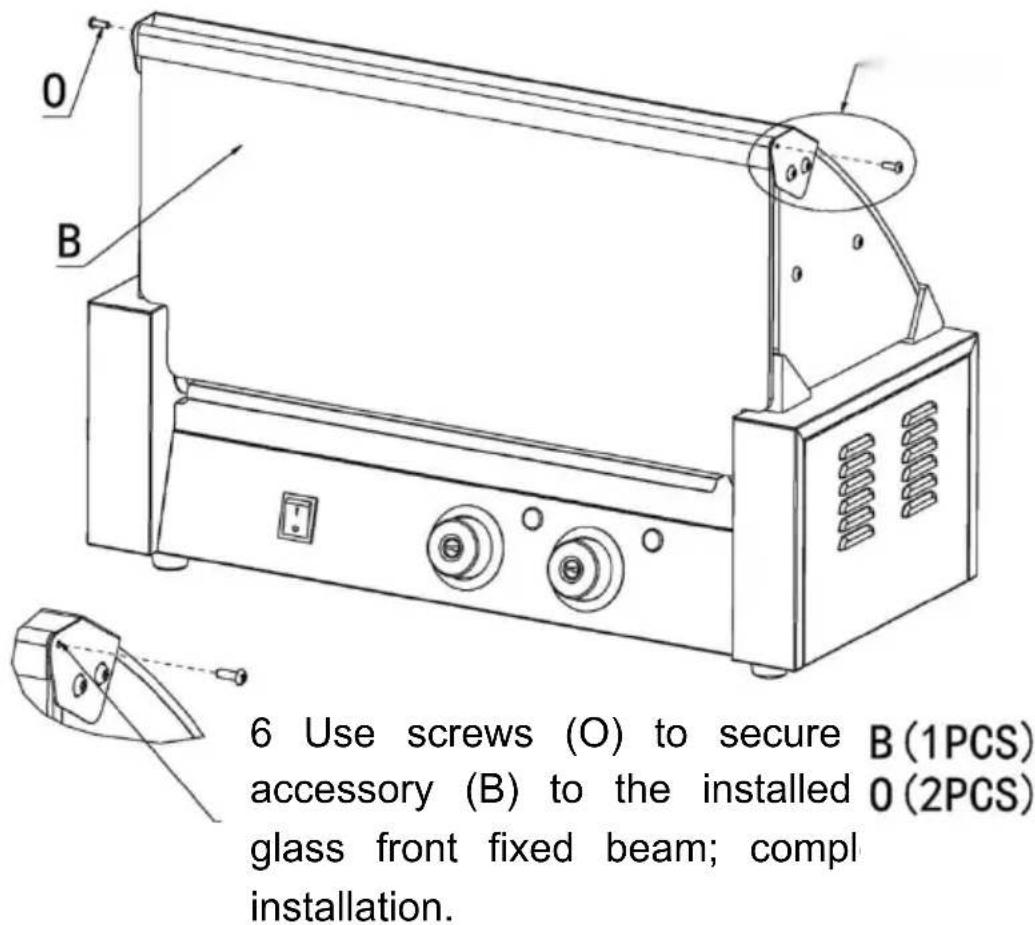
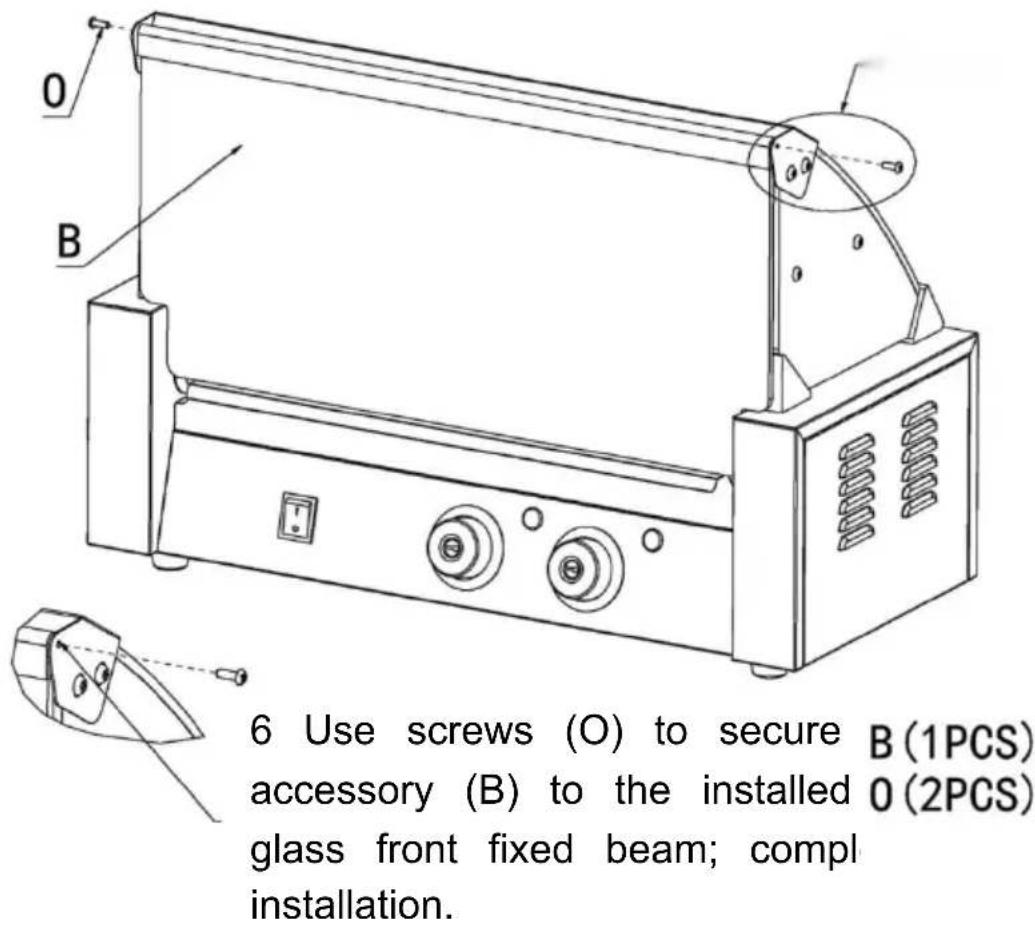
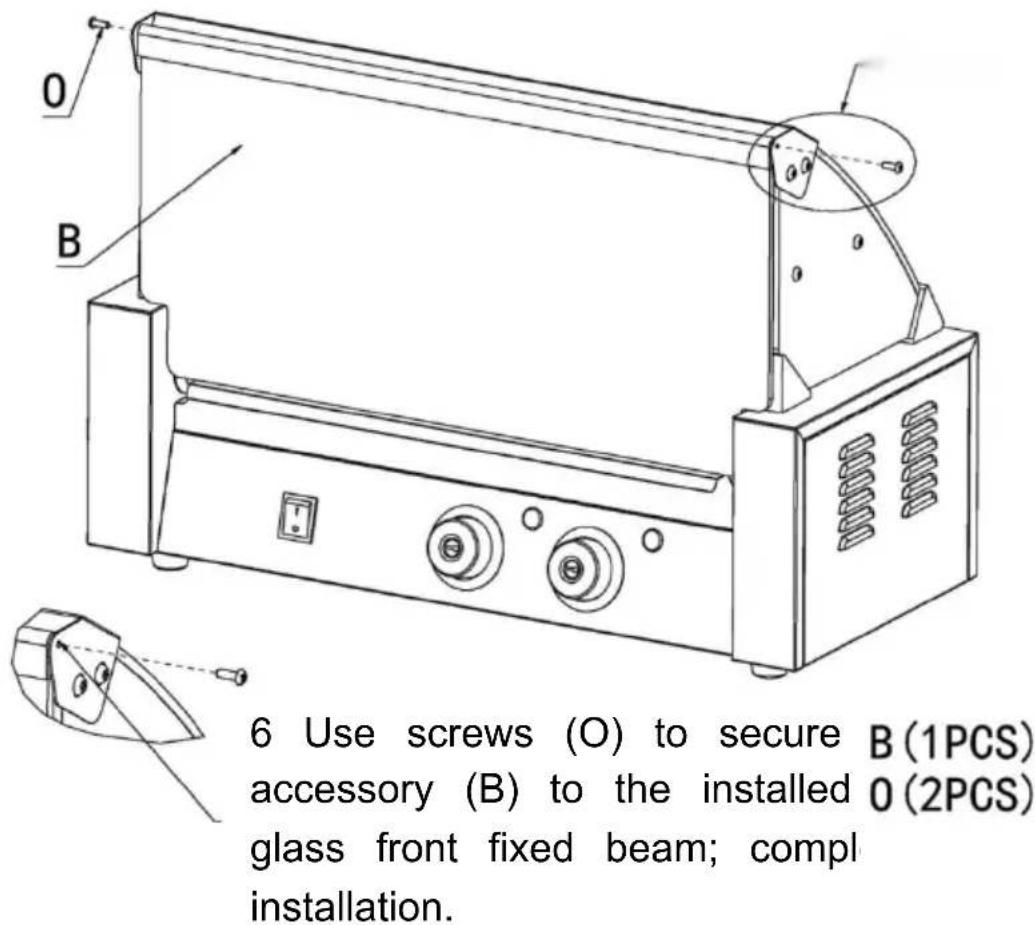
6. Use screws (O) to secure accessory (B) to the installed glass front fixed beam; complete installation.
accessory (B) to the installed 0 (2PCS)
glass front fixed beam; compl
installation.
OPERATING INSTRUCTIONS
CLEANING AND MAINTENANCE
C/O YH Consulting Limited Office 147,
Centurion House, London Road,
Staines-upon-Thames, Surrey, TW18 4AX
| EC | REP |
E-CrossStu GmbH
Mainzer Landstr.69,
60329 Frankfurt am Main.
VEVOR®
TOUGH TOOLS, HALF PRICE
www.vevor.com/support
VEVOR®
TOUGH TOOLS, HALF PRICE
MODEL: SC-5XD / SC-7XD / SC-11XD
MODEL: SC-11XD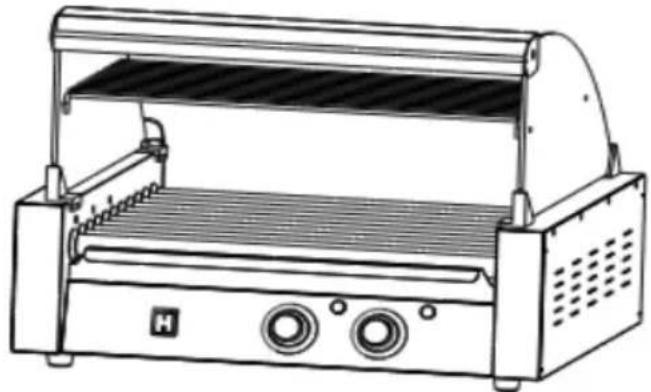
SAFETY WARNINGS AND PRECAUTIONS
- Power Switch
- Temperature Knob (Front)
- Heat Light (Front)
- Temperature Knob (Back)
- Heat Light (Back)
- Pan
- Fuse
- Protective Earthing
- Power Socket
EXPLODED VIEW
2.2 First put the left and right glass into the fasteners in sequence, and then tighten the
D (2PCS)
L (4PCS)
P (4PCS)
Step3: 3.1 Place the accessory (C) into the slot of the glass
Step4
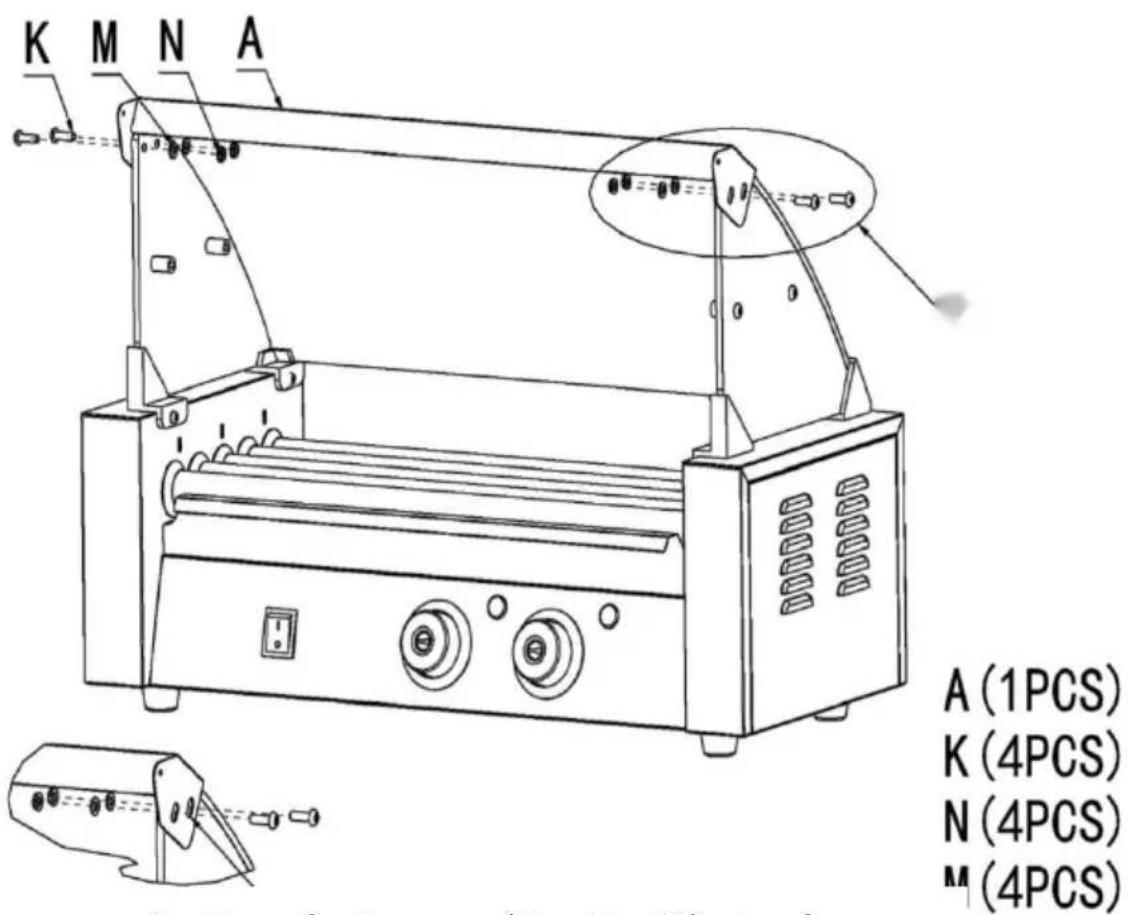
4 Use fasteners (K; N; M) to fix accessory (A) to the reserved openings in the glass order and tighten them.
Step 5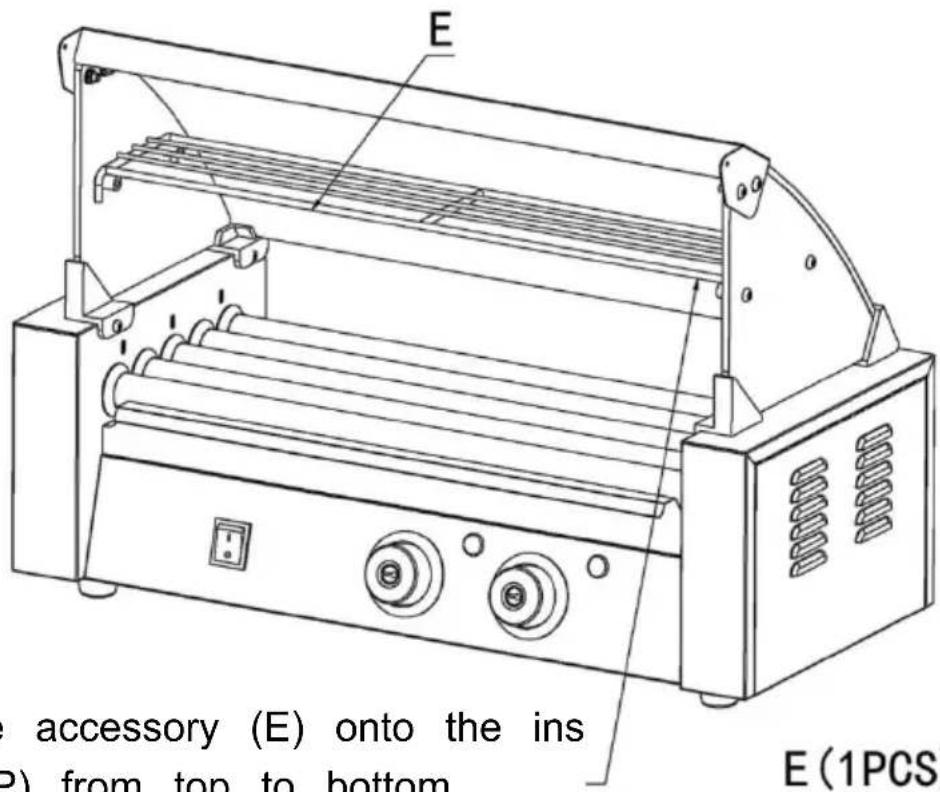
5 Place the accessory (E) onto the accessory (P) from top to bottom.
E (1 piece)
Step 6
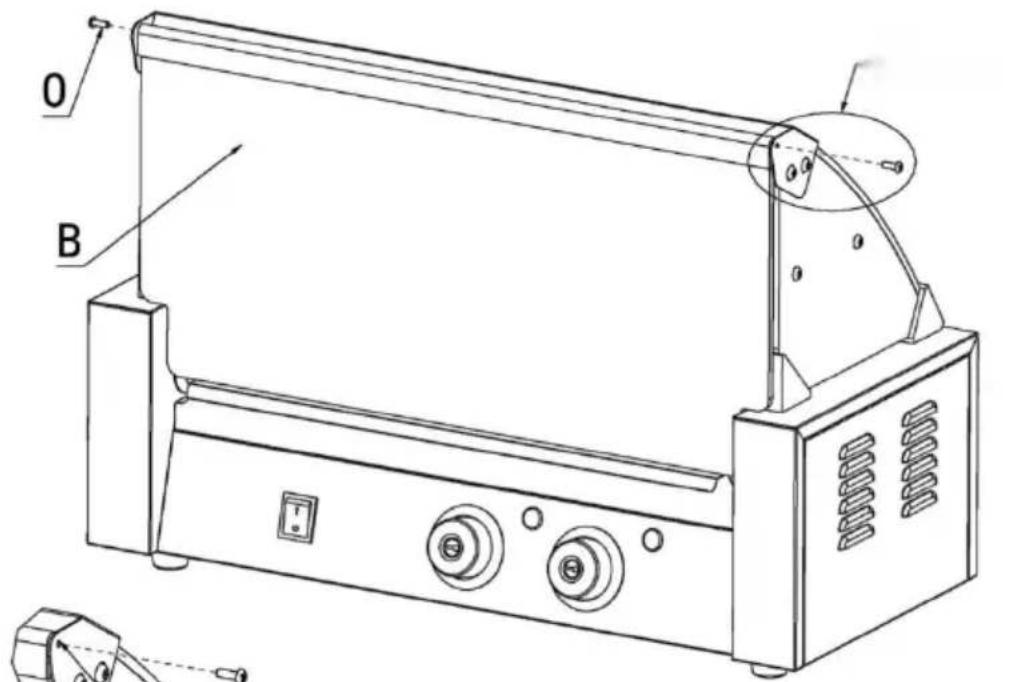
6 Use screws (O) to secure accessory (B) to the installed glass front fixed beam; complete installation.
O (2 pieces)
glass front fixed beam; complete installation.
installation.
OPERATING INSTRUCTIONS
CLEANING AND MAINTENANCE
| EC | REP |
60329 Frankfurt am Main.
VEVOR®
TOUGH TOOLS, HALF PRICE
www.vevor.com/support
VEVOR®
TOUGH TOOLS, HALF PRICE
www.vevor.com/support
Rolling Hot Dog Grill
Model: SC-5XD/SC-7XD/SC-11XD
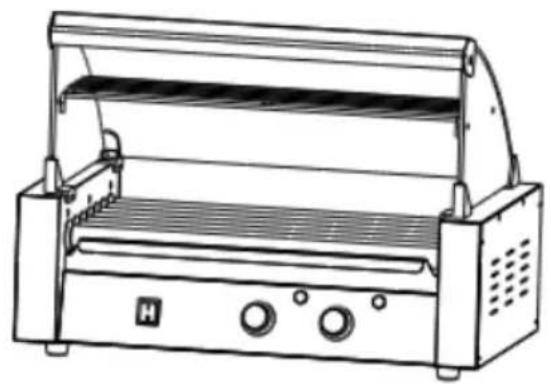
Model: SC-11XD
Need help? Contact us!
Safety warnings and precautions
- Power switch
- Temperature knob (front)
- Heat light (front)
- Temperature Knob (Back)
- Heat Light (Back)
- Pan
- Fuse
- Protective Earthing
- Power Socket
EXPLODED VIEW
2.2 First put the left and right glass into the fasteners in sequence, and then tighten the fixing screws.
D (2PCS)
L (4PCS)
P (4PCS)
Step3 3.1 Place the accessory (C) into the slot of the glass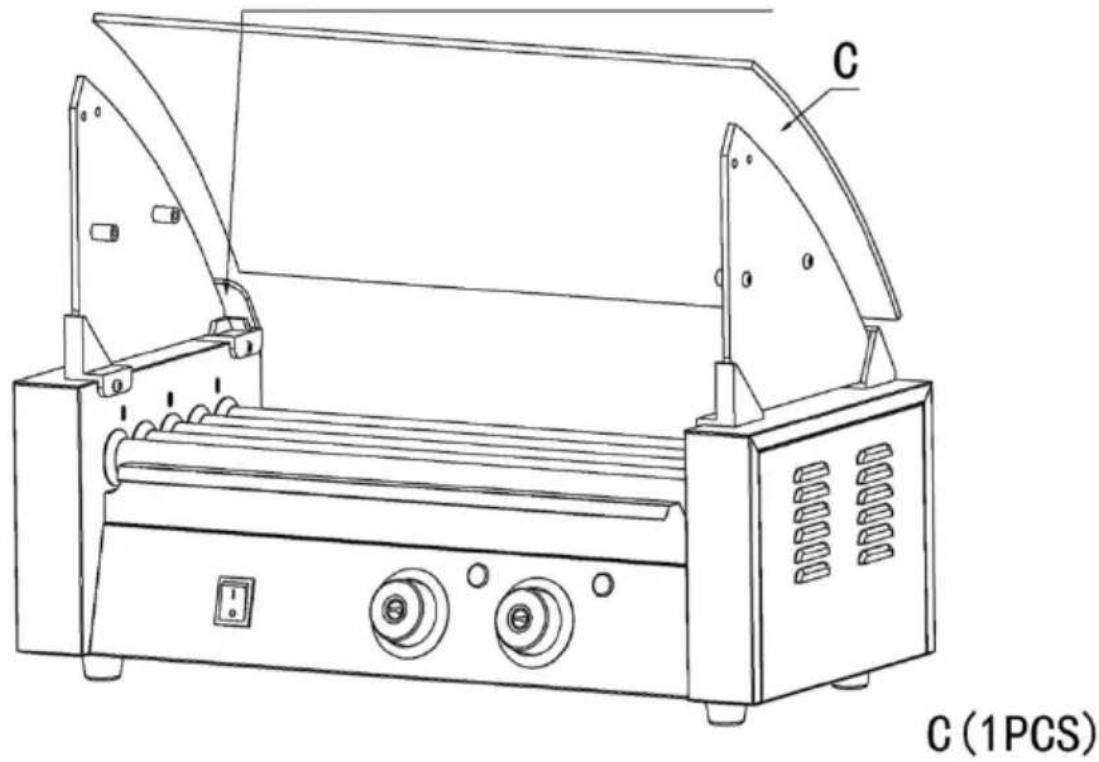
Step4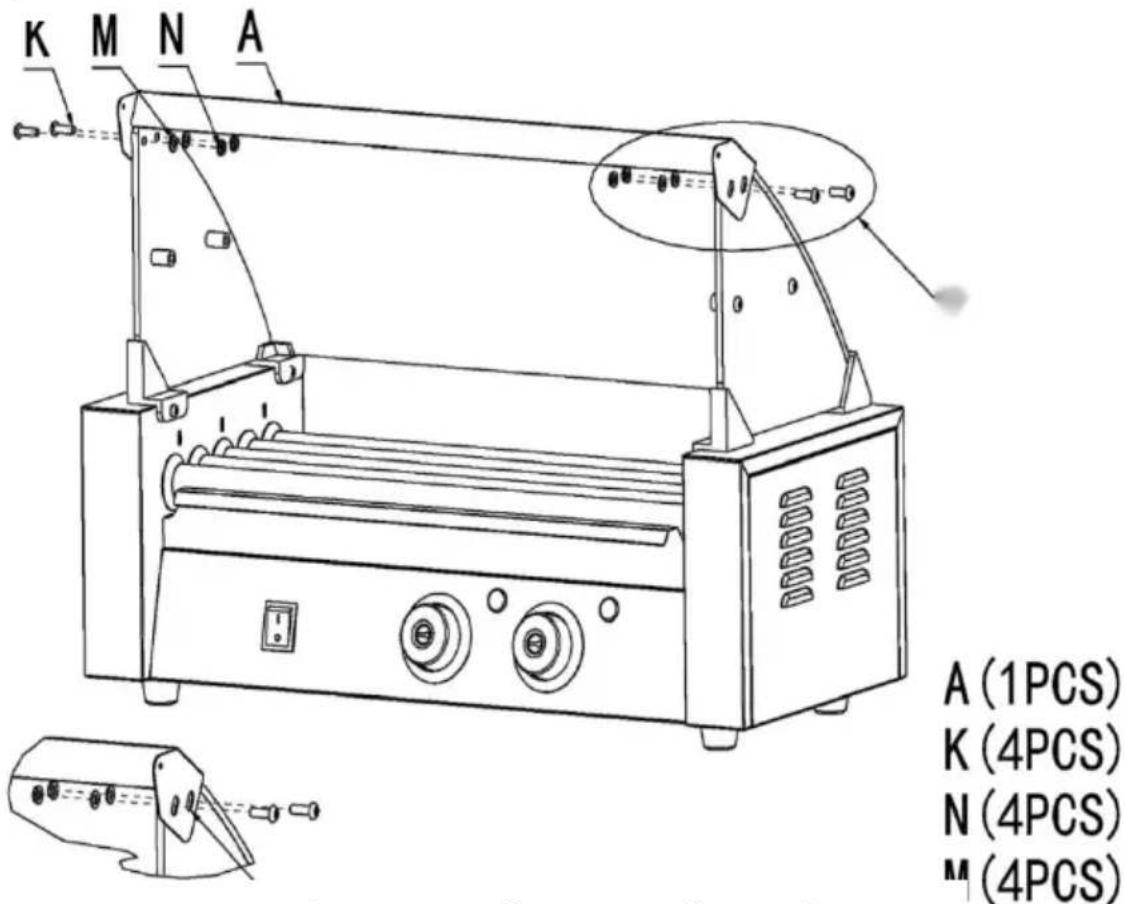
4 Use fasteners (K; N; M) to fix access (A) to the reserved openings in the glass order and tighten them.
Step5
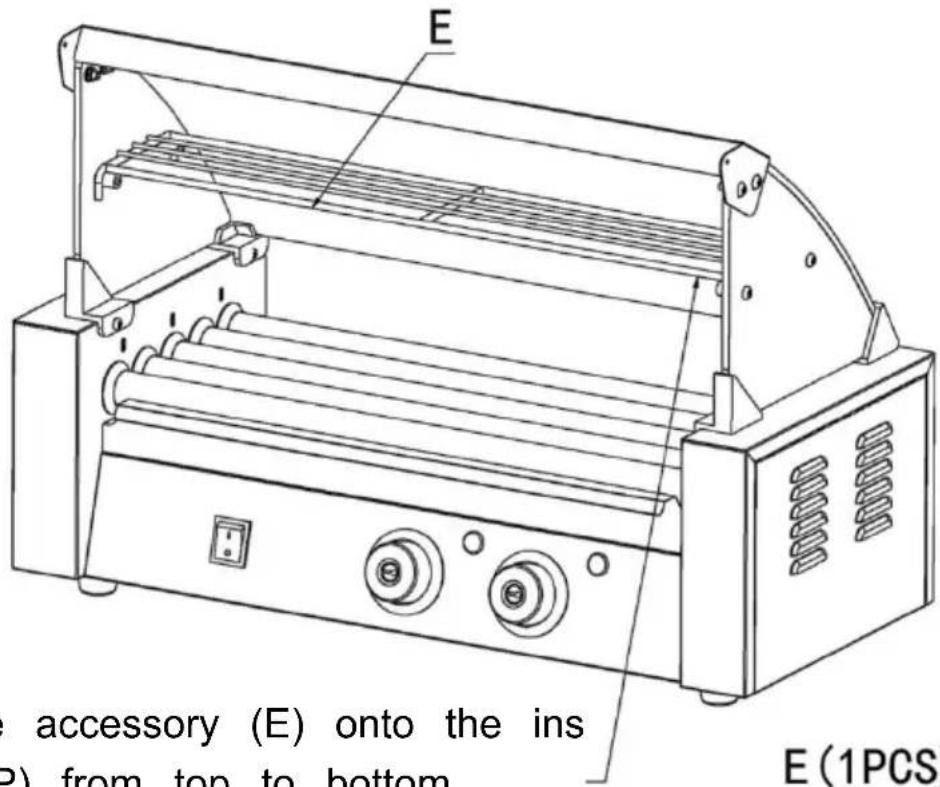
5 Place the accessory (E) onto the accessory (P) from top to bottom.
E (1PCS)
Step 6
OPERATING INSTRUCTIONS
CLEANING AND MAINTENANCE
C/O YH Consulting Limited Office 147, Centurion House, London Road,
Staines-upon-Thames, Surrey, TW18 4AX
| EC | REP |
E-CrossStu GmbH
Mainzer Landstr.69,
60329 Frankfurt am Main.
VEVOR®
TOUGH TOOLS, HALF PRICE
MODELS: SC-5XD / SC-7XD / SC-11XD
MODEL: SC-5XD MODEL: SC-7XD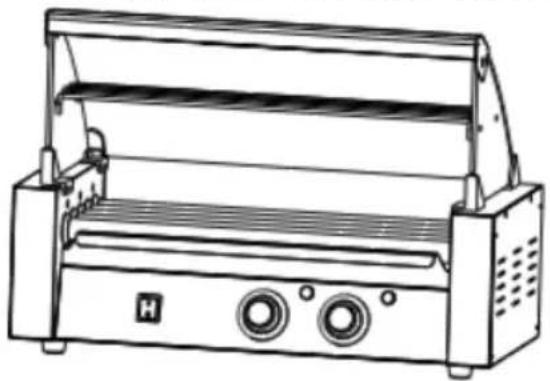
MODEL: SC-11XD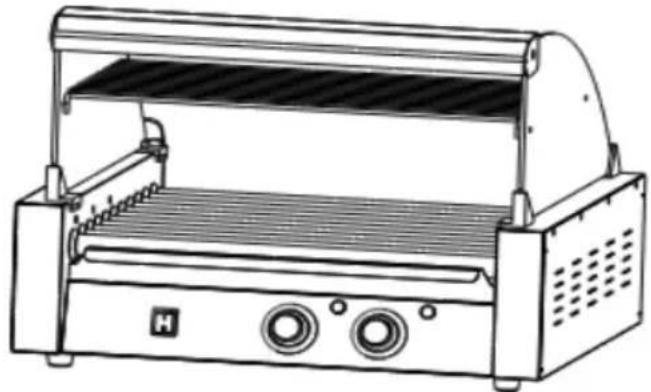
SAFETY WARNINGS AND PRECAUTIONS
- Power Switch
- Temperature Knob (Front)
- Heat Light (Front)
- Temperature Knob (Back)
- Heat Light (Back)
- Pan
- Fuse
- Protective Earthing
- Power Socket
EXPLODED VIEW
2.2 First put the left and right glass into the fasteners in sequence, and then tighten the fixing screws.
D (2PCS)
L (4PCS)
P (4PCS)
Step3 3.1 Place the accessory (C) into the slot of the glass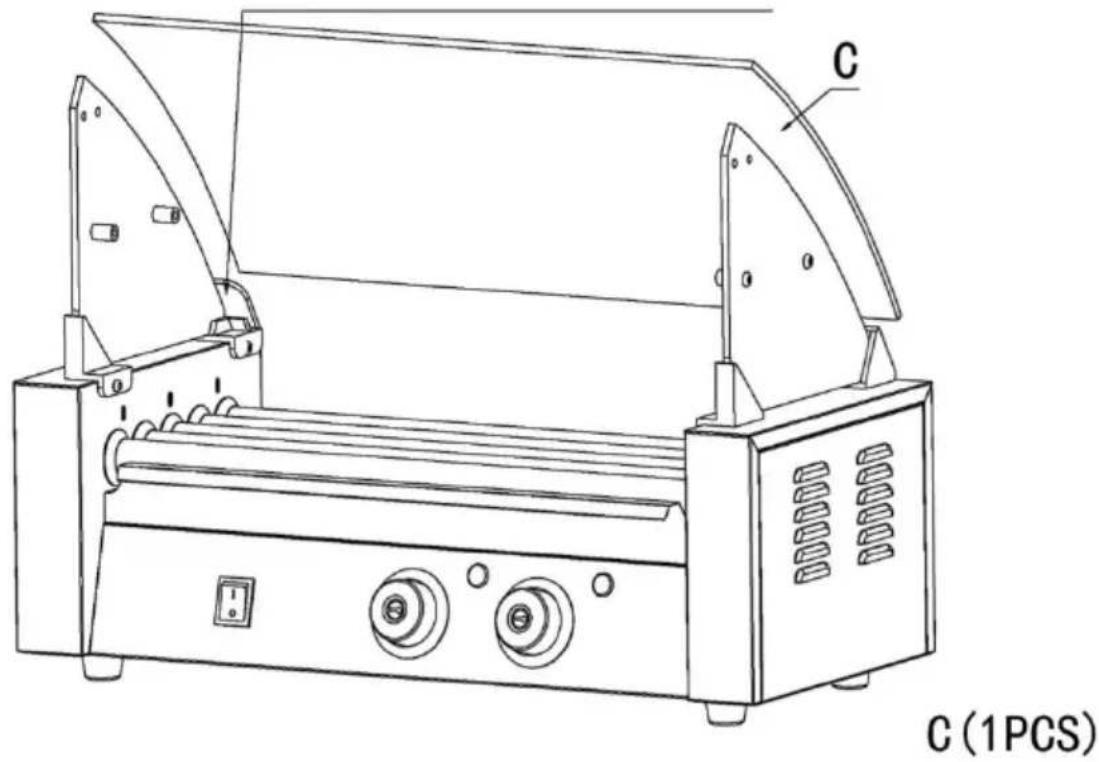
Step4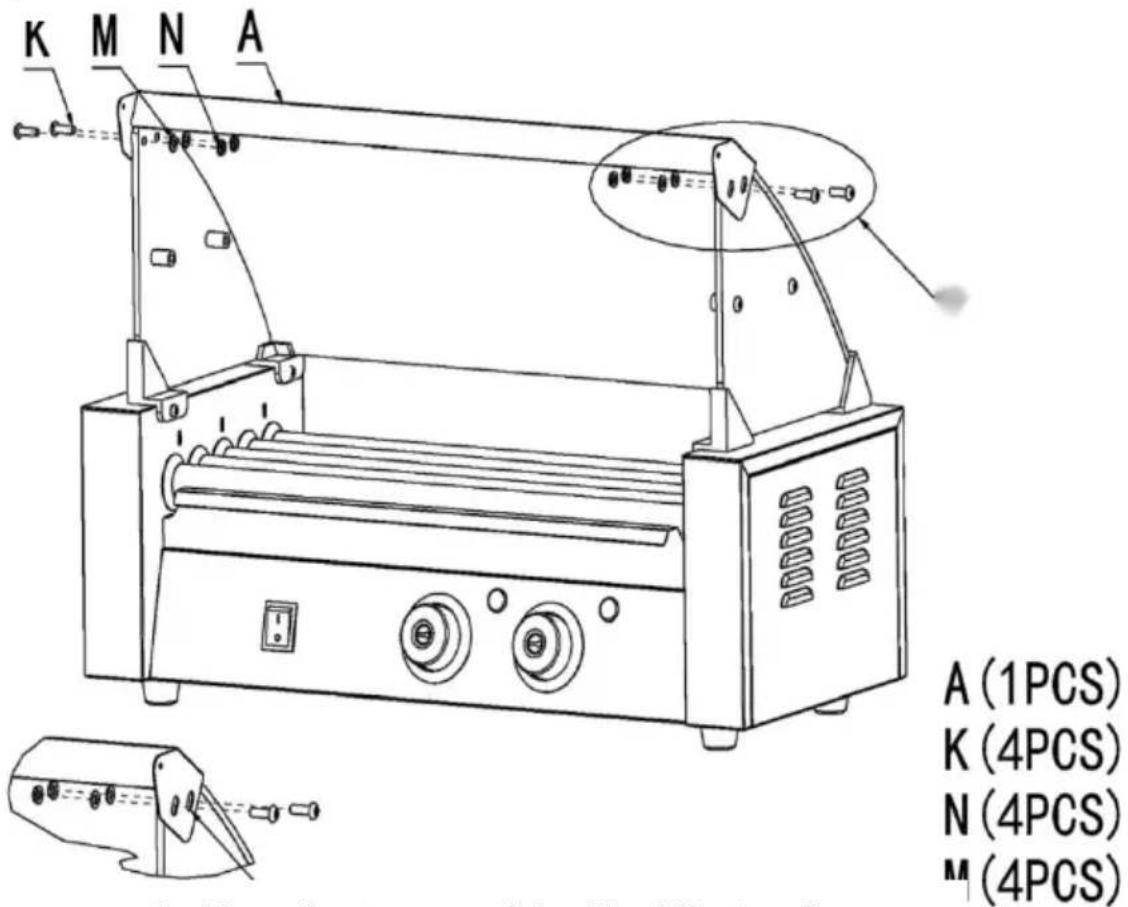
4 Use fasteners (K; N; M) to fix access (A) to the reserved openings in the glass order and tighten them.
Step5
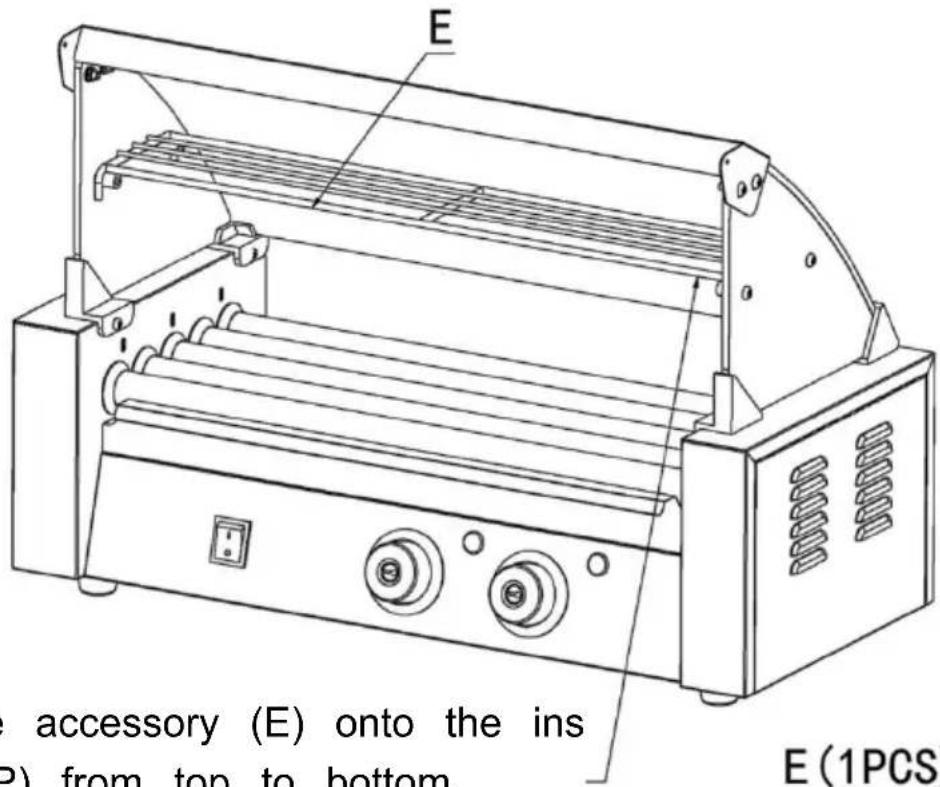
5 Place the accessory (E) onto the ins accessory (P) from top to bottom.
E (1PCS)
Step 6
OPERATING INSTRUCTIONS
CLEANING AND MAINTENANCE
C/O YH Consulting Limited Office 147,
Centurion House, London Road,
Staines-upon-Thames, Surrey, TW18 4AX
| EC | REP |
E-CrossStu GmbH
Mainzer Landstr.69,
60329 Frankfurt am Main.
VEVOR®
TOUGH TOOLS, HALF PRICE
www.vevor.com/support
VEVOR®
TOUGH TOOLS, HALF PRICE
MODEL: SC-5XD / SC-7XD / SC-11XD
MODEL: SC-11XD
NEED HELP? CONTACT US!
SAFETY WARNINGS AND PRECAUTIONS
- Power Switch
- Temperature Knob (Front)
- Heat Light (Front)
- Temperature Knob (Back)
- Heat Light (Back)
- Pan
- Fuse
- Protective Earthing
- Power Socket
EXPLODED VIEW
2.2 First put the left and right glass into the fasteners in sequence, and then tighten the
D (2 PCS)
L (4 PCS)
P (4 PCS)
Step 3: 3.1 Place the accessory (C) into the slot of the glass.
Step 4
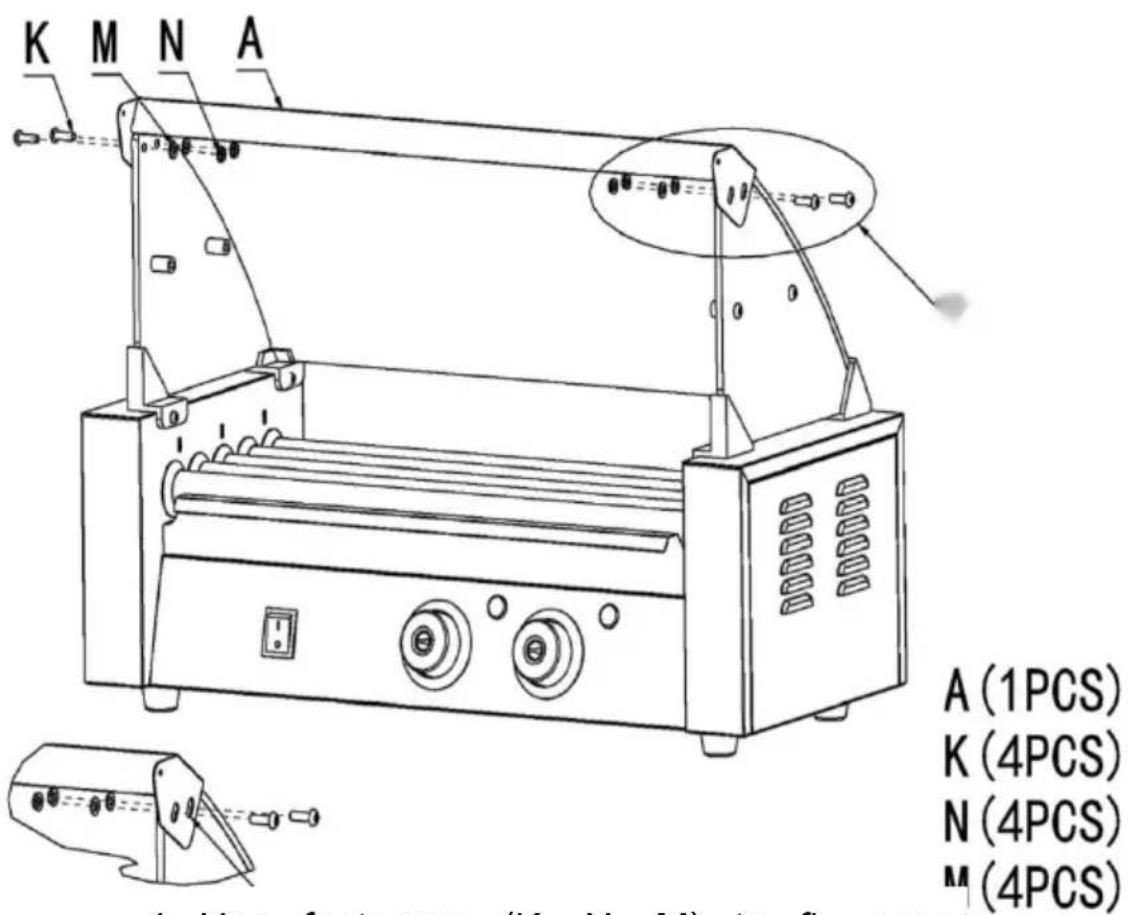
4. Use fasteners (K; N; M) to fix accessory (A) to the reserved openings in the glass order and tighten them.
Step 5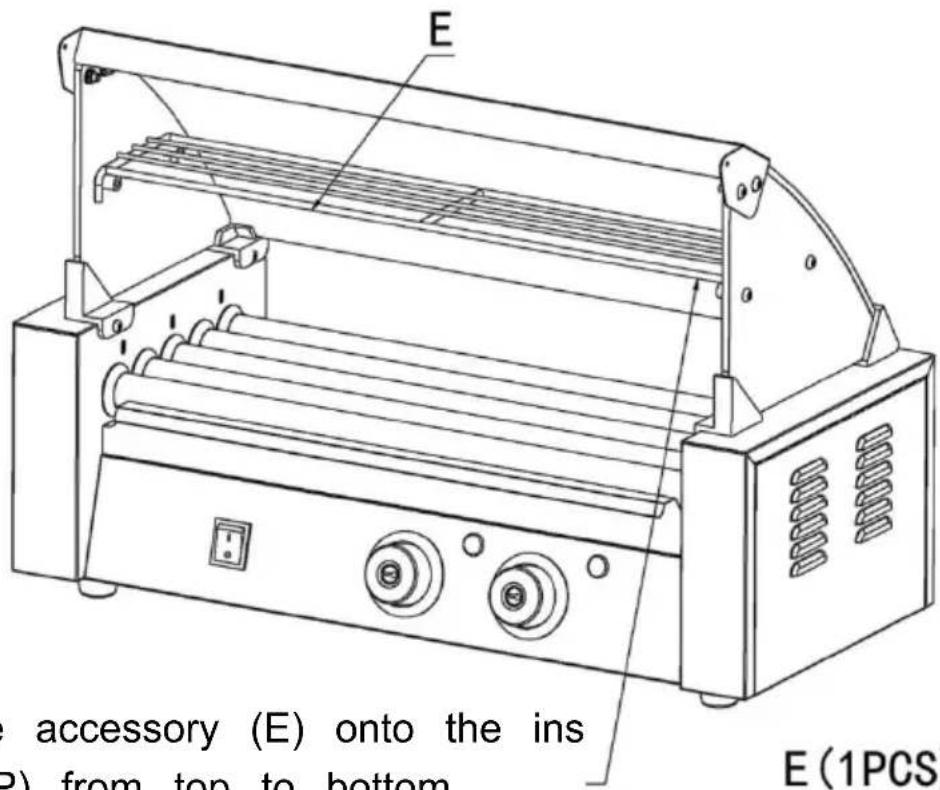
5. Place the accessory (E) onto the accessory (P) from top to bottom.
E (1 PCS)
Step 6
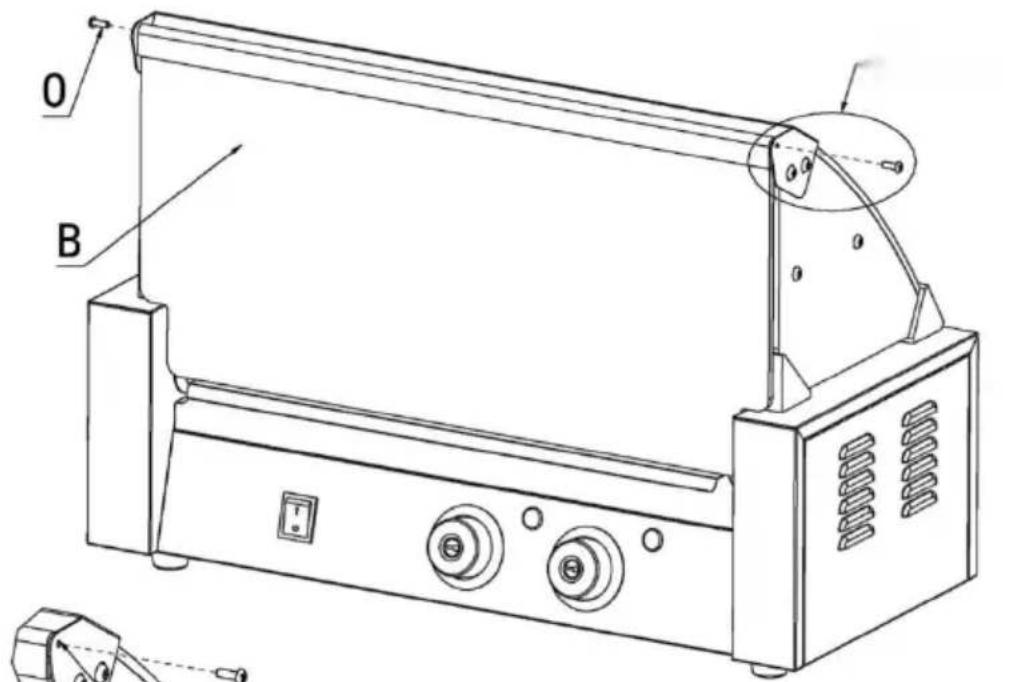
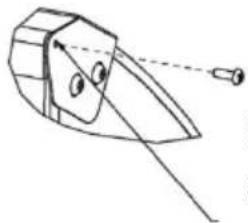
6. Use screws (O) to secure accessory (B) to the installed glass front fixed beam; complete installation.
OPERATING INSTRUCTIONS
CLEANING AND MAINTENANCE
C/O YH Consulting Limited Office 147,
Centurion House, London Road,
Staines-upon-Thames, Surrey, TW18 4AX
| EC | REP |
E-CrossStu GmbH
Mainzer Landstr.69,
60329 Frankfurt am Main.
VEVOR®
TOUGH TOOLS, HALF PRICE
www.vevor.com/support
VEVOR®
TOUGH TOOLS, HALF PRICE
MODEL: SC-5XD / SC-7XD / SC-11XD
MODEL: SC-5XD MODEL: SC-7XD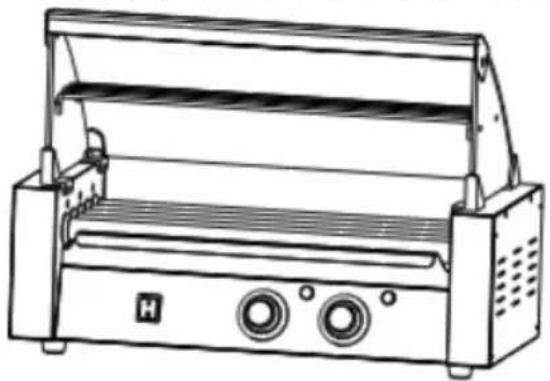
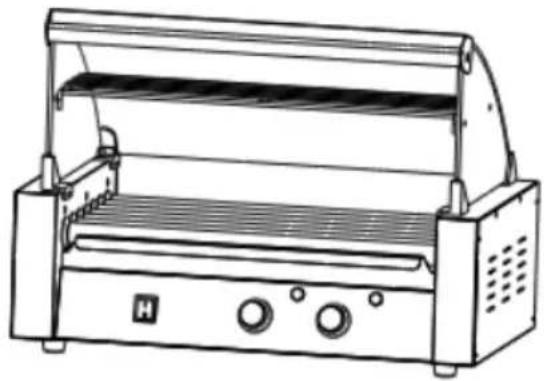
MODEL: SC-11XD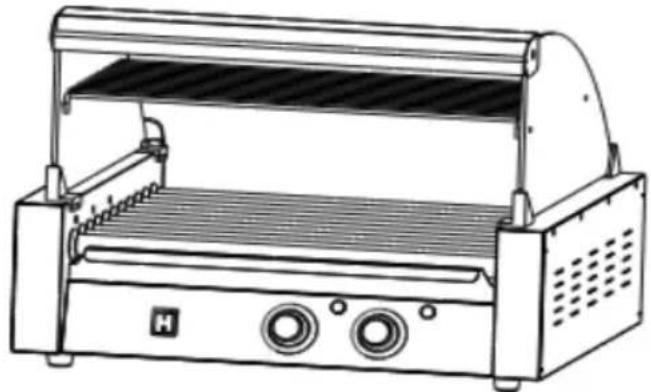
SAFETY WARNINGS AND PRECAUTIONS
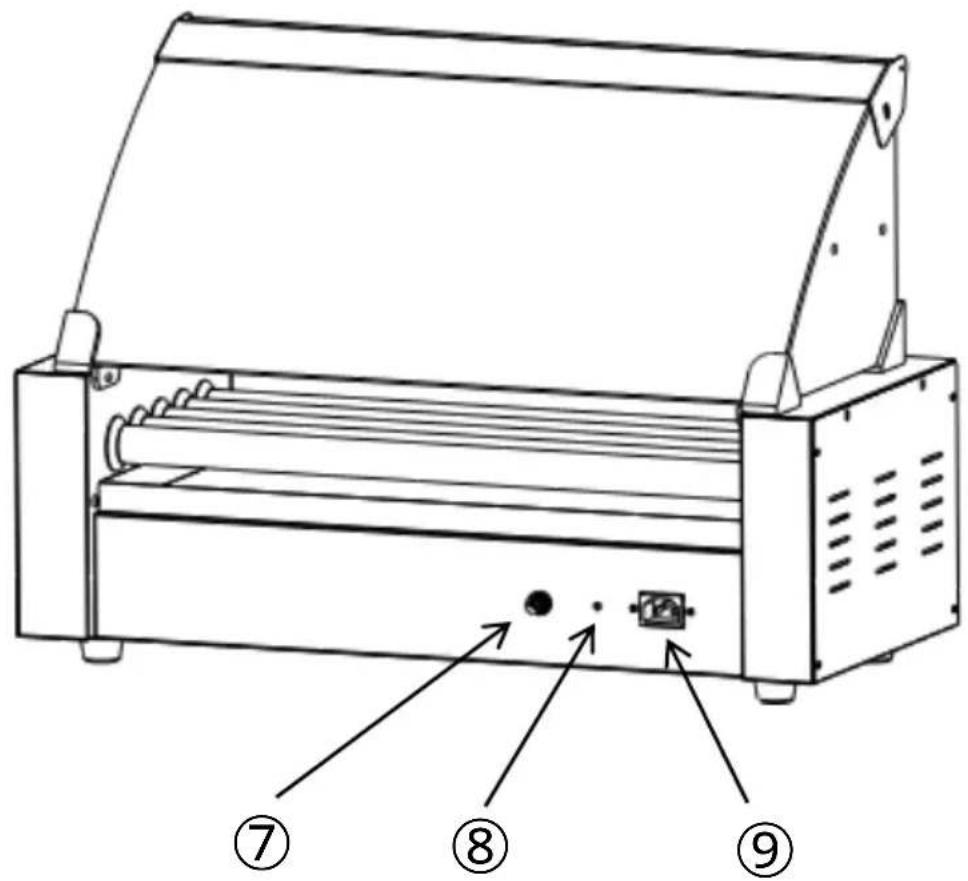
- Power Switch
- Temperature Knob (Front)
- Heat Light (Front)
- Temperature Knob (Back)
- Heat Light (Back)
- Pan
- Fuse
- Protective Earthing
- Power Socket
EXPLODED VIEW
2.2 First put the left and right glass into the fasteners in sequence, and then tighten the
D (2PCS)
L (4PCS)
P (4PCS)
Step3 3.1 Place the accessory (C) into the slot of the glass
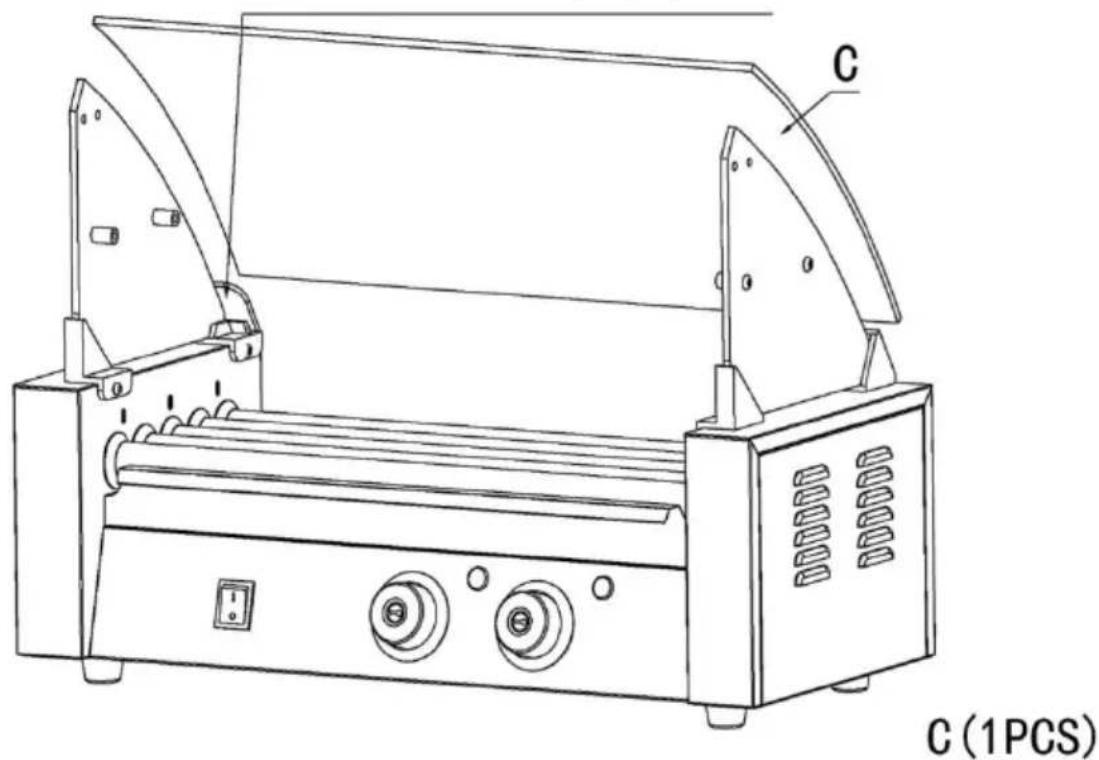
Step4
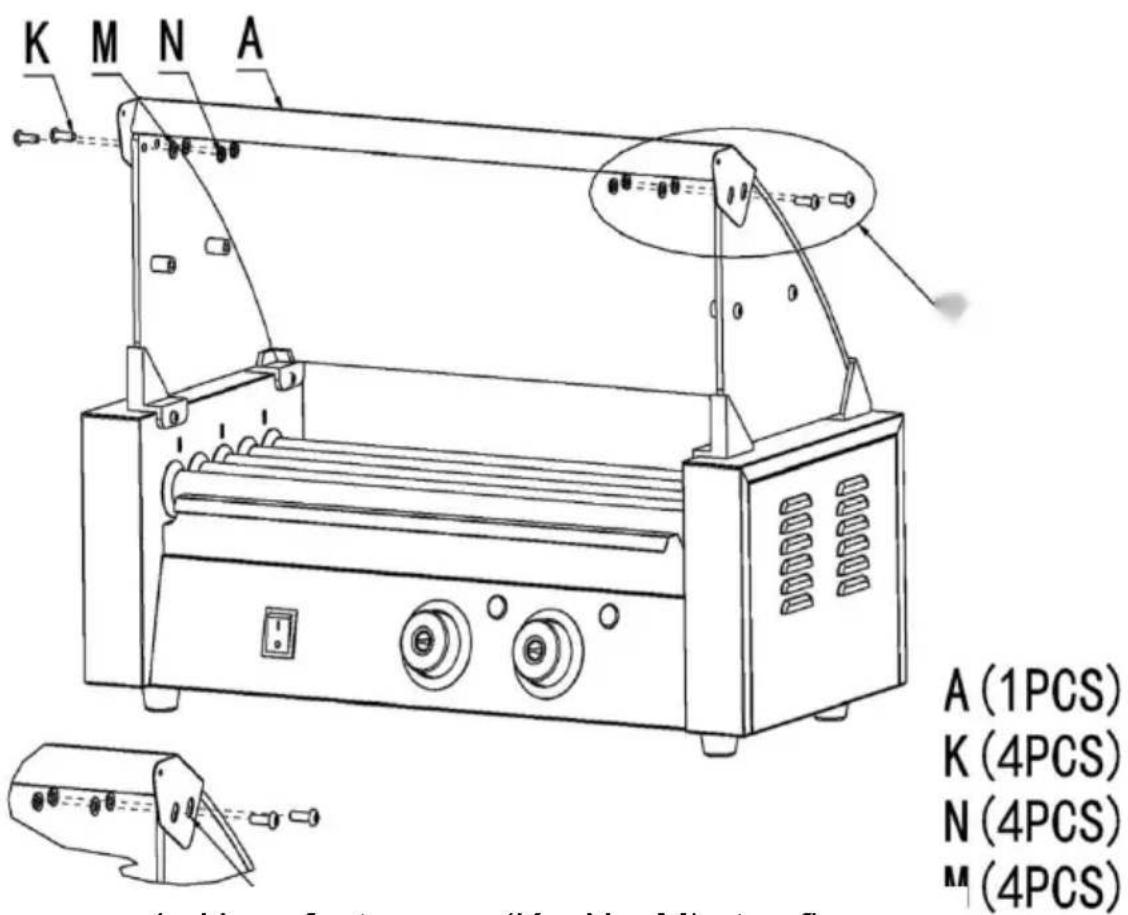
4 Use fasteners (K; N; M) to fix access (A) to the reserved openings in the glass order and tighten them.
Step 5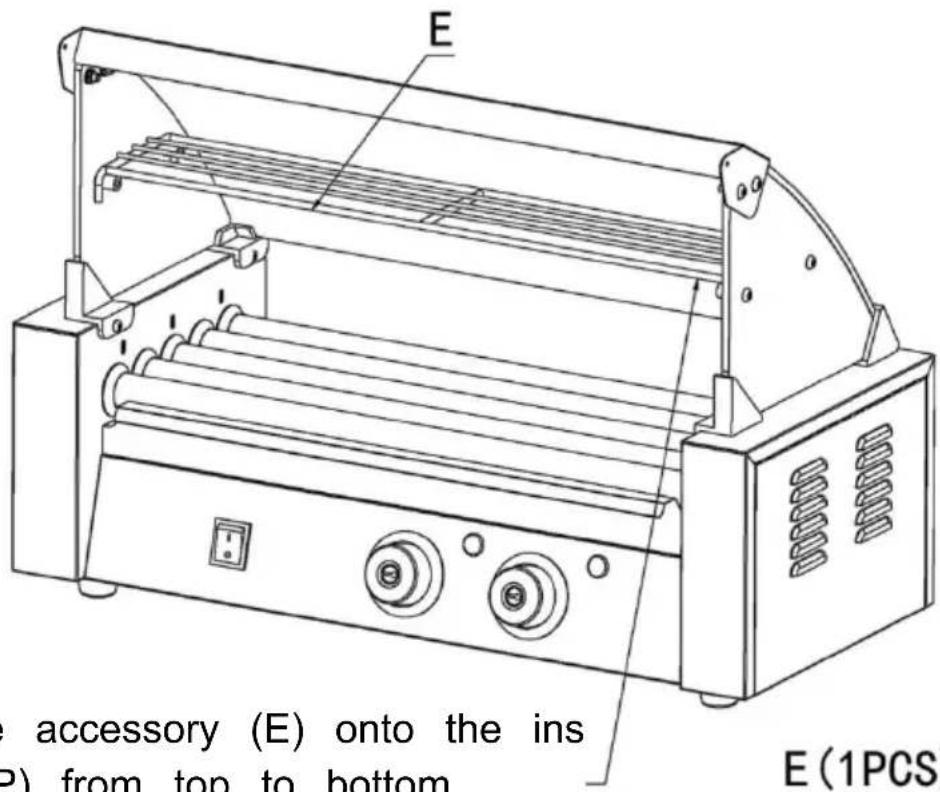
5 Place the accessory (E) onto the accessory (P) from top to bottom.
E (1 piece)
Step 6
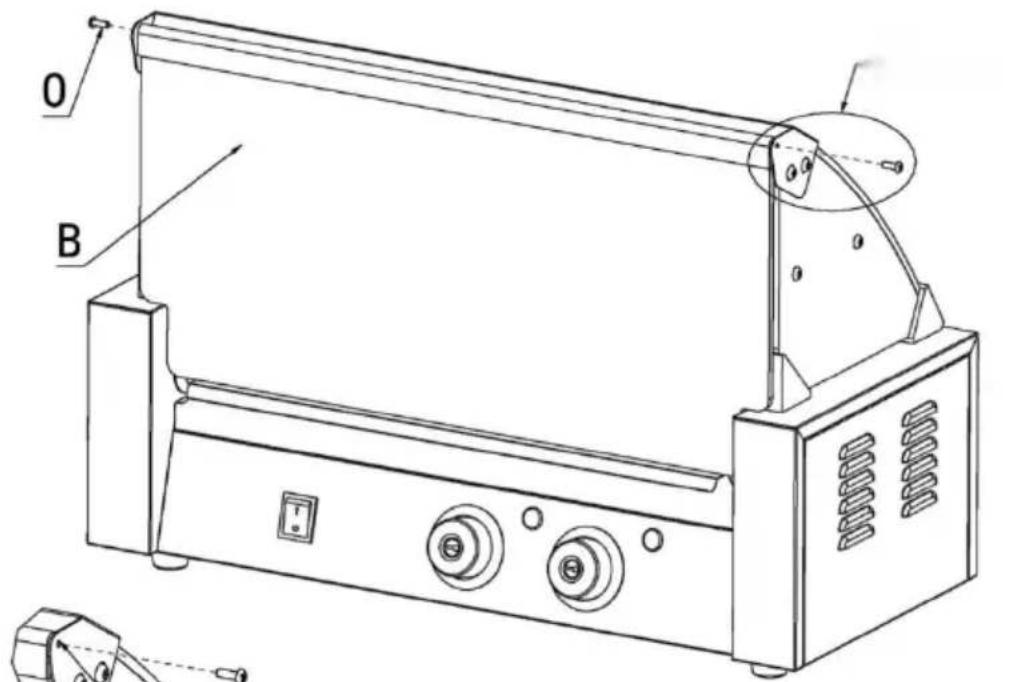
6 Use screws (O) to secure accessory (B) to the installed glass front fixed beam; complete installation.
B (1 piece)
O (2 pieces)
OPERATING INSTRUCTIONS
CLEANING AND MAINTENANCE
C/O YH Consulting Limited Office 147,
Centurion House, London Road,
Staines-upon-Thames, Surrey, TW18 4AX
| EC | REP |
E-CrossStu GmbH
Mainzer Landstr.69,
60329 Frankfurt am Main.
VEVOR®
TOUGH TOOLS, HALF PRICE
www.vevor.com/support
VEVOR®
TOUGH TOOLS, HALF PRICE
MODEL: SC-5XD / SC-7XD / SC-11XD
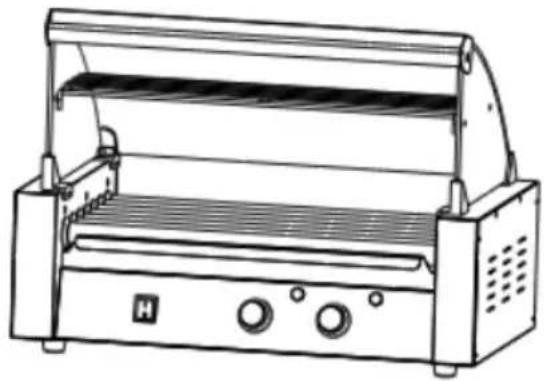
MODEL: SC-11XD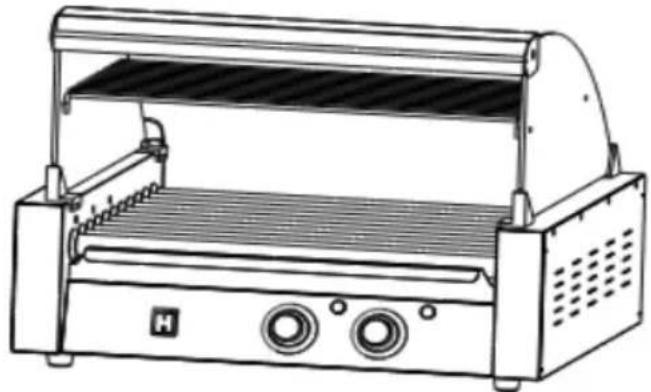
NEED HELP? CONTACT US!
SAFETY WARNINGS AND PRECAUTIONS
- Power Switch
- Temperature Knob (Front)
- Heat Light (Front)
- Temperature Knob (Back)
- Heat Light (Back)
- Pan
- Fuse
- Protective Earthing
- Power Socket
EXPLODED VIEW
2.2 First put the left and right glass into the fasteners in sequence, and then tighten the
D (2PCS)
L (4PCS)
P (4PCS)
Step3 3.1 Place the accessory (C) into the slot of the glass
Step4
4 Use fasteners (K; N; M) to fix accessory (A) to the reserved openings in the glass order and tighten them.
Step5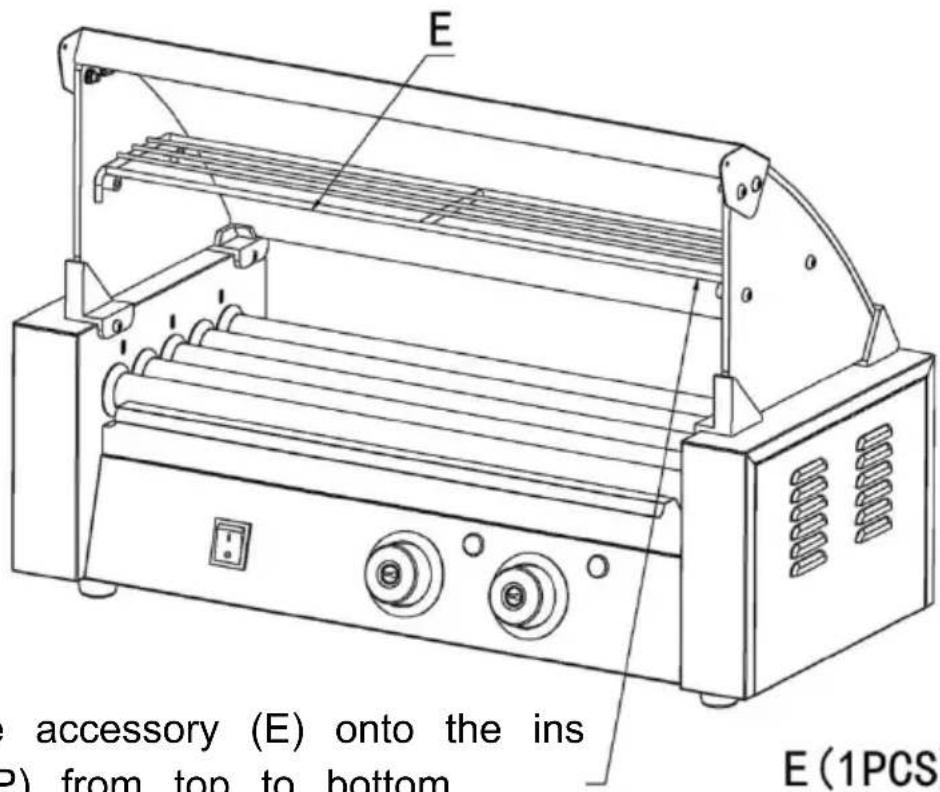
5 Place the accessory (E) onto the accessory (P) from top to bottom.
E (1PCS)
Step 6
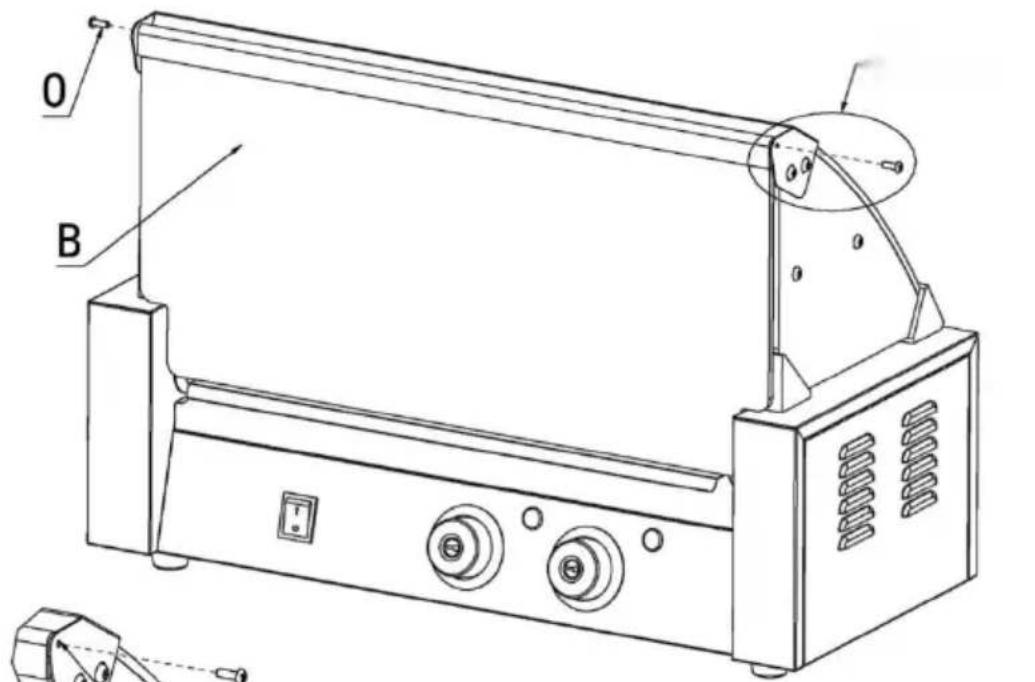
6 Use screws (O) to secure accessory (B) (1 piece)
to the installed glass front fixed beam;
complete the
installation.
OPERATING INSTRUCTIONS
CLEANING AND MAINTENANCE
Imported into AUS: SIHAO PTY LTD. 1 ROKEVA STREET EASTWOOD NSW 2122 Australia
C/O YH Consulting Limited Office 147,
Centurion House, London Road,
Staines-upon-Thames, Surrey, TW18 4AX
| EC | REP |
E-CrossStu GmbH
Mainzer Landstr.69,
60329 Frankfurt am Main.
VEVOR®
TOUGH TOOLS, HALF PRICE
www.vevor.com/support
- ROLLING HOT-DOG GRILL
- VEVOR®
- NEED HELP? CONTACT US
- TECHNICAL SUPPORT AND E-WARRANTY CERTIFICATE WWW.VEVOR.COM/SUPPORT
- SAFETY WARNINGS AND PRECAUTIONS
- PLEASE READ ALL THE INSTRUCTIONS BEFORE USING YOUR MACHINE
- ATTENTION
- WARM PROMPT
- PRODUCT COMPONENTS
- EXPLODED VIEW
- STEP
- OPERATING INSTRUCTIONS
- NOTE
- TIPS
- CLEANING AND MAINTENANCE
- STORAGE
- TOUGH TOOLS, HALF PRICE
- ROLLING HOT DOG GRILL
Brand : Vevor
Model : SC-5XD
Category : Hot dog maker