KENWOOD CR-ST120S - Radio

CR-ST120S - Radio KENWOOD - Free user manual and instructions

Find the device manual for free CR-ST120S KENWOOD in PDF.

📄 150 pages English EN Download 💬 AI Question 10 questions ⚙️ Specs
Notice KENWOOD CR-ST120S - page 32
View the manual : Français FR Deutsch DE English EN Italiano IT Nederlands NL
Pick your language and provide your email: we'll send you a specifically translated version.
Product Type Smart Radio (Internet Radio)
Brand Kenwood
Model CR-ST120S
Dimensions (W x H x D) 245 x 145 x 105 mm
Weight 1.7 kg
Power Supply AC adapter 12 V / 2 A (24 W), input 100-240 V~ 50/60 Hz
Standby Power Consumption 0.73 W (normal standby), 0.92 W (network standby)
Tuner DAB+ (Band III 174.928 - 239.200 MHz) and FM (87.5 - 108 MHz)
Network Connectivity WiFi IEEE 802.11 a/b/g/n (2.4 and 5 GHz), WPS, WEP, WPA, WPA2
Bluetooth Version 5.2, class 1, range approx. 10 m, A2DP and AVRCP profiles
Supported Audio Formats MP3, AAC/AAC+ (up to 48 kHz / 16 bit)
USB USB 1.1 Full-Speed compatible, FAT16/FAT32, max. 500 mA, MP3 (32-320 kbps)
Inputs / Outputs 1x Aux-In (3.5 mm), 1x Line-Out (3.5 mm), 1x USB (front)
Amplification 2 x 10 W RMS
Speakers Built-in, stereo
Main Functions Internet radio, Podcasts, Spotify Connect, Deezer, DAB+, FM, Bluetooth, USB, AUX, 2 alarms, Snooze, Sleep Timer, Equalizer (presets + custom), 20 presets (Internet/DAB/FM), 20 podcast presets, 10 Spotify presets, 8 Deezer presets
Display Color screen with adjustable backlight (3 levels)
Remote Control Yes (infrared, with AAA batteries)
Menu Languages Danish, German, English, Finnish, French, Italian, Dutch, Norwegian, Polish, Portuguese, Swedish, Spanish, Turkish
Maintenance Clean with a dry cloth; do not use liquid or abrasive products
Safety Do not expose to water; do not open the casing; use only the supplied adapter
Repairability Repair by a JVCKENWOOD authorized service center
Warranty 2 years (according to manufacturer's warranty conditions)

Frequently Asked Questions - CR-ST120S KENWOOD

How to connect the radio to the WiFi network?
Go to System > Network > Network Wizard. The radio lists available networks. Select yours, enter the password if necessary. You can also use WPS (button on the router) or manually configure the IP address.
How to set the alarm?
Press the ALARM button on the remote control or go to Menu > Alarm. You can configure two independent alarms: enable/disable, set time, choose source (Buzzer, Internet radio, DAB or FM), duration (15 to 120 min) and volume. Press OK to save.
Can I listen to DAB+ radio without an Internet connection?
Yes, the CR-ST120S has a built-in DAB+ tuner. Simply extend the telescopic antenna and select the DAB source in the main menu. An automatic channel scan is performed on first use.
How to use Spotify Connect with this radio?
Make sure your smartphone and the radio are on the same WiFi network. Select the Spotify source on the radio. Open the Spotify app on your phone, start playback and tap the Spotify Connect icon. Choose KENWOOD CR-ST120S from the list of available devices.
What to do if the sound is low or of poor quality?
Check the volume (+ and - on the remote or the rotary knob). Use the equalizer (EQ on the remote) to select a preset (Rock, Jazz, Classical, etc.) or create your own profile in System > Equalizer. Also ensure the audio source provides a good bitrate.
How to update the radio software?
Go to System > Software update. You can choose automatic or manual search (Search now). If an update is available, confirm with Yes. Do not turn off the power during installation.
The remote control is no longer responding, what to do?
Check that the AAA batteries are not dead. Replace them if necessary. Make sure there is no obstacle between the remote and the sensor on the radio. Keep the radio away from direct sunlight or fluorescent lamps that could interfere with the infrared sensor.
Can I plug headphones into this radio?
No, the radio does not have a headphone output. You can use the Line Out (3.5 mm jack) to connect the radio to an external amplifier or powered speakers. The volume setting on the radio does not affect this output.
How to clean the device safely?
Unplug the AC adapter. Use a soft, dry cloth to wipe the casing. Never use liquid products, aerosols or abrasive cleaners. Avoid water entering the openings.
How to reset the radio to factory settings?
Go to System > Factory settings. Select Yes to confirm. All personal data (network, presets, alarms) will be erased. This operation is recommended before giving away or reselling the device.

User questions about CR-ST120S KENWOOD

0 question about this device. Answer the ones you know or ask your own.

Ask a new question about this device

The email remains private: it is only used to notify you if someone responds to your question.

No questions yet. Be the first to ask one.

Download the instructions for your Radio in PDF format for free! Find your manual CR-ST120S - KENWOOD and take your electronic device back in hand. On this page are published all the documents necessary for the use of your device. CR-ST120S by KENWOOD.

USER MANUAL CR-ST120S KENWOOD

First Floor, Gleneagles, The Belfry, Colonial Way, Watford, Hertfordshire WD24 4WH UNITED KINGDOM

https://uk.jvckenwood.com/

NANSHAN DISTRICT, SHENZHEN, CHINA

www.hugebattery.com/

natural_image Front view of a modern kitchen appliance with a digital display and 'KENWOOD' branding (no text or symbols on the device itself)

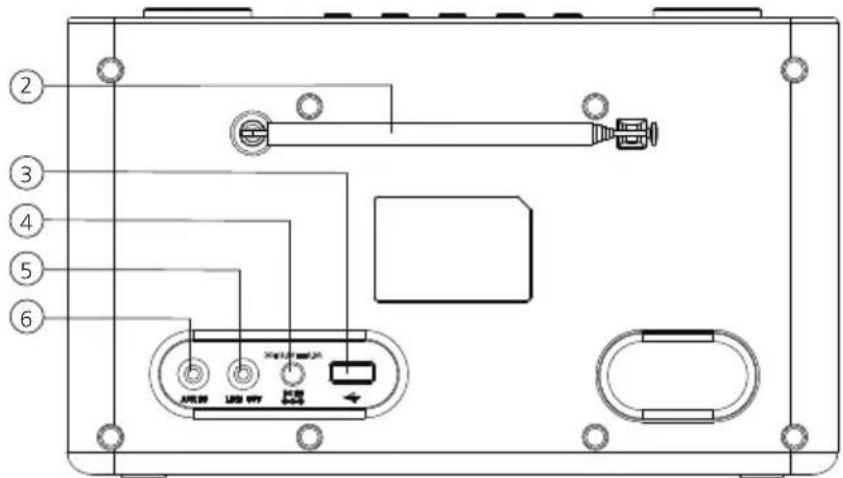
Rückseite
Diagram of a device rear panel with labeled ports and control buttons, including a central display unit.

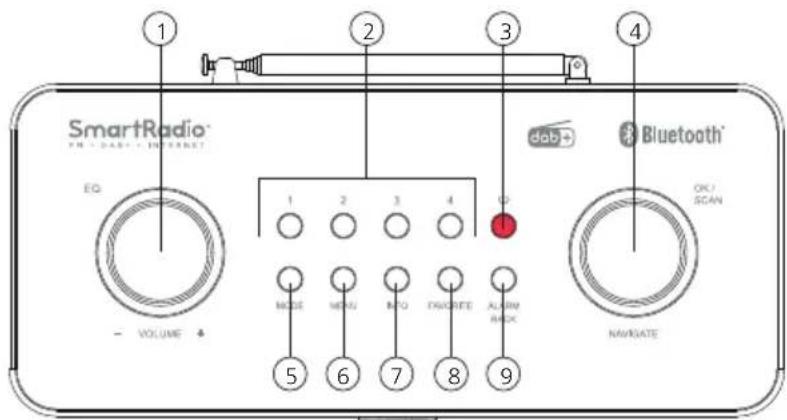
Draufsicht
SmartRadio® EQ VOLUME 1 2 3 4 MODE MENU INFO EXORATE ALARM BOX OK/SCAN NaVOATE dab Bluetooth®

Manual assistant
Powered by Anthropic
Waiting for your message
Product information

Brand : KENWOOD

Model : CR-ST120S

Category : Radio