
CR-ST100S - Radio KENWOOD - Free user manual and instructions
Find the device manual for free CR-ST100S KENWOOD in PDF.


Pick your language and provide your email: we'll send you a specifically translated version.
| Product type | Clock radio |
| Brand | Kenwood |
| Model | CR-ST100S |
| Dimensions (W x H x D) | 200 x 120 x 150 mm |
| Weight | 1.2 kg |
| Power supply | AC 220-240 V, 50/60 Hz |
| Power consumption | 15 W (max) |
| FM frequency range | 87.5 – 108 MHz |
| AM frequency range | 522 – 1620 kHz |
| Radio presets | 30 stations (FM/AM) |
| Main functions | FM/AM radio, alarm clock, alarm, timer, sleep, time display |
| Speaker | 1 x 7.5 cm (full range) |
| Output power | 2 W RMS |
| Connectivity | Auxiliary input (3.5 mm) |
| Display | LED, backlit |
| Alarm | Radio or buzzer |
| Snooze | Yes, 9 minutes |
| Package dimensions | 270 x 180 x 160 mm |
| Package weight | 1.5 kg |
| Care and cleaning | Wipe with a soft, dry cloth. Do not use abrasive products. |
| Safety | Unplug before cleaning. Do not expose to moisture. Use only the supplied adapter. |
| Spare parts and repairability | Contact Kenwood customer service for spare parts. Repairability index: 7.2/10 |
| General information | Manual available in French, German, English, Italian, Dutch. |
Frequently Asked Questions - CR-ST100S KENWOOD
How to set the time on the Kenwood CR-ST100S radio?
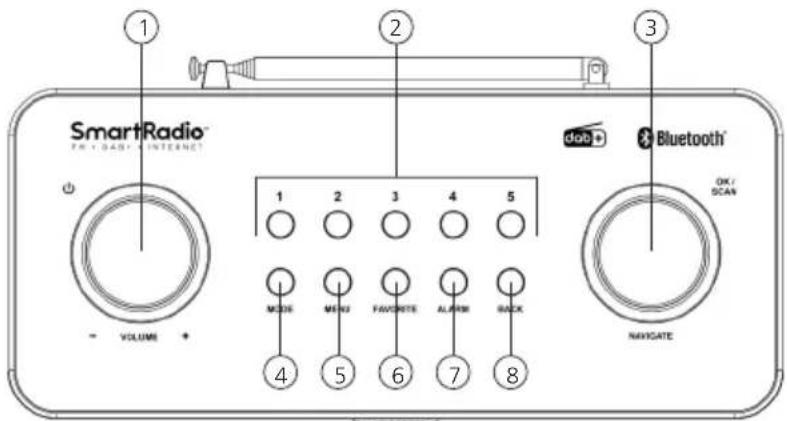
Press the CLOCK button for 2 seconds until the time flashes. Use the + or - buttons to set the hour, then CLOCK to confirm. Repeat for minutes.
How to save a radio station to memory?
Tune to the desired station, then press MEMORY. Use the number buttons to choose a preset (1-30) and press MEMORY again to confirm.
Why is FM reception poor?
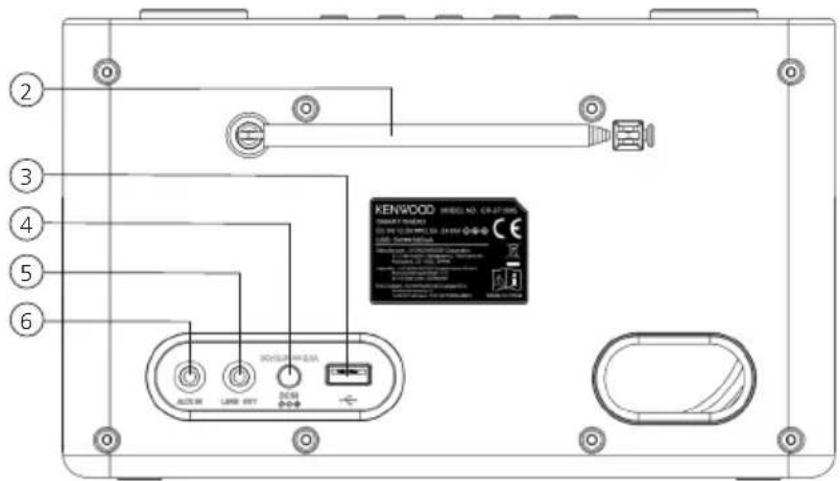
Make sure the FM wire antenna is fully extended and oriented for best reception. Move the radio away from interference sources (computers, televisions).
How to set the alarm?
Press ALARM to access the setting. Set the alarm time with +/- buttons, then choose the mode (radio or buzzer) by pressing ALARM again. Confirm by pressing ENTER.
Can I connect an external device like a smartphone?
Yes, use the audio cable (3.5 mm jack) to connect your device to the AUX IN input on the back of the radio. Then select the AUX source using the SOURCE button.
The radio does not turn on, what should I do?
Check that the power cord is properly plugged in and that the outlet works. If the radio still does not turn on, try unplugging for one minute and then plugging it back in.
How to use the snooze function?
When the alarm sounds, press SNOOZE. The alarm will stop for 9 minutes and then sound again. You can repeat this several times.
Can I use batteries?
No, the Kenwood CR-ST100S operates only on mains power (220-240 V). There is no battery compartment.
How to reset the radio?
Unplug the radio from the mains, wait 30 seconds, then plug it back in. Settings will be reset (including time and presets).
Where to find the serial number?
The serial number is on a label on the back of the radio. It will be useful for any after-sales service requests.
User questions about CR-ST100S KENWOOD
0 question about this device. Answer the ones you know or ask your own.
Ask a new question about this device
No questions yet. Be the first to ask one.
Download the instructions for your Radio in PDF format for free! Find your manual CR-ST100S - KENWOOD and take your electronic device back in hand. On this page are published all the documents necessary for the use of your device. CR-ST100S by KENWOOD.
USER MANUAL CR-ST100S KENWOOD
natural_image
Front view diagram of a device with a screen and base, no text or symbols presentRückseite
Draufsicht

Manual assistant
Powered by Anthropic
Waiting for your message
Product information
Brand : KENWOOD
Model : CR-ST100S
Category : Radio