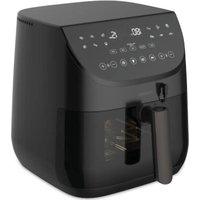
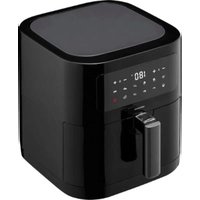
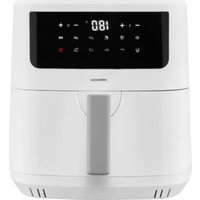
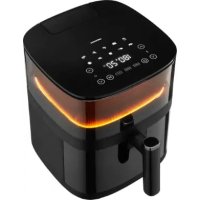
Life X20 XL - Deep fryer MEDION - Free user manual and instructions
Find the device manual for free Life X20 XL MEDION in PDF.


| Product type | Hot air fryer |
| Brand | Medion |
| Model | Life X20 XL |
| Dimensions (L × H × D) | Approx. 31 × 32.8 × 39.5 cm (with handle) |
| Weight | 5.66 kg |
| Power supply | 220-240 V~, 50/60 Hz, 1700 W |
| Total capacity | Approx. 6.6 liters |
| Temperature range | 35 °C to 230 °C (max 90 °C for dehydration) |
| Maximum timer | 60 minutes (12 hours for dehydration) |
| Automatic programs | Fries, nuggets, drumsticks, fish, steak, vegetables, rolls, dehydration, preheat, reheat |
| Grill programs | Beef, chicken, fish, lamb, pork with temperature sensor |
| Special functions | Preheat, reheat, keep warm, interior light, adjustable key sound |
| Basket material | Removable grid, basket with handle |
| Care and cleaning | Basket and grid dishwasher safe (hand washing recommended); do not immerse the appliance |
| Safety | Overheat protection, automatic shut-off, hot surface warning, child lock not mentioned |
| Spare parts | Available at medion.com/medionserviceshop |
| Protection class | I (grounded) |
| Standby power consumption | 0.5 W |
| General information | CE certified, RoHS compliant, recycling via WEEE |
Frequently Asked Questions - Life X20 XL MEDION
User questions about Life X20 XL MEDION
0 question about this device. Answer the ones you know or ask your own.
Ask a new question about this device
Download the instructions for your Deep fryer in PDF format for free! Find your manual Life X20 XL - MEDION and take your electronic device back in hand. On this page are published all the documents necessary for the use of your device. Life X20 XL by MEDION.
USER MANUAL Life X20 XL MEDION
natural_image
Black median air fryer with digital display and control buttons (no visible text or symbols on device body)Heißluftfritt euse mit Temperaturfühler Friteuse à air chaud avec sonde de température Heteluchtfriteuse met temperatuursensor Freidora de aire con sensor de temperatura Friggitrice ad aria calda con sonda di temperatura Air Fryer with temperature probe
Medion Life X20XL (MD 13060)
Inhaltsverzeichnis
DE
Abb. 1 - Frontseite
natural_image
Diagram of a hand holding a mechanical component with directional arrows indicating rotation or movement (no text or symbols present)Abb. 4 – Schütteln
natural_image
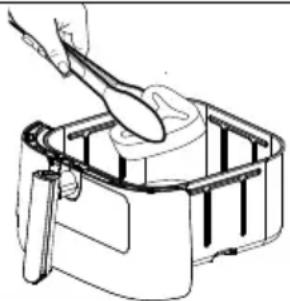
Line drawing of a hand using a spatula to lift a cylindrical object into a container (no text or symbols)Abb. 5 – Wenden
19. Impressum
Copyright 2025
natural_image
Illustration of a hand holding a mechanical component with directional arrows indicating rotation (no text or symbols)Fig. 4 - Secouer
natural_image
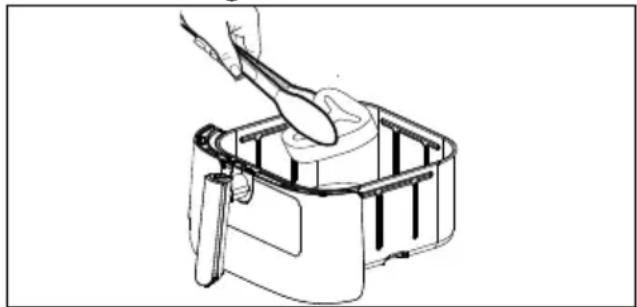
Line drawing of a hand using a spoon to handle a cylindrical object in a container (no text or symbols)Fig. 5 – Retourner
WAARSCHUWING! Brandgevaar!
Afb. 1 – Voorzijde
natural_image
Hand holding a mechanical component with directional arrows indicating rotation or movement (no text or symbols)Afb. 4 - Schudden
natural_image
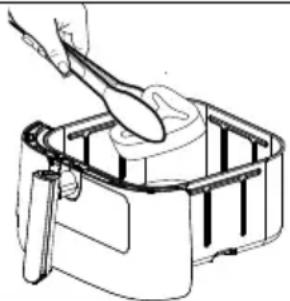
Line drawing of a hand using a spatula to lift a cylindrical object into a container (no text or symbols)Afb. 5 – Draaien
E03 Apparaat is oververhit
Voeding: 220–240 V ∼, 50/60 Hz
19. Colofon
Copyright 2025
Fig. 1 - Lado frontal
natural_image
Diagram of a hand holding a device with directional arrows indicating rotation or movement (no text or symbols present)Fig. 4 – Agitar
natural_image
Line drawing of a hand using a spoon to clean or prepare food in a container (no text or symbols)19. Aviso legal
Copyright 2025
Fig. 1 - Lato anteriore
natural_image
Diagram of a hand holding a device with directional arrows indicating rotation or movement (no text or symbols present)Fig. 4 – Agitare
natural_image
Line drawing of a hand using a spoon to clean or prepare food in a container (no text or symbols)Fig. 5 – Girare
1–7: plastiche/20–22: carta e cartone/80–98: materiali compositi
APPARECCHIO
19. Note legali
Copyright 2025
- Information about this user manual .... 134
1.1. Explanation of symbols ......134 FR
-
Proper use ....135
-
Safety instructions ....135
3.1. Initial operation and use 138
3.2. Cleaning 139ES
-
Package contents 139
-
Description of components ....139 IT
-
Preparing the air fryer....141
-
Information regarding preparation....141
-
Operating the air fryer 142
8.1. Setting an automatic programme 143
8.2. Individually setting cooking time and temperature 145
8.3. Preheating 145
8.4. Reheating food....145
8.5. Recommended settings....146
8.6. Interrupting a programme 147
8.7. Ending the programme....147
8.8. Switch the cooking compartment lighting on/off 147
8.9. Switching button tones on/off 147
-
Grill programmes with temperature sensor....147
-
Dehydrating 149
10.1. Preparing food....149
10.2. Dehydration settings 149
-
Cleaning the air fryer 150
-
Prolonged non-use and transport 151
-
Troubleshooting 151
13.1. Error messages 153
13.2. System self-test....154
13.3. System reset....154
-
Technical specifications.... 154
-
EU declaration of conformity.... 154
-
Spare parts 154
-
Disposal....155
-
Service information....155
-
Legal Notice....156
1. Information about this user manual

Thank you for choosing our product. We hope you enjoy using this appliance.
Please read the safety instructions and the user manual carefully before using the appliance for the first time. Note the warnings on the appliance and in the user manual.
Always keep the user manual close to hand. If you sell the appliance or give it away, please ensure that you also pass on this user manual. It is an essential component of the product.
1.1. Explanation of symbols
If a block of text is marked with one of the warning symbols listed below, the hazard described in that text must be avoided to prevent the potential consequences described there from occurring.

DANGER!
Warning: risk of fatal injury!

WARNING!
Warning: risk of possible fatal injury and/or serious irreversible injuries!

CAUTION!
Warning: risk of minor and/or moderate injuries!

NOTICE!
Follow these instructions to prevent damage to the appliance!

More detailed information about using the appliance

Follow the instructions in the user manual!

Warning: risk of electric shock!

Danger due to hot surfaces!

Symbol for alternating current (AC)
2. Proper use
This appliance is suitable for baking, cooking and grilling food such as vegetables, chips and potato wedges (home made or oven-ready), as well as for the preparation of fish, meat and poultry.
This appliance is designed for use in private households and similar household applications, such as:
- in kitchens for staff in retail outlets, offices and other commercial areas
• on agricultural estates - by customers in hotels, motels and other accommodation facilities
- in bed-and-breakfast establishments.
The appliance is not intended for commercial or industrial use.
Please note that we shall not be liable in cases of improper use:
▶ Do not modify the appliance without our consent and do not use any accessories that we have not approved or supplied.
▶ Comply with all the information in this user manual, especially the safety instructions. Any other use is considered improper and can cause personal injury or property damage.
3. Safety instructions DE IMPORTANT SAFETY IN- STRUCTIONS – READ FR CAREFULLY AND KEEP FOR NL FUTURE REFERENCE!

WARNING! Risk of injury!
Risk of injury due to improper use.
- Keep the appliance and its accessories out of the reach of children.
■ This appliance may be used by children over the age of 8 and by persons with reduced physical, sensory or mental abilities or by those with limited experience and/or knowledge, provided that they are supervised or have been instructed in the safe use of the appliance and have understood the associated risks.
■ Children must not be allowed to play with the appliance.
■ Do not allow children to clean the appliance or perform maintenance tasks on it unless they are aged 8 years or older and properly supervised.
■ Children younger than 8 should be kept away from the appliance and the connection cable.

WARNING!
Risk of electric shock/short circuit!
There is a risk of electric shock/short circuit from live parts.
■ Only connect the appliance to a properly installed and easily accessible socket that is close to where you are using the appliance. The local mains voltage must match the voltage stated in the technical specifications for the appliance.
■ The power socket must be easily accessible so that you can unplug the appliance from the mains quickly if necessary.
■ Always hold the plug to pull it out, and never pull the cable.
■ Do not allow the mains cable to come into contact with hot objects or surfaces (e.g. cooker hob).
■ Check the appliance and the mains cable for damage before using the appliance for the first time and after each use.
■ Do not use if the appliance or the mains cable is visibly damaged or if the appliance has been dropped.
■ Contact our Service Centre without delay if the appliance has been damaged during transport.
■ Do not, under any circumstances, make any unauthorised modifications to the appliance or try to open and/or repair a component yourself.
■ Never open the housing or slide objects into the ventilation slots.
■ If there is damage to the mains connection cable on this appliance, it must be replaced by the manufacturer, its customer service department or another suitably qualified person. This is necessary to avoid hazards.
■ Completely unwind the mains cable.
■ Do not kink or crush the mains cable.
■ Unplug the appliance from the socket if:
- when you are cleaning or maintaining the appliance
- when you are assembling or disassembling the appliance
– the appliance is damp or wet - if you are no longer using the appliance
- when the appliance is un-
attended
– during thunderstorms.
■ Do not immerse the appliance in water or other liquids, or hold it under running water or use it in damp environments, as this may result in an electric shock.
■ Do not allow the appliance to come into contact with water or other liquids. Keep the appliance, the mains cable and the mains plug away from wash basins, sinks or similar.
■ Do not place any objects DE filled with liquid (e.g. vases or drinks) on or near the appliance. FR
■ Do not operate the appliance on wet surfaces.
■ Never touch the appliance or the mains cable/mains plug with damp or wet hands.
■ Use the appliance indoors only.
■ Do not expose the appliance to extreme conditions. Avoid:
– high humidity or wet conditions
- extremely high or low temperatures
- direct sunlight
- naked flames.
i
No action is required by the user to switch the product between 50 and 60 Hz. The product is suitable for both 50 and 60 Hz.
3.1. Initial operation and use

WARNING!
Risk of fire!
Hot surfaces pose a risk of fire.
■ To avoid hazards resulting from an unintentional reset of the safety temperature limiter, the appliance must not be supplied via an external contactor such as a timer or connected to an electrical circuit that is regularly switched on and off via a device.
■ Place the appliance on a heat-resistant, dry and level surface.
■ Do not place the appliance on surfaces that can become hot (e.g. on hotplates, naked flames).
■ Ensure that the appliance does not come into contact with any other objects during use. Maintain a distance of at least 10 cm from other objects. Above all, do not set up the appliance near easily flammable materials (cur-tains, drapes, paper etc.).
■ Do not operate the appliance beneath wall cup-boards or other objects that could hinder the free upwards flow of steam.
■ Do not cover the appliance.
■ Do not place any objects on the appliance.
■ Never leave the appliance unattended while it is in use.
■ Never use the appliance near explosive or highly flammable steam.
■ Always place the hot frying basket on a heat-resistant surface.
■ Do not place foods wrapped in cling film, plastic wrap or other flammable materials into the frying basket.
■ If the appliance starts to give off dark smoke, pull the mains plug out of the socket immediately. Wait until the appliance has stopped smoking before removing the frying basket from the appliance.
In case of fire, disconnect the appliance from the power supply first. Do not use water to extinguish the fire. Use a fire blanket or a suitable fire extinguisher to extinguish the flames.

ATTENTION! Possible material damage!
Chemical additives in furniture coatings may corrode the material of the appliance feet and cause residue on the furniture surface.
■ Place the appliance on a heat-resistant surface if necessary.
3.2. Cleaning
■ Follow the additional instructions for cleaning and clean surfaces that come into contact with food as described in section "11. Cleaning the air fryer" on page 150.
4. Package contents

DANGER!
Risk of injury!
There is a risk of choking and suffocation due to swallowing or inhaling small parts or plastic wrap.
- Keep all packaging materials used (bag, pieces of polystyrene etc.) out of the reach of children.
■ Do not let children play with the packaging material.
Please check the package contents to ensure that all items are included and in perfect condition. If anything is missing or damaged, contact us within 14 days of purchase.
The following items are supplied with your product:
- Air fryer
- Short manual
5. Description of com- ponents
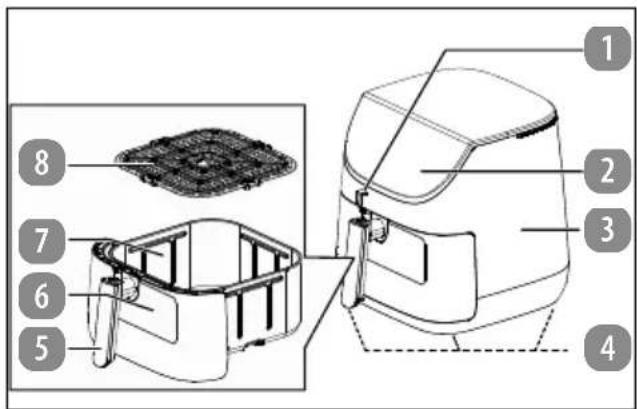
Fig. 1 - Front
- Temperature sensor
- Control elements/display panel
- Housing
- Feet (4x)
- Frying basket handle
- Viewing window
- Frying basket
- Grill grid
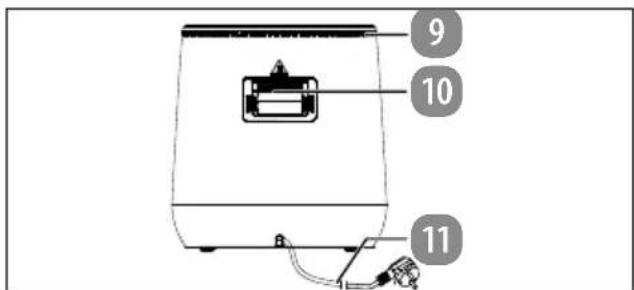
Fig. 2 - Back
- Ventilation slots
- Steam outlet
- Mains cable with mains plug
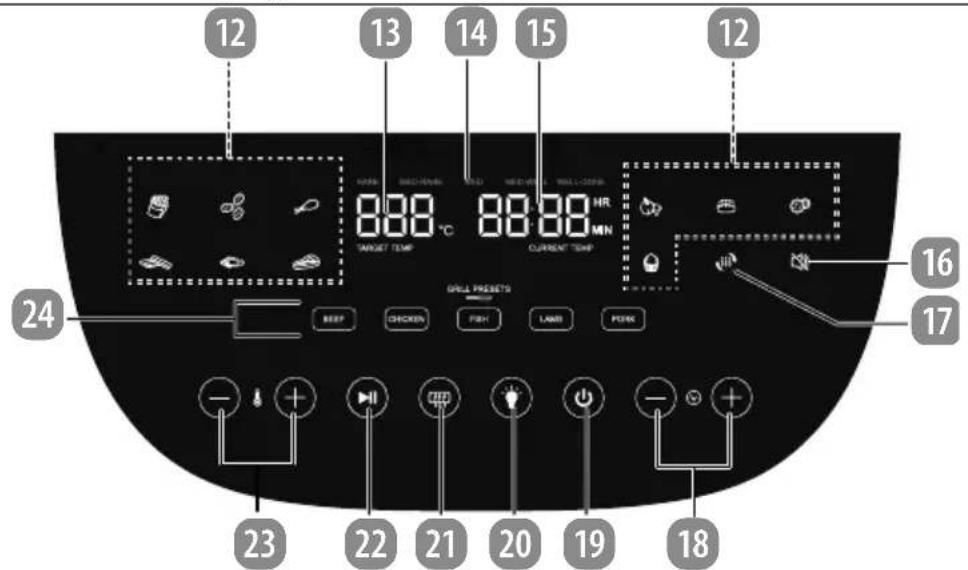
Fig. 3 - Control elements
- Buttons/operating lights for automatic programmes
- Display panel TARGET TEMP: Cooking temperature (set temperature)
- Grill programme cooking level display (RARE, MED-RARE, MED, MED-WELL, WELL-DONE)
- Cooking time display/grilling mode CURRENT TEMP: temperature reached
- 📋 button: Switch button tones off/on
-
🎨 button: Warming up
-
/ button: Extend cooking time /
/ button: Reduce cooking time - ⏻ button: Switch the appliance on/off
- ⏻ button: Switch the cooking compartment lighting on/off
- ☐ button: Preheating
- ▶ button: Start/pause programme
- / button: Increase temperature / / button: Reduce temperature
- Grill programme buttons/operating lights (BEEF, CHICKEN, FISH, LAMB, PORK)
6. Preparing the air fry-er
Remove all packaging, stickers and plastic wrap from the appliance.
Place the appliance on a heat-resistant, dry and level surface.
▶ Pull the frying basket [7] out of the appliance.
- Rinse the frying basket [7] and the grill grid [8] with hot water. Dry both parts thoroughly.
▶ Take hold of the grill grid [8] by the hand holes and place it in the frying basket [7] horizontally on the base of the pan.
▶ Wipe the housing using a damp cloth.
▶ Only connect the air fryer to a properly installed, earthed and fused socket. The local mains voltage must match the voltage stated in the technical specifications for the appliance.
The air fryer emits an acoustic signal; all buttons and symbols light up briefly. The on/off button ⏻ [19] lights up permanently.

When using the appliance for the first time, odour or smoke may develop due to residues caused during manufacturing. However, this is not dangerous and will quickly disappear.
■ Allow the appliance to run at its highest temperature setting for approx. 30 minutes before first use.
7. Information regard- DE ing preparation
▶ Distribute the food evenly in the frying basket [7]. Only fill the frying basket [7] up to 75%.
natural_image
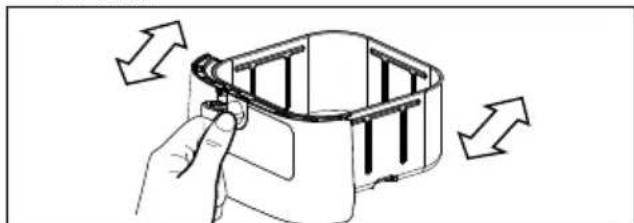
Line drawing of a hand holding a device with directional arrows indicating rotation or movement (no text or symbols)Fig. 4 - Shaking
natural_image
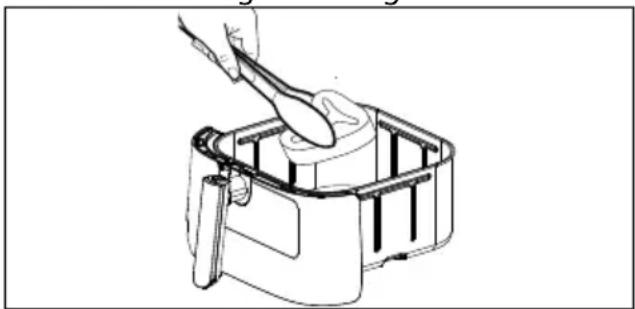
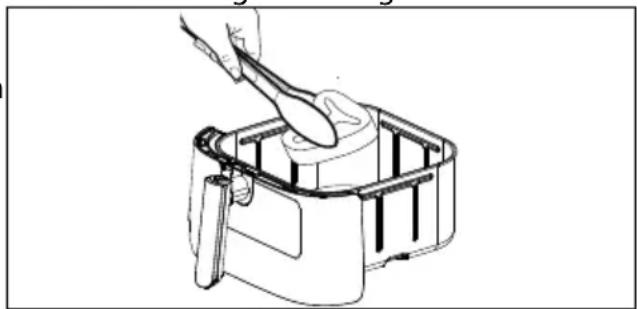
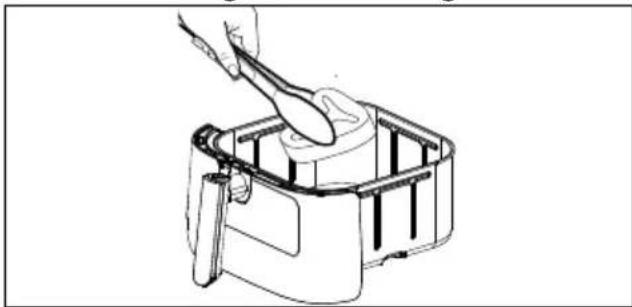
Line drawing of a hand using a spoon to handle a cylindrical object in a container (no text or symbols)Fig. 5 – Turning
To achieve optimal cooking results, shake the frying basket [7] (see Fig. 4) or turn the food (see Fig. 5) during the cooking time, especially when food is overlapping. Halfway through the cooking time, acoustic signals are emitted in selected programmes to remind you to redistribute the food.
▶ Check the food regularly throughout the cooking time to avoid burning the food.
▶ At the end of the cooking time, remove the food immediately to avoid burning the food.
When preparing fresh potatoes or fresh vegetables, use a small amount of cooking oil to make the food more crispy.
When preparing ready meals, observe the manufacturer's preparation instructions.
8. Operating the air fry- er

WARNING!
Risk of fire!
Cooking oil/fat and other liquids can catch fire as a result of the high temperatures of the hot air.
■ Do not fill the frying basket [7] with fat or oil as you would with a conventional fryer. Add only the appropriate small amount of cooking oil to the food, depending on the recipe.
■ Do not overfill the frying basket [7]. Ensure that the food does not touch the heating elements inside the appliance when the appliance is in use. Only fill the frying basket [7] up to 75%.

WARNING!
Risk of injury from hot surfaces!
The touchable surfaces on the appliance and accessories may become hot during operation.
As the ventilation grille on the side of the appliance becomes hot during operation, do not touch the ventilation grille when the appliance is in use in order to prevent burns.
■ During operation, touch the appliance only by the handle [5] and control elements!
■ Do not touch the frying chamber, the frying basket [7] or the heating elements.
■ Do not move the appliance while it is in use.
■ Do not move the appliance while it is hot, instead allow the appliance to cool down completely first.
■ Risk of burns from steam escaping when you remove the frying basket [7] during or after food preparation. Do not position your head directly above the appliance and do not touch the steam.
Place the frying basket [7] on a heat-resistant surface if necessary.
■ The frying basket [7] becomes extremely hot when the appliance is in use. Do not touch. Use oven gloves.
■ The heating elements remain hot for some time after the appliance is switched off. Make sure that no one touches the frying chamber.

CAUTION!
Risk to health!
Baking, cooking or grilling at excessive temperatures may produce substances harmful to health. Acrylamide, which forms in charred or burnt food residues, can cause cancer.
■ Remove burnt residues from the food.
■ Do not brown the food excessively when baking or grilling.
▶ Use the frying basket handle [5] to pull the frying basket [7] out of the appliance.
▶ Fill the frying basket [7] with the food. For more information on the recommended fill levels, see the tables in sections "8.1. Setting an automatic programme" on page 143 and "8.5. Recommended settings" on page 146.
▶ Hold the frying basket [7] firmly by the frying basket handle [5] and push it from the front so that it is completely inside the appliance until it clicks into place.
8.1. Setting an automatic programme
With the automatic programmes, you can cook certain foods at a preset temperature and cooking time. The following programmes are available:
| Pro-gramme | Recommended weight (g) | Time (min.) | °C | Redis-tribute signal | Note |
| Customised (no button) | 15 180 | X | ▶ After switching on, a standard cooking time and temperature is set, see “8.2. Individually setting cooking time and temperature” on page 145. | ||
 Preheating Preheating | 3 180 | X | ▶ Run the programme without food in the fry-ing basket. | ||
 Warming up Warming up | 5 170 | X | ▶ Load food in a single layer, not overlapping. | ||
 Chips Chips | 500 18 180 | ■ | |||
 Chicken nuggets Chicken nuggets | 12 200 | ■ | ▶ Load food in a single layer, not overlapping. | ||
 Chicken thighs Chicken thighs | 33 200 | ■ | ▶ Coat with cooking oil▶ Load food in a single layer, not overlapping. | ||
 Frozen fish fingers Frozen fish fingers | 14 200 | ■ | ▶ Load food in a single layer, not overlapping. | ||
 Grilled fish Grilled fish | 12 180 | ■ | ▶ Coat with cooking oil▶ Load food in a single layer, not overlapping. | ||
 Steak (medium) Steak (medium) | 7 230 | ■ | ▶ Fill the frying basket with a single layer. ▶ The preset time and temperature may vary depending on the meat temperature and quality. | ||
 Vegetables Vegetables | 500 20 170 | ■ | |||
 Baking bread rolls Baking bread rolls | 8 180 | ■ | ▶ Fill the frying basket with a single layer. | ||
 Dehydrating Dehydrating | 360 (6 hrs.) | 60 | X | ▶ Load food in a single layer, not overlapping | |
| [GOGS] Small cakes | 15 160 | X | ▶ Use baking tin ▶ Distribute the baking tins with some space between them. ▶ Do not tilt/flip |

After 5 minutes, if no buttons are pressed the appliance switches to standby mode.

The automatic programmes mentioned above are performed without a temperature sensor.
▶ Press the on/off button ⏻ [19] to switch on the appliance.
▶ Press the automatic programme button to set the automatic programme you require. The symbol for the selected programme lights up.
The temperature and cooking time of the selected programme are displayed.
▶ Start the cooking process by pressing the button [22].
During the cooking process, the symbol of the automatic programme, the temperature and remaining cooking time as well as the
[22], [16], [20] and / [18 or +
23] buttons are displayed.
Once the remaining time is less than 1 minute, the display changes to a 60-second countdown.

For optimal cooking results, shake the frying basket [7] or turn the food several times during the cooking time as needed.
Halfway through the cooking time, 3 acoustic signals are emitted and the display panel flashes three times to remind you to redistribute the food (except for programmes marked X in the table or the grill programmes).

You can adjust the cooking time and cooking temperature at any time later (see "8.2. Individually setting cooking time and temperature").

To achieve optimum cooking results, heat up the air fryer for at least 3 minutes beforehand using the ⬆ additional programme.

To prevent heat losses, it is recommended that you do not start cooking until the frying basket [7] is fully inserted.
▶ Press and hold the respective button/ [18 or 23] to speed up setting the cooking temperature and cooking time.
▶ Press thell [22] button to start cooking.
8.3. Preheating
▶ Press the [21] button to select the preheating programme. Run the programme without food in the frying basket [7].
After heating up, three acoustic signals are emitted.
▶ Press the button [22] to start the pre-heating process.
▶ After preheating, fill the frying basket [7] with food and then start the appropriate programme immediately.

If you set the cooking temperature and time after preheating, the temperature display or cooking time display flashes. The settings are saved after 5 seconds and the display lights up permanently.
8.2. Individually sett ing cook- ing time and temperature 8
▶ Press the on/off button [19] to switch on the air fryer.
The default setting is a cooking time of 15 minutes and a temperature of 180° C.
You can adapt an automatic programme or the default setting specified above to suit your recipe.
▶ Press the / or / [23] but- tons to increase/reduce the cooking temperature in 5°C increments.
Temperatures can be set from 35° C to 200° C – except with the STEAK (max. 230° C) and DEHYDRATION (max. 90° C) programmes.
▶ Press the / or [18] button to extend/reduce the cooking time in minute increments.
A maximum cooking time of 60 minutes can be set – except with the STEAK (max. 20 minutes) and DEHYDRATION (12 hours) programmes.
8.4. Reheating food
▶ Place cooked but cooled food in the frying basket [7].
▶ Press the [17] button.
Refer to the table above for the default setting. A heating temperature of 35-200° C and a heating time of 1-60 minutes can be set.
▶ Press the / or buttons to adjust the cooking time.
▶ Press the / or / buttons to adjust the temperature.
▶ Press the [22] button to start the process of keeping the food warm.
8.5. Recommended sett ings
| Food | Optimum weight (g)Maximum weight (g) | Time (min.) | Temp. (°C) | Note |
| Thin-cut frozen chips | 300 | 18 180 | ||
| 500 | ||||
| Small cakes | 120 | 15 160 | ▸ Use baking tin*▸ Distribute the baking tins with some space between them.▸ Do not tilt/flip | |
| 200 | ||||
| Chicken thighs | 200 | 33 200 | ▸ Coat with cooking oil▸ Load food in a single layer, not overlapping. | |
| 400 | ||||
| Vegetables (e.g.peppers, mushrooms, cour-gettes, potatoes) | 400 | 20 170 | ▸ Add 2 tbsp cooking oil▸ Prepare 2.5 cm pieces▸ Cut pieces of potato into smaller pieces | |
| 600 |
* Baking tins for baking in the air fryer are not included in the package contents.

The quantities or numbers of pieces in the table represent the optimum and maximum quantity.
Refer to the table for the corresponding settings for the respective food. The settings may vary by volume, by the food itself or by your own wishes and taste. Also observe the preparation instructions from the respective food manufacturers.
Larger quantities of food usually require a slightly longer cooking time, smaller quantities, a slightly shorter cooking time.

■ For optimal cooking results, shake the frying basket [7] or turn the food several times during the cooking time as needed.

If you have not preheated the air fryer, leave the food to cook for an extra 3 minutes.

You can remove the frying basket [7] from the appliance at any time during preparation to avoid burning the food.
Pulling out the frying basket [7] frequently results in heat loss. This can make it necessary to extend the cooking time.
It is recommended that the frying basket is pulled out briefly a maximum of twice for every 30 minutes of cooking time.
8.6. Interrupting a pro- gramme
You can interrupt the cooking process to check the cooking progress, change/adjust the programme or redistribute the food.
▶ Press the [22] button and/or pull out the frying basket [7] to interrupt the cooking process.
An acoustic signal is emitted. If the frying basket is not in the appliance, “- - - - - - - - - - - -” is displayed in the display panel.
▶ Check the cooking progress or redistribute the food.
Place the frying basket [7] fully back into the appliance.
▶ Press thell [22] button again to continue the cooking process.
The programme will be continued.

- If the programme is interrupted for longer than 30 minutes by pressing the [22] button or by pulling out the frying basket [7], the appliance switches to standby mode.
8.7. Ending the programme
At the end of the cooking time, the heating element switches off and acoustic signals sound. The fan will continue to run for a few seconds. The appliance switches to standby mode: The control panel goes out; the on/off button ⏻ [19] remains illuminated.
▶ If you want to cancel the cooking process completely, press the on/off button ⏻ [19] until the appliance switches to standby mode.
▶ Pull the mains plug [11] out of the socket.
▶ Use the frying basket handle [5] to pull the frying basket [7] out of the appliance. Place the frying basket [7] on a heat-resistant surface.
▶ Remove the food from the frying basket [7].
8.8. Switch the cooking compartment lighting on/off
▶ Press the button to switch on the lighting in the cooking compartment.
The lighting switches off automatically after 30 seconds.
▶ Press the button again to switch off the lighting in the cooking compartment.
8.9. Switching butt on tones on/off
The button tones are switched on by default.
▶ Press the button to mute the button tones.
▶ Press the button again to switch the button tones back on.
9. Grill programmes with temperature sensor
You can use the temperature sensor to monitor the cooking levels when preparing meat, poultry and fish. The cooking levels reached are shown in the display panel during the grilling process:
| Cooking level | Meaning |
| rare Bloody | |
| med-rare | Slightly bloody |
| med | Medium |
| med-well | Almost cooked through |
| well-done | Cooked through |
▶ Insert the temperature sensor into the connection socket on the front of the appliance.

If the temperature sensor is not plugged in, the grill programmes are not available and the display panel shows No Plug.
Place the food to be grilled in the frying basket. Insert the pointed end of the temperature sensor into the food so that the tip is approximately in the centre of the piece of food.
▶ Guide the cable through the cable ducting on the frying basket and push the frying basket fully into the appliance.
▶ Press the BEEF, CHICKEN, FISH, LAMB or PORK button to select a grill programme.
▶ Press the √ or [18] button to select the cooking level.
| Grill pro-gramme | Cooking level monitoring (in-ternal temper-ature) | Cook-ing level |
| BeefBEEF | RARE (50°C) 1 | |
| MED-RARE(55°C) | 2 | |
| MED (65°C) 3 | ||
| MED-WELL(70°C) | 4 | |
| WELL-DONE(80°C) | 5 | |
| ChickenCHICKEN | WELL-DONE(85°C) | 5 |
| FishFISH | WELL-DONE(60°C) | 5 |
| Grill pro-gramme | Cooking level monitoring (in-ternal temper-ature) | Cook-ing level |
| Lamb LAMB | MED-RARE (55°C) | 3 |
| MED (60°C) 4 | ||
| WELL-DONE (70°C) | 5 | |
| Pork PORK | WELL-DONE (75°C) | 5 |
▶ Press the ▶ [22] button to start the grilling process.
During the cooking process, the set temperature is shown on the left-hand side of the display panel [13] and the temperature reached so far is shown on the right-hand side [15].
The cooking level display [14] shows the current cooking progress of the meat.

For optimum cooking results, turn the food as required during the cooking time.
When the set cooking level is reached, the grilling process switches off automatically.
If you want to stop the grilling process completely, press the on/off button ⏻ [19] until the appliance switches to stand-by mode.
▶ Pull the mains plug [11] out of the socket.
▶ Use the frying basket handle [5] to pull the frying basket [7] out of the appliance. Place the frying basket [7] on a heat-resistant surface.
Remove the grilled food from the frying basket [7].
10. Dehydrating
With dehydration, fruits and vegetables are dried at relatively low temperatures to make them suitable for storing.
10.1. Preparing food
▶ Only use fresh foods.
▶ Ensure that fruits and vegetables are ripe, but not overripe, and that they are not bruised or rotten. If necessary, generously cut off the rotten parts.
Clean the food thoroughly before the dehydration process. Observe good kitchen hygiene and always work with clean hands and utensils.
▶ Cut the food into uniformly sized pieces to ensure even dehydration.
▶ Use the same food where possible, because dehydration times may vary.
▶ Take into account that dehydration causes the food to shrink. As such, do not cut the food into pieces that are too small.
▶ Dehydrate the food immediately after its preparation.
▶ Fill the fryer pans only in one layer to ensure uniform air flow.
10.2. Dehydration settings
The dehydration periods in the following table are for guidance only. The actual dehydration period may vary depending on the size, quality of the pieces and the amount used.
DE
FR
NL
ES
IT
EN
| Dehydrated food | Preparation (guide values) | Dehydration temperature | Dehydration period in minutes (guide values) |
| Fruit | |||
| Apple Slices: 3 mm 60°C 420–480 | |||
| Banana Slices: 3 mm 60°C 480–600 | |||
| Pineapple Slices: 10 mm 60°C 360–480 | |||
| Strawberry Halved 60°C 360–480 | |||
| Vegetables | |||
| Aubergine | Slices: 3 mm 60°C 360–480 | ||
| Tomatoes | Slices: 3 mm 60°C 360–480 | ||
| Mushroom Halved 60°C 360–480 | |||
| Meat/fish | |||
| Beef Chicken Fish | Thin slices (approx. 6 mm, marinated) | 70°C | 300–420 |
| Herbs | |||
| Fresh herbs | Washed, patted dry, de-stemmed | 60°C | 240 |
The quality of the dehydrated food depends on the dehydration period and the type of food.
Herbs: fragile
Fruit: usually soft, flexible to crisp
Vegetables: flexible to fragile
The default setting is a dehydration time of 6 hours and a temperature of 60° C.
▶ Select the button [12] to select the dehydration automatic programme. Set the dehydration period/dehydration temperature manually as required.
▶ Use the / or / buttons [23]
to set the desired dehydration temperature. The dehydration temperature is shown in the display panel [13].
A dehydration temperature of 40–90°C can be set.
▶ Use the / or [18] button to
set the desired dehydration period. The dehydration time is shown in the display panel [15].

During the dehydration process, the dehydration time is displayed in the XX:XX HR format.
It is possible to set a maximum dehydration time of 12 hours.
▶ Start the dehydrating process by pressing the ▶ button [22].
At the end of the cooking time, the heating element switches off and acoustic signals sound.
To cancel the dehydration process prematurely, press the on/off button ⏻ [19] until the appliance switches to standby mode.
▶ Pull the mains plug [11] out of the socket.
▶ Use the handle to pull the frying basket from the appliance. Place it on a heat-resistant surface.
Remove the dehydrated food from the frying basket using a suitable tool.
11. Cleaning the air fryer

WARNING!
Risk of electric shock!
There is a risk of electric shock due to live parts.
■ Always disconnect the mains plug [11] before cleaning.
■ Never immerse the appliance in water or other liquids. If the appliance does fall into liquid, under no circumstances should you attempt to touch it. First, unplug the mains plug [11].
Do not operate the appliance again under any circumstances. Have the appliance checked by the manufacturer, its customer services department or a similarly qualified person.

WARNING!
Risk of injury!
Hot surfaces pose a risk of injury from burning.
■ Allow the appliance to cool down for at least 30 minutes before cleaning. Remove the frying basket [7] to enable the appliance to cool down more quickly. Place the frying basket [7] on a heat-resistant surface if necessary.

NOTICE!
Possibility of damage to the appliance!
There is a risk of damage to the appliance if it is used improperly.
■ Never use acidic, abrasive or granular, acetic-acid-, soda- or solvent-based cleaning agents. These may damage the appliance surfaces or the printing on it.
■ Do not clean the air fryer in the dishwasher.
▶ Pull the frying basket [7] out of the appliance. Hold the grill grid [8] by the handle and pull it out of the frying basket [7].
Clean the frying basket [7] and grill grid [8] using a sponge and a small amount of mild soap solution. Rinse all the parts carefully with clean water and then dry them carefully.
The frying basket [7] and the grill grid [8] are dishwasher safe. However, we recommend rinsing by hand as described above for more gentle cleaning.
▶ Clean the frying chamber using warm water and a damp sponge.
▶ If the heating elements are dirty, use a washing-up brush. Carefully remove the food residue.
▶ A soft, slightly damp cloth is suitable for cleaning the control panel [2] and outer surfaces of the appliance.
▶ Pull the temperature sensor [1] out of the connection socket. Wipe it with a soft, damp cloth and mild soap solution. Allow it to dry completely.
12. Prolonged non-use and transport
If you are not going to use the appliance for an extended period of time, unplug the mains plug [11], clean the appliance and store the appliance in a dry, dust-free and frost-free environment that is not exposed to direct sunlight.
▶ To avoid damaging the product during transport, we recommend that you use the original packaging.
13. Troubleshooting
The product left our warehouse in perfect condition. If you do, however, discover a problem, see if you can solve it by using the solutions offered in the following table. If you do not succeed, contact our customer service team.
| Problem Possible cause Troubleshooting | ||
| The appliance is not working. | The mains plug [11] is not plugged into a socket. | • Only connect the appliance to a properly installed power socket. |
| Incomplete entry. • Start | the cooking process by pressing the ➕ button [22] (see section “8. Operating the air fryer”). | |
| The food is not cooked. | The fill level is too high. | • Only fill the frying basket [7] up to 75%. |
| The cooking temperature is too low. | • Press the ➕ button [23] to increase the cooking temperature. | |
| The cooking time is too short. | • Press the ➕ button [18] again to extend the cooking time. | |
| The food is not evenly cooked. | The pieces of food are too close together. | • Many foods need to be shaken/ turned several times during the cooking time. |
| • Fill the frying basket [7] with small pieces of food. Smaller pieces cook more evenly. | ||
| The fried foods are not crisp enough. | The food is unsuitable for cooking in the air fryer. | • Use oven-ready or lightly oiled snacks for crispier results. |
| The appliance cannot be closed. | The frying basket [7] is too full. | • Only fill the frying basket [7] up to 75%. |
| White smoke comes out of the appliance. | The food is very fatty. • During preparation, fat from these extremely greasy foods drips onto the base of the frying basket [7]. The fat causes a higher temperature than usual to develop in the frying basket – this does not impair the appliance or the cooking result. | |
| The frying basket [7] and the grill grid [8] still have fat residue from the previous cooking process. | • Fat residue is burning. Clean the frying basket [7] and the grill grid [8] after each use. | |
| Fresh chips are not evenly fried. | The chips have not been sufficiently soaked. | • Place the chips in cold water for around 30 minutes to remove the starch. Dry the chips using kitchen paper before adding to the fryer pan. |
| The variety of potato is unsuitable. | ||
| Fresh chips do not go crisp. | The potatoes are too moist. | • The crispiness is dependent on the water and starch content of the variety of potato used and the quantity of oil. |
| • Dry the potatoes carefully and cover them with about 1 table-spoon of cooking oil. | ||
| • Cut the potatoes into smaller pieces. | ||
| The grill programmes are not displayed. | Temperature sensor is not plugged in | • Insert the temperature sensor into the connection socket. |
13.1. Error messages
E01 Temperature sensor interruption Protected mode: The heating and fan switch off.
E02 Temperature sensor short circuit 10 acoustic signals are emitted.
E03 The appliance has overheated
Temperature sensor triggers because the frying basket exceeds a temperature of 260° C
E05 Temperature sensor short circuit
▶ Immediately pull out the mains plug and allow the appliance to cool down.
▶ Only switch on again after it has cooled down to room temperature.
If the error message appears again, pull out the mains plug and contact customer services.
No Plug Temperature sensor not connected
Connect the temperature sensor as described in "9. Grill programmes with temperature sensor" on page 147.
13.2. System self-test

NOTICE!
This function is reserved for our Service team or a specialist workshop.
▶ Press the / and / buttons simultaneously for approx. 3 seconds within 6 seconds of switching on to start an appliance self-test.
13.3. System reset

NOTICE!
This function is reserved for our Service team or a specialist workshop.
The appliance is not in standby mode nor is it performing a self-test.
▶ Press the 📋 and buttons simultaneously for approx. 6 seconds to reset the appliance.
14. Technical specifications
Supplier's address:
MEDION AG
Am Zehnthof 77
45307 Essen
GERMANY
Model identifier: MD 13060
Power supply: 220–240 V ∼, 50/60 Hz
Protection class: I
Output: 1700 W
Total capacity: Approx. 6.6 litres
Temperature control:
35-230°C
Max. cooking time:
60 minutes
Dimensions Approx. (W × H × D), 31 × 32.8 × 39.5 cm incl. frying bas- ket handle
Weight 5.66 kg
Standby mode 0.5 W power consumption
Maximum time 5 minutes until standby mode is reached during inactivity

15. EU declaration of conformity
CE MEDION AG hereby declares that the product conforms to the following European Union requirements:
• EMC Directive 2014/30/EU
• Low Voltage Directive 2014/35/EU
• Ecodesign Directive 2009/125/EC
• RoHS Directive 2011/65/EU
16. Spare parts
Please visit our MEDIONServiceshop at https://www.medion.com/medionservice-shop to order any spare parts you need. You will be able to find out all the details about your specific product while you're there.
17. Disposal

PACKAGING
The product has been packaged to protect it from damage in transit. The packaging is made of materials that can be recycled in an environmentally friendly manner.

Observe the following labels on the packaging materials regarding waste separation with the abbreviations (a) and numbers (b): 1–7: plastics/20–22: paper and cardboard/80–98: composite materials
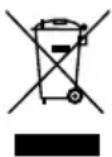
DEVICE
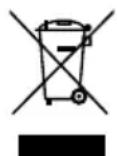
All old appliances marked with the symbol illustrated must not be disposed of in normal household rubbish.
In accordance with Directive 2012/19/EU, the device must be properly disposed of at the end of its service life.
This involves separating the materials in the appliance for the purpose of recycling as well as minimising the environmental impact and negative effects on human health.
Take old devices to a collection point for electrical scrap or a recycling centre. Before doing so, remove the batteries from the device and take them to a separate collection point for used batteries.
Contact your local waste disposal company or your local authority for more information on this subject.
18. Service information
Please contact our Customer Service team if your device ever stops working the way you want or expect it to. There are several ways for you to contact us:
- In our Service-Community, you can meet other users, as well as our staff, and you can exchange your experiences and pass on your knowledge there. You will find our Service-Community at community.medion.com.
• Alternatively, use our contact form at www.medion.com/contact. - You can also contact our Service team via our hotline or by post.
| Hotline number |
| 1 0333 3213106 |
| Opening times |
| Mon – Fri: 08.00 – 20.00Sat – Sun: 10.00 – 16.00 |
| Service address |
| MEDION Electronics Ltd.120 Faraday Park,Faraday Road, DorcanSwindon SN3 5JF, WiltshireUnited Kingdom |
You can download this and many other sets of operating instructions from our service portal at www.medionservice.com.
We have stopped providing printed copies of our warranty terms and conditions as part of our commitment to sustainability, but you can access the warranty terms and conditions on our service portal.
You can also scan the QR code below and to download the operating instructions onto your mobile device from the service portal.

19. Legal Notice
Copyright 2025
Date: 13. August 2025
All rights reserved.
These operating instructions are protected by copyright.
Mechanical, electronic and any other forms of reproduction are prohibited without the written permission of the manufacturer.
Copyright is owned by the company:
MEDION GmbH
Am Zehnthof 77
45307 Essen
Germany
Please note that you cannot use the address above for returns. Please always contact our Customer Service team first.
- Inhaltsverzeichnis
- Impressum
- WAARSCHUWING! Brandgevaar!
- Colofon
- Aviso legal
- APPARECCHIO
- Note legali
- Information about this user manual
- Explanation of symbols
- DANGER!
- WARNING!
- CAUTION!
- NOTICE!
- Proper use
- Safety instructions DE IMPORTANT SAFETY IN- STRUCTIONS – READ FR CAREFULLY AND KEEP FOR NL FUTURE REFERENCE!
- WARNING! Risk of injury!
- Risk of electric shock/short circuit!
- i
- Initial operation and use
- Risk of fire!
- ATTENTION! Possible material damage!
- Cleaning
- Package contents
- Risk of injury!
- Description of com- ponents
- Preparing the air fry-er
- Information regard- DE ing preparation
- Operating the air fry- er
- Risk of injury from hot surfaces!
- Risk to health!
- Setting an automatic programme
- Preheating
- Individually sett ing cook- ing time and temperature 8
- Reheating food
- Recommended sett ings
- Interrupting a pro- gramme
- Ending the programme
- Switch the cooking compartment lighting on/off
- Switching butt on tones on/off
- Grill programmes with temperature sensor
- Dehydrating
- Preparing food
- Dehydration settings
- Cleaning the air fryer
- Risk of electric shock!
- Possibility of damage to the appliance!
- Prolonged non-use and transport
- Troubleshooting
- Error messages
- System self-test
- System reset
- Technical specifications
- EU declaration of conformity
- Spare parts
- Disposal
- PACKAGING
- DEVICE
- Service information
- Legal Notice
Brand : MEDION
Model : Life X20 XL
Category : Deep fryer