JS506DC - Jigsaw Vonroc - Free user manual and instructions
Find the device manual for free JS506DC Vonroc in PDF.


| Product type | Cordless jigsaw |
| Brand | Vonroc |
| Model | JS506DC |
| Power supply | 20 V Lithium-Ion battery (VPOWER platform) |
| No-load speed | 0 – 2700 min⁻¹ |
| Blade stroke | 20 mm |
| Max cutting capacity (wood, 0°) | 80 mm |
| Max cutting capacity (steel, 0°) | 5 mm |
| Weight | 1,7 kg |
| Sound pressure level (LPA) | 85 dB(A), K=3 dB |
| Sound power level (LWA) | 96 dB(A), K=3 dB |
| Compatible battery types | CD828AA (2,0 Ah), CD829AA (4,0 Ah) |
| Charging time for 2 Ah battery | approx. 35 min |
| Charging time for 4 Ah battery | approx. 60 min |
| Pendulum motion | 4 adjustable positions (0–3) |
| Bevel cutting angle | 0° – 45° |
| Blowing/suction system | Adjustable: blowing or external suction |
| Included accessories | Parallel guide, anti-splinter guard, slide sole, vacuum adapter |
| Double insulation | Yes (class II) |
| Maintenance and cleaning | Clean the housing with a slightly damp soft cloth. Do not use solvents. |
| Safety | Wear goggles, dust mask and ear protection. Disconnect the battery before any adjustments. |
| Warranty | Legal warranty against material and workmanship defects (duration not specified). |
Frequently Asked Questions - JS506DC Vonroc
User questions about JS506DC Vonroc
0 question about this device. Answer the ones you know or ask your own.
Ask a new question about this device
Download the instructions for your Jigsaw in PDF format for free! Find your manual JS506DC - Vonroc and take your electronic device back in hand. On this page are published all the documents necessary for the use of your device. JS506DC by Vonroc.
USER MANUAL JS506DC Vonroc
CE Declaration of conformity 121
WEEE Directive 122

A
B
C
1. SAFETY INSTRUCTIONS
Read the enclosed safety warnings, the additional safety warnings and the instructions. Failure to follow the safety warnings and the instructions may result in electric shock, fire and/or serious injury. Save the safety warnings and the instructions for future reference.
The following symbols are used in the user manual or on the product:

Read the user manual.

Denotes risk of personal injury, loss of life or damage to the tool in case of non-observation of the instructions in this manual.

Wear eye protection.

Wear ear protection.

Wear a dust mask protection.

Time-lag miniature fuse-link.

Class II machine - Double insulation - You don't need any earthed plug.

Max temperature 45^

Do not throw the battery into fire.

Do not throw the battery into water.

Separate collection for Li-ion battery.

The product is in accordance with the applicable safety standards in the European directives.
GENERAL POWER TOOL SAFETY WARNINGS

WARNING! Read all safety warnings and all instructions. Failure to follow the warnings and instructions may result in electric shock, fire and/or serious injury.
Save all warnings and instructions for future reference.
The term "power tool" in the warnings refers to your mains-operated (corded) power tool or battery-operated (cordless) power tool.
1) Work area safety
a) Keep the work area clean and well lit. Cluttered or dark areas invite accidents.
b) Do not operate power tools in explosive atmospheres, such as in the presence of flammable liquids, gases or dust. Power tools create sparks which may ignite the dust or fumes.
c) Keep children and bystanders away while operating a power tool. Distractions can cause you to lose control.
2) Electrical safety
a) Power tool plugs must match the outlet. Never modify the plug in any way. Do not use any adapter plugs with earthed (grounded) power tools. Unmodified plugs and matching outlets will reduce risk of electric shock.
b) Avoid body contact with earthed or grounded surfaces, such as pipes, radiators, ranges and refrigerators. There is an increased risk of electric shock if your body is earthed or grounded.
c) Do not expose power tools to rain or wet conditions. Water entering a power tool will increase the risk of electric shock.
d) Do not abuse the cord. Never use the cord for carrying, pulling or unplugging the power tool. Keep cord away from heat, oil, sharp edges or moving parts. Damaged or entangled cords increase the risk of electric shock.
e) When operating a power tool outdoors, use an extension cord suitable for outdoor use. Use of a cord suitable for outdoor use reduces the risk of electric shock.
f) If operating a power tool in a damp location is unavoidable, use a residual current device (RCD) protected supply. Use of an RCD reduces the risk of electric shock.
3) Personal safety
a) Stay alert, watch what you are doing and use common sense when operating a power tool. Do not use a power tool while you are tired or under the influence of drugs, alcohol or medication. A moment of inattention while operating power tools may result in serious personal injury.
b) Use personal protective equipment. Always wear eye protection. Protective equipment such as dust mask, non-skid safety shoes, hard hat, or hearing protection used for appropriate conditions will reduce personal injuries.
c) Prevent unintentional starting. Ensure the switch is in the off-position before connecting to power source and/or battery pack, picking up or carrying the tool. Carrying power tools with your finger on the switch or energising power tools that have the switch on invites accidents.
d) Remove any adjusting key or wrench before turning the power tool on. A wrench or a key left attached to a rotating part of the power tool may result in personal injury.
e) Do not overreach. Keep proper footing and balance at all times. This enables better control of the power tool in unexpected situations.
f) Dress properly. Do not wear loose clothing or jewellery. Keep your hair, clothing and gloves away from moving parts. Loose clothes, jewellery or long hair can be caught in moving parts.
g) If devices are provided for the connection of dust extraction and collection facilities, ensure these are connected and properly used. Use of dust collection can reduce dust related hazards.
h) Do not let familiarity gained from frequent use of tools allow you to become complacent and ignore tool safety principles. A careless action can cause severe injury within a fraction of a second.
4) Power tool use and care
a) Do not force the power tool. Use the correct power tool for your application. The correct power tool will do the job better and safer at the rate for which it was designed.
b) Do not use the power tool if the switch does not turn it on and off. Any power tool that cannot be controlled with the switch is dangerous and must be repaired.
c) Disconnect the plug from the power source and/or the battery pack from the power tool before making any adjustments, changing accessories, or storing power tools. Such preventive safety measures reduce the risk of starting the power tool accidentally.
d) Store idle power tools out of the reach of children and do not allow persons unfamiliar with the power tool or these instructions to operate the power tool. Power tools are dangerous in the hands of untrained users.
e) Maintain power tools. Check for misalignment or binding of moving parts, breakage of parts and any other condition that may affect the power tool's operation. If damaged, have the power tool repaired before use. Many accidents are caused by poorly maintained power tools.
f) Keep cutting tools sharp and clean. Properly maintained cutting tools with sharp cutting edges are less likely to bind and are easier to control.
g) Use the power tool, accessories and tool bits etc. in accordance with these instructions, taking into account the working conditions and the work to be performed. Use of the power tool for operations different from those intended could result in a hazardous situation.
h) Keep handles and grasping surfaces dry, clean and free from oil and grease. Slippery handles and grasping surfaces do not allow for safe handling and control of the tool in unexpected situations.
5) Battery tool use and care
a) Recharge only with the charger specified by the manufacturer. A charger that is suitable for one type of battery pack may create a risk of fire when used with another battery pack.
b) Use power tools only with specifically designated battery packs. Use of any other battery packs may create a risk of injury and fire.
c) When battery pack is not in use, keep it away from other metal objects, like paper clips, coins, keys, nails, screws or other small metal objects that can make a connection from one terminal to another. Shorting the battery terminals together may cause burns or a fire.
d) Under abusive conditions, liquid may be ejected from the battery; avoid contact. If contact accidentally occurs, flush with water. If liquid contacts eyes, additionally seek medical help. Liquid ejected from the battery may cause irritation or burns.
e) Do not use a battery pack or tool that is damaged or modified. Damaged or modified batteries may exhibit unpredictable behaviour resulting in fire, explosion or risk of injury.
f) Do not expose a battery pack or tool to fire or excessive temperature. Exposure to fire or temperature above 130^ may cause explosion. NOTE The temperature, 130^ can be replaced by the temperature, 265^ .
g) Follow all charging instructions and do not charge the battery pack or tool outside the
temperature range specified in the instructions. Charging improperly or at temperatures outside the specified range may damage the battery and increase the risk of fire.
6) Service
a) Have your power tool serviced by a qualified repair person using only identical replacement parts. This will ensure that the safety of the power tool is maintained.
b) Never service damaged battery packs. Service of battery packs should only be performed by the manufacturer or authorized service providers.
SAFETY WARNINGS FOR JIG SAWS
- Hold power tool by insulated gripping surfaces, when performing an operation where the cutting accessory may contact hidden wiring. Cutting accessory contacting a "live" wire may make exposed metal parts of the power tool "live" and could give the operator an electric shock.
- Keep hands away from the sawing range. Do not reach under the workpiece. Contact with the saw blade can lead to injuries.
- Apply the machine to the workpiece only when switched on. Otherwise there is danger of kickback when the cutting tool jams in the workpiece.
- Pay attention that the base plate rests securely on the material while sawing. A jammed saw blade can break or lead to kickback.
- When the cut is completed, switch off the machine and then pull the saw blade out of the cut only after it has come to a standstill. In this manner you can avoid kickback and can place down the machine securely.
- Use only undamaged saw blades that are in perfect condition.
Bent or dull saw blades can break, negatively influence the cut, or lead to kickback.
- Do not brake the saw blade to a stop by applying side pressure after switching off. The saw blade can be damaged, break or cause kickback.
- Use appropriate detectors to determine if utility lines are hidden in the work area or call the local utility company for assistance. Contact with electric lines can lead to fire and electric shock. Damaging a gas line can lead to explosion. Penetrating a water line causes property damage.
-
Secure the workpiece. A workpiece clamped with clamping devices or in a vice is held more secure than by hand.
-
Always wait until the machine has come to a complete stop before placing it down. The tool insert can jam and lead to loss of control over the power tool.
- Use clamps or another practical way to secure and support the workpiece to a stable platform. Holding the workpiece by hand or against your body leaves it unstable and may lead to loss of control.
SAFETY WARNINGS FOR BATTERY
a) Do not open the battery. Danger of shortcircuting.
b) Protect the battery against heat, e. g., against continuous intense sunlight, fire, water, and moisture. Danger of explosion.
c) In case of damage and improper use of the battery, vapours may be emitted. Ventilate the area and seek medical help in case of complaints. The vapours can irritate the respiratory system.
d) Use the battery only in conjunction with your Vonroc product. This measure alone protects the battery against dangerous overload.
e) The battery can be damaged by pointed objects such as nails or screwdrivers or by force applied externally. An internal short circuit can occur and the battery can burn, smoke, explode or overheat.
SAFETYWARNINGSFORCHARGER
Intended use
Charge only CD828AA and CD829AA type rechargeable Battery packs with the charger. Other types of batteries may burst causing personal injury and damage.
a) The appliance is not to be used by persons (including children) with reduced physical, sensory or mental capabilities, or lack of experience and knowledge, unless they have been given supervision or instruction.
b) Children being supervised not to play with the appliance.
c) Do not recharging non-rechargeable batteries!
d) During charging, batteries must be placed in the well ventilated area!
2. MACHINE INFORMATION
Intended use
The machine is intended for sawing wood, metal, plastics, ceramics, rubber, etc. to any required size and in any required shape, while keeping the baseplate resting firmly on the workpiece. A suitable saw blade must always be used.
TECHNICAL SPECIFICATIONS

This manual has been drawn up for different sets / article numbers. Check the corresponding article number in below specifications table for the correct composition and contents of your set.
| Model No | Batteries included | Chargers included |
| JS506DC | - | - |
| S_JS506DC | CD828AA | CD830AA |
| S2_JS506DC | 2 x CD828AA | CD830AA |
| S3_JS506DC | CD829AA CD830AA |
Machine information
| Rated voltage | 20V |
| No load speed 0-2700/min | |
| Saw stroke 20mm | |
| Max. saw capacity wood 0° 80mm | |
| Max. saw capacity steel 0° 5mm | |
| Weight 1.7 kg | |
| Sound pressure level LPA 85.0 dB(A), K=3dB(A) | |
| Sound power level LWA 96.0 dB(A), K=3dB(A) | |
| Vibration 'sawing sheet metal' 6.148 m/s2 K=1.5 m/s2 | |
| Vibration 'sawing plywood' 5.860 m/s2 K=1.5 m/s2 | |
Model No. CD828AA
| Battery Type | Lithium-Ion |
| Voltage | 20V |
| Capacity | 2.0 Ah |
| Recommended charger | CD830AA |
| Weight | 0.3 kg |
Model No. CD830AA
| Charger input | 220-240V, 50-60Hz, Max. 1.5A |
| Charger output | 21.5V 4A |
| Charging time 2Ah battery | 35 minutes |
| Charging time 4Ah battery | 60 minutes |
| Recommended batteries | CD828AA, CD829AA |
| Weight | 0.36 kg |
| Model No. CD829AA | |
| Battery Type | Lithium-Ion |
| Voltage | 20V |
| Capacity | 4.0 Ah |
| Recommended charger | CD830AA |
| Weight | 0.65 kg |
Only use the following batteries of the VONROC VPOWER 20V battery platform. Using any other batteries could cause serious injury or damage the tool.
CD828AA 20V, 2Ah Lithium-Ion
CD829AA 20V,4Ah Lithium-Ion
The following charger of the can be used to charge these batteries.
CD830AA Quick charger
The batteries of the VONROC VPOWER 20V battery platform are interchangeable with all the VONROC
VPOWER 20V battery platform tools.
Vibration level
The vibration emission level stated in this instruction manual has been measured in accordance with a standardized test given in EN 62841; it may be used to compare one tool with another and as a preliminary assessment of exposure to vibration when using the tool for the applications mentioned.
- Using the tool for different applications, or with different or poorly maintained accessories, may significantly increase the exposure level.
The times when the tool is switched off or when it is running but not actually doing the job, may significantly reduce the exposure level.
Protect yourself against the effects of vibration by maintaining the tool and its accessories, keeping your hands warm, and organizing your work patterns.
DESCRIPTION
The numbers in the text refer to the diagrams on page 2-4.
- Lock-off button
- On/off switch
- Handle
- Battery
- Battery unlock button
- Pendulum action switch
-
Protection pin
-
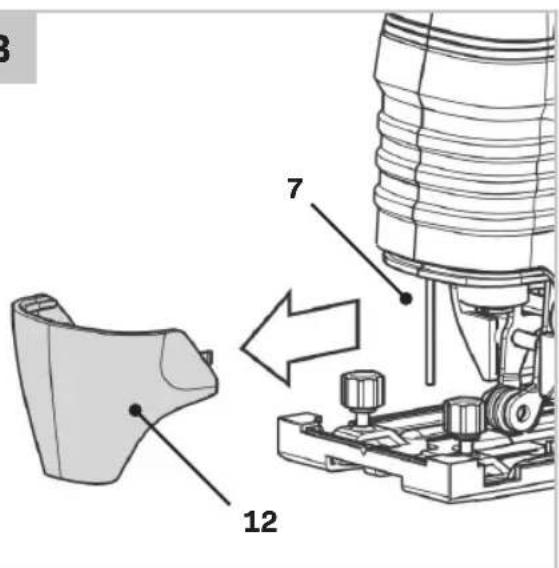
Baseplate cover
- Baseplate
- Guide roller
- Chip break protection
- Guard
- Clamping lever
- Wing bolts for parallel guide
- Hex key
- Chuck
- Saw blade
- Bolt for baseplate
- Parallel guide
- Dust outlet
21.Cutting mark - Selector for dust blowing/extraction
- Battery LED indicators button
- Battery LED indicators
- Charger
- Charger LED indicators
- Vacuum cleaner adapter
- Vacuum cleaner hose
3. ASSEMBLY

Before any work on the power tool, remove the battery.

The battery must be charged before first use.
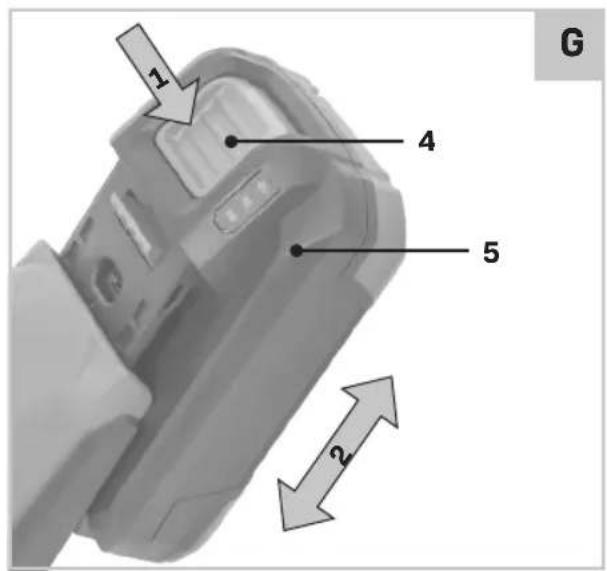
Inserting the battery into the machine (Fig. A, G)

e that the exterior of the battery is clean and dry before connecting to the charger or machine.
- Insert the battery (4) into the base of the machine as shown in Fig. G.
- Push the battery further forward until it clicks into place.
Removing the battery from the machine (Fig. A, G)
- Push the battery unlock button (5)
- Pull the battery out of the machine like shown in Fig. G.
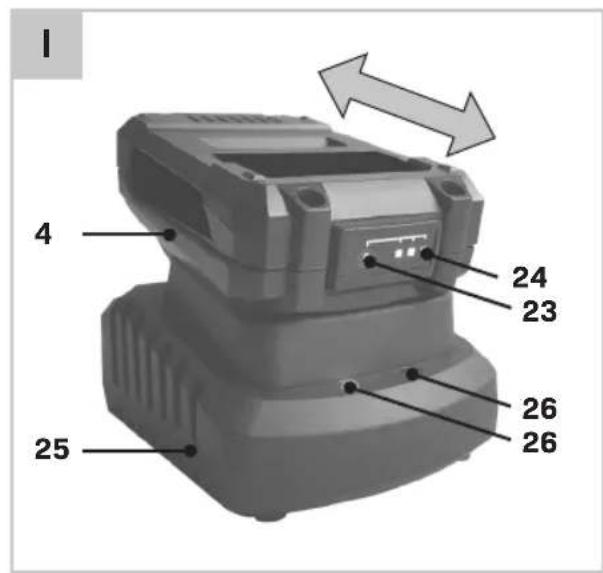
Checking the battery charging status (Fig. 1)
- To check the battery charge status, push the button (23) on battery shortly.
-
The battery has 3 lights indicating the charge level, the more lights that burn, the more charge the battery has left.
-
When the lights are not burning it means the battery is empty and must be charged immediately.
Charging the battery with the charger (Fig. 1)
- Take the battery (4) from the machine.
- Turn the battery (4) to upside down position and slide it onto the charger (25) as shown in Fig. 1.
- Push the battery until it is fully pushed into the slot.
- Plug the charger plug into an electrical outlet and wait for a while. The LED indicators on the charger (26) will lighten up and show the charger status.
The charger has 2 LED indicators (26) which indicate the status of the charging process:
| Red LED Status | Green LED status | Charger status |
| Off Off No power | ||
| Off On | Standby mode: - No battery is inserted or, - Battery inserted but charging has finished | |
| On Off | Battery charging in progress |
Fully charging the 2Ah battery may take up to 35 minutes.
Fully charging the 4Ah battery may take up to 60 minutes.
After the battery is fully charged remove the charger plug from the outlet and remove the battery from the charger.

When the machine is not being used over a longer period of time it is best to store the battery in charged condition.
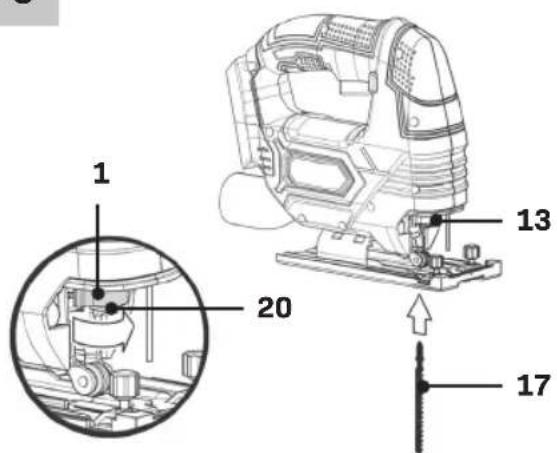
Replacing the saw blade (Fig. A, C)
When mounting the saw blade, wear protective gloves. Danger of injury when touching the saw blade.
Only use saw blades that correspond with the characteristic data given in the operating instructions.
Mounting the saw blade

Make sure the blade holder is free of material debris (such as splinters of wood or metal).
- Turn the clamping lever (13) as far to the left as possible and hold it in this position.
- Insert the saw blade in the chuck (16). Check that the saw blade is securely fixed and that the teeth are pointing in the cutting direction.
- Let go of the clamping lever. Check whether the back of the saw blade is positioned in the centre of the guide roller (10).
Make sure to use the right sawblade for the corresponding material. Included with the machine is a coarse sawblade for wood and a fine sawblade for metal and plastics.
Removing the saw blade
- Turn the clamping lever (13) as far to the left as possible and hold it in this position.
- Remove the saw blade from the chuck (16).
- Let go of the clamping lever.
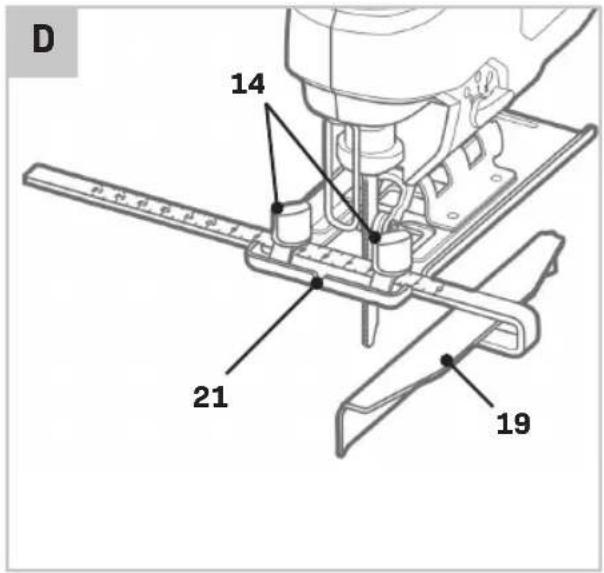
Attaching the parallel guide (Fig. D)
- Loosen the wing bolts (14).
- Mount the parallel guide (19) onto the baseplate (9).
- Set the desired cutting width using the scale on the parallel guide (14) and the cutting mark on the baseplate (20). The cutting mark (20) indicates the position of the saw blade.
- Tighten the wing bolt (14).
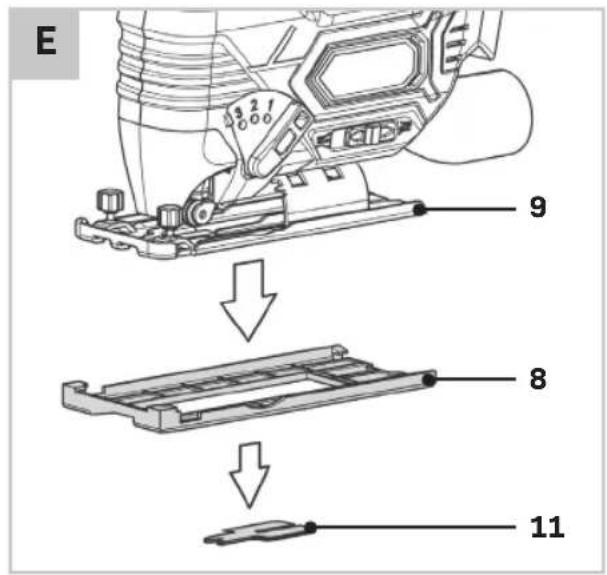
Mounting / Dismounting the Glide Shoe (Fig. E)
To protect the surface of the material to be processed, the glide shoe is already mounted. The glide shoe can be removed if necessary.
- Remove the battery (5) from the device.
- Release both retaining clips at the rear of the glide shoe (8).
- Slide the glide shoe (8) forward, carefully detaching the front part of the glide shoe from the base plate (9).
- Pull the glide shoe (8) downwards.
- To reattach the glide shoe (8), first slide it onto the base plate (9) at the front.
- Then lock the retaining clips at the rear. Check that the glide shoe (8) is securely fastened.
- Reinsert the battery (5).
Mounting / Dismounting the Chip Break Protection (Fig. E)
With a chip break protection (already pre-installed), the chipping of the wood surface during sawing can be prevented. The chip break protection can only be used at a saw angle of 0^ . It can be removed if necessary, for example, if you want to make a miter cut.
- Remove the battery (5) from the device.
- First, disassemble the glide shoe (8).
- Remove the chip break protection (11) from the base plate (9) by carefully pressing the chip break protection (11) outwards.
- To reinstall the chip break protection (11), carefully press it back into the recess on the base plate (9) from below until the chip break protection (11) locks. Ensure that the smooth side of the chip break protection (11) faces away from the device.
- Reinsert the battery (5).
4. OPERATION
Switching the machine on/off (Fig. A)
The on/off switch (2) is used for activating the machine and adjusting speed.
- To start the machine, press and hold the lock-off button (1) and press the on/off switch (2).
- The further the on/off switch (2) is being pushed, the faster the blade will move. The required speeds depend on the material and can be determined by practical testing.
- To stop the machine, release the on/off switch (2).
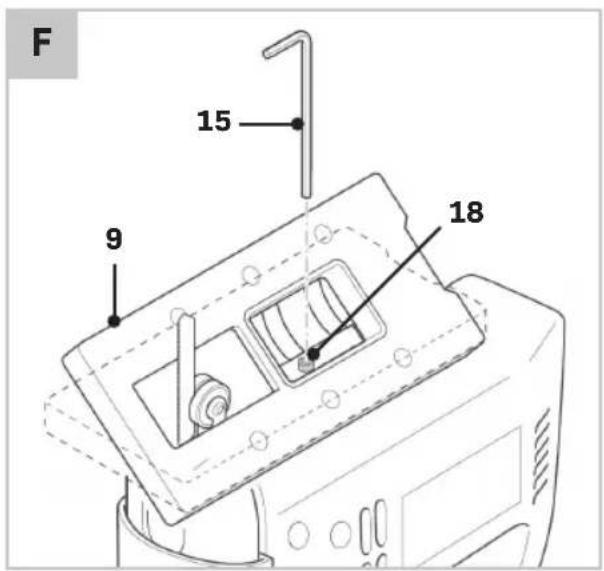
Adjusting the bevel angle (Fig. B, F)
- Loosen the bolt (18), using the hex key (15).
- Adjust the baseplate (9) to the desired position (0^ - 45^)
The sawing angle (bevel) can be read on the scale (7).
- Tighten the bolt (7), using the hex key (15). It is possible to store the hex key onto the machine, as shown on Fig. B.
Adjusting the pendulum action (Fig. A)
The pendulum action switch is used to set the way in which the teeth of the saw blade grip the material. The pendulum action switch can be set to 4 positions:
0 - No pendulum action
1 - Small pendulum action
2 - Medium pendulum action
3 - Large pendulum action
The required pendulum action can be determined by practical testing, although the following instructions can be observed:
- Soft material (wood, plastics etc.): set the pendulum to level II or III. For a finer and cleaner saw cut, use pendulum level 0 or I.
- Thin material, use pendulum level 0.
- Hard material (steel etc.): set the pendulum to level 0.
- Curves: set pendulum to level 0.
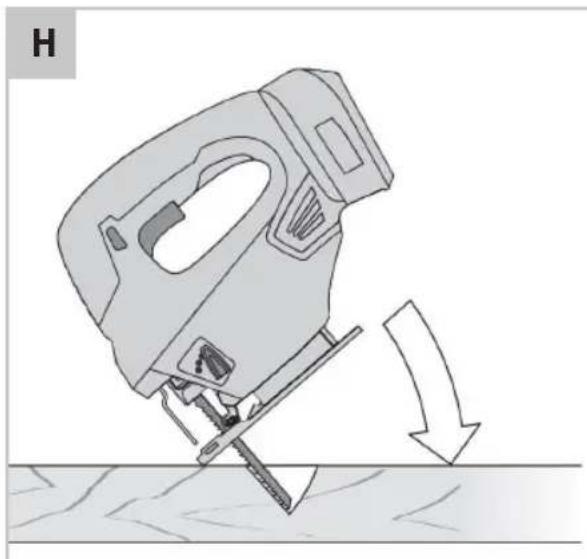
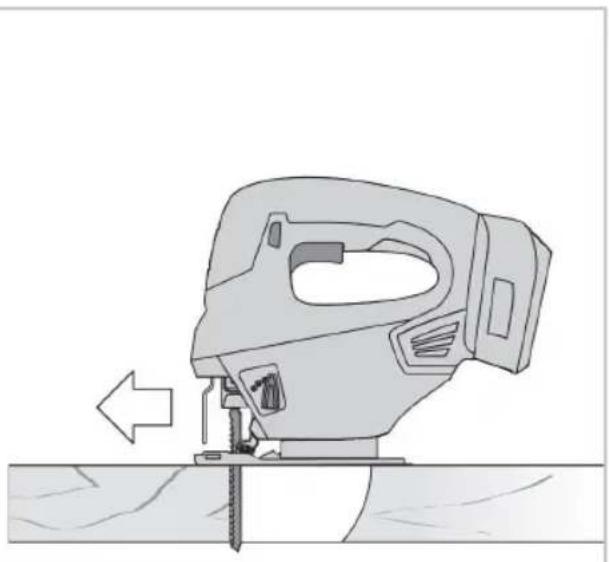
Plunge cutting (Fig. H)
Plunge cutting may only be used on soft materials such as wood, aerated concrete, gypsum plaster boards, etc. However, this requires a certain practise and is only possible with short saw blades.
- Place the saw onto the workpiece and switch it on.
- Ensure that the bottom edge of the footplate rests on the workpiece surface as shown on Fig. H.
- Slowly saw into the workpiece at an angle, moving the saw to a vertical position and continue to saw along the cutting line.
- Switch the saw off and lift off the workpiece when the work is complete.
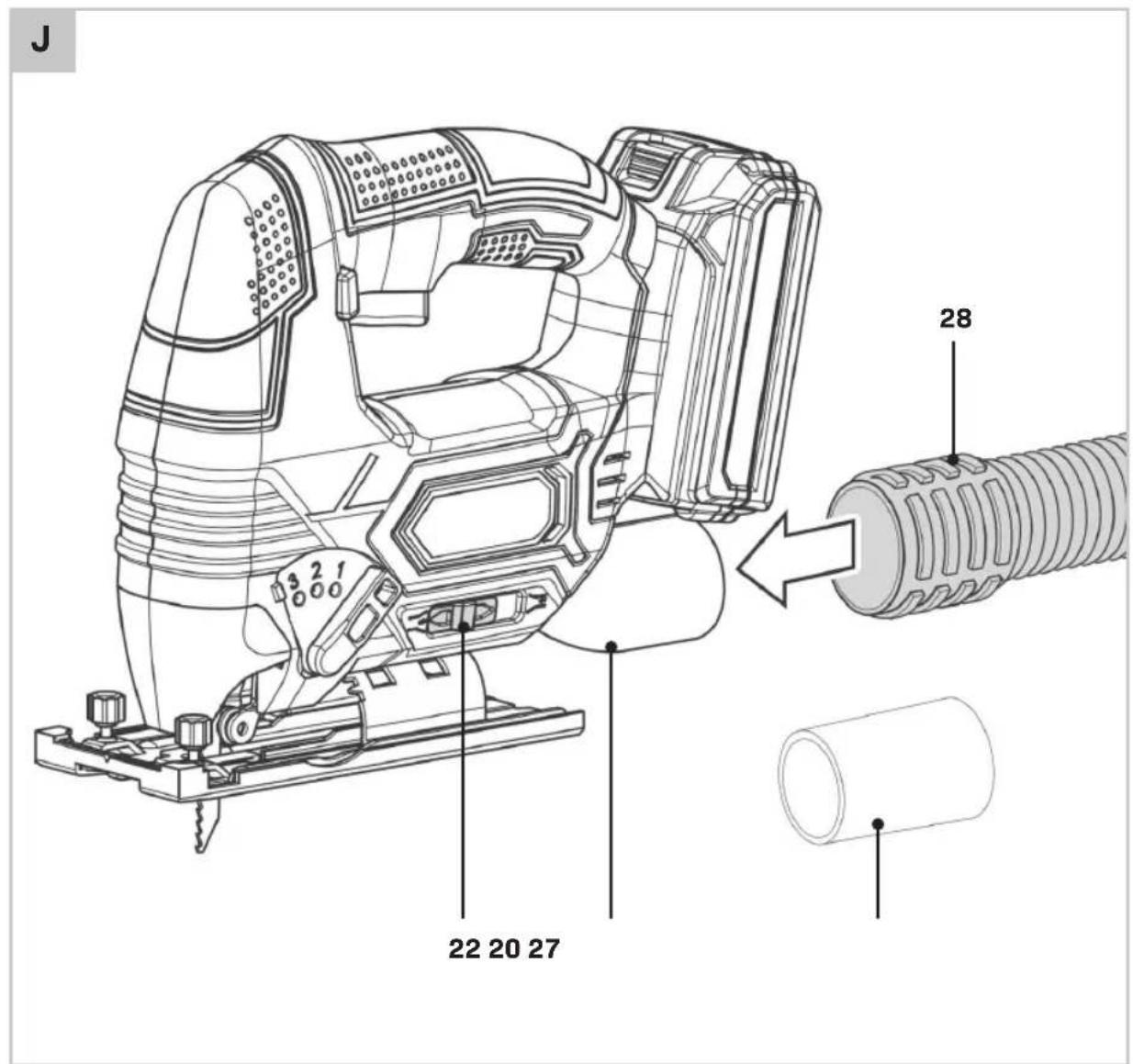
Set chip blowing/extraction function (Fig. J)
You can set whether the chips are blown forward or extracted via an optionally connectable vacuum cleaner.
- Ensure that the protective cover (12) is mounted.
- Slide the chip blowing/extraction function selector switch (22) to the right to blow the chips away.
- Slide the chip blowing/extraction function selector switch (22) to the left to extract the chips with an external vacuum cleaner.
Connecting dust extraction (Fig. E, J)
You can connect a vacuum cleaner to the device. The supplied adapter allows connection to smaller pipe diameters.
- If necessary, connect the adapter (27) to the dust extraction port (20).
- For optimal extraction, place the chip break protection (11) if possible.
- Connect a suitable vacuum cleaner (e.g., industrial vacuum or Vonroc wet/dry vacuum) to the dust extraction port (20) or the adapter (27).
- Slide the chip blowing/extraction function selector switch (22) to the left to extract the chips with an external vacuum cleaner.
Optimum use
- Clamp the workpiece. Use a clamping device for small workpieces.
- Draw a line to define the direction in which to guide the saw blade.
- Firmly hold the machine by the grip.
- Set the sawing speed.
- Set the litre angle.
- Switch on the machine.
- Wait until the machine has reached full speed.
- Place the saw shoe on the workpiece.
- Slowly move the machine along the pre-drawn line, firmly pressing the saw shoe against the workpiece.
- Do not apply too much pressure on the machine. Let the machine do the work.
- Switch off the machine and wait for the machine to come to a complete standstill before putting the machine down.
5. MAINTENANCE

Before cleaning and maintenance, always switch off the machine and remove the battery pack from the machine.
Clean the machine casings regularly with a soft cloth, preferably after each use. Make sure that the ventilation openings are free of dust and dirt. Remove very persistent dirt using a soft cloth moistened with soapsuds. Do not use any solvents such as gasoline, alcohol, ammonia, etc. Chemicals such as these will damage the synthetic components.

When extracting materials that are toxic or harmful to health, always use a special vacuum cleaner.
WARRANTY
VONROC products are developed to the highest quality standards and are guaranteed free of defects in both materials and workmanship for the period lawfully stipulated starting from the date of original purchase. Should the product develop any failure during this period due to defective material and/or workmanship then contact VONROC directly.
The following circumstances are excluded from this guarantee:
- Repairs and or alterations have been made or attempted to the machine by unauthorized service centers;
Normal wear and tear;
The tool has been abused, misused or improperly maintained; - Non-original spare parts have been used.
This constitutes the sole warranty made by company either expressed or implied. There are no other warranties expressed or implied which extend beyond the face thereof, herein, including the implied warranties of merchantability and fitness for a particular purpose. In no event shall VONROC be liable for any incidental or consequential damages. The dealers remedies shall be limited to repair or replacement of nonconforming units or parts.
The product and the user manual are subject to change. Specifications can be changed without further notice.
VEILIGHEIDSVOORSCHRIFTEN VOOR DE ACCU
CD829AA 20V,4Ah Lithium-Ion
Separate collection for Li-ion battery.

CD829AA 20V,4Ah Lithium-Ion
CD828AA 20 V, 2 Ah-s litium-ion
CD829AA 20 V, 4 Ah-s litium-ion
| Model No. Batarya dahildir | Şarı cihazkınahim dahildir |
| JS506DC | - |
| S_JS506DC | CD828AA |
| S2_JS506DC | 2 x CD828AA |
| S3_JS506DC | CD829AA CD830AA |
CD829AA 20V,4Ah Lityum-Iyon
S_JS506DC,S2_JS506DC,S3_JS506DC
EN 55014-1, EN 55014-2, EN 61000-3-2, EN 61000-3-3, EN 62841-1, EN 62841-2-11, EN 60335-1, EN 60335-2-29, EN 62233, 2006/42/EC, 2014/30/EU, 2014/35/EU, 2012/19/EU, 2011/65/EU
Zwolle, 01-02-2025 H.G.FRosberg CEO
VONROC · Lingenstraße 6 · 8028 PM Zwolle · The Netherlands
- SAFETY INSTRUCTIONS
- GENERAL POWER TOOL SAFETY WARNINGS
- 6) Service
- SAFETY WARNINGS FOR JIG SAWS
- SAFETY WARNINGS FOR BATTERY
- SAFETYWARNINGSFORCHARGER
- Intended use
- MACHINE INFORMATION
- TECHNICAL SPECIFICATIONS
- Vibration level
- DESCRIPTION
- ASSEMBLY
- Inserting the battery into the machine (Fig. A, G)
- Removing the battery from the machine (Fig. A, G)
- Checking the battery charging status (Fig. 1)
- Charging the battery with the charger (Fig. 1)
- Replacing the saw blade (Fig. A, C)
- Mounting the saw blade
- Removing the saw blade
- Attaching the parallel guide (Fig. D)
- Mounting / Dismounting the Glide Shoe (Fig. E)
- Mounting / Dismounting the Chip Break Protection (Fig. E)
- OPERATION
- Switching the machine on/off (Fig. A)
- Adjusting the bevel angle (Fig. B, F)
- Adjusting the pendulum action (Fig. A)
- Plunge cutting (Fig. H)
- Set chip blowing/extraction function (Fig. J)
- Connecting dust extraction (Fig. E, J)
- Optimum use
- MAINTENANCE
- WARRANTY
- VEILIGHEIDSVOORSCHRIFTEN VOOR DE ACCU
Brand : Vonroc
Model : JS506DC
Category : Jigsaw