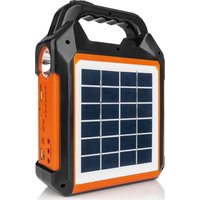
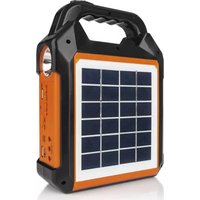
09470 - Other phone accessories EasyMaxx - Free user manual and instructions
Find the device manual for free 09470 EasyMaxx in PDF.


| Product Type | Solar Power Kit |
| Brand | EasyMaxx |
| Model | 09470 |
| Power Supply | Solar panel (6 V, 3 A max) or micro-USB (5 V DC) |
| Battery Capacity | 3.7 V Li-Ion, 4500 mAh |
| Charging Time (micro-USB) | Approximately 5 to 6 hours |
| Charging Time (solar panel) | Approximately 20 hours at 100% solar exposure |
| Outputs | 1 USB A port (5 V) for external charging, 3 outputs 3 V for LED lamps |
| Main Functions | Lamp, spotlight, FM radio, SD card reader, wireless speaker, external device charger |
| Integrated Lamp | Adjustable spotlight and lamp, plus 3 external LED lamps with cord |
| FM Radio | Frequency 87.5 – 108 MHz, telescopic antenna |
| Media Playback | SD cards (slot) and USB devices (USB A port) |
| Wireless Connection | Bluetooth (pairing with external devices) |
| Speaker | Built-in, for radio or wireless audio |
| Protection Rating | IP20 |
| Protection Class | III |
| Operating Temperature | 0 °C to 50 °C |
| Storage Temperature | 0 °C to 50 °C |
| Output Power | 16.65 Wh |
| Care and Cleaning | Clean with a damp cloth, do not use corrosive solvents |
| General Information | Domestic use, indoor and sheltered outdoor. Do not immerse. |
Frequently Asked Questions - 09470 EasyMaxx
User questions about 09470 EasyMaxx
0 question about this device. Answer the ones you know or ask your own.
Ask a new question about this device
Download the instructions for your Other phone accessories in PDF format for free! Find your manual 09470 - EasyMaxx and take your electronic device back in hand. On this page are published all the documents necessary for the use of your device. 09470 by EasyMaxx.
USER MANUAL 09470 EasyMaxx
Charging Up the Battery 12
Use 13
Cleaning and Storage 14
Troubleshooting 15
Disposal 15
Technical Data 16
EC Conformity Declaration 33
SYMBOLS

Danger symbols: These symbols indicate possible dangers. Read the associated safety notices carefully and follow them.


Supplementary information

Read the operating instructions before use!

DC voltage
ITEMS SUPPLIED
1 x solar power kit
1 x USB cable
3 x LED lights with cable
1 x operating instructions
Check the items supplied for any transport damage. If you find any damage, do not use the device but contact our customer service department.
Remove any possible films, stickers or transport protection from the device.
Never remove the rating plate and any possible warnings!
SIGNAL WORDS
Signal words indicate hazards if the associated notices are not followed.
DANGER - high risk, results in serious injury or death
WARNING - medium risk, may result in serious injury or death
NOTICE - may result in risk of damage to material
EN
Dear Customer,
We are delighted that you have chosen this solar power kit. Before using the device for the first time, please read through these operating instructions carefully and keep them for future reference and other users. They form an integral part of the device. The manufacturer and importer do not accept any liability if the information in these operating instructions is not complied with.
If you have any questions about the device and about spare parts/accessories, please contact the customer service department via our website:
We hope you have a lot of fun with your solar power kit.
AT A GLANCE
(Picture A)
1 Spotlight
2 Solar panel
3 Switch for spotlight and light
4 Extendible telescopic aerial
5 Speaker
6 5V USB output (DC 5 V) for charging external devices
7 3V OUT 3× barrel connector output (DC 3 V), e.g. for LED lights
8 Charge control lamp
9 5V IN Micro USB input (DC 5 V) for charging via cable
10 ON OFF On/Off switch
11 M Switch for switching between FM and wireless connection to external playback device
12 SD Slot for SD cards
13 Vol-/ Press briefly: go to previous FM station / track; hold down: reduce volume
14 II/FM Pause / start playback
15 Vol+/press briefly: go to next FM station / track; hold down: increase volume
16 USB USB input for external playback devices
17 Light
INTENDED USE
The device is used as a light, radio receiver and playback device. Furthermore, it can supply direct current to small electrical devices.
The device is suitable for use indoors and in covered outdoor spaces.
The device is for personal use only and is not intended for commercial applications.
- Use the device only for the specified purpose and as described in the operating instructions. Any other use is deemed to be improper.
The warranty does not cover faults caused by incorrect handling, damage or attempted repairs. The same applies to normal wear and tear.
SAFETYNOTICES

DANGER - Danger of ElectricShock
If the device falls into water while it is connected to a plug socket, pull the plug of the power supply out of the plug socket immediately! Only after this should you pull the device out of the water. There is a danger of electric shock.
- Never touch the device, the connecting cable and all connected cables and consumers with wet hands. There is a danger of electric shock.

WARNING - Danger of Injury
This device may be used by children aged 8 and over and by people with reduced physical, sensory or mental abilities or a lack of experience and knowledge if they are supervised or have received instruction on how to use the device safely and have understood the dangers resulting from this. Children must not play with the device. Cleaning and user maintenance may not be carried out by children without supervision.
Children younger than 8 years of age and animals must be kept away from the device.
- Keep the packaging material away from young children and animals. There is a danger of suffocation.
Make sure that all cables are always kept out of the reach of young children and animals. There is a danger of strangulation.
Make sure that connected cables do not present a trip hazard.
If used incorrectly, fluid may escape from the battery. Avoid any contact with it. Rinse with water if you happen to come into contact with it. If the fluid gets into your eyes, you should also
seek medical assistance. Escaping fluid can lead to skin irritations or burns.
If the battery is damaged and used inappropriately, vapours may escape. Get some fresh air and seek medical assistance if you feel unwell. The vapours may irritate the respiratory passages.

WARNING - Danger of Fire
- Do not cover the device or the connecting cable during charging and operation and keep them away from combustible materials to prevent the risk of fire.
The device must not be thrown into a fire or exposed to high temperatures of over 50^
Inspect the device for damage each time before you use it. In the event of damage / faults during operation, switch the device off immediately. Do not use the device if it has been damaged or modified. Damaged or modified batteries may display unpredictable behaviour which may lead to a fire, explosion or risk of injury. - Do not take the device apart! Do not make any modifications to the device. Do not attempt to repair the device. If the device is damaged, it must be replaced or repaired by the manufacturer, customer service department or a similarly qualified person (e.g. specialist workshop) in order to avoid any hazards.
- Do not place any heavy objects on the device. Protect the device from impacts and any mechanical damage. The battery could ignite.
- No liquid or moisture must be allowed to enter the housing of the device as this may cause a short circuit. Do not immerse the device and the connecting cable in water or other
EN
liquids and ensure that they cannot become wet! Protect the device and solar panel from rain and do not place it on damp or wet ground. Store the device only in closed rooms. If liquid has got inside it, do not use the device and have it checked in a specialist workshop before using it again.
- Do not stick any metal objects into the device. These might cause bridging of the contacts. A short circuit between the contacts may cause burns or a fire.
- Follow all instructions for charging the battery. Only ever charge, use and store the device within the temperature range which is specified in the operating instructions (see the "Technical Data" chapter). Inappropriate charging or charging, use and storage at temperatures outside the specified range may damage the battery and increase the risk of fire.
- Protect the device and solar panel from: fire, heat sources (e.g. radiators), frost, corrosive objects (acid, rust, etc.).
- Never connect the solar panel to a car battery or other plugs / cables on a car. There is a danger of short-circuits.
- Do not bend the solar panel, open it up, or drill through it with a nail or another sharp object.
NOTICE - Risk of Damage to Material and Property
- Use only original accessories from the manufacturer in order to guarantee that there is no interference that may prevent the device from working and to avoid possible damage.
Make sure that cables are not squashed, bent or laid over sharp edges and do not come into contact with hot surfaces. - Protect the device from dust and dirt.
CHARGING UP THE BATTERY
Please Note!
Only charge the battery in an ambient temperature of from 0^ to 50^ . Sub-zero temperatures can have an adverse effect on the battery.
If you are charging the device via a solar panel, make sure that it is optimally aligned towards the sun.
A USB mains adapter is required for connection to a plug socket. Only connect it to a properly installed plug socket. The plug socket must also be readily accessible after connection so that the connection to the mains can quickly be isolated.
- Do not charge the battery on a computer because the high charging current could damage the computer.
- Disconnect the device from the power source if the battery is full, a fault occurs during charging or before a thunderstorm.
The Li-ion battery is only supplied partially charged and it is essential to charge it up fully before you first use it so that it can reach its maximum capacity. If the battery is fully discharged during use, it must be fully charged up again.

After the battery has first been charged, it can be charged at any time without loss of capacity. Interrupting the charging process will not damage the battery.
Charging is done either via the integrated solar panel (2) or via an external power source.
Solar Panel
Please Note!
- Place the solar panel in a position where it can absorb direct sunlight all day long if possible and is not in the shade. Its output depends on the strength of the sunlight hitting it and therefore, among other things, on the weather conditions, the time of year and its position.
-
Keep the solar panel clean so that the largest possible light absorption is guaranteed (see the "Cleaning and Storage" chapter).
-
Detach the solar panel (2) from the device: press on the top edge and slide down (Picture B).
- Fully unwind the cable of the solar panel. Make sure that the plugs on the device and solar panel are connected. The charge control lamp (8) is lit red during charging.
- Direct the solar panel so it is facing the sun (Picture D). Make sure that the rays of sunlight hit the solar panel as vertically as possible to achieve a high level of efficiency. While you are using it, constantly adjust the position of the solar panel to the position of the sun.
- Place the connected device in the shade if possible so that it does not overheat in the sun.
- After charging wind up the cable, store it in the device and insert the solar panel into the device (Picture C).
External Power Source
The USB cable that is supplied (Picture E) and a USB mains adapter is required for charging via a plug socket.
-
Plug the Micro USB connector of the USB cable that is also supplied into the socket 5V IN (9).
-
Connect the other end of the cable to a power source, e.g. using a USB mains adapter.
- The charge control lamp (8) flashes red during charging, When it is lit permanently red, the battery is full. Disconnect the USB cable from the power source first and then from the device.
USE
The device can be used as a
Light
FM radio
- Playback device for SD cards and storage media with a USB connector
- Speaker for external playback devices which are paired via a wireless connection or are connected via a USB interface
- Charger for external devices
Light Function
- Slide the switch (3) to switch on either the light (17) or the spotlight (1).
- Both lights are switched off when the switch is in the middle position.
- The 3 external LED lights are connected at the sockets 3V OUT (7) and operated using the associated On/Off switches.
They can be hung up on their hooks.
Radio
- To obtain the best possible radio reception, extend the telescopic aerial (4).
- Slide the On/Off switch ON OFF (10) to the ON position to switch on the device.
- Press the M button (11) to switch to FM reception.
- Briefly press the Vol-/ button (13) or Vol+ button (15) to select a station.
EN
- Hold down these buttons to adjust the volume.
- If necessary, use the II/FM button (14) to pause and restart the playback.
- To switch off the device, move the On/Off switch ON OFF to the OFF position.
Playback Function
- Slide the On/Off switch ON OFF (10) to the ON position to switch on the device.
- Insert an SD card into the SD slot (12) or connect a device or storage medium to the socket USB (16). In order to switch to wireless connection press the M button (11). Then, pair an external device (search for Easymaxx).
- Briefly press the Vol- button (13) or Vol+ button (15) to switch between the tracks.
- Hold down these buttons to adjust the volume.
- If necessary, use the II/FM button (14) to pause and restart the playback.
- To switch off the device, move the On/Off switch ON OFF to the OFF position.
Charging External Devices
- Plug the USB connector of the device that is to be charged into the socket 5V (6).
- When charging, the charge control lamp (8) is lit green. Read the charge level on the external device. If the battery of the external device is full, disconnect it.
CLEANING AND STORAGE
Please Note!
The device must always be disconnected from the power source and / or the consumers before cleaning it.
- Do not use any solvents and/or corrosive or abrasive cleaning agents! These may damage the surface.
- Keep the device clean. Remove any dirt with a damp cloth. Then wipe the device dry.
- Store the device out of the reach of children and animals.
- Store the device in a dry, clean place that is protected from direct sunlight and dust and within the temperature range that is specified in the "Technical Data" chapter.
- Charge the battery before storing it for a lengthy period of time.
- During a lengthy period of storage, check the charge status of the battery approx. every 6 months and recharge the battery if necessary in order to prevent a deep discharge.
TROUBLESHOOTING
If the device does not work properly, check whether you are able to rectify the problem yourself. If the problem cannot be solved with the steps that are listed, contact the customer service department.

Do not attempt to repair an electrical device yourself!
The battery is not charging up.
The plug connectors do not fit properly in the respective sockets.
- Check the fit of the plug connectors and correct if necessary.
When charging at a plug socket: The plug socket is defective.
Try another plug socket.
When charging at a plug socket: There is no mains voltage.
- Check the electrical distributor (fuse box).
When charging via a solar panel: The power input is too low.
- Direct the solar panel so it is facing the sun.
Clean the solar panel if it is dirty.
The device does not work.
The battery is too weak.
Charge up the battery.
Poor sound quality / interference
Interference from electronic devices such as televisions, stereo systems, mobile phones, computers etc.
- Keep the device away from electronic devices.
Radio operation: Steel or reinforced concrete in multi-storey buildings may block the radio signal.
Place the radio near a window.
Radio operation: Interference may be caused by a nearby radio mast.
It may be helpful to use the extendible telescopic aerial.
DISPOSAL

Dispose of the packaging material in an environmentally friendly manner so that it can be recycled.
The adjacent symbol (crossed-out bin underlined) means that used devices should not be disposed of in the domestic waste, but should instead be taken to special collection and return systems.
Owners of used devices must remove from the used device any used batteries or rechargeable batteries which are not encapsulated by the used device and can be removed in a non-destructive way and dispose of them separately (see also the section on battery disposal).
Owners of used devices from private households can take them free of charge to the collection points of the public waste disposal authorities or the disposal points which are set up by manufacturers and distributors under the Electrical Equipment Act. Businesses which market electrical and electronic devices are also obliged to take back used devices.
EN

Non-rechargeable and rechargeable batteries must not be disposed of along with the household waste. Consumers are legally obliged to separate and recycle non-rechargeable and rechargeable batteries.
Non-rechargeable and rechargeable batteries can be taken free of charge to a collection point of your local authority/district or in shops so that they can be disposed of in an environmentally friendly way and valuable raw materials can be recovered. If they are not disposed of properly, toxic ingredients may enter the environment and have harmful effects on people, animals and plants.
Only dispose of non-rechargeable and rechargeable batteries when they are discharged. If possible, use rechargeable batteries rather than single-use batteries.
With non-rechargeable and rechargeable batteries that contain lithium, cover the poles before disposing of them to prevent a short circuit. A short circuit may cause a fire or explosion.
Waste prevention makes an even more valuable contribution to protecting the environment. This means if possible, as well as continuing to use or repair a device yourself, passing it on to another user also represents an ecologically beneficial alternative to disposal.
TECHNICAL DATA
| Device: Solar Power Kit | ||
| Article number: 09467 09470 | ||
| Model number: EP-0188 EP-0188 | ||
| Battery: | 3,7V Li-ion 10000 mAh | 3,7V Li-ion 4500 mAh |
| Charging/ input: Micro US | USB: 5 V DC;Solar panel: 6 V; 3 A max. | Micro USB: 5 V DC;Solar panel: 6 V; 3 A max. |
| Charging time(if the battery iscompletely flat): | Micro USB: approx. 5–6.5 h;solar panel: approx. 30 h with 100%sunlight throughout the charging time | Micro USB: approx. 5–6 h;solar panel: approx. 20 h with 100%sunlight throughout the charging time |
| DC outputs: USB-A, barrel connector: 3 V USB-A, barrel connector: 3 V | ||
| Temperature range,operation/storage: 0°C | to 50°C 0°C to 50°C | |
| Temperature range,charging: | 0°C to 50°C 0°C to 50°C | |
| Frequency: | 87.5 – 108 MHz | 87.5 – 108 MHz |
| Transmitting power: | 37 Wh 16.65 Wh | |
| Type of protection: | IP20 | IP20 |
| Protection class: | III | III |
CE
ID of operating instructions: Z 09467_09470 M DS V3 0923 md
All rights reserved.
SOMMAIRE
Symboles 17
Chere cliente, cher client,
WAARSCHUWING - Verwondingsgevaar
WAARSCHUWING - Brandgevaar
The product is in compliance to following governing EU-regulations:
(Qualitätsmanager / Quality manager)
DS Produkte GmbH
Stormming 14
22145 Stanfield Version
T+48.10675726
14494087373
Fae+49 4067573-298
Christian-Ame Carstensen
Balf Dummel
Hauke Haegemann
Antwerpen
Andreas Schmid
Lars Stegeimann
Bankverbindung
Deutsche Bank AG Hamburg
The product is in compliance to following governing EU-regulations:
Christian-Ame Carstensen
Ralf Dummel
Hauke Hanemann
Andreas Schneider
Lars Stegelmann
Bankverbindung
Deutsche Bank AG Hamburg
SWIFT/BIG Code: DEUTDEHHOOX
Christian-Ame Carstensen
Ralf Dummel
Hauke Hagemann
Andreas Schneider
Lars Stegelmann
Bankverbindung
Deutsche Bank AG Hamburg
BL7200700.00Kto-N507511400
IRAN:DF15200700000507511400
- SYMBOLS
- ITEMS SUPPLIED
- SIGNAL WORDS
- EN
- AT A GLANCE
- INTENDED USE
- SAFETYNOTICES
- DANGER - Danger of ElectricShock
- WARNING - Danger of Injury
- WARNING - Danger of Fire
- NOTICE - Risk of Damage to Material and Property
- CHARGING UP THE BATTERY
- Please Note!
- Solar Panel
- External Power Source
- USE
- Light Function
- Radio
- Playback Function
- Charging External Devices
- CLEANING AND STORAGE
- TROUBLESHOOTING
- Do not attempt to repair an electrical device yourself!
- DISPOSAL
- CE
- SOMMAIRE
- WAARSCHUWING - Verwondingsgevaar
- WAARSCHUWING - Brandgevaar
Brand : EasyMaxx
Model : 09470
Category : Other phone accessories