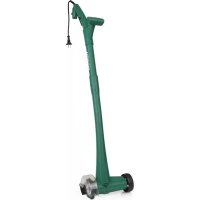
02978 - Sweeper EasyMaxx - Free user manual and instructions
Find the device manual for free 02978 EasyMaxx in PDF.



| Product type | Sweeper / Edge cleaner |
| Brand | EasyMaxx |
| Model | 02978 |
| Supply voltage | 230-240 V~, 50 Hz |
| Power | 140 W |
| Rotation speed | 1200 rpm |
| Sound pressure level (LpA) | 68 dB(A) |
| Sound power level (LWA) | 88 dB(A) |
| Maximum brush diameter | 100 mm |
| Protection class | II |
| Protection rating | IP20 |
| Type of brushes supplied | Steel brush (stubborn weeds) and nylon brush (light dirt) |
| Main function | Removal of weeds and dirt from joints between paving slabs |
| Intended use | Domestic use only, not professional |
| Maintenance | Clean after each use; remove brush and protective cover; clean with warm water and mild detergent; wipe body with damp cloth |
| Safety | Mandatory use of safety goggles and hearing protection; do not use without protective cover; disconnect before cleaning |
| Spare parts available | Replacement brushes (steel and nylon) available from after-sales service |
| Importer / After-sales service | DS Produkte GmbH, Am Heisterbusch 1, 19258 Gallin, Germany, Tel.: +49 38851 314650 |
Frequently Asked Questions - 02978 EasyMaxx
User questions about 02978 EasyMaxx
0 question about this device. Answer the ones you know or ask your own.
Ask a new question about this device
Download the instructions for your Sweeper in PDF format for free! Find your manual 02978 - EasyMaxx and take your electronic device back in hand. On this page are published all the documents necessary for the use of your device. 02978 by EasyMaxx.
USER MANUAL 02978 EasyMaxx
natural_image
Mechanical device with articulated arm and base (no visible text or symbols)www.service-shopping.de
1 Haupteinheit (1 x)
2 Schutzhaube (1 x)
3 Maulschlüssel (1 x)
4 Fixierstab (1 x)
5 Mutter (1 x)
6 Schraube (4 x)
7 Nylon-Bürste (1 x)
8 Stahl-Bürste (1 x)
9 Führungsrad (1 x)
Nicht abgebildet:
natural_image
Close-up of a mechanical component with a black arrow pointing to a circular feature (no text or symbols visible)natural_image
Close-up of a mechanical component with two arrows pointing to a central feature (no visible text or symbols)natural_image
Two-panel image showing a robotic arm and a close-up of a circular brush head with directional arrows (no text or symbols)natural_image
Close-up of a black electric vehicle charging plug with cable (no visible text or symbols)Explanation of the Symbols 21
Explanation of the Signal Words 21
Safety Instructions 21
Items Supplied and Device Overview 28
Assembly 29
Use 30
Cleaning, Storage and Maintenance 32
Technical Data 33
Troubleshooting 34
Disposal 35
Annex: Conformity Declaration
Dear Customer,
We are delighted that you have chosen this crevice cleaner.
Before using the device for the first time, please read the instructions carefully and keep them for future reference. If the device is given to someone else, these instructions should also be handed over with it.
The manufacturer and importer do not accept any liability if the information in these instructions is not complied with.
If you have any questions about the device and about spare parts / accessories, please contact the customer service department via our website:
www.service-shopping.de
Intended Use
- The device is intended to be used for removing weeds and dirt from crevices between fl agstones and paving slabs.
- The device is not suitable for cleaning crevices between tiles and slabs made from delicate material, such as plastic.
- The device is for personal use only and is not intended for commercial applications.
- The device should only be used as described in these instructions. Any other use is deemed to be improper.
- The following are excluded from the warranty: all defects caused by improper handling, damage or unauthorised attempts at repair. This also applies to normal wear and tear.
Explanation of the Symbols

Safety instructions: Read through these carefully and follow them to prevent personal injury.


Wear protective goggles and hearing protection!

Do not reach into rotating parts.

If the mains cable is damaged, pull out the mains plug and do not start operating the device!

Do not expose the device to any rain.

Caution: Danger of injury from fl ying dirt particles!

Keep people who are not involved away from the working area. Maintain a safe distance from people standing nearby.

Protection class II

Read operating instructions before use!

Supplementary information
Explanation of the Signal Words
DANGER warns of serious injuries and danger to life
WARNING warns of possible serious injuries and danger to life
CAUTION warns of slight to moderate injuries
NOTICE warns of damage to property
Safety Instructions

The device is equipped with safety features. Nevertheless, the device may still present dangers if it is not used in the intended way and / or is utilised in some other way. Comply with the following safety instructions and the procedures that are specified in these operating instructions.
General Power Tool Safety Warnings

WARNING: Read all safety notes, instructions, illustrations and technical data provided with this power tool.
Failure to follow the instructions listed below may result in electric shock, fire and / or serious injury.
Retain all safety warnings and instructions for future reference.
The term “power tool” in all the safety instructions listed below refers to mains-operated (corded) power tools and to battery-operated (cordless) power tools.
1) Workplace Safety
- Keep the working area clean and well lit. Cluttered or dark areas invite accidents.
- Do not operate the power tool in potentially explosive atmospheres containing fl ammable liquids, gases, or dusts. Power tools create sparks which may ignite the dust or fumes.
- Keep children and bystanders away while operating the power tool. If you are distracted, you may lose control of the power tool.
2) Electrical Safety
- The power tool mains plug must fit in the plug socket. The plug may not be modified in any way. Do not use any adapter plugs with earthed (grounded) power tools. Unmodified mains plugs and matching sockets will reduce the risk of electric shock.
- Avoid body contact with earthed or grounded surfaces such as pipes, radiators, ranges and refrigerators. There is an increased risk of electric shock if the body is earthed or grounded.
- Keep power tools away from rain or moisture. Water entering a power tool will increase the risk of electric shock.
- Do not misuse the mains cable for carrying, suspending or unplugging the power tool. Keep the mains cable away from heat, oil, sharp edges or moving parts. Damaged or entangled mains cables increase the risk of electric shock.
- When operating a power tool outdoors, only use extension cables that are also suitable for outdoor use. Use of an extension cable that is suitable for outdoor use reduces the risk of electric shock.
If operating the power tool in a damp location is unavoidable, use a residual current device (RCD) protected supply. Use of an RCD reduces the risk of electric shock.
3) Personal Safety
- Remain alert, pay attention to what you are doing, and use common sense when operating a power tool. Do not use a power tool while you are tired or under the influence of drugs, alcohol or medication. A moment of inattention while operating power tools may result in serious personal injury.
■ Wear personal protective equipment and always wear safety goggles. Wearing personal protective equipment such as a dust mask, non-skid safety shoes, a hard hat or hearing protection, depending on how and where the power tool is used, will reduce the risk of injuries. - Avoid accidental start-up. Ensure that the power tool is switched off before connecting it to the power supply and I or battery, picking up or carrying the power tool. Carrying power tools with your finger on the switch or energising power tools that have the switch on invites accidents.
■ Remove any adjusting tools or wrenches before the power tool is switched on. A tool or wrench left attached to a rotating part of the power tool may result in injuries. - Avoid adopting an abnormal posture. Maintain a secure footing and balance at all times. This enables better control of the power tool in unexpected situations.
■ Wear suitable clothing. Do not wear loose clothing or jewellery. Keep hair and clothing away from moving parts. Loose clothing, jewellery or long hair may become entangled in moving parts.
If dust extraction and collection equipment can be mounted, it should be connected and used properly. Use of dust collection can reduce dust-related hazards. - Do not have a false sense of security and do not ignore the safety rules for power tools even if you are familiar with the power tool after using it many times. Careless actions can result in serious injuries in fractions of a second.
4) Power Tool Use and Care
- Do not overload the power tool. Only ever use the designated power tool for the activity that is to be performed. With the appropriate power tool, you will work better and more safely in the specified power range.
- Do not use a power tool whose switch is defective. Any power tool that cannot be controlled with the switch is dangerous and must be repaired.
- Pull the mains plug out of the plug socket and / or remove a detachable battery before any device settings are made, tool bits are changed or the power tool is put to one side. This preventive measure reduces the risk of starting the power tool accidentally.
■ Store idle power tools out of the reach of children. Do not allow people who are unfamiliar with the power tool or have not read these instructions to operate the power tool. Power tools are dangerous in the hands of inexperienced people. - Handle power tools and tool bits with care. Check whether moving parts function perfectly and do not jam and check whether parts are broken or damaged in such a way that the function of the power tool is impaired. Have damaged parts repaired before using the power tool. Many accidents are caused by poorly maintained power tools.
- Keep cutting tools sharp and clean. Properly maintained cutting tools with sharp cutting edges are less likely to bind and are easier to control.
- Use the power tool, tool bits etc. in accordance with these instructions. Take account of the working conditions and the work to be performed. Use of power tools for operations other than those intended could result in a hazardous situation.
5) Service
■ Have the power tool repaired only by a qualified expert using only genuine replacement parts. This will ensure that the safety of the power tool is maintained.
Device-Specific Safety Instructions

Wear safety goggles and hearing protection when working with the device!
This device is not intended to be used by people (including children) with limited sensory or mental capabilities or who lack the necessary experience and / or knowledge. Children must be supervised to ensure that they do not play with the device.
■ Children must not play with the device.
- The device must always be disconnected from the mains power when it is left unattended and before assembling, disassembling or cleaning the device.
In the interest of your own safety, check the device, the mains cable or extension cable and the mains plug for damage every time before use. Use the device only if it is in working order. Do not use the device if it is damaged.
- The device is only guaranteed to work perfectly if the manufacturer's original accessories are used.
- Brushes may not be fitted on machines whose speed is higher than the maximum permitted brush speed.
■ Damaged or worn brushes must not be used.
- Any rust discolouration or other signs of chemical or mechanical changes on the fixing material to which the brushes are attached may result in premature failure of the brushes.
■ Store the brushes so that they are protected from the following influences:
– high humidity, heat, water or other liquids which might damage the brushes;
—acids or acid vapours which might damage the brushes;
–low ambient temperatures which will cause condensation on the brushes if they are taken out of storage in an area with higher ambient temperatures;
–deformation of any areas or parts of the brushes.
It is essential to follow the instructions in the “Cleaning, Storage and Maintenance” chapter.

DANGER – Danger of Electric Shock from Water
■ Never immerse the device, mains cable or mains plug in water or other liquids and ensure that they cannot fall into water or become wet.
- Should the device fall into water, switch off the power supply immediately. Do not attempt to pull it out of the water while it is still connected to the mains power!
■ Never touch the device, mains cable or extension cable and mains plug with wet hands when these components are connected to the mains power.
As additional protection, the installation of a residual current device (RCD) with a rated tripping current of no more than 30 mA is recommended. If you are unsure, ask a fitter for advice.

WARNING – Danger of Electric Shock from Damage and Inappropriate Use
■ Always switch off the device first before the mains plug is pulled out of the plug socket or connected to the plug socket.
■ Unwind the extension cable fully from the cable extension reel to prevent possible overheating.
- Lay the mains cable or extension cable in such a way that it does not become squashed or bent and does not come into contact with hot surfaces or rotating parts of the device. Always guide the mains cable or extension cable backwards away from the device.
- Switch off the device and pull the mains plug out of the plug socket if the mains cable or extension cable is damaged during operation.

WARNING – Danger of Fire
Do not operate the device in the vicinity of combustible material. Do not place any combustible materials (e.g. cardboard, paper, wood or plastic) in or on the device.
Do not cover the device during operation. Make sure that the ventilation slots of the device are free of any contamination and are not covered during use.
In the event of a fire: Do not extinguish with water! Smother the flames with a fireproof blanket or a suitable fire extinguisher.

CAUTION – Danger of Injury
Danger from Vibrations!
- When the device is used, the user is exposed to vibrations which may lead to loss of the sense of touch, numbness, a tingling sensation and a reduction in the gripping strength of the hand. Long-term exposure may result in chronic complaints. If possible, limit the level of exposure to vibrations and wear vibration-reducing gloves.
The vibration strengths which are quoted in the “Technical Data” restrict the period of use. Adapt the period of time for which you use the device and the frequency and length of the breaks you take to your individual physical condition in order to keep vibration shocks as low as possible.
- PLEASE NOTE: The actual vibration strength may differ from the figures which are quoted in these instructions when using the device. This may have the following causes:
-non-designated use,
–incorrect operation,
– insufficient maintenance.
■ To reduce the risks posed by vibrations, comply with the following instructions:
- If possible, do not operate the device in cold ambient temperatures.
- Keep your body and in particular your hands warm in cold ambient temperatures.
- Take sufficient breaks and during the breaks move or loosen your hands and fingers to get the blood flowing through them.
If you experience an unpleasant sensation or the colour of the skin on your hands changes while you are using the device, stop performing the work with the device immediately!
- Danger posed by loud noises! It is imperative to wear appropriate hearing protection when working and in the vicinity of the switched-on device, in areas in which the noise level exceeds 85 dB(A). Limit the length of exposure where possible. If in spite of hearing protection any kind of discomfort arises, stop work immediately and check the hearing protection to establish whether it fits and works properly. Make sure that it provides an appropriate level of protection for the noise level which is produced by the device which is used.
■ Always keep the handle and the extra grip dry, clean and free of grease to ensure that the device can be held securely and firmly during use. - Danger of tripping! Make sure that the connected mains cable or extension cable does not present a trip hazard.
NOTICE – Risk of Damage to Material and Property
The device should only be used if it has been correctly assembled! Check before each use whether the brush has been attached to the main unit correctly and securely!
■ Only use brushes with a maximum diameter of 100 mm.
■ Always test the device first on a small, inconspicuous spot.
- Switch off the device and pull the mains plug out of the plug socket if an error occurs during operation or before a thunderstorm. Do not use the device if it has malfunctioned or been dropped in water.
- Protect the device from heat sources, naked flames, sub-zero temperatures, persistent moisture, wet conditions and impacts.
■ Use only original spare parts from the manufacturer.
■ Only use and store the device in an ambient temperature of from 0 °C to 40 °C.
Items Supplied and Device Overview

PLEASE NOTE!
■ WARNING – Danger of Suffocation! Keep children and animals away from the packaging material.
■ Never remove the rating plate and any possible warnings!
Items Supplied
- Unpack the items supplied and check them for completeness and transport damage. If the device, the mains plug or the mains cable does have damage, do not (!) use the device, but contact our customer service department.
- Remove all packaging materials and any possible protective films used for protection during transportation.

1 Main unit (1 x)
2 Protective guard (1 x)
3 Spanner (1 x)
4 Fixing rod (1 x)
5 Nut (1 x)
6 Screw (4 x)
7 Nylon brush (1 x)
8 Steel brush (1 x)
9 Guide wheel (1 x)
Not shown:
- Operating instructions
Device Overview

10 Mains cable with mains plug
11 Holder for extension cable
12 On / Off switch
13 Extra grip
14 Release button
15 Handle
Assembly

PLEASE NOTE!
■ Always switch off the device first and pull the mains plug out of the plug socket before the brushes are replaced!
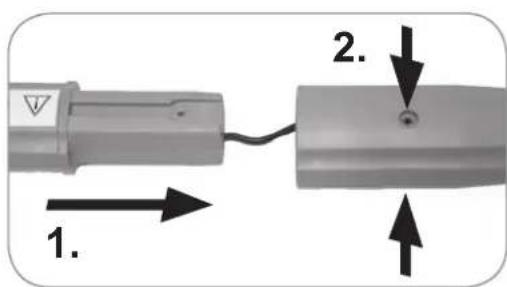
- Plug together the two parts of the main unit (1).
- Fix the parts of the main unit in place with two screws (6).

natural_image
Close-up of a mechanical component with a black arrow pointing to a circular feature (no text or symbols visible)- Place the guide wheel (9) into the recess which is provided for it at the bottom end of the main unit. You should feel and hear it click into place.
natural_image
Close-up of a mechanical component with two arrows pointing to a central hub (no text or symbols visible)-
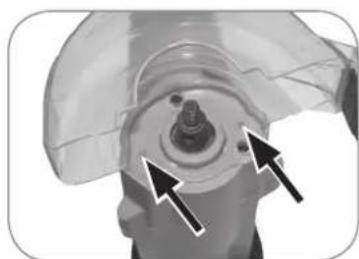
Insert the protective guard (2) into the recess which is provided for it at the bottom end of the main unit. When you do this, make sure that the arrow is pointing forwards.
-
Fix the protective guard in place with two screws.

natural_image
Close-up of a cleaning brush head with a pointed tool, showing no text or symbols
natural_image
Close-up of a mechanical component with concentric rings and a curved arrow indicating rotation (no text or symbols)-
Place the brush you want onto the thread. When you do this, the writing on the brush must be pointing upwards.
-
Fix the brush on the main unit with the nut (5). To do this, place the fi xing rod (4) into the recess on the axis, twist the nut onto the thread and turn it tight using the spanner (3) that is also supplied.
Perform the steps in reverse order to dismantle the device.
Brushes
The items supplied include two different brushes:
Steel brush (8): The steel brush is suitable for resistant surfaces and stubborn weeds.
Nylon brush (7): The nylon brush is suitable for light dirt and surfaces which are too delicate for the steel brush.
Use

PLEASE NOTE!

This device generates a volume of up to approx. 91 dB. You should therefore wear suitable hearing protection! For your own safety, you should also wear protective goggles while working with the device.
It is essential to wear suitable clothing, e. g. long trousers, a long-sleeved top and sturdy footwear.
IMPORTANT: Remove the fixing rod from the axis before putting the device into operation.
Before using the device, clear from the surface which is to be processed any coarse dirt and objects lying around which may be spread around by the device or become caught in the device.
31 EN
■ After the device has been switched off, the brush carries on rotating for a few seconds. Wait until the brush has come to a complete standstill.
■ Never use the device without the protective guard fitted!
- Do not use the device without a brush.
- Switch the device on first and then guide it over the surface which is to be processed.
■ Always move the device forwards when it is switched on. Never drag the device when it is switched on!
- When working with the device, never linger on one spot for too long. Always keep moving.
■ Always guide the device with two hands.

It is impossible to prevent the impact of noise from this device. Take periods of rest.
- Familiarise yourself with all of the features and functions of the device.

natural_image
Close-up of a black electric vehicle charging plug with cable (no visible text or symbols)-
Hang a suitable extension cable in a loop in the holder for the extension cable (11) on the device.
-
Connect the mains plug of the device to the extension cable.
- Plug the mains plug of the extension cable into a plug socket that has been properly installed. The socket must also be readily accessible after connection so that the connection to the mains can quickly be isolated.
- Place the device on the ground and align it so that the open side of the protective guard (2) is parallel with the ground.
- Hold the device securely with two hands on both handles (13, 15) and maintain a sufficient distance from the device or brush.
- Switch on the device: Press down the release button (14) and the On / Off switch (12) at the same time and keep the On / Off switch pressed down.
- Move the device at an even speed over the crevices which are to be cleaned.

Repeat this step if necessary for more stubborn dirt.
-
Switch off the device: Release the On / Off switch.
-
After finishing work, pull the mains plug from the plug socket and disconnect the extension cable from the device.
- Clean the device after each use in the manner described in the “Cleaning, Storage and Maintenance” chapter.
Cleaning, Storage and Maintenance

PLEASE NOTE!
Before commencing the cleaning, note the safety instructions in the “Safety Instructions” chapter!
- Clean the device immediately after use. Do not allow any dirt particles to dry on.
- Do not use any corrosive or abrasive cleaning agents or cleaning pads for cleaning. These can damage the surface.
Cleaning and Storage
- Remove the brush and the protective guard (2) from the device (see the "Assembly" chapter).
- Carefully tap out the brush and the protective guard and remove any coarse dirt with a soft cleaning brush. Then clean it with warm water and a little mild detergent.
- Wipe down the main unit (1) and the guide wheel (9) with a damp cloth. If necessary, use a little mild detergent to remove more intense soiling. In particular, give the ventilation slots a thorough clean.
IMPORTANT: Make sure that no liquids get into the main unit during cleaning!
-
Once all parts are completely dry, reassemble the device.
-
Store the device in a dry, clean, frost-free place that is protected from direct sunlight and cannot be accessed by children or animals.
Maintenance
- Check the device, in particular the mains cable, and all accessories for damage regularly. Do not use the device if the device, the mains cable, the mains plug or the accessories are damaged. Damaged parts must be replaced by the manufacturer, customer service department or a specialist workshop in order to avoid any hazards.
- Do not use any worn brushes. Worn brushes must be replaced.
Technical Data
| Article | number: | 02978 |
| Model | number: | N1C-100JS |
Voltage supply: 230 – 240 V\~ 50 Hz
| Power: | 140 | W |
| Speed: | 1200 | rpm |
Sound power level ( L_WA )*: 88 dB (A)
Sound pressure level ( L_pA )*: 68 dB (A)
Sound level tolerance: K = 3 dB(A)
Vibration emission*: 1.6 m/s^2 K = 1.5 m/s^2
Brush diameter: max. 100 mm
Protection class: II
Type of protection: IP20

\* PLEASE NOTE:
- The specified values are emission values and they do not therefore also represent safe workplace values. Although there is a correlation between emission and immission levels, it cannot reliably be inferred from this whether additional precautionary measures are necessary or not. Factors which influence the current immission level existing at a workplace include the nature of the workspace, other noise sources, e.g. the number of machines and other working processes taking place nearby. The permitted workplace values can also vary from country to country. However, this information should help you to be able to make a better assessment of hazard and risk.
- The specified total vibration value and the specified noise emission values have been measured using a standardised testing method and can be used to compare one power tool with another one. The emission values can also be used to make a preliminary assessment of the level of pollution.
- The vibration and noise emissions may vary from the specified values when the power tool is actually used, depending on the way in which the power tool is used, in particular what kind of workpiece is being machined.
Troubleshooting
If the device does not work properly, check whether you are able to rectify the problem yourself. If the problem cannot be solved with the steps that are listed, contact the customer service department.

Do not attempt to repair a defective electrical device yourself!
| Problem Possible cause Fix | ||
| The device does not work. | The mains plug is not inserted correctly in the socket. | Insert the mains plug. |
| The mains cable of the device is not connected properly to the extension cable. | Check the connection between the mains cable and extension cable. | |
| The socket is defective. Try another socket. | ||
| The extension cable is defective. | Use a new extension cable. | |
| No mains voltage is present. | Check the fuse of the mains connection. | |
| The On / Off switch (12) is not fully pressed or is not being held down. | Press down the release button (14) and the On / Off switch at the same time and keep the On / Off switch pressed down. | |
| The fuse in the fuse box is triggered. | Too many devices connected to the same circuit. | Reduce the number of devices in the circuit. |
| No error can be identified. | Contact our customer service department. | |
| The dirt in the crevices is not fully removed. | The brush is worn. Replace the brush. | |
| During use, an unpleasant smell is detected. | Is the device being used for the first time? | A smell often develops when new devices are first used. The smell should disappear once the device has been used several times. |
Disposal
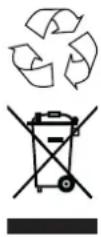
Dispose of the packaging material in an environmentally friendly manner and take it to a recycling centre.
Dispose of the device in an environmentally friendly manner at a recycling centre for used electrical and electronic devices. It should not be disposed of in the regular domestic waste. More information is available from your local authorities.
Customer Service / Importer:
DS Produkte GmbH
Am Heisterbusch 1
19258 Gallin
Germany
Tel.: +49 38851 314650
(Calls to German landlines are subject to charges. The cost varies depending on the service provider.)
Contenu
www.service-shopping.de
1 Corps de l'appareil (1 x)
2 Capot de protection (1 x)
3 Clé plate (1 x)
4 Tige de fixation (1 x)
5 Écrou (1 x)
6 Vis (4 x)
7 Brosse en nylon (1 x)
8 Brosse en acier (1 x)
9 Roue de guidage (1 x)
Non illustré :
- Mode d'emploi
natural_image
Close-up of a mechanical component with a black arrow pointing to a circular feature (no text or symbols visible)natural_image
Close-up of a mechanical component with two arrows pointing to a central hub (no text or symbols visible)natural_image
Two-panel image showing a robotic arm and a close-up of a circular brush head with directional arrows (no text or symbols)natural_image
Close-up of a black electric vehicle charging plug with cable (no visible text or symbols)www.service-shopping.de
Doelmatig gebruik
WAARSCHUWING – Brandgevaar
1 Hoofdeenheid (1 x)
2 Beschermkap (1 x)
3 Muilsleutel (1 x)
4 Fixeerpen (1 x)
5 Moer (1 x)
6 Schroef (4 x)
7 Nylon borstel (1 x)
8 Staalborstel (1 x)
9 Geleidingswieltje (1 x)
Niet afgebeeld:
natural_image
Close-up of a mechanical component with a black arrow pointing to a circular feature (no text or symbols visible)natural_image
Close-up of a mechanical component with two arrows pointing to a central feature (no text or symbols visible)natural_image
Close-up of a mechanical brush applying material to a surface, with an arrow indicating direction (no text or symbols visible)
natural_image
Close-up of a circular mechanical component with textured surfaces and a curved arrow indicating rotation (no text or symbols)natural_image
Close-up of a black electric vehicle charging plug with cable (no visible text or symbols)Herewith we confirm that the object of the declaration described below is in conformity with the relevant Union harmonisation legislation as mentioned in this form and mass production will be effected accordingly. This declaration of conformity is issued under the sole responsibility of the manufacturer.
The object of the declaration described above is in conformity with Directive 2011/65/EU of the European Parliament and of the Council of 8 June 2011 on the restriction of the use of certain hazardous substances in electrical and electronic equipment.
The object of the declaration described above is in conformity with the relevant Union harmonisation legislation: Directive 2014/53/EU.
- Dear Customer,
- Intended Use
- Explanation of the Symbols
- Explanation of the Signal Words
- Safety Instructions
- General Power Tool Safety Warnings
- Retain all safety warnings and instructions for future reference.
- 1) Workplace Safety
- 2) Electrical Safety
- 3) Personal Safety
- 4) Power Tool Use and Care
- 5) Service
- Device-Specific Safety Instructions
- DANGER – Danger of Electric Shock from Water
- WARNING – Danger of Electric Shock from Damage and Inappropriate Use
- WARNING – Danger of Fire
- CAUTION – Danger of Injury
- Danger from Vibrations!
- NOTICE – Risk of Damage to Material and Property
- Items Supplied and Device Overview
- PLEASE NOTE!
- Items Supplied
- Device Overview
- Assembly
- Brushes
- Use
- EN
- Cleaning, Storage and Maintenance
- Cleaning and Storage
- Maintenance
- Technical Data
- \* PLEASE NOTE:
- Troubleshooting
- Disposal
- Customer Service / Importer:
- Contenu
- Doelmatig gebruik
- WAARSCHUWING – Brandgevaar
Brand : EasyMaxx
Model : 02978
Category : Sweeper