Travel 400 - Keyboard HAMA - Free user manual and instructions
Find the device manual for free Travel 400 HAMA in PDF.


| Brand | Hama |
| Model | Travel 400 |
| Product type | Bluetooth Keyboard |
| Dimensions (L x W x H) | 28.5 x 12.0 x 1.8 cm |
| Weight | Approximately 250 g (with batteries) |
| Power supply | 2 AAA batteries (1.5 V) |
| Bluetooth version | 5.0 |
| Bluetooth range | Up to 10 m |
| Number of keys | 78 (including 12 multimedia keys) |
| Supported operating systems | iOS, iPadOS, macOS, Android, Windows |
| Frequency bands | 2402 - 2480 MHz |
| Maximum transmission power | 2.09 mW (EIRP) |
| Main features | Bluetooth connection, automatic pairing, multimedia keys, automatic sleep mode |
| Care and cleaning | Clean with a slightly damp, lint-free cloth, without aggressive detergent |
| Safety | Protect from humidity, shocks and overheating; respect battery polarity |
| Spare parts and repairability | Not specified; contact Hama customer service |
| General information | Non-commercial household use; CE declaration of conformity available online |
Frequently Asked Questions - Travel 400 HAMA
User questions about Travel 400 HAMA
0 question about this device. Answer the ones you know or ask your own.
Ask a new question about this device
Download the instructions for your Keyboard in PDF format for free! Find your manual Travel 400 - HAMA and take your electronic device back in hand. On this page are published all the documents necessary for the use of your device. Travel 400 by HAMA.
USER MANUAL Travel 400 HAMA
OperatingInstructions
Bedienungsanleitung
Moded'emploi
Manualdeutilizare
Работнаинструкция
GB
D
F
RO
BG


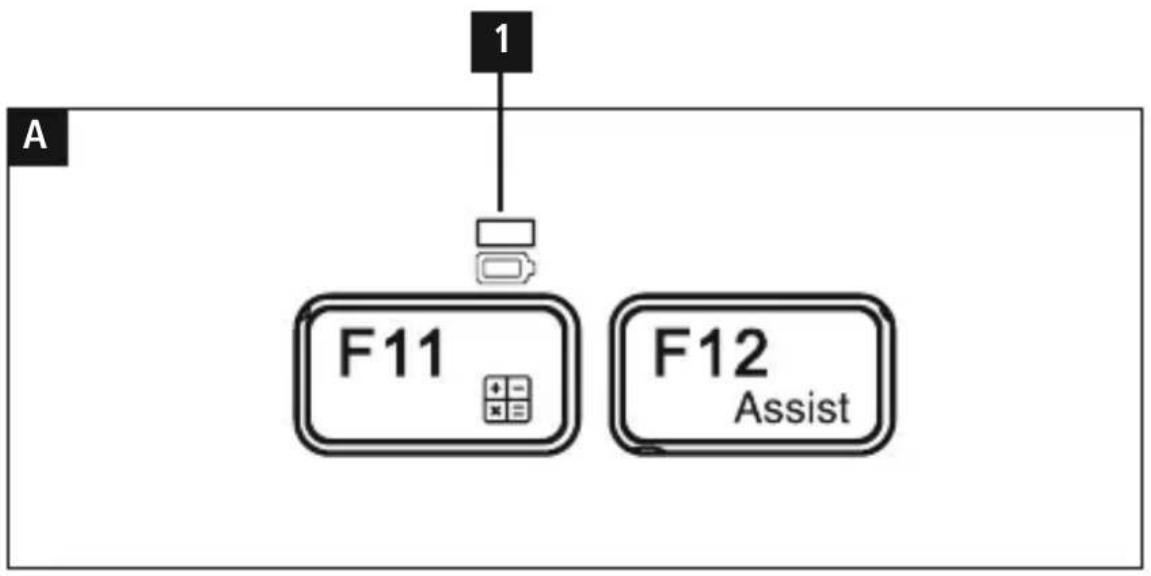
flowchart
graph TD
    A["1"] --> B["F11"]
    B --> C["F12 Assist"]
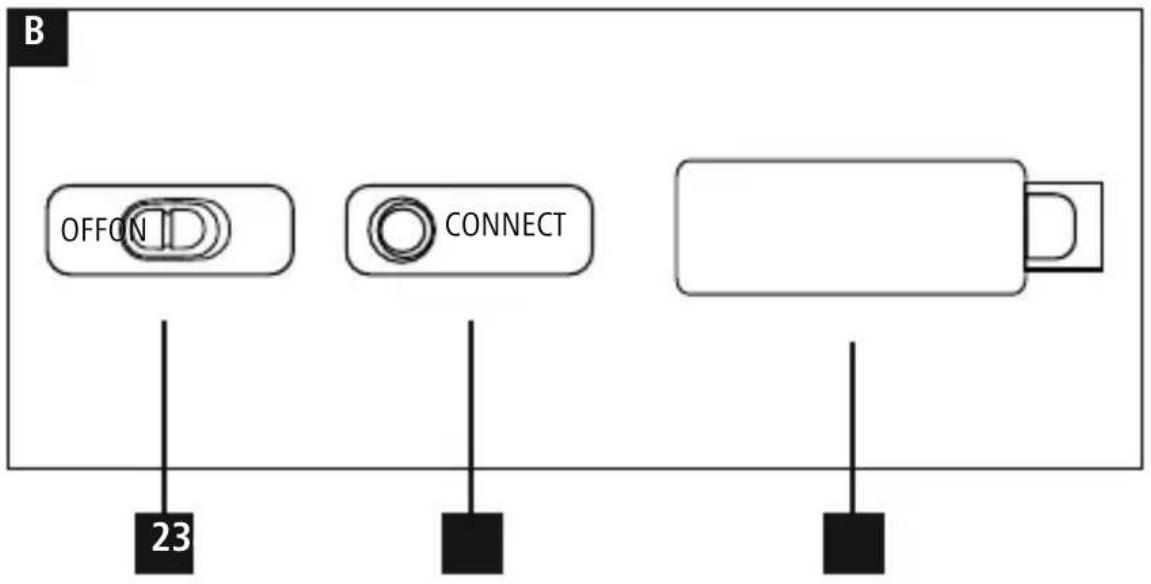
Controlsanddisplays
ADisplaybar
- StatusLEDforBluetooth ^ connection/ battery capacity
BControls
2.[OFF/ON]switch
3.[CONNECT]button
4.Batterycompartment
Thankyouforchoosinga H amaproduct. Takeyourtimeandreadthefollowinginstructions andinformationcompletely. P leasekeepthese instructions in a safe place for future reference.
1. Explanationofwarning s ymbolsandnotes
Warning
This symbol is used to indicate safety instructions ortodraw your attention specific h a z a r d s and risks.

Note
This symbol is used to indicate additional information or important notes.

2.Packagecontents
- "Travel400"Bluetooth® keyboard
• Theseoperatinginstructions - 2 x A AAbatteries
3. Safetyinstructions
• T heproductisintendedforprivate,non-commercialuseonly.
- Protect the product from dirt, moisture and overheating and use it indry environments only.
- Do n otusetheproductinareasinwhichelectronic productsare n otpermitted.
- Do not use the product in a damp environment and avoids splashingwater.
- D o n otdroptheproductanddonotexposeitto anymajorshocks.
- D isposeofpackagingmaterial i mmediatelyin accordancewiththelocallyapplicableregulations.
- Do not modify the product in any way. Doing so voidsthewarranty.
4. Systemrequirements
Thekeyboard supportsBluetooth ^® -enableddevices withtheiOS,iPadOS,MacOS,AndroidandWindows operatingsystems.
The following requirements must be metto enable its use:
- iPad devices require iPadOS 14 or higher
• i Phonedevicesrequire i OS14orhigher - A ndroiddevicesrequire A ndroid8.0orlater
- W indowsdevicesrequire W indows10orhigher
- M acOS11orhigher
Checkwhetherthe latestversionisinstalledand carry out a software update if necessary.

Note
- For proper functioning of the Bluetooth keyboard, makes sure that the correct keyboard layout (QWERTZ, QWERTY etc.) is activated in the setting so your device.
- P leasebeaware that your device must support some functions if they are to be used.
- If someofthekeysoftheBluetooth ^ keyboard donotfunctionproperlyonyourdevicedueto software,youcanexecutethemviathe virtual keyboard.
- P leaserefertotheoperatinginstructionsof yourdeviceformore i nformation.
5.Setup
Warning-Batteries
- When inserting batteries, not the correct polarity(+and-m markings) and insert the batteries accordingly. Failure to do so could result in the batteries leaking orexploding.
- O nlyusebatteries(orrechargeablebatteries) that match the specified type.
- Before you insert the batteries, clean the battery contactsandthepolaritycontacts.
- Do not allow child rentochange batteries without supervision.
- Do not mix old and new batteries, or batteries of different types or from different manufacturers.

Warning- Batteries

- R emovethebatteriesfromproductsthatare n o t beingusedforanextendedperiod(unlesthese are b eingkeptreadyforanemergency).
- Don otshort-circuitbatteries.
- Don otchargebatteries.
- Donotburnbatteries.
- Keepbatteriesoutofthereachofchildren.
- N everopen,damageorswallowbatteriesorallow themtoentertheenvironment.Theycancontain toxic,environmentallyharmfulheavymetals.
- R emovespentbatteriesfromtheproductand disposeofthemwithoutdelay.
-
Avoid storing, charging and using in extreme temperatures and at extremely low atmospheric pressures (such as high altitudes).
-
The two AAA batteries are already inserted with the correct polarity in the battery compartment(4). Only remove the contact protection.
- If the battery capacity is low, the Bluetooth® connection/ b atterycapacitystatusLED(1)starts to flash red during operation. Replace the batteries immediatelyasdescribedabove.
6.Operation

Note
- T hefunctionsdescribedinthissectionare only possiblewithBluetooth®-enableddevices.
- NotethatthemaximumrangeforBluetooth is 10 metres without obstacless such as walls, people, etc.
6.1 Bluetooth ^® initialconnection(pairing)

Note-pairing
- Ensure that the Bluetooth®-enabled device is switched on and that the Bluetooth® function is activated.
- M akesure thatyourBluetooth ^® -enableddevice isvisibletootherBluetooth ^® devices.
- P leaserefertotheoperatinginstructionsof yourdeviceformore i nformation.
ThepositionoftheswitchisalreadysettoON. The keypadisswitchedonwhenthe contactprotection isremoved.
- Press and hold the [CONNECT] button (3) until theBluetooth® connection/ b atterycapacity status LED (1) starts to flash red continuously. The keyboard searchesfora B l u e t o ® connection.
- O pentheBluetooth® settingsonyourdeviceand waituntilthelistoffound Bluetooth devices shows Hama Travel 400.
- Select Hama Travel 400, follow the instructions of your end device if necessary and wait until the keyboard is displayed as connected in the Bluetooth® settingsofyourdevice.TheBluetooth® connection / battery capacity status LED (1) goesout.
- YoucannowusetheBluetooth ^ keyboard.
6.2 AutomaticBluetooth ^® connection (oncepairinghas b eenperformed)

Note
- Ensure that the Bluetooth®-enabled device is switched and that the Bluetooth® function is activated.
- Make sure that your Bluetooth®-enableddevice isvisibleto other B l u e t o®devices.
- P leaserefertotheoperatinginstructionsof yourdeviceformore i nformation.
- Slide the [OFF/ON] switch (2) to the ON position to switch on the Bluetooth® keyboard. The Bluetooth® connection/ b atterycapacity status LED(1)flashesred.
- Youcannowusethe Bluetooth ^ tkeyboard.

Note- c onnectionimpaired
After a successful initial pairing, the connection is established automatically. If the Bluetooth® connection is not established automatically, check the following:
- In your device's Bluetooth® settings, check that Hama Travel 400 is connected. If not, repeat the steps described in 6.1. Bluetooth® initial connection.
- Checkwhetherobstaclesare i mpairingthe range.Ifso,movethedevicesclosertogether.
6.30 operating system change
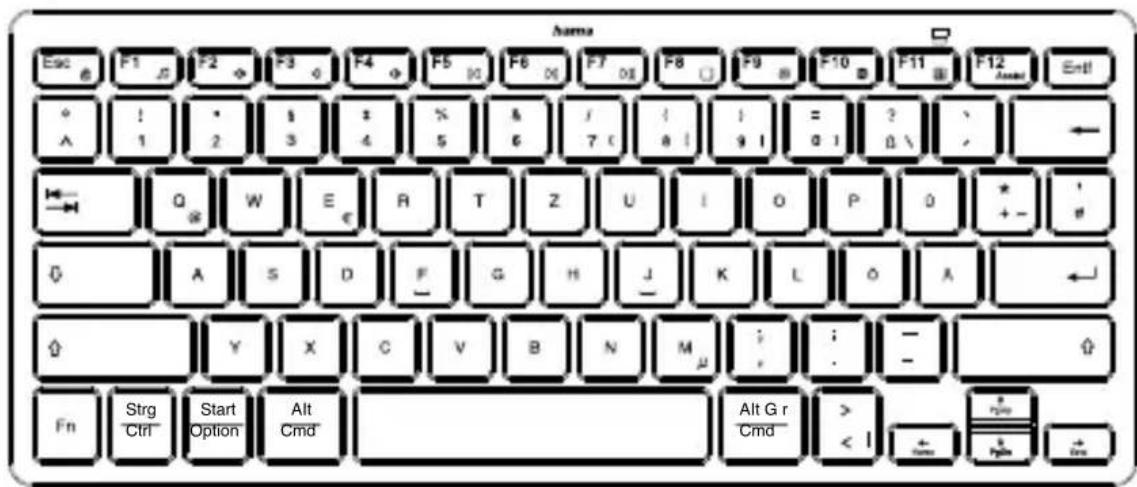
TheHamaTravel400keyboardsupportsthree different operating systems. You can select the desiredoperatingsystemwiththefollowingkey combinations:
- F n + Q f orAndroid
- F n + W f or Windows
• F n + E f oriOS,iPadOS,MacOS
6.4 Multimediakeys
Themultimediakeysallowdirectquickaccess to various applicationsandfunctions,whichyou canusewiththekeycombinationofFnandthe respectiveemultimediakey.
Note
PossiblylimitedusabilitywiththeAndroid,iOS,iPadOSandMacOSoperatingsystems.

6.5 Standbyandswitchoff
- The keyboard automatically switches to standby mode if it is not used for more than 5 minutes.
- Pressanykeytoreactivatethekeyboard.
- Move the [OFF/ON] switch (2) to the OFF position to switch the Bluetooth ^ keyboard of ff.
7. Care and maintenance
- Only clean this product using a lint-free, slightly dampclothanddonotuseanyharshcleaners.
- Ensure that no water is able to enter the product.
8.Warrantydisclaimer
HamaGmbH& C o K G a ssumesnoliability and providesnowarrantyfordamageresultingfrom improper installation, mounting and improper use of the p roductor non-observance of t heoperatinginstructions and/or of the safety instructions.
- Technical data
| Bluetooth® version5.0 | |
| Reach | M ax.10m |
| Dimensions(Lx W x H) | 28.5x 1 2.0x 1 .8cm |
| Numberofkeys | 78incl.12media keys |
| Batteries2x1.5V(AAA) | |
| Operating systems | iOS,iPadOS,MacOS,Android,Windows |
10. Declaration of conformity
CE HamaGmbH& C o K G h erebydeclares thattheradioequipmenttype [00125132,00125133]isincompliance
with Directive 2014/53/EU. The full text of the EU declarationofconformityisavailableatthefollowing Internetaddress:
https://de.hama.com → 📄 → 00125132, 00125133 → Downloads
| Frequencyband(s)2402- 2 | 480MHz |
| Maximumradio-frequencypower transmitted | 2.09mWEIRP |
The Bluetooth® word mark and logos are registered trademarks owned by Bluetooth SIG, Inc. and any use of such marks by Hama GmbH & Co KG is under license. Other trademarks and trade names are those of their respective owners.
All listed brands are trademarks of the corresponding companies.
Errors and omissions excepted, and subject to technical changes.
Our general terms of delivery and payment are applied.