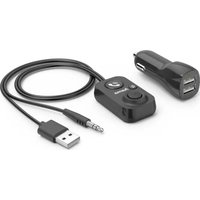
00014167 - Bluetooth audio accessory HAMA - Free user manual and instructions
Find the device manual for free 00014167 HAMA in PDF.


User questions about 00014167 HAMA
0 question about this device. Answer the ones you know or ask your own.
Ask a new question about this device
Download the instructions for your Bluetooth audio accessory in PDF format for free! Find your manual 00014167 - HAMA and take your electronic device back in hand. On this page are published all the documents necessary for the use of your device. 00014167 by HAMA.
USER MANUAL 00014167 HAMA
Bluetooth®-handsfreeset forcarswithAUX-In
Operatinginstruction
Thankyouforchoosinga H amaproduct.
Take your time and read the following instructions and informationcompletely. P leasekeeptheseinstructions in a safe place for future reference. If you sell the device, pleasepasstheseseoperatinginstructionsontothew owner.
1.Controlsanddisplays
-1.12VUSBccharger(max.2.1A)
2. Multi-function key for call pick-up / termination / Play/Pause
3.Microphone
-4. Buttonforbassamplification
-5.3.5mmplug
-6.USBplugforpowersupply
-7. Buttonforthexttrackandlouder
-8. Buttonforprevioustrackandquieter
-9.BluestatusLED
2.Explanationof warningsymbolsandnotes
RiskofElectricshock
Thissymbolindicates a riskofelectricshockfrom touchingproductpartscarryinghazardousvoltage.
Warning
Thissymbolisusedtoindicatesafetyinstructionsoarto draw your attention to specific hazards and risks.
Note
Thissymbolisusedtoindicateadditionalinformation orimportantnotes.
3.Packagecontents
- Bluet®handsfreefacility
1 2 V U SBcharger
1 self-adhesivehookandloopstrip - T heseoperatinginstructions
4.Safetyinstructions
T heproductisintendedforprivate,non-commercial useonly.
- P rotectheproductfromdirt,moisture and overheatinganduseitindryenvironmentsonly.
- Do not use the product in the immediate vicinity of heaters, other heaters or indirect sunlight.
- Do not allow yourself to be distracted by the product when driving a vehicle. Always pay attention to the surrounding traffic and your environment.
- D o n otdroptheproductanddonotexposeittoany majorshocks.
- D o n otoperatetheproductoutsidethepowerlimits specified inthetechnicaldata.
- D isposeofpackagingmaterialimmediatelyin accordancewiththelocallyapplicable管理条例.
- Do not modify the device in any way. Doing so voids the warranty.
- U setheproductonlyforthenthendidpurpose.
- Onlyusethearticleunder moderateclimatic conditions.
- As with all electrical products, this device should be kept out of thereachofchildren.
- Do not use the product in a damp environment and avoidsplashingwater.
- Donotusetheproductinareasinwhichelectronic productsare not permitted.
- Donotbendorcrushthecable.
- Always pull directly on the plug when disconnecting the cable, never on the cable itself.
- Ensure that the product is securely mounted before every journey.
- When using this product, observe the applicable local traffic lawsandregulations.
Take care that components such as airbags, safety areas, controls, instruments, etc. and visibility are not blocked or restricted.
Risikofelectricshock(car)

- Do not open the device or continue to operate it if it becomes damaged.
- Donotusetheproductifthechargingcable, adapter cable or power cable is damaged.
- Donotattemptoserviceorrepairtheproduct yourself. Leave any and all service work to qualified experts.
Note- 12 V linevoltage

Thechargeriscompatiblewithalinevoltageof 12V.
Note-Carbattery

Withsomevehicles, it can happen that power continues to be upplied eventhough the ignition has been switched off. You should therefore disconnect the product from the line connection when not using to protect your car battery from being drained.
Note-Carcharger

-
On some types of vehicle, the ignition must be switched on for the voltage tagetotraveltothecar socket. For more information, please refer to your vehicle's owners' manual.
-
Usetheenclosedcarchargeronlytochargethis device.
5. Gettingstarted
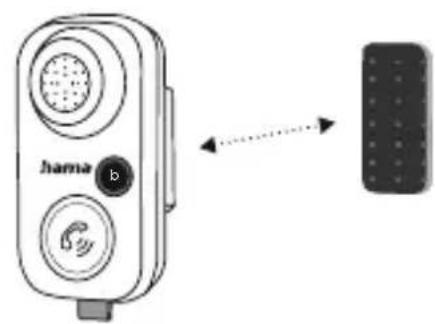
A
- Position the supplied hook and loop strip in a suitable place in the car and attach the Bluetooth® hands-free facilitytoit.
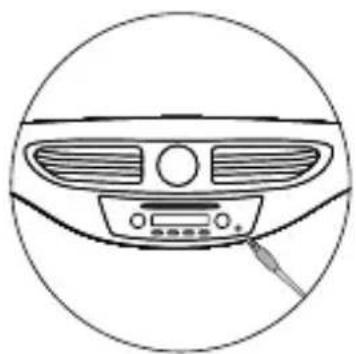
B
- Connectthe3.5mmjackplug(5)tothecar'sAUX socket.
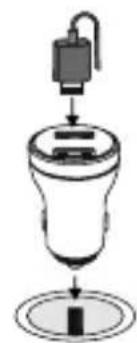
C
- Plug the USB car charger (1) into the car's cigarette lighter socket and then connect the USB plug (6) ontheBluetooth® hands-free facility to the USB car charger.
D
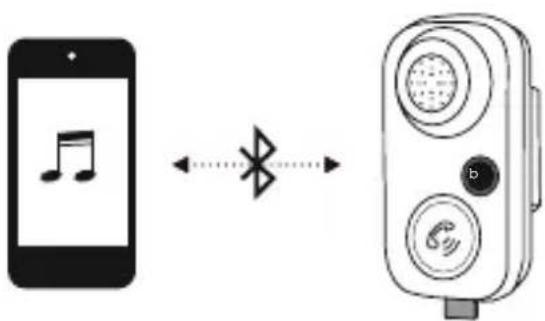
- You can now connect your transmitting device (e.g. smartphone) to the Bluetooth® hands-free facility.
6. Operation
6.1FirstconnectionviaBluetooth (pairing)
Note

- Makesure that your Bluetooth®-capabledeviceis switched on and that B Lu e oostivated.
-
For more information, please refer to the operating instructions of your device.
-
ConnecttheBluetooth hands-freefacilityusingthe 3.5mmjacksocket(orAUX)tothereceivingdevice (e.g.onthecarradio).
- Tosupplypowertothedevice,thesuppliedUSBcar chargermustbepluggedintothecar'scigarette lighter socket and the USB plug on the BT hands-free facilitymustbeconnectedtotheUSBcarcharger.
- ThestatusLED(9)startstoflashblueandthedevic
isinsearchmode. - ThenactivatetheBluetooth® functiononyour transmittingdevice(e.g.smartphone)andselectthe device"BT61".
- The status LED (9) lights up solid blue - the device is paired and ready to use.
Note- Bl u e t o password

- Some devices require a password in order to connecttoanotherBluetooth device.
- If your device requests a password to connect, enter thepassword 0 000,1234,1111or8888.
6.2Terminatingtheconnection
- Toswitchthedeviceandterminatetheconnection, unplug the USB plug (6) from the USB car charger (1).
6.3 A utomaticconnection
- ToreconnecttotheBluetooth receiver, s implyplug theUSBplug(6)backintotheUSBcarcharger(1).
- Thelasttransmittingdeviceispre-settoensure fast connectivity.
- If this does not work, establish a new connection (see Point6.1 InitialconnectionviaBluetooth®).
6.4Acceptcalls
- Pressingthemulti-functionkey(2)onceallowsyou toaccepta c all.
-Toendit, pressthemulti-functionkeyagain. - To reject a call, press and hold the multi-function key for around 2 seconds.
6.5Bassamplification
To activate the bass amplification function, press and holdthebutton(4)untilthesymbollightsupblue.
7. Chargingdevices

Warning- C onnnectionof devices
- Before connecting a device, check whether it can be a dequately supplied with the charger's current delivery.
- Ensure that the power of the connected device does not exceed 10.5W.
- Notetheinstructionsinyourdevice'soperating manual.
Unless different instructions have been expressly given in the operating instructions for the devices you are charging, proceed as follows:
- Connect your device to a USB charging port using a suitable USB cable.
- Then connect the charger to the on-board electrical system'scarsocket.
- Thechargingprocessisdisplayedonyourdevice.
- Disconnect the device from the charger if you wish to interruptthechargingprocessorwhenthedevices fullycharged.
- Thendisconnectthechargerfromthelineconnection.
8.Buttonfunctions
| Call | |
| Accept calls | : Brief press |
| Reject: Longpress | |
| Hangup: Brief press | |
| Musiccontrol | |
| Increasevolume: Longpress | |
| Decreasevolume | : Longpress |
| Bass amplification | : Brief press |
| Next track | : Brief press |
| Previous track | : Brief press |
| Play/Pause | : Brief press |
| StatusLED | |
| Inoperation/ connected | Solidblue |
| AttemptingtoconnectFlashesblue | |
9.Careandmaintenance
| Note |
| Disconnect the device from the mains before cleaning and during prolongedperiods of non-use. |
- Only clean this product with a slightly damp, lint-free cloth and do not use aggressive cleaning agents.
- Ensure that no water is able to enter the product.
10.Warranty disclaimer
HamaGmbH& Co K G a ssumesnoliabilityandprovides nowarrantyfordamageresultingfromimproper installation/mounting,improperuseoftheproductor fromfailure to o bservertheoperatingsinstructionsand/ orsafetynotes.
11. Technical data
| Connection3.5mmjackplug | |
| Max.rang e10m | |
| Cablelength1m | |
| Powersupply12V U SBcarcharger | |
| Bluetooth® version5.1 | |
| Frequencyband(s)2.40GHz- 2 .48GHz | |
| Maximumradiofrequencypowertransmitted | Max.4 d B m |
12.DeclarationofConformity
CE HamaGmbH& Co K G h erebydeclaresthat theradioequipmenttype[00014167]isin compliancewithDirective2014/53/EU. The full textoftheEUdeclarationofconformitycanbefound onthefollowingwebsite:www.hama.com-> 00014167->Downloads.
All listed brands are trademarks of the corresponding companies. Errors and omissions excepted, and subject to technical changes. Our general terms of delivery and payment are applied.