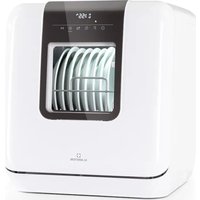
Melville 3 - Dishwasher Klarstein - Free user manual and instructions
Find the device manual for free Melville 3 Klarstein in PDF.


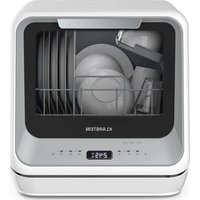
| Product type | Mini tabletop dishwasher |
| Brand | Klarstein |
| Model | Melville 3 |
| Dimensions (H x W x D) | 47 x 42 x 44 cm |
| Number of place settings | 3 |
| Power supply | 220 - 240 V ~ 50 Hz |
| Energy efficiency class | F |
| Energy consumption (eco program) | 0.446 kWh/cycle |
| Water consumption (eco program) | 6.0 L/cycle |
| Duration of eco program | 2 h 35 min |
| Noise level | 58 dB(A) |
| Wash programs | Eco, Hygiene 72°, Intensive, 1420 (glassware), 58 min, Rapid, Self-clean |
| Special functions | Delayed start (up to 24 h), Automatic door opening, Child lock |
| Water softener | Adjustable to 6 levels (H1 to H6) |
| Filtration system | Main filter and fine filter, weekly cleaning recommended |
| Spray arms | Removable for cleaning |
| Installation type | Free-standing (freestanding or built-in) |
| Water connection | Cold water inlet (3/4"), drain hose (max length 4 m) |
| Safety | Child lock, leak protection (code E4), automatic stop when opened |
| Maintenance | Regular cleaning of filters, spray arms, door seals |
| Approximate weight | 15 kg |
Frequently Asked Questions - Melville 3 Klarstein
User questions about Melville 3 Klarstein
0 question about this device. Answer the ones you know or ask your own.
Ask a new question about this device
Download the instructions for your Dishwasher in PDF format for free! Find your manual Melville 3 - Klarstein and take your electronic device back in hand. On this page are published all the documents necessary for the use of your device. Melville 3 by Klarstein.
USER MANUAL Melville 3 Klarstein
CLEANINGCI LEANINGLE ANINGLEAN NINGCLEAN GCLEANINGCI CLEANINGLE LEANINGLE ANINGLEAN

KLARSTEIN
www.klarstein.com

INHALT
Maintenance and Cleaning 22
Installation 26
Troubleshooting Tips 28
Add water into the dishwasher's tank
Water is not enough, light is on;
natural_image
Diagram showing a container with liquid and arrows indicating flow or process (no text or symbols)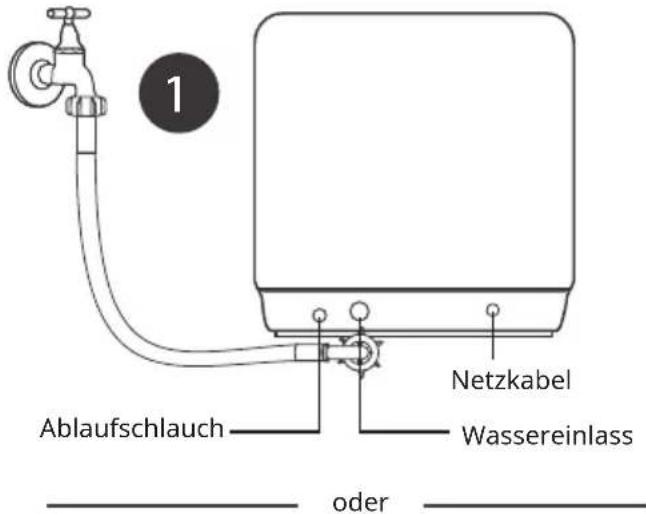
natural_image
Line drawing of a hand pouring liquid into a container connected to an electrical outlet (no text or symbols)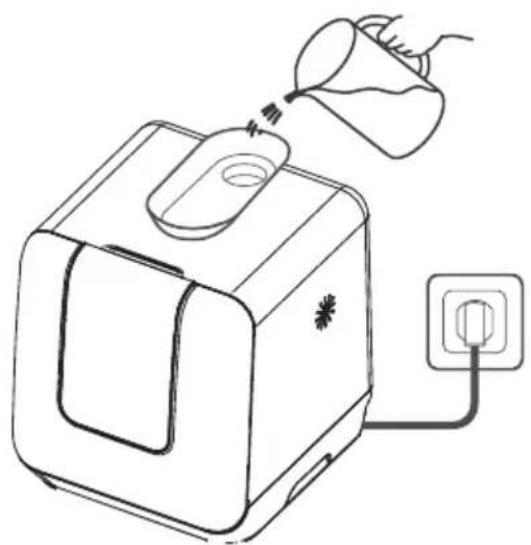
natural_image
Line drawing of a toaster with a funnel pouring liquid into it, connected to an electrical outlet (no text or symbols)natural_image
Line drawing of a laptop with a screen and a pen inserted, showing no text or symbolsnatural_image
Simple line drawing of a rectangular container with a side slot and two curved arrows indicating rotation (no text or symbols)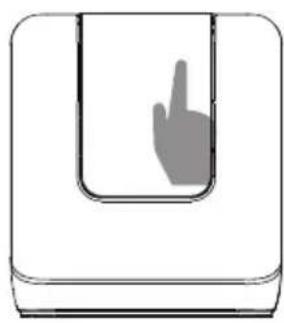
natural_image
Simple line drawing of a hand pressing inside a U-shaped container (no text or symbols)GERÄTEBESCHREIBUNG
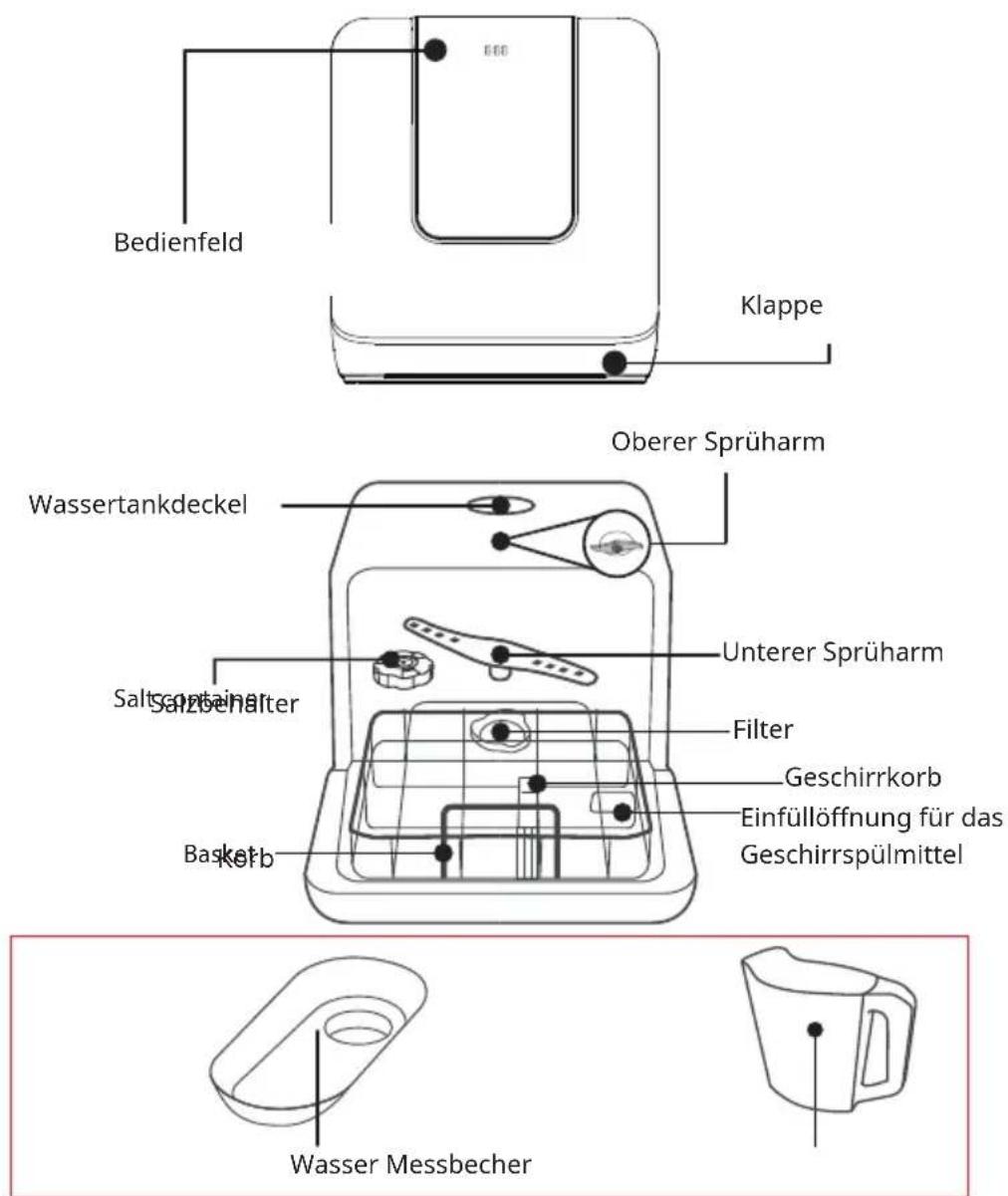
Bedienfeld
flowchart
graph LR
    A["Hand holding container"] --> B["Step 1: pouring liquid into a jar"]
    B --> C["Step 2: pouring liquid into a jar with salt"]
    C --> D["Step 3: pouring liquid into a jar with salt"]
    D --> E["Step 4: pouring liquid into a jar with salt"]
Press the Power button to end the setting mode.
natural_image
Diagram of a container with two blades and a cross mark, no text or symbols presentPosition the dishes and cookware so that they will not get moved by the spray of water.
Korb befüllen
natural_image
Line drawing of a device with a tool and dotted particles inserted, no text or symbols presentPress Start/Pause Button to pause the machine when the door is closed, Press Program Button for more than 3 seconds the machine will be in stand-by state, then you can change the program to the desired cycle setting (see the section entitled "Starting a wash program").
natural_image
Diagram of a mechanical component with rotational arrows indicating motion (no text or symbols)natural_image
Simple line drawing of a gas stove with an upward arrow indicating heating (no text or symbols)natural_image
Line drawing of a kitchen sink with a toothbrush and side table (no text or symbols)No solvents or abrasive cleaning
natural_image
Illustration of hands holding a pipe fitting with a handle (no text or symbols)PRODUKTDATENBLATT (EN 60436)
Member of Berlin Brands Group
Handwerkerstr. 11
15366 Dahlwitz-Hoppegarten
Deutschland
natural_image
Symbol of a trash bin crossed with a diagonal line, no text or numbers presentBerlin Brands Group UK Ltd
PO Box 1145
Oxford
OX1 9UW
Großbritannien
Dear Customer,
Congratulations on purchasing this device. Please read the following instructions carefully and follow them to prevent possible damages. We assume no liability for damage caused by disregard of the instructions and improper use. Scan the QR code to get access to the latest user manual and more product information.

CONTENTS
Safety Instructions 40
Quick guide 42
Product Overview 45
Use 48
Loading the Dishwasher Baskets 50
Adding the Detergent 54
Programming the Dishwasher 55
Maintenance and Cleaning 58
Installation 62
Troubleshooting 64
Product Data Sheet (EN 60436) 68
Disposal Considerations 69
Manufacturer & Importer (UK) 69
SAFETY INSTRUCTIONS
WARNING
Risk of explosion! Under certain conditions, Hydrogen gas may be produced in a hot-water system that has not been used for two weeks or more. HYDROGEN GAS IS EXPLOSIVE. If the hot-water system has not been used for such a period, before using the dishwasher turn on all hot-water faucets and let the water flow from each for several minutes. This will release any accumulated hydrogen gas. As the gas is flammable, do not smoke or use an open flame during this time.
- Do not abuse, sit on, or stand on the door or dish basket of the dishwasher.
- Do not touch the heating element during or immediately after use.
- Do not operate your dishwasher unless all enclosure panels are properly in place.
- Open the door very carefully if the dishwasher is operating. There is a risk of water squirting out.
- Do not place any heavy objects or stand on the door when it is open. The appliance could tip forward.
- When using your dishwasher, you should prevent plastic items from contacting with heating element.
- Check that the detergent receptacle is empty after completion of the wash cycle.
- Do not wash plastic items unless they are marked dishwasher safe or the equivalent.
- For plastic items not so marked, check the manufacturer's recommendations.
- Use only detergent and rinse additives designed for an automatic dishwasher.
- Never use soap, laundry detergent, or hand washing detergent in your dishwasher.
- Other means for disconnection from the supply must be incorporated in the fixed wiring with at least 3 mm contact separation in all poles.
- Keep children away from detergent and rinse aid, keep children away from the open door of the dishwasher, there could still be some detergent left inside.
- Young children should be supervised to ensure that they do not play with the appliance.
- This device may be only used by children 8 years old or older and persons with limited physical, sensory and mental capabilities and / or lack of experience and knowledge, provided that they have been instructed in use of the device by a responsible person who understands the associated risks.
- Dishwasher detergents are strongly alkaline. They can be extremely dangerous if swallowed. Avoid contact with skin and eyes, and keep children away from the dishwasher when the door is open. The door should not be left in the open position since this could present a tripping hazard.
- If the supply cord is damaged, it must be replaced by the manufacturer or its service agent or a similarly qualified person in order to avoid a hazard.
- Please dispose of packing materials properly.
- During installation, the power supply must not be excessively or dangerously bent or flattened.
- Do not tamper with controls.
- The appliance is to be connected to the water mains using new hose sets, and the old hose-sets should not be reused.
- Make sure that the carpet must not obstruct the openings at the bottom base.
- Use the dishwasher only for its intended function.
• The dishwasher is intended for indoor use only.
- The dishwasher is not designed for commercial use. It is intended for use in domestic households and in similar working and residential environments.

CAUTION
Risk of injury! Locate sharp items so that they are not likely to damage the door seal. Load sharp knives with the handles up to reduce the risk of cut-type injuries. Warning: Knives and other utensils with sharp points must be loaded in the basket with their points down or placed in a horizontal position.

WARNING
Risk of suffocation! Packaging material could be dangerous for children! For disposing of package and the appliance please go to a recycling centre. Cut off the power supply cable and make the door closing device unusable.
- The appliance is to be connected to the water mains using new hose sets and that old hose-sets should not be reused.
- The maximum number of place settings to be washed is 3.
- The maximum permissible inlet water pressure is 1 MPa.
- The minimum permissible inlet water pressure is 0.04 MPa.
QUICK GUIDE
Connected to power supplies
The power supply is 220-240V AC 50Hz the specification of the socket is 10A 250V AC
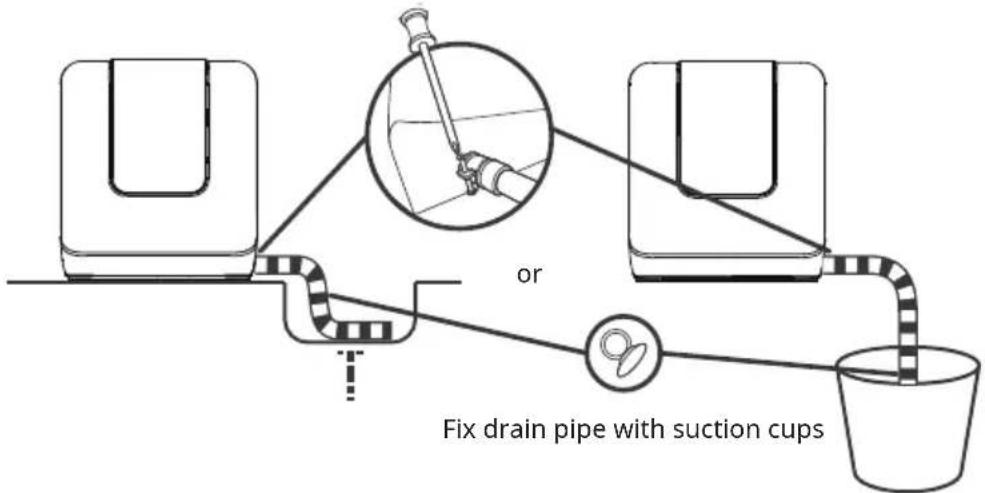
The connection of the drain pipe
Put end of the drain into a sink or bucket. Fix the drain pipe with the back pipe of the machine. The interface is fitted with clamps and tightened with a screwdriver.
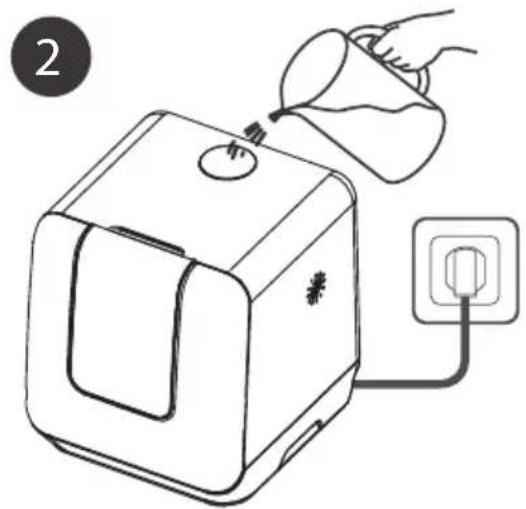
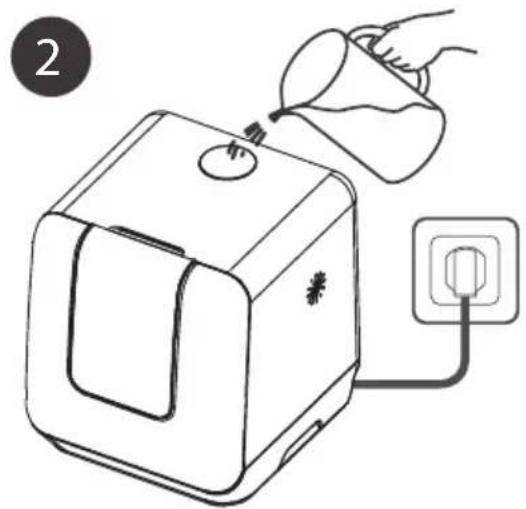
Add water into the dishwasher's tank
There are two ways of prompting the tank that full of water.
-
Before starting: When the tank is full of water, the machine will beep fleetly for 3 seconds.
-
After starting: Water is not enough, light is on; Water is enough, light will be off and the machine will beep fleetly for 3 seconds.
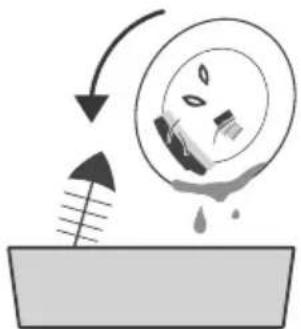
Remove the larger residue
Please remove the large residue before placing.
natural_image
Diagram showing a droplet falling into a container with an arrow indicating flow or process (no text or symbols)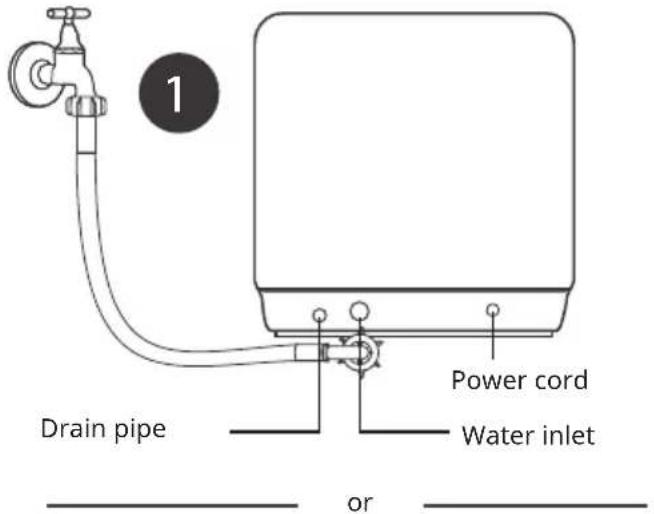
natural_image
Line drawing of a hand pouring liquid into a container connected to an electrical outlet (no text or symbols)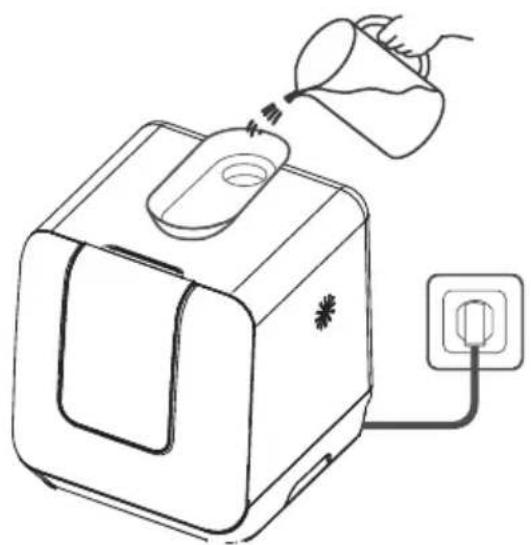
natural_image
Line drawing of a toaster with a funnel pouring liquid into it, connected to an electrical outlet (no text or symbols)Opening the door, placing the dishes and adding detergent
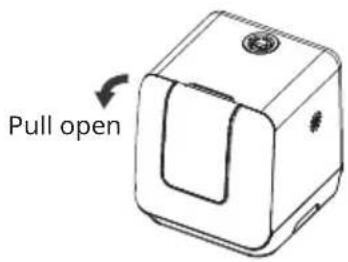
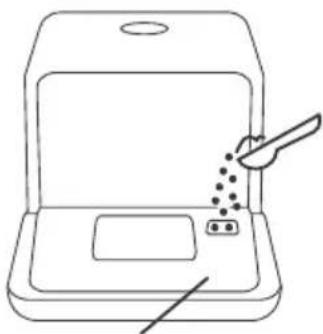
Placing order by size and from the two sides to the middle. All cutlery are suggested to be tilted to improve cleaning performance.
The spray arm will be blocked by the improper placement of the cutlery and cleaning effect may not be ideal.
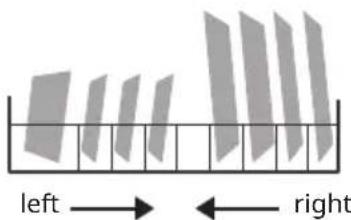
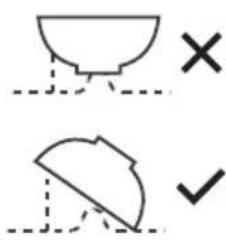
DO NOT place the dishwares in the upper direction or may affect the cleaning preformance. Try to leave the dirty face towards the spray arm.
natural_image
Line drawing of a laptop with a screen and a pen inserted, showing no text or symbolsThe place is for adding the detergent.
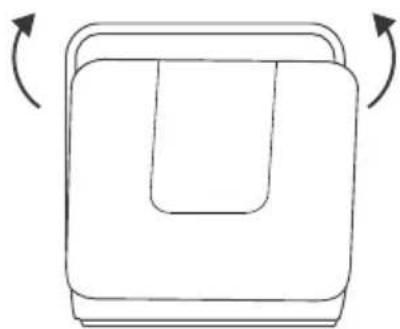
Close the door, select the program and start the dishwasher.
natural_image
Simple line drawing of a rectangular device with a curved top and side panels, no text or symbols present.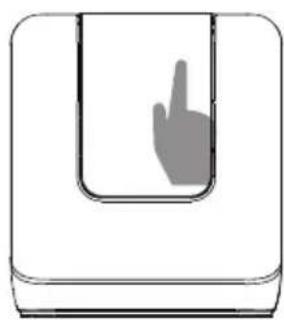
natural_image
Simple line drawing of a hand pressing down inside a U-shaped container (no text or symbols)PRODUCT OVERVIEW
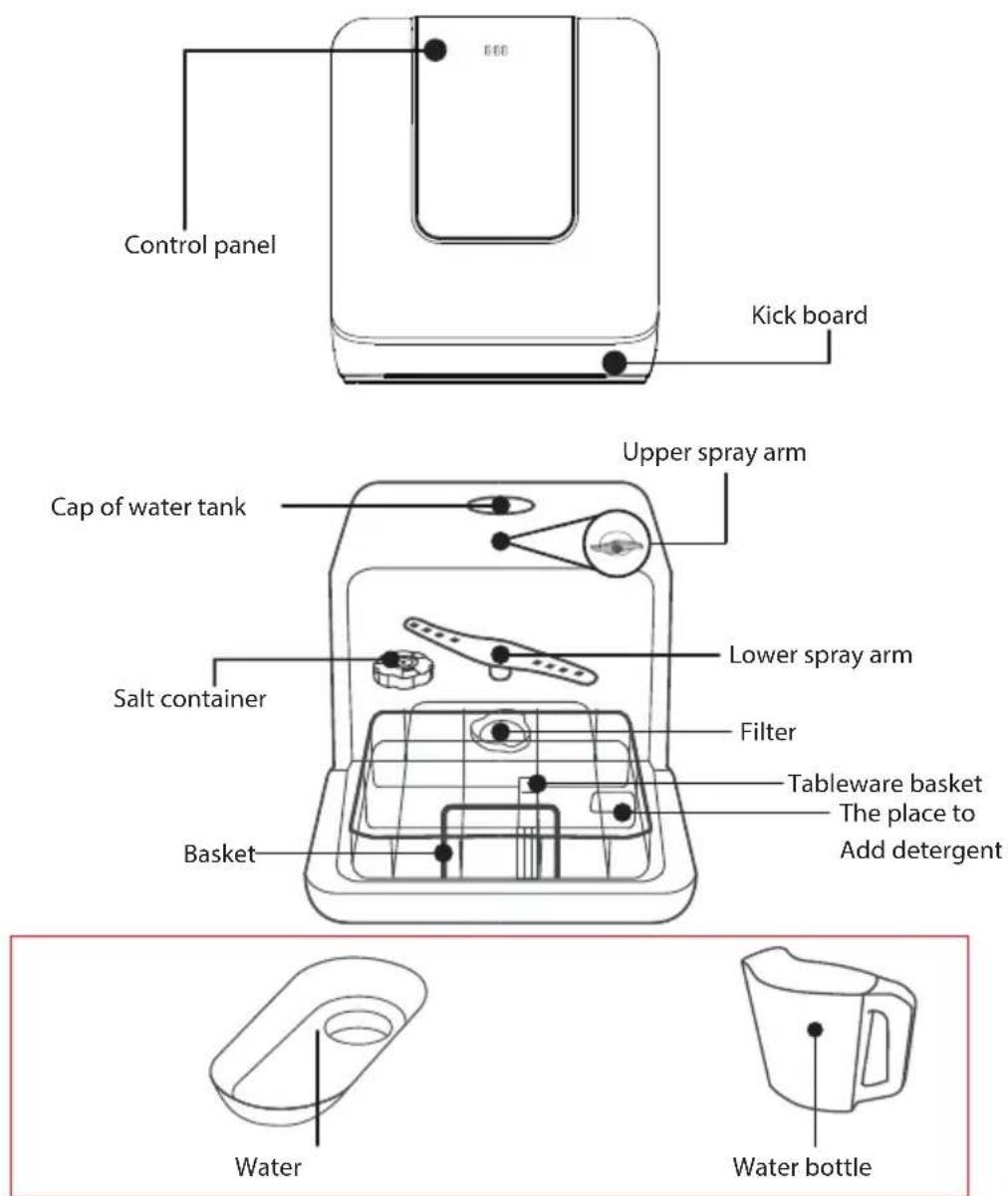
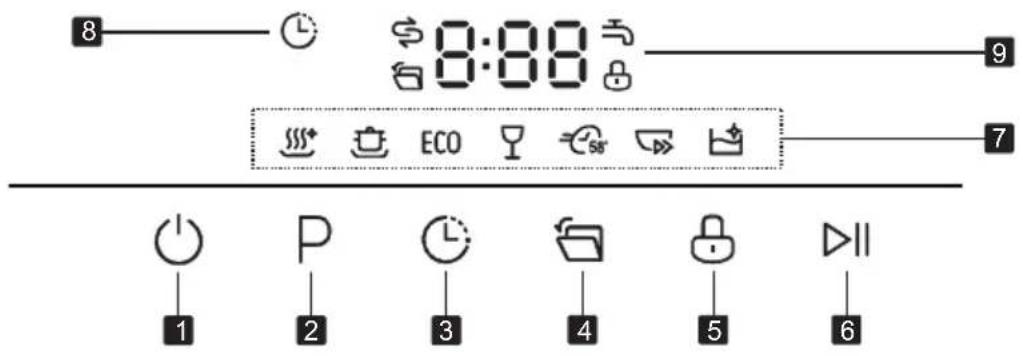
Control panel
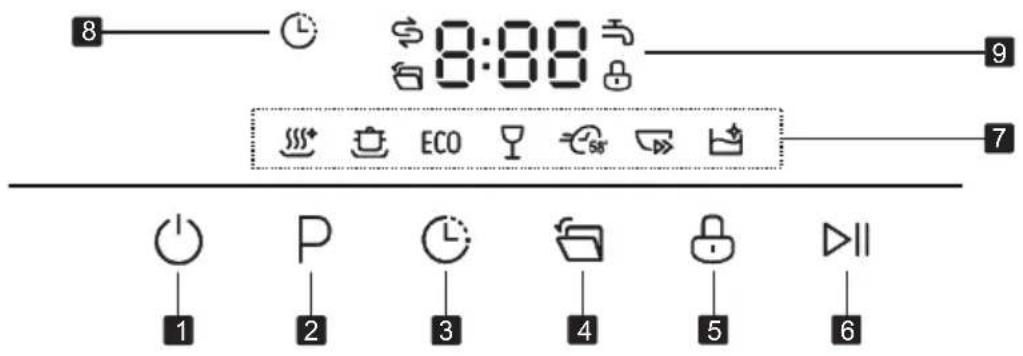
| 1 Power To turn on and off. | |||
| 2 Program | Select the appropriate washing program, the selected program indicator will be lit. | ||
| 3 Delay | Press this button to set the delayed hours for washing. You can delay the start of washing up to 24 hours. One press on this button delays the start of washing by one hour. | ||
| 4 Auto open | Press this button to activate or deactivate auto open function. When this function is on, the light will be lit, and the dishwasher will open the door automatically in the drying phase to help drying. | ||
| 5 Child lock | Press this button for 3 seconds to activate or deactivate child lock. Childlock allows you to lock the buttons except the Power button. | ||
| 6 Start/Pause | To start the selected washing program or pause it when the dishwasher is working. | ||
| 7 | Program indicator | Use to sanitize your dishes and glassware. Maintains the water temperature at 70 C. | |
| For heaviest soiled crockery, and normally soiled pots, pans, dishes etc. with dried-on food. | |||
| ECO | This is standard program, it is suitable to clean normally soiled tableware and it is the most efficient program in terms of its combined energy and water consumption for that type of tableware. | ||
| 7 | Program indicator |  | For lightly soiled crockery and glass. |
 | For normally soiled loads that need quick wash. | ||
 | A shorter wash for lightly soiled loads that do not need drying. | ||
 | This program provides an effective cleaning of the dishwasher itself. | ||
| 8 | Delay indicator | (+IST) | When the delay start function is on, this indicator will be lit. |
| 9 Screen | 8:88 | To show the remaining time and delay time, functions, error codes etc. | |
| [0078] | If this indicator is lit, it means the dishwasher is low on dishwasher salt and needs to be refilled. | ||
 | If the indicator is lit, it means the water faucet closed. | ||
| [2X1G] | If this indicator is lit, it means the door will open automatically for better drying. | ||
| [ESK] | If this indicator is lit, it means the child lock is on. | ||
USE
Loading the salt into the softener
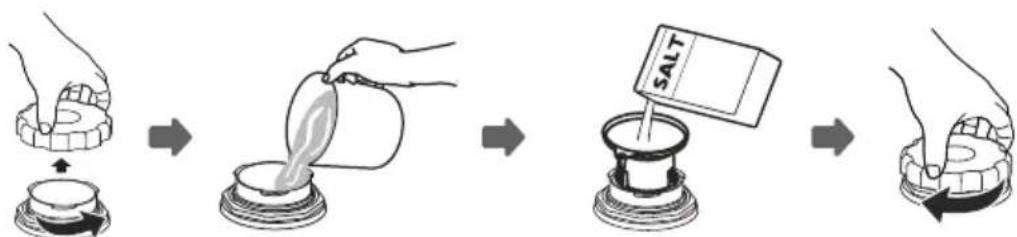
Always use salt intended for use with dishwasher. The salt container is located beneath the basket and should be filled as follows:
flowchart
graph LR
    A["Hand holding container"] --> B["Step 1: pouring liquid into a jar"]
    B --> C["Step 2: pouring liquid into a jar with salt"]
    C --> D["Step 3: pouring liquid into a jar with salt"]
    D --> E["Step 4: pouring liquid into a jar with salt"]
- Remove the basket and then unscrew and remove the cap from the salt container.
- Before first wash, add 1lt. of water in the salt container of your machine.
- Place the end of the funnel (if supplied) into the hole and introduce about, 0.13 kg of salt. It is normal for a small amount of water to come out of the salt container.
- After filling the container, screw the cap tightly back clockwise. Usually, the salt warning light will be cease to be illuminated within 2-6 days after the salt container has been filled with salt.
- Immediately after filling the salt into the salt container, a washing programme should be started (Suggest choose rapid program). Otherwise filter system, pump or other important parts of the machine may be damaged by salty water. It is out of warranty.
- Only use salt specifically designed for dishwashers use! Every other type of salt not specifically designed for dishwasher use, especially table salt, will damage the water softener. In case of damages caused by the use of unsuitable salt the manufacturer does not give any warranty nor is liable for any damages caused.
- Only fill with salt before running a cycle. This will prevent any grains of salt or salty water, which may have been spilled, remaining on the bottom of the machine for any period of time, which may cause corrosion.
- The salt container must only be refilled when the salt warning light in the control panel comes on. Depending on how fully the salt dissolves, the salt warning light may still be on even though the salt container is filled. If there is no salt warning light in the control panel (For some Models), you can judge when to load the salt into the softener by the cycles that the dishwasher had run.
- If there are spills of the salt, a soak or a rapid program should be run to remove the excess salt.
Adjusting salt consumption
Please follow the steps below for adjustment in salt consumption.
- Enter the status of salt adjustment
Close the door, switch on the appliance. Within 60 seconds after the appliance was switched on, press Program button and hold for 5 seconds, the appliance will enter setting mode.
- Select a certain level of salt consumption
Press the Program button to select the proper set according to your local environment, the sets will change in the following sequence:
- Exit the status of salt adjustment
Press the Power button to end the setting mode.
There are 6 levels of salt consumption in all. It is recommended to select the level according to below table:
| Water hardness | Softener setting | Display | Salt consumption (g/cycle) | |
| ^^1) | mmol/l^2) | |||
| 0-5 0 - 0.94 | 1 | H1 | 0 | |
| 6-11 1.0 | -2.0 2 H2 9 | |||
| 12-17 2.1 | -3.0 3 | 3) | H3 12 | |
| 18-22 3.1 | -4.0 4 H4 20 | |||
| 23-34 4.1 | -6.0 | 5 H5 30 | ||
| 35-55 | 6.1 - 9.8 | 6 | H6 60 | |
| (1) German water hardness.(2) Millimoles, international water hardness.(3) Default when first startedContact your local water board for information on the hardness of your water supply.Every cycle with a regeneration operation consumes additional 0.5 litres of water, the energy consumption increases by 0.02 kWh and the programme extents by 4 minutes. | ||||
LOADING THE DISHWASHER BASKETS
Recommendation
- Consider buying utensils which are identified as dishwasher-proof.
- Use a mild detergent that is described as 'kind to dishes'. If necessary, seek further information from detergent manufacturers.
- For particular items, select a program with as low temperature as possible.
- To prevent damage, do not take glass and cutlery out of the dishwasher immediately after the program has ended.
| Unsuitable dishes and cutlery | Conditionally suitable dishes and cutlery |
| Cutlery with wooden, horn, china or mother of pearl handlesPlastic items that are not heat resistantOlder cutlery with glued parts that are not temperature resistantBonded cutlery items or dishesPewter or copper itemsCrystal glassThings made of non-stainless steelWooden dishesPlastic dishes and utensils | Certain types of glass, as they can become cloudy over timeSilver and aluminium parts, as they can change colour over timeGlazed dishes, as the glaze disappears the more you wash it |
Attention before or after loading the dishwasher baskets
For the best performance of the dishwasher, follow these loading guidelines.
Scrape off any large food paritcles. Soften remnants of burnt food in pans. It is not necessary to rinse the dishes under running water. Place objects in the dishwasher in following way:
- Items such as cups, glasses, pots/pans, etc. are face downwards.
- Curved items, or those with recesses, should be loaded at aslant so that water can run off.
- All utensils are stacked securely and can not tip over.
- All utensils are placed in the way that the spray arms can rotate freely during washing.t
- Very small items should not be washed in the dishwasher as they could easily fall out of the basket.
- Load hollow items such as cups, glasses, pans etc. with the opening facing downwards so that water cannot collect in the container or a deep base.
- Dishes and items of cutlery must not lie inside one another, or cover each other.
-
To avoid damage to glasses, they must not be touched.
-
Long bladed knives stored in an upright position are a potential hazard!
- Long and/or sharp items of cutlery such as carving knives must be positioned horizontally in the basket.
- Please do not overload your dishwasher. This is important for good results and for reasonable energy consumption.
Use of the dishware support.
Small-size dishware will drop through the basket and block the rotation of spray arm. Flip the dishware support inward to support the small-size dishware.

natural_image
Architectural floor plan showing structural change from original to simplified layout (no text or symbols)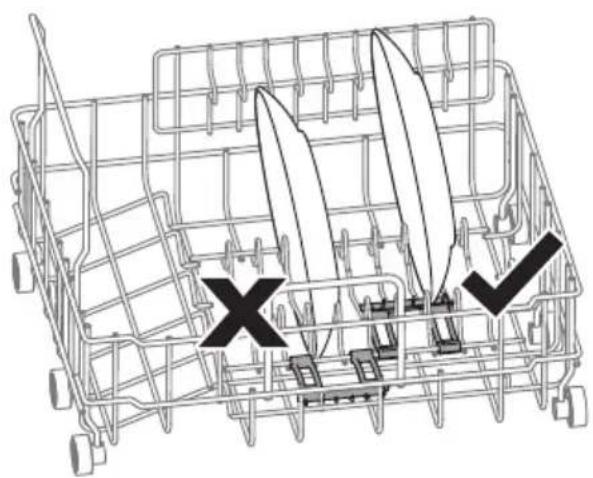
natural_image
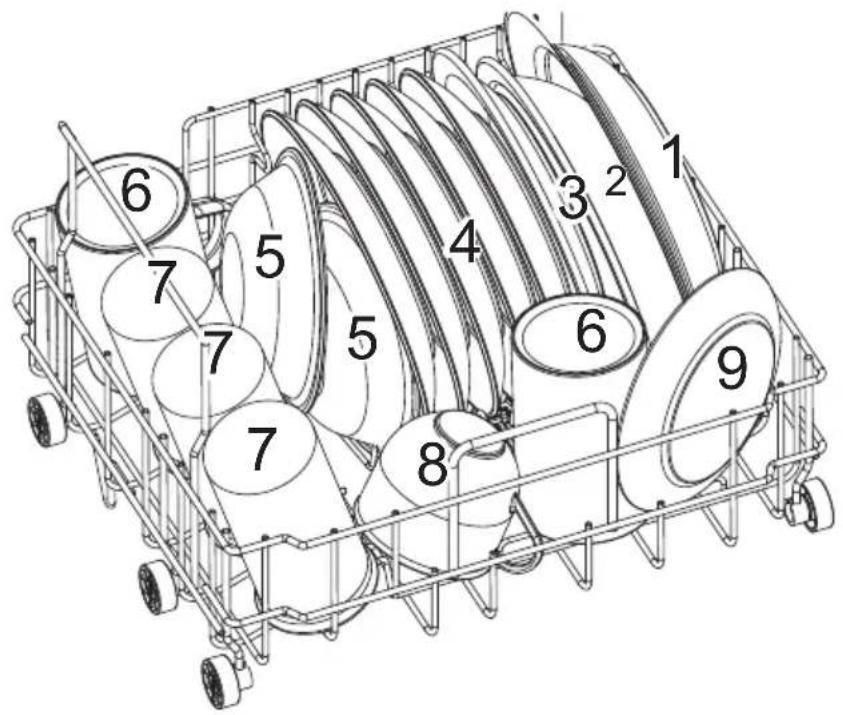
Diagram of a shopping cart with cutouts and a 'X' mark, no text or symbols presentLoading the basket according to EN60436
Position the dishes and cookware so that they will not get moved by the spray of water.
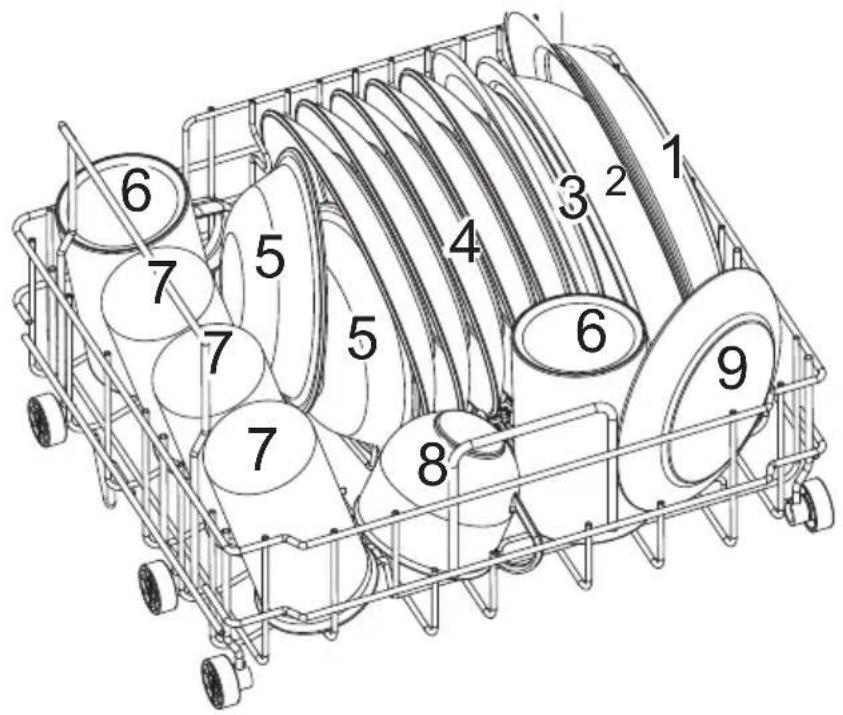
| Number Item | |
| 1 Soup plate | |
| 2 Melamine bowl | |
| 3 Melamine dessert plate | |
| 4 Dessert plate | |
| 5 Dessert bowl | |
| 6 Mug | |
| 7 Glass | |
| 8 Cup | |
| 9 Sauder |
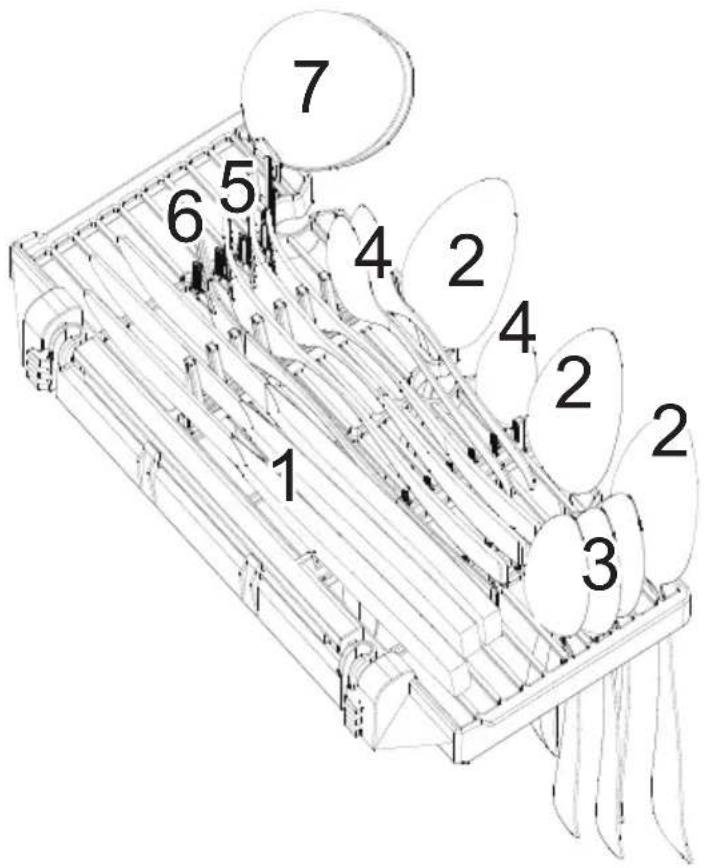
| Number Item | |
| 1 Knife | |
| 2 Soup spoon | |
| 3 Teaspoon | |
| 4 Dessert spoon | |
| 5 Fork | |
| 6 Serving fork | |
| 7 Gravy ladle | |
For personal safety and a top quality clean, make sure place the silverware in the basket as follows:
• They do not nest together.
- Place silverware with handles-down.
- But place knives and other potentially dangerous utensils handles-up.
ADDING THE DETERGENT
Only use detergent specifically for dishwashers.
Never use any other detergents. This will damage the appliance.
Dishwasher detergent is corrosive!
Keep dishwasher detergent out of the reach of children.
Concentrated Detergent
Based on their chemical composition, detergents can be split in two basic types:
- Conventional, alkaline detergents with caustic components.
- Low alkaline concentrated detergents with natural enzymes.
The use of Normal washing program in combination with concentrated detergent reduces pollution and is good for your dishes.
Detergent Tablets
Detergent tablets of different brands dissolve at different speeds. For this reason some detergent tablets cannot dissolve and develop their full cleaning power during short programs. Therefore please use long programs when using detergent tablets, to ensure the complete removal of detergent residuals.
Detergent
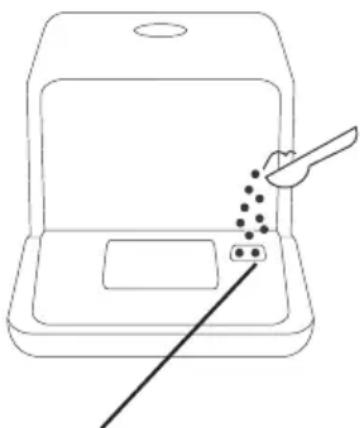
The detergent must be refilled before the start of each wash cycle following the instructions provided in the Wash Cycle Table. Your dishwasher uses less detergent then conventional dishwasher. Generally, only one tablespoon of detergent is needed for a normal wash load. More heavily soiled items need more detergent. Always add the detergent just before starting the dishwasher, otherwise it could get damp and will not dissolve properly.
Adding detergent
natural_image
Line drawing of a device with a tool interacting with a screen and a pointer, no text or symbols presentPlace to add the detergent
PROGRAMMING THE DISHWASHER
Wash cycle table according to EN60436
The table below shows the best programmes for the levels of food residue on them and how much detergent is needed. It also show various information about the programmes. Consumption values and program duration are only indicative except for ECO program.
| Program Cycle Selection Information | Description Of Cycle | Detergent | Time (min) | Energy (kWh) | Water (L) |
 (EN6043)* (EN6043)* | The ECO program is suitable to clean normally soiled tableware.It is the most efficient program in terms of its combined energy and water consumption, and it is used to assess compliance with the EU ecodesign legislation. | Wash (55 °C)RinseRinse (70 °CDrying) | 11 g 155 0.446 6.0 | ||
 Hygiene 72° Hygiene 72° | Use to sanitize your dishes and glassware. Maintains the water temperature at around 72 °C. | Wash (70 °C)RinseRinse (72 °CDrying) | 11 g 115 0.590 6.0 | ||
 Intensive Intensive | For heavily soiled items include pots and pans with dried-on food. | Wash (62 °C)RinseRinse (70 °CDrying) | 11 g 160 0.580 6.0 | ||
 (EN6043) (EN6043) | For lightly soiled loads, such as glasses, crystal and fine china. | Wash (50 °C)RinseRinse (65 °CDrying) | 11 g 85 0.380 6.0 | ||
 58 min 58 min | For normally soiled loads that need quick wash. | Wash (55 °C)RinseRinse (65 °CDrying) | 11 g 58 0.390 6.0 | ||
 Rapid Rapid | A shorter wash for lightly soiled loads that do not need drying. | Wash (50 °C)RinseRinse (60 °C) | 11 g 29 0.290 6.0 | ||
| [W3ZX] Self-cleaning | To provides an effective cleaning of the dishwasher itself. | Wash (60 °C)RinseRinse (70 °C) | 11 g 65 0.430 6.0 |
*: This program is the test cycle. The information for comparability test is in accordance with EN60436
Turning on the appliance
Starting a wash cycle...
- Draw out the basket (see the section entitled "Loading the Dishwasher").
- Pour in the detergent (see the section "Fill the detergent").
- Insert the plug into the socket. The power supply is 220-240VAC 50Hz, the specification of the socket is 10A 250V AC.
- Press the power button to turn on the appliance,
- Connect the inlet hose to the tap, make sure that the water supply is turned on to full pressure, or add water the the tank manually.
- select a suitable program according to the "Wash cycle table";
- If a program is selected, the corresponding light will be lit. Then press theStart/Pause button, the dishwasher begins to start.
Note: When you press the Start/Reset button to pause during washing, the dishwasher will beep every minute unless you press the Start/Reset button to start.
Change the program
Premise: You can modify the washing program, if the dishwasher just worked for a short time. Otherwise, the detergent may have already been released, and the appliance may have already drained the wash water in this case, the cycle must be restarted.
Press Start/Pause Button to pause the machine when the door is closed, Press Program Button for more than 3 seconds the machine will be in stand-by state, then you can change the program to the desired cycle setting (see the section entitled "Starting a wash program").
| Display Meaning | |
| „-;--" Standby | |
| „H:MM" permanent Pause | |
| „H:MM" blinkend Pause | |
| „END" End |
Note: If you open the door during washing, the machine will pause. When you and press the Start/Pause Button, the machine will keep on working after 10 seconds.
If your model has broken remember function, the machine will go on to finish the selected program after the power cut.
At the end of the Wash Cycle
When the working cycle has finished, the buzzer of dishwasher will sound 8 seconds, then stop. Turn off the appliance using the ON/OFF button, shut off the water supply and open the door of the dishwasher. Wait a few minutes before
Add dishes while a program is running
A forgotten dish can be added only when the detergent. If this is the case, follow the instructions below.
- Press the Start/Pause button to pause the running program.
- Open the door.
- Add forgotten dishes.
- Close the door.
- Press the Start/Pause button, the dishwasher will continue to run.

flowchart
graph LR
    A["Input"] --> B["Device"]
    B --> C["Image Display"]
    C --> D["Hand Trigger"]
    D --> E["Display Panel"]
    E --> F["Output"]
unloading the dishwasher to avoid scald, the dishes and utensils are still hot and more susceptible to breakage. They will also dry better.
Switch Off the Dishwasher
- Switch off the dishwasher by pressing the Power button.
- Turn off the water tap.
Open the door carefully
Hot dishes are sensitive to knocks. The dishes should be allowed to cool down around 15 minutes before removing from the appliance.
Open the dishwasher's door, leave it open and wait a few minutes before removing the dishes. In this way they will be cooler and the drying will be improved.
Unloading the dishwasher
It is normal that the dishwasher is wet inside.

Caution: Danger of scalding
Do not open the door when washing.
Forced drainage operation
In standby mode, you can press and hold DELAY button + AUTO OPEN button simultaneously for 3 seconds to drain the water tank.
MAINTENANCE AND CLEANING
Filter system
Attention
- Never use the dishwasher without filters!
• Make sure the filters is properly assembled. - The performance may be affected and dishes and utensils could become damaged.
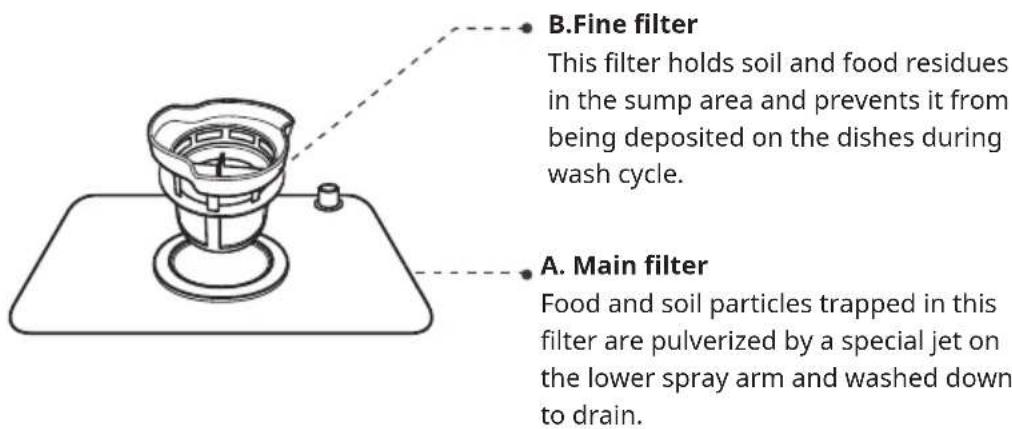
The filter efficiently removes food particles from the wash water, allowing it to be recycled during the cycle.
For best performance and results, the filter assembly must be cleaned regularly. For this reason, it is a good idea to move the larger food particles trapping in the filter after each wash cycle by rinsing the filter and cup under running water.
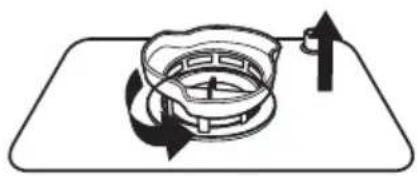
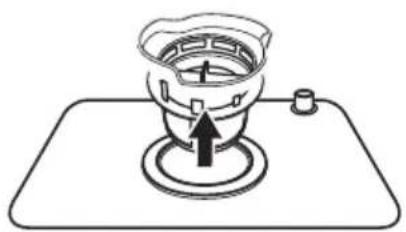
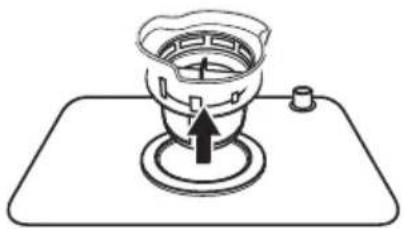
To remove the filter assembly, rotate the filter handle anticlockwise and then pull the handle in the upward direction.
Step 1: Contrarotate the filter assembly, then lift it all up.
natural_image
Diagram of a mechanical component with rotational arrows indicating motion (no text or symbols)Step 2: Lift fine filter up from main filter.
natural_image
Simple line drawing of a gas stove with a valve and base (no text or symbols)Note: If do it from step1 to step 2, the filter system will be removed; while if do it from Step 2 to Step 1, the filter system will be installed. The entire filter assembly should be cleaned once a week.
- Inspect the filters for blocking after every time the dishwasher has been used.
- By unscrewing the coarse filter, you can remove the filter system. Remove any food remnants and clean the filters under running water.
Attention: When cleaning the filters, don't knock on them. Otherwise, the filters could be contorted and the performance of dishwasher could be decreased.
Caring for the Dishwasher
The control panel can be cleaned by using a lightly dampened cloth. After cleaning, make sure to dry it thoroughly. For the exterior use a good appliance polish wax. Never use sharp objects, scouring pads or harsh cleaners on any part of the dishwasher.
Attention: Never use a spray cleaner to clean the door panel as it may damage the door lock and electrical components.
Cleaning The Door
To clean the edge around the door, you should use only a soft warm, damp cloth. To avoid penetration of water into the door lock and electrical components, do not use a spray cleaner of any kind.
Protect against freezing
please take frost protection measures on the dishwasher in winter. Each time after Pashing cycles, please operate as follows.
- Cut off electrical power to the dishwasher.
- Turn off the water supply and disconnect the water inlet pipe from the water valve.
- Drain water from the inlet pipe and water valve (Use a pan to catch the water).
- Reconnect the water inlet pipe to the water valve.
- Remove the filter at the bottom of the tub and use a sponge to soak up water in the sump.
Note: If your dishwasher cannot work because of the ice, please contact authorised service person.
Cleaning the spray arms
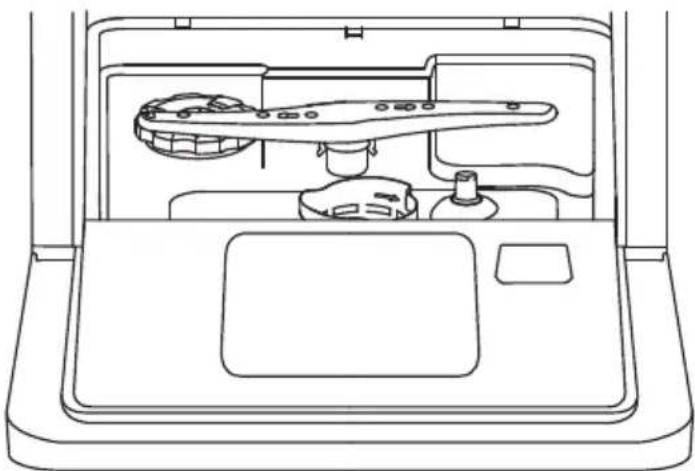
The spray arms can be easily removed for periodic cleaning of the nozzles to prevent possible clogging. Wash them under running water and carefully replace them in their seats, checking that their rotary movement is in no way impeded.
Grasp the middle of the spray arm, pull it upwards to remove it. Wash the arms under a jet of running water and replace it carefully to its seat. After reassembly, check that the spray arms rotate freely. Otherwise, check that they have been installed correctly.
natural_image
Line drawing of a car interior showing dashboard, steering wheel, and dashboard (no text or symbols)How to keep your Dishwasher in shape
After every wash
After every wash, turn off the water supply to the appliance and leave the door slightly open so that moisture and odours are not trapped inside.
Remove the plug
Before cleaning or performing maintenance, always remove the plug from the socket.
No solvents or abrasive cleaning
To clean the exterior and rubber parts of the dishwasher, do not use solvents or abrasive cleaning products. Only use a cloth with warm soapy water.
To remove spots or stains from the surface of the interior, use a cloth dampened with water an a little vinegar, or a cleaning product made specifically for dishwashers.
When not in use for a longtime
It is recommend that you run a wash cycle with the dishwasher empty and then remove the plug from the socket, leave the door of the appliance open. This will help the door seals to last longer and prevent odours from forming within the appliance.
Moving the appliance
If the appliance must be moved, try to keep it in the vertical position. If absolutely necessary, it can be positioned on its back.
INSTALLATION

WARNING: Danger of electric shock
Disconnect electrical power before installing dishwasher. Do not, under any circumstances, cut or remove the earthing connection from the power cord. The installation of the pipes and electrical equipments must be done by professionals.
Installation preparation
The installation position of dishwasher should be near the existing water inlet tap and drain outlet and power socket. One side of the cabinet sink should be chosen to facilitate the connection of drain
hose of the dishwasher.
Positioning the appliance
Position the appliance in the desired location. The back should rest against the wall behind it, and the sides, along the adjacent cabinets or wall. The dishwasher is equipped with water supply and drain hoses that can be positioned to the right or the left to facilitate proper installation.
Electrical requirements
Please look at the rating label to know the rating voltage and connect the dishwasher to the appropriate power supply. Use the required fuse 10 amp, time delay fuse or circuit breaker recommended and provide separate circuit serving only this appliance.
Electrical Connection
Ensure the voltage and frequency of the power being corresponds to those on the rating plate. Only insert the plug into an electrical socket which is earthed properly. If the electrical socket to which the appliance must be connected is not appropriate for the plug, replace the socket, rather than using a adaptors or the like as they could cause overheating and burns.
Water Connection
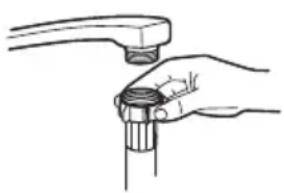
Connect the cold water supply hose to a threaded 3/4(inch) connector and make sure that it is fastened tightly in place.
If the water pipes are new or have not been used for an extended period of time, let the water run to make sure that the water is clear and free of impurities. If this precaution is not taken, there is a risk that the water inlet can get blocked and damage the appliance.
Please note: If the supplied hose cloes not fit your tap, please contact your local plumbing supply center where adapters are available for purchase.
natural_image
Illustration of a hand holding a wrench, no text or symbols presentConnection of drain hoses
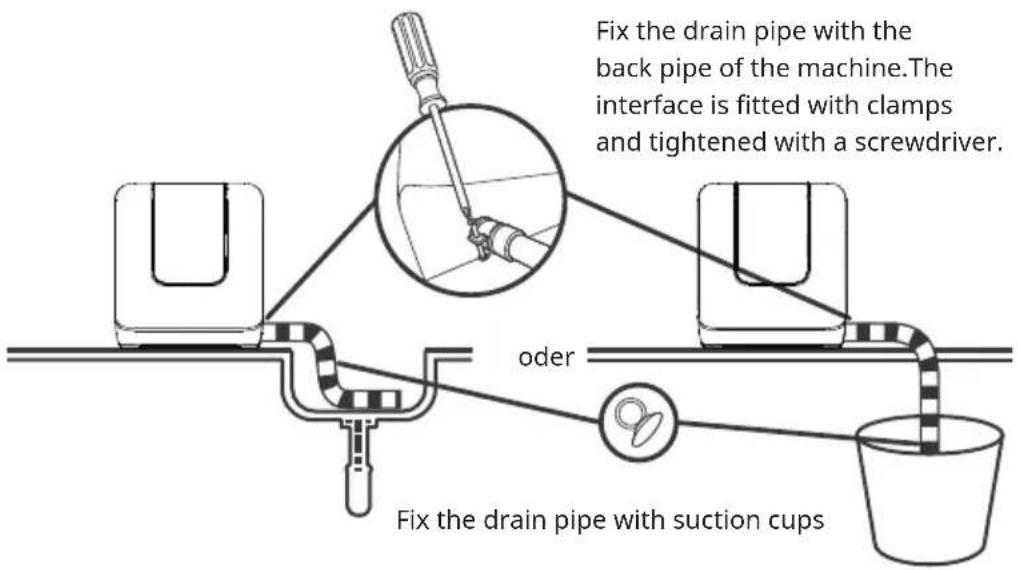
The connection of the drain pipe: Put end of the drain into a sink or bucket.
How to drain excess water from hoses
If the sink is more than 1000 mm higher than the floor, the excess water in hoses cannot be drained directly into the sink. It will be necessary to drain excess water from hoses into a bowl or suitable container that is held outside and lower than the sink.
Water Outlet
Connect the water drain hose. The drain hose must be correctly fitted to avoid. water leaks. Ensure that the water drain hose is not kinked or squashed.
Extension Hose
If you need a drain hose extension, make sure to use a similar drain hose. It must be no longer than 4 metres, otherwise the cleaning effect of the dishwasher could be reduced.
TROUBLESHOOTING
Reviewing the charts on the following pages may save you from calling for service.
| Problem Possible Causes What To Do | ||
| Dishwasher does not start | Fuse blown, or the circuit break tripped. | Replace fuse or reset circuit breaker.Remove any other appliances sharing the same circuit with the dishwasher. |
| Power supply is not turned on. | Make sure the dishwasher is turned on and the door is closed securely.Make sure the power cord is. properly plugged into the wall socket | |
| Error code:E1;Water pressure is low | Check that the water supply is connected properly andthe water is turned on. | |
| Door of dishwasher not properly closed. | Make sure to close the door properly and latch it. | |
| Water not pumped form dishwasher | Twisted or trapped drain hose. | Check the drain hose. |
| Filter clogged. Check coarse the filter. | ||
| Kitchen sink clogged. | Check the kitchen sink to make sureit is draining well.If the problem isthe kitchen sink that is notdraining,you may need a plumber rather thana serviceman for dishwashers. | |
| Problem Possible Causes | What To Do | |
| Suds in the tub Wrong detergent | Use only the dedicated dishwasher detergent to avoid suds. If suds exist in the washer. Open the door for 20-30 minutes to allow the foam to evaporate. If the foam still exists in the liner. Add 1.5 L of water to the liner, close the dishwasher door and run a forced drain to drain it with the water. Repeat above operation until the foam is cleared. | |
| Stained tub interior | Detergent with colourant may have been used. | Make sure that the detergent has no colourant. |
| White film on inside surface. | Hard water minerals. | To clean the interior, use a damp sponge with dishwasher detergent and wear rubber gloves. Never use any other cleaner than dishwasher detergent otherwise, it may cause foaming or suds. |
| There are rust stains on cutlery | The affected items resistant. | Avoid washing items that are not corrosion resistant in the dishwasher. |
| A programme was not run after dishwasher salt was added. Traces of salt have gotten into the wash cycle. | Always run a wash programme without any crockery after adding salt. | |
| The lid of the softer is loose. | Check the softener lid is secure | |
| Knocking noise in the dishwasher | A spray arm is knocking against an item in a basket-. | Interrupt the programme and rearrange the items which are obstructing the spray arm. |
| Rattling noise in the dishwasher. | Items of crockery are loose in the dishwasher. | Interrupt the programme and rearrange the items of crockery. |
| Knocking noise in the water pipes | This may be caused by on-site installation or the cross-section of the piping. | This has no influence on the dishwasher function. If in doubt, contact a qualified plumber. |
| The dishes are not clean. | The dishes were not loaded correctly. | See notes in “Loading & unloading your dishwasher”. |
| The programme was not powerful enough. | Select a more intensive programme. | |
| Not enough detergent was dispensed. | Use more detergent, or change your detergent. | |
| Items are blocking the movement of the spray arms. | Rearrange the items so that the spray can rotate freely . | |
| The filter combination is not clean or is not correctly fitted in the base of wash cabinet.This may cause the spray arm jets to get blocked | Clean and/or fit the filter correctly Clean the spray arm jets. | |
| Cloudiness on glassware. | Combination of soft water and too much detergent. | Use less detergent if you have soft water and select a shorter cycle to wash the glassware and to get them clean. |
| White spots appear on dishes and glasses. | Hard water area can cause limescale deposits. | Add more detergent. |
| Black or grey marks on dishes. | Aluminium utensils have rubbed against dishes. | Use a mild abrasive cleaner to eliminate those marks. |
| The dishes are not drying | Improper loading Load the | dishwasher as suggested in the directions. |
| Dishes are removed too soon | Do not empty your dishwasher immediately after washing.Open the door slightly so that the steam can come out. Take out the dishes until the inside temperature is safe to touch.Unload the lower basket first to prevent the dropping water from the upper basket. | |
| The dishes are not drying | Wrong program has been selected. | With a short programme, the washing temperature is lower, decreasing cleaning performance.Choose a programme with a long washing time. |
| Use of cutlery with a low-quality coating | Water drainage is more difficult with these items.Cutlery or dishes of this type are not suitable for washing in the dishwasher. | |
Error codes
When some malfunctions come on, the appliance will display error codes to warn you:
| Codes Meaning Possible Causes | ||
| E1 | Longer inlet time. A flow meter, drain valve, or pump failure, it should be repaired by a qualified worker. | |
| E3 | Not reaching required temperature | Heating element or thermistor failed, it should be repaired by a qualified worker. |
| E4 | Overflow. Some elements of dishwasher leaks. | |
| Ed | Communication error It should be repaired by a qualified worker. | |
- If overflow occurs, turn off the main water supply before calling a servide.
- If there is water in the base pan because of an overfill or small leak, the water should be removed before restarting the dishwater.
- If there is an error code that cannot be solved, please request professional assistance.
PRODUCT DATA SHEET (EN 60436)
| Name or trademark of the producer: Chal-Tec GmbH | ||||
| Address of the producer: Wallstraße 16, 10179 Berlin, Deutschland. | ||||
| Item number: 10041183 | ||||
| General product parameters: | ||||
| Parameter Value Parameter Value | ||||
| Standard place settings (a) | 3 Dimensions in cm | Height 47 | ||
| Width 42 | ||||
| Depth 44 | ||||
| EEI (a) 61,9 | Energy efficiency class (a) | F | ||
| Cleaning performance index (a) | 1,125 | Drying performance index (a) | 0,865 | |
| Energy consumption in kWh [per cycle], based on the eco programme using cold water fill. Actual energy consumption will depend on how the appliance is used. | 0,446 | Water consumption in litres [per cycle], based on the eco program. Actual water consumption will depend on how the appliance is used and on the hardness of the water. | 6,0 | |
| Program duration (a)(h:min) | 2:35 Type Free standing | |||
| Airborne acoustical noise emissions (a)(dB(A) re 1 pW) | 58 | Airborne acoustical noise emission class (a) | D | |
| Off-mode (W) 0,49 Standby mode | (W) k. A. | |||
| Delay start (W)(if applicable) | 1,00 | Networked standby (W) (if applicable) | k. A. | |
^(a) for the eco program.
DISPOSAL CONSIDERATIONS
natural_image
Symbol of a trash bin with crossed lines and a blank rectangular base (no text or numbers)If there is a legal regulation for the disposal of electrical and electronic devices in your country, this symbol on the product or on the packaging indicates that this product must not be disposed of with household waste. Instead, it must be taken to a collection point for the recycling of electrical and electronic equipment. By disposing of it in accordance with the rules, you are protecting the environment and the health of your fellow human beings from negative consequences. For information about the recycling and disposal of this product, please contact your local authority or your household waste disposal service.
MANUFACTURER & IMPORTER (UK)
Manufacturer:
Chal-Tec GmbH, Wallstrasse 16, 10179 Berlin, Germany.
Importer for Great Britain:
Berlin Brands Group UK Ltd
PO Box 1145
Oxford
OX1 9UW
United Kingdom
Cher client, chère cliente,
SOMMAIRE
natural_image
Diagram showing a container with liquid and a magnified circular object containing leaf-like structures, with an arrow indicating flow or interaction (no text or symbols)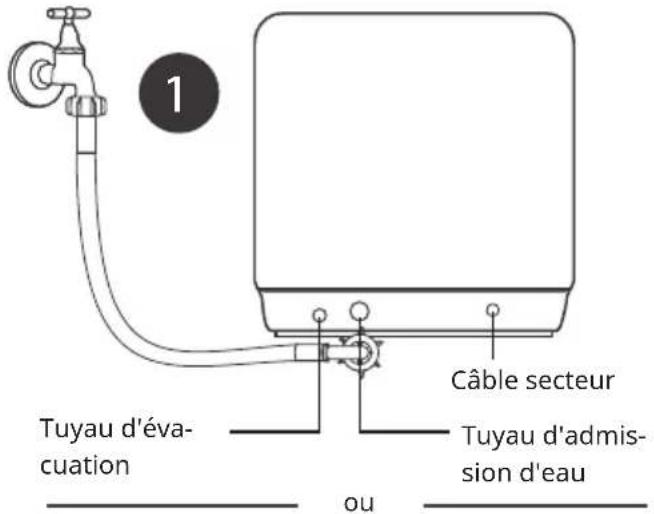
natural_image
Line drawing of a hand pouring liquid into a container connected to an electrical outlet (no text or symbols)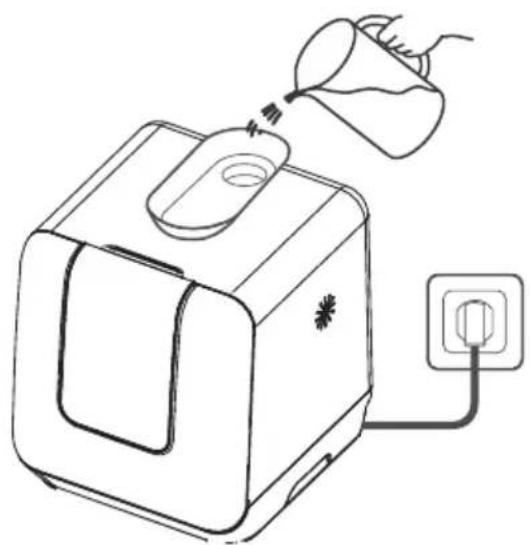
natural_image
Line drawing of a toaster with a funnel pouring liquid into it, connected to an electrical outlet (no text or symbols)natural_image
Line drawing of a laptop with a screen and a pen inserted, showing no text or symbolsflowchart
graph LR
    A["Hand holding container"] --> B["Step 1: pouring liquid into a jar"]
    B --> C["Step 2: pouring liquid into a jar with salt"]
    C --> D["Step 3: pouring liquid into a jar with salt"]
    D --> E["Step 4: pouring liquid into a jar with salt"]
natural_image
Architectural floor plan showing structural components before and after modification (no text or labels)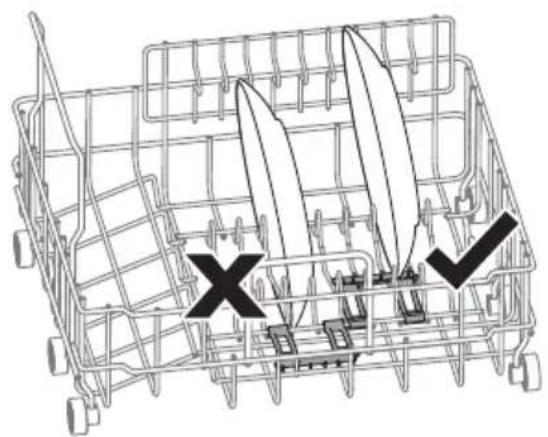
natural_image
Diagram of a shopping cart with two cutouts and a cross mark, no text or symbols presentnatural_image
Line drawing of a device with a tool and dotted particles inserted, no text or symbols presentnatural_image
Diagram of a mechanical component with rotational arrows indicating motion (no text or symbols)natural_image
Simple line drawing of a gas stove with an upward arrow indicating heating (no text or symbols)natural_image
Line drawing of a kitchen sink with a toothbrush and side table (no text or symbols)natural_image
Illustration of hands holding a pipe fitting with a handle (no text or symbols)natural_image
Symbol of a trash bin crossed with a diagonal line, no text or numbers presentBerlin Brands Group UK Ltd
PO Box 1145
Oxford
OX1 9UW
Grande-Bretagne
Estimado cliente:
CONTENIDO
natural_image
Diagram showing a container with liquid and arrows indicating flow or process, no text or symbols present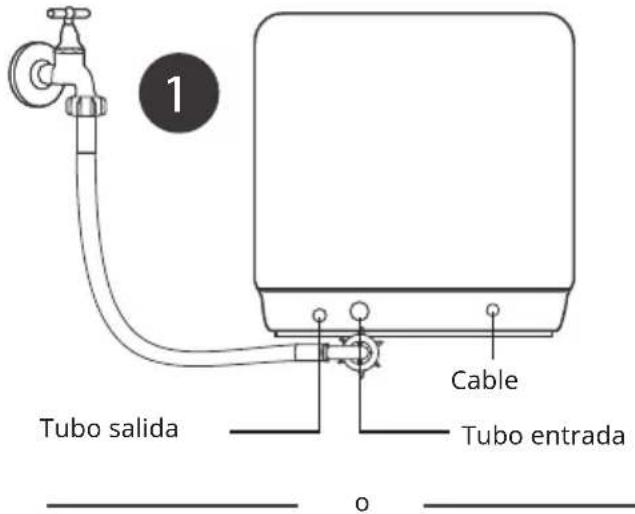
natural_image
Line drawing of a hand pouring liquid into a container connected to an electrical outlet (no text or symbols)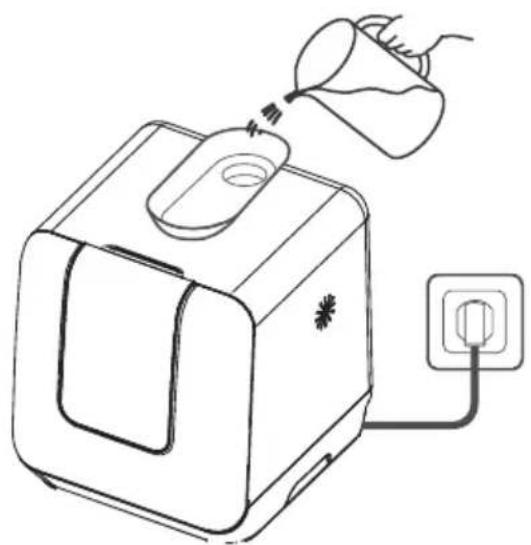
natural_image
Line drawing of a toaster with a funnel pouring liquid into it, connected to an electrical outlet (no text or symbols)flowchart
graph LR
    A["Hand holding container"] --> B["Step 1: pouring liquid into a jar"]
    B --> C["Step 2: pouring liquid into a jar with salt"]
    C --> D["Step 3: pouring liquid into a jar with salt"]
    D --> E["Step 4: pouring liquid into a jar with salt"]
natural_image
Line drawing of a device with a tool and particles inserted, no text or symbols presentnatural_image
Diagram of a mechanical component with rotational arrows indicating motion (no text or symbols)Paso 2: Retire el filtro fino del filtro principal.
natural_image
Simple line drawing of a cooking pot on a base with a valve and handle (no text or symbols)natural_image
Line drawing of a kitchen sink with a toothbrush and side table (no text or symbols)natural_image
Illustration of hands holding a pipe fitting with a handle (no text or symbols)natural_image
Symbol of a trash bin crossed with a diagonal line, no text or numbers presentBerlin Brands Group UK Ltd
PO Box 1145
Oxford
OX1 9UW
Gran Bretaña
Gentile cliente,
INDICE
natural_image
Diagram showing a container with liquid and a magnified circular object containing leaf-like structures (no text or symbols)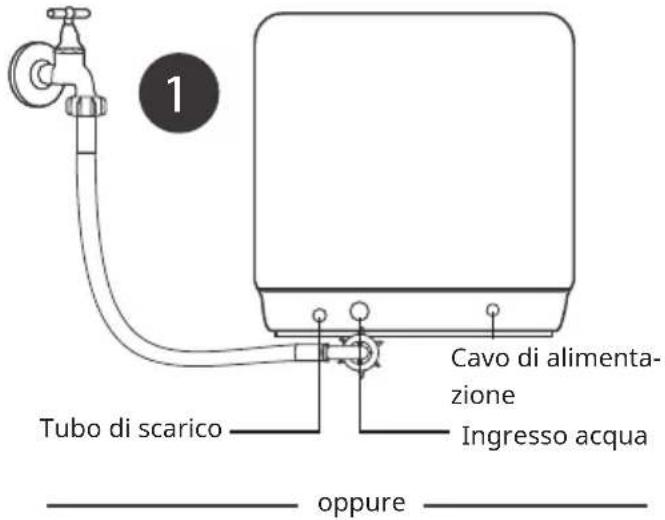
natural_image
Line drawing of a hand pouring liquid into a container connected to an electrical outlet (no text or symbols)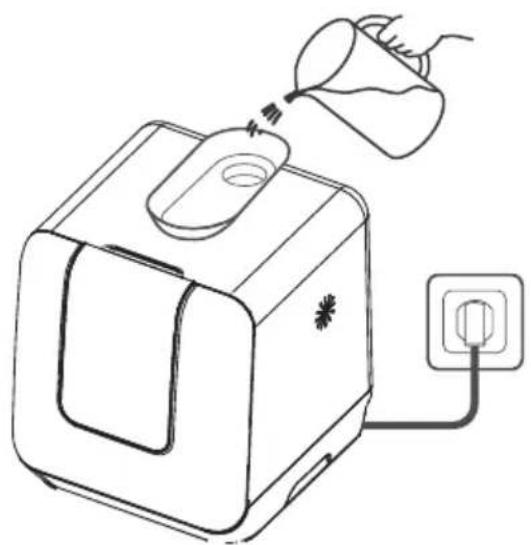
natural_image
Line drawing of a toaster with a funnel pouring liquid into it, connected to an electrical outlet (no text or symbols)natural_image
Line drawing of a laptop with a screen and a pen inserted, showing no text or symbolsflowchart
graph LR
    A["Hand holding container"] --> B["Step 1: pouring liquid into a jar"]
    B --> C["Step 2: pouring liquid into a jar with salt"]
    C --> D["Step 3: pouring liquid into a jar with salt"]
    D --> E["Step 4: pouring liquid into a jar with salt"]
natural_image
Architectural floor plan showing structural components before and after installation (no text or labels)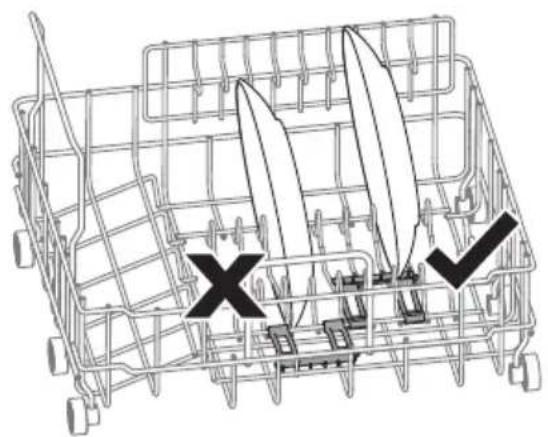
natural_image
Diagram of a shopping cart with two blades and a cross mark, no text or symbols presentnatural_image
Line drawing of a device with a tool and particles inserted, no text or symbols presentflowchart
graph LR
    A["Input Device"] --> B["Device with Bar Chart"]
    B --> C["Bar Chart with Down Arrow"]
    C --> D["Output Device"]
    D --> E["Output Device"]
natural_image
Diagram of a mechanical component with rotational arrows indicating motion (no text or symbols)natural_image
Simple line drawing of a cooking pot on a base with a valve and handle (no text or symbols)natural_image
Line drawing of a kitchen sink with a toothbrush and side table (no text or symbols)natural_image
Illustration of hands holding a wrench and tap (no text or symbols)natural_image
Symbol of a trash bin crossed with a diagonal line, no text or numbers presentPRODUTTORE E IMPORTATORE (UK)
Produttore:
Chal-Tec GmbH, Wallstraße 16, 10179 Berlino, Germania.
Berlin Brands Group UK Ltd
PO Box 1145
Oxford
OX1 9UW
Gran Bretagna

bar
| Category | Value | |---|---| | Category 1 | 100 | | Category 2 | 100 | | Category 3 | 100 | | Category 4 | 100 | | Category 5 | 100 | | Category 6 | 100 | | Category 7 | 100 | | Category 8 | 100 | | Category 9 | 100 | | Category 10 | 100 | | Category 11 | 100 | | Category 12 | 100 | | Category 13 | 100 | | Category 14 | 100 | | Category 15 | 100 | | Category 16 | 100 | | Category 17 | 100 | | Category 18 | 100 | | Category 19 | 100 | | Category 20 | 100 | | Category 21 | 100 | | Category 22 | 100 | | Category 23 | 100 | | Category 24 | 100 | | Category 25 | 100 | | Category 26 | 100 | | Category 27 | 100 | | Category 28 | 100 | | Category 29 | 100 | | Category 30 | 100 | | Category 31 | 100 | | Category 32 | 100 | | Category 33 | 100 | | Category 34 | 100 | | Category 35 | 100 | | Category 36 | 100 | | Category 37 | 100 | | Category 38 | 100 | | Category 39 | 100 | | Category 40 | 100 | | Category 41 | 100 | | Category 42 | 100 | | Category 43 | 100 | | Category 44 | 100 | | Category 45 | 100 | | Category 46 | 100 | | Category 47 | 100 | | Category 48 | 100 | | Category 49 | 100 | | Category 50 | 100 | | Category 51 | 100 | | Category 52 | 100 | | Category 53 | 100 | | Category 54 | 100 | | Category 55 | 100 | | Category 56 | 100 | | Category 57 | 100 | | Category 58 | 100 | | Category 59 | 100 | | Category 60 | 100 | | Category 61 | 100 | | Category 62 | 100 | | Category 63 | 100 | | Category 64 | 100 | | Category 65 | 100 | | Category 66 | 100 | | Category 67 | 100 | | Category 68 | 100 | | Category 69 | 100 | | Category 70 | 100 | | Category 71 | 100 | | Category 72 | 100 | | Category 73 | 100 | | Category 74 | 100 | | Category 75 | 100 | | Category 76 | 100 | | Category 77 | 100 | | Category 78 | 100 | | Category 79 | 100 | | Category 80 | 100 | | Category 81 | 100 | | Category 82 | 100 | | Category 83 | 100 | | Category 84 | 100 | | Category 85 | 100 | | Category 86 | 100 | | Category 87 | 100 | | Category 88 | 100 | | Category 89 | 100 | | Category 90 | 100 | | Category 91 | 100 | | Category 92 | 100 | | Category 93 | 100 | | Category 94 | 100 | | Category 95 | 100 | | Category 96 | 100 | | Category 97 | 100 | | Category 98 | 100 | | Category 99 | 100 | | Total (Total) = [sum of bars] / [values] * (sum of bars + bars) * (sum of bars + bars) * (sum of bars + bars). The values in the table represent the sum of the bars and the corresponding sum of the bars. There is no additional data series or categories specified in the code.
KLARSTEIN

- INHALT
- Add water into the dishwasher's tank
- GERÄTEBESCHREIBUNG
- No solvents or abrasive cleaning
- Member of Berlin Brands Group
- Dahlwitz-Hoppegarten
- Deutschland
- Dear Customer,
- CONTENTS
- SAFETY INSTRUCTIONS
- WARNING
- CAUTION
- QUICK GUIDE
- Connected to power supplies
- The connection of the drain pipe
- Remove the larger residue
- Opening the door, placing the dishes and adding detergent
- PRODUCT OVERVIEW
- USE
- Loading the salt into the softener
- Adjusting salt consumption
- LOADING THE DISHWASHER BASKETS
- Recommendation
- Attention before or after loading the dishwasher baskets
- Use of the dishware support.
- Loading the basket according to EN60436
- ADDING THE DETERGENT
- Concentrated Detergent
- Detergent Tablets
- Detergent
- Adding detergent
- PROGRAMMING THE DISHWASHER
- Wash cycle table according to EN60436
- Turning on the appliance
- Change the program
- At the end of the Wash Cycle
- Add dishes while a program is running
- Switch Off the Dishwasher
- Open the door carefully
- Unloading the dishwasher
- Forced drainage operation
- MAINTENANCE AND CLEANING
- Filter system
- Attention
- Caring for the Dishwasher
- Cleaning The Door
- Protect against freezing
- Cleaning the spray arms
- How to keep your Dishwasher in shape
- After every wash
- Remove the plug
- When not in use for a longtime
- Moving the appliance
- INSTALLATION
- WARNING: Danger of electric shock
- Installation preparation
- Positioning the appliance
- Electrical requirements
- Electrical Connection
- Water Connection
- Connection of drain hoses
- How to drain excess water from hoses
- Water Outlet
- Extension Hose
- TROUBLESHOOTING
- Error codes
- DISPOSAL CONSIDERATIONS
- MANUFACTURER & IMPORTER (UK)
- Cher client, chère cliente,
- SOMMAIRE
- Estimado cliente:
- CONTENIDO
- Gentile cliente,
- INDICE
- PRODUTTORE E IMPORTATORE (UK)
- KLARSTEIN
Brand : Klarstein
Model : Melville 3
Category : Dishwasher