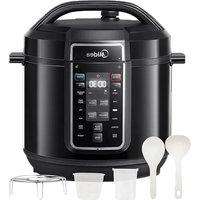
MPC602SBMK - Electric pressure cooker MIDEA - Free user manual and instructions
Find the device manual for free MPC602SBMK MIDEA in PDF.


| Product type | Electric pressure cooker |
| Brand | Midea |
| Model | MPC602SBMK |
| Capacity | 6,0 L |
| Power supply | 220-240 V~ 50/60 Hz |
| Rated power | 1500 W |
| Operating pressure | 40 / 80 kPa (adjustable) |
| Keep warm temperature | 60 °C - 80 °C |
| Cooking functions | Pressure cooking, slow cooking, steam, sterilization, rice, beans, chili, sous vide, bake, thick sauce, sauté, yogurt, keep warm |
| Delay start | Yes (10 min to 24 h) |
| Display screen | Digital |
| Inner pot material | Non-stick coating |
| Included accessories | Inner pot, sealing ring, pressure release valve, water tank, spoon, measuring cup, steam basket |
| Safety | Safety lock, manual pressure release valve, float valve, sealing ring block, anti-clog cover |
| Cleaning | Hand wash of inner pot and removable parts |
| Usage | Household only |
| Warranty | 24 months |
| Standby power consumption | 0,8 W |
| Available spare parts | Sealing ring, pressure release valve, inner pot, water tank |
| Recommended storage conditions | Keep away from sunlight and splashes |
Frequently Asked Questions - MPC602SBMK MIDEA
User questions about MPC602SBMK MIDEA
0 question about this device. Answer the ones you know or ask your own.
Ask a new question about this device
Download the instructions for your Electric pressure cooker in PDF format for free! Find your manual MPC602SBMK - MIDEA and take your electronic device back in hand. On this page are published all the documents necessary for the use of your device. MPC602SBMK by MIDEA.
USER MANUAL MPC602SBMK MIDEA
natural_image
Technical line drawing of a mechanical component with no visible text or symbolsELECTRIC PRESSURE COOKER
USER MANUAL
MPC602SBMK
Warning notices: Before using this product, please read this manual carefully and keep it for future reference. The design and specifications are subject to change without prior notice for product improvement. Consult with your dealer or manufacturer for details. The diagram above is just for reference. Please take the appearance of the actual product as the standard.
LANGUAGES
EN English
DE German
IT Italian
FR France
SP Spanish
THANK YOU LETTER
Thank you for choosing Midea! Before using your new Midea product, please read this manual thoroughly to ensure that you know how to operate the features and functions that your new appliance offers in a safe way.
CONTENTS
THANK YOU LETTER 01
SAFETY INSTRUCTIONS 02
SPECIFICATIONS 06
PRODUCT OVERVIEW 07
QUICK START DUIDE 08
OPERATION INSTRUCTIONS 13
CLEANING AND MAINTENANCE 20
TROUBLESHOOTING 26
TRADEMARKS, COPYRIGHTS AND LEGAL STATEMENT 28
DISPOSAL AND RECYCLING 29
DATA PROTECTION NOTICE 30
WARRANTY / SERVICE 31
SAFETY INSTRUCTIONS
Intended Use
The following safety guidelines are intended to prevent unforeseen risks or damage from unsafe or incorrect operation of the appliance. Please check the packaging and appliance on arrival to make sure everything is intact to ensure safe operation. If you find any damage, please contact the retailer or dealer. Please note modifications or alterations to the appliance are not allowed for your safety concern. Unintended use may cause hazards and loss of warranty claims.
Explanation of Symbols

Danger
This symbol indicates that there are dangers to the life and health of persons due to extremely flammable gas.

Warning of electrical voltage
This symbol indicates that there is a danger to life and health of persons due to voltage.

Warning
The signal word indicates a hazard with a medium level of risk which, if not avoided, may result in death or serious injury.

Caution
The signal word indicates a hazard with a low degree of risk which, if not avoided, may result in minor or moderate injury.

Attention
The signal word indicates important information (e.g. damage to property), but not danger.

Observe instructions
This symbol indicates that a service technician should only operate and maintain this appliance in accordance with the operating instructions.
Read these operating instructions carefully and attentively before using/commissioning the unit and keep them in the immediate vicinity of the installation site or unit for later use!
IMPORTANT PRECAUTIONS
CAUTION
- Read all the instructions
- This appliance is for household use only. Do not use outdoors.
- This appliance is not intended for use by persons with reduced physical, sensory or mental capabilities, or lack of experience and knowledge, unless they have been given supervision or instruction concerning use of the appliance by a person responsible for their safety.
- This appliance shall not be used by children. Keep the appliance and its cord out of reach of children;
- Children should be supervised to ensure that they do not play with the appliance;
-
This appliance is intended to be used in household and similar applications such as:
-
Staff kitchen areas in shops, office and other working environments;
- farm houses;
- by clients in hotels, motels and other residential type environments;
-
bed and breakfast type environments;
-
If the supply cord is damaged, it must be replaced by the manufacturer, its service agentor similarly qualified persons in order to avoid a hazard.
- Please turn off and unplug the appliance before cleaning, maintenance or relocation and whenever it is not in use;
- Do not immerse any part of the appliance in water or other liquid.
-
The pressure regulator allowing the escape of steam should be checked regularly to ensure that they are not blocked.
-
The container must not be opened until the pressure has decreased sufficiently.
- The heating element surface is subject to residual heat after use, do not touch.
- Warning: Avoid spillage on the connector.
- Warning: Misuse may cause potential injury;
- The appliance is not intended to be operated by means of an external timer or a separate remote-control system.
- Do not put the pressure cooker into a heated oven.
- Move the pressure cooker under pressure with the greatest care. Do not touch hot surfaces. Use the handles and knobs. If necessary, use protection.
- Do not let children near the pressure cooker when in use.
- Do not use the pressure cooker for a purpose other than the one for which it is intended.
- This appliance cooks under pressure. Scalds may result from inappropriate use of the pressure cooker. Make sure that the cooker is property closed before applying heat, see “instructions for use”.
- Never force open the pressure cooker. Do not open before making sure that its internal pressure has completely dropped. See the “instructions for use”.
- Never use your pressure cooker without adding water or food, this would seriously damage it.
- Do not fill the cooker beyond 2/3 of its capacity. When cooking foodstuffs which expand during cooking, such as rice or dehydrate vegetables, do not fill the cooker to more than half of its capacity.
-
Use the appropriate heat source(s) according to the instructions for use.
• After cooking meat with a skin (e.g. ox tongue) which may swell under the effect of pressure, do not prick the meat which the skin is swollen; you might be scalded. -
When cooking doughy food, gently shake the cooker before opening the lid to avoid food ejection.
- Before each use, check that the valves are not obstructed. See the instructions for use.
- Never use the pressure cooker in its pressurized mode for deep or shallow frying of food.
- Do not tamper with any of the safety systems beyond the maintenance instructions specified in the instructions for use.
- Only use manufacturer's spare parts in accordance with the relevant model. In particular, use a body and a lid from the same manufacturer indicated as being compatible.
- Any repairs shall be performed by an authorized service representative.
KEEP THESE INSTRUCTIONS.
EN
SPECIFICATIONS
| MPC602SBMKProduct Model | |
| Capacity | 6.0L |
| Power Supply | 220-240V~ 50/60Hz |
| Rated Power | 1500W |
| Working Pressure 40/80kPa | |
| Keep Warm Temperature | 60°C~80°C |
EN
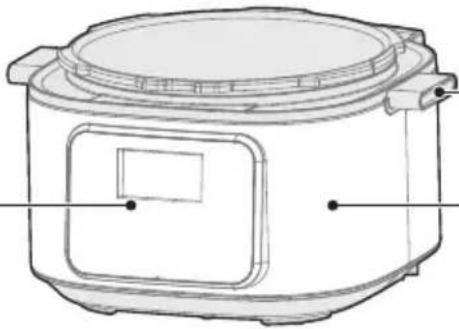
PRODUCT OVERVIEW
Component Name
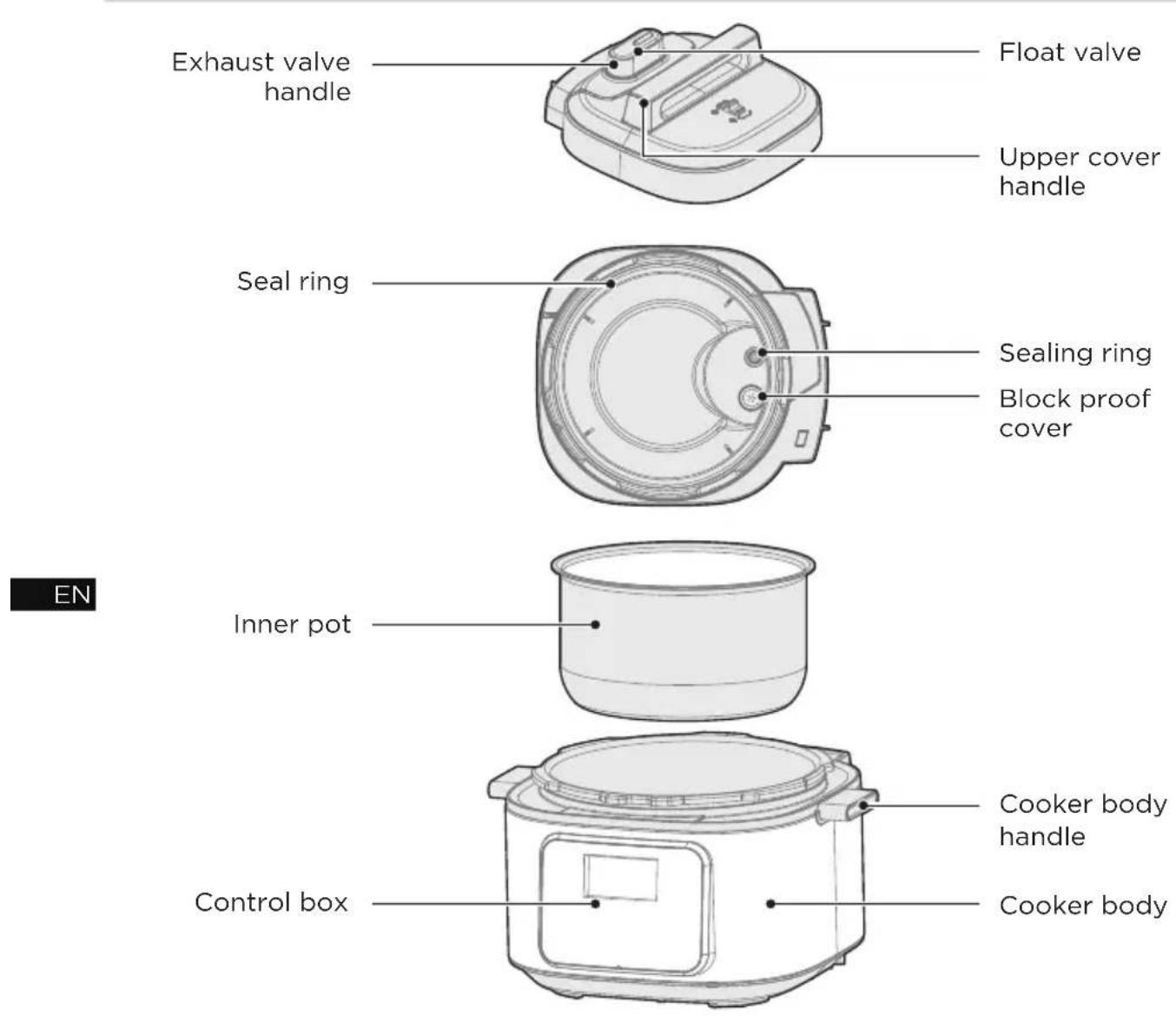
Parts List


NOTE
All the pictures in this manual are for explanation purpose only. Any discrepancy between the real object and the illustration in the drawing shall be subject to the real subject.
QUICK START GUIDE
Tips:
- Please move the product with the handle of the cooker body;
- Please remove the water from the housing cover with cloth.

NOTE
- Exhaust valve: Pull out the exhaust valve from the lid. Clean the internal side of the exhaust valve and the exhaust valve and float valve of the lid with brush and cloth at least once a month.
- Sealing ring: Please remove oil and dirt from the sealing ring with detergent and brush.
- Water box: After cooking, the steam may stay in the water box of the external pot as water. Water in the box should be removed for avoiding bad odor, please clean it with clean cloth.
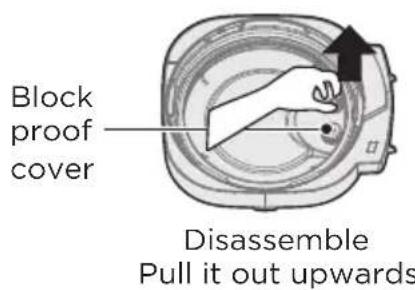
Disassemble and Install the Block Proof Cover, Seal Ring, Sealing ring and Water box
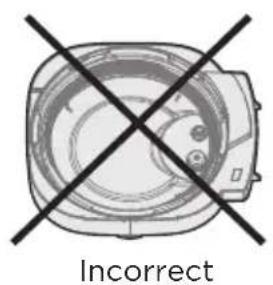
Check if the seal ring and block proof cover are correctly installed in the upper cover before use each time.
Disassemble and install the block proof cover
- After use, please clean the seal ring and around of block proof cover for avoiding jamming the cover, keep it clean to avoid bad odor.
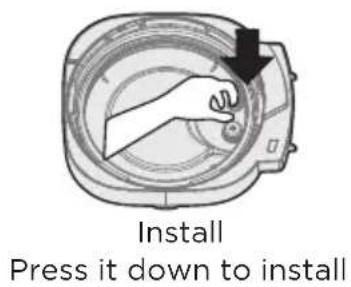
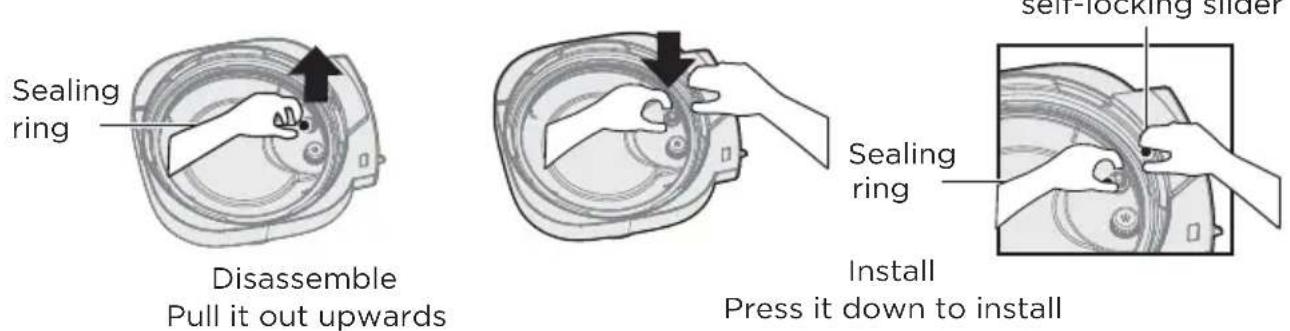
Disassemble and install the seal ring
- Please do not pull the seal ring forcefully, otherwise, the distorted seal ring may influence the seal and pressure effect.
- Do not use the dam aged seal ring, please replace it at the authorized repair office.
- Place the seal ring over the seal ring rack and press it into place. Press down firmly to prevent puckering. When installed properly, the seal ring is snug behind seal ring rack and should not fall out when the lid is turned over.
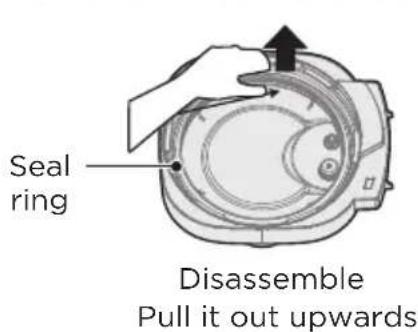
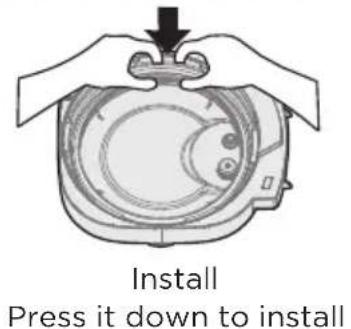
Disassemble and install the sealing ring
- Please do not pull the sealing ring forcefully, otherwise, the distorted sealing ring may influence the seal and pressure effect.
- Install the sealing ring, when the float valve is in a falling state, press the self-locking slider with the left hand, then rotate the lid with left hand and press the sealing ring with right hand.
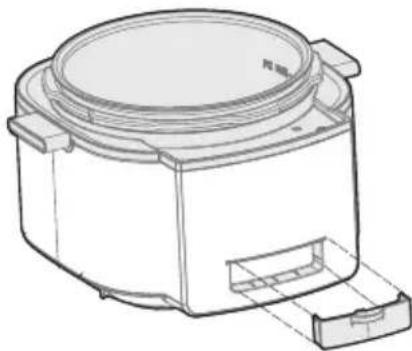
Disassemble and install the water box
- The water box sits at the back of the appliance base and catches any overflow from the condensation rim. It should be installed before cooking, then emptied and rinsed out after each use.
- Pull the water box away from the appliance base; do not pull down. Note the tabs on the appliance base and the grooves on the water box.
- Align the grooves on the water box over the tabs on the back of the appliance base and slide the water box into place.
natural_image
Technical line drawing of a mechanical component with no visible text or symbolsUse and Maintain the Inner Pot
1. Do not empty
It may cause yellowish and spotted inner pot or distorted bottom if it is empty for a long time.
2. Do not use it to store the acid, alkali and preserved foods for a long period
Although the inner pot has excellent anti-corrosion performance, it may cause corrosion of certain degree, the suggested time of keep warm shall not exceed 2h.
3. Keep it clean to prolong the service life
Do not immerse it in water for a long period.
Clean the inner pot with soap, mild detergent or warm water to remove dust, oil and dirt.
- Do not use a metal shovel or other hard tool, otherwise it will damage the inner surface of pot.
Prepare for Cooking
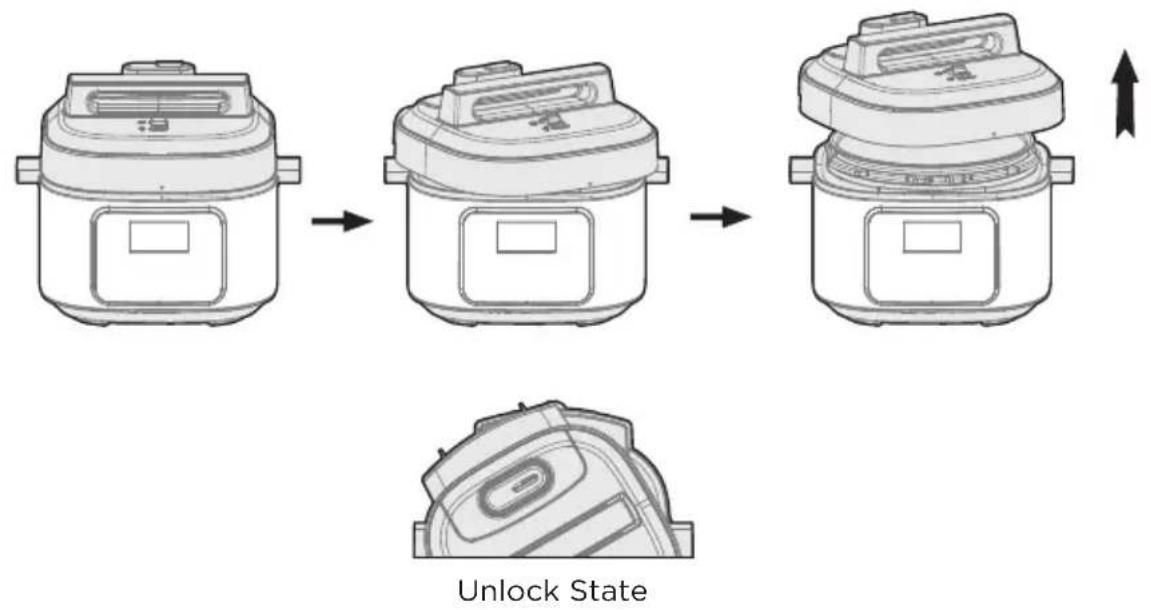
1 Opening the lid correctly
- Hold the handle of upper cover, turn it anticlockwise for about 30^ till the lid at unlock state, and then lift the upper cover.
2 Check if the parts and accessories of lid are well installed
- Check if the floater valve and exhaust valve are jammed, confirm if the sealing ring and block proof cover are well installed.
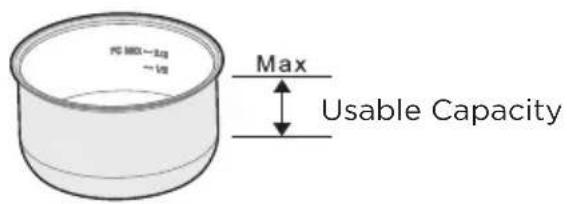
3 Take out the inner pot, put the foods and water into the inner pot
- The total amount of foods and water shall not exceed the Max marked on the inner pot.
4 Put the inner pot into the cooker
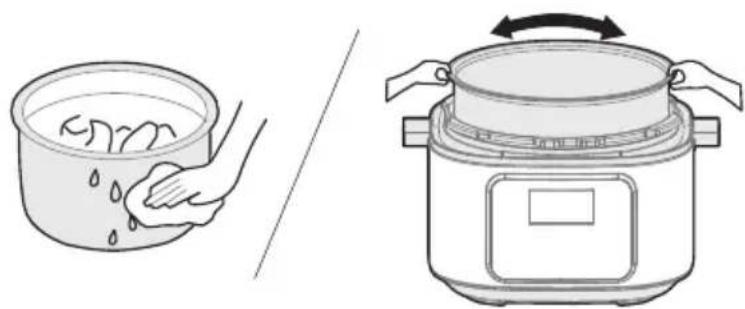
- Wipe to clean the external surface of inner pot, foreign object and water are not allowed on the inner surface of electric pressure cooker;
- Turn the inner pot to left and right to ensure good contact with the heating plate.
natural_image
Illustration showing a hand washing food in a bowl and a rice cooker with its side panel (no text or symbols)5 Safely close the lid
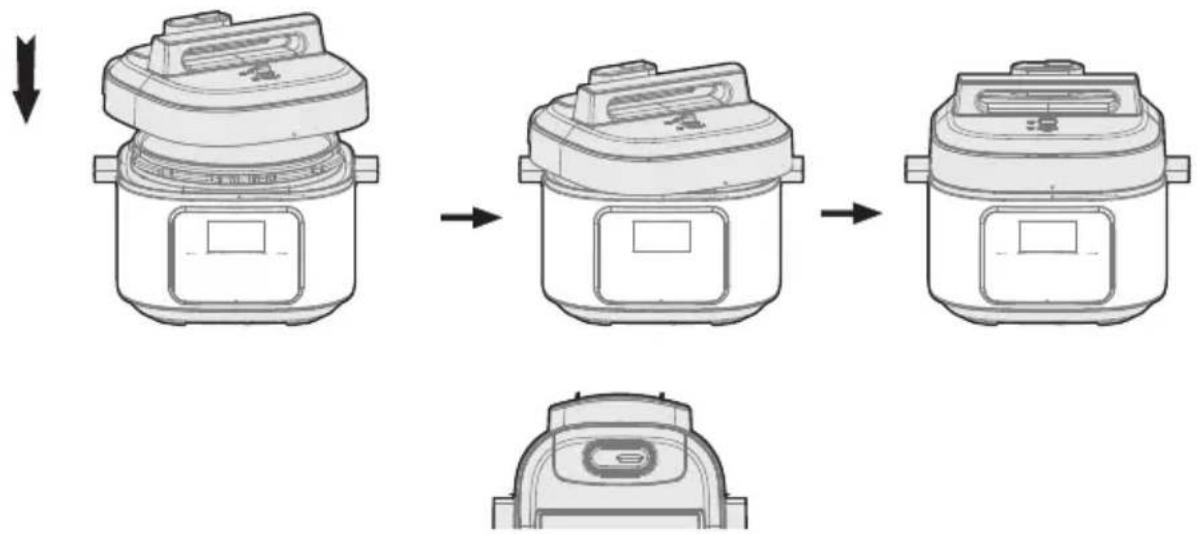
- Before closing the lid, check if the sealing ring is well installed.
- Hold the handle of upper cover, aim the lid as “unlock state”, put the top cover horizontally on the cooker body, turn the upper cover clockwise for about 30° to the lock place as “Lock State”.
flowchart
graph TD
    A["Raw material"] --> B["Preparation"]
    B --> C["Product"]
lock State
EN 6 Put the exhaust valve well
- When working, please turn the exhaust valve to the sealing place, which means the electric pressure cooker keeps at sealing state:
- For manual exhaust, please turn the exhaust valve handle to the exhaust place, the electric pressure cooker keeps at the exhaust state; when exhausting, do not keep the hands or face above the exhaust opening;
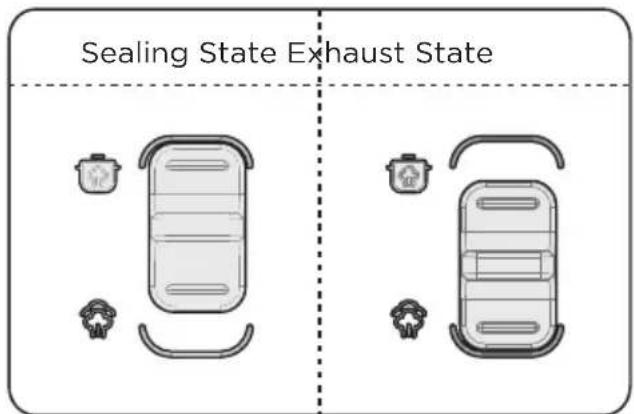
- Check if the floater valve drops down before working (before heating, the floater valve is down).

NOTE
• (Picture are for reference only, atual product may differ from picture shown)
General Function
- Switch on If the buttons are inactive when use, please confirm if the lid is closed at the right place, the buttons are inactive if the lid is not closed correctly for product of this series.
- After cooking, the cooker may automatically enter into the keep warm state(Some funtion). and the indicator display "00:00 (0 min), 00:01 (1 min)..."
Tips:
- When the cooker is working, it is normal that it makes “cluck” sound, please set your heart at relax when use.
- To cook a small amount of foods, the inner pot may possibly be lifted when opening the lid, please shake the lid to drop the inner pot in the cooker body and then remove the lid.
Safely Open the Lid
- Cut off power supply or remove the power plug
- Exhaust method
A. Quickly open the lid (For non-fluid foods)
Turn the exhaust valve to the exhaust place for exhausting, Some unit by pressing steam release button “💡” till the float valve drops down.
B. Generally open the lid
Keep the electric pressure cooker cool naturally till the float valve drops down.
- Open the lid
Turn the upper cover anticlockwise with the left hand, turn it to the cover open limit place, lift the upper cover with the right hand to open the lid.
Do not open the lid before the pressure in the pot has been completely released, do not open the lid fiercely if it is difficult to open.
Do not pull out the exhaust valve when turning the exhaust valve.
After cooking fluid foods (porridge and soup), do not turn the exhaust valve or press the steam release button please cut off power supply to make it cool naturally till the float drops before opening the lid.
OPERATION INSTRUCTIONS
Operation Part
EN
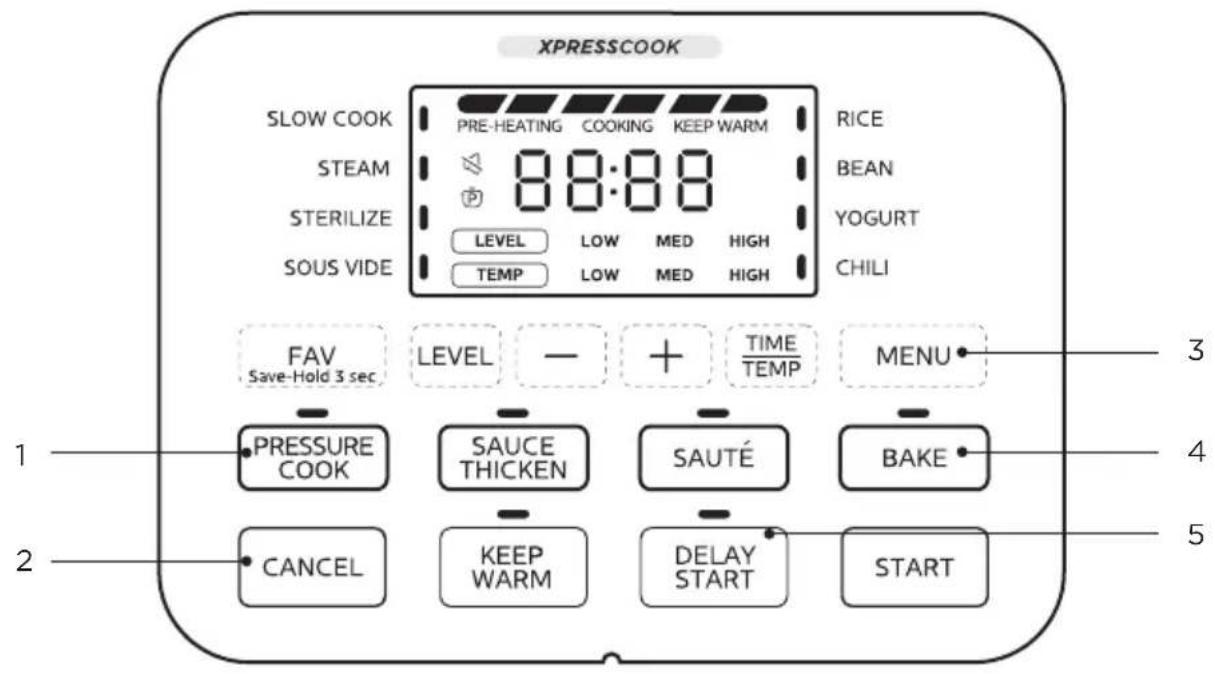
| Function description | ||
| 1 | PRESSURE COOK | • Pressure Cook Button |
| 2 | CANCEL | • Cancel Button |
| 3 | MENU | • Menu Button |
| 4 | BAKE | • Bake Button |
| 5 | DELAY START | • Deploy Start Button |
General Operating Instructions
- Plug in the Power Cord, put food ingredients in the inner pot and close the lid, make sure the exhaust valve at the sealing place.
Function selection:
Press the function selection button to choose the desired functions, Functions are programmed with an ideal time and Level for cooking certain food.
- Functions such as SLOW COOK, STEAM, STERILIZE, SOUS VIDE, RICE, BEAN, YOGURT and CHILI may be selected through the "MENU" button;
- The PRESSURE COOK function can be selected by pressing the "PRESSURE COOK" button;
- The SAUCE THICKEN function can be selected by pressing the "SAUCE THICKEN" button;
- The SAUTÉ function can be selected by pressing the "SAUTÉ" button;
- The BAKE function can be selected by pressing the "BAKE" button;
Optionally, change the cooking time/temperature:
- Press the “-” or “+” button to change the time, press and hold the button for a rapid change.
- For SOUS VIDE, YOGURT and BAKE functions, you can press "TIME/TEMP" button to switch the temperature or time adjustment.
Optionally, change the cooking level:
After selecting the function to enter the setting state of cooking time, you can adjust the cooking level by pressing the “LEVEL” key (except for SOUS VIDE, YOGURT and BAKE functions);
Optionally Setting of DELAY START:
After the function parameters are set, press the “DELAY START” key to enter the DELAY START setting state. In the DELAY START setting state, the screen displays the preset start time, which can be adjusted by pressing “-” and “+” keys. After setting, press the “START” key to start the countdown of the delay time. When it counts down to 0, the product starts cooking.

NOTE
DELAY START cannot be set for SOUS VIDE, BAKE, SAUTÉ, SAUCE THICKEN and YOGURT.
OptionallySetting of heat preservation:
- In the standby mode, press the “KEEP WARM” key to start heat preservation, and the display screen will show the heat preservation time. The heat preservation time adopts forward timing, and the maximum duration of heat preservation is 10 hours;
- After the product is powered on and the function is selected, press the "KEEP WARM" key to enable or disable the automatic heat preservation stage after cooking for the function.

NOTE
Automatic heat preservation cannot be selected for SOUS VIDE, YOGURT, SAUCE THICKEN, SAUTÉ and BAKE. After cooking, these functions enter the standby mode without automatic heat preservation.
Press the "START" button to begin cooking. After cooking, the product automatically starts to keep warm
CANCEL key:
In the process of function setting or delay setting, press the “CANCEL” key to return to the standby mode; in the process of heating or delay waiting, press the “CANCEL” key to cancel heating or delay and return to the standby mode.
Functional Operation Logic
SLOW COOK:
- Power on the product, put food ingredients in the inner pot and close the lid;
- In standby mode, press the "MENU" key to select the "SLOW COOK" function. The "SLOW COOK" indicator will be on and the display screen will show the cooking time and level.
- Press "+" or "-" key to set the cooking time;
- Press the "LEVEL" key to set the cooking level;
- Press the "START" key to start heating;
- After cooking, the product automatically starts to keep warm.
YOGURT:
- Power on the product, put food ingredients in the inner pot and close the lid;
- In standby mode, press the "MENU" key to select the YOGURT function. The "YOGURT" indicator will be on and the display screen will show the cooking time and temperature level;
- Press “+” or “-” key to set the cooking time;
- Press the "TIME/TEMP" key to switch to the temperature level setting state, and press the "+" or "-" key to select the corresponding temperature level;
- Then press the "START" key to start heating;
- After cooking, the product returns to the standby mode.
SOUS VIDE:
- Power on the product, put food ingredients in the inner pot and close the lid;
- In standby mode, press the "MENU" key to select the SOUS VIDE function. The "SOUS VIDE" indicator will be on and the display screen will show the cooking time;
- Press "+" or "-" key to set the cooking time;
- Press the "TIME/TEMP" key to switch to the cooking temperature setting state, and the display screen shows the cooking temperature. Press the "+" or "-" key to adjust the cooking temperature;
- Then press the "START" key to start heating;
- After cooking, the product returns to the standby mode.
STEAM, STERILIZE, RICE, BEAN and CHILI:
- Power on the product, put food ingredients in the inner pot, close the lid, and turn the exhaust valve to the sealing position;
- In standby mode, the corresponding menu can be selected by pressing the "MENU" key. The corresponding menu indicator will be on, and the display screen will show the cooking time and cooking pressure level;
- Press “+” or “-” key to set the cooking time;
- Press the "LEVEL" key to set the cooking pressure level;
- Press the "START" key to start cooking;
- After cooking, the product automatically starts to keep warm.
* Special descriptions of RICE function: The volume ratio of rice to water for RICE function is recommended to be 1:1.2, and users can adjust the time and volume ratio of rice to water according to their tastes;
PRESSURE COOK:
- Power on the product, put food ingredients in the inner pot, close the lid, and turn the exhaust valve to the sealing position;
- In standby mode, press the "PRESSURE COOK" key. The "PRESSURE COOK" indicator will be on, and the display screen will show the cooking time and cooking pressure level;
- Press "+" or "-" key to adjust the time;
- Press the "LEVEL" key to set the cooking pressure level;
- Press the "START" key to start cooking;
- After cooking, the product automatically starts to keep warm.
SAUCE THICKEN:
- Power on the product, put food ingredients in the inner pot and keep the lid open;
- In standby mode, press the “SAUCE THICKEN” key. The “SAUCE THICKEN” indicator will be on, and the display screen will show the cooking time and the cooking power level;
- Press "+" or "-" key to adjust the time;
- Press the "LEVEL" key to adjust the cooking power level;
- Press the "START" key to start heating;
- After cooking, the product returns to the standby mode.
SAUTÉ:
- Power on the product, put food ingredients in the inner pot and keep the lid open;
- In standby mode, press the "SAUTÉ" key. The "SAUTÉ" indicator will be on, and the display screen will show the cooking time and temperature level;
- Set the cooking time by pressing the “-” and “+” keys;
- Press the "LEVEL" key to adjust the cooking temperature level;
- Then press the "START" key to start cooking;
- After cooking, the product returns to the standby mode;
BAKE:
- Power on the product and put food ingredients in the inner pot;
- In standby mode, press the "BAKE" key. The "BAKE" indicator will be on and the display screen will show the cooking time;
- Press the “+” or “-” key to adjust the cooking time;
- Press the "TIME/TEMP" key to switch to the cooking temperature setting state, and press the "+" or "-" key to adjust the cooking temperature;
- Press the "START" key to start cooking;
- After cooking, the product returns to the standby mode.
Other Product Settings
Modify parameters midway:
- After starting cooking, if it is necessary to modify the cooking parameters (cooking time, pressure level, power level, temperature level or temperature value) midway, press the "LEVEL", "-", "+", or "TIME/TEMP" to enter the midway parameter modification state and modify the corresponding cooking parameters;
- After completing the parameter modification, press the "START" key to confirm the parameters and start cooking with new parameters.
FAV Save-Hold 3 sec:
- In the process of function setting, if the function setting has been completed, press and hold the "FAV Save-Hold 3 sec" key for 3s to add the current function and parameters to favorites. After successful adding, the display screen will show "SEt" for 3s;
- In the standby mode or function selection state, if the function has been added to favorites, short press the "FAV Save-Hold 3 sec" key to jump to the corresponding favorite function and parameters selection state immediately. Then press the "START" key to start the favorite function.
- If you need to cancel the favorite function, press and hold the "FAV Save-Hold 3 sec" key for 3s in the standby mode. After successful cancellation, the display screen will alternately display "No" and "SEt" for 3s;
Setting of temperature unit:
In the standby mode, press and hold both “-” and “+” keys for 3s to switch the current system temperature unit, and the display screen will show the switched temperature unit. The system temperature unit can be switched between “°C” and “°F” by the above operation. After the setting is completed, the product will always remember this setting even in the event of power-off.
Setting of product sound:
In the standby mode, press and hold both the “DELAY START” and the “KEEP WARM” keys for 3s to set the mute function of the current system. When the mute function is on, the mute icon on the display screen will light up. After the setting is completed, the product will always remember this setting even in the event of power-off.
Menu parameter memory function and default factory settings:
- The parameters of all functions will be memorized after cooking is started. When the corresponding function is selected next time, the function parameters will be initialized to the last memorized parameters for quick use by users.
- If it is necessary to restore the product functions to the default factory settings, press and hold the "CANCEL" key for 3s in standby mode. After successful operation, all indicators will flash 3 times.
Program Setting
| Smart Program | Pressure | Keep-pressure Time range | Cooking Time range | Default Cooking Time |
| PRESSURE COOK | Low: 40kPa High: 80kPa | 00:01-04:00 | - | 0:35 |
| CHILI | 00:01-04:00 | - | 0:25 | |
| STEAM | 00:01-04:00 | - | 0:10 | |
| BEAN | 00:01-04:00 | - | 0:30 | |
| RICE | 00:01-01:00 | - | 0:12 | |
| STERILIZE | 00:01-01:00 | - | 0:15 | |
| SOUS VIDE | No Pressure | - | 00:01-99:30 | 3:00 |
| BAKE | No Pressure | - | 00:01-01:00 | 0:30 |
| SAUCE THICKEN | No Pressure | - | 00:01-01:00 | 0:30 |
| SLOW COOK | No Pressure | - | 00:01-24:00 | 6:00 |
| SAUTÉ | No Pressure | - | 00:01-01:00 | 0:30 |
| YOGURT | No Pressure | - | 00:01-99:30 | 8:00 |
| Smart Program | Cooking Time Increment/ Decrement | Level range | Default Level | Temp range | Default Temp |
| PRESSURE COOK | 1min (Hold 10min) | Low、High - | High | - | |
| CHILI | 1min (Hold 10min) | High | |||
| STEAM | 1min (Hold 10min) | High | |||
| BEAN | 1min (Hold 10min) | High | |||
| RICE | 1min (Hold 10min) | Low | |||
| STERILIZE | 1min (Hold 10min) | High | |||
| SOUS VIDE | 1min (Hold 10min) | - | - | - | - |
| BAKE | 1min (Hold 10min) | - | - | - | - |
| SAUCE THICKEN | 1min (Hold 10min) | Low、Med、 High | High | - | - |
| SLOW COOK | 1min (Hold 10min) | Low、Med、 High | Med | - | - |
| SAUTÉ | 1min (Hold 10min) | Low、Med、 High | High | - | - |
| YOGURT | 1min (Hold 10min) | - | - | Low、Med、 High | Med |
| Smart Program | Temperature range | Default Temperature | Temperature Increment/ Decrement | Auto Keep Warm | Delay Start |
| PRESSURE COOK | - | - | - | ON | Y |
| CHILI | ON | Y | |||
| STEAM | ON | Y | |||
| BEAN | ON | Y | |||
| RICE | ON | Y | |||
| STERILIZE | OFF | Y | |||
| SOUS VIDE | 77-194°F (25-90°C) | 133°F (56°C) | 1°F (1°C) [Hold 5°F/5°C] | N/A | N |
| BAKE | 220-284°F (104-140°C) | 284°F (140°C) | 5°F (1°C) [Hold 10°F/5°C] | N/A | N |
| SAUCE THICKEN | - | - | - | N/A | N |
| SLOW COOK | - | - | - | ON | Y |
| SAUTÉ | - | - | - | N/A | N |
| YOGURT | - | - | - N/A | N |

NOTE
- The default time for delay is 6:00, the adjustable range is 0:10-24:00, and the adjustable step is 0:10 (1:00 for continuous press);
- Description of Level: For the pressure function, it is the Pressure Level; for the non-pressure function (except Sous vide and Bake), it is the Power Level;
- Description of Temp: For Yogurt, Low: 33^ C; Med: 40^ C; High: 83^ C (the digital tube displays boil);
- Description of Yogurt: For the level of High, the time cannot be set, and the digital tube displays Boil;
- Keep Warm adopts forward timing, with an increment of every minute; when the product is in standby mode, press the Keep Warm key to start. The maximum duration for heat preservation is 10 hours.
- Saute, Low: 120°C; Med: 150°C; High: 179°C;
- SAUCE THICKEN is a full-course countdown function, and cooking ends when the countdown ends.
CLEANING AND MAINTENANCE
For use the product safely with a longer service life, please carefully check and maintain it.
| SolutionsIf followings | |
| Power cord and plug is expanded, deformation, damaged and it color is changed.One part of the power cord and plug are hotter.Power cord is flexible with discontinuous power supply.The electric pressure cooker has abnormal heating and generates bad odor.There's abnormal noise or vibration when supply power. | Stop using, and repair it by the authorized repair center. |
| There's dust or dirt on the plug or socket. | Remove the dust or dirt. |
EN
Safety Precautions
To avoid personal injury and property loss, be sure to observe the following safety precautions.
• Meanings of the marks:
 | Means“Forbidden” items |  | GeneralForbid |  | DisassembleForbidden |  | Wet handsForbidden |
 | ContactForbidden |  | Spray WaterForbidden | ||||
 | Means“Mandatory” items |  | Must beexecuted |  | Remove thepower plug |
- The danger caused by mistaken use if following warnings are neglected includes to two grades.

WARNING
It may possibly cause death or serious injury if the warming items are disobeyed.

CAUTION
It may cause physical injury or property damage if the caution items are disobeyed.
WARNING
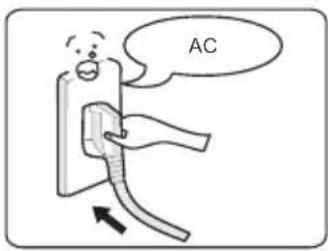
Use correct power outlet (Refer to the label)
- Failure to use correct electricity can cause fire or electric shock.
- Danger of fire if the bad socket is adopted.

natural_image
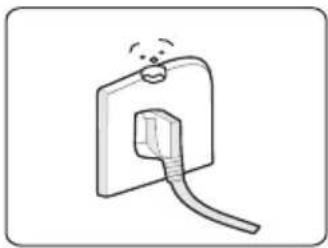
Simple line drawing of a plug inserted into a socket (no text or symbols)A socket shall be used alone
- A socket of more than 10A rated current with grounding wire shall be used alone;
- If shared with other electrical appliances, the socket may cause abnormal heat and result in fire.

natural_image
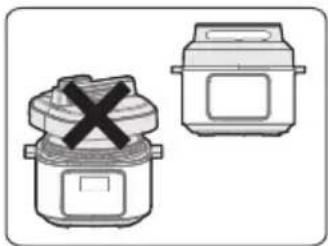
Illustration of two rice cooker models with a crossed-out X mark (no text or symbols)It is strictly prohibited to use other lid
- It is strictly prohibited to use other lid for heating, and in the (switching on) process, the use of non-original lid is not allowed.
- As this may cause electric shock or safety hazards.

natural_image
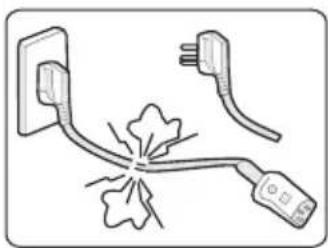
Simple line drawing of a plug and plug with a fuse, no text or symbols presentStop using if the power cord is damaged
- Replace the damaged power cord with special soft cord or replace it with special assembly purchased from the manufacturer or authorized repair center.

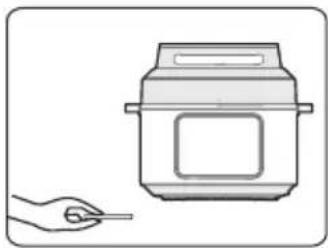
natural_image
Illustration of a hand holding a pen next to a cooking pot (no text or symbols)Do not put foreign objects
- It is prohibited to insert metal shavings, needles and other foreign matter in the gap.
- As this may cause electric shock or movement anomalies.

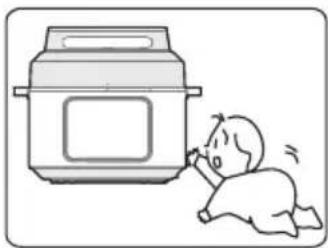
natural_image
Illustration of a baby crawling under a rice cooker (no text or symbols)Place the appliance in a location out of reach of infants
- Place the appliance in a location out of reach of infants.
• To avoid electric shock and scald.

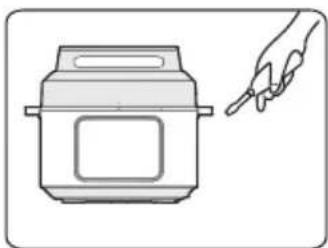
natural_image
Line drawing of a rice cooker with a hand pointing to it (no text or symbols)Modification is prohibited
- Modification or repair by non-professionals is prohibited.
• Violation may cause a fire or electric shock. - Repair or replacement of parts shall be made in a designated service center.
natural_image
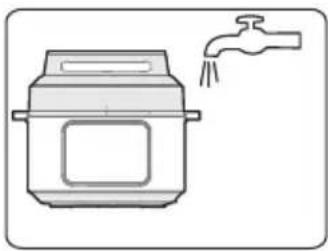
Simple line drawing of a rice cooker with a faucet, no text or symbols presentProducts may not be immersed or sprinkled in water
- Doing so could cause electric shock and electrical short circuits.


WARNING
Warning on Opening the lid
- When the electric pressure cooker is not working, there isn't pressure in the pot, the float valve is down;
- When the electric pressure cooker is working, pressure in the cooker rises, float valve ascends; do not fiercely open the lid before the pressure has been completely released;
- If it is difficult to open the lid, please do not open it fiercely, otherwise, it may cause scalding or physical injury.
natural_image
Illustration of a rice cooker with a close-up inset showing its interior components (no text or symbols)Check periodically
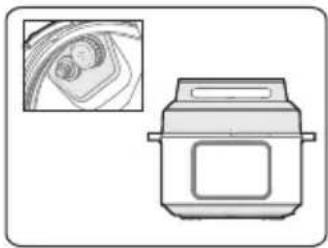
- Be sure to check periodically the block proof cover and exhaust valve core to make sure that they are not be blocked;
- Do not cover the exhaust valve with heavy object or replace it with other object.


CAUTION
EN
natural_image
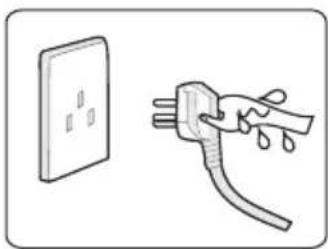
Illustration of a hand holding a plug with liquid, next to a wall socket (no text or symbols)Never pull the plug with a wet hand
• To avoid electric shock.

natural_image
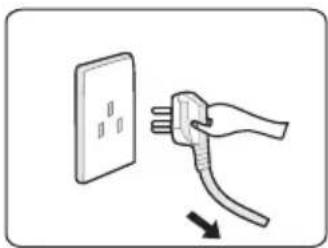
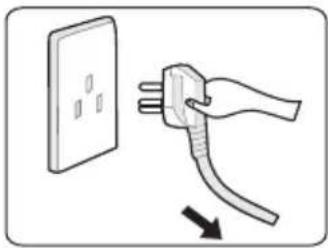
Illustration of a hand holding a plug with three pins, next to a wall socket (no text or symbols)When pulling the plug, you must pinch the plug
- When pulling the plug, you must pinch the plug;
- Do not pull the power cord, otherwise it will damage the cord, causing electric shock and short circuit.

natural_image
Illustration of a hand inserting a plug into an electrical outlet (no text or symbols)Unplugging when not in use
- Otherwise, it may produce leakage, fire or failure.

natural_image
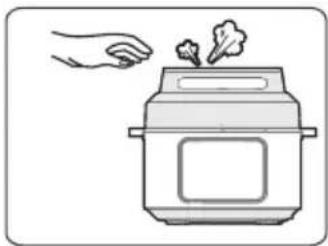
Illustration of a hand holding a steaming rice cooker with smoke rising (no text or symbols)In working, never move your hands to close to the exhaust port.
- In cooking process, never move your hands to close to the exhaust port to avoid burns.
- During cooking, do not cover the vent with a cloth and other items.

natural_image
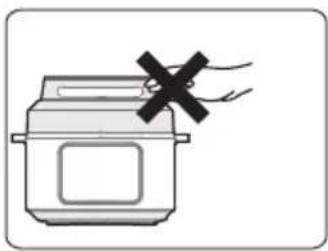
Illustration of a cooking pot with a hand holding a cross mark (no text or symbols)When the cooker is working, please do not touch the lid
- When the cooker is working, lid has high temperature, do not touch it;
- Otherwise, it may possibly cause scalding.

natural_image
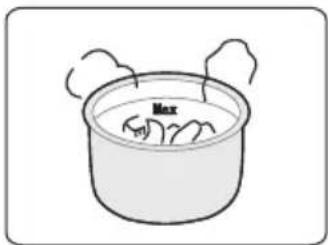
Simple line drawing of a cooking pot with steam rising from the side (no text or symbols)The total amount of food and water can not exceed Max scale
- The total amount of food and water can not exceed Max scale, otherwise food may be cooked unfamiliar, or cause malfunction.

natural_image
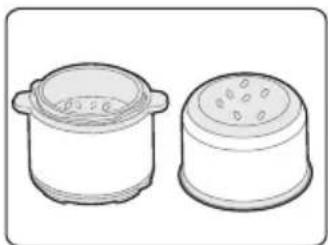
Two identical cylindrical containers, one lided and one lided with a perforated lid (no text or symbols)Do not use a pot other than the dedicated pot
- When there is foreign object on the bottom of pot and heating plate surface, remove the foreign object before use.
- Otherwise, it may cause overheating and work abnormalities etc.

natural_image
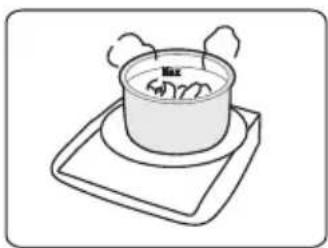
Simple line drawing of a pot on a tray with steam rising from the side (no text or symbols)Do not put the inner pot on other appliance for heating
• In order to avoid deformation or fault.
- Please use the special inner pot.

natural_image
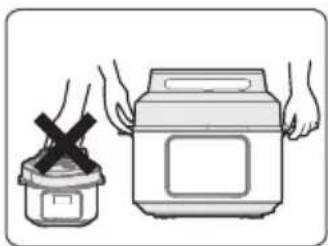
Illustration of a cooking pot and a rice cooker with steam rising (no text or symbols)When moving the product, please hold the handle of cooker body
- When moving the product, do not directly hold the handle of lid for avoiding lid dropping.

Do not use in the following locations
- Do not use in unstable locations;
- Do not use in locations near water and fire;
- Do not use near walls and furniture;
- Do not use in locations exposed to direct sunlight and oil splatter.
- Do not approach the stove for avoiding fire.

Environment for Storing the Product
- Periodically clean the cooker and remove oil and dirt if it is stored on the table.
- Put the electric pressure cooker 30cm away from other kitchen appliances.
Clean after Use
- Clean after each use.
- Before cleaning and maintenance, please unplug the power cord until the product cools.
- Remove the lid and inner pot, clean with detergent first, then rinse well with water, and wipe dry with a soft cloth.
- Clean the internal side of the lid with water, the seal ring, block proof cover, exhaust valve core and float valve can be removed for washing, timely and correctly install them after washing, and then dry the internal side of lid with cloth.
- Wipe clean the cooker body with a rag, and it is prohibited to soak the cooker body in water or spray water to it.
TROUBLESHOOTING
Operation of your appliance can lead to errors and malfunctions. The following tables contain possible causes and notes for resolving an error message or malfunction. It is recommended to read the tables carefully below in order to save your time and money that may cost for calling to the service center.
| Reason SolutionProblem | ||
| Difficult to close the lid | Sealing ring not installed properly. | Position the sealing ring well. |
| The floater valve clamps the push rod. | Lightly push the push rod. | |
| Difficult to open the lid | Float valve in the popped-up position. | Press the float valve lightly with a chopstick. |
| Pressure exists inside the cooker. | Open the lid after the pressure is completely released. | |
| Steam leaks from the lid | Sealing ring installed improperly. | Install the sealing ring as required. |
| Food debris attached to the sealing ring. | Clean the sealing ring. | |
| Replace the sealing ring.• S | ||
| The lid is not closed correctly. | Close the lid correctly. | |
| Steam leaks from float valve. | Food debris on the float valve gasket. | Clean the float valve gasket. |
| Float valve gasket worn-out. | Replace the float valve gasket. | |
| Float valve unable to rise | Too little food and water in inner pot. | Add water and food according to the recipe. |
| Steam leaks from the lid or exhaust valve. | Send to the service center for repair. |
EN
| Reason Solu | |||
| Steam comes out from exhaust valve non-stop | · Exhaust valve not in sealing position. | · Turn the exhaust valve to the sealing position. | |
| · Pressure control fails | · Send to the service center for repair. | ||
| Power indicator doesn't light on | · Power socket bad contact. | · Please check the power socket. | |
| All indicators flas | Display screen displays E1 | · Bottom sensor fault. | · Send to the service center for repair. |
| Display screen displays E2 | |||
| Display screen displays E8 | · Pressure switch fault. | · Send to the service center for repair. | |
| Display screen displays EU | · An exception in receiving or sending information during product | · Send to the service center for repair | |
| Self-diagnosed Warning Displays | Display screen displays noPr | · There is not enough pressure. | · Add a minimum 1.5 cups (375 mL) of a thin liquid to the inner pot. |
| Display screen displays PrSE | · excess pressure. | · If pressure has not fully released after 60 minutes contact the Customer Care Team. | |
| Rice half cooked or too hard | · Too little water. | · Add water accordingly. | |
| · Lid opened prematurely. | · After cooking cycle completes, leave the lid on for 5 more minutes. | ||
| · Too much water.Rice too soft | · Reduce water accordingly. | ||
— If the fault is not removed after above check, please contact our authorized service center for repair.
TRADEMARKS, COPYRIGHTS AND LEGAL STATEMENT
Midea logo, word marks, trade name, trade dress and all versions there of are valuable assets of Midea Group and/or its affiliates (“Midea”), to which Midea owns trademarks, copyrights and other intellectual property rights, and all goodwill derived from using any part of an Midea trademark. Use of Midea trademark for commercial purposes without the prior written consent of Midea may constitute trademark infringement or unfair competition in violation of relevant laws.
This manual is created by Midea and Midea reserves all copyrights thereof. No entity or individual may use, duplicate, modify, distribute in whole or in part this manual, or bundle or sell with other products without the prior written consent of Midea.
All the described functions and instructions were up to date at the time of printing this manual. However, the actual product may vary due to improved functions and designs.
DISPOSAL AND RECYCLING
Important Instructions for Environment
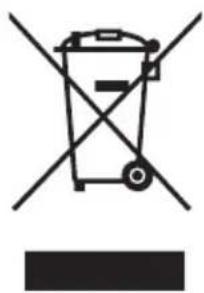
Compliance with the WEEE Directive and Disposing of the Waster Product: This product complies with EU WEEE Directive (2012/19/EU). This product bears a classification symbol for waster electrical and electronic equipment (WEEE).
This symbol indicates that this product shall not be disposed with other household wastes at the end of its service life. Used device must be returned to official collection point for recycling of electrical electronic devices. To find these collection systems please contact to your local authorities or retailer where the product was purchased. Each household performs important role in recovering and recycling of old appliance. Appropriate disposal of used appliance helps prevent potential negative consequences for the environment and human health.
natural_image
Symbol of a trash bin crossed with no visible text or labelsEN
Compliance with RoHS Directive
The product you have purchased complies with EU RoHS Directive (2011/65/EU). It does not contain harmful and prohibited materials specified in the Directive.
- 00:00 Indicates the time
- Product information for power consumption and time to reach the applicable low power mode: Standby mode: 0.8W
The maximum time needed to reach the applicable low power mode: 5 seconds.
Package Information
Packaging materials of the product are manufactured from recyclable materials in accordance with our National Environment Regulations. Do not dispose of the packaging materials together with the domestic or other wastes. Take them to the packaging material collection points designated by the local authorities.

natural_image
Recycling symbol with three chasing arrows forming a triangle (no text or labels)DATA PROTECTION NOTICE
For the provision of the services agreed with the customer,
we agree to comply without restriction with all stipulations of applicable data protection law, in line with agreed countries within which services to the customer will be delivered, as well as, where applicable, the EU General Data Protection Regulation (GDPR).
Generally, our data processing is to fulfil our obligation under contract with you and for product safety reasons, to safeguard your rights in connection with warranty and product registration questions. In some cases, but only if appropriate data protection is ensured, personal data might be transferred to recipients located outside of the European Economic Area.
Further information are provided on request. You can contact our Data Protection Officer via MideaDPO@midea.com. To exercise your rights such as right to object your personal date being processed for direct marketing purposes, please contact us via MideaDPO@midea.com. To find further information, please follow the QR Code.
EN
WARRANTY / SERVICE
We congratulate you to your new device and are convinced that you will be satisfied and have your joy with this modern appliance.
If you have any question or concerns, please email us
Email: customer_services@midea.com
In case of a technical fault, enter your exact address, telephone number, sales contract number and Device type (from the type plate of the device).
A precise fault description saves you time and money. For special questions, please contact the customer service center.
Before calling for service:
Please check whether there is an operating error or a cause that has nothing to do with the function of your device.
Please observe the note in the user manual and check whether:
- The power plug is connected
- The power plug may be damaged
- Electricity is available
Warranty terms
This device has been manufactured and tested according to the most modern methods. The seller warrants for faultless material and proper manufacture for a period of 24 months from the date of sale to the end user. The unit is not suitable for commercial use.
The claim under guarantee lapses in the event of intervention by the Buyer or by a third party. Damage caused as a result of improper handling or operation, incorrect installation or storage, improper connection or installation as well as an act [...] of God or other external factors shall not be covered by this warranty.
When claims are submitted, the manufacturer reserves the right to make improvements to defective parts or to replace or exchange the device.
Only if it is not possible to achieve the intended use of the device by repairing or replacing the device, the buyer can demand a reduction of the purchase price or the cancellation of the purchase contract within 6 months from the date of purchase.
Claims for damages, including consequential damages, are excluded unless they are based on intent or gross negligence.
The guarantee claim exists only with submission of the product and the purchase receipt.
Midea Electrics Netherlands B.V.
Barbara Strozzilaan 101,
1083 HN Amsterdam,
the Netherlands
VIELEN DANK
natural_image
Diagram of a hand pressing down on a circular mechanical component with an arrow indicating force (no text or symbols)natural_image
Technical line drawing of a mechanical component with no visible text or symbolsnatural_image
Illustration showing a hand washing food in a bowl and another cooking into a rice cooker (no text or symbols)flowchart
graph TD
    A["Top-down rice cooker"] --> B["Prepared in the middle, then processed"]
    B --> C["Processed in the final oven"]
Verriegelungsposition
natural_image
Simple line drawing of a plug inserted into a socket (no text or symbols)natural_image
Illustration of two rice cooker models with a crossed-out X mark (no text or symbols)natural_image
Diagram showing three electrical plugs connected to a central explosion (no text or symbols)natural_image
Illustration of a hand holding a small object next to a rice cooker (no text or symbols)natural_image
Illustration of a baby reacting to a cooking pot (no text or symbols present)natural_image
Line drawing of a rice cooker with a hand pointing to it (no text or symbols)natural_image
Simple line drawing of a rice cooker with a faucet, no text or symbols presentnatural_image
Illustration of a rice cooker with a close-up inset showing internal components (no text or symbols)natural_image
Illustration of a hand holding a plug with liquid, next to a wall socket (no text or symbols)natural_image
Illustration of a hand holding a plug inserted into a wall socket (no text or symbols)natural_image
Illustration of a hand holding a plug with a cable, next to a wall socket (no text or symbols)natural_image
Illustration of a hand holding a steaming rice cooker with smoke rising (no text or symbols)natural_image
Simple line drawing of a cooking pot with a black X mark and smoke, no text or symbols present.natural_image
Simple line drawing of a cooking pot with steam rising from the lid (no text or symbols)natural_image
Illustration of two cooking pot containers, one lided and one lided with perforated lid (no text or symbols)natural_image
Simple line drawing of a pot on a tray with steam rising from it (no text or symbols)natural_image
Illustration of hands holding a rice cooker and a container with a cross symbol (no text or labels)natural_image
Symbol of a trash bin with no text or labels, crossed by two diagonal lines and a solid rectangle below (no text or symbols present)natural_image
Recycling symbol icon with three chasing arrows forming a triangle (no text or labels)DATENSCHUTZHINWEISE
Email: customer_services@midea.com
Midea Electrics Netherlands B.V.
Barbara Strozzilaan 101,
1083 HN Amsterdam,
the Netherlands
natural_image
Technical line drawing of a mechanical component with no visible text or symbolsnatural_image
Technical line drawing of a mechanical component with concentric circular features and mounting points (no text or symbols)Valvola di tenuta
natural_image
Simple line drawing of a cylindrical container with a small arrow pointing to its side (no text or symbols)Box di controllo
natural_image
Line drawing of a cylindrical kitchen appliance with lid and side panels (no text or symbols)natural_image
Diagram of a hand pressing down on a circular mechanical component with an arrow indicating force (no text or symbols present)natural_image
Technical line drawing of a mechanical component with no visible text or symbolsnatural_image
Illustration showing a hand washing a bowl and another cooking into a rice cooker (no text or symbols)natural_image
Simple line drawing of a plug inserted into a socket (no text or symbols)natural_image
Illustration of two cooking pots with a crossed-out X mark, no text or symbols presentnatural_image
Simple line drawing of a fuse with two plug plugs and a explosion (no text or symbols)natural_image
Illustration of a hand holding a pen next to a rice cooker (no text or symbols)natural_image
Illustration of a baby kneeling beside a large rice cooker (no text or symbols)natural_image
Illustration of a rice cooker with a hand pointing at it (no text or symbols)natural_image
Illustration of a rice cooker with a faucet, no text or symbols presentnatural_image
Illustration of a rice cooker with a close-up inset showing its interior components (no text or symbols)Controllo periodico
natural_image
Illustration of a hand holding a plug with liquid, next to a wall socket (no text or symbols)natural_image
Illustration of a hand holding a plug with a cable, next to a wall-mounted socket (no text or symbols)natural_image
Illustration of a hand holding a plug with three pins, connected to a wall socket (no text or symbols)natural_image
Illustration of a hand pouring liquid into a rice cooker (no text or symbols)natural_image
Simple line drawing of a cooking pot with a black X mark indicating a cooking step (no text or symbols)natural_image
Simple line drawing of a cooking pot with steam rising from the side (no text or symbols)natural_image
Two identical cylindrical containers with lid designs, shown side by side without any text or symbols.natural_image
Simple line drawing of a pot on a tray with steam rising from the side (no text or symbols)natural_image
Illustration of hands holding a container and a cooking pot with a cross mark (no text or symbols)natural_image
Symbol of a trash bin with crossed lines indicating no waste or restriction, and a solid black rectangle below (no text or labels)natural_image
Recycling symbol with four arrows forming a triangle (no text or labels)Email: customer_services@midea.com
VUE D'ENSEMBLE DU PRODUIT 07
GUIDE RAPIDE 08
MODE D'EMPLOI 13
NETTOYAGE ET ENTRETIEN 20
DÉPANNAGE 26
MARQUES, DROITS D'AUTEUR ET MENTIONS LEGALES 28
ELIMINATION ET RECYCLAGE 29
AVIS SUR LA PROTECTION DES DONNEES 30
GARANTIE / SERVICE 31
CONSIGNES DE SECURITE
Usage prévu
VUE D'ENSEMBLE DU PRODUIT
natural_image
Technical line drawing of a mechanical component with no visible text or symbolsnatural_image
Illustration showing a hand washing food in a bowl and another cooking into a rice cooker (no text or symbols)natural_image
Simple line drawing of a plug inserted into a socket (no text or symbols)natural_image
Illustration of two cooking pots with a cross mark, one open and one closed, both without any text or symbols.natural_image
Simple line drawing of two electrical plugs connected to a fuse with a fuse (no text or symbols)natural_image
Illustration of a hand holding a tool next to a cooking pot (no text or symbols)natural_image
Illustration of a baby crawling into a large kitchen appliance (no text or symbols)natural_image
Illustration of a rice cooker with a hand holding a pen, no text or symbols presentnatural_image
Simple line drawing of a kitchen appliance with a faucet and water droplet (no text or symbols)natural_image
Illustration of a rice cooker with a close-up inset showing its interior components (no text or symbols)natural_image
Illustration of a wall socket connected to a plug with liquid, no text or symbols presentnatural_image
Illustration of a hand holding a plug with three pins, connected to a wall socket (no text or symbols)natural_image
Illustration of a hand holding a plug with a cable, next to an open electrical outlet (no text or symbols)natural_image
Illustration of a hand holding a steaming pot with smoke rising from it (no text or symbols)natural_image
Illustration of a cooking pot with a hand holding a cross mark (no text or symbols)natural_image
Simple line drawing of a cooking pot with steam rising from the side (no text or symbols)natural_image
Two identical cylindrical containers with lid designs, shown from different angles (no text or symbols)natural_image
Simple line drawing of a pot on a tray with steam rising from the side (no text or symbols)natural_image
Illustration of hands holding a container and a cooking pot, no text or symbols presentnatural_image
Symbol of a trash bin crossed with no text or numbers, representing waste sorting or disposal (no text present)natural_image
Recycling symbol with three chasing arrows forming a triangle (no text or labels)AVIS SUR LA PROTECTION DES DONNEES
Email: customer_services@midea.com
Midea Electrics Netherlands B.V.
Barbara Strozzilaan 101,
1083 HN Amsterdam,
the Netherlands
AGRADECIMIENTOS
natural_image
Technical line drawing of a mechanical component with a circular top and rectangular base (no text or symbols)Use y mantenga la olla interior
1. No vaciar
natural_image
Illustration showing a hand washing food in a pot and another cooking into a rice cooker (no text or symbols)flowchart
graph TD
    A["Raw Material"] --> B["Preparation"]
    B --> C["Product"]
natural_image
Simple line drawing of a plug inserted into a socket (no text or symbols)natural_image
Illustration of two cooking pots with a crossed-out X symbol (no text or labels)natural_image
Simple line drawing of two electrical plugs connected to a fuse with a starburst (no text or symbols)natural_image
Illustration of a hand holding a pen next to a rice cooker (no text or symbols)natural_image
Illustration of a child running next to a rice cooker (no text or symbols)natural_image
Line drawing of a rice cooker with a hand pointing to it (no text or symbols)natural_image
Illustration of a rice cooker with a faucet, no text or symbols presentnatural_image
Illustration of a rice cooker with a close-up inset showing its interior components (no text or symbols)natural_image
Illustration of a hand holding a plug with liquid, next to a wall-mounted electrical socket (no text or symbols)natural_image
Illustration of a hand holding a plug with three pins, connected to a wall socket (no text or symbols)natural_image
Illustration of a hand holding a plug with three pins, connected to a wall socket (no text or symbols)natural_image
Illustration of a hand holding a steaming leaf inside a rice cooker (no text or symbols)natural_image
Illustration of a rice cooker with a hand holding a black cross (no text or symbols)natural_image
Simple line drawing of a cooking pot with steam rising from the side (no text or symbols)natural_image
Two identical cylindrical containers with lid designs, shown from different angles (no text or symbols)natural_image
Simple line drawing of a pot on a tray with steam rising from the side (no text or symbols)natural_image
Illustration of hands holding a rice cooker and a container with a cross symbol (no text or labels)natural_image
Symbol of a trash bin crossed with no visible text or labelsnatural_image
Recycling symbol with three chasing arrows forming a triangle (no text or labels)Email: customer_services@midea.com
make yourself at home

www.midea.com
© Midea 2022 all rights reserved
| MIDEA | Midea Europe GmbH Ludwig-Erhard-Str.14, 65760 Eschborn. Germany | kundenservice@midea.com |
| MIDEA ITALIA S.R.L. Via Luigi Bodio 29/37 -Milano (MI) 20158 Italy | assistenza@midea.com | |
| Midea Electrics France 253 RUE SAINT-HONORE 75001 PARIS | service_france@midea.com | |
| MIDEA HOME APPLIANCES UK LTD Conavon Court Ground Floor, 12 Blackfriars Street, Salford,Manchester M3 5BQ UK | service_uk@midea.com |
Guangdong Midea Consumer Electric Manufacturing Co., Ltd 19 Sanle Road, Beijiao, Shunde, Foshan, Guangdong, China.


FR
ÉLÉMENTS D'EMBALLAGE