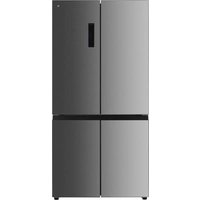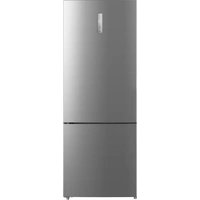
ERCVE190-70miV1 - Fridge Essentiel B - Free user manual and instructions
Find the device manual for free ERCVE190-70miV1 Essentiel B in PDF.


User questions about ERCVE190-70miV1 Essentiel B
0 question about this device. Answer the ones you know or ask your own.
Ask a new question about this device
Download the instructions for your Fridge in PDF format for free! Find your manual ERCVE190-70miV1 - Essentiel B and take your electronic device back in hand. On this page are published all the documents necessary for the use of your device. ERCVE190-70miV1 by Essentiel B.
USER MANUAL ERCVE190-70miV1 Essentiel B
https://boulanger.score7.com/is/content/Boulanger/3497674188696 n 0
Clayettes amovibles
Compartment congélateur
You have just purchased an Essentiel b branded product, and we thank you for your purchase. We pay particular attention to the RELIABILITY, EASE OF USE and DESIGN of our products.
We hope you will be completely satisfied with your new upright refrigerator.
before using for the first time
Unpacking
- Remove the shipping box.
- Check that the appliance has not been damaged during transport. Do not plug in a damaged appliance under any circumstances! If the appliance is damaged, please contact your retailer.
- Remove all tape and packaging material on the inside and outside of the appliance including the parts that are stored inside the refrigerator boxes.
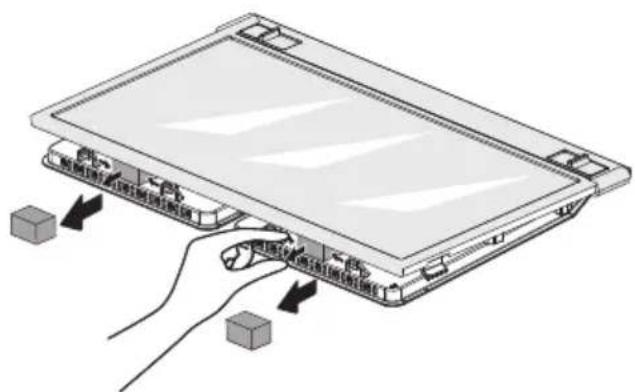
- Make sure you remove the spacer blocks on the below shelf by pulling them out.
Preliminary cleaning
- Clean the inside of the appliance with lukewarm water with a little white wine vinegar added to it. Do not use soap or detergent as the odour may linger. After cleaning, completely dry the appliance.
- You can use white spirit to remove any remaining adhesive from the outside of the appliance.
- To clean the appliance, always turn it off and unplug it, or remove the fuses or flip the circuit breaker to the off position.
Installation location
WARNING: To avoid any risk due to the instability of the appliance, it must be secured as per the instructions.
- Place your refrigerator on a stable, level surface. Your appliance will be heavy when loaded with food: it must, therefore, be placed on a strong, solid floor.
- The appliance must be installed in a dry, well-ventilated room at room temperature (10°C minimum and 43°C maximum for optimal performance, although the refrigerator can work outside of this temperature range).
- The appliance should not be exposed to direct sunlight.
The appliance must not be exposed to rain. - The appliance must not be installed next to a radiator, a stove or any other heat source.
- The appliance's energy consumption and efficient operation are affected by the room temperature.
- The appliance must be installed in such a way that the power point is accessible.
- After installing it, make sure that it is not resting on its power cord.
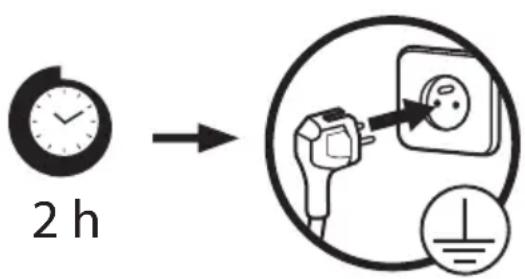
Before plugging the appliance into the mains socket for the first time, please let the appliance
rest for two hours if the appliance was transported in an upright position, or 24 hours if the appliance was transported in the horizontal position. This is to allow the refrigerant gas to go back down into the compressor. Failure to comply with this waiting period may damage the compressor. Allow the appliance to run for two to four hours (depending on the ambient temperature) to reach the required temperature before storing food in it.
Climate class
Only install the appliance in a location where the room temperature matches the climate class for which it was designed (see table below).
The climate class is on the rating plate located inside the appliance.
The table below shows the correct room temperature for each climate class:
| Climate class Room temperature | |
| SN from +10 to +32 | 2°C |
| N from +16 to +32 | °C |
| ST from +16 to +38 | °C |
| T from +16 to +43 | °C |
Your refrigerator ERCVE190-70miV1 is rated "SN/N/ST/T". If the room temperature is below or above the rated room temperature, the performance of your refrigerator may be affected, and your food may spoil.
Sufficient ventilation
The refrigerator is not intended to be used as a built-in appliance and ideally it should not be positioned directly under a cabinet.
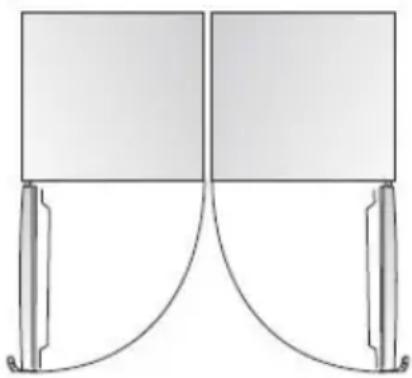
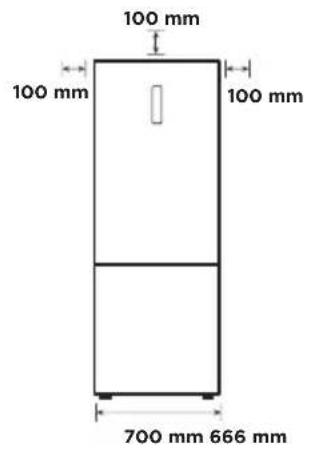
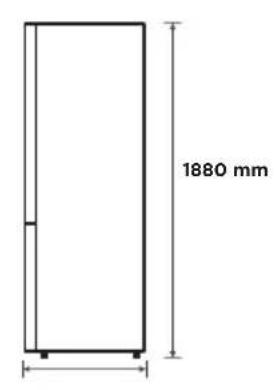
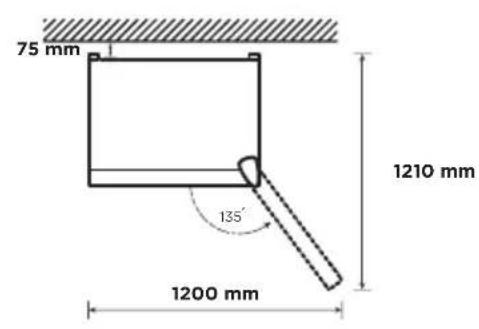
Make sure that air can circulate freely around the appliance to ensure that it can work properly (see figure below).
The space above and to the sides he refrigerator should be more than 100mm and at least 75mm to the rear to facilitate heat dissipation.
Also, make sure you leave enough space for the doors to open.
If your appliance is to be installed next to another refrigerator or freezer, make sure the appliances are not touching each other. This is to prevent condensation from forming on the outside.
Levelling the appliance
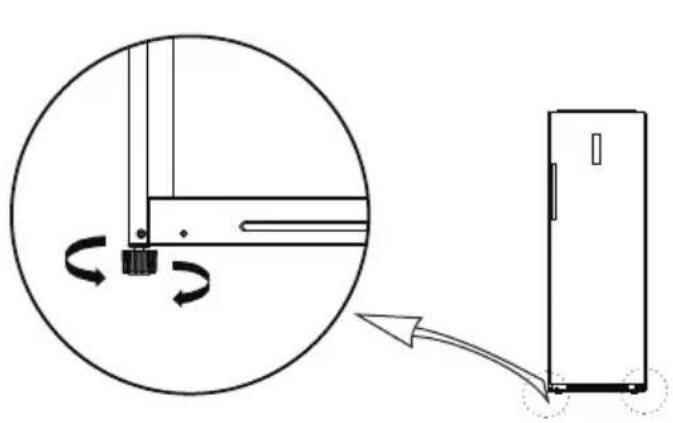
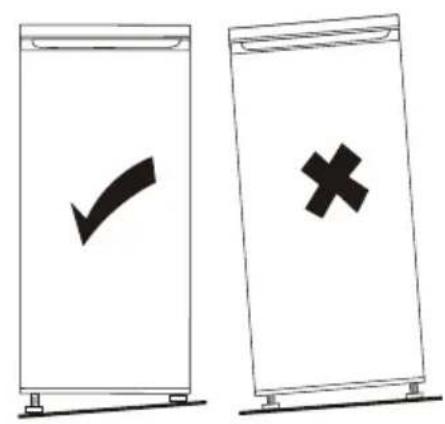
For vibration-free operation, the appliance needs to be in a level position. To do this, adjust the adjustable front feet to properly balance the appliance.
Reversing the opening direction of the door
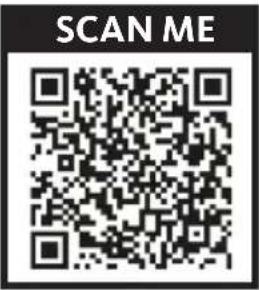
You can change the direction that your refrigerator door opens, if necessary. To make this change, remove all accessories (drawers, door shelves, etc.) and then, using a mobile device, scan the QR code below and follow the steps indicated. We recommend that you get help from another person or contact a qualified professional.

Unplug the appliance from the power point when reversing the opening direction of the door.
艺
Note: The wiring for the power supply of the control panel is present on both sides of the door.
https://boulanger.score7.com/is/content/Boulanger/3497674188696 n 0
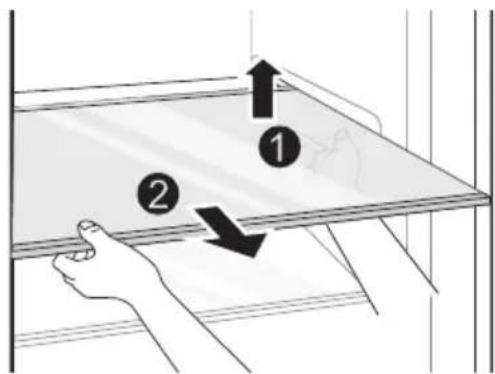
Removable shelves
The walls of the refrigerator are equipped with a series of runners allowing you to position the shelves according to your needs.
You can remove the shelves for easy cleaning. Lift the shelf up and then pull it out. After cleaning, reposition it in the opposite direction.
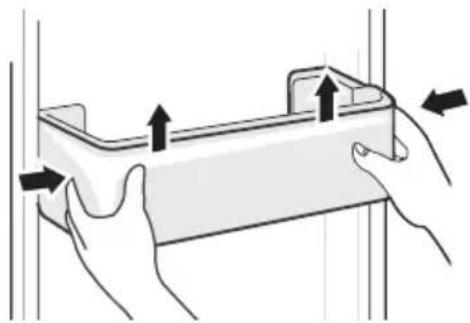
Door shelves
They are intended for the storage of eggs, condiments, canned drinks, etc. Do not place too many heavy objects in the door shelves.
You can remove the door shelves for cleaning. Squeeze the sides of the shelf with both hands and then gradually lift the shelf upwards until it comes free. After cleaning, reposition it in the opposite direction.
Vegetable and fruit crisper drawers
They are intended for the storage of vegetables and fruit. The drawers are designed to keep these items crisp and fresh.
You can remove the drawers for cleaning. Pull the drawer out fully and then lift is up and pull it out until it comes free. After cleaning, reposition it in the opposite direction.
Ice tray
The refrigerator comes with an ice tray. To make ice cubes:
- Fill the ice cube tray 3/4 full with cold water. Place it in the freezer and let the water freeze.
- To remove the ice cubes, slightly bend the tray or place it under running water for a few seconds.
usage
Getting started
- Before plugging the appliance into the mains socket for the first time, please let the appliance to rest for two hours if it was transported in an upright position, or 24 hours if it was transported in a horizontal position. This is to allow the refrigerant gas to go back down into the compressor. Failure to comply with this waiting period may damage the compressor.
- Check the voltage stated on the rating label of your appliance corresponds to the voltage in in your home. A different voltage could damage the appliance.
- Plug the appliance into a mains socket.
- Wait at least two hours before placing food in the appliance to ensure that the correct temperature has been reached inside the refrigerator.
Description and use of the control panel
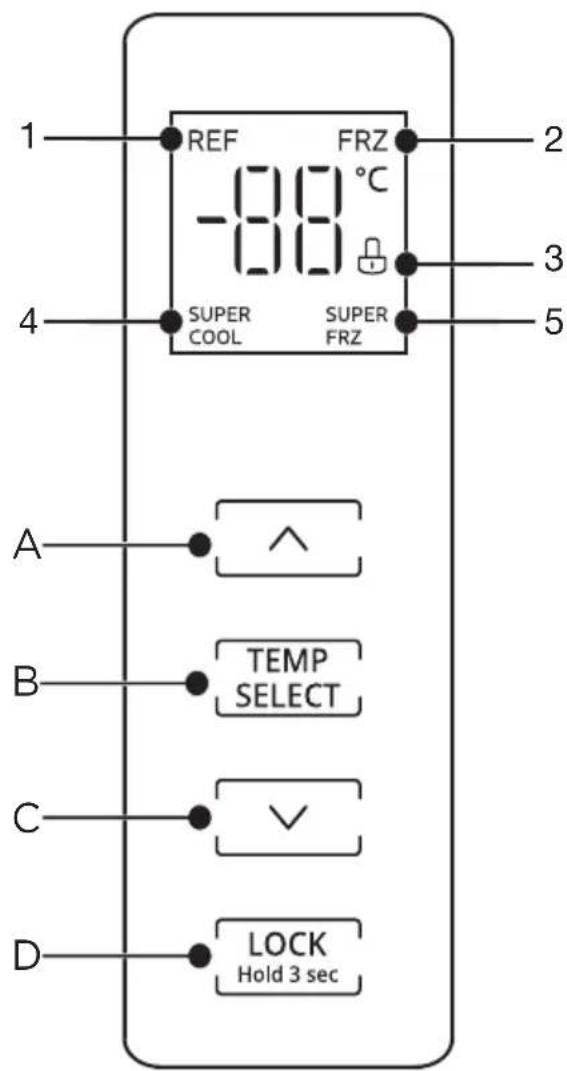
- Fridge temperature is displayed
- Freezer temperature is displayed
- Lock / unlock icon
- Super cool icon
- Super freeze icon
A. Temperature increase button
B. Fridge or freezer temperature selection button
C. Temperature decrease button
D. Lock/unlock button
When you plug in the refrigerator, the display screen, the fridge and freezer are automatically on. For the first connection, the default temperature in the fridge is set to 5^ and the freezer is set to -18^ . Thereafter, each time you restart the refrigerator, it will operate according to the temperature set before the last power off. If there is no operation for 60 seconds, the LED screen will turn off and lock.
艺
1-Fridge temperature setting
- Press the TEMP button until disp on the screen. Press the temperature increase / decrease buttons to set the desired fridge temperature. The set temperature change will take effect after the control panel is locked.
- The following temperatures are available: 2^, 3^, 4^, 5^, 6^, 7^ and 8^ .
- We recommend setting the temperature to 4^ when starting up your appliance.
2- Freezer temperature setting
- Press the TEND button until displays on the screen. Press the temperature increase / decrease buttons to set the desired freezer temperature. The set temperature change will take effect after the display screen is locked.
- The freezer temperature setting range is from -16^ to -24^ and can be changed in increments of 1^ .
- We recommend setting the temperature to -18^ when starting up your appliance.
3- Super cool mode
- Press the TEMP button until displays on the screen. Press the temperature decrease button to set the fridge temperature to 2^ . Then press the temperature decrease button to enter the super cool mode and the super cool icon SUPER COOL displays on the screen. The setting will take affect after the control panel is locked.
- This mode is used to quickly refrigerate a large quantity of food (such as when returning from shopping). Remember to activate this mode 1 or 2 hours before introducing fresh food.
- The super cool mode will automatically turn off after 6 hours and the fridge will return to the previous temperature setting.
- To turn this mode off at any time, press the increase temperature button. The super cool icon SUPERCool will no longer display.
- In super cool mode, the appliance may be slightly noisier than normal.
4- Super freeze mode
- Press the TEMP button until FRZ. displays on the screen. Press the temperature decrease button to set the freezer temperature to -24°C. Then press the temperature decrease button to enter the super freeze mode and the super freeze icon SUPER FRZ. displays on the screen. The setting will take affect after the control panel is locked.
- This mode is used to quickly freeze a large quantity of food (such as when returning from shopping) and assists with keeping the food fresh. Remember to activate this mode 12 hours before introducing unfrozen food. Alternatively, activate this mode as soon as possible when putting in large amounts of unfrozen food.
- The super freeze mode will automatically turn off after 40 hours and the fridge will return to the previous temperature setting.
- To turn this mode off, press the increase temperature button at any time. The super freeze icon SUPER FRZ will no longer display and the freezer will return to the previous temperature setting.
- In super freeze mode, the appliance may be slightly noisier than normal.
5- Refrigerator shutdown mode
- The refrigerator shutdown mode enables the fridge to be turned off while the freezer remains on.
- Press the TEMP on until disp on the screen. Press and hold the button for TEMP three seconds until you hear three beeps and the displays shows -- . The appliance is now in shutdown mode.
- To exit shutdown mode, press the TEMP button until REF. displays on the screen. Press and hold the TEMP button for three seconds until you hear three beeps and the temperature displays on the appliance. The fridge will return to the default setting of 5^ .
6- Control panel lock mode
- This mode is used to prevent a setting being changed when a person accidentally touches the control panel buttons.
- Press and hold the lock button LOCK for three seconds to turn the control panel lock mode on. The lock mode icon will display on the LED screen when the refrigerator is locked. No buttons work when the lock mode is activated.
- Press and hold the LOCK button for three seconds to turn the control panel lock mode off. The unlock mode icon will display on the LED screen.
7- Door opening alarm
ALARM
- If the door is left open for more than 120 seconds, an alarm will sound, and it will repeat each minute until the door is closed. This alarm can only be cancelled by closing the door. However, to turn it off in the short term before the door is closed, press any button.
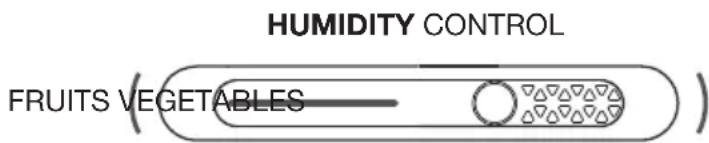
Setting the humidity control
- The humidity control switch is in the vegetable and fruit crisper drawer.
- High moisture foods, such as leafy or thin-skinned vegetables, prefer a higher humidity setting, while thick skinned fruits prefer a lower humidity setting.
- Slide the switch to the left to maintain lower humidity levels in the vegetable and fruit crispener drawer or slide it to the right to maintain higher humidity levels.
practical tips for use
Storage tips - fridge
- Always pack products to prevent different foods from contaminating each other.
- So that the air can flow properly, never cover the shelves with paper or plastic sheets. Arrange food so that air can circulate freely around it.
- Do not put hot food or evaporating liquids inside the refrigerator. Wait for anything cooked to cool completely before storing it (for example: soup).
- Store only fresh foods, cleaned and wrapped in appropriate food packaging or containers.
- Limit how often the door is opened and, in any case, do not leave the door open for too long to prevent the refrigerator's temperature from rising.
Storage tips - freezer
- The freezer is suitable for freezing fresh food and storing frozen and deep-frozen food for a long time.
- When first using the appliance or after a period of it not being used, set it to the highest setting (Super freeze).
- Place fresh food to be frozen in the freezer compartment.
- Check the rating plate for the maximum amount of food that can be frozen in 24 hours.
- The freezing process lasts 24 hours. Do not add other food during this time.
- Frozen food can be thawed in the fridge or at room temperature, depending on the time you have.
- Some smaller foods can be cooked straight from the freezer, but they may require additional cooking time.
- Only freeze top quality, fresh and thoroughly cleaned foods.
- Store food in small portions for quick and thorough defrosting and reduce waste.
- Wrap food in aluminium foil or plastic ensuring it is airtight.
- Do not allow fresh, unfrozen food to touch frozen food as this may cause a temperature rise in the latter.
- Lean foods store better and for longer than fatty foods.
Salt reduces the storage life of food. - When placing food in your own packaging, put the food name and date on the packaging before freezing.
- Position the frozen food so that the use by date is visible on each packet when you open the door.
- Transfer purchased frozen goods to your freezer as quickly as possible.
- Once defrosted, food deteriorates rapidly and should not be refrozen.
- Do not exceed the storage period indicated by the food manufacturer.
Freezer compartment
- The freezer is designated for the storage of food frozen at very low temperature, long-term storage of frozen food, and for the production of ice.
- Do not put fresh and frozen food next to each other. The frozen food may thaw.
- When freezing fresh food (such as meat, fish or chopped meat), cut them into parts that can be used at the same time.
- Storing frozen food: Instructions are usually stated on the packages, which must be followed. If there is no information on the packaging, food should not be stored for longer than three months from the date of purchase.
- When purchasing frozen food, make sure that it was frozen at a suitable temperature and that the packaging is not damaged.
- Frozen food should be kept in suitable packages to retain the quality and should be returned to the freezer compartment as soon as possible.
- If a package of frozen food shows moisture or abnormal bulging, it is probable that it was stored at the wrong temperature and the content is spoiled.
- The storage period for frozen food depends on the room temperature, the thermostat setting, the frequency of opening the door of the freezer, the type of food and the time of transporting the product from the shop to the household. Always follow the instructions printed on the packaging and never exceed the maximum storage time stated on the package.
Cooling compartment
- To reduce moisture and subsequent ice build-up, never put liquid into the refrigerator in unsealed containers. Frost tends to concentrate in the coolest parts of the evaporator. Storing uncovered liquids results in a more frequent need for defrosting.
- Never put warm foods in the refrigerator. These should first cool down at room temperature and then be placed so as to ensure adequate air circulation in the refrigerator.
- Foods or food containers should not touch the back wall of the refrigerator because they could freeze to the wall. Do not keep regularly opening the door of the refrigerator.
- Meat and clean fish (packed in a package or plastic foil) can be placed in the refrigerator, which can be used in 1-2 days.
- Fruit and vegetables without packaging can be placed in the part designated for fresh fruit and vegetables.

ATTENTION
The optimal temperature setting of each compartment depends on the ambient temperature. Above optimal temperature is based on the ambient temperature of 25^ .
Energy saving tips
- Wait for anything cooked to cool completely before storing or freezing (e.g. soup). Do not put hot food in your appliance.
- Spread the food out in various locations so that the air flow is not blocked.
- Make sure that the food does not touch the walls of the appliance, especially the back wall.
- In the event of a power cut, do not open the door.
- Open the door as little as possible.
- Do not leave the door open for a long time because hot air will enter the refrigerator and the cold air inside will escape, thereby wasting energy.
- Make sure there are no obstructions preventing the door from closing properly.
- Do not set the temperature to a colder temperature than necessary.
- The arrangement of drawers and shelves as shown in the product overview drawing offers the most efficient use of energy and should be retained as far as possible.
To obtain larger storage space for larger items, move the middle drawers and shelves first. - Spread food out evenly on the shelves and drawers for optimal energy use.
- Check the door seals are in good condition and fitted correctly. Replace if necessary.
cleaning and maintenance
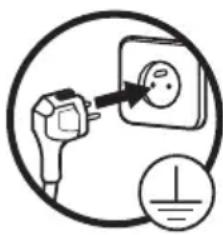
Unplug the appliance before you clean it.
We recommend that you regularly clean and disinfect your appliance.
CAUTION: Allow at least 5 minutes between turning the appliance off and turning it on again as frequent restarting may damage the compressor.
Defrosting
This appliance automatically defrosts. However, the freezer compartment may progressively become covered in frost. Please defrost the freezer when you see a buildup of frost.
- Remove the frozen and fresh food from the freezer compartment, wrap it in newspaper and store it in a cool, dry place.
- Wedge the freezer door open.
- Place an old towel on the bottom of the freezer and the floor around the appliance. Then put a shallow container on the freezer grid to catch the ice and water.
- When the ice begins to soften, use a plastic scraper to dislodge and remove the larger pieces of ice.
- When all the ice has been removed, clean the appliance with a soft sponge and soapy, lukewarm water.
- Once everything is dry, the appliance can be used again.
- Annually, carefully remove dust from the condenser at the back of the freezer with a soft brush.
Cleaning
- Remove the fresh food from the fridge. Wrap it up and store it in a cool place.
- Clean the appliance and accessories inside with a soft (non-abrasive) sponge dipped in a solution of bicarbonate of soda and warm water or soapy, lukewarm water. Remove the door shelves. Do not forget to clean the door seals.
- After cleaning, rinse with clean water and dry the parts thoroughly with a soft cloth.
- Once everything is dry, reassemble the fridge Put the door shelves back by sliding them in from the top.
-
Allow at least 5 minutes between turning the appliance off and turning it on again as frequent restarting may damage the compressor.
-
Never clean the appliance with a steam cleaner. The moisture generated can accumulate on the electrical components and can expose users to the risk of an electric shock! Hot steam can also damage parts made with plastic.
- Never use abrasive or caustic products, or sponges with scouring pads to clean the inside or outside of your appliance.
- Do not use hot water to clean the glass shelves if they are cold. There is a risk that the glass will shatter because of the sudden change in temperature which could cause injury and serious damage.
- IMPORTANT: Never put oil or oily dishes in the refrigerator in open containers as the fatty substances can damage the plastic surfaces of the refrigerator. If you spill or splash oil on the plastic surfaces, clean it up and immediately wash the affected parts with hot water.
Replacing the bulb
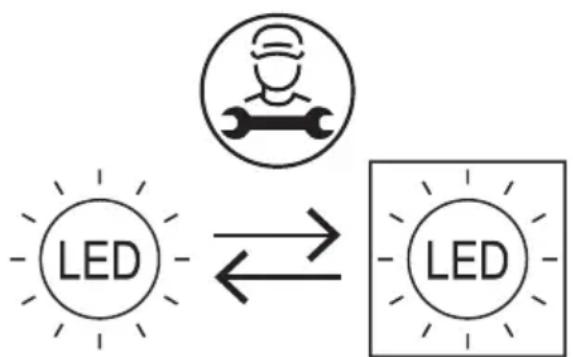
- Your appliance has LED lighting. This type of lighting is designed to work longer than a conventional light bulb. Contact your dealer's after-sales service if a fault occurs with the lighting.
- This product contains a light source of energy efficiency class 'F' in the freezer and class 'G' in the fridge.
- The light bulbs in this product are replaceable only by qualified engineers.
Noises during operation
The appliance may make the following noises when operating normally:
- Crackling: Noise produced during automatic defrosting. It may also be produced when the refrigerator is in the cooling or warming phase and is due to expansion of the appliance materials.
- Clicking: Noise produced when the thermostat switches the compressor on or off.
- Compressor noise, humming: Normal motor noise. This noise indicates that the compressor is working normally. When the compressor cuts in, the noise can rise slightly for a brief moment.
- Bubbling or gurgling: Noise produced when the refrigerant fluid flows through the coils inside the system.
- Running water: Normal noise produced when the water flows out of the evaporation container during defrosting. This noise may also be audible inside the appliance during defrosting.
In case of prolonged absence or non-use
- Unplug, empty, defrost and clean the appliance.
- Keep the doors ajar when the appliance is unplugged and not in use.
INFORMATION

ENERG

SUPPLIER'S NAME MODEL IDENTIFIER


You can find information on the models as recorded in the product database on the following website by searching for your model () , which is specified on the energy label:
https://eprel.ec.europa.eu/
The spare parts for the appliance shall remain available for 10 years.
Link to the manufacturer's website where the information referred to in point 4 a) of the appendix to the Commission Regulation (EU) 2019/2019 can be found:
https://www.boulanger.com/info/assistance/
Malfunctions
| Problem Possible Cause Solution | ||
| Appliance does not work. | Mains plug is not plugged in, or it is loose. | Insert the plug correctly. |
| Fuse has blown. Check and replace | the fuse. | |
| Socket is defective. Ask an electrician to fix the socket. | to fix the socket. | |
| Light is not on. Mains plug is not plugged in. Insert the plug correctly. | ||
| The light is broken. Ask a qualified electrician to change the light in the appliance. | ||
| Fruits and vegetables in the fridge are frozen. | The food is positioned too close to the back wall. | Move the food away from the back wall. |
| Fruits and vegetables are stored in the cold zone that is reserved meat and fish. | Place the fruits and vegetables in another area of the fridge. | |
| Fridge/freezer is over cooling. | The temperature setting is too cold. | Turn the fridge to a warmer setting. |
| The food is insufficiently chilled or frozen. | Incorrect temperature. Turn the temperature to a colder setting. | |
| The door has been left open for an extended time. | Temporarily use a colder temperature. | |
| The appliance is too near to a heat source. | Check the guidelines advise in the Installation location section and move the appliance away from the heat source. | |
| A large amount of food has been inserted into the fridge or freezer. | Use the Super Cool or Super Freeze modes to cool/freeze large amounts of food. | |
艺
Problem Possible Cause Solution
| Door does not shut properly. | The door seal is not airtight. Warm the leaking sections of the seal with a hair dryer (on a cool setting) and mould them by hand until they sit correctly. | |
| Buildup of frost on the freezer door. | Remove the frost and then turn the temperature to a warmer setting. | |
| Too much food in the fridge/ freezer or in the fridge door. | Move any food that is preventing the door from closing. Do not overfill the appliance. | |
| Unusual noises. Appliance is not level. Adjust the feet. | ||
| Appliance is touching the wall, a pipe or other objects. | Move the appliance or pipe slightly. | |
| The compressor is working for a long time. | The ambient temperature is hot. This is normal and the compressor will work less as the temperature cools. | |
| Too much food is placed in the appliance at one time or hot food is inserted. | Do not put too much food in at one time or put hot food in the appliance. | |
| The door is opened too often. Do not open the door too often. | ||
| Frost has built up. Defrost and clean the appliance. | ||
| The outer walls are hot. | When the appliance is operating, heat is dissipated to the outside through metal tubes inside the walls. | This is normal. |
| Ambient temperature is high or there is insufficient ventilation. | Move the location of the fridge to a cooler spot ensuring there is sufficient ventilation on all sides. | |
| The actual temperature differs from the set temperature. | Warm food inserted into the appliance. | The food has increased the temperature temporarily. Wait until it has time to reach the set temperature. |
| A new temperature has been set. Wait for the appliance to reach the set temperature. | ||
| There is a slight temperature difference of ±3°C in different areas of the fridge. | This is normal. | |
| Hard to open the door. | There is an air pressure difference between the inside and outside of the appliance. | Wait a few moments, then retry to open the door slowly. |
| Problem Possible Cause Solution | ||
| Frost buildup around the vents on the back wall of the fridge. | Door incorrectly closed. Remove any items blocking the door. | |
| Door seal is not tight. Check, clean and reposition the door seal as necessary. | ||
If this does not solve your specific problem, please contact your retail store service desk and do not attempt to make repairs yourself.
Your refrigerator should only be repaired by qualified maintenance technicians. Poorly done repairs can be dangerous for the user and are not covered by the warranty.
Error codes
If an error code appears on the display, please contact your retailer's after-sales service.
Error Code Description
E1 Fridge temperature sensor fault
E2 Freezer temperature sensor fault
E3 Meat and fish drawer temperature sensor fault
E5 Freezer defrost sensor fault
E6 Main control PCV and display PCB communication fault
E7 Ambient temperature sensor fault
https://boulanger.score7.com/is/content/Boulanger/3497674188696 n 0
https://boulanger.score7.com/is/content/Boulanger/3497674188696 n 0
https://eprel.ec.europa.eu/
All information, designs, drawings and pictures in this document are the property of SOURCING & CREATION. SOURCING & CREATION reserves all rights to its brands, designs and information. Any copy and reproduction through any means shall be deemed and considered as counterfeiting.
Protection of the environment
This symbol attached to the product means that it is an appliance whose disposal is subject to the directive on waste from electrical and electronic equipment (WEEE). This appliance may not in any way be treated as household waste and must be subject to a specific type of removal for this type of waste. Recycling and recovery systems are available in your area (waste removal) and by distributors.
By taking your appliance at its end of life to a recycling facility, you will contribute to environmental conservation and prevent any harm to your health.

Umweltschutz
* Tested in our laboratories
Warranty valid from the date of purchase (receipt as proof of purchase). This warranty does not cover defects or damage caused by improper set up, incorrect use, or normal wear and tear of this product.
* In unseren Labors getestet
* Getest in once laboratoria
SERVICE RELATION CLIENTS / Customer Relations Department / Kundenservice / Klantenafdeling
Art. 8011472
Ref. ERCVE190-70miV1
FABRIQUE EN R.P.C. / Made in China / Hergestellt in VR China / Gefabriceerd in VRC.
SOURCING & CREATION
Avenue de la Motte
59810 Lesquin - FRANCE
contact@sc-ub.com