MX60MKII - Receiver Artsound - Free user manual and instructions
Find the device manual for free MX60MKII Artsound in PDF.


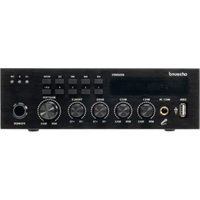
| Product type | Receiver / mixer amplifier |
| Brand | Artsound |
| Model | MX60MKII |
| Output power (100 V) | 60 W |
| RMS output power (8 Ω) | 60 W |
| Output impedances | 4 Ω, 16 Ω, 70 V, 100 V |
| Frequency range | 60 Hz - 18 kHz (< 0.5% THD) |
| Micro inputs | 3 (MIC1 balanced XLR and 6.35 mm jack, MIC2 balanced XLR) |
| AUX inputs | 2 x stereo RCA |
| Bluetooth connectivity | Yes, name: "MX60MKII" |
| USB / microSD player | Yes (USB, TF/microSD card) |
| Phantom power (48 V) | MIC1 and MIC2 (switchable via DIP switch) |
| Voice priority | MIC1 configurable as priority |
| Tone controls | Treble and Bass |
| Remote control | Remote control included, RS232 |
| Power supply | AC 100-240 V 50/60 Hz and DC 24 V |
| Dimensions (H x W x D) | 63 x 215 x 285 mm |
| Weight | 1.8 kg |
| Warranty | 2 years |
| Safety | Protection against short circuits, overload, high temperature, peak current limiter |
Frequently Asked Questions - MX60MKII Artsound
User questions about MX60MKII Artsound
0 question about this device. Answer the ones you know or ask your own.
Ask a new question about this device
Download the instructions for your Receiver in PDF format for free! Find your manual MX60MKII - Artsound and take your electronic device back in hand. On this page are published all the documents necessary for the use of your device. MX60MKII by Artsound.
USER MANUAL MX60MKII Artsound
text_image
arts@und MX60MKII ▶II I<< ▶I EQ MODE -15 0 PW 1 2 3 4 5/5+ MIC1 IN MIC1 MIC2 BASS TREBLE MASTER MIN MAX MIN MAX -10 +10 -10 +10 MIN MAX POWERMENGVERSTERKER 2
AMPLIFICATEUR MÉLANGEUR 9
MIXING AMPLIFIER 16
MISCHVERSTÄRKER 23

natural_image
Abstract gray circular graphic with concentric arcs (no text or symbols)artsound
we speak sound
HANDLEIDING
Thank your for buying our MX60MKII. We hope you'll enjoy it for years to come. Please read these instructions carefully and keep this manual for later reference.
- Warnings and safety 16
- What's in the box 16
- Main Features 17
- Interface and Functions 17
-
Device Connection Diagram 18
-
Speaker wiring and setup 19
- Bluetooth Device Connection 21
- Appendix A Communication Format 21
- Technical Specifications 22
- Warranty conditions 23
1. WARNINGS AND SAFETY
- To prevent fire or electric shocks, the device must not be exposed to rain or humidity.
- For your own safety: to prevent electric shocks do not remove the housing.
- Do not try to repair any malfunctioning parts of the device yourself. Ask a professional expert to do this for you.
- When plugged into the mains, the device remains electrically charged even when switched off.
2. WHAT'S IN THE BOX
Check that the packaging contains the following parts:
1 Amplifier / 1 Power cable / 1 Antenna / remote control / 1 User's Manual
3. MAIN FEATURES
This full-featured mixer-amplifi er delivers 60W of output power, Bluetooth functionality, integrated USB audio player power, and fi ve inputs, including two balanced MICs (MIC1 has an additional 6.35 mm unbalanced jack on the front panel), each with individual volume control functions included:
• VOICE PRIORITY: MIC1 can be set to have priority over other inputs.
- TREBLE: Individually controlling the treble and allowing adjustment of tone quality, the TREBLE controls the amount of cut or boost for treble frequencies above 10KHz.
• BASS: Controls the amount of cut or boost for bass frequencies below 100 Hz.
• Color indicators on the front panel include power, signal, peak and protection indicators.
Compatible with 70V, 100V and 4Ω speaker systems, this is an extremely versatile component for background music and paging systems.
• Built-in Bluetooth receiver and USB player.
• 70/100V and 4ohm output loads
• Stable performance with SMT circuit board.
• Powerful amplifi er tubes
- Three microphone jacks, MIC1 on rear panel with 48V phantom power.
- MIC1 priority input
- High-defi nition display for playback of programmed operating states.
- Separate input volume control to adjust all volume levels
• BASS and TREBLE tone controllers - Provides full protection against output short circuits, overloads, high temperatures and peak current limiters
4. INTERFACE AND FUNCTIONS
A FRONT PANEL

text_image
(9) artsound MX60MKII (10) EQ MODE -15 0 FW USB MIC1 IN MIN MAX MIC1 MIN MAX BASS -10 +10 TREBLE -10 +10 MASTER MIN MAX POWER (1) (2) (3) (4) (5) (6) (7) (8)-
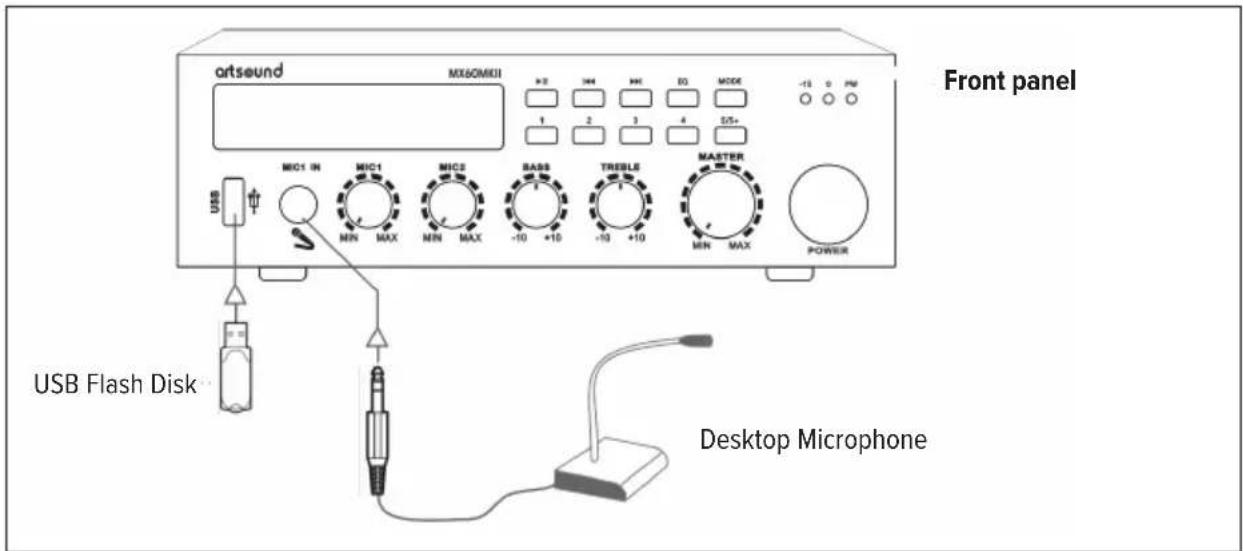
USB: Can play music from USB flash drive
-
MIC1 IN: 6.35mm microphone input hole
-
MIC1: Microphone 1 volume control
-
MIC2: Microphone 2 volume control
-
BASS: Subwoofer control
-
TREBLE: Treble control
-
MASTER: Master output volume control
-
POWER: Main unit power switch
-
Display Screen: Displays the current status of system usage
-
MP3 Audio Controls
▶II Play, Pause
Previous: Long press to lower the volume Next: Long press to turn up the volume EQ Produces 6 different balancing effects modus Selectable USB and Bluetooth modes 1/2/3/4/5/5+ Select the song you want to play
11. LED indicator
ON Red light when main unit is on
-15/0 Flashes with volume level
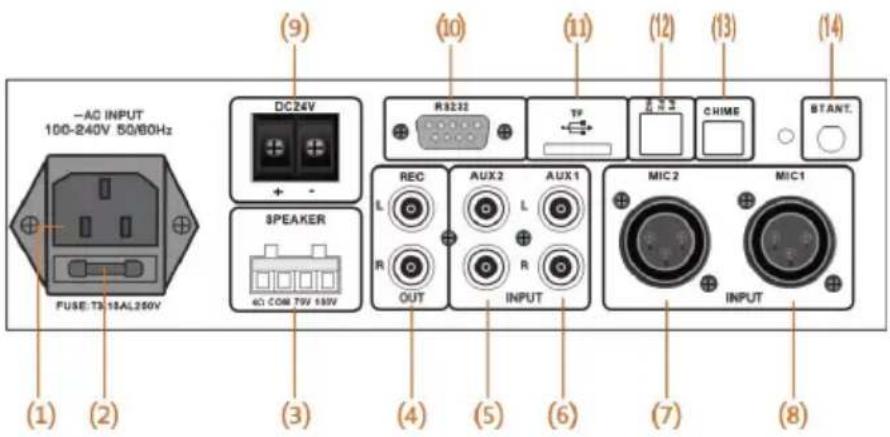
B REAR PANEL
text_image
(1) (2) -AC INPUT 100-240V 50/60Hz PUSE: TS 18AL260V DC24V + - (3) SPEAKER AC COM 79V 180V (9) (10) R32-32 REC L R OUT (4) (5) (6) AUX 2 L R INPUT (11) TF Y C CHIME (12) (13) (14) BTANT. MIC 2 MIX 1 INPUT (7) (8)- Power Input
- Fuse: Only on select models
- Speaker Output Terminal: Outputs to 4Ω, COM, 70V, 100V and other types of speakers, only one output can be used at the same time, connecting more than one output may cause damage to the internal parts of the amplifi e, each of the 100V, 70V and 4Ω terminals must be connected to the COM.
- Audio Outputs: Output to other amplifiers
- AUX2: RCA connectors for receiving stereo channels, and a source for converting dual channels to mono mode inside the amplifier
- AUX1: RCA connectors for receiving stereo channels, and a source for converting dual channels to mono mode inside the amplifier
-
MIC2: Accepts XLR terminal audio inputs
-
MIC1: Accepts XLR terminal audio inputs
- DC24V: DC 24V power supply can be connected
- RS232 interface: the amplifi er can be externally controlled via RS232 codes
- TF: Insert microSD / TF card to play audio fi les
-
DIP SW:
-
P1: phantom power supply MIC1 (up = OFF / down = ON).
- P2: phantom power supply MIC2 (up = OFF / down = ON).
- HIZ:
$$ \mathrm{up} = 7 0 \mathrm{V} - 1 0 0 \mathrm{V} $$
$$ \mathrm{down} = 4 - 1 6 \Omega $$
- CHIME: Ringtone switch interface
- BT ANT: Bluetooth receiving antenna, maximum receiving range - 10 meters
5. DEVICE CONNECTION DIAGRAM
text_image
artsound MX60MKII +2 144 +4 EQ MODE -13 0 PM Front panel MIC1 IN MIC1 MIC2 SAB8 TREBLE MASTER MIN MAX POWER USB Flash Disk Desktop Microphone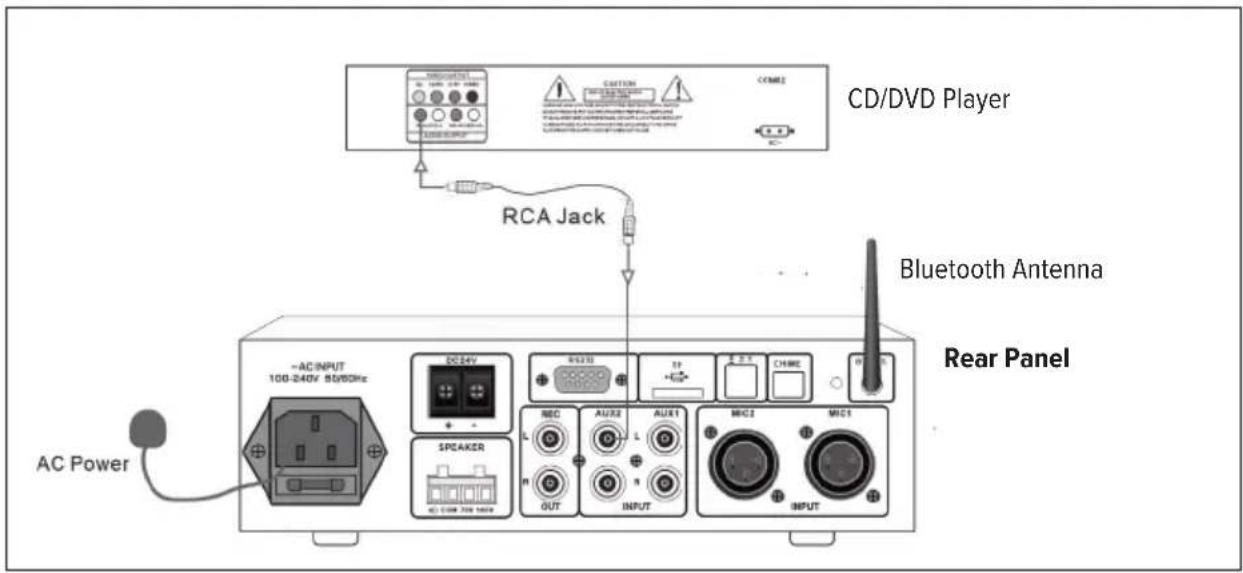
text_image
CD/DVD Player RCA Jack Bluetooth Antenna Rear Panel AC INPUT 100-240V 50/50Hz DC24V + - SPEAKER AC CDM 700 MHz REC AUX2 AUX1 MCC2 MCC1 OUTPUT INPUT AC Power6. SPEAKER WIRING AND SETUP
KEEP IN MIND:
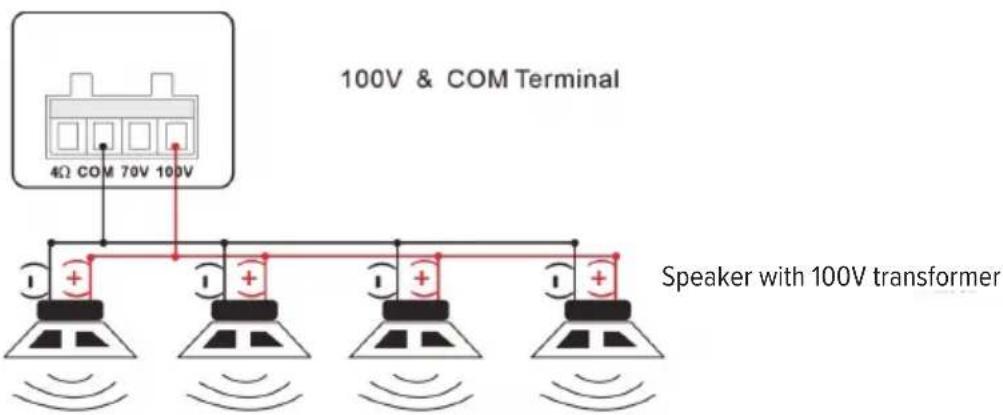
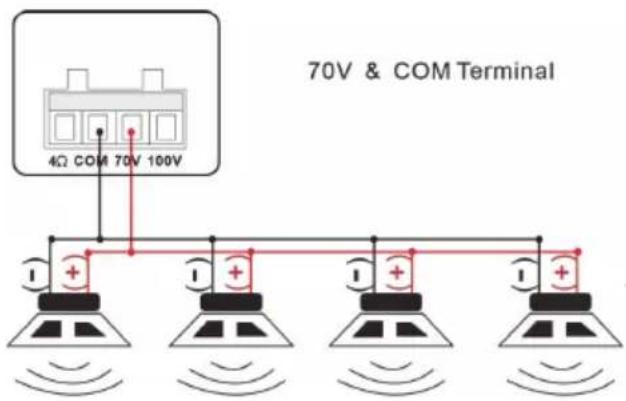
• The amplifier has different speaker sound outputs of 100V, 70V and low impedance 4Ω.
- Only one output can be used at the same time, the amplifier may damage internal parts if more than one output is connected, and each of the 100V, 70V, and 4Ω terminals must be terminated with COM (common).
100V OUTPUT
This system is most commonly used in PA systems and only 100V line speaker cabinets with transformers may be used. All speaker cabinets are connected in parallel and the sum of their power must not exceed the rated output power of the amplifier.
When playing music, it is recommended not to load the amplifier beyond 70% of its rated output power.
text_image
100V & COM Terminal 4Ω COM 70V 100V Speaker with 100V transformer70V OUTPUT
This type of horn speaker system is common in the U.S. It works the same as a 100V line except that the output terminals of the amplifier have 70V RMS at rated output power.
text_image
70V & COM Terminal 4Ω COM 70V 100VSpeaker with 70V transformer
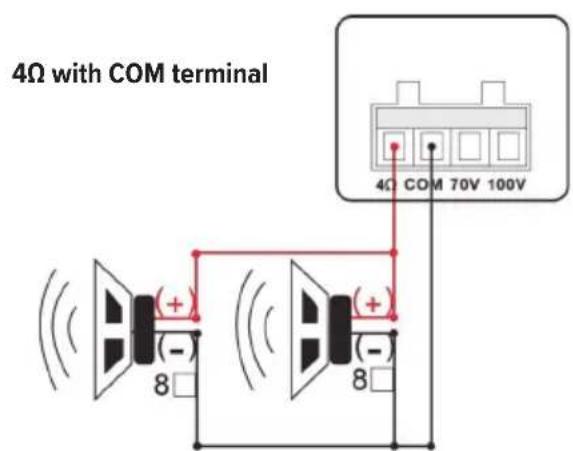
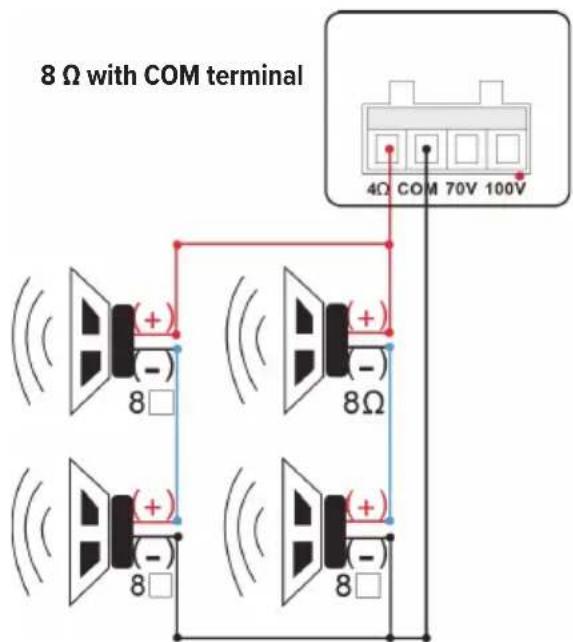
4Ω & 8Ω LOW IMPEDANCE OUTPUTS
This output allows the connection of low impedance speaker cabinets without transformers when using two or more speaker cabinets.
Be sure to connect in series, parallel, or a mixture of series and parallel, keeping the total load impedance at 4 or 8 .
A. PARALLEL B. MIXED SERIES AND PARALLEL CONNECTION
text_image
4Ω with COM terminal 4Ω COM 70V 100V (+) (+) (-) 8 (+) (-) 882=4 (Total Load Impedance)
text_image
8 Ω with COM terminal 4Ω COM 70V 100V ( + ) ( - ) 8Ω ( + ) ( - ) ( + ) ( - ) 8□ 8□ 8□8×22=8 (Total Load Impedance)
7. BLUETOOTH DEVICE CONNECTION
*Note: The name of the Bluetooth device searched by the cell phone or tablet is "MX60MKII".
In order to enjoy music from a Bluetooth device, the Bluetooth device must first be paired with this amplifier; after the Bluetooth device is paired, there is no need to pair it again. Press the MODE button on the front panel of the amplifier to switch the input source to Bluetooth mode and the screen displays the name "BLUE".
Activate the Bluetooth function of the phone/tablet.
Select "MX60MKII" from the list of devices displayed on the phone/tablet screen.
At this time, the cellphone/tablet can be connected about 1M close to the unit, and "MX60MKII" will appear on the cell phone's/tablet's pairing list when the pairing is finished.
*Note: Please enter "0101" when your cell phone/tablet requires a password when trying to connect to the expander.
Play music from your phone/tablet.
*Note: The next time you switch the input source to Bluetooth, this amplifier will automatically connect to the last Bluetooth device connected.
8. APPENDIX A COMMUNICATION FORMAT
| Baudrate: 9600 n 8 1 | ||
| Command code Function Command | ||
| 0x0B Enquire about online equipment USB: BIT(1) SD:BIT(2) | (Simultaneously for 3)Command: AF 02 0B DF | |
| 0x0C Query currently playing devices Off:0 USB: 1 SD:2 BT:3 | AUX1: 4 AUX2:5Command: AF 02 0C DF | |
| 0x0D Setting mode switching On:0 USB:1 SD:2 BT:3 | AUX1:4 AUX2:5Command: AF 03 0D xx DF | |
| 0x0E Query volume level Level 0-30 | Command: AF 02 0E DF | |
| 0x0F Setting volume 0-30(Memory after setting) | Command: AF 03 0F xx DF(1E Set the volume to 30) | |
| 0x10 Fast forward Fast forward five seconds | Command: AF 02 10 DF | |
| 0x11 | Rewind | Rewind the song five secondsCommand: AF 02 11 DF |
| 0x13 | Query current EQ | 0-5(NO\POP\ROCK\JAZZ\CLASSIC\BASS)(On 0)Command: AF 02 13 DF |
| 0x14 | Setting EQ | 0-5(NO\POP\ROCK\JAZZ\CLASSIC\BASS)(On 0)Command: AF 03 13 00 DF(00 NO) |
| 0x15 MUTE | AF 03 15 00 DF Mute | AF 03 15 01 DF Unmute |
| 0XA0 | MIC1 priority setting AF 03 A0 00 DF MIC1 priority | AF 03 A0 01 DF MIC1 no priority |
Specification: (\S) (Len) (CMD) (para1) (para2) (\O)
| S Start bit 0×AF | |
| Len String Length Len = CMD + para1 + para2 + (O) | |
| CMD Command Bits Command Code | |
| para1 Parameter 1 High Bit | |
| para2 Parameter 2 Low Bit | |
| $O End 0×DF |
Baud rate: 9600 n 8 1
| Command Code Function Directives | ||
| 0x00 | Mode Switching | AF 02 00 DF |
| 0x01 | Play | AF 02 01 DF |
| 0x02 | Pause | AF 02 02 DF |
| 0x03 | Next Song | AF 02 03 DF |
| 0x04 | Previous Song | AF 02 04 DF |
| 0x05 | Volume up | Loudness value(Max 30)Command: AF 02 05 DF |
| 0x06 | Volume down | Loudness value(Min 0)Command: AF 02 06 DF |
| 0x07 | Off | AF 02 07 DF |
| 0x08 | On | AF 02 08 DF |
| 0x09 | Designated track playback | OX01-0XFFFFCommand: AF 04 09 xx yy DF(xx High Bit yy Low Bit) |
| 0x0A | Stop Playing | AF 02 0A DF |
9. TECHNICAL SPECIFICATIONS
| output capacity 100V | 60W |
| output capacity RMS 8Ω | 60W |
| frequency range | 60Hz - 18kHz < 0,5% THD |
| zones | 1 |
| direct output | 4-16Ω / 70V / 100V |
| tone control | bass & treble |
| built-in source | USB |
| Bluetooth | |
| microSD | |
| line-out | RCA |
| MIC input MIC1/MIC2: 600 Ω 10 mv balanced, MIC1 (front) unbalanced | |
| AUX input | 2 RCA |
| priority input | MIC 1 |
| phantom power | MIC 1, MIC 2 with dip switches |
| power supply AC100V - AC240V - DC24V | |
| dimentions (h x w x d) | 63 x 215 x 285 mm |
| weight | 1,8kg |
| extra | remote control |
10. WARRANTY CONDITIONS
2 year warranty from date of purchase. The warranty is limited to the repair of replacement of the defective material insofar as this defect is a result of normal use and the device has not been damaged. Artsound is not responsible for any other costs that ensue as a result of the defect (e.g. transport). For details, please consult our general terms and conditions of sale.

This product bears the selective sorting symbol for waste electrical and electronic equipment (WEEE). This means that this product must be handled pursuant to European Directive 2002/96/EC in order to be recycled or dismantled to minimize its impact on the environment. For further information, please contact local or regional authorities.

I, House Of Music NV, hereby declare that the type of radio equipment ARTSOUND complies with Directive 2014/53/EU. The full text of the EU Declaration of Conformity can be found at the following internet http://www.artsound.be/en/support/downloads
Disclaimer: All trademarks are the property of their respective owners. All specifications and information are subject to change without further notice. Slight variations and differences might appear between printed photos and actual product due to product enhancement.
House Of Music NV - Legen Heirweg 23D, B-9890 Gavere
BENUTZERHANDBUCH
Check that the packaging contains the following parts:
Baud rate: 9600 n 8 1