PWR08 - Speaker Artsound - Free user manual and instructions
Find the device manual for free PWR08 Artsound in PDF.


User questions about PWR08 Artsound
0 question about this device. Answer the ones you know or ask your own.
Ask a new question about this device
Download the instructions for your Speaker in PDF format for free! Find your manual PWR08 - Artsound and take your electronic device back in hand. On this page are published all the documents necessary for the use of your device. PWR08 by Artsound.
USER MANUAL PWR08 Artsound
natural_image
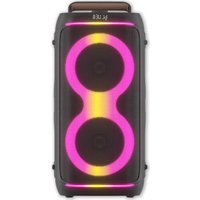
Black portable electronic device with glowing pink and yellow ambient lighting (no visible text or symbols)GEBRUIKSAANWIJZING
MANUEL
USER MANUAL
BENUTZERHANDBUCH
Dear Customer, congratulations on the purchase of this loudspeaker. Please read these instructions carefully and keep them for further reference.
1. WARNINGS AND SAFETY
• To prevent the risk of fire or electric shock, do not expose the device to rain or moisture for long periods of time.
- For your own safety: to prevent electric shocks do not remove the housing.
- Do not try to repair any malfunctioning parts of the device yourself. Ask a professional expert to do this for you.
- When plugged into the mains, the device remains electrically charged even when switched off.
2. CONTENTS OF THE BOX
- PWR08
- Power cable
• Remote control (AAA batteries)
- Instruction manual
- Aux cable
3. GENERAL DESCRIPTION
The PWR08 is a Bluetooth party speaker with two 6.5-inch woofers that deliver powerful and clear sound at every frequency.
4. FUNCTIONS
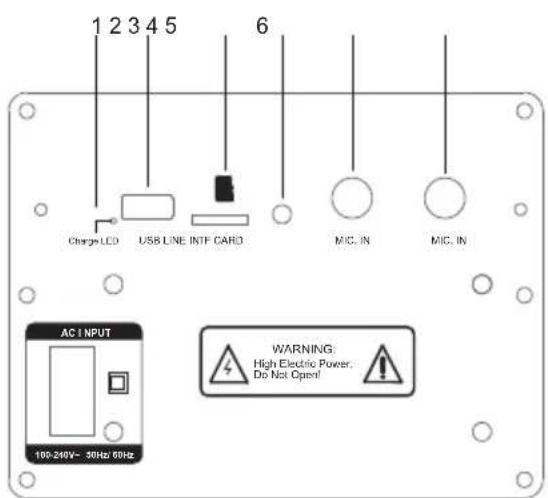
- Charging status indicator LED
- USB port for music playback
- microSD card port
- 3.5 mm AUX port
- 6.5 mm MIC port 1
- 6.5 mm MIC port 2
- LED: Short press the button to select one of the different LED modes
- PLAY/PAUSE: Short press to play/pause music; long press to connect TWS
- Mic priority
- MODE: Short press to select the various music sources
- Short press to change the EQ
- Previous song
- Power on/off
- Next song
text_image
1 2 3 4 5 Charge LCD USB LINE INTF CARD MIC. IN MIC. IN AC INPUT 100-240V~ 30Hz/60Hz WARNING: High Electric Power. Do Not Open!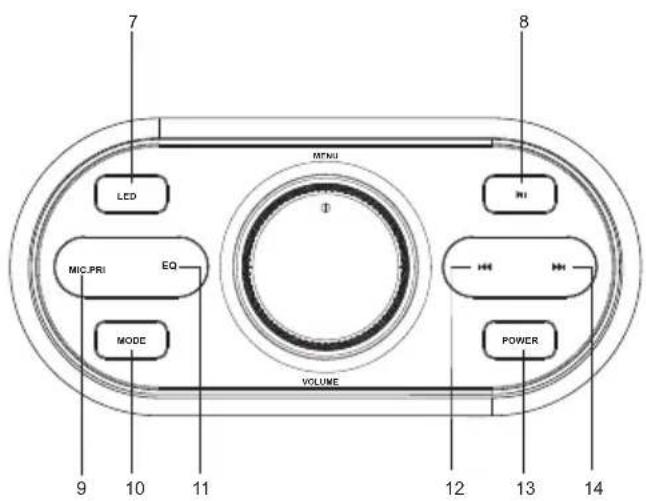
text_image
7 8 LED MIC.PRI EQ MODE VOLUME 9 10 11 12 13 14EN
5. REMOTE CONTROL
text_image
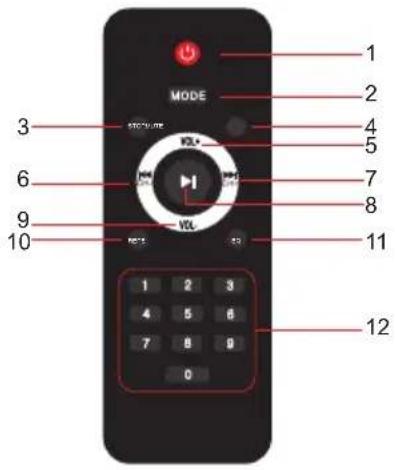
MODE 1 2 3 4 5 6 7 8 9 10 VOLT VOLT VOLT 1 2 3 4 5 6 7 8 9 0 12- Power on/off
- Mode: short press to select the various music sources
- Stop music playback (only for USB & microSD mode)
- Mute the sound
- Volume up
- Previous song
- Next song
- Play/pause
- Volume down
- In USB/microSD mode, press it to repeat the current track or repeat all
- Short press to change the EQ
- Button number(0-9):track selecting songs number in TF/microSD mode(to select numbers 0 - 99, press two digits within 1 -3 seconds (e · g. 1 and 0)
6. CHARGING
-
To charge the speaker's built-in battery, connect AC charge cable to the charging port. The LED indicator is red when charging and will change to blue when fully charged.
-
The battery will be fully charged after approximately 4 hours.
7. PAIRING BLUETOOTH DEVICES
Press the POWER button until "HI" is shown on the display. The PWR08 is in pairing mode when the word "BLUE" is flashing.
Turn on Bluetooth on your source device (mobile phones, tablets, computers etc) and search for the PWR08 in the list.
Going forward, the PWR08 will automatically pair with the device previously paired. The PWR08 can connect to only one Bluetooth device at a time.
To clear the list of paired devices, long press the MODE button.
8. BLUETOOTH-MUZIEK AFSPELEN
-
Open the music player and select a song to play. Press the ▶ button to pause / play the music.
-
Press the ▶▶I button to skip to the next song.
-
Press the ◀ button to skip to the previous song.
9. TWS FUNCTION
You can purchase two PWR08 speakers so you can connect them together and enjoy the True Wireless Stereo Sound.
- Turn off the Bluetooth on your phone or device and make sure speakers are not connected with
any devices (also remove the Aux-in cable).
-
Long press the Play/ Pause button of either speaker, the display will show "t-ON" and then the "BLUE." A voice prompt will then be heard to signify that the two speakers have connected via Bluetooth.
-
Turn on Bluetooth on the mobile phone and search for "PWR08" and connect. A voice prompt will then be heard signifying that the mobile has con-
nected to the speakers. You can now enjoy music from the two speakers.
EN
10. USB MODE
-
Insert a USB device into the speaker's USB port. USB mode will start automatically.
-
Short press the PLAY/ PAUSE button to play or pause the music.
11. AUX IN MODE
- Connect a 3.5 mm audio cable to the unit's auxiliary input.
- Short press MODE to switch to auxiliary input
mode ("LINE" on display).
- Short press the PLAY/ PAUSE button to play or pause the music.
12. MICROSD CARD MODE
-
Insert an microSD card, playback will start automatically.
-
Short press the PLAY/ PAUSE button to play or pause the music.
13. MICROPHONE
You can connect up to two microphones to the PWR08. Connect the microphone cable to one of the MIC inputs on the back.
14. ROTARY KNOB FUNCTION
- Press the rotary knob to display "b", then adjust the bass level by turning the knob.
- Press the rotary knob to display "t", then adjust the tweeter level by turning the knob.
-
Press the rotary knob to display "n", then adjust the volume of wireless or wired microphone by turning the knob.
-
Press the rotary knob to display "nE", then adjust the echo of wireless or wired microphone by turning the knob.
- Press the rotary knob to display "U", then adjust the volume of speaker.
15. TROUBLESHOOTING
Q: My speaker will not switch on.
A: Please recharge it and make sure it has enough power. Plug the unit into a charger and see if the power LED indicator turn on
Q: Why can't I pair this speaker with other Bluetooth devices?
A: The PWR08 can only connect to one device at a time. Please disconnect the other device.
EN
16. TECHNICAL SPECIFICATIONS
| system 2-way bluetooth speaker | ||
| range < 150 m | 2 | |
| woofer 6.5", 2 x 50 W | ||
| tweeter 1.5", 2 x 10 W | ||
| amplifier power RMS 120 W | ||
| sensitivity 82dB (±3 dB) | ||
| sources stereo Bluetooth [TWS] | ||
| input USB playback (WAV / WMA / APE / FLAC / MP3) MIC - 6.5 mm jack (x2) | ||
| AUX - 3.5mm jack microSD card | ||
| lighting LED 8 MODUS/ OFF | ||
| wireless bluetooth 5.3 (<10 m) | ||
| battery Li-lon 11.1V 3600 mAh | ||
| charging time 4 hour | ||
| playtime 4 - 8 hour | ||
| power supply 110-220V 50-60Hz AC | ||
| weight | 11kg | |
| composition | ABS plastic / wood | |
| colour | black | |
| dim. (hxwxd) | 595 x 305 x 300 | |
| accessoire | remote control | |
| splash proof | IPX4 | |
| optional pole mount |
17. WARRANTY CONDITIONS
2 year warranty from date of purchase. The warranty is limited to the repair of replacement of the defective material insofar as this defect is a result of normal use and the device has not been damaged. Artsound is not responsible for any other costs that ensue as a result of the defect (e.g. transport). For details, please consult our general terms and conditions of sale.
This product bears the selective sorting symbol for waste electrical and electronic equipment (WEEE). This means that this product must be handled pursuant to European Directive 2002/96/EC in order to be recycled or dismantled to minimize its impact on the environment. For further information, please contact your local or regional authorities.

I, House Of Music NV, hereby declare that the type of radio equipment ARTSOUND complies with Directive 2014/53/EU. The full text of the EU Declaration of Conformity can be found at the following internet address: http://www.artsound.be/en/support/downloads
Disclaimer: All trademarks are the property of their respective owners. All specifications and information are subject to change without further notice. Slight variations and differences might appear between printed photos and actual product due to product enhancement.
House Of Music NV - Legen Heirweg 23D, B-9890 Gavere