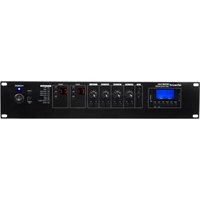
MATAMP-2240 - Receiver Artsound - Free user manual and instructions
Find the device manual for free MATAMP-2240 Artsound in PDF.


| Product type | 2-zone matrix mixer amplifier |
| Brand | Artsound |
| Model | MATAMP-2240 |
| Output power | 2 x 240 W RMS |
| Zones | 2 zones, 100 V and 8-16 Ω |
| Micro/line inputs | 3 symmetrical combo XLR/6.3 mm jack inputs |
| Phantom power | +48 V switchable per channel |
| Additional inputs | 1 RCA line input, 1 RCA EMC input, 1 mute input |
| Outputs | 2 speaker outputs 100 V / 8-16 Ω, RCA line output, 6.3 mm jack monitor output |
| Built-in media player | USB, SD, DAB+, FM, Bluetooth |
| Bluetooth | Yes, name LOCAL, password 2018 |
| DAB+/FM tuner | Yes, with included antenna |
| Remote connectivity | Up to 8 MIC-2240 microphones and 2 WP-2240 wall panels via RJ45 (CAT5/CAT6) |
| Frequency response | 60 Hz - 15 kHz (±3 dB) |
| Dimensions (H x W x D) | 88 x 484 x 405 mm |
| Weight | 9.6 kg |
| Power supply | AC 230 V, 50-60 Hz |
| Maximum power consumption | 600 W |
| Protections | Short circuit, overvoltage, excessive temperature, clipping |
| Safety | Do not expose to moisture; refer all servicing to qualified personnel; do not block ventilation openings |
| Maintenance and cleaning | Clean with a dry cloth; do not use solvents or abrasive products |
| Warranty | 2 years from purchase date (repair or exchange under conditions) |
| General information | Compliant with directive 2014/53/EU; manufacturer: House Of Music NV, Legen Heirweg 23D, B-9890 Gavere, Belgium |
Frequently Asked Questions - MATAMP-2240 Artsound
User questions about MATAMP-2240 Artsound
0 question about this device. Answer the ones you know or ask your own.
Ask a new question about this device
Download the instructions for your Receiver in PDF format for free! Find your manual MATAMP-2240 - Artsound and take your electronic device back in hand. On this page are published all the documents necessary for the use of your device. MATAMP-2240 by Artsound.
USER MANUAL MATAMP-2240 Artsound
text_image
TUNING... VOL Mode Power RPA Power Need 1 MP3 2 MIC/LINE1 3 MIC/LINE2 4 MIC/LINE3 5 AUX 21 22 21 22 21 22 21 22 VOL VOL VOL VOL VOL VOL VOL VOL VOL VOL VOL VOL VOL VOL VOL VOL VOL VOL VOL VOL VOL VOL VOL VOL VOL VOL VOL VOL VOL VOL VOL VOL VOL VOLMATAMP-2240
2 ZONE MATRIX MENGVERSTERKER
AMPLIFICATEUR MATRICIEL 2 ZONES
2 ZONE MATRIX MIXING AMPLIFIER
2-ZONEN-MATRIX-MISCHVERSTÄRKER
MIC-2240
EXTERNE MICROFOON
MICROPHONE À DISTANCE
REMOTE MICROPHONE
FERNMIKROFON
WP-2240
MUURPANEEL
PANNEAU MURAL
WALL PANEL
WANDPANEL
text_image
Orsaund MIC 2240 remote microphone ZONES SELECTOR CALL ORSAUND MIC 2240 REMOTE ZONE 01 ZONE 02 ALL Source Bluetooth Source - VOL VOLGEBRUIKERSHANDLEIDING
text_image
CAUTION AVS 12 3 SPEAKER ZONE OUTPUT ← f ZONE1 ZONE2 LINE OUT 13 BELOW INT BELOW INT BELOW INT BELOW INT BELOW INT BELOW INT BELOW INT BELOW INT BELOW INT BELOW INT BELOW INT BELOW INT BELOW INT BELOW INT BELOW INT BELOW INT BELOW INT BELOW INT BELOW INT BELOW INT BELOW INT BELOW INT BELOW INT BELOW INT BELOW INT BELOW INLET BELOW INLET BELOW INLET BELOW INLET BELOW INLET BELOW INLET BELOW INLET BELOW INLET BELOW INLET BELOW INLET BELOW INLET BELOW INLET BELOW INLET BELOW INLET BELOW INLET BELOW INLET BELOW INLET BELOW INLET BELOW INLET BELOW INLET BELOW INLEUT BELOW INLEUT BELOW INLEUT BELOW INLEUT BELOW INLEUT BELOW INLEUT BELOW INLEUT BELOW INLEUT BELOW INLEUT BELOW INLEUT BELOW INLEUT BELOW INLEUT BELOW INLEUT BELOW INLEUT BELOW INLEUT BELOW INLEUT BELOW INLEUT BELOWINLET BELOWINLET BELOWINLET BELOWINLET BELOWINLET BELOWINLET BELOWINLET BELOWINLET BELOWINLET BELOWINLET BELOWINLET BELOWINLET BELOWINLET BELOWINLET BELOWINLET BELOWINLET BELOWINLET BELOWINLET BELOWINLET BELOWINLET BELOWINRET BELOWINRET BELOWINRET BELOWINRET BELOWINRET BELOWINRET BELOWINRET BELOWINRET BELOWINRET BELOWINRET BELOWINRET BELOWINRET BELOWINRET BELOWINRET BELOWINRET BELOWINRET BELOWINRET BELOWINRET BELOWINRET BELOWINRET BELOWINDET BELOWINDET BELOWINDET BELOWINDET BELOWINDET BELOWINDET BELOWINDET BELOWINDET BELOWINDET BELOWINDET BELOWINDET BELOWINDETtext_image
100V 4Ω 8Ω COM 5W 5W 5W 5W 5Wtext_image
TF Mode Play Folder RPT Prev Next VOL-VCL+ USB ① ② ③ ④ ⑤ ⑥ ⑦ ⑧ ⑨ ⑩- Display
- SD drive
- Mode (Modus): Keuze tussen Bluetooth, FM tuning, USB of SD playback
- Play: afspelen
- Folder: map selecteren
-
RPT: herhalingsmodus
-
Prev: vorige liedje
Vol-: volume omlaag (lang indrukken)
6.9. WERKING BLUETOOTH
natural_image
Black industrial telephone receiver with a black adjustable arm and control buttons (no visible text or symbols)FUNCTIES
INSTELLINGEN
text_image
1 2 3 Source Bluetooth Source - VOL + VOL 4 5 6HOE GEBRUIKEN
text_image
100V 4Ω 8Ω COM 5W 5W 5W 5W 5Wtext_image
1F Mode Play Folder RPT Prev Next VOL-VCL+ USB ① ② ③ ④ ⑤ ⑥ ⑦ ⑧ ⑨ ⑩CONDITIONS DE GARANTIE
Thank you for purchasing our MATAMP-2240 matrix mixing amplifi er. We hope you will enjoy many years of listening to it. Please read these instructions carefully and keep this manual for future reference. Please visit our website for updates to this manual: www.artsound.be
TABLE OF CONTENTS
MATAMP-2240
| 1. Warnings and safety 10 | |
| 2. Description 10 | |
| 3. What's in the box 10 | |
| 4. Features | 10 |
| 5. Interface | 11 |
| 6. Operation | 11 |
| 6.1. Connection and confi guration | 11 |
| 6.2. DIP switches | 11 |
| 6.3. Priority and emergency activation | 11 |
| 6.4. Signal inputs and outputs | 11 |
| 6.5. 100V line systems | 11 |
| 6.6.Low impedance systems | 11 |
| 6.7. Meaning of LED display | 11 |
| 6.8. Integrated multi-source audio player | 12 |
| 6.9. Bluetooth Operation | 12 |
| 6.10. Use of DAB+ | 12 |
| 6.11. FM tuner | 12 |
| 6.12. USB/SD drive | 12 |
| 7. technical specifications | 12 |
| MIC-2240 REMOTE MICROPHONE | 13 |
| WP-2240 WALL PANEL | 13 |
1. WARNINGS AND SAFETY
• To prevent fire or electric shock, do not expose this device to rain or moisture.
- Do not repair any parts inside the unit, but leave all repairs to qualified service personnel.
- As long as the mains cable of the machine is connected to a wall socket, the
machine is live, even if the machine is switched off.
- Do not operate the device for a long time if the sound is distorted.
- Do not block the ventilation openings of the device.
2. DESCRIPTION
The MATAMP-2240 is a professional 2 zone 100V matrix mixing amplifi er in a 19" 2U housing. The MATAMP-2240 is designed for 19" rack installation or tabletop use, it is ideal for professional PA systems and commercial audio solutions, as it is designed with 2-zone speaker outputs supporting 100V & 8-16Ω. The MATAMP-2240 integrates two 100V & 8 Ω amplifi ers into one unit, so it can be used as a stereo mixing amplifi er or 2-zone commercial mixing amplifi er. The mixing amplifi er incorporates a USB/SD/DAB+/FM/ & Bluetooth media player, with 3 switchable mic/line inputs with selectable phantom power, a line input, an EMC input, 6 MIC-2240 2-zone remote call mic inputs (optionally available) and 6 WP-2240 remote panel inputs (optionally
available) and a mute input. A master chime with volume can be used for paging calls and alerts. The 2-zone mixing amplifi er is designed for multi-room commercial audio systems requiring different audio sources and multiple paging microphones. In addition, up to 8 remote microphone units (MIC-2240) and 2 2-zone remote control panel units (WP-2240) can be connected to the MATAMP-2240 via CAT5 or CAT6 cable. The mute input can be integrated with the fi re alarm system or another third-party system. The amplifi er is designed with full protection including short circuit, clip, overload and high temperature.
3. WHAT'S IN THE BOX
Main unit / user manual / antenna / power cable / remote control
4. FEATURES
• Workstation or 19" rack mounting 2-zone sound mixing amplifier
- 2-zone mixing amplifier with integrated media player, USB/SD/DAB+/FM/ & Bluetooth
• Output power 2×240W
- Separate 2-zone 100V & 8-16Ω speaker output
• Each input with zone 1 or zone 2 output selector on front panel.
• Each zone output with volume +, volume- and mono control on the front panel.
- 3 x mic/line inputs, 1 x RCA line input, 1 x RCA EMC input and 1 x mute input
- Combo mic/line inputs1-3 with switchable +48V phantom power supply
- With remote emergency mute input
- Input priority level from top to bottom: Mute, EMC, Mic1 and remote call mic to other inputs.
• Each amplifi er supports up to 8x MIC-2240 remote microphone units for 2 zones via CAT6 cable.
• Each amplifier supports up to 2x WP-2240 remote control panel units of 2 zones via CAT6 cable. - With protection against short-circuits, cuts, overloads and high temperatures.
5. INTERFACE
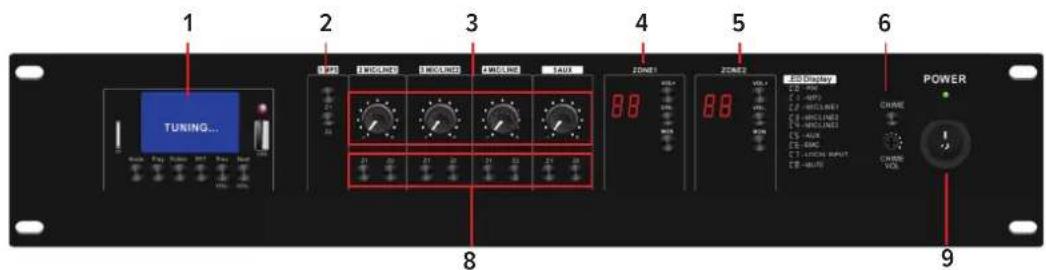
5.1 FRONT PANEL (FIG. 1)
text_image
TUNING... 1 2 3 4 5 6 8 9 POWER 10 Display C D - VAC C E - MPD C F - MCLLINE1 C G - MCLLINE2 C H - MCLLINE3 C I - AUA C J - EAC C K - LUXON INPUT C L - AUA VOL VOL VOL VOL VOL VOL VOL VOL VOL VOL VOL VOL VOL VOL VOL VOL VOL VOL VOL VOL VOL VOL VOL VOL VOL VOL VOL VOL VOL VOL VOL VOL VOL VOL- Mp3 / FM / Bluetooth multimedia player module
- Zone 1-2 output settings
- Aux and Mic 2-4 attenuator output
- Volume control Zone 1
-
Volume control Zone 2
-
Chime button and chime volume reduction
- Power on/off light
- Output selector to zone 1 or zone 2
- Power switch ON/OFF
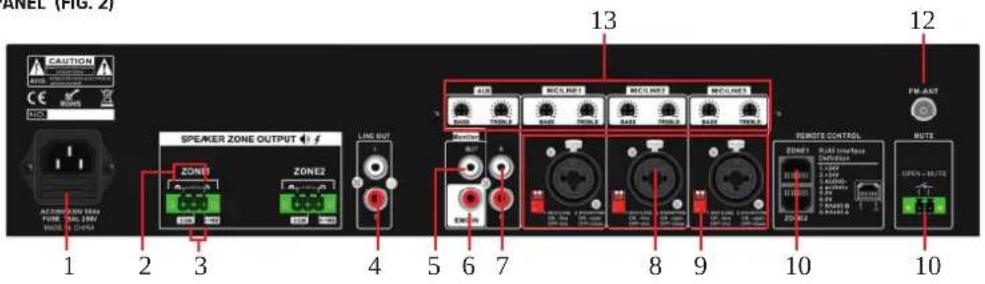
5.2 REAR PANEL (FIG. 2)
text_image
ANEL (FIG. 2) CAUTION SPEAKER ZONE OUTPUT 1 2 3 4 5 6 7 8 9 10 11 12 LINE OUT ZONE1 ZONE2 MCLR1 MCLR2 MCLR3 MCLR4 MCLR5 REMOTE CONTROL BUTS 13 10 10- AC socket with removable fuse
- Zone1-2 100V output (- & + terminals)
- Zone1-2 output 8-16 Ohm (COM & 8-16Ohm)
- Line output
- Monitor output
- EMC input for fi re alarm system with priority except MUTE input (11)
-
Stereo line and Aux input
-
Mic/line COMBO input and XLR plus 6.3mm jack input.
- 2 PIN dipswitch. mic/line switch +48V phantom
- RJ45 ports for microphone console and wall plate
- Mute input, open circuit to activate the highest priority mute and closed circuit to return the amplifier to its normal operating state.
- DAB+/FM antenna connector
- Mic2-4 & Aux input bass & treble gain control (build in).
6. OPERATION
6.1. CONNECTION AND CONFIGURATION
With the MATAMP-2240 switched off, connect the rear IEC socket to the mains using the mains cable supplied (or equivalent approved type). Ensure that the voltage is correct and that the speaker connections are correct, then switch on the power.
The AM-2 amplifier has 5 input channels and an integrated multi-source audio player.
Mic inputs 1, 2 and 3 are designed for microphones or line-level sources (such as a CD/MP3 player or mixer output) via combined connectors on the rear panel, and are DIP-switchable. They can accept XLR or 6.3 mm plugs for balanced or unbalanced signals.
6.2. DIP SWITCHES
Mic/Line inputs 1, 2 and 3 each have 2 DIP switches on the rear panel for adjusting input level and/or activating +48V phantom power for use with condenser microphones.
Set the level correctly according to the type of input source connected (microphone or line).
If the source connected is a condenser microphone that requires phantom power, make sure that phantom power is activated for this channel.
Be sure to make these DIP switch settings with the amplifi er switched off. If you make changes when the amplifi er is switched on, you risk causing loud bangs in the system and damage to the loudspeakers.
6.3. PRIORITY AND EMERGENCY ACTIVATION
- Mute input, open circuit to activate the highest priority mute and closed circuit to return the amplifier to its normal operating state.
- EMC input - this is the secondary priority EMC audio input.
- Mic1 input
- Compatible call microphone desk
6.4. SIGNAL INPUTS AND OUTPUTS
Connect microphones or line signals to Mic/Line inputs 1, 2 and 3 using good quality signal cables. A stereo or mono line level source can be connected to the Auxiliary Channel 4 input on 2 RCA connectors.
To check the output of any zone, an assignable monitor output can be connected to headphones from the 6.3 mm socket on the front panel or as a line output (e.g. to active speakers) from the RCA connectors at the rear.
Each zone output has a dedicated RCA signal output on the rear panel, which can be connected to the line inputs of active speakers or amplifiers. These outputs are in addition to the speaker outputs detailed below.
An aerial input is provided on the rear panel for connection to an external aerial for DAB+/FM tuning.
The rear panel features bass and treble volume controls for adjusting the sound of the MIC and Line input signals.
The MATAMP-2240 has separate speaker outputs for each zone, connected via large modular terminal plugs. Each plug can be removed from the rear panel for convenient connection of 2-zone speaker outputs.
Each zone output can be used to power either 100V line array loudspeakers or standard low impedance loudspeakers. These two configurations cannot be used together, so it is important to decide which will be used initially.
6.5. 100V LINE SYSTEMS
For 100V loudspeakers, connect the output of the selected zone to the first loudspeaker in the zone using a double-insulated loudspeaker wire with a current rating sufficient to support the total output of the amplifier.
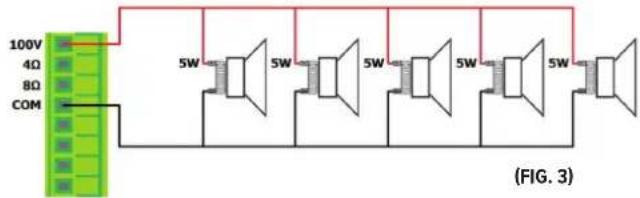
Connect the "100V" output terminal of the selected zone to the positive (+) connection of the speaker and the "COM" output to the negative (-) connection of the speaker. Connect the other speakers in parallel with the first speaker, with all positive terminals connected together and all negative terminals connected together, as shown below.
text_image
100V 4Ω 8Ω COM 5W 5W 5W 5W 5W (FIG. 3)A 100V line array loudspeaker system may include many loudspeakers connected together. The determining factor in how many loudspeakers can be used on a single amplifi er is the power rating. In most cases, it is advisable to connect as many speakers as necessary with a combined power rating of no more than 80% of the amplifi er's rated output power. The terminals of a 100V loudspeaker are connected via a transformer and, if required, this transformer can be 'tapped' for different power ratings. These taps can be used to adjust the power (and output volume) of each speaker in a zone to achieve the ideal total system power for that zone's output.
6.6. LOW IMPEDANCE SYSTEMS
Alternatively, each zone output of the amplifier is capable of driving one or more low impedance loudspeakers. There is an option on each zone for either 8-16Ω speaker output to determine the minimum impedance. It is essential to select the correct output terminal when opting for low impedance speakers.
For a single 8Ω speaker, connect the positive (+" 8-16Ω) wire to the (+) speaker terminal and the negative (-) speaker wire to the "COM" amplifier terminals.
In both cases, the connected load must have a combined impedance no lower than that indicated on the terminal.
A lower impedance may cause irreparable damage to the amplifier.
The connected loudspeaker(s) must also have a power capacity to accept a load up to RMS of the zone output.
A lower power rating may damage the speakers.
6.7. MEANING OF LED DISPLAY
[fi g 1, zone 1 & 2 display]
• C1-MP3 Module • C2-MIC1/Line1
• C3-MIC2/Line2 • C4-MIC3/Line3
• C5-AUX • C6-EMC
• C7-Local input • C8-Mute
How it works
When all the connections to the amplifier have been made, turn down all the rotary controls and switch the unit on and the power LED lights up.
To check that the system is working correctly, select an input source and an output zone to test. In the following example, Mic/Line 1 input and Zone 1 output have been selected.
- Press the Z1 button on the MIC/Line1 line. If zone1 displays C2, this means that the MIC/Line1 output is intended for zone 1.
- If you are playing MP3, press the Z1 button on the MP3 line, zone 1 will receive MP3 music and the zone 1 screen will display C1.
- If Zone 1 is not audible from the MATAMP-2240 location, use the Monitor function as follows Press the Monitor button and connect headphones to the Monitor output.
- Ensure that the Monitor button for Mic/Line 1 is pressed and listen through the headphones.
- Gradually increase the level of the Monitor control and check the output to zone 1.
6.8. INTEGRATED MULTI-SOURCE AUDIO PLAYER
The amplifier features a built-in audio player, controlled by a backlit LCD display and transport buttons.
This section provides access to a Bluetooth ^™ receiver, FM/DAB+ radio tuner and USB/SD audio player.
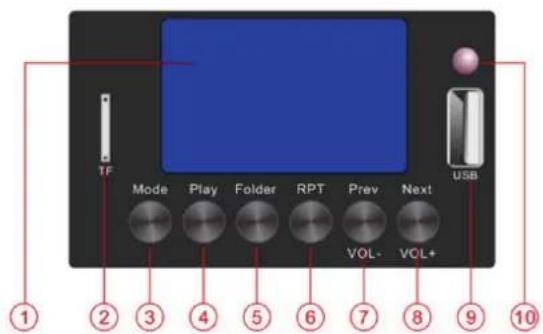
text_image
1F Mode Play Folder RPT Prev Next USB VOL-VCL+ ① ② ③ ④ ⑤ ⑥ ⑦ ⑧ ⑨ ⑩- Display
- SD-Audioplayer
- Mode: Selection between Bluetooth, FM tuning, USB or SD playback
- Play: playback
- Folder: select folder
-
RPT: repeat music
-
Prev: previous track
Vol-: volume down [Long Press] - Next: Next track
Vol+: volume up [Long press] - USB-Audioplayer
- IR receiver
In order to play audio from a smartphone, tablet or other Bluetooth device, the built-in Bluetooth receiver will need to be paired with a device that is within range." To pair a device with the MATAMP-2240 Bluetooth receiver, it is necessary to search for devices in the Bluetooth menu of the transmitting device and select pairing with "BT66078". Once paired, the MATAMP-2240 screen will indicate that it is connected, Password: 1234.
- Select to connect as an audio device and play the audio tracks on the smartphone or tablet (or similar) and the audio should be heard in the selected area.
- The "Prev" and "Next" buttons are used to adjust the output volume of the audio player.
- Press and hold "Prev" to increase the volume or press and hold "Next" to decrease the volume.
- If the transmitting device is out of range or if the audio player mode is changed, the connection will stop. Returning to the range or Bluetooth mode will re-establish the pairing.
- It may be necessary to re-select the connection as an audio device on the sending device.
6.10. USE OF DAB+
For operation of the DAB+ tuner it is essential to connect the antenna.
-
Turn on the device with the POWER button
-
Press the MODE button repeatedly until DAB+ MODE appears in the display
- Press the RPT button (do not hold) and start the station search
- Check that the scan starts, at the end, the number of stations found in the top right will be displayed
With the Prev/V- and Next /V+ buttons you can change radio station (pressing fast) or adjust the volume (holding them down)
6.11. FM TUNER
Press the Mode button to switch to the FM tuner function. For good FM reception, it will be necessary to connect an external aerial to the Antenna connector on the rear panel using a good quality coaxial RF cable terminated with an F connector. If no channels are tuned in, press the Play button to start automatic tuning, which scans the available stations and stores them as channels in the FM tuner. To scroll through the preset stations, press the Previous or Next buttons.
6.12. USB/SD DRIVE
The audio player has inputs for a USB stick or SD card containing standard compressed digital audio files. By inserting either of these inputs, the player will switch to play these sources and the display will show "MP3 mode". After inserting the USB stick, playback starts automatically, you can use "Prev" or "NEXT" to select the last or next song, "REPT" to repeat one or all songs.
- TECHNICAL SPECIFICATIONS
| System 2 Zone Matrix | Mixing Amplifier |
| Output power 2 x 240W | |
| Frequency range 60Hz-15kHz (+/-3dB) | |
| Zones 2 zones 100V & 8-16 ohms | |
| Input MIC/Line 1-3 2.5mV, balanced combo XLR with selectable 48V phantom power supply | |
| Line 1 & EMC input 250 mV, RCA | |
| Mute (open = mute) | |
| 2 x RJ45 ports for optional WP-2240 and MIC-2240 | |
| Output Line out RCA (0.775 0dBV) | |
| Built-in source DAB+ / | FM / Bluetooth / USB / micro SD |
| Protection | Overvoltage, temperature, clipping and short-circuit protection |
| Power supply | AC 230V, 50-60Hz |
| Power consumption | 600W (max) |
| Dimensions | 88 x 484 x 405mm |
| Weight | 9,6kg |
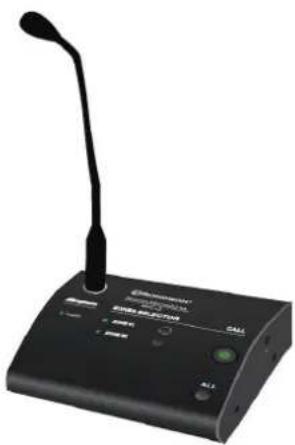
MIC-2240
REMOTE MICROPHONE
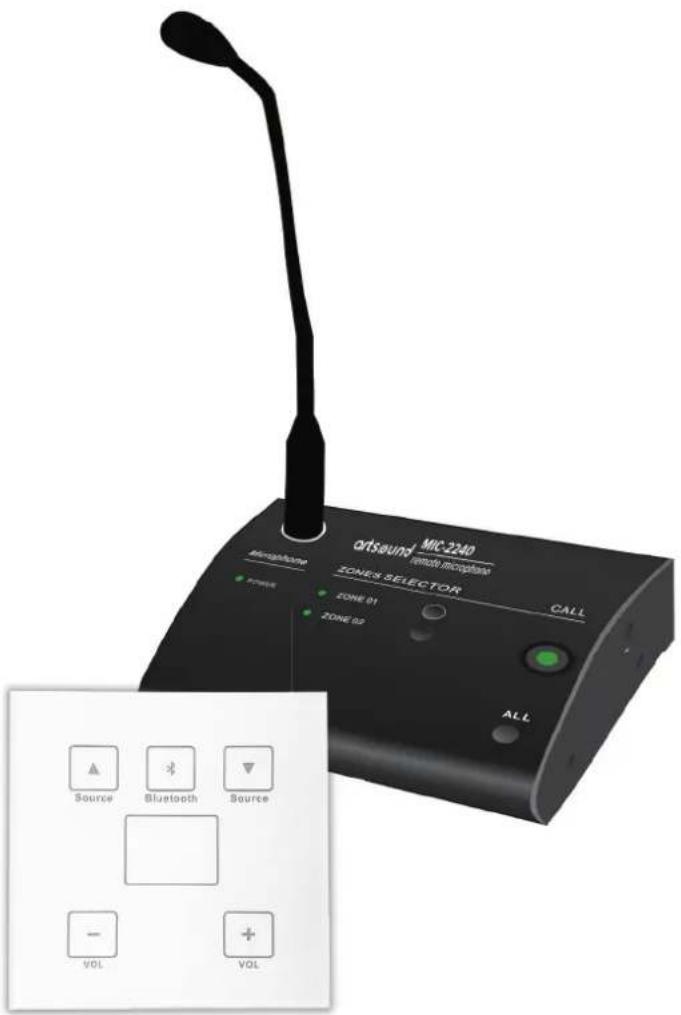
The MIC-2240 is a call station microphone for making announcements in selected announcements in selected zones. It can be connected to MATAMP-2240 series amplifiers.
natural_image
Black desktop microphone with a single speakers and control buttons (no visible text or symbols on the device body)FEATURES
SETTINGS
- The 3 zone buttons provide an easy-to-use control interface for broadcasting calls to zones, one general (ALL) and one zones, one general (ALL) and one for each zone (1 to 2)
TALK button for speech
Volume control level - Connections
RJ-45 to connect to MATAMP-2240 amplifiers
INDICATORS
- Power, Signal (modulation), Busy LED display visible when switch is pressed of one or more zones
SPECIFICATIONS
• Communication via CAT6 cable up to 200m
- Direct power supply from the matrix controller
- Broadcasting by zone or in all zones via 2 loudspeakers
- Up to 8 microphones working simultaneously loop connection.
WP-2240
WALL PANEL
The WP-2240 is a wall-mounted panel that can be used to select and control one of the MATAMP-2240's sources. It also offers Bluetooth locally
It can be connected to the MATAMP-2240 amplifier and the MIC-2240 microphone.
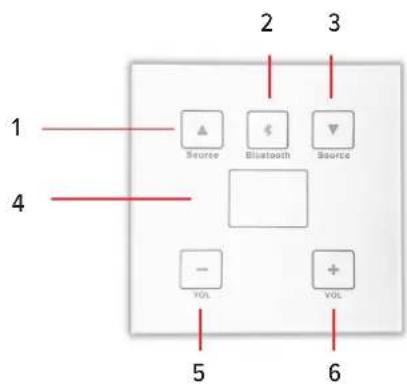
text_image
1 2 3 4 Source Bluetooth Source - VOL + VOL 5 6HOW TO USE
- Source selection (arrow )
- Bluetooth
- Source selection (arrow ↓)
- Display
- Volume -
- Volume +
SPECIFICATIONS
- CAT6 cable communication up to 200 ms
- Direct amplifier power supply
• Audio source selection and volume control
• Capacity of 6 units for each matrix controller
• WP-2240 Bluetooth Name: LOCAL, Password: 2018
7. WARRANTY CONDITIONS
2 year warranty from date of purchase. The warranty is limited to the repair of replacement of the defective material insofar as this defect is a result of normal use and the device has not been damaged. Artsound is not responsible for any other costs that ensue as a result of the defect (e.g. transport). For details, please consult our general terms and conditions of sale.

This product bears the selective sorting symbol for waste electrical and electronic equipment (WEEE). This means that this product must be handled pursuant to European Directive 2002/96/EC in order to be recycled or dis-
mantled to minimize its impact on the environment. For further information, please contact your local or regional authorities.
CE I, House Of Music NV, hereby declare that the type of radio equipment ARTSOUND complies with Directive 2014/53/EU. The full text of the EU Declaration of Conformity can be found at the following internet address: http://www.artsound.be/en/support/downloads
Disclaimer: All trademarks are the property of their respective owners. All specifications and information are subject to change without further notice. Slight variations and differences might appear between printed photos and actual product due to product enhancement.
House Of Music NV - Legen Heirweg 23D, B-9890 Gavere