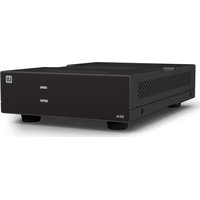
DIO 04 - Audio Interface LD Systems - Free user manual and instructions
Find the device manual for free DIO 04 LD Systems in PDF.


| Product type | Dante interface 0 input / 4 outputs |
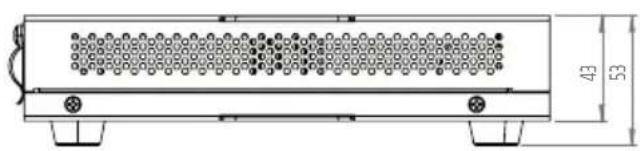
| Dimensions (W x H x D) | 142 x 53 x 221.7 mm (with rubber feet) |
| Weight | 1.0 kg |
| Power supply | PoE+ (IEEE 802.3at) or external power supply 24 V DC (1.5 A min.) |
| Power consumption | Max. 10 W (without secondary port), 22 W with secondary port |
| Number of line outputs | 4 balanced outputs on 3-pin Euroblock connectors (pitch 3.81 mm) |
| Maximum output level | +18 dBu |
| Frequency response | 15 Hz – 20 kHz (-0.5 dB) |
| Dynamic range | > 107 dB |
| Digital resolution | 24 bits / 48 kHz |
| Dante latency | 1 ms (minimum) |
| Network connectors | 2 x RJ45 (100 BASE-T) for daisy chain |
| Main features | Extraction of 4 Dante channels to analog; signal/clip indicators per channel; automatic mute mode; PoE+ injector function |
| Mounting | Under/on table (plates provided) or in 19" rack (optional accessory) |
| Maintenance and cleaning | Clean surfaces with a damp cloth; dust ventilation grilles; do not use solvents |
| Safety | Do not open; repair by qualified personnel only; maintain minimum safety distances of 0.3 m |
| Spare parts and repairability | No user-serviceable parts; contact manufacturer for service |
| General information | Reference LDDI004; compatible with Dante Domain Manager and AES67; material: steel chassis, plastic front panel |
Frequently Asked Questions - DIO 04 LD Systems
User questions about DIO 04 LD Systems
0 question about this device. Answer the ones you know or ask your own.
Ask a new question about this device
Download the instructions for your Audio Interface in PDF format for free! Find your manual DIO 04 - LD Systems and take your electronic device back in hand. On this page are published all the documents necessary for the use of your device. DIO 04 by LD Systems.
USER MANUAL DIO 04 LD Systems
This device was developed and manufactured under high quality requirements to ensure many years of trouble-free operation. This is what LD Systems stands for with its name and many years of experience as a manufacturer of high-quality audio products. Please read these operating instructions carefully so that you can quickly and optimally use your new LD Systems product. You can find more information about LD Systems on our website WWW.LD-SYSTEMS.COM
ABOUT THIS MANUAL
- Read the safety instructions and the entire manual carefully before commissioning.
- Observe the warnings on the unit and in the operating instructions.
• Always keep the operating instructions within reach. - If you sell or pass on the appliance, be sure to hand over these operating instructions as well, as they are an essential part of the product.
INTENDED USE
The product is a device for professional audio installation! The product has been developed for professional use in the field of audio installation and is not intended for use in households! Furthermore, this product is intended for installation by qualified persons with specialist knowledge and for operation by instructed persons! The use of the product outside the specified technical data and operating conditions is considered as not intended! Liability for damages and third party damages to persons and property due to non-intended use is excluded! The product is not suitable for:
- Persons (including children) with limited physical, sensory or mental capabilities or lack of experience and knowledge.
- Children (children must be instructed not to play with the device).
EXPLANATIONS OF TERMS AND SYMBOLS
- DANGER: The word DANGER, possibly in combination with a symbol, indicates immediately dangerous situations or conditions for life and limb.
- WARNING: The word WARNING, possibly in combination with a symbol, indicates potentially dangerous situations or conditions for life and limb.
- CAUTION: The word CAUTION, possibly in combination with a symbol, is used to indicate situations or conditions that may lead to injury.
- ATTENTION: The word ATTENTION, possibly in combination with a symbol, refers to situations or states that can lead to damage to property and/or the environment.
This symbol indicates hazards that can cause an electric shock.

This symbol indicates danger spots or dangerous situations.

This symbol indicates danger from hot surfaces.
This symbol indicates danger from high volumes.

This symbol indicates supplementary information on the operation of the product.

This symbol denotes a device that does not contain any user-serviceable parts.
This symbol indicates electrical equipment designed primarily for indoor use.
SAFETY INSTRUCTIONS
DANGER:
- Do not open or modify the device.
- If your device is no longer working properly, liquids or objects have gotten inside the device, or the device has been damaged in any other way, switch it off immediately and disconnect it from the power supply. This device may only be repaired by authorized specialist personnel.
- For devices of protection class 1, the protective conductor must be connected correctly. Never interrupt the protective conductor. Protection class 2 devices do not have a protective conductor.
- Ensure that live cables are not kinked or otherwise mechanically damaged.
- Never bypass the device fuse.
WARNING:
- The device must not be put into operation if it shows obvious signs of damage.
- The device may only be installed in a voltage-free state.
- If the power cord of the device is damaged, the device must not be put into operation.
- Permanently connected power cords may only be replaced by a qualified person.
DANGER:
- Do not operate the device if it has been exposed to severe temperature fluctuations (e.g. after transport). Humidity and condensation could damage the device. Do not switch on the device until it has reached the ambient temperature.
- Make sure that the voltage and frequency of the mains supply correspond to the values indicated on the device. If the device has a voltage selector switch, do not connect the device until this is set correctly. Only use suitable power cords.
- To disconnect the device from the mains at all poles, it is not enough to press the on/off switch on the device.
- Ensure that the fuse used corresponds to the type printed on the device.
- Make sure that appropriate measures against overvoltage (e.g. lightning) have been taken.
- Note the specified maximum output current on devices with a power out connection. Make sure that the total power consumption of all connected devices does not exceed the specified value.
- Only replace pluggable power cords with original cables.

DANGER:
- Danger of suffocation! Plastic bags and small parts must be kept out of the reach of people (including children) with reduced physical, sensory or mental abilities.
- Danger from falling! Make sure the device is installed securely and cannot fall. Only use suitable tripods or attachments (especially for fixed installations). Make sure accessories are properly installed and secured. Make sure that the applicable safety regulations are observed.

WARNING:
- Only use the device in the manner intended.
- Only operate the device with the accessories recommended and intended by the manufacturer.
- During installation, observe the safety regulations applicable in your country.
- After connecting the unit, check all cable routes to avoid damage or accidents, e.g. due to tripping hazards.
- Be sure to observe the specified minimum distance to normally flammable materials! Unless this is explicitly stated, the minimum distance is 0.3 m.

ATTENTION:
- There is a risk of jamming with moving components such as mounting brackets or other moving components.
- In the case of units with motor-driven components, there is a risk of injury from the movement of the unit. Sudden device movement can cause shock reactions.

DANGER:
- Do not install or operate the device near radiators, heat registers, stoves or other heat sources. Make sure that the device is always installed in such a way that it is sufficiently cooled and cannot overheat.
- Do not place any sources of ignition such as burning candles near the device.
- Ventilation openings must not be covered and fans must not be blocked.
- Use the original packaging or packaging provided by the manufacturer for transport.
- Avoid shock or shock to the device.
- Observe the IP protection class and the environmental conditions such as temperature and humidity according to the specification.
- Devices can be continuously developed. In the event of deviating information on operating conditions, performance or other device properties between the operating instructions and the device labeling, the information on the device always has priority.
- The device is not suitable for tropical climate zones and for operation above 2000 m above sea level.

ATTENTION:
Connecting signal cables can result in significant noise interference. Make sure that devices connected to the output are muted during plugging. Otherwise, noise levels can cause damage.
ATTENTION HIGH VOLUMES WITH AUDIO PRODUCTS!
This device is intended for professional use.
The commercial operation of this device is subject to the applicable national regulations and guidelines for accident prevention.
Hearing damage due to high volumes and continuous exposure: The use of this product can generate high sound pressure levels (SPL) which can cause hearing damage. Avoid exposure to high volumes.

NOTES FOR INDOOR INSTALLATION EQUIPMENT
- Units for installation applications are designed for continuous operation.
- Units for indoor installation are not weatherproof.
- Surfaces and plastic parts of installation equipment can also age, e.g. due to UV radiation and temperature fluctuations. This does not usually lead to functional restrictions.
- with permanently installed units, the deposition of impurities, e.g. dust, is to be expected. Be sure to observe the care instructions.
- Unless explicitly stated otherwise on the unit, the units are intended for installation heights of less than 5 m.
PACKAGING CONTENT
Remove the product from the packaging and remove all packaging material.
Please check the completeness and integrity of the delivery and notify your distribution partner immediately after purchase if the delivery is not complete or if it is damaged.
The packaging includes:
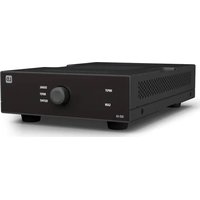
• 1 x DIO 04 Dante Break Out Box
- 1 set of terminal blocks
- 1 set of rubber feet (pre-assembled)
- 1 mounting set for on-table or under-table installation
- User manual
INTRODUCTION
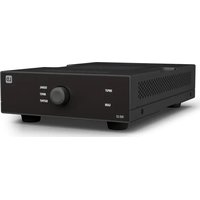
Part of the TICA ^® series, the DIO 04 is a four output Dante interface that delivers the capabilities that audio and AV professionals really need. Equipped with four balanced outputs to connect to any analogue audio device such as power amplifiers Signal presence lights on each channel speed installation and fault-finding.
Power from any PoE+ network switch or use the optional, external power supply. Since it comes with two Dante networked ports, you can daisy chain devices together. It also works as a PoE+ injector: if you use the external power supply, you can power one further networked device in the chain.
It's tiny form factor (106 x 44 x 222 mm) and included mounting plates allow it to be installed discreetly behind screens or under tables. Alternatively, it fits into 1/3 19 inch rack. Use the optional rack tray to slot up to three TICA® DIO series products alongside each other and build a system to your exact requirements, using minimal rack space.
Terminal block connections on the analogue outputs make wiring easy.
The perfect solution for professional installers wanting to interface into Dante equipment.
Dante Domain Manager and AES 67 compliant.
FEATURES
• Four output Dante interface
- Connect Dante to line level audio equipment
• Terminal blocks for all analogue connectons
• Signal indicators on each channel
- Use PoE or an external power supply
- Use as a PoE injector to power another networked device
• Daisy-chain Dante devices together
CONNECTIONS, OPERATING AND DISPLAY ELEMENTS
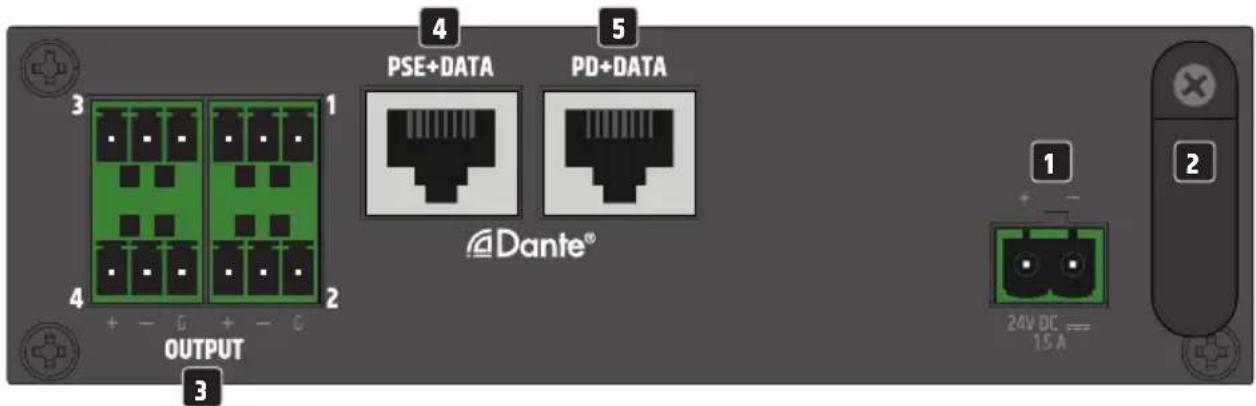
1 TERMINAL BLOCK CONNECTION FOR POWER SUPPLY
Terminal block connection for the device's power supply. To avoid damage to the unit, please use only the original power supply unit (power supply unit optionally available).
Alternative power supply: Ethernet switch or PoE injector with PoE+ (Power over Ethernet plus) or better.
2 STRAIN RELIEF
Use the strain relief for the flexible cable of the power supply unit to protect the device's power terminal block connector and the power supply terminal block from damage and to prevent the terminal block from being pulled out unintentionally.
3 OUTPUT 1 - 4
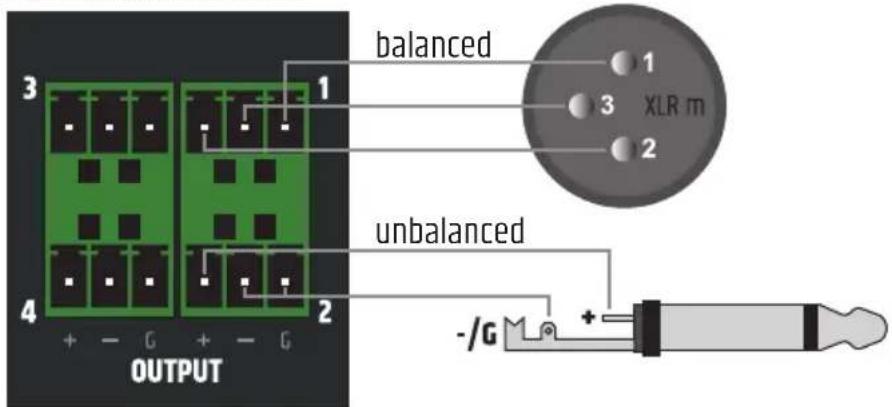
Analogue audio outputs with balanced terminal block connections. The poles +, - and G are intended for the balanced output signal (suitable for unbalanced cabling). Terminal blocks are included in the packaging content. If there is no audio signal at the line outputs OUTPUT 1 to 4, they are automatically muted after some time. If an audio signal is detected, the mute function is automatically deactivated.
4 PSE+DATA (Power Sourcing Equipment)
Dante® interface with RJ45 socket for connecting further Dante® devices to the Dante® network. If the DIO 04 is supplied with power via an external power supply unit, another DIO 04 can be supplied with power via PoE (see connection example 2).
5 PD+DATA (Powered Device)
Dante® interface with RJ45 socket for connecting the DIO 04 to a Dante® network. The DIO 04 can be supplied with voltage via PoE+ (Power over Ethernet plus) or better.
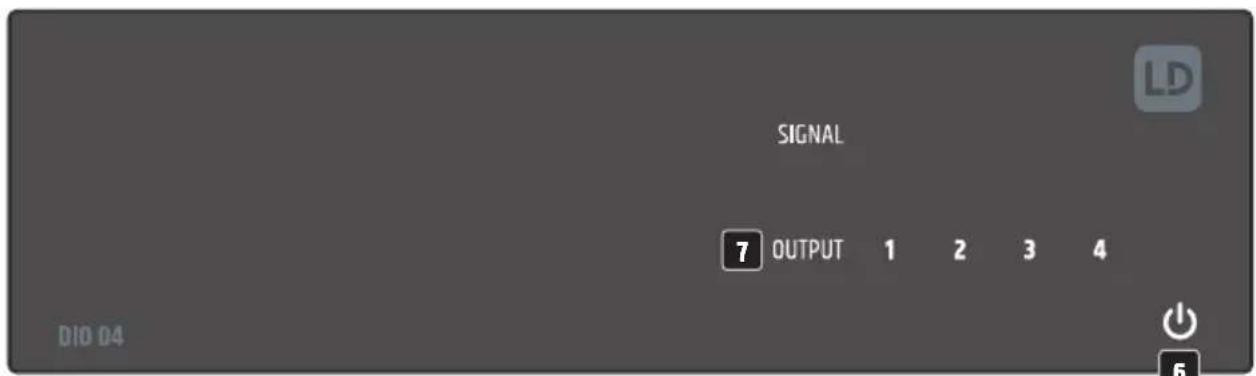
6 POWER SYMBOL
As soon as the DIO 04 is supplied with voltage, the starting process begins. During the start-up process, the white power symbol flashes and the line outputs OUTPUT 1 to 4 are muted. When the start-up process is completed after a few seconds, the symbol lights up permanently and the unit is ready for operation.
7 SIGNAL OUTPUT 1 - 4
Two-colour illuminated digits 1 to 4 for signal detection and clip display.
OUTPUT: As soon as an audio signal with sufficient level is present at an output channel, the corresponding digit lights up white. As soon as one of the digits lights up red, the corresponding output stage is operated at the distortion limit. In this case, reduce the level on the source player so that the digit no longer lights up red.
AIR VENTS
To prevent damage to the device, do not cover the ventilation openings on the left and right sides and on the top and bottom of the device and ensure that air can circulate freely. Covering the ventilation openings on the top or bottom of the enclosure when mounting it underneath or on top of a table is not critical, as the cooling provided by the ventilation openings on the remaining sides is sufficient.

Tip: Preferably use balanced audio cables for wiring analogue line inputs and outputs.
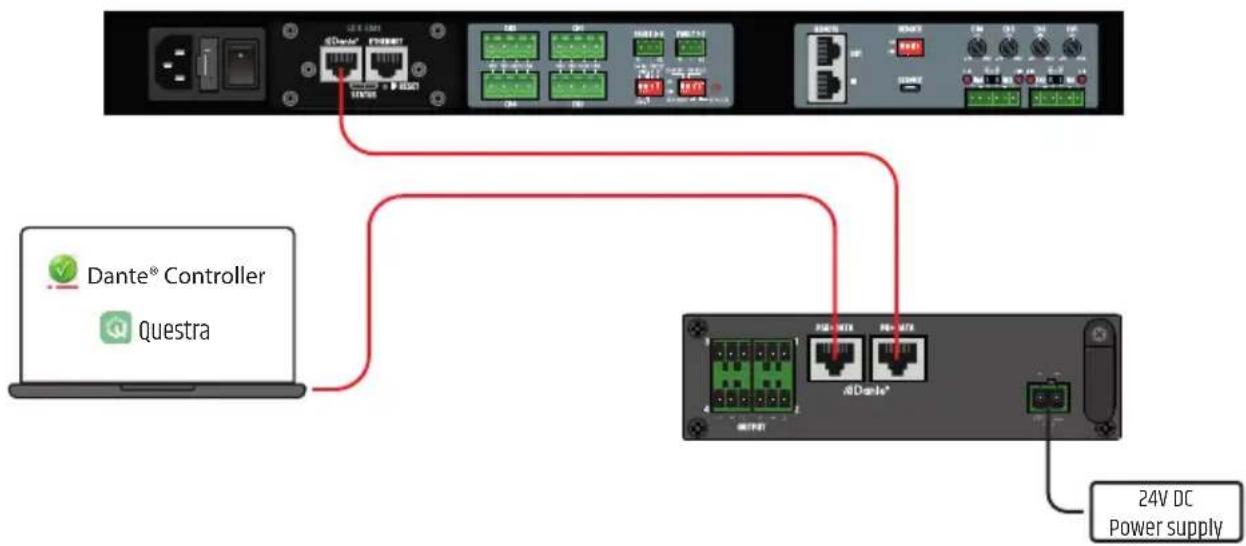
CONNECTION EXAMPLES
1
flowchart
graph TD
    A["User Interface"] --> B["USB TCP"]
    B --> C["Ethernet Port 1"]
    C --> D["Switch"]
    D --> E["Switch"]
    E --> F["Switch"]
    F --> G["Switch"]
    G --> H["Switch"]
    H --> I["Switch"]
    I --> J["Switch"]
    J --> K["Switch"]
    K --> L["Switch"]
    L --> M["Switch"]
    M --> N["Switch"]
    N --> O["Switch"]
    O --> P["Switch"]
    P --> Q["Switch"]
    Q --> R["Switch"]
    R --> S["Switch"]
    S --> T["Switch"]
    T --> U["Switch"]
    U --> V["Switch"]
    V --> W["Switch"]
    W --> X["Switch"]
    X --> Y["Switch"]
    Y --> Z["Switch"]
    Z --> AA["Switch"]
    AA --> AB["Switch"]
    AB --> AC["Switch"]
    AC --> AD["Switch"]
    AD --> AE["Switch"]
    AE --> AF["Switch"]
    AF --> AG["Switch"]
    AG --> AH["Switch"]
    AH --> AI["Switch"]
    AI --> AJ["Switch"]
    AJ --> AK["Switch"]
    AK --> AL["Switch"]
    AL --> AM["Switch"]
    AM --> AN["Switch"]
    AN --> AO["Switch"]
    AO --> AP["Switch"]
    AP --> AQ["Switch"]
    AQ --> AR["Switch"]
    AR --> AS["Switch"]
    AS --> AT["Switch"]
    AT --> AU["Switch"]
    AU --> AV["Switch"]
    AV --> AW["Switch"]
    AW --> AX["Switch"]
    AX --> AY["Switch"]
    AY --> AZ["Switch"]
    AZ --> BA["Switch"]
    BA --> BB["Switch"]
    BB --> BC["Switch"]
    BC --> BD["Switch"]
    BD --> BE["Switch"]
    BE --> BF["Switch"]
    BF --> BG["Switch"]
    BG --> BH["Switch"]
    BH --> BI["Switch"]
    BI --> BJ["Switch"]
    BJ --> BK["Switch"]
    BK --> BL["Switch"]
    BL --> BM["Switch"]
    BM --> BN["Switch"]
    BN --> BO["Switch"]
    BO --> BP["Switch"]
    BP --> BQ["Switch"]
    BQ --> BR["Switch"]
    BR --> BS["Switch"]
    BS --> BT["Switch"]
    BT --> BU["Switch"]
    BU --> BV["Switch"]
    BV --> BW["Switch"]
    BW --> BX["Switch"]
    BX --> BY["Switch"]
    BY --> BZ["Switch"]
2
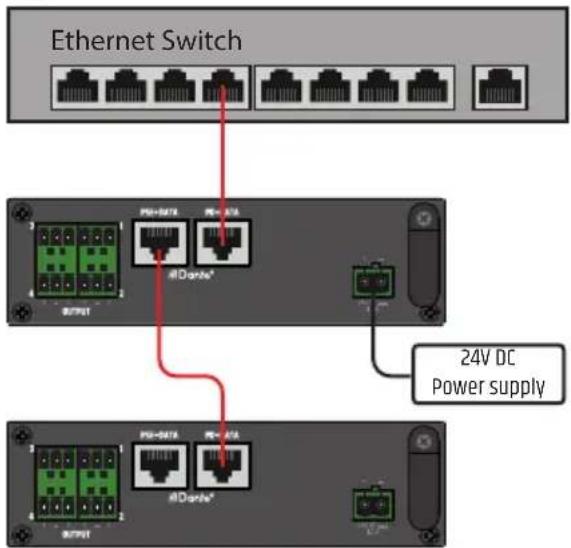
3
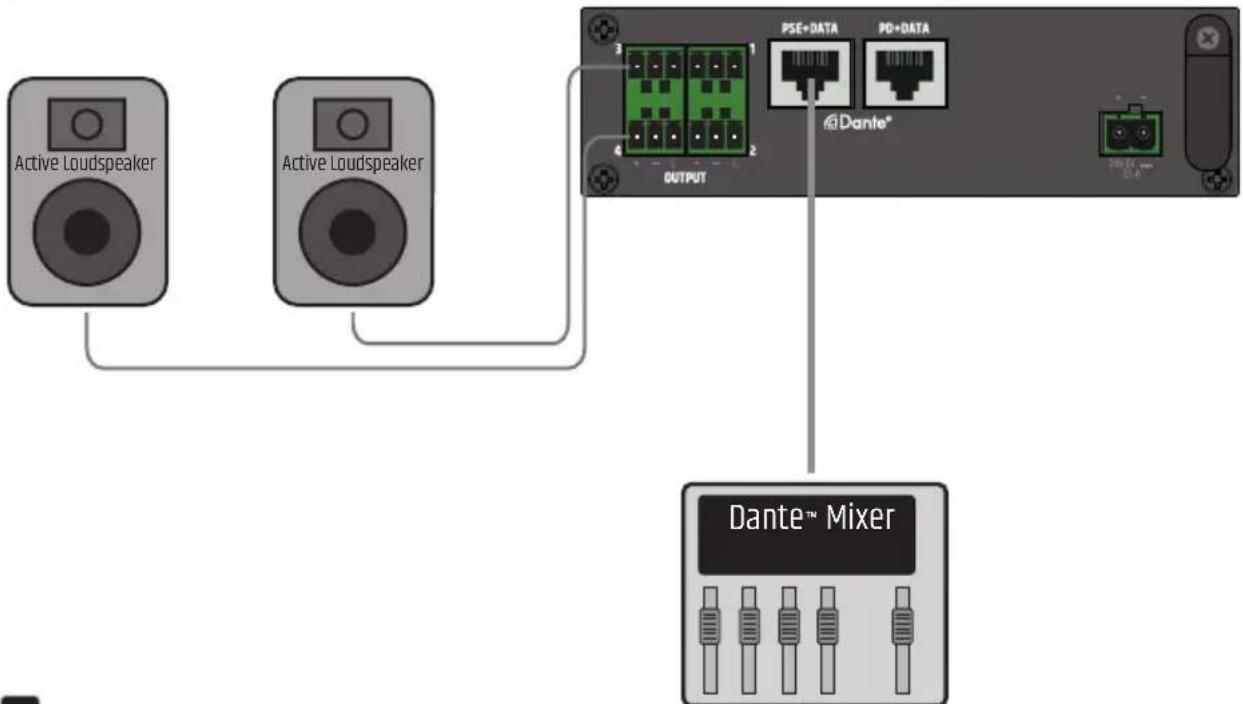
flowchart
graph TD
    A["Active Loudspeaker"] --> C["OUTPUT"]
    B["Active Loudspeaker"] --> C["OUTPUT"]
    C --> D["Dante™ Mixer"]
    D --> E["PSE+DATA"]
    D --> F["PD+DATA"]
4
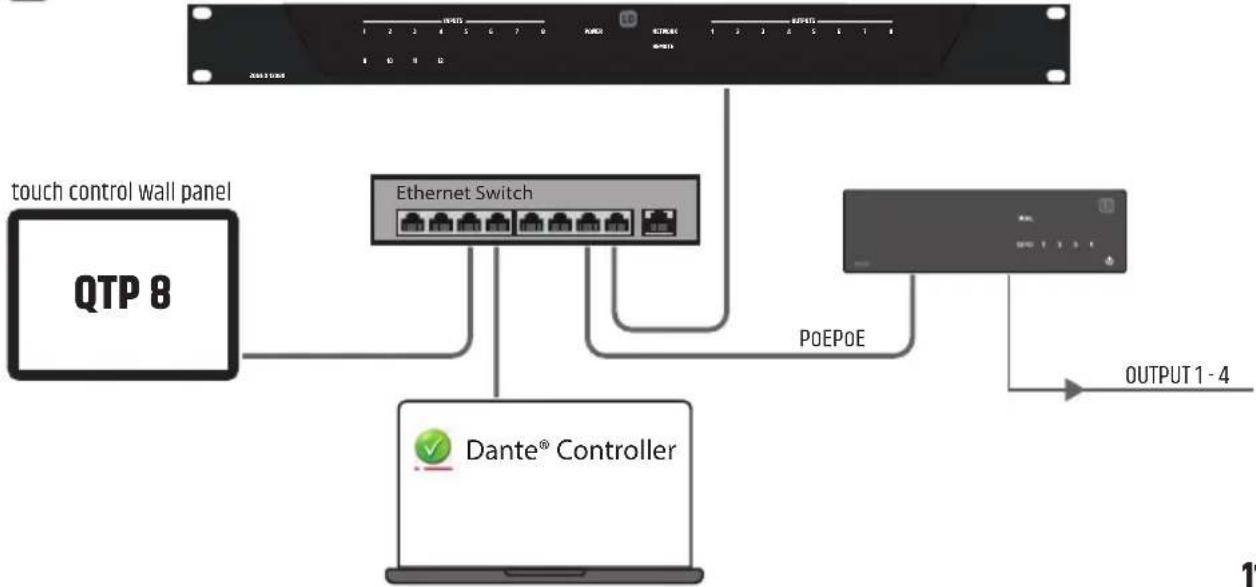
flowchart
graph TD
    A["touch control wall panel"] --> B["QTP 8"]
    B --> C["Ethernet Switch"]
    C --> D["Dante® Controller"]
    D --> E["OUTPUT 1 - 4"]
    F["POEPOE"] --> C
    G["OUTPUT 1 - 4"] --> E
TERMINAL BLOCK CONNECTIONS
OUTPUT connections
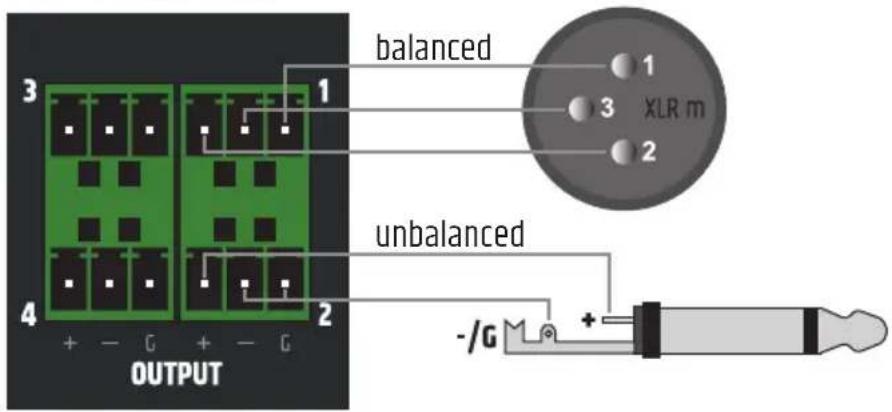

When wiring terminal blocks, please observe the correct assignment of the poles/terminals. The manufacturer accepts no liability for damage caused by faulty wiring!
DANTE® CONTROLLER
A Dante® network is set up using the freely available DANTE® CONTROLLER software. Download the software from the manufacturer's website www.audinate.com and install it on a computer. Connect the computer's Ethernet interface to a network interface using a network cable (Cat. 5e or better) and run the Dante® Controller software. The software has an automatic device detection function. Signal routing is done by mouse click and the unit and channel designations can be individually edited by the user. IP address, MAC address and other information about the devices in the Dante® network can be displayed in the software.
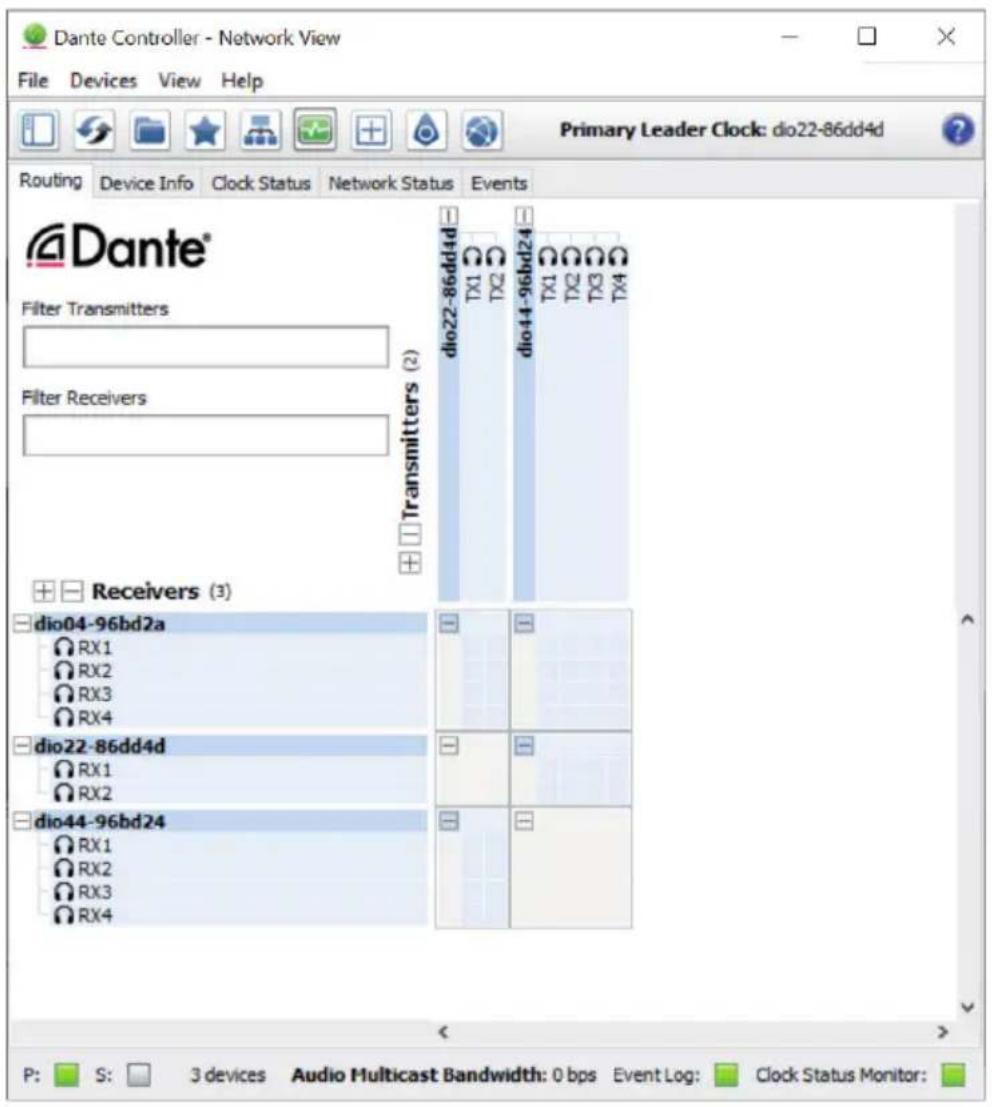
Once the configuration of the devices on the Dante® network is complete, the Dante® Controller software can be closed and the computer disconnected from the network. The settings in the units in the network are retained.
When the DIO 04 is disconnected from the Dante® network, the unit's audio outputs are muted and the power icon on the front panel starts flashing.
UNDER / ON-TABLE MOUNTING
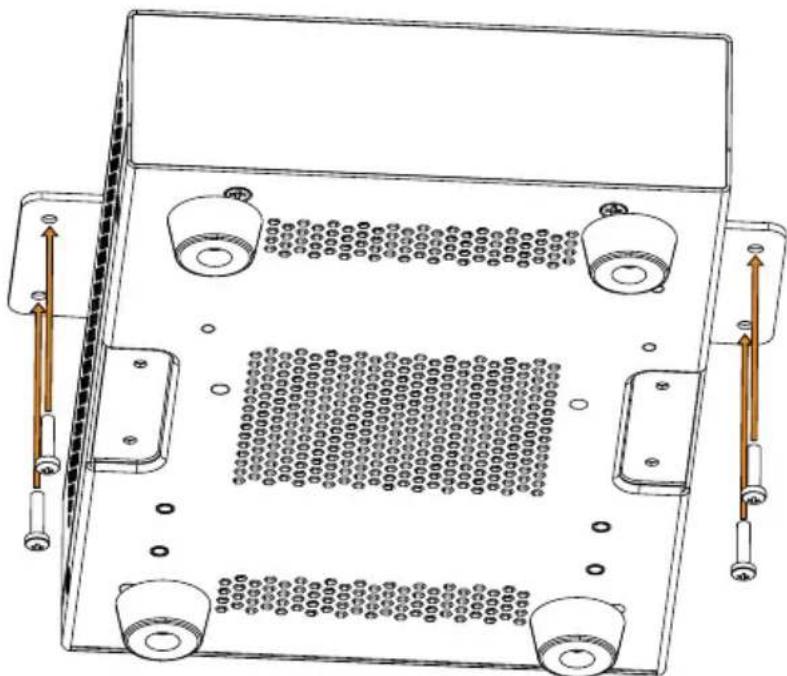
There are two recesses on the top and bottom of the enclosure, each with two M3 threaded holes, for mounting underneath or on top of the table. Screw the two enclosed mounting plates to the top or bottom using the enclosed M3 countersunk screws. Now the amplifier can be fixed in the desired position (see illustration, fixing screws not included). For tabletop mounting, the four rubber feet must be removed beforehand.
natural_image
Technical line drawing of a mechanical or electronic component with four ports and a central grid pattern (no text or symbols)CARE, MAINTENANCE AND REPAIR
To ensure the proper functioning of the unit in the long term, it must be cared for regularly and serviced as required. The need for care and maintenance depends on the intensity of use and the environment.
We generally recommend a visual inspection before each start-up. Furthermore, we recommend that you carry out all the maintenance measures listed below every 500 operating hours or, in the case of low intensity of use, after one year at the latest. Defects caused by inadequate care may result in limitations of the warranty claims.
CARE (CAN BE CARRIED OUT BY THE USER)
WARNING! Before carrying out any maintenance work, disconnect the power supply and, if possible, all appliance connections.

NOTE! Improper care can lead to impairment or even destruction of the unit.
- Housing surfaces must be cleaned with a clean, damp cloth. Make sure that no moisture can penetrate the unit.
- Air inlets and outlets must be regularly cleaned of dust and dirt. If compressed air is used, make sure that damage to the unit is prevented (e.g. fans must be blocked in this case).
- Cables and plug contacts must be cleaned regularly and freed from dust and dirt.
- In general, no cleaning agents, disinfectants or agents with an abrasive effect may be used for maintenance, otherwise the surface finish may be impaired. Especially solvents, such as alcohol, can impair the function of the housing seals.
- Units should generally be stored in a dry place and protected from dust and dirt.
MAINTENANCE AND REPAIR (BY QUALIFIED PERSONNEL ONLY)
DANGER! There are live components in the unit. Even after disconnecting from the mains, residual voltage may still be present in the unit, e.g. due to charged capacitors.

NOTE! There are no assemblies in the unit that require maintenance by the user.

NOTE! Maintenance and repair work may only be carried out by specialist personnel authorised by the manufacturer. In case of doubt, contact the manufacturer.

NOTE! Improperly performed maintenance work can affect the warranty claim.
DIMENSIONS (mm)
natural_image
Technical line drawing of a rectangular device with internal grid pattern and dimension annotations (43 and 53) — no readable text or symbols beyond measurement labels.TECHNICAL DATA
Item number LDDI004
Product type 0x4 I/O Dante Interface
Inputs 0
Input type Switchable balanced mic or line level
Line outputs 4
Output type Balanced line level with auto mute relay on loss of Dante/AES67 signal
Cooling Convection
Analogue Line Output
Number of output connectors 4
Connection type 3-pin terminal block, Pitch 3.81 mm
Max. Output Level 18 dBu
Interm. Distortion SMPTE < 0.005 % (-20 dBFS to 0 dBFS)
THD + Noise < 0.002% (10 dBu, 20 kHz BW)
Idle Noise Better than -92dBu
Dynamic Range > 107 dB (0 dBFS, AES 17, CCIR-2k Weighting)
Frequency response 15 Hz - 20 kHz (-0.5 dB)
Dante® Specifications
Audio Channels 4 outputs
Bit depth 24 bit
Sample Rate 48 kHz
Latency Minimum 1ms
Dante Connector 100 BASE-T RJ45
Power over Ethernet (PoE) Specifications
Minimum PoE Requirements PoE+ IEEE 802.3at
PSE+Data Capable of powering 1 extra PD unit
Power Input Requirements
Input Voltage 24 V DC
Minimum Current 1.5 A
Power Input Connector Pitch 5.08 mm terminal block (2-pin)
Max power consumption 10 W
Idle power consumption 7.5 W (no signal input)
Power Consumption with 22 W
Secondary Port use
Mains Inrush Current 1.7 A @ 230 V AC
Operating Temperature 0^ - 40^; < 85% humidity, non condensing
Item number LDDI004
General
Material Steel chassis, Plastic front panel
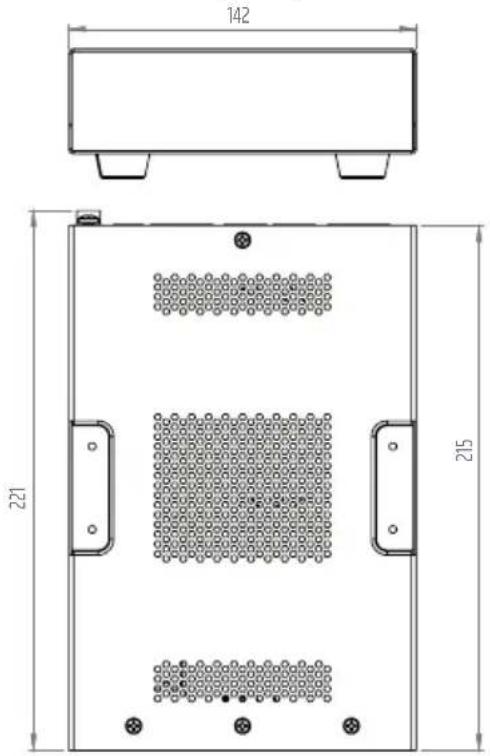
Dimensions (W x H x D) 142 x 53 x 221.7 mm (height with rubber feet)
Weight 1.0 kg
Included Accessories Mounting plates for surface mount applications,
Terminal blocks for Electrical Connections, rubber feet
DISPOSAL

Packaging:
- Packaging can be disposed of via the usual waste disposal channels.
- Please separate the packaging according to the waste disposal and materials regulations in your country.
Device:
- This device is subject to the European Directive on Waste Electrical and Electronic Equipment in its applicable version. WEEE Directive-Waste Electrical and Electronical Equipment. Old devices and batteries do not belong in household waste. The old device or batteries must be disposed of via an approved waste disposal service or a municipal waste disposal facility. Follow the directives in your country!
- Follow the disposal laws in your country.
- As a private customer, you can obtain information on environmentally friendly disposal options from the retailer from whom you purchased the product or from the relevant regional authorities.
MANUFACTURER'S DECLARATIONS
MANUFACTURER'S WARRANTY & LIMITATIONS OF LIABILITY
Adam Hall GmbH, Adam-Hall-Str. 1, D-61267 Neu Anspach / E-mail Info@adamhall.com /
Our current warranty conditions and limitation of liability can be found at:
https://cdn-shop.adamhall.com/media/pdf/MANUFACTURERS-DECLARATIONS_LD_SYSTEMS.pdf.
Contact your distribution partner for service.
UKCA-CONFORMITY
Hereby, Adam Hall Ltd. declares that this product meets the following guidelines
(where applicable):
Electrical Equipment (Safety) Regulations 2016
Electromagnetic Compatibility Regulations 2016 (SI 2016/1091)
The Restriction of the Use of Certain Hazardous Substances in Electrical and Electronic Equipment
Regulation 2012 (SI 2012/3032)
Radio Equipment Regulations 2017(SI 2016/2015)
UKCA-DECLARATION OF CONFORMITY
Products that are subject to Electrical Equipment(Safety)Regulation 2016, EMC Regulation 2016 or
RoHS Regulation can be requested at info@adamhall.com.
Products that are subject to the Radio Equipments Regulations 2017
(SI2017/1206) can be downloaded from www.adamhall.com/compliance/
CE CONFORMITY
Adam Hall GmbH hereby confirm that this product meets the following guidelines
(where applicable):
R&TTE (1999/5/EC) or RED (2014/53/EU) as of June 2017.
Low Voltage Directive (2014/35/EU)
EMC Directive (2014/30/EU)
RoHS (2011/65/EU)
The complete Declaration of Conformity can be found at www.adamhall.com.
Furthermore, you can also request it at info@adamhall.com.
CE DECLARATION OF CONFORMITY
Declarations of conformity for products subject to the LVD, EMC, RoHS Directive
can be requested from info@adamhall.com.
Declarations of conformity for products subject to RED Directive
can be downloaded from www.adamhall.com/compliance/.
Subject to misprints and errors, as well as technical or other modifications!
DEUTSCH
4 PSE+DATA (Power Sourcing Equipment)
5 PD+DATA (Powered Device)

natural_image
Technical line drawing of a mechanical or electronic component with four ports and a central grid pattern (no text or symbols)natural_image
Technical line drawing of a rectangular device with circular components and dimension annotations (43 and 53) — no readable text or symbols beyond measurement markers.TECHNISCHE DATEN
Artikelnummer LDDI004
| Produktart 0x4 I/O Dante Interface |
Eingänge 0
| Eingangsart Switchable Balanced mic or line level |
Line-Ausgänge 4
THD + N < 0.002% (10 dBu, 20 kHz BW)
https://cdn-shop.adamhall.com/media/pdf/MANUFACTURERS-DECLARATIONS_LD_SYSTEMS.pdf.
4 PSE+DATA (Power Sourcing Equipment)
5 PD+DATA (Powered Device)

natural_image
Technical line drawing of a mechanical or electronic component with four ports and a central grid pattern (no text or symbols)ENTRETIEN, MAINTENANCE ET RÉPARATION
natural_image
Technical line drawing of a rectangular device with internal grid pattern and mounting feet (no text or symbols)CARACTÉRISTIQUES TECHNIQUES
https://cdn-shop.adamhall.com/media/pdf/MANUFACTURERS-DECLARATIONS_LD_SYSTEMS.pdf.
DÉCLARATION DE CONFORMITÉ EU
4 PSE+DATA (Power Sourcing Equipment)
5 PD+DATA (Powered Device)

natural_image
Technical line drawing of a mechanical or electronic component with four ports and a central grid pattern (no text or symbols)natural_image
Technical line drawing of a rectangular device with perforated panel and side supports (no text or symbols)DATOS TÉCNICOS
https://cdn-shop.adamhall.com/media/pdf/MANUFACTURERS-DECLARATIONS_LD_SYSTEMS.pdf.
4 PSE+DATA (Power Sourcing Equipment)

natural_image
Technical line drawing of a mechanical or electronic component with four ports and a central grid pattern (no text or symbols)PIELEGNACJA, KONSERWACJA I NAPRAWA
natural_image
Technical line drawing of a rectangular device with circular patterns and dimension annotations (43 and 53) — no readable text or symbols beyond measurement markers.DANE TECHNICZNE
https://cdn-shop.adamhall.com/media/pdf/MANUFACTURERS-DECLARATIONS_LD_SYSTEMS.pdf.
Connessioni DI USCITA

natural_image
Technical line drawing of a mechanical or electronic component with four mounting holes and a central grid pattern (no text or symbols)natural_image
Technical line drawing of a rectangular device with internal grid pattern and dimension annotations (43 and 53) — no readable text or symbols beyond measurement labels.DATI TECNICI
https://cdn-shop.adamhall.com/media/pdf/MANUFACTURERS-DECLARATIONS_LD_SYSTEMS.pdf.
- ABOUT THIS MANUAL
- INTENDED USE
- EXPLANATIONS OF TERMS AND SYMBOLS
- SAFETY INSTRUCTIONS
- DANGER:
- WARNING:
- ATTENTION:
- ATTENTION HIGH VOLUMES WITH AUDIO PRODUCTS!
- NOTES FOR INDOOR INSTALLATION EQUIPMENT
- PACKAGING CONTENT
- INTRODUCTION
- FEATURES
- CONNECTIONS, OPERATING AND DISPLAY ELEMENTS
- TERMINAL BLOCK CONNECTION FOR POWER SUPPLY
- STRAIN RELIEF
- OUTPUT 1 - 4
- PSE+DATA (Power Sourcing Equipment)
- PD+DATA (Powered Device)
- POWER SYMBOL
- SIGNAL OUTPUT 1 - 4
- AIR VENTS
- CONNECTION EXAMPLES
- TERMINAL BLOCK CONNECTIONS
- OUTPUT connections
- DANTE® CONTROLLER
- UNDER / ON-TABLE MOUNTING
- CARE, MAINTENANCE AND REPAIR
- MAINTENANCE AND REPAIR (BY QUALIFIED PERSONNEL ONLY)
- DIMENSIONS (mm)
- TECHNICAL DATA
- Item number LDDI004
- Analogue Line Output
- Dante® Specifications
- Power over Ethernet (PoE) Specifications
- Power Input Requirements
- General
- DISPOSAL
- Packaging:
- Device:
- MANUFACTURER'S DECLARATIONS
- MANUFACTURER'S WARRANTY & LIMITATIONS OF LIABILITY
- UKCA-CONFORMITY
- UKCA-DECLARATION OF CONFORMITY
- CE CONFORMITY
- CE DECLARATION OF CONFORMITY
- DEUTSCH
- TECHNISCHE DATEN
- ENTRETIEN, MAINTENANCE ET RÉPARATION
- DÉCLARATION DE CONFORMITÉ EU
- DATOS TÉCNICOS
- PIELEGNACJA, KONSERWACJA I NAPRAWA
- DANE TECHNICZNE
- DATI TECNICI
Brand : LD Systems
Model : DIO 04
Category : Audio Interface