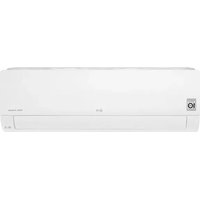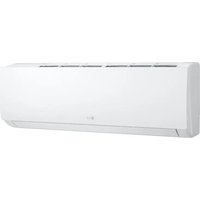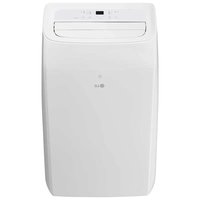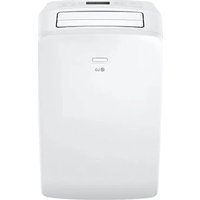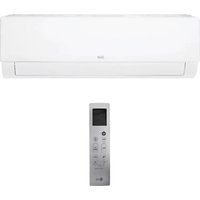
KNUAB091A - Air Conditioning LG - Free user manual and instructions
Find the device manual for free KNUAB091A LG in PDF.


User questions about KNUAB091A LG
0 question about this device. Answer the ones you know or ask your own.
Ask a new question about this device
Download the instructions for your Air Conditioning in PDF format for free! Find your manual KNUAB091A - LG and take your electronic device back in hand. On this page are published all the documents necessary for the use of your device. KNUAB091A by LG.
USER MANUAL KNUAB091A LG
Read the IMPORTANT SAFETY INSTRUCTIONS completely first.
In order to use the product safely and conveniently, please read the owner's manual before using the product.
ENGLISH FRANÇAIS ESPÁÑOL
TYPE: WALL MOUNTED
K*UAB**1A, K*UAK**1A, KNMAB**1A
2
TABLE OF CONTENTS
3 OPERATION
3 SEE MORE INFORMATION
3 Installing LG ThinQ Application and Connecting an LG Appliance (On Some Models)
4 WIRELESS REMOTE CONTROL
7 NEW FUNCTIONS
9 HELPFUL TIP
9 PRODUCT OVERVIEWS
9 Wall Mounted
10 MAINTENANCE
10 Removing and Replacing the Air Filter
11 Cleaning the Air Filter
12 TROUBLESHOOTING
12 Before Calling for Service
14 APPENDIX
14 Open Source Software Notice Information
15 LIMITED WARRANTY
15 USA
17 CANADA
OPERATION
SEE MORE INFORMATION
1 Check the model name on the label.
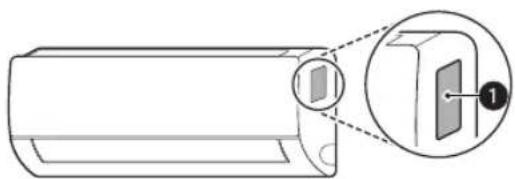
1 Label
2 Search for the model name at www.lg.com.
NOTE
The image may differ depending on the product.
Installing LG ThinQ Application and Connecting an LG Appliance (On Some Models)
NOTE
- This feature is only available on models with Wi-Fi.
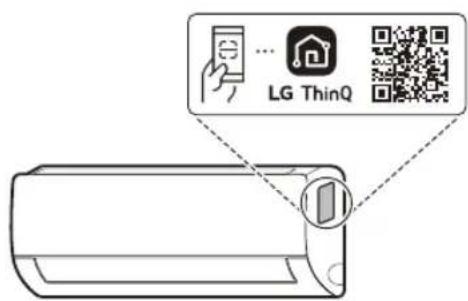
Models with QR Code
Scan the QR code attached to the product using the camera or a QR code reader application on your smartphone.
Models without QR Code
Search for and install the LG ThinQ application from the Google Play Store or Apple App Store on a smartphone.
Run the LG ThinQ application and sign in with your existing account or create an LG account to sign in.
Touch the add (+) button on the LG ThinQ application to connect your LG appliance. Follow the instructions in the application to complete the process.
WIRELESS REMOTE CONTROL
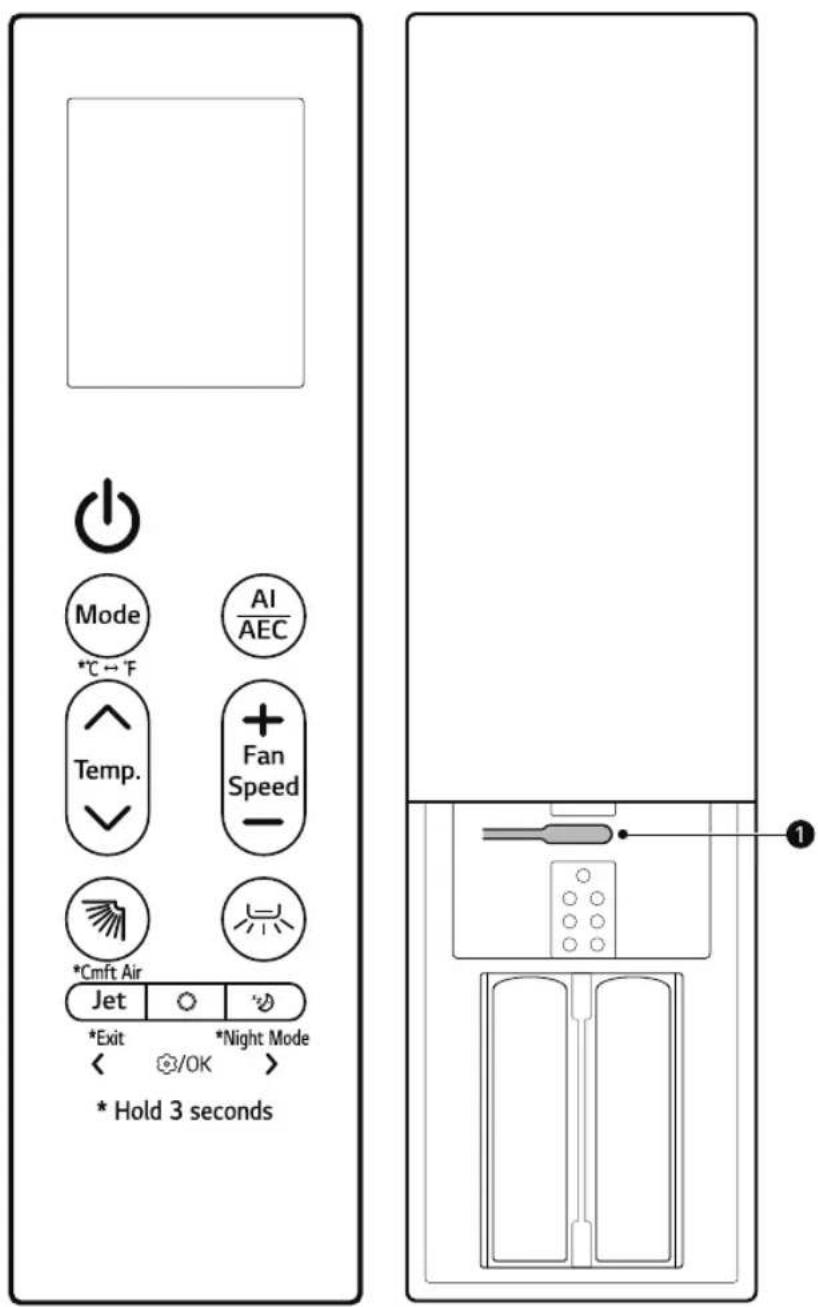
You can operate the appliance more conveniently with the wireless remote control.
For more detailed instructions, please refer to the Web-manual.
NOTE
- Some functions may not be supported, depending on the model.
| Image Description | |
| Power Turns the appliance on or off. | |
| Connecting to LG ThinQ Press and hold the Power button for about 3 seconds to prepare for connecting appliance and Wi-Fi. | |
| Mode *℃←F | Mode Selects the desired operating mode. • Each press changes the mode in this order: Cooling → Auto → Dehumidification → Heating → Fan |
| °C←°F Press and hold the Mode button for about 3 seconds to change units between °C and °F | |
| AI/AEC | AI/AEC Selects AI Smart Care or Active Energy Control to decrease the power input. NOTE • When connected to the Multi Outdoor unit, Active Energy Contorl function may not be supported. |
| Temp. Fan Speed | Temperature A, V Adjusts the desired room temperature. |
| +Fan Speed | Fan Speed+, - Adjusts the fan speed. |
| *CMft Air | (Up-Down Swing) Adjusts the airflow direction up and down. |
| Cmft Air Press and hold the button for about 3 seconds to adjust the airflow direction. This will help minimize direct contact with airflow. | |
| 泉泉泉泉泉泉泉泉泉泉泉泉泉泉泉泉泉泉泉泉泉泉泉泉泉泉泉泉泉泉泉泉泉泉泉泉泉泉泉泉泉泉泉泉泉泉泉泉泉泉泉泉泉泉泉泉泉泉泉泉泉泉泉泉泉泉泉泉泉泉泉泉泉泉泉泉泉泉泉泉泉泉泉泉泉泉泉泉泉泉泉泉泉泉泉泉泉泉泉泉泉水泉泉泉泉泉泉泉泉泉泉泉泉泉泉泉泉泉泉泉泉泉泉泉泉泉泉泉泉泉泉泉泉泉泉泉泉泉泉泉泉泉泉泉泉泉泉泉泉泉泉泉泉泉泉泉泉泉泉泉泉泉泉泉泉泉泉泉泉泉泉泉泉泉泉泉泉泉泉泉泉泉泉泉泉泉泉泉泉泉泉泉泉泉泉泉泉泉泉泉京泉泉泉泉泉泉泉泉泉泉泉泉泉泉泉泉泉泉泉泉泉泉泉泉泉泉泉泉泉泉泉泉泉泉泉泉泉泉泉泉泉泉泉泉泉泉泉泉泉泉泉泉泉泉泉泉泉泉泉泉泉泉泉泉泉泉泉泉泉泉泉泉泉泉泉泉泉泉泉泉泉泉泉泉泉泉泉泉泉泉泉泉泉泉泉泉泉泉泉尿泉尿尿尿尿尿尿尿尿尿尿尿尿尿尿尿尿尿尿尿尿尿尿尿尿尿尿尿尿尿尿尿尿尿尿尿尿尿尿尿尿尿尿尿尿尿尿尿尿尿尿尿尿尿尿尿尿尿尿尿尿尿尿尿尿尿尿尿尿尿尿尿尿尿尿尿尿尿尿尿尿尿尿尿尿尿尿尿尿尿尿尿尿尿尿尿尿尿尿尿尿 | |
| Jet *Exit < | Jet Changes the room temperature quickly and operates at maximum fan speed. |
| Exit When entering the settings, press and hold the Jet button for about 3 seconds to return the previous setting. | |
| O ◎/OK | Function Selects the desired function. NOTE ·When connected to the Multi Outdoor unit, Low Ambient Heating function may not be supported. |
| Night Mode > | Sleep Automatically turns the appliance off at a desired time. Use it before sleeping. Night Mode Press and hold the button for about 3 seconds to turn off the display and the beep sound. |
| Reset | Reset Resets the wireless remote control setting. |
NEW FUNCTIONS
All Cleaning (On Some Models/LG ThinQ)
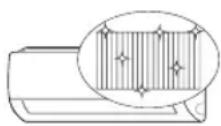
By repeatedly freezing and thawing the heat exchanger of the air conditioner, contaminants such as dust are washed away and the appliance is kept clean.
After cleaning, it reduces moisture inside the indoor unit.
On some indoor units, RL appears on the display of the indoor unit.
NOTE
- The All Cleaning function will end after the appliance has dried.
- If the humidity in the room is high when the All Cleaning function is operating, the area near the indoor unit may become foggy.
-
The All Cleaning function can be used indoors at 70^ (21^) to 90^ (32^) and outdoors at 70^ (21^) to 99^ (37^) . The All Cleaning function is a hygiene management function, not a cooling function, so the usage conditions may vary from the verified operation range of the appliance.
-
If the All Cleaning function is operated at a temperature outside of the allowable range, alarms in the LG ThinQ application and the function does not work.
- The All Cleaning function is available even when the appliance is running.
- If you press the button on the appliance or on the remote control during the All Cleaning, the All Cleaning function is deactivated.
- During the All Cleaning, a "tick-tick-" or "tack-tack" noise may be heard as the appliance expands or contracts.
After the All Cleaning, the appliance will automatically shut off. When the power is turned back on, it will operate in Cooling mode. - If the Timer function is set, the All Cleaning function may not operate properly.
Cool air comes out of the outlet when the All Cleaning function is activated. - When connected to the Multi Outdoor unit, this functions may not be supported.
kW Manager (On Some Models/LG ThinQ)
The air conditioner power consumption is automatically adjusted based on a schedule and target power consumption set by the user.
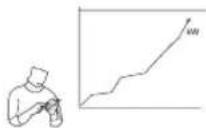
E appears on the display of the indoor unit on some models.
NOTE
-
When using kW Manager function, the output of cold air may be reduced, depending on the remaining target power amount.
-
When the target electricity consumption is exceeded, the kW Manager function is disabled.
-
When using the Heating and Auto modes, the kW Manager function is disabled.
-
When connected to the Multi Outdoor unit, this functions may not be supported.
The power usage shown through the LG ThinQ application may differ from the actual power usage shown on your utility bill.
Power consumption information may vary depending on the appliance.
- Power consumption may differ from results measured using other measuring devices.
Depending on the environment in which the device is installed, measured power consumption may vary.
Measured power consumption may vary depending on the usage environment or usage method of the home appliance.
- When setting the usage time, the appliance does not automatically turn on or off.
Even during the operation of the kW Manager function, the function set with the remote control is reflected first.
Actual usage may differ.
Sleep+ (On Some Models/LG ThinQ)
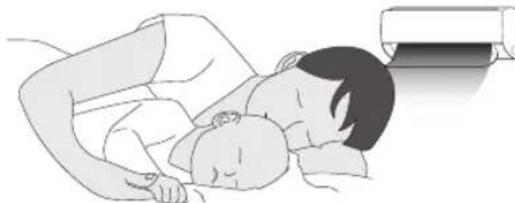
Use it before sleeping. The appliance will automatically learn and adjust the temperature and fan speed to create an even more personalized sleep environment.
NOTE
This function can be set when the appliance is turned on.
This function is available with the Cooling mode.
- When connected to the Multi Outdoor unit, this functions may not be supported.
HELPFUL TIP
Manual Operation
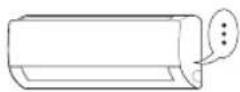

If your wireless remote control is unavailable, you can turn the appliance on and off by pressing the POWER button 1 on the indoor unit.
1 Open the up-down vane.
2 Press the POWER button 1.

PRODUCT OVERVIEWS
Wall Mounted
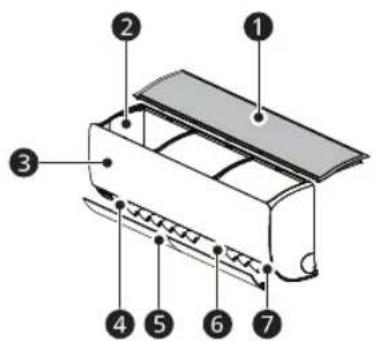
Air Filter
2 Air Intake Vents
3 Front Cover
Air Outlet Vents
5 Air Deflector (Up-Down Vane)
6 Air Deflector (Left-Right Louver)
Power Button
NOTE
The number and location of parts may vary depending on the model of the appliance.
- Features may change depending on the model type.
MAINTENANCE
Removing and Replacing the Air Filter
1 Turn off the power to the appliance.
2 Locate the knobs of the air filter on the top front of the appliance.
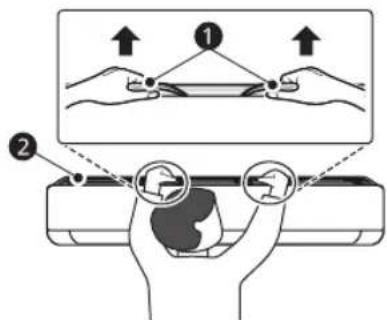
Knobs
Air Filter
3 Pull the knobs upward slightly and then lift the entire filter to remove it.
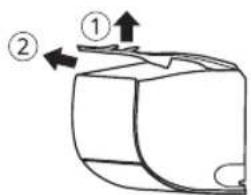
4 Insert the hooks on the air filter into the slots on the back of the front panel.
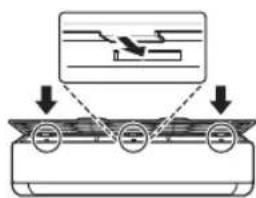
5 Push the hooks down until they click into place.
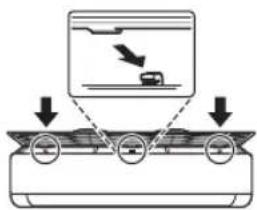
6 To make sure the filter is assembled properly, press down along the entire front length of the filter.
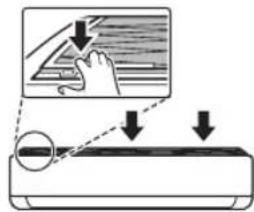
Cleaning the Air Filter
1 Remove the air filter from the appliance.
2 Clean the air filter with a vacuum cleaner or wash it with lukewarm water and a mild detergent.
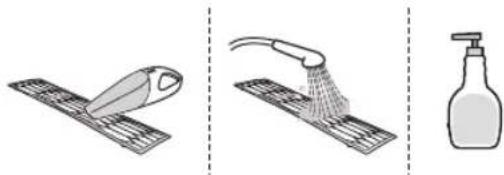
3 Dry the filter in the shade.
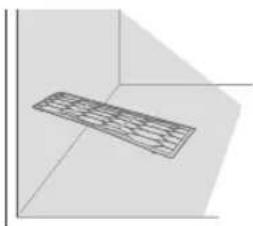
NOTE
Clean the air filter once every 2 weeks, or more if needed.
- Do not bend the air filter, as it may break.
- Do not operate the appliance without the filter in place.
- Assemble the air filter properly to prevent dust and other substances from entering the appliance.
TROUBLESHOOTING
Before Calling for Service
Please check the following before you contact the service centre. If the problem persists, contact your local service centre.
Self-Diagnosis Function
This appliance has a built-in self-diagnosis function. If an error occurs, the lamp of the indoor unit will flash in 2-second intervals. If this occurs, contact your local dealer or service centre.
The appliance does not work normally.
- Burning smell and strange sounds are coming from the appliance.
Water leaks from the indoor unit even when the humidity level is low. - The power cable is damaged or it is generating excessive heat.
- A switch, a circuit breaker (safety, ground) or a fuse is not operating properly.
- The appliance generates an error code from its self-diagnosis.
- Turn off the appliance, switch off or disconnect the power supply, and contact the service centre.
R32 refrigerant leakage detecting system is activated. - If there are error code such as 228,229 and 230, ventilate the room and contact authorized personnel immediately.
If there is an error code of 236, the refrigerant leak detector has a lifetime of less than 6 months. Contact authorized personnel immediately.
The fan speed cannot be adjusted.
-
The Jet mode or Auto Operation mode is selected.
-
In some operating modes, you cannot adjust the fan speed. Select an operating mode in which you can adjust the fan speed.
The temperature cannot be adjusted.
-
The Fan mode or Jet mode is selected.
-
In some operating modes, you cannot adjust the temperature. Select an operating mode in which you can adjust the temperature.
The appliance does not work.
The appliance is unplugged.
- Check whether the power cord is plugged into the outlet or the power isolators are switched on.
- A fuse exploded or the power supply is blocked.
- Replace the fuse or check if the circuit breaker has tripped.
- A power failure has occurred.
- Turn off the appliance when a power failure occurs.
- When the power is restored, wait 3 minutes, and then turn on the appliance.
The voltage is too high or too low.
- Check if the circuit breaker has tripped.
- The appliance was turned off automatically at a preset time.
- Turn the appliance on.
- The battery setting in the wireless remote control is incorrect.
- Make sure that the batteries are inserted correctly in your wireless remote control.
- If the batteries are placed correctly, but the appliance still does not operate, replace the batteries and try again.
The appliance does not emit cool air.
Air is not circulating properly.
- Make sure that there are no curtains, blinds, or pieces of furniture blocking the front of the appliance.
The air filter is dirty.
Clean the air filter once every 2 weeks.
See "Cleaning the Air Filter" for more information.
The room temperature is too high.
- In summer, cooling the indoor air fully may take some time. In this case, select the Jet mode to cool the indoor air quickly.
Cold air is escaping from the room.
- Make sure that no cold air is escaping through the ventilation points in the room.
- The desired temperature is higher than the current temperature.
- Set the desired temperature to a level lower than the current temperature.
There is a heating source nearby.
- Avoid using heat generators like electric ovens or gas hobs while the air conditioner is in operation.
Fan mode is selected.
- During Fan mode, air blows from the appliance without cooling or heating the indoor air.
- Switch the operating mode to cooling operation.
The indoor unit is still operating even when the appliance has been turned off.
-
The Auto Clean+ function is being operated.
-
Allow the Auto Clean+ function to continue since it reduces any remaining moisture inside the indoor unit. If you do not want this function, you can turn the indoor unit off.
The appliance does not emit warm air.
-
When the Heating mode starts, the vane is almost closed, and no air comes out, even though the outdoor unit is operating.
-
This is normal. Please wait until the appliance has generated enough warm air to blow through the indoor unit.
-
The outdoor unit is in Defrosting mode.
- In Heating mode, ice and frost is built up on the coils when the outside temperature falls. The Defrosting mode reduces a layer of frost on the coil, and it should finish in approximately 15 minutes.
APPENDIX
Open Source Software Notice Information
To obtain the source code that is contained in this product, under GPL, LGPL, MPL, and other open source licenses that have the obligation to disclose source code, and to access all referred license terms, copyright notices and other relevant documents, please visit https://opensource.lge.com.
LG Electronics will also provide open source code to you on CD-ROM for a charge covering the cost of performing such distribution (such as the cost of media, shipping, and handling) upon email request to opensource@lge.com.
This offer is valid to anyone in receipt of this information for a period of three years after our last shipment of this product.
LIMITED WARRANTY
USA
TERMS AND CONDITIONS
ARBITRATION NOTICE: THIS LIMITED WARRANTY CONTAINS AN ARBITRATION PROVISION THAT REQUIRES YOU AND LG ELECTRONICS ("LG") TO RESOLVE DISPUTES BY BINDING ARBITRATION INSTEAD OF IN COURT, UNLESS YOU CHOOSE TO OPT OUT. IN ARBITRATION, CLASS ACTIONS AND JURY TRIALS ARE NOT PERMITTED. PLEASE SEE THE SECTION Titled "PROCEDURE FOR RESOLVING DISPUTES" BELOW.
PROCEDURE FOR RESOLVING DISPUTES:
ALL DISPUTES BETWEEN YOU AND LG ARISING OUT OF OR RELATING IN ANY WAY TO THIS LIMITED WARRANTY OR THE PRODUCT SHALL BE RESOLVED EXCLUSIVELY THROUGH BINDING ARBITRATION, AND NOT IN A COURT OF GENERAL JURISDICTION. BINDING ARBITRATION MEANS THAT YOU AND LG ARE EACH WAIVING THE RIGHT TO A JURY TRIAL AND TO BRING OR PARTICIPATE IN A CLASS ACTION.
Definitions. For the purposes of this section, references to "LG" mean LG Electronics U.S.A., Inc., its parents, subsidiaries and affiliates, and each of their officers, directors, employees, agents, beneficiaries, predecessors in interest, successors, assigns and suppliers; references to "dispute" or "claim" shall include any dispute, claim or controversy of any kind whatsoever (whether based in contract, tort, statute, regulation, ordinance, fraud, misrepresentation or any other legal or equitable theory) arising out of or relating in any way to the sale, condition or performance of the product or this Limited Warranty.
Notice of Dispute. In the event you intend to commence an arbitration proceeding, you must first notify LG in writing at least 30 days in advance of initiating the arbitration by sending a letter to LG at LG Electronics, USA, Inc. Attn: Legal Department-Arbitration 111 Sylvan Avenue, Englewood Cliffs, NJ 07632. You and LG agree to engage in good faith discussions in an attempt to amicably resolve your claim. The notice must provide your name, address, and telephone number; identify the product that is the subject of the claim; and describe the nature of the claim and the relief being sought. If you and LG are unable to resolve the dispute within 30 days, either party may proceed to file a claim for arbitration.
Agreement to Binding Arbitration and Class Action Waiver. Upon failure to resolve the dispute during the 30 day period after sending written notice to LG, you and LG agree to resolve any claims between us only by binding arbitration on an individual basis, unless you opt out as provided below. Any dispute between you and LG shall not be combined or consolidated with a dispute involving any other person's or entity's product or claim. More specifically, without limitation of the foregoing, any dispute between you and LG shall not under any circumstances proceed as part of a class or representative action. Instead of arbitration, either party may bring an individual action in small claims court, but that small claims court action may not be brought on a class or representative basis.
Arbitration Rules and Procedures. To begin arbitration of a claim, either you or LG must make a written demand for arbitration. The arbitration will be administered by the American Arbitration Association ("AAA") and will be conducted before a single arbitrator under the AAA's Consumer Arbitration Rules that are in effect at the time the arbitration is initiated (referred to as the "AAA Rules") and under the procedures set forth in this section. The AAA Rules are available online at www.adr.org/consumer. Send a copy of your written demand for arbitration, as well as a copy of this provision, to the AAA in the manner described in the AAA Rules. You must also send a copy of your written demand to LG at LG Electronics, USA, Inc. Attn: Legal Department-Arbitration 111 Sylvan Avenue, Englewood Cliffs, NJ 07632. If there is a conflict between the AAA Rules and the rules set forth in this section, the rules set forth in this section will govern. This arbitration provision is governed by the Federal Arbitration Act. Judgment may be entered on the arbitrator's award in any court of competent jurisdiction. All issues are for the arbitrator to decide, except that issues relating to the scope and enforceability of the arbitration provision and to the arbitrability of the dispute are for the court to decide. The arbitrator is bound by the terms of this provision.
Governing Law. The law of the state of your residence shall govern this Limited Warranty and any disputes between us except to the extent that such law is preempted by or inconsistent with applicable federal law.
Fees/Costs. You do not need to pay any fee to begin an arbitration. Upon receipt of your written demand for arbitration, LG will promptly pay all arbitration filing fees to the AAA unless you seek more than $25,000 in damages, in which case the payment of these fees will be governed by the AAA Rules. Except as otherwise provided for herein, LG will pay all AAA filing, administration and arbitrator fees for any arbitration initiated in accordance with the AAA Rules and this arbitration provision. If you prevail in the arbitration, LG will pay your attorneys' fees and expenses as long as they are reasonable, by considering factors including, but not limited to, the purchase amount and claim amount. Notwithstanding the foregoing, if applicable law allows for an award of reasonable attorneys' fees and expenses, an arbitrator can award them to the same extent that a court would. If the arbitrator finds either the substance of your claim or the relief sought in the demand is frivolous or brought for an improper purpose (as measured by the standards set forth in Federal Rule of Civil Procedure 11(b)), then the payment of all arbitration fees will be governed by the AAA Rules. In such a situation, you agree to reimburse LG for all monies previously disbursed by it that are otherwise your obligation to pay under the AAA Rules. Except as otherwise provided for, LG waives any rights it may have to seek attorneys' fees and expenses from you if LG prevails in the arbitration.
Hearings and Location. If your claim is for 25,000 or less, you may choose to have the arbitration conducted solely on the basis of (1) documents submitted to the arbitrator, (2) through a telephonic hearing, or (3) by an in-person hearing as established by the AAA Rules. If your claim exceeds 25,000, the right to a hearing will be determined by the AAA Rules. Any in-person arbitration hearings will be held at a location within the federal judicial district in which you reside unless we both agree to another location or we agree to a telephonic arbitration.
Opt Out. You may opt out of this dispute resolution procedure. If you opt out, neither you nor LG can require the other to participate in an arbitration proceeding. To opt out, you must send notice to LG no later than 30 calendar days from the date of the first consumer purchaser's purchase of the product by either: (i) sending an e-mail to optout@lge.com, with the subject line: "Arbitration Opt Out" or (ii) calling 1-800-980-2973. You must include in the opt out e-mail or provide by telephone: (a) your name and address; (b) the date on which the product was purchased; (c) the product model name or model number; and (d) the serial number (the serial number can be found (i) on the product; or (ii) online by accessing https://www.lg.com/us/support/repair-service/schedule-repair-continued and clicking on "Find My Model & Serial Number").
You may only opt out of the dispute resolution procedure in the manner described above (that is, by e-mail or telephone); no other form of notice will be effective to opt out of this dispute resolution procedure. Opting out of this dispute resolution procedure will not affect the coverage of the Limited Warranty in any way, and you will continue to enjoy the full benefits of the Limited Warranty. If you keep this product and do not opt out, then you accept all terms and conditions of the arbitration provision described above.
CANADA
TERMS AND CONDITIONS
THE PRODUCT'S FULL LIMITED WARRANTY TERMS AND CONDITIONS ARE AVAILABLE AT HTTPS://WWW.LGHVAC.COM
ARBITRATION NOTICE: THIS LIMITED WARRANTY CONTAINS AN ARBITRATION PROVISION THAT REQUIRES YOU AND LG TO RESOLVE DISPUTES BY BINDING ARBITRATION INSTEAD OF IN COURT, UNLESS THE LAWS OF YOUR PROVINCE OR TERRITORY DO NOT PERMIT THAT, OR, IN OTHER JURISDICTIONS, IF YOU CHOOSE TO OPT OUT. FOR FURTHER CLARITY, THIS ARBITRATION PROVISION IS NOT APPLICABLE TO CUSTOMERS RESIDING IN ONTARIO. IN ARBITRATION, CLASS ACTIONS AND JURY TRIALS ARE NOT PERMITTED. PLEASE SEE THE SECTION Titled "PROCEDURE FOR RESOLVING DISPUTES" BELOW.
PROCEDURE FOR RESOLVING DISPUTES:
EXCEPT WHERE PROHIBITED BY LAW, ALL DISPUTES BETWEEN YOU AND LG ARISING OUT OF OR RELATING IN ANY WAY TO THIS LIMITED WARRANTY OR THE PRODUCT SHALL BE RESOLVED EXCLUSIVELY THROUGH BINDING ARBITRATION, AND NOT IN A COURT OF GENERAL JURISDICTION. EXCEPT WHERE PROHIBITED AT LAW, YOU AND LG BOTH IRREVOCABLY AGREE TO WAIVE THE RIGHT TO A JURY TRIAL AND TO BRING OR PARTICIPATE IN A CLASS ACTION. FOR CLARITY, THIS PROVISION DOES NOT APPLY TO CONSUMERS RESIDING IN ONTARIO.
Definitions. For the purposes of this section, references to "LG" mean LG Electronics Canada, Inc., its parents, subsidiaries and affiliates, and each of their officers, directors, employees, agents, beneficiaries, predecessors in interest, successors, assigns and suppliers; references to "dispute" or "claim" shall include any dispute, claim or controversy of any kind whatsoever (whether based in contract, tort, statute, regulation, ordinance, fraud, misrepresentation or any other legal or equitable theory) arising out of or relating in any way to the sale, condition or performance of the product or this Limited Warranty.
Notice of Dispute. In the event you intend to commence an arbitration proceeding, you must first notify LG in writing at least 30 days in advance of initiating the arbitration by sending a letter to LGECI Legal Team at 20 Norelco Drive, North York, Ontario, Canada M9L 2X6 (the "Notice of Dispute"). You and LG agree to engage in good faith discussions in an attempt to amicably resolve your claim. The notice must provide your name, address, and telephone number; identify the product that is the subject of the claim; and describe the nature of the claim and the relief being sought. If you and LG are unable to resolve the dispute within 30 days of LG's receipt of the Notice of Dispute, the dispute shall be resolved by binding arbitration in accordance with the procedure set out herein. You and LG both agree that, during the arbitration proceeding, the terms (including any amount) of any settlement offer made by either you or LG will not be disclosed to the arbitrator until the arbitrator determines the dispute.
Agreement to Binding Arbitration and Class Action Waiver. Upon failure to resolve the dispute during the 30 day period after LG's receipt of the Notice of Dispute, you and LG agree to resolve any claims between you and LG only by binding arbitration on an individual basis, unless you opt out as provided below, or you reside in a jurisdiction that prevents full application of this clause in the circumstances of the claims at issue (in which case if you are a consumer, this clause will only apply if you expressly agree to the arbitration). To the extent permitted by applicable law, any dispute between you and LG shall not be combined or consolidated with a dispute involving any other person's or entity's product or claim. Morespecifically, without limitation of the foregoing, except to the extent such a prohibition is not permitted at law, any dispute between you and LG shall not under any circumstances proceed as part of a class or representative action. Instead of arbitration, either party may bring an indi dual action in small claims court, but that small claims court action may not be brought on a class or representative basis except to the extent this prohibition is not permitted at law in your province or territory of jurisdiction as it relates to the claims at issue between you and LG. This does not apply to consumers in Ontario. In accordance with provincial legislation, the consumer and LG may agree to resolve the dispute using any procedure available, including commencing the action in the Superior Court of Justice.
Arbitration Rules and Procedures. To begin arbitration of a claim, either you or LG must make a written demand for arbitration. The arbitration will be private and confidential, and conducted on a simplified and expedited basis before a single arbitrator chosen by the parties under the provincial or territorial commercial arbitration law and rules of the province or territory of your residence. You must also send a copy of your written demand to LG at LG Electronics, Canada, Inc., Attn: Legal Department-Arbitration, 20 Norelco Drive, North York, Ontario M9L 2X6. This arbitration provision is governed by your applicable provincial or territorial commercial arbitration legislation. For consumers in Ontario, the applicable arbitration legislation only applies if consumers agree to submit the dispute to arbitration. Judgment may be entered on the arbitrator's award in any court of competent jurisdiction. All issues are for the arbitrator to decide, except that, issues relating to the scope and enforceability of the arbitration provision and to the arbitrability of the dispute are for the court to decide. The arbitrator is bound by the terms of this provision.
Governing Law. The law of the province or territory of your purchase shall govern this Limited Warranty and any disputes between you and LG except to the extent that such law is preempted by or inconsistent with applicable federal or provincial/territorial law. Should arbitration not be permitted for any claim, action, dispute or controversy between you and LG, you and LG attend to the exclusive jurisdiction of the courts of the province or territory of your purchase for the resolution of the claim, action, dispute or controversy between you and LG.
Fees/Costs. You do not need to pay any fee to begin an arbitration. Upon receipt of your written demand for arbitration, LG will promptly pay all arbitration filing fees unless you seek more than $25,000 in damages, in which case the payment of these fees will be governed by the applicable arbitration rules. Except as otherwise provided for herein, LG will pay all filing, administration and arbitrator fees for any arbitration initiated in accordance with the applicable arbitration rules and this arbitration provision. If you prevail in the arbitration, LG will pay your attorneys' fees and expenses as long as they are reasonable, by considering factors including, but not limited to, the purchase amount and claim amount. Notwithstanding the foregoing, if applicable law allows for an award of reasonable attorneys' fees and expenses, an arbitrator can award them to the same extent that a court would. If the arbitrator finds either the substance of your claim or the relief sought in the demand is frivolous or brought for an improper purpose (as measured by the applicable laws), then the payment of all arbitration fees will be governed by the applicable arbitration rules. In such a situation, you agree to reimburse LG for all monies previously disbursed by it that are otherwise your obligation to pay under the applicable arbitration rules. Except as otherwise provided for, LG waives any rights it may have to seek attorneys' fees and expenses from you if LG prevails in the arbitration.
Hearings and Location. If your claim is for 25,000 or less, you may choose to have the arbitration conducted solely (1) on the basis of documents submitted to the arbitrator, (2) through a telephonic hearing, or (3) by an in-person hearing as established by the applicable arbitration rules. If your claim exceeds 25,000, the right to a hearing will be determined by the applicable arbitration rules. Any in-person arbitration hearings will be held at the nearest, most mutually-convenient arbitration location available within the province or territory in which you reside unless you and LG both agree to another location or agree to a telephonic arbitration.
Severability and Waiver. If any portion of this Limited Warranty (including these arbitration procedures) is unenforceable, the remaining provisions will continue in full force and effect to the maximum extent permitted by applicable law. Should LG fail to enforce strict performance of any provision of this Limited Warranty (including these arbitration procedures), it does not mean that LG intends to waive or has waived any provision or part of this Limited Warranty.
Opt Out. The arbitration provision requires you and LG to resolve disputes by binding arbitration instead of court, unless the laws of your province or territory do not permit that, or, in other jurisdictions, if you choose to opt out. The arbitration provision does not apply to consumers in Ontario. For individuals that fall within the binding arbitration provisions, you may opt out of this dispute resolution procedure. If you opt out, neither you nor LG can require the other to participate in an arbitration proceeding. To opt out, you must send notice to LG no later than 30 calendar days from the date of the first consumer purchaser's purchase of the product by either (i) sending an e-mail to optout@lge.com, with the subject line: "Arbitration Opt Out;" or (ii) calling 1-800-980-2973. You must include in the opt out e-mail or provide by telephone: (a) your name and address; (b) the date on which the product was purchased; (c) the product model name or model number; and (d) the serial number (the serial number can be found (i) on the product; or (ii) online by accessing https://www/lg.com/ca_en/findmodelserial/).
In the event that you "Opt Out", the law of the province or territory of your residence shall govern this Limited Warranty and any disputes between you and LG except to the extent that such law is preempted by or inconsistent with applicable federal or provincial/territorial law. Should arbitration not be permitted for any claim, action, dispute or controversy between you and LG, you and LG agree to attend to the exclusive jurisdiction of the courts of the province or territory of your residence for the resolution of the claim, action, dispute or controversy between you and LG.
You may only opt out of the dispute resolution procedure in the manner described above (that is, by e-mail or telephone); no other form of notice will be effective to opt out of this dispute resolution procedure. Opting out of this dispute resolution procedure will not affect the coverage of the Limited Warranty in any way, and you will continue to enjoy the full benefits of the Limited Warranty. If you keep this product and do not opt out, then you accept all terms and conditions of the arbitration provision described above.
Conflict of Terms. In the event of a conflict or inconsistency between the terms of this Limited Warranty and the End User License Agreement ("EULA") in regards to dispute resolution, the terms of this Limited Warranty shall control and govern the rights and obligations of the parties and shall take precedence over the EULA.
20 MEMO
MANUEL D'UTILISATION
CLIMATISEUR
KUAB1A, KUAK1A, KNMAB1A
2
TABLE DES MATIÈRES
3 FONCTIONNEMENT
| US | Please call the installing contractor of your product, as warranty service will be provided by them. |
| CANADA | Service call Number #: (888) LG Canada, (888) 542-2623 Numéro pour les appeals de service: LG Canada, 1-888-542-2623 |