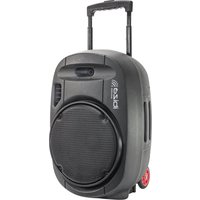
PORT15UHF-MKII-TWS - Portable speaker IBIZA SOUND - Free user manual and instructions
Find the device manual for free PORT15UHF-MKII-TWS IBIZA SOUND in PDF.


| Product Type | Portable Audio Speaker |
| Brand | Ibiza Sound |
| Model | PORT15UHF-MKII-TWS |
| Speakers | Boomer 15" (38 cm) + 1" (25 mm) Compression Tweeter |
| Sensitivity | 101 dB ± 2 dB |
| Max SPL | 115 dB |
| Impedance | 4 ohms |
| Frequency Response | 40 Hz - 20 kHz |
| Built-in Battery | 12 V / 7.2 Ah (Lead-acid) |
| Power Supply | 15 V / 4 A AC Adapter (included) |
| USB/SD Playback Formats | MP3, WMA, WAV (FAT32/exFAT) |
| Bluetooth | Frequency 2402-2480 MHz, max power 3.29 dBm |
| Included Wireless Microphones | Handheld mic 863 MHz + headset mic 865 MHz with belt pack transmitter |
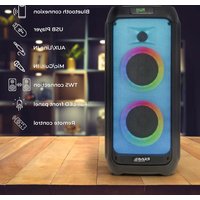
| Main Functions | USB/SD player, Bluetooth, TWS, recording, VOX, equalizer, wired mic/guitar inputs, line inputs (RCA and AUX 3.5 mm), mix output |
| Remote Control | Yes (CR2025 battery included) |
| Dimensions | 440 x 400 x 690 mm |
| Net Weight | 18.5 kg |
| Usage | Indoor only (dry and closed room) |
| Maintenance and Cleaning | Disconnect before cleaning. Use a clean, dry cloth. Do not use harsh cleaning products. |
| Available Spare Parts | Battery (BAT-PORT7.2A), handheld mic (PORTUHF-HAND), headset mic (PORTUHF-HEAD2) |
| Repairability | Opening the housing exposes live components. Repairs must be carried out by a specialist. |
| Safety | Do not expose to water, heat sources, open flames. Keep out of reach of children. Use only the supplied adapter. |
Frequently Asked Questions - PORT15UHF-MKII-TWS IBIZA SOUND
User questions about PORT15UHF-MKII-TWS IBIZA SOUND
0 question about this device. Answer the ones you know or ask your own.
Ask a new question about this device
Download the instructions for your Portable speaker in PDF format for free! Find your manual PORT15UHF-MKII-TWS - IBIZA SOUND and take your electronic device back in hand. On this page are published all the documents necessary for the use of your device. PORT15UHF-MKII-TWS by IBIZA SOUND.
USER MANUAL PORT15UHF-MKII-TWS IBIZA SOUND
natural_image
Black portable air purifier device with attached electronic components and a small device (no visible text or symbols)OWNER'S MANUAL
IMPORTANT SAFETY INSTRUCTIONS AND DANGER WARNINGS
EXPLANATION OF SIGNS

Accordance with the requirements of UK standard

The product is for indoor use only
IMPORTANT SAFETY INSTRUCTIONS AND DANGER WARNINGS
- Please read this manual carefully and keep it for future reference.
- All safety instructions and warnings must be observed. They are part of the manual and must be kept with the manual.
- Failure to comply with these instructions will invalidate any warranty claim. We accept no liability for any damage resulting from this.
- We accept no liability for personal injury or damage to property caused by improper handling or failure to comply with the safety instructions. In such cases, any warranty claims will be void.
- Unauthorised conversions and/or modifications to the unit are not permitted for safety and licensing (CE) reasons.
- The unit is approved for use in dry, enclosed spaces only. Do not operate the unit near water, e.g. in bathrooms or near swimming pools.
- The unit must not be exposed to extreme temperatures (< +5^ / > +35^) during operation.
- Do not expose the unit to strong vibrations or heavy mechanical loads.
- Do not expose the unit to excessive moisture (e.g. dripping or splashing). Do not place objects filled with liquids, such as glasses or vases, on top of or next to the appliance. They could fall over and cause water to spill into the machine. Never spill liquids over the appliance. Do not place small objects, such as coins or paper clips, on the machine as they may fall into the machine. There is a high risk of fire or life-threatening electric shock! If any liquid or objects fall into the apparatus, unplug the apparatus immediately from the wall outlet and contact an authorized service centre.
• Always unplug the power cord from the wall outlet
a) before cleaning the machine.
b) During thunderstorms.
c) If you are not going to use the appliance for a long time (>1 week). - Keep electrical appliances out of the reach of children. Be especially careful when children are present. Children are not aware of the dangers of improper handling of electrical appli-
ances. Children may try to insert objects into the appliance. There is a life-threatening risk of electric shock.
- Do not leave the appliance unattended while it is in use.
- Never place the appliance on an unstable or moving surface. The unit may fall, causing injury to persons or damage to the unit.
- When using a rack, ensure that it is in a stable position and that it is securely transported. Installing on uneven, sloping surfaces or stopping the rack abruptly during transport may cause the rack to overturn or equipment to fall from or out of the rack and injure persons.
- Live components may be exposed by opening covers or removing components (unless this can be done without tools). Contact points may also be live. If the equipment must be opened to calibrate, service, repair or replace components or subassemblies, it must first be disconnected from all voltage sources. If it is necessary to leave the equipment open and live during maintenance or repair, this work may only be carried out by a specialist who is familiar with the risks involved and the relevant regulations.
- Never connect the appliance directly after moving it from a cold room to a warm room. The condensation that forms could destroy the unit or cause an electric shock. Allow the unit to reach room temperature before connecting it. Wait until the condensation has evaporated. This may take several hours.
- Do not place naked flames, such as lighted candles, on or near the unit.
- Do not place the unit on soft surfaces such as carpets or beds. Do not cover the ventilation openings of the unit. Do not obstruct the air circulation with objects such as magazines, tablecloths or curtains. This will prevent heat from being dissipated from the unit and may result in overheating.
- Only use the appliance in a moderate climate, not in tropical environments.
FOR ALL EU COUNTRIES
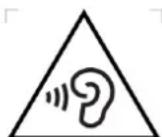
For products that include sound output
Preventing hearing loss
CAUTION: Permanent hearing loss may occur if earphones or headphones are used at high vo-
lume for prolonged periods.
For France, the products have been tested to comply with the sound pressure level requirements of the applicable NF EN 50332 L.5232-1 standard.
NOTE: To avoid possible hearing damage, do not listen at high volume for long periods of time.
WEEE NOTICE
The Directive on Waste Electrical and Electronic Equipment (WEEE), which came into force as European law on 14/02/2014, has resulted in a major change in the treatment of electrical equipment at the end of its life.
The main objective of this Directive
is to prevent waste of electrical and electronic equipment (WEEE) and to promote the reuse, recycling and other forms of recovery of such waste in order to reduce its disposal.
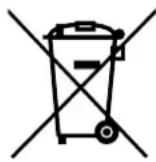
The WEEE logo on the product or on its box indicating collection of electrical and electronic equipment consists of the crossed out wheeled bin, as shown below.
This product must not be disposed of with your other household waste. It is your responsibility to dispose of your waste electrical and electronic equipment at a designated collection point for recycling to help conserve natural resources. To find out more about correct recycling and collection points, please contact your local authority, household waste disposal service or the shop where you purchased the product.
ROHS COMPLIANCE
This product complies with Directive 2011/65/EU of the European Parliament and of the Council of 8 June 2011 on the restriction of the use of certain hazardous substances in electrical and electronic equipment.
FOR ALL PRODUCTS EXCEPT THOSE WITH WIRELESS OPERATION
LOTRONIC International hereby declares that this equipment is in compliance with EMC 2014/30/EU Directive, LVD 2014/35/EU Directive. The declaration of conformity may be consulted in the support section of our Web Site, accessible from www.lotronic.net.
FOR ALL PRODUCTS
LOTRONIC International hereby declares that this equipment is in compliance with the essential requirements and other relevant provisions of Directive 2014/53/EU. The declaration of conformity may be consulted in the support section of our Web Site, accessible from www.lotronic.net.
RECOMMENDATIONS FOR BATTERIES

This symbol indicates that used batteries should not be disposed of with household waste but deposed correctly in accordance our local regulations.
Batteries shall not be exposed to excessive heat such as sunshine, fire or the like.
When the internal batteries are not to be used, remove them to avoid damage caused by battery leakage or corrosion.
ATTENTION: Danger of explosion if battery is incorrectly placed. Only replace by the same or equivalent type.
WARNING: Do not swallow the battery. Danger of chemical burns. Keep new and old batteries out of the reach of children.
If the battery compartment doesn't close properly, stop using the product and keep it out of the reach of children.
If you are in doubt whether the batteries have been swallowed or introduced into any other part of the body, contact immediately a doctor.
WHAT'S IN THE BOX
- Main unit
• Handheld UHF mic (863MHz) - Headset mic with belt clip transmitter (865MHz)
- Remote control
- Protection cover
- Power cord
- Quick Start Guide
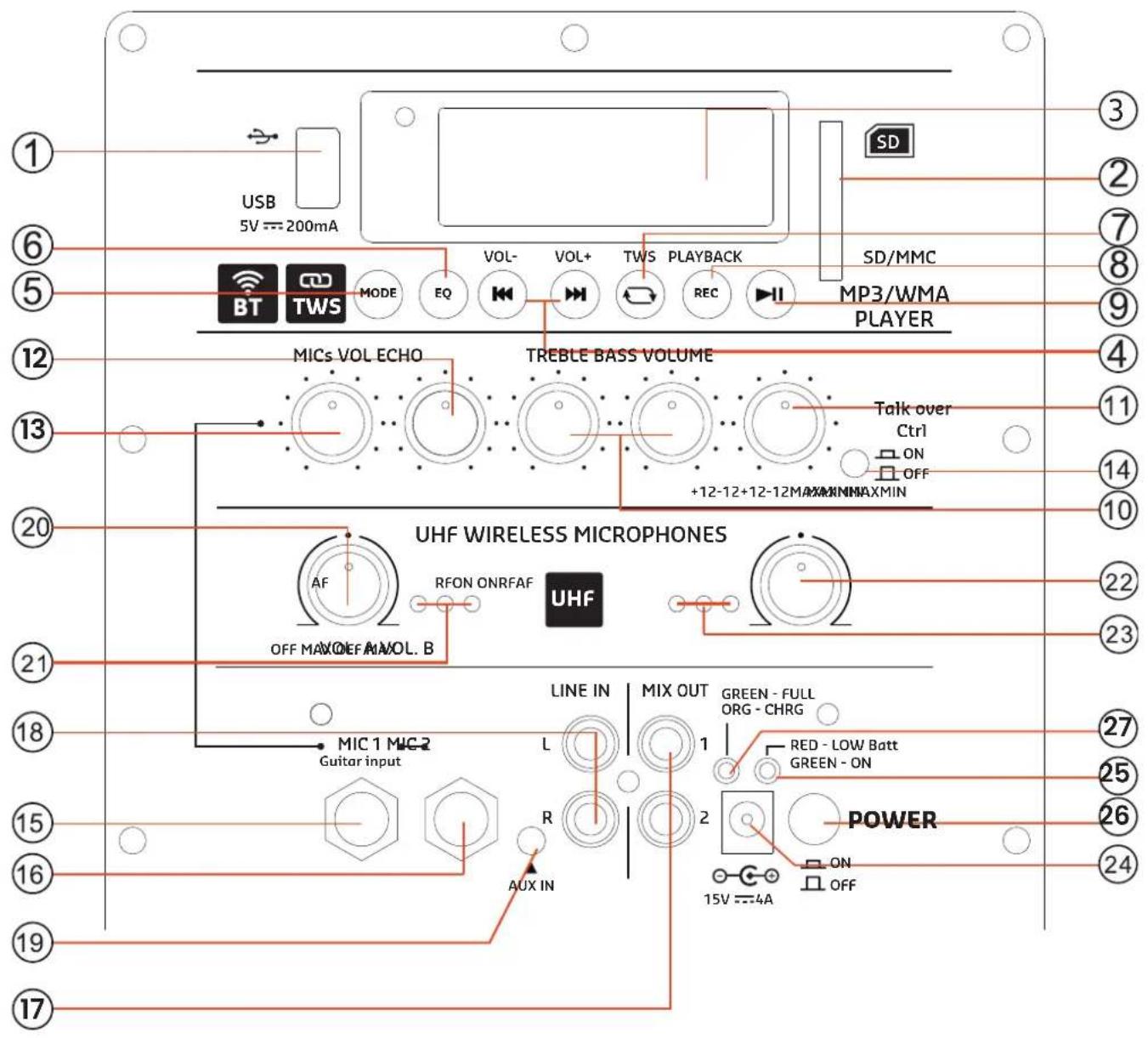
PRODUCT OVERVIEW / REAR PANEL
1. USB input
Connect a USB storage device that contains MP3 files (format : exFat32).
2. SD card slot
Connect an SD card that contains MP3 files (format: exFat32).
3. Screen
Shows information about the current mode, track, timer, equalizer, number of tracks on the device, etc.
MULTIMEDIA CONTROLS
4. Next/Previous
Skip to the next/previous track of the USB/SD player. Long press to increase/decrease the volume of the USB/SD player.
5. Mode
Select from Bluetooth (standard), USB, SD, Line (toggles only among active inputs).
Long press to enter the menu.
Navigate through the menu using Previous/Next buttons.
Use Play to enter a menu.
Use Mode to exit.
Main menu: MUSIC - AUDIO INPUT - SET
MUSIC:
Cyclic mode: All, folder, single, random.
EQ mode: Normal, Pop, Rock, Classic, soft, subwoofer.
File browsing: Browse through folders and files..
AUDIO INPUT: change the source.
SET:
Display On Time : 0-240s.
Language : CN, EN, FR, DE, ES.
Tools:PowerOff:0-90min.
Keypad Tones : ON/OFF.
Contrast: 0-20 (default is 10).
Firmware version : shows version.
Factory settings : reset to default.
6. EQ button
Press to cycle through Normal, Pop, Rock, Classic, soft, subwoofer.
7. TWS button
ress to switch the unit into TWS pairing mode to connect to a 2nd PORT-UHF-MKII box
8. REC button
Starts/stops microphone recording when a USB/SD device is connected. Press and hold to delete the file. Use the PLAY/PAUSE button to pause and resume recording.
9. Play/Pause
Press to Play/Pause/Resume a track of the USB/SD player.
SOUND CONTROLS
10. Treble / Bass control
Adjusts the treble & bass levels.
11. Master volume control
Controls the overall volume of the USB/SD player and UHF mics.
12. Echo control
Adjusts the echo effect of the microphones.
13. MIC VOLUME
Adjusts the volume of the wired MIC inputs.
14. Voice control (VOX/vcv)
ON/OFF switch. When this is set to ON, the volume of the music will decrease when someone speaks into the microphone.
INPUTS / OUTPUTS
15. MIC1/Guitar input
Input for wired microphone 1 or guitar: 1/4" mono input jack for connecting a wired microphone or guitar.
16. MIC2 input
Input for wired microphone 2: 1/4" mono input for another wired microphone.
17. MIX OUT / RCA OUT
Connect the left and right channel outputs to the input of a mixer, amplifier or second speaker.
18. LINE IN / RCA IN
Connect to an external audio device using an RCA left and right audio cable (not supplied).
19. AUX IN / 3.5mm jack
Connect to an external audio device using a 3.5mm audio cable (not supplied).
WIRELESS SECTION
20. MIC ON/OFF/Volume control A (863MHz handheld mic)
Rotate to switch on the handheld mic and adjust the volume.
21. RF MIC channel A LED
Glows red when paired with the 863MHz microphone.
Mic Channel A ON led
Lights up in blue when the handheld mic is switched on.
AF MIC channel A LED
Lights up in green when you talk into the handheld mic.
22. MIC ON/OFF/Volume control B (865MHz headset mic)
Rotate to switch on the headset mic and adjust the volume
23. RF. MIC channel B LED
Glows red when paired with the 865MHz headset microphone.
Mic Channel B ON led
Lights up in blue when the headset mic is switched on.
AF MIC channel B LED
Lights up in green when you talk into the headset mic
ELECTRICAL CONNECTIONS
24. DC power input
Connect the supplied 15V=4A mains adaptor.
25. Power LED
Glows green when the speaker is switched on. Glows red when the battery is low.
26. Main power switch
Press to the ON position to turn on the speaker.
27. Charge LED indicator
Glows red when the battery needs charging. Glows orange when the battery is being charged. Glows green when the battery is fully charged.
POWER SUPPLY: BATTERY & AC OPERATION
FIRST CHARGE
Before using this system for the first time, insert the supplied mains adaptor into the 15V4A socket and plug the other end into a suitable wall outlet. Make sure the "CHARGE INDICATOR" is lit for 14 hours continuously.
Please charge the battery when the CHARGE indicator (25) lights up in red.
Please charge the battery regularly after each use, don't wait until it is discharged!
Plug one end of the supplied adaptor into the socket (24) on the rear panel and the other end into a suitable wall socket.
During charging, the LED indicator will be orange. It will turn green when the battery is fully charged.
NOTE: Please turn off the power switch when you have finished using the system.
IMPORTANT NOTE ON LEAD-ACID BATTERIES
- BEFORE using the unit for the first time, fully charge the battery without interruption.
2. Charge the battery regularly after each use. Don't wait until the battery is flat!
-
DON'T allow the battery to become completely discharged, as this will cause it to lose 20% of its capacity or even be completely damaged! If the voltage is too low, the internal circuits will not be powered and it will be impossible to recharge the battery!
-
If you don't use the unit for a long time, it is recommended to charge it once a month.
The life of the battery depends on following these recommendations.
** BATTERIES ARE NOT COVERED BY THE WARRANTY **
WE CANNOT BE HELD RESPONSIBLE FOR DAMAGED BATTERIES FURTHER TO THE NON-OBSERVANCE OF THESE BASIC RULES.
REMOTE CONTROL
INSTALLING THE BATTERIES IN THE REMOTE CONTROL
The battery of the remote (CR2025) is included and in place, simply pull the plastic strip out for the remote to work.
REMOTE CONTROL FOR USB/SD PLAYER
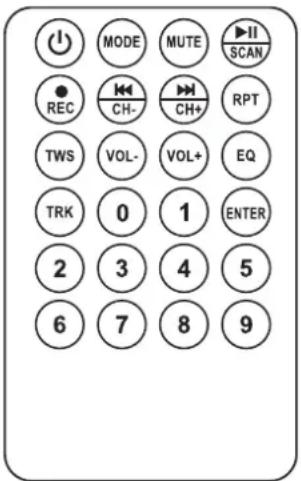
Please note that the remote control controls only the Multimedia player, not the other input sources of the unit. If the volume is set to minimum on the multimedia player, there will be no sound output, even if the Master volume control of the speaker box is set to maximum.
ON/OFF: Turns the player on and off.
MODE: Press until the desired operating mode is displayed
MUTE: Mutes or resumes the volume
▶ Play/Pause: Press to play/pause/resume a track on the USB/SD player.
REC: Press to start/stop recording when a USB/SD device is connected
«/CH-: Return to the previous track.
▶▶ /CH+: Skip to the next track
RPT: Press to change repeat mode: one, all tracks, no repeat.
TWS: Press to switch the unit into TWS pairing mode to connect to a 2. PORT-UHF-MKII box
VOL-: Decreases the volume of the multimedia player.
VOL+: Increases the volume of the USB/SD player
EQ: Select among several sound modes (Rock, Pop, Jazz, Classic, Flat)
TRK: Track selection. Press the TRK button, select a track via the number keys (0-9) and press ENTER to confirm
Number buttons: Press the number of the desired track
ENTER: Once you have made your selection, press ENTER to confirm.
USING YOUR PORT
HOW TO PAIR BLUETOOTH WITH DEVICES
Activate the Bluetooth function on your BT device, search for "IBIZA-PORT" in the list of found devices and connect to the speaker.
Once connected to a device in BT, you can use the MODE button to switch from Line to BT. The MODE button only works between active and connected sources.
Play/pause the music on your connected BT device. We recommend that you set the volume of the paired device to maximum and adjust it on the speaker itself.
TWS CONNECTION
This function allows to pair 2 units of the PORT-UHF-MKII range with 1 single Bluetooth source to enjoy wireless stereo sound.
Turn off the Bluetooth feature on your smartphone. Switch on both speakers and keep the "TWS" button (7) on one of the speakers (master speaker) pressed for a few seconds. If the connection was successful, you will hear the message "left channel" from the master speaker, and "right channel" from the slave speaker.
Activate the Bluetooth function of your smartphone and select IBIZA-PORT in the list of found devices. Now the master speaker is connected to your Bluetooth source. After that, you can use any mode to play music in TWS mode.
USB/SD PLAYER
Insert a USB memory stick (1) or SD card (2) into the appropriate socket.
The USB key must be formatted in exFat or FAT32 to be recognised. If the high-capacity storage device does not work on the speaker, use a lower-capacity storage device.
The unit will automatically switch to USB/SD player when a device is detected and start reading. You can switch between connected devices and inputs using the MODE button (5).
Select a track using the ◀ or ▶ buttons on the speaker or remote control, and press ▶ (9) to pause or resume playback.
To adjust the volume of the USB/SD Speaker, there are 2 separate volumes:
- Master volume of the speaker.
- USB/SD volume of the player (can be increased or decreased on the speaker using the Previous/Next buttons or the remote control).
LINE IN/OUT CONNECTION (RCA)
Connect an RCA plug to the LINE IN sockets (18). If LINE is not displayed by default, press the MODE button (5) until LINE is displayed.
Adjust the line source volume control (11).
You can connect any line device (mixer, amplifier, another active speaker, TV, etc.) to this RCA input.
AUX IN CONNECTIONS (JACK3.5mm)
Connect any device with a 3.5 mm plug, such as a computer, smartphone or tablet, to play your content on the PORT.
If LINE/AUX is not displayed by default, press the MODE button (5) until LINE is displayed.
JACK 6.35 : MIC/GUITAR CONNECTION
Connect wired microphones to the 1/4" jack inputs (15 or 16) for singing or speaking, or a guitar to MIC1 (15) to play your guitar using the PORT as an amplifier.
The volume of the wired microphones and the guitar can be adjusted using the dedicated MIC volume knob (13).
MICROPHONES
A wireless hand microphone (channel A - 863MHz) and a wireless headset microphone with belt clip transmitter (channel B - 865MHz) are supplied.
Rotate the UHF ON/OFF/Volume button (20 or 22) to switch on the wireless handheld or headset mic. The ON indicator (21 or 23) will light up in blue.
Switch on the handheld microphone and/or headset microphone (ON/OFF switch on microphone or belt clip transmitter).
Adjust the volume on the loudspeaker to the desired level using the dedicated volume control. For the headset microphone, also adjust the volume on the belt clip transmitter. If either volume control is set to minimum, no sound will be output.
SINGING ALONG
If you want to sing along with the music, switch on the wireless microphone function (20 or 22) and the switch on the wireless microphone or connect a wired microphone to MIC INPUT (15 or 16). Adjust the volume of the wired microphone using the MIC VOL control (15). Adjust the volume of the wireless microphones using the buttons (20 or 22).
USING THE VOX FUNCTION (SPEECH)
When the VOX function is activated, the music level decreases when someone speaks into one of the microphones. The music level returns to normal when the user stops speaking into the microphone.
To activate this function, set the VCV switch (14) to on. To disable this function, set the switch to off.
RECORD FUNCTION (REC)
Please note that ONLY THE SOUND OF THE MICROPHONE(s) (wireless mics, connected wired mic(s) and/or guitar) can be recorded. You can only record on a USB or SD device.
To start recording, press the RECORD button (8) on the speaker or the RECORD button on the re-
mote control.
A file is created on your USB key or SD card (in a specific folder at the root of the USB/SD device). To stop recording, press the RECORD button again.
To listen to your recording, select the track on the SD card or USB key.
Note that you can't use the same USB/SD device to play and record at the same time.
VOLUME CONTROLS
Each input section (multimedia player, wired microphones, wireless microphones) has its own volume controls, which must be adjusted on the back of the speakers, except for the multimedia player, which can be adjusted with the remote control.
If these controls are set to minimum, there will be no sound even if the master volume is set to maximum.
Set the Master volume to an appropriate level and adjust the volume of the individual inputs using their respective volume controls.
REPLACEMENT MICROPHONES
Both wireless UHF microphones are available in both frequencies.
So, if you prefer to use 2 handheld mics or 2 headset mics, you can do so.
Please find below the order codes
- For handheld mic in 865MHz frequency, order: PORTUHF-HAND2 (code: 16-6091)
- For headset mic in 863MHz frequency, order: PORTUHF-HEAD (code: 15-6092)
CARE
Unplug the machine before cleaning. Do not use aggressive detergents. Use a clean cloth to wipe off any dust or dirt from the product. We are not liable for damage caused by incorrect handling, improper use or wear and tear. We reserve the right to make technical changes without notice.
SPECIFICATIONS
Woofer....15"/38cm
Tweeter....1"/25mm compression driver
Sensitivity 101dB±2dB
Max. SPL....115dB
Impedance....4 Ohms
Freq. range....40-20,000Hz
Built-in battery 12V/7.2Ah LEAD-ACID
Spare battery ref. ....BAT-PORT7.2A - 15-6012
USB format....FAT32
Supported format.....mp3, .wma, .wav
Bluetooth frequency.... 2402-2480MHz
BT max. RF power....3.29dBm
UHF handheld mic freq....863MHz
UHF hand mic replace ....
.PORTUHF-HAND-15-6090
UHF headset mic freq....865MHz
UHF head mic replace....
.PORTUHF-HEAD2 - 15-6093
UHF MIC battery needed /mic.....2 x AA battery
Max. RF power handheld mic 8.37dBm
Max. RF power headset mic....8.16dBm
Remote control battery needed....CR2025
DC power supply 15V=4A
Product dimensions....440 x 400 x 690mm
Net Weight....18.5kg
TROUBLESHOOTING
SYSTEM
The speaker does not turn on
- The battery is empty and the AC adaptor is not connected properly.
BATTERY
LED is still red
- Check that the mains connector is inserted properly.
Battery is still low after hours of charging
- A battery that is too old or hasn't been charged according to the battery warnings may not be able to be charged. The speaker needs a new battery.
SOUND
No sound when turned on
- Connect a device to the speaker (USB/SD, AUX IN jack 3.5mm, RCA) and make sure it's playing.
- Check the volume control on the speaker and the volume of the connected source device.
Volume is very low
- Check the volume control on the speaker and the volume of the connected source device.
- If you're playing a USB/SD device, also check the volume of the internal player by pressing and holding the Next button.
USB/SD PLAYER
USB key/SD card doesn't read music
- Check that the USB device is formatted in ex-FAT/FAT32.
- Check that the USB/SD device is correctly inserted.
- Check the main volume (11) and the volume of the MP3 player (4 - long press).
- The USB input doesn't work to connect another device with USB (such as a computer), to play music with USB, please insert a USB stick.
BLUETOOTH
BT disconnect
- Try moving the device you want to connect closer to the speaker.
PORT not found by BT device
- Check the BT function of your device.
- Check that no other device is currently connected to the speaker.
MICROPHONE
Microphone does not connect
- Check that the UHF ON/OFF/Volume button on the speaker is not in OFF position and the ON LED glows blue.
- Check that the microphone is switched on.
- Replace the current battery in the microphone.
REMOTE CONTROL
Not working
- Check the battery of the remote (CR2025)
- Try and aim directly at the IR receiver positioned on the rear panel of the speaker.
• Note that the remote only controls the USB/SD player
MISSING ITEMS
Some items are missing
- Check all openings of the box, some items are placed in the foam at the top and bottom of the product/box.
- Check that all components, foam and protective materials have been removed from the box.
CONSIGNES DE SECURITE IMPORTANTES
SIGNIFICATION DES SYMBOLES

Conforme aux normes CE

FONCTION VOX (DISCOURS)
PORTUHF-HAND2 (code: 16-6091)
PORTUHF-HEAD (code: 15-6092)
ENTRETIEN
Piles/micro....2 x LR6 (AA)
Puissance RF max. micro main....8.37dBm
PORTUHF-HAND2 (Code: 16-6091)
PORTUHF-HEAD (Code: 15-6092)
TECHNISCHE DATEN
Tieftöner....15"/38cm
UHF Headset Mikro Freq 865MHz
UHF Ersatz-Headset.....PORTUHF-HEAD2 - 15-6093
UHF Mikrofonbatterie/Mikro....2 x AA
Max. RF Leistung Handmikro 8.37dBm
Max. RF Leistung Headset-Mikro 8.16dBm
Taal: CN, EN, FR, DE, ES.
Tools: Uitschakelen : 0-90min.
Mic kanaal A AAN led
PORTUHF-HAND2 (code: 16-6091
PORTUHF-HEAD (code: 15-6092)
REINIGING
Lingua: CN, EN, FR, DE, ES.
Strumenti: Spegnimento : 0-90 min.
Toni tastiera: ON/OFF.
CONNESSIONE LINE IN/OUT (RCA)
FÖR ALLA PRODUKTER MED TRÅDLÖS DRIFT
Språk: CN, EN, FR, DE, ES.
Verktyg: Avstängning : 0-90min.
Knappljud: PÅ/AV.
Firmwareversion: visar version.
Mic Channel A ON lysdiod
Mic Channel B ON lysdiod
NÄR SKA PORTHÖGTALAREN LADDAS?
PORTUHF-HAND2 (code: 16-6091)
PORTUHF-HEAD (code: 15-6092)
VÅRD
Idioma: CN, EN, FR, DE, ES.
- Interruptor principal
ZŁĄCZE LINE IN/OUT (RCA)
Dil: CN, EN, FR, DE, ES.
The image contains a graphical representation of rectangular blocks arranged in a row. There is no textual content to extract or process according to the OCR guidelines.
Limba: CN, EN, FR, DE, ES.
Instrumente: Oprire: 0-90 min.
CONEXIUNE LINE IN/OUT (RCA)
CONFORMIDAD CON LA ROHS
Idioma: CN, EN, FR, DE, ES.
Both wireless UHF microphones are available in both frequencies.
So, if you prefer to use 2 handheld mics or 2 headset mics, you can do so.
Please find below the order codes
For handheld mic in 865MHz frequency, order:
PORTUHF-HAND2 (code: 16-6091)
For headset mic in 863MHz frequency, order:
PORTUHF-HEAD (code: 15-6092)
MANTENIMIENTO
EU Declaration of Conformity
Hereby we, LOTRONIC SA
Avenue Zénobe Gramme, 9
1480 SAINTES
Belgium
+32.2.390.91.91
Certify and declare under our sole responsibility that the following product:

SOUND

Trade name:
Product name: SPEAKER WITH BLUETOOTH, USB and SD
Type or model:
PORT12UHF-BT-MKII & PORT15UHF-BT-MKII
Conforms with the essential requirements of
RED directive 2014/53/EU, ErP directive 2009/125/EC, Commission Regulation (EC) No 278/2009, 2011/65/EU RoHS directive and the Commission Delegated Directive (EU) 2015/863 and REACH 1907/2006.
Based on the following specifications applied:
EN 62368-1:2014+A11:2017
EN 62479 : 2010
EN 55032 : 2015
EN 55035 : 2017
Draft ETSI EN 301 489-1 V2.2.0 (2017-03)
Draft ETSI EN 301 489-17 V3.2.0 (2017-03)
Draft ETSI EN 300 328 V2.1.1 (2016-11)
EN 61000-3-2 : 2014
EN 61000-3-3 : 2013
IEC 62321-3-1 : 2013
Place and date of issue: Saintes (Belgium), on 21/12/2022
Manuel De Sousa
Quality manager
CE
Marque :

Any questions or problems?
Contact us
IBIZALIGHTSOUND
Follow us on Instagram

Join us on facebook
Assembled in PRC • Designed by LOTRONIC S.A. • Rue F. Englert 17 • Bt 2 • 1480 Tubize • Belgium info@lotronic.net
https://ibizashop.eu/
©Copyright LOTRONIC 2024
- IMPORTANT SAFETY INSTRUCTIONS AND DANGER WARNINGS
- EXPLANATION OF SIGNS
- FOR ALL EU COUNTRIES
- WEEE NOTICE
- ROHS COMPLIANCE
- FOR ALL PRODUCTS EXCEPT THOSE WITH WIRELESS OPERATION
- FOR ALL PRODUCTS
- RECOMMENDATIONS FOR BATTERIES
- WHAT'S IN THE BOX
- PRODUCT OVERVIEW / REAR PANEL
- USB input
- SD card slot
- Screen
- MULTIMEDIA CONTROLS
- Next/Previous
- Mode
- Main menu: MUSIC - AUDIO INPUT - SET
- MUSIC:
- SET:
- EQ button
- TWS button
- REC button
- Play/Pause
- SOUND CONTROLS
- Treble / Bass control
- Master volume control
- Echo control
- MIC VOLUME
- Voice control (VOX/vcv)
- INPUTS / OUTPUTS
- MIC1/Guitar input
- MIC2 input
- MIX OUT / RCA OUT
- LINE IN / RCA IN
- AUX IN / 3.5mm jack
- WIRELESS SECTION
- MIC ON/OFF/Volume control A (863MHz handheld mic)
- RF MIC channel A LED
- Mic Channel A ON led
- AF MIC channel A LED
- MIC ON/OFF/Volume control B (865MHz headset mic)
- RF. MIC channel B LED
- Mic Channel B ON led
- AF MIC channel B LED
- ELECTRICAL CONNECTIONS
- DC power input
- Power LED
- Main power switch
- Charge LED indicator
- POWER SUPPLY: BATTERY & AC OPERATION
- FIRST CHARGE
- Please charge the battery regularly after each use, don't wait until it is discharged!
- IMPORTANT NOTE ON LEAD-ACID BATTERIES
- Charge the battery regularly after each use. Don't wait until the battery is flat!
- REMOTE CONTROL
- INSTALLING THE BATTERIES IN THE REMOTE CONTROL
- USING YOUR PORT
- HOW TO PAIR BLUETOOTH WITH DEVICES
- TWS CONNECTION
- USB/SD PLAYER
- LINE IN/OUT CONNECTION (RCA)
- AUX IN CONNECTIONS (JACK3.5mm)
- JACK 6.35 : MIC/GUITAR CONNECTION
- MICROPHONES
- SINGING ALONG
- USING THE VOX FUNCTION (SPEECH)
- RECORD FUNCTION (REC)
- VOLUME CONTROLS
- REPLACEMENT MICROPHONES
- CARE
- SPECIFICATIONS
- TROUBLESHOOTING
- SYSTEM
- The speaker does not turn on
- BATTERY
- LED is still red
- Battery is still low after hours of charging
- SOUND
- No sound when turned on
- Volume is very low
- USB key/SD card doesn't read music
- BLUETOOTH
- BT disconnect
- PORT not found by BT device
- MICROPHONE
- Microphone does not connect
- Not working
- MISSING ITEMS
- Some items are missing
- CONSIGNES DE SECURITE IMPORTANTES
- SIGNIFICATION DES SYMBOLES
- FONCTION VOX (DISCOURS)
- ENTRETIEN
- PORTUHF-HAND2 (Code: 16-6091)
- TECHNISCHE DATEN
- Mic kanaal A AAN led
- REINIGING
- CONNESSIONE LINE IN/OUT (RCA)
- FÖR ALLA PRODUKTER MED TRÅDLÖS DRIFT
- Mic Channel A ON lysdiod
- Mic Channel B ON lysdiod
- NÄR SKA PORTHÖGTALAREN LADDAS?
- VÅRD
- ZŁĄCZE LINE IN/OUT (RCA)
- The image contains a graphical representation of rectangular blocks arranged in a row. There is no textual content to extract or process according to the OCR guidelines.
- CONEXIUNE LINE IN/OUT (RCA)
- CONFORMIDAD CON LA ROHS
- MANTENIMIENTO
- EU Declaration of Conformity
- CE
Brand : IBIZA SOUND
Model : PORT15UHF-MKII-TWS
Category : Portable speaker