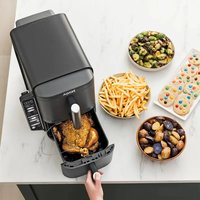
Double Stack XL SL451EU - Deep fryer NINJA - Free user manual and instructions
Find the device manual for free Double Stack XL SL451EU NINJA in PDF.


| Product Type | Oil-free Fryer (Air Fryer) |
| Brand | Ninja |
| Model | Double Stack XL SL451EU |
| Power Supply | 220-240 V~, 50-60 Hz |
| Power | 2,470 W |
| Number of Compartments | 2 independent drawers (DualZone) |
| Cooking Modes | Air Fry, Max Crisp, Bake, Roast, Reheat, Dehydrate |
| Special Functions | Double Stack Pro, SYNC (synchronization), MATCH (duplication), cooking probe |
| Temperature Range | From 50°C (dehydration) to 240°C (Max Crisp) |
| Timer | Up to 12 hours (depending on mode) |
| Indicative Capacity | 4 foods simultaneously (2 x 2 levels with stackable racks) |
| Included Accessories | 2 non-stick drawers, 2 non-stick baking trays, 2 stackable metal racks, digital probe |
| Cleaning drawers, trays and racks | Dishwasher safe (hand washing recommended) |
| Cleaning main unit | Wipe with a damp cloth, do not immerse |
| Cleaning probe | Hand wash only, do not immerse |
| Safety | Automatic shut-off, hot surfaces indicated, drawer lock during operation |
| Commercial Warranty | 2 years (subject to registration within 28 days) |
| Customer Service | +33 800 908874 (toll-free) |
| Spare Parts | Available at ninjakitchen.eu |
Frequently Asked Questions - Double Stack XL SL451EU NINJA
User questions about Double Stack XL SL451EU NINJA
0 question about this device. Answer the ones you know or ask your own.
Ask a new question about this device
Download the instructions for your Deep fryer in PDF format for free! Find your manual Double Stack XL SL451EU - NINJA and take your electronic device back in hand. On this page are published all the documents necessary for the use of your device. Double Stack XL SL451EU by NINJA.
USER MANUAL Double Stack XL SL451EU NINJA
natural_image
Exterior view of a Ninja air fryer with control panel and digital display (no text or symbols on main body)Air fry (airfrying)....14
Roast (stegning)....16
Reheat (genopvarmning) 17
Dehydrate (dehydrering)....17
ninjakitchen.eu/register-guarantee

24 25 ninjakitchen.euninjakitchen.eu
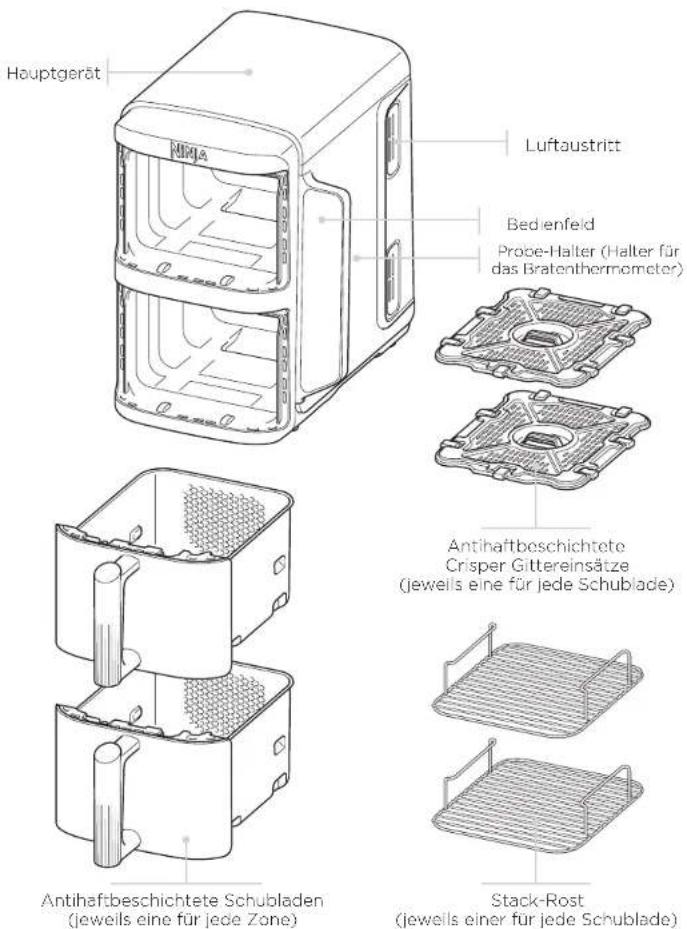
BESTANDTEILE
for purchasing the Ninja Double Stack XL 2-Drawer Air Fryer

REGISTER YOUR PURCHASE

ninjakitchen.eu/register-guarantee

Scan QR code using mobile device
RECORD THIS INFORMATION
Model Number:
Serial Number:
Date of Purchase:
(Keep receipt)
Store of Purchase:
TIP: You can find the model and serial numbers on the QR code label on the back of the unit by the power cord.
TECHNICAL SPECIFICATIONS
Voltage: 220-240V-, 50-60Hz
Watts: 2470W
CONTENTS
Product Registration 43
Important Safeguards 44
Parts 46
Getting to Know Your Air Fryer 47
Function Buttons 47
Operating Buttons 47
Before First Use 47
Using the Ninja Probe....48
How to correctly insert the probe....50
Using Your Air Fryer....52
Cooking with Double Stack Pro. 52
Cooking with DualZone Technology 53
Cooking in a single zone....54
Air Fry 54
Max Crisp 55 Bake 55 Roast 56 Reheat 57 Dehydrate 57
Cleaning & Maintenance....58
Helpful Tips 58
Troubleshooting Guide .... 59
PRODUCT REGISTRATION
Please visit ninjakitchen.eu/register-guarantee to register your new Ninja product within 28 days of purchase. You will be asked to provide the store name, date of purchase, and model number along with your name and address.
The registration will enable us to contact you in the unlikely event of a product safety notification.
IMPORTANT SAFEGUARDS
HOUSEHOLD USE ONLY
Read all instructions before using your Ninja Double Stack XL 2-Drawer Air Fryer.
When using electrical appliance, basic safety precautions should always be followed, including the following:
⚠️WARNINGS
1 This appliance can be used by persons with reduced physical, sensory or mental capabilities or lack of experience and knowledge if they have been given supervision or instruction concerning use of the appliance in a safe way and understand the hazards involved.
2 Keep the appliance and its cord out of reach of children. DO NOT allow the appliance to be used by children. Close supervision is necessary when used near children.
3 Children should not play with the appliance.
4 DO NOT place or store anything on top of product when in use.
5 To prevent fire, DO NOT place appliance on or near a gas or electric hob, or in a heated oven.
6 NEVER use electrical socket below counter.
7 NEVER connect this appliance to an external timer switch or separate remote-control system.
8 DO NOT use an extension cord. A short power-supply cord is used to reduce the risk of children less than 8 years grabbing the cord or becoming entangled and to reduce the risk of people tripping over a longer cord.
9 To protect against electrical shock DO NOT immerse cord, plugs, or main unit housing in water or other liquid. Cook only in the drawer provided.
10 Regularly inspect the appliance and power cord. DO NOT use the appliance if there is damage to the power cord or plug, if the appliance malfunctions or has been damaged in any way, immediately stop use and call Customer Service.
11 ALWAYS ensure the appliance is properly assembled before use.
12 When using this appliance, provide at least 15cm of space above and on all sides for adequate air circulation.
13 DO NOT cover the air intake vent or air outlet while unit is operating. Doing so will prevent even cooking and may damage the unit or cause it to overheat.
14 Before placing removable drawer into the main unit, ensure drawer and unit are clean and dry by wiping with a soft cloth.
15 This appliance is for household use only. DO NOT use this appliance for anything other than its intended use. DO NOT use in moving vehicles or boats. DO NOT use outdoors. Misuse may cause injury.
16 Intended for worktop use only. Ensure the surface is level, clean and dry. DO NOT move the appliance when in use.
17 DO NOT place the appliance near the edge of a worktop during operation.
18 DO NOT use accessory attachments not recommended or sold by SharkNinja. Do not place accessories in a microwave, toaster oven, convection oven, or conventional oven or on a ceramic cooktop, electric coil, gas burner range or outdoor grill. The use of accessory attachments not recommended by SharkNinja may cause fire, electric shock or injuries.
19 ALWAYS ensure drawers are properly closed before operating.
20 DO NOT use the appliance without the removable drawers installed.
21 DO NOT use this appliance for deep-frying.
22 Prevent food contact with heating elements. DO NOT overfill when cooking. Overfilling may cause personal injury or property damage or affect the safe use of the appliance.
23 Socket voltages can vary, affecting the performance of your product. To prevent possible illness, use a thermometer to check that your food is cooked to the temperatures recommended.
24 Should the unit emit black smoke, unplug immediately. Wait for smoking to stop before removing any cooking accessories.
25 DO NOT touch hot surfaces. Appliance surfaces are hot during and after operation. To prevent burns or personal injury, ALWAYS use protective hot packs or insulated oven mitts and use available handles.
26 Extreme caution must be used when the appliance contains hot food. Improper use may result in personal injury.
27 Spilled food can cause serious burns. Keep appliance and cord away from children. DO NOT let cord hang over edges of tables or counters or touch hot surfaces.
28 The drawers, racks and crisper plates become extremely hot during the cooking process. Avoid physical contact while removing the drawers, racks and plates from the appliance. ALWAYS place drawers, racks and plates on a heat-resistant surface after removing. DO NOT touch accessories during or immediately after cooking.
29 DO NOT place any of the following materials in the unit: paper, cardboard, plastic, roasting bags and the like. They may cause fire.
30 Extreme caution should be exercised when using containers constructed of any materials other than metal or glass.
31 Cleaning and user maintenance should not be carried out by children.
32 To disconnect, turn off any control to OFF, then unplug from socket when not in use and before cleaning. Allow to cool before cleaning, disassembly, putting in or taking off parts and storage.
33 DO NOT clean with metal scouring pads. Pieces can break off the pad and touch electrical parts, creating the risk of electric shock.
34 Please refer to the Cleaning & Maintenance section for regular maintenance of the appliance.

Indicates to read and review instructions to understand operation and use of product.

Indicates the presence of a hazard that can cause personal injury, death or substantial property damage if the warning included with this symbol is ignored.

Take care to avoid contact with hot surface. Always use hand protection to avoid burns.

For indoor and household use only.
SAVE THESE INSTRUCTIONS
PARTS GETTING TO KNOW YOUR AIR FRYER
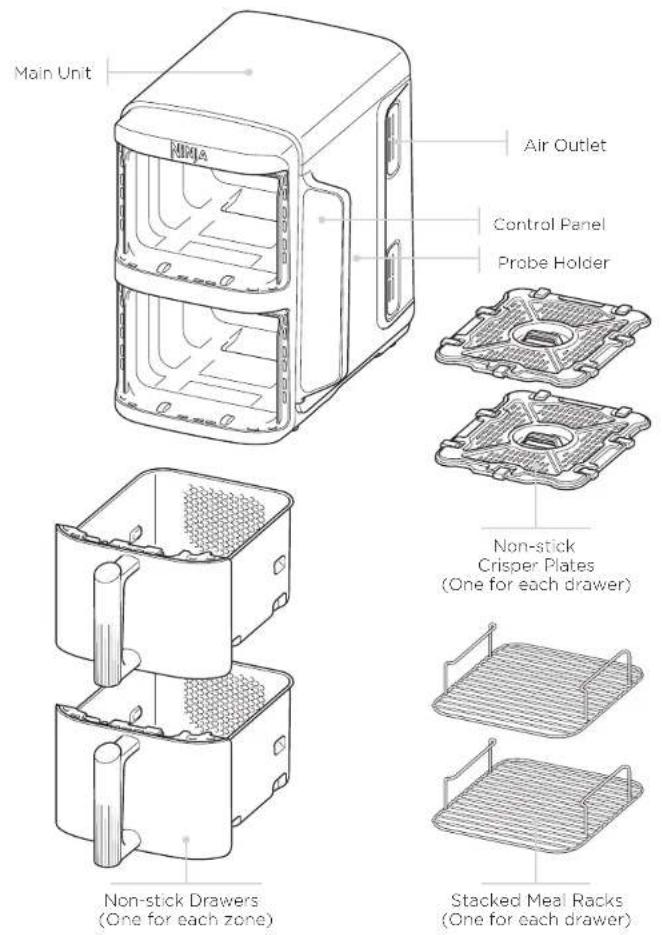
To order additional parts and accessories, visit ninjakitchen.eu.
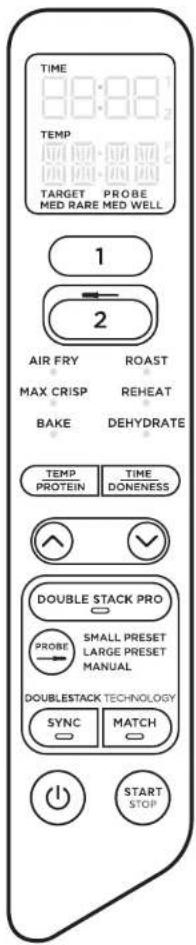
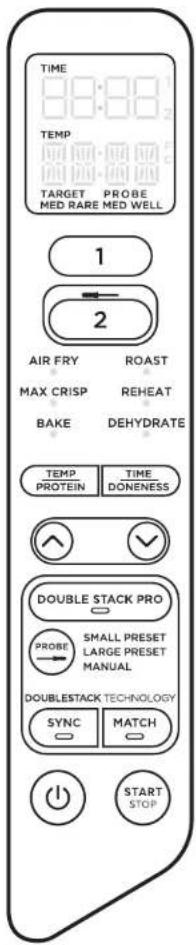
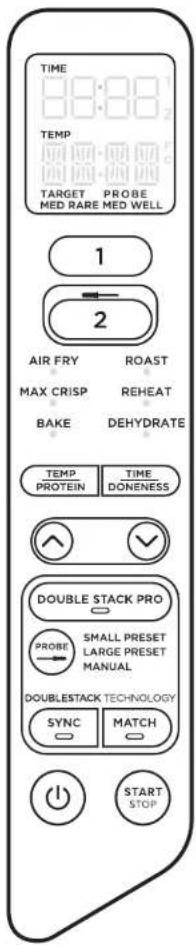
FUNCTION BUTTONS
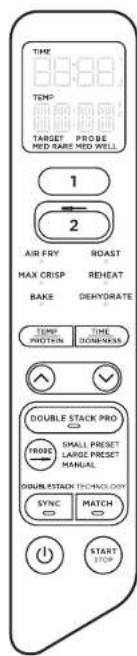
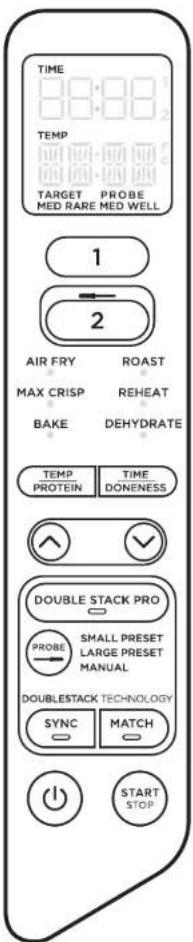
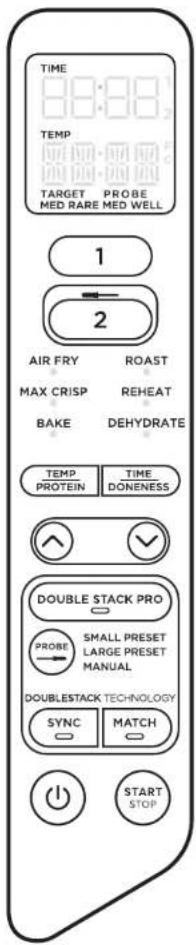
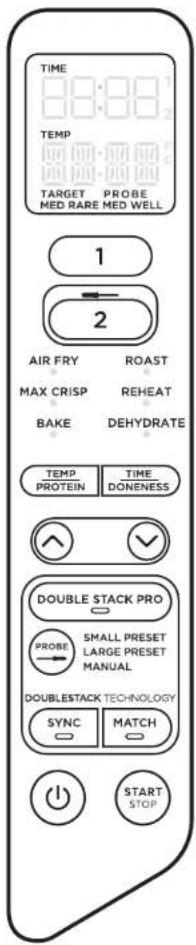
AIR FRY: Use this function to give your food crispiness and crunch with little to no oil.
MAX CRISP: Best for cooking smaller quantities of frozen food such as French fries and chicken nuggets, which may need a high temperature.
BAKE: Create decadent baked treats and desserts.
ROAST: Use the unit as an oven for tender meats and more.
REHEAT: Revive leftovers by gently warming them, leaving you with crispy results.
DEHYDRATE: Dehydrate moats, fruits and vegetables for healthy snacks.
Power button: The Ⓞ button turns the unit on and also shuts it off and stops all cooking functions.
OPERATING BUTTONS
Control the output for top zone (Zone 1).
Control the output for the bottom zone (Zone 2).
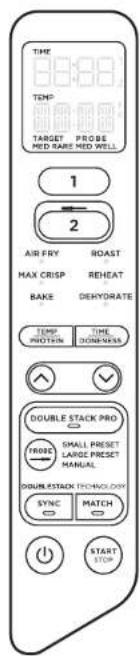
When setting time, the digital display shows HH:MM.
TEMP button: Press the TEMP button, then use the arrows to adjust the cook temperature before or during cooking.
TIME button: Press the TIME button, then use the arrows to adjust the cook time in any function before or during the cook cycle.
DOUBLE STACK PRO: Cook 4 foods at once in 2 independent air fry drawers for evenly crispy meals and snacks.
SYNC button: Automatically syncs the cook times to ensure both zones finish at the same time, even if they have different cook times.
MATCH button: Automatically matches Zone 2 settings to those of Zone 1 to cook a larger amount of the same food or cook different foods using the same function, temperature and time.
START/STOP button: Use the arrows to select desired function. Start cooking by pressing the START/STOP button.
HOLD MODE: Hold will appear on the unit while in SYNC mode. One zone will be cooking, while the other zone will be holding until the times sync together.
STANDBY MODE: After 10 minutes with no interaction with the control panel, the unit will enter standby mode.
BEFORE FIRST USE
1 Remove and discard any packaging material, promotional labels and tape from the unit.
2 Remove all accessories from the package and read this manual carefully. Please pay particular attention to operational instructions, warnings and important safeguards to avoid any injury or property damage.
3 Wash the drawers, stacked meal racks and crisper plates in hot, soapy water, then rinse and dry thoroughly. The drawers, stacked meal racks and crisper plates are the ONLY dishwasher safe parts. However to extend the life of the accessories we recommend hand-washing. NEVER clean the main unit in the dishwasher.
4 When using this appliance, provide at least 15cm of space on all sides for adequate air circulation.
USING THE NINJA PROBE
Before plugging probe into the unit, make sure the socket is free of any residue and the cord is free of knots.
NOTE: The probe is only available in Zone 2.
1 Remove the probe storage compartment located behind the control panel. Then unwind the cord from the compartment to remove the probe. Remove Zone 2 drawer (before plugging in the probe).
2 Insert the probe in protein using the guide on page 50 to ensure the probe is placed correctly.
3 Plug the probe into socket (located above Zone 2). Push firmly on the plug until it cannot go into the socket any further and then insert the drawer. You should hear and feel a click when the probe is inserted fully. Place the storage compartment back onto the back of the control panel.
NOTE: The excess probe wire can be left in the drawer.
4 Once the probe is plugged into the socket, select Zone 2 and then desired cooking function.
NOTE: Cooking temperature will automatically default based on function selection. Temperature can be adjusted based on preference or recipe Instructions. There is no temperature adjustment available on Max Crisp.
5a Use the PROBE button to select either Small or Large preset, depending on size of protein. Reference page 12 in your Quick Start Guide for guidance. Use the TEMP/PROTEIN button to cycle between the two, and the arrows to select your desired food type. Press the TIME/DONENESS button and use the arrows to set the internal outcome of your food.
5b If using the Manual button, use the recommended internal cook temperatures below.
| FOOD TYPE: | SET OUTCOME TO: |
| Fish | Medium Rare (50°C)Medium (55°C)Medium Well (60°C)Well (65°C) |
| Chicken/Turkey | Wol (75°C) |
| Pork | Medium (55°C)Medium Well (65°C)Well (70°C) |
| Beef/Lamb | Rare (50°C)Medium Rare (55°C)Medium (60°C)Medium Well (65°C)Wol (70°C) |
NOTE: Refer to the UK Food Standards Agency for recommended food safe temperatures.
NOTE: Set outcome for BEEF are lower than normal recommendations, as unit will carry-over cook 5-10°C.
6 There is no preheat needed. Once you have made your selections, press the START/STOP button to begin cooking. The screen will display the current probe temperature as well as the target temperature.
7 When cooking is complete, unit will beep. Transfer protein to a plate and allow to rest for 5 minutes before serving. This is an important step, as proteins continue to cook and retain juices after being removed from the source of heat.
NOTE: The probe will be HOT. Use either oven gloves or tongs to take the probe out of the protein.
Using SYNC with Probe:
1 Refer to steps 1-3 on page 48 for instructions on setting up the probe.
2 Press Zone 2 and select desired cooking function. Use the PROBE button to select either the Small or Large preset, depending on size of protein (refer to Quick Start Guide for guidance). Use the TEMP/PROTEIN button to cycle between the two, and the arrows to select your desired food type. Press the TIME/DONENESS button and use the arrows to set the internal outcome of your food.
3 Press Zone 1 and select desired cooking function. Set time and temperature and select SYNC. Press the START/STOP button to begin cooking.
NOTE: During the initial setup, the Zone with the shorter cook time will display HOLD. The display will then transition to showing the probe's current and target temperature in Zone 2 and progress bars in Zone 1.
4 Whilst Zone 2 continues to reach target temperature. Zone 1 will begin cooking. The display will show progress bars during the cook cycle. Select Zone 1 to see the remaining cook time.
5 When cooking is complete in both Zones, "rest" will appear on the display for Zone 2. The display will then flash "COOL" 3 times and then "End".
Using MATCH with Probe:
1 Press Zone 2 and select desired cooking function. Use the left-hand arrows to select desired cook temperature. Use the PROBE button to select Small Preset or Large Preset, depending on the size of the protein. Reference the Quick Start Guide for guidance. If using the Manual button, use the recommended internal cook temperatures on page 49. Use the TEMP/PROTEIN button to cycle between the two, and the arrows to select your desired food type. Press the TIME/DONENESS button and use the arrows to set the internal outcome of your food.
2 Select MATCH, then press the START/STOP button to begin cooking.
USING THE NINJA PROBE - CONT.
HOW TO CORRECTLY INSERT THE PROBE
| FOOD TYPE: | PLACEMENT | CORRECT | INCORRECT |
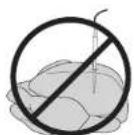
| SteaksPork chopsLamb chopsChicken breastsBurgersTenderloinsFish fillets | Insert probe horizontally into the centre of the thickest part of the meat.Make sure the tip of the probe is inserted straight into the centre of the meat, not angled toward the bottom or top of it.Make sure the probe is close to (but not touching) the bone and away from any fat or gristle.NOTE:The thickest part of the fillet may not be the centre. It is important that the end of the probe hits the thickest part so desired results are achieved. | 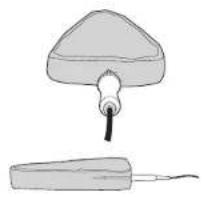 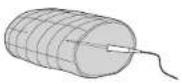 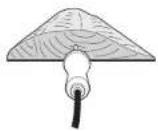 | 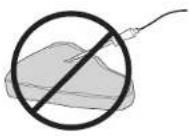 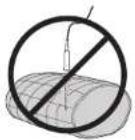 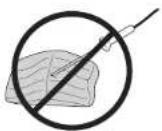 |
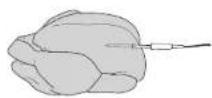
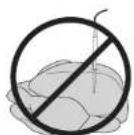
| Whole chicken | Insert probe horizontally into the thickest part of the breast, parallel to, but not touching, the bone.Make sure the top reaches the centre of the thickest part of the breast and doesn't go all the way through the breast into the cavity. | 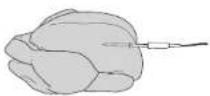 | 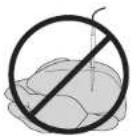 |
NOTE: DO NOT use the probe with frozen protein or for cuts of meat thinner than 1.5cm.
IMPORTANT: Reference Quick Start Guide for preset cooking chart when using SYNC and MATCH with the Probe.
COOKING IN YOUR AIR FRYER
REFERENCE QUICK START GUIDE FOR RECIPES AND COOKING CHARTS
COOKING WITH DOUBLE STACK PRO
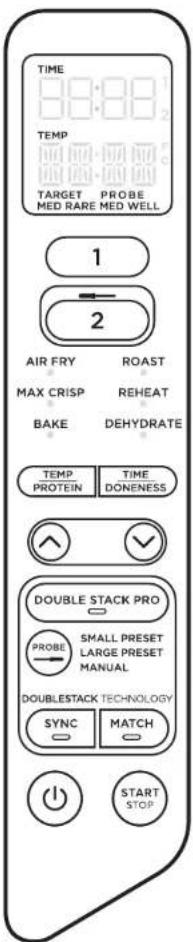
Double Stack Pro allows you to cook 4 foods at once in 2 independent drawers. You can cook in both zones or just in a single zone.
For detailed instructions to use SYNC or MATCH, see page 53.
When using these functions, Press DOUBLE STACK PRO before pressing either SYNC or MATCH.
When cooking in a single zone, press DOUBLE STACK PRO before pressing START/STOP.
For detailed instructions on using each function, see pages 54-57.
ENDING THE COOK TIME IN ONE ZONE (WHILE USING BOTH ZONES)
1 Select the zone you would like to stop.
2 Press START/STOP to end cooking.
3 When cooking is complete, the unit will beep and "COOL" will appear on the display for 60 seconds.
PAUSING COOKING
Cooking will automatically pause when a drawer is removed. Re-insert drawer to resume cooking.
WHEN USING IN SYNC or MATCH MODE
If you open a drawer, the other drawer will automatically pause so that cooking will still finish at the same time. Reinsert drawer to continue cooking in both zones.
COOKING WITH DUALZONE TECHNOLOGY
DualZone Technology utilises two cooking zones to increase versatility. The Sync feature ensures that, regardless of different cook settings, both zones will finish ready to serve at the same time.
For detailed instructions on using each function, see pages 54-57.
SYNC
To finish cooking at the same time when foods have different cook times, temperatures, or even functions:
1 Place ingredients in the drawers, then insert drawers in unit.
2 Select Zone 1. Select the desired cooking function using the arrows. Press the TEMP button, then use the arrows to set the temperature, and press the TIME button, then use the arrows to set the time.
3 Select Zone 2, then select the desired cooking function using the arrows. Press the TEMP button, then use the arrows to set the temperature, and use the TIME arrows to set the time.
NOTE: You can select a different function for Zone 2.
4 Press SYNC, then press START/STOP to begin cooking in the zone with the longest time. The other zone will display Hold. The unit will beep and activate the second zone when both zones have the same time remaining.
5 When cooking is complete, the unit will beep and "COOL" will appear on the display for 60 seconds.
6 Remove ingredients by tipping them out or using silicone-tipped tongs/utensils.
MATCH
To cook a larger amount of the same food, or cook different foods using the same function, temperature, and time:
1 Place ingredients in the drawers, then insert drawers in unit.
2 Select Zone 1. Select the desired cooking function using the arrows. Press the TEMP button, then use the arrows to set the temperature, and press the TIME button, then use the arrows to set the time.
3 Press the MATCH button to copy the Zone 1 settings to Zone 2. Then Press START/STOP to begin cooking in both zones.
4 When cooking is complete, the unit will beep and "COOL" will appear on the display for 60 seconds.
5 Remove ingredients by tipping them out or using silicone-tipped tongs/utensils.
Starting both zones at the same time, but ending at different times:
1 Select Zone 1, then select the desired function using the arrows. Press the TEMP button, then use the arrows to set the temperature.
2 Press the TIME button, then use the arrows to set the time.
3 Select Zone 2 and repeat steps 1 and 2.
4 Press START/STOP to begin cooking in both zones.
5 When cooking is complete, the unit will beep and "COOL" will appear on the display for 60 seconds.
6 Remove ingredients by tipping them out or using silicone-tipped tongs/utensils.
COOKING IN YOUR AIR FRYER - CONT.
COOKING IN A SINGLE ZONE
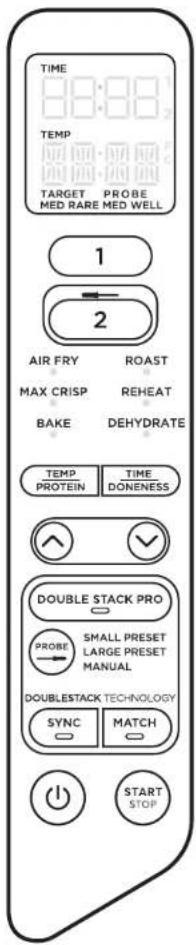
To turn on the unit, plug the power cord into a wall socket, then press the power button.
Air Fry
NOTE: The temperature is preset to 200°C.
1 Install crisper plate in the drawer, then place ingredients in the drawer, and insert drawer in unit.
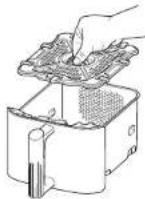
2 Select Zone 1 or Zone 2. Select AIR FRY using the arrows.
3 Press TEMP and use the arrows to set the desired temperature.
4 Press TIME and use the arrows to set the time in 1-minute increments up to 1 hour. Press START/STOP to begin cooking
NOTE: During cooking, you can remove the drawer and shake or toss ingredients for evening crisping.
5 When cooking is complete, the unit will beep and "COOL" will appear on the display for 60 seconds.
6 Remove ingredients by tipping them out or using silicone-tipped tongs/utensils.
Max Crisp
NOTE: There is no temperature adjustment available when using the Max Crisp function. The temperature is preset to 240°C.
1 Install crisper plate in the drawer, then place ingredients in the drawer, and insert drawer in unit.
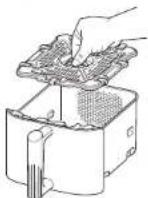
2 Select Zone 1 or Zone 2. Select MAX CRISP using the arrows.
3 Press TIME and use the arrows to set the time in 1-minute increments up to 30 minutes. Press START/STOP to begin cooking.
4 When cooking is complete, the unit will beep and "COOL" will appear on the display for 60 seconds.
5 Remove ingredients by tipping them out or using silicone-tipped tongs/utensils.
Bake
NOTE: The temperature is preset to 160°C.
1 Install crisper plate in the drawer (optional), then place ingredients in the drawer and insert drawer in unit.
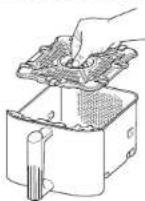
2 Select Zone 1 or Zone 2. Select BAKE using the arrows.
NOTE: To convert recipes from a traditional oven, reduce the temperature by 10°C.
3 Press TEMP and use the arrows to set the desired temperature.
4 Press TIME and use the arrows to set the time in 1-minute increments up to 1 hour and in 5-minute increments from 1 to 4 hours. Press START/STOP to begin cooking.
5 When cooking is complete, the unit will beep and "COOL" will appear on the display for 60 seconds.
6 Remove ingredients by tipping them out or using silicone-tipped tongs/utensils.
COOKING IN YOUR AIR FRYER - CONT.
Roast
NOTE: The temperature is preset to 190°C
1 Install crispor plate in the drawer (optional), then place ingredients in the drawer and insert drawer in unit.
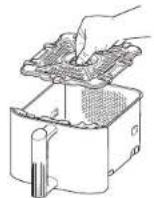
2 Select Zone I or Zone 2. Select ROAST using the arrows.
3 Press TEMP and use the arrows to set the desired temperature.
4 Press TIME and use the arrows to set the time in 1-minute increments up to 1 hour and in 5-minute increments from 1 to 4 hours. Press START/STOP to begin cooking.
5 When cooking is complete, the unit will beep and "COOL" will appear on the display for 60 seconds.
6 Remove ingredients by tipping them out or using silicone-tipped tongs/utensils.
Reheat
NOTE: The temperature is preset to 170°C
1 Install crisper plate in the drawer (optional), then place ingredients in the drawer, and insert drawer in unit.
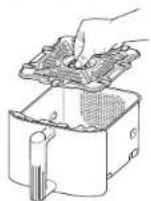
2 Select Zone 1 or Zone 2. Select REHEAT using the arrows.
3 Press TEMP and use the arrows to set the desired temperature.
4 Press TIME and use the arrows to set the time in 1-minute increments up to 1 hour. Press START/STOP to begin reheating.
5 When cooking is complete, the unit will beep and "COOL" will appear on the display for 60 seconds.
6 Remove ingredients by tipping them out or using silicone-tipped tongs/utensils.
Dehydrate
NOTE: The temperature is preset to 60°C
1 Place a single layer of ingredients in the drawer. Then install the crisper plate in the drawer on top of the ingredients and place another layer of ingredients on the crisper plate.
2 Select Zone 1 or Zone 2. Select DEHYDRATE using the arrows. The default temperature will appear on the display. Press TEMP and use the arrows to set the desired temperature.
3 Press TIME and use the arrows to set the time in 15-minute increments from 1 to 12 hours. Press START/STOP to begin dehydrating.
4 When cooking is complete, the unit will beep and "COOL" will appear on the display for 60 seconds.
5 Remove ingredients by tipping them out or using silicone-tipped tongs/utensils.
NOTE: If during cooking when using SYNC a drawer is removed for longer than 2 minutes, then the program will be cancelled. You will need to re-program each zone to resume cooking.
CLEANING & MAINTENANCE
The unit should be cleaned thoroughly after every use. Unplug the unit from the plug socket and wait until the unit is fully cooled before cleaning.
Part/Accessory Cleaning Method Dishwasher Safe?
| Main Unit | To clean the main unit and the control panel, wipe them clean with a damp clothNOTE: NEVER immerse the main unit in water or any other liquid. NEVER clean the main unit or drawer in a dishwasher. | No |
| Drawers, Crisper Plates & Stacked Meal Racks | These can be washed in the dishwasher or by hand, if hand washed air-dry or towel-dry all parts after use. To extend the life of the accessories we recommend hand-washing them. | Yes |
| Digital Cooking Probe | Clean probe end by hand-washing.NOTE: NEVER immerse probe in water or any other liquid. NEVER clean the probe in a dishwasher. | No |
If food residue is stuck on the drawers, crisper plates & stacked meal racks place them in a sink filled with warm, soapy water and allow to soak.
HELPFUL TIPS
1 For best results, when using Double Stack Pro always place vegetables/starch in the bottom half of the drawers on the crisper plate and proteins in the upper half using the stacked meal racks.
2 For consistent browning, make sure ingredients are arranged in an even layer with no overlapping. If ingredients are overlapping, make sure to shake them at regular intervals through the set cook time.
3 Cook temperature and time can be adjusted at any time during cooking. Simply select the zone you want to adjust. Press TEMP and use the arrows to set the desired temperature or press TIME and use the arrows to set the time.
4 To convert recipes from your conventional oven, reduce the temperature by 10°C. Check food frequently to avoid overcooking.
5 Occasionally, the fan from the air fryer will blow lightweight foods around. To alleviate this, secure foods (like the top slice of bread on a sandwich) with cocktail sticks.
6 The crisper plates & stacked meal racks elevate ingredients in the drawers so air can circulate under and around ingredients for even, crisp results.
7 After selecting a cooking function, you can press STOP/START to begin cooking immediately. The unit will run at the default temperature and time.
8 For best results with fresh vegetables and potatoes, use at least 1 tablespoon of oil. Add more oil as desired to achieve the preferred level of crispiness.
9 For best results, check progress throughout cooking and remove food when desired level of brownness has been achieved. We recommend using an instant-read thermometer to monitor the internal temperature of meat & fish.
10 For best results, remove food immediately after the cook time is complete to avoid overcooking.
TROUBLESHOOTING GUIDE
• How do I adjust the temperature or time while using a single zone?
Select the active zone, then press TEMP and use the arrows to adjust the temperature or press TIME and use the arrows to adjust the time.
• How do I adjust the temperature or time while using dual zones?
Select the desired zone, press TEMP and use the arrows to adjust the temperature or press TIME and use the arrows to adjust the time.
- Does the unit need to pre-heat?
The unit does not need to be pre-heated.
• Can I cook different foods in each zone and not worry about cross contamination?
Yes, both zones are self-contained with separate heating elements and fans
• How do I pause the countdown?
The countdown timer will pause automatically when you remove the drawers from the unit. Rinsert drawer within 15 minutes to resume cooking or the zone with the drawer open will be cancelled.
• Is the drawer safe to put on my worktop?
The drawer will heat up during cooking. Use caution when handling, and place on heat resistant surfaces only.
- When should I use the crisper plate?
Use the crisper plate when you want food to come out crispy. The plate elevates the food in the drawer so that air can flow under and around it to cook ingredients evenly.
- When should I use the stacked meal racks?
Use the stacked meal racks when you want to cook two layers of food in one drawer. Place vegetables/starch in the bottom half of the drawer and protein in the upper half of the drawer. It is not recommended to mix fresh and frozen ingredients within the same drawer. For the best output, cook frozen food leads within 1 drawer.
• Why didn't my food cook fully?
Make sure the drawer is fully inserted during cooking. For consistent browning, make sure ingredients are arranged in an even layer on the bottom of the drawer with no overlapping. Shake drawer to toss Ingredients for even crispiness. Cook temperature and time can be adjusted at any time during cooking. Simply select the desired zone, press TEMP and use the arrows to adjust the temperature or press TIME and use the arrows to adjust the time.
• Why is my food burned?
For best results, check progress throughout cooking and remove food when desired level of brownness has been achieved. Remove food immediately after the cook time is complete to avoid overcooking.
• Why do some ingredients blow around when air frying?
Occasionally, the fan from the air fryer will blow lightweight foods around. Use wooden cocktail sticks to secure loose lightweight food, like the top slice of bread on a sandwich.
• Can I air fry wet, battered ingredients?
Yes, but use the proper breeding technique. It is important to coat foods first with flour, then with egg, and then with breadcrumbs. Press breadcrumbs firmly onto the battered ingredients, so crumbs won't be blown off by the fan.
• Why is the unit beeping?
Either the food is finished cooking or it indicates that the other zone has started cooking.
• Why did the display screen go black?
The unit is in standby mode. Press the power Ⓞ button to turn it back on.
• Why is there an "E" message on the display screen?
The unit is not functioning properly. Please contact Customer Service.
NINJA
TWO (2) YEAR LIMITED GUARANTEE
When a consumer buys a product in Europe, they get the benefit of legal rights reading to the quality of the product (your statutory rights). You can enforce these rights against your retailer. We give you an additional manufacturer's guarantee of two years. These terms and conditions relate to our manufacturer's guarantee only - your statutory rights are unaffected.
The conditions below describe the prerequisites and scope of our guarantee. They do not affect your statutory rights or the obligations of your retailer and your contract with them.
Ninja Guarantees
Every Ninja machine comes with a free parts and labour guarantee. You'll also find online support at www.ninjakitchen.eu
How do I register my Ninja guarantee?
You can register your guarantee online within 28 days of purchase. To save time, you'll need the following information about your product.
- Date you purchased the unit (receipt or delivery note).
• To register online, please visit
www.ninjakitchen.eu
IMPORTANT:
• The guarantee will only cover your product from the date of purchase.
- Please keep your receipt at all times. Should you need to use your guarantee we will need your receipt to verify the information you have supplied to us is correct. The inability to produce a valid receipt may invalidate your guarantee.
What are the benefits of registering my free Ninja guarantee?
When you register your guarantee we'll have your details to hand if we ever hood to get in touch. You can also receive tips and advice on how to get the best out of your Ninja unit and hear the latest news about new Ninja technology and launches. If you register your guarantee online, you'll get instant confirmation that we've received your details.
What is covered by the free Ninja guarantee?
Repair or replacement of your Ninja machine (at Ninja's discretion), including all parts and labour. A Ninja guarantee is in addition to your legal rights as a consumer.
What is not covered by the free Ninja guarantee?
-
Normal wear and tear of wearable parts (such as accessories). Replacement parts are available for purchase at www.ninjaklitchen.eu
-
Damage caused by misuse, abuse, negligent handling, failure to perform required maintenance or damage due to mishandling in transit.
-
Damage caused by maintenance not authorised by Ninja.
Where can I buy genuine Ninja spares and accessories?
You'll find a full range of Ninja soaros and replacement parts/accessories for all Ninja machines at www.ninjakitchen.eu
Please remember that damage caused by the use of non-Nje spares may not be covered under your guarantee.
GRACIAS
akitchen.eu/register-guarantee

Max Crisp (Gratinar)....75
Bake (Hornear) 75
Roast (Asar)....76
Reneat (Recalentar) 77
Dehydrate (Deshidratar) 77
Max Crisp (Gratinar)
Dehydrate (Deshidratar)
NOTA: La temperatura viene preestablecida a 60 °C.
akitchen.eu/register-guarantee

INSÉRER CORRECTEMENT LA PROBE
TYPE D'ALIMENT : POSITIONNEMENT CORRECT INCORRECT
Steaks
Côtelettes
de porc
Côtelettes
d'agneau
Blancs de poulet
Hamburgers
Filets
Filets de
poisson
ninjakitchen.eu/register-guarantee

MODALITÀ HOLD (Attesa):
ninjakitchen.eu/register-guarantee

natural_image
Illustration of four different types of electrical components or tools, including a plug, wire, coiled cable, and bulb (no text or symbols present)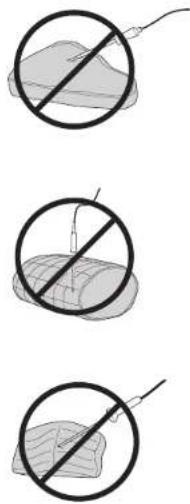
ninjakitchen.eu/register-guarantee

Skann QR-koden med en mobilenhet
ARKIVER DENNE INFORMASJONEN
Modellnummer:
Serienummer:
Kjøpsdato:
Bake (baking)....155
Roast (steking) 156
Reheat (oppvarming)....157
REHEAT (oppvarming):
ninjakitchen.eu/register-guarantee

Air Fry (Fritar a Ar)....174
Reheat (Reaquecer) 177
Dehydrate (Desidratar) 177
APENAS PARA USO DOMÉSTICO
Dehydrate (Desidratar)
Halibse alaosan (Zone 2) to minola.
natural_image
Illustration of four different types of electrical components or tools, including a plug, wire, coil, and bulb (no text or symbols present)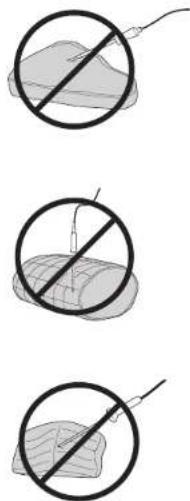

KYPSENNYS AIR FRYERISSA
PIKA-ALOITUSOPAS SISÄLTÄÄ RUOKAOHJEITA JA KYPSENNYSTAULUKOITA
KYPSENNYS DOUBLE STACK PROLLA
KYPSENNYS AIR FRYERISSA - JATKUU
KYPSENTÄMINEN YHDESSÄ KYPSENNYSOSASSA
KYPSENNYS AIR FRYERISSA - JATKUU
Roast (paahto)
ninjakitchen.eu/register-guarantee

Max Crisp (Maximal crispighet)....215
Bake (Baka) 215
Roast (Ugnsstek) 216
© 2024 SharkNinja Operating LLC. TRYKT I KINA
DEUTSCH
© 2024 SharkNinja Operating LLC. GEDRUCKT IN CHINA
ENGLISH
Illustrations may differ from actual product. We are constantly striving to improve our products, therefore the specifications contained herein are subject to change without notice.
FOODI and NINJA are registered trademarks in the European Union of SharkNinja Operating LLC.
© 2024 SharkNinja Operating LLC. PRINTED IN CHINA
ESPAÑOL
© 2024 SharkNinja Operating LLC. IMPRESO EN CHINA
FRANÇAIS
© 2024 SharkNinja Operating LLC. IMPRIMÉ EN CHINE
ITALIANO
© 2024 SharkNinja Operating LLC. STAMPATO IN CINA
SharkNinja Germany GmbH, Rotfeder-Ring 9,
60327 Frankfurt am Main, Germany
ninjakitchen.eu
NEDERLANDS
© 2024 SharkNinja Operating LLC. GEDRUKT IN CHINA
NORSK
© 2024 SharkNinja Operating LLC. TRYKKET | KINA
PORTUGUÊS
© 2024 SharkNinja Operating LLC. IMPRESSO NA CHINA
SUOMI
© 2024 SharkNinja Operating LLC. PAINETTU KIINASSA
SVENSKA
© 2024 SharkNinja Operating LLC. TRYCKT I KINA
SharkNinja Europe Ltd,
1st/2nd Floor Building 3150,
Thorpe Park, Century Way, Leeds, England, LS15 8ZB
ninjakitchen.co.uk