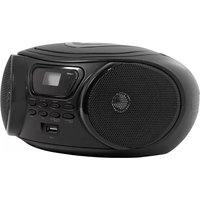
Rumba - Radio Essentiel B - Free user manual and instructions
Find the device manual for free Rumba Essentiel B in PDF.


| Product type | CD/MP3 radio player |
| Brand | Essentiel B |
| Model | Rumba |
| Supported formats | CD, CD-R/RW, MP3/WMA |
| Mains power supply | 100-240V~ 50/60Hz |
| Battery power supply | 6 LR14 batteries (1.5V) not included |
| Maximum power consumption | 14 W |
| Standby power consumption | < 0.5 W |
| Radio frequency range | FM: 87.5 MHz - 108 MHz |
| Output power | 2 x 1.5 W |
| Dimensions (W x H x D) | 240 x 130 x 220 mm |
| Weight | 1.3 kg |
| Operating temperature | +5°C to +35°C |
| Storage temperature | 0°C to 50°C |
| Operating humidity | 5% - 90% |
| Main functions | FM radio, CD/MP3 player, USB port, AUX input, track programming, repeat, shuffle, automatic station search |
| Number of memory stations | 30 FM stations |
| Number of programmable tracks | 20 for audio CD, 99 for MP3 CD |
| Display | LCD screen |
| Antenna | FM telescopic antenna |
| Auxiliary jack | 3.5 mm jack |
| Automatic standby | Yes, after 15 minutes of inactivity |
| Maintenance | Clean with a soft, dry cloth. Unplug before cleaning. No liquid or aerosol. |
| Safety | Double electrical insulation. Do not replace batteries with an incorrect type. Do not expose to extreme temperatures. |
| Spare parts and repairability | Spare parts not specified. Contact customer service in case of malfunction. |
Frequently Asked Questions - Rumba Essentiel B
User questions about Rumba Essentiel B
0 question about this device. Answer the ones you know or ask your own.
Ask a new question about this device
Download the instructions for your Radio in PDF format for free! Find your manual Rumba - Essentiel B and take your electronic device back in hand. On this page are published all the documents necessary for the use of your device. Rumba by Essentiel B.
USER MANUAL Rumba Essentiel B
Radio CD/MP3 player /
natural_image
Black portable electronic device with a digital display and antenna (no visible text or symbols)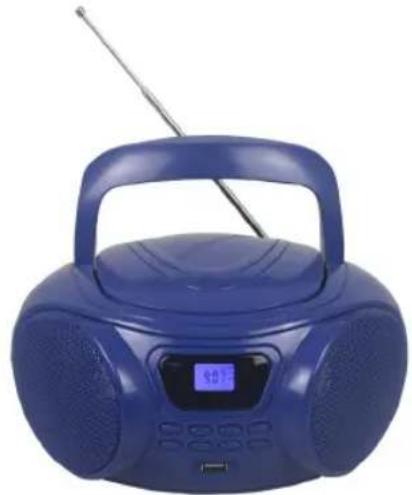
natural_image
Blue portable radio with antenna and digital display (no visible text or symbols)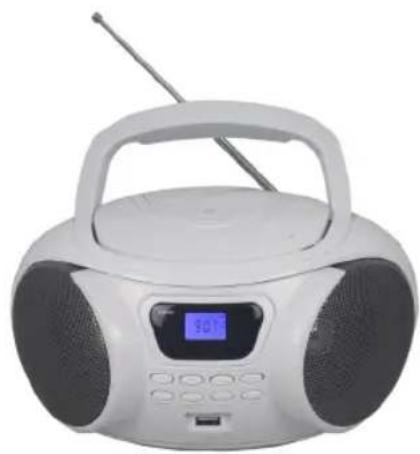
natural_image
White portable radio with black knobs and a digital display (no visible text or symbols)Notice d'utilisation / User guide / Instrucciones de uso / Bedienungsanleitung / Gebruiksaanwijzing


natural_image
Line drawing of a portable electronic device with control panel and power plug (no text or symbols)
natural_image
Line drawing of a portable electronic device with control panel and indicator lights (no text or symbols)Thank you for purchasing an Essential brand product. We pay special attention to the RELIABILITY, EASE OF USE and DESIGN of our products. We hope that you will be fully satisfied with this radio/CD/MP3 playon
contents
your product 18
Contents of the box 18
Technical features 18
Appliance description 19
powering the radio 20
Mains connection 20
Inserting batteries 20
basic use 21
Turning your radio on or off 21
Adjusting the volume 21
listening to the radio 21
Automatically search stations 22
Storing your stations 22
playing an audio CD 22
Basic functions 22
Creating a playlist 23
Define a repeat order 24
connecting a removable USB device 25
Basic functions 25
connecting the boombox to an auxiliary source 26
maintenance and cleaning 27
Cleaning the device 27
Notes on the discs 27
troubleshooting guide 28
simplified EU declaration of conformity 29
your product
Contents of the box
• 1 radio CD/MP3 player
• 1 power cord
• 1 user manual
Technical features
| Brand Essentiel b | |
| Model Rumba II | |
| Compatible formats CD, CD-R/RW, MP3/WMA | |
| Voltage | Mains: 100-240 V~ 50/60 HzBatteries: 6 x LR14 batteries (not included) |
| Consumption (max) 14 W | |
| Standby power consumption < 0.5W | |
| Frequency range FM: 87.5 MHz - 108 MHz | |
| Maximum output power 2 x 1.5 W | |
| Dimensions (W x H x D) 240 x 130 x 220 mm | |
| Weight 1.3 kg | |
| Environment: Operating temperature +5°C ~ +35°C | |
| Environment: Relative humidity | 5% ~90% |
| Storage temperature & Transportation temperature | 0°C ~ 50°C |

This electrical symbol means that the appliance has double electrical insulation between the (dangerous) supply voltage and the parts that are accessible to the user.
WARNING:
- Replacing the battery with an incorrect type may cause fire or explosion.
- Replacing the battery with an incorrect type may prevent protection.
- Disposing of a battery in a fire or hot oven, or mechanically crushing or cutting a battery may cause an explosion.
- Storing a battery in a very hot environment may cause an explosion, or cause flammable liquids or gases to leak out.
- Batteries subject to extremely low air pressure may cause an explosion, or cause flammable liquids or gases to leak out.
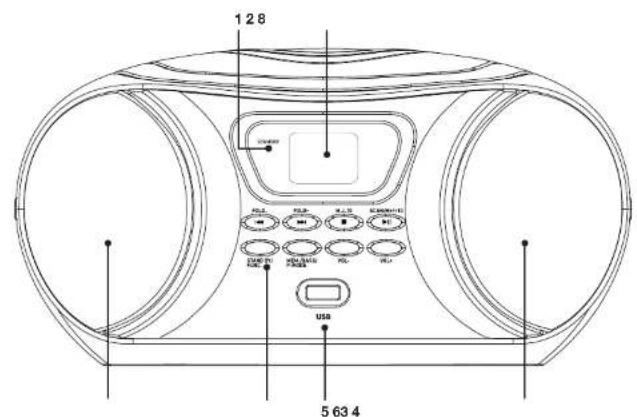
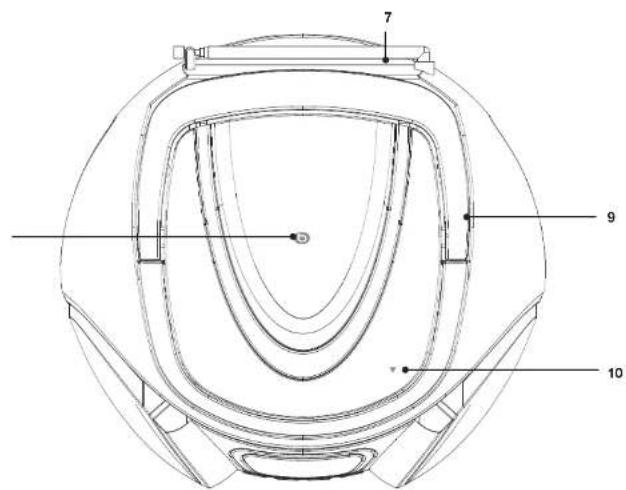
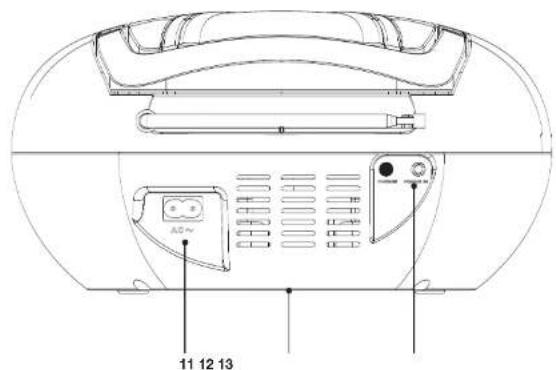
Appliance description
| 1 STANDBY indicator light | |
| 2 LCD display | |
| 3 Left speaker | |
| 4 | ◀ / Fold -: access the previous track, play backwards at an accelerated speed, set the radio frequency, access the previous MP3 folder. |
| ▶ / Fold +: access the next track, play forward at an accelerated speed, set the radio frequency, access the next MP3 folder. | |
| ■ / M- / -10: stop playback, select a stored radio station (press briefly) / access content (press and hold) | |
| ▶II / Scan / M+ / +10: start or pause playback, select a stored radio station (press briefly) / automatically search for a radio station, access content (press and hold) | |
| STAND BY / FUNC.: tum the boombox on, activate the boombox if it is in standby mode, select the CD-USB-AUX-FM function (press briefly) / switch the boombox off (press and hold) | |
| MEM. / BASS. / P-MODE: store radio stations / create a playlist or define a repeat order / activate shuffle mode / activate the bass enhancement mode. | |
| Vol -: Tum down the volume | |
| Vol +: Tum up the volume | |
| 5 USB port | |
| 6 Right speaker | |
| 7 Telescopic antenna | |
| 8 Disc compartment cover | |
| 9 Carrying handle | |
| 10 Button to open the disc compartment | |
| 11 Power input | |
| 12 Battery compartment | |
| 13 3.5 mm AUX jack socket | |
powering the radio
Mains connection
natural_image
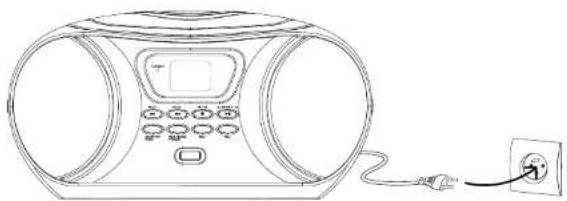
Line drawing of a portable air conditioner unit with control panel and power outlet (no text or symbols)Before plugging your radio in, make sure that your home's mains voltage matches that specified on the radio's data plate and that the mains plug is correct for the wall socket.
- Plug one end of the power cord into the power connector on the back of the radio. Then plug the other end into a mains outlet. The boombox is now ready to use.
• To fully unplug the boombox, unplug the power cord from the mains outlet.
Inserting batteries
- Open the battery compartment cover located under the boombox.
- Insert 6 x 1.5 V LR14 batteries (not included) in the battery compartment, observing the + and - polarities indicated at the bottom of the compartment. Close the cover when you have finished.

- Use only the type of battery specified in this manual.
- Replace the batteries when they are worn out or leaking.
- Do not use new batteries with old batteries, or different types of batteries together.
- Remove the batteries if the device is not used for a long time.
basic use
Turning your radio on or off

- To turn the boombox on, briefly press the STAND BY/FUNC. button.
- To turn the boombox off, press and hold the STAND BY/FUNC. button.

Your radio is equipped with an automatic standby function. If, for 15 minutes, no music is playedinCD/USB/AUX/FM woctheboomboxautomaticallygoesintostandby.PresstheSTAND BY/FUNC. button to exit standby mode.
Adjusting the volume

• To turn up the volume, press the Vol + button.
- To turn down the volume, press the Vol - button.
listening to the radio
- Fully extend the telescopic antenna on the back of the boombox.
- Briefly press the STAND BY/FUNC, button to select the FM function.
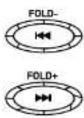
- Set the radio to your chosen station using the ▶ / Fold + and ◀ / Fold - buttons. The screen displays the frequency.
- You can also hold down the ▶ / Fold + or ◀ / Fold - buttons to make the radio scan frequencies until it finds a station with good signal.

• To improve FM reception, extend the antenna to its full length.
Automatically search stations

Storing your stations
You can store up to 30 FM radio stations of your choice.
- Set the radio to your chosen station using the ▶ / Fold + and ◀ / Fold - buttons. The screen displays the frequency.
- Press the MEM. / BASS. / P-MODE button: "P01" is displayed on the screen.
- Press ▶/ Scan / M+ / +10 or ■ / M- / -10 to select the position you want to save the station to (P01, P02, P03, etc.).
- Press MEM. / BASS. / P-MODE again to confirm that you want to store this station.

playing an audio CD
Your boombox can play audio CDs as well as MP3s recorded on CD-R or CD-RW.
- Briefly press the STAND BY/FUNC, button to select the CD function.
- Open the disc compartment cover and insert an audio CD with the printed side facing up. "OP" appears on the display screen.
- Close the disc compartment cover. The total number of tracks/folders appears on the display screen.
- After use, carefully remove the CD, holding it by the edges.

If there is no disc in the compartment or if the disc is upside down, the screen will display "NO" (no disc).
Basic functions
▶ / Scan / M+ / +10
- To start, pause or resume playback, press briefly.
- To go forward 10 tracks, press and hold this button.
■/M-/10
- To stop playback, press briefly.
- To go backwards 10 tracks, press and hold this button.
| / Fold - | - Accesses the previous track.- Press and hold this button to play backwards at an accelerated speed.For CDs with MP3 files spread across different folders, press and hold this button to select the previous folder, when the playback is stopped. |
| / Fold + | - Accesses the next track.- Press and hold this button to play forwards at an accelerated speed.For CDs with MP3 files spread across different folders, press and hold this button to select the next folder, when the playback is stopped. |
Creating a playlist
With the audio CD stopped, you can program a playlist of 20 tracks for audio CDs, and 99 tracks for CDs with MP3 audio files.
- Press the ■ button before starting to program your playlist.
- Press the MEM. / BASS. / P-MODE. "PROGRAM" will flash on the LCD display, then "P01".
- To create your playlist:
- Use the |◀ / Fold - and ▶ | / Fold + buttons to select a track,
- Press the MEM. / BASS. / P-MODE button to confirm your selection. "P02" is displayed.
- Repeat these steps as many times as necessary to add other tracks.
- When you have finished creating your playlist, start playback from the first track by pressing the ▶/ Scan / M+ / +10 button.
- Press the ■ / M- / -10 button to stop playback. The playlist is stored in the memory.

To delete the program, press the ■ / M- / -10 button when the playback is stopped, then open the disc compartment.
Define a repeat order
When playing an audio CD, you can select a repeat order using the MEM. / BASS / P-MODE button:
| Number of presses on the button MEM. / BASS / P-MODE | Audio CD CD with MP3 | audio files |
| 1 | Repeated playback of the current track.The message "REPEAT" flashes. | Repeated playback of the current track.The message "REPEAT" flashes. |
| 2 | Repeated playback of the entire CD.The message "REPEAT" appears. | Repeated playback of a folder.The message "REPEAT FOLDER" appears. |
| 3 | Random CD playback.The message "RAN" appears. | Repeated playback of the entire CD.The message "REPEAT" appears. |
| 4 No repeat order. | Random CD playback.The message "RAN" appears. | |
| 5 / No repeat order. |
connecting a removable USB device
natural_image
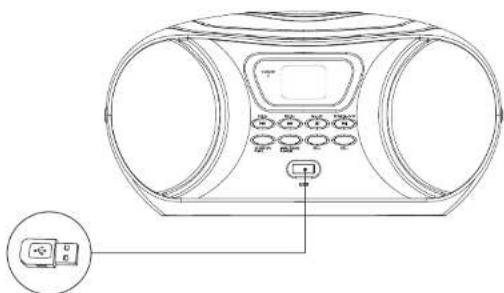
Line drawing of a portable electronic device with control panel and indicator lights (no text or symbols)- Turn on the boombox, then insert your removable USB device in the USB port on the front of the appliance.
- To play the content on your removable device, press STAND BY/FUNC, until the USB function is selected.
- The total number of tracks and folders appears on the display screen.
- Playback automatically starts with track 1.
Basic functions
The basic functions are the same as those for CD playback. Please refer to the table in the chapter on basic functions for CD playback.

Do not use a USB extension cable to connect your USB device to prevent conflicts.
connecting the boombox to an auxiliary source
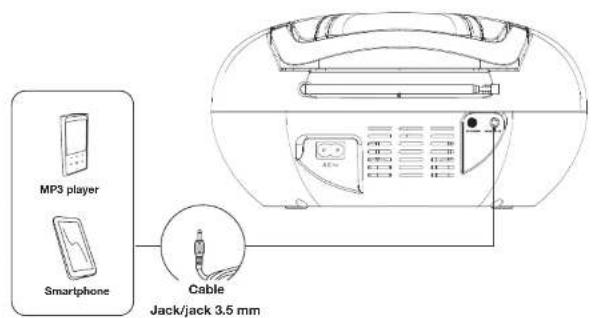
The PC/AUX IN plug enables you to connect an audio player, and play music from the player on the two radio speakers.
- To do so, plug the end of a 3.5 mm jack/jack cable (not supplied) into the PC/AUX IN jack on the back of the radio.
- Plug the other end into the audio output jack of your media player. Refer to your audio player's user guide for more information about the location of this jack.
- Press STAND BY/FUNC. to select the AUX function.
- Begin playback on your auxiliary source; the sound travels through the radio's speakers.
Note: control the playback, pause and change tracks on the auxiliary source.
maintenance and cleaning
Cleaning the device
- Always unplug the radio from the mains socket before cleaning.
-
Clean the device only with a soft, dry cloth.
-
Do not use liquid cleaners or aerosol cleaners.
Notes on the discs
DISK HANDLING


Hold the disc by the ends and make sure that your fingers do not touch the playing surface. Do not glue paper or put stickers on the discs.
CLEANING THE DISCS
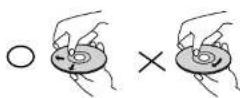
Fingerprints and dust on a disc can cause poor quality sound and sound distortion. Before playing, clean the disc with a clean, dry cloth from the centre to the ends.
Never use alcohol, benzene, thinner, cleaning fluid or other chemicals.
Do not use compressed air to clean dust.
STORING THE DISCS
Store the disc in its case after use.
Do not expose the discs to very cold, humid or hot environments.
Never leave it in a parked vehicle in direct sunlight.
DISCS THAT ARE DAMAGED AND OUT OF SHAPE

Do not use cracked, chipped, warped, or otherwise damaged discs as they may damage the player.
This radio is designed to be used only with traditional, fully circular discs. Do not use discs of any other shape.
Never lift or move the appliance during playback: discs rotate at high speed and may be damaged.
troubleshooting guide
Before contacting the service department please carry out the checks listed below.
PROBLEMS CHECKS AND SETTINGS
| The radio will not switch on. | Check that the mains outlet is working properly.Check that the power cord is not damaged.Check that the mains plug is properly connected to a mains outlet.Check that the radio has not automatically gone into standby mode after 15 minutes of inactivity. To do so, press the button. |
| The CD player will not play. | There is no disc in the reader, insert a disc.The disc has been inserted upside down. Tum the disc over, so that the printed side is facing up.The radio cannot play this type of disc.The disc is dirty or damaged, clean it or try another disc.Moisture is trapped inside the system. Remove the disc and leave the radio switched on for an hour or two.The 3.5 mm jack/jack cable is plugged into the auxiliary plug. If a jack plug is plugged in, it overrides the CD player. |
| "NO" appears on the screen. | Check that the disc is not upside down (the printed side should be facing up).Check that the CD-R/CD-RW is not blank. |
| Malfunction. | If the radio is malfunctioning, unplug it for 30 minutes. After 30 minutes, tum the radio back on. |
| There is no sound or it is erratic. | The radio is on an unstable surface. Place it on a flat and stable surface.Check that the radio's volume is not set to minimum.The disc is dirty or damaged. Clean the disc or try another.The radio cannot play this type of audio CD. |
| The volume is low. | If the radio is battery powered, the batteries may be low.If you are listening to a CD-R or CD-RW, they may be poor quality.Some CDs are recorded at a low volume, it is therefore not a malfunction. |
| Poor radio reception. | Extend the telescopic FM antenna.Change the position of your radio.Switch off any electrical appliances near the CD radio (e.g. TV, microwave oven, etc.). |
simplified EU declaration of conformity
The undersigned, Sourcing & Creation, hereby declares that the Essentiel b Rumba II Radio CD/MP3 player radioelectric device complies with directive 2014/53/EU.
The full text of the EU declaration of conformity is available from the following Internet address: https://www.boulanger.com/info/assistance
natural_image
Line drawing of a portable electronic device with control panel and power outlet (no text or symbols)ITS

natural_image
Line drawing of a portable electronic device with control panel and indicator lights (no text or symbols)natural_image
Line drawing of a portable radio with control panel and power outlet (no text or symbols)natural_image
Line drawing of a portable electronic device with control panel and buttons (no text or symbols)natural_image
Line drawing of a portable electronic device with control panel and power outlet (no text or symbols)

natural_image
Line drawing of a portable electronic device with control panel and indicator lights (no text or symbols)All information, designs, drawings and pictures in this document are the property of SOURCING & CREATION. SOURCING & CREATION reserves all rights to its brands, designs and information. Any copy and reproduction through any means shall be deemed and considered as counterfeiting.
Protection of the environment
This symbol attached to the product means that it is an appliance whose disposal is subject to the directive on waste from electrical and electronic equipment (WEEE). This appliance may not in any way be treated as household waste and must be subject to a specific type of removal for this type of waste. Recycling and recovery systems are available in your area (waste removal) and by distributors. By taking your appliance at its end of life to a recycling facility, you will contribute to environmental conservation and prevent any harm to your health.
\* Tested in our laboratories
Warranty valid from the date of purchase (receipt as proof of purchase). This warranty does not cover defects or damage caused by improper set up, incorrect use, or normal wear and tear of this product.
Art. 8009093/8009094/8009095 Ref. RUMBA II
FABRIQUÉ EN R.P.C. / Made in China / Fabricado en R.P.C. / Hergestellt in VR China / Gefabriceerd in VRC.
SOURCING & CREATION Avenue de la Motte 59810 Lesquin - FRANCE

Please behave responsibly towards the environment. Recycle this product at the end of its life.