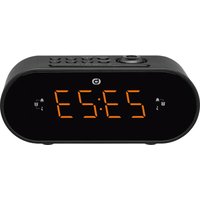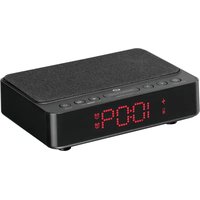
RRVI-100 - Alarm clock radio Essentiel B - Free user manual and instructions
Find the device manual for free RRVI-100 Essentiel B in PDF.


User questions about RRVI-100 Essentiel B
0 question about this device. Answer the ones you know or ask your own.
Ask a new question about this device
Download the instructions for your Alarm clock radio in PDF format for free! Find your manual RRVI-100 - Essentiel B and take your electronic device back in hand. On this page are published all the documents necessary for the use of your device. RRVI-100 by Essentiel B.
USER MANUAL RRVI-100 Essentiel B
natural_image
Black digital alarm clock with red LED display showing 10:09 (no visible text or symbols on device body)Notice d'utilisation / User guide / Instrucciones de uso / Bedienungsanleitung / Gebruiksaanwijzing
SYMPTÔMES CAUSES POSSIBLES SOLUTIONS
READ THESE INSTRUCTIONS CAREFULLY BEFORE USING THE APPLIANCE AND KEEP THEM IN A SAFE PLACE FOR FUTURE REFERENCE.
General instructions
Users should not attempt to repair or replace any part of this device. Repairs and maintenance must be carried out by qualified personnel. Any disassembly of the appliance will void the warranty.
- Check that the supply voltage on the mains adapter data plate is compatible with your electrical installation.
- Only power this device with the included power adapter.
- The wireless charging pad is designed to charge Qi enabled devices only.
- The power adapter serves as the disconnect device. Only connect the power adapter to an electrical outlet that is easily accessible.
- If the cable or plug of the power adapter is damaged in any way, the adapter must be replaced with an original one or one recommended by the device manufacturer to avoid hazards.
- The use of accessories or attachments not recommended by the device manufacturer may cause fire, injury, or damage to the product or connected devices.
- This device must not be used by children unless supervised. Make sure that children do not play with the device.
- Do not use this appliance:
— if the power cord is damaged,
— in the event of a malfunction,
— if the appliance has been damaged in any way.
• This device is intended for indoor use only.
- Do not use this product for any purpose other than its intended use.
- Do not place any metallic or magnetic foreign objects (metallic cases, coins, keys, paper clips, etc.) between the wireless charger and your compatible device, as this can prevent proper charging and cause overheating or fire.
- Do not place any foreign items on the wireless charging pad.
- Also observe the safety and operating instructions of the compatible device that will be charged with this product.
- Make sure the power cable cannot be crushed or trapped, especially around plugs, sockets, power outlets and where it is connected to the device.
- Do not open the appliance for any reason.
- Never use sharp objects to access the inside of the appliance.
- Unplug this device during storms, or if it is not going to be used for a long period, to avoid damage.
Installing the device
- Place the device on a dry, flat, solid surface.
- Do not install this device near sources of heat such as radiators, hot air vents, stoves or other devices (including amplifiers) that produce heat.
- Do not place anything that produces a naked flame (a lighted candle for example) on or near the device.
- Do not put the device where it may be subject to vibration.
- Plug your device into an easily accessible power outlet.
- Use this device in a temperate environment. This device must not be used in a tropical climate.
- Never unplug the device by pulling on the power cord; pull on the mains plug instead.
- If your device malfunctions, in particular if it makes sounds or smells that seem abnormal, stop using it immediately and take it to an authorised repair centre.
- WARNING! This product might interfere with hearing aids, pacemakers, or other medical devices. Keep a distance of at least 20 cm between the charger and implanted medical devices to avoid possible interference. If you suspect this unit is interfering with your medical device, stop using the product.
Keep this device away from water
- Do not allow water or other liquids to get into the device, and do not place objects filled with liquids (such as vases) on it.
- Avoid exposing this device to rain, humidity and water splashes.
- Never immerse the device in water or other liquids.
- Do not use this device near water or places where moisture may be present, such as a bath, washbasin, kitchen sink, near a swimming pool, in a damp basement or any other damp location.
Important note concerning ventilation
- This device must be located in a place that does not interfere with its ventilation. Leave a ventilation gap of at least 10 cm around the device. Make sure that the air vents are not obstructed by objects such as newspapers, tablecloths, curtains, etc.
-
Do not place the product in closed bookcases or racks without proper ventilation.
-
Do not cover the device during use.
- Do not insert objects or pointed items into the air vents.
Cleaning the device
- Unplug the radio alarm clock before cleaning it.
- Clean the outside of the device with a cloth that has been moistened with water and a gentle detergent.
- Do not use solvents such as alcohol, benzene or thinners as they could damage the casing.
Battery recycling
- Do not dispose of the batteries with household waste. In order to protect the environment, the batteries must be disposed of according to current regulations.
- Never attempt to recharge non-rechargeable batteries and never disassemble or incinerate them.
- Do not expose them to high temperatures or direct sunlight.
- Only use the type of battery specified in this manual.

WARNING: DO NOT INGEST BATTERY, CHEMICAL BURN HAZARD.
This product contains a button cell battery. If the button cell battery is swallowed, it can cause severe internal burns in just 2 hours and can lead to death.
Keep new and used batteries away from children.
If the battery compartment does not close securely, stop using the product and keep it away from children.
If you think batteries might have been swallowed or placed inside any part of the body, seek immediate medical advice attention.
CAUTION:
Risk of fire or explosion if the battery is replaced by an incorrect type.
Replacement of a battery with an incorrect type that can defeat a safeguard.
Disposal of a battery into fire or a hot oven, or mechanically crushing or cutting of a battery, that can result in an explosion.
Leaving a battery in an extremely high temperature surrounding environment that can result in an explosion or the leakage of flammable liquid or gas.
A battery subjected to extremely low air pressure that may result in an explosion or the leakage of flammable liquid or gas.
your product
Description of the device
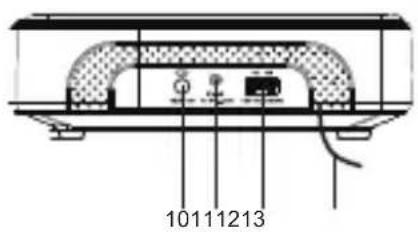
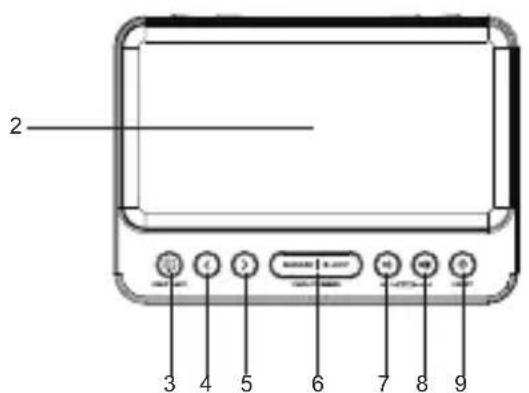
- Display
- Wireless charging pad
- Night Light button
- Backward button
- Forward button
- [SNOOZE | SLEEP | DISPLAY DIMMER]
Snooze / Sleep / Display Dimmer button
- Alarm 1 ON / Alarm 1 OFF / Volume Down button
- Alarm 2 ON / Alarm 2 OFF / Volume Up button
- Radio On/Off button
- [SET]
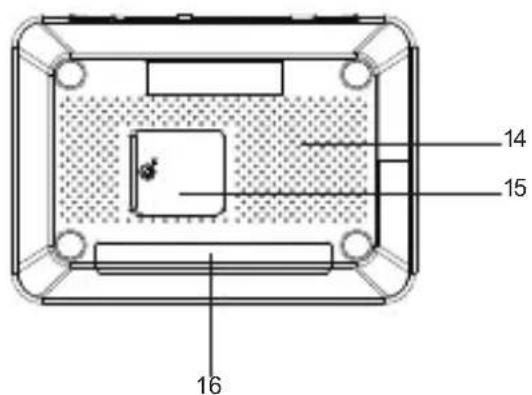
Set / Memory / M+ button
- DC input jack
- USB charging port
- Antenna
- Speaker
- Battery compartment
- Night light
- Power adapter (included, not shown)
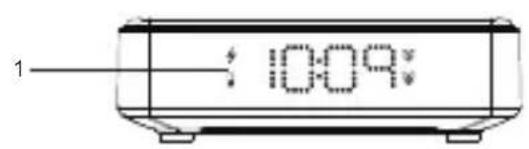
Display

E
A. Abnormal wireless charging alert indicator
B. Low battery indicator
C. Alarm 1 indicator
D. Alarm 2 indicator
E. Time / Alarm / Radio frequency display
Technical specifications
Device
| Input voltage, current: DC 5 V, 3 A | |
| Rated power: 15 W | |
| Outputs:Wireless charging pad: 5 WUSB-A charging port: 5 W, 5 V, 1 A | |
| Wireless charging compatibility: Qi enabled devices only | |
| Memory backup battery type: 1 x CR2032, 3 V Lithium battery | |
| Radio frequency range: FM: 87.50 – 108.00 MHz | |
| Number of preset radio stations: 10 (FM) | |
| Speaker output power: 0.4 W (RMS) | |
| Operating/Storage temperature: 15 °C to 35 °C (59 °F to 122 °F) | |
| Dimensions (L x W x H): 151 x 108 x 46 mm | |
| Frequency of wireless charging: 110-205 kHz | |
| Transmission power: 5.51 dBuA/m | |
| Transport temperature: <60 °C (<140 °F) | |
Power Adapter
| Adapter Model No.: OBL-0503000E | |
| Adapter Manufacturer: DongGuan Obelieve Electronic Co., Ltd. | |
| Commercial Registration No.: 91441900050747698U | |
| Input voltage: AC 100-240 V | |
| Input frequency: 50/60 Hz, 1.0 A Max. | |
| Output voltage, current: DC 5.0 V, 3.0 A | |
| Output power: 15 W | |
| Average active efficiency: 81.87% | |
| Efficiency at low load (10%): 79.41% | |
| No-load power consumption: 0.068 W | |

Caution - Please read the operator's manual carefully before using the appliance and retain it for future reference.
Indoor use only.

Class II protection (for the adapter)
Polarity
getting started
Place the device on a flat, stable and dry surface.
Connecting the device to the mains
- Plug the cable of the included power adapter into the DC input on the clock radio.
- When the device is connected to the power supply, the display will turn on and show "0:00" (clock view).
Installing the backup battery
The clock radio is equipped with a battery backup system that requires a lithium coin battery. If a temporary power outage occurs, the display will turn off and the device will automatically switch to the battery power to keep the time and alarm settings.
Replace the battery when the display shows the Low battery indicator (☐).
- When replacing the battery, the power adapter can be kept connected to the mains outlet to avoid losing any user settings on the device.
- To open the cover of the battery compartment, loosen the screw on the cover with a screwdriver.
- Insert the new battery (1 x 3 V CR2032, Lithium coin battery, included) into the battery compartment, with the positive (+) side of the battery facing up (the cover).
- Close the cover and tighten the screw.
- Dispose of the battery in an environmentally friendly way. DANGER! KEEP OUT OF THE REACH OF BABIES AND CHILDREN.
Adjusting the display brightness
In clock view, press the [DISPLAY DIMMER] button to adjust the brightness level of the display: High / Medium / Low / Off.
setting the clock
To set the current time in the Clock:
- In clock view, press and hold the [SET] button to enter clock setting mode. The hours will start to blink.
- Press the < or > button to set the hour (24 hour format), and press the [SET] button to continue. The minutes will start to blink.
- Press the < or > button to set the minutes, and press the [SET] button to save your settings (or wait 5 seconds to save automatically). The minutes will stop blinking, and the set Clock will be displayed.
TIP: In any setting mode, the < and >buttons support long pressing (press and hold) to quickly scroll through values.
using the alarms
Setting the alarms
The clock radio has two alarms ( and ). You can select the source of the alarm sound as Buzzer or Radio.
To set Alarm 1:
- Make sure the Radio is turned off by pressing the button.
- In clock view, press the button once to display the indicator.
- Press and hold the button for 2 seconds until and the Hour start blinking on the display (Alarm 1 setting mode).
- Press the < or > button to set the Hour (24 hour format), and press the 📋 button once to continue. The Minutes will start to blink.
- Press the < or > button to set the Minutes, and press the ▶ button once to continue. The display will show the source of the alarm sound blinking.
- Press the or button to select between:
a) Buzzer alarm – “bu” will blink on the display.
b) Radio alarm – The last radio frequency used will blink on the display.
- Press the button to save your settings (or wait 5 seconds to save automatically). The display will return to clock view.
To set Alarm 2:
- Repeat the above steps using the button.
| Alarm 1 / Alarm 2 indicator | Status Function | |
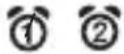 | solid Activated. | |
| not displayed Deactivated. | ||
| blinking | The alarm (Buzzer or Radio) is sounding or snoozing. | |
Using the Alarms and Snooze
When an alarm is activated, it will sound at the set time every 9 minutes (for 9 minutes), 6 times in total every day.
-
To activate Alarm 1 or Alarm 2, press the 🎨 or 📋 button respectively in clock view to turn on the 🌐 or 🙏 indicator on the display. You can activate one or both alarms.
-
When an alarm (Buzzer or Radio) starts to sound, the corresponding indicator (or ) will blink on the display.
- Press the [SNOOZE] button to temporarily silence the sounding alarm. The indicator (or) will continue to blink during the Snooze period. The alarm will sound again after the Snooze period (9 minutes).
- To turn off Snooze or the currently sounding alarm, press any Alarm Off button (or ☐) once. The corresponding alarm indicator (① or ②) will stop blinking and remain solid on the display. The alarm will not sound until the next day.
- To deactivate Alarm 1 or Alarm 2, press the 📄 or 🌐 button respectively in clock view to turn off the 🔒 or indicator on the display. The alarm will not sound until it is activated again.
using the night light
Press the *button repeatedly to turn the LED night light on and select the brightness: High / Medium / Low / Off.
using the radio
Fully extend the antenna to improve FM signal reception.
Adjusting the Volume
While listening to the radio, press the ☐ or ☐ button to adjust the volume level: "00" (mute) – "15" (maximum).
Automatic and manual tuning
- Press the button to turn the Radio on.
- Press and hold the < or > button for 2 to 3 seconds and release to automatically tune to the previous or next available FM station.
- Press the or button repeatedly to adjust the FM frequency manually.
- Press the button to turn on the Radio off.
Storing Preset Stations
The radio can store up to 10 FM preset stations for quick access to your favourite stations.
- Press the button to turn the Radio on.
- Tune to an FM station.
- Press and hold the [SET] button on the back of the device until "P01" starts blinking on the display.
- Press the < or > button to select the preset number where you want to save the tuned station ("P01" - "P10").
- Press the [SET] button once to confirm and save.
- Repeat the above steps to save the 10 preset stations.
- While listening to the radio, press the [SET] button repeatedly (or press the [SET] button once and then press the
button) to listen to the desired preset station.
Using the Sleep timer
The Sleep timer allows you to set the radio to turn off automatically after the selected time.
- While listening to the radio, press the [SLEEP] button repeatedly to set the Sleep timer: Off, 10, 20, 30, 40, 50, 60, 70, 80, or 90 minutes. The setting is automatically saved after 3 seconds and the timer will start.
- To check the remaining time on the timer, press the [SLEEP] button once.
- To cancel the Sleep timer, press the button.
charging external devices
Using the Wireless Charging Pad
Supports:
• Qi compatible smartphones (works with plastic cases up to 3mm thick).
• Wireless earphones with Qi compatible charging case.
- Place your Qi compatible device face up and centered on the wireless charging pad, as illustrated below.

natural_image
Illustration of a device with a screen, a checkmark icon, and a smartphone on a keyboard (no text or symbols)WARNING! Remove any metal or magnetic protective case from the phone before charging. When charging your phone, do not place cards or items with magnetic strips or metal objects on the charger. Doing so can damage the item or this device and cause overheating or fire.
- After placing your compatible device on the wireless charging pad, check the display of the clock radio. If the alert indicator starts to blink on the display, it indicates that your device is not compatible or charging is abnormal. Try repositioning your device or removing the protective case.
10:09
-
Monitor the charging process. Do not leave the devices unattended while charging.
-
Remove your device from the wireless charging pad once charging is complete.
Using the USB charging port
-
To charge an external USB device (e.g. smartphone, MP3 player), connect your USB device to the the USB charging port on the clock radio with a suitable USB cable (not provided). The USB charging port only supports charging and does not support data transfer.
-
Disconnect the USB cable from the clock radio once charging is complete.
troubleshooting guide
| SYMPTOMS POSSIBLE CAUSES SOLUTIONS | ||
| The radio alarm clock will not switch on. | The appliance is not plugged in. | Plug the device adapter into the mains. |
| There is no power at the mains plug. | Connect another device to the same power outlet to perform a cross test. | |
| No sound. | The volume is set to minimum. | Adjust the volume by pressing the or key. |
| The radio is not turned on or no station is tuned. | Turn on the radio and tune to a station. | |
| Malfunction. | The radio alarm clock malfunctions or makes an unusual noise. | Unplug the device for 30 minutes. When the 30 minutes are up, turn the radio alarm clock back on. |
| Weak FM reception. | The antenna is not fully deployed. | Deploy the antenna. |
| There is interference from other electrical devices such as microwave ovens, TVs, etc. | Move the radio alarm clock away from potential sources of interference. | |
simplified declaration of conformity
Sourcing & Creation hereby declares that the Essentiel b RRVI-100 Alarm clock wireless charging type radio electric device complies with directive 2014/53/UE. The full text of the EU declaration of conformity is available on the following website:
https://www.boulanger.com/info/assistance
natural_image
Illustration of a device with a screen, a checkmark, and a smartphone on a keyboard (no text or symbols)natural_image
Illustration of two devices with icons and checkmark symbols (no text or labels)
| EN | ||
| Information published | Value and precision | Unit |
| Manufacturer's name or trade mark, commercial registration number and address | DongGuan Obelieve Electronic Co.,LtdAddress: Huazhaoxin Industrial Park B-4/F, Golden Phoenix industrial Zone, Fenggan Town, Dongguan, GuanDong Province, People's Republic of China. | |
| Model identifier | OBL-0503000E | |
| Input voltage | 100-240 V | |
| Input AC frequency 50/60 Hz | ||
| Output voltage | 5.0 V | |
| Output current | 3.0 A | |
| Output power | 15.0 W | |
| Average active efficiency | 81.87 % | |
| Efficiency at low load (10 %) | 79.41 % | |
| No-load power consumption | 0.068 W | |
All information, designs, drawings and pictures in this document are the property of SOURCING & CREATION. SOURCING & CREATION reserves all rights to its brands, designs and information. Any copy and reproduction through any means shall be deemed and considered as counterfeiting.
Protection of the environment
This symbol attached to the product means that it is an appliance whose disposal is subject to the directive on waste from electrical and electronic equipment (WEEE). This appliance may not in any way be treated as household waste and must be subject to a specific type of removal for this type of waste. Recycling and recovery systems are available in your area (waste removal) and by distributors. By taking your appliance at its end of life to a recycling facility, you will contribute to environmental conservation and prevent any harm to your health.

Tested in our laboratories
Warranty valid from the date of purchase (receipt as proof of purchase). This warranty does not cover defects or damage caused by improper set up, incorrect use, or normal wear and tear of this product.