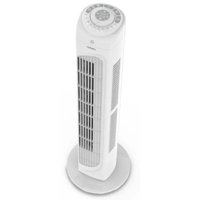
LIFE E11 TF - Fan MEDION - Free user manual and instructions
Find the device manual for free LIFE E11 TF MEDION in PDF.


| Product type | Tower fan |
| Brand | MEDION |
| Model | LIFE E11 TF (MD 12067) |
| Dimensions (L x D x H) | 22 x 22 x 79 cm |
| Weight | Approximately 2.1 kg |
| Power supply | 220-240 V~, 50/60 Hz |
| Rated power | 45 watts |
| Protection class | II |
| Rated air flow | ≥ 23.13 m³/min |
| Service value | 0.69 (m³/min)/W |
| Maximum noise level | ≤ 56 dB(A) |
| Number of speeds | 3 |
| Operating modes | Normal, Natural, Sleep |
| Oscillation | Yes, approximately 60° |
| Timer | 1 to 7.5 hours (in 30-minute increments) |
| Remote control | Yes, with CR2032 battery included, range approx. 6 m |
| Package contents | Fan, base, remote control, quick start guide |
| Cleaning | Soft, slightly damp cloth; do not immerse |
| Safety | Integrated safety grille, auto-off not specified |
| Intended use | Air circulation in enclosed rooms |
| After-sales service | Hotline and contact form at medion.com |
Frequently Asked Questions - LIFE E11 TF MEDION
User questions about LIFE E11 TF MEDION
0 question about this device. Answer the ones you know or ask your own.
Ask a new question about this device
Download the instructions for your Fan in PDF format for free! Find your manual LIFE E11 TF - MEDION and take your electronic device back in hand. On this page are published all the documents necessary for the use of your device. LIFE E11 TF by MEDION.
USER MANUAL LIFE E11 TF MEDION
natural_image
White high-tiered air conditioner tower with control panel and ventilation grille (no visible text or symbols)Turmventilator Ventilateur colonne Torenventilator Ventilador de torre Ventilatore Tower fan
MEDION LIFE E11 TF (MD 12067)
Inhaltsverzeichnis
DE
natural_image
Diagram of a mechanical device with rotating components and directional arrows indicating motion (no text or symbols)Abb. 4 - Montage Schritt 1
natural_image
Technical line drawing of a mechanical component with multiple bolt holes (no text or symbols)Abb. 5 - Montage Schritt 2
natural_image
Diagram showing a device emitting a fan or plug with a black arrow pointing to it, next to a separate electronic device (no text or symbols present)Abb. 6 - Montage Schritt 3
natural_image
Technical diagram of a mechanical device with internal components and directional arrows (no text or labels)Abb. 8 - Montage Schritt 5
natural_image
Technical line drawing of a mechanical device with a central hub and surrounding components (no text or symbols)Abb. 9 - Montage Schritt 6
natural_image
Diagram of a mechanical device with rotating components and directional arrows (no text or symbols)natural_image
Technical line drawing of a mechanical component with multiple bolt holes (no text or symbols)natural_image
Mechanical diagram of a rotary pump or impeller with rotating shaft and housing (no text or symbols)natural_image
Technical line drawing of a mechanical device with a central hub and surrounding components (no text or symbols)Cd = cadmium, Hg = mercure, Pb = plomb.
natural_image
Diagram of a mechanical device with rotating components and directional arrows (no text or symbols)Afb. 4 - Montage stap 1
natural_image
Technical line drawing of a mechanical component with multiple bolt holes (no text or symbols)Afb. 5 - Montage stap 2
Afb. 6 - Montage stap 3
natural_image
Mechanical assembly diagram showing a rotating disk with internal components and directional arrows (no text or labels)Afb. 8 - Montage stap 5
natural_image
Technical line drawing of a mechanical device with a central hub and surrounding components (no text or symbols)Afb. 9 - Montage stap 6
Cd = cadmium, Hg = kwikzilver, Pb = lood.
natural_image
Diagram of a mechanical device with rotating components and directional arrows (no text or symbols)natural_image
Technical line drawing of a mechanical component with multiple bolt holes (no text or symbols)natural_image
Diagram of a device with a downward arrow pointing to a component, no text or symbols presentnatural_image
Technical diagram of a mechanical device with labeled components and directional arrows (no readable text or symbols)natural_image
Technical line drawing of a mechanical device with no visible text or symbolsnatural_image
Diagram of a mechanical device with rotating components and directional arrows indicating motion (no text or symbols)natural_image
Technical line drawing of a mechanical component with multiple bolt holes (no text or symbols)natural_image
Diagram showing a device emitting a fan or fan cover with a black arrow indicating the process (no text or symbols present)natural_image
Mechanical assembly diagram showing a rotating disk with internal components and directional arrows (no text or labels)natural_image
Technical line drawing of a mechanical device with a central hub and surrounding components (no text or symbols)- Information about this user manual 107
1.1. Explanation of symbols .....107 FR - Proper use 107
- Safety instructions N107
3.1. Product-specific hazards 109
3.2. Noise emissions 110 ES
3.3. Handling batteries.... 110 - Package contents ......111
- Appliance overview 112
- Before using the appliance for the first time....114
6.1. Mounting the base 115
6.2. Inserting the battery in the remote control....117 - Operation 117
7.1. Switching on the appliance....117
7.2. Setting the speed....118
7.3. Setting mode....118
7.4. Switch oscillation on/off....118
7.5. Setting the timer....118
7.6. Switching off the appliance....118 - Troubleshooting 119
- Cleaning....119
- Prolonged non-use and transport 120
- Technical specifications.... 120
- EU declaration of conformity 120
- Disposal....121
- Service information....122
- Legal Notice....123
1. Information about this user manual

Thank you for choosing our product. We hope you enjoy using this appli-ance.
Read the safety instructions carefully before using the appliance for the first time. Note the warnings on the appliance and in the user manual.
Always keep the user manual close to hand. If you sell the appliance or give it away, please ensure that you also pass on this user manual. It is an essential component of the product.
1.1. Explanation of symbols

DANGER!
Warning: risk of fatal injury!

WARNING!
Warning: risk of possible fatal injury and/or serious irreversible injuries!

CAUTION!
Warning: risk of minor and/or moderate injuries!
WARNING!
Warning: risk of electric shock!

NOTICE!
Follow these instructions to prevent damage to the appliance!

More detailed information about using the appliance!

Follow the instructions in the user manual!

Symbol for protection class II
DE
FR
NL
ES
IT
EN
2. Proper use
This appliance is used to circulate air in closed, private indoor spaces.
Please note that we shall not be liable in cases of improper use:
Do not modify the appliance without our prior consent. Use only auxiliary devices approved or supplied by us.
▶ Only use replacement parts or accessories that we have supplied or approved.
▶ Comply with all the information in this user manual, especially the safety instructions. Any other use is considered improper and can cause personal injury or property damage.
3. Safety instructions
- Keep the appliance and its accessories out of the reach of children.
■ This appliance can be used by children of 8 years and older, and by people with reduced physical, sensory or mental capacity, or with a lack of experience and/or knowledge, but only with proper supervision, or if they have been told how to use the appliance safely, and have understood the risks involved if they use it improperly.
■ Children must not be allowed to play with the appliance.
■ Cleaning and user maintenance must not be carried out by children.
■ Children do not recognise the dangers that can arise when handling electrical appliances. Please be particularly careful while using the appliance if there are children nearby.
■ Children younger than 8 must be kept away from the appliance and the power cord.
■ Only connect the appliance to a properly installed and easily accessible socket that is close to where you are using the appliance. The local mains voltage must correspond to the technical specifications for the appliance.
■ The power socket must be easily accessible so that you can unplug the appliance from the mains quickly if necessary.
■ Unplug the appliance from the socket: – when you are cleaning the appliance
- if you are no longer using the appliance
- when the appliance is un- attended
– during thunderstorms.
■ Always hold the plug to pull it out and never pull the mains cable.
■ The appliance must not be immersed in water or other liquids, or held under running water, because this could cause an electric shock.
■ Do not place the appliance near to sinks and do not expose it to water droplets or spray.
■ Use the appliance indoors only.
■ Do not use the appliance outdoors.
■ Do not allow the mains cable to come into contact with hot objects or surfaces.
■ Do not use if the appliance if the appliance or the mains cable is visibly damaged or if the appliance has been dropped.
■ Check the appliance and the mains cable for damage before using the appliance for
the first time, and after each use.
■ Completely unwind the mains cable.
■ Do not kink or crush the mains cable.
■ Contact our Service team without delay if the appliance has been damaged during transport.
■ Do not, under any circumstances, make any unauthorised modifications to the appliance or try to open a component and/or repair it yourself.
■ The power cord should only be repaired by an authorised repair workshop. Otherwise, contact the Medion Service Centre to avoid hazards.
■ Never touch the plug with damp or wet hands.
■ Do not expose the appliance to extreme conditions. Avoid:
– high humidity or wet conditions
- extremely high or low temperatures
- direct sunlight
- naked flames.
■ Do not operate the appliance in potentially explosive atmospheres. FR
■ Ensure the mains cable does not become a tripping hazard – do not use an extension cable.
■ Place the appliance on a stable, level surface.
■ Do not place the appliance on a wet surface.
- Never place the appliance on the edge of a table – it could tip over and fall.
3.1. Product-specific hazards
■ The fan may only be used when fully assembled!
■ Do not put your fingers or other objects through the protective grille.
■ Make sure that no fabrics such as curtains or similar are hanging or lying near the appliance which could get caught in the appliance.
■ Do not operate the appliance on uneven surfaces or near steps. Avoid tipping the appliance (e.g. due to edges on the floor) during use.
■ Check all screw and plug connections at regular intervals!
■ Tighten up loose screws and swallowed or secreted in any correct the hold of the plug part of the body.
In the event of a thunderstorm, turn off the appliance and remove the mains plug from the socket.
■ Do not carry the appliance while it is in use.
■ Do not cover the appliance during operation.
■ Ensure the air intake and outlet are clear. Make sure that the air intake and outlet are free from dirt or loose objects.
3.2. Noise emissions
■ The sound pressure level of the fan is less than 54 dB(A).
3.3. Handling batteries

WARNING!
Risk of chemical burns!
The remote control contains a button cell battery. If this battery is swallowed, it can cause serious internal chemical burns within 2 hours, which may prove fatal.
- Seek medical help immediately if you think that a battery may have been
■ Avoid contact with battery acid. If battery acid comes into contact with skin, eyes or mucous membranes, rinse the affected areas with plenty of clean water and consult a doctor as soon as possible.
- Keep new and used batteries out of the reach of children.
■ Stop using the remote control if you cannot close the battery compartment securely, and keep it well away from children.
■ Only replace the battery with batteries of the same or an equivalent type.
■ Never try to recharge non-rechargeable batteries. Risk of explosion!
■ Never expose the batteries to excessive heat (such as direct sunlight, fire or similar).
■ Store batteries in a cool, dry place. Strong direct heat can damage batteries. Do not expose the appliance to sources of intense heat.
■ Never short-circuit batteries.
■ Remove leaking batteries from the appliance immediately. Clean the contacts before inserting new batteries. Battery acid can cause chemical burns!
4. Package contents
DE

DANGER!
Risk of choking and suffocation!
There is a risk of choking and suffocation due to swallowing or inhaling small parts or plastic wrap.
FR
NL
ES
■ Always remove flat batteries from the appliance.
- Keep packaging material such as plastic film or plastic bags away from children.
IT
■ If the appliance is not going to be used for long periods, remove the batteries.
■ Do not let children play with the packaging material.
■ Before inserting the batteries, check that the contacts in the appliance and on the batteries are clean and, if necessary, clean them.
Remove the product from the packaging and remove all packaging material.
▶ Please check the package contents to ensure that all items are included. If anything is missing, please contact us within 14 days of purchase.
The following items are supplied with your product:
- Fan
- Base
■ Always use new batteries the same type. Never use old and new batteries together.
of Remote control incl. CR2025 battery
- Short manual
■ Pay attention to the polarity (+/-) when inserting the batteries.
EN
5. Appliance overview
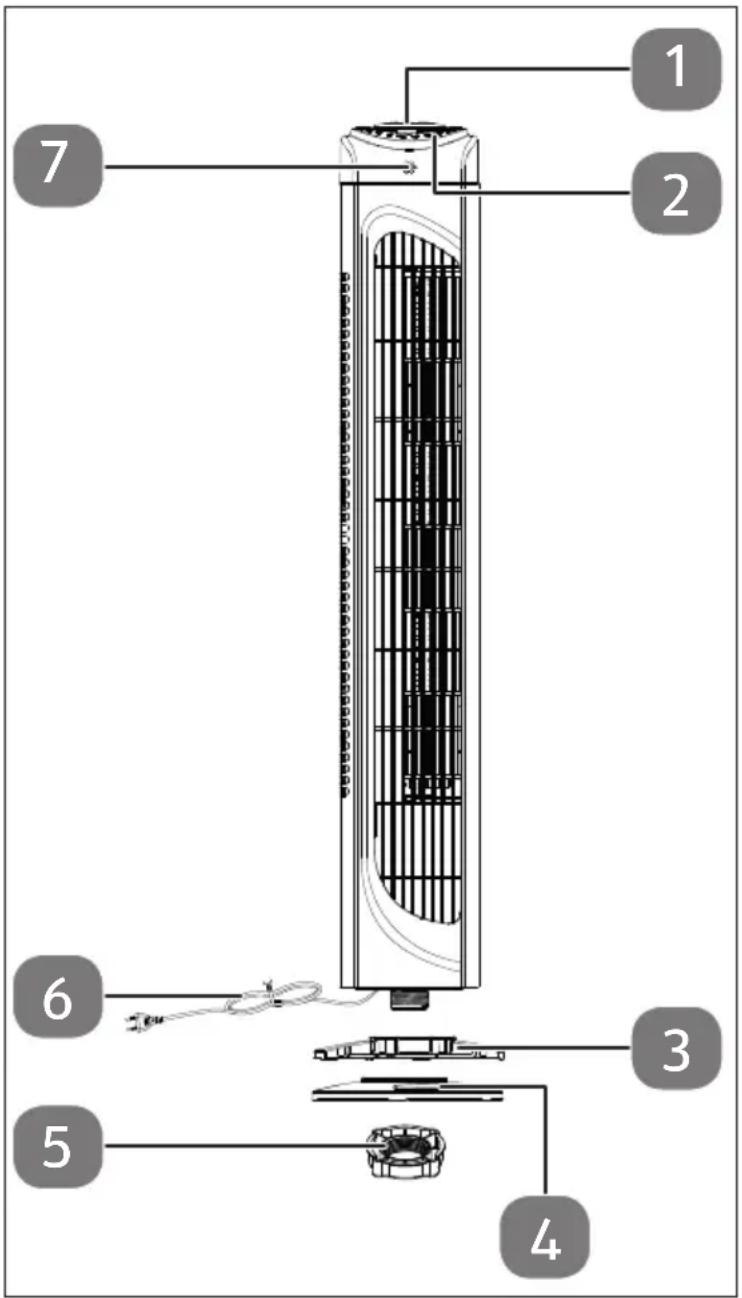
Fig. 1 – Overview
- Remote control
- Control panel
- Rear half of the base with cable guide
- Front half of the base
- Fastening nut for the base
- Mains cable
- IR receiver
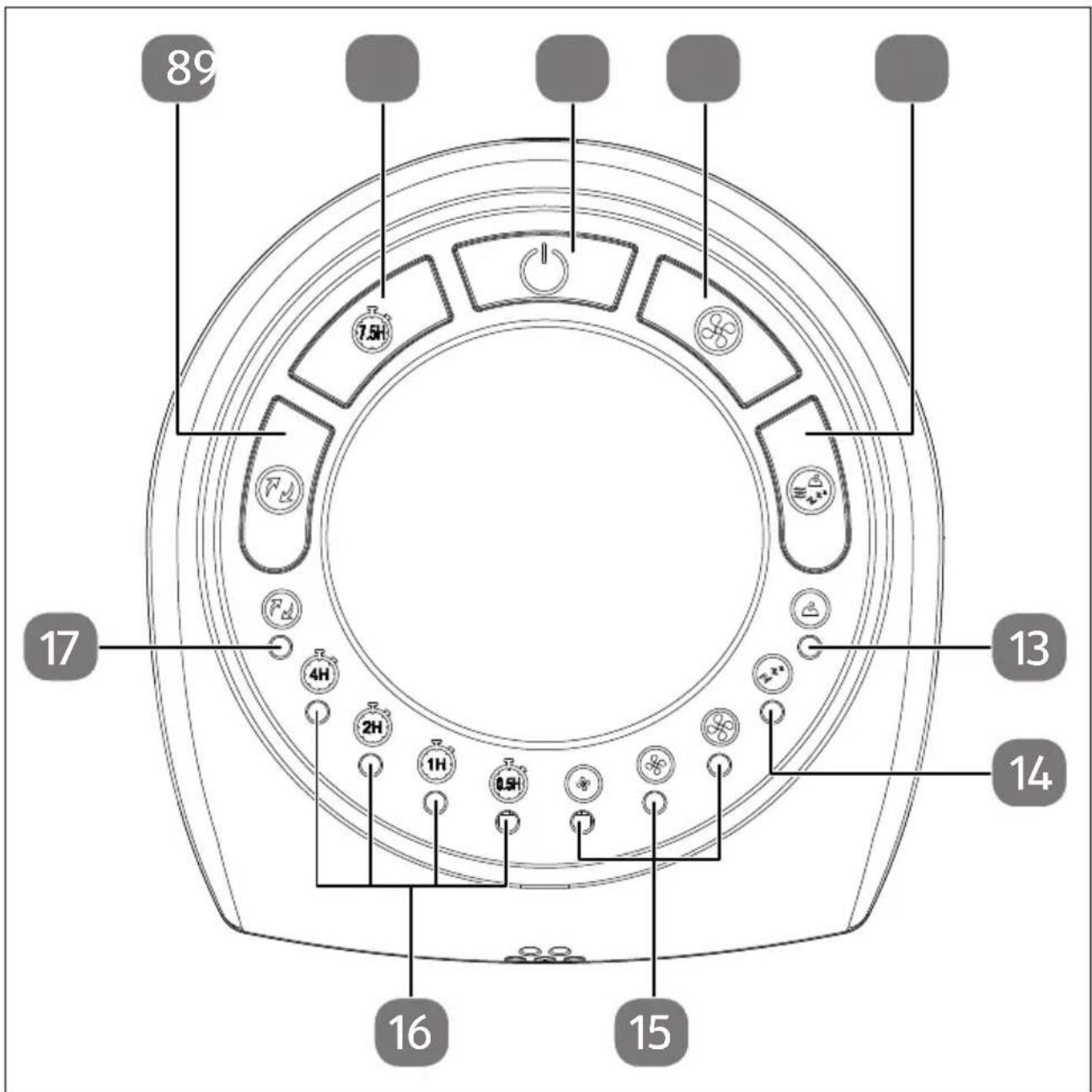
Fig. 2 - Control panel
- Oscillation button
- Timer function button
- ⏻ Button to switch appliance on/off
- Speed selection button
- Operating mode selection button
- Natural operating mode operating light
- Sleep operating mode operating light
- Speed operating light in the Normal operating mode
- Timer function operating light
- Oscillation operating light
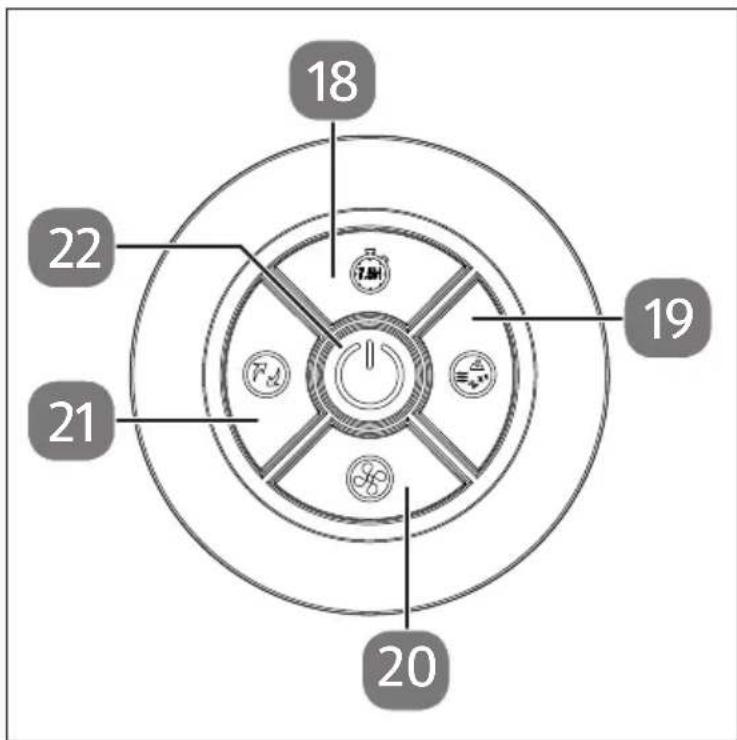
Fig. 3 - Remote control
- 7刷 Timer function button
- Operating mode selection button
- Speed selection button
- Oscillation button
- Button to switch appliance on/off
6. Before using the appliance for the first time

NOTICE!
Possible material damage!
Without a fixed base, the fan may tilt and fall over.
■ The fan may only be used or switched on after assembly is complete.

WARNING!
Risk of injury!
Risk of cuts due to rotating rotor blades.
■ Do not put your fingers or objects through the protective grille in the housing.
▶ Remove all packaging materials.
▶ Mount the appliance as described below.
6.1. Mounting the base
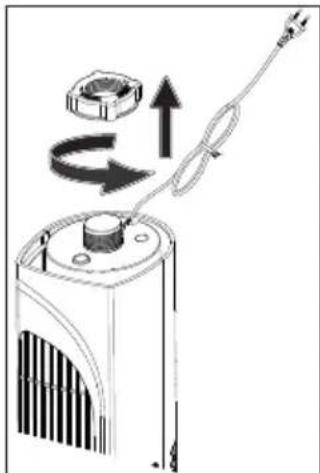
▶ Turn the tower fan upside down and unscrew the fastening nut from the underside of the tower fan.
natural_image
Diagram of a mechanical device with rotating components and directional arrows (no text or symbols)Fig. 4 - Assembly step 1
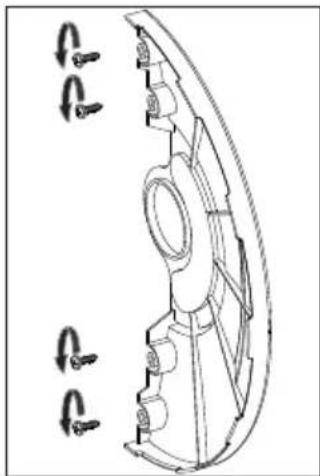
▶ Loosen the screws from the front half of the base.
natural_image
Technical line drawing of a mechanical component with multiple bolt holes (no text or symbols)Fig. 5 - Assembly step 2
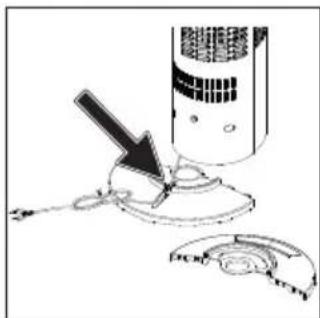
▶ Guide the connection cable through the cable guide on the rear half of the base.
natural_image
Diagram of a device with a lightning bolt striking a circular component, no text or symbols presentFig. 6 - Assembly step 3
▶ First insert the front half of the base onto the thread on the underside.
Then attach the rear half of the base to the thread on the underside.
▶ Plug both halves of the base together until you hear them click into place.
Ensure that both parts are correctly connected to each other and that the underside of the base is level.
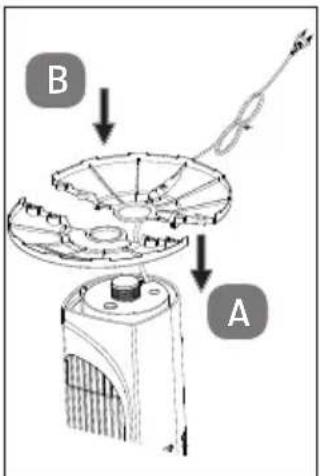
Fig. 7 - Assembly step 4
▶ Screw the fastening nut back onto the thread and tighten the fastening nut hand-tight.
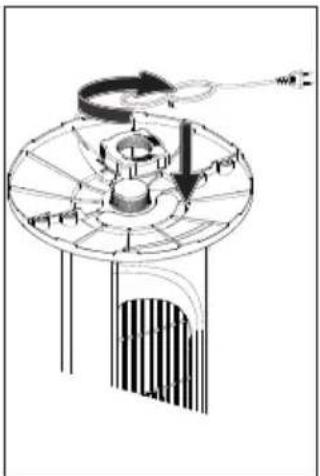
natural_image
Technical diagram of a mechanical device with labeled components and directional arrows (no readable text or symbols)Fig. 8 - Assembly step 5
▶ Screw the four screws back into the respective threaded holes and tighten the screws hand-tight.
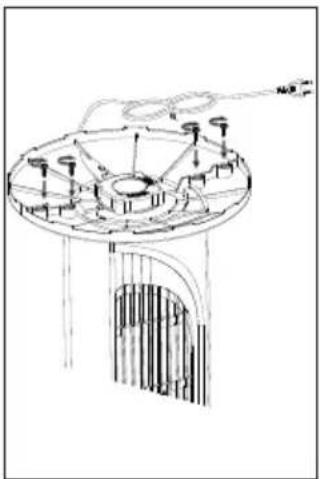
natural_image
Technical line drawing of a mechanical device with no visible text or symbolsFig. 9 - Assembly step 6
▶ Position the appliance with a minimum distance of 30 cm from walls and objects.
6.2. Inserting the battery in the remote control
On delivery the battery is already inserted in the remote control. The remote control requires a 3 V button cell battery, CR2025.
To activate it, pull out the insulating strip on the underside of the remote control.
Replace the battery if the appliance fails to react to commands from the remote control properly.

WARNING!
Risk of explosion if batteries are replaced incorrectly.
■ Do not throw the battery into a fire.
■ Only replace batteries with the same type or an equivalent type recommended by the manufacturer.
- Dispose of used batteries according to the manufacturer's specifications.
▶ Press the latch A and pull out the battery compartment B.
▶ Remove the flat battery.
▶ Put a new battery in the battery compartment with the positive pole facing upwards. Ensure that the polarity (+/-) is correct when inserting the battery.
▶ Slide the battery compartment in until it clicks into place.
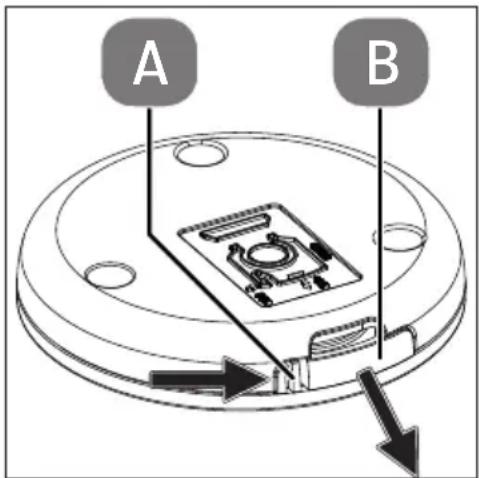
Fig. 10 - Inserting the battery
7. Operation
Place the appliance on a level surface.
▶ Plug the mains plug into a suitable socket.
An acoustic signal will sound.

You can operate the appliance using the operating buttons on the appliance or using the remote control supplied. The operating buttons on the remote control are identical to the operating buttons on the appliance.
7.1. Switching on the appliance
▶ Press the button to switch on the fan.
▶ Press the button to switch between the speeds.
There are 3 speed levels available. The set speed level is shown on the operating lights.
7.3. Setting mode
▶ Press the Ⓜ button to switch between the operating modes.
The control display (10), (11) and (12) shows the set operating mode:
| Operating mode Functionality | |
| Normal | operates constantly at the set speed (1-3) |
| Natural | operates at different intervals (high, medium, low speed and off) to imitate a natural breeze |
| Sleep | works in the same way as in Natural operating mode, speed level is automatically switched down by one speed level every 30 minutes until level 1 is reached to ensure healthy and undisturbed sleep The operating lights switch off after 30 seconds. |
7.4. Switch oscillation on/off
▶ Press the Ⓥ button to switch on the oscillation.
When the oscillation is switched on, the control display (8) lights up. The swivel radius is approx. 60^ .
▶ Press the button again to switch the oscillation off.
After it is switched off, the fan remains in the last position.
7.5. Setting the timer
▶ Press the 📊 button to set a runtime after which the appliance switches off automatically.
▶ Press the button repeatedly to set the runtime from 1 to 7.5 hours (in 30-minute increments).
The 0,5H, 1H, 2H, 4H operating lights light up, including in combination, and show the total runtime.
7.6. Switching off the appliance
▶ Press the button to switch off the fan.
▶ Pull the mains plug out of the socket.
8. Troubleshooting
If the appliance stops working properly, please refer to the troubleshooting table shown below to see if you can resolve the problem yourself.
Never attempt to repair the appliance yourself. If a repair is necessary, please contact our Service Centre or a suitable authorised repair workshop.
| Problem Possible cause Troubleshooting | ||
| The appliance is not working. | The mains plug is not properly inserted. | Disconnect the mains plug and then plug it in again. |
| The earthed mains socket is faulty. | Check the earthed mains socket by connecting another appliance. | |
9. Cleaning

WARNING!
Risk of electric shock!
There is a risk of electric shock due to live parts.
■ The appliance must not be immersed in water or other liquids, or held under running water, because this could cause an electric shock.
■ Unplug the mains plug from the socket before you start cleaning the appliance.
■ Make sure that no liquids enter the appliance.

WARNING!
Risk of injury!
There is a risk of cuts due to contact with sharp-edged rotor blades inside the housing.
■ Do not disassemble the appliance to clean the rotor blades.

NOTICE!
Damage to the appliance!
The improper use of cleaning agents on the fan may damage the surfaces.
■ Never use acidic, abrasive or granular, acetic-acid-, soda- or solvent-based cleaning agents. These may damage the appliance surfaces or the printing on it.
▶ Clean the housing only with a soft, slightly damp cloth.
▶ To remove stubborn dirt, moisten the cloth with a mild soap solution.
Dry the housing carefully before switching on the appliance.
10. Prolonged non-use and transport
If you do not intend to use the appliance for a longer period of time, disconnect the mains plug from the socket and store the appliance in a dry, dust-free and frost-free environment that is not exposed to direct sunlight.
To avoid damaging the product during transport, we recommend that you use the original packaging.
11. Technical specifications
| Tower fan | |
| Model MD 12067 | |
| Power supply 220–240 V~, 50–60 Hz | |
| Rated power 45 watts | |
| Protection class II | |
| Dimensions (WxDxH) 22 x 22 x 79 cm | |
| Weight Approx. 2.1 kg | |
| Nominal air flow rate | ≥ 23.13 m3/min |
| Service ratio | 0.69 (m3/min)/W |
| Operating volume | ≤ 56 dB(A) |
| Remote control | 1 x battery, type CR2032 3 V(included in package contents)Range: approximately 6 m |
12. EU declaration of conformity

The manufacturer hereby declares that this appliance complies with the fundamental requirements and the other relevant provisions of:
• EMC Directive 2014/30/EU
• Low Voltage Directive 2014/35/EU
• Ecodesign Directive 2009/125/EC (and Ecodesign Regulation 2019/1782)
• RoHS Directive 2011/65/EU
13. Disposal

PACKAGING
Your appliance has been packaged to protect it from damage in transit. The packaging is made of materials that can be recycled in an environmentally friendly manner.

Observe the following labels on the packaging materials regarding waste separation with the abbreviations (a) and numbers (b):
1–7: plastics/20–22: paper and cardboard/80–98: composite materials

(France only)
The “Triman” symbol tells the consumer that the product can be recycled, is covered by an extended system of manufacturer’s responsibility and must be sorted by material type in France.
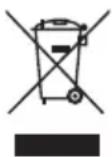
APPLIANCE
All old appliances marked with the symbol shown must not be disposed of in normal household waste.
In accordance with Directive 2012/19/EU, the appliance must be properly disposed of at the end of its service life.
This involves separating the materials in the appliance for the purpose of recycling as well as minimising the environmental impact and negative effects on human health.
Take old appliances to an electrical scrap collection point or a recycling centre.
Contact your local waste disposal company or your local authority for more information on this subject.

BATTERIES
Batteries that carry the symbol illustrated must not be disposed of in ordinary household waste.
In accordance with Regulation 2023/1542, batteries must be disposed of properly at the end of their service life.
They may contain toxic heavy metals and are subject to hazardous waste treatment.
The chemical symbols of the heavy metals are as follows:
Cd = cadmium, Hg = mercury, Pb = lead.
You are legally obliged to return old batteries and rechargeable batteries after use.
Therefore, please return used batteries and rechargeable batteries free of charge to a retailer or a municipal collection point.
Batteries and rechargeable batteries may contain substances that are harmful to human health and the environment. The negative effects can only be avoided if old batteries and rechargeable batteries are collected and recycled separately.
Take particular care when handling batteries and rechargeable batteries containing lithium, as there is an increased risk of fire if they are used incorrectly. Tape the poles to prevent an external short circuit.
Use batteries with a long service life or rechargeable batteries to reduce the generation of waste from old batteries.
Follow the storage instructions and avoid completely discharging and recharging the battery to extend its service life.
In addition, batteries or electrical and electronic devices with batteries or rechargeable batteries must not be left in public areas in order to avoid littering. Check options for reusing batteries instead of disposing of them, for example by repairing the battery.
14. Service information
Please contact our Customer Service team if your device ever stops working the way you want or expect it to. There are several ways for you to contact us:
- In our Service-Community, you can meet other users, as well as our staff, and you can exchange your experiences and pass on your knowledge there.
You will find our Service-Community at community.medion.com.
• Alternatively, use our contact form at www.medion.com/contact. - You can also contact our Service team via our hotline or by post.
| Opening times Hotline number UK | |
| Mon – Fri: 08.00 – 20.00Sat – Sun: 10.00 – 16.00 | 0333 3213106 |
| Service address | |
| MEDION Electronics Ltd.120 Faraday Park, Faraday Road, DorcanSwindon SN3 5JF, WiltshireUnited Kingdom | |

You can download this and many other sets of operating instructions from our service portal at www.medionservice.com.
We have stopped providing printed copies of our warranty terms and conditions as part of our commitment to sustainability, but you can access the warranty terms and conditions on our service portal.
You can also scan the QR code on the side of the screen, to download the operating instructions onto your mobile device from the service portal.
15. Legal Notice
Copyright 2025
Date: 21. January 2025
All rights reserved.
These operating instructions are protected by copyright.
Mechanical, electronic and any other forms of reproduction are prohibited without the written permission of the manufacturer.
Copyright is owned by the company:
MEDION AG
Am Zehnthof 77
45307 Essen
Germany
Please note that you cannot use the address above for returns. Please always contact our Customer Service team first.
DE
FR
NL
ES
IT
EN
- Inhaltsverzeichnis
- Information about this user manual
- Explanation of symbols
- DANGER!
- WARNING!
- CAUTION!
- NOTICE!
- Proper use
- Safety instructions
- Product-specific hazards
- Noise emissions
- Handling batteries
- Risk of chemical burns!
- Package contents
- Risk of choking and suffocation!
- Appliance overview
- Before using the appliance for the first time
- Possible material damage!
- Risk of injury!
- Mounting the base
- Inserting the battery in the remote control
- Risk of explosion if batteries are replaced incorrectly.
- Operation
- Switching on the appliance
- Setting mode
- Switch oscillation on/off
- Setting the timer
- Switching off the appliance
- Troubleshooting
- Cleaning
- Risk of electric shock!
- Damage to the appliance!
- Prolonged non-use and transport
- Technical specifications
- EU declaration of conformity
- Disposal
- PACKAGING
- APPLIANCE
- BATTERIES
- Service information
- Legal Notice
- MEDION AG
Brand : MEDION
Model : LIFE E11 TF
Category : Fan