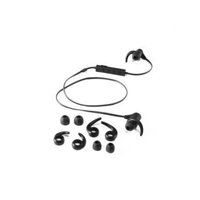
SBSK 5.0 A1 - Bluetooth headphones SILVERCREST - Free user manual and instructions
Find the device manual for free SBSK 5.0 A1 SILVERCREST in PDF.


User questions about SBSK 5.0 A1 SILVERCREST
0 question about this device. Answer the ones you know or ask your own.
Ask a new question about this device
Download the instructions for your Bluetooth headphones in PDF format for free! Find your manual SBSK 5.0 A1 - SILVERCREST and take your electronic device back in hand. On this page are published all the documents necessary for the use of your device. SBSK 5.0 A1 by SILVERCREST.
USER MANUAL SBSK 5.0 A1 SILVERCREST
natural_image
Diagram showing a laptop connected to a device via cable, with two earphones attached (no text or symbols)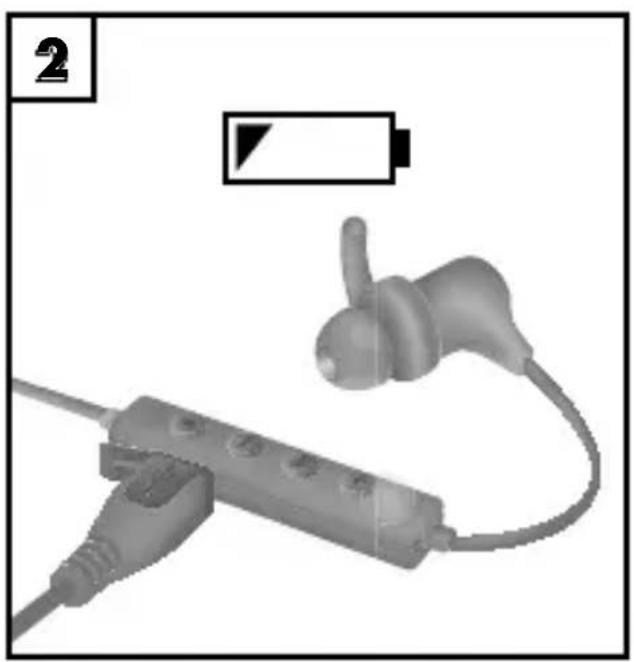
natural_image
Medical device with attached earpiece and battery icon (no text or symbols)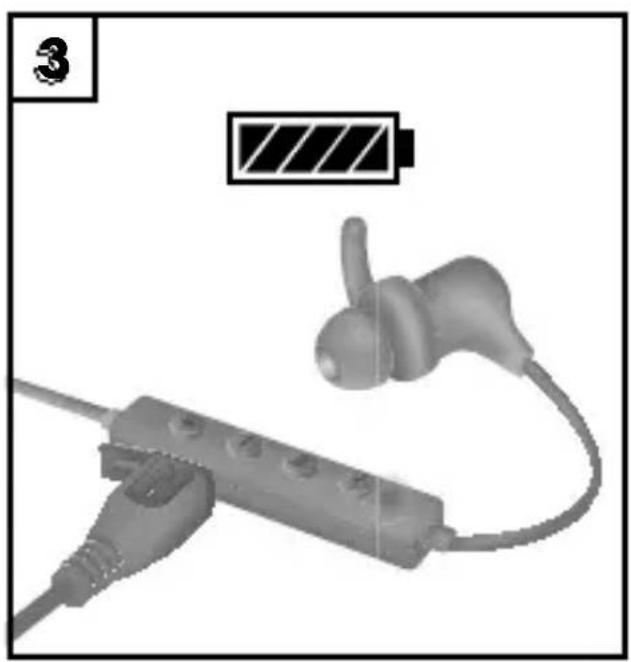
natural_image
Illustration of a wireless earbuds with a charging plug and battery icon above (no text or symbols)
text_image
Bluetooth® ON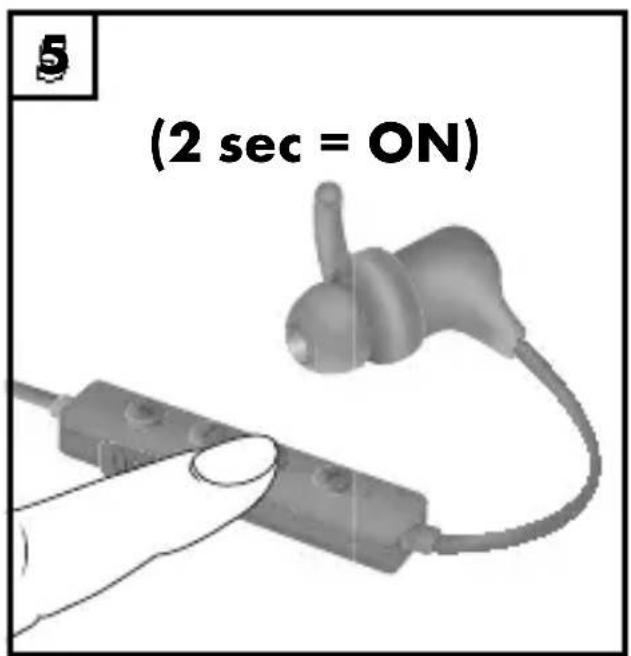
text_image
(2 sec = ON)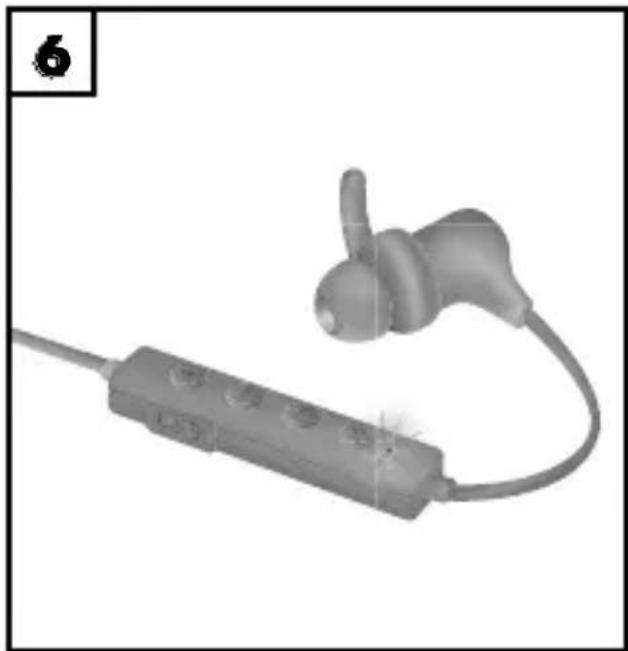
natural_image
3D rendered image of a wireless earbuds with a probe inserted, no text or symbols visible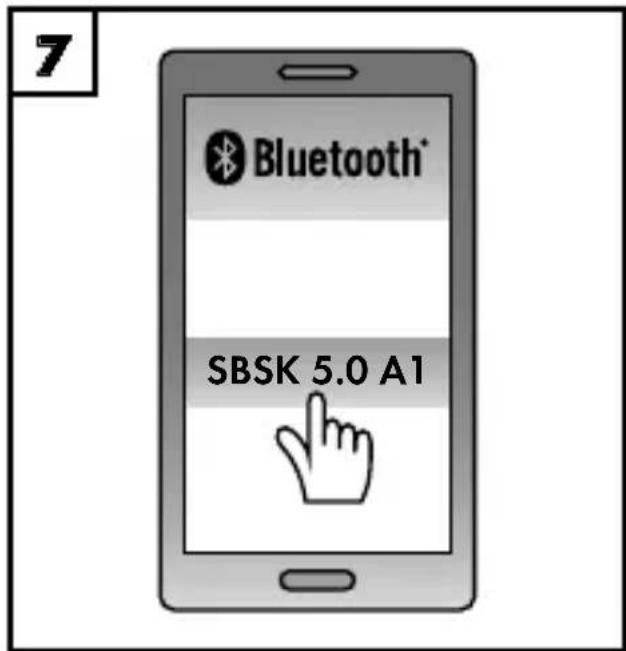
text_image
7 Bluetooth® SBSK 5.0 A1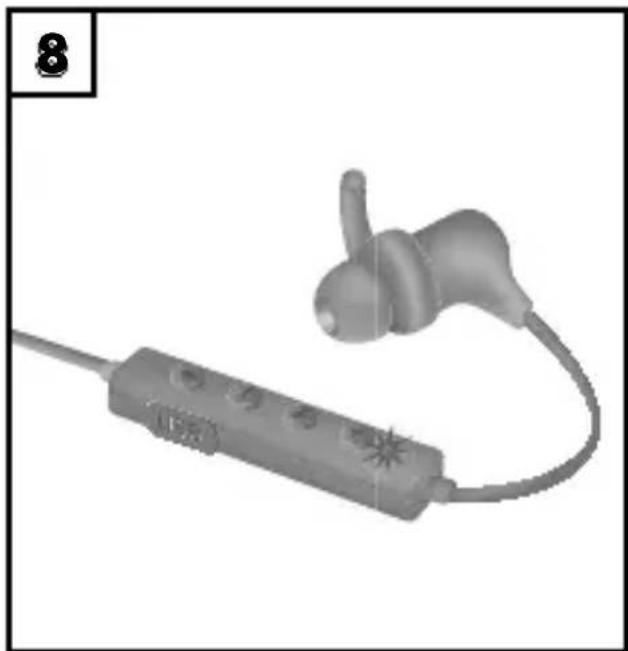
natural_image
3D rendered image of a handheld earbuds with a connector, no visible text or symbols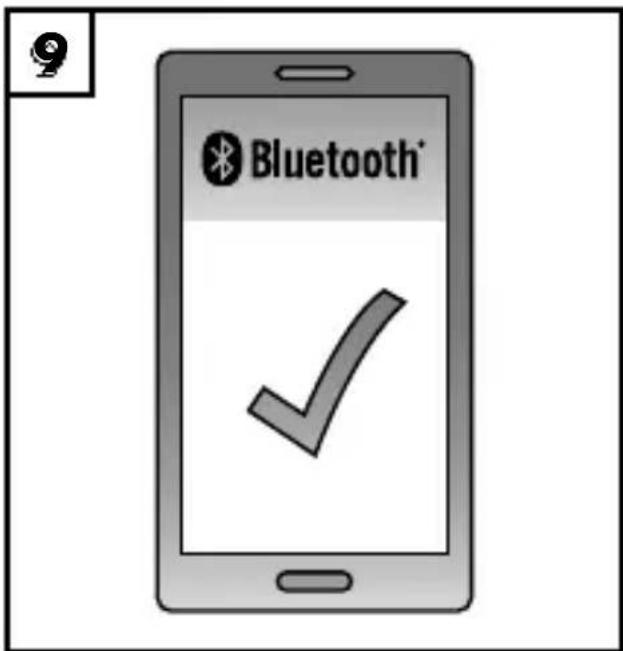
text_image
Bluetooth®Illustrations apply to initial operation.
GB MT IE NI This information sheet is an integral part of the operating instructions. Keep it together with the operating instructions. Please also pass all associated documents on to any future owner(s). Before using the product for the first time, read the operating instructions and pay close attention to the safety instructions.
KOMPERNASS HANDELS GMBH
BURGSTRASSE 21
DE-44867 BOCHUM
GERMANY
www.kompernass.com
Operating instructions
DK
IN-EAR H∅RETELEFONER MED BLUETOOTH®
Before reading, unfold the page containing the illustrations and familiarise yourself with all functions of the device.
DK
GB/IE/NI Operating instructions Page 1
Information about these operating instructions....3
Copyright 3
Notes on trademarks 4
Intended use....4
Warnings and symbols....5
Safety 6
Basic safety instructions....6
Risk of hearing damage....9
Risk of accidents....9
Notes on the radio interface 10
Parts description/operating components.... 11
Use....12
Unpacking 12
Check package contents 12
Disposal of packaging 13
Charging the battery 13
Inserting the earbuds 15
Replacing the ear cushions....16
Pairing the earbuds with a Bluetooth® device ..... 17
Handling and operation....20
Operation of the buttons 20
Telephone functions 21
Using the magnet....22
Troubleshooting 23
Cleaning. 24
Storage when not in use 25
Disposal....25
Appendix....26
Technical data 26
Notes on the EU Declaration of Conformity. . . . . . . . . 27
Kompernass Handels GmbH warranty ..... 27
Service 30
Importer 30
Introduction
Information about these operating instructions
Congratulations on the purchase of your new device.
You have selected a high-quality product.
The operating instructions are part of this product. They contain important information about safety, usage and disposal.
Before using the product, please familiarise yourself with all operating and safety instructions. Use the product only as described and for the range of applications specified. Keep these operating instructions as a reference and store them near the product. Please pass on all documentation incl.
these operating instructions to any future owner(s) if you sell this product or give it away.
Copyright
This documentation is protected by copyright. Any copying or reproduction, including in the form of extracts, or any reproduction of images (even in a modified state), is permitted only with the written authorisation of the manufacturer.
Notes on trademarks
■ USB® is a registered trademark of USB Implementers Forum, Inc.
The Bluetooth® logotype and Bluetooth® logo are registered trademarks of Bluetooth SIG, Inc. (Special Interest Group). Any use of the trademarks by Kompernaß Handels GmbH is made under the provisions of a licence.
■ The SilverCrest trademark and the retail name are the property of their respective owner.
All other names and products may be trademarks or registered trademarks of their respective owner.
Intended use
These earbuds are a consumer electronics device and can be used to play back audio files, which can be transferred via Bluetooth®. You can use the earbuds as a headset to take calls using the integrated microphone once the Bluetooth® connection has been made. The device is not intended for any other purpose, nor for use beyond the scope described. The device is not intended for use in commercial or industrial environments. The manufacturer accepts no responsibility for damage caused by failure to observe these instructions, improper use or repairs, unauthorised modifications or the use of unapproved replacement parts. The risk is borne solely by the user.
Warnings and symbols
The following warnings are used in these operating instructions:

DANGER
A warning at this hazard level indicates a potentially hazardous situation.
Failure to avoid this hazardous situation could result in severe injuries or even death.
▶ Follow the instructions in this warning notice to avoid the risk of serious injuries or death.
CAUTION
A warning notice at this hazard level indicates a risk of property damage.
Failure to avoid this situation could result in property damage.
▶ Follow the instructions in this warning notice to prevent property damage.
NOTE
▶ A note provides additional information that makes handling the device easier for you.
Safety
This section contains important safety instructions for handling the device. This device complies with statutory safety regulations. Improper use may result in personal injury and property damage.
Basic safety instructions
To ensure safe operation of the device, follow the safety guidelines set out below:
- Check the earbuds for visible external damage before use. Do not operate damaged earbuds or earbuds that have been dropped.
If the cables or connections are damaged, have them replaced by an authorised specialist or the Customer Service department.
These earbuds may be used by children aged 8 years and above and by persons with limited physical, sensory or mental capabilities or lack of experience and knowledge, provided that they are under supervision or have been told how to use the earbuds safely and are aware of the potential risks. Do not allow children to use the earbuds as a toy. Cleaning and user maintenance tasks may not be carried out by children unless they are supervised.
DANGER! Do not allow children to play with the packaging material! Keep all packaging materials away from children. There is a risk of suffocation!
DANGER! Do not allow children to use the earbuds unless they are being supervised. The package includes parts that can be swallowed. There is a risk of suffocation!
■ Protect the charging cable from hot surfaces and sharp edges and ensure that it is not stretched tight or kinked.
The earbuds should only be repaired by authorised specialist personnel or the customer service department. Improper repairs may put the user at risk. They will also invalidate any warranty claims.
■ Defective components must always be replaced with original replacement parts. Compliance with the safety requirements can only be guaranteed by using these replacement parts.
■ Do not make any unauthorised modifications or alterations to the earbuds.
■ Never open the housing of the earbuds.
There are no parts inside the device which require user maintenance.
In addition, this will invalidate the warranty.
■ Do not place objects filled with liquids (such as vases or open drinks) next to the earbuds.
- Do not allow any liquids or moisture to get into the earbuds.
The earbuds may heat up while charging. Place the earbuds in a well-ventilated location during the charging process and do not cover them.
■ Do not operate or place the earbuds close to open flames (e.g. candles).
The earbuds have an integrated lithium-ion battery. Mishandling the lithium-ion batteries can cause fires, explosions, leakage of dangerous chemicals or other hazards! Do not throw the earbuds into an open fire.
If you notice unusual noises, a burning smell or smoke coming from your earbuds, remove the earbuds from your ears immediately and disconnect any attached charging cable. Have the earbuds checked by a qualified specialist before using them again.
The earbuds have integrated magnets. Keep the earbuds at least 20 cm away from a pacemaker or implanted defibrillator, as the proper functioning of the pacemaker or the implanted defibrillator could be affected by the magnetic field.
Risk of hearing damage

DANGER
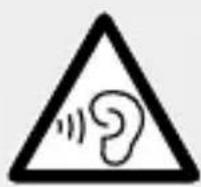
Risks from extremely high volume levels!
Loud music can lead to hearing damage.
- Avoid listening to music at an extremely high volume, especially over long periods of time, when using these earbuds.
Risk of accidents

DANGER
Risk of impaired perception!
Acoustic warnings/notification signals and ambient noise can sound different when you are wearing these earbuds. Be aware of how these signals deviate in their sound so that you can recognise the signals in the appropriate situations.
Do not use the earbuds while driving a vehicle, riding a bicycle, operating machinery or in any other situation in which impaired perception of ambient noise could put you or other people in danger. Please also observe the statutory provisions and regulations of the country in which you are using the earbuds.
Notes on the radio interface
- Keep the device at least 20 cm away from a pacemaker or implanted defibrillator, as the proper functioning of the pacemaker or the implanted defibrillator could be affected by radio waves.
■ The transmitted radio waves can cause noise interference in hearing aids.
Do not use the device with the radio components switched on in the presence of flammable gases or in a potentially explosive atmosphere (e.g. in a paint shop), as the transmitted radio waves can cause an explosion or ignite a fire.
■ The range of the radio waves is dependent on the environment and the ambient conditions.
■ Data transmissions via a wireless connection can be intercepted by unauthorised third parties.
Parts description/operating components
(See fold-out page for illustrations)
① Ear mould (medium)
② Integratedmagnet
3 Ear cushion (medium)
4 Operating/charging LED
⑤ + button (increase volume; next track)
6 ▶ button (on/off switch; play/pause; phone functions)
⑦ — button (decrease volume; previous track)
8 Charging socket (micro USB)
9 Button (Bluetooth®)
10Neckband
⑪Microphone
12 Ear cushion (small)
13 Ear cushion (large)
14 Ear mould (small)
15 Ear mould (large)
16 Charging cable (USB type A to micro USB)
17 Quick guide (symbol)
18 Operating instructions (symbol)
Use
Unpacking
◆ Remove all parts and the operating instructions from the box.
◆ Remove all packaging material.
Check package contents
(See fold-out page for illustrations)
The following components are included in delivery:
- Earbuds with pre-fitted ear cushions (medium size 3) and ear moulds (medium) 1
- 2 pairs of ear cushions (small) and large
- 2 pairs of ear moulds (small) and large 15
● Charging cable 6 (USB type A to micro USB)
- Quick guide ^7
• These operating instructions 8
NOTE
▶ Check the package for completeness and signs of visible damage.
If the delivery is incomplete or damage has occurred as a result of defective packaging or during transport, contact the service hotline (see section Service).
Disposal of packaging
text_image
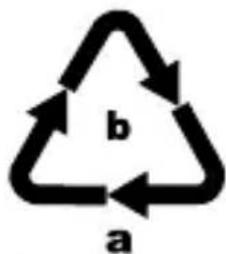
b aDispose of the packaging in an environmentally friendly manner.
Note the labelling on the packaging and separate the packaging material components
for disposal if necessary.
The packaging material is labelled with abbreviations (a) and numbers (b) with the following meanings:
1-7:plastics,
20-22: paper and cardboard,
80-98: composites
NOTE
If possible, keep the original packaging for the complete warranty period of the device so that the device can be packaged properly for return shipment in the event of a warranty claim.
Charging the battery
CAUTION
▶ Only charge the earbuds in dry indoor spaces.
▶ Use only mains adapters with an output voltage of 5 V and an output current of at least 0.5 A or a USB port on your computer to charge the earbuds.
▶ Use only the supplied charging cable 96 o charge the earbuds!
▶ Always disconnect the charging cable when charging is complete!
Before using the earbuds, the integrated battery must be charged fully.
- Connect the USB type A plug of the charging cable to a switched-on PC or a suitable USB power supply (not supplied).
Connect the micro USB plug of the charging cable to the charging socket (micro USB) 8 in the operating element of the earbuds.
NOTE
The operating/charging LED 4 lights up orange during charging. When the battery is fully charged, the operating/charging LED 4 lights up blue.
▶ Charging takes about 2.5 hours when the earbuds are fully discharged.
If the battery charge level is low, there will be a series of beeps every 10 minutes. The operating/charging LED ④ flashes orange three times every 15 seconds.
The integrated Short Charge quick charging functions allows around 60 minutes of operation at a medium volume after around 10 minutes of charging. The Short Charge quick charging function only works with a completely empty battery.
Inserting the earbuds
◆ Place the neck band ^10 around your neck.
When putting in the earbuds, pay attention to the markings "R" (right) and "L" (left) on the earpieces.
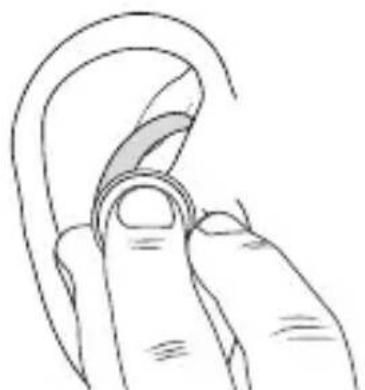
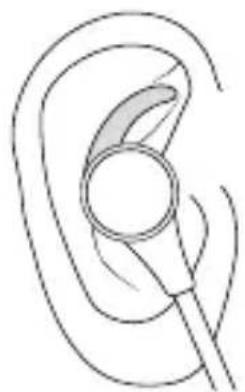
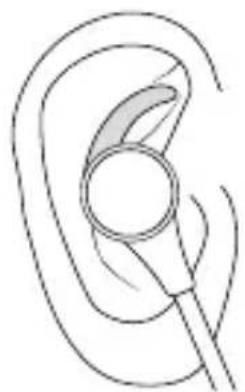
- Carefully push one of the earbuds deeply into your ear canal (see fig. 1). In order to straighten the ear channel somewhat and therefore make the headphone easier to insert, pull your ear backwards and upwards a little.
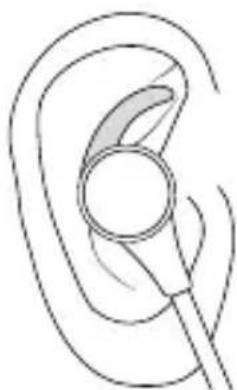
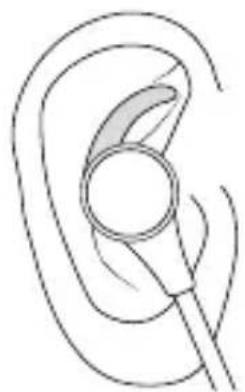
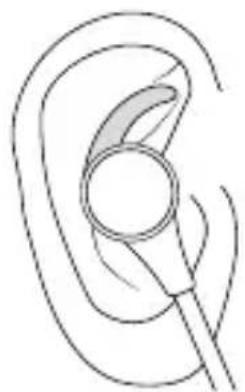
Place the ear mould in your ear to ensure that the earbud sits firmly (see fig. 2).
◆ Proceed in the same way to insert the other earbud.
natural_image
Line drawing of a finger pressing a circular ring on the ear (no text or symbols)Fig. 1 Fig. 2
natural_image
Line drawing of a human ear with a magnifying glass (no text or symbols)Replacing the ear cushions
The earbuds are supplied with the medium-sized ear cushions ③ and medium-sized ear moulds ① re-fitted. Depending on the size of your ear, you can use ear cushions (12 or 13) and ear moulds (14 or 15) of a different size from the ones supplied. You can freely combine the sizes of the ear cushions and ear moulds for the best fit in your ear.
NOTE
The better the ear cushion seals off the ear canal, the better the sound quality (especially at lower frequencies).
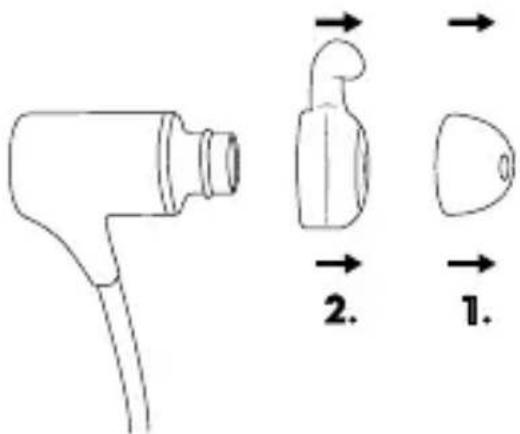
Gently pull on the ear cushion 3 to detach them from the earbuds (see fig. 3).
Gently pull on the ear mould ^① to detach them from the earbuds (see fig. 3).
text_image
Diagram showing a medical device with labeled parts and directional arrows indicating flow or movement.Fig. 3
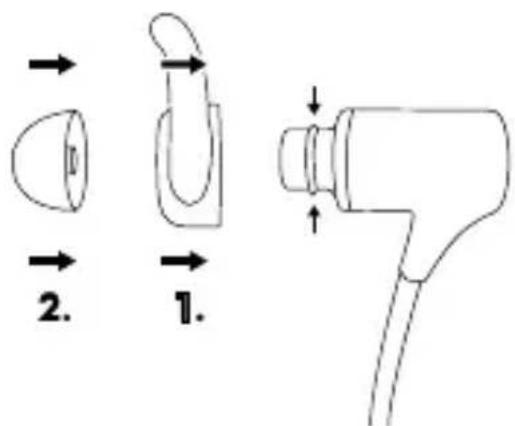
Select suitable ear moulds (14 or 15) from the ones supplied and push these onto the earbuds.
◆ Push them directly onto the ear cushions ^12 or ^13 until they slip into the recesses on the earbuds (see fig. 4).
text_image
Technical diagram showing three labeled mechanical components with directional arrows indicating motion or assembly.Fig. 4
Pairing the earbuds with a Bluetooth® device
Before you can use the earbuds, you must pair them with a compatible Bluetooth® device.
Proceed as follows:
- Ensure that the earbuds are switched off and the Bluetooth® device is switched on.
- Set the Bluetooth® device so that it scans for other Bluetooth® devices. A detailed description of how to do this can be found in the operating instructions for your Bluetooth® device.
Press the ▶ button 6 or 2 seconds to switch the earbuds on. You will hear a rising series of beeps and the operating/charging LED 4 flashes briefly simultaneously orange and blue and then alternately orange and blue.
Select the entry SBSK 5.0 A1 from the list of found devices on your Bluetooth® device and, if required, enter the code 0000 to connect the two devices. You will hear a beep and the operating/charging LED flashes blue at 3-second intervals once the connection has been successfully established.
♦ Start playback on the Bluetooth® device.
To switch off the earbuds and deactivate the Bluetooth function, press the ▶button 6 for 2 seconds. You will hear a descending series of beeps and the operating/charging LED 4 flashes briefly simultaneously orange and blue and then goes out.
To connect further Bluetooth® devices, proceed as follows:
Switch on the earbuds and press the button for about 2 seconds. Now, the earbuds are in pairing mode and can be connected to another Bluetooth® device.
NOTE
If you do not establish a connection between the earbuds and your Bluetooth® device within 10 minutes, the earbuds will switch off automatically. In this case, you will have to switch the earbuds back on before restarting the pairing process.
If the earbuds stop receiving a signal while in Bluetooth® mode, the earbuds will switch off automatically after 10 minutes.
The next time you turn on the earbuds, they will automatically connect to the last-connected Bluetooth® device. If your Bluetooth® device does not automatically reconnect to the earbuds, you will have to re-establish the connection manually. A detailed description of how to do this can be found in the operating instructions for your Bluetooth® device.
If you want to connect the earbuds to another Bluetooth® device, start by pressing the 📄button ⑨ for about 2 seconds to disconnect the currently connected Bluetooth® device from the earbuds. Alternatively, you can deactivate the Bluetooth® function on the connected Bluetooth® device. You will hear a beep and the operating/charging LED 🌐 vill flash alternatively orange and blue. The earbuds are now ready to be paired with another Bluetooth® device.
Handling and operation
Operation of the buttons
| Button Function | |
 | Switching on: press for 2 secondsSwitching off: press for 2 secondsPlay/Pause: press brieflyAccept call: press brieflyReject call: press for 2 secondsEnd call: press brieflyRedial: press briefly twice |
 | Increase volume: press briefly / When you reach the maximum volume, you will hear a short beep.Next track: press for 2 seconds |
 | Reduce volume: press briefly / When you reach the minimum volume, you will hear a short beep.Restart current track: press for 2 secondsPrevious track: if the current track restarts, press again for 2 seconds |
 | Activate Bluetooth function: press for 2 seconds (You will hear a beep)Disconnect Bluetooth device: press for 2 seconds (you will hear a beep) / You can re-pair immediately with another Bluetooth® device |
Telephone functions
The following telephone functions are only available when the earbuds and the Bluetooth® device are connected via Bluetooth®. Some Bluetooth® devices may not support all functions.
Use your Bluetooth® device to dial the required telephone number. The call is automatically transferred to the headphones.
◆ Speak into the microphone on the earbuds to make your call.
NOTE
If you are listening to music and receive a call, the playback will be paused until the call ends, and you will hear the ring tone in the earbuds. After finishing the call, playback will be resumed automatically.
▶ You can accept/reject calls via the earbuds or your Bluetooth® device. The sound is automatically played back through the headphones.
▶ You can switch the audio source back to your Bluetooth® device at any time. Consult the operating instructions of your Bluetooth® device for more information.
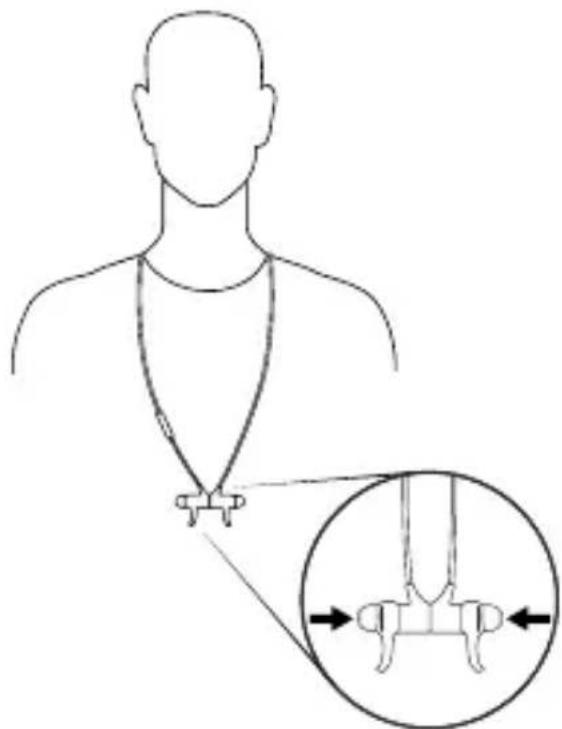
Using the magnet
The earbuds have integrated magnets 2 Proceed as follows if you are not using the earbuds but would still like to keep them on your person:
◆ Place the neck band around your neck.
◆ Guide both earbuds towards one another so the integrated magnets ② attract.
text_image
Diagram illustrating a medical or anatomical procedure with labeled components and directional arrows indicating measurement or alignment.Fig. 5
Troubleshooting
The earbuds cannot be paired with a compatible Bluetooth® device
Make sure that the Bluetooth® function is activated on the Bluetooth® device.
◆ Check that the earbuds are switched on.
If you use several Bluetooth® devices, ensure that any previous connection is disconnected. There may be a previously paired Bluetooth® device in range.
Make sure that the earbuds are no more than 10 metres from the Bluetooth® device and that no obstacles or electronic devices are placed between them.
You cannot switch on the earbuds
◆ The integrated battery in the earbuds is empty. Charge the battery.
You cannot use all of the described functions
This may be down to your Bluetooth® device and its current software. Try updating the software or using a different Bluetooth® device.
You hear no sound from the earbuds
The volume control of the earbuds is set to the minimum volume. Increase the playback volume.
You only hear sound from one of the earbuds
Go to the menu of your Bluetooth device and adjust the balance so that sound comes out of both sides.
NOTE
If the above-mentioned solutions do not resolve the problem, please contact Customer Service (see section Service).
Cleaning
CAUTION
- To avoid irreparable damage to the earbuds, ensure that no moisture gets into the earbuds during cleaning. - Do not use caustic, abrasive or solvent-based cleaning materials. These could damage the surfaces of the earbuds.
◆ Clean the earbuds only with a slightly damp cloth.
Remove the ear cushions (3, 12r) and ear moulds (1 c14) for cleaning. Clean the parts under running water. Dry the parts thoroughly. Do not push the ear cushions and ear moulds back onto the earbuds until they are completely dry.
Storage when not in use
◆ Store the earbuds in a location which is clean, dry, dust-free and out of direct sunlight.
For long-term storage, the integrated battery should be fully charged to extend its operating life. During prolonged periods of non-use, you should top up the battery charge regularly. This is necessary to prolong the battery life.
Disposal
Disposal of the device
The adjacent symbol of a crossed-out dustbin means that this device is subject to Directive 2012/19/EU. This directive states that this device may not be disposed of in the normal household waste at the end of its useful life, but must be handed over to specially set-up collection locations, recycling depots or disposal companies. The integrated rechargeable battery in this device cannot be removed for disposal.
This disposal is free of charge for the user. Protect the environment and dispose of this device properly.

Your local community or municipal authorities can provide information on how to dispose of the worn-out product.
Appendix
Technical data
| Earbuds | |
| Operating voltage/current | 5 V = (DC), 500 mA via USB charging socket |
| Bluetooth® specifications | Version 5.0(range up to 10 m) |
| Supported Bluetooth® profiles | A2DP*, AVRCP*, HFP and HSP*if supported by Bluetooth® device |
| Frequency band 2.4 GHz | |
| Transmission output < 10 dBm | |
| Frequency response 20 Hz to 20 kHz | |
| Integrated battery(Lithium ion) | 3.7 V / 85 mAh |
| Talk time | approx. 4.5 hrs(at a medium volume) |
| Music playback | approx. 6 h (music play-back at a medium volume) |
| Charging time approx. 2.5 h | |
| Operating temperature +15°C to +35°C | |
| Storage temperature 0°C to +40°C | |
| Relative humidity(no condensation) | ≤ 75% |
| Protection type | IPX 4(splashproof) |
| Dimensions (W x D x H) | each earbud:approx. 2.6 x 2.2 x 1.3 cm |
| Weight | Earbuds:approx. 16 g |
Notes on the EU Declaration of Conformity
This device complies with the essential requirements and other relevant provisions of the RE Directive 2014/53/EU and the RoHS Directive 2011/65/EU.
You can download the complete EU conformity declaration from www.kompernass.com/support/304113_DOC.pdf.
This appliance has a 3-year warranty valid from the date of purchase. If this product has any faults, you, the buyer, have certain statutory rights. Your statutory rights are not restricted in any way by the warranty described below.
Warranty conditions
The validity period of the warranty starts from the date of purchase. Please keep your original receipt in a safe place. This document will be required as proof of purchase.
If any material or production fault occurs within three years of the date of purchase of the product, we will either repair or replace the product for you at our discretion. This warranty service is dependent on you presenting the defective appliance and the proof of purchase (receipt) and a short written description of the fault and its time of occurrence.
If the defect is covered by the warranty, your product will either be repaired or replaced by us. The repair or replacement of a product does not signify the beginning of a new warranty period.
Warranty period and statutory claims for defects
The warranty period is not prolonged by repairs effected under the warranty. This also applies to replaced and repaired components. Any damage and defects present at the time of purchase must be reported immediately after unpacking. Repairs carried out after expiry of the warranty period shall be subject to a fee.
Scope of the warranty
This appliance has been manufactured in accordance with strict quality guidelines and inspected meticulously prior to delivery.
The warranty covers material faults or production faults. The warranty does not extend to product parts subject to normal wear and tear or fragile parts such as switches, batteries, baking moulds or parts made of glass.
The warranty does not apply if the product has been damaged, improperly used or improperly maintained. The directions in the operating instructions for the product regarding proper use of the product are to be strictly followed. Uses and actions that are discouraged in the operating instructions or which are warned against must be avoided.
This product is intended solely for private use and not for commercial purposes. The warranty shall be deemed void in cases of misuse or improper handling, use of force and modifications / repairs which have not been carried out by one of our authorised Service centres.
Warranty claim procedure
To ensure quick processing of your case, please observe the following instructions:
■ Please have the till receipt and the item number (e.g. IAN 12345) available as proof of purchase.
■ You will find the item number on the type plate, an engraving on the front page of the instructions (bottom left), or as a sticker on the rear or bottom of the appliance.
If functional or other defects occur, please contact the service department listed either by telephone or by e-mail.
■ You can return a defective product to us free of charge to the service address that will be provided to you. Ensure that you enclose the proof of purchase (till receipt) and information about what the defect is and when it occurred.
You can download these instructions along with many other manuals, product videos and software on www.lidl-service.com.
Service
GB Service Great Britain
Tel.: 0800 404 7657
E-Mail: kompernass@lidl.co.uk
IE Service Ireland
Tel.: 1890 930 034
(0,08 EUR/Min., (peak))
(0,06 EUR/Min., (off peak))
E-Mail: kompernass@lidl.ie
IAN 304113
Importer
Please note that the following address is not the service address. Please use the service address provided in the operating instructions.
KOMPERNASS HANDELS GMBH
BURGSTRASSE 21
DE-44867 BOCHUM
GERMANY
www.kompernass.com
Indholdsfortegnelse
Introduktion 33
natural_image
Line drawing of a human ear with a finger, showing the curve and ring (no text or symbols)Fig. 1 Fig. 2
natural_image
Line drawing of a human ear with a magnifying glass overlay (no text or symbols)text_image
Diagram showing a hairdryer with labeled parts 1 and 2, illustrating mechanical or medical positioning.Fig. 3
text_image
Technical diagram showing three labeled mechanical components with directional arrows indicating assembly or assembly steps.Fig. 4
text_image
Diagram illustrating a medical or anatomical procedure with labeled components and directional arrows indicating measurement or alignment.Fig. 5
Fejlsøgning
KOMPERNASS HANDELS GMBH
BURGSTRASSE 21
DE-44867 BOCHUM
TYSKLAND
www.kompernass.com
Table des matières
Introduction....65
natural_image
Line drawing of a finger pressing a circular object on an ear (no text or symbols)Fig. 1 Fig. 2
natural_image
Line drawing of a human ear with a magnifying glass overlay (no text or symbols)text_image
Diagram showing a medical or laboratory device with labeled parts and directional arrows indicating flow or movement.Fig. 3
text_image
Technical diagram showing three labeled parts of a hairdryer with directional arrows indicating movement or assembly.Fig. 4
text_image
Diagram illustrating a medical or anatomical procedure with labeled components and directional arrows indicating measurement or alignment.Fig. 5
KOMPERNASS HANDELS GMBH
BURGSTRASSE 21
DE-44867 BOCHUM
ALLEMAGNE
www.kompernass.com
Inhoud
Inleiding....97
natural_image
Line drawing of a human ear with a finger, showing the curve being pointed (no text or symbols)Afb. 1 Afb. 2
natural_image
Line drawing of a human ear with a magnifying glass overlay (no text or symbols)text_image
Diagram showing a medical or laboratory device with labeled parts and directional arrows indicating flow or movement.Afb. 3
text_image
Technical diagram showing three labeled mechanical components with directional arrows indicating motion or assembly.Afb. 4
text_image
Diagram illustrating a medical or anatomical procedure with labeled components and directional arrows indicating measurement or alignment.Afb. 5
Problemen oplossen
KOMPERNASS HANDELS GMBH
BURGSTRASSE 21
DE-44867 BOCHUM
DUITSLAND
www.kompernass.com
Inhaltsverzeichnis
Einführung.... 127
natural_image
Line drawing of a finger pressing a circular object on the ear (no text or symbols)Abb. 1 Abb. 2
natural_image
Line drawing of a human ear with a magnifying glass overlay (no text or symbols)text_image
Diagram showing a hairdryer with labeled parts and directional arrows indicating flow or movement.Abb. 3
text_image
Technical diagram showing three labeled mechanical components with directional arrows indicating motion or assembly.Abb. 4
text_image
Diagram illustrating a medical or anatomical procedure with labeled components and directional arrows indicating measurement or alignment.Abb. 5
Fehlersuche
KOMPERNASS HANDELS GMBH
BURGSTRASSE 21
DE-44867 BOCHUM
DEUTSCHLAND
www.kompernass.com
KOMPERNASS HANDELS GMBH
BURGSTRASSE 21
DE-44867 BOCHUM
GERMANY
www.kompernass.com
Last Information Update · Tilstand af information · Version des
informations · Stand van de informatie · Stand der Informationen:
08 / 2018 · Ident.-No.: SBSK5.0A1-072018-4