
Outdoor Camera CW700S - Surveillance Camera Xiaomi - Free user manual and instructions
Find the device manual for free Outdoor Camera CW700S Xiaomi in PDF.


| Product Type | IP66 Outdoor Surveillance Camera |
| Brand | Xiaomi |
| Model | Outdoor Camera CW700S (MJSXJ06HL) |
| Resolution | 2560 × 1440 (4 MP) |
| Aperture | f/1.6 |
| Video Codec | H.265 |
| Night Vision | Yes, with automatic filter switching |
| Audio | Built-in microphone and speaker (two-way audio) |
| Storage | microSD card (8 to 256 GB, minimum class U1/10) |
| Connectivity | Wi-Fi 802.11b/g/n 2.4 GHz |
| Network Port | RJ45 (with waterproof accessory) |
| Power Supply | 12 V ⎓ 1 A (power adapter included, indoor use only) |
| Protection Rating | IP66 (dust and water) |
| Operating Temperature | -30 °C to 60 °C (camera) / -30 °C to 45 °C (adapter) |
| Dimensions | 150 × 103 × 185 mm |
| Compatibility | Xiaomi Home app (Android 8+ / iOS 12+) |
| Mounting | Wall or ceiling (mounting kit included) |
| Reset | Reset button (does not delete SD card data) |
| Warranty | Legal warranty and manufacturer warranty (see terms at mi.com) |
Frequently Asked Questions - Outdoor Camera CW700S Xiaomi
User questions about Outdoor Camera CW700S Xiaomi
0 question about this device. Answer the ones you know or ask your own.
Ask a new question about this device
Download the instructions for your Surveillance Camera in PDF format for free! Find your manual Outdoor Camera CW700S - Xiaomi and take your electronic device back in hand. On this page are published all the documents necessary for the use of your device. Outdoor Camera CW700S by Xiaomi.
USER MANUAL Outdoor Camera CW700S Xiaomi
xiaomi Outdoor Camera CW700S User Manual · 04
B
1
D-1
D-2 D-3
E-1 E-2
F
G-1 G-2
G-3

Read this manual carefully before use, and retain it for future reference.
Product Overview
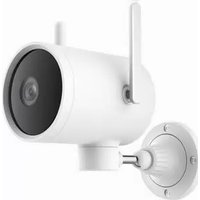
Fig. A

Antenna

Fill Light

Power Port

Waterproof Cover

Lens

Microphone

microSD Card Slot

Wall Mount

Indicator

Reset Button

Speaker

Network Cable Port
Package Contents: Xiaomi Outdoor Camera CW700S, power adapter, waterproof tape for power cable, wall/ceiling mounting template sticker, screw accessory kit, waterproof network port accessories, user manual
Note: Illustrations of product, accessories, and user interface in the user manual are for reference purposes only. Actual product and functions may vary due to product enhancements.
How to Use
- Installing a microSD card
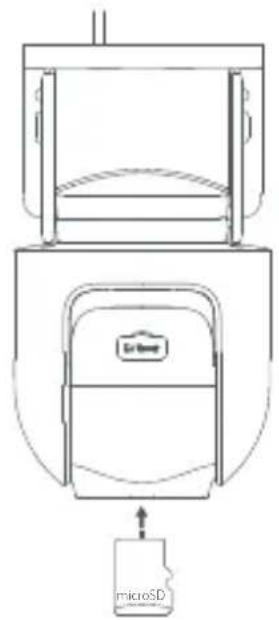
Make sure that the camera is unplugged. Open the waterproof cover above the microSD card slot and insert a microSD card with its contact points facing down.
CAUTION: Unplug the camera when inserting or removing the microSD card. Please use a microSD card from a qualified brand (the camera supports a microSD card of 8 GB to 256 GB. The microSD card may need to be formatted via Settings > Manage storage on the camera's plug-in page in the Xiaomi Home app). It is recommended that the microSD card has a read/write speed of no less than U1/Class 10. (Fig. B)
Note: After installing or removing the microSD card, make sure to place the waterproof cover back on the card slot properly to prevent water from entering the camera and affecting normal use.
● Turning on
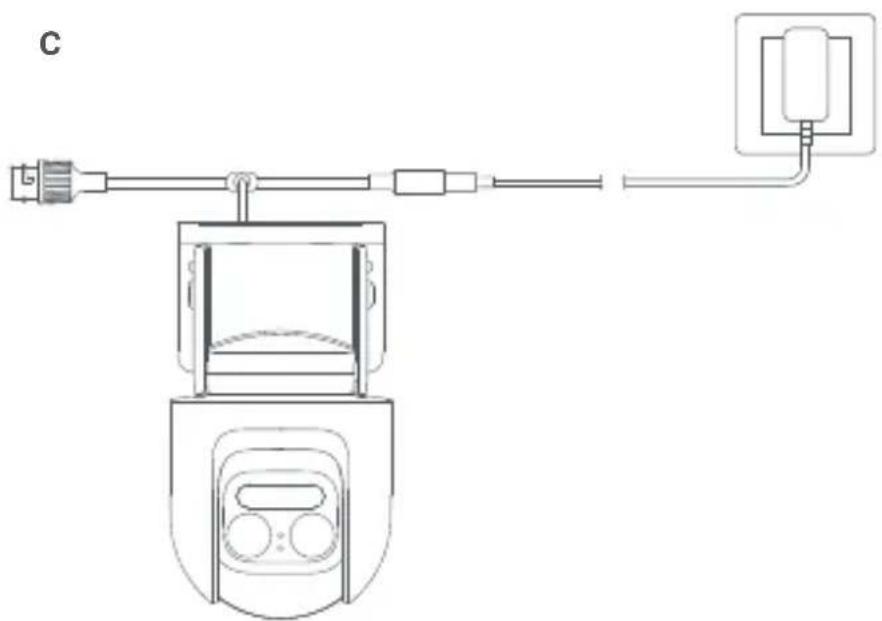
- Insert the power adapter cable into the power port to automatically turn on the camera. (Fig. C)
●The camera is successfully turned on when the indicator light is yellow and a voice prompt is heard.
Notes: Please make sure to use the original power adapter cable for connection to avoid abnormal operations. Do not twist the lens of the camera to force it to rotate after the camera is turned on. If the lens is not positioned accurately, you may calibrate it via the Mi Home/Xiaomi Home app.
- Indicator status description
Yellow: Awaiting connection...
Blinking yellow: Connecting to a network...
Blinking blue: Connecting to a server...
Keeping blue: Connected successfully
Connecting with the Xiaomi Home App
This product works with the Xiaomi Home app. Use the Xiaomi Home app to control your device, and to interact with other smart home devices.
Scan the QR code to download and install the app. You will be directed to the connection setup page if the app is installed already. Or search for "Xiaomi Home" in the app store to download and install it.
Open the Xiaomi Home app, tap "+" on the upper right, and then follow the instructions to add your device.

82993641
Notes: The version of the app might have been updated, please follow the instructions based on the current app version.
Make sure that the camera turns on and the network connection is stable during connecting. The indicator keeps yellow when the camera is turned on, and then changes to blue after the successful connection between the camera and the app.
- Resetting
When switching the network or the Xiaomi Account to which the camera is connected, please delete the camera from the Xiaomi Home app and then bind it again.
Note: Resetting the camera will not delete any data on the microSD card.
Precautions
- The operating temperature for the camera ranges from -30°C to 60°C . Do not use the camera in environments with temperatures above or below the specified range.
- The camera is a precision electronic product that has an IP66 dust-tight and water-resistant rating. To ensure normal use, do not use the camera in extremely humid environments or locations that may cause water ingress.
- The power adapter that comes along with the camera is not waterproof and is only for indoor use. Do not use the power adapter in extremely humid environments or locations that may cause water ingress. The operating temperature for the power adapter ranges from -30°C to 45°C. Do not use in environments with temperatures above or below the specified range.
- To improve the camera's performance, do not place it where its lens faces or is next to a reflective surface, such as glass and white walls, as this will cause the image to appear overly bright in areas close to the camera and darker in areas further away, or may cause the camera to produce white images.
- When using Wi-Fi, please make sure that the camera is installed in an area with a strong Wi-Fi signal. Do not install the camera near microwave ovens or other objects or places that may affect its Wi-Fi signal.
- When the night vision feature is enabled, the change of ambient light will trigger the filter to change, probably accompanied by a slight click sound, which is normal.
- If the power cable is damaged or broken, it must be replaced by professionals from the manufacturer, after-sales service department, or departments of similar functions to avoid safety hazards.
How to Install
Mounting the camera on a wall
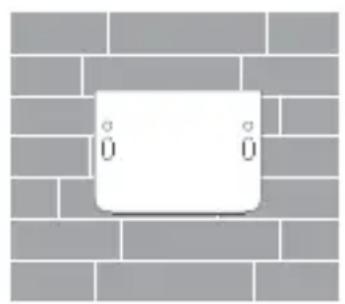
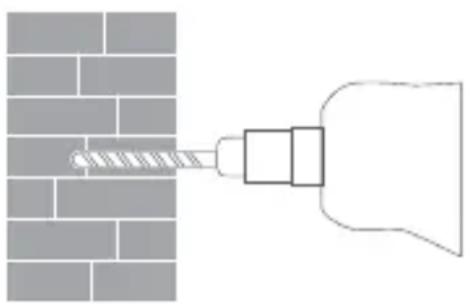
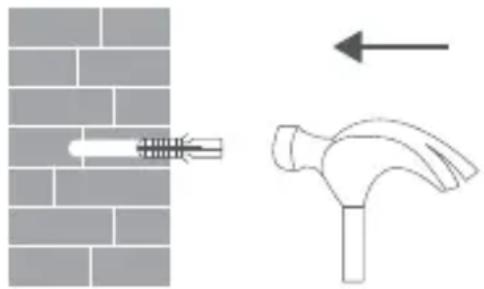
- Paste the mounting template sticker where the camera needs to be installed, and drill four holes in the wall with a drilling tool according to the locating holes on the sticker. The hole is approx. 6 mm in diameter and approx. 40 mm in depth. (Fig. D-1 Fig. D-2)
- Insert four plastic wall plugs into the holes in the wall. (Fig. D-3)
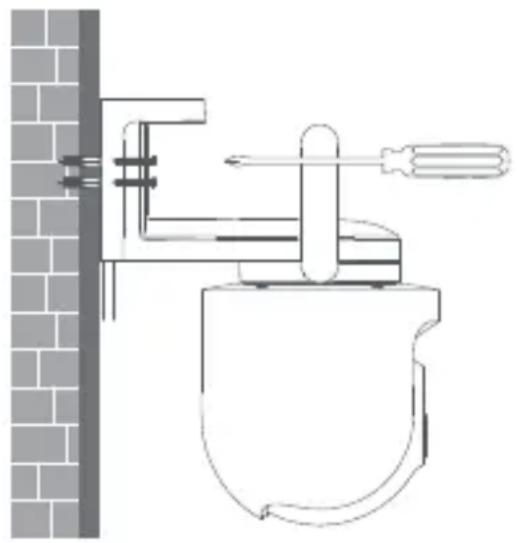
- Place the mount against the wall, insert screws into the holes, and drill them into the plastic wall plugs on the wall.
(Fig. E-1)
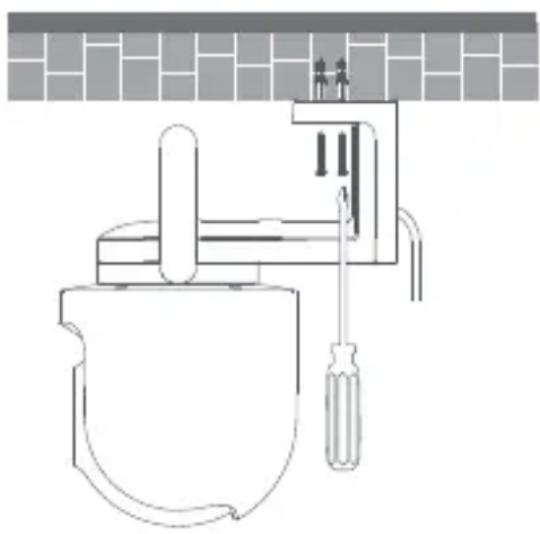
Ceiling mount installation (Fig. B2)nt installation
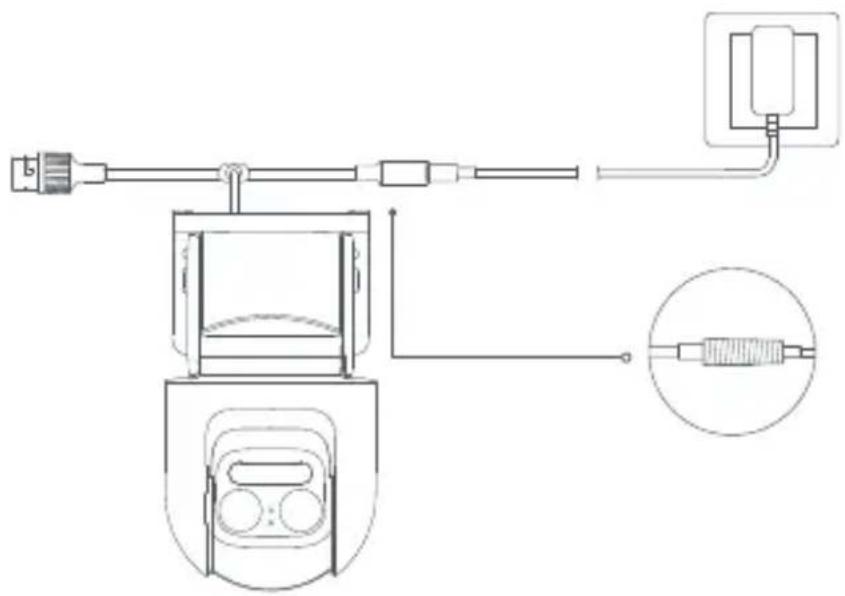
- Wrap the power cable port with the waterproof tape after the camera is fixed to ensure waterproof performance. (Fig. F)
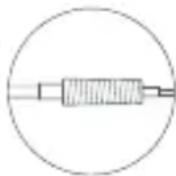
Wrapping with the waterproof tape
Installing the waterproof accessories
The waterproof network port accessories to be installed include: sealing ring, waterproof sleeve, stopper, waterproof rear cover. Once installed, the waterproof performance of the network cable port will be improved.
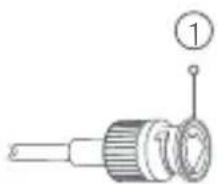
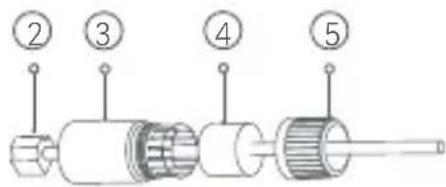
Place the sealing ring on the camera's network cable port (Fig. G-1). Thread the waterproof rear cover, stopper and waterproof sleeve over the network cable in order (Fig. G-2), then plug the network cable into the port. Screw together the waterproof sleeve and stopper, then screw together the waterproof rear cover and waterproof sleeve (Fig. G-3).
Fig. G-1 Fig. G-2
① Sealing Ring
② Network Cable
③ Waterproof Sleeve
④ Stopper
⑤ Waterproof Rear Cover
CAUTIONS:
● The wall must be able to support at least three times the total weight of the camera.
- The camera must be firmly fixed to the wall according to the installation instructions in the user manual to prevent accidental injury.
- Do not install near an air conditioner outdoor unit, range hood outlet, gas water heater outlet, or other heat sources.
Specifications
Name: Smart Camera
Model: MJSXJ06HL
Rated Input: 12 V = 1 A
Aperture: f/1.6
Storage: microSD card
Wireless Connectivity: Wi-Fi IEEE 802.11b/g/n 2.4 GHz
Operating Frequency: 2412–2472 MHz
Operating Temperature: -30°C to 60°C
Resolution: 2560 × 1440
Item Dimensions: 150 × 103 × 185 mm
Video Codec: H.265
Compatible with: Android™ 8 & iOS 12.0 or above
Maximum Output Power: < 20 dBm
External AC Adapter Specifications
Manufacturer: Shenzhen AMC Technology Co., Ltd.
Model Identifier: AD-0121200100EU-6
Input Voltage: 100–240 V
Input AC Frequency: 50/60 Hz
Output Voltage: 12 V
Output Current: 1 A
Output Power: 12.0 W
Average Active Efficiency: > 82.97%
Efficiency at Low Load (10%): 80.40%
No-load Power Consumption: < 0.10 W
Note: Product specifications and safety information are shown in the user manual and on the product's bottom. External Power Supply: Charge the device with the EU adapter (AD-0121200100EU-6) supplied by Shenzhen AMC Technology Co., Ltd.
WARRANTY NOTICE
As a Xiaomi consumer, you benefit under certain conditions from additional warranties. Xiaomi offers specific consumer warranty benefits which are in addition to, and not instead of, any legal warranties provided by your national consumer law. The duration and conditions related to the legal warranties are provided by respective local laws. For more information about the consumer warranty benefits, please refer to Xiaomi's official website https://www.mi.com/global/support/warranty. Except as prohibited by laws or otherwise promised by Xiaomi, the after-sales services shall be limited to the country or region of the original purchase. Under the consumer warranty, to the fullest extent permitted by law, Xiaomi will, at its discretion, repair, replace or refund your product. Normal wear and tear, force majeure, abuse or damage caused by the user's negligence or fault are not warranted. The contact person for the after-sale service may be any person in Xiaomi's authorized service network, Xiaomi's authorized distributors or the final vendor who sold the products to you. If in doubt please contact the relevant person as Xiaomi may identify.
The present warranties do not apply in Hong Kong and Taiwan.
Products which were not duly imported and/or were not duly manufactured by Xiaomi and/or were not duly acquired from Xiaomi or a Xiaomi's official seller are not covered by the present warranties. As per applicable law you may benefit from warranties from the non-official retailer who sold the product. Therefore, Xiaomi invites you to contact the retailer from whom you purchased the product.
Regulatory Compliance Information
WEEE Information

All products bearing this symbol are waste electrical and electronic equipment (WEEE as in directive 2012/19/EU) which should not be mixed with unsorted household waste. Instead, you should protect human health and the environment by handing over your waste equipment to a designated collection point for the recycling of waste electrical and electronic equipment, appointed by the government or local authorities. Correct disposal and recycling will help prevent potential negative consequences to the environment and human health. Please contact the installer or local authorities for more information about the location as well as terms and conditions of such collection points.
EU Declaration of Conformity

Hereby, Xiaomi Communications Co., Ltd. declares that the radio equipment type MJSXJ06HL is in compliance with Directive 2014/53/EU. The full text of the EU declaration of conformity is available at the following internet address:
http://www.mi.com/global/service/support/declaration.html For detailed e-manual, please go to www.mi.com/global/support/user-guide
Under normal use of condition, this equipment should be kept a separation distance of at least 20 cm between the antenna and the body of the user. It is recommended to use LPS power supply, or the PS Level of power output part is less than PS2.
Manufacturer: Xiaomi Communications Co., Ltd.
Address: #019, 9th Floor, Building 6, 33 Xi'erqi Middle Road, Haidian District, Beijing, 100085, China For further information, please go to www.mi.com
User Manual Version: V4.0
82993641
Адрес: #019, 9th Floor, Building 6, 33 Xi'erqi Middle Road, Haidian District, Beijing, 100085, China
82993641
http://www.mi.com/global/service/support/declaration.html
wān: Xiaomi Communications Co., Ltd.
82993641
Website: https://www.mi.com/id
| No | City | Agency Name | Address |
| 1 | Aceh | Xiaomi Exclusive Service Center-ACEH-PANGLIMAPO-LIM | Jl. T. Panglima Polem No. 93, Peunayong, Kec. Kuta Alam, Kota Banda Aceh, Aceh 24415 |
| 2 | Ambon | Xiaomi Exclusive Service Center-AMBON-JL CENGKEH | JL.Cengkeh No 6 Kecamatan Sirimau Kelurahan Honipopu |
| 3 | Balikpapan | Xiaomi Exclusive Service Center-BALIKPA-PAN-SUDIRMAN | Ruko Bandar No. 09, Jl. Jenderal Sudirman, Klandasan Ilir, Balikpapan Kota, Kota Balikpapan, Kalimantan Timur 76131 |
| 4 | Bali | Xiaomi Exclusive Service Center-BALI-TEUKU UMAR | Jl. Teuku Umar No. 74XX/121, Denpasar Barat, Bali 80114 |
| 5 | Bandung | Xiaomi Exclusive Service Center-BANDUNG-BEC | Bandung Electronic Center Lt. 3 A-07, Jl. Purnawarman, Babakanciamis, Sumurbandung, Bandung, Jawa Barat 40117 |
| 6 | Banjarmasin | Xiaomi Exclusive Service Center-BANJARMASIN-SUN-GAI BARU | Jl. Ahmad Yani KM.2 No. 69, Sungai Baru, Banjarmasin Tengah, Kota Banjarmasin, Kalimantan Selatan 70122 |
| 7 | Batam | Xiaomi Exclusive Service Center-BATAM-LUCKY PLAZA | Komplek Lucky Plaza Batam Lt.2 No.12A, Nagoya, Batam 29444 |
| 8 | Bekasi | Xiaomi Exclusive Service Center-BEKASI-MEGA HYPERMALL | Mega Bekasi Hypermall Lt.II Blok G2 No.10, Jl. Jend. Ahmad Yani No. 1, Bekasi 17144 |
| 9 | Bogor | Xiaomi Exclusive Service Center-BOGOR-WARUNG JAMBU | Jl. Raya Pajajaran No.17B, Samping Panasonic Center, Warung Jambu, Bogor 16161 |
| 10 | Cirebon | Xiaomi Exclusive Service Center-CIREBON-RUKO CSB | Komplek Ruko CSB, Blok Green Ville No. 23 Jl. Cipto Mangunkusumo, Cirebon 45131 |
| 11 | Depok | Xiaomi Exclusive Service Center-DEPOK-MARGONDA | Depok Town Square Blok GE 2 No. 3, Jl. Margonda Raya, Kemiri Muka, Beji, Kota Depok, Jawa Barat 16424 |
| 12 | Jakarta | Xiaomi Exclusive Service Center-DAANMOGOT-IMPE-RIAL | Ruko Imperial Blok C10, Jl. Daan Mogot No. 136, Kalideres, Jakarta Barat, DKI Jakarta 11850 |
| 13 | Jakarta | Xiaomi Exclusive Service Center-CEMPAKA-MAS-ITCCCEMPAKA | ITC Cempaka Mas Lt. 6 Pusat Komputer Blok H 07-14, JI. Letjend Suprapto, Sumur Batu, Kemayoran, Jakarta Pusat 10640 |
| 14 | Jakarta | Xiaomi Exclusive Service Center-JAKARTA-ITCFATMAWATI | Ruko ITC Fatmawati No. 21, Cipete, Kebayoran Baru, Jakarta Selatan 12150 |
| 15 | Jakarta | Xiaomi Exclusive Service Center-JAKARTA-RUKO ROXY MAS | Ruko ITC Roxy Mas Blok B2 No.6 JI. KH Hasyim Ashari - Jakarta Pusat |
| 16 | Jakarta | Xiaomi Exclusive Service Center-JAKARTA-CILILI-TAN | Ruko Kokan Anggatra Pusdikkes No. PP10-A1, JI Raya Bogor Km.18 RW09 Kramat Jati, Kec. Kramat Jati, Kota Jakarta Timur, DKI Jakarta, 13510 |
| 17 | Jambi | Xiaomi Exclusive Service Center-JAMBI-SUDIRMAN | Jl. Jend. Sudirman No. 11, Tambak Sari, Jambi Selatan, Kota Jambi, Jambi 36122 |
| 18 | Kediri | Xiaomi Exclusive Service Center-KEDIRI-PEMUDA | Jl. Pemuda No. 11C, Ngadirejo Kediri 64122 |
| 19 | Kendari | Xiaomi Exclusive Service Center-KENDARI-RUKO SENTRA GMT | Sentra GMT, JI. Sorumba No.2D, Anaiwoi, Kec. Kadia, Kota Kendari, Sulawesi Tenggara 93117 |
| 20 | Kupang | Xiaomi Exclusive Service Center-KUPANG-JL CAKDOKO | jl.cakdoko no.34, Oebobo, Kupang NTT |
| 21 | Lampung | Xiaomi Exclusive Service Center-LAMPUNG-KARTI-NI | Jl. Kartini No. 60, Palapa, Tanjung Karang Pusat, Kota Bandar Lampung, Lampung 35116 |
| 22 | Makassar | Xiaomi Exclusive Service Center-MAKASSAR-BU-LUSARAUNG SQUARE | Ruko Bulusaraung Square No. A8, JI. Bulusaraung, Makassar 90157 |
| 23 | Malang | Xiaomi Exclusive Service Center-MALANG-LOWOK-WARU | Ruko Grand Soekarno Hatta Kavling 4 JI. Soekarno Hatta, Mojolangu, Lowokwaru, Kota Malang, Jawa Timur 65142 |
| 24 | Manado | Xiaomi Exclusive Service Center-MANADO-PIERE-TENDEAN | Ruko Mega Mas Blok A1 No. 20, JI. Pierre Tendean, Wenang Selatan, Wenang, Kota Manado, Sulawesi Utara 95111 |
| 25 | Mataram | Xiaomi Exclusive Service Center-MATARAM-RUKO-BLOKH | Ruko Sriwijaya Blok H, JI. Sriwijaya No. 177, Pagesangan Timur, Mataram, NTB 83115 (Sebelah Bank Mandiri) |
| 26 | Medan | Xiaomi Exclusive Service Center-MEDAN-GATOT SUBROTO | Plaza Medan Fair lantai IV island #1, JI. Gatot Subroto No. 30, Sekip, Medan Petisah, Kota Medan, Sumatera Utara 20113 |
| 27 | Padang | Xiaomi Exclusive Service Center-PADANG-VETER-AN | Jl. Veteran No. 24B, Purus, Padang Barat, Kota Padang, Sumatera Barat 25116 (Seberang SDN 64 Purus Kota Padang) |
| 28 | Palangkaraya | Xiaomi Exclusive Service Center-PA-LANGKARAYA-TJILIKRI-WUT | Jl. Tjilik Riwut KM 1 No. 5, Palangka, Jekan Raya, Kota Palangka Raya, Kalimantan Tengah 74874 |
| 29 | Palembang | Xiaomi Exclusive Service Center-PALEMBANG-IN-TERNATIONAL PLAZA | Jl. Angkatan 45, Lorok Pakjo Ilir Barat 1 Palembang |
| 30 | Pekanbaru | Xiaomi Exclusive Service Center-PEKANBARU-RIN-TIS | Jl. Dr.Setia Budhi No. 84, Rintis, Pekanbaru-Riau 28141 |
| 31 | Pontianak | Xiaomi Exclusive Service Center-PONTIANAK-SAB-DURRAHMAN | Jl. Sultan Abdurrahman No. 38B, Pontianak Selatan, Pontianak, Kalimantan Barat 78113 |
| 32 | Semarang | Xiaomi Exclusive Service Center-SEMARANG-KA-RANGTURI | Jl. MT. Haryono No.976A, Lamper Kidul, Kec. Semarang Selatan, Kota Semarang, Jawa Tengah 50249 |
| 33 | Serang | Xiaomi Exclusive Service Center-SERANG-AH-MADYANI | Jl. Jendral Ahmad Yani No. 134, Sumurpecung, Serang, Banten 42117 |
| 34 | Solo | Xiaomi Exclusive Service Center-SOLO-SUKOHAR-JO | Komplek The Park, Blok C No. 16 Jl. Ir. Soekarno, Sukoharjo-Solo Baru 57552 |
| 35 | Surabaya | Xiaomi Exclusive Service Center-SURABAYA-WTC EMALL | WTC e-mall Lt. 4 - Galeria No 4028, Jl. Pemuda No.21-31, Embong Kaliasin, Genteng, Surabaya, Jawa Timur 60271 |
| 36 | Surabaya | Xiaomi Exclusive Service Center-SURABAYA-PLA-ZA MARINA | Plaza Marina Lt.3 Kav. M1, Jl. Margorejo Indah 97-99, Surabaya 60238 |
| 37 | Tangerang | Xiaomi Exclusive Service Center-TANGERANG-GA-DING SERPONG | Ruko Sinpasa Blok SG2 No. 9, Gading Serpong, Pakulonan Barat, Kelapa Dua, Kota Tangerang, Banten 15810 |
| 38 | Tangerang | Xiaomi Exclusive Service Center-PIK-PIK2 | Kawasan ruko EDC,, H.R Rasuna Said Kavling BB-15, kelurahan Salembaran, Kecamatan Kosambi, Kabupaten Tangerang Provinsi Banten 15214 |
| 39 | Tanjung | Xiaomi Exclusive Service Center-TANJUNG-PINANG-BINTANCENTER | Ruko Bintan Center No. 8, JI. D.I Panjaitan KM. 9, Air Raja, Tanjungpinang Timur, Tanjung Pinang, Kepulauan Riau 29125 |
| 40 | Tasikmalaya | Xiaomi Exclusive Service Center-TASIKMALAYA-CI-HIDEUNG | Jl. Hz. Mustofa no. 376 Kel. Tugujaya, Kec. Cihideung, Tasikmalaya, Jawa Barat 46126 |
| 41 | Yogyakarta | Xiaomi Exclusive Service Center-YOGYAKAR-TA-BRIDGEN KATAMSO | Ruko Gondomanan Square, JI. Brigjen Katamso No.37, Prawirodirjan, Kec. Gondomanan, Kota Yogyakarta, Daerah Istimewa Yogyakarta 55121 |
| Pusat Layanan Multibrand | |||
| 1 | Medan | TAM Multibrand - Medan | Plaza Medan Fair Lt. 4 No. 278-279 HPC Tahap IV, Jl. Gatot Subroto No.30, Medan - Sumatera Utara 20113 / (62-61) 80512213 |
103611/SDPPI/2024
9003
Model: MJSXJ06HL
MKG # IMKG.2623.10.2024
Alamat: #019, 9th Floor, Building 6, 33 Xi'erqi Middle Road, Haidian District, Beijing, 100085, China
82993641
Adresse : #019, 9th Floor, Building 6, 33 Xi'erqi Middle Road, Haidian District, Beijing, 100085, China
82993641
82993641
Entrada nominal: 12 V --- 1 A
Apertura: f/1.6
82993641
019, 9th Floor, Building 6, 33 Xi'erqi Middle Road, Haidian District, Beijing, 100085, China : العنوان
82993641
Indirizzo: #019, 9th Floor, Building 6, 33 Xi'erqi Middle Road, Haidian District, Beijing, 100085, China
82993641
Producent: Xiaomi Communications Co., Ltd.
Adres: #019, 9th Floor, Building 6, 33 Xi'erqi Middle Road, Haidian District, Beijing, 100085, China
82993641
Entrada nominal: 12 V --- 1 A
Abertura: f/1.6
Morada: #019, 9th Floor, Building 6, 33 Xi'erqi Middle Road, Haidian District, Beijing, 100085, China
82993641
Entrada nominal: 12 V --- 1 A
Abertura: f/1.6
http://www.mi.com/global/service/support/declaration.html
Endereço: #019, 9th Floor, Building 6, 33 Xi'erqi Middle Road, Haidian District, Beijing, 100085, China Para obter mais informações, acesse www.mi.com.
82993641
82993641
82993641
Adresa: #019, 9th Floor, Building 6, 33 Xi'erqi Middle Road, Haidian District, Beijing, 100085, China
For further details, please scan the QR code to obtain the e-manual.
Xiaomi Technology Netherlands B.V.
Prinses Beatrixlaan 582, 2595BM, The Hague, The Netherlands
contact@support.mi.com
UK REP.
Xiaomi Technology UK Limited
Davidson House, Forbury Square, Reading, Berkshire RG1 3EU
contact@support.mi.com

PAP



- FIG. A
- HOW TO USE
- INSTALLING A MICROSD CARD
- ● TURNING ON
- INDICATOR STATUS DESCRIPTION
- CONNECTING WITH THE XIAOMI HOME APP
- RESETTING
- PRECAUTIONS
- HOW TO INSTALL
- MOUNTING THE CAMERA ON A WALL
- INSTALLING THE WATERPROOF ACCESSORIES
- FIG. G-1 FIG. G-2
- CAUTIONS
- SPECIFICATIONS
- EXTERNAL AC ADAPTER SPECIFICATIONS
- WARRANTY NOTICE
- REGULATORY COMPLIANCE INFORMATION
- WEEE INFORMATION
- EU DECLARATION OF CONFORMITY
- 019, 9TH FLOOR, BUILDING 6, 33 XI'ERQI MIDDLE ROAD, HAIDIAN DISTRICT, BEIJING, 100085, CHINA : العنوان
Brand : Xiaomi
Model : Outdoor Camera CW700S
Category : Surveillance Camera