XG2S101 - Power bank Xtorm - Free user manual and instructions
Find the device manual for free XG2S101 Xtorm in PDF.


User questions about XG2S101 Xtorm
0 question about this device. Answer the ones you know or ask your own.
Ask a new question about this device
Download the instructions for your Power bank in PDF format for free! Find your manual XG2S101 - Xtorm and take your electronic device back in hand. On this page are published all the documents necessary for the use of your device. XG2S101 by Xtorm.
USER MANUAL XG2S101 Xtorm
natural_image
Line drawing of a device casing with internal grid structure and labeled ports (no text or symbols beyond branding)1 SPECIFICATIONS

10.000mAh Li-poly / 37Wh

USB-C 15W
USB-A 15W

USB-C 15W input

Solar 1.0W input

142.5x77x27mm

310 grams

USB-A to USB-C cable, Carabiner, Manual
When using multiple outputs
When using 2 outputs

Share 15W
W 2
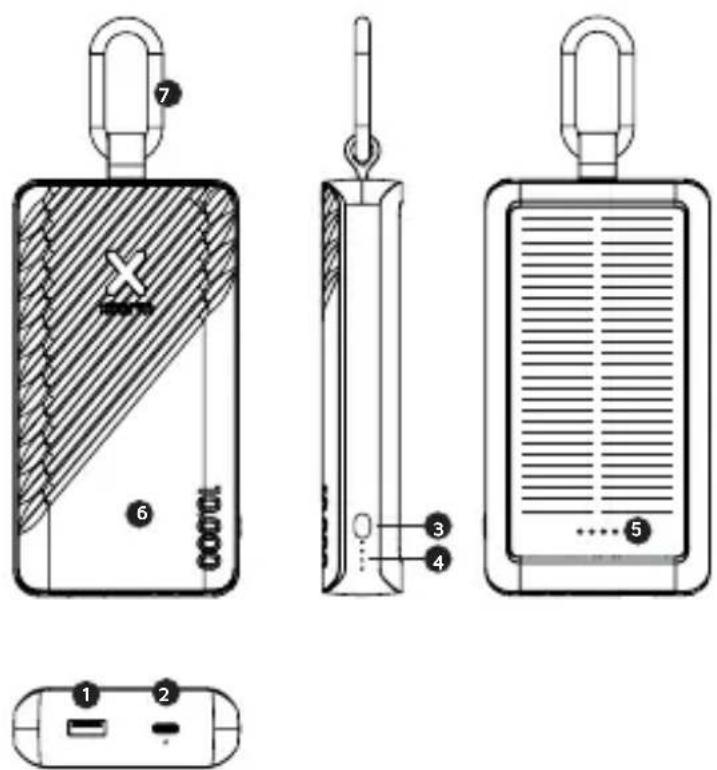
Output
USB-A 15W
1
In/output
USB-C 15W
2
Power indicator button/
Flashlight button
3
LED Power Indicator
4
Solar strength indicator
5
LED Flashlight
6
Carabiner
7
CHARGING YOUR DEVICE3
COMPATIBLE DEVICES

natural_image
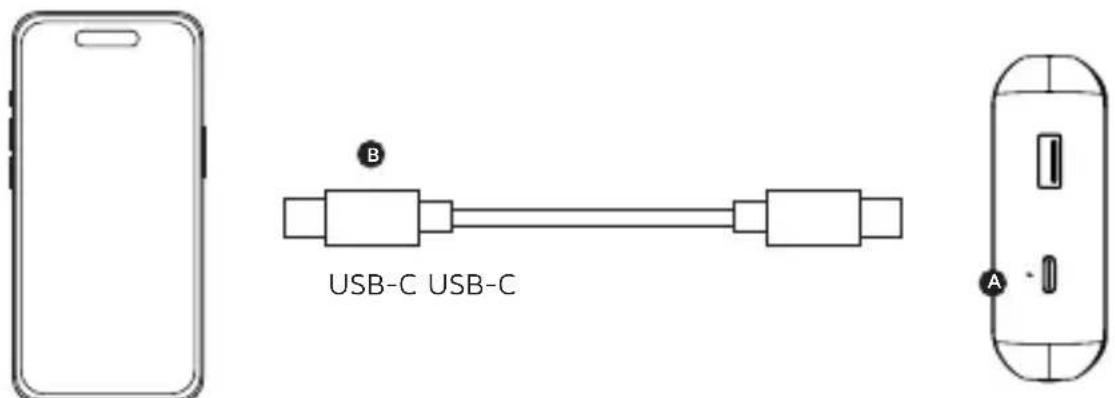
Six black-and-white icons representing different devices: smartphone, mobile phone, earbuds, navigation pad, computer monitor, and smartphone (no text or symbols)3.1 Connect the USB-C end of a charging cable to the USB-C output of the Power Bank and the other end to the input of your device. The charging will start automatically.
3.2 Charging some devices requires a charging cable other than the one supplied. E.g. an Apple Lightning ^® or a Micro USB cable.
RECHARGING THE POWER BANK 4
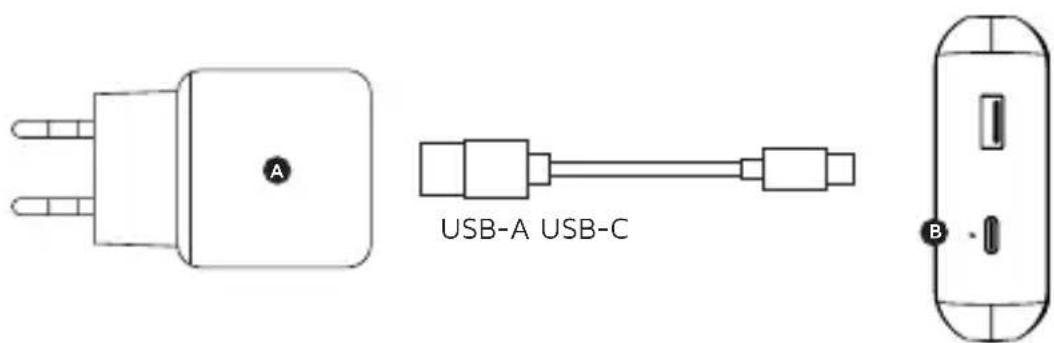
4.1 Connect the USB-C end of the charging cable to in/output 1 of the Power Bank and the USB-A end to a wall charger.
4.2 For the fastest charging possible use a 15W USB-C charger. This will fully recharge the Power Bank within 4 hours.
LED POWER INDICATOR5
natural_image
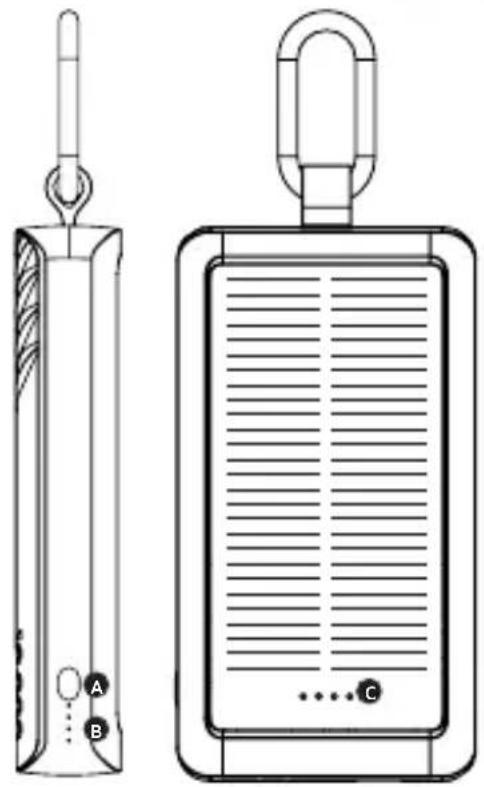
Technical line drawings of two electronic devices: a vertical cylindrical device with labeled ports A and B, and a rectangular device with a handle and internal grid lines (no text or symbols present)5.1 Press the Power Button (A) once to display the battery level remaining in the Power Bank via the LED display (B). Each lit LED light indicates 25% remaining energy in the Power Bank. At 4 lit lights, the Power Bank is fully charged.
5.2 Double press the Power Button to turn on/off the flashlight.
5.3 The LED indicators underneath the back-up solar panel (C) indicate how much energy is generated by the solar panel.
This will give an estimated range how fast the Power Bank will be recharged from 0% to 100%:
1 LED: 250-1000 hours
2 LEDs: 80-250 hours
3 LEDs: 50-80 hours
4 LEDs: 50 hours or less
IN THE BOX 6
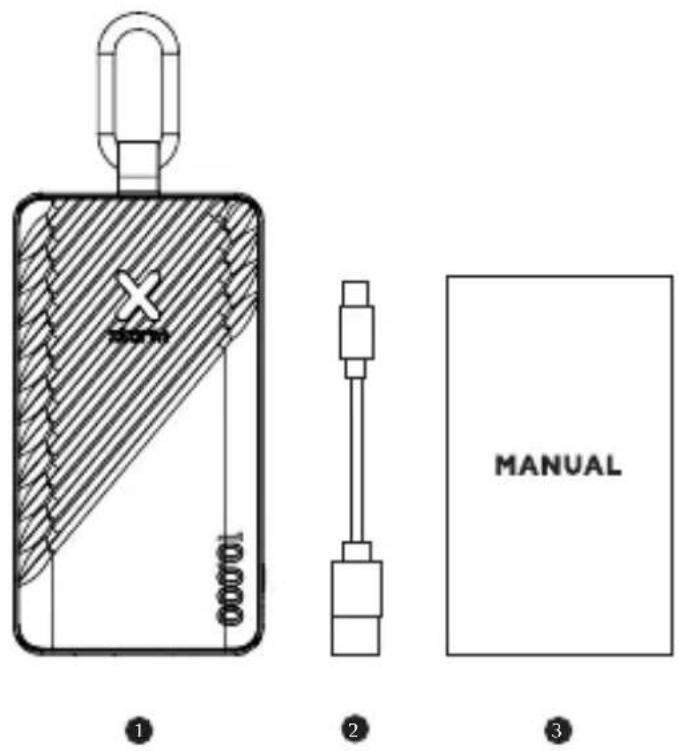
XG2S10x
Power Bank

USB-A to USB-C Cable

Manual

EN - ENGLISH
- SPECIFICATIONS
- PRODUCT OVERVIEW
- CHARGING YOUR DEVICE
3.1. Connect the USB-C end of a charging cable to the USB-C output of the Power Bank and the other end to the input of your device. The charging will start automatically.
3.2. Charging some devices requires a charging cable other than the one supplied. E.g. an Apple Lightning® or a Micro USB cable. - RECHARGING THE POWER BANK
4.1. Connect the USB-C end of the charging cable to output 1 of the Power Bank and the USB-A end to a wall charger.
4.2. For the fastest charging possible use a 15W USB-C charger. This will fully recharge the Power Bank within 4 hours.
5. LED POWER INDICATOR
5.1. Press the Power Button (A) once to display the battery level remaining in the Power Bank via the LED display (B). Each lit LED light indicates 25% remaining energy in the Power Bank. At 4 lit lights, the Power Bank is fully charged.
5.2. Double press the Power Button to turn on/off the flashlight.
5.3. The LED indicators underneath the back-up solar panel (C) indicate how much energy is generated by the solar panel.
This will give an estimated range how fast the Power Bank will be recharged from 0% to 100%:
1 LED: 250-1000 hours
2 LEDs: 80-250 hours
3 LEDs: 50-80 hours
4 LEDs: 50 hours or less
6. IN THE BOX
NL - NEDERLANDS
3 LED diody: 50-80 hodin
3 LED diode: 50-80 ur
4 LED: 50 ur ali manj
6. V KRABICI
HR - HRVATSKI
2 LED diode: 80-250 sati
3 LED diode: 50-80 sati
4 LED diode: 50 sati ili manje
6. U KUTIJI
RO - ROMÂNĂ
- SPECIFICATII
- PREZENTARE GENERALĂ A PRODUSULUI
- ÎNCĂRCAREA DISPOZITIVULUI DVS.
5. LED GÜÇ GÖSTERGESI
EN When recycling this product, please follow WEEE battery recycling procedures. Contact your local recycling organization for more information.
Provided with a temperature control chip that prevents overheating.

2. OVERLOAD PROTECTION
Protects both the internal battery as well as the battery of the attached device from overcharging.

3. SECURED POWER MANAGEMENT
Automatically picks the correct charging speed and efficiently devides power between attached devices.

4. SHORT CIRCUIT PROTECTION
Breaks the circuit automatically when an overcurrent is detected. This protects the Xtorm charger and your device from short circuit damage.

5. A-CLASS BATTERY CELLS
We only use the best battery cells that provide the fast charging you need and meet all safety requirements.

6. HIGH EFFICIENCY
Our power products are built to power your device as efficient as possible. This ensures the least possible loss of energy during the charging process.

WARNINGS
EN Warnings
Don't drop, dissemble or attempt to repair the charger by yourself. Avoid exposure to water or high humidity. Don't expose to any heat source. Keep out of reach of children. Don't use in the presence of flammable gas. The warranty will lapse in the event of improper use. Telco Accessories has tested the product in a test environment. All statements/declarations made by Telco Accessories about the (operation) of the product are based on the results obtained from such tests. These results/statements/declarations cannot be guaranteed, for example in cases of deviating or injudicious use and/or use in a different environment.
NL Waarschuwingen
EU DECLARATION OF CONFORMITY
![Declaration number: 020P-MY301 Name and address of: Tokyo Accessories Group BV manufacture of: EURB: Honifacuda 15 1992 Bill Houston Katharanda THIS DECLARATION OF CONFORMITY IS ISSUED UNDER THE SOLE RESPONSIBILITY OF: Name and address of: Tokyo Accessories Group BV manufacture: Honifacuda 15 1992 Bill Houston Katharanda Product identifiers: No.25110 THE PRODUCTS MENTIONED IN THIS DECLARATION ARE IN CONFORMITY WITH: SV Community Legislation: Restrictions of Hs22 (Road Services) [NHS] (Director 2011/03/04) [OBSU LT78/08-115. 03.07.2011] Battery Regulation [EVB 2025/1962 (MBSU LT1, 28.07.2020)] Electrical Products (Copyright Entity ID/MA) (Director 2024/30/04) [OBSU DN79.105, 25.05.2014] Sponsored by: Electric Materials (EMC) EN 3002212025 - ACQ228 EN 3003112017 Copyright by: EMBR in electrical products EN 3002211 - ACQ228 EN 3002212 - ACQ228 EN 3002213 - ACQ228 EN 3002214 - ACQ228 EN 3002215 - ACQ228 EN 3002216 - ACQ228 SIGNED FOR AND ON DERIAL OF: Price and date of issue: Reuters, 35 November 2024 Signature: Name: Renter Smith, 7557 Company name: Telco Accessories BV](/content/2026/04/725233/images/cd8767e8f77954538e51fc27685b7725de98e370a315304e076023d66f959f09.jpg)

HIGHER QUALITY
= LOWER IMPACT
CUSTOMER SUPPORT
support@tag.nl
+31 (0)30 635 4800
TELCO ACCESSORIES GROUP
Hoofdveste 19, 3992DH Houten
The Netherlands
MOREENERGY
XTORM.EU