Universe - Earphones PowerLocus - Free user manual and instructions
Find the device manual for free Universe PowerLocus in PDF.


User questions about Universe PowerLocus
0 question about this device. Answer the ones you know or ask your own.
Ask a new question about this device
Download the instructions for your Earphones in PDF format for free! Find your manual Universe - PowerLocus and take your electronic device back in hand. On this page are published all the documents necessary for the use of your device. Universe by PowerLocus.
USER MANUAL Universe PowerLocus
natural_image
Black outdoor headphones with earbuds and headband, no visible text or symbolsUniverse
Hybrid ANC Bluetooth Headphones
CONTENTS | CONTENU
- Bluetooth Version: 5.3
• Working Distance Range: 10M - Speaker dimension: 40 mm
• Frequency Range: 20Hz-20kHz - Charging Voltage: DC 5V
• Sensitivity: 100dB+/-3dB - Charging time: around 3 hours
- Playtime: 60 Hours (70% volume) | ANC ON : 30 Hours
• Frequency band:2.4000 GHz - 2.4835 GHz - Operating frequency: 2400 MHz - 2483.5 MHz
• Rated power consumption: 20mw
• Maximum output power: < 10 dBm - Operating temperature of the products: -20C à 60C
How to charge the headphone?
A voice prompt 'Battery low' allows for 2 minutes play time before the headphones power down stating 'Battery low, power off'. The LED Indicator Light 9 will flash WHITE once and will then switch off. Connect the headphones to a suitable USB wall charger, computer USB port or a power bank using the USB-C Charging Cable14 supplied and connect it to the headphones USB-C Charging Port 10. While charging, the LED Indicator Light 9 will glow WHITE. Once the headphones are fully charged, the LED Indicator Light 9 will turn off. Charging can take up to 2 hours.
How to connect the headphones?
First Time Pairing
Power On 5. Press the multi-function button to turn on. A voice prompt 'Power on, pairing' confirms the headphones are on and in pairing mode. The LED Indicator Light 9 will flash WHITE and BLUE ready to pair with your audio device. Go to the Bluetooth settings on your audio device to select 'PowerLocus Universe' from the list. Once paired successfully you will hear 'Connected' and the LED Indicator Light 9 will switch off. You can now enjoy your music, watch a video or take a call handsfree. The headphones will automatically reconnect to the last device they were paired with, confirming 'Connected'. If there is no
2
EN
Bluetooth connection after 5 minutes, the LED Indicator Light 9 will begin to flash BLUE and WHITE for 60 seconds. The headphones will then automatically turn off by confirming with 'Power off' and the LED Indicator Light 9 will flash White once and then switch off.
Wired mode\*\*
The headphones are suitable for devices with a 3.5mm audio socket. Insert the 3.5mm audio cable into the 3.5mm Audio Port 11 of your headphones and the other end into your phone or plane's 3.5mm socket to start listening to your music or movie.
*3.5mm audio cable available separately.
** Note: ANC mode is not available when using a 3.5mm cable to connect the headphones.
Operations
Play / Pause
Short press Call / Play / Pause Button 5
Volume Up / Down
Short press
the Volume Up / Down Buttons 4 / 6 to adjust the volume
Skip / Previous Track
Press and hold
the Skip / Previous Track Buttons 4 / 6 to change tracks
Active Noise Cancellation (ANC) On / Off and Transparent Mode
Short press the ANC button 8 to cycle through the following modes: TRANSPARENT MODE > ANC ON > ANC OFF. You will hear a voice announcement telling you which mode you are in: 'Transparent On', 'ANC On' or 'ANC Off'. The ANC LED light 7 will glow GREEN while either Transparent mode or ANC mode is being used.
Change the Preset Equalisation (EQ) Settings
Choose from Equalisation (EQ) modes to suit your personal preference. There is no App required.
- Bass boost mode increases the bass sound.
3
EN
Short press
the EQ button 13 to cycle through the Music and Bass Boost.
Answer / End a call
Short press the Call Button 5. (Audio is picked up via the microphones 12.
Power On / Off
Press and hold
the multi-function button 5n / off. You will hear 'Power on / off'.
How to Reset?
Press and hold the + and - button for 6-7 seconds until the LED lights start flashing again in Blue/White.

Please Recycle
Disposal of waste batteries and electrical and electronic equipment (applicable in the European Union and other countries with separate collection systems) This symbol on the product, the battery or on the packaging indicates that the product and the battery shall not be treated as household waste. On certain batteries this symbol might be used in combination with a chemical symbol. The chemical symbol for lead (Pb) is added if the battery contains more than 0.004% lead. By ensuring that these products and batteries are disposed of correctly, you will help to prevent potentially negative consequences for the environment and human health which could be caused by inappropriate waste handling. The recycling of the materials will help to conserve natural resources. In case of products that for safety, performance or data integrity reasons require a permanent connection with an incorporated battery, this battery should be replaced by qualified service staff
only. To ensure that the battery and the electrical and electronic equipment will be treated properly, hand over these products at end-of-life to the appropriate collection point for the recycling of electrical and electronic equipment. For all other batteries, please view the section on how to remove the battery from the product safely. Hand the battery over to the appropriate collection point for the recycling of waste batteries. For more detailed information about recycling of this product or battery, please contact your local Civic Office, your household waste disposal service or the shop where you purchased the product or battery.
LET'S BE SAFE
IT IS IMPORTANT THAT YOU PLEASE READ THIS SECTION COMPLETELY.
To avoid hearing damage, limit the time you use headphones at high volume and set the volume to a save level. The louder the volume, the shorter the safe listening time is. If water or foreign matter enters the
4
EN
unit, stop use immediately and contact PowerLocus. In particular, be careful in the following cases: - When using the unit near a sink or liquid container. Be careful that the unit does not fall into a sink or container filled with water - When using the unit in the rain or snow, or in humid conditions. If you touch the unit with wet hands, or put the unit in the pocket of a damp article of clothing, the unit may get wet. Never insert the USB plug when the headphone or charging cable is wet. If the USB plug is inserted while the unit or charging cable is wet, a short circuit may occur due to liquid (tap water, seawater, soft drink, etc.) or foreign matter on the unit or charging cable, and cause abnormal heat generation or malfunction.
Safety Precautions
Please DO NOT use adapters more than DC5V 1A! Please use the original cable supplied with the package as different cables could harm the product and void its warranty.
Attention - Magnetic Fields
Magnetic fields are being generated by this product that could cause interference with cardiac pacemaker, implanted defibrillators (ICDs) and other implants. Please always maintain at east 10cm/3.94 inch distance between the headphone and the pacemaker, implanted defibrillators (ICDs) and other implants. Check with your doctor before use if you are fitted with a medical device such as a pacemaker or a programmable shunt!
Safety Precautions for the Batteries:
Do not expose the batteries (battery pack or batteries installed) to excessive heat, such as sunshine, fire or the like, for a long time. Do not subject the batteries to extreme low temperature conditions that may result in overheating and thermal runaway. Do not dismantle, open, or shred secondary cells or batteries. In the event of a cell leaking, do not allow the liquid to come in contact with the skin or eyes. If contact has been made, wash the affected area with copious amounts of water and seek medical advice. Secondary cells and batteries need to be charged before use. Always refer to the manufacturer's instructions or product manual for proper charging instructions. Always dispose of properly.
Notice
- Keep the product dry; do not place the product in damp places.
- Keep out of direct sunlight and high temperatures. High temperatures may result in damage.
- Keep out of cold temperatures, this will help avoid internal damage.
- Do not disassemble the product.
- Avoid dropping the product.
- Do not continue to charge the product over 10 hours.
- When charging use the Type-C charging cable that came with the product.
CE
Hereby GL Grup-2015 LTD declares that wireless headphone PowerLocus Universe is in compliance with essential requirements and other relevant conditions of Directive 2014/53/EU. The full text of the EU declaration conformity is available at the following internet address: (powerlocus.com/doc)
Frequency: 2402-2480 MHz Max radio frequency power: 100 mW (EIRP) GL GRUP-2015 LTD. 36 VASIL LEVSKI STREET, 5370 DRYANOVO, BULGARIA
EN
UK
Hereby, GL GRUP-2015 LTD. declares that this equipment is in compliance with the UK relevant statutory requirements. To find out more about the UK Declaration of Conformity, please visit: https://powerlocus.com/doc-uk-universe
Dryanovo BG, 2024-06-07 Registered Office: GL GRUP-2015 LTD, Vasil Levski 36, Dryanovo 5370, Bulgaria
For customers in the UK STATEMENT OF COMPLIANCE
Model No.: Universe
Name and address of the manufacturer's authorized representative: GL GRUP-2015 LTD, Unit J. Hove Technology Centre, Hove BN3 7ES United Kingdom This statement of compliance is issued under the sole responsibility of the manufacturer: GL GRUP-2015 LTD, Vasil Levski 36, Dryanovo 5370, Bulgaria Object of the statement: Wireless Headphones
The object of the statement described above is in compliance with the applicable security requirements in Schedule 1 of S.I. 2023 No. 1007 (Product Security) Where applicable, references to the relevant standards used in relation to which compliance is declared: Defined support period for security updates: 2026-01-01 Additional information: Note(s): Signed for and on behalf of: GL GRUP 2015 LTD.
ISED Canada Statement:
This device contains licence exempt transmitter(s)/receiver(s) that comply with Innovation, Science and Economic Development Canada's licence exempt RSS(s). Operation is subject to the following two conditions: this device may not cause interference and this device must accept any interference, including interference that may cause undesired operation of the device. Radiation Exposure. This equipment complies with Canada radiation Exposure limits set forth for an uncontrolled environment to maintain compliance with IC's RF Exposure guidelines. This equipment should be installed and operated with minimum distance of 0mm the radiator your body. This device and its antenna(s) must not be co-located or operation in conjunction with any other antenna or transmitter.
natural_image
Black outdoor headphones with labeled parts (1, 2, 3), no visible text or symbols on the headset itself.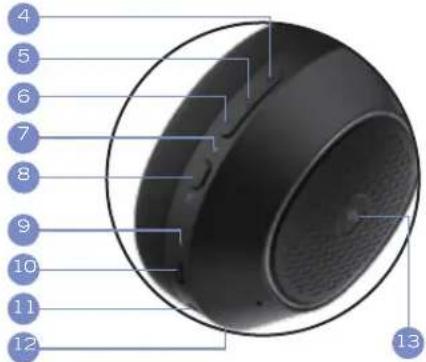
text_image
4 5 6 7 8 9 10 11 12 13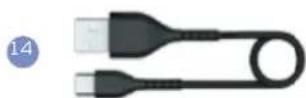
BG
Спецификации
ZHONGSHAN JINGYU ELECTRONICS CO.LTD. Address:1-3 F, Building 25, Qiaoguang Industrial Zone, Nanlang Town, Zhongshan, Guangdong, P.R. China
ΠΡΟΕΙΔΟΠΟΙΗΣΗ!
text_image
Diagram of a black multi-band headphones with numbered labels pointing to various ear components and cable.HU
HU
MÜSZAKI ADATOK
- Bluetooth Version: 5.3
• Working Distance Range: 10M - Speaker dimension: 40 mm
• Frequency Range: 20Hz-20kHz
• Charging Voltage: DC 5V
• Sensitivity: 100dB+/-3dB - Charging time: around 3 hours
- Playtime: 60 Hours (70% volume) | ANC ON : 30 Hours
• Frequency band:2.4000 GHz - 2.4835 GHz - Operating frequency: 2400 MHz - 2483.5 MHz
• Rated power consumption: 20mw
• Maximum output power: < 10 dBm - Operating temperature of the products: -20C à 60C
ZHONGSHAN JINGYU ELECTRONICS CO, LTD. Address: 1-3 F, Building 25, Qiaoguang Industrial Zone, NanLang Town, Zhongshan, Guangdong, P.R. China
GEVAAR!
natural_image
Black hardcover headphones with labeled parts (1, 2, 3), no visible text or symbols on the device itself.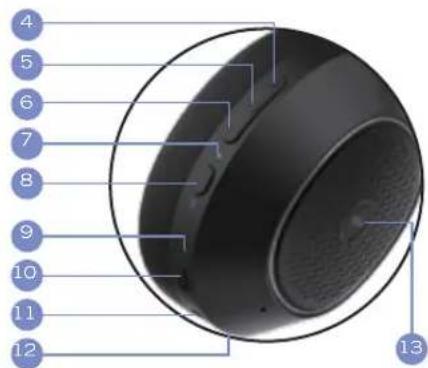
text_image
4 5 6 7 8 9 10 11 12 13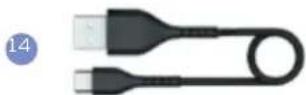
GER GER
Technischen Daten
text_image
Diagram of a black multi-band headphones with numbered labels pointing to various ear components and connectors.51 52
PL
PL
Specyfikacje:
Active Noise Cancelling (ANC) On/Off
i Transparency Tryb
doclawany, ješli akumulator
Recycling material flow (pmol)
chronic zasoby naturaine. W
natural_image
Black outdoor headphones with labeled parts (1, 2, 3) showing front and back views (no text or symbols on the headset itself)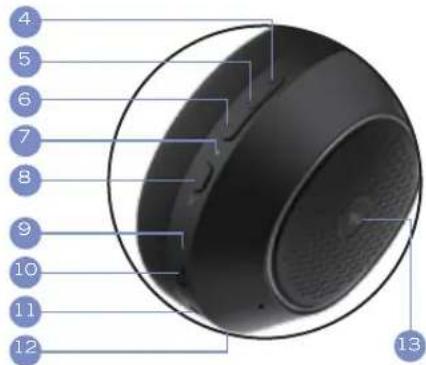
text_image
4 5 6 7 8 9 10 11 12 13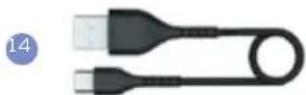
SW
SW
Tekniska specifikationer
ZHONGSHAN JINGYU ELECTRONICS CO., LTD. Address: 1-3 F, Building 25, Qiaoguang Industrial Zone, NanLang Town, Zhongshan, Guangdong, P.R. China
FARA!
Shenzhen Kerilong Technology CO., LTD. Factory Building 101-401 on the right side of No. 3-2, Fudigang Second Industrial Zone, Pingdong Community, Pingd Street, Longgang District, Shenzhen City, Guangdong, P.R. China.
Battery specifications | Batteriespezifikationen | Spécifications de la batterie | Especificaciones de la bateria | Specifiche della batteria | Specificaties van de batteri | Batterispecifikationer :
Li iCN Battery 403035 3.7V 400mAh
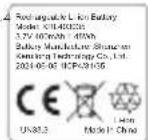
Battery Precautions | Vorsichtsmaßnahmen zur Batterie | Précautions concernant la batterie | Precauzioni per la batteria | Precauciones con la batteria | Voorzorgsmaatregelen voor de batterij | Försiktighetsåtgårder för batteri :
In case of products that for safety, performance or data integrity reasons require a permanent connection with an incorporated battery, the battery should be replaced by qualified service staff only. In ensure that the battery and the electrical and electronic equipment will be treated properly hand over these products at end-of-life to the appropriate collection point for the recycling of electrical and electronic equipment. For all other batteries, please view the section on how to remove the battery from the product safety. Hand the battery over to the appropriate collection point for the recycling of waste batteries.
PowerLocus™ All rights reserved.
The Bluetooth® word mark and logos registered trademarks owned by Bluetooth SIG, Inc. and any use of such marks by PowerLocus is under license. Other marks and trade names are those of their respective owners.
text_image
FSC www.fsc.org MIX Paper FSC™ C165081
text_image
UK CA CE ROHS FC Reach Compliant Prop 65 22 PAP Raccolta Carta FR ÉLÉMENTS D'EMBALLAGE + PAPIER BAC DE TRI Séparez les éléments avant de trierMade in China