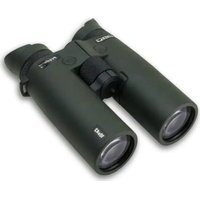
ePredator LRF 10x42 - Binoculars Steiner - Free user manual and instructions
Find the device manual for free ePredator LRF 10x42 Steiner in PDF.


| Brand | Steiner |
| Model | ePredator LRF 10x42 |
| Product Type | Laser Rangefinder Binoculars |
| Magnification | 10x |
| Objective Diameter | 42 mm |
| Power Supply | 1 CR battery (CR2 type recommended) |
| Measuring Range | 15 m to 3000 m |
| Measurement Accuracy | ± 1 m up to 300 m, ± 2 m up to 600 m |
| Measurement Modes | Standard, scan, near object priority, far object priority, extreme weather |
| Measurement Units | Meters or yards |
| Mobile App | Steiner Connect 2.0 |
| Connectivity | Bluetooth |
| Additional Functions | Impact Locator, compass, inclinometer |
| Focus | Central focusing wheel |
| Diopter Adjustment | Yes, on right eyepiece |
| Eyepieces | Twist-up/slide eyecup |
| Weight | Approx. 800 g |
| Dimensions | Approx. 150 x 130 x 60 mm |
| Housing Material | Armored rubber |
| Waterproofness | Weatherproof |
| Operating Temperature | -20°C to +50°C (estimated) |
| Warranty | Manufacturer's warranty (refer to manual) |
| Included Accessories | Case, strap, cleaning cloth, battery, battery compartment tool |
| Maintenance and Cleaning | Clean lenses with a soft lint-free cloth |
| Safety | Class 1M laser, do not point directly at eyes |
| Spare Parts and Repairability | Battery replaceable by user |
Frequently Asked Questions - ePredator LRF 10x42 Steiner
User questions about ePredator LRF 10x42 Steiner
0 question about this device. Answer the ones you know or ask your own.
Ask a new question about this device
Download the instructions for your Binoculars in PDF format for free! Find your manual ePredator LRF 10x42 - Steiner and take your electronic device back in hand. On this page are published all the documents necessary for the use of your device. ePredator LRF 10x42 by Steiner.
USER MANUAL ePredator LRF 10x42 Steiner
Steiner Connect App 2.0 17
Presentation of the product components 18
Main menu Overview 19
Battery 20
Laser distance measurements 21
Menu overview 22
Important information 26
Disposal of electrical and electronic devices 27
STEINER CONNECT APP 2.0
With the Steiner Connect App 2.0 you can manage settings and use the Impact Locator, which supports you in your search. To do this, connect your ePredator LRF to the Steiner Connect App 2.0 and follow the instructions in the app. Once your ePredator LRF is successfully connected to the app, the settings can be adjusted to suit your needs.
The Impact Locator (search function) is activated in the Steiner Connect App 2.0 by clicking on one of the last 3 measurements. This will automatically open Google maps and you can navigate to one of these measuring points.
You can find further explanatory videos on our YouTube channel "Steiner-Optik."

STEINER CONNECTAPP2.0




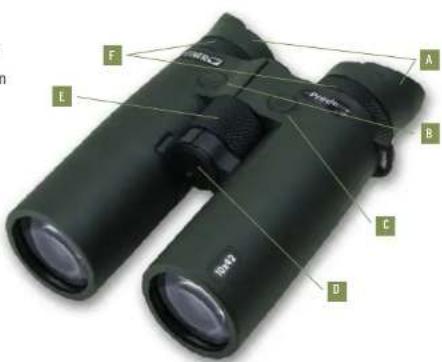
PRESENTATION OF THE PRODUCT COMPONENTS
Illustration 1:
A Eyepiece with twist up eyecups
Power/measurement/scan button
C Menu button
Battery compartment
E Focus wheel
Dlopter compensation
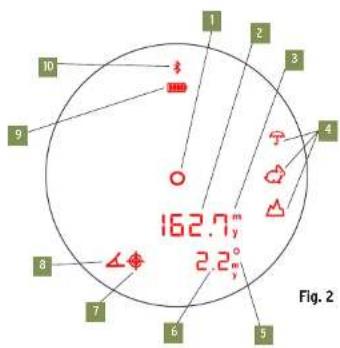
MAIN MENU OVERVIEW
Symbols in Figure 2.
Target mark
Distance display
Unit of measurement
Feature modes
Units of measurement angle / compass / Horizontal distance
6 Distance display angle or compass
7 Compass icon
Angle icon
Battery status indicator
10 Active Bluetooth® connection
BATTERY LASER DISTANCE MEASUREMENTS
Inserting and replacing the battery:
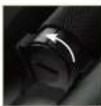
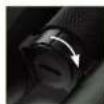
The laser rangefinder is powered by a CR 2 battery. To insert and replace the battery, unscrew the battery compartment by turning it counterclockwise. Insert the battery with its positive contact first (according to the symbols in the battery compartment). Then screw the battery compartment light again by turning it clockwise. To unscrew the battery compartment, use the Steiner tool included in the delivery.
Battery charge level:
A new battery is enough for more than 2500 measurements at the optimal temperature. Battery life can be significantly shorter or longer depending on the application conditions. Low temperatures and frequent use of the scan mode shorten battery life. If a battery symbol "1" is displayed at the top of the field of view during operation in one of the modes, it means that the battery needs to be changed.
Attention: Cold reduces battery life. At low temperatures, the LRF should therefore be worn as close to the body as possible and used with a new/as-new battery.
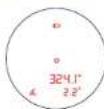
These are carried out using an eye-safe, invisible laser pulse. The ePredator LRF can display the measured distance in meters or yards. When measuring, either "M" for meters or "Y" for yards is displayed next to the respective distance display.
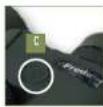
You can change the setting using the menu button in the menu. If you press the button for a longer period of time (> 3 seconds), the menu opens in which you can change the measuring unit of the respective distance display. For further information, please see the menu overview on page 24.

MENU OVERVIEW
Standard mode:
No additional icons appear and you are not in any special mode. The distance can be measured or the scan mode can be activated.
Display brightness:
The brightness of the displays can be set in 6 different levels by pressing the " ① " button.
Accessing your saved measurements display:
You can view the last three measurements from the ePredator LRF's internal memory and switch between them. This feature allows you to quickly and easily retrieve previous measurement results.
Distance display angle / compass or horizontal distance:
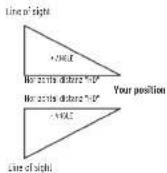
The display can be selected between angle (degrees), angle (meters) - in this setting the horizontal distance is displayed - and compass (degrees).
Customization of feature modes:
Priority of a closer object If more than one target object is detected by the ePredator LRF, the distance of the closer object is shown on the display.
Priority of another object
This mode ignores objects, e.g. bushes, stones and branches, in the foreground. If more than one target object is detected by the ePredator LRF, the distance of the more distant object is shown on the display.

Allows measurement in extreme weather conditions, such as heavy rain.
Switching the Bluetooth connection on/off:
You can turn the Bluetooth® connection on or off depending on your needs. Activate Bluetooth® to be able to connect to the ePendant 8 or the Steiner Connect App 2.0.
Setting or selecting the scale unit or unit of measurement:
You can choose between meters and yards. The measurement result will then be shown on the display in the selected unit.
Compass unit adjustment:
The unit for the compass display can be adjusted. You can choose between degrees or the artillery stroke depending on your preferences and requirements.
Battery Indicator:
If " " is displayed left in the field of view during one of the modes, means the battery needs to be changed.
MENU OVERVIEW
- Switch on your ePredator LRF by pressing the power/measurement/scan button . You are now automatically in the mode you last used.
- By pressing the menu button you can navigate through the different modes.
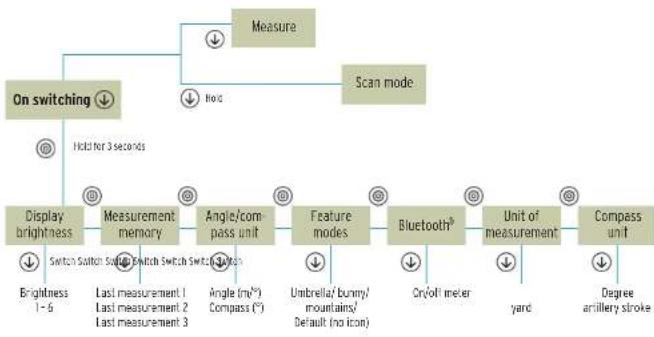
Saving the setting in the menu:
To save your menu changes, you must press the Menu button again. Then hold the menu key pressed for 3 seconds to exit the menu.
Measuring range and measuring accuracy:
The measuring range of the ePredalor LRF is between 15 m/16.5 yds and 3000 m/3280.84 yds.
The measuring range depends on factors such as weather, visibility and reflection properties of the respective target:
Under optimal conditions, the following parameters apply:
± 1,0m / yds to 300m / 328yds,
±2.0m/yds to 600 m/656 yds,
± 0.5% over 600 m/656 yds
Range: higher lower
Color of the object: white black
Angle to the object: perpendicular pointed
Object size: large
Almospheric
conditions: clear
hazy
e.g. house wall e.g.bush, tree
The display shows "End" when:
The distance is less than 15 meters
(in feature mode less than 30 n
The distance is over 3.000 meters
The reflection properties are too low
IMPORTANT INFORMATION
WARNING!
These binoculars comply with the following regulations for laser class 1 M of the valid standards EN 60825-1 or IEC 60825-1 or FDA21CFR 1040.10 and 1040.11, with the exception of certain deviations in accordance with Laser Notice No. 50, dated June 24, 2007. The device is therefore classified as eye-safe and can be used accordingly. However, targeting people directly is not permitted.
FCC Declaration of Conformity
The binoculars have been carefully tested and subsequently found to be compliant within the limits of a Class B digital device in accordance with Part 15 of the FCC Rules. The limits are designed to protect against harmful interference in a residential installation. These binoculars generate, use and transmit radio waves and, if not installed and used in accordance with the instructions, may cause harmful interference to radio transmissions. However, there is no guarantee that interference will not occur in some installations. If the binoculars cause harmful interference to radio and TV reception that cannot be confirmed by turning the affected device on and off, the user has the following options to eliminate this interference:
Reorient or relocate the receiving antenna
- Increase the distance between device and receiver
- Contact the dealer or a professional radio/TV technician
DISPOSAL OF ELECTRICAL AND ELECTRONIC DEVICES
(applies to the EU, and other European countries with separate collection systems)
User information on the disposal of electrical and electronic equipment (private households).
This symbol on our products and/or accompanying documents means that used electrical and electronic products should not be mixed with unsorted municipal waste (ordinary household waste). For proper treatment, recovery and recycling, take these products to the appropriate collection points where they will be accepted without charge.
Before handing over the waste equipment to a collection point, please remove used batteries and accumulators and dispose of them separately from the waste equipment at the appropriate collection points.
In some countries, it may also be possible to dispose of these products at your local retailer when purchasing an equivalent new product.
Proper disposal of this product will help protect the environment and prevent potential harm to people and the environment which could result from inappropriate waste handling.
For more detailed information on the nearest collection point, please contact your local government. In accordance with provincial legislation, penalties may be imposed for improper disposal of this type of waste.
For business customers in the European Union
Please contact your dealer or supplier if you wish to dispose of electrical and electronic equipment. He will have more information for you.
Information on disposal in other countries outside the European Union
This symbol is only valid in the European Union. Please contact your local council or distributor if you wish to dispose of this product and ask for a disposal option.

SOMMARIO
±2.0m/yds-600m/656 yds,
± 0.5% su 600 m/656 yds
± 0.5% sur 600 m/656 yds
Alcance: mayor menor
Color del objeto: bianco negro
Angulo respecto
DEFENSE: www.steiner-defense.com

BERETTA
HOLDING
STEINER-OPTIK is a
Beretta Holding company