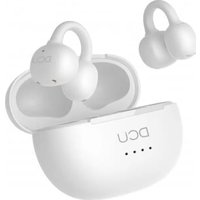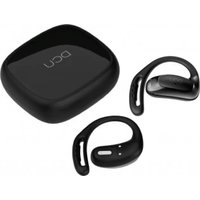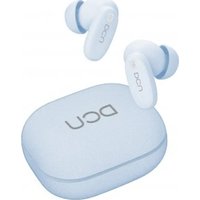
34152030 - Earphones DCU - Free user manual and instructions
Find the device manual for free 34152030 DCU in PDF.


User questions about 34152030 DCU
0 question about this device. Answer the ones you know or ask your own.
Ask a new question about this device
Download the instructions for your Earphones in PDF format for free! Find your manual 34152030 - DCU and take your electronic device back in hand. On this page are published all the documents necessary for the use of your device. 34152030 by DCU.
USER MANUAL 34152030 DCU
natural_image
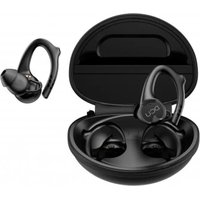
Illustration of an open electronic device with two earbuds inside a circular housing (no text or symbols)Earbuds Bluetooth Sport
Earhook IPX-6
34152030
| Manual de usuario | 3 | ESP |
| User manual | 11 | ENG |
| Manual d'usuari | 19 | CAT |
| Mode d'emploi | 27 | FRA |
| Manual de usuário | 35 | PORT |
ESP
natural_image
Line drawing of an open cylindrical device with internal components (no text or symbols)text_image
Anatomical diagram of an ear with labeled parts, likely for medical or educational purposes.Soporte auriculares
natural_image
Line drawing of an open basket containing three food items (no text or symbols)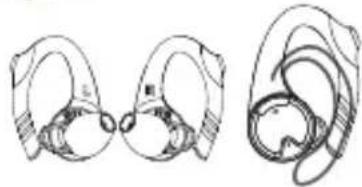
natural_image
Line drawings of ear ear structures showing front and side views (no text or labels)
Presionar durante
3 segundos
Presionar durante
3 segundos
Important Safety Instructions:
Please read carefully and keep all safety and usage instructions in a proper place.
- Please read these instructions carefully.
- Please keep this instruction manual in a proper place.
- Please pay attention to all warnings.
- Please follow all instructions described in this manual.
- Do not use the product at a place where there is water or moisture.
- Please wipe clean with a dry cloth.
- Only use attachments/accessories specified by the manufacturer.
- If you have any questions or concerns about maintenance or if you find any problem with the product, please contact DCU Tecnologic to manage the warranty www.dcutec.com
- Do not spill liquids or expose the product to moisture, Do not expose or subject the product to strong shocks. Damage caused by liquids, humidity or shock is outside the guarantee.
Warnings/Cautions:
- Do not use the earbuds at a high volume for any extended period.
• To avoid hearing damage, use your earbuds at a comfortable, moderate volume level. - Turn the volume down on your device before placing the earbuds in/on your ears, then turn the volume up gradually until you reach a comfortable listening level.
- Do not use the earbuds while driving or you are unable to hear ambient sound, so as to avoid danger.
- Focus on your safety and that of others if you use the earbuds while engaging in any activity requiring your attention, e.g., while riding a bicycle or walking in ornear traffic, a construction site or railroad and follow applicable laws regarding earbuds use, etc.
- Remove the earbuds or adjust your volume to ensure you can hear surrounding sounds, including alarms and warning signals.
- If you feel the earbuds generate heat or can't hear sound, please remove them immediately.
- Do not make unauthorized alterations to this product.
- Never attempt to disassemble or alter the product in any way.
- Use this product only with an USB power supply which meets local regulatory requirements (CE, TUV, etc). 2.4 maximum and don't use quick charge.
- If the battery leaks, please do not contact with your skin or eyes. If contact occurs, please consult a doctor immediately.
- Do not expose products containing batteries to excessive heat (e.g. from storage in direct sunlight, fire or the like).
- Wipe off sweat from the earbuds and the charging case before charging.
- IPX6 is not a permanent condition, and resistance might decrease as a result of normal wear.

Contains small parts which may be a choking hazard. Not suitable for children under age 3.

This product contains magnetic material.
Consult your physician on whether this might affect your implantable medical device.
ENG
Care and Maintenance:
- Do not drop, squeeze, bend or use excessive force to the product.
- Do not place the product in a damp, cold, extreme environment or for a prolonged period of time. Excessively high or low temperature may cause a fire/explosion of the battery. Keep away from moisture condition, in order to prevent damage of the built-in circuits.
- Do not wipe the product with volatile, irritating liquids. The best way is to clean with a soft cloth or a professional leather cleaner.
- Do not disassemble the product by yourself.
from normal wear and tear or cracking, etc., please contact the merchant. - This product contains magnetic material. Keep the product away from magnetic sensitive products (such as credit cards and video screens) to prevent damage.
Listening Safety:
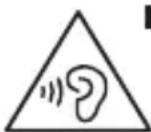
Danger
To avoid harm your hearing, do not listen at high volume for a long time.
Please adjust the volume to a safe range.
If the earbuds volume is too high, the use time should be shortened.
After-sales Service:
This product is covered under warranty for a period of 3 years free maintenance and 30-day unconditional return policies. If you have any quality problems about
the product contact DCU Tecnologic at www.dcutec.com
Product Parameters:
Bluetooth Version: Bluetooth 5.0
Charging current: 60mA
Wireless transmission range: 10m
Frequency response range: 20Hz-20KHz
Speaker unit: OD = 12MM, 16Ω
Charging box:
LED: 4pcs
Electricity display: 25%, 50%, 75%, 100%
Interface: Micro USB
Input voltage: 5V + 5% charging current: 370mA (0.5C)
Charging time: 2-3 hours
Charging instructions: when charging, the led turn on and it blinks (power indication)
Full charge: 4 lights are always on (pull out the input power and turn out the lights)
Power View: Press the button in the charging box at a short time once. Display the current power and turn off after 15 seconds.
ENG
Packing contents:
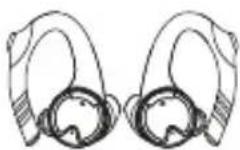
Earphones (Leftx1, Rightx1) Earphones charging box x1
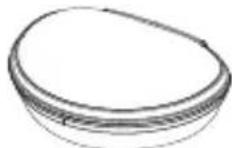

USB cable x1
User guide x1
Product introduction:
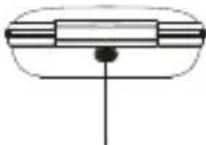
A. Charging case B. Earbuds
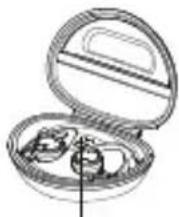
natural_image
Line drawing of an open cylindrical device with internal compartments (no text or symbols)Charging indicator light Charging port
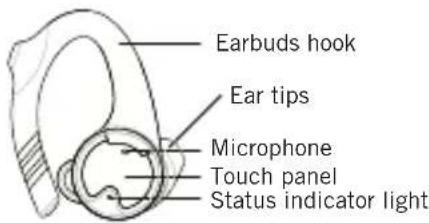
text_image
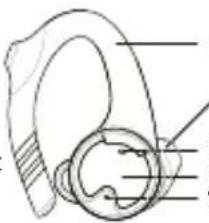
Earbuds hook Ear tips Microphone Touch panel Status indicator lightBattery charge:
- Charge the case:
- Charge the battery with the provided USB cable. When charging the product, LED indicator flashes blue light.
- When the product is fully charged, the LED indicator become solid blue.
• Charging case Indicators:
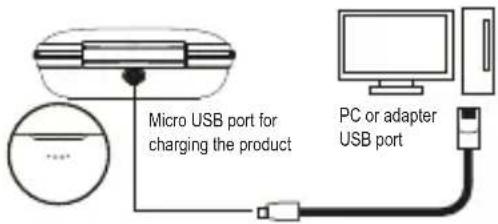
text_image
Micro USB port for charging the product PC or adapter USB port| Charge the charging case | Charging mode | When charging the charging case, the indicator blue light flashes. There are 4 LED lights to represent battery level(the battery box switchclicks to display the power). After fully charged, 4 LED lights become solid |
| Charge the earbuds with thecharging case | Discharging mode | When you charge earbuds with the charging case, the corresponding LED lights flashes in blue to display the battery level. |
ENG
Charge the earbuds:
- Earphones are placed in the charging box and charged automatically.
- The red LED indicator lights up and the charging starts automatically.
It takes about 1 hour for a full charge. - After fully charged, the red LED lights go out.
Secure fit:
- Please check the "L" and "R"
- Put the earbuds on your ears. Please adjust the angle according to your ears and make surethey fit in the ear securely and comfortably.
Power ON/OFF:
Power on:
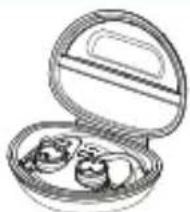
- Open the charging case, take the earbuds out, the earbuds are powered on automatically. The blue light flashes fora second, Red and blue lights flashing alternately. Prompt sound: Power on, Pairing
- Power on by button: Long press the left or right sides for 3 seconds. The blue light flashes for a second, Red and blue lights flashing alternately. Prompt sound: Power on, Pairing
natural_image
Line drawing of an open cylindrical food item with two dumplings inside (no text or symbols)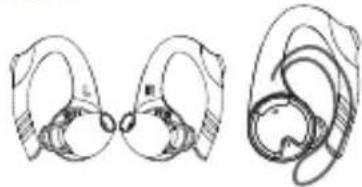
natural_image
Line drawings of two earbuds with different anatomical structures (no text or labels)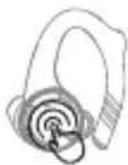
Long press about 3 seconds
Power off:
- Put the earbuds into the charging case, the earbuds will automatically power off. The red light is alwayson(Charing)
- Power off by button: Long press the left or right sides for 3 seconds. The red light is on for about 1 second. Promptsound: Power off.
- It will be power off automatically when there is no connection of the left/right earbud for about 5 min.
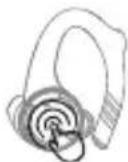
Long press about 3 seconds
Earbuds connection:
Earbuds connection with each other (First Manual Matching) The right ear is the main ear.
- Wearing Earphones on the ear, Manual simultaneous long press of left and right ear buttons for 3 seconds. Release your hand after hearing voice prompt "Power on, Pairing".
ENG
- Then, press the left and right ear buttons for about 2 seconds at the same time. When you hear the sound of "di", release your hands.
(Hearing voice "di" after loosening hands indicates successful clearance). - Double-click the right ear to enter the left and right ear pairing. Hearing the prompt sound "Pairing". (Right and left ears pairing are successful)
- Left and right earphones are connected automatically, left ear blue lamp flashes slowly, right ear red and blue lamp flashes alternately, left ear voice prompt "leftchannel", right ear voice prompt "right channel".
- Open the Bluetooth function on the device to search "dcu_sport", and tap to finish the connection, prompt sound "Connected", the connection is successful, the left and right ear blue light flashes every 3 seconds.
Clear and repairing: When the left and right ears can't match automatically, please repeat the above manual matching steps and repairing
Single ear use:
- Take out the left or right ear in the charging box, turn on automatically, the blue light is on for 1 second, then the red and blue lights are flashing alternately,
voice prompt "Power on, Pairing". - Mobile Bluetooth Search Device Name: Left "dcu_sport_L", Right "dcu_sport", and tap to finish the connection, prompt sound "Connected", the
connection is successful, the left and right ear blue light flashes every 3 seconds. - When using a single ear, double-clicking on the left ear can only play previous song, while double-clicking on the right ear can only play the next song.
- The left ear is taken out and used for a period of time before using both ears. It needs to be restarted. (Take the right ear first without rebooting)
Earbuds Controls:
The following operations are suitable for both left and right earbuds.
- Play/Pause music
In the standby mode/music playback, click the left or right side touch panel once to play/pause music. - Previous track
When playing music, double-click the left ear button to switch to the previous one (music pause is invalid)
- Next track
When playing music, double-click the right ear button to switch to the next song (music pause is invalid)
- Voice assistant
Press the left or right ear button for 2 seconds during standby or music play or music pause, after a voice prompt “Di” then active the voice assistant.
- Answer calls
When calling, click the button in the left or right ear once to answer the call (when a third party calls, click the left or right ear to hang up the current call to connect the call and answer the call). Double-click on the left or right ear to maintain the current call and answer the call.
- End the calls
When you are on a call, click the left or right ear button once.
ENG
- Refuse the call
When there is an incoming call, press and hold the touch panel for about 2 seconds.
- Tail number redial
Three clicks on the left or right ear button during standby or music play or music pause to start the tail number redial.
| Function and status | Flash Mode |
| Unpaired left and right ears, standby status | The red and blue lights of the left and right ears alternately flash |
| Left and right ears paired, wait for the connecting to the smartphone | Blue light flashing slowly in left ear, Red and blue lights flashing alter- nately in the right ear |
| The left and right ears are connected to themobile phone and listening to music | Blue light flashing slowly in left and right ears |
| Charging status | LED red light is always on |
| Fully charged status | LED red light goes out |
FAQ:
-
If the earbuds doesn't function as expected, try the following steps to resolve the issue.
-
Find the symptoms of the issue in this User Guide, and try any corrective actions listed.
- Charge the battery: You may be able to resolve some issues by charging the battery.
- Initialize the earbuds: This operation resets the earbuds to the factory settings and deletes all pairing information.
-
Look up information on the issue on the customer support www.dcutec.com
-
Can't turn on the Bluetooth earbuds.
-
The battery level is low, please charge the earbuds in time.
-
Put into the charging case to charge the battery.
-
Unable to make a Bluetooth connection.
-
Check that the earbuds are turned on.
- Check that the Bluetooth device is turned on and the Bluetooth function is on.
- Make sure the earbuds are not connected to another device.
- Move your mobile device closer to the earbuds and away from any interference or obstructions.
-
Clear the earbuds pairing list and connect again.
-
The earbuds are connected to a Bluetooth-enabled device (mobile phone, PC, tablet, etc.), but you can't play a song through the earbuds.
-
Refer to your device's user manual and select to play songs through the earbuds.
- For some music playback software, you have to go into the setup interface, and choose to play songs through the earbuds from the list of output devices (it typically occurs on the PC).
ENG
5. Poor sound quality.
- Move your mobile device closer to the earbuds (30 ft. or 10 m) and away from any interference or obstructions.
- Make sure that both earbuds fit securely in your ear.
- Use a different music source.
- Try connecting another mobile device.
- Clear any debris or wax buildup from the earbuds and earbuds nozzles.
6. Earbuds don't charge.
- Make sure the earbuds are properly placed in the charging case.
- Make sure the charging case battery is not depleted.
- Make sure there is no dirt or debris covering the charging conductors within the case or on the earbuds.
- If your earbuds have been exposed to high or low temperatures, let the earbuds return to room temperature and then try charging again.
7. Charging case doesn't charge.
- Check the case battery level by gently pressing the button on the case. If needed, charge the case with the supplied USB cable.
- Secure both ends of the USB cable.
- If your charging case has been exposed to high or low temperatures, let the case return to room temperature and then try charging again.
8. No sound.
- Press play on your mobile device to make sure the audio track is playing.
- Place the earbuds in the charging case to check the earbuds charging status. If needed, charge the earbuds.
- Increase the volume on the earbuds and mobile device.
- Press the Bluetooth button to hear the connected mobile device. Make sure you are using the correct device.
-
Move your mobile device closer to the earbuds (30 ft. Or 10 m) and away from any interference or obstructions.
-
Use a different music source.
- Connect a different mobile device.
9. Earbuds cannot pair each other or only one earbud worked.
- If the earbuds are currently or had already been connected to a Bluetooth device, click "forget" or remove "dcu_sport" from your Bluetooth settings and turnoff Bluetooth on your device.
- Then put the earbuds into the charging case, plug in the charging cable to charge the earbuds, then press and hold the touch panel for 5 seconds, the blue lightflashes three times to clear the Bluetooth pairing record.
10. Cannot hear a person on a call.
- Check that both the earbuds and the connected device (i.e., smart-phone) are turned on.
- Turn up the volume of the connected device if it is too low.
- Check the audio settings of the Bluetooth device to make sure the sound comes from the earbuds during a call.
- Re-establish the connection using the Bluetooth device.
- While listening to music with the earbuds, stop playback and press the button on the right or left unit to respond to an incoming call.
11. The Bluetooth connection and sound signal are unstable.
- The Bluetooth device is out of range. Please shorten the distance between the earbuds and the Bluetooth device. And keep away from any interference or obstacles.
ENG
12. Do both earbuds have call function when using single earbud?
- Take one earbud out of the charging case. It will automatically turn on, and the indicator light flashes blue (Please make sure another one is power off, or earbuds will connect each first).
- Left/right earbud also have call function when you use single earbud.
13. Can I use it on Apple products?
- Supports iPhone, iPad, Samsung, Sony, Huawei, Xiaomi and other smart-phone devices. Supports Bluetooth audio devices.
- As long as your device is with Bluetooth version above 4.0, you can use it with the earbuds.
14. What version of Bluetooth is in the earbuds? What is the maximum distance the earbuds will cover?
- Bluetooth version is 5.0. The maximum distance must be less than or equal to 10 meters without obstacles
15. How to charge the earbuds? How many times does the charging case charge the earbuds? How long does it take to charge the earbuds?
- Place the earbuds into the charging case and close the cover, it will start to charge the earbuds.
- The charging case can charge the earbuds 5 times when it is fully charged.
- It takes about one hour to fully charge the earbuds, depending on the actual situation.
16. Can I use the earbuds when charging?
- The earbuds must be put into the charging case when charging. So you can't use it during charge.
17. Does it support the fast charge function?
• These earbuds do not support fast charge function.
18. What are the environmental requirements for the product?
- Please use the product under normal environment where the temperature is between -10 °C and 40 °C.
19. How to disconnect the earbuds from a Bluetooth connected device?
- Put the earbuds into the charging case and close the cover. The earbuds will automatically shut down.
- Click on the right ear 5 times to disconnect the Bluetooth connection.
- Clear earbuds pairing records.
- Manually disconnect the earbuds on the Bluetooth connected device.
CAT
Advertiments/Precaucions:
natural_image
Illustration of an open cylindrical food item with three small items inside (no text or symbols visible)natural_image
Line drawing of an open cylindrical food item with two small bowls (no text or symbols)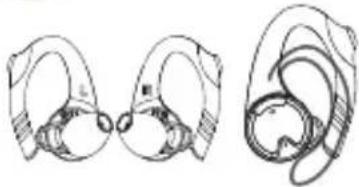
natural_image
Line drawings of ear ear structures showing front and side views (no text or labels)natural_image
Illustration of an open cylindrical food item with a side dish, no text or symbols visibleVoyant de chargePort de chargement
text_image
Technical diagram of an ear with labeled parts, likely for medical or educational purposes.natural_image
Line drawings of wireless earbuds and earpieces (no text or symbols)natural_image
Line drawing of an open cylindrical food item with two dumplings inside (no text or symbols)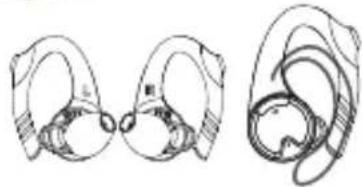
natural_image
Line drawings of ear ear structures showing front and side views (no text or labels)- Terminar as chamadas
natural_image
Illustration of an open electronic device case with two internal components (no text or symbols)DCU
TECNOLOGIC
Good people
www.dcutec.com
C/ Industria, 34
Designed in BCN / Made in PRC / B55166847