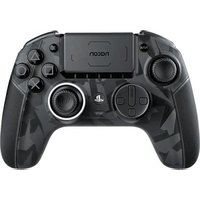
Revolution Pro 5 - Controller Nacon - Free user manual and instructions
Find the device manual for free Revolution Pro 5 Nacon in PDF.


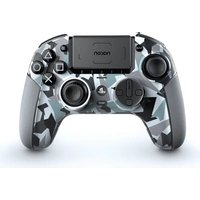
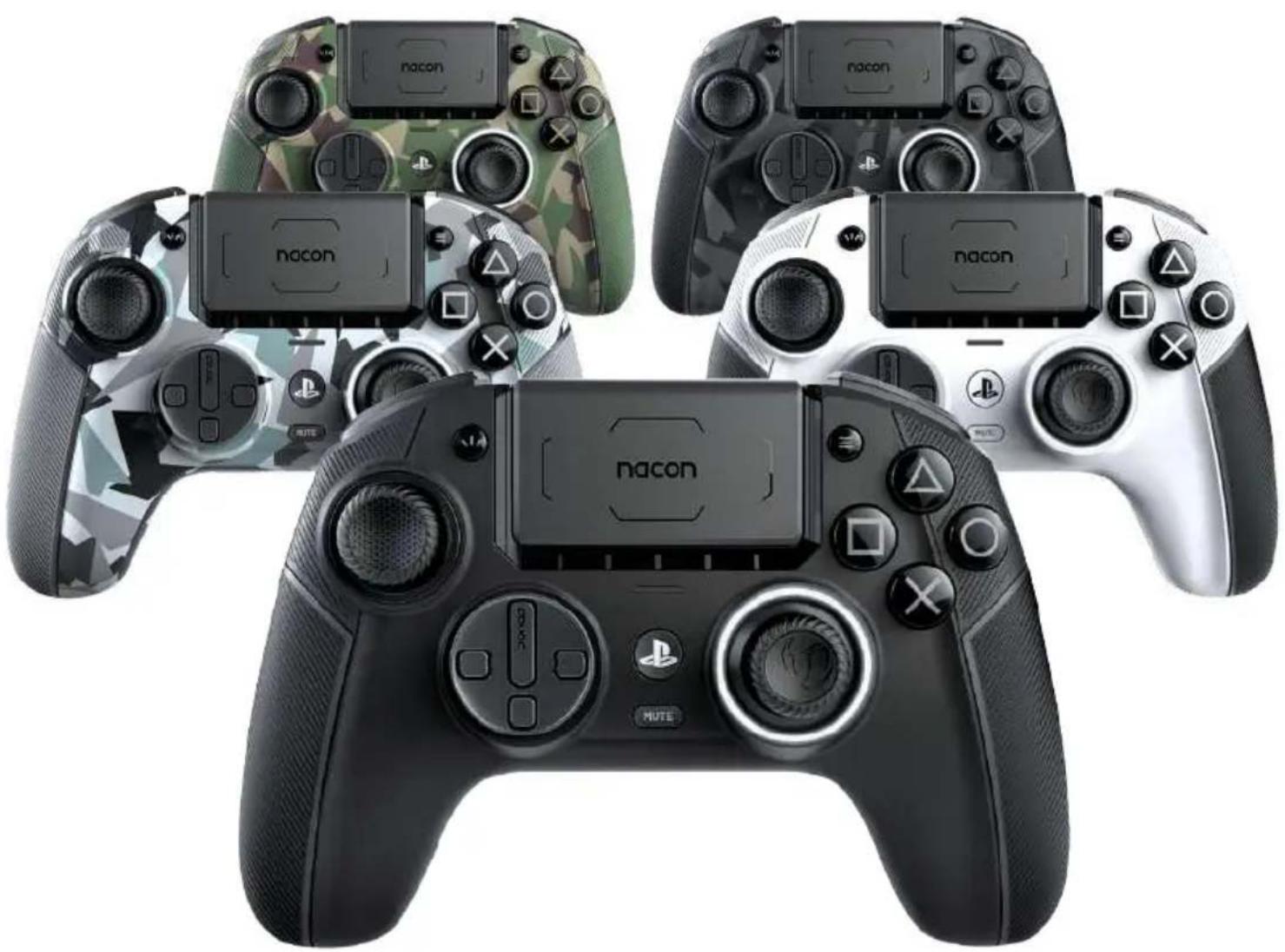
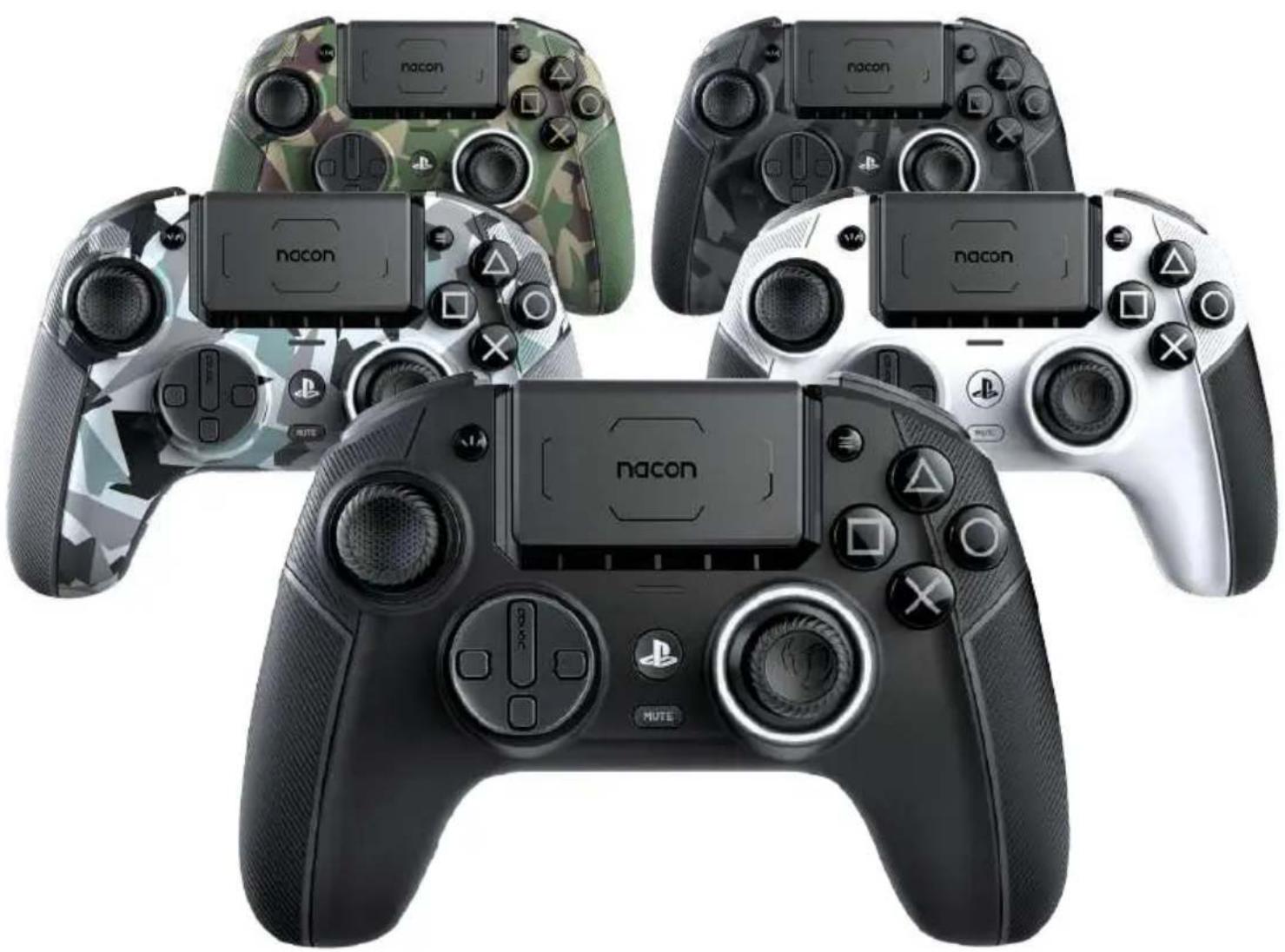
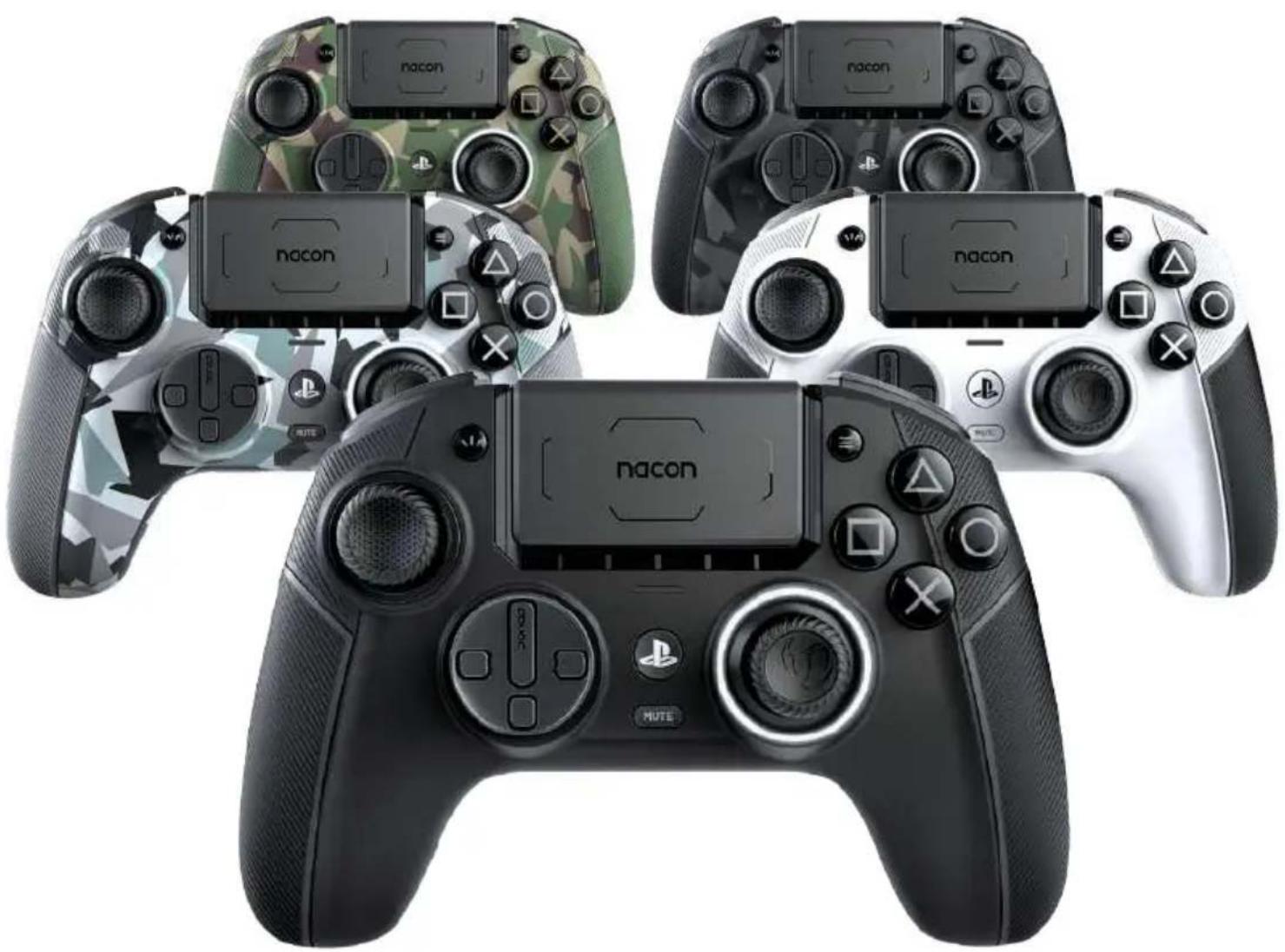
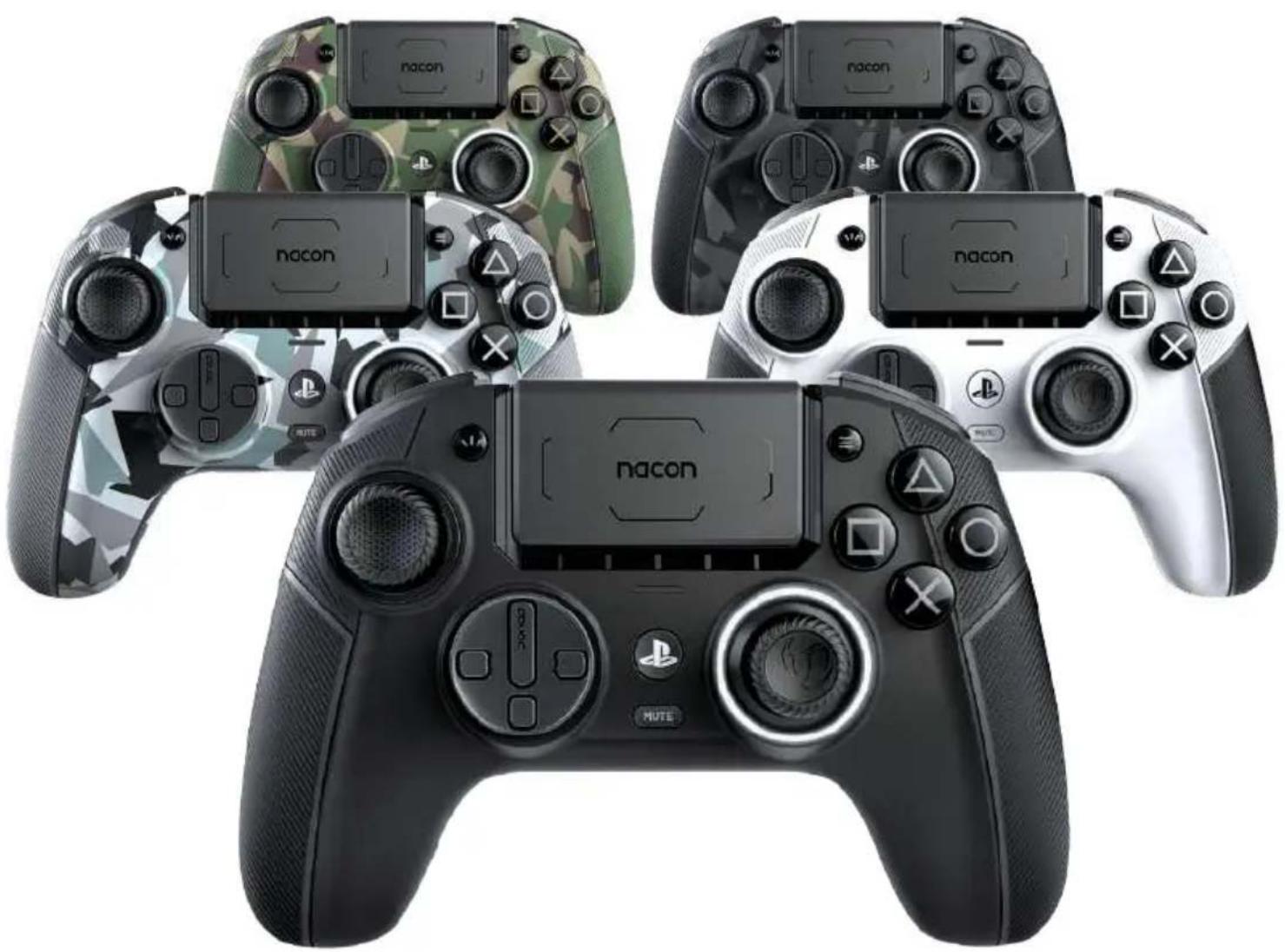
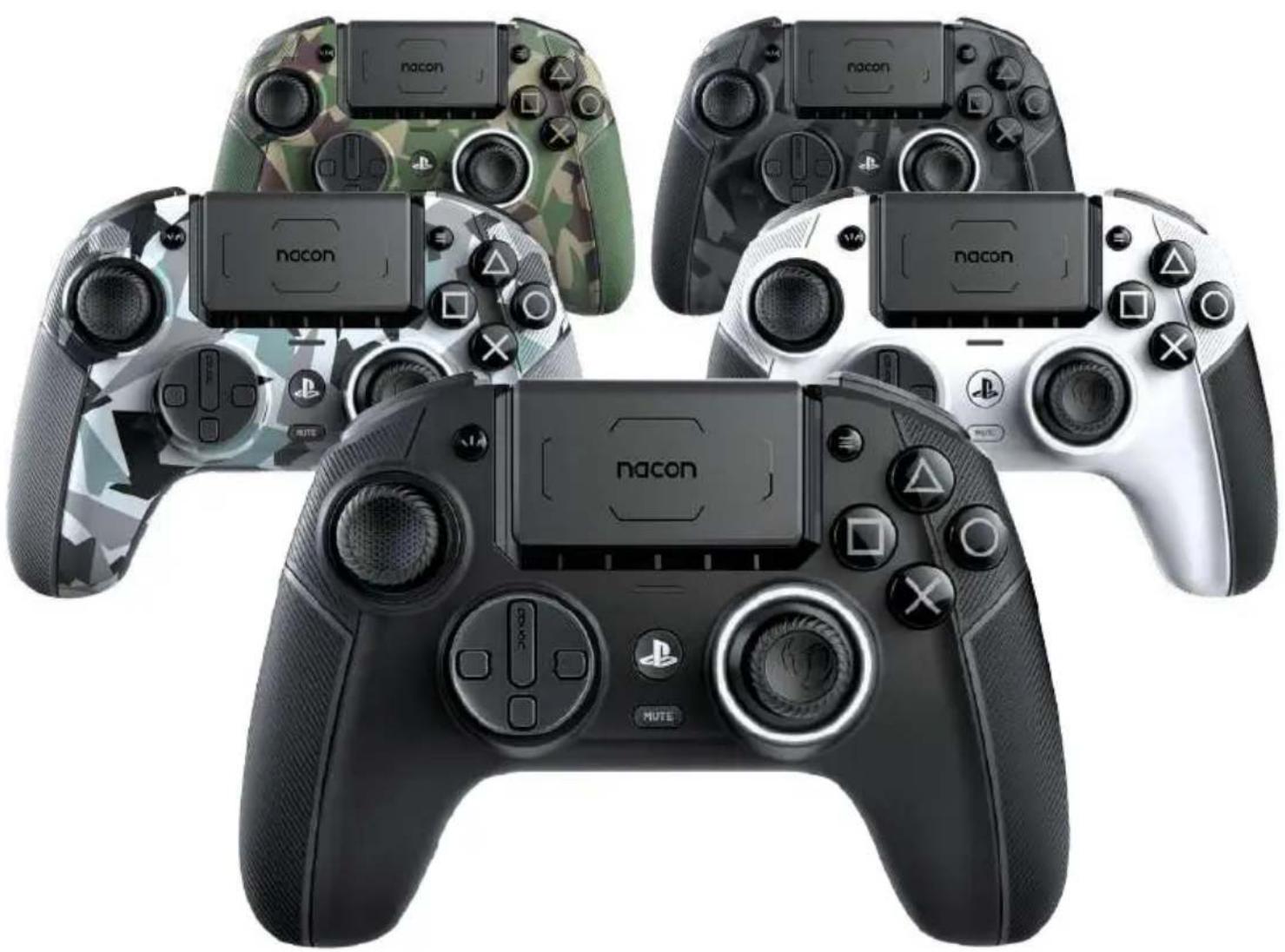
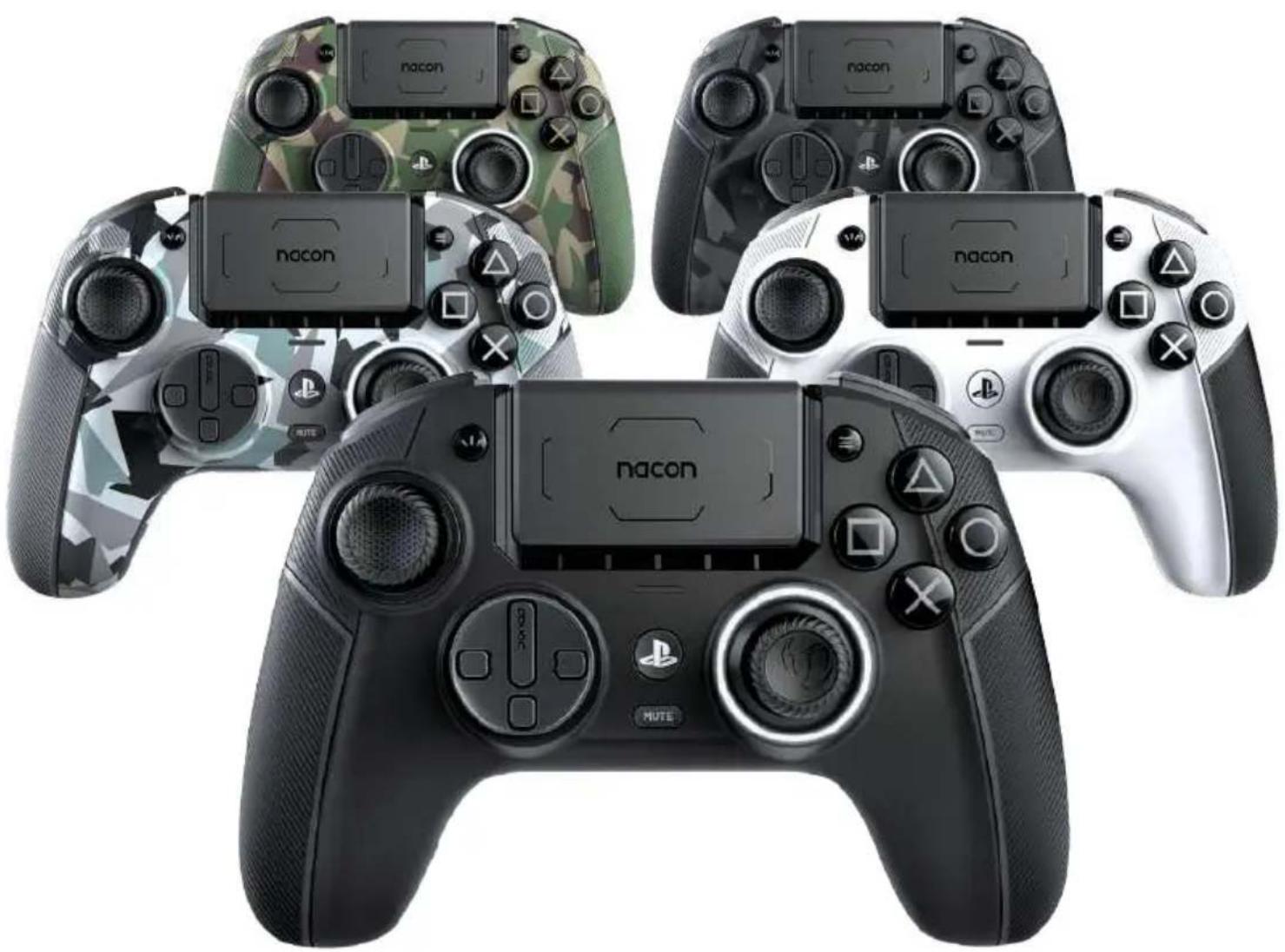
| Product Type | Wireless controller for PlayStation 5, PlayStation 4 and PC |
| Brand | NACON |
| Model | Revolution Pro 5 |
| Dimensions | 190 x 189 x 89 mm |
| Weight | 308 g approx |
| Power | Rechargeable lithium-ion battery, 5 V == 500 mA |
| Joystick technology | Hall effect (magnetic sensors) for increased lifespan |
| Connectivity | Wired (USB-C), wireless via 2.4 GHz USB dongle, Bluetooth 5.2 for audio |
| Compatibility | PlayStation 5, PlayStation 4, PC (Windows 10/11, macOS) |
| Main features | Touchpad, adjustable triggers (long/short travel), 4 programmable rear shortcut buttons, mechanical trigger locks, volume wheel |
| Operating modes | Classic (customization without software) and Advanced (via the Revolution 5 Pro app) |
| Integrated profiles | 4 pre-installed profiles: Racing/Sports, FPS, Arcade/Fighting, Stealth |
| Customization | Interchangeable joysticks, D-pads and weights (10g, 14g, 16g), concave and convex joystick tops |
| Audio | 3.5mm jack, included external USB-C microphone, volume control and equalizer via touchpad |
| LED indicators | 5 LEDs for battery level and player number, RGB light ring around the right joystick |
| Vibration motor | Compatible with PS4 and PC (not on PS5 in native mode) |
| Maintenance and cleaning | Soft damp cloth only, no detergents |
| Safety | Indoor use only, do not expose to moisture, do not open, non-replaceable battery |
| Spare parts and repairability | Interchangeable joysticks, D-pads, weights, USB cable, USB dongle, external microphone; battery not replaceable |
| General information | Made in China, distributed under license from Sony Interactive Entertainment |
Frequently Asked Questions - Revolution Pro 5 Nacon
User questions about Revolution Pro 5 Nacon
0 question about this device. Answer the ones you know or ask your own.
Ask a new question about this device
Download the instructions for your Controller in PDF format for free! Find your manual Revolution Pro 5 - Nacon and take your electronic device back in hand. On this page are published all the documents necessary for the use of your device. Revolution Pro 5 by Nacon.
USER MANUAL Revolution Pro 5 Nacon
natural_image
Four PlayStation 1 controllers with different visor and control buttons, shown from different angles (no text or symbols visible on the consoles themselves)REVOLUTION 5 PRO
GUIDE DE DÉMARRAGE
natural_image
Four-panel diagram showing a mechanical press or lever mechanism with arrows indicating motion (no text or symbols present)natural_image
Top-down line drawing of a game controller with blue directional arrows indicating left and right control buttons (no text or symbols)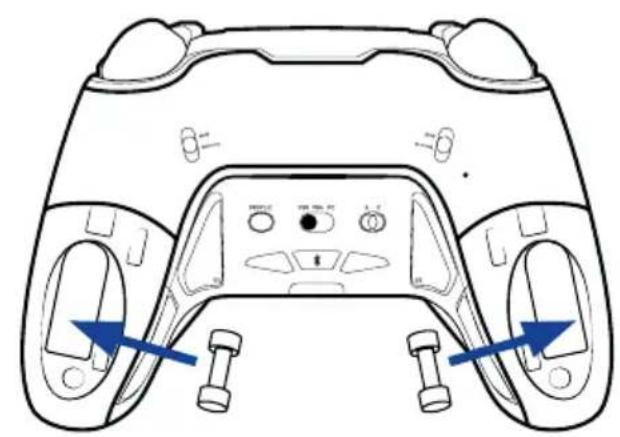
natural_image
Line drawing of a game controller head with two buttons and control buttons, showing front and side views (no text or symbols)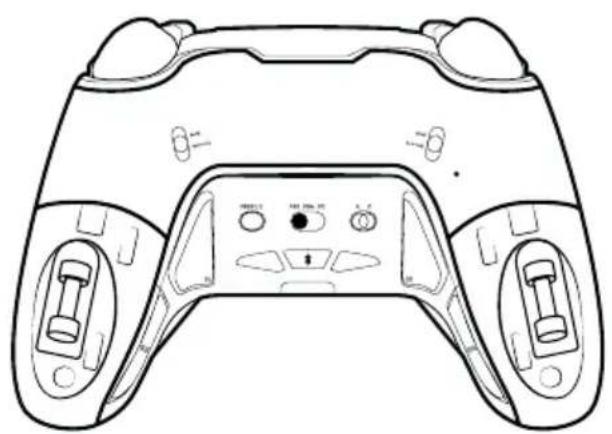
natural_image
Line drawing of a game controller with front and back panels, no text or symbols present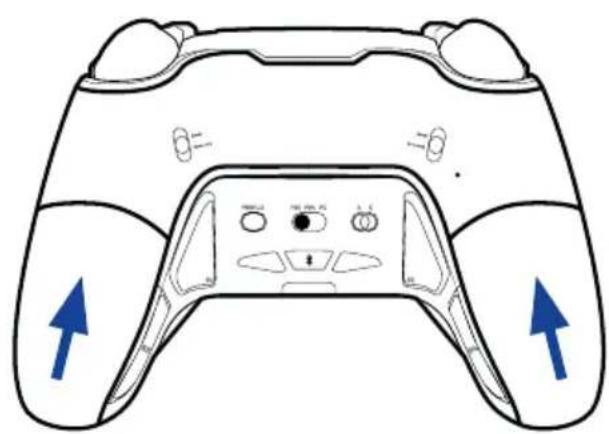
natural_image
Line drawing of a game controller with blue directional arrows indicating left and right sides (no text or symbols)natural_image
Pure technical line drawing of a mechanical component without any text, numbers, or symbolsInformations concernant les communications sans-fil
natural_image
Line drawing of a PlayStation 8 controller with no visible text or symbols on the main bodynatural_image
Line drawing of a PlayStation 8 controller with labeled buttons and a red play button (no text or symbols beyond branding)I Lancer l'application (APP)
natural_image
Simple line drawing of a rectangular object with a vertical line and a small oval shape inside, no text or symbols present.I Jumelage Bluetooth®
I Informations relatives au support technique
Email : support.be@nacongaming.com
Site Internet : www.nacongaming.com
- Reorient or relocate the receiving antenna.
- Increase the separation between the equipment and receiver.
- Connect the equipment into an outlet on a circuit different from that to which the receiver is connected.
- Consult the dealer or an experienced radio/TV technician for help.
1124 8TH Street, Kirkland, WA 98033 USA
Nacon Pty. Ltd.
Level 2/20 Bond Street, Sydney NSW 2000
Australia
FABRIQUÉ EN CHINE / MADE IN CHINA
WWW.NACONGAMING.COM
SUPPORT :
UK, support@nacongaming.com
Tel.: +44 08081010970
BELGIQUE, support.be@nacongaming.com
NEDERLAND, support.nl@nacongaming.com
ESPAÑA, support.es@nacongaming.com
Tel.: +34 900993359
ITALIA, support.it@nacongaming.com
Tel:+39 800172494
USA/CANADA, support.us@nacongaming.com
AUSTRALIA, support.us@nacongaming.com
MEXICO, soporte@nacongaming.com

nacon
natural_image
Four PlayStation 1 controllers from different platforms, each with a unique black and gray design, shown against a white background (no text or symbols visible on the consoles themselves).REVOLUTION 5 PRO
START GUIDE
"LP", "PlayStation", "PS5", "PS4" and "PlayStation Shapes Logo (gradated)" are registered trademarks or trademarks of Sony Interactive Entertainment Inc. All other trademarks are the property of their respective owners. Manufactured and distributed under license from Sony Interactive Entertainment Inc. or its affiliates.
© 2024 NACON
Made in China
Thank you for purchasing this NACON® product.
This product has been designed to enhance your gaming experience. Please keep this user manual in a safe place for future reference.
I Contents
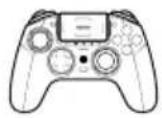
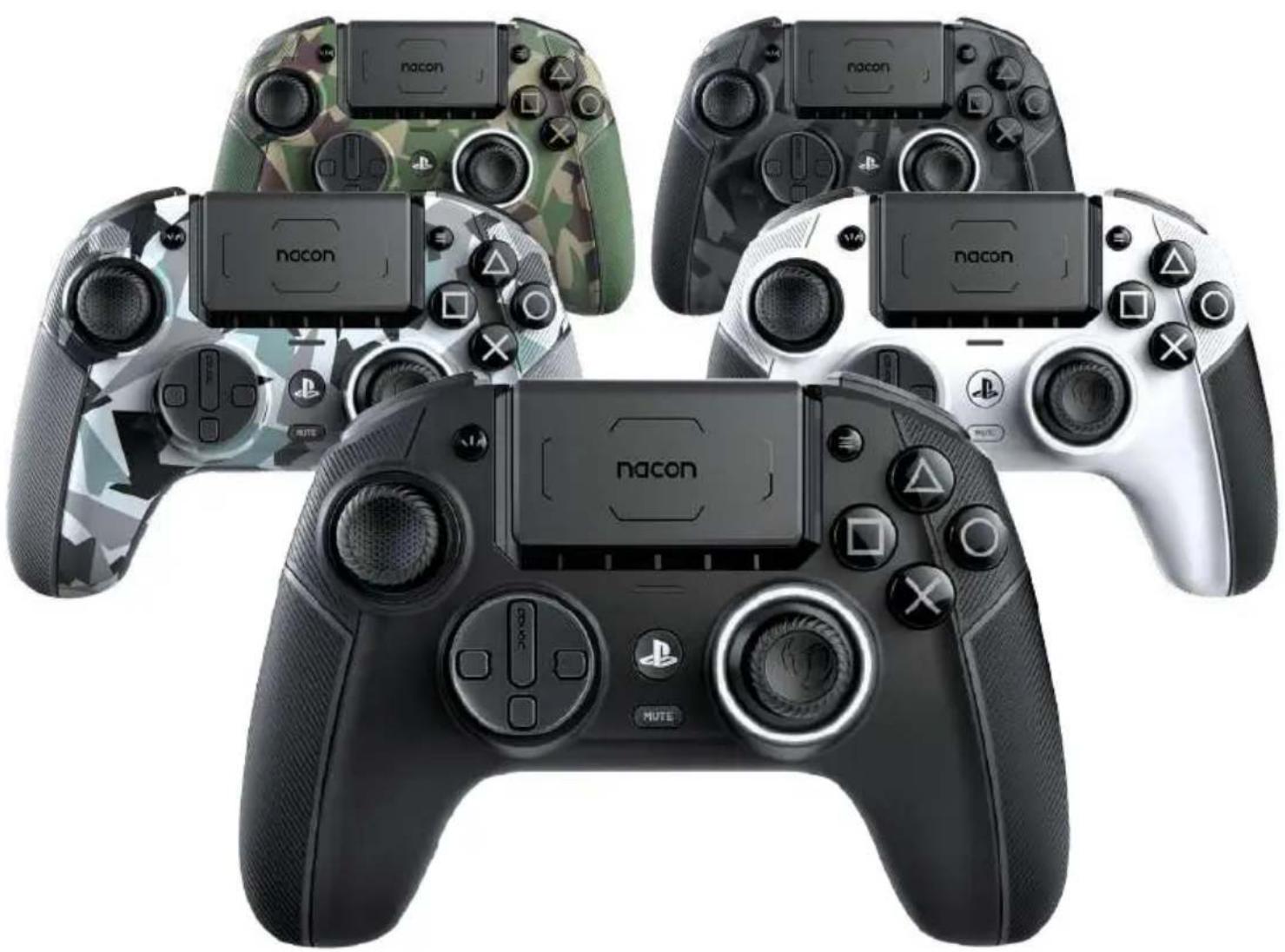
Revolution 5 pro
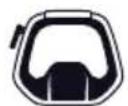
Storage case
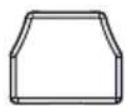
Accessory
storage box


2 D-pads
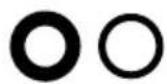
Metal joystick rings
(2x 30°, 2x 38°)
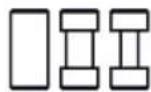
6 Weights
(2x 10g, 2x 14g, 2x 16g)
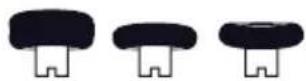
6 Joystick heads
(2 concave, 4 convex)



Quick Start Guide3m USB-C cal
I Additional information
Dimensions: 190 x 189 x 89 mm
Weight: 308g approx.
Consumption: 5V = 500mA
Please note: As we aim to continually improve your gaming experience, we are likely to publish firmware updates (also called micro-software) via the Revolution 5 Pro application. Regularly check the application for the latest updates.
I Controller elements
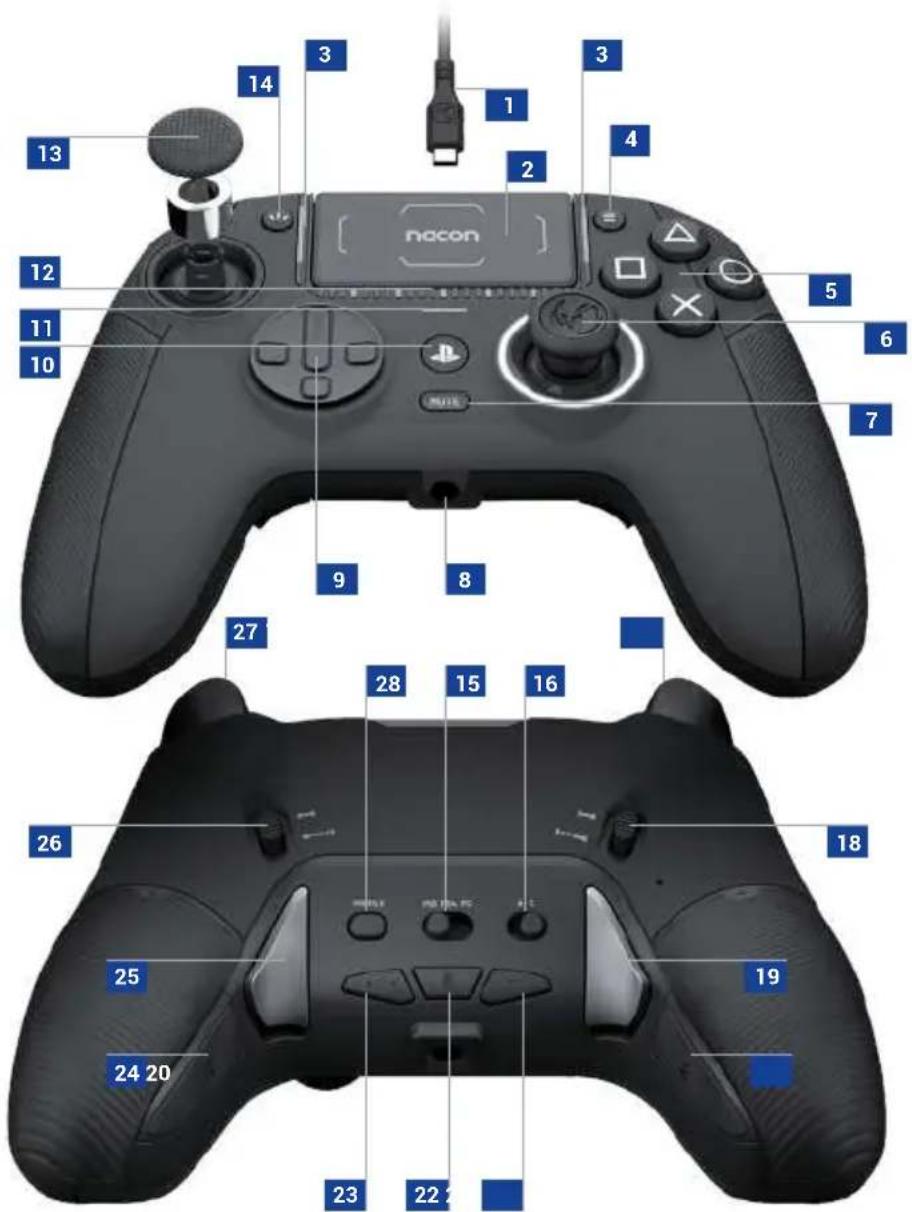
- USB-C connector
2 Touch pad
3 4x Profile LEDs (active in Advanced mode only)
4 Options button
5 Action buttons
6 Right joystick
7 Microphone Mute button
8 3.5mm Jack socket
9 D-pad
10 PS home button
11 PS4™ LED player status indicator
12 PS5 ^® LED player status indicators + battery level indication
13 Left joystick
14 Share button
15 Format selector (PS5 ^® , PS4 ^™ , PC ^* )
16 Classic & Advanced setting selector
17 L2 trigger
18 L2 trigger stopper
19 S2 shortcut button
20 S4 shortcut button
21 Volume down button
22 Bluetooth® button
23 Volume up button
24 S3 shortcut button
25 S1 shortcut button
26 R2 trigger stopper
27 R2 trigger
28 Profile button
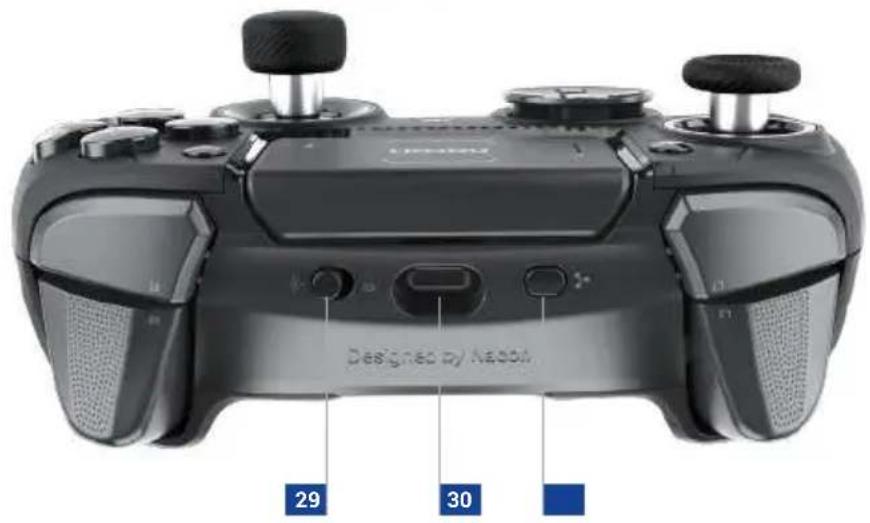
29 Wired, wireless mode button
30 USB-C input
31 Multi-function button
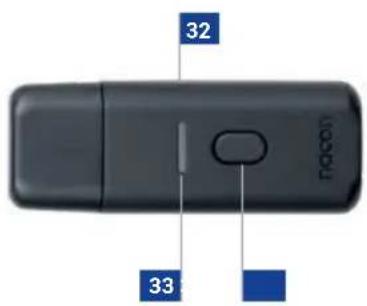
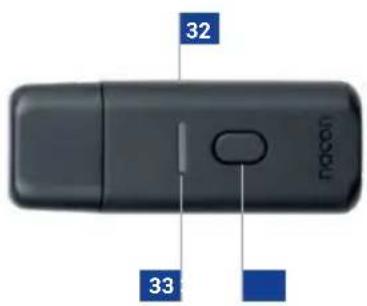
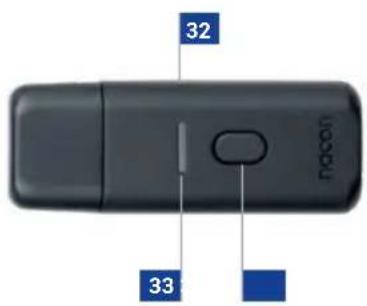
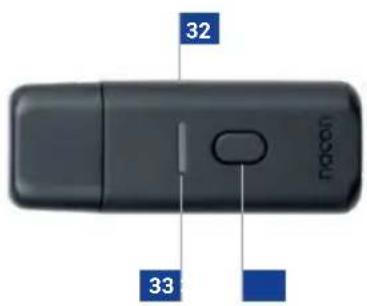
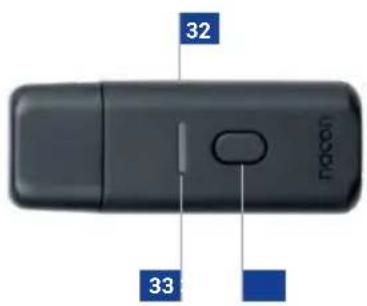
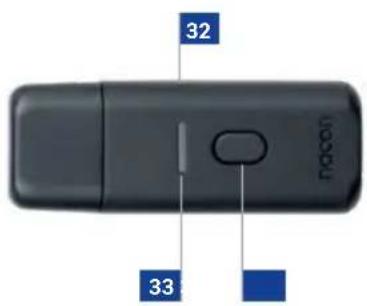
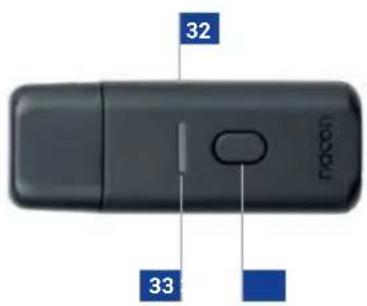
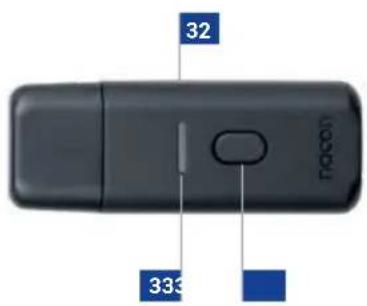
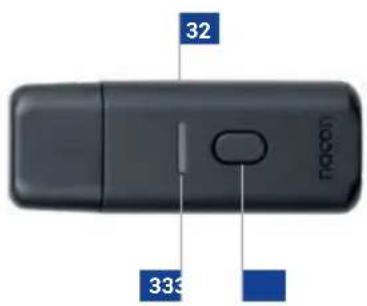
32 USB dongle
33 Pairing LED
34 Pairing button
Joysticks, D-Pad, joystick shaft and Hand grips
Customize your controller with a range of accessories:
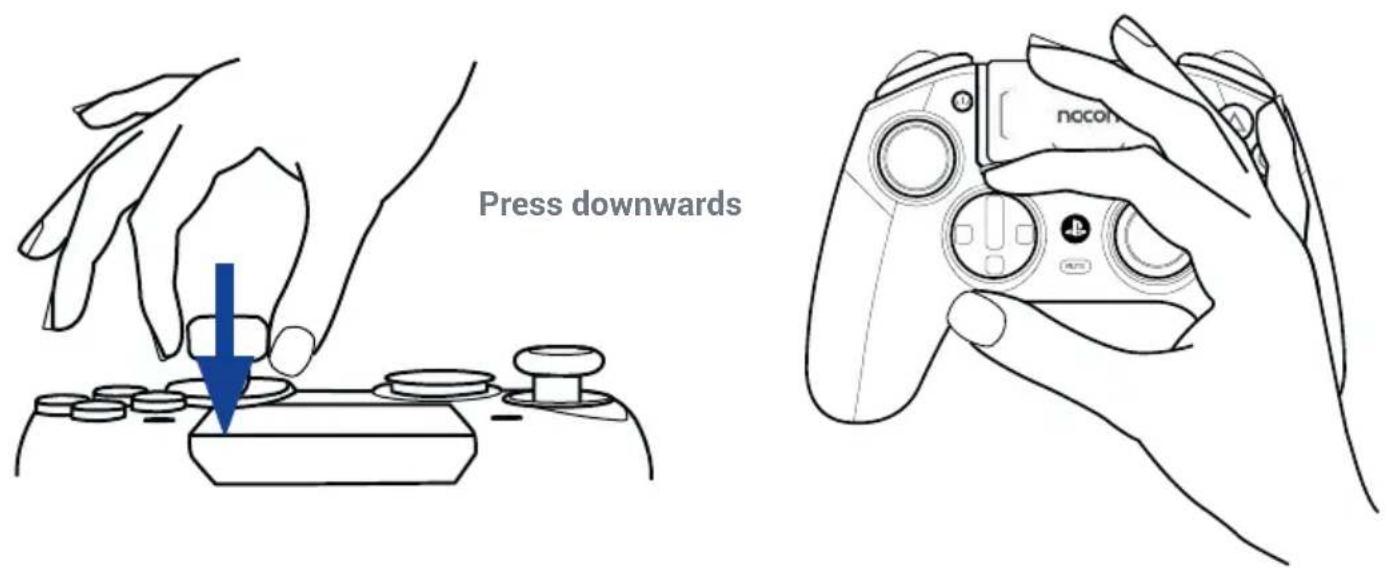
- Remove the joystick head or directional cross (as shown below): Grasp the directional cross joystick head with two fingers and pull.
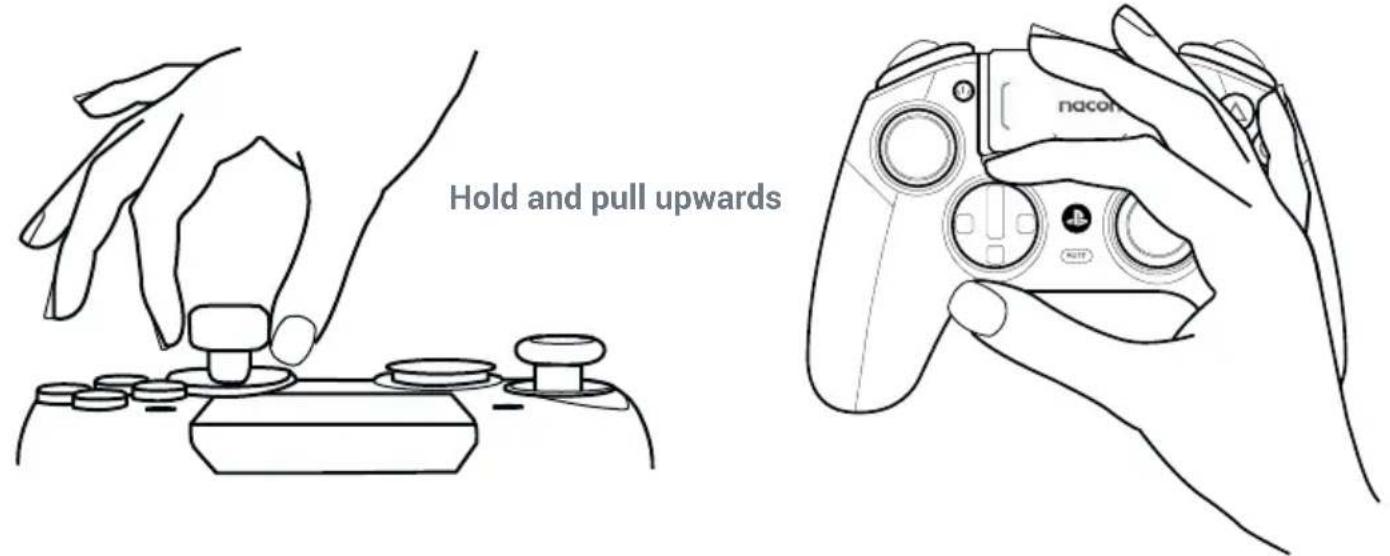
• Install a new joystick head or directional cross: Position the head or cross on its dedicated slot and press until the part engages and you hear a "click".
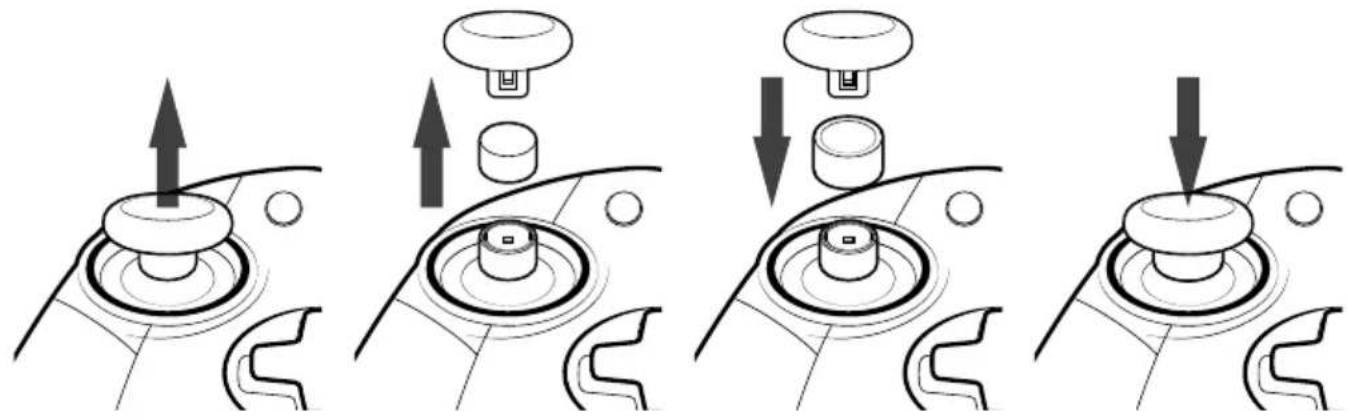
- Change the joystick shaft:
Changing the shaft on your left or right joystick allows you to get a more reactive or precise response on certain games. To change the joystick shaft, you must:
- Remove the joystick head by pulling on it gently;
- Remove the joystick shaft by pulling it;
- Put the desired joystick shaft in place;
- Fit the underside of the joystick head and match the shape with the shape in the top of the shaft. Press gently until you feel the joystick head 'click' in to position.
natural_image
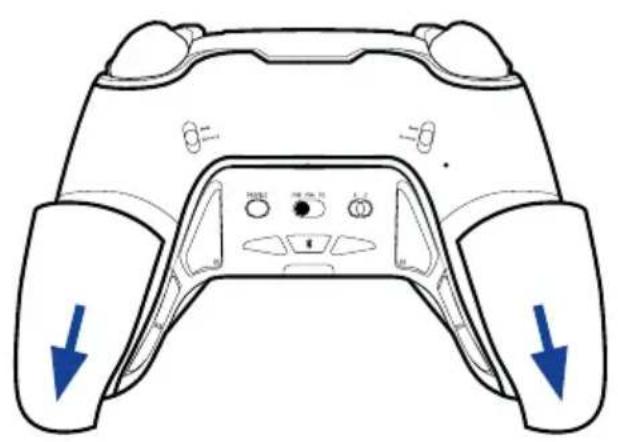
Four-panel diagram showing a mechanical switch mechanism with arrows indicating motion (no text or symbols)- Change the hand grip weights: To replace the weights, push and slide down the hand grip covers to remove them. Insert the desired weight and slide the cover back in position until you hear a "click".
natural_image
Line drawing of a game controller with blue directional arrows indicating left and right sides (no text or symbols)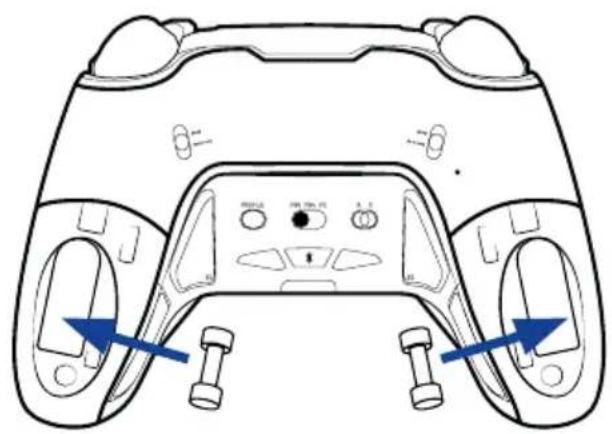
natural_image
Top-down line drawing of a game controller with blue directional arrows indicating movement or control points (no text or symbols)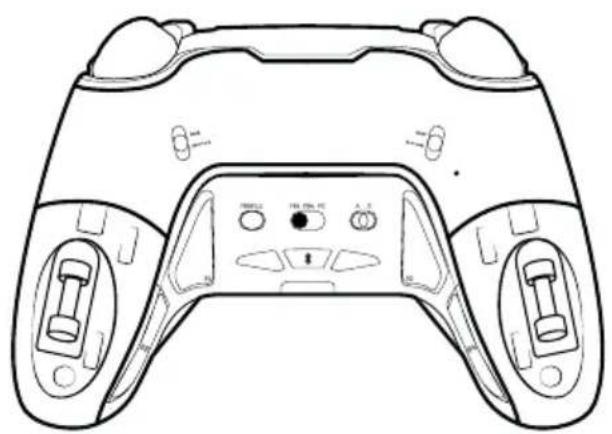
natural_image
Line drawing of a game controller with front and back panels, no text or symbols present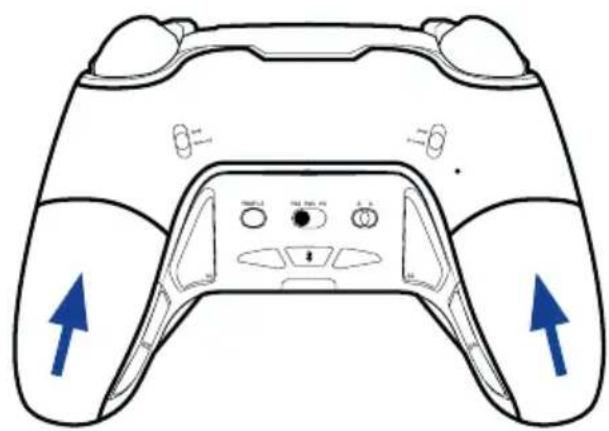
natural_image
Line drawing of a game controller with blue directional arrows indicating left and right sides (no text or symbols)Use this external microphone to communicate with your teammates efficiently. This simple plug-in Jack microphone is ideal to communicate in combination with your Bluetooth headset for example.
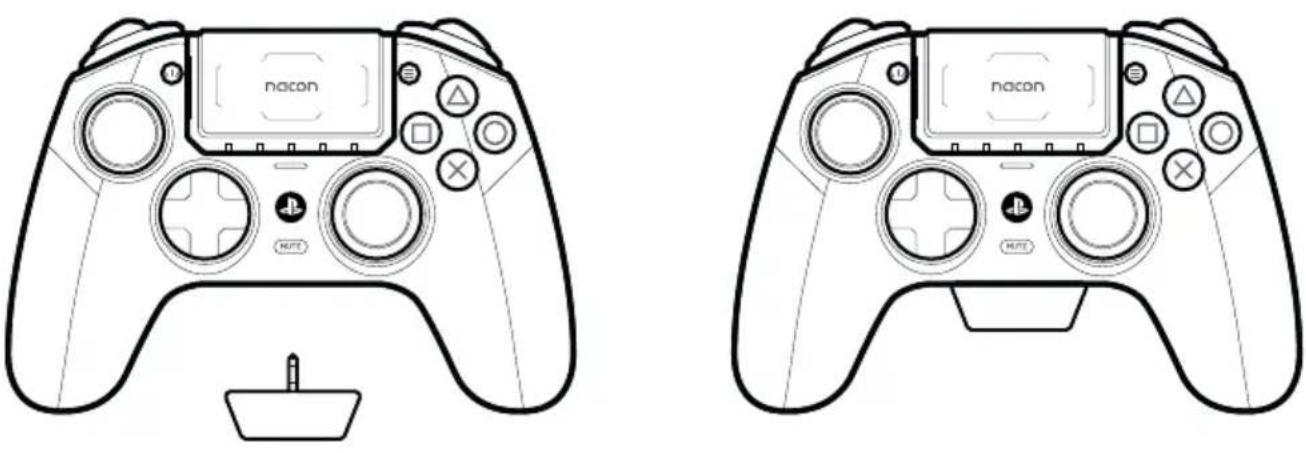
The controller uses Bluetooth 5.2 technology to connect with in-ear audio devices or other wireless headsets. In this situation the Bluetooth, and RF communication to the USB dongle, operate simultaneously without interference. Audio from the PlayStation 5 console, will be heard through your Bluetooth connected device. When you want to chat please attach the External MIC to the 3.5mm audio socket of the controller.
Note that when a wired headset is connected to the 3.5mm audio socket, of the controller, the Bluetooth function will be disabled.
I Using your controller on a PC\*

Make sure that the format selector button is set to PC*.
If you are playing in Wired Mode:

natural_image
Diagram of a car interior showing front and rear seats with sound wave indicators (no text or symbols)Make sure that the Wired/Wireless mode button is in the Wired icon position (as shown above).
Using the USB-A to USB-C cable provided, connect your controller to your PC. Your controller will be auto-detected and is ready to use.
If you are playing in Wireless Mode:

Make sure that the Wired/Wireless mode button is in the Wireless icon position (as shown above).
Make sure your USB dongle is properly connected to the PC*.
Press the PS home button and your controller is ready to play.
Using your controller on a PlayStation ^® 5 console

Make sure that the format selector button is set to PS5 ^® .
If you are playing in Wired Mode:

Make sure that the Wired/Wireless mode button is in the Wired icon position (as shown above).
Using the USB-A to USB-C cable provided, connect your controller to your console. Press the PS home button and your controller is ready to use.
If you are playing in Wireless Mode:

Make sure that the Wired/Wireless mode button is in the Wireless icon position (as shown above).
Make sure that your USB dongle is properly connected to the console.
Press the PS home button and your controller is ready to use.
Using your controller on a PlayStation ^® 4 console

Make sure that the format selector button is set to PS4 ^™ .
If you are playing in Wired Mode:

Make sure that the Wired/Wireless mode button is in the Wired icon position (as shown above).
Using the USB-A to USB-C cable provided, connect your controller to your console.
Press the PS home button and your controller is ready to use.
If you are playing in Wireless Mode:

Make sure that the Wired/Wireless mode button is in the Wireless icon position (as shown above).
Make sure that your USB dongle is properly connected to the console.
Press the PS home button and your controller is ready to use.
1 Trigger Stopper
To activate or deactivate the trigger stopper, follow these steps:
- Press down the button to unlock it.
- Press and hold the button, and then slide up or down to activate/deactivate the stopper.
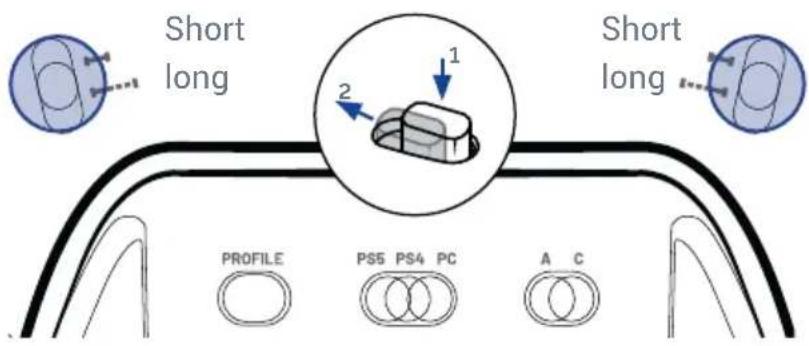
I Reduced trigger data range
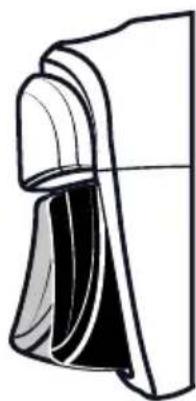
The trigger stopper is a completely mechanical function. You can increase the reactivity of your triggers in two ways:
natural_image
Pure technical line drawing of a mechanical component without any text, numbers, or symbols• IN CLASSIC MODE: Press and hold the Profile button, then fully press on the trigger. The controller will vibrate once to indicate that the short range travel is selected, and will vibrate twice to indicate that the long range travel is selected. You can then release the trigger and Profile button.
• IN ADVANCED MODE: Use the application and save this setting in one of your profiles.
I Information about wireless communication
This controller uses 2.4GHz radio frequency range, so you may notice some issues if other products use the same radio frequency range.
Nacon validated operability between the PlayStation®5 console (CFI-1000 series) and this controller.
It is recommended to insert the USB dongle into the USB port at the front of your PlayStation ^® 5 console (CFI-1000 series).
The controller uses Bluetooth 5.2 technology to communicate with Bluetooth® in-ear audio devices or other wireless headsets. In this situation, Bluetooth and RF communication operate simultaneously without interference. It is also possible to connect the external microphone to the 3.5mm jack port for data transmission from the microphone. If headphones are connected to the jack, audio and microphone data will only be transmitted via the audio jack and Bluetooth will be disabled.
If a wired headset is connected to the 3.5mm jack port, it is not possible to connect or pair a Bluetooth® headset or in-ear headphones to the controller. If you try, the light ring around the Right joystick, will flash Red for 5 seconds to indicate that this action is not recognized.
If in-ear audio devices are connected to the jack port, it will not be possible to pair or connect in-ear headphones or wireless headphones.
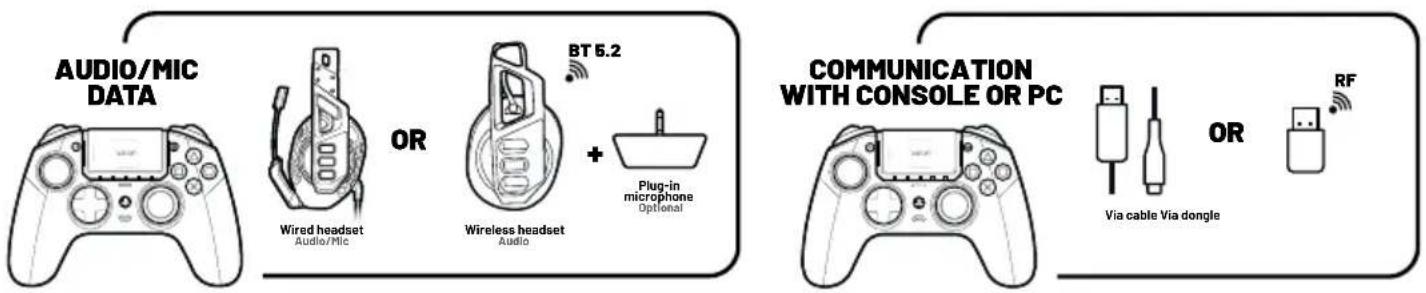
flowchart
graph LR
    A["AUDIO/MIC DATA"] --> B["OR"]
    B --> C["BT 6.2"]
    C --> D["Wireless headset"]
    D --> E["Plug-in microphone"]
    E --> F["Optional"]
    G["COMMUNICATION WITH CONSOLE OR PC"] --> H["OR"]
    H --> I["RF"]
    I --> J["Via cable Via dongle"]
    J --> K["OR"]
I Hall effect technology
By using Hall effect technology, which is based on the use of magnetic sensors and magnets, it will prevent friction and mechanical wear on key components. Consequently, the lifespan is greatly increased compared to traditional mechanisms.
I Vibration
The controller is equipped with a vibration engine which is only compatible with PC* and PS4™ games. In PS5® mode on PS5® games played on the PS5® console, the controller will not vibrate.
Classic & Advanced modes
Classic mode: your controller will act as a classic DualSense ^® wireless controller, DUALSHOCK ^® 4 wireless controller, or PC controller.
You can access the following customization options "on the fly" without the need for any App:
- Mapping of the 4 rear shortcut buttons.
- Trigger travel data range, via the trigger stopper position.
- Audio control, via the touch pad.
Advanced mode: access using the Revolution 5 Pro App for the full customization experience.
Download the App at https://nacongaming.com/revolution-5-pro and follow the tutorial. Enjoy!
Your controller is pre-loaded with 4 profiles so you can experience the range of features.
Profile 1: Racing - Sports - adapted for racing and sports games
Profile 2: FPS – adapted with a reactive curve on your Left joystick for quick movement and a progressive curve on the Right joystick for precision aiming.
Profile 3: Arcade - Fighting – adapted with an instant curve on the Left and Right joysticks for a quicker reaction time.
Profile 4: Infiltration – adapted with an ultra reactive curve on the Left joystick for quick movement and a delayed one on the Right joystick for precision actions.
Using the App, you can create and share your profiles with your friends and the gaming community.
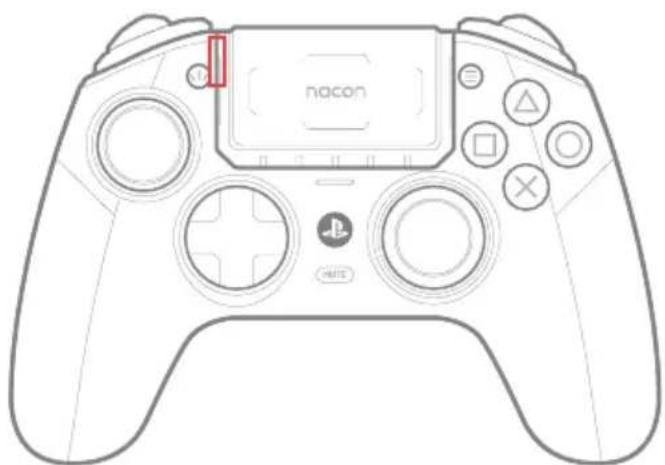
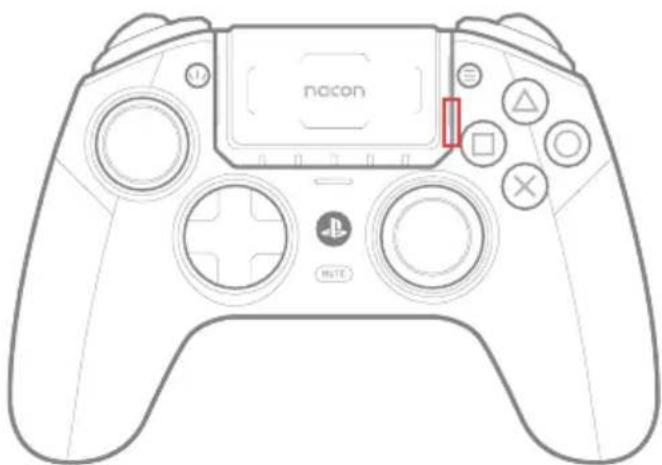
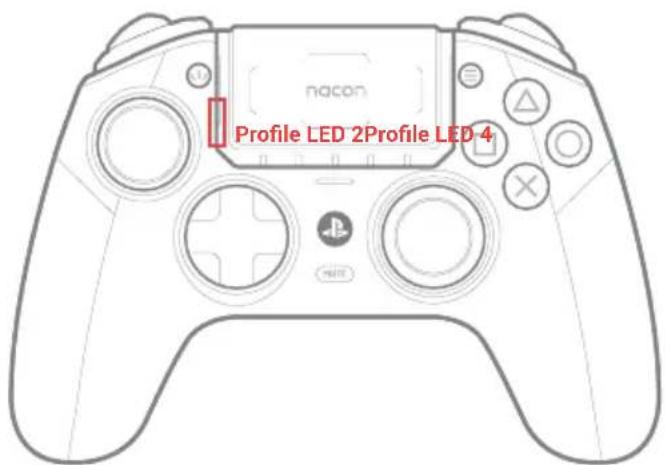
- Press and hold the Multi-function button for 3 seconds. The light ring around the Right joystick will start to flash;
- Now, press the rear shortcut button that you want to program. The Profile LED, which is linked to the selected rear shortcut, will light up (see image below);
- Then, press the button that you want to associate with the shortcut. The profile LED will flash 3 times to indicate that the mapping was applied to the selected shortcut;
- Repeat these steps for each shortcut or if you want to change an existing setting;
- The profile LED will flash 3 times to indicate that the mapping was applied to the selected shortcut;
- Repeat these steps for each shortcut or if you want to change an existing setting.
- Apply a short press on the Multi-function button to leave this mode and save your settings. The light ring will stop flashing.
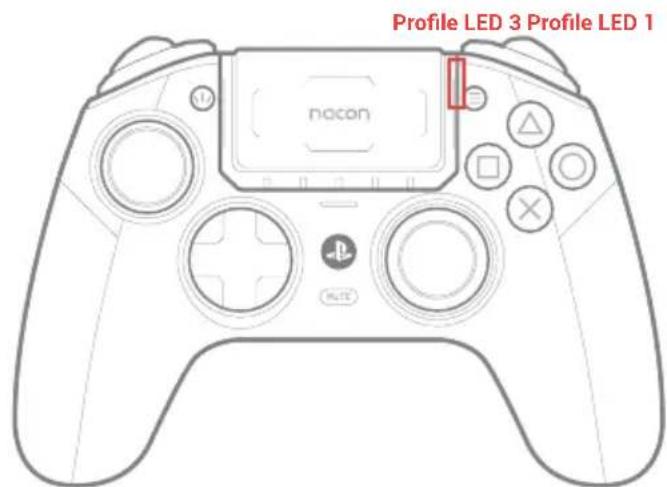
S1 is being mapped
Profile LED 3 is in:
White (PS5 mode)
or
Blue (PS4 mode)
or
Purple (PC mode), the other LEDs are OFF.
natural_image
Line drawing of a PlayStation 8 controller with no visible text or symbols on the main bodyS2 is being mapped
Profile LED 1 is in:
White (PS5 mode)
or
Blue (PS4 mode)
or
Purple (PC mode), the other LEDs are OFF.
natural_image
Line drawing of a PlayStation 8 controller with no visible text or symbols on the main bodyS3 is being mapped
Profile LED 4 is in:
White (PS5 mode)
or
Blue (PS4 mode)
or
Purple (PC mode), the other LEDs are OFF.
S4 is being mapped
Profile LED 2 is in:
White (PS5 mode)
or
Blue (PS4 mode)
or
Purple (PC mode), the other LEDs are OFF.
Advanced mode settings via the dedicated PC application (APP)
Up to 4 fully customizable profiles via the dedicated PC application available on the nacongaming.com website. The application (APP) is compatible with Windows 10, 11 and macOS.
Once you've installed the application, you can customize your controller and have fun testing and optimizing your settings for your favorite games.
Please note: Up to 4 custom profiles can be saved.
I Features of the Application
- Customize the amplitude of the Left and Right joysticks and their dead zones.
- Reassign functions to the controller buttons (with the exception of the Share, Options and PS buttons).
- Modify the dead zones on the Left and Right triggers.
- Customize the intensity of the joystick vibrations.
- Choose between the different D-pads available: 8 directions or 4 directions.
- Customize shortcuts.
- Controller firmware updates.
I Launching the application (APP)
Once you have downloaded the application make sure that the controller is connected to your PC before opening the application. Also make sure that:
- The Mode selection button is in Wired mode.
- The format button is in PS5 ^® or PS4 ^™ .
- The Classic/Advanced mode switch is in Advanced mode.
Now you are ready, you can start the application and follow the on-screen instructions to personalize your profile.
Once you have personalized your profile and closed the application, you can switch from one mode to the other by pushing the switch to the "C" marking for Classic mode or to the "A" marking for Advanced mode. You can switch from one profile to another by pressing the profile button.
I Indicator LEDs

- Profile number + Audio/Microphone settings + Mute status
- PS5 ^® player number + Battery level on demand (PS4 ^TM /PC) + Battery charging in OFF mode.
- System Mode (PS5®/PS4™/PC*) + Multifunction + Bluetooth® pairing.
- In PS5® Mode:
Classic Mode: LEDs on = microphone muted, either volume up/down or microphone gain, profile number indicator, mapping of the shortcuts.
Advanced Mode: Muted microphone, Profile number indicator.
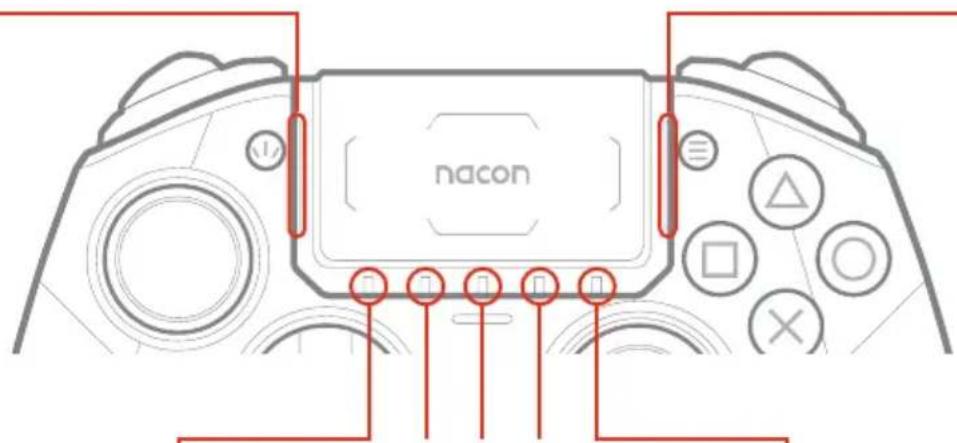
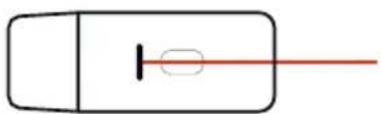
The 5 White LEDs are used to indicate the player number.
natural_image
Simple line drawing of a rectangular object with a vertical line and a small oval shape inside, extending to the right (no text or symbols)The RGB LED on the USB dongle indicates that pairing is in progress and displays connection status with the controller.
- In PS4™ Mode:
Classic Mode: LEDs on = microphone muted, either volume up/down or microphone gain, profile number indicator, mapping of the shortcuts.
Advanced Mode: Muted microphone, Profile number indicator.
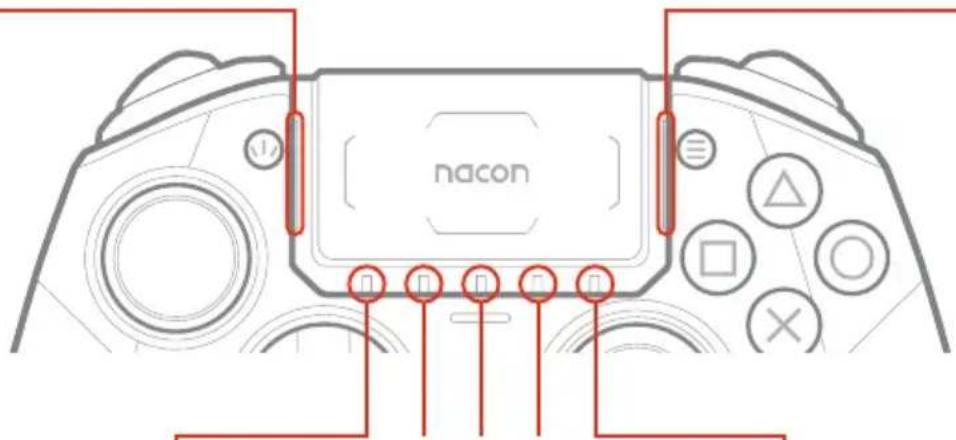
The 5 White LEDs are used to indicate battery level on request.
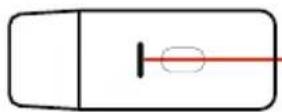
The RGB LED on the USB dongle indicates that pairing is in progress and displays connection status with the controller.
- In PC\* Mode:
Classic Mode: The LEDs stay off except during the mapping of shortcuts.
Advanced Mode: These 4 LEDs are used to indicate the profile.
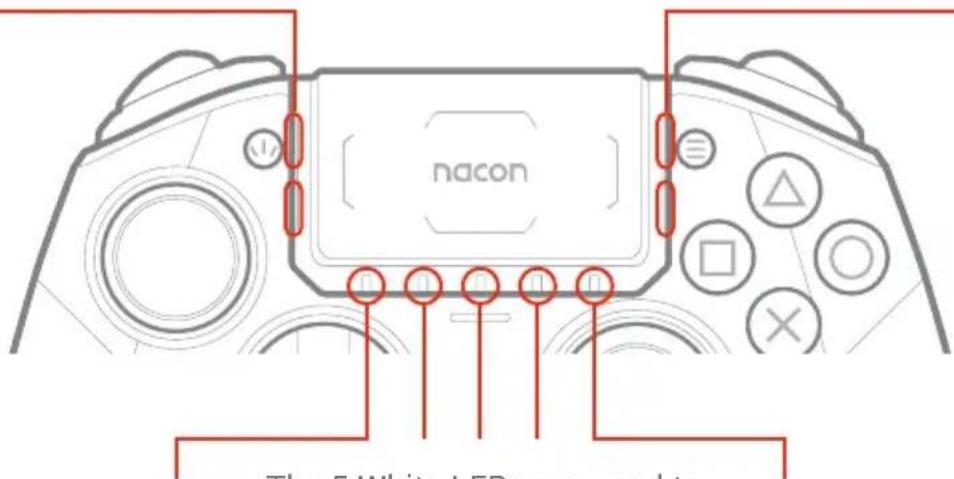
The 5 White LEDs are used to indicate battery level on request.
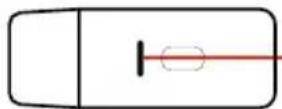
The RGB LED on the USB dongle indicates that pairing is in progress and displays connection status with the controller.
I Audio control via the touch pad
The sound equalizer (also called an "EQ") is an audio filter that isolates certain frequencies and either boosts them, lowers them, or leaves them unchanged.
With the multi-function button, you can use your touch pad to adjust your audio settings.
While in this mode, the light-ring around the Right joystick will flash continuously in White - Blue - Purple - White - Blue - Purple until you have finished using these microphone gain and equalizer functions.
CLASSIC MODE
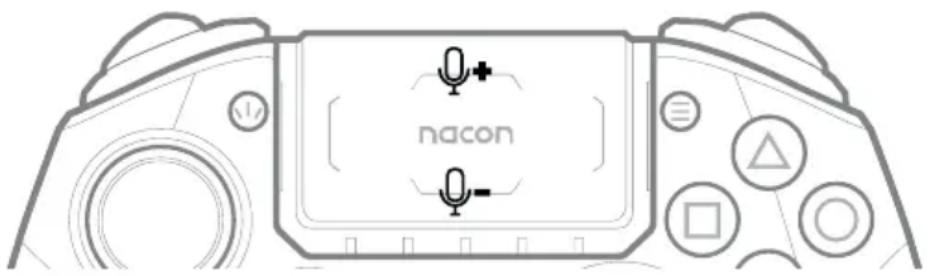
Increase or decrease headset microphone gain:
To adjust the microphone gain, short press on the multi-function button and use the touch pad by pressing up/down on it.
Press up to increase the gain, press down to decrease it.
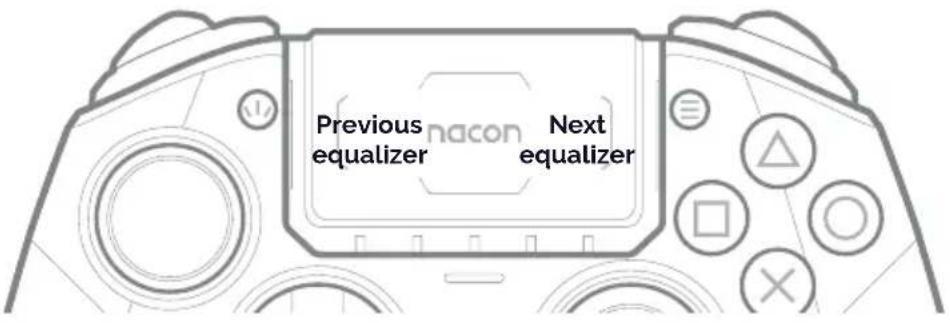
Equalizer:
To select an equalizer profile, short press on the multi-function button and use the touch pad to scroll through the Sound equalizer by pressing left/right on it. You can now navigate between the 4 different profiles of audio equalizers as illustrated below:
 | 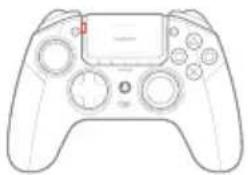 | 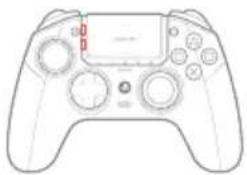 | 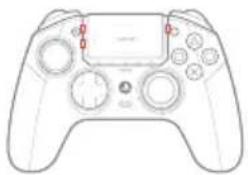 | 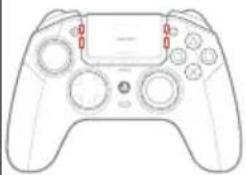 |
| No EQ | EQ 1Racing - Sports | EQ 2FPS | EQ 3Arcade - Fighting | EQ 4Chat |
| All the LEDs are OFF. | The LED 1 is inWhite, the other LEDs are OFF. | The LED 1 and LED 2 are inWhite, the other LEDs are OFF. | The LED 1, LED 2 and LED 3 are inWhite, the other LEDs are OFF. | All the LEDs are inWhite. |
ADVANCED MODE
Activate/deactivate sound equalizer:
To activate/deactivate the equalizer, short press on the multi-function button and use the touch pad by pressing left/right on it.
To customize your own equalizer, use the Revolution 5 Pro App.
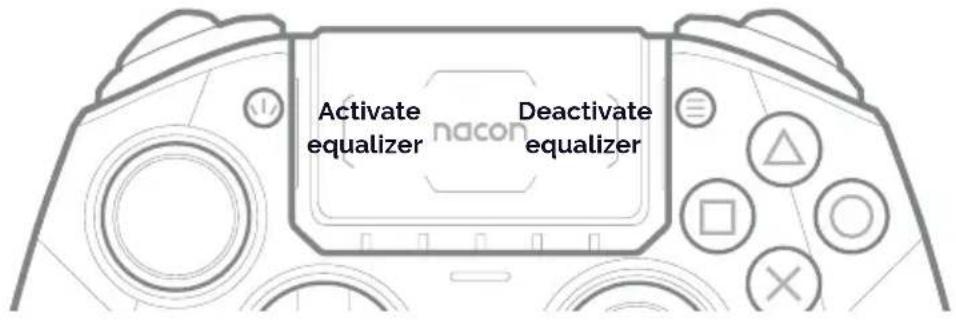
Audio functions
Volume control
When an audio device is connected to the controller, press the Volume up button to increase the volume. Press the Volume down button to decrease it.
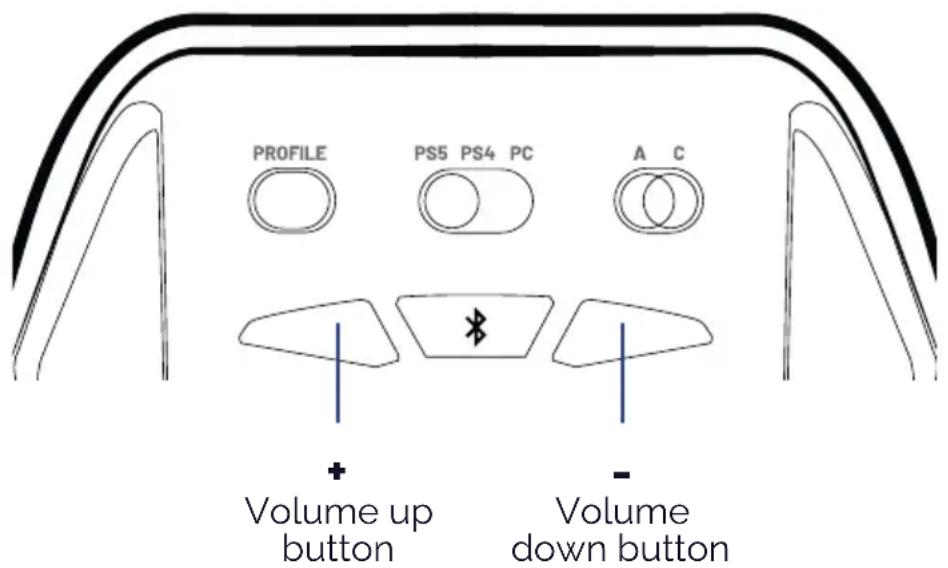
Bluetooth® pairing
To pair the controller to Bluetooth® true wireless earbuds or headset, follow these steps:
- Put the controller and true wireless earbuds/headset next to each other.
- Put the Bluetooth ^® true wireless earbuds/headset in to pairing mode.
- Press and hold the Bluetooth® button on the controller for 6 seconds.

- The controller will go in to pairing mode and light ring around the Right joystick will flash alternatively in blue and white.
- When the controller is paired, the halo ring will stop flashing.
- Future connections of the same true wireless earbuds/headset will pair automatically. Make sure that the Bluetooth® is turned on, on the controller, by pressing and holding the Bluetooth button for 3 seconds.
NOTE: The controller cannot connect to the console via Bluetooth®.
I How to charge your Revolution 5 pro controller
- The Revolution 5 pro controller contains a Lithium Ion battery.
- To charge the battery connect the USB-A to USB-C cable to your PS5 ^® console, PS4 ^™ console or PC and then to the controller. For the fastest charge time, make sure your controller is powered OFF. If you wish to use the controller and charge at the same time, then the battery will 'trickle' charge and the charge time will be extended.
- To check the battery level in PS5 ^® mode when you are connected via the cable, tap the back of the controller twice. The White LEDs below the touch pad will light up. There are 5x LEDs and they indicate the level as follows:
$$ 5x \text{LEDs} = 100 - 80\% $$
$$ 4x \text{LEDs} = 80 - 60\% $$
$$ 3x \text{LEDs} = 60 - 40\% $$
$$ 2x \text{LEDs} = 40 - 20\% $$
$$ 1 \times \text { LED } = 20 - 10 \% $$
NOTE: When the battery level is below 10%, the 1x LED will start to flash.
You need to immediately charge the battery.
To check the battery level in PS5 ^® mode when you are connected via the USB dongle, then go to the PS5 ^® on-screen menu and you will see the battery level in the bottom left of your TV/Monitor screen.
To check the battery level, in PS4 mode or PC mode, tap the back of the controller twice. The White LEDs below the touch pad, will light up. There are 5x LEDs and they indicate the capacity as follows:
$$ 5x \text{LEDs} = 100 - 80\% $$
$$ 4x \text{LEDs} = 80 - 60\% $$
$$ 3x \text{LEDs} = 60 - 40\% $$
$$ 2x \text{LEDs} = 40 - 20\% $$
$$ 1 \times \text { LED } = 20 - 10 \% $$
NOTE: When the battery level is below 10%, the 1x LED will start to flash. You need to immediately charge the battery.
REMARK: Battery life is influenced by the features you have activated and the games you are playing. The more features you have activated, the quicker your battery life will be used.
To optimize play time, you can use the Revolution 5 Pro App to disable certain features such as LEDs and vibration.
Recycling

This symbol on the product or on its packaging indicates that this product shall not be treated as household waste. Instead it should be taken to an applicable collection point for the recycling of electrical and electronic equipment. By ensuring that this equipment is disposed of correctly you will help prevent potential negative consequences for the environment and human health, which could otherwise be caused by inappropriate waste handling of this product. The recycling of materials will help to conserve natural resources. For more information please contact your local council or waste disposal service. EU, UK and Turkey only.
Turkey
If you require further information about this legislation please click on the link http:
I Important precautions
1/ This product is designed for indoor use only. Do not expose it to direct sunlight or bad weather.
2/ Do not expose the product to splashes, rain, drips or moisture. Do not immerse it in a liquid.
3/ Do not expose to dust, high levels of humidity, extreme temperatures or mechanical shocks.
4/ Do not use and do not open if the equipment is damaged. Do not attempt to repair it.
5/ When cleaning the outside, only use a soft, clean and damp cloth. Detergents can damage the finish and get inside the product.
6/ Do not carry the product while holding it by the cable.
7/ This product is not designed for people (including children) suffering from a physical, sensory or mental disability, or for users without the necessary and relevant experience or knowledge (unless they have been given advice and instructions on how to use the device from a person responsible for the user). Do not leave the product unattended, do not leave this product within the reach of children. Not suitable for children under 7 (the cable can get wrapped around the neck). This product shall not be connected to power supply source exceeding 15W. rated 5VDC 500mA.
I Precautions for use regarding the battery
WARNING: If your product has a built-in, non-replaceable battery, do not attempt to open the product or remove the battery, as you may damage the product and/or injure yourself.
If your product has a built-in replaceable battery, only use the type of battery supplied by Nacon/RIG. Used batteries should be removed promptly and taken to appropriate collection centres. RECYCLING: The product battery should be recycled or disposed of in the proper manner. Contact your local recycling centre for instructions on battery removal and disposal. The battery has a limited lifespan. Battery charge duration gradually increases with repeated usage and age. Battery life also varies depending on the storage method, usage state, environment and other factors. Charging may not be as effective when performed in other environments. Battery duration may vary depending on the usage condition and environmental factors. When not in use: When the controller is not used for an extended period of time, it is recommended that you fully charge it at least once a year in order to maintain its functionality.
WARNING: Risk of fire, explosion and burns. Do not leave your charged battery for an extended period without the product being used. Prevent metal objects such as keys or coins from coming into contact with a battery or its holder.
Do not attempt to open or damage the battery. It may contain corrosive products which are dangerous if they come into contact with eyes or skin and are toxic if ingested.
Never put a battery in your mouth. If ingested, contact a doctor or poison control centre.
If the product contained in the battery comes into contact with your clothes, skin or eyes, please wash thoroughly with clear water and contact your doctor immediately.
Always keep batteries out of the reach of children.
Never throw a battery into a fire or oven; crushing or cutting a battery may cause an explosion;
A battery should not be subjected to extremely high or low temperature, low air pressure at high altitude during use, storage or transportation, as this may cause an explosion or leakage of flammable liquid or gas
I Ergonomics
Keeping your hand in the same position for a prolonged period of time can result in pain. If this happens repeatedly, please consult your doctor.
As a precaution, take a 15-minute break every hour.
I Technical support
For any information you can contact a hotline. Before calling, make sure you have gathered as much information as possible about the problem and the product.
UK
Email: support@nacongaming.com
Tel. : (+44)08081010970
Australia
Email: support.us@nacongaming.com
Tel.:(+61)1300512410
Europe
Email: support@nacongaming.com
US/Canada email
(English/French)
Email: support.us@nacongaming.com
(Spanish)
Email: soporte@nacongaming.com
US/Canada Phone Support
(English/French/Spanish)
Tel.: 1-833-622-6687
I EU Declaration of Conformity
Product: REVOLUTION 5 PRO for PS5®
Manufacturer: Nacon
Nacon declares that this product is in compliance with the Union harmonisation legislation:
• Directive 2014/30/EU for Electromagnetic Compatibility
- Directive 2011/65/EU the restriction of the use of certain hazardous substances in electrical and electronic equipment
The full text, of the EU Declaration of Conformity, is available at the following website: my.nacongaming.com/en-GB/support
I UK Declaration of Conformity
Product: REVOLUTION 5 PRO for PS5®
Manufacturer: Nacon
Nacon declares that this product is in compliance with the United Kingdom legislation:
• Electromagnetic Compatibility Regulations 2016
- The restriction of the use of certain hazardous substances in electrical and electronic equipment regulations 2012
The full text, of the UK Declaration of Conformity, is available at the following website: my.nacongaming.com/en-GB/suppor
I FCC: Declaration of Conformity
United states
This product complies with Part 15 of the FCC Rules. Operation is subject to the following two conditions: (1) this device may not cause harmful interference, and (2) this device must accept any interference received, including interference that may cause undesired operation.
Warning: Changes or modifications not expressly approved by the party responsible for compliance could void the user's authority to operate the equipment.
Note: This equipment has been tested and found to comply with the limits for a Class B digital device, pursuant to part 15 of the FCC Rules. These limits are designed to provide reasonable protection against harmful interference in a residential installation. This equipment generates, uses and can radiate radio frequency energy and, if not installed
and used in accordance with the instructions, may cause harmful interference to radio communications. However, there is no guarantee that interference will not occur in a particular installation. If this equipment does cause harmful interference to radio or television reception, which can be determined by turning the equipment off and on, the user is encouraged to try to correct the interference by one or more of the following measures:
- Reorient or relocate the receiving antenna.
- Increase the separation between the equipment and receiver.
- Connect the equipment into an outlet on a circuit different from that to which the receiver is connected.
- Consult the dealer or an experienced radio/TV technician for help.
This equipment complies with FCC radiation exposure limits set forth for an uncontrolled environment.
Reporting Security Issues
Nacon is committed to ensuring the security of its customers by protecting their personal information from unwarranted disclosure. If you feel that there is, or has been, a security issue then please follow this process:
1) Information on how to report security issues
Please email Nacon at support@nacongaming.com with the following information:
- Product name;
- Date of purchase;
- Location of purchase;
• Details of the issue; - The location the vulnerability, or security concern, was discovered;
- The detailed description of the steps needed to reproduce the vulnerability or security concern which may include screen shots;
You will receive an acknowledgement, of the security issue report, as soon as practicable and status updates until the resolution of the reported security issue.
Please use the email title: 'Security issue'
2) Information on minimum security periods
Security updates will be available for 2 years, from the date of purchase, up to the 31st December 2026.
This process is free of charge to the end user.
3) Disclosure to third parties
If the issue reported affects a third-party vendor, or library, then Nacon reserves the right to forward the relevant details to that party without giving prior notice.

nacon
WWW.NACONGAMING.COM

@NaconGaming

lacongaming

con International
MANUFACTURER / FABRICANT :
NACON - 396 - 466 Rue de la Voyette, CRT2 - 59273 Fretin, France
1124 8TH Street, Kirkland, WA 98033 USA
Nacon Pty. Ltd.
Level 2/20 Bond Street, Sydney NSW 2000 Australia
Flex Sea Gaming Pte. Ltd.
Terrasse
33 Terrasse Lane 02-72
Singapore 544780
FABRIQUÉ EN CHINE / MADE IN CHINA WWW.NACONGAMING.COM
SUPPORT :
UK, support@nacongaming.com
Tel.: +44 08081010970
BELGIQUE, support.be@nacongaming.com
NEDERLAND, support.nl@nacongaming.com
ESPAÑA, support.es@nacongaming.com
Tel.: +34 900993359
ITALIA, support.it@nacongaming.com
Tel:+39 800172494
USA/CANADA, support.us@nacongaming.com
AUSTRALIA, support.us@nacongaming.com
MEXICO, soporte@nacongaming.com
SINGAPORE david@flexseagaming.com
Tel.: +65 88045198

nacon
natural_image
Four PlayStation 1 controllers with different visor and control buttons, shown from different angles (no text or symbols visible on the consoles themselves)REVOLUTION 5 PRO
STARTANLEITUNG
"◀", "PlayStation", "PS5", "PS4", "PlayStation Shapes Logo (gradated)", "DualSense" und "DUALSHOCK"
natural_image
Four-panel diagram showing a mechanical assembly with arrows indicating movement or force, no text or symbols present.natural_image
Top-down line drawing of a game controller with blue directional arrows indicating left and right sides (no text or symbols)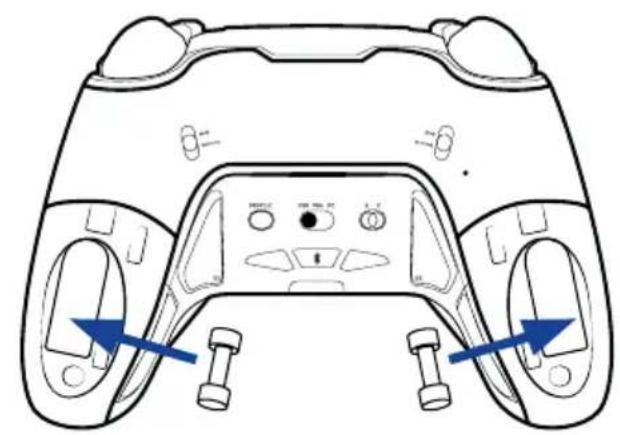
natural_image
Top-down schematic of a game controller with blue directional arrows indicating movement or force (no text or symbols)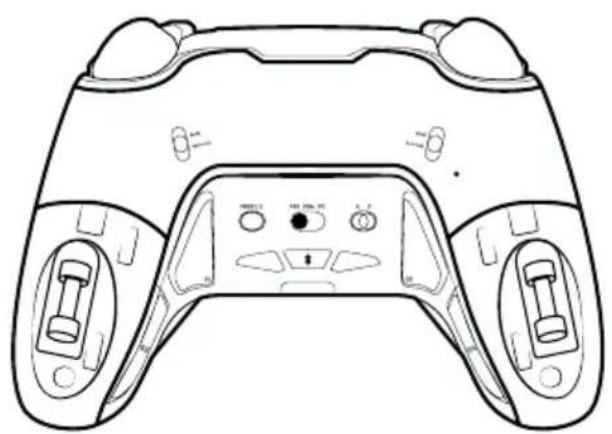
natural_image
Line drawing of a game controller with front and back panels, no text or symbols present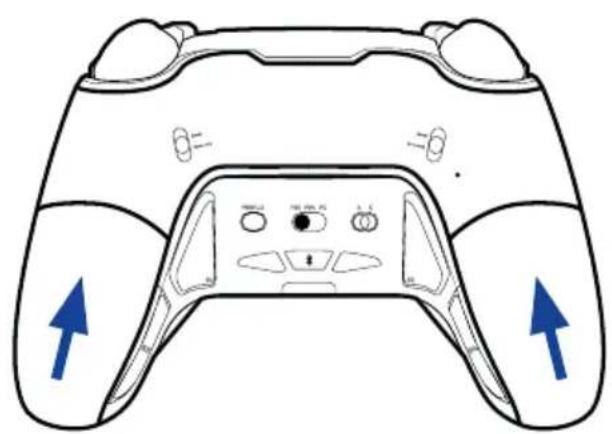
natural_image
Line drawing of a game controller with blue directional arrows indicating left and right sides (no text or symbols)natural_image
Top-down diagram of a car dashboard with labeled parts and control buttons (no text or symbols beyond basic labels)natural_image
Diagram of a car front panel with labeled buttons and sensors (no text or symbols)natural_image
Technical line drawing of a mechanical component or bracket (no text or symbols)natural_image
Line drawing of a PlayStation controller with no visible text or symbols on the main bodyS2 wird belegt
S3 wird belegt
natural_image
Simple line drawing of a rectangular object with a vertical line and a small oval shape inside, no text or symbols present.5 LEDs = 100-80%
4 LEDs = 80-60%
3 LEDs = 60-40%
2 LEDs = 40-20%
1 LED = 20-10%
@nacongamingde @nacongamingde
1124 8TH Street, Kirkland, WA 98033 USA
Nacon Pty. Ltd.
Level 2/20 Bond Street, Sydney NSW 2000 Australia
FABRIQUÉ EN CHINE / MADE IN CHINA WWW.NACONGAMING.COM
SUPPORT :
UK, support@nacongaming.com
Tel.: +44 08081010970
BELGIQUE, support.be@nacongaming.com
NEDERLAND, support.nl@nacongaming.com
ESPAÑA, support.es@nacongaming.com
Tel.: +34 900993359
ITALIA, support.it@nacongaming.com
Tel:+39 800172494
USA/CANADA, support.us@nacongaming.com
AUSTRALIA, support.us@nacongaming.com
MEXICO, soporte@nacongaming.com
Licensed for sale in the European Union, United Kingdom, Australia, New Zealand, United States. Manufactured by Nacon. - Licencié pour la vente en Union europeenne. Royaume-Uni, Australie, Nouvelle-Zélande, États-Unis. - Lizenziert für den Verkauf in der Europäischen Union. Großbritannien, Australien, Neuseeland, den USA. - Verkoopvergunning voor de Europese Unie, het Verenigd Koninkrijk, Australië. Nieuw-Zeeland, de Verenigde Staten.- Autorizado para la venta en la Unión Europea, Reino Unido, Australia, Nueva Zelanda, Estados Unidos.- Autorizzato alla vendita in Unione Europea, Regno Unido, Australia. Nuova Zelanda, Stati Uniti - Licenciado para venda na União Europeia, Reino Unido, Australia, Nova Zelândia, Estados Unidos.
natural_image
Four PlayStation 1 controllers with different visor and control buttons, shown from different angles (no text or symbols visible on the consoles themselves)REVOLUTION 5 PRO
GUIDA INTRODUTTIVA
Joystick, D-pad e impugnature
natural_image
Four-panel diagram showing a mechanical press or lever mechanism with arrows indicating motion (no text or symbols present)natural_image
Top-down line drawing of a game controller with blue directional arrows indicating left and right sides (no text or symbols)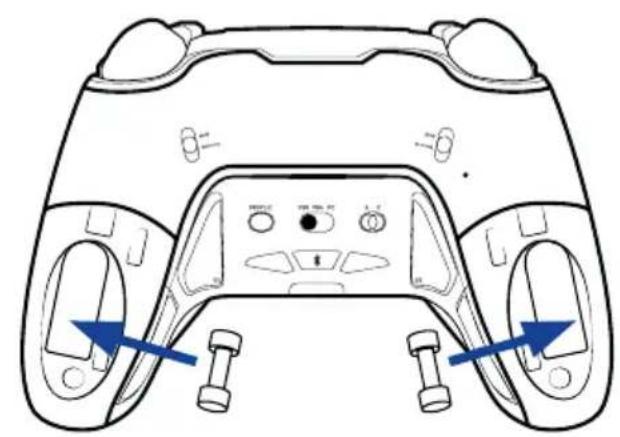
natural_image
Line drawing of a game controller head with two buttons and control buttons, showing no text or symbols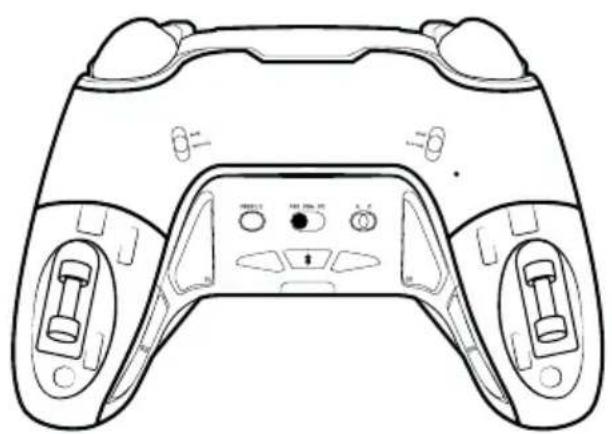
natural_image
Line drawing of a game controller with front and back panels, no text or symbols present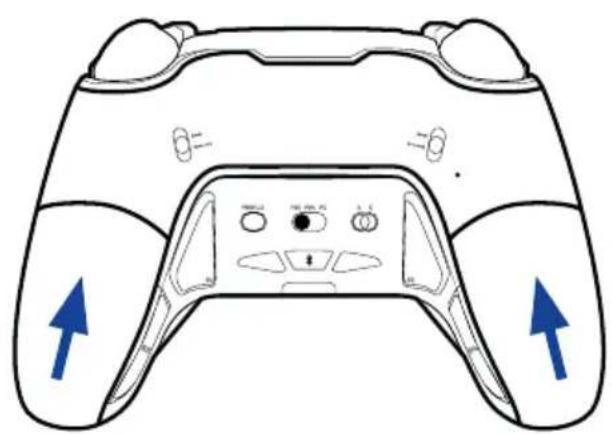
natural_image
Line drawing of a game controller with blue directional arrows indicating left and right sides (no text or symbols)natural_image
Top-down line drawing of a car dashboard with front, rear, and side panels (no text or symbols)natural_image
Pure technical line drawing of a mechanical component without any text, numbers, or symbolsnatural_image
Line drawing of a PlayStation 8 controller with no visible text or symbols on the main bodynatural_image
Line drawing of a PlayStation 8 controller with labeled buttons and a red play button (no text or symbols beyond branding)natural_image
Simple diagram of a rectangular object with a vertical line and a small oval shape inside, connected by a red line (no text or symbols)natural_image
Simple line drawing of a rectangular object with a vertical line and a small oval shape inside, no text or symbols present.natural_image
Simple diagram of a rectangular object with a vertical line and a small oval shape inside, no text or symbols present.1124 8TH Street, Kirkland, WA 98033 USA
Nacon Pty. Ltd.
Level 2/20 Bond Street, Sydney NSW 2000
Australia
FABRIQUÉ EN CHINE / MADE IN CHINA
WWW.NACONGAMING.COM
SUPPORT :
UK, support@nacongaming.com
Tel.: +44 08081010970
BELGIQUE, support.be@nacongaming.com
NEDERLAND, support.nl@nacongaming.com
ESPAÑA, support.es@nacongaming.com
Tel.: +34 900993359
ITALIA, support.it@nacongaming.com
Tel:+39 800172494
USA/CANADA, support.us@nacongaming.com
AUSTRALIA, support.us@nacongaming.com
MEXICO, soporte@nacongaming.com

nacon
natural_image
Four PlayStation 1 controllers with different visor and control buttons, shown from different angles (no text or symbols visible on the consoles themselves)REVOLUTION 5 PRO
GUÍA DE INICIO
Joysticks, D-Pad y asas
natural_image
Four-panel diagram showing a mechanical press or lever mechanism with arrows indicating motion (no text or symbols present)natural_image
Top-down line drawing of a game controller with blue directional arrows indicating left and right sides (no text or symbols)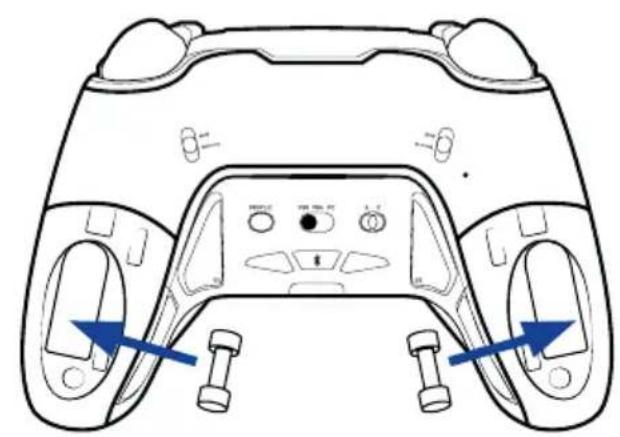
natural_image
Line drawing of a game controller head with two buttons and control buttons, showing front and side views (no text or symbols)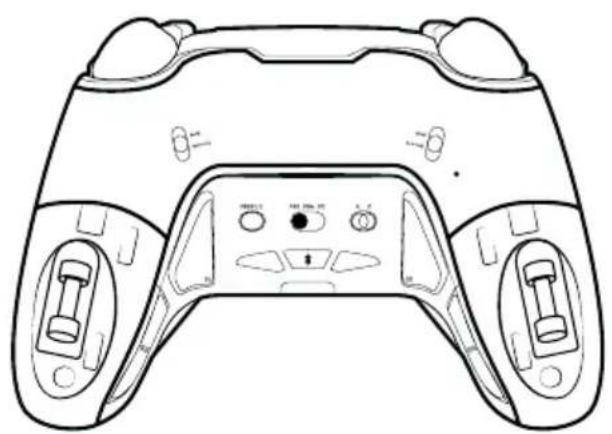
natural_image
Line drawing of a game controller with front and back panels, no text or symbols present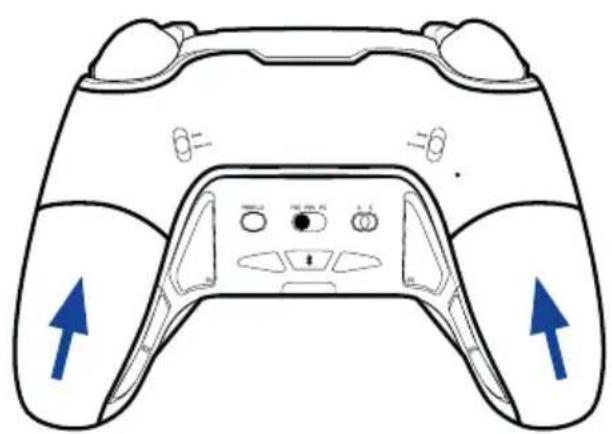
natural_image
Line drawing of a game controller with blue directional arrows indicating left and right sides (no text or symbols)natural_image
Pure technical line drawing of a mechanical component without any text, numbers, or symbolsnatural_image
Line drawing of a PlayStation 8 controller with no visible text or symbols on the main bodynatural_image
Line drawing of a PlayStation 8 controller with labeled buttons and a red play button (no text or symbols beyond branding)natural_image
Simple diagram of a rectangular object with a vertical line and a small oval shape inside, connected by a red line (no text or symbols)natural_image
Simple diagram of a rectangular object with a vertical line and a horizontal red line extending from its right side (no text or symbols)natural_image
Simple line drawing of a rectangular object with a vertical line and an oval cutout, no text or symbols present.1124 8TH Street, Kirkland, WA 98033 USA
Nacon Pty. Ltd.
Level 2/20 Bond Street, Sydney NSW 2000
Australia
FABRIQUÉ EN CHINE / MADE IN CHINA
WWW.NACONGAMING.COM
SUPPORT :
UK, support@nacongaming.com
Tel.: +44 08081010970
BELGIQUE, support.be@nacongaming.com
NEDERLAND, support.nl@nacongaming.com
ESPAÑA, support.es@nacongaming.com
Tel.: +34 900993359
ITALIA, support.it@nacongaming.com
Tel:+39 800172494
USA/CANADA, support.us@nacongaming.com
AUSTRALIA, support.us@nacongaming.com
MEXICO, soporte@nacongaming.com

nacon
natural_image
Four PlayStation 1 controllers from different platforms, each with a unique black and gray model (no visible text or symbols on the consoles themselves)REVOLUTION 5 PRO
GEBRUIKERSHANDLEIDING
Joysticks, D-Pad en Handgrepen
natural_image
Four-panel diagram showing a mechanical press or lever mechanism with arrows indicating movement, no text or symbols present.natural_image
Top-down line drawing of a game controller with blue directional arrows indicating left and right sides (no text or symbols)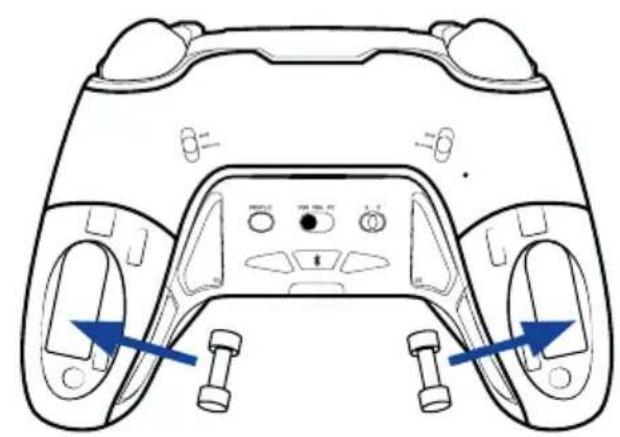
natural_image
Line drawing of a game controller head with two buttons and control buttons, showing front and side views (no text or symbols)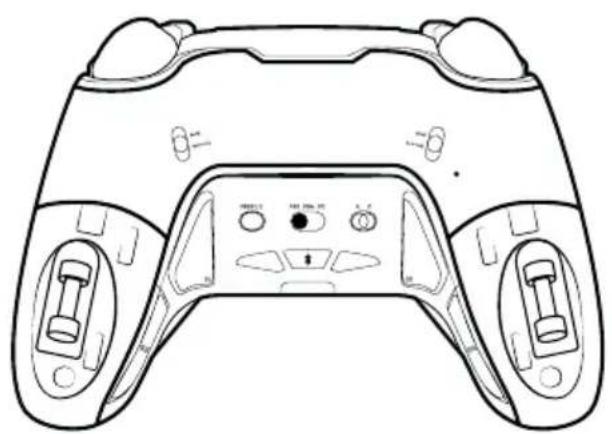
natural_image
Line drawing of a game controller with front and back panels, no text or symbols present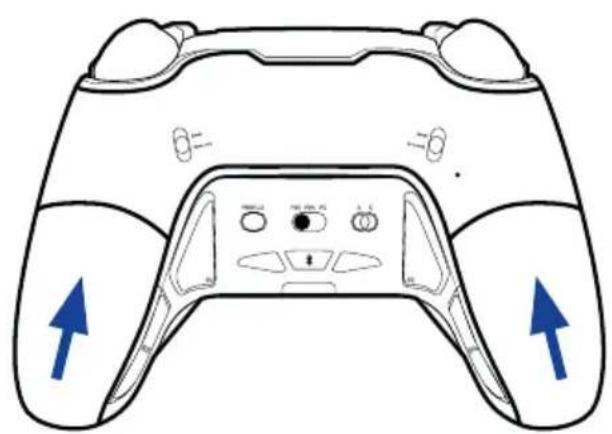
natural_image
Line drawing of a game controller with blue directional arrows indicating left and right sides (no text or symbols)natural_image
Top-down schematic of a car dashboard with labeled parts (no text or symbols beyond basic labels)natural_image
Diagram of a car front panel with labeled buttons and sensors (no text or symbols beyond basic labels)natural_image
Pure technical line drawing of a mechanical component without any text, numbers, or symbolsnatural_image
Line drawing of a PlayStation 8 controller with no visible text or symbols on the main body (no readable labels or symbols)S1 wordt ingesteld
natural_image
Line drawing of a PlayStation 8 controller with no visible text or symbols on the main bodyS2 wordt ingesteld
natural_image
Simple diagram of a rectangular object with a vertical line and a small oval shape inside, no text or symbols present.• Electromagnetic Compatibility Regulations 2016
- The restriction of the use of certain hazardous substances in electrical and electronic equipment regulations 2012
1124 8TH Street, Kirkland, WA 98033 USA
Nacon Pty. Ltd.
Level 2/20 Bond Street, Sydney NSW 2000
Australia
FABRIQUÉ EN CHINE / MADE IN CHINA
WWW.NACONGAMING.COM
SUPPORT :
UK, support@nacongaming.com
Tel.: +44 08081010970
BELGIQUE, support.be@nacongaming.com
NEDERLAND, support.nl@nacongaming.com
ESPAÑA, support.es@nacongaming.com
Tel.: +34 900993359
ITALIA, support.it@nacongaming.com
Tel:+39 800172494
USA/CANADA, support.us@nacongaming.com
AUSTRALIA, support.us@nacongaming.com
MEXICO, soporte@nacongaming.com

nacon
natural_image
Four PlayStation 1 controllers from different platforms (no visible text or symbols on the consoles themselves)REVOLUTION 5 PRO
INSTRUKCJA URUCHAMIANIA
natural_image
Four-panel diagram showing a mechanical switch mechanism with arrows indicating motion (no text or symbols)natural_image
Top-down line drawing of a game controller with blue directional arrows indicating left and right sides (no text or symbols)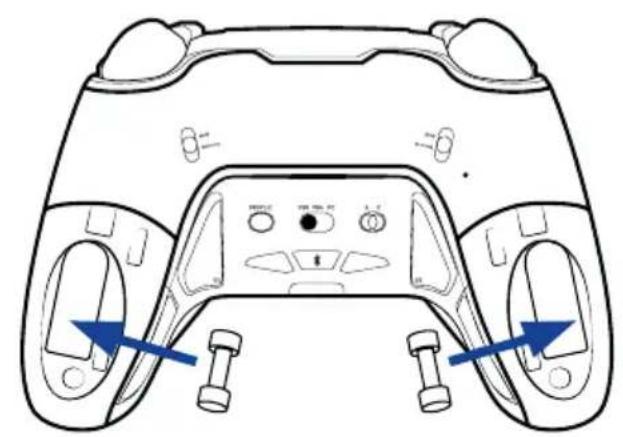
natural_image
Line drawing of a game controller head with blue directional arrows indicating movement or force (no text or symbols)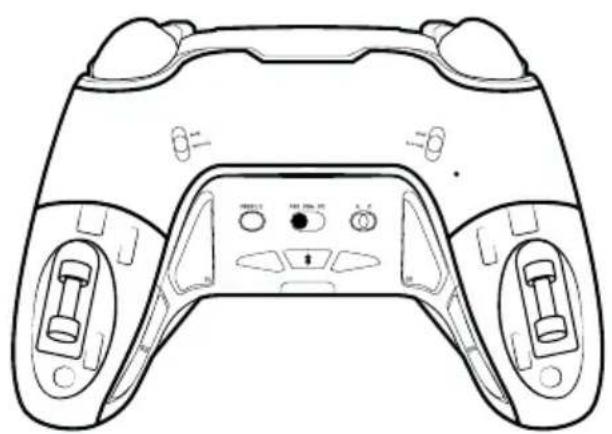
natural_image
Line drawing of a game controller with front and back panels, no text or symbols present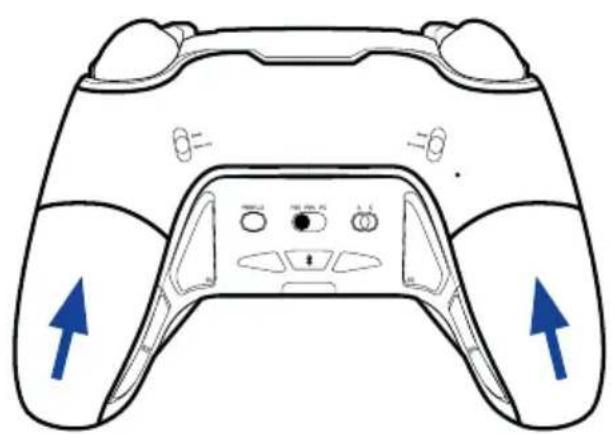
natural_image
Line drawing of a game controller with blue directional arrows indicating left and right sides (no text or symbols)natural_image
Diagram of a car interior showing front and rear seats with sound wave indicators (no text or symbols)natural_image
Diagram of a car front panel with labeled buttons and indicators (no text or symbols beyond basic labels)natural_image
Technical line drawing of a mechanical component or bracket (no text or symbols)natural_image
Line drawing of a PlayStation 8 controller with no visible text or symbols on the main bodynatural_image
Line drawing of a PlayStation 8 controller with no visible text or symbols on the main body, featuring control buttons and a red rectangle on the screen (no readable text or symbols beyond branding)natural_image
Simple line drawing of a rectangular object with a vertical line and a small oval shape inside, no text or symbols present.1124 8TH Street, Kirkland, WA 98033 USA
Nacon Pty. Ltd.
Level 2/20 Bond Street, Sydney NSW 2000
Australia
FABRIQUÉ EN CHINE / MADE IN CHINA
WWW.NACONGAMING.COM
SUPPORT :
UK, support@nacongaming.com
Tel.: +44 08081010970
BELGIQUE, support.be@nacongaming.com
NEDERLAND, support.nl@nacongaming.com
ESPAÑA, support.es@nacongaming.com
Tel.: +34 900993359
ITALIA, support.it@nacongaming.com
Tel:+39 800172494
USA/CANADA, support.us@nacongaming.com
AUSTRALIA, support.us@nacongaming.com
MEXICO, soporte@nacongaming.com

nacon
natural_image
Four PlayStation 1 controllers from different platforms, each with a unique black and gray model (no visible text or symbols on the consoles themselves)REVOLUTION 5 PRO
GUIA DE INÍCIO
Joysticks, D-Pad e Pegas
natural_image
Four-panel diagram showing a mechanical press or lever mechanism with arrows indicating motion (no text or symbols present)natural_image
Top-down line drawing of a game controller with blue directional arrows indicating left and right control buttons (no text or symbols)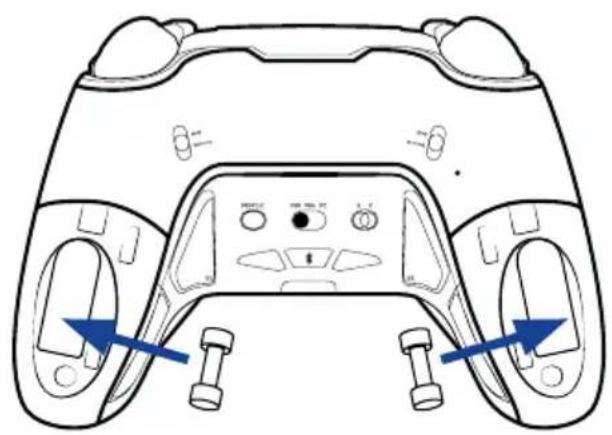
natural_image
Line drawing of a game controller head with blue directional arrows indicating motion or movement (no text or symbols)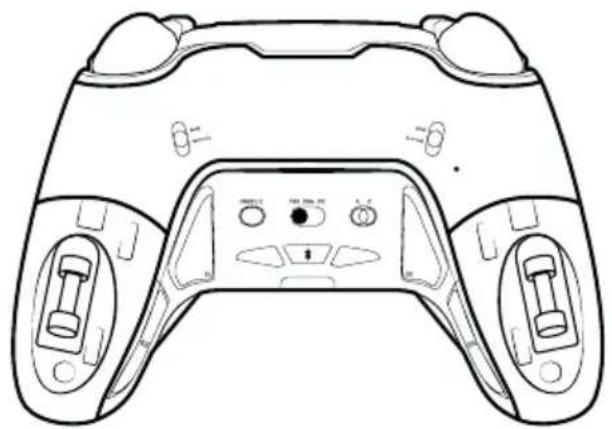
natural_image
Line drawing of a game controller with front and back panels (no text or symbols)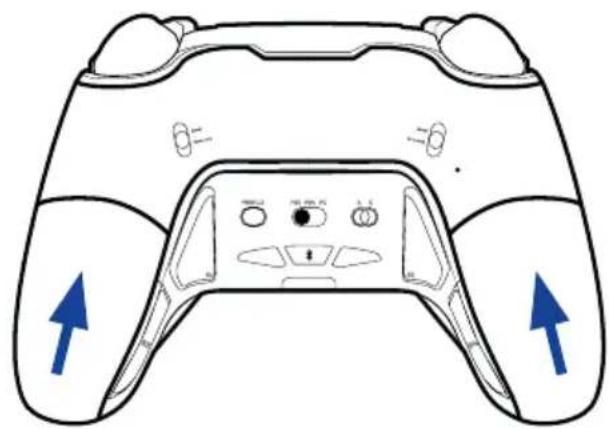
I Tecnologia Magnetic Hall Effect
natural_image
Line drawing of a PlayStation 8 controller with no visible text or symbols on the main bodynatural_image
Line drawing of a PlayStation 8 controller with labeled buttons and a red play button (no text or symbols beyond branding)natural_image
Simple diagram of a rectangular object with a vertical line and a small oval shape inside, connected by a red line (no text or symbols)natural_image
Simple line drawing of a rectangular object with a vertical line and a small oval shape inside, no text or symbols present.natural_image
Simple line drawing of a rectangular object with a vertical line and a horizontal line extending from its right side (no text or symbols)1124 8TH Street, Kirkland, WA 98033 USA
Nacon Pty. Ltd.
Level 2/20 Bond Street, Sydney NSW 2000
Australia
FABRIQUÉ EN CHINE / MADE IN CHINA
WWW.NACONGAMING.COM
SUPPORT :
UK, support@nacongaming.com
Tel.: +44 08081010970
BELGIQUE, support.be@nacongaming.com
NEDERLAND, support.nl@nacongaming.com
ESPAÑA, support.es@nacongaming.com
Tel.: +34 900993359
ITALIA, support.it@nacongaming.com
Tel:+39 800172494
USA/CANADA, support.us@nacongaming.com
AUSTRALIA, support.us@nacongaming.com
MEXICO, soporte@nacongaming.com

nacon
natural_image
Four PlayStation 1 controllers with different visor and control buttons, displayed against a plain background (no text or symbols visible on the consoles themselves).REVOLUTION 5 PRO
UŽÍVATELŠKÁ PRÍRUČKA
natural_image
Four-panel diagram showing a mechanical assembly with arrows indicating motion or force direction (no text or symbols)natural_image
Line drawing of a game controller with blue directional arrows indicating left and right sides (no text or symbols)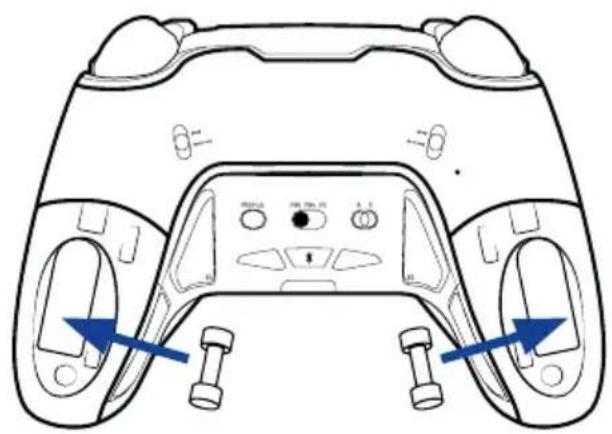
natural_image
Top-down schematic of a game controller with blue directional arrows indicating movement or control points (no text or symbols present)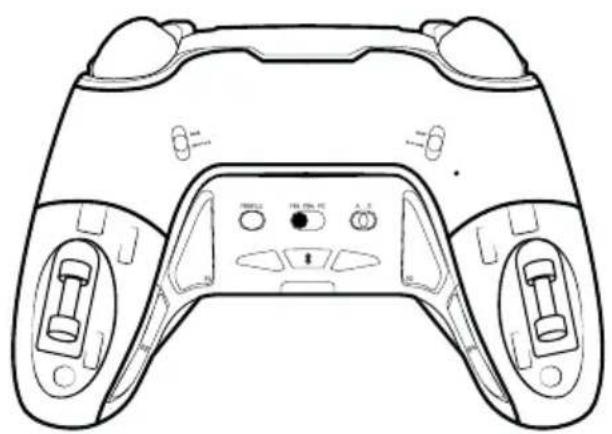
natural_image
Line drawing of a game controller with front and back panels, no text or symbols present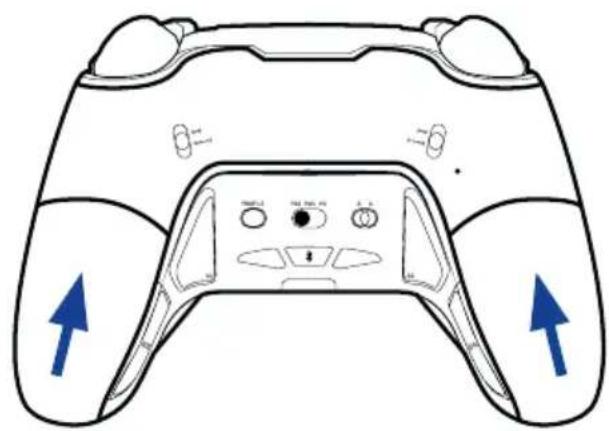
natural_image
Line drawing of a game controller with blue directional arrows indicating left and right sides (no text or symbols)natural_image
Diagram of a car interior showing front and rear seats with sound wave indicators (no text or symbols)natural_image
Technical line drawing of a mechanical component or bracket (no text or symbols)• V KLASICKOM REŽIME
natural_image
Line drawing of a PlayStation 8 controller with no visible text or symbols on the main bodyMapuje sa S1
LED ukazovatel' profilu 3 svieti:
bielo (režim PS5)
alebo
modro (režim PS4)
alebo
fialovo (režim PC),
natural_image
Line drawing of a PlayStation 8 controller with no visible text or symbols on the main bodyMapuje sa S2
LED ukazovatel' profilu 1 svieti:
bielo (režim PS5)
alebo
modro (režim PS4)
alebo
fialovo (režim PC),
natural_image
Simple line drawing of a rectangular object with a vertical line and a small oval shape inside, no text or symbols present.1124 8TH Street, Kirkland, WA 98033 USA
Nacon Pty. Ltd.
Level 2/20 Bond Street, Sydney NSW 2000
Australia
FABRIQUÉ EN CHINE / MADE IN CHINA
WWW.NACONGAMING.COM
SUPPORT :
UK, support@nacongaming.com
Tel.: +44 08081010970
BELGIQUE, support.be@nacongaming.com
NEDERLAND, support.nl@nacongaming.com
ESPAÑA, support.es@nacongaming.com
Tel.: +34 900993359
ITALIA, support.it@nacongaming.com
Tel:+39 800172494
USA/CANADA, support.us@nacongaming.com
AUSTRALIA, support.us@nacongaming.com
MEXICO, soporte@nacongaming.com
Licensed for sale in the European Union, United Kingdom, Australia, New Zealand, United States. Manufactured by Nacon. - Licencié pour la vente en Union europeenne. Royaume-Uni, Australie, Nouvelle-Zélande, États-Unis. - Lizenziert für den Verkauf in der Europäischen Union. Großbritannien, Australien, Neuseeland, den USA. - Verkoopvergunning voor de Europese Unie, het Verenigd Koninkrijk, Australië. Nieuw-Zeeland, de Verenigde Staten.- Autorizado para la venta en la Unión Europea, Reino Unido, Australia, Nueva Zelanda, Estados Unidos.- Autorizzato alla vendita in Unione Europea, Regno Unito, Australia, Nuova Zelanda, Stati Uniti - Licenciado para venda na União Europeia, Reino Unido, Austrália, Nova Zelândia, Estados Unidos. - Licencované pre predaj v Európskej ünii, Spojenom královstve, Austrálii, Novom Zélande. Spojených štátoch a Kanade. Výrobila spoločnost Nacon.
All the trademarks belong to their respective owners. - Toutes les marques citées appartiennent à leurs propriétaires respectifs. - Všetky ochranné známky sú majelkom príslušných vlastnikov.

nacon
natural_image
Four PlayStation 1 controllers from different platforms, each with a unique black and gray model (no visible text or symbols on the consoles themselves)REVOLUTION 5 PRO
UŽIVATELSKÁ PŘÍRUČKA
natural_image
Four-panel diagram showing a mechanical switch mechanism with arrows indicating motion (no text or symbols)natural_image
Line drawing of a game controller with blue directional arrows indicating left and right sides (no text or symbols)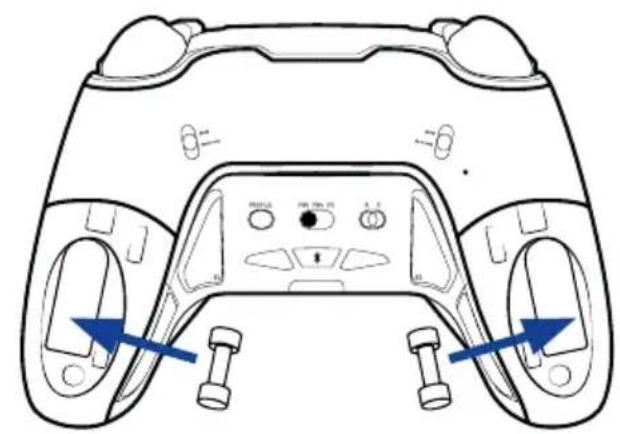
natural_image
Top-down schematic of a game controller with blue directional arrows indicating movement or control points (no text or symbols present)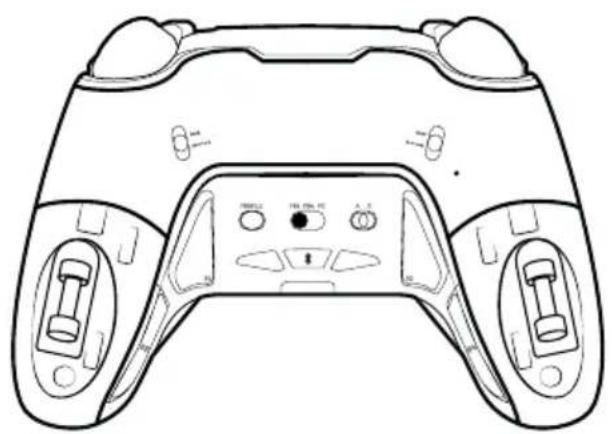
natural_image
Line drawing of a game controller with front and back panels, no text or symbols present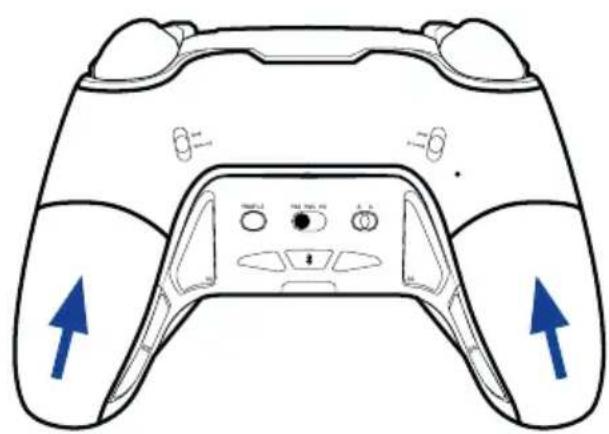
natural_image
Line drawing of a game controller with blue directional arrows indicating left and right sides (no text or symbols)natural_image
Diagram of a car front panel with labeled buttons and indicators (no text or symbols beyond basic labels)natural_image
Technical line drawing of a mechanical component or bracket (no text or symbols)natural_image
Line drawing of a PlayStation 8 controller with no visible text or symbols on the main bodyMapuje se S1
LED ukazatel profilu 3 svítí:
bíle (režim PS5)
nebo
modře (režim PS4)
nebo
fialově (režim PC),
natural_image
Line drawing of a PlayStation 8 controller with no visible text or symbols on the main bodyMapuje se S3
LED ukazatel profilu 1 svítí:
bíle (režim PS5)
nebo
modře (režim PS4)
nebo
fialově (režim PC),
natural_image
Simple line drawing of a rectangular object with a vertical line and an oval shape inside, no text or symbols present.natural_image
Simple line drawing of a rectangular object with a vertical line and a horizontal red line extending from its right side (no text or symbols)natural_image
Simple diagram of a rectangular object with a vertical line and a horizontal red line extending from its right side (no text or symbols)5 LED ukazatelü = 100–80%
4 LED ukazatele = 80–60%
3 LED ukazatele = 60–40%
2 LED ukazatele = 40–20%
1 LED ukazatel = 20–10%
1124 8TH Street, Kirkland, WA 98033 USA
Nacon Pty. Ltd.
Level 2/20 Bond Street, Sydney NSW 2000
Australia
FABRIQUÉ EN CHINE / MADE IN CHINA
WWW.NACONGAMING.COM
SUPPORT :
UK, support@nacongaming.com
Tel.: +44 08081010970
BELGIQUE, support.be@nacongaming.com
NEDERLAND, support.nl@nacongaming.com
ESPAÑA, support.es@nacongaming.com
Tel.: +34 900993359
ITALIA, support.it@nacongaming.com
Tel:+39 800172494
USA/CANADA, support.us@nacongaming.com
AUSTRALIA, support.us@nacongaming.com
MEXICO, soporte@nacongaming.com