PLATINUM Automatic EAS SO-2100 - Speaker SONORO - Free user manual and instructions
Find the device manual for free PLATINUM Automatic EAS SO-2100 SONORO in PDF.


User questions about PLATINUM Automatic EAS SO-2100 SONORO
0 question about this device. Answer the ones you know or ask your own.
Ask a new question about this device
Download the instructions for your Speaker in PDF format for free! Find your manual PLATINUM Automatic EAS SO-2100 - SONORO and take your electronic device back in hand. On this page are published all the documents necessary for the use of your device. PLATINUM Automatic EAS SO-2100 by SONORO.
USER MANUAL PLATINUM Automatic EAS SO-2100 SONORO
PLATINUM Automatic EAS
(SO-2100)
natural_image
Line drawing of a vintage portable radio with visible dials and control knobs (no text or symbols)Bedienungsanleitung
Operating manual
Mode d'emploi





natural_image
Concentric circular pattern with concentric rings, no text or symbols presentG
JKL
natural_image
Illustration of a power plug, motor, and electrical connector (no text or symbols)B
natural_image
Simple line drawing of a portable electronic device with buttons and a scroll (no text or symbols)E
natural_image
Simple line drawing of a circular object with four holes and a separate vertical bar (no text or symbols)H
natural_image
Line drawing of a helicopter with attached propeller (no text or symbols)C
natural_image
Simple 3D rectangular block diagram with no text or symbolsF
natural_image
Technical line drawing of a mechanical component with no visible text or symbols|
natural_image
Line drawing of a coiled cable with two connectors (no text or symbols)text_image
A B C sonoro D E F G H I J K L M Ntext_image
PRE AMP OFF ON USB 12V= 1A ON OFF DEFGHI
natural_image
Geometric 3D object with a checkmark and a circled circle, no text or symbols present
natural_image
Simple line drawing of a truck on a flat surface with a checkmark icon (no text or symbols)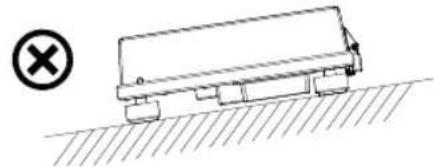
natural_image
Simple line drawing of a truck on a slope with a cross symbol (no text or labels)natural_image
Illustration of a hand pressing down on a circular disc on a stovetop with control knobs and a small device nearby (no text or symbols)


natural_image
Diagram of a curved mechanical component with a rotating arrow, no text or symbols presentDE
natural_image
Line drawing of a hand using a tool to cut a mechanical component (no text or symbols)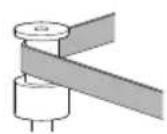
√
×
natural_image
Illustration of a hand using a tool to cut a curved object (no text or symbols visible)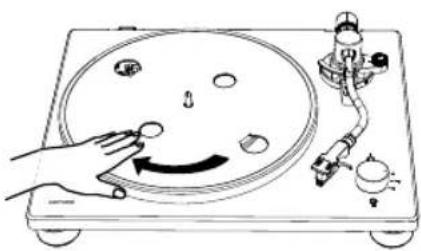
natural_image
Diagram of a hand operating a circular dial on a workbench with mechanical components (no text or symbols)natural_image
Illustration of hands holding a circular disc with concentric rings, next to a radio device (no text or symbols visible)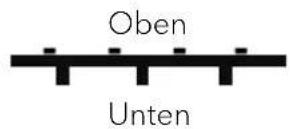
natural_image
Technical line drawing of a mechanical device with a rotating knob (no text or symbols)5.6 Installieren des Headshells
natural_image
Illustration of a hand using a handheld device to interact with a circular component (no text or symbols visible)natural_image
Line drawing of a hand using a caliper to measure a mechanical component (no text or symbols present)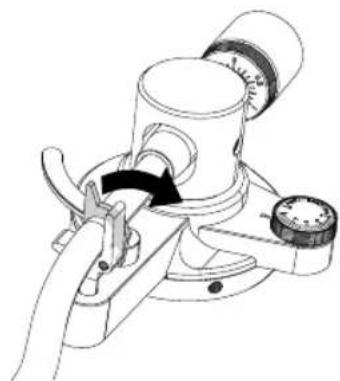
natural_image
Technical line drawing of a mechanical device with no visible text or symbols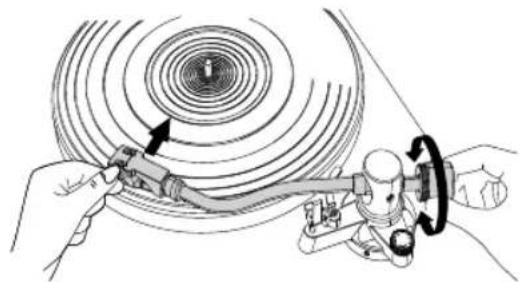
natural_image
Diagram of a mechanical device with a tool interacting with a circular component, showing motion lines and no text or symbols.natural_image
Technical line drawing of a mechanical device with rotating components (no text or symbols)
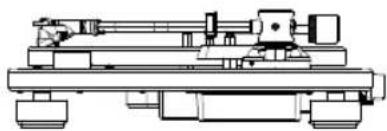
natural_image
Technical line drawing of a mechanical assembly with no visible text or symbols
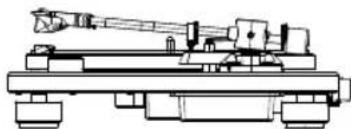
natural_image
Technical line drawing of a mechanical device with no visible text or symbols
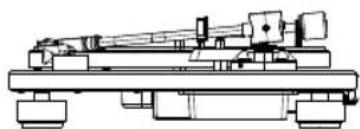
natural_image
Technical line drawing of a mechanical assembly with no visible text or symbolsnatural_image
Illustration of hands adjusting a mechanical component with a dial and knob (no text or symbols)natural_image
Illustration of a hand pressing a circular component with an arrow indicating rotation (no text or symbols present)natural_image
Illustration of a hand using a dial to measure a mechanical component (no text or symbols visible)natural_image
Line drawing of a rectangular electronic component with two connectors and upward arrows indicating movement (no text or symbols)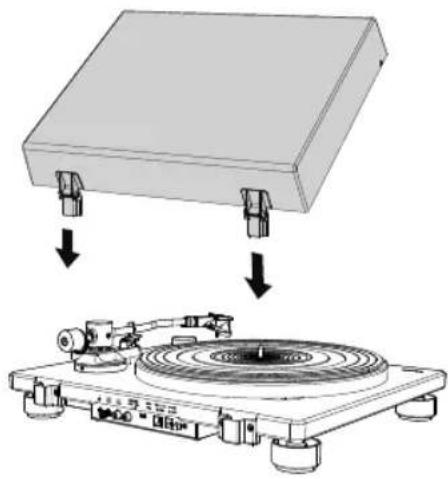
natural_image
Diagram showing a physical setup with a flat plate and a circular disc mounted on a base, both without any text or symbols.DE
natural_image
Diagram of a vintage diper with a rotary disc and mechanical components, showing rotational motion (no text or symbols)text_image
Technical diagram of a battery pack with labeled components and directional arrows indicating assembly or movement.text_image
L R 'AUX IN 1' AUX INtext_image
Diagram showing audio equipment connection with labeled components and signal flow arrowstext_image
PRE AMP OFF ON I IHinweis:
text_image
12V=== 1ADE
natural_image
Technical line drawing of a mechanical assembly with no visible text or symbols
AUS

EIN
natural_image
Diagram of a vintage diper with a circular disc and mechanical components, showing no text or symbols.natural_image
Diagram of a vinyl record with a disc and stand, showing the blade and base (no text or symbols)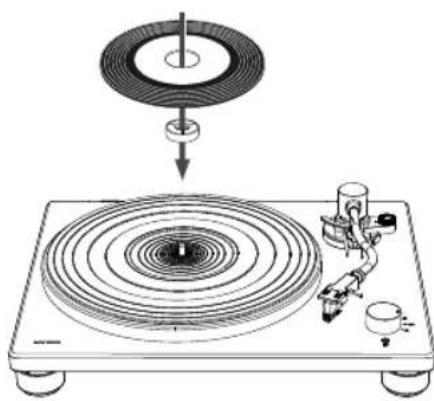
natural_image
Diagram of a vinyl record with a disc and mechanical tool, no text or symbols presentnatural_image
Illustration of a hand using a tool to apply or inspect the component (no text or symbols visible)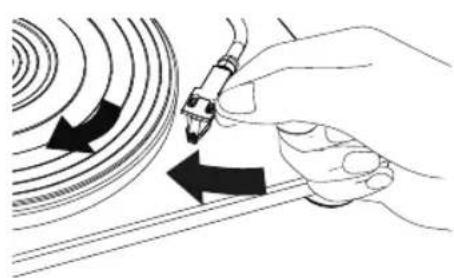
natural_image
Illustration of a hand holding a pen with arrows indicating direction (no text or symbols)natural_image
Illustration of hands using a tool to adjust or install a CD or vinyl record (no text or symbols visible)DE
text_image
Diagram showing a finger pressing a button on a device with labeled parts and a magnified view of the button.text_image
Diagram illustrating a mechanical or electrical component being adjusted to form a circular component with labeled parts (a, b, c, d, e) and UT indicator.natural_image
Diagram of a laptop connected to a device via cable, showing ports and connectors (no text or symbols present)natural_image
Illustration of a hand holding a gemstone with a compass, showing mechanical components and a curved arrow indicating rotation (no text or symbols)DE
natural_image
Line drawing of a mechanical device with two hands operating it, showing upward force arrows (no text or symbols)
natural_image
Line drawing of a vintage portable radio with a circular vent and control knobs (no text or symbols)natural_image
Technical line drawing of a mechanical component with an arrow indicating direction (no text or symbols)
natural_image
Technical line drawing of a mechanical device with internal components and directional arrows indicating motion (no text or symbols)
natural_image
Hand holding a 3D cube with a hand pointing to it, no text or symbols present
natural_image
Hand holding a mechanical component with an arrow indicating direction (no text or symbols)text_image
Technical diagram showing three mechanical component configurations with check and cross symbols indicating inspection or testing points.text_image
Technical diagram showing two 3D printer designs with check and cross icons indicating approval or rejection states.natural_image
Line drawing of a hand holding a tool, possibly a cutting or fastening tool, with no visible text or symbols.
natural_image
Diagram of a circular mechanical component with a central hub and radial arms, no text or symbols present.Operating manual for the device:
PLATINUM Automatic EAS
▶Read these instructions carefully.
▶Keep the instructions accessible.
▶Observe safety manual.
▶ When passing on the product, also hand over these instructions.
This Assembly instructions is part of the product and protected by copyright.
Reproduction, reprinting and distribution only with permission.
Manufacturer:
sonoro audio GmbH
▶Visit our support website for more information.
https://support.sonoro.com

▶For more information, you can also find us on YouTube. youtube.com/@sonoro_audio

Bluetooth®
The Bluetooth® word mark and logos are registered trademarks owned by the Bluetooth SIG, Inc. and any use of such marks by sonoro audio GmbH is under license. Other trademarks and trade names are those of their respective owners.
Operating manual Platinum Automatic EAS
Table of contents
- Safety information ....40
- Scope of delivery 41
- Device overview....42
3.1 Top view 42
3.2 Rear side view 43
-
Technical specifications....44
-
Assembling the turntable .....46
5.1 Placing PLATINUM Automatic EAS 46
5.2 Placing the platter 46
5.3 Attaching the drive belt 47
5.4 Placing the mat 48
5.5 Installing the counterweight 48
5.6 Installing the headshell....48
5.7 Removing the stylus protective cover 48
5.8 Setting the tonearm balance....49
5.9 Setting the tracking force....50
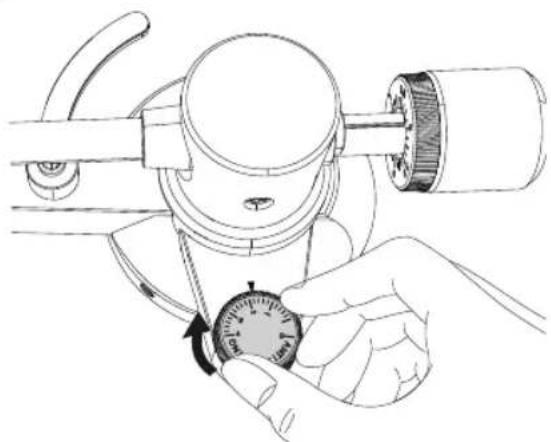
5.10 Setting the anti-skating dial....50
5.11 Installing the dust cover....51
5.11.1 Opening and closing the dust cover....51
5.12 Attaching and detaching the AC adapter's power plug . . . . . . . . . . . . . . . . . . . . . . . . . . . . . . . . . . . . . . . . . . . . . 52
5.12.1 Attaching the power plug 52
5.12.2 Detaching the power plug 52
- Connecting PLATINUM Automatic EAS....53
6.1 Connecting to an audio system / amplifier .....53
6.2 Setting pre-amplifier selector switch....54
6.3 Connecting the AC adapter 55
- Playing a record ....55
7.1 Use the Speed / STOP rotatory switch knob 56
-
When playback finishest....57
-
Connecting with Bluetooth device .....58
9.1 First time pairing Bluetooth device .....58
9.2 Connecting the paired Bluetooth device .....59
9.3 Disconnecting the paired Bluetooth device 59
-
Connecting to a computer ....60
-
Maintenance ....61
11.1 Cleaning turntable 61
Operating manual Platinum Automatic EAS
11.2 Remove the dust cover....61
11.3 Moving turntable....61
11.4 Transport or shipping turntable S .....62
11.5 Cleaning the tip of the stylus....62
11.6 Replacing the stylus ....63
11.7 Replacing the cartridge .....64
11.8 Adjust the overhang....65
11.9 Replacing the drive belt....66
- Troubleshooting ....67
- Warranty ....69
Operating manual Platinum Automatic EAS
1. Safety information
WARNING!
Danger due to non-observance of the safety instructions!
The associated safety manual contains important information for the safe use of the device. Special attention is drawn to possible dangers. Failure to observe these may result in serious injury or damage to the device.
▶ Read the associated safety manual and these instructions carefully.
▶Follow the safety instructions.
▶Store the documents in an accessible location.
Use of the device is prohibited in the following cases:
- In case of damage to the device or individual components.
- In the event of unauthorised conversions or modifications to the device.
• After improper repairs.
The manufacturer accepts no liability for damage in the following cases:
- If these instructions are not followed.
• In case of improper use.
• In case of improper handling. - In the case of unauthorised conversions or modifications.
The device is intended exclusively for use in private households. The device may only be used if it is in technically perfect condition and has been set up correctly. Any other use is considered improper. Proper use also includes reading and observing these instructions and the associated safety manual.
Operating manual Platinum Automatic EAS
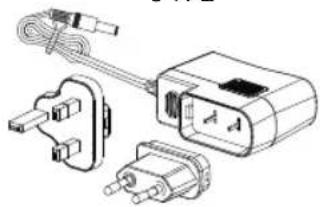
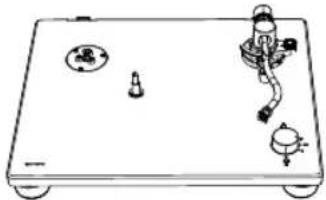
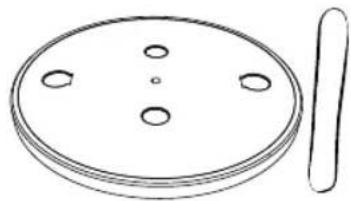
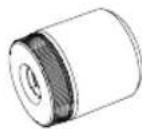
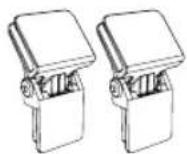
2. Scope of delivery
A

D

natural_image
Concentric circular pattern with concentric rings, no text or symbols presentG
JKL
natural_image
Illustration of a power plug, motor, and electrical enclosure (no text or symbols)B
natural_image
Simple line drawing of a handheld electronic device with buttons and a scroll (no text or symbols)E
natural_image
Simple line drawing of a circular object with four holes and a separate vertical line (no text or symbols)H
natural_image
Line drawing of a helicopter with attached propeller (no text or symbols)C

natural_image
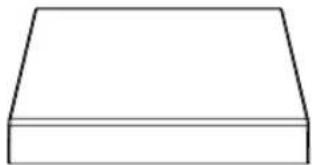
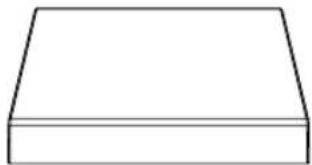
Simple 3D geometric shape resembling a trapezoid or truncated rectangular prism (no text or symbols)F
natural_image
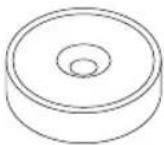
Technical line drawing of a mechanical component with no visible text or symbols|
natural_image
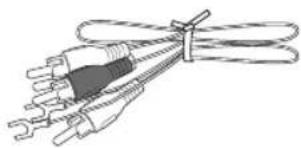
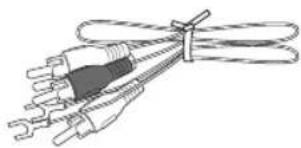
Line drawing of a coiled cable with two connectors (no text or symbols)A Operating manual and safety instructions
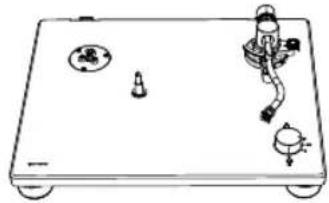
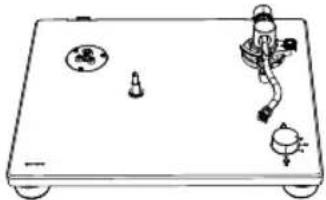
B Turntable
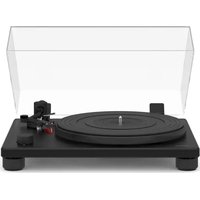
C Dust cover
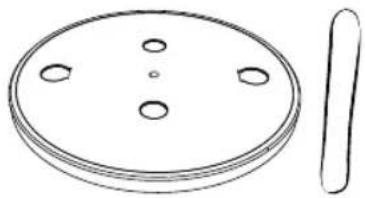
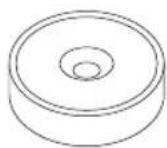
D Mat for the platter
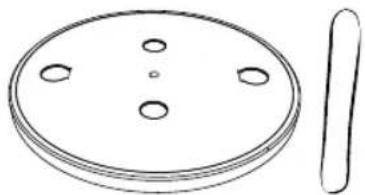
E Platter with drive belt
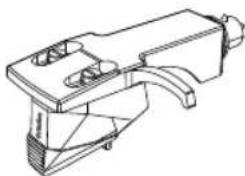
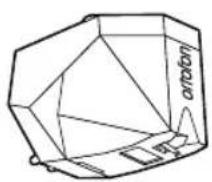
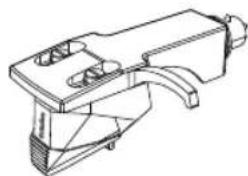
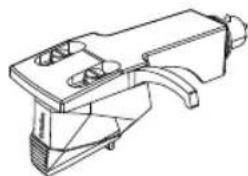
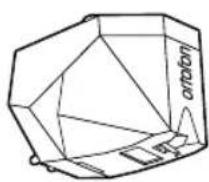
F Headshell with catridge
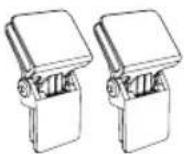
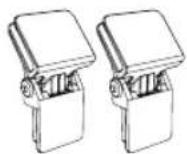
G Dust cover hinge
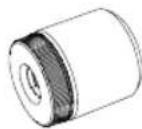
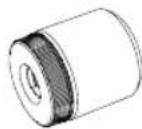
H Counterweight
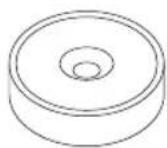
I 45 RPM Adapter (7" Single Adapter)
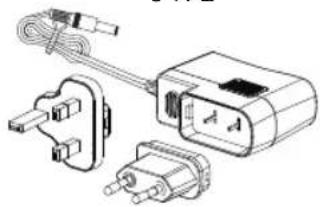
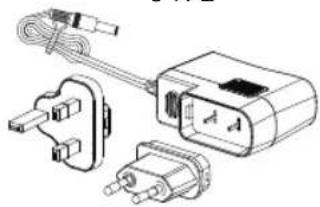
J AC adapter with EU & UK Adapter
K RCA calbe
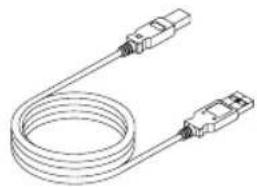
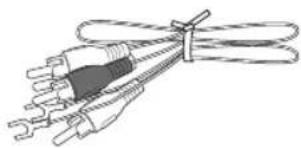
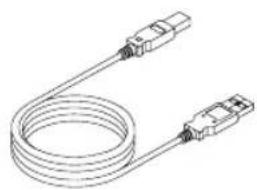
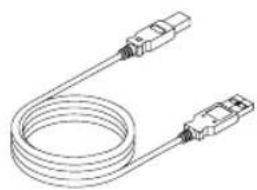
L USB-B to USB-A cable
Operating manual Platinum Automatic EAS
3. Device overview
3.1 Top view
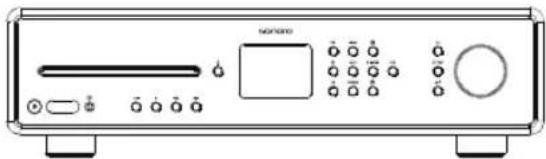
text_image
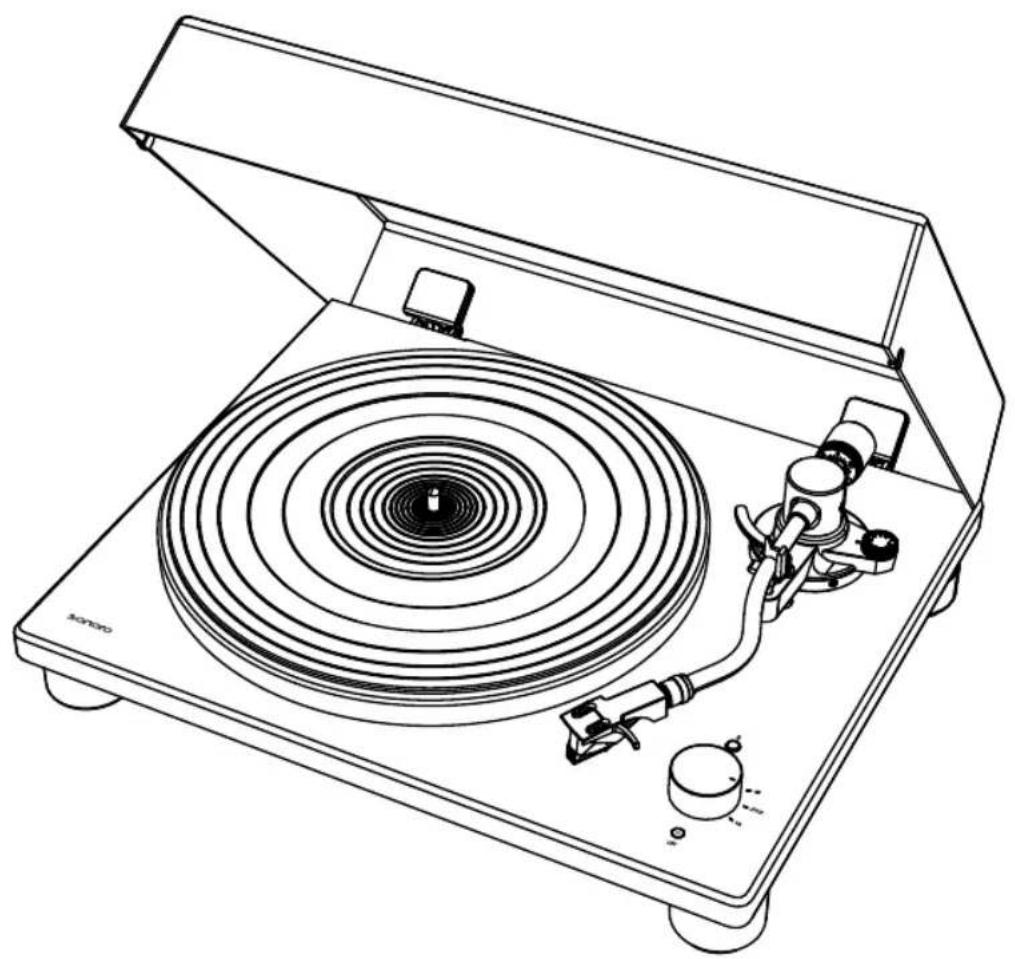
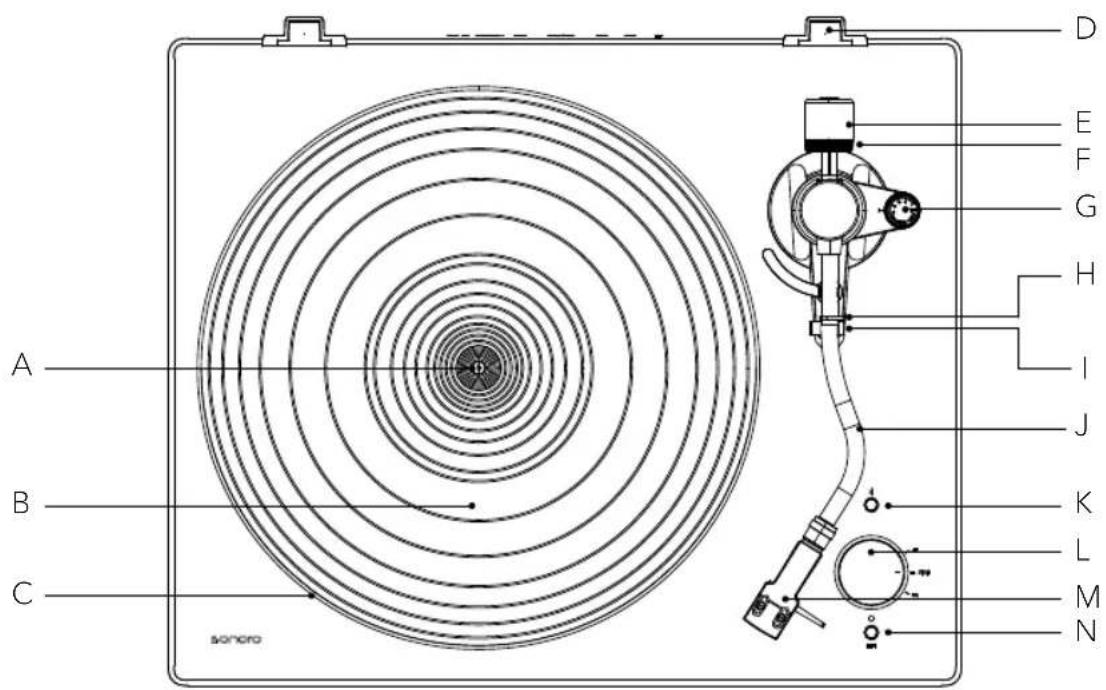
A B C sonoro D E F G H I J K L M NA Spindle
B Mat for the platter
C Platter
D Dust cover hinge holders
E Counterweight
F Tracking force gauge ring
G Anti-skating dial
H Tonearm clamp
I Tonearm rest
J Tonearm
K Bluetooth indicator / Pairing button
L Speed / STOP rotatory switch knob
M Headshell with cartridge
N Raise and lower the tonearm (lift button)



Operating manual Platinum Automatic EAS
3.2 Rear side view
text_image
A B CEN
text_image
PRE AMP OFF ON USB 12V= 1A ON OFF DEFGHI
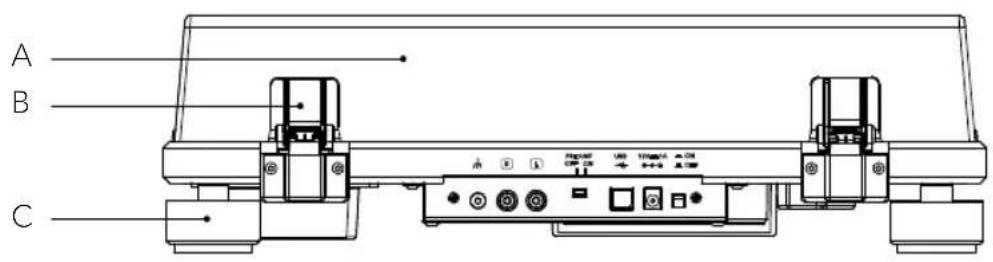
A Dust cover
B Hinges
C Feet
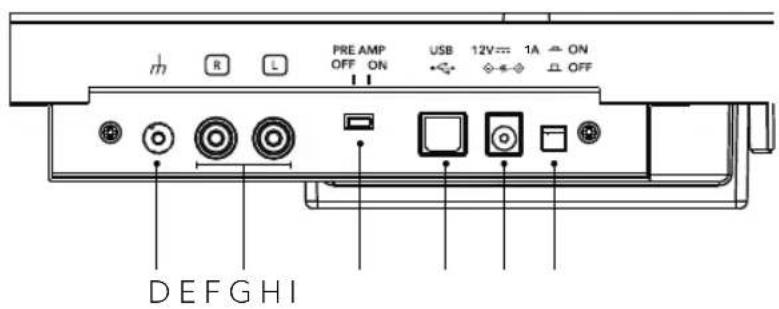
D Grounding terminal
E Stereo output terminals
F Pre-amplifier selector switch
G USB-B output
H DC input jack
1 On / Off button
Operating manual Platinum Automatic EAS
4. Technical specifications
Turntable
| Type 2-speed, semi-automatic operation | |
| Drive system Belt drive | |
| Motor DC motor | |
| Speed 33 1/3 RPM, 45 RPM | |
| Turntable platter Die-cast aluminum, diameter 300 mm | |
| Wow and flutter < 0.15% (33 RPM) at 3KHz | |
| Signal to noise ratio >67 dB (A-weighted, 20KHz, LPF) | |
| Output levels | |
| Pre-amplifier OFF | 5.5mV±3dB (1KHz, 5cm/s) |
| Pre-amplifier ON | 300 mV±3dB (1KHz, 5cm/s) |
| Output jacks RCA | |
Tone arm
| Arm type Static balanced S-shaped tonearm |
| Effective length 224 mm |
| Overhang 19 mm |
| Stylus pressure ad-justment range 0 to 2.5 g |
| Applicable cartridge weight range 5 to 7.5 g |
Cartridge
| Model Ortofon 2M Red | |
| Type Moving Magnet | |
| Recommended load impedance | 47,000 ohms |
| Amplifier connection | MM-input |
| Output voltage | 5.5mV (1KHz, 5 cm/sec) |
| Stylus type | Elliptical |
| Stylus tip radius | r/R 8/18 μm |
| Tracking force range | 1.6 to 2.0g (standard 1.8g) |
| Cartridge weight | 7.2g |
| Headshell weight | 9.3 g (including screws, nuts and lead wires) |
Operating manual Platinum Automatic EAS
USB port
| Supporting interface USB 1.1 Compliant | |
| Windows 7 or above, or MAC OSX or above | |
| Bluetooth | |
| Bluetooth version 5.2 | |
| Output class Class 2 | |
| Frequency band 2,402 GHz - 2,480 GHz | |
| Profile A2DP 1.4 | |
| Supported codecs SBC, aptX & aptX HD | |
| Maximum output power 10.0 dBm | |
| Maximum communication range approx. 10m | |
| General | |
| Dimension (W x D x H) approx. 423 x 345 x 125 mm | |
| Weight approx. 5.2 kg | |
| Operating temperature 0 °C ~ +40 °C | |
| Power consumption | |
| OFF | 0.2W or less |
| ON | 3.5W or less |
| Replacement stylus (sold separately) Ortofon 2M Red / 2M Blue | |
| AC Adapter | |
| Manufacturer's name and address Golden Profit Electronics Ltd. Shayao Chenwu Village, Shijie Town, Dongguan, Guangdong, China | |
| Model identifier GPE012T-120100-Z | |
| Input voltage | AC 100 - 240 V |
| Input AC frequency | 50 / 60 Hz |
| Output voltage | DC 12,0 V |
| Output current | 1 A |
| Output power | 12.0 W |
| Average active efficiency | More than 82.96% |
| Efficiency at low load (10%) | approx. 82% |
| No-load power consumption | 0.10 W or less |
EN
Operating manual Platinum Automatic EAS
5. Assembling the turntable
- PLATINUM Automatic EAS requires some assembly before using it for the first time.
- Do not connect your turntable to a power outlet with the AC adapter until you have finished the assembly.
- Keep the carton and packing materials. They do provide an ideal container to transport the unit.
- There is a stylus protective cover which is attached to the stylus. Keep the cover as you assemble your turntable.
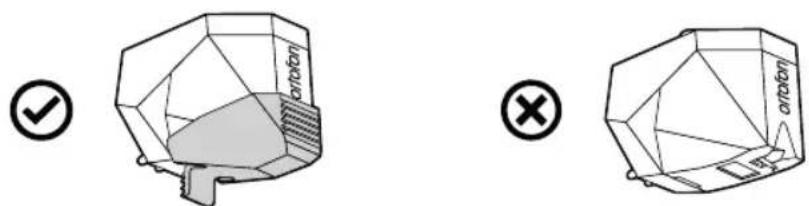
The stylus is a high precision component. Do not touch the stylus with your fingers, or banging the stylus into the platter, this may cause damage to the stylus.
▶ Remove the cable tie used to secure the tonearm at the time of delivery.
5.1 Placing PLATINUM Automatic EAS
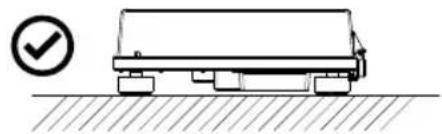
▶ Place it on a flat surface so that the record can be accurately traced.
natural_image
Simple line drawing of a truck on a flatbed surface with a checkmark icon (no text or symbols)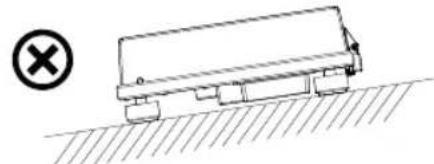
natural_image
Simple line drawing of a tanker truck on a hilly ground surface with a cross symbol (no text or labels)5.2 Placing the platter
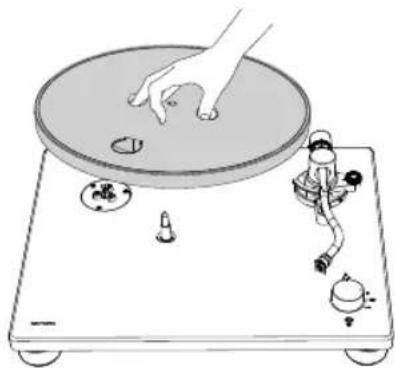
▶Hold the platter firmly.
▶Place the platter on the spindle gently.
▶ Turn the platter to the position where you can see the motor pulley through the circle hole on the platter.
natural_image
Illustration of a hand pressing down on a circular disc on a rotary stand with mechanical components (no text or symbols)

Operating manual Platinum Automatic EAS
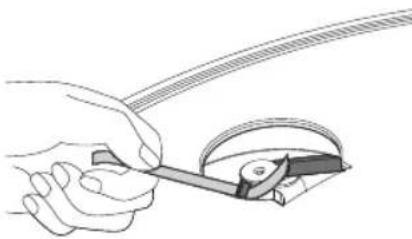
5.3 Attaching the drive belt
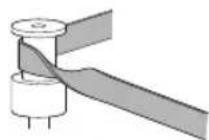
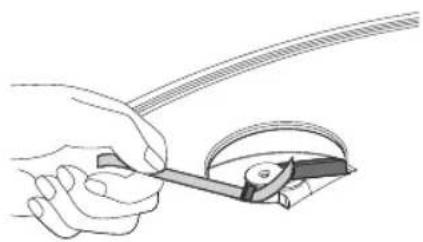
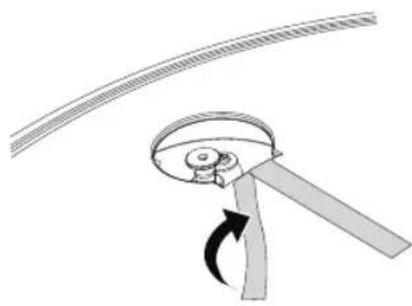
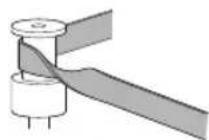
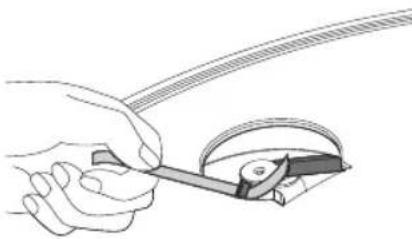
▶Peel off the adhesive tape, pull and hold the red ribbon.
▶Then, hook the drive belt around the motor pulley.
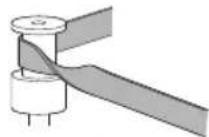
▶Be careful not to let the drive belt become twisted.
▶Remove the red ribbon from the drive belt.
▶Rotate the turntable several times to make sure that the drive belt is secure and rotating smoothly.

EN
natural_image
Diagram of a mechanical device with rotating arm and curved blade (no text or symbols)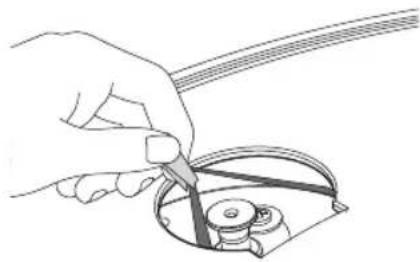
natural_image
Line drawing of a hand using a tool to cut a mechanical component (no text or symbols)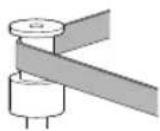
√
×
natural_image
Illustration of a hand using a tool to cut a curved strip or wire (no text or symbols present)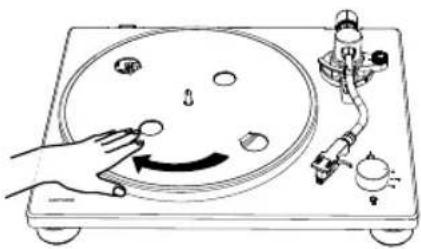
natural_image
Diagram of a hand operating a circular dial on a workbench with mechanical components (no text or symbols)Operating manual Platinum Automatic EAS
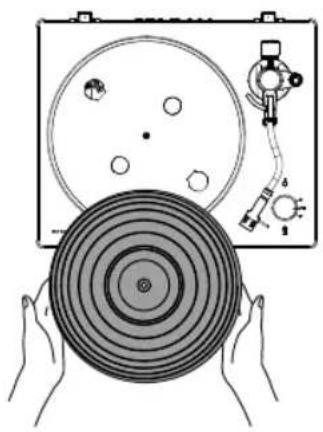
5.4 Placing the mat
▶ Place the mat of the platter on the platter.
▶The mat has a top and a bottom. The side with the ridged concentric circles should be placed down.
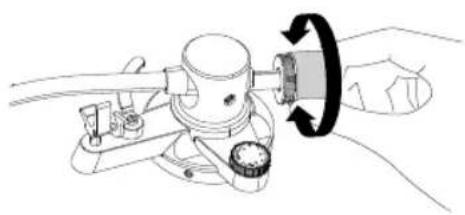
5.5 Installing the counterweight
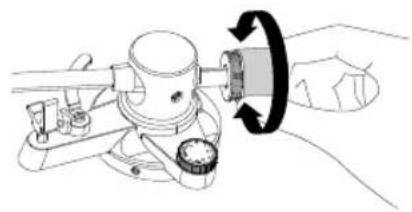
▶Place the counterweight over the end of tonearm, and slowly turn it anti-clockwise while gently pushing it.
natural_image
Illustration of hands holding a circular disc with concentric rings, next to a radio device (no text or symbols visible)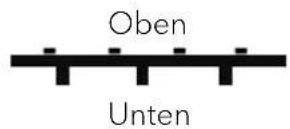
natural_image
Technical line drawing of a mechanical device with a rotating knob (no text or symbols)5.6 Installing the headshell
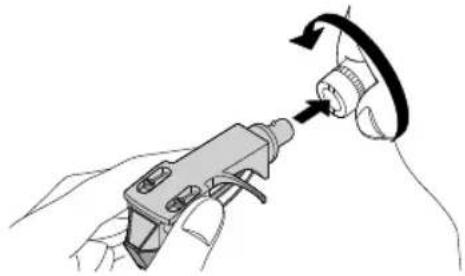
▶Insert the headshell on the end of tonearm.
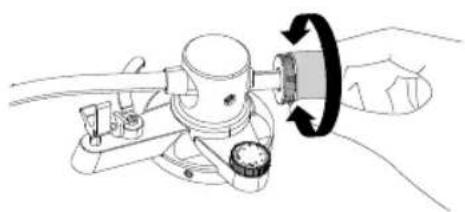
▶Turn the lock nut in the clockwise direction to secure the headshell.
natural_image
Illustration of a hand using a handheld device to interact with a circular component (no text or symbols visible)5.7 Removing the stylus protective cover
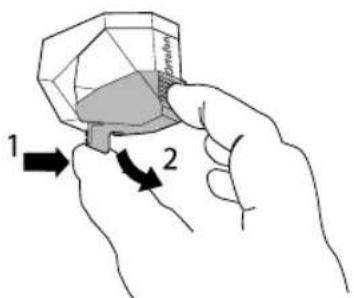
▶Hold the stylus protective cover from it's front and back, and while pushing the latch on the rear part.
▶ Slowly tile the cover downward.
text_image
1 2


Operating manual Platinum Automatic EAS
5.8 Setting the tonearm balance
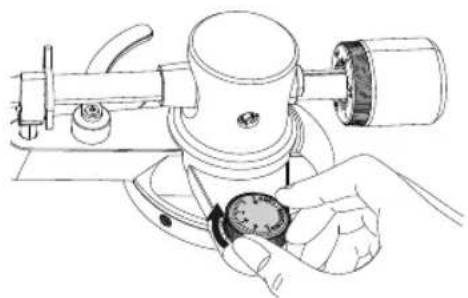
▶ Set the anti-skating dial to zero.
natural_image
Line drawing of a hand using a microscope to measure a dial (no text or symbols present)EN
▶Release the tonearm rest clamp
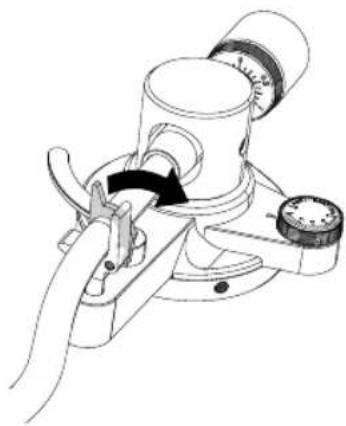
natural_image
Technical line drawing of a mechanical device with a clamping tool and lever mechanism (no text or symbols)
▶Holding the finger lift of the headshell, move the tonearm over the turntable.
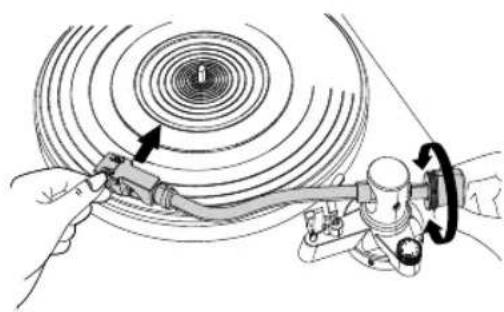
natural_image
Diagram of a mechanical device with rotating coil and adjustment mechanism (no text or symbols)
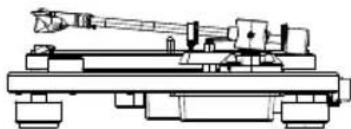
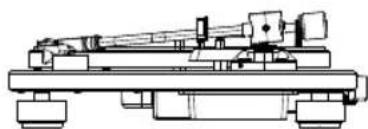
▶Adjust the counterweight so that the tonearm is floating parallel to the turntable.
▶Return the tonearm to its original position.
▶Lock the tonearm rest clamp.
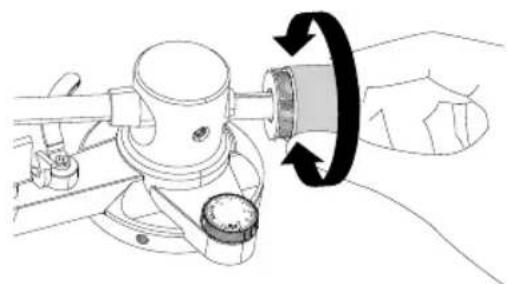
natural_image
Technical line drawing of a mechanical device with a hand operating it, showing a rotating knob and adjustment knob (no text or symbols)
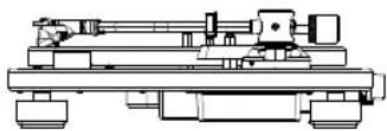
natural_image
Technical line drawing of a mechanical assembly with no visible text or symbols
natural_image
Technical line drawing of a mechanical device with no visible text or symbols
natural_image
Technical line drawing of a mechanical assembly or machine component (no text or symbols visible)Operating manual Platinum Automatic EAS
5.9 Setting the tracking force
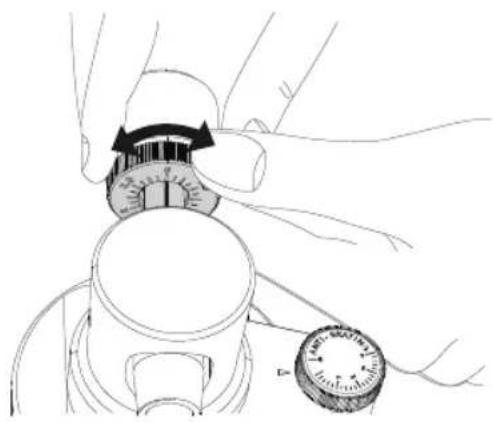
▶Turn the tracking force gauge ring so that the center line aligns with 0 on the scale.
▶Only turn the ring. Be careful not to let the counterweight turn.
▶Turn the counterweight and the tracking force gauge ring together so that the tracking force gauge ring scale matches the stylus pressure specified for the cartridge
▶The recommended tracking force of the included cartridge is 1.8g.
natural_image
Illustration of hands adjusting a mechanical component with a dial and knob (no text or symbols)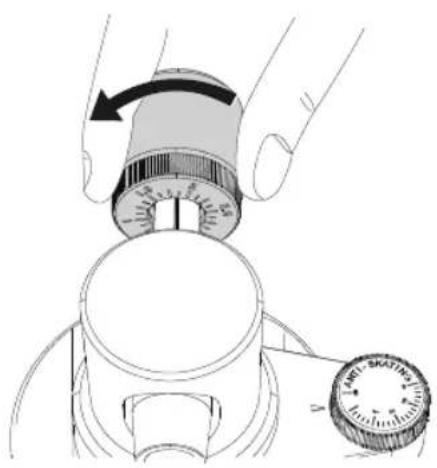
natural_image
Illustration of a hand using a dial to measure a device, showing the handle and dial (no text or symbols present)5.10 Setting the anti-skating dial
▶The anti-skating scale must be set to the same value as the tracking force; 1.8.
natural_image
Illustration of a hand holding a dial indicator on a mechanical device (no text or symbols visible)Operating manual Platinum Automatic EAS
5.11 Installing the dust cover
Note:
- The dust cover is designed to protect the turntable sensitive components. When the product is not in use, it should remain close.
- Do not open or close it when a record is playing.
- Be careful not to pinch your finger when opening and closing the dust cover
- Do not place anything on the dust cover.
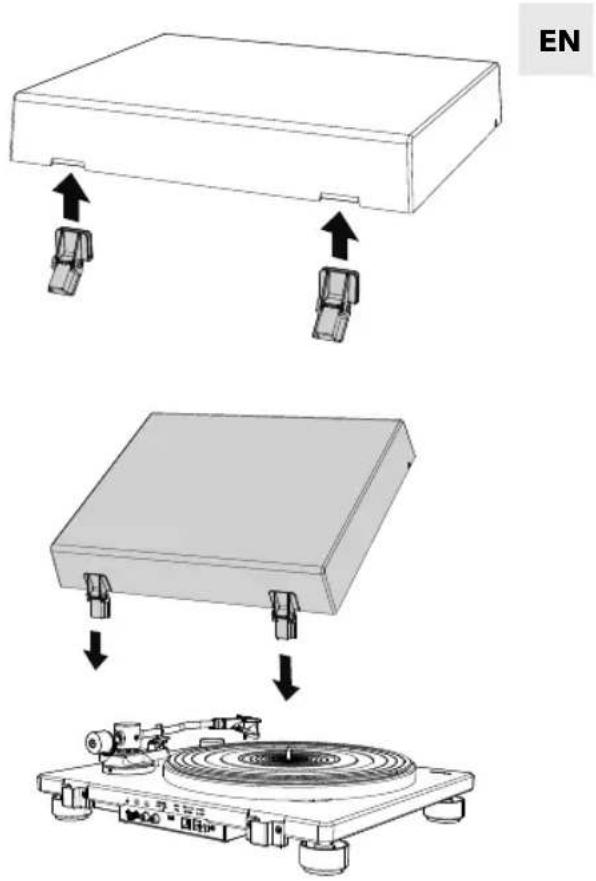
▶Insert the dust cover hinges completely into the hinge holders on the dust cover.
▶Align the dust cover hinge with the hinge holder on the rear of the turntable and push it in the dust cover.
text_image
EN5.11.1 Opening and closing the dust cover
Opening
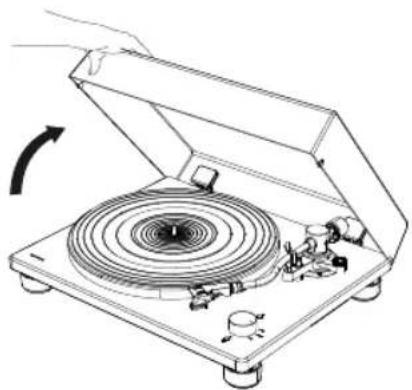
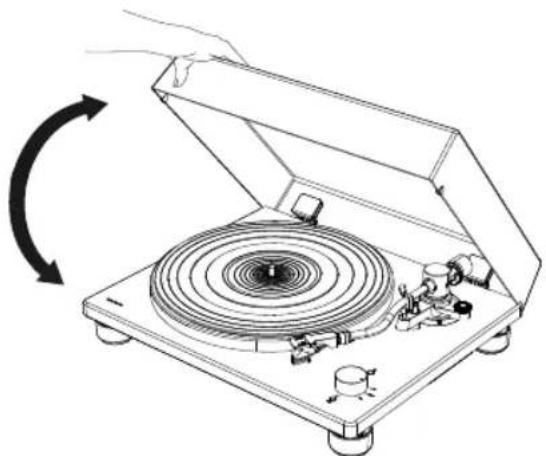
▶Hold the front edge of the dust cover and gently lift it open completely until it stops.
• The dust cover will stay open in its positions
Closing
▶Gently lower the dust cover until it is closed.
natural_image
Diagram of a vintage diper with a circular vent, showing mechanical components and a hand operating it (no text or symbols present)Operating manual Platinum Automatic EAS
5.12 Attaching and detaching the AC adapter's power plug
WARNING!
Risk of electric shock!
- Do not insert power plug alone to the AC inlet socket.
• Make sure plug and adapter are locked thoroughly.
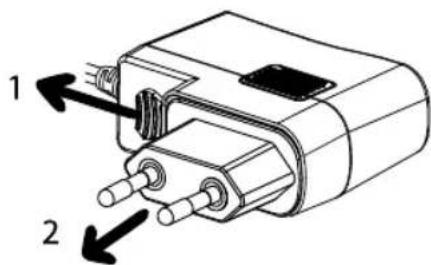
5.12.1 Attaching the power plug
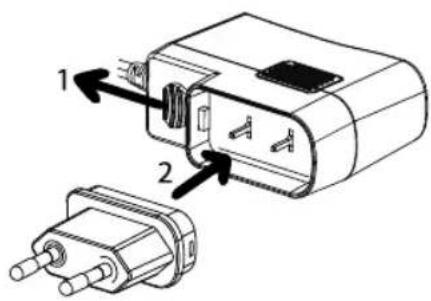
▶Pull down the clip and hold it.
▶Match the round corner of plug to the adapter.
▶Insert the desired power plug vertically into the contact pins of the adapter until it completely pushes inward.
▶Release the clip and lock the power adapter in place.
text_image
Technical diagram of a mechanical component with labeled parts 1 and 2, showing internal structure and pin connections.5.12.2 Detaching the power plug
▶Pull down the clip and hold it.
▶Pull the power plug vertically out of the power supply.
text_image
1 2Operating manual Platinum Automatic EAS
6. Connecting PLATINUM Automatic EAS
Note:
- The mounted Ortofon 2M RED cartridge is a MM cartridge, so please set your audio system to MM (not MC).
- Make sure the audio system / amplifier you connected to PLATINUM Automatic EAS is switched off and its volume set low.
- Before turning on your audio system and PLATINUM Automatic EAS, make sure all connections are made properly, and you choose the right pre-amplifier setting.
- Failures in doing so may lead into loud hum noise which may damage your audio system or speakers.
6.1 Connecting to an audio system / amplifier
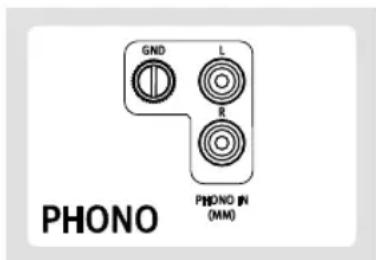
PHONO
Note:
- The ground terminal of PLATINUM Automatic EAS is not a safety ground connection.
- Depending on the amplifier, connecting the ground terminal might have the reverse effect of increasing noise. In this case, it is not necessary to connect the ground terminal.
- It is recommended to connect PLATINUM Automatic EAS's phono ground to MAESTRO Quantum phono ground plate.
- Make sure the PLATINUM Automatic EAS preamp selector switch is set to OFF.
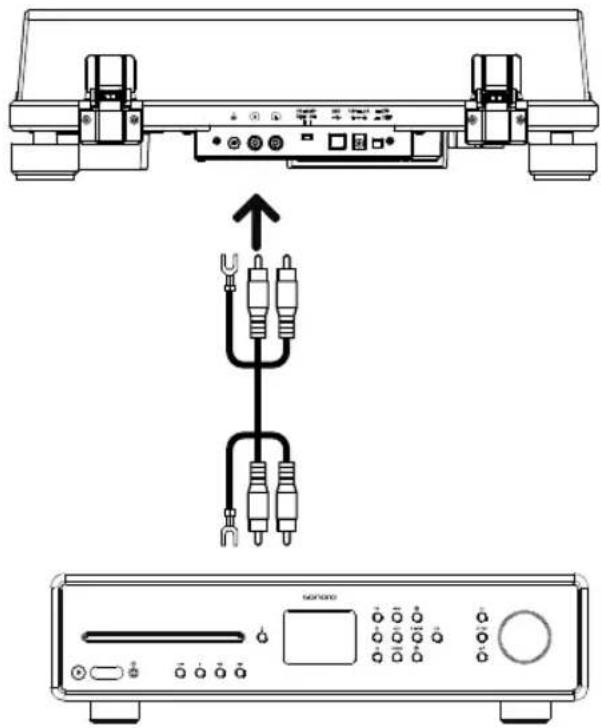
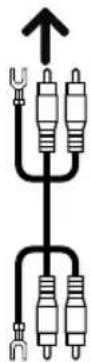
▶Connect your audio system and PLATINUM Automatic EAS by using the delivered RCA cable.
▶If your audio system has a built-in phono amplifier, there most probably will be a grounding terminal. Please screw the grounding cables on both sides: Your audio system and PLATINUM Automatic EAS.
AUX
▶If your audio system has no phono input, use a free Aux-in RCA input.
▶Make sure the PLATINUM Automatic EAS preamp selector switch is set to ON.
text_image
GND L R PHONO IN (MM) PHONO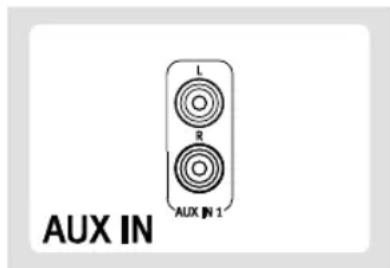
text_image
L R AUX IN 1 AUX IN


Operating manual Platinum Automatic EAS
▶The white plug is for the left channel, the red plug for the right channel.
text_image
Diagram showing audio equipment connection with labeled components and signal flow arrows6.2 Setting pre-amplifier selector switch
Switch the pre-amplifier switch on the back side of PLATINUM Automatic EAS according to the features of your audio system / amplifier PLATINUM Automatic EAS is connected to.
Set the switch to OFF position.
▶If your audio system / amplifier has a PHONO input jack, PLATINUM Automatic EAS can be connected directly to it, bypassing it's built-in pre-amplifier by switching it OFF.
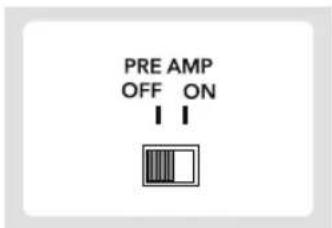
text_image
PRE AMP OFF ONSet the switch to ON position.
▶If your audio system / amplifier has no phono input, you can use the build-in pre-amplifier of PLATINUM Automatic EAS by switching it ON.
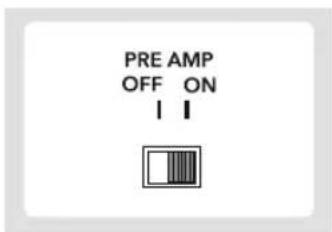
text_image
PRE AMP OFF ON I INote:
▶ When connecting via Bluetooth or USB socket, set the PRE AMP switch to ON position.
Operating manual Platinum Automatic EAS
6.3 Connecting the AC adapter
After completing all other connections, connect the included AC adapter to the DC input socket.
▶Insert the power supply into an AC inlet socket.
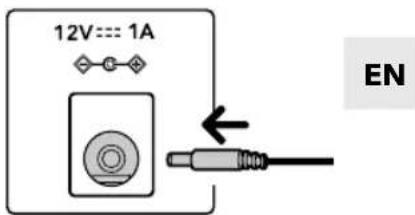
text_image
12V=== 1A EN7. Playing a record
Note:
- Before you play a record, turn down the audio device's volume. The loud, crackling noise made by the tone arm descending and the stylus coming into contact with the record could damage the speakers or audio device.
- Wait until the stylus has completely descended, and then adjust the volume.
- Even new records may produce a crackling noise when you play them. Please note that this noise is a characteristic of playing records.
- Place only one record on the platter at a time.
- Close the turntable cover during record playback to avoid dust.
- Do not stop turntable rotation during playback.
- During record playback, feedback could occur if the volume is too loud. In this case, reduce the volume of the amplifier and ensure that there is acoustic decoupling.
▶Switch on the turntable.
▶Press the ON/OFF button on the back of the turntable to turn it on.
- Open the dust cover gently. - If the turntable is in sleep mode, set the speed selector switch to STOP and then back to the desired speed.
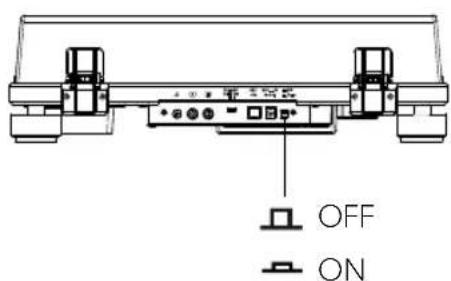
text_image
OFF ON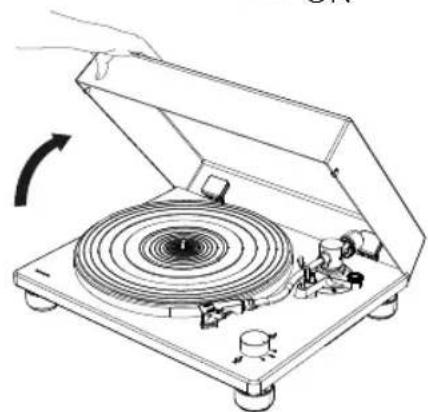
natural_image
Diagram of a vintage diper with a rotary dial and mechanical components, no text or symbols presentOperating manual Platinum Automatic EAS
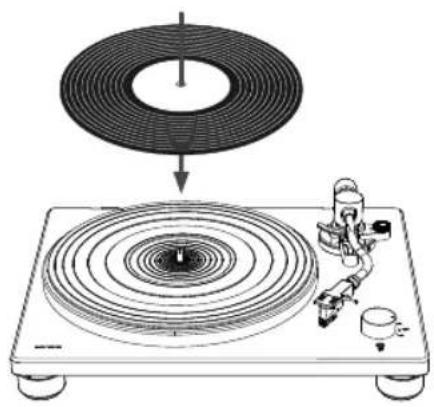
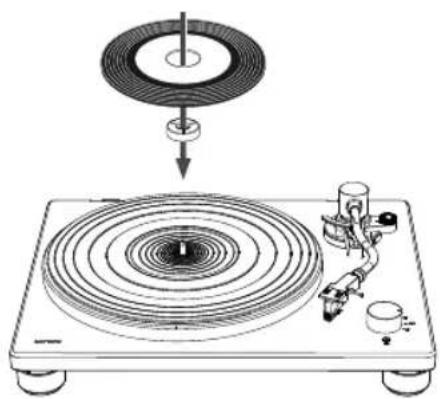
Place a record on the platter
▶Place the record on the mat of the platter so that the center hole aligns with the spindle.
natural_image
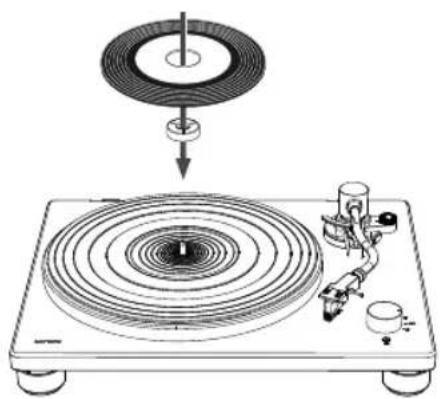
Diagram of a vinyl record being placed on a stand with a circular ring and mechanical components (no text or symbols)▶To play 7-inch (17cm) records (EP records), place the supplied 45 RPM. adapter on the spindle.
natural_image
Diagram of a vinyl record with a disc and base mount (no text or symbols)7.1 Use the Speed / STOP rotatory switch knob
Note:
▶The rotation speed is usually printed on the center label of the record or the record jacket.
▶The rotation speed can be set to 33 or 45 RPM. Select the rotation speed appropriate for the record.
- Choose the speed appropriate for the record.
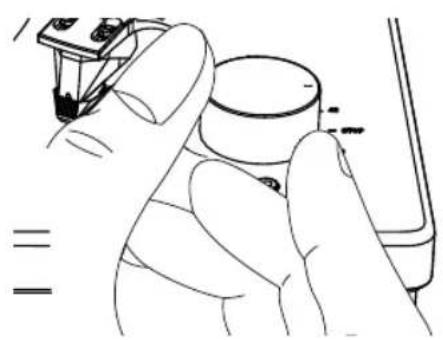
- The turntable only starts turning when the tone arm is just in front of the turntable. If the tone arm is in the middle or outside of the turntable, the rotary motor stops..
▶Release the tonearm rest clamp.
natural_image
Illustration of a hand holding a small cylindrical object with a tool, no text or symbols present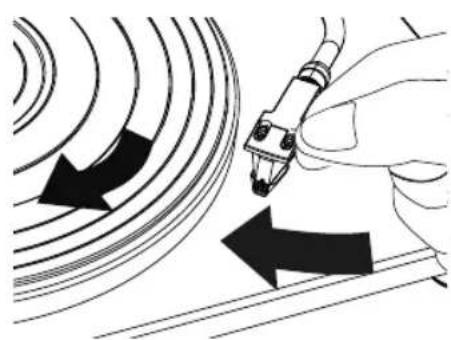
natural_image
Illustration of a hand using a pen to interact with curved lines, showing directional arrows (no text or symbols)Operating manual Platinum Automatic EAS
▶Holding the finger lift of the headshell, move the tone arm over the edge of the record or the track where you want to start playback.
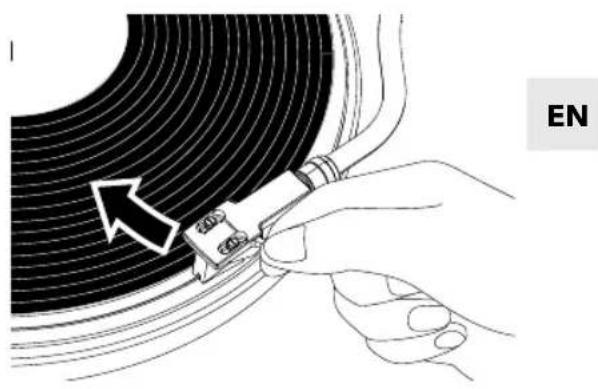
text_image
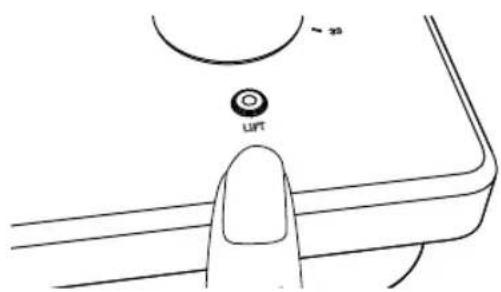
EN▶Lower the tonearm by pressing the lift button on the device. The tone arm is slowly lowered and playback begins.
▶Gently close the dust cover.
text_image
Lift8. When playback finishest
Note:
- PLATINUM Automatic EAS is a semi-automatic turntable. This means that after playing a record, the tone arm is automatically raised and the rotating motor is stopped.
- If the tone arm remains still for 18 minutes after playing the record or the record player is not operated during this time, it switches in standby automatically (sleep mode). To bring the turntable out of sleep mode, set the speed selector switch to STOP and then back to the desired speed.
▶ Use your finger on the headshell to move the tonearm to its original position.
▶Turn the speed selector switch to the STOP position.
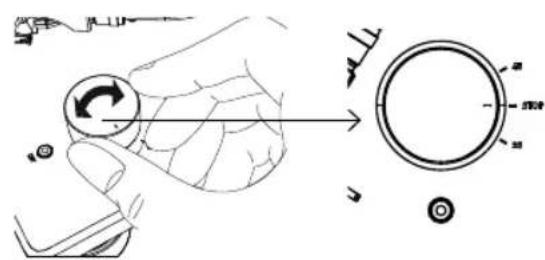
text_image
Diagram illustrating hand turning a circular component with rotation arrow and measurement scale▶ Press the ON/OFF button on the back of the turntable to turn it off if no longer to use.
Operating manual Platinum Automatic EAS
9. Connecting with Bluetooth device
The PLATINUM Automatic EAS can connect to Bluetooth-enabled devices (e.g. Bluetooth speakers and Bluetooth headphone).
Note:
- Set the PRE AMP switch to ON position.
- Operating distance is within a range of approximately 10 meters (30 feet).
• Refer to the operation manual of the Bluetooth devices for information how to use it. - Pairing might take some time depending on the connected device.
- If there are playback devices, which support Bluetooth wireless technology nearby, that have the Bluetooth function enabled, but some of them are not the devices with which you want to pair, disable their Bluetooth function and try pairing again.
- Do not connect to Bluetooth speakers or headphones for which you cannot adjust the volume. Audio tracks may be played at very loud volumes.
- You cannot pair the turntable with smartphones, TVs, or computers, etc.
- You have to disconnect the current Bluetooth connection before you can connect to any other.
9.1 First time pairing Bluetooth device
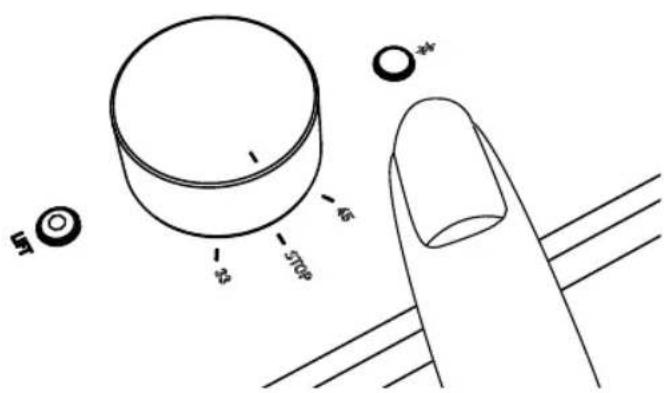
▶ Press the BT button on the turntable to start Bluetooth connection mode. The indicator will become blue and blink slowly.
▶ Press the BT button again for at least two seconds to start pairing mode. The blue indicator will flash rapidly.
text_image
5 23 45 570mm *4▶ After turntable enters pairing mode, put the Bluetooth device into paring mode.
- Pairing is automatically done. When the turntable and the Bluetooth device are connected, the indicator will stay lit without flashing.
Operating manual Platinum Automatic EAS
9.2 Connecting the paired Bluetooth device
PLATINUM Automatic EAS can register information for up to 8 paired devices, you do not have to pair the next or subsequent times you connect the device to the turntable.
EN
▶ Press the BT button on the turntable to start connection mode. The indicator will become blue and blink slowly.
▶ Make the Bluetooth device ready to connect.
- Pairing is automatically done. When the turntable and the Bluetooth device are connected, the pairing lamp will stay lit without flashing.
9.3 Disconnecting the paired Bluetooth device
▶ Press the BT button for at least 2 seconds to disconnect the paired Bluetooth device from the turntable. The indicator will become blue and flash rapidly.
▶ Press the BT button in Bluetooth connection mode, it will switch off the Bluetooth function.
- If no Bluetooth device is found for five minutes, Bluetooth indicator will become unlit.
- Below is the BT indicator status for different operating status.
| Operating status | BT indicator (blue) | |
| Pairing | Searching for device | ●●●●●●●●●Fast blinking |
| Connection | Waiting to be connected | |
| Connected | Lit | |
Operating manual Platinum Automatic EAS
10. Connecting to a computer
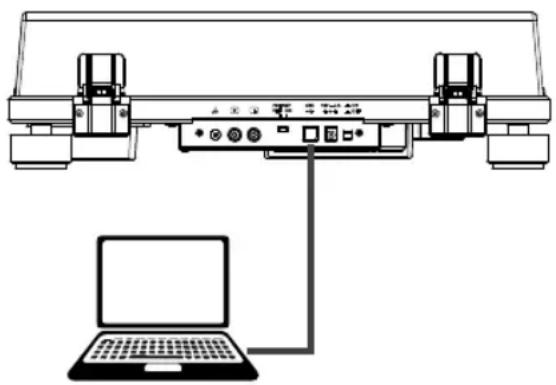
The sound of a record can be digitally recorded on a computer by using the provided USB cable to connect the turntable (type B) to a USB port (type A) of the computer.
Note:
▶Set the PRE AMP switch to ON position.
- The USB output signals can be used only for recording, not for playback.
- The turntable will run with the standard Windows or Mac driver so there is no need to install a special driver.
- The computer will automatically detect the turntable's USB port and identify as USB Audio CODEC.
- You must first install software that can be used for audio recording on the computer.
- You may purchase the audio recording software that you prefer separately or download free software such as Audacity (https://www.audacityteam.org/), from the Internet.
- If the application does not work successfully, please contact your computer administrator for help.
- When recording with a computer, do not disconnect the USB cable and put the turntable into standby.
- The recorded music is limited to private use only. Use of the music beyond this limit requires permission of the copyright holders.
▶Connect a computer to your turntable with provided USB cable.
▶Rotate the speed rotatory switch knob to start playing of a record.
▶Use your recording application to record audio tracks onto the computer.
- For detail instructions on how to use the application and transferring audio tracks, refer to the application user guide.
natural_image
Diagram of a laptop connected to a device via cable, showing ports and connectors (no text or symbols present)Operating manual Platinum Automatic EAS
11. Maintenance
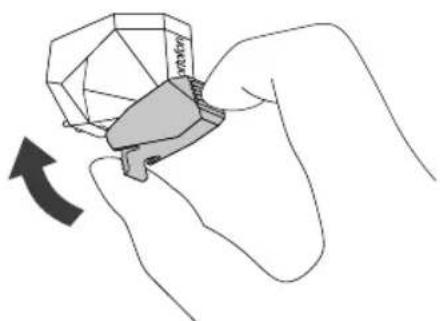
▶Attaching the stylus protective cover.
▶Hold the stylus protective cover from it's front and back, align with the front of the cartridge, and slowly lift it.
natural_image
Hand holding a gemstone with a hand pointing to it, showing a curved arrow (no text or symbols)EN
11.1 Cleaning turntable
▶ Use a dry, soft cloth to clean the dust cover and the turntable body.
▶ When it is hard to wipe off the soil, use a slightly damp cloth and then dry turntable with a soft and dry cloth.
▶ Do not use any chemical solution such as alcohol, benzine, or paint thinner, that damages the finish.
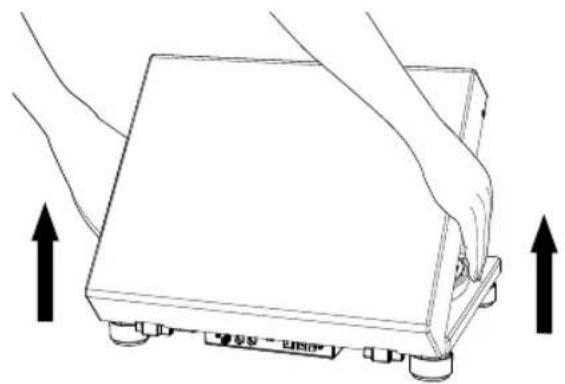
11.2 Remove the dust cover
▶To remove the dust cover from the turntable, fully open the dust cover, grasp both sides near the bottom of the cover, and then gently pull it out in the upward direction.
natural_image
Line drawing of a hand pressing down on a mechanical device with two upward arrows indicating motion (no text or symbols)
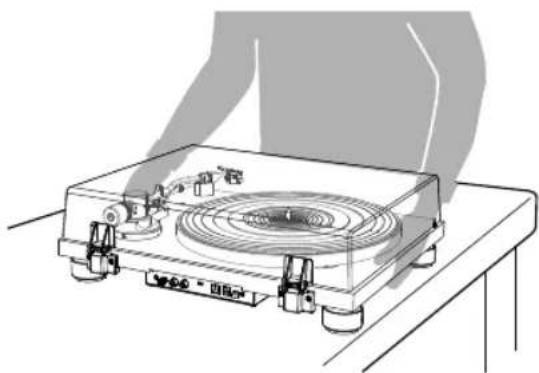
11.3 Moving turntable
▶Lock the tonearm rest clamp.
▶Switch off the turntable and unplug the AC adapter.
▶Disconnect all the connecting cables from the turntable.
▶Attach the stylus cover.
▶When you move the turntable, make sure that you firmly hold the bottom of the turntable.
▶Re-adjust the tracking force and the anti-skating force if necessary.
natural_image
Line drawing of a portable radio with a circular vent and control knobs, placed on a table (no text or symbols)Operating manual Platinum Automatic EAS
11.4 Transport or shipping turntable S
PRECAUTION!
- In case the turntable needs to be returned for repair or transport to other places, the original packing provides a better protection for the product during transportation and handling.
▶ If you lose the original packing, please use a sufficiently stable and protective packing that prevents damage from the PLATINUM Automatic EAS.
▶Take off the dust cover and carefully wrap it.
▶Take off the platter and mat and carefully wrap them.
▶ Attach the stylus cover and remove the headshell and counterweight from the tonearm and carefully wrap them.
▶Lock the tonearm rest clamp and tape it in place.
▶ Carefully wrap the turntable in a bubble wrap or similar soft and protecting material.
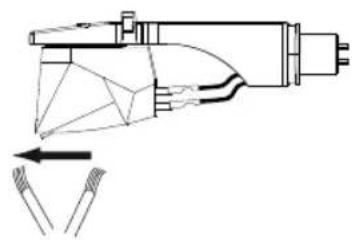
11.5 Cleaning the tip of the stylus
Note:
- Record styluses are precision parts, so handle them carefully to avoid bending or damaging their tips. If a stylus becomes bent or damaged, it might not be able to follow the audio groove precisely and could damage records or cause another malfunction.
- Do not rub the stylus tip with thinner or other chemicals.
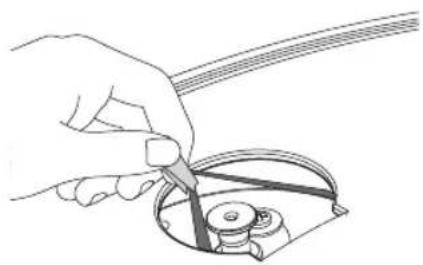
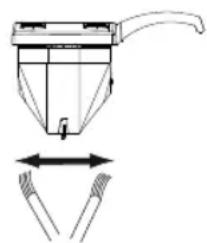
- Use a small brush (not included) if the stylus tip is considerably dirty. Clean the stylus tip by moving the brush from the rear to the front of the stylus tip.
natural_image
Pure mechanical diagram showing a tool interacting with wires, no text or symbols present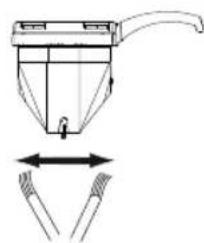
natural_image
Technical line drawing of a mechanical device with two hands holding a tool, showing internal components and motion arrows (no text or symbols)

Operating manual Platinum Automatic EAS
11.6 Replacing the stylus
If the tracking diamond is worn, it not only degrades sound quality but can also damage records. After approximately 1000 hours of playback, replace the tracking diamond with one specified by us.
▶Please use Ortofon 2M RED / 2M Blue replacement stylus.
▶ Follow the replacement instructions in the manual of the replacement stylus.
To remove old stylus
▶Keep attaching the stylus protective cover on the cartridge.
▶Release the headshell from the tonearm.
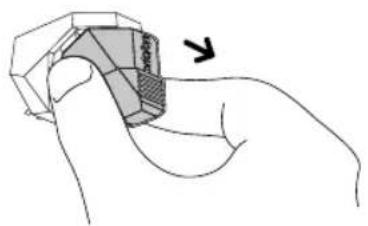
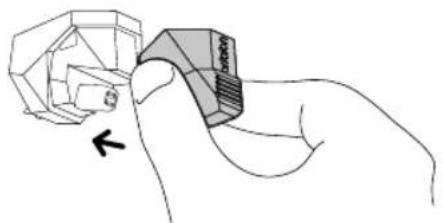
▶Hold the cartridge in one hand, grasp the plastic stylus housing with thumb and forefinger, and pull away from the cartridge.
natural_image
Hand holding a 3D object with shaded surfaces, no visible text or symbolsEN

Installing a new replacement stylus:
▶To install replacement stylus, insert the new stylus assembly into the cartridge.
- The stylus assembly should be fully seated into the cartridge.
▶Mount the headshell onto the tonearm.
natural_image
Hand holding a mechanical component with a close-up view of its face (no text or symbols visible)
Operating manual Platinum Automatic EAS
11.7 Replacing the cartridge
Note:
- The cartridge installed in this unit is equivalent to Ortofon 2M Red.
- If you use another cartridge than Ortofon 2M Red, you might need to adjust overhang and weight, as well the height of your tonearm. If in doubt, please ask your dealer.
▶Keep attaching the stylus protective cover on the cartridge.
▶First remove the headshell from the tonearm.
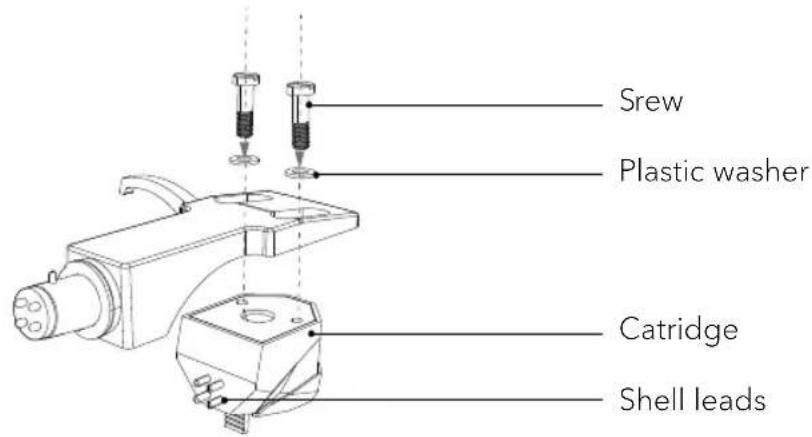
▶ Use a non-metallic slotted screwdriver to remove the installation screws, washers and, and then remove the cartridge from the headshell..
▶ Use a non-metallic slotted screwdriver to tighten the screws in both places, and then adjust the overhang.
- Refer to the user manual for new cartridge for mounting instruction and connecting to the shell leads.
text_image
Screw Plastic washer Catridge Shell leads- The signals and colors of the shell leads are shown below.
| Signal | Color |
| Left channel + | White |
| Left channel - | Blue |
| Right channel + | Red |
| Right channel - | Green |



Operating manual Platinum Automatic EAS
11.8 Adjust the overhang
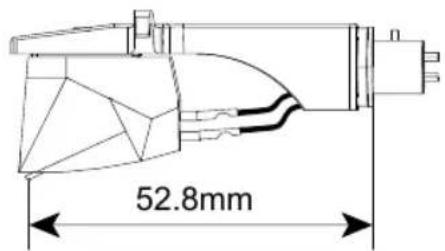
▶Move the cartridge to adjust the overhang in such a way the stylus tip is at 52.8mm from the headshell mounting end.
text_image
52.8mmEN
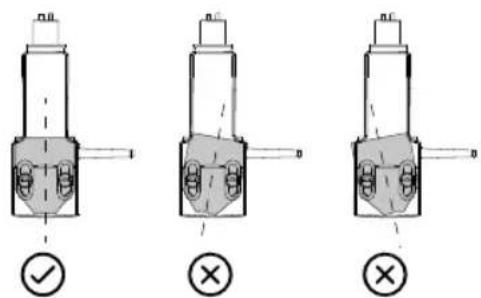
▶The cartridge should be parallel on the headshell when viewed from the top.
text_image
Technical diagram showing three mechanical component configurations with check and cross symbols indicating inspection or validation points.- The cartridge should also not tilt when viewed from the side.
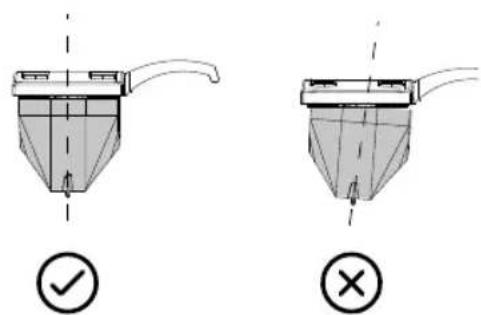
text_image
Technical diagram showing two 3D printer designs with check and cross icons indicating approval or rejection states.▶ After the adjustments are complete, tighten the screws securely.
▶ Attach the headshell to the tonearm.
Operating manual Platinum Automatic EAS
11.9 Replacing the drive belt
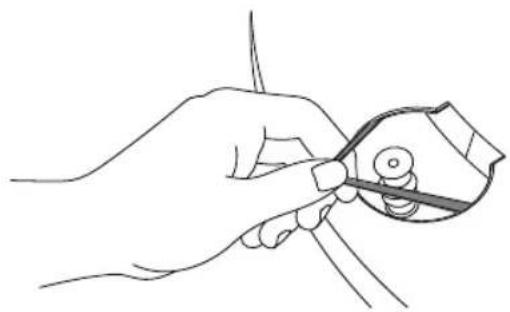
The drive belt will wear or may even break over time. In such case, replace it with a new one. To obtain a spare drive belt, contact your dealer or the customer support.
▶Turn off your turntable and the connected audio device and unplug the AC adapter from the AC inlet.
▶Remove the mat of the platter.
▶Turn the platter to the position where you can see the motor pulley through the circle hole on the platter.
▶Unhook the drive belt from the motor pulley.
▶Put your finger and thumb into the platter's round holes to hold the platter and remove the platter.
▶Turn the platter upside down and remove the drive belt.
▶Wind a new drive belt around the platter while keeping it untwisted.
▶Follow the steps in "Attaching the drive belt" to finish the assembly.
natural_image
Line drawing of a hand using a tool to cut or wire around a mechanical component (no text or symbols)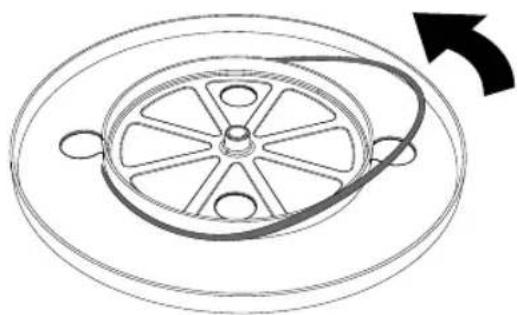
natural_image
Diagram of a circular mechanical component with a rotating shaft and central hub, no text or symbols presentOperating manual Platinum Automatic EAS
12. Troubleshooting
Malfunctions can occur with any electrical equipment. This is not necessarily due to a defect. As such, you should check the following table to see if you can eliminate the problem yourself.
EN
Malfunction Possible cause Solution
| The platter does not spin. | The AC adapter is not properly connected. | Plug the AC adapter into the AC inlet socket. |
| The turntable is not switched on.The record player is in sleep mode. | Check the rear side of the turntable, it should be in pressed down position.Set the speed selector switch to STOP and then back to the desired speed. | |
| The platter spins, but there is no sound or the volume is not loud enough. | Cartridge's protective cover is still attached. | Remove the cartridge's protective cover. |
| Tonearm is in lift position. Lower the tonearm. | ||
| Wrong setting or input for the connected equipment (amplifier, etc.) | Check if the setting for the connected equipment is correct | |
| The stylus is damaged. Check the stylus and re-place it, if necessary. | ||
| Stylus or cartridge are not adjusted correctly. | Check the cartridge and adjust it, if necessary. | |
| Wrong setting for the PRE AMP selector switch. | Select the correct setting for the pre-amplifier.If using an amplifier with a PHONO input jack, set this switch to the OFF position.If connecting to the AUX jack of an amplifier, set this switch to the ON position. | |
| The audio playback jumps(stylus slides outwards). | The anti-skating value is set incorrectly. | Slightly lower the anti-skating value. |
| The audio playback jumps(stylus slides inwards). | The anti-skating value is set incorrectly. | Slightly increase the anti-skating value. |
| The stylus skips. The record is warped. Change the record. | ||
Operating manual Platinum Automatic EAS
| There is noise when the record is playing. | There is dust on the cartridge's stylus tip. | Clean the stylus's tip with a commercially brush and stylus cleaner. |
| There is howling sound. | The turntable is picking up excessive vibrations from the floor, surface of the walls, or nearby speakers. | Decrease the vibrations or put the turntable on a surface that is not subject to the effects of vibration. |
| There is humming noise during playback. | The ground terminal is not properly connected. | Check if the ground terminal it properly connected. |
| Depending on the audio system, connecting to the ground may lead to humming noise. | Disconnect the ground terminal. | |
| Bluetooth connection is not possible with the Bluetooth headphone or Bluetooth speakers. | The PLATINUM Automatic EAS has not entered the pairing mode. | Follow the instructions to put PLATINUM Automatic EAS in pairing mode. First, short press the PAIRING button to switch to Bluetooth mode. Then press the PAIRING button again for 2 seconds to start pairing mode. |
| Bluetooth headphone or speakers has not entered the pairing mode. | Follow the instruction to put Bluetooth headphone or speakers into pairing mode. | |
| The PLATINUM Automatic EAS and pairing devices are too far away. | Put PLATINUM Automatic EAS and pairing devices close to each other. | |
| Bluetooth connection does not establish. | On PLATINUM Automatic EAS, first press the PAIRING button briefly to switch to Bluetooth mode. Then press the PAIRING button for at least ten seconds to delete all existing pairings with other devices. Then pair with the Bluetooth headphone or speaker again. | |
| Bluetooth headphone or speakers connected but have no sound. | PRE AMP switch is not in ON position. | Set the PRE AMP switch to ON position. |
| Bluetooth connection with smartphone. | Not supported. Connect with | a Bluetooth speaker or headphone only. |
Operating manual Platinum Automatic EAS
A record does not play to its end.
With some LPs, the automatic lifting function may activate too early. This is usually caused by variations in the record's grooves, which the record player's mechanism can interpret as the end of the record.
This is a well-known phenomenon that can occur with records with unusual groove patterns or where the music ends close to the edge of the record.
13. Warranty
When submitting warranty claims, the following applies without restricting your legal rights:
- Warranty claims can only be asserted within a period of max. 2 years (1 year in North America and Australia), calculated from the date of purchase.
- onoro audio GmbH shall, at its own discretion, repair or replace PLATINUM Automatic EAS free of charge any defects caused by material or manufacturing defects within the warranty period.
- In case of a complaint, please contact your dealer or our customer service department. You will find our contact data or visit our website at www.sonoro.com
- No new warranty period begins following repair or replacement of PLATINUM Automatic EAS. The warranty period of 2 years (1 year in North America and Australia) from date of purchase remains applicable.
- Excluded from the warranty is damage caused by improper use, normal wear and tear, as well as defects which only minimally affect the value or usability of PLATINUM Automatic EAS. The warranty also expires in case of any modifications not made by our authorized service center.
- This guarantee does not restrict or cancel the purchaser's free recourse to the rights set forth under statutory regulations concerning defects.
natural_image
Concentric circular pattern with concentric rings, no text or symbols presentG
JKL
natural_image
Illustration of a power plug, motor, and electrical connector (no text or symbols)B
natural_image
Simple line drawing of a handheld electronic device with buttons and a knob (no text or symbols)E
natural_image
Simple line drawing of a circular object with four holes and a separate vertical bar (no text or symbols)H
natural_image
Line drawing of a helicopter with attached propeller (no text or symbols)C
natural_image
Simple 3D rectangular block diagram with no text or symbolsF
natural_image
Technical line drawing of a mechanical component with no visible text or symbols|
natural_image
Line drawing of a coiled cable with two connectors (no text or symbols)text_image
A B C sonoro D E F G H I J K L M NFR
text_image
PRE AMP OFF ON USB 12V= 1A ON OFF DEFGHI
natural_image
3D geometric mechanical component diagram with no visible text or symbols
natural_image
Simple line drawing of a truck on a flatbed surface with a checkmark icon (no text or symbols)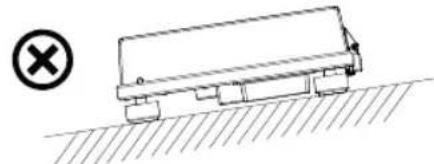
natural_image
Simple line drawing of a tanker truck on a hilly surface with a cross symbol (no text or labels)natural_image
Illustration of a hand operating a circular disc on a workbench with tools and components (no text or symbols)


natural_image
Diagram of a mechanical device with rotating arm and curved blade (no text or symbols)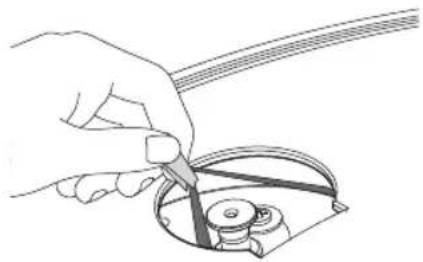
natural_image
Line drawing of a hand using a tool to cut or adjust a mechanical component (no text or symbols present)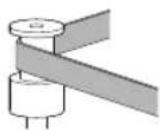
√
×
natural_image
Illustration of a hand using a tool to cut a curved wire or cable (no text or symbols present)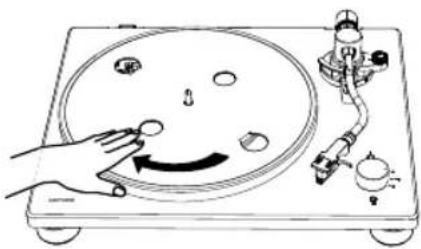
natural_image
Diagram of a hand operating a circular dial on a CD or DVD stand with a rotary knob and mechanical components (no text or symbols)


natural_image
Illustration of a radio receiver with a circular base and two hands holding it (no text or symbols)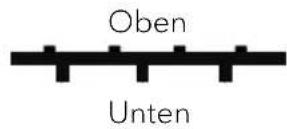
FR
natural_image
Technical line drawing of a mechanical device with a rotating knob (no text or symbols)
natural_image
Illustration of a hand using a handheld tool to adjust a mechanical component (no text or symbols visible)natural_image
Line drawing of a hand using a precision tool to measure a mechanical component (no text or symbols present)natural_image
Technical line drawing of a mechanical device with a clamping tool and lever mechanism (no text or symbols)
natural_image
Technical line drawing of a mechanical device with rotating components (no text or symbols)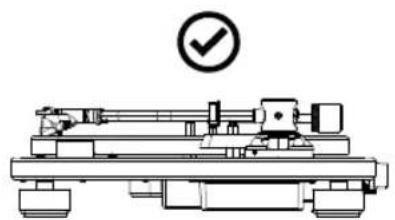
natural_image
Technical line drawing of a mechanical device with a circular checkmark indicating approval (no text or symbols present)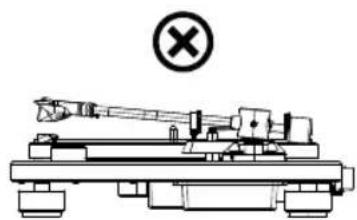
natural_image
Technical line drawing of a mechanical device with a cross symbol indicating no text or labels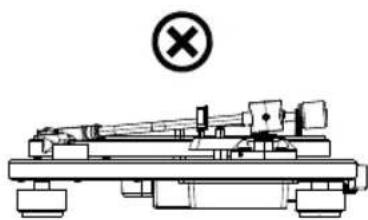
natural_image
Technical line drawing of a mechanical assembly with a cross symbol (no text or labels)natural_image
Illustration of hands adjusting a device with a compass and a labeled component (FR), no text or symbols present.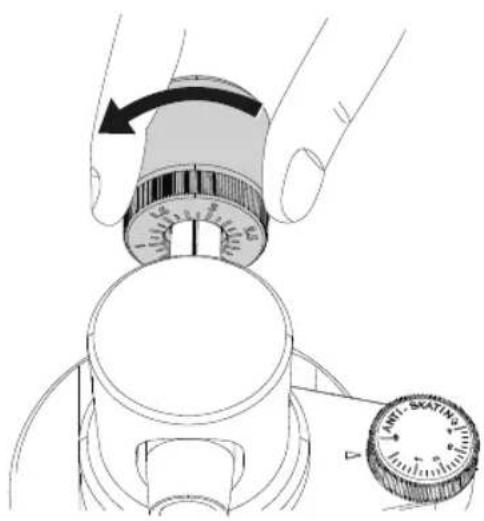
natural_image
Illustration of a hand adjusting a rotary knob with a dial and belt (no text or symbols)5.10 Réglage de la force anti-patinage
natural_image
Illustration of a hand using a dial indicator to measure a mechanical component (no text or symbols present)natural_image
Simple line drawing of a rectangular electronic component with two connectors and upward arrows indicating motion (no text or symbols)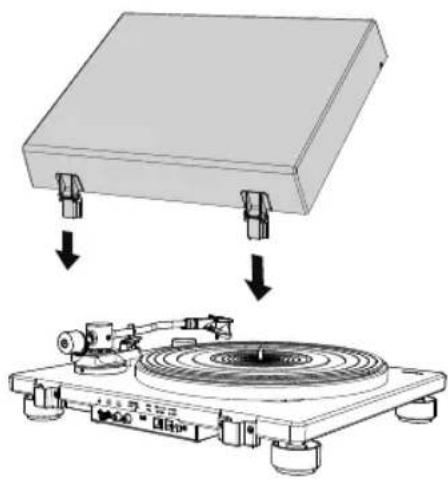
natural_image
Diagram showing a physical setup with a rectangular block and a circular disc mounted on a base, both without any text or symbols.natural_image
Diagram of a vintage diper with a rotary disc and mechanical components, showing rotational motion (no text or symbols)text_image
Technical diagram of a battery pack with labeled components and pin connectionstext_image
L R 'AUX IN 1' AUX IN


natural_image
Technical line drawing of a mechanical assembly with no visible text or symbolsFR
natural_image
Front view of a portable electronic device with buttons, ports, and a display (no visible text or labels)text_image
PRE AMP OFF ON I IRemarque:
text_image
12V === 1Anatural_image
Diagram of a vintage diper with a rotary disc and mechanical components, no text or symbols present

natural_image
Diagram of a vinyl record being placed on a top platform with a circular track and mechanical device (no text or symbols)FR
natural_image
Diagram of a vinyl record being placed on a stand with a mechanical device (no text or symbols present)
natural_image
Illustration of a hand holding a small electronic device with a pointer, no text or symbols present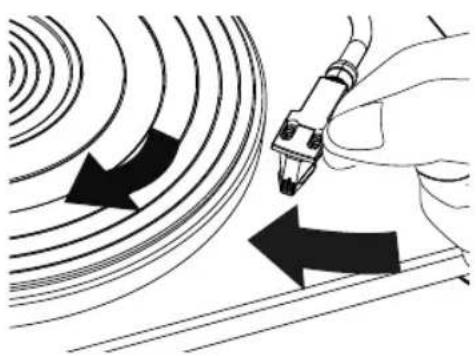
natural_image
Illustration of a hand holding a pen writing on a curved surface with arrows indicating direction (no text or symbols present)natural_image
Illustration of a hand using a tool to adjust or install a component on a curved surface, with no visible text or symbols.text_image
Technical diagram showing hand operating a rotary knob with directional arrows and labeled partstext_image
Technical diagram showing a finger pressing a button on a mechanical component with labeled parts and directional arrows.natural_image
Diagram of a laptop connected to a device via cable, showing ports and connectors (no text or symbols present)natural_image
Hand holding a gemstone with a curved arrow indicating rotation (no text or symbols)natural_image
Line drawing of a hand pressing down on a rectangular electronic device with arrows indicating motion (no text or symbols)11.3 Transport de la platine
natural_image
Line drawing of a portable radio with a circular vent and control knobs, no text or symbols presentnatural_image
Technical line drawing of a mechanical device with internal components and an arrow indicating motion (no text or symbols)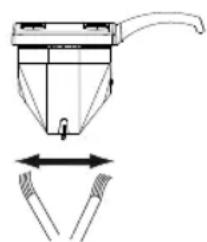
natural_image
Technical line drawing of a mechanical device with two arrows indicating movement or force direction (no text or symbols)

natural_image
Hand holding a 3D object with a shaded section, no visible text or symbols
natural_image
Hand holding a mechanical component with a close-up view of its face (no text or symbols visible)text_image
Technical diagram showing three mechanical component configurations with check and cross symbols indicating inspection or validation points.text_image
Technical diagram showing two 3D printer designs with check and cross icons indicating approval or rejection states.natural_image
Line drawing of a hand using a tool to cut or wire around a small object (no text or symbols)FR
natural_image
Diagram of a circular mechanical component with a central hub and radial arms, showing rotational motion (no text or symbols)